Page 1 of 10
ISO 14289-1 (PDF/UA) (Sample Report)
Date: July 27, 2017
Product: Microsoft Word 2016
Contents
Overview....................................................................................................................................................................................1
1. Scope....................................................................................................................................................................................1
2. Normative references...................................................................................................................................................1
3. Terms and definitions...................................................................................................................................................2
4. Notation..............................................................................................................................................................................2
5. Version Identification.....................................................................................................................................................2
6. Conformance requirements......................................................................................................................................2
7. File format requirements............................................................................................................................................2
8. Conforming reader requirements.......................................................................................................................10
9. AT requirements...........................................................................................................................................................10
Disclaimer...................................................................................................................................................................................10
Overview
This document describes Microsoft Word 2016’s conformance to ISO 14289-1 (PDF/UA)
specifications.
1. Scope
Not Applicable
2. Normative references
Not Applicable
Page 2 of 10
3. Terms and definitions
Not Applicable
4. Notation
Not Applicable
5. Version Identification
Word provides support for PDF/UA as described in this document. In some instances, noted
below, it is incumbent on the user to take steps to ensure that a PDF is in full compliance with
PDF/UA. We expect the user will add the appropriate PDF/UA version and conformance
identifiers as the last step in this process, indicating that the necessary work has been done to
make the PDF entirely PDF/UA compliant.
6. Conformance requirements
Criteria Supporting Feature Remarks
6.1 General Supported Word exports PDF version 1.7.
6.2 Conforming files Supported with
Exceptions
See remarks in section 7. File format
requirements.
6.3 Conforming
reader
Not Applicable
6.4 Conforming
assistive technology
Not Applicable
7. File format requirements
Criteria Supporting Feature Remarks
7.1 General Supported with
Exceptions
All real content shall be tagged as defined in
ISO 32000-1:2008, 14.8. Artifacts (ISO 32000-
1:2008, 14.8.2.2.2) shall not be tagged in the
structure tree.
 Word does not offer the flexibility to
explicitly mark individual items as artifacts,
so it will instead artifact everything that
maps to the criteria in ISO 32000-1:2008,
14.8.2.2.2.
Page 3 of 10
Criteria Supporting Feature Remarks
Content shall be marked in the structure tree
with semantically appropriate tags in a logical
reading order.
NOTE 4 WCAG 2.0, Guideline 1.4 explains issues
regarding contrast, colour and other formatting
for accessibility.
 The user would need to ensure that their
document is not subject to these issues.
Standard tags defined in ISO 32000-1:2008,
14.8.4, shall not be remapped.
 Word does not remap the standard tags,
although it does introduce other tags that
get role-mapped to the standard tags.
Documents begin with the Document root
element.
NOTE 5 Methods used for correcting such errors
are dependent on the tools used for processing
documents consisting of raster-based images.
 When Word rasterizes text, it does add
ActualText; otherwise, this does not apply.
Files claiming conformance with this
International Standard shall have a Suspects
value of false (ISO 32000-1:2008, Table 321).
 Word does not have the Suspects entry. This
is an optional property.
7.2 Text Supported with
Exceptions
Content shall be tagged in logical reading order.
The most semantically appropriatetag shall be
used for each logical element in the document
content.
 Word tags content in logical reading order
as much as is feasible.
Character codes shall map to Unicode as
described in ISO 32000-1:2008, 14.8.2.4.2.
Characters not included in the Unicode
specification may use the Unicode private use
area or declare another character encoding.
Page 4 of 10
Criteria Supporting Feature Remarks
Natural language shall be declared as discussed
in ISO 32000-1:2008, 14.9.2 and/or as described
in ISO 32000-1:2008, 7.9.2. Changes in natural
language shall be declared. Changes in natural
language inside text strings (e.g. inside alternate
descriptions) shall be declared using a language
identifier as described in ISO 32000-1:2008,
14.9.2.2.
 The language used for text is identified at
the text string level. There is no supported
document language property in Word.
7.3 Graphics Supported with
Exceptions
Graphics objects, other than text objects, shall
be tagged with a Figure tag as described in ISO
32000-1:2008, 14.8.4.5, Table 340. If any of the
following exceptions are true, then the graphic
shall be tagged as an artifact:
— the graphic does not represent meaningful
content, or
— the graphic appears as a background to a link
annotation, in which case, the alternative text on
the link shall describe both the graphic and the
link.
 Word tags graphics objects with the Figure
tag.
A caption accompanying a figure shall be
tagged with a Caption tag.
 Word does not currently tag captions on
figures with a Caption tag.
Figure tags shall include an alternative
representation or replacement text that
represents the contents marked with the Figure
tag as noted in ISO 32000-1:2008, 14.7.2, Table
323.
NOTE 1 See also WCAG 2.0, Guideline 1.1.
If text represented in a graphic is not text in a
natural language that is meant to be read by a
human reader, alternative text describing the
Page 5 of 10
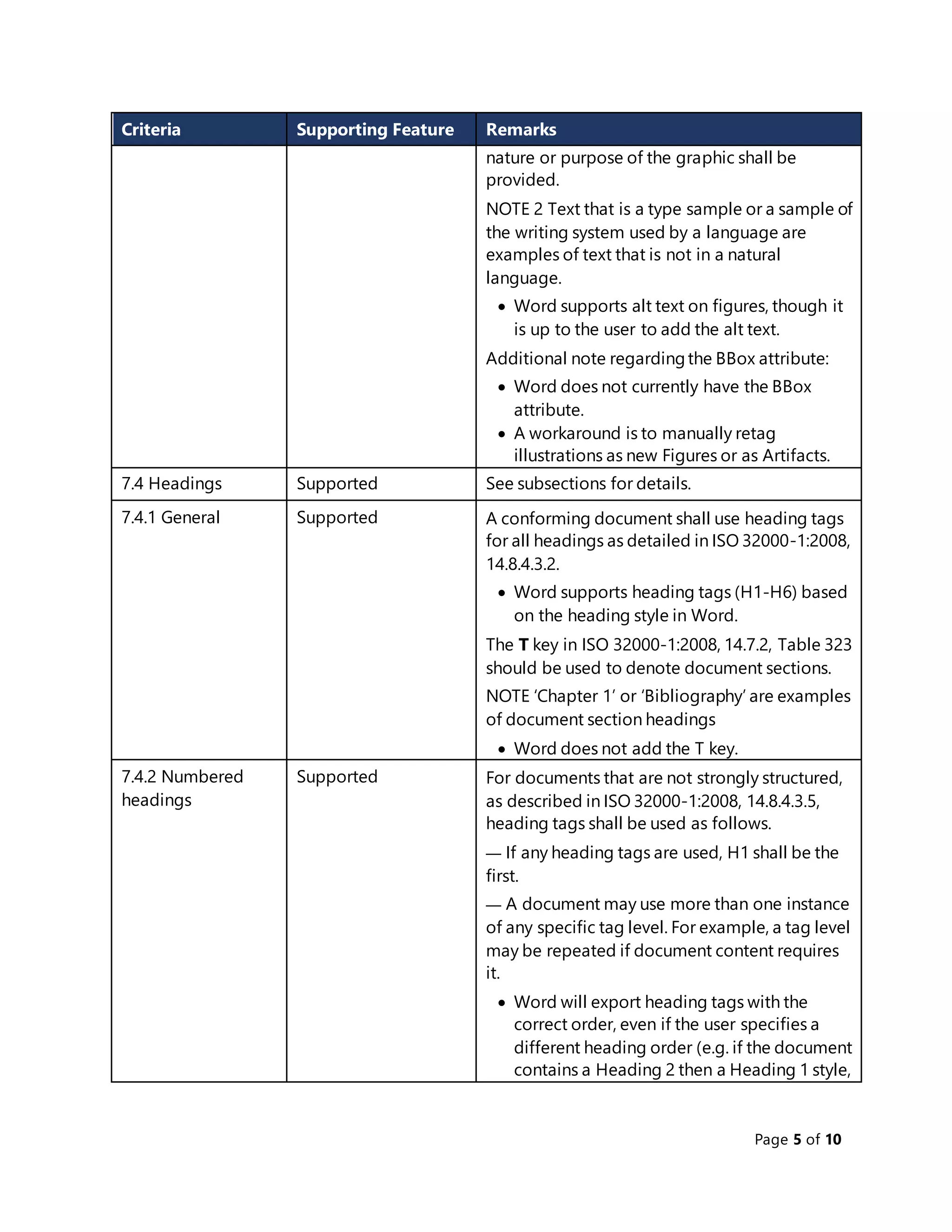
Criteria Supporting Feature Remarks
nature or purpose of the graphic shall be
provided.
NOTE 2 Text that is a type sample or a sample of
the writing system used by a language are
examples of text that is not in a natural
language.
 Word supports alt text on figures, though it
is up to the user to add the alt text.
Additional note regardingthe BBox attribute:
 Word does not currently have the BBox
attribute.
 A workaround is to manually retag
illustrations as new Figures or as Artifacts.
7.4 Headings Supported See subsections for details.
7.4.1 General Supported A conforming document shall use heading tags
for all headings as detailed in ISO 32000-1:2008,
14.8.4.3.2.
 Word supports heading tags (H1-H6) based
on the heading style in Word.
The T key in ISO 32000-1:2008, 14.7.2, Table 323
should be used to denote document sections.
NOTE ‘Chapter 1’ or ‘Bibliography’ are examples
of document section headings
 Word does not add the T key.
7.4.2 Numbered
headings
Supported For documents that are not strongly structured,
as described in ISO 32000-1:2008, 14.8.4.3.5,
heading tags shall be used as follows.
— If any heading tags are used, H1 shall be the
first.
— A document may use more than one instance
of any specific tag level. For example, a tag level
may be repeated if document content requires
it.
 Word will export heading tags with the
correct order, even if the user specifies a
different heading order (e.g. if the document
contains a Heading 2 then a Heading 1 style,
Page 6 of 10
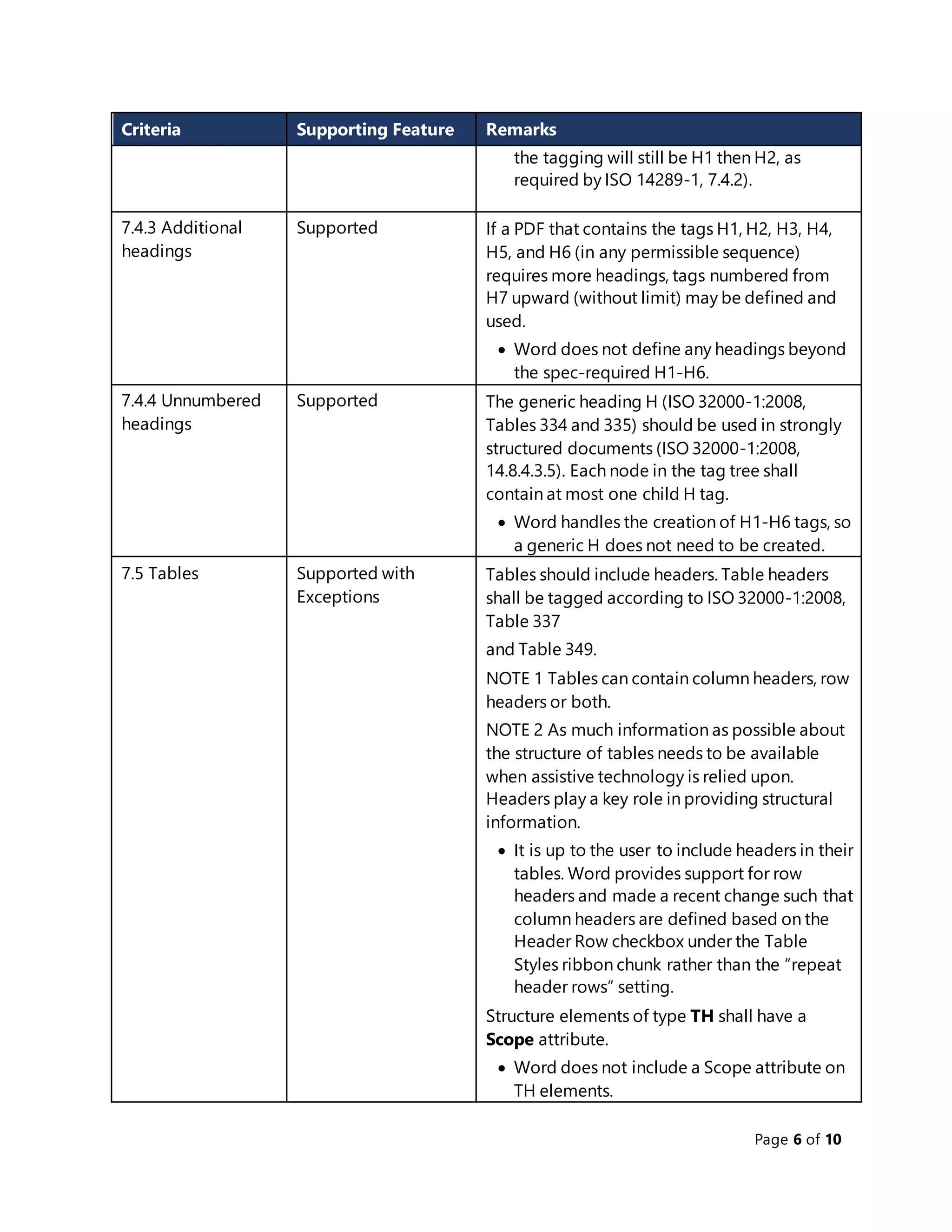
Criteria Supporting Feature Remarks
the tagging will still be H1 then H2, as
required by ISO 14289-1, 7.4.2).
7.4.3 Additional
headings
Supported If a PDF that contains the tags H1, H2, H3, H4,
H5, and H6 (in any permissible sequence)
requires more headings, tags numbered from
H7 upward (without limit) may be defined and
used.
 Word does not define any headings beyond
the spec-required H1-H6.
7.4.4 Unnumbered
headings
Supported The generic heading H (ISO 32000-1:2008,
Tables 334 and 335) should be used in strongly
structured documents (ISO 32000-1:2008,
14.8.4.3.5). Each node in the tag tree shall
contain at most one child H tag.
 Word handles the creation of H1-H6 tags, so
a generic H does not need to be created.
7.5 Tables Supported with
Exceptions
Tables should include headers. Table headers
shall be tagged according to ISO 32000-1:2008,
Table 337
and Table 349.
NOTE 1 Tables can contain column headers, row
headers or both.
NOTE 2 As much information as possible about
the structure of tables needs to be available
when assistive technology is relied upon.
Headers play a key role in providing structural
information.
 It is up to the user to include headers in their
tables. Word provides support for row
headers and made a recent change such that
column headers are defined based on the
Header Row checkbox under the Table
Styles ribbon chunk rather than the “repeat
header rows” setting.
Structure elements of type TH shall have a
Scope attribute.
 Word does not include a Scope attribute on
TH elements.
Page 7 of 10
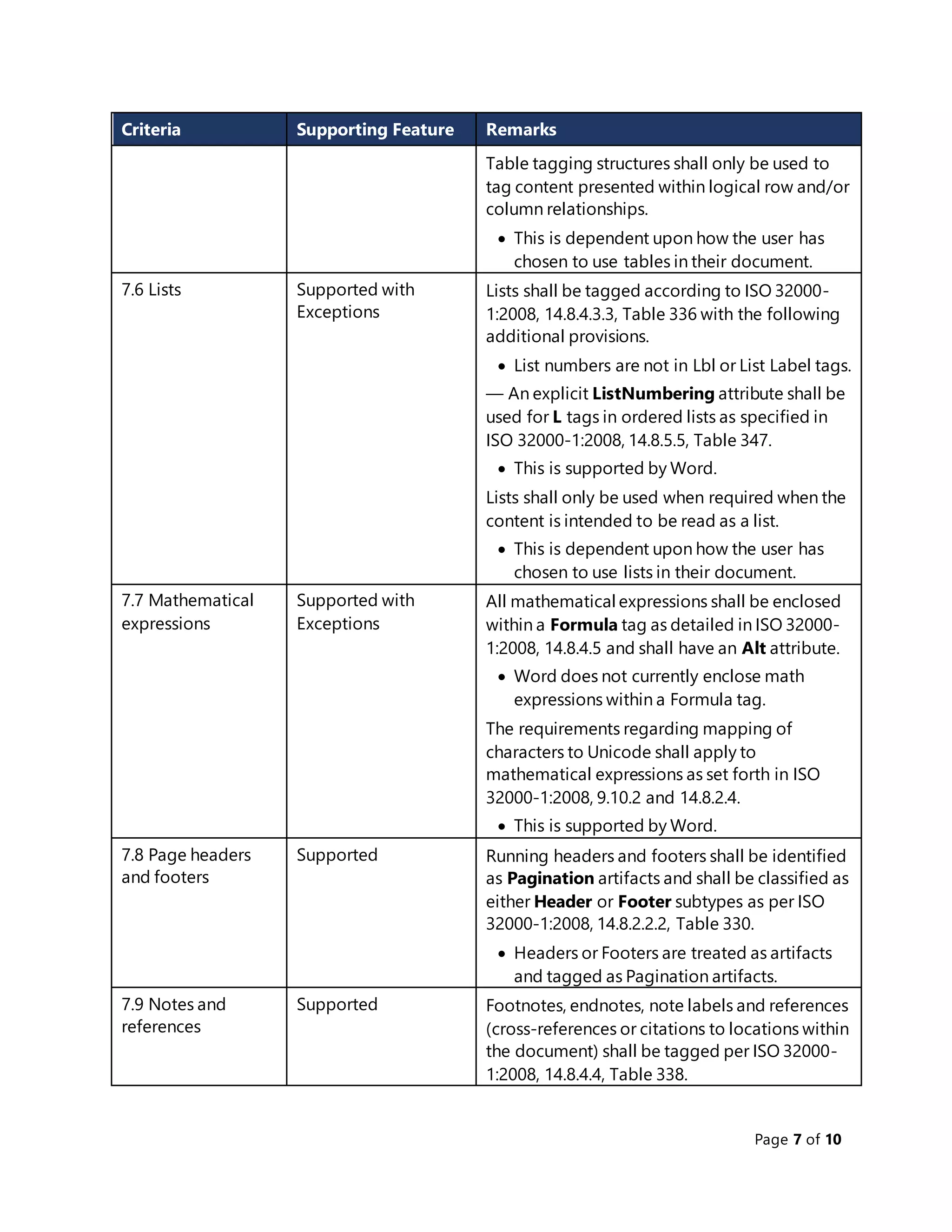
Criteria Supporting Feature Remarks
Table tagging structures shall only be used to
tag content presented within logical row and/or
column relationships.
 This is dependent upon how the user has
chosen to use tables in their document.
7.6 Lists Supported with
Exceptions
Lists shall be tagged according to ISO 32000-
1:2008, 14.8.4.3.3, Table 336 with the following
additional provisions.
 List numbers are not in Lbl or List Label tags.
— An explicit ListNumbering attribute shall be
used for L tags in ordered lists as specified in
ISO 32000-1:2008, 14.8.5.5, Table 347.
 This is supported by Word.
Lists shall only be used when required when the
content is intended to be read as a list.
 This is dependent upon how the user has
chosen to use lists in their document.
7.7 Mathematical
expressions
Supported with
Exceptions
All mathematical expressions shall be enclosed
within a Formula tag as detailed in ISO 32000-
1:2008, 14.8.4.5 and shall have an Alt attribute.
 Word does not currently enclose math
expressions within a Formula tag.
The requirements regarding mapping of
characters to Unicode shall apply to
mathematical expressions as set forth in ISO
32000-1:2008, 9.10.2 and 14.8.2.4.
 This is supported by Word.
7.8 Page headers
and footers
Supported Running headers and footers shall be identified
as Pagination artifacts and shall be classified as
either Header or Footer subtypes as per ISO
32000-1:2008, 14.8.2.2.2, Table 330.
 Headers or Footers are treated as artifacts
and tagged as Pagination artifacts.
7.9 Notes and
references
Supported Footnotes, endnotes, note labels and references
(cross-references or citations to locations within
the document) shall be tagged per ISO 32000-
1:2008, 14.8.4.4, Table 338.
Page 8 of 10
Criteria Supporting Feature Remarks
 Word tags footnotes and endnotes; they are
role-mappedto Note, which is the standard
structure type as specified in ISO 32000-
1:2008, 14.8.4.4, Table 338.
7.10 Optional
content
Not Applicable
7.11 Embedded files Not Applicable
7.12 Article threads Not Applicable
7.13 Digital
signatures
Supported The appearance of a signature form field as
documented in ISO 32000-1:2008, 12.7.4.5 shall
meet all other requirements for page content of
this specification.
 Word does not export form fields (including
signature form fields).
If a portion of the appearance of a signature is
represented by a graphic, alternative text shall
be provided for that graphic.
 If you insert a signature block in Word and
export it, the resulting rasterized version of
the signature does have alt text.
7.14 Non-interactive
forms
Not Applicable
7.15 XFA Not Applicable
7.16 Security Supported
7.17 Navigation Supported A document should include a document outline
that matches the reading order and level of
navigational targets (ISO 32000-1:2008, 12.3.3).
 Word supports making headings into
bookmarks to make an outline, but the user
must select this option. Word can also
export its native bookmarks as bookmarks in
the PDF if the user elects to do so.
If present, the entries in the PageLabels number
tree (ISO 32000-1:2008, 7.7.2, Table 28) should
be semantically appropriate.
Page 9 of 10
Criteria Supporting Feature Remarks
 Word includes a PageLabels number tree
with semantically appropriate entries.
7.18 Annotations Supported
7.18.1 General Supported Word does not export anything with an ILSE
type Annot except for links, which are a special
case (see 7.18.5). Word specifies “Annotation” as
the tag name for comments, but it is role
mapped to type Sect instead.
7.18.2 Annotation
types
Supported Word does not do TrapNet annotations, and
only uses standard subtypes.
7.18.3 Tab order Supported Word includes the Tabs key in the page
dictionary and sets the value to S.
7.18.4 Forms Not Applicable
7.18.5 Links Supported
7.18.6 Media Not Applicable
7.18.6.1 General Not Applicable
7.18.6.2 Media clip
data
Not Applicable
7.18.7 File
attachments
Not Applicable
7.18.8 PrinterMark Not Applicable
7.19 Actions Not Applicable
7.20 XObjects Supported Reference XObjects, as noted in ISO 32000-
1:2008, 8.10.4, shall not be used in conforming
PDF/UA files.
 Word does not support reference
XObjects.
7.21 Fonts Supported
7.21.1 General Supported
7.21.2 Font types Supported
7.21.3 Composite
fonts
Supported
Page 10 of 10
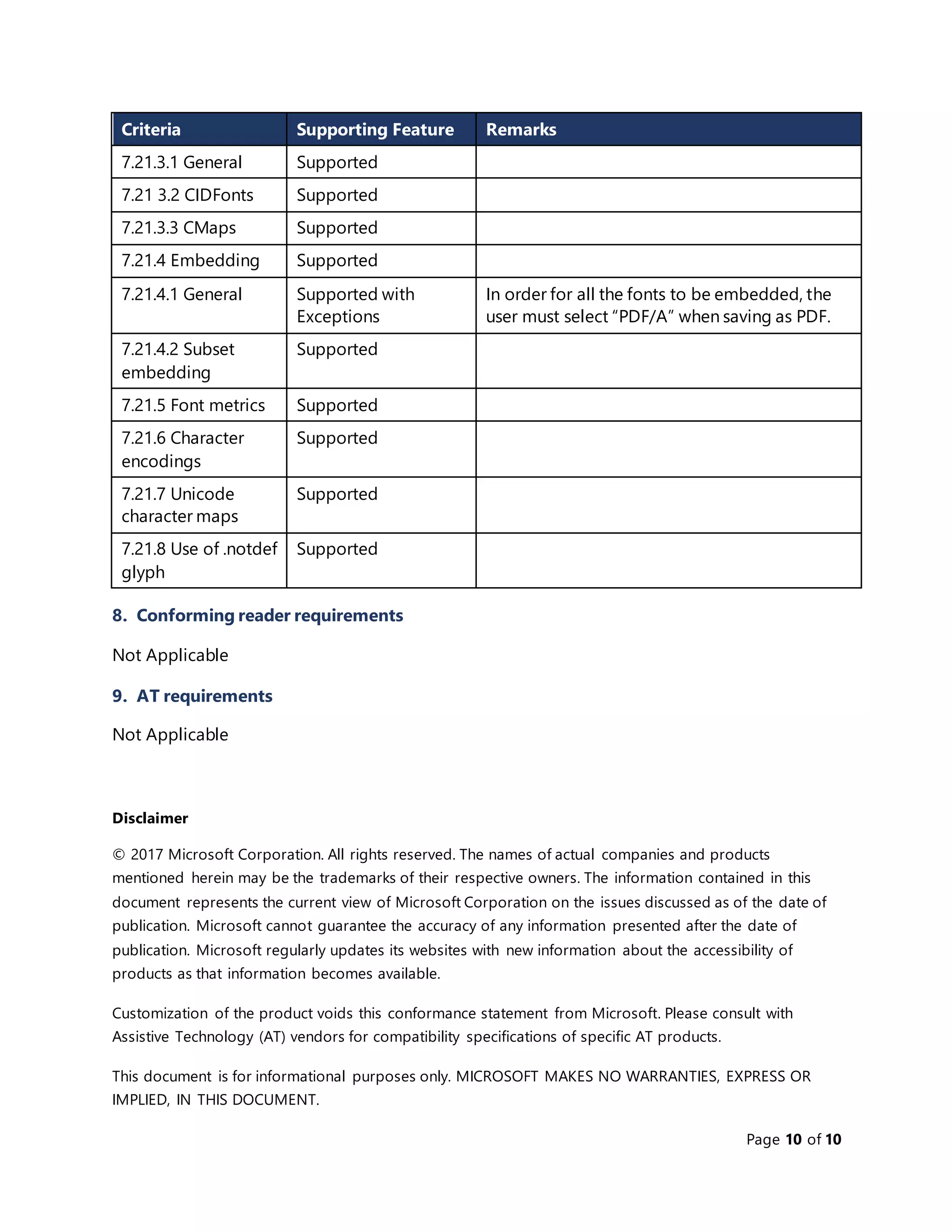
Criteria Supporting Feature Remarks
7.21.3.1 General Supported
7.21 3.2 CIDFonts Supported
7.21.3.3 CMaps Supported
7.21.4 Embedding Supported
7.21.4.1 General Supported with
Exceptions
In order for all the fonts to be embedded, the
user must select “PDF/A” when saving as PDF.
7.21.4.2 Subset
embedding
Supported
7.21.5 Font metrics Supported
7.21.6 Character
encodings
Supported
7.21.7 Unicode
character maps
Supported
7.21.8 Use of .notdef
glyph
Supported
8. Conforming reader requirements
Not Applicable
9. AT requirements
Not Applicable
Disclaimer
© 2017 Microsoft Corporation. All rights reserved. The names of actual companies and products
mentioned herein may be the trademarks of their respective owners. The information contained in this
document represents the current view of Microsoft Corporation on the issues discussed as of the date of
publication. Microsoft cannot guarantee the accuracy of any information presented after the date of
publication. Microsoft regularly updates its websites with new information about the accessibility of
products as that information becomes available.
Customization of the product voids this conformance statement from Microsoft. Please consult with
Assistive Technology (AT) vendors for compatibility specifications of specific AT products.
This document is for informational purposes only. MICROSOFT MAKES NO WARRANTIES, EXPRESS OR
IMPLIED, IN THIS DOCUMENT.

PDF/UA Support in Word 2016

  • 1.
    Page 1 of10 ISO 14289-1 (PDF/UA) (Sample Report) Date: July 27, 2017 Product: Microsoft Word 2016 Contents Overview....................................................................................................................................................................................1 1. Scope....................................................................................................................................................................................1 2. Normative references...................................................................................................................................................1 3. Terms and definitions...................................................................................................................................................2 4. Notation..............................................................................................................................................................................2 5. Version Identification.....................................................................................................................................................2 6. Conformance requirements......................................................................................................................................2 7. File format requirements............................................................................................................................................2 8. Conforming reader requirements.......................................................................................................................10 9. AT requirements...........................................................................................................................................................10 Disclaimer...................................................................................................................................................................................10 Overview This document describes Microsoft Word 2016’s conformance to ISO 14289-1 (PDF/UA) specifications. 1. Scope Not Applicable 2. Normative references Not Applicable
  • 2.
    Page 2 of10 3. Terms and definitions Not Applicable 4. Notation Not Applicable 5. Version Identification Word provides support for PDF/UA as described in this document. In some instances, noted below, it is incumbent on the user to take steps to ensure that a PDF is in full compliance with PDF/UA. We expect the user will add the appropriate PDF/UA version and conformance identifiers as the last step in this process, indicating that the necessary work has been done to make the PDF entirely PDF/UA compliant. 6. Conformance requirements Criteria Supporting Feature Remarks 6.1 General Supported Word exports PDF version 1.7. 6.2 Conforming files Supported with Exceptions See remarks in section 7. File format requirements. 6.3 Conforming reader Not Applicable 6.4 Conforming assistive technology Not Applicable 7. File format requirements Criteria Supporting Feature Remarks 7.1 General Supported with Exceptions All real content shall be tagged as defined in ISO 32000-1:2008, 14.8. Artifacts (ISO 32000- 1:2008, 14.8.2.2.2) shall not be tagged in the structure tree.  Word does not offer the flexibility to explicitly mark individual items as artifacts, so it will instead artifact everything that maps to the criteria in ISO 32000-1:2008, 14.8.2.2.2.
  • 3.
    Page 3 of10 Criteria Supporting Feature Remarks Content shall be marked in the structure tree with semantically appropriate tags in a logical reading order. NOTE 4 WCAG 2.0, Guideline 1.4 explains issues regarding contrast, colour and other formatting for accessibility.  The user would need to ensure that their document is not subject to these issues. Standard tags defined in ISO 32000-1:2008, 14.8.4, shall not be remapped.  Word does not remap the standard tags, although it does introduce other tags that get role-mapped to the standard tags. Documents begin with the Document root element. NOTE 5 Methods used for correcting such errors are dependent on the tools used for processing documents consisting of raster-based images.  When Word rasterizes text, it does add ActualText; otherwise, this does not apply. Files claiming conformance with this International Standard shall have a Suspects value of false (ISO 32000-1:2008, Table 321).  Word does not have the Suspects entry. This is an optional property. 7.2 Text Supported with Exceptions Content shall be tagged in logical reading order. The most semantically appropriatetag shall be used for each logical element in the document content.  Word tags content in logical reading order as much as is feasible. Character codes shall map to Unicode as described in ISO 32000-1:2008, 14.8.2.4.2. Characters not included in the Unicode specification may use the Unicode private use area or declare another character encoding.
  • 4.
    Page 4 of10 Criteria Supporting Feature Remarks Natural language shall be declared as discussed in ISO 32000-1:2008, 14.9.2 and/or as described in ISO 32000-1:2008, 7.9.2. Changes in natural language shall be declared. Changes in natural language inside text strings (e.g. inside alternate descriptions) shall be declared using a language identifier as described in ISO 32000-1:2008, 14.9.2.2.  The language used for text is identified at the text string level. There is no supported document language property in Word. 7.3 Graphics Supported with Exceptions Graphics objects, other than text objects, shall be tagged with a Figure tag as described in ISO 32000-1:2008, 14.8.4.5, Table 340. If any of the following exceptions are true, then the graphic shall be tagged as an artifact: — the graphic does not represent meaningful content, or — the graphic appears as a background to a link annotation, in which case, the alternative text on the link shall describe both the graphic and the link.  Word tags graphics objects with the Figure tag. A caption accompanying a figure shall be tagged with a Caption tag.  Word does not currently tag captions on figures with a Caption tag. Figure tags shall include an alternative representation or replacement text that represents the contents marked with the Figure tag as noted in ISO 32000-1:2008, 14.7.2, Table 323. NOTE 1 See also WCAG 2.0, Guideline 1.1. If text represented in a graphic is not text in a natural language that is meant to be read by a human reader, alternative text describing the
  • 5.
    Page 5 of10 Criteria Supporting Feature Remarks nature or purpose of the graphic shall be provided. NOTE 2 Text that is a type sample or a sample of the writing system used by a language are examples of text that is not in a natural language.  Word supports alt text on figures, though it is up to the user to add the alt text. Additional note regardingthe BBox attribute:  Word does not currently have the BBox attribute.  A workaround is to manually retag illustrations as new Figures or as Artifacts. 7.4 Headings Supported See subsections for details. 7.4.1 General Supported A conforming document shall use heading tags for all headings as detailed in ISO 32000-1:2008, 14.8.4.3.2.  Word supports heading tags (H1-H6) based on the heading style in Word. The T key in ISO 32000-1:2008, 14.7.2, Table 323 should be used to denote document sections. NOTE ‘Chapter 1’ or ‘Bibliography’ are examples of document section headings  Word does not add the T key. 7.4.2 Numbered headings Supported For documents that are not strongly structured, as described in ISO 32000-1:2008, 14.8.4.3.5, heading tags shall be used as follows. — If any heading tags are used, H1 shall be the first. — A document may use more than one instance of any specific tag level. For example, a tag level may be repeated if document content requires it.  Word will export heading tags with the correct order, even if the user specifies a different heading order (e.g. if the document contains a Heading 2 then a Heading 1 style,
  • 6.
    Page 6 of10 Criteria Supporting Feature Remarks the tagging will still be H1 then H2, as required by ISO 14289-1, 7.4.2). 7.4.3 Additional headings Supported If a PDF that contains the tags H1, H2, H3, H4, H5, and H6 (in any permissible sequence) requires more headings, tags numbered from H7 upward (without limit) may be defined and used.  Word does not define any headings beyond the spec-required H1-H6. 7.4.4 Unnumbered headings Supported The generic heading H (ISO 32000-1:2008, Tables 334 and 335) should be used in strongly structured documents (ISO 32000-1:2008, 14.8.4.3.5). Each node in the tag tree shall contain at most one child H tag.  Word handles the creation of H1-H6 tags, so a generic H does not need to be created. 7.5 Tables Supported with Exceptions Tables should include headers. Table headers shall be tagged according to ISO 32000-1:2008, Table 337 and Table 349. NOTE 1 Tables can contain column headers, row headers or both. NOTE 2 As much information as possible about the structure of tables needs to be available when assistive technology is relied upon. Headers play a key role in providing structural information.  It is up to the user to include headers in their tables. Word provides support for row headers and made a recent change such that column headers are defined based on the Header Row checkbox under the Table Styles ribbon chunk rather than the “repeat header rows” setting. Structure elements of type TH shall have a Scope attribute.  Word does not include a Scope attribute on TH elements.
  • 7.
    Page 7 of10 Criteria Supporting Feature Remarks Table tagging structures shall only be used to tag content presented within logical row and/or column relationships.  This is dependent upon how the user has chosen to use tables in their document. 7.6 Lists Supported with Exceptions Lists shall be tagged according to ISO 32000- 1:2008, 14.8.4.3.3, Table 336 with the following additional provisions.  List numbers are not in Lbl or List Label tags. — An explicit ListNumbering attribute shall be used for L tags in ordered lists as specified in ISO 32000-1:2008, 14.8.5.5, Table 347.  This is supported by Word. Lists shall only be used when required when the content is intended to be read as a list.  This is dependent upon how the user has chosen to use lists in their document. 7.7 Mathematical expressions Supported with Exceptions All mathematical expressions shall be enclosed within a Formula tag as detailed in ISO 32000- 1:2008, 14.8.4.5 and shall have an Alt attribute.  Word does not currently enclose math expressions within a Formula tag. The requirements regarding mapping of characters to Unicode shall apply to mathematical expressions as set forth in ISO 32000-1:2008, 9.10.2 and 14.8.2.4.  This is supported by Word. 7.8 Page headers and footers Supported Running headers and footers shall be identified as Pagination artifacts and shall be classified as either Header or Footer subtypes as per ISO 32000-1:2008, 14.8.2.2.2, Table 330.  Headers or Footers are treated as artifacts and tagged as Pagination artifacts. 7.9 Notes and references Supported Footnotes, endnotes, note labels and references (cross-references or citations to locations within the document) shall be tagged per ISO 32000- 1:2008, 14.8.4.4, Table 338.
  • 8.
    Page 8 of10 Criteria Supporting Feature Remarks  Word tags footnotes and endnotes; they are role-mappedto Note, which is the standard structure type as specified in ISO 32000- 1:2008, 14.8.4.4, Table 338. 7.10 Optional content Not Applicable 7.11 Embedded files Not Applicable 7.12 Article threads Not Applicable 7.13 Digital signatures Supported The appearance of a signature form field as documented in ISO 32000-1:2008, 12.7.4.5 shall meet all other requirements for page content of this specification.  Word does not export form fields (including signature form fields). If a portion of the appearance of a signature is represented by a graphic, alternative text shall be provided for that graphic.  If you insert a signature block in Word and export it, the resulting rasterized version of the signature does have alt text. 7.14 Non-interactive forms Not Applicable 7.15 XFA Not Applicable 7.16 Security Supported 7.17 Navigation Supported A document should include a document outline that matches the reading order and level of navigational targets (ISO 32000-1:2008, 12.3.3).  Word supports making headings into bookmarks to make an outline, but the user must select this option. Word can also export its native bookmarks as bookmarks in the PDF if the user elects to do so. If present, the entries in the PageLabels number tree (ISO 32000-1:2008, 7.7.2, Table 28) should be semantically appropriate.
  • 9.
    Page 9 of10 Criteria Supporting Feature Remarks  Word includes a PageLabels number tree with semantically appropriate entries. 7.18 Annotations Supported 7.18.1 General Supported Word does not export anything with an ILSE type Annot except for links, which are a special case (see 7.18.5). Word specifies “Annotation” as the tag name for comments, but it is role mapped to type Sect instead. 7.18.2 Annotation types Supported Word does not do TrapNet annotations, and only uses standard subtypes. 7.18.3 Tab order Supported Word includes the Tabs key in the page dictionary and sets the value to S. 7.18.4 Forms Not Applicable 7.18.5 Links Supported 7.18.6 Media Not Applicable 7.18.6.1 General Not Applicable 7.18.6.2 Media clip data Not Applicable 7.18.7 File attachments Not Applicable 7.18.8 PrinterMark Not Applicable 7.19 Actions Not Applicable 7.20 XObjects Supported Reference XObjects, as noted in ISO 32000- 1:2008, 8.10.4, shall not be used in conforming PDF/UA files.  Word does not support reference XObjects. 7.21 Fonts Supported 7.21.1 General Supported 7.21.2 Font types Supported 7.21.3 Composite fonts Supported
  • 10.
    Page 10 of10 Criteria Supporting Feature Remarks 7.21.3.1 General Supported 7.21 3.2 CIDFonts Supported 7.21.3.3 CMaps Supported 7.21.4 Embedding Supported 7.21.4.1 General Supported with Exceptions In order for all the fonts to be embedded, the user must select “PDF/A” when saving as PDF. 7.21.4.2 Subset embedding Supported 7.21.5 Font metrics Supported 7.21.6 Character encodings Supported 7.21.7 Unicode character maps Supported 7.21.8 Use of .notdef glyph Supported 8. Conforming reader requirements Not Applicable 9. AT requirements Not Applicable Disclaimer © 2017 Microsoft Corporation. All rights reserved. The names of actual companies and products mentioned herein may be the trademarks of their respective owners. The information contained in this document represents the current view of Microsoft Corporation on the issues discussed as of the date of publication. Microsoft cannot guarantee the accuracy of any information presented after the date of publication. Microsoft regularly updates its websites with new information about the accessibility of products as that information becomes available. Customization of the product voids this conformance statement from Microsoft. Please consult with Assistive Technology (AT) vendors for compatibility specifications of specific AT products. This document is for informational purposes only. MICROSOFT MAKES NO WARRANTIES, EXPRESS OR IMPLIED, IN THIS DOCUMENT.