1
PASSBOOK: Just the beginning
November 2012
2
Passbook: Just the beginning
1. Passbook: Keeping everything organized
2. Inside Passbook
3. Passbook Apps and adding a pass
4. Passbook and Barcode integation
5. Passbook solutions offered
6. iOS 6 Passbook vs Google Wallet
7. iOS 6 Passbook vs WP8 Wallet Hub
8. Passbook integrated applications
9. Appendix: Shopping cards, tickets, membership/loyalty
cards on Passbook
3
Passbook keeps everything organized
Passbook is a new default app available for
iPhone and iPod touch with iOS6 and up
allowing users to store:
• Boarding passes
• Tickets
• Coupons
• Loyalty cards
“No more hunting through your wallet for gift
cards, coupons, passes, or tickets. Passbook
keeps everything organized — and handy.”*
To illustrate the usage:
Step 1: A customer walks by the outlet, they receive a notification of %20 discount on selected items
Step 2: When they walk through the doors, the store card automatically appears on their lock screen
Step 3: With the swipe of a finger, the pass is opened and ready for use.
+ With Passbook, businesses will be able to send push notifications to customers within
certain proximity of their stores and these notifications will appear on user’s Lock screen.
Passbook is Time and Location enabled and
integrated with the Lock screen:
“ Passbook is time and location enabled, so
passes and tickets show on your Lock screen
when and where you need them — just swipe
to get your pass.”*
*apple.com
4
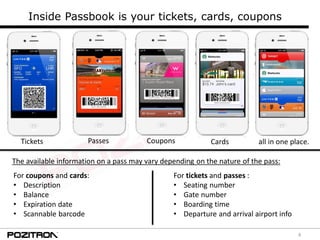
Inside Passbook is your tickets, cards, coupons
PassesTickets Coupons Cards all in one place.
For coupons and cards:
• Description
• Balance
• Expiration date
• Scannable barcode
For tickets and passes :
• Seating number
• Gate number
• Boarding time
• Departure and arrival airport info
The available information on a pass may vary depending on the nature of the pass:
5
Passbook comes as a default app with iOS6 and up, no backward compatibility.
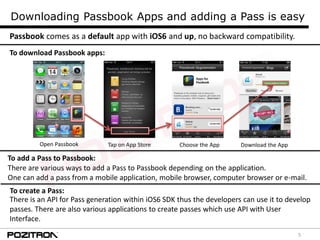
To download Passbook apps:
Open Passbook Download the AppChoose the AppTap on App Store
To add a Pass to Passbook:
There are various ways to add a Pass to Passbook depending on the application.
One can add a pass from a mobile application, mobile browser, computer browser or e-mail.
To create a Pass:
There is an API for Pass generation within iOS6 SDK thus the developers can use it to develop
passes. There are also various applications to create passes which use API with User
Interface.
Downloading Passbook Apps and adding a Pass is easy
6
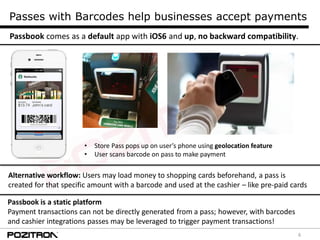
Passbook comes as a default app with iOS6 and up, no backward compatibility.
Passbook is a static platform
Payment transactions can not be directly generated from a pass; however, with barcodes
and cashier integrations passes may be leveraged to trigger payment transactions!
Passes with Barcodes help businesses accept payments
• Store Pass pops up on user’s phone using geolocation feature
• User scans barcode on pass to make payment
Alternative workflow: Users may load money to shopping cards beforehand, a pass is
created for that specific amount with a barcode and used at the cashier – like pre-paid cards
7
Passbook Solutions for Banking
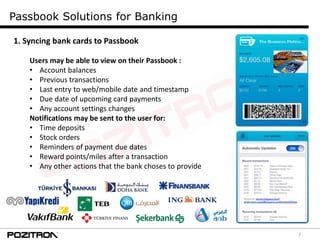
1. Syncing bank cards to Passbook
Users may be able to view on their Passbook :
• Account balances
• Previous transactions
• Last entry to web/mobile date and timestamp
• Due date of upcoming card payments
• Any account settings changes
Notifications may be sent to the user for:
• Time deposits
• Stock orders
• Reminders of payment due dates
• Reward points/miles after a transaction
• Any other actions that the bank choses to provide
8
Passbook Solutions for Banking
2. Creative solutions for customer convenience
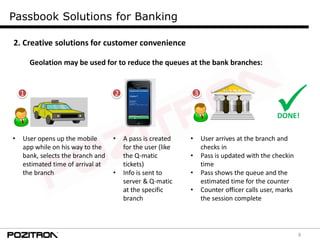
Geolation may be used for to reduce the queues at the bank branches:
• User opens up the mobile
app while on his way to the
bank, selects the branch and
estimated time of arrival at
the branch
• A pass is created
for the user (like
the Q-matic
tickets)
• Info is sent to
server & Q-matic
at the specific
branch
• User arrives at the branch and
checks in
• Pass is updated with the checkin
time
• Pass shows the queue and the
estimated time for the counter
• Counter officer calls user, marks
the session complete
DONE!
1 2 3
9
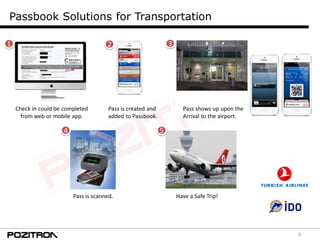
Passbook Solutions for Transportation
Check in could be completed
from web or mobile app.
Pass is created and
added to Passbook.
Pass shows up upon the
Arrival to the airport.
Pass is scanned. Have a Safe Trip!
1 2 3
4 5
10
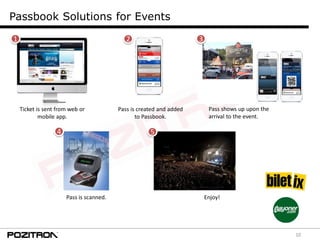
Passbook Solutions for Events
Pass is scanned.
4
1 2 3
5
Ticket is sent from web or
mobile app.
Pass is created and added
to Passbook.
Pass shows up upon the
arrival to the event.
Enjoy!
11
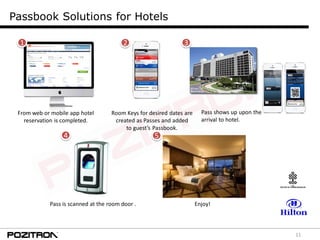
Passbook Solutions for Hotels
Pass is scanned at the room door .
4
1 2 3
5
From web or mobile app hotel
reservation is completed.
Room Keys for desired dates are
created as Passes and added
to guest’s Passbook.
Pass shows up upon the
arrival to hotel.
Enjoy!
12
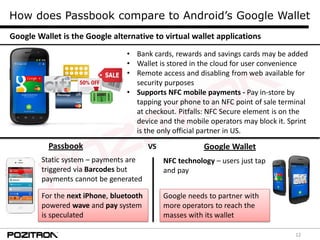
How does Passbook compare to Android’s Google Wallet
• Bank cards, rewards and savings cards may be added
• Wallet is stored in the cloud for user convenience
• Remote access and disabling from web available for
security purposes
• Supports NFC mobile payments - Pay in-store by
tapping your phone to an NFC point of sale terminal
at checkout. Pitfalls: NFC Secure element is on the
device and the mobile operators may block it. Sprint
is the only official partner in US.
Google Wallet is the Google alternative to virtual wallet applications
Passbook
Static system – payments are
triggered via Barcodes but
payments cannot be generated
For the next iPhone, bluetooth
powered wave and pay system
is speculated
Google WalletVS
NFC technology – users just tap
and pay
Google needs to partner with
more operators to reach the
masses with its wallet
13
How does Passbook compare to WP’s Wallet Hub
• Bank cards, rewards and savings cards may be added
• Wallet is accessible through the cloud for user
convenience
• Wallet will be PIN protected.
• Supports NFC mobile payments - Pay in-store by
tapping your phone to an NFC point of sale terminal at
checkout. Advantage: ISIS will be supported next year,
Orange is the first partner in Europe for SE in SIM.
• Third party apps will be available to be integrated.
Wallet Hub is the Windows Phone’s alternative to virtual wallet applications
Passbook
Static system – payments are
triggered via Barcodes but
payments cannot be generated
For the next iPhone, bluetooth
powered wave and pay system
is speculated
WP Wallet HubVS
NFC technology – users just tap
and pay
WP Wallet will be available to
not only WP8 users but also to
earlier OS users.
14
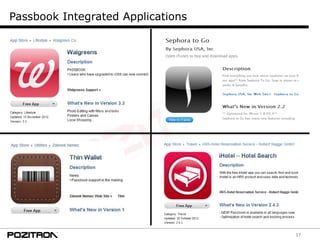
Passbook Integrated Applications
15
Passbook Integrated Applications
16
Passbook Integrated Applications
17
Passbook Integrated Applications
18
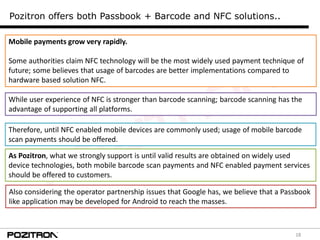
Pozitron offers both Passbook + Barcode and NFC solutions..
Mobile payments grow very rapidly.
Some authorities claim NFC technology will be the most widely used payment technique of
future; some believes that usage of barcodes are better implementations compared to
hardware based solution NFC.
As Pozitron, what we strongly support is until valid results are obtained on widely used
device technologies, both mobile barcode scan payments and NFC enabled payment services
should be offered to customers.
While user experience of NFC is stronger than barcode scanning; barcode scanning has the
advantage of supporting all platforms.
Therefore, until NFC enabled mobile devices are commonly used; usage of mobile barcode
scan payments should be offered.
Also considering the operator partnership issues that Google has, we believe that a Passbook
like application may be developed for Android to reach the masses.
19
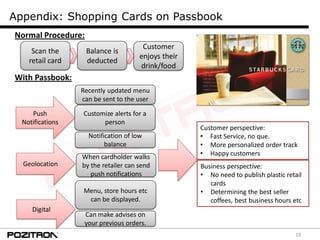
Appendix: Shopping Cards on Passbook
Recently updated menu
can be sent to the user
Customize alerts for a
person
Notification of low
balance
Customer perspective:
• Fast Service, no que.
• More personalized order track
• Happy customers
Business perspective:
• No need to publish plastic retail
cards
• Determining the best seller
coffees, best business hours etc
When cardholder walks
by the retailer can send
push notifications
Geolocation
Menu, store hours etc
can be displayed.
Digital
Can make advises on
your previous orders.
Push
Notifications
Normal Procedure:
Scan the
retail card
Balance is
deducted
Customer
enjoys their
drink/food
With Passbook:
20
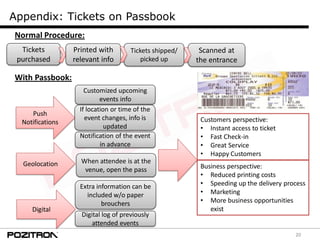
Appendix: Tickets on Passbook
Customized upcoming
events info
If location or time of the
event changes, info is
updated
Notification of the event
in advance
Customers perspective:
• Instant access to ticket
• Fast Check-in
• Great Service
• Happy Customers
Business perspective:
• Reduced printing costs
• Speeding up the delivery process
• Marketing
• More business opportunities
exist
When attendee is at the
venue, open the pass
Geolocation
Extra information can be
included w/o paper
brouchers
Digital
Digital log of previously
attended events
Push
Notifications
Normal Procedure:
Tickets
purchased
Printed with
relevant info
Tickets shipped/
picked up
With Passbook:
Scanned at
the entrance
21
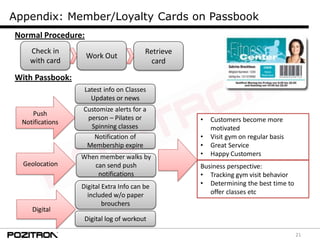
Appendix: Member/Loyalty Cards on Passbook
Latest info on Classes
Updates or news
Customize alerts for a
person – Pilates or
Spinning classes
Notification of
Membership expire
• Customers become more
motivated
• Visit gym on regular basis
• Great Service
• Happy Customers
Business perspective:
• Tracking gym visit behavior
• Determining the best time to
offer classes etc
When member walks by
can send push
notifications
Geolocation
Digital Extra Info can be
included w/o paper
brouchers
Digital
Digital log of workout
Push
Notifications
Normal Procedure:
Check in
with card
Work Out
Retrieve
card
With Passbook:
22
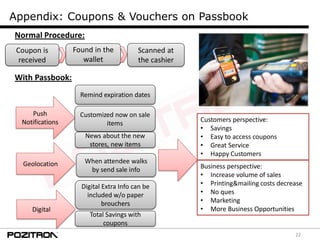
Appendix: Coupons & Vouchers on Passbook
Remind expiration dates
Customized now on sale
items
News about the new
stores, new items
Customers perspective:
• Savings
• Easy to access coupons
• Great Service
• Happy Customers
Business perspective:
• Increase volume of sales
• Printing&mailing costs decrease
• No ques
• Marketing
• More Business Opportunities
When attendee walks
by send sale info
Geolocation
Digital Extra Info can be
included w/o paper
brouchers
Digital
Total Savings with
coupons
Push
Notifications
Normal Procedure:
Coupon is
received
Found in the
wallet
With Passbook:
Scanned at
the cashier
23
Thank you!
www.pozitron.com
info@pozitron.com
@Pozitron_Mobile

PASSBOOK: Just the beginning

  • 1.
    1 PASSBOOK: Just thebeginning November 2012
  • 2.
    2 Passbook: Just thebeginning 1. Passbook: Keeping everything organized 2. Inside Passbook 3. Passbook Apps and adding a pass 4. Passbook and Barcode integation 5. Passbook solutions offered 6. iOS 6 Passbook vs Google Wallet 7. iOS 6 Passbook vs WP8 Wallet Hub 8. Passbook integrated applications 9. Appendix: Shopping cards, tickets, membership/loyalty cards on Passbook
  • 3.
    3 Passbook keeps everythingorganized Passbook is a new default app available for iPhone and iPod touch with iOS6 and up allowing users to store: • Boarding passes • Tickets • Coupons • Loyalty cards “No more hunting through your wallet for gift cards, coupons, passes, or tickets. Passbook keeps everything organized — and handy.”* To illustrate the usage: Step 1: A customer walks by the outlet, they receive a notification of %20 discount on selected items Step 2: When they walk through the doors, the store card automatically appears on their lock screen Step 3: With the swipe of a finger, the pass is opened and ready for use. + With Passbook, businesses will be able to send push notifications to customers within certain proximity of their stores and these notifications will appear on user’s Lock screen. Passbook is Time and Location enabled and integrated with the Lock screen: “ Passbook is time and location enabled, so passes and tickets show on your Lock screen when and where you need them — just swipe to get your pass.”* *apple.com
  • 4.
    4 Inside Passbook isyour tickets, cards, coupons PassesTickets Coupons Cards all in one place. For coupons and cards: • Description • Balance • Expiration date • Scannable barcode For tickets and passes : • Seating number • Gate number • Boarding time • Departure and arrival airport info The available information on a pass may vary depending on the nature of the pass:
  • 5.
    5 Passbook comes asa default app with iOS6 and up, no backward compatibility. To download Passbook apps: Open Passbook Download the AppChoose the AppTap on App Store To add a Pass to Passbook: There are various ways to add a Pass to Passbook depending on the application. One can add a pass from a mobile application, mobile browser, computer browser or e-mail. To create a Pass: There is an API for Pass generation within iOS6 SDK thus the developers can use it to develop passes. There are also various applications to create passes which use API with User Interface. Downloading Passbook Apps and adding a Pass is easy
  • 6.
    6 Passbook comes asa default app with iOS6 and up, no backward compatibility. Passbook is a static platform Payment transactions can not be directly generated from a pass; however, with barcodes and cashier integrations passes may be leveraged to trigger payment transactions! Passes with Barcodes help businesses accept payments • Store Pass pops up on user’s phone using geolocation feature • User scans barcode on pass to make payment Alternative workflow: Users may load money to shopping cards beforehand, a pass is created for that specific amount with a barcode and used at the cashier – like pre-paid cards
  • 7.
    7 Passbook Solutions forBanking 1. Syncing bank cards to Passbook Users may be able to view on their Passbook : • Account balances • Previous transactions • Last entry to web/mobile date and timestamp • Due date of upcoming card payments • Any account settings changes Notifications may be sent to the user for: • Time deposits • Stock orders • Reminders of payment due dates • Reward points/miles after a transaction • Any other actions that the bank choses to provide
  • 8.
    8 Passbook Solutions forBanking 2. Creative solutions for customer convenience Geolation may be used for to reduce the queues at the bank branches: • User opens up the mobile app while on his way to the bank, selects the branch and estimated time of arrival at the branch • A pass is created for the user (like the Q-matic tickets) • Info is sent to server & Q-matic at the specific branch • User arrives at the branch and checks in • Pass is updated with the checkin time • Pass shows the queue and the estimated time for the counter • Counter officer calls user, marks the session complete DONE! 1 2 3
  • 9.
    9 Passbook Solutions forTransportation Check in could be completed from web or mobile app. Pass is created and added to Passbook. Pass shows up upon the Arrival to the airport. Pass is scanned. Have a Safe Trip! 1 2 3 4 5
  • 10.
    10 Passbook Solutions forEvents Pass is scanned. 4 1 2 3 5 Ticket is sent from web or mobile app. Pass is created and added to Passbook. Pass shows up upon the arrival to the event. Enjoy!
  • 11.
    11 Passbook Solutions forHotels Pass is scanned at the room door . 4 1 2 3 5 From web or mobile app hotel reservation is completed. Room Keys for desired dates are created as Passes and added to guest’s Passbook. Pass shows up upon the arrival to hotel. Enjoy!
  • 12.
    12 How does Passbookcompare to Android’s Google Wallet • Bank cards, rewards and savings cards may be added • Wallet is stored in the cloud for user convenience • Remote access and disabling from web available for security purposes • Supports NFC mobile payments - Pay in-store by tapping your phone to an NFC point of sale terminal at checkout. Pitfalls: NFC Secure element is on the device and the mobile operators may block it. Sprint is the only official partner in US. Google Wallet is the Google alternative to virtual wallet applications Passbook Static system – payments are triggered via Barcodes but payments cannot be generated For the next iPhone, bluetooth powered wave and pay system is speculated Google WalletVS NFC technology – users just tap and pay Google needs to partner with more operators to reach the masses with its wallet
  • 13.
    13 How does Passbookcompare to WP’s Wallet Hub • Bank cards, rewards and savings cards may be added • Wallet is accessible through the cloud for user convenience • Wallet will be PIN protected. • Supports NFC mobile payments - Pay in-store by tapping your phone to an NFC point of sale terminal at checkout. Advantage: ISIS will be supported next year, Orange is the first partner in Europe for SE in SIM. • Third party apps will be available to be integrated. Wallet Hub is the Windows Phone’s alternative to virtual wallet applications Passbook Static system – payments are triggered via Barcodes but payments cannot be generated For the next iPhone, bluetooth powered wave and pay system is speculated WP Wallet HubVS NFC technology – users just tap and pay WP Wallet will be available to not only WP8 users but also to earlier OS users.
  • 14.
  • 15.
  • 16.
  • 17.
  • 18.
    18 Pozitron offers bothPassbook + Barcode and NFC solutions.. Mobile payments grow very rapidly. Some authorities claim NFC technology will be the most widely used payment technique of future; some believes that usage of barcodes are better implementations compared to hardware based solution NFC. As Pozitron, what we strongly support is until valid results are obtained on widely used device technologies, both mobile barcode scan payments and NFC enabled payment services should be offered to customers. While user experience of NFC is stronger than barcode scanning; barcode scanning has the advantage of supporting all platforms. Therefore, until NFC enabled mobile devices are commonly used; usage of mobile barcode scan payments should be offered. Also considering the operator partnership issues that Google has, we believe that a Passbook like application may be developed for Android to reach the masses.
  • 19.
    19 Appendix: Shopping Cardson Passbook Recently updated menu can be sent to the user Customize alerts for a person Notification of low balance Customer perspective: • Fast Service, no que. • More personalized order track • Happy customers Business perspective: • No need to publish plastic retail cards • Determining the best seller coffees, best business hours etc When cardholder walks by the retailer can send push notifications Geolocation Menu, store hours etc can be displayed. Digital Can make advises on your previous orders. Push Notifications Normal Procedure: Scan the retail card Balance is deducted Customer enjoys their drink/food With Passbook:
  • 20.
    20 Appendix: Tickets onPassbook Customized upcoming events info If location or time of the event changes, info is updated Notification of the event in advance Customers perspective: • Instant access to ticket • Fast Check-in • Great Service • Happy Customers Business perspective: • Reduced printing costs • Speeding up the delivery process • Marketing • More business opportunities exist When attendee is at the venue, open the pass Geolocation Extra information can be included w/o paper brouchers Digital Digital log of previously attended events Push Notifications Normal Procedure: Tickets purchased Printed with relevant info Tickets shipped/ picked up With Passbook: Scanned at the entrance
  • 21.
    21 Appendix: Member/Loyalty Cardson Passbook Latest info on Classes Updates or news Customize alerts for a person – Pilates or Spinning classes Notification of Membership expire • Customers become more motivated • Visit gym on regular basis • Great Service • Happy Customers Business perspective: • Tracking gym visit behavior • Determining the best time to offer classes etc When member walks by can send push notifications Geolocation Digital Extra Info can be included w/o paper brouchers Digital Digital log of workout Push Notifications Normal Procedure: Check in with card Work Out Retrieve card With Passbook:
  • 22.
    22 Appendix: Coupons &Vouchers on Passbook Remind expiration dates Customized now on sale items News about the new stores, new items Customers perspective: • Savings • Easy to access coupons • Great Service • Happy Customers Business perspective: • Increase volume of sales • Printing&mailing costs decrease • No ques • Marketing • More Business Opportunities When attendee walks by send sale info Geolocation Digital Extra Info can be included w/o paper brouchers Digital Total Savings with coupons Push Notifications Normal Procedure: Coupon is received Found in the wallet With Passbook: Scanned at the cashier
  • 23.