Parallel Execution in a Web
Application
By Guy Bary
linkedin.com/in/bgauryy
Who am I
● Technical FED Guild Manager @ Wix
● Working as Software Engineer for 10 years on several
software domains
● Web development is my main focus
● Like Beers, Music and Snowboarding
Basic User Metrics
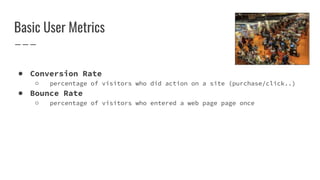
● Conversion Rate
○ percentage of visitors who did action on a site (purchase/click..)
● Bounce Rate
○ percentage of visitors who entered a web page page once
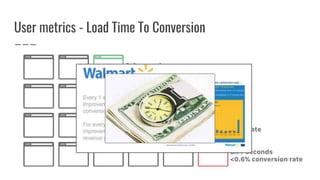
User metrics - Load Time To Conversion
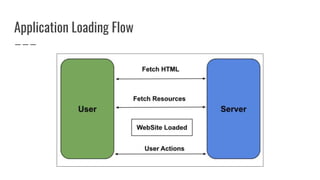
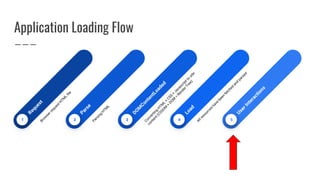
Application Loading Flow
5
4
3
2
1
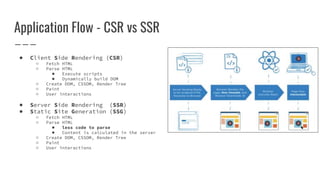
Application Flow - CSR vs SSR
● Client Side Rendering (CSR)
○ Fetch HTML
○ Parse HTML
■ Execute scripts
■ Dynamically build DOM
○ Create DOM, CSSOM, Render Tree
○ Paint
○ User interactions
● Server Side Rendering (SSR)
● Static Site Generation (SSG)
○ Fetch HTML
○ Parse HTML
■ less code to parse
■ Content is calculated in the server
○ Create DOM, CSSOM, Render Tree
○ Paint
○ User interactions
The Challenges
Render Web Application soon as possible
Let Users Interact With the Web Application
As Soon As Possible
Let Users Use Web Applications Smoothly
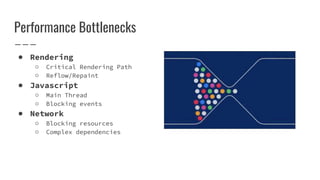
Performance Bottlenecks
● Rendering
○ Critical Rendering Path
○ Reflow/Repaint
● Javascript
○ Main Thread
○ Blocking events
● Network
○ Blocking resources
○ Complex dependencies
Performance Bottlenecks - Rendering
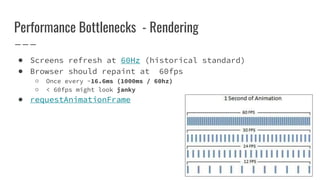
● Screens refresh at 60Hz (historical standard)
● Browser should repaint at 60fps
○ Once every ~16.6ms (1000ms / 60hz)
○ < 60fps might look janky
● requestAnimationFrame
Performance Bottlenecks - Rendering
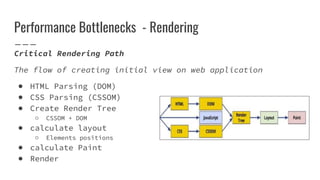
Critical Rendering Path
The flow of creating initial view on web application
● HTML Parsing (DOM)
● CSS Parsing (CSSOM)
● Create Render Tree
○ CSSOM + DOM
● calculate layout
○ Elements positions
● calculate Paint
● Render
Performance Bottlenecks - Rendering
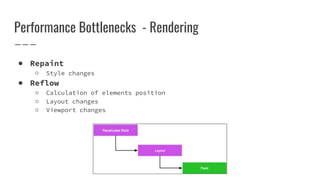
● Repaint
○ Style changes
● Reflow
○ Calculation of elements position
○ Layout changes
○ Viewport changes
Performance Bottlenecks - Rendering
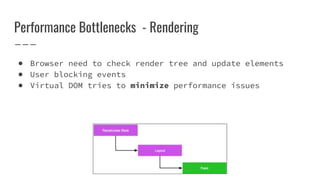
● Browser need to check render tree and update elements
● User blocking events
● Virtual DOM tries to minimize performance issues
Performance Bottlenecks - Javascript
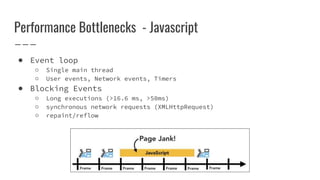
● Event loop
○ Single main thread
○ User events, Network events, Timers
● Blocking Events
○ Long executions (>16.6 ms, >50ms)
○ synchronous network requests (XMLHttpRequest)
○ repaint/reflow
Event Loop
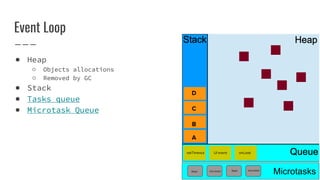
D
A
B
C
setTimeout UI event onLoad
Microtasks
then microtask microtask
then
● Heap
○ Objects allocations
○ Removed by GC
● Stack
● Tasks queue
● Microtask Queue
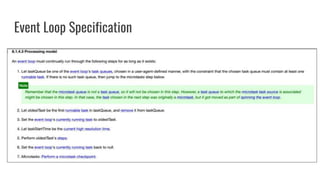
Event Loop Specification
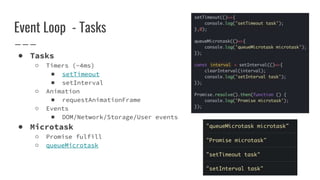
Event Loop - Tasks
● Tasks
○ Timers (~4ms)
■ setTimeout
■ setInterval
○ Animation
■ requestAnimationFrame
○ Events
■ DOM/Network/Storage/User events
● Microtask
○ Promise fulfill
○ queueMicrotask
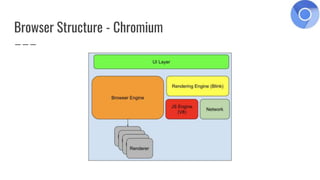
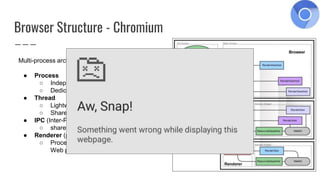
Browser Structure - Chromium
Multi-process architecture
● Process
○ Independent program that runs in OS
○ Dedicated memory space
● Thread
○ Lightweight executable within a process
○ Shares process memory
● IPC (Inter-Process Communication)
○ share data between processes
● Renderer (process)
○ Process that creating
Web page from HTML, JS, CSS
● Pros
○ Isolation (bugs)
○ Security
● Cons
○ CPU
○ Memory
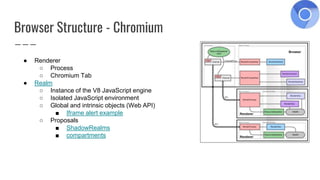
Browser Structure - Chromium
● Renderer
○ Process
○ Chromium Tab
● Realm
○ Instance of the V8 JavaScript engine
○ Isolated JavaScript environment
○ Global and intrinsic objects (Web API)
■ Iframe alert example
○ Proposals
■ ShadowRealms
■ compartments
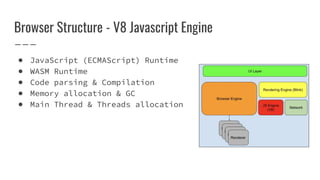
Browser Structure - V8 Javascript Engine
● JavaScript (ECMAScript) Runtime
● WASM Runtime
● Code parsing & Compilation
● Memory allocation & GC
● Main Thread & Threads allocation
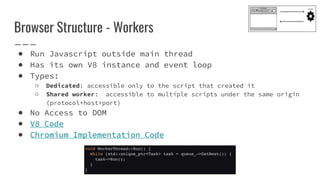
Browser Structure - Workers
● Run Javascript outside main thread
● Has its own V8 instance and event loop
● Types:
○ Dedicated: accessible only to the script that created it
○ Shared worker: accessible to multiple scripts under the same origin
(protocol+host+port)
● No Access to DOM
● V8 Code
● Chromium Implementation Code
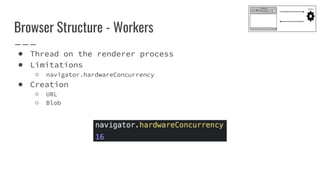
● Thread on the renderer process
● Limitations
○ navigator.hardwareConcurrency
● Creation
○ URL
○ Blob
Browser Structure - Workers
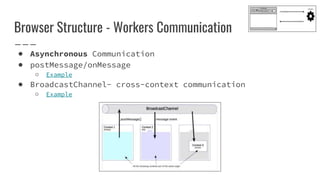
Browser Structure - Workers Communication
● Asynchronous Communication
● postMessage/onMessage
○ Example
● BroadcastChannel- cross-context communication
○ Example
Browser Structure - Worklets
● Experimental
● Lightweight Worker (Blink Implementation)
● Types
○ Animation
■ Enables high performance animations
■ Chrome flag: chrome://flags/#enable-experimental-web-platform-
features
○ Paint
■ Extend CSS
■ Allow Custom painting without extending the DOM
○ Layout
■ Allow creating custom layout algorithms
○ Audio
■ Offload Audio processing to high priority thread
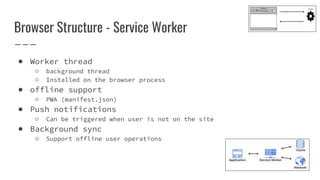
Browser Structure - Service Worker
● Worker thread
○ background thread
○ Installed on the browser process
● offline support
○ PWA (manifest.json)
● Push notifications
○ Can be triggered when user is not on the site
● Background sync
○ Support offline user operations
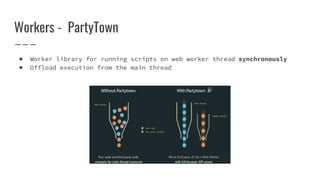
Workers - PartyTown
● Worker library for running scripts on web worker thread synchronously
● Offload execution from the main thread
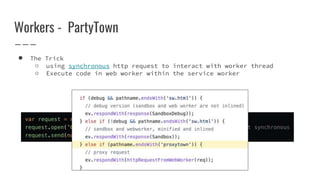
Workers - PartyTown
● The Trick
○ using synchronous http request to interact with worker thread
○ Execute code in web worker within the service worker
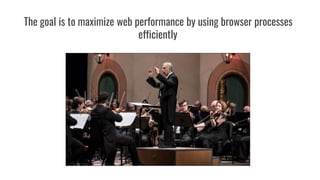
The goal is to maximize web performance by using browser processes
efficiently
How do we detect performance issues?
How do we monitor web application performance?
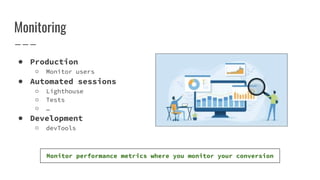
Monitoring
● Production
○ Monitor users
● Automated sessions
○ Lighthouse
○ Tests
○ …
● Development
○ devTools
Monitor performance metrics where you monitor your conversion
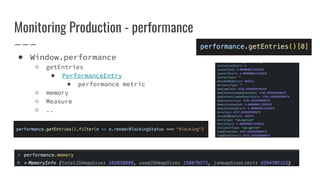
Monitoring Production - performance
● Window.performance
○ getEntries
■ PerformanceEntry
● performance metric
○ memory
○ Measure
○ ..
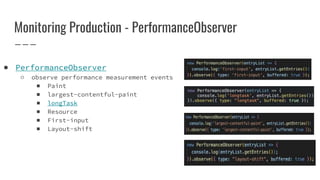
Monitoring Production - PerformanceObserver
● PerformanceObserver
○ observe performance measurement events
■ Paint
■ largest-contentful-paint
■ longTask
■ Resource
■ First-input
■ Layout-shift
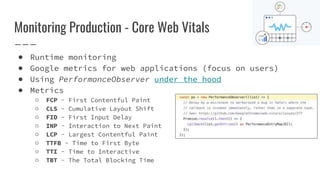
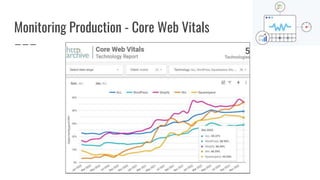
Monitoring Production - Core Web Vitals
● Runtime monitoring
● Google metrics for web applications (focus on users)
● Using PerformanceObserver under the hood
● Metrics
○ FCP - First Contentful Paint
○ CLS - Cumulative Layout Shift
○ FID - First Input Delay
○ INP - Interaction to Next Paint
○ LCP - Largest Contentful Paint
○ TTFB - Time to First Byte
○ TTI - Time to Interactive
○ TBT - The Total Blocking Time
Monitoring Production - Core Web Vitals
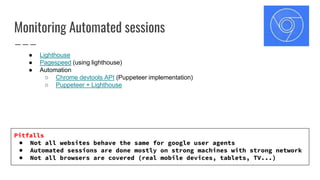
Monitoring Automated sessions
● Lighthouse
● Pagespeed (using lighthouse)
● Automation
○ Chrome devtools API (Puppeteer implementation)
○ Puppeteer + Lighthouse
Pitfalls
● Not all websites behave the same for google user agents
● Automated sessions are done mostly on strong machines with strong network
● Not all browsers are covered (real mobile devices, tablets, TV...)
Monitoring with DevTools
● Lighthouse/Audit tab
● Performance tab
● Performance insights tab
● Javascript Profiler tab
● Rendering & Performance Monitors
Parallel programing in web applications - public.pptx

Parallel programing in web applications - public.pptx

  • 1.
    Parallel Execution ina Web Application By Guy Bary linkedin.com/in/bgauryy
  • 2.
    Who am I ●Technical FED Guild Manager @ Wix ● Working as Software Engineer for 10 years on several software domains ● Web development is my main focus ● Like Beers, Music and Snowboarding
  • 4.
    Basic User Metrics ●Conversion Rate ○ percentage of visitors who did action on a site (purchase/click..) ● Bounce Rate ○ percentage of visitors who entered a web page page once
  • 5.
    User metrics -Load Time To Conversion
  • 6.
  • 7.
  • 8.
    Application Flow -CSR vs SSR ● Client Side Rendering (CSR) ○ Fetch HTML ○ Parse HTML ■ Execute scripts ■ Dynamically build DOM ○ Create DOM, CSSOM, Render Tree ○ Paint ○ User interactions ● Server Side Rendering (SSR) ● Static Site Generation (SSG) ○ Fetch HTML ○ Parse HTML ■ less code to parse ■ Content is calculated in the server ○ Create DOM, CSSOM, Render Tree ○ Paint ○ User interactions
  • 9.
    The Challenges Render WebApplication soon as possible Let Users Interact With the Web Application As Soon As Possible Let Users Use Web Applications Smoothly
  • 10.
    Performance Bottlenecks ● Rendering ○Critical Rendering Path ○ Reflow/Repaint ● Javascript ○ Main Thread ○ Blocking events ● Network ○ Blocking resources ○ Complex dependencies
  • 11.
    Performance Bottlenecks -Rendering ● Screens refresh at 60Hz (historical standard) ● Browser should repaint at 60fps ○ Once every ~16.6ms (1000ms / 60hz) ○ < 60fps might look janky ● requestAnimationFrame
  • 12.
    Performance Bottlenecks -Rendering Critical Rendering Path The flow of creating initial view on web application ● HTML Parsing (DOM) ● CSS Parsing (CSSOM) ● Create Render Tree ○ CSSOM + DOM ● calculate layout ○ Elements positions ● calculate Paint ● Render
  • 13.
    Performance Bottlenecks -Rendering ● Repaint ○ Style changes ● Reflow ○ Calculation of elements position ○ Layout changes ○ Viewport changes
  • 14.
    Performance Bottlenecks -Rendering ● Browser need to check render tree and update elements ● User blocking events ● Virtual DOM tries to minimize performance issues
  • 15.
    Performance Bottlenecks -Javascript ● Event loop ○ Single main thread ○ User events, Network events, Timers ● Blocking Events ○ Long executions (>16.6 ms, >50ms) ○ synchronous network requests (XMLHttpRequest) ○ repaint/reflow
  • 16.
    Event Loop D A B C setTimeout UIevent onLoad Microtasks then microtask microtask then ● Heap ○ Objects allocations ○ Removed by GC ● Stack ● Tasks queue ● Microtask Queue
  • 17.
  • 18.
    Event Loop -Tasks ● Tasks ○ Timers (~4ms) ■ setTimeout ■ setInterval ○ Animation ■ requestAnimationFrame ○ Events ■ DOM/Network/Storage/User events ● Microtask ○ Promise fulfill ○ queueMicrotask
  • 20.
  • 21.
    Browser Structure -Chromium Multi-process architecture ● Process ○ Independent program that runs in OS ○ Dedicated memory space ● Thread ○ Lightweight executable within a process ○ Shares process memory ● IPC (Inter-Process Communication) ○ share data between processes ● Renderer (process) ○ Process that creating Web page from HTML, JS, CSS ● Pros ○ Isolation (bugs) ○ Security ● Cons ○ CPU ○ Memory
  • 22.
    Browser Structure -Chromium ● Renderer ○ Process ○ Chromium Tab ● Realm ○ Instance of the V8 JavaScript engine ○ Isolated JavaScript environment ○ Global and intrinsic objects (Web API) ■ Iframe alert example ○ Proposals ■ ShadowRealms ■ compartments
  • 23.
    Browser Structure -V8 Javascript Engine ● JavaScript (ECMAScript) Runtime ● WASM Runtime ● Code parsing & Compilation ● Memory allocation & GC ● Main Thread & Threads allocation
  • 24.
    Browser Structure -Workers ● Run Javascript outside main thread ● Has its own V8 instance and event loop ● Types: ○ Dedicated: accessible only to the script that created it ○ Shared worker: accessible to multiple scripts under the same origin (protocol+host+port) ● No Access to DOM ● V8 Code ● Chromium Implementation Code
  • 25.
    ● Thread onthe renderer process ● Limitations ○ navigator.hardwareConcurrency ● Creation ○ URL ○ Blob Browser Structure - Workers
  • 26.
    Browser Structure -Workers Communication ● Asynchronous Communication ● postMessage/onMessage ○ Example ● BroadcastChannel- cross-context communication ○ Example
  • 27.
    Browser Structure -Worklets ● Experimental ● Lightweight Worker (Blink Implementation) ● Types ○ Animation ■ Enables high performance animations ■ Chrome flag: chrome://flags/#enable-experimental-web-platform- features ○ Paint ■ Extend CSS ■ Allow Custom painting without extending the DOM ○ Layout ■ Allow creating custom layout algorithms ○ Audio ■ Offload Audio processing to high priority thread
  • 28.
    Browser Structure -Service Worker ● Worker thread ○ background thread ○ Installed on the browser process ● offline support ○ PWA (manifest.json) ● Push notifications ○ Can be triggered when user is not on the site ● Background sync ○ Support offline user operations
  • 29.
    Workers - PartyTown ●Worker library for running scripts on web worker thread synchronously ● Offload execution from the main thread
  • 30.
    Workers - PartyTown ●The Trick ○ using synchronous http request to interact with worker thread ○ Execute code in web worker within the service worker
  • 31.
    The goal isto maximize web performance by using browser processes efficiently
  • 32.
    How do wedetect performance issues? How do we monitor web application performance?
  • 33.
    Monitoring ● Production ○ Monitorusers ● Automated sessions ○ Lighthouse ○ Tests ○ … ● Development ○ devTools Monitor performance metrics where you monitor your conversion
  • 34.
    Monitoring Production -performance ● Window.performance ○ getEntries ■ PerformanceEntry ● performance metric ○ memory ○ Measure ○ ..
  • 35.
    Monitoring Production -PerformanceObserver ● PerformanceObserver ○ observe performance measurement events ■ Paint ■ largest-contentful-paint ■ longTask ■ Resource ■ First-input ■ Layout-shift
  • 36.
    Monitoring Production -Core Web Vitals ● Runtime monitoring ● Google metrics for web applications (focus on users) ● Using PerformanceObserver under the hood ● Metrics ○ FCP - First Contentful Paint ○ CLS - Cumulative Layout Shift ○ FID - First Input Delay ○ INP - Interaction to Next Paint ○ LCP - Largest Contentful Paint ○ TTFB - Time to First Byte ○ TTI - Time to Interactive ○ TBT - The Total Blocking Time
  • 37.
    Monitoring Production -Core Web Vitals
  • 38.
    Monitoring Automated sessions ●Lighthouse ● Pagespeed (using lighthouse) ● Automation ○ Chrome devtools API (Puppeteer implementation) ○ Puppeteer + Lighthouse Pitfalls ● Not all websites behave the same for google user agents ● Automated sessions are done mostly on strong machines with strong network ● Not all browsers are covered (real mobile devices, tablets, TV...)
  • 39.
    Monitoring with DevTools ●Lighthouse/Audit tab ● Performance tab ● Performance insights tab ● Javascript Profiler tab ● Rendering & Performance Monitors