Using Public Mode
What is Public Mode?
Public mode allows you to use your app for parent
sin in/out, visitor log and for staff to heck in/out of
the centre
Turning Public Mode on/off
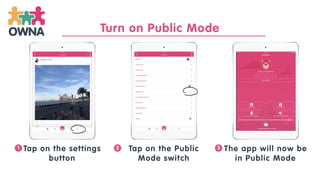
Tap on the settings
button
Tap on the Public
Mode switch
The app will now be
in Public Mode
1 2 3
Turn on Public Mode
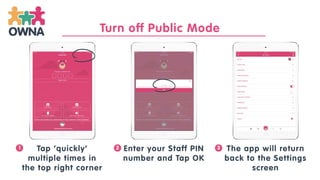
Tap ‘quickly’
multiple times in
the top right corner
Enter your Staff PIN
number and Tap OK
The app will return
back to the Settings
screen
1 2 3
Turn off Public Mode
Get in touch at anytime… we’re here to support
you!
www.owna.com.au

OWNA Childcare Apps: Using Public Mode

  • 1.
  • 2.
    What is PublicMode? Public mode allows you to use your app for parent sin in/out, visitor log and for staff to heck in/out of the centre
  • 3.
  • 4.
    Tap on thesettings button Tap on the Public Mode switch The app will now be in Public Mode 1 2 3 Turn on Public Mode
  • 5.
    Tap ‘quickly’ multiple timesin the top right corner Enter your Staff PIN number and Tap OK The app will return back to the Settings screen 1 2 3 Turn off Public Mode
  • 6.
    Get in touchat anytime… we’re here to support you! www.owna.com.au