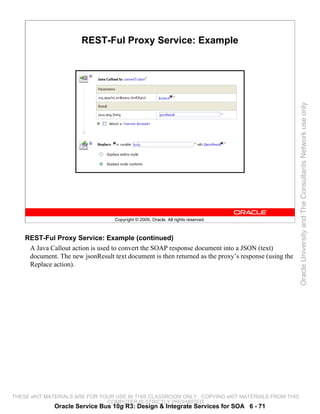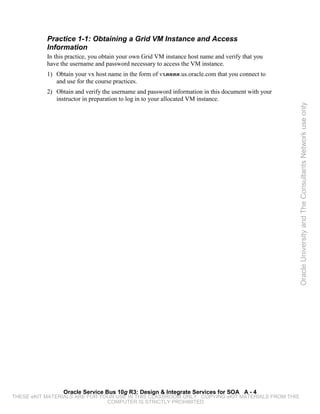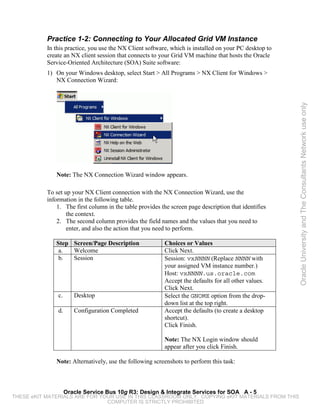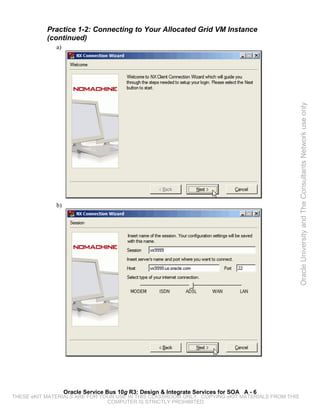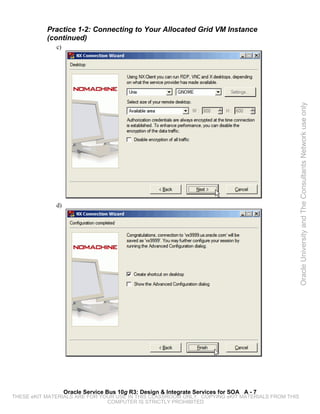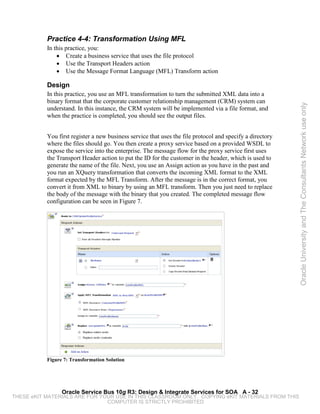



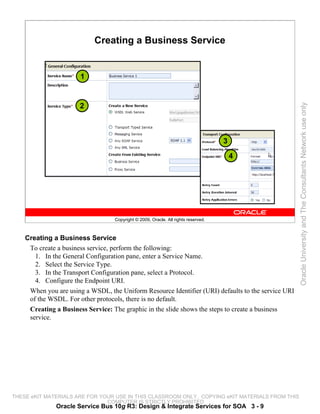
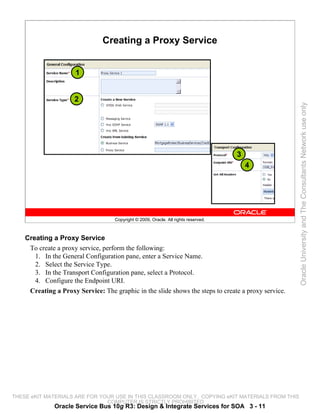
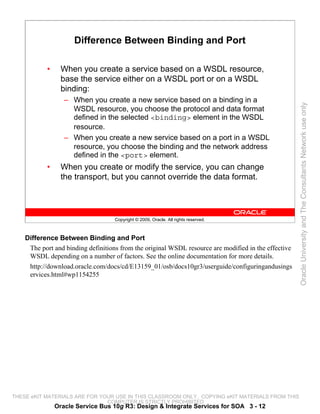
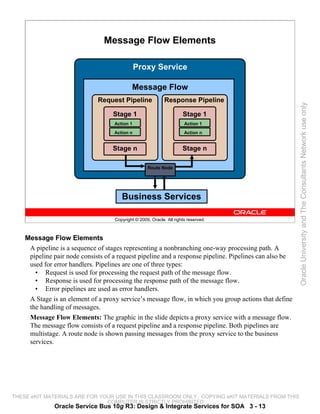
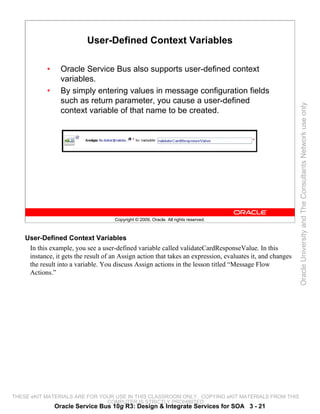


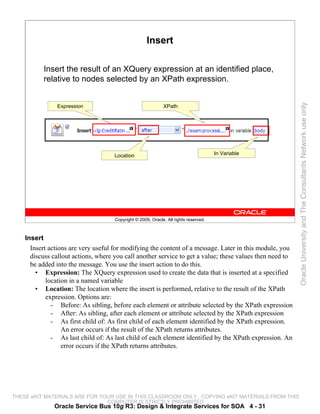
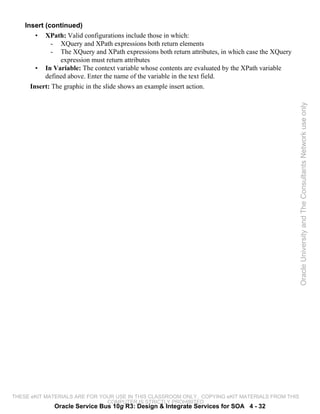
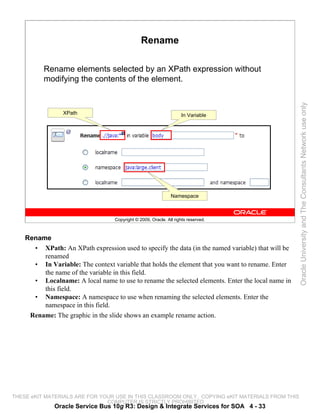
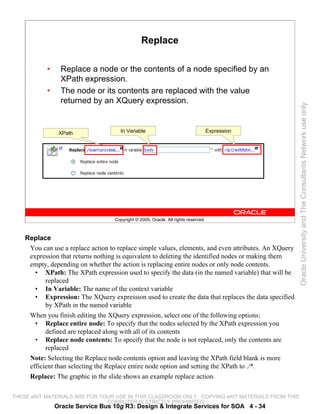
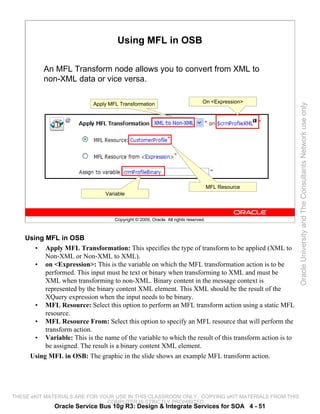
Oracle University and The Consultants Network use only
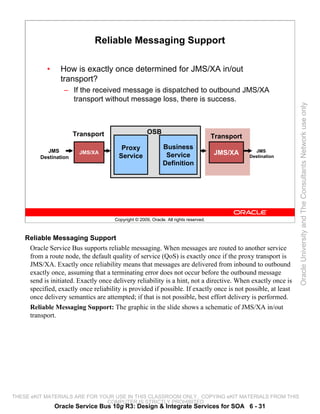
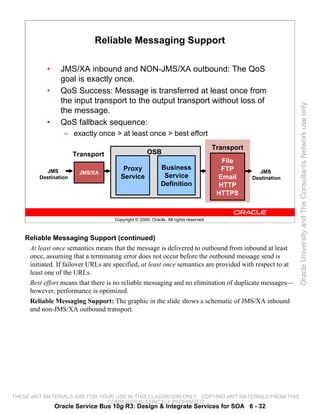
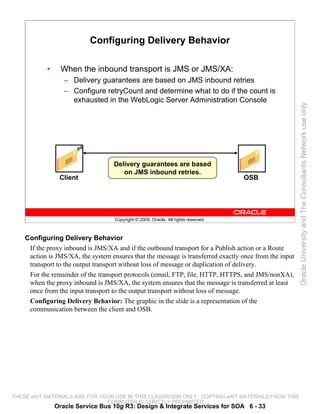
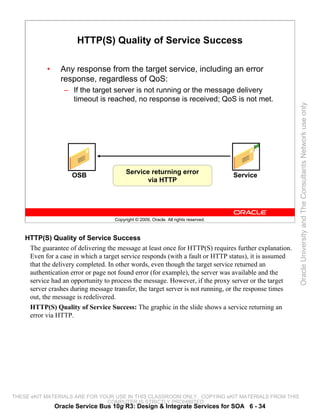
                                               Oracle Service Bus 10g R3:
                                               Design & Integrate Services for
                                               SOA
                                               Student Guide


        D56299GC10
        Edition 1.0
        August 2010
        D59152


THESE eKIT MATERIALS ARE FOR YOUR USE IN THIS CLASSROOM ONLY. COPYING eKIT MATERIALS FROM THIS
                               COMPUTER IS STRICTLY PROHIBITED
Authors                    Copyright © 2009, 2010, Oracle. All rights reserved.

    Bill Bunch                 Disclaimer
    Tom Hardy                  This document contains proprietary information and is protected by copyright and other intellectual
                               property laws. You may copy and print this document solely for your own use in an Oracle training
    Technical Contributors     course. The document may not be modified or altered in any way. Except where your use constitutes
    and Reviewers              "fair use" under copyright law, you may not use, share, download, upload, copy, print, display,
                               perform, reproduce, publish, license, post, transmit, or distribute this document in whole or in part
    Werner Bauer               without the express authorization of Oracle.
    Holger Dindler Rasmussen
                               The information contained in this document is subject to change without notice. If you find any
                               problems in the document, please report them in writing to: Oracle University, 500 Oracle Parkway,
    Editors                    Redwood Shores, California 94065 USA. This document is not warranted to be error-free.

    Raj Kumar


                                                                                                                                       Oracle University and The Consultants Network use only
                               Restricted Rights Notice
    Vijayalakshmi Narasimhan
                               If this documentation is delivered to the United States Government or anyone using the
                               documentation on behalf of the United States Government, the following notice is applicable:
    Graphic Designer
                               U.S. GOVERNMENT RIGHTS
    Rajiv Chandrabhanu         The U.S. Government’s rights to use, modify, reproduce, release, perform, display, or disclose these
                               training materials are restricted by the terms of the applicable Oracle license agreement and/or the
    Publisher                  applicable U.S. Government contract.

    Giri Venugopal             Trademark Notice

                               Oracle is a registered trademark of Oracle Corporation and/or its affiliates. Other names may be
                               trademarks of their respective owners.


THESE eKIT MATERIALS ARE FOR YOUR USE IN THIS CLASSROOM ONLY. COPYING eKIT MATERIALS FROM THIS
                               COMPUTER IS STRICTLY PROHIBITED
Contents


              1   Introduction
                  Objectives 1-2
                  Agenda 1-3
                  Target Audience 1-4
                  Course Objectives 1-5


                                                                                                 Oracle University and The Consultants Network use only
                  Course Agenda 1-6
                  Classroom Guidelines 1-7
                  Course Environment 1-8
                  Summary 1-9
                  Practice 1-1 Overview: Obtaining a Grid VM Instance and
                     Accessing Information 1-10
                  Practice 1-2 Overview: Connecting to Your Allocated Grid VM Instance 1-11


              2   Getting Started with Oracle Service Bus
                  Objectives 2-2
                  Road Map 2-3
                  Enterprise Challenge 2-4
                  Point-to-Point Integration 2-5
                  EAI and BPM 2-6
                  Service-Oriented Architecture (SOA): Definition 2-8
                  SOA Further Defined 2-9
                  Domain Model for SOA Business Strategy and Process 2-11
                  Six Domain Approach 2-13
                  Layered Architectural Model 2-14
                  Enterprise Reference Architecture 2-15
                  Information and Access Services Layer 2-16
                  Shared Business Services Layer 2-17
                  Presentation Services Layer 2-18
                  Composite Applications Layer 2-19
                  Service Infrastructure Layer 2-20
                  Projects and Applications 2-21
                  Section Summary 2-22
                  Quiz 2-23
                  Road Map 2-25
                  Got Service Mayhem? 2-26
                  Enter Oracle Service Bus 2-27
                  OSB as a Message Broker 2-28
                  Messaging Types 2-30
                  Location Transparency 2-31
                  Dynamic Routing 2-32


                                                    iii
THESE eKIT MATERIALS ARE FOR YOUR USE IN THIS CLASSROOM ONLY. COPYING eKIT MATERIALS FROM THIS
                               COMPUTER IS STRICTLY PROHIBITED
Transformations 2-33
            Service Orchestration 2-34
            Message Enrichment 2-35
            Security 2-36
            Service-Level Agreements (SLA) 2-38
            Section Summary 2-39
            Quiz 2-40
            Summary 2-41


                                                                                                 Oracle University and The Consultants Network use only
        3   Message Flow
            Objectives 3-2
            Road Map 3-3
            What Is OSB Console? 3-4
            Projects and Resources 3-5
            OSB Projects 3-6
            OSB Resource Types 3-7
            Business Service 3-8
            Creating a Business Service 3-9
            Proxy Services 3-10
            Creating a Proxy Service 3-11
            Difference Between Binding and Port 3-12
            Message Flow Elements 3-13
            Section Summary 3-14
            Quiz 3-15
            Practice # 3-1 Overview: Simple Routing 3-16
            Road Map 3-17
            Message Context Model 3-18
            Using Context Variables 3-19
            Predefined Context Variables 3-20
            User-Defined Context Variables 3-21
            Message-Related Variables 3-22
            Predefined Context Variable Descriptions 3-23
            Variables and Types 3-25
            $header Variables 3-26
            $body Variables 3-27
            $body Binary Content 3-28
            $attachments Variable 3-29
            $body and RPC 3-30
            $fault Variable 3-31
            Inbound Message Dispatching 3-32
            Outbound Message Dispatching 3-33
            Section Summary 3-34
            Quiz 3-35


                                              iv
THESE eKIT MATERIALS ARE FOR YOUR USE IN THIS CLASSROOM ONLY. COPYING eKIT MATERIALS FROM THIS
                               COMPUTER IS STRICTLY PROHIBITED
Road Map 3-36
                  What Is Branching? 3-37
                  Branching Types 3-38
                  Conditional Branch 3-39
                  Operational Branch 3-41
                  Adding an Operational Branch 3-42
                  Section Summary 3-43
                  Quiz 3-44
                  Practice # 3-2 Overview: Operational Branching 3-45


                                                                                                 Oracle University and The Consultants Network use only
                  Practice # 3-3 Overview: Conditional Branching 3-46
                  Summary 3-47


              4   Message Flow Actions
                  Objectives 4-2
                  Road Map 4-3
                  Routing Nodes 4-4
                  Route Node in OSB Console 4-5
                  Routing Table 4-7
                  Routing Table in OSB Console 4-8
                  Routing Table Versus Conditional Branch 4-10
                  Routing Options 4-11
                  Routing Options in OSB Console 4-12
                  Transport Headers 4-13
                  Publish 4-16
                  Publish Node in OSB Console 4-17
                  Publish Table 4-18
                  Section Summary 4-19
                  Quiz 4-20
                  Practice # 4-1 Overview: Using a Routing Table 4-21
                  Practice # 4-2 Overview: Using a Publish Node 4-22
                  Road Map 4-23
                  Expression Editor 4-24
                  Variable Structures 4-25
                  Namespace Definitions 4-27
                  XQuery Functions 4-28
                  Assign 4-29
                  Delete 4-30
                  Insert 4-31
                  Rename 4-33
                  Replace 4-34
                  For Each 4-35
                  If-Then 4-36
                  Condition Builder 4-38


                                                    v
THESE eKIT MATERIALS ARE FOR YOUR USE IN THIS CLASSROOM ONLY. COPYING eKIT MATERIALS FROM THIS
                               COMPUTER IS STRICTLY PROHIBITED
Reply 4-39
            Skip 4-40
            Section Summary 4-41
            Quiz 4-42
            Road Map 4-43
            Oracle XQuery Mapper 4-44
            Mapping Data 4-45
            Creating a Transformation 4-46
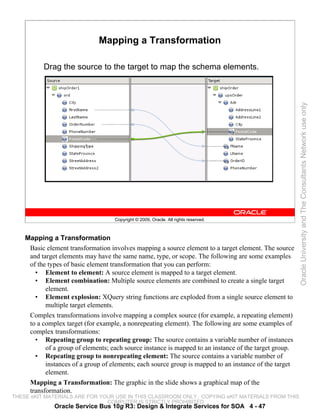
            Mapping a Transformation 4-47


                                                                                                 Oracle University and The Consultants Network use only
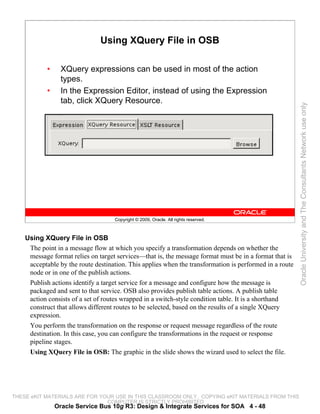
            Using XQuery File in OSB 4-48
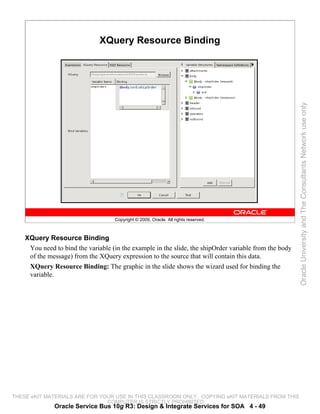
            XQuery Resource Binding 4-49
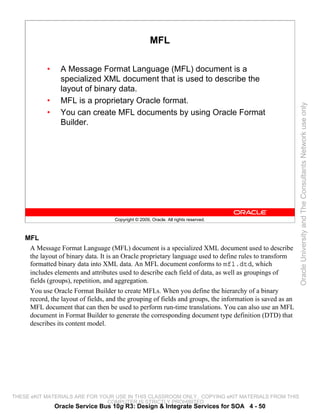
            MFL 4-50
            Using MFL in OSB 4-51
            Section Summary 4-52
            Quiz 4-53
            Practice # 4-3 Overview: Transformation Using an XQuery File 4-54
            Practice # 4-4 Overview: Transformation Using MFL 4-55
            Road Map 4-56
            Service Callouts 4-57
            SOAP Document Style Service Callout 4-58
            SOAP RPC Style Service Callout 4-59
            XML Service Callouts 4-61
            Messaging Service Callouts 4-62
            Service Callout Actions 4-63
            Java Callouts 4-64
            Section Summary 4-65
            Practice # 4-5 Overview: Using a Service Callout 4-66
            Practice # 4-6 Overview: Using a Java Callout 4-67
            Summary 4-68


        5   Debugging with OSB
            Objectives 5-2
            Road Map 5-3
            Error Handler Pipelines 5-4
            Error Handlers 5-5
            $fault variable 5-7
            Error Codes 5-8
            Reply Action 5-10
            Reply Action in OSB Console 5-11
            Transport Errors with Service Callouts 5-12
            Error Code BEA-382502 5-13
            SOAP Faults with Service Callouts 5-14
            Unexpected Responses and Service Callouts 5-15


                                              vi
THESE eKIT MATERIALS ARE FOR YOUR USE IN THIS CLASSROOM ONLY. COPYING eKIT MATERIALS FROM THIS
                               COMPUTER IS STRICTLY PROHIBITED
Resume Action 5-16
                  Section Summary 5-17
                  Quiz 5-18
                  Road Map 5-19
                  Validation and Error Scenario 5-20
                  Validation and Error Solution 5-21
                  Validate Action 5-22
                  Section Summary 5-23
                  Quiz 5-24


                                                                                                 Oracle University and The Consultants Network use only
                  Practice # 5-1 Overview: Error Handling and Validation 5-25
                  Road Map 5-26
                  Reporting Actions 5-27
                  Reporting Framework 5-28
                  Reporting Framework Diagram 5-29
                  JMS Reporting Provider Framework 5-30
                  Report Action 5-31
                  Log Action 5-33
                  Alert Action 5-34
                  Section Summary 5-35
                  Quiz 5-36
                  Practice # 5-2 Overview: Using the Report Action 5-37
                  Road Map 5-38
                  OSB Debug Files 5-39
                  OSB Debug Flags 5-40
                  Configuration Framework Debug Flags 5-42
                  Section Summary 5-43
                  Summary 5-44


              6   Best Practices with OSB
                  Objectives 6-2
                  Road Map 6-3
                  Introduction 6-4
                  Split-Join Order: Example 6-5
                  Static Split-Join 6-6
                  Dynamic Split-Join 6-7
                  Creating a Split-Join Configuration 6-8
                  Receive Node 6-9
                  Reply Node 6-10
                  Parallel Node 6-11
                  Assign Node 6-12
                  Invoke Service Node 6-14
                  Input and Output Variables 6-15
                  Exporting the Split-Join Flow 6-16


                                                   vii
THESE eKIT MATERIALS ARE FOR YOUR USE IN THIS CLASSROOM ONLY. COPYING eKIT MATERIALS FROM THIS
                               COMPUTER IS STRICTLY PROHIBITED
Split-Join Flow Creation Process 6-17
           Section Summary 6-18
           Quiz 6-19
           Practice # 6-1 Overview: Implementing the Split-Join Pattern 6-20
           Road Map 6-21
           What Is Quality of Service? 6-22
           Delivery Guarantees 6-23
           Delivery Guarantee Types 6-24
           Delivery Guarantee Rules 6-25


                                                                                                 Oracle University and The Consultants Network use only
           Additional Delivery Guarantee Rules 6-26
           Overriding the Default Element 6-30
           Reliable Messaging Support 6-31
           Configuring Delivery Behavior 6-33
           HTTP(S) Quality of Service Success 6-34
           Handling Unreliable Transports 6-35
           Section Summary 6-37
           Quiz 6-38
           Road Map 6-39
           Dynamic Routing 6-40
           Dynamic Routing Techniques 6-41
           Technique #1 6-42
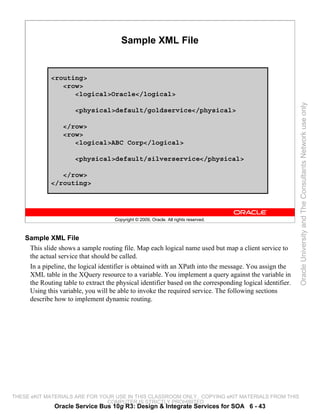
           Sample XML File 6-43
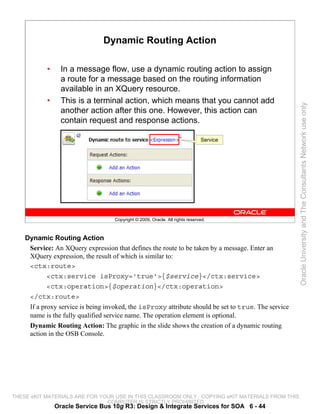
           Dynamic Routing Action 6-44
           Technique #2 6-45
           Section Summary 6-46
           Quiz 6-47
           Practice # 6-2 Overview: Using Dynamic Routing 6-48
           Road Map 6-49
           What Is Service Versioning? 6-50
           Map of URIs 6-51
           Metadata-Based Selection Algorithm 6-52
           Content-Based Selection Algorithm 6-53
           Content-Based URI File 6-54
           Service Interface 6-55
           Versioning Input and Output State 6-56
           Versioning the Service Interface 6-57
           Section Summary 6-58
           Quiz 6-59
           Road Map 6-60
           What Is REST? 6-61
           Benefits of REST 6-62
           Configuring Proxy Service for REST 6-63
           OSB Support for REST 6-64
           Example 6-65


                                             viii
THESE eKIT MATERIALS ARE FOR YOUR USE IN THIS CLASSROOM ONLY. COPYING eKIT MATERIALS FROM THIS
                               COMPUTER IS STRICTLY PROHIBITED
Standard Proxy Service: Example 6-66
                 REST-Ful Proxy Service: Example 6-68
                 Section Summary 6-73
                 Quiz 6-74
                 Practice # 6-3 Overview: Using REST in a Proxy Service 6-75
                 Summary 6-76

              Appendix A: Practices and Solutions

              Index


                                                                                                 Oracle University and The Consultants Network use only


                                                    ix
THESE eKIT MATERIALS ARE FOR YOUR USE IN THIS CLASSROOM ONLY. COPYING eKIT MATERIALS FROM THIS
                               COMPUTER IS STRICTLY PROHIBITED
Oracle University and The Consultants Network use only


THESE eKIT MATERIALS ARE FOR YOUR USE IN THIS CLASSROOM ONLY. COPYING eKIT MATERIALS FROM THIS
                               COMPUTER IS STRICTLY PROHIBITED
Introduction


                                                                                                 Oracle University and The Consultants Network use only
                                 Copyright © 2009, Oracle. All rights reserved.


THESE eKIT MATERIALS ARE FOR YOUR USE IN THIS CLASSROOM ONLY. COPYING eKIT MATERIALS FROM THIS
                               COMPUTER IS STRICTLY PROHIBITED
Objectives

          After completing this lesson, you should be able to:
           • Understand the target audience of the course
           • Describe the course objectives


                                                                                                 Oracle University and The Consultants Network use only
                                 Copyright © 2009, Oracle. All rights reserved.


THESE eKIT MATERIALS ARE FOR YOUR USE IN THIS CLASSROOM ONLY. COPYING eKIT MATERIALS FROM THIS
                               COMPUTER IS STRICTLY PROHIBITED
              Oracle Service Bus 10g R3: Design & Integrate Services for SOA 1 - 2
Agenda

           •    Target Audience
           •    Course Objectives
           •    Course Agenda
           •    Classroom Guidelines


                                                                                                 Oracle University and The Consultants Network use only
           •    Course Environment


                                  Copyright © 2009, Oracle. All rights reserved.


THESE eKIT MATERIALS ARE FOR YOUR USE IN THIS CLASSROOM ONLY. COPYING eKIT MATERIALS FROM THIS
                               COMPUTER IS STRICTLY PROHIBITED
               Oracle Service Bus 10g R3: Design & Integrate Services for SOA 1 - 3
Target Audience

            •    This course is directed at:
                  – SOA Architects
                  – Project Architects
                  – Developers


                                                                                                     Oracle University and The Consultants Network use only
            •    Prerequisite skills include:
                  – Web Services experience
                  – XML programming experience


                                     Copyright © 2009, Oracle. All rights reserved.


    Target Audience
     If you are concerned about whether your experience fulfills the course prerequisites, ask the
     instructor.


THESE eKIT MATERIALS ARE FOR YOUR USE IN THIS CLASSROOM ONLY. COPYING eKIT MATERIALS FROM THIS
                               COMPUTER IS STRICTLY PROHIBITED
                Oracle Service Bus 10g R3: Design & Integrate Services for SOA 1 - 4
Course Objectives

          After completing this course, you should be able to:
           • Understand the Oracle Service Bus (OSB) architecture
           • Create OSB resources
           • Enrich and route messages within the Service Bus


                                                                                                 Oracle University and The Consultants Network use only
           • Validate messages
           • Use common OSB design patterns


                                 Copyright © 2009, Oracle. All rights reserved.


THESE eKIT MATERIALS ARE FOR YOUR USE IN THIS CLASSROOM ONLY. COPYING eKIT MATERIALS FROM THIS
                               COMPUTER IS STRICTLY PROHIBITED
              Oracle Service Bus 10g R3: Design & Integrate Services for SOA 1 - 5
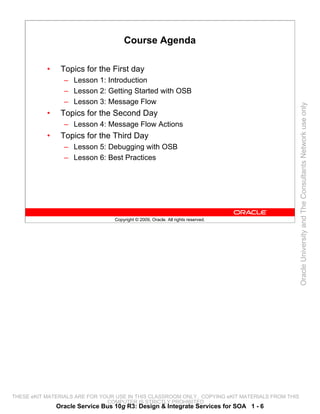
Course Agenda

           •    Topics for the First day
                 – Lesson 1: Introduction
                 – Lesson 2: Getting Started with OSB
                 – Lesson 3: Message Flow


                                                                                                 Oracle University and The Consultants Network use only
           •    Topics for the Second Day
                 – Lesson 4: Message Flow Actions
           •    Topics for the Third Day
                 – Lesson 5: Debugging with OSB
                 – Lesson 6: Best Practices


                                  Copyright © 2009, Oracle. All rights reserved.


THESE eKIT MATERIALS ARE FOR YOUR USE IN THIS CLASSROOM ONLY. COPYING eKIT MATERIALS FROM THIS
                               COMPUTER IS STRICTLY PROHIBITED
               Oracle Service Bus 10g R3: Design & Integrate Services for SOA 1 - 6
Classroom Guidelines

          Guidelines
           • The instructor starts each session promptly at the
              scheduled time.
           • Ask questions, but be respectful of the topic at hand and


                                                                                                 Oracle University and The Consultants Network use only
              the interests of the other students.
           • Ensure that cell phones and pagers are silent.


                                 Copyright © 2009, Oracle. All rights reserved.


THESE eKIT MATERIALS ARE FOR YOUR USE IN THIS CLASSROOM ONLY. COPYING eKIT MATERIALS FROM THIS
                               COMPUTER IS STRICTLY PROHIBITED
              Oracle Service Bus 10g R3: Design & Integrate Services for SOA 1 - 7
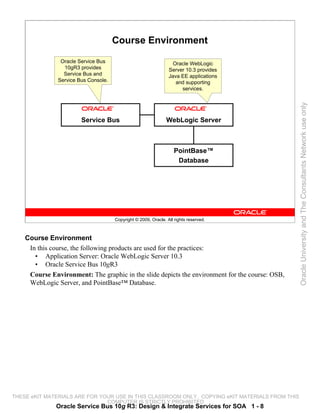
Course Environment

                Oracle Service Bus                                 Oracle WebLogic
                 10gR3 provides                                  Server 10.3 provides
                 Service Bus and                                 Java EE applications
               Service Bus Console.                                 and supporting
                                                                      services.


                                                                                                 Oracle University and The Consultants Network use only
                        Service Bus                             WebLogic Server


                                                                    PointBase™
                                                                     Database


                                      Copyright © 2009, Oracle. All rights reserved.


    Course Environment
     In this course, the following products are used for the practices:
       • Application Server: Oracle WebLogic Server 10.3
       • Oracle Service Bus 10gR3
     Course Environment: The graphic in the slide depicts the environment for the course: OSB,
     WebLogic Server, and PointBase™ Database.


THESE eKIT MATERIALS ARE FOR YOUR USE IN THIS CLASSROOM ONLY. COPYING eKIT MATERIALS FROM THIS
                               COMPUTER IS STRICTLY PROHIBITED
              Oracle Service Bus 10g R3: Design & Integrate Services for SOA 1 - 8
Summary

          In this lesson, you learned how to:
           • Identify the course objectives
           • Discuss the course agenda
           • Discuss the course target audience


                                                                                                 Oracle University and The Consultants Network use only
                                 Copyright © 2009, Oracle. All rights reserved.


THESE eKIT MATERIALS ARE FOR YOUR USE IN THIS CLASSROOM ONLY. COPYING eKIT MATERIALS FROM THIS
                               COMPUTER IS STRICTLY PROHIBITED
              Oracle Service Bus 10g R3: Design & Integrate Services for SOA 1 - 9
Practice 1-1 Overview: Obtaining a Grid VM
                  Instance and Accessing Information
          This practice covers the following topics:
           • Obtaining your vx host name that you connect to and use
               for the course practices
           • Obtaining and verifying the username and password


                                                                                                 Oracle University and The Consultants Network use only
               information in this document with your instructor in
               preparation to log in to your allocated VM instance


                                 Copyright © 2009, Oracle. All rights reserved.


THESE eKIT MATERIALS ARE FOR YOUR USE IN THIS CLASSROOM ONLY. COPYING eKIT MATERIALS FROM THIS
                               COMPUTER IS STRICTLY PROHIBITED
             Oracle Service Bus 10g R3: Design & Integrate Services for SOA 1 - 10
Practice 1-2 Overview: Connecting to Your
                        Allocated Grid VM Instance
          This practice covers how to connect to your allocated VM
          instance.


                                                                                                 Oracle University and The Consultants Network use only
                                 Copyright © 2009, Oracle. All rights reserved.


THESE eKIT MATERIALS ARE FOR YOUR USE IN THIS CLASSROOM ONLY. COPYING eKIT MATERIALS FROM THIS
                               COMPUTER IS STRICTLY PROHIBITED
             Oracle Service Bus 10g R3: Design & Integrate Services for SOA 1 - 11
Oracle University and The Consultants Network use only


THESE eKIT MATERIALS ARE FOR YOUR USE IN THIS CLASSROOM ONLY. COPYING eKIT MATERIALS FROM THIS
                               COMPUTER IS STRICTLY PROHIBITED
Getting Started with Oracle Service Bus


                                                                                                 Oracle University and The Consultants Network use only
                                 Copyright © 2009, Oracle. All rights reserved.


THESE eKIT MATERIALS ARE FOR YOUR USE IN THIS CLASSROOM ONLY. COPYING eKIT MATERIALS FROM THIS
                               COMPUTER IS STRICTLY PROHIBITED
Objectives

          After completing this lesson, you should be able to describe the
          following:
           • Service-Oriented Architecture (SOA)
           • Different service layers in SOA


                                                                                                 Oracle University and The Consultants Network use only
           • Role of Oracle Service Bus (OSB)
           • Features of OSB


                                 Copyright © 2009, Oracle. All rights reserved.


THESE eKIT MATERIALS ARE FOR YOUR USE IN THIS CLASSROOM ONLY. COPYING eKIT MATERIALS FROM THIS
                               COMPUTER IS STRICTLY PROHIBITED
              Oracle Service Bus 10g R3: Design & Integrate Services for SOA 2 - 2
Road Map

           •    Introduction to SOA
                 – SOA Concepts
                 – SOA Architecture
                 – SOA Advantages


                                                                                                 Oracle University and The Consultants Network use only
           •    Introduction to Oracle Service Bus


                                  Copyright © 2009, Oracle. All rights reserved.


THESE eKIT MATERIALS ARE FOR YOUR USE IN THIS CLASSROOM ONLY. COPYING eKIT MATERIALS FROM THIS
                               COMPUTER IS STRICTLY PROHIBITED
               Oracle Service Bus 10g R3: Design & Integrate Services for SOA 2 - 3
Enterprise Challenge

           •    Application development and integration issues:
                  – Lack of flexibility
                  – Not standards-based
                  – Project costs and long duration


                                                                                                        Oracle University and The Consultants Network use only
           •    Traditional methodologies:
                  – Point-to-point
                  – Enterprise message bus or middleware
                  – Business process–based integration


                                    Copyright © 2009, Oracle. All rights reserved.


    Enterprise Challenge
     Enterprises use many different custom-built and out-of-the-box packaged applications to run
     their business processes. Application integration is used to share information between
     applications and develop new applications by integrating information from existing applications.
     Application integration is one of the most critical issues that IT managers face. Traditional
     application development and integration approaches have not been flexible and standards-based
     to facilitate, in a timely manner, an agile enterprise IT environment that can support the
     changing needs of a dynamic organization.
     In large enterprises, application development means interacting with business data from one or
     more sources or other applications. That is, application development meant application
     integration and application integration meant application development. Alternatively,
     application integration could not be implemented without application development tasks that
     included developing components, assembling components, connecting components to back-end
     systems, process flow and workflow implementation, user interface development, testing, and
     debugging.
     Three of the most common application integration methodologies were point-to-point, enterprise
     message bus or middleware (known as Enterprise Application Integration or EAI), and business
     processes–based integration.
THESE eKIT MATERIALS ARE FOR YOUR USE IN THIS CLASSROOM ONLY. COPYING eKIT MATERIALS FROM THIS
                               COMPUTER IS STRICTLY PROHIBITED
               Oracle Service Bus 10g R3: Design & Integrate Services for SOA 2 - 4
Point-to-Point Integration

             «EAI»                 Siebel «Packaged CRM» Siebel                      «Client Tier»
                                    API                   API
                                                     Siebel
             «Custom                        «Packaged ERP» SAP                        «Client
                                   SAP


                                                                                                          Oracle University and The Consultants Network use only
             Logic»                API                                      API       Application»

                                                      SAP

             «Custom                                                                  «Client
                                  Custom «Mainframe»                     Custom
             Logic»                API                                    API
                                                                                      Application»
                                              Custom
                                              Application

             «Custom              Custom «App Server»                    Custom       «Client
             Logic»                API                                    API         Application»
                                              EJB
                                              Application


                                    Copyright © 2009, Oracle. All rights reserved.


    Point-to-Point Integration
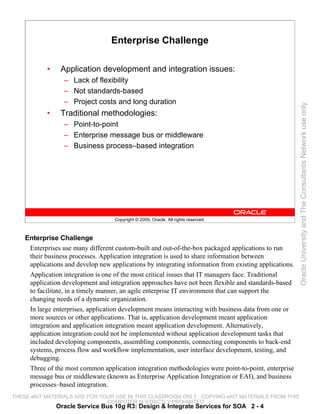
      Point-to-point integration has the following problems:
        • Proprietary messages, APIs
        • Custom integration links
        • Duplication of efforts
        • Lack of open standards
        • Tight coupling of data and implementation
        • Skill-set issue
        • Projects lasting months
        • Cost (skill, time, and products)
        • Operational polices embedded in an application
        • Lack of agility
        • Slow response by IT to business changes
      In the point-to-point (or peer-to-peer) integration methodology, applications are integrated
      with other applications as needed. The interconnections as shown in the slide could be built with
      Web services as well. But that does not mean that the peer-to-peer implementation shown in the
      slide is SOA-based; it still is not loosely coupled and intermediary-based, and it lacks a shared
      infrastructure.
      Point-to-Point Integration: The graphic in the slide depicts a system with point-to-point
THESE integration using multiple APIs.
      eKIT MATERIALS ARE FOR YOUR USE IN THIS CLASSROOM ONLY. COPYING eKIT MATERIALS FROM THIS
                                  COMPUTER IS STRICTLY PROHIBITED
               Oracle Service Bus 10g R3: Design & Integrate Services for SOA 2 - 5
EAI and BPM

            «Client Tier»
                  «VB                             «Java                                  «Web
                  Application»                    Application»                           Application»


                                                                                                              Oracle University and The Consultants Network use only
                                     Message Bus or Middleware
                                     C/C++                                                IDOCs/BAPI
            «Packaged CRM»                                   «Packaged ERP»


                      Siebel                                                SAP
                                                    JAM                                                 RMI
                             «Mainframe»                                              «App. Server»

                                  Custom                                                  EJB
                                  application                                             application


                                     Copyright © 2009, Oracle. All rights reserved.


    EAI and BPM
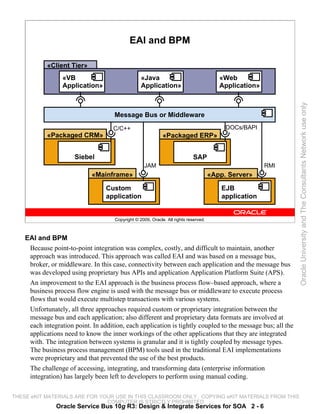
     Because point-to-point integration was complex, costly, and difficult to maintain, another
     approach was introduced. This approach was called EAI and was based on a message bus,
     broker, or middleware. In this case, connectivity between each application and the message bus
     was developed using proprietary bus APIs and application Application Platform Suite (APS).
     An improvement to the EAI approach is the business process flow–based approach, where a
     business process flow engine is used with the message bus or middleware to execute process
     flows that would execute multistep transactions with various systems.
     Unfortunately, all three approaches required custom or proprietary integration between the
     message bus and each application; also different and proprietary data formats are involved at
     each integration point. In addition, each application is tightly coupled to the message bus; all the
     applications need to know the inner workings of the other applications that they are integrated
     with. The integration between systems is granular and it is tightly coupled by message types.
     The business process management (BPM) tools used in the traditional EAI implementations
     were proprietary and that prevented the use of the best products.
     The challenge of accessing, integrating, and transforming data (enterprise information
     integration) has largely been left to developers to perform using manual coding.

THESE eKIT MATERIALS ARE FOR YOUR USE IN THIS CLASSROOM ONLY. COPYING eKIT MATERIALS FROM THIS
                               COMPUTER IS STRICTLY PROHIBITED
               Oracle Service Bus 10g R3: Design & Integrate Services for SOA 2 - 6
EAI and BPM (continued)
     The presence of multiple, disparate data sources is a reality in enterprise IT environments.
     Developers have many tools to combat this data integration challenge. There are adapters for
     accessing data sources, transformation engines for reformatting data, and replication for creating
     a physical consolidation of the data. To integrate data sources, developers use these tools to
     program the integration requirements into applications.
     EAI and BPM: The graphic in the slide depicts an EAI-based system.


                                                                                                          Oracle University and The Consultants Network use only


THESE eKIT MATERIALS ARE FOR YOUR USE IN THIS CLASSROOM ONLY. COPYING eKIT MATERIALS FROM THIS
                               COMPUTER IS STRICTLY PROHIBITED
               Oracle Service Bus 10g R3: Design & Integrate Services for SOA 2 - 7
Service-Oriented Architecture (SOA): Definition

          Service-Oriented Architecture is an IT strategy that organizes
          the discrete functions contained in enterprise applications into
          interoperable, standards-based services that can be combined
          and reused quickly to meet business needs.


                                                                                                 Oracle University and The Consultants Network use only
                                 Copyright © 2009, Oracle. All rights reserved.


THESE eKIT MATERIALS ARE FOR YOUR USE IN THIS CLASSROOM ONLY. COPYING eKIT MATERIALS FROM THIS
                               COMPUTER IS STRICTLY PROHIBITED
              Oracle Service Bus 10g R3: Design & Integrate Services for SOA 2 - 8
SOA Further Defined

           •    SOA is an enterprise-level design approach.
           •    It is a collection of services that communicate with one
                another on a network.
           •    Services are loosely coupled, have well-defined platform-
                independent interfaces, and are reusable.


                                                                                                            Oracle University and The Consultants Network use only
           •    SOA is a higher level of application development that
                focuses on business processes and uses standard
                interfaces to help mask the underlying technical complexity
                of the IT environment.
           •    Services provide access to data, business processes, and
                IT infrastructure, ideally in an asynchronous manner.
           •    SOA typically leverages standards-based integration (XML
                and Web services) to connect heterogeneous systems.


                                     Copyright © 2009, Oracle. All rights reserved.


    SOA Further Defined
     SOA-based application development and integration solves many issues and shortcomings of the
     traditional approaches mentioned earlier.
     SOA describes a set of well-established patterns that help a client application to connect to a
     service. These patterns represent mechanisms used to describe a service, to advertise and
     discover a service, and to communicate with a service.
     Most communication middleware systems, such as remote procedure call (RPC), Common
     Object Request Broker Architecture (CORBA), Distributed Component Object Model (DCOM),
     Enterprise JavaBeans (EJB), and Remote Method Invocation (RMI), rely on similar patterns.
     However, there are some differences between each implementation and weaknesses among
     them. The primary issue has been around acceptable standards and interoperability. SOA has
     built on these technologies and tried to eliminate apparent weaknesses.
     Each of these technologies has a fixed granularity, function for RPC, object for CORBA, and so
     on. Services do not have this fixed granularity. Instead, a service can be a function, an object, an
     application, and so on. SOA is therefore adaptable to any existing system and does not force the
     system to conform to any particular level of granularity.


THESE eKIT MATERIALS ARE FOR YOUR USE IN THIS CLASSROOM ONLY. COPYING eKIT MATERIALS FROM THIS
                               COMPUTER IS STRICTLY PROHIBITED
               Oracle Service Bus 10g R3: Design & Integrate Services for SOA 2 - 9
SOA Further Defined (continued)
     SOA helps information systems to move toward a “leave-and-layer” architecture. Instead of
     replacing existing architectures, it helps to reuse all existing systems and applications in the
     company and transform them into agile services. SOA not only covers information from
     packaged applications, customer applications, and legacy systems, but also the functionality or
     data from IT infrastructure such as security, content management, search, and so on. The ease
     with which developers could add functionality that came from these IT infrastructure services
     resulted in a significant reduction in the time to develop new applications based on SOA.


                                                                                                        Oracle University and The Consultants Network use only


THESE eKIT MATERIALS ARE FOR YOUR USE IN THIS CLASSROOM ONLY. COPYING eKIT MATERIALS FROM THIS
                               COMPUTER IS STRICTLY PROHIBITED
              Oracle Service Bus 10g R3: Design & Integrate Services for SOA 2 - 10
Domain Model for SOA
                          Business Strategy and Process


                                                                                                         Oracle University and The Consultants Network use only
                                    Copyright © 2009, Oracle. All rights reserved.


    Domain Model for SOA Business Strategy and Process
     The adoption of SOA requires close and permanent alignment of business and IT:
       • Many services are determined by the business process architecture.
       • Business processes must be developed and maintained holistically.
     SOA forces IT to express the technology in business terms:
       • Fosters business sponsorship
       • Prevents IT from simply translating requirements into a set of disconnected systems and
           applications
       • Closes the “IT gap”
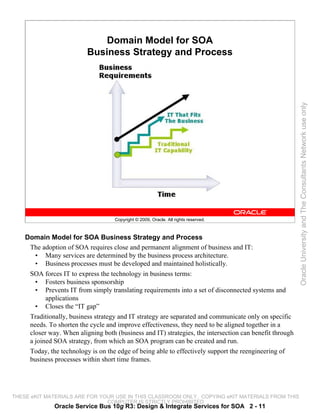
     Traditionally, business strategy and IT strategy are separated and communicate only on specific
     needs. To shorten the cycle and improve effectiveness, they need to be aligned together in a
     closer way. When aligning both (business and IT) strategies, the intersection can benefit through
     a joined SOA strategy, from which an SOA program can be created and run.
     Today, the technology is on the edge of being able to effectively support the reengineering of
     business processes within short time frames.


THESE eKIT MATERIALS ARE FOR YOUR USE IN THIS CLASSROOM ONLY. COPYING eKIT MATERIALS FROM THIS
                               COMPUTER IS STRICTLY PROHIBITED
              Oracle Service Bus 10g R3: Design & Integrate Services for SOA 2 - 11
Domain Model for SOA Business Strategy and Process (continued)
     Even if a project needs to be done without taking reuse into account (for example, to realize
     near-term revenue opportunities), reuse can be introduced within the maintenance cycles (next
     version) because the pressure to meet the deadline will be off then.
     Business Strategy and Process: The graphic in the slide shows how SOA architecture is a
     better choice for business than traditional IT architecture.


                                                                                                     Oracle University and The Consultants Network use only


THESE eKIT MATERIALS ARE FOR YOUR USE IN THIS CLASSROOM ONLY. COPYING eKIT MATERIALS FROM THIS
                               COMPUTER IS STRICTLY PROHIBITED
              Oracle Service Bus 10g R3: Design & Integrate Services for SOA 2 - 12
Six Domain Approach

            “Nontechnical”             •SOA-enabled business strategies
              SOA skills               •Business process architecture

                                                  Business
           •Construction costs                                                    •Reference architectures
                                                  Strategy &
           •Business and IT                        Process                        •Manageability or availability
            benefits                                                              •Scalability


                                                                                                                   Oracle University and The Consultants Network use only
           •Key measures             Costs &                                      •Security
                                     Benefits                  Architecture


                                    Organization &           Building    •Infrastructure services
          •Organization design
                                      Governance              Blocks     •Information and access
          •Funding                                                        services
          •Skill sets                             Projects               •Shared business
          •Roles and responsibilities                &                    services
          •Standards                           Applications              •Presentation services
          •Operational processes and                                     •Composite applications
           tools
          •Change management              •Existing applications
                                          •Key “in-flight” projects
                                                                                      “Technical”
                                          •Infrastructure construction plans           SOA skills


                                     Copyright © 2009, Oracle. All rights reserved.


    Six Domain Approach
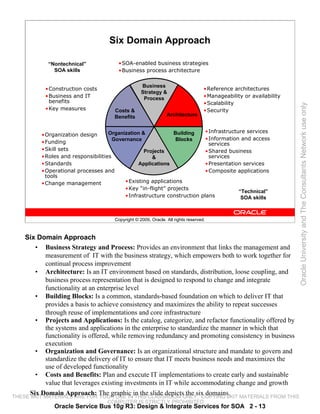
       • Business Strategy and Process: Provides an environment that links the management and
           measurement of IT with the business strategy, which empowers both to work together for
           continual process improvement
       • Architecture: Is an IT environment based on standards, distribution, loose coupling, and
           business process representation that is designed to respond to change and integrate
           functionality at an enterprise level
       • Building Blocks: Is a common, standards-based foundation on which to deliver IT that
           provides a basis to achieve consistency and maximizes the ability to repeat successes
           through reuse of implementations and core infrastructure
       • Projects and Applications: Is the catalog, categorize, and refactor functionality offered by
           the systems and applications in the enterprise to standardize the manner in which that
           functionality is offered, while removing redundancy and promoting consistency in business
           execution
       • Organization and Governance: Is an organizational structure and mandate to govern and
           standardize the delivery of IT to ensure that IT meets business needs and maximizes the
           use of developed functionality
       • Costs and Benefits: Plan and execute IT implementations to create early and sustainable
           value that leverages existing investments in IT while accommodating change and growth
     Six Domain Approach: The graphic in the slide depicts the six domains.
THESE eKIT MATERIALS ARE FOR YOUR USE IN THIS CLASSROOM ONLY. COPYING eKIT MATERIALS FROM THIS
                                   COMPUTER IS STRICTLY PROHIBITED
              Oracle Service Bus 10g R3: Design & Integrate Services for SOA 2 - 13
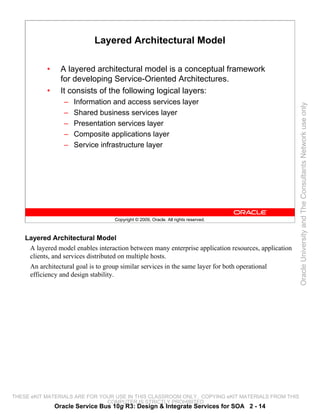
Layered Architectural Model

           •     A layered architectural model is a conceptual framework
                 for developing Service-Oriented Architectures.
           •     It consists of the following logical layers:
                  –   Information and access services layer


                                                                                                      Oracle University and The Consultants Network use only
                  –   Shared business services layer
                  –   Presentation services layer
                  –   Composite applications layer
                  –   Service infrastructure layer


                                    Copyright © 2009, Oracle. All rights reserved.


    Layered Architectural Model
     A layered model enables interaction between many enterprise application resources, application
     clients, and services distributed on multiple hosts.
     An architectural goal is to group similar services in the same layer for both operational
     efficiency and design stability.


THESE eKIT MATERIALS ARE FOR YOUR USE IN THIS CLASSROOM ONLY. COPYING eKIT MATERIALS FROM THIS
                               COMPUTER IS STRICTLY PROHIBITED
               Oracle Service Bus 10g R3: Design & Integrate Services for SOA 2 - 14
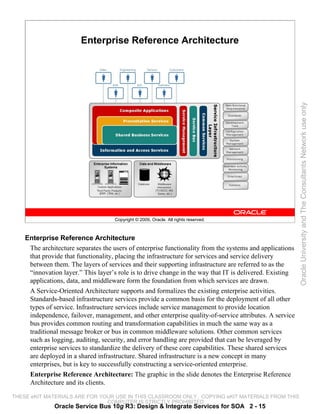
Enterprise Reference Architecture


                                                                                                          Oracle University and The Consultants Network use only
                                    Copyright © 2009, Oracle. All rights reserved.


    Enterprise Reference Architecture
     The architecture separates the users of enterprise functionality from the systems and applications
     that provide that functionality, placing the infrastructure for services and service delivery
     between them. The layers of services and their supporting infrastructure are referred to as the
     “innovation layer.” This layer’s role is to drive change in the way that IT is delivered. Existing
     applications, data, and middleware form the foundation from which services are drawn.
     A Service-Oriented Architecture supports and formalizes the existing enterprise activities.
     Standards-based infrastructure services provide a common basis for the deployment of all other
     types of service. Infrastructure services include service management to provide location
     independence, failover, management, and other enterprise quality-of-service attributes. A service
     bus provides common routing and transformation capabilities in much the same way as a
     traditional message broker or bus in common middleware solutions. Other common services
     such as logging, auditing, security, and error handling are provided that can be leveraged by
     enterprise services to standardize the delivery of these core capabilities. These shared services
     are deployed in a shared infrastructure. Shared infrastructure is a new concept in many
     enterprises, but is key to successfully constructing a service-oriented enterprise.
     Enterprise Reference Architecture: The graphic in the slide denotes the Enterprise Reference
     Architecture and its clients.

THESE eKIT MATERIALS ARE FOR YOUR USE IN THIS CLASSROOM ONLY. COPYING eKIT MATERIALS FROM THIS
                               COMPUTER IS STRICTLY PROHIBITED
              Oracle Service Bus 10g R3: Design & Integrate Services for SOA 2 - 15
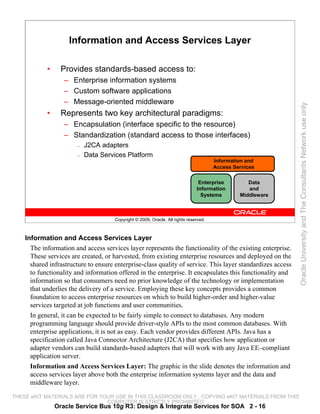
Information and Access Services Layer

            •     Provides standards-based access to:
                   – Enterprise information systems
                   – Custom software applications
                   – Message-oriented middleware


                                                                                                             Oracle University and The Consultants Network use only
            •     Represents two key architectural paradigms:
                   – Encapsulation (interface specific to the resource)
                   – Standardization (standard access to those interfaces)
                       —   J2CA adapters
                       —   Data Services Platform
                                                                                       Information and
                                                                                       Access Services

                                                                                Enterprise         Data
                                                                               Information         and
                                                                                 Systems        Middleware


                                      Copyright © 2009, Oracle. All rights reserved.


    Information and Access Services Layer
      The information and access services layer represents the functionality of the existing enterprise.
      These services are created, or harvested, from existing enterprise resources and deployed on the
      shared infrastructure to ensure enterprise-class quality of service. This layer standardizes access
      to functionality and information offered in the enterprise. It encapsulates this functionality and
      information so that consumers need no prior knowledge of the technology or implementation
      that underlies the delivery of a service. Employing these key concepts provides a common
      foundation to access enterprise resources on which to build higher-order and higher-value
      services targeted at job functions and user communities.
      In general, it can be expected to be fairly simple to connect to databases. Any modern
      programming language should provide driver-style APIs to the most common databases. With
      enterprise applications, it is not as easy. Each vendor provides different APIs. Java has a
      specification called Java Connector Architecture (J2CA) that specifies how application or
      adapter vendors can build standards-based adapters that will work with any Java EE–compliant
      application server.
      Information and Access Services Layer: The graphic in the slide denotes the information and
      access services layer above both the enterprise information systems layer and the data and
      middleware layer.

THESE eKIT MATERIALS ARE FOR YOUR USE IN THIS CLASSROOM ONLY. COPYING eKIT MATERIALS FROM THIS
                               COMPUTER IS STRICTLY PROHIBITED
                Oracle Service Bus 10g R3: Design & Integrate Services for SOA 2 - 16
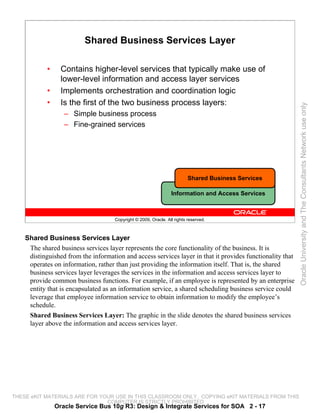
Shared Business Services Layer

            •     Contains higher-level services that typically make use of
                  lower-level information and access layer services
            •     Implements orchestration and coordination logic
            •     Is the first of the two business process layers:


                                                                                                           Oracle University and The Consultants Network use only
                   – Simple business process
                   – Fine-grained services


                                                                          Shared Business Services

                                                                 Information and Access Services


                                     Copyright © 2009, Oracle. All rights reserved.


    Shared Business Services Layer
     The shared business services layer represents the core functionality of the business. It is
     distinguished from the information and access services layer in that it provides functionality that
     operates on information, rather than just providing the information itself. That is, the shared
     business services layer leverages the services in the information and access services layer to
     provide common business functions. For example, if an employee is represented by an enterprise
     entity that is encapsulated as an information service, a shared scheduling business service could
     leverage that employee information service to obtain information to modify the employee’s
     schedule.
     Shared Business Services Layer: The graphic in the slide denotes the shared business services
     layer above the information and access services layer.


THESE eKIT MATERIALS ARE FOR YOUR USE IN THIS CLASSROOM ONLY. COPYING eKIT MATERIALS FROM THIS
                               COMPUTER IS STRICTLY PROHIBITED
                Oracle Service Bus 10g R3: Design & Integrate Services for SOA 2 - 17
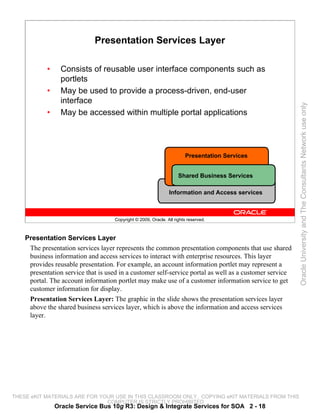
Presentation Services Layer

            •     Consists of reusable user interface components such as
                  portlets
            •     May be used to provide a process-driven, end-user
                  interface


                                                                                                         Oracle University and The Consultants Network use only
            •     May be accessed within multiple portal applications


                                                                        Presentation Services


                                                                     Shared Business Services

                                                                Information and Access services


                                     Copyright © 2009, Oracle. All rights reserved.


    Presentation Services Layer
     The presentation services layer represents the common presentation components that use shared
     business information and access services to interact with enterprise resources. This layer
     provides reusable presentation. For example, an account information portlet may represent a
     presentation service that is used in a customer self-service portal as well as a customer service
     portal. The account information portlet may make use of a customer information service to get
     customer information for display.
     Presentation Services Layer: The graphic in the slide shows the presentation services layer
     above the shared business services layer, which is above the information and access services
     layer.


THESE eKIT MATERIALS ARE FOR YOUR USE IN THIS CLASSROOM ONLY. COPYING eKIT MATERIALS FROM THIS
                               COMPUTER IS STRICTLY PROHIBITED
                Oracle Service Bus 10g R3: Design & Integrate Services for SOA 2 - 18
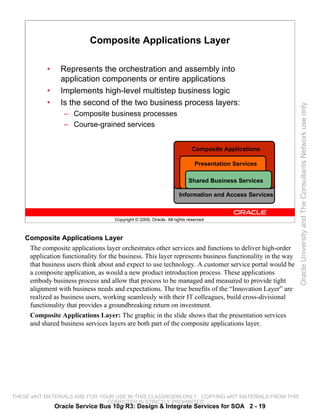
Composite Applications Layer

            •     Represents the orchestration and assembly into
                  application components or entire applications
            •     Implements high-level multistep business logic
            •     Is the second of the two business process layers:


                                                                                                           Oracle University and The Consultants Network use only
                   – Composite business processes
                   – Course-grained services


                                                                            Composite Applications

                                                                             Presentation Services

                                                                          Shared Business Services

                                                                     Information and Access Services


                                     Copyright © 2009, Oracle. All rights reserved.


    Composite Applications Layer
     The composite applications layer orchestrates other services and functions to deliver high-order
     application functionality for the business. This layer represents business functionality in the way
     that business users think about and expect to use technology. A customer service portal would be
     a composite application, as would a new product introduction process. These applications
     embody business process and allow that process to be managed and measured to provide tight
     alignment with business needs and expectations. The true benefits of the “Innovation Layer” are
     realized as business users, working seamlessly with their IT colleagues, build cross-divisional
     functionality that provides a groundbreaking return on investment.
     Composite Applications Layer: The graphic in the slide shows that the presentation services
     and shared business services layers are both part of the composite applications layer.


THESE eKIT MATERIALS ARE FOR YOUR USE IN THIS CLASSROOM ONLY. COPYING eKIT MATERIALS FROM THIS
                               COMPUTER IS STRICTLY PROHIBITED
                Oracle Service Bus 10g R3: Design & Integrate Services for SOA 2 - 19
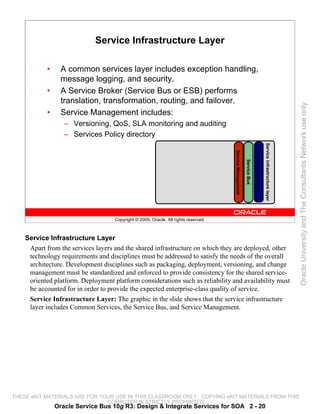
Service Infrastructure Layer

            •     A common services layer includes exception handling,
                  message logging, and security.
            •     A Service Broker (Service Bus or ESB) performs
                  translation, transformation, routing, and failover.


                                                                                                                                                                         Oracle University and The Consultants Network use only
            •     Service Management includes:
                   – Versioning, QoS, SLA monitoring and auditing
                   – Services Policy directory


                                                                                                                                          Service infrastructure layer
                                                                                     Service Management


                                                                                                                        Common Services
                                                                                                          Service Bus
                                    Copyright © 2009, Oracle. All rights reserved.


    Service Infrastructure Layer
     Apart from the services layers and the shared infrastructure on which they are deployed, other
     technology requirements and disciplines must be addressed to satisfy the needs of the overall
     architecture. Development disciplines such as packaging, deployment, versioning, and change
     management must be standardized and enforced to provide consistency for the shared service-
     oriented platform. Deployment platform considerations such as reliability and availability must
     be accounted for in order to provide the expected enterprise-class quality of service.
     Service Infrastructure Layer: The graphic in the slide shows that the service infrastructure
     layer includes Common Services, the Service Bus, and Service Management.


THESE eKIT MATERIALS ARE FOR YOUR USE IN THIS CLASSROOM ONLY. COPYING eKIT MATERIALS FROM THIS
                               COMPUTER IS STRICTLY PROHIBITED
                Oracle Service Bus 10g R3: Design & Integrate Services for SOA 2 - 20
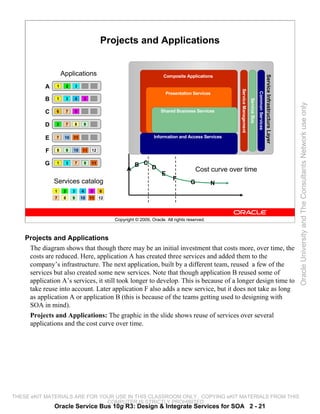
Projects and Applications


                    Applications                                              Composite Applications


                                                                                                                                                                             Service Infrastructure Layer
                                                                  F       G
           A


                                                                                                                                                                                Infrastructure Services
                1    2    3


                                                                                                                        Service Management
                                                                              Presentation Services


                                                                                                                                                           Common Services
           B    1    3    4     5


                                                                                                                                             Service Bus
                                                                  5       8


                                                                                                                                                                                                            Oracle University and The Consultants Network use only
           C    6    7    5                                               Shared Business Services


           D    2    7    8     9                                         9       10       11   12
                                                        7
           E   7     10   11                            3             Information and Access Services

                                                              1       2       4        6
           F    8    9    10   11   12


           G    1    3    7     9   11
                                                        B C D
                                                    A                                                    Cost curve over time
                                                                          E
                                                                                       F
               Services catalog                                                                      G       N
               1     2    3    4    5    6
               7     8    9    10   11   12


                                              Copyright © 2009, Oracle. All rights reserved.


    Projects and Applications
     The diagram shows that though there may be an initial investment that costs more, over time, the
     costs are reduced. Here, application A has created three services and added them to the
     company’s infrastructure. The next application, built by a different team, reused a few of the
     services but also created some new services. Note that though application B reused some of
     application A’s services, it still took longer to develop. This is because of a longer design time to
     take reuse into account. Later application F also adds a new service, but it does not take as long
     as application A or application B (this is because of the teams getting used to designing with
     SOA in mind).
     Projects and Applications: The graphic in the slide shows reuse of services over several
     applications and the cost curve over time.


THESE eKIT MATERIALS ARE FOR YOUR USE IN THIS CLASSROOM ONLY. COPYING eKIT MATERIALS FROM THIS
                               COMPUTER IS STRICTLY PROHIBITED
               Oracle Service Bus 10g R3: Design & Integrate Services for SOA 2 - 21
Section Summary

          In this section, you discussed the following:
           • Different services layers in SOA
           • Service-oriented architecture


                                                                                                 Oracle University and The Consultants Network use only
                                 Copyright © 2009, Oracle. All rights reserved.


THESE eKIT MATERIALS ARE FOR YOUR USE IN THIS CLASSROOM ONLY. COPYING eKIT MATERIALS FROM THIS
                               COMPUTER IS STRICTLY PROHIBITED
             Oracle Service Bus 10g R3: Design & Integrate Services for SOA 2 - 22
Quiz

          Which of the following is not one of the six domains?
          a. Business Strategy and Process
          b. Building Blocks
          c. Projects and Applications


                                                                                                 Oracle University and The Consultants Network use only
          d. Open Source
          e. Costs and Benefits
          f. Architecture


                                 Copyright © 2009, Oracle. All rights reserved.


    Answer: d


THESE eKIT MATERIALS ARE FOR YOUR USE IN THIS CLASSROOM ONLY. COPYING eKIT MATERIALS FROM THIS
                               COMPUTER IS STRICTLY PROHIBITED
             Oracle Service Bus 10g R3: Design & Integrate Services for SOA 2 - 23
Quiz

          An architectural goal is to group similar services in the same
          layer for both ________ and ________ (choose two).
           a. ease of programming
           b. operational efficiency


                                                                                                 Oracle University and The Consultants Network use only
           c. optimal granularity
           d. design stability


                                 Copyright © 2009, Oracle. All rights reserved.


    Answers: b, d


THESE eKIT MATERIALS ARE FOR YOUR USE IN THIS CLASSROOM ONLY. COPYING eKIT MATERIALS FROM THIS
                               COMPUTER IS STRICTLY PROHIBITED
             Oracle Service Bus 10g R3: Design & Integrate Services for SOA 2 - 24
Road Map

           •     Introduction to SOA
           •     Introduction to Oracle Service Bus
                  – Role of OSB
                  – OSB Features


                                                                                                 Oracle University and The Consultants Network use only
                                  Copyright © 2009, Oracle. All rights reserved.


THESE eKIT MATERIALS ARE FOR YOUR USE IN THIS CLASSROOM ONLY. COPYING eKIT MATERIALS FROM THIS
                               COMPUTER IS STRICTLY PROHIBITED
               Oracle Service Bus 10g R3: Design & Integrate Services for SOA 2 - 25
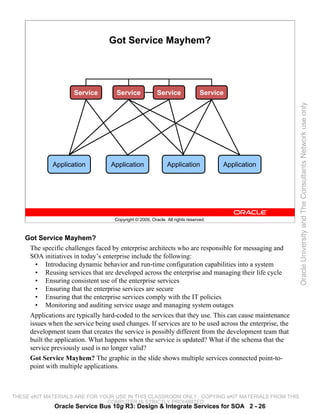
Got Service Mayhem?


                      Service        Service              Service               Service


                                                                                                         Oracle University and The Consultants Network use only
              Application          Application                 Application            Application


                                     Copyright © 2009, Oracle. All rights reserved.


    Got Service Mayhem?
     The specific challenges faced by enterprise architects who are responsible for messaging and
     SOA initiatives in today’s enterprise include the following:
       • Introducing dynamic behavior and run-time configuration capabilities into a system
       • Reusing services that are developed across the enterprise and managing their life cycle
       • Ensuring consistent use of the enterprise services
       • Ensuring that the enterprise services are secure
       • Ensuring that the enterprise services comply with the IT policies
       • Monitoring and auditing service usage and managing system outages
     Applications are typically hard-coded to the services that they use. This can cause maintenance
     issues when the service being used changes. If services are to be used across the enterprise, the
     development team that creates the service is possibly different from the development team that
     built the application. What happens when the service is updated? What if the schema that the
     service previously used is no longer valid?
     Got Service Mayhem? The graphic in the slide shows multiple services connected point-to-
     point with multiple applications.


THESE eKIT MATERIALS ARE FOR YOUR USE IN THIS CLASSROOM ONLY. COPYING eKIT MATERIALS FROM THIS
                               COMPUTER IS STRICTLY PROHIBITED
              Oracle Service Bus 10g R3: Design & Integrate Services for SOA 2 - 26
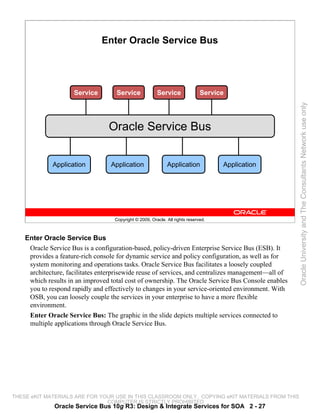
Enter Oracle Service Bus


                     Service        Service              Service               Service


                                                                                                     Oracle University and The Consultants Network use only
                                  Oracle Service Bus


             Application          Application                 Application            Application


                                    Copyright © 2009, Oracle. All rights reserved.


    Enter Oracle Service Bus
     Oracle Service Bus is a configuration-based, policy-driven Enterprise Service Bus (ESB). It
     provides a feature-rich console for dynamic service and policy configuration, as well as for
     system monitoring and operations tasks. Oracle Service Bus facilitates a loosely coupled
     architecture, facilitates enterprisewide reuse of services, and centralizes management—all of
     which results in an improved total cost of ownership. The Oracle Service Bus Console enables
     you to respond rapidly and effectively to changes in your service-oriented environment. With
     OSB, you can loosely couple the services in your enterprise to have a more flexible
     environment.
     Enter Oracle Service Bus: The graphic in the slide depicts multiple services connected to
     multiple applications through Oracle Service Bus.


THESE eKIT MATERIALS ARE FOR YOUR USE IN THIS CLASSROOM ONLY. COPYING eKIT MATERIALS FROM THIS
                               COMPUTER IS STRICTLY PROHIBITED
              Oracle Service Bus 10g R3: Design & Integrate Services for SOA 2 - 27
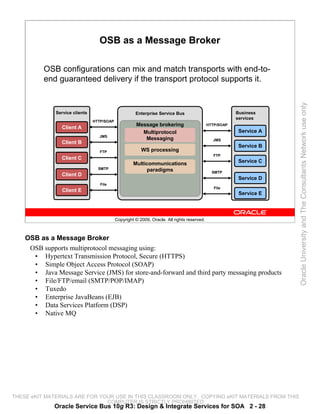
OSB as a Message Broker

          OSB configurations can mix and match transports with end-to-
          end guaranteed delivery if the transport protocol supports it.


                                                                                                                      Oracle University and The Consultants Network use only
              Service clients                         Enterprise Service Bus                             Business
                                                                                                         services
                                HTTP/SOAP
                                                      Message brokering                      HTTP/SOAP
                Client A
                                                        Multiprotocol                                     Service A
                                  JMS
                                                         Messaging                             JMS
                Client B
                                                                                                          Service B
                                   FTP                   WS processing
                                                                                                FTP
                Client C
                                                     Multicommunications                                  Service C
                                  SMTP                    paradigms                            SMTP
                Client D
                                                                                                          Service D
                                   File
                                                                                                File
                 Client E
                                                                                                          Service E


                                            Copyright © 2009, Oracle. All rights reserved.


    OSB as a Message Broker
     OSB supports multiprotocol messaging using:
      • Hypertext Transmission Protocol, Secure (HTTPS)
      • Simple Object Access Protocol (SOAP)
      • Java Message Service (JMS) for store-and-forward and third party messaging products
      • File/FTP/email (SMTP/POP/IMAP)
      • Tuxedo
      • Enterprise JavaBeans (EJB)
      • Data Services Platform (DSP)
      • Native MQ


THESE eKIT MATERIALS ARE FOR YOUR USE IN THIS CLASSROOM ONLY. COPYING eKIT MATERIALS FROM THIS
                               COMPUTER IS STRICTLY PROHIBITED
             Oracle Service Bus 10g R3: Design & Integrate Services for SOA 2 - 28
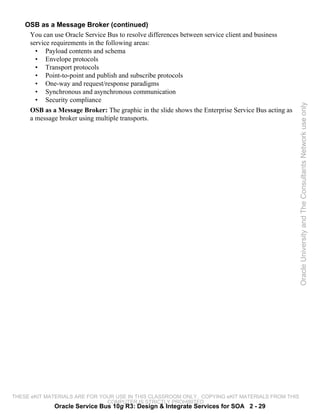
OSB as a Message Broker (continued)
     You can use Oracle Service Bus to resolve differences between service client and business
     service requirements in the following areas:
       • Payload contents and schema
       • Envelope protocols
       • Transport protocols
       • Point-to-point and publish and subscribe protocols
       • One-way and request/response paradigms
       • Synchronous and asynchronous communication
       • Security compliance


                                                                                                    Oracle University and The Consultants Network use only
     OSB as a Message Broker: The graphic in the slide shows the Enterprise Service Bus acting as
     a message broker using multiple transports.


THESE eKIT MATERIALS ARE FOR YOUR USE IN THIS CLASSROOM ONLY. COPYING eKIT MATERIALS FROM THIS
                               COMPUTER IS STRICTLY PROHIBITED
              Oracle Service Bus 10g R3: Design & Integrate Services for SOA 2 - 29
Messaging Types

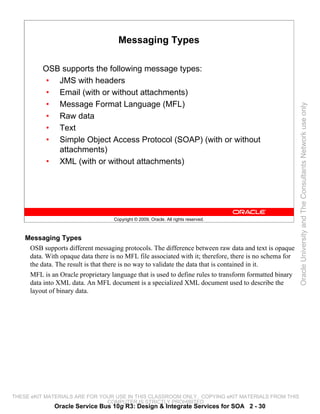
          OSB supports the following message types:
           • JMS with headers
           • Email (with or without attachments)
           • Message Format Language (MFL)


                                                                                                         Oracle University and The Consultants Network use only
           • Raw data
           • Text
           • Simple Object Access Protocol (SOAP) (with or without
             attachments)
           • XML (with or without attachments)


                                    Copyright © 2009, Oracle. All rights reserved.


    Messaging Types
     OSB supports different messaging protocols. The difference between raw data and text is opaque
     data. With opaque data there is no MFL file associated with it; therefore, there is no schema for
     the data. The result is that there is no way to validate the data that is contained in it.
     MFL is an Oracle proprietary language that is used to define rules to transform formatted binary
     data into XML data. An MFL document is a specialized XML document used to describe the
     layout of binary data.


THESE eKIT MATERIALS ARE FOR YOUR USE IN THIS CLASSROOM ONLY. COPYING eKIT MATERIALS FROM THIS
                               COMPUTER IS STRICTLY PROHIBITED
              Oracle Service Bus 10g R3: Design & Integrate Services for SOA 2 - 30
Location Transparency

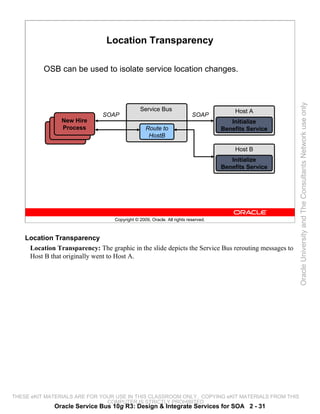
          OSB can be used to isolate service location changes.


                                                                                                       Oracle University and The Consultants Network use only
                                               Service Bus                              Host A
                               SOAP                                       SOAP
                New Hire                                                               Initialize
                Process                           Route to                          Benefits Service
                                                   HostB

                                                                                        Host B
                                                                                       Initialize
                                                                                    Benefits Service


                                   Copyright © 2009, Oracle. All rights reserved.


    Location Transparency
     Location Transparency: The graphic in the slide depicts the Service Bus rerouting messages to
     Host B that originally went to Host A.


THESE eKIT MATERIALS ARE FOR YOUR USE IN THIS CLASSROOM ONLY. COPYING eKIT MATERIALS FROM THIS
                               COMPUTER IS STRICTLY PROHIBITED
              Oracle Service Bus 10g R3: Design & Integrate Services for SOA 2 - 31
Dynamic Routing

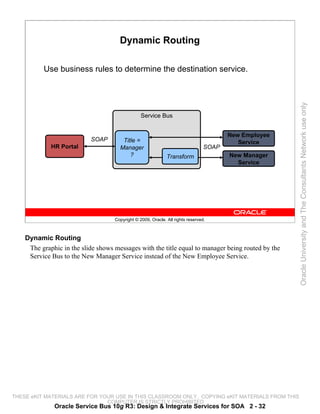
          Use business rules to determine the destination service.


                                                                                                       Oracle University and The Consultants Network use only
                                                 Service Bus


                                                                                        New Employee
                           SOAP        Title =                                             Service
             HR Portal                Manager                                    SOAP
                                          ?                   Transform                 New Manager
                                                                                          Service


                                    Copyright © 2009, Oracle. All rights reserved.


    Dynamic Routing
     The graphic in the slide shows messages with the title equal to manager being routed by the
     Service Bus to the New Manager Service instead of the New Employee Service.


THESE eKIT MATERIALS ARE FOR YOUR USE IN THIS CLASSROOM ONLY. COPYING eKIT MATERIALS FROM THIS
                               COMPUTER IS STRICTLY PROHIBITED
              Oracle Service Bus 10g R3: Design & Integrate Services for SOA 2 - 32
Transformations

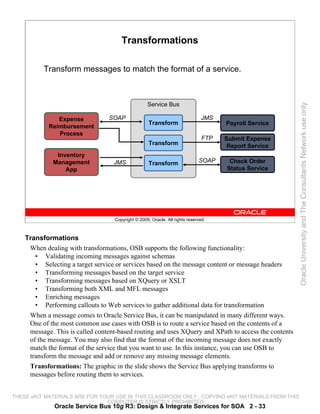
          Transform messages to match the format of a service.


                                                   Service Bus


                                                                                                       Oracle University and The Consultants Network use only
               Expense           SOAP                                         JMS
                                                    Transform                        Payroll Service
            Reimbursement
               Process
                                                                               FTP   Submit Expense
                                                    Transform                         Report Service
              Inventory
             Management            JMS              Transform                SOAP     Check Order
                 App                                                                 Status Service


                                   Copyright © 2009, Oracle. All rights reserved.


    Transformations
     When dealing with transformations, OSB supports the following functionality:
       • Validating incoming messages against schemas
       • Selecting a target service or services based on the message content or message headers
       • Transforming messages based on the target service
       • Transforming messages based on XQuery or XSLT
       • Transforming both XML and MFL messages
       • Enriching messages
       • Performing callouts to Web services to gather additional data for transformation
     When a message comes to Oracle Service Bus, it can be manipulated in many different ways.
     One of the most common use cases with OSB is to route a service based on the contents of a
     message. This is called content-based routing and uses XQuery and XPath to access the contents
     of the message. You may also find that the format of the incoming message does not exactly
     match the format of the service that you want to use. In this instance, you can use OSB to
     transform the message and add or remove any missing message elements.
     Transformations: The graphic in the slide shows the Service Bus applying transforms to
     messages before routing them to services.


THESE eKIT MATERIALS ARE FOR YOUR USE IN THIS CLASSROOM ONLY. COPYING eKIT MATERIALS FROM THIS
                               COMPUTER IS STRICTLY PROHIBITED
              Oracle Service Bus 10g R3: Design & Integrate Services for SOA 2 - 33
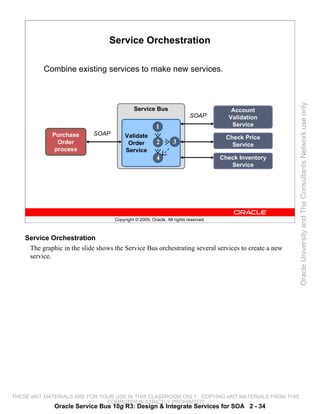
Service Orchestration

          Combine existing services to make new services.


                                                                                                       Oracle University and The Consultants Network use only
                                             Service Bus                                Account
                                                                          SOAP         Validation
                                                         1                              Service
             Purchase        SOAP        Validate                                     Check Price
               Order                      Order          2       3                      Service
              process                    Service
                                                         4                           Check Inventory
                                                                                        Service


                                    Copyright © 2009, Oracle. All rights reserved.


    Service Orchestration
     The graphic in the slide shows the Service Bus orchestrating several services to create a new
     service.


THESE eKIT MATERIALS ARE FOR YOUR USE IN THIS CLASSROOM ONLY. COPYING eKIT MATERIALS FROM THIS
                               COMPUTER IS STRICTLY PROHIBITED
              Oracle Service Bus 10g R3: Design & Integrate Services for SOA 2 - 34
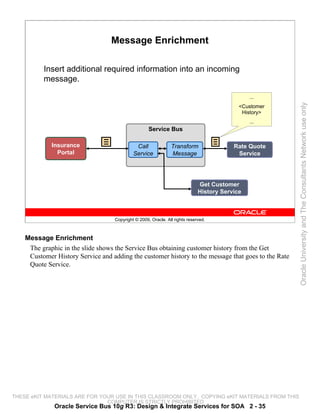
Message Enrichment

          Insert additional required information into an incoming
          message.

                                                                                               ...


                                                                                                       Oracle University and The Consultants Network use only
                                                                                           <Customer
                                                                                            History>
                                                                                               ...
                                                    Service Bus

             Insurance                       Call              Transform                 Rate Quote
               Portal                       Service            Message                    Service


                                                                             Get Customer
                                                                             History Service


                                   Copyright © 2009, Oracle. All rights reserved.


    Message Enrichment
     The graphic in the slide shows the Service Bus obtaining customer history from the Get
     Customer History Service and adding the customer history to the message that goes to the Rate
     Quote Service.


THESE eKIT MATERIALS ARE FOR YOUR USE IN THIS CLASSROOM ONLY. COPYING eKIT MATERIALS FROM THIS
                               COMPUTER IS STRICTLY PROHIBITED
              Oracle Service Bus 10g R3: Design & Integrate Services for SOA 2 - 35
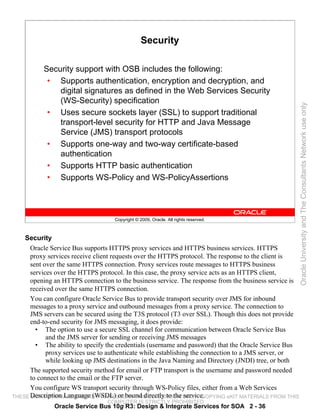
Security

           Security support with OSB includes the following:
            • Supports authentication, encryption and decryption, and
               digital signatures as defined in the Web Services Security
               (WS-Security) specification


                                                                                                       Oracle University and The Consultants Network use only
            • Uses secure sockets layer (SSL) to support traditional
               transport-level security for HTTP and Java Message
               Service (JMS) transport protocols
            • Supports one-way and two-way certificate-based
               authentication
            • Supports HTTP basic authentication
            • Supports WS-Policy and WS-PolicyAssertions


                                   Copyright © 2009, Oracle. All rights reserved.


    Security
      Oracle Service Bus supports HTTPS proxy services and HTTPS business services. HTTPS
      proxy services receive client requests over the HTTPS protocol. The response to the client is
      sent over the same HTTPS connection. Proxy services route messages to HTTPS business
      services over the HTTPS protocol. In this case, the proxy service acts as an HTTPS client,
      opening an HTTPS connection to the business service. The response from the business service is
      received over the same HTTPS connection.
      You can configure Oracle Service Bus to provide transport security over JMS for inbound
      messages to a proxy service and outbound messages from a proxy service. The connection to
      JMS servers can be secured using the T3S protocol (T3 over SSL). Though this does not provide
      end-to-end security for JMS messaging, it does provide:
        • The option to use a secure SSL channel for communication between Oracle Service Bus
            and the JMS server for sending or receiving JMS messages
        • The ability to specify the credentials (username and password) that the Oracle Service Bus
            proxy services use to authenticate while establishing the connection to a JMS server, or
            while looking up JMS destinations in the Java Naming and Directory (JNDI) tree, or both
      The supported security method for email or FTP transport is the username and password needed
      to connect to the email or the FTP server.
      You configure WS transport security through WS-Policy files, either from a Web Services
THESE Description Language (WSDL)USE IN THIS CLASSROOM ONLY. COPYING eKIT MATERIALS FROM THIS
      eKIT MATERIALS ARE FOR YOUR or bound directly to the service.
                                 COMPUTER IS STRICTLY PROHIBITED
              Oracle Service Bus 10g R3: Design & Integrate Services for SOA 2 - 36
Security (continued)
     To secure email, you must designate a service account as an alias for the username and password
     in the Oracle Service Bus Console. The service uses the username and password to authenticate
     to the Simple Mail Transfer Protocol (SMTP) server.
     To secure FTP, in the Oracle Service Bus Console, select external_user and designate a service
     account as an alias for the username and password. The service uses the username and password
     to authenticate to the FTP server.
     WS-Policy is a specification that allows Web services to use XML to advertise their policies (on
     security, Quality of Service, and so on) and Web service consumers to specify their policy
     requirements.


                                                                                                        Oracle University and The Consultants Network use only
     WS-PolicyAssertions is a specification that defines a common set of policy assertions for Web
     services. The assertions defined by this specification cover text encoding, natural language
     support, versioning of specifications, and predicates.


THESE eKIT MATERIALS ARE FOR YOUR USE IN THIS CLASSROOM ONLY. COPYING eKIT MATERIALS FROM THIS
                               COMPUTER IS STRICTLY PROHIBITED
              Oracle Service Bus 10g R3: Design & Integrate Services for SOA 2 - 37
Service-Level Agreements (SLA)

            •     Service Level Agreements define the precise level and
                  quality of service to be expected from services.
            •     Administrators can configure alerts for Service Level
                  Agreement rule violations.


                                                                                                             Oracle University and The Consultants Network use only
            •     The administrator can configure multiple levels of severity
                  for an alert.


                                     Copyright © 2009, Oracle. All rights reserved.


    Service-Level Agreements (SLA)
     Oracle Service Bus implements service-level agreements (SLAs) and automated responses to
     SLA violations by enabling you to define rules that specify unacceptable service performance
     and the system response that you require under those circumstances.
     You can construct rules that Oracle Service Bus evaluates against its aggregated metrics each
     time it updates that data. When a rule evaluates to true, it raises an alert. Rules can be configured
     to generate an alert log that is displayed on the dashboard. In addition, Oracle Service Bus
     executes the action you specified for the rule when it evaluates to true. You can assign any of the
     following types of actions to a rule:
       • Send email notification
       • Send a JMS message


THESE eKIT MATERIALS ARE FOR YOUR USE IN THIS CLASSROOM ONLY. COPYING eKIT MATERIALS FROM THIS
                               COMPUTER IS STRICTLY PROHIBITED
                Oracle Service Bus 10g R3: Design & Integrate Services for SOA 2 - 38
Section Summary

          In this section, you learned about the following:
           • Role of OSB
           • Features of OSB


                                                                                                 Oracle University and The Consultants Network use only
                                 Copyright © 2009, Oracle. All rights reserved.


THESE eKIT MATERIALS ARE FOR YOUR USE IN THIS CLASSROOM ONLY. COPYING eKIT MATERIALS FROM THIS
                               COMPUTER IS STRICTLY PROHIBITED
             Oracle Service Bus 10g R3: Design & Integrate Services for SOA 2 - 39
Quiz

          Combining existing services to make new services is called:
           a. Location transparency
           b. Dynamic routing
           c. Message enrichment


                                                                                                 Oracle University and The Consultants Network use only
           d. Service orchestration
           e. Security


                                 Copyright © 2009, Oracle. All rights reserved.


    Answer: d


THESE eKIT MATERIALS ARE FOR YOUR USE IN THIS CLASSROOM ONLY. COPYING eKIT MATERIALS FROM THIS
                               COMPUTER IS STRICTLY PROHIBITED
             Oracle Service Bus 10g R3: Design & Integrate Services for SOA 2 - 40
Summary

          In this lesson, you should have learned about the following:
           • Service-oriented architecture
           • Features of OSB
           • Role of OSB


                                                                                                 Oracle University and The Consultants Network use only
                                 Copyright © 2009, Oracle. All rights reserved.


THESE eKIT MATERIALS ARE FOR YOUR USE IN THIS CLASSROOM ONLY. COPYING eKIT MATERIALS FROM THIS
                               COMPUTER IS STRICTLY PROHIBITED
             Oracle Service Bus 10g R3: Design & Integrate Services for SOA 2 - 41
Oracle University and The Consultants Network use only


THESE eKIT MATERIALS ARE FOR YOUR USE IN THIS CLASSROOM ONLY. COPYING eKIT MATERIALS FROM THIS
                               COMPUTER IS STRICTLY PROHIBITED
Message Flow


                                                                                                 Oracle University and The Consultants Network use only
                                 Copyright © 2009, Oracle. All rights reserved.


THESE eKIT MATERIALS ARE FOR YOUR USE IN THIS CLASSROOM ONLY. COPYING eKIT MATERIALS FROM THIS
                               COMPUTER IS STRICTLY PROHIBITED
Objectives

          After completing this lesson, you should be able to:
           • Configure simple routing to a service in a message flow
           • Use context variables in a message flow
           • Configure branching in a message flow


                                                                                                 Oracle University and The Consultants Network use only
                                 Copyright © 2009, Oracle. All rights reserved.


THESE eKIT MATERIALS ARE FOR YOUR USE IN THIS CLASSROOM ONLY. COPYING eKIT MATERIALS FROM THIS
                               COMPUTER IS STRICTLY PROHIBITED
              Oracle Service Bus 10g R3: Design & Integrate Services for SOA 3 - 2
Road Map

           •    OSB Resources
                 – OSB Projects
                 – OSB Resource Types
           •    Context Variables


                                                                                                 Oracle University and The Consultants Network use only
           •    Branching


                                  Copyright © 2009, Oracle. All rights reserved.


THESE eKIT MATERIALS ARE FOR YOUR USE IN THIS CLASSROOM ONLY. COPYING eKIT MATERIALS FROM THIS
                               COMPUTER IS STRICTLY PROHIBITED
               Oracle Service Bus 10g R3: Design & Integrate Services for SOA 3 - 3
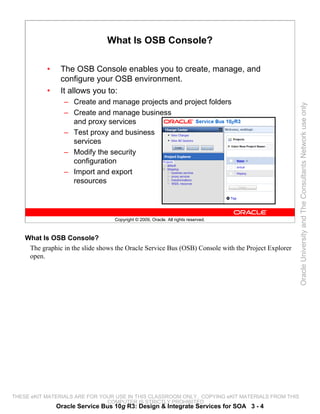
What Is OSB Console?

           •    The OSB Console enables you to create, manage, and
                configure your OSB environment.
           •    It allows you to:
                 – Create and manage projects and project folders


                                                                                                     Oracle University and The Consultants Network use only
                 – Create and manage business
                   and proxy services
                 – Test proxy and business
                   services
                 – Modify the security
                   configuration
                 – Import and export
                   resources


                                   Copyright © 2009, Oracle. All rights reserved.


    What Is OSB Console?
     The graphic in the slide shows the Oracle Service Bus (OSB) Console with the Project Explorer
     open.


THESE eKIT MATERIALS ARE FOR YOUR USE IN THIS CLASSROOM ONLY. COPYING eKIT MATERIALS FROM THIS
                               COMPUTER IS STRICTLY PROHIBITED
               Oracle Service Bus 10g R3: Design & Integrate Services for SOA 3 - 4
Projects and Resources

           •    An OSB project is a container for resources.
           •    Within a project, there are various resources that can be
                created, including:
                 –   Proxy services


                                                                                                 Oracle University and The Consultants Network use only
                 –   Business services
                 –   Transformations
                 –   Web Services Description Languages (WSDLs)
                 –   XML schemas
                 –   WS-Policies
                 –   Security Service Providers
                 –   Java Archives (JARs)
                 –   Alert destinations


                                  Copyright © 2009, Oracle. All rights reserved.


THESE eKIT MATERIALS ARE FOR YOUR USE IN THIS CLASSROOM ONLY. COPYING eKIT MATERIALS FROM THIS
                               COMPUTER IS STRICTLY PROHIBITED
               Oracle Service Bus 10g R3: Design & Integrate Services for SOA 3 - 5
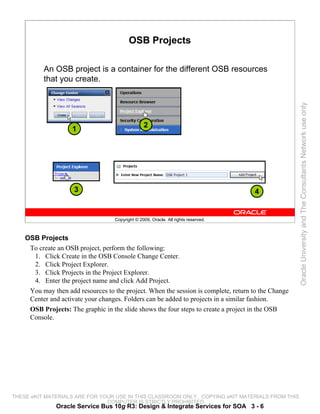
OSB Projects

          An OSB project is a container for the different OSB resources
          that you create.


                                                                                                     Oracle University and The Consultants Network use only
                                                  2
                    1


                     3                                                               4


                                    Copyright © 2009, Oracle. All rights reserved.


    OSB Projects
     To create an OSB project, perform the following:
      1. Click Create in the OSB Console Change Center.
      2. Click Project Explorer.
      3. Click Projects in the Project Explorer.
      4. Enter the project name and click Add Project.
     You may then add resources to the project. When the session is complete, return to the Change
     Center and activate your changes. Folders can be added to projects in a similar fashion.
     OSB Projects: The graphic in the slide shows the four steps to create a project in the OSB
     Console.


THESE eKIT MATERIALS ARE FOR YOUR USE IN THIS CLASSROOM ONLY. COPYING eKIT MATERIALS FROM THIS
                               COMPUTER IS STRICTLY PROHIBITED
               Oracle Service Bus 10g R3: Design & Integrate Services for SOA 3 - 6
OSB Resource Types

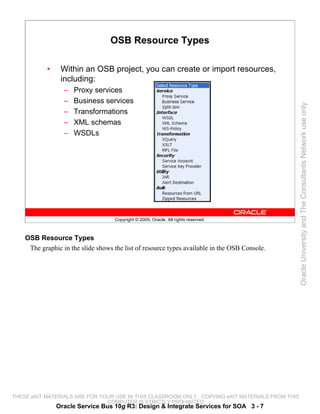
            •    Within an OSB project, you can create or import resources,
                 including:
                  –   Proxy services
                  –   Business services


                                                                                                 Oracle University and The Consultants Network use only
                  –   Transformations
                  –   XML schemas
                  –   WSDLs


                                    Copyright © 2009, Oracle. All rights reserved.


    OSB Resource Types
     The graphic in the slide shows the list of resource types available in the OSB Console.


THESE eKIT MATERIALS ARE FOR YOUR USE IN THIS CLASSROOM ONLY. COPYING eKIT MATERIALS FROM THIS
                               COMPUTER IS STRICTLY PROHIBITED
                Oracle Service Bus 10g R3: Design & Integrate Services for SOA 3 - 7
Business Service

           •    A business service:
                 – Is contained within an OSB project
                 – Defines a protocol used with the service
                 – Defines a URL that is called when the service is invoked


                                                                                                 Oracle University and The Consultants Network use only
           •    The properties of a business service depend on which
                protocol is selected.


                                  Copyright © 2009, Oracle. All rights reserved.


THESE eKIT MATERIALS ARE FOR YOUR USE IN THIS CLASSROOM ONLY. COPYING eKIT MATERIALS FROM THIS
                               COMPUTER IS STRICTLY PROHIBITED
               Oracle Service Bus 10g R3: Design & Integrate Services for SOA 3 - 8
Creating a Business Service


                       1


                      2


                                                                                                    Oracle University and The Consultants Network use only
                                                                                    3

                                                                                        4


                                   Copyright © 2009, Oracle. All rights reserved.


    Creating a Business Service
     To create a business service, perform the following:
       1. In the General Configuration pane, enter a Service Name.
       2. Select the Service Type.
       3. In the Transport Configuration pane, select a Protocol.
       4. Configure the Endpoint URI.
     When you are using a WSDL, the Uniform Resource Identifier (URI) defaults to the service URI
     of the WSDL. For other protocols, there is no default.
     Creating a Business Service: The graphic in the slide shows the steps to create a business
     service.


THESE eKIT MATERIALS ARE FOR YOUR USE IN THIS CLASSROOM ONLY. COPYING eKIT MATERIALS FROM THIS
                               COMPUTER IS STRICTLY PROHIBITED
              Oracle Service Bus 10g R3: Design & Integrate Services for SOA 3 - 9
Proxy Services

            •     A proxy service is the gateway for applications and
                  services to access OSB.
            •     Each proxy service contains a message flow that allows
                  actions to be performed on a message.


                                                                                                    Oracle University and The Consultants Network use only
            •     Every proxy service must route to some service.


                                     Copyright © 2009, Oracle. All rights reserved.


    Proxy Services
     The process for creating a proxy service is similar to that for creating a business service.


THESE eKIT MATERIALS ARE FOR YOUR USE IN THIS CLASSROOM ONLY. COPYING eKIT MATERIALS FROM THIS
                               COMPUTER IS STRICTLY PROHIBITED
                Oracle Service Bus 10g R3: Design & Integrate Services for SOA 3 - 10
Creating a Proxy Service


                      1


                     2


                                                                                                     Oracle University and The Consultants Network use only
                                                                                     3
                                                                                         4


                                    Copyright © 2009, Oracle. All rights reserved.


    Creating a Proxy Service
     To create a proxy service, perform the following:
       1. In the General Configuration pane, enter a Service Name.
       2. Select the Service Type.
       3. In the Transport Configuration pane, select a Protocol.
       4. Configure the Endpoint URI.
     Creating a Proxy Service: The graphic in the slide shows the steps to create a proxy service.


THESE eKIT MATERIALS ARE FOR YOUR USE IN THIS CLASSROOM ONLY. COPYING eKIT MATERIALS FROM THIS
                               COMPUTER IS STRICTLY PROHIBITED
              Oracle Service Bus 10g R3: Design & Integrate Services for SOA 3 - 11
Difference Between Binding and Port

           •     When you create a service based on a WSDL resource,
                 base the service either on a WSDL port or on a WSDL
                 binding:
                  – When you create a new service based on a binding in a


                                                                                                      Oracle University and The Consultants Network use only
                    WSDL resource, you choose the protocol and data format
                    defined in the selected <binding> element in the WSDL
                    resource.
                  – When you create a new service based on a port in a WSDL
                    resource, you choose the binding and the network address
                    defined in the <port> element.
           •     When you create or modify the service, you can change
                 the transport, but you cannot override the data format.


                                    Copyright © 2009, Oracle. All rights reserved.


    Difference Between Binding and Port
     The port and binding definitions from the original WSDL resource are modified in the effective
     WSDL depending on a number of factors. See the online documentation for more details.
     http://download.oracle.com/docs/cd/E13159_01/osb/docs10gr3/userguide/configuringandusings
     ervices.html#wp1154255


THESE eKIT MATERIALS ARE FOR YOUR USE IN THIS CLASSROOM ONLY. COPYING eKIT MATERIALS FROM THIS
                               COMPUTER IS STRICTLY PROHIBITED
               Oracle Service Bus 10g R3: Design & Integrate Services for SOA 3 - 12
Message Flow Elements

                                               Proxy Service

                                            Message Flow
                              Request Pipeline               Response Pipeline


                                                                                                        Oracle University and The Consultants Network use only
                                   Stage 1                            Stage 1
                                    Action 1                           Action 1
                                    Action n                           Action n


                                   Stage n                            Stage n

                                                    Route Node


                                       Business Services

                                    Copyright © 2009, Oracle. All rights reserved.


    Message Flow Elements
     A pipeline is a sequence of stages representing a nonbranching one-way processing path. A
     pipeline pair node consists of a request pipeline and a response pipeline. Pipelines can also be
     used for error handlers. Pipelines are one of three types:
       • Request is used for processing the request path of the message flow.
       • Response is used for processing the response path of the message flow.
       • Error pipelines are used as error handlers.
     A Stage is an element of a proxy service’s message flow, in which you group actions that define
     the handling of messages.
     Message Flow Elements: The graphic in the slide depicts a proxy service with a message flow.
     The message flow consists of a request pipeline and a response pipeline. Both pipelines are
     multistage. A route node is shown passing messages from the proxy service to the business
     services.


THESE eKIT MATERIALS ARE FOR YOUR USE IN THIS CLASSROOM ONLY. COPYING eKIT MATERIALS FROM THIS
                               COMPUTER IS STRICTLY PROHIBITED
              Oracle Service Bus 10g R3: Design & Integrate Services for SOA 3 - 13
Section Summary

          In this section, you discussed the creation of the following:
           • OSB projects
           • Business services and proxy services


                                                                                                 Oracle University and The Consultants Network use only
                                 Copyright © 2009, Oracle. All rights reserved.


THESE eKIT MATERIALS ARE FOR YOUR USE IN THIS CLASSROOM ONLY. COPYING eKIT MATERIALS FROM THIS
                               COMPUTER IS STRICTLY PROHIBITED
             Oracle Service Bus 10g R3: Design & Integrate Services for SOA 3 - 14
Quiz

          When you create a new service based on a binding in a WSDL
          resource, you choose the binding and the network address
          defined in the <port> element.
           a. True


                                                                                                 Oracle University and The Consultants Network use only
           b. False


                                 Copyright © 2009, Oracle. All rights reserved.


    Answer: b


THESE eKIT MATERIALS ARE FOR YOUR USE IN THIS CLASSROOM ONLY. COPYING eKIT MATERIALS FROM THIS
                               COMPUTER IS STRICTLY PROHIBITED
             Oracle Service Bus 10g R3: Design & Integrate Services for SOA 3 - 15
Practice # 3-1 Overview:
                                  Simple Routing
          This practice covers the following topics:
           • Creating a proxy service
           • Creating a business service
           • Routing a proxy service to a business service


                                                                                                 Oracle University and The Consultants Network use only
           • Testing a proxy service


                                 Copyright © 2009, Oracle. All rights reserved.


THESE eKIT MATERIALS ARE FOR YOUR USE IN THIS CLASSROOM ONLY. COPYING eKIT MATERIALS FROM THIS
                               COMPUTER IS STRICTLY PROHIBITED
             Oracle Service Bus 10g R3: Design & Integrate Services for SOA 3 - 16
Road Map

           •     OSB Resources
           •     Context Variables
                  – Message Context
                  – Predefined Context Variables


                                                                                                 Oracle University and The Consultants Network use only
                  – User-defined Context Variables
           •     Branching


                                  Copyright © 2009, Oracle. All rights reserved.


THESE eKIT MATERIALS ARE FOR YOUR USE IN THIS CLASSROOM ONLY. COPYING eKIT MATERIALS FROM THIS
                               COMPUTER IS STRICTLY PROHIBITED
               Oracle Service Bus 10g R3: Design & Integrate Services for SOA 3 - 17
Message Context Model

          The OSB message context is a set of properties that holds the
          message context as well as information about messages as
          they are routed through Oracle Service Bus.
                                       SOAP Message Syntax


                                                                                                    Oracle University and The Consultants Network use only
                                                  Envelope
                                                    Header
                                                     Header
                                                     Entry1
                                                     Header
                                                     Entry2

                                                    Body –
                                               Message payload
                                                 goes here.


                                               Attachments


                                   Copyright © 2009, Oracle. All rights reserved.


    Message Context Model
     Message context is the state of the message, plus the operational metadata.
     SOAP Message Syntax: The graphic in the slide shows a Simple Object Access Protocol
     (SOAP) envelope. Within the envelope is a header, body, and attachments. The header contains
     multiple header entries. The body contains the message payload.


THESE eKIT MATERIALS ARE FOR YOUR USE IN THIS CLASSROOM ONLY. COPYING eKIT MATERIALS FROM THIS
                               COMPUTER IS STRICTLY PROHIBITED
              Oracle Service Bus 10g R3: Design & Integrate Services for SOA 3 - 18
Using Context Variables

            •     Context variables are the access point to request and
                  response messages.
            •     Use context variables to:
                   –   Reassemble


                                                                                                          Oracle University and The Consultants Network use only
                   –   Modify
                   –   Reroute
                   –   Make run-time decisions about message processing


                                     Copyright © 2009, Oracle. All rights reserved.


    Using Context Variables
     The Oracle Service Bus message context is a set of properties that holds message context as well
     as information about messages as they are routed through Oracle Service Bus. These properties
     are referred to as context variables; for example, service endpoints are represented by predefined
     context variables. You typically use XQuery expressions to manipulate the context variables in
     the message flow that defines a proxy service.


THESE eKIT MATERIALS ARE FOR YOUR USE IN THIS CLASSROOM ONLY. COPYING eKIT MATERIALS FROM THIS
                               COMPUTER IS STRICTLY PROHIBITED
                Oracle Service Bus 10g R3: Design & Integrate Services for SOA 3 - 19
Predefined Context Variables

          The message-related predefined context variables include
          $header, $body, and $attachments.

                                           SOAP Message


                                                                                                       Oracle University and The Consultants Network use only
                                                     $header


                                                     $body –
                                                 Body of Message


                                                $attachments


                                    Copyright © 2009, Oracle. All rights reserved.


    Predefined Context Variables
     The SOAP message is always in $header, $body, and $attachments. They are the state
     of the message. These variables have no fixed type or schema. Outbound messages are
     assembled with these context variables. All are user-modifiable, with one exception. You cannot
     modify binary attachment data, but you can reorder and remove attachments.
     SOAP Message: The graphic in the slide shows that the SOAP message state is composed of the
     contents of the $header, $body, and $attachments variables.


THESE eKIT MATERIALS ARE FOR YOUR USE IN THIS CLASSROOM ONLY. COPYING eKIT MATERIALS FROM THIS
                               COMPUTER IS STRICTLY PROHIBITED
              Oracle Service Bus 10g R3: Design & Integrate Services for SOA 3 - 20
User-Defined Context Variables

            •     Oracle Service Bus also supports user-defined context
                  variables.
            •     By simply entering values in message configuration fields
                  such as return parameter, you cause a user-defined


                                                                                                            Oracle University and The Consultants Network use only
                  context variable of that name to be created.


                                      Copyright © 2009, Oracle. All rights reserved.


    User-Defined Context Variables
     In this example, you see a user-defined variable called validateCardResponseValue. In this
     instance, it gets the result of an Assign action that takes an expression, evaluates it, and changes
     the result into a variable. You discuss Assign actions in the lesson titled “Message Flow
     Actions.”


THESE eKIT MATERIALS ARE FOR YOUR USE IN THIS CLASSROOM ONLY. COPYING eKIT MATERIALS FROM THIS
                               COMPUTER IS STRICTLY PROHIBITED
                Oracle Service Bus 10g R3: Design & Integrate Services for SOA 3 - 21
Message-Related Variables

           •     A message payload is contained in the body variable.
           •     If you want to modify a message while processing it, you
                 must modify these variables.
           •     The decision about which variable’s content to include in


                                                                                                      Oracle University and The Consultants Network use only
                 an outgoing message is made at the point at which a
                 message is dispatched, published, or routed.


                                    Copyright © 2009, Oracle. All rights reserved.


    Message-Related Variables
     The decision about which variable’s content to include in an outgoing message is dependent on
     whether the target endpoint is expecting a SOAP or a non-SOAP message.
      • In the case that a SOAP message is required, the header and body variables are combined
          in a SOAP envelope to create the message.
      • In the case that a non-SOAP message is required, the contents of the Body element in the
          body variable constitutes the entire message.
      • In either case, if the service expects attachments, a Multipurpose Internet Mail Extensions
          (MIME) package is created from the resulting message and the attachments variable.


THESE eKIT MATERIALS ARE FOR YOUR USE IN THIS CLASSROOM ONLY. COPYING eKIT MATERIALS FROM THIS
                               COMPUTER IS STRICTLY PROHIBITED
               Oracle Service Bus 10g R3: Design & Integrate Services for SOA 3 - 22
Predefined Context Variable Descriptions

           Context         Description
           Variable
           header          Contains the SOAP headers for SOAP messages (for SOAP
                           messages that contain a SOAP header). The header variable
                           contains an empty SOAP header element for message types other


                                                                                                 Oracle University and The Consultants Network use only
                           than SOAP.
           body            For the following cases:
                           SOAP messages—Contains the <SOAP:Body> part extracted from
                           the SOAP envelope
                           Non-SOAP, non-binary messages—Contains the entire message
                           content wrapped in a <SOAP:Body> element
                           Binary messages—Contains a <SOAP:Body> wrapped reference to
                           an in-memory copy of the binary message
           attachments     Contains the MIME attachments for a given message


                                    Copyright © 2009, Oracle. All rights reserved.


    Predefined Context Variable Descriptions
     This table describes the header, body, and attachments context variables.


THESE eKIT MATERIALS ARE FOR YOUR USE IN THIS CLASSROOM ONLY. COPYING eKIT MATERIALS FROM THIS
                               COMPUTER IS STRICTLY PROHIBITED
              Oracle Service Bus 10g R3: Design & Integrate Services for SOA 3 - 23
Predefined Context Variable Descriptions

           Context          Description
           Variable
           inbound          Contains information about the proxy service that received a
                            message and the inbound transport headers
           outbound         Contains information about the target service to which a message is


                                                                                                  Oracle University and The Consultants Network use only
                            to be sent and the outbound transport headers
           operation        Identifies the operation that is being invoked on a proxy service
           fault            Contains information about errors that have occurred during the
                            processing of a message


                                     Copyright © 2009, Oracle. All rights reserved.


    Predefined Context Variable Descriptions (continued)
     This table describes the inbound, outbound, operation, and fault context variables.


THESE eKIT MATERIALS ARE FOR YOUR USE IN THIS CLASSROOM ONLY. COPYING eKIT MATERIALS FROM THIS
                               COMPUTER IS STRICTLY PROHIBITED
              Oracle Service Bus 10g R3: Design & Integrate Services for SOA 3 - 24
Variables and Types

           •     At Design Time
                  – All variables (user- and system-defined) are scoped for the
                    entire service.
                  – $outbound, $inbound, $fault, and $operation are


                                                                                                 Oracle University and The Consultants Network use only
                    typed. Others are not because their contents vary.
                  – User-defined variables are not visible outside the pipeline
                    they are created in.
           •     At Run Time
                  – Variables are automatically created when first assigned a
                    value during execution.
                  – Variables are deleted when the service execution terminates.


                                  Copyright © 2009, Oracle. All rights reserved.


THESE eKIT MATERIALS ARE FOR YOUR USE IN THIS CLASSROOM ONLY. COPYING eKIT MATERIALS FROM THIS
                               COMPUTER IS STRICTLY PROHIBITED
               Oracle Service Bus 10g R3: Design & Integrate Services for SOA 3 - 25
$header Variables

           •     $header has a SOAP header element that points to the
                 <SOAP:Header> element with actual headers as
                 subelements.
           •     If there are non-SOAP messages or SOAP messages
                 without headers, the <SOAP:Header> element is empty.


                                                                                                 Oracle University and The Consultants Network use only
                                        SOAP Envelope
                                          $header
                                                Header
                                                Entry1
                                                Header
                                                Entry2
                                                 Body

                                            Attachments


                                  Copyright © 2009, Oracle. All rights reserved.


    $header Variables
     The header variable contains the SOAP headers associated with a message.
     $header Variables: The graphic in the slide shows multiple entries for the SOAP header
     element. The header element is followed by the body and attachments.


THESE eKIT MATERIALS ARE FOR YOUR USE IN THIS CLASSROOM ONLY. COPYING eKIT MATERIALS FROM THIS
                               COMPUTER IS STRICTLY PROHIBITED
               Oracle Service Bus 10g R3: Design & Integrate Services for SOA 3 - 26
$body Variables

           •     The core payload for both
                 SOAP and non-SOAP
                 messages is always available
                 via (wrapped in) the


                                                                                                    Oracle University and The Consultants Network use only
                 <SOAP:Body> element.
           •     If it is a SOAP message,
                 $body points to the actual                                   SOAP Envelope
                 <SOAP:Body> element.
                                                                                      Header
           •     Otherwise, the
                 <SOAP:Body> element is
                 created and populated with                                          $body
                 the full message contents,
                 excluding attachments.                                             Attachments


                                   Copyright © 2009, Oracle. All rights reserved.


    $body Variables
     $body Variables: The graphic in the slide shows the body element in the SOAP envelope. It is
     preceded by the header and followed by the attachments.


THESE eKIT MATERIALS ARE FOR YOUR USE IN THIS CLASSROOM ONLY. COPYING eKIT MATERIALS FROM THIS
                               COMPUTER IS STRICTLY PROHIBITED
               Oracle Service Bus 10g R3: Design & Integrate Services for SOA 3 - 27
$body Binary Content

           •     Binary is not text, not XML, not Message Format
                 Language (MFL).
           •     The rule is that binary content is always replaced by a
                 reference XML element.


                                                                                                 Oracle University and The Consultants Network use only
                 <binary-content ref=…>
           •     The reference is the in-memory hash table.
           •     Binary content is never left in $body
                 (or $attachments) ever.
                  – The benefit is that it supports processing efficiency.
                  – The tradeoff is that binary content cannot be modified.


                                   Copyright © 2009, Oracle. All rights reserved.


    $body Binary Content
     There are two patterns to deal with:
      • Binary content is included in the incoming message.
      • Binary content is not included and is already referenced by a <binary-content
          ref=…> tag in the message body.
     Note: You can configure proxy services based on file, email, and FTP to pass content by
     reference.


THESE eKIT MATERIALS ARE FOR YOUR USE IN THIS CLASSROOM ONLY. COPYING eKIT MATERIALS FROM THIS
                               COMPUTER IS STRICTLY PROHIBITED
               Oracle Service Bus 10g R3: Design & Integrate Services for SOA 3 - 28
$attachments Variable

           •     $attachments has the attachments element with zero or
                 more attachment subelements.
           •     Each subelement represents an attachment along with its
                 MIME metadata.


                                                                                                        Oracle University and The Consultants Network use only
                                              SOAP Envelope

                                                      Header

                                                        Body


                                            $attachments


                                    Copyright © 2009, Oracle. All rights reserved.


    $attachments Variable
     The attachments variable holds the attachments associated with a message. The attachments
     variable is defined by an XML schema. It consists of a single root node
     <ctx:attachments> with a <ctx:attachment> subelement for each attachment. The
     subelements contain information about the attachment (derived from MIME headers) as well as
     the attachment content. As with most of the other message-related variables, the attachments
     variable is always set, but if there are no attachments, the attachments variable consists of an
     empty <ctx:attachments> element.
     $attachments Variable: The graphic in the slide shows the attachments element within the
     SOAP envelope. It is preceded by the header and body elements.


THESE eKIT MATERIALS ARE FOR YOUR USE IN THIS CLASSROOM ONLY. COPYING eKIT MATERIALS FROM THIS
                               COMPUTER IS STRICTLY PROHIBITED
               Oracle Service Bus 10g R3: Design & Integrate Services for SOA 3 - 29
$body and RPC

          This SOAP body element is an example of a Remote
          Procedure Call (RPC) from a SOAP message:


                                                                                                   Oracle University and The Consultants Network use only
                   <soap-env:Body>
                     <ns:operationname>
                          <ns:parametername>
                             parameter (type or element)
                          </ns:parametername>
                      </ns:operationname>
                    </soap-env:Body>


                                   Copyright © 2009, Oracle. All rights reserved.


    $body and RPC
     Web services can expose one of two styles for binding to their Web operations in the Web
     Service Description Language (WSDL) contract that describes them: Document or RPC. Be
     aware that different encodings and Web service styles (doc literal versus RPC, for example)
     cause the structure of the body variable to change.


THESE eKIT MATERIALS ARE FOR YOUR USE IN THIS CLASSROOM ONLY. COPYING eKIT MATERIALS FROM THIS
                               COMPUTER IS STRICTLY PROHIBITED
             Oracle Service Bus 10g R3: Design & Integrate Services for SOA 3 - 30
$fault Variable

          OSB uses the $fault variable to hold:
           •     The error code
           •     The reason for errors thrown by external services


                                                                                                 Oracle University and The Consultants Network use only
                                   Copyright © 2009, Oracle. All rights reserved.


    $fault Variable
     There are four core elements within the $fault variable:
      • errorCode: Holds an error code as a string value
      • Reason: Contains a brief textual description of the error
      • Details: Contains arbitrary XML content about the error
      • Location: Identifies the pipeline and the stage where the error occurred


THESE eKIT MATERIALS ARE FOR YOUR USE IN THIS CLASSROOM ONLY. COPYING eKIT MATERIALS FROM THIS
                               COMPUTER IS STRICTLY PROHIBITED
               Oracle Service Bus 10g R3: Design & Integrate Services for SOA 3 - 31
Inbound Message Dispatching

          In inbound message dispatching:
           • If binary content is included in the message, the reference
               element is created
           • If binary content is already referenced, “pass exactly


                                                                                                    Oracle University and The Consultants Network use only
               as is”


                                   Inbound Messaging


                                   Client                             OSB


                                   Copyright © 2009, Oracle. All rights reserved.


    Inbound Message Dispatching
      Inbound Messaging: The graphic in the slide shows messaging between the client and the OSB.


THESE eKIT MATERIALS ARE FOR YOUR USE IN THIS CLASSROOM ONLY. COPYING eKIT MATERIALS FROM THIS
                               COMPUTER IS STRICTLY PROHIBITED
              Oracle Service Bus 10g R3: Design & Integrate Services for SOA 3 - 32
Outbound Message Dispatching

           •     If the <binary-content ref=…> URI is recognized as
                 one that refers to internally managed binary content, the
                 binary content is added back to the body (before the
                 message is sent to its external destination).


                                                                                                 Oracle University and The Consultants Network use only
           •     Otherwise, the reference XML (<binary-content
                 ref=…>) is sent to the destination as is.


                                   Outbound Messaging

                               OSB                                           OSB
                               Proxy                                      Business
                              Service                                      Service


                                  Copyright © 2009, Oracle. All rights reserved.


    Outbound Message Dispatching
     Outbound Messaging: The graphic in the slide shows outbound messaging between a proxy
     service and a business service.


THESE eKIT MATERIALS ARE FOR YOUR USE IN THIS CLASSROOM ONLY. COPYING eKIT MATERIALS FROM THIS
                               COMPUTER IS STRICTLY PROHIBITED
               Oracle Service Bus 10g R3: Design & Integrate Services for SOA 3 - 33
Section Summary

          In this section, you learned about the following:
           • Message context variables
           • Message content model
           • Predefined context variables


                                                                                                 Oracle University and The Consultants Network use only
                                 Copyright © 2009, Oracle. All rights reserved.


THESE eKIT MATERIALS ARE FOR YOUR USE IN THIS CLASSROOM ONLY. COPYING eKIT MATERIALS FROM THIS
                               COMPUTER IS STRICTLY PROHIBITED
             Oracle Service Bus 10g R3: Design & Integrate Services for SOA 3 - 34
Quiz

          Which one of the following is not a predefined context variable?
          a. header
          b. body
          c. attachments


                                                                                                 Oracle University and The Consultants Network use only
          d. outbound
          e. operation
          f. fault
          g. None of the above


                                 Copyright © 2009, Oracle. All rights reserved.


    Answer: g


THESE eKIT MATERIALS ARE FOR YOUR USE IN THIS CLASSROOM ONLY. COPYING eKIT MATERIALS FROM THIS
                               COMPUTER IS STRICTLY PROHIBITED
             Oracle Service Bus 10g R3: Design & Integrate Services for SOA 3 - 35
Road Map

           •     OSB Resources
           •     Context Variables
           •     Branching
                  – Operational Branch


                                                                                                 Oracle University and The Consultants Network use only
                  – Conditional Branch


                                  Copyright © 2009, Oracle. All rights reserved.


THESE eKIT MATERIALS ARE FOR YOUR USE IN THIS CLASSROOM ONLY. COPYING eKIT MATERIALS FROM THIS
                               COMPUTER IS STRICTLY PROHIBITED
               Oracle Service Bus 10g R3: Design & Integrate Services for SOA 3 - 36
What Is Branching?

          A branch node allows
          processing to proceed
          down exactly one of
          several possible paths.


                                                                                                           Oracle University and The Consultants Network use only
                                     Copyright © 2009, Oracle. All rights reserved.


    What Is Branching?
     Branching is driven by a simple lookup table with each branch tagged with a simple but unique
     string value. A variable in the message context is designated as the lookup variable for that node,
     and its value is used to determine which branch to follow. If no branch matches the value of the
     lookup variable, a default branch is followed. The value of the lookup variable must be set
     before the branch node is reached. This approach ensures that exceptions do not occur within the
     branch node itself. A branch node may have several descendants in the message flow tree: one
     for each branch, including the default branch.
     What Is Branching? The graphic in the slide shows messages passing between the branching
     and nonbranching nodes. The branch nodes have multiple possible exit paths.


THESE eKIT MATERIALS ARE FOR YOUR USE IN THIS CLASSROOM ONLY. COPYING eKIT MATERIALS FROM THIS
                               COMPUTER IS STRICTLY PROHIBITED
              Oracle Service Bus 10g R3: Design & Integrate Services for SOA 3 - 37
Branching Types

           •     There are two types of branching:
                  – Conditional
                  – Operational
           •     Operational branching creates a branch for each WSDL


                                                                                                 Oracle University and The Consultants Network use only
                 operation defined on the service.
           •     Conditional branching allows the conditional execution of
                 pipeline pairs and route nodes, based on message data.


                                  Copyright © 2009, Oracle. All rights reserved.


THESE eKIT MATERIALS ARE FOR YOUR USE IN THIS CLASSROOM ONLY. COPYING eKIT MATERIALS FROM THIS
                               COMPUTER IS STRICTLY PROHIBITED
               Oracle Service Bus 10g R3: Design & Integrate Services for SOA 3 - 38
Conditional Branch

           •     You can configure a message flow to make decisions
                 through a conditional branch.
           •     Conditional branching is driven by a lookup table with each
                 branch tagged with simple, unique string values.


                                                                                                         Oracle University and The Consultants Network use only
                                    Copyright © 2009, Oracle. All rights reserved.


    Conditional Branch
     Use conditional branching to branch based on a specified condition, for example, the document
     type of a message.
     Conditional branching is driven by a lookup table with each branch tagged with simple, unique
     string values—for example, QuantityEqualToOrLessThan150 and QuantityMoreThan150.
     You can configure a conditional branch to branch based on the value of a variable in the
     message context (declared, for example, in a stage earlier in the message flow), or you can
     configure the condition to branch based on the results of an XPath expression defined in the
     branch itself.
     At run time, the variable or expression is evaluated and the resulting value is used to determine
     which branch to follow. If no branch matches the value, the default branch is followed. A branch
     node may have several descendants in the message flow: one for each branch, including the
     default branch. You should always define a default branch. You should design the proxy service
     in such a way that the value of a lookup variable is set before the branch node is reached.


THESE eKIT MATERIALS ARE FOR YOUR USE IN THIS CLASSROOM ONLY. COPYING eKIT MATERIALS FROM THIS
                               COMPUTER IS STRICTLY PROHIBITED
               Oracle Service Bus 10g R3: Design & Integrate Services for SOA 3 - 39
Conditional Branch (continued)
     Conditional Branch: The graphic in the slide shows the pop-up menu that appears when you
     click either a Pipeline Pair node or a Branch node. Add Conditional Branch is selected.
     To add a conditional branch, click a Pipeline Pair node or a Branch node and select Add
     Conditional Branch.


                                                                                                 Oracle University and The Consultants Network use only


THESE eKIT MATERIALS ARE FOR YOUR USE IN THIS CLASSROOM ONLY. COPYING eKIT MATERIALS FROM THIS
                               COMPUTER IS STRICTLY PROHIBITED
              Oracle Service Bus 10g R3: Design & Integrate Services for SOA 3 - 40
Operational Branch

           •     When message flows define WSDL-based proxy services,
                 operation-specific processing is required. When you create
                 an operational branch node in a message flow, you can
                 build branching logic based on the operations defined in


                                                                                                 Oracle University and The Consultants Network use only
                 the WSDL.
           •     You must use operational branching when a proxy service
                 is based on a WSDL with multiple operations. You can
                 consider using an operational branch node to handle
                 messages separately for each operation.


                                  Copyright © 2009, Oracle. All rights reserved.


THESE eKIT MATERIALS ARE FOR YOUR USE IN THIS CLASSROOM ONLY. COPYING eKIT MATERIALS FROM THIS
                               COMPUTER IS STRICTLY PROHIBITED
               Oracle Service Bus 10g R3: Design & Integrate Services for SOA 3 - 41
Adding an Operational Branch


                                                                                                 Oracle University and The Consultants Network use only
                                           Select a Service
                                             Operation.


                                    Copyright © 2009, Oracle. All rights reserved.


    Adding an Operational Branch
     The graphic in the slide shows the OSB Console while an operational branch is created.


THESE eKIT MATERIALS ARE FOR YOUR USE IN THIS CLASSROOM ONLY. COPYING eKIT MATERIALS FROM THIS
                               COMPUTER IS STRICTLY PROHIBITED
              Oracle Service Bus 10g R3: Design & Integrate Services for SOA 3 - 42
Section Summary

          In this section, you discussed:
           • Conditional branching
           • Operational branching


                                                                                                 Oracle University and The Consultants Network use only
                                 Copyright © 2009, Oracle. All rights reserved.


THESE eKIT MATERIALS ARE FOR YOUR USE IN THIS CLASSROOM ONLY. COPYING eKIT MATERIALS FROM THIS
                               COMPUTER IS STRICTLY PROHIBITED
             Oracle Service Bus 10g R3: Design & Integrate Services for SOA 3 - 43
Quiz

          When message flows define WSDL-based business services,
          operation-specific processing is required.
           a. True
           b. False


                                                                                                 Oracle University and The Consultants Network use only
                                 Copyright © 2009, Oracle. All rights reserved.


    Answer: b


THESE eKIT MATERIALS ARE FOR YOUR USE IN THIS CLASSROOM ONLY. COPYING eKIT MATERIALS FROM THIS
                               COMPUTER IS STRICTLY PROHIBITED
             Oracle Service Bus 10g R3: Design & Integrate Services for SOA 3 - 44
Practice # 3-2 Overview:
                               Operational Branching
          This practice covers the following topics:
           • Configuring a message flow
           • Configuring a proxy service to use operational branching


                                                                                                 Oracle University and The Consultants Network use only
                                 Copyright © 2009, Oracle. All rights reserved.


THESE eKIT MATERIALS ARE FOR YOUR USE IN THIS CLASSROOM ONLY. COPYING eKIT MATERIALS FROM THIS
                               COMPUTER IS STRICTLY PROHIBITED
             Oracle Service Bus 10g R3: Design & Integrate Services for SOA 3 - 45
Practice # 3-3 Overview:
                               Conditional Branching
          This practice covers the following topics:
           • Adding a conditional branch to a message flow
           • Testing a proxy service that has a conditional branch


                                                                                                 Oracle University and The Consultants Network use only
                                 Copyright © 2009, Oracle. All rights reserved.


THESE eKIT MATERIALS ARE FOR YOUR USE IN THIS CLASSROOM ONLY. COPYING eKIT MATERIALS FROM THIS
                               COMPUTER IS STRICTLY PROHIBITED
             Oracle Service Bus 10g R3: Design & Integrate Services for SOA 3 - 46
Summary

          In this lesson, you should have learned how to:
           • Create OSB projects and resources
           • Use context variables
           • Configure branching in a message flow


                                                                                                 Oracle University and The Consultants Network use only
                                 Copyright © 2009, Oracle. All rights reserved.


THESE eKIT MATERIALS ARE FOR YOUR USE IN THIS CLASSROOM ONLY. COPYING eKIT MATERIALS FROM THIS
                               COMPUTER IS STRICTLY PROHIBITED
             Oracle Service Bus 10g R3: Design & Integrate Services for SOA 3 - 47
Oracle University and The Consultants Network use only


THESE eKIT MATERIALS ARE FOR YOUR USE IN THIS CLASSROOM ONLY. COPYING eKIT MATERIALS FROM THIS
                               COMPUTER IS STRICTLY PROHIBITED
Message Flow Actions


                                                                                                 Oracle University and The Consultants Network use only
                                 Copyright © 2009, Oracle. All rights reserved.


THESE eKIT MATERIALS ARE FOR YOUR USE IN THIS CLASSROOM ONLY. COPYING eKIT MATERIALS FROM THIS
                               COMPUTER IS STRICTLY PROHIBITED
Objectives

          After completing this lesson, you should be able to:
           • Use a variety of routing actions
           • Create and use XQuery transformations
           • Perform Java and Service callouts


                                                                                                 Oracle University and The Consultants Network use only
                                 Copyright © 2009, Oracle. All rights reserved.


THESE eKIT MATERIALS ARE FOR YOUR USE IN THIS CLASSROOM ONLY. COPYING eKIT MATERIALS FROM THIS
                               COMPUTER IS STRICTLY PROHIBITED
              Oracle Service Bus 10g R3: Design & Integrate Services for SOA 4 - 2
Road Map

           •    Communications Actions
                 – Routing Nodes
                 – Publish Nodes
                 – Transport Headers


                                                                                                 Oracle University and The Consultants Network use only
           •    Message Processing Actions
           •    XQuery Mapper and Transformations
           •    Callouts


                                  Copyright © 2009, Oracle. All rights reserved.


THESE eKIT MATERIALS ARE FOR YOUR USE IN THIS CLASSROOM ONLY. COPYING eKIT MATERIALS FROM THIS
                               COMPUTER IS STRICTLY PROHIBITED
               Oracle Service Bus 10g R3: Design & Integrate Services for SOA 4 - 3
Routing Nodes

           •    Are containers used to define the message destination
           •    Are used to perform one-way communication, such as
                using file or email transport
           •    Represent the boundary between request and response


                                                                                                 Oracle University and The Consultants Network use only
                processing for the proxy service:
                 – When the route node dispatches a request message, request
                   processing is considered finished.
                 – When the route node receives a response message,
                   response processing begins.


                                  Copyright © 2009, Oracle. All rights reserved.


THESE eKIT MATERIALS ARE FOR YOUR USE IN THIS CLASSROOM ONLY. COPYING eKIT MATERIALS FROM THIS
                               COMPUTER IS STRICTLY PROHIBITED
               Oracle Service Bus 10g R3: Design & Integrate Services for SOA 4 - 4
Route Node in OSB Console


                                    1


                                                                                                    Oracle University and The Consultants Network use only
                                                                                    2


                                   Copyright © 2009, Oracle. All rights reserved.


    Route Node in OSB Console
     To create a route node in the OSB Console, perform the following:
       1. Click a proxy service or branch node icon, and then click Add Route.
       2. To add actions to the route node, click the route node icon, and then click Edit Route.
     Route Node in OSB Console: The graphic in the slide shows the first two steps for creating a
     route node.


THESE eKIT MATERIALS ARE FOR YOUR USE IN THIS CLASSROOM ONLY. COPYING eKIT MATERIALS FROM THIS
                               COMPUTER IS STRICTLY PROHIBITED
               Oracle Service Bus 10g R3: Design & Integrate Services for SOA 4 - 5
Route Node in OSB Console


                                                                                     3


                                                                                                 Oracle University and The Consultants Network use only
                                                          4


                                    Copyright © 2009, Oracle. All rights reserved.


    Route Node in OSB Console (continued)
      3. Add a Routing action to the route node.
      4. Select the Service, and add Request Actions and Response Actions.
     The graphic in the slide shows the last two steps for creating a route node.


THESE eKIT MATERIALS ARE FOR YOUR USE IN THIS CLASSROOM ONLY. COPYING eKIT MATERIALS FROM THIS
                               COMPUTER IS STRICTLY PROHIBITED
              Oracle Service Bus 10g R3: Design & Integrate Services for SOA 4 - 6
Routing Table

           •    A Routing Table is a set of routes wrapped in a switch-
                style condition table.
           •    Different routes are selected based on the results of a
                single XQuery expression.


                                                                                                 Oracle University and The Consultants Network use only
           •    Every Routing Table also contains a default branch that is
                used when none of the other branch expressions is true.


                                  Copyright © 2009, Oracle. All rights reserved.


THESE eKIT MATERIALS ARE FOR YOUR USE IN THIS CLASSROOM ONLY. COPYING eKIT MATERIALS FROM THIS
                               COMPUTER IS STRICTLY PROHIBITED
               Oracle Service Bus 10g R3: Design & Integrate Services for SOA 4 - 7
Routing Table in OSB Console


                                1


                                                                                                     Oracle University and The Consultants Network use only
                                                                                     2


                                    Copyright © 2009, Oracle. All rights reserved.


    Routing Table in OSB Console
     To add a Routing Table to a route node, perform the following:
      1. Click the route node icon, and then click Edit Route.
      2. Add a Routing Table action to the route node.
     Routing Table in OSB Console: The graphic in the slide shows the first two steps for adding a
     Routing Table.


THESE eKIT MATERIALS ARE FOR YOUR USE IN THIS CLASSROOM ONLY. COPYING eKIT MATERIALS FROM THIS
                               COMPUTER IS STRICTLY PROHIBITED
               Oracle Service Bus 10g R3: Design & Integrate Services for SOA 4 - 8
Routing Table in OSB Console


                                                                                3


                                                                                                       Oracle University and The Consultants Network use only
                                    Copyright © 2009, Oracle. All rights reserved.


    Routing Table in OSB Console (continued)
      3. Enter a value expression for the Routing Table, select a comparison operator, enter a value
          expression, select a service and operation, and add request and response actions.
     The graphic in the slide shows the last step for adding a Routing Table.


THESE eKIT MATERIALS ARE FOR YOUR USE IN THIS CLASSROOM ONLY. COPYING eKIT MATERIALS FROM THIS
                               COMPUTER IS STRICTLY PROHIBITED
               Oracle Service Bus 10g R3: Design & Integrate Services for SOA 4 - 9
Routing Table Versus Conditional Branch

            •     You can use conditional branching to expose the routing
                  alternatives for the message flow at the top-level flow view.
            •     Use conditional branching if the condition that you are
                  branching on is known early in the message flow.


                                                                                                        Oracle University and The Consultants Network use only
                                    Copyright © 2009, Oracle. All rights reserved.


    Routing Table Versus Conditional Branch
     You can use conditional branching to expose the routing alternatives for the message flow at the
     top-level flow view. For example, consider a situation where you want to invoke service A or
     service B based on a condition known early in the message flow (for example, the message
     type). You could configure conditional branching in a Routing Table in the route node.
     However, this makes the branching somewhat more difficult to follow if you are just looking at
     the top level of the flow. Instead, you could use a conditional branch node to expose this
     branching in the message flow itself and use simple route nodes as the subflows for each of the
     branches.


THESE eKIT MATERIALS ARE FOR YOUR USE IN THIS CLASSROOM ONLY. COPYING eKIT MATERIALS FROM THIS
                               COMPUTER IS STRICTLY PROHIBITED
                Oracle Service Bus 10g R3: Design & Integrate Services for SOA 4 - 10
Routing Options

          The Routing Options node allows users to modify any or all of
          the following properties in the outbound request:
           • URI
           • Quality of Service


                                                                                                    Oracle University and The Consultants Network use only
           • Mode
           • Retry parameters
           • Message Priority


                                   Copyright © 2009, Oracle. All rights reserved.


    Routing Options
     The properties that can be set are:
      • URI - This option is selected to set the URI for the outbound message
      • Quality of Service - This option is selected to set the Quality of Service element
      • Mode - This option is selected to set the mode of the invoked service to Request or
          Request-Response
      • Retry parameters - The Retry Count and Retry Intervals can be set for the invoked service
      • Message Priority - This option is selected to set the message priority


THESE eKIT MATERIALS ARE FOR YOUR USE IN THIS CLASSROOM ONLY. COPYING eKIT MATERIALS FROM THIS
                               COMPUTER IS STRICTLY PROHIBITED
              Oracle Service Bus 10g R3: Design & Integrate Services for SOA 4 - 11
Routing Options in OSB Console


                                                                                                 Oracle University and The Consultants Network use only
                                                                                   1


                                                                                       2


                                  Copyright © 2009, Oracle. All rights reserved.


    Routing Options in OSB Console
     To add a routing option, perform the following steps:
      1. Click Add an Action, and then Routing Options.
      2. Select the options required.
     Routing Options in OSB Console: The graphic in the slide shows how to create a routing
     options action.


THESE eKIT MATERIALS ARE FOR YOUR USE IN THIS CLASSROOM ONLY. COPYING eKIT MATERIALS FROM THIS
                               COMPUTER IS STRICTLY PROHIBITED
              Oracle Service Bus 10g R3: Design & Integrate Services for SOA 4 - 12
Transport Headers

           •     The transport headers action allows you to set, delete, or
                 pass through the headers in $inbound or $outbound.
           •     If you set or delete these headers, and then log $inbound
                 or $outbound, you can see the effects of your changes.


                                                                                                     Oracle University and The Consultants Network use only
           •     However, when the message is sent out, the OSB binding
                 layer may modify or remove some headers in $inbound
                 or $outbound and the underlying transport may in turn
                 ignore some of these headers and use its own values.


                                    Copyright © 2009, Oracle. All rights reserved.


    Transport Headers
     An important distinction is that any modifications done by the binding layer on a header are
     done directly to $inbound and $outbound, whereas modifications done by the transport
     affects only the message’s wire format. For example, although you can specify a value for the
     outbound Content-Length header, the binding layer deletes it from $outbound when sending
     the message. Consequently, the modification is visible in the response path—for example, you
     can see the modified value if you log $outbound. If you set the User-Agent header in
     $outbound, the HTTP transport ignores it and uses its own value. However, the value in
     $outbound is not changed.
     For information about the different headers for each of the supported protocols, refer to the
     Oracle documentation.


THESE eKIT MATERIALS ARE FOR YOUR USE IN THIS CLASSROOM ONLY. COPYING eKIT MATERIALS FROM THIS
                               COMPUTER IS STRICTLY PROHIBITED
               Oracle Service Bus 10g R3: Design & Integrate Services for SOA 4 - 13
Transport Headers

            •     The two options with the Transport Header node are:
                   – Pass all Headers through Pipeline
                   – Copy Header from Inbound Request/Outbound Response
            •     Additionally, you can add your own custom headers with


                                                                                                            Oracle University and The Consultants Network use only
                  the Transport Header node.


                                     Copyright © 2009, Oracle. All rights reserved.


    Transport Headers (continued)
     The following options are available when you configure a transport headers action:
        • The Pass all Headers through Pipeline option specifies that at run time, the transport
           headers action passes all the headers from the inbound message to the outbound message
           or vice versa. Every header in the source set of headers is copied to the target header set,
           overwriting any existing values in the target header set.
        • The Copy Header from Inbound Request and the Copy Header from Outbound Response
           options specify that at run time, the transport headers action copies the specific header with
           which this option is associated from the inbound message to the outbound message or vice
           versa.
     Use the options in a way that best suits your scenario. Both options result in the headers in the
     source header set being copied to the target header set, overwriting any existing value in the
     target set. Note that the Pass all Headers through Pipeline option is executed before the header-
     specific Copy Header options. In other words, for a given transport headers action configuration,
     if you select Pass all Headers through Pipeline, there is no need to select the Copy Header option
     for the given headers.
     Transport Headers: The graphic shows the check box for the Pass all Headers through Pipeline
     option.

THESE eKIT MATERIALS ARE FOR YOUR USE IN THIS CLASSROOM ONLY. COPYING eKIT MATERIALS FROM THIS
                               COMPUTER IS STRICTLY PROHIBITED
                Oracle Service Bus 10g R3: Design & Integrate Services for SOA 4 - 14
Transport Headers


                                                                                                       Oracle University and The Consultants Network use only
                                    Copyright © 2009, Oracle. All rights reserved.


    Transport Headers (continued)
     However, you can select Pass all Headers through Pipeline to copy all headers, and subsequently
     configure the action such that individual headers are deleted by selecting Delete Header for
     specific headers.
     Transport Headers: The graphic shows the option buttons for the Copy Header from Inbound
     Request/Outbound Response options.


THESE eKIT MATERIALS ARE FOR YOUR USE IN THIS CLASSROOM ONLY. COPYING eKIT MATERIALS FROM THIS
                               COMPUTER IS STRICTLY PROHIBITED
              Oracle Service Bus 10g R3: Design & Integrate Services for SOA 4 - 15
Publish

           •     A Publish node allows you to identify a statically specified
                 target service for a message and to configure how the
                 message is packaged and sent to that service.
           •     Publish nodes call services asynchronously and can have


                                                                                                 Oracle University and The Consultants Network use only
                 actions executed before they call the service.


                                  Copyright © 2009, Oracle. All rights reserved.


THESE eKIT MATERIALS ARE FOR YOUR USE IN THIS CLASSROOM ONLY. COPYING eKIT MATERIALS FROM THIS
                               COMPUTER IS STRICTLY PROHIBITED
               Oracle Service Bus 10g R3: Design & Integrate Services for SOA 4 - 16
Publish Node in OSB Console


                                                                               1


                                                                                                    Oracle University and The Consultants Network use only
                                                                                    2


                                   Copyright © 2009, Oracle. All rights reserved.


    Publish Node in OSB Console
     To add a publish node, perform the following:
      1. Click Add an Action, and then select Publish.
      2. Select the Service and add a request action to configure how the message is packaged and
          sent to the service.
     Publish Node in OSB Console: The graphic in the slide shows how to create a publish node.


THESE eKIT MATERIALS ARE FOR YOUR USE IN THIS CLASSROOM ONLY. COPYING eKIT MATERIALS FROM THIS
                               COMPUTER IS STRICTLY PROHIBITED
              Oracle Service Bus 10g R3: Design & Integrate Services for SOA 4 - 17
Publish Table

           •     A Publish Table allows you to publish a message to zero
                 or more statically specified services.
           •     The switch-style condition logic is used to determine at run
                 time which services will be used for the publish.


                                                                                                 Oracle University and The Consultants Network use only
           •     The Publish Table works just like a Routing Table but the
                 service for the branch is called asynchronously.


                                  Copyright © 2009, Oracle. All rights reserved.


THESE eKIT MATERIALS ARE FOR YOUR USE IN THIS CLASSROOM ONLY. COPYING eKIT MATERIALS FROM THIS
                               COMPUTER IS STRICTLY PROHIBITED
               Oracle Service Bus 10g R3: Design & Integrate Services for SOA 4 - 18
Section Summary

          In this section, you learned about creating the following:
           • A Routing Table
           • A Publish Node
           • A Transport Header


                                                                                                 Oracle University and The Consultants Network use only
                                 Copyright © 2009, Oracle. All rights reserved.


THESE eKIT MATERIALS ARE FOR YOUR USE IN THIS CLASSROOM ONLY. COPYING eKIT MATERIALS FROM THIS
                               COMPUTER IS STRICTLY PROHIBITED
             Oracle Service Bus 10g R3: Design & Integrate Services for SOA 4 - 19
Quiz

          The Publish Table works just like a Routing Table but the
          service for the branch is called ________.
           a. Synchronously
           b. Asynchronously


                                                                                                 Oracle University and The Consultants Network use only
                                 Copyright © 2009, Oracle. All rights reserved.


    Answer: b


THESE eKIT MATERIALS ARE FOR YOUR USE IN THIS CLASSROOM ONLY. COPYING eKIT MATERIALS FROM THIS
                               COMPUTER IS STRICTLY PROHIBITED
             Oracle Service Bus 10g R3: Design & Integrate Services for SOA 4 - 20
Practice # 4-1 Overview:
                               Using a Routing Table
          This practice covers the following topics:
           • Creating a proxy service from a WSDL
           • Creating and configuring a Routing Table
           • Using the log action


                                                                                                 Oracle University and The Consultants Network use only
                                 Copyright © 2009, Oracle. All rights reserved.


THESE eKIT MATERIALS ARE FOR YOUR USE IN THIS CLASSROOM ONLY. COPYING eKIT MATERIALS FROM THIS
                               COMPUTER IS STRICTLY PROHIBITED
             Oracle Service Bus 10g R3: Design & Integrate Services for SOA 4 - 21
Practice # 4-2 Overview:
                               Using a Publish Node
          This practice covers the following topics:
           • Publishing to a service asynchronously
           • Creating and configuring a publish node


                                                                                                 Oracle University and The Consultants Network use only
                                 Copyright © 2009, Oracle. All rights reserved.


THESE eKIT MATERIALS ARE FOR YOUR USE IN THIS CLASSROOM ONLY. COPYING eKIT MATERIALS FROM THIS
                               COMPUTER IS STRICTLY PROHIBITED
             Oracle Service Bus 10g R3: Design & Integrate Services for SOA 4 - 22
Road Map

           •     Communications Actions
           •     Message Processing Actions
                  – Expression Editor
                  – CRUD Actions


                                                                                                 Oracle University and The Consultants Network use only
                  – Flow Control Actions
           •     XQuery Mapper and Transformations
           •     Callouts


                                  Copyright © 2009, Oracle. All rights reserved.


THESE eKIT MATERIALS ARE FOR YOUR USE IN THIS CLASSROOM ONLY. COPYING eKIT MATERIALS FROM THIS
                               COMPUTER IS STRICTLY PROHIBITED
               Oracle Service Bus 10g R3: Design & Integrate Services for SOA 4 - 23
Expression Editor

           •     The Expression editor is used to create XQuery and
                 Extensible Stylesheet Language Transformations (XSLT)
                 expressions.
           •     There are tabs that contain values you can use:


                                                                                                 Oracle University and The Consultants Network use only
                  – Variable Structures
                  – Namespace Definitions
                  – XQuery Functions
           •     You can also use already created XQuery and XSLT files,
                 in addition to building a new expression.


                                  Copyright © 2009, Oracle. All rights reserved.


THESE eKIT MATERIALS ARE FOR YOUR USE IN THIS CLASSROOM ONLY. COPYING eKIT MATERIALS FROM THIS
                               COMPUTER IS STRICTLY PROHIBITED
               Oracle Service Bus 10g R3: Design & Integrate Services for SOA 4 - 24
Variable Structures

          The Variable Structures tab gives you access to predefined
          variables.


                                                                                                          Oracle University and The Consultants Network use only
                                     Copyright © 2009, Oracle. All rights reserved.


    Variable Structures
     You can use the Inline XQuery Expression Editor to create variable structures with which you
     define the structure of a given variable for design purposes. For example, it is easier to browse
     the XPath variable in the Console rather than view the XML schema of the XPath variable.
     In a typical programming language, the scope of variables is static. Their names and types are
     explicitly declared. You can access the variable anywhere within the static scope.
     In OSB, there are some predefined variables, but you can also dynamically create variables and
     assign values to them using the assign action or using the loop variable in the for loop. When a
     value is assigned to a variable, you can access the variable anywhere in the proxy service
     message flow. The variable type is not declared but the type is essentially the underlying type of
     the value it contains at any point in time.
     When you use the Inline XQuery Expression Editor, the XQuery has zero or more inputs and
     one output. Because you can display the structure of the inputs and the structure of the output
     visually in the Expression Editor, you do not need to open the XML schema or WSDL resources
     to see their structure when you create the Inline XQuery. The graphical structure display also
     enables you to drag simple variable paths along the child axis without predicates into the
     composed XQuery.

THESE eKIT MATERIALS ARE FOR YOUR USE IN THIS CLASSROOM ONLY. COPYING eKIT MATERIALS FROM THIS
                               COMPUTER IS STRICTLY PROHIBITED
              Oracle Service Bus 10g R3: Design & Integrate Services for SOA 4 - 25
Variable Structures (continued)
     Each variable structure mapping entry has a label and maps a variable or variable path to one or
     more structures. The scope of these mappings is the stage or route node. Because variables are
     not statically typed, a variable can have different structures at different points (or at the same
     point) in the stage or route node. Therefore, you can map a variable or variable path to multiple
     structures, each with a different label. To view the structure, select the corresponding label with
     a drop-down list.
     Variable Structures: The graphic in the slide is a screenshot of the body variable structures in
     the OSB Console.


                                                                                                           Oracle University and The Consultants Network use only


THESE eKIT MATERIALS ARE FOR YOUR USE IN THIS CLASSROOM ONLY. COPYING eKIT MATERIALS FROM THIS
                               COMPUTER IS STRICTLY PROHIBITED
               Oracle Service Bus 10g R3: Design & Integrate Services for SOA 4 - 26
Namespace Definitions

          The Namespace Definitions tab lists all the namespaces that
          are used in the OSB configuration.


                                                                                                 Oracle University and The Consultants Network use only
                                   Copyright © 2009, Oracle. All rights reserved.


    Namespace Definitions
     The graphic is a screenshot of the Namespace Definitions displayed in the OSB Console.


THESE eKIT MATERIALS ARE FOR YOUR USE IN THIS CLASSROOM ONLY. COPYING eKIT MATERIALS FROM THIS
                               COMPUTER IS STRICTLY PROHIBITED
              Oracle Service Bus 10g R3: Design & Integrate Services for SOA 4 - 27
XQuery Functions

          A set of functions that can be used to create an expression


                                                                                                   Oracle University and The Consultants Network use only
                                    Copyright © 2009, Oracle. All rights reserved.


    XQuery Functions
     To use an XQuery Function, drag it to the expression pane.
     The graphic in the slide is a screenshot of the XQuery Functions tab, showing the available
     functions.


THESE eKIT MATERIALS ARE FOR YOUR USE IN THIS CLASSROOM ONLY. COPYING eKIT MATERIALS FROM THIS
                               COMPUTER IS STRICTLY PROHIBITED
              Oracle Service Bus 10g R3: Design & Integrate Services for SOA 4 - 28
Assign

            •     Assign the result of an XQuery expression to a context
                  variable.
            •     Assign actions are very useful when you want to modify
                  part of a message.


                                                                                                         Oracle University and The Consultants Network use only
                XQuery Expression


                                                      Context Variable


                                    Copyright © 2009, Oracle. All rights reserved.


    Assign
     The Assign action to used to assign the result of an XQuery expression to a context variable. The
     Assign action has two parts:
       • XQuery expression
       • Context Variable
     The XQuery expression is used to create the data or value that will be assigned to the named
     variable. The value could be an XML fragment, complete XML or just a string.
     The Context variable stores the result of the XQuery expression. This variable could be either a
     predefined context variable or an user-defined variable.
     Assign: The graphic in the slide shows an example of the Assign action. Here the result of the
     XQuery expression is stored in the loanRequestVariable.


THESE eKIT MATERIALS ARE FOR YOUR USE IN THIS CLASSROOM ONLY. COPYING eKIT MATERIALS FROM THIS
                               COMPUTER IS STRICTLY PROHIBITED
                Oracle Service Bus 10g R3: Design & Integrate Services for SOA 4 - 29
Delete

          Delete a context variable or a set of nodes specified by an
          XPath expression.


                                                                                                       Oracle University and The Consultants Network use only
                     XPath Expression                 Variable


                                    Copyright © 2009, Oracle. All rights reserved.


    Delete
     Use the delete node if you need to route a message or execute a callout, and you need to remove
     a node or set of nodes before the message is sent.
     Delete: The graphic in the slide shows an example delete action.


THESE eKIT MATERIALS ARE FOR YOUR USE IN THIS CLASSROOM ONLY. COPYING eKIT MATERIALS FROM THIS
                               COMPUTER IS STRICTLY PROHIBITED
              Oracle Service Bus 10g R3: Design & Integrate Services for SOA 4 - 30
Insert

          Insert the result of an XQuery expression at an identified place,
          relative to nodes selected by an XPath expression.


                                                                                                          Oracle University and The Consultants Network use only
               Expression                                    XPath


                                     Location                                         In Variable


                                     Copyright © 2009, Oracle. All rights reserved.


    Insert
      Insert actions are very useful for modifying the content of a message. Later in this module, you
      discuss callout actions, where you call another service to get a value; these values then need to
      be added into the message. You use the insert action to do this.
        • Expression: The XQuery expression used to create the data that is inserted at a specified
            location in a named variable
        • Location: The location where the insert is performed, relative to the result of the XPath
            expression. Options are:
              - Before: As sibling, before each element or attribute selected by the XPath expression
              - After: As sibling, after each element or attribute selected by the XPath expression
              - As first child of: As first child of each element identified by the XPath expression.
                  An error occurs if the result of the XPath returns attributes.
              - As last child of: As last child of each element identified by the XPath expression. An
                  error occurs if the XPath returns attributes.


THESE eKIT MATERIALS ARE FOR YOUR USE IN THIS CLASSROOM ONLY. COPYING eKIT MATERIALS FROM THIS
                               COMPUTER IS STRICTLY PROHIBITED
              Oracle Service Bus 10g R3: Design & Integrate Services for SOA 4 - 31
Insert (continued)
        • XPath: Valid configurations include those in which:
             - XQuery and XPath expressions both return elements
             - The XQuery and XPath expressions both return attributes, in which case the XQuery
                 expression must return attributes
        • In Variable: The context variable whose contents are evaluated by the XPath variable
           defined above. Enter the name of the variable in the text field.
      Insert: The graphic in the slide shows an example insert action.


                                                                                                   Oracle University and The Consultants Network use only


THESE eKIT MATERIALS ARE FOR YOUR USE IN THIS CLASSROOM ONLY. COPYING eKIT MATERIALS FROM THIS
                               COMPUTER IS STRICTLY PROHIBITED
              Oracle Service Bus 10g R3: Design & Integrate Services for SOA 4 - 32
Rename

          Rename elements selected by an XPath expression without
          modifying the contents of the element.


                                                                                                   Oracle University and The Consultants Network use only
                 XPath                                              In Variable


                                                               Namespace


                                   Copyright © 2009, Oracle. All rights reserved.


    Rename
      • XPath: An XPath expression used to specify the data (in the named variable) that will be
         renamed
      • In Variable: The context variable that holds the element that you want to rename. Enter
         the name of the variable in this field.
      • Localname: A local name to use to rename the selected elements. Enter the local name in
         this field.
      • Namespace: A namespace to use when renaming the selected elements. Enter the
         namespace in this field.
     Rename: The graphic in the slide shows an example rename action.


THESE eKIT MATERIALS ARE FOR YOUR USE IN THIS CLASSROOM ONLY. COPYING eKIT MATERIALS FROM THIS
                               COMPUTER IS STRICTLY PROHIBITED
              Oracle Service Bus 10g R3: Design & Integrate Services for SOA 4 - 33
Replace

           •     Replace a node or the contents of a node specified by an
                 XPath expression.
           •     The node or its contents are replaced with the value
                 returned by an XQuery expression.


                                                                                                       Oracle University and The Consultants Network use only
                XPath                 In Variable                                    Expression


                                    Copyright © 2009, Oracle. All rights reserved.


    Replace
     You can use a replace action to replace simple values, elements, and even attributes. An XQuery
     expression that returns nothing is equivalent to deleting the identified nodes or making them
     empty, depending on whether the action is replacing entire nodes or only node contents.
       • XPath: The XPath expression used to specify the data (in the named variable) that will be
           replaced
       • In Variable: The name of the context variable
       • Expression: The XQuery expression used to create the data that replaces the data specified
           by XPath in the named variable
     When you finish editing the XQuery expression, select one of the following options:
       • Replace entire node: To specify that the nodes selected by the XPath expression you
           defined are replaced along with all of its contents
       • Replace node contents: To specify that the node is not replaced, only the contents are
           replaced
     Note: Selecting the Replace node contents option and leaving the XPath field blank is more
     efficient than selecting the Replace entire node option and setting the XPath to ./*.
     Replace: The graphic in the slide shows an example replace action.

THESE eKIT MATERIALS ARE FOR YOUR USE IN THIS CLASSROOM ONLY. COPYING eKIT MATERIALS FROM THIS
                               COMPUTER IS STRICTLY PROHIBITED
               Oracle Service Bus 10g R3: Design & Integrate Services for SOA 4 - 34
For Each

          Iterate over a sequence of values and execute a block of
          actions.


                                                                                                      Oracle University and The Consultants Network use only
             For Each Variable                           XPath                          In Variable


                                                                    Count Variable
                      Index Variable


                                       Copyright © 2009, Oracle. All rights reserved.


    For Each
     The For Each statement is very useful when you need to do the same processing logic over a set
     of elements that are the same. As an example, say you have an Order and you want to check the
     availability of each of the items in the order. You could use a For Each node to loop over the
     items in the order and call the service that checks for availability.
       • For Each Variable: The variable on whose contents the for each actions will be executed.
           You enter the name of the variable in this field.
       • XPath: An XPath expression that specifies where, in the structure of the containing
           context variable, the variable specified in the For Each Variable field is located
       • In Variable: The context variable containing the variable on whose contents the for each
           actions will be executed
       • Index Variable: A variable containing the current number of iterations in the loop
       • Count Variable: A variable containing the total number of iterations
     For Each: The graphic in the slide shows an example for each action.


THESE eKIT MATERIALS ARE FOR YOUR USE IN THIS CLASSROOM ONLY. COPYING eKIT MATERIALS FROM THIS
                               COMPUTER IS STRICTLY PROHIBITED
              Oracle Service Bus 10g R3: Design & Integrate Services for SOA 4 - 35
If-Then

           Perform an action or set of actions conditionally, based on the
           Boolean result of an XQuery expression.
                  Condition


                                                                                                            Oracle University and The Consultants Network use only
                                     Copyright © 2009, Oracle. All rights reserved.


    If-Then
      An if-then action always contains an if condition plus zero or more else-if conditions, where you
      define the conditions for the if-then action. An if-then action can also contain an else condition,
      which defines the default action when no other condition is met. Click the If-then icon to add the
      else and else-if conditions.


THESE eKIT MATERIALS ARE FOR YOUR USE IN THIS CLASSROOM ONLY. COPYING eKIT MATERIALS FROM THIS
                               COMPUTER IS STRICTLY PROHIBITED
               Oracle Service Bus 10g R3: Design & Integrate Services for SOA 4 - 36
If-Then (continued)
      To add or edit a condition, perform the following:
        1. Click <Condition> (or condition fragment, if one is already defined) to display the
            Condition Editor. Define a condition to be evaluated in the if-then action.
        2. When you finish editing the condition, add one or more actions that will be executed when
            the condition evaluates to true. In the route node, you can select only the routing, dynamic
            routing, or Routing Table actions. However, these actions can contain request and response
            actions.
        3. To add an else-if condition, click Add else-if Condition from the menu. Continue with as
            many else-if conditions as your logic requires.


                                                                                                            Oracle University and The Consultants Network use only
      Condition actions can be nested. However, there is a nesting limit of four cumulative levels in
      the stage editor. If you attempt to add a fifth level, this nesting action is not displayed.
      Cumulative levels include all branching actions: If-Then conditions, publish tables, and route
      tables. For example, you can have two levels of conditionals, and then a publish table with a
      route table inside it, bringing the total to four levels. If you attempt to add another conditional
      action (to the last publish table), it is not displayed.
      If-Then: The graphic in the slide shows an example if-then action, and the menu obtained by
      clicking an if-then icon.


THESE eKIT MATERIALS ARE FOR YOUR USE IN THIS CLASSROOM ONLY. COPYING eKIT MATERIALS FROM THIS
                               COMPUTER IS STRICTLY PROHIBITED
               Oracle Service Bus 10g R3: Design & Integrate Services for SOA 4 - 37
Condition Builder


                                                                                           1


                                                                                                       Oracle University and The Consultants Network use only
                           1


                                                                                       2
                                                                  1
                                             1


                                    Copyright © 2009, Oracle. All rights reserved.


    Condition Builder
       1. Configure the condition by copying variable structures or XQuery functions from Property
          Inspector, select an operator, and then select a value to compare it with.
       2. Make sure you click Add; if you do not, the editor will not use the condition you built.
     Condition Builder: The graphic in the slide shows a context variable selected and copied to the
     Operand of the Condition Builder. It also shows the selected comparison operator and the value
     compared against.


THESE eKIT MATERIALS ARE FOR YOUR USE IN THIS CLASSROOM ONLY. COPYING eKIT MATERIALS FROM THIS
                               COMPUTER IS STRICTLY PROHIBITED
              Oracle Service Bus 10g R3: Design & Integrate Services for SOA 4 - 38
Reply

           •     Specify that an immediate reply be sent to the invoker.
           •     You can use the reply action in the request, response, or
                 error pipeline.
           •     You can configure the reply action to result in a reply with


                                                                                                 Oracle University and The Consultants Network use only
                 success or failure.
           •     In the case of reply with failure where the inbound
                 transport is HTTP, the reply action specifies that an
                 immediate reply is sent to the invoker.


                                  Copyright © 2009, Oracle. All rights reserved.


THESE eKIT MATERIALS ARE FOR YOUR USE IN THIS CLASSROOM ONLY. COPYING eKIT MATERIALS FROM THIS
                               COMPUTER IS STRICTLY PROHIBITED
               Oracle Service Bus 10g R3: Design & Integrate Services for SOA 4 - 39
Skip

           •     Specify that at run time, the execution of this stage is
                 skipped and the processing proceeds to the next stage in
                 the message flow.
           •     This action has no parameters and can be used in the


                                                                                                 Oracle University and The Consultants Network use only
                 request, response, or error pipelines.


                                  Copyright © 2009, Oracle. All rights reserved.


THESE eKIT MATERIALS ARE FOR YOUR USE IN THIS CLASSROOM ONLY. COPYING eKIT MATERIALS FROM THIS
                               COMPUTER IS STRICTLY PROHIBITED
               Oracle Service Bus 10g R3: Design & Integrate Services for SOA 4 - 40
Section Summary

          In this section, you learned how to:
           • Modify the contents of a message
           • Use flow control actions


                                                                                                 Oracle University and The Consultants Network use only
                                 Copyright © 2009, Oracle. All rights reserved.


THESE eKIT MATERIALS ARE FOR YOUR USE IN THIS CLASSROOM ONLY. COPYING eKIT MATERIALS FROM THIS
                               COMPUTER IS STRICTLY PROHIBITED
             Oracle Service Bus 10g R3: Design & Integrate Services for SOA 4 - 41
Quiz

          Which of the following are valid actions?
          a. Assign
          b. Delete
          c. Insert


                                                                                                 Oracle University and The Consultants Network use only
          d. Rename
          e. Replace
          f. For Each
          g. Reply
          h. Skip


                                      Copyright © 2009, Oracle. All rights reserved.


    Answers: a, b, c, d, e, f, g, h


THESE eKIT MATERIALS ARE FOR YOUR USE IN THIS CLASSROOM ONLY. COPYING eKIT MATERIALS FROM THIS
                               COMPUTER IS STRICTLY PROHIBITED
              Oracle Service Bus 10g R3: Design & Integrate Services for SOA 4 - 42
Road Map

           •     Communications Actions
           •     Message Processing Actions
           •     XQuery Mapper and Transformations
                  –   Oracle XQuery Mapper


                                                                                                 Oracle University and The Consultants Network use only
                  –   XQuery Transformations
                  –   MFL Transformations
                  –   Using Transformations in Message Flow
           •     Callouts


                                  Copyright © 2009, Oracle. All rights reserved.


THESE eKIT MATERIALS ARE FOR YOUR USE IN THIS CLASSROOM ONLY. COPYING eKIT MATERIALS FROM THIS
                               COMPUTER IS STRICTLY PROHIBITED
               Oracle Service Bus 10g R3: Design & Integrate Services for SOA 4 - 43
Oracle XQuery Mapper

           •     Workshop for WebLogic includes an XQuery Mapper,
                 which is a visual way to create transformations.
           •     Workshop for WebLogic supports data transformation for
                 the following versions of XQuery:


                                                                                                     Oracle University and The Consultants Network use only
                  – XQuery 2004: Graphical design view (XQuery Mapper),
                    source view, and test view
                  – XQuery 2002: Source view and test view


                                   Copyright © 2009, Oracle. All rights reserved.


    Oracle XQuery Mapper
     Oracle XQuery Mapper is a graphical mapping tool that enables you to transform data between
     XML, non-XML, and Java data types, allowing you to integrate heterogeneous applications
     rapidly. For example, you can package the data transformations in Oracle WebLogic Integration
     (WLI) as controls and reuse the controls in multiple business processes and applications.
     Note: For XQuery 2002–compliant XQuery files, the source view does not show compilation
     errors.


THESE eKIT MATERIALS ARE FOR YOUR USE IN THIS CLASSROOM ONLY. COPYING eKIT MATERIALS FROM THIS
                               COMPUTER IS STRICTLY PROHIBITED
               Oracle Service Bus 10g R3: Design & Integrate Services for SOA 4 - 44
Mapping Data


                                                                                                           Oracle University and The Consultants Network use only
                                     Copyright © 2009, Oracle. All rights reserved.


    Mapping Data
     You can use XQuery Mapper to transform data between XML, non-XML, and Java data types.
     For example, XML data that is valid against one schema can be converted to XML that is valid
     against a different schema. The data can be based on XML schemas, a Web Service Definition
     Language (WSDL) file, and Message Format Language (MFL) files.
     When you select the Simple source type, you can transform the standard schema types, such as
     boolean, byte, double, float, int, long, short, String, and Date, to any other required target data
     format.
     A data transformation can have multiple input types, but only one target type.
     Mapping Data: The graphic in the slide shows that both source XML data (which is valid to a
     source XML schema) and source non-XML data (valid to an MFL schema) can be transformed
     by a data transformation built in the Eclipse Development Environment. The output is called the
     Target XML Data and is valid to the target XML schema.


THESE eKIT MATERIALS ARE FOR YOUR USE IN THIS CLASSROOM ONLY. COPYING eKIT MATERIALS FROM THIS
                               COMPUTER IS STRICTLY PROHIBITED
              Oracle Service Bus 10g R3: Design & Integrate Services for SOA 4 - 45
Creating a Transformation


                                                                                                        Oracle University and The Consultants Network use only
                                    Copyright © 2009, Oracle. All rights reserved.


    Creating a Transformation
     When you create a transformation, you are prompted to list the different source types. These can
     be XML sources, non-XML sources, or simple types (integer, string, and so on). Then you need
     to define what the target type of the resulting transformation will be; you may have only one
     target type.
     You can perform the following types of data transformations:
       • Basic element transformations: Mapping a source element to a target element
       • Basic attribute transformations: Mapping a source attribute to a target attribute
       • Complex transformations: Mapping a complex source (for example, a repeating element)
           to a complex target (for example, a nonrepeating element)
     Creating a Transformation: The graphic in the slide shows the Source Types and Target Types
     wizard that is used to select the source type and target type for the transformation.


THESE eKIT MATERIALS ARE FOR YOUR USE IN THIS CLASSROOM ONLY. COPYING eKIT MATERIALS FROM THIS
                               COMPUTER IS STRICTLY PROHIBITED
              Oracle Service Bus 10g R3: Design & Integrate Services for SOA 4 - 46
Mapping a Transformation

          Drag the source to the target to map the schema elements.


                                                                                                        Oracle University and The Consultants Network use only
                                    Copyright © 2009, Oracle. All rights reserved.


    Mapping a Transformation
     Basic element transformation involves mapping a source element to a target element. The source
     and target elements may have the same name, type, or scope. The following are some examples
     of the types of basic element transformation that you can perform:
       • Element to element: A source element is mapped to a target element.
       • Element combination: Multiple source elements are combined to create a single target
           element.
       • Element explosion: XQuery string functions are exploded from a single source element to
           multiple target elements.
     Complex transformations involve mapping a complex source (for example, a repeating element)
     to a complex target (for example, a nonrepeating element). The following are some examples of
     complex transformations:
       • Repeating group to repeating group: The source contains a variable number of instances
           of a group of elements; each source instance is mapped to an instance of the target group.
       • Repeating group to nonrepeating element: The source contains a variable number of
           instances of a group of elements; each source group is mapped to an instance of the target
           element.
     Mapping a Transformation: The graphic in the slide shows a graphical map of the
     transformation.
THESE eKIT MATERIALS ARE FOR YOUR USE IN THIS CLASSROOM ONLY. COPYING eKIT MATERIALS FROM THIS
                               COMPUTER IS STRICTLY PROHIBITED
              Oracle Service Bus 10g R3: Design & Integrate Services for SOA 4 - 47
Using XQuery File in OSB

            •     XQuery expressions can be used in most of the action
                  types.
            •     In the Expression Editor, instead of using the Expression
                  tab, click XQuery Resource.


                                                                                                         Oracle University and The Consultants Network use only
                                    Copyright © 2009, Oracle. All rights reserved.


    Using XQuery File in OSB
     The point in a message flow at which you specify a transformation depends on whether the
     message format relies on target services—that is, the message format must be in a format that is
     acceptable by the route destination. This applies when the transformation is performed in a route
     node or in one of the publish actions.
     Publish actions identify a target service for a message and configure how the message is
     packaged and sent to that service. OSB also provides publish table actions. A publish table
     action consists of a set of routes wrapped in a switch-style condition table. It is a shorthand
     construct that allows different routes to be selected, based on the results of a single XQuery
     expression.
     You perform the transformation on the response or request message regardless of the route
     destination. In this case, you can configure the transformations in the request or response
     pipeline stages.
     Using XQuery File in OSB: The graphic in the slide shows the wizard used to select the file.


THESE eKIT MATERIALS ARE FOR YOUR USE IN THIS CLASSROOM ONLY. COPYING eKIT MATERIALS FROM THIS
                               COMPUTER IS STRICTLY PROHIBITED
                Oracle Service Bus 10g R3: Design & Integrate Services for SOA 4 - 48
XQuery Resource Binding


                                                                                                        Oracle University and The Consultants Network use only
                                    Copyright © 2009, Oracle. All rights reserved.


    XQuery Resource Binding
     You need to bind the variable (in the example in the slide, the shipOrder variable from the body
     of the message) from the XQuery expression to the source that will contain this data.
     XQuery Resource Binding: The graphic in the slide shows the wizard used for binding the
     variable.


THESE eKIT MATERIALS ARE FOR YOUR USE IN THIS CLASSROOM ONLY. COPYING eKIT MATERIALS FROM THIS
                               COMPUTER IS STRICTLY PROHIBITED
              Oracle Service Bus 10g R3: Design & Integrate Services for SOA 4 - 49
MFL

            •     A Message Format Language (MFL) document is a
                  specialized XML document that is used to describe the
                  layout of binary data.
            •     MFL is a proprietary Oracle format.


                                                                                                           Oracle University and The Consultants Network use only
            •     You can create MFL documents by using Oracle Format
                  Builder.


                                     Copyright © 2009, Oracle. All rights reserved.


    MFL
     A Message Format Language (MFL) document is a specialized XML document used to describe
     the layout of binary data. It is an Oracle proprietary language used to define rules to transform
     formatted binary data into XML data. An MFL document conforms to mfl.dtd, which
     includes elements and attributes used to describe each field of data, as well as groupings of
     fields (groups), repetition, and aggregation.
     You use Oracle Format Builder to create MFLs. When you define the hierarchy of a binary
     record, the layout of fields, and the grouping of fields and groups, the information is saved as an
     MFL document that can then be used to perform run-time translations. You can also use an MFL
     document in Format Builder to generate the corresponding document type definition (DTD) that
     describes its content model.


THESE eKIT MATERIALS ARE FOR YOUR USE IN THIS CLASSROOM ONLY. COPYING eKIT MATERIALS FROM THIS
                               COMPUTER IS STRICTLY PROHIBITED
                Oracle Service Bus 10g R3: Design & Integrate Services for SOA 4 - 50
Using MFL in OSB

          An MFL Transform node allows you to convert from XML to
          non-XML data or vice versa.

                            Apply MFL Transformation                            On <Expression>


                                                                                                         Oracle University and The Consultants Network use only
                                                                                     MFL Resource
                                 Variable


                                    Copyright © 2009, Oracle. All rights reserved.


    Using MFL in OSB
       • Apply MFL Transformation: This specifies the type of transform to be applied (XML to
          Non-XML or Non-XML to XML).
       • on <Expression>: This is the variable on which the MFL transformation action is to be
          performed. This input must be text or binary when transforming to XML and must be
          XML when transforming to non-XML. Binary content in the message context is
          represented by the binary content XML element. This XML should be the result of the
          XQuery expression when the input needs to be binary.
       • MFL Resource: Select this option to perform an MFL transform action using a static MFL
          resource.
       • MFL Resource From: Select this option to specify an MFL resource that will perform the
          transform action.
       • Variable: This is the name of the variable to which the result of this transform action is to
          be assigned. The result is a binary content XML element.
     Using MFL in OSB: The graphic in the slide shows an example MFL transform action.


THESE eKIT MATERIALS ARE FOR YOUR USE IN THIS CLASSROOM ONLY. COPYING eKIT MATERIALS FROM THIS
                               COMPUTER IS STRICTLY PROHIBITED
              Oracle Service Bus 10g R3: Design & Integrate Services for SOA 4 - 51
Section Summary

          In this section, you learned how to:
           • Create an XQuery transformation
           • Use XQuery and MFL transformations in a message flow


                                                                                                 Oracle University and The Consultants Network use only
                                 Copyright © 2009, Oracle. All rights reserved.


THESE eKIT MATERIALS ARE FOR YOUR USE IN THIS CLASSROOM ONLY. COPYING eKIT MATERIALS FROM THIS
                               COMPUTER IS STRICTLY PROHIBITED
             Oracle Service Bus 10g R3: Design & Integrate Services for SOA 4 - 52
Quiz

          ______ is a proprietary Oracle format.
           a. XQuery
           b. MFL


                                                                                                 Oracle University and The Consultants Network use only
                                 Copyright © 2009, Oracle. All rights reserved.


    Answer: b


THESE eKIT MATERIALS ARE FOR YOUR USE IN THIS CLASSROOM ONLY. COPYING eKIT MATERIALS FROM THIS
                               COMPUTER IS STRICTLY PROHIBITED
             Oracle Service Bus 10g R3: Design & Integrate Services for SOA 4 - 53
Practice # 4-3 Overview:
                    Transformation Using an XQuery File
          This practice covers the following topics:
           • Creating XQuery transformations
           • Using XQuery transformations in OSB


                                                                                                 Oracle University and The Consultants Network use only
                                 Copyright © 2009, Oracle. All rights reserved.


THESE eKIT MATERIALS ARE FOR YOUR USE IN THIS CLASSROOM ONLY. COPYING eKIT MATERIALS FROM THIS
                               COMPUTER IS STRICTLY PROHIBITED
             Oracle Service Bus 10g R3: Design & Integrate Services for SOA 4 - 54
Practice # 4-4 Overview:
                            Transformation Using MFL
          This practice covers the following topics:
           • Creating a business service that uses the file protocol
           • Using the Transport Headers action
           • Using the MFL Transform action


                                                                                                 Oracle University and The Consultants Network use only
                                 Copyright © 2009, Oracle. All rights reserved.


THESE eKIT MATERIALS ARE FOR YOUR USE IN THIS CLASSROOM ONLY. COPYING eKIT MATERIALS FROM THIS
                               COMPUTER IS STRICTLY PROHIBITED
             Oracle Service Bus 10g R3: Design & Integrate Services for SOA 4 - 55
Road Map

           •     Communications Actions
           •     Message Processing Actions
           •     XQuery Mapper and Transformations
           •     Callouts


                                                                                                 Oracle University and The Consultants Network use only
                  – Service Callouts
                  – Java Callouts


                                  Copyright © 2009, Oracle. All rights reserved.


THESE eKIT MATERIALS ARE FOR YOUR USE IN THIS CLASSROOM ONLY. COPYING eKIT MATERIALS FROM THIS
                               COMPUTER IS STRICTLY PROHIBITED
               Oracle Service Bus 10g R3: Design & Integrate Services for SOA 4 - 56
Service Callouts

           •     Service callouts allow for more complex message flows.
           •     Callouts allow you to query another service for a value,
                 that can then be used in the message flow.
           •     There are two types of callout actions:


                                                                                                      Oracle University and The Consultants Network use only
                  – Service callouts
                  – Java callouts


                                    Copyright © 2009, Oracle. All rights reserved.


    Service Callouts
     Oracle Service Bus provides a Service Callout action that offers greater flexibility for more
     sophisticated message flows. Service callouts are message-processing request actions from one
     message flow that invoke other services registered within Oracle Service Bus. The Service
     Callout action is used in response to decisions made in complex dynamic routing processing; it
     is used to perform message enrichment. The Service Callout action is used in a message flow
     routing stage to call on the destination service to perform some action on the message. The
     destination service returns a response to the message flow, which gets assigned to a local
     variable. The variable may be used within the current message flow for conditional branching.
     Service callouts allow custom Java code to be invoked from within proxy services. Oracle
     Service Bus supports a Java exit mechanism via a Java Callout action that allows call out to a
     Plain Old Java Object (POJO). Static methods can be accessed from any POJO. The POJO and
     its parameters are visible in the OSB Console at design time; the parameters can be mapped to
     message context variables.


THESE eKIT MATERIALS ARE FOR YOUR USE IN THIS CLASSROOM ONLY. COPYING eKIT MATERIALS FROM THIS
                               COMPUTER IS STRICTLY PROHIBITED
               Oracle Service Bus 10g R3: Design & Integrate Services for SOA 4 - 57
SOAP Document Style Service Callout

           •     Messages for SOAP Document Style services (including
                 EJB document and document-wrapped services), can be
                 constructed as follows:
                  – The variable assigned for the request document contains the


                                                                                                 Oracle University and The Consultants Network use only
                    SOAP body.
                  – The variable assigned for the SOAP request header contains
                    the SOAP header.
                  – The response must be a single XML document; it is the
                    content of the SOAP body plus the SOAP header
                    (if specified).


                                  Copyright © 2009, Oracle. All rights reserved.


THESE eKIT MATERIALS ARE FOR YOUR USE IN THIS CLASSROOM ONLY. COPYING eKIT MATERIALS FROM THIS
                               COMPUTER IS STRICTLY PROHIBITED
               Oracle Service Bus 10g R3: Design & Integrate Services for SOA 4 - 58
SOAP RPC Style Service Callout

          Messages for SOAP RPC Style services (including EJB RPC
          services) can be constructed as follows:
           • Request messages are assembled from message context
               variables.


                                                                                                 Oracle University and The Consultants Network use only
                 – The SOAP body is built based on the SOAP RPC format
                   (operation wrapper, parameter wrappers, and so on).
                 – The SOAP header is the content of the variable specified for
                   the SOAP request header, if one is specified.
                 – Part as element – The parameter value is the variable
                   content.
                 – Part as simple type – The parameter value is the string
                   representation of the variable content.


                                 Copyright © 2009, Oracle. All rights reserved.


THESE eKIT MATERIALS ARE FOR YOUR USE IN THIS CLASSROOM ONLY. COPYING eKIT MATERIALS FROM THIS
                               COMPUTER IS STRICTLY PROHIBITED
             Oracle Service Bus 10g R3: Design & Integrate Services for SOA 4 - 59
SOAP RPC Style Service Callout

                  – Part as complex type—The parameter corresponds to
                    renaming the root of the variable content after the parameter
                    name.
           •     Response messages are assembled as follows:


                                                                                                 Oracle University and The Consultants Network use only
                  – The output content is the content of the SOAP header, if a
                    SOAP header is specified.
                  – Part as element—The output content is the child element of
                    the parameter; there is at most one child element.
                  – Part as simple/complex type—The output content is the
                    parameter itself.


                                  Copyright © 2009, Oracle. All rights reserved.


THESE eKIT MATERIALS ARE FOR YOUR USE IN THIS CLASSROOM ONLY. COPYING eKIT MATERIALS FROM THIS
                               COMPUTER IS STRICTLY PROHIBITED
               Oracle Service Bus 10g R3: Design & Integrate Services for SOA 4 - 60
XML Service Callouts

           •     Messages for XML services can be constructed as follows:
                  – The request message is the content of the variable assigned
                    for the request document.
                  – The content of the request variable must be a single XML


                                                                                                 Oracle University and The Consultants Network use only
                    document.
                  – The output document is the response message.


                                  Copyright © 2009, Oracle. All rights reserved.


THESE eKIT MATERIALS ARE FOR YOUR USE IN THIS CLASSROOM ONLY. COPYING eKIT MATERIALS FROM THIS
                               COMPUTER IS STRICTLY PROHIBITED
               Oracle Service Bus 10g R3: Design & Integrate Services for SOA 4 - 61
Messaging Service Callouts

          In the case of Messaging services:
           • The request message is the content of the request
               variable. The content can be simple text, XML, or binary
               data represented by an instance of <binary-content


                                                                                                 Oracle University and The Consultants Network use only
               ref=.../> reference XML.
           •     The response messages are treated as binary, so the
                 response variable will contain an instance of <binary-
                 content ref= ... /> reference XML, regardless of the
                 actual content received.


                                  Copyright © 2009, Oracle. All rights reserved.


    Messaging Service Callouts
     For example, if the request message context variable myreq is bound to an XML document of
     the following format: <hello>there</hello>, the outbound message contains exactly this
     payload. The response message context variable (myresp) is bound to a reference element
     similar to the following:
     <binary-content ref=" cid:1850733759955566502-
     2ca29e5c.1079b180f61.-7fd8"/>


THESE eKIT MATERIALS ARE FOR YOUR USE IN THIS CLASSROOM ONLY. COPYING eKIT MATERIALS FROM THIS
                               COMPUTER IS STRICTLY PROHIBITED
               Oracle Service Bus 10g R3: Design & Integrate Services for SOA 4 - 62
Service Callout Actions

                                 Service                   Invoking


                                                                                     Configure


                                                                                                      Oracle University and The Consultants Network use only
                                                                                     Payload
                                                                                    Parameters


                                   Copyright © 2009, Oracle. All rights reserved.


    Service Callout Actions
       • Service: The target service for the Service Callout action
       • Invoking: The operation to be invoked on the target service. This option appears only if
          the selected service is WSDL-based and has operations that can be invoked on the service.
       • Configure Soap Body or Configure Payload Parameters: Specify how you want to
          configure the request and response messages by selecting one of the following options:
            - Select Configure SOAP Body to configure the SOAP Body. Selecting this option
                allows you to use $body directly. This option supports SOAP-RPC encoded, which
                is not supported when configuring payload parameters or document.
            - Select Configure Payload Parameters or Configure Payload Document to configure
                the payload.
     Any other parameters for a service will depend on the type of service being invoked.
     Service Callout Actions: The graphic in the slide shows an example Service Callout action.


THESE eKIT MATERIALS ARE FOR YOUR USE IN THIS CLASSROOM ONLY. COPYING eKIT MATERIALS FROM THIS
                               COMPUTER IS STRICTLY PROHIBITED
              Oracle Service Bus 10g R3: Design & Integrate Services for SOA 4 - 63
Java Callouts

            •     Java Callouts are used to call Plain Old Java Objects
                  (POJO) or Enterprise JavaBeans (EJB).


                                                                                                              Oracle University and The Consultants Network use only
                                      Copyright © 2009, Oracle. All rights reserved.


    Java Callouts
     Method: An external Java method to be called from the message flow. Click Browse to select a
     class and a static method from an archived resource. After you have selected the class and
     method, a table appears on the Java Callout Properties page:
       • The Name column lists all the method’s arguments.
       • The Action column provides an <Expression> or expression_fragment link to the
           XQuery/XSLT Expression Editor, where you can create an expression to retrieve a value
           for the argument.
     Result Value: The variable to which the result is assigned. The label for the field indicates the
     data type of the result. If the result is a byte array (the only possible array returned), the binary-
     content XML element is returned.
     Service Account: An optional Service Account, which can be specified if there is a security
     context for this Java method


THESE eKIT MATERIALS ARE FOR YOUR USE IN THIS CLASSROOM ONLY. COPYING eKIT MATERIALS FROM THIS
                               COMPUTER IS STRICTLY PROHIBITED
                Oracle Service Bus 10g R3: Design & Integrate Services for SOA 4 - 64
Section Summary

          In this section, you learned how to use the following:
           • Service Callouts
           • Java Callouts


                                                                                                 Oracle University and The Consultants Network use only
                                 Copyright © 2009, Oracle. All rights reserved.


THESE eKIT MATERIALS ARE FOR YOUR USE IN THIS CLASSROOM ONLY. COPYING eKIT MATERIALS FROM THIS
                               COMPUTER IS STRICTLY PROHIBITED
             Oracle Service Bus 10g R3: Design & Integrate Services for SOA 4 - 65
Practice # 4-5 Overview:
                               Using a Service Callout
          This practice covers the following topics:
           • Using a Service Callout action
           • Modifying data in an existing message


                                                                                                 Oracle University and The Consultants Network use only
                                 Copyright © 2009, Oracle. All rights reserved.


THESE eKIT MATERIALS ARE FOR YOUR USE IN THIS CLASSROOM ONLY. COPYING eKIT MATERIALS FROM THIS
                               COMPUTER IS STRICTLY PROHIBITED
             Oracle Service Bus 10g R3: Design & Integrate Services for SOA 4 - 66
Practice # 4-6 Overview:
                                Using a Java Callout
          This practice covers the following topics:
           • Using a Java Callout
           • Using the JMS and File protocols


                                                                                                 Oracle University and The Consultants Network use only
                                 Copyright © 2009, Oracle. All rights reserved.


THESE eKIT MATERIALS ARE FOR YOUR USE IN THIS CLASSROOM ONLY. COPYING eKIT MATERIALS FROM THIS
                               COMPUTER IS STRICTLY PROHIBITED
             Oracle Service Bus 10g R3: Design & Integrate Services for SOA 4 - 67
Summary

          In this lesson, you learned how to:
           • Use different routing actions
           • Create and use XQuery transformations
           • Perform Service and Java Callouts


                                                                                                 Oracle University and The Consultants Network use only
                                 Copyright © 2009, Oracle. All rights reserved.


THESE eKIT MATERIALS ARE FOR YOUR USE IN THIS CLASSROOM ONLY. COPYING eKIT MATERIALS FROM THIS
                               COMPUTER IS STRICTLY PROHIBITED
             Oracle Service Bus 10g R3: Design & Integrate Services for SOA 4 - 68
Debugging with OSB


                                                                                                 Oracle University and The Consultants Network use only
                                 Copyright © 2009, Oracle. All rights reserved.


THESE eKIT MATERIALS ARE FOR YOUR USE IN THIS CLASSROOM ONLY. COPYING eKIT MATERIALS FROM THIS
                               COMPUTER IS STRICTLY PROHIBITED
Objectives

          After completing this lesson, you should be able to:
           • Configure error handling in Oracle Service Bus (OSB)
           • Configure validation in OSB
           • Use the reporting action


                                                                                                 Oracle University and The Consultants Network use only
                                 Copyright © 2009, Oracle. All rights reserved.


THESE eKIT MATERIALS ARE FOR YOUR USE IN THIS CLASSROOM ONLY. COPYING eKIT MATERIALS FROM THIS
                               COMPUTER IS STRICTLY PROHIBITED
              Oracle Service Bus 10g R3: Design & Integrate Services for SOA 5 - 2
Road Map

           •    Error Handling
                 – $fault Variable
                 – Error Codes
                 – Reply Action


                                                                                                 Oracle University and The Consultants Network use only
           •    Validation
           •    Reporting and Logging
           •    Debug Flag (optional)


                                  Copyright © 2009, Oracle. All rights reserved.


THESE eKIT MATERIALS ARE FOR YOUR USE IN THIS CLASSROOM ONLY. COPYING eKIT MATERIALS FROM THIS
                               COMPUTER IS STRICTLY PROHIBITED
               Oracle Service Bus 10g R3: Design & Integrate Services for SOA 5 - 3
Error Handler Pipelines

               Proxy Service

                                                            Message Flow
                Error Pipeline                 Request Pipeline                 Response Pipeline


                                                                                                          Oracle University and The Consultants Network use only
                    Stage 1                           Stage 1                         Stage 1
                     Action 1                          Action 1                         Action 1

                     Action n                          Action n                         Action n


                    Stage n                           Stage n                          Stage n

                                                                        Route Node


                                                                        Endpoint


                                     Copyright © 2009, Oracle. All rights reserved.


    Error Handler Pipelines
     Oracle Service Bus (OSB) provides a mechanism to handle errors by enabling you to define
     error handlers.
     An error handler is a pipeline that allows you to perform various actions such as logging,
     transformation, and publishing to handle errors appropriately. If an error occurs within a stage,
     pipeline, or service, a sequence of steps is executed. This sequence of steps constitutes an error
     pipeline for that stage.
     Error Handler Pipelines: The graphic in the slide depicts a proxy service with a message flow
     and an error pipeline. The message flow consists of a request pipeline and a response pipeline.
     Both pipelines are multistage. The error pipeline is separate from the message flow and is also
     multistage. A route node is shown passing messages from the proxy service to the business
     services.


THESE eKIT MATERIALS ARE FOR YOUR USE IN THIS CLASSROOM ONLY. COPYING eKIT MATERIALS FROM THIS
                               COMPUTER IS STRICTLY PROHIBITED
              Oracle Service Bus 10g R3: Design & Integrate Services for SOA 5 - 4
Error Handlers

            •    An error handler is a special stage where a set of actions
                 can occur if something goes wrong.
            •    The following error handlers are defined:
                  –   Stage


                                                                                                          Oracle University and The Consultants Network use only
                  –   Pipeline
                  –   Service
                  –   System


                                     Copyright © 2009, Oracle. All rights reserved.


    Error Handlers
     The error handler at the stage level is invoked for handling an error. If the stage-level error
     handler is not able to handle a given type of error, the pipeline error handler is invoked. If the
     pipeline-level error handler also fails to handle the error, the service-level error handler is
     invoked. If the service-level error handler also fails, the error is handled by the system. The
     scope of the error handlers at various levels in the message flow is summarized as follows:
       • Stage: Handles all the errors within a stage
       • Pipeline: Handles all the errors in a pipeline, along with any unhandled errors from any
           stage in a pipeline
       • Service: Handles all the errors in a proxy service, along with any unhandled errors in any
           pipeline in a service
           Note: All WS-Security errors are handled at this level.
       • System: Handles all the errors that are not handled anywhere else in a pipeline


THESE eKIT MATERIALS ARE FOR YOUR USE IN THIS CLASSROOM ONLY. COPYING eKIT MATERIALS FROM THIS
                               COMPUTER IS STRICTLY PROHIBITED
                Oracle Service Bus 10g R3: Design & Integrate Services for SOA 5 - 5
Error Handlers (continued)
     There are exceptions to the scope of error handlers. For example, an exception thrown by a non-
     XML transformation at the stage level is caught only by the service-level error handler. Suppose
     a transformation occurs that transforms XML to MFL for an outgoing proxy service response
     message; it always occurs in the binding layer. Therefore, if a non-XML output is missing a
     mandatory field at the stage level, only a service-level error handler can catch this error.


                                                                                                        Oracle University and The Consultants Network use only


THESE eKIT MATERIALS ARE FOR YOUR USE IN THIS CLASSROOM ONLY. COPYING eKIT MATERIALS FROM THIS
                               COMPUTER IS STRICTLY PROHIBITED
               Oracle Service Bus 10g R3: Design & Integrate Services for SOA 5 - 6
$fault variable

           •    $fault is a predefined context variable used to hold
                information about any error that occurs during message
                processing.
           •    It is populated before the appropriate error handler is


                                                                                                    Oracle University and The Consultants Network use only
                invoked.
           •    The $fault variable contains the following attributes:
                 –   errorCode
                 –   reason
                 –   details
                 –   location


                                   Copyright © 2009, Oracle. All rights reserved.


    $fault variable
      • errorCode: Specifies the error code as a string value
      • reason: Contains a text description of the error
      • details: Contains the user-defined XML content related to the error
      • location: Identifies the node, pipeline, and stage in which the error occurred; also
         identifies whether the error occurred in an error handler. The subelements include:
           - node: The name of the pipeline, branch, or route node where an error occurred; a
               string
           - pipeline: The name of the pipeline where an error occurred (if applicable); a string
           - stage: The name of the stage where an error occurred (if applicable); a string
           - error-handler: Indicates whether an error occurred in an error handler; a Boolean


THESE eKIT MATERIALS ARE FOR YOUR USE IN THIS CLASSROOM ONLY. COPYING eKIT MATERIALS FROM THIS
                               COMPUTER IS STRICTLY PROHIBITED
               Oracle Service Bus 10g R3: Design & Integrate Services for SOA 5 - 7
Error Codes


            Error Code Range                                Description

            BEA– 380000—BEA– 380999                         Indicates a transport error (for example,
                                                            failure to dispatch a message)


                                                                                                         Oracle University and The Consultants Network use only
            BEA– 382000—BEA– 382499                         Indicates a proxy service run-time error
                                                            (for example, a stage exception)

            BEA– 382500—BEA– 382999                         Indicates controls tightly integrated with
                                                            the Page Flow controller

            BEA– 386000—BEA– 386999                         Indicates a WS-Security error (for
                                                            example, authorization failure)

            BEA– 394500—BEA– 394999                         Indicates an error in the UDDI
                                                            subsystem


                                    Copyright © 2009, Oracle. All rights reserved.


    Error Codes
     The table in the slide shows the different error code ranges that the errorCode attribute could
     have. The contents of the fault variable are modeled after the Simple Object Access Protocol
     (SOAP) faults to facilitate fault generation when replying from a SOAP-based proxy service.
     The values for the error codes generated by the OSB correspond to the system error codes and
     are prefixed with a BEA string.
     The error codes associated with the errors surface inside the element of the fault context
     variable. You can access the value using the following XQuery statement:
           $fault/ctx:errorCode/text()
     OSB defines three generic error codes for the three classes of possible errors. The format of the
     generic codes is BEA-xxx000, where xxx represents a generic category as follows:
       • 380 Transport
       • 382 Proxy
       • 386 Security
       • 394 UDDI
     Error Codes: This table describes the error code ranges.


THESE eKIT MATERIALS ARE FOR YOUR USE IN THIS CLASSROOM ONLY. COPYING eKIT MATERIALS FROM THIS
                               COMPUTER IS STRICTLY PROHIBITED
               Oracle Service Bus 10g R3: Design & Integrate Services for SOA 5 - 8
Error Codes (continued)
     OSB defines unique codes for specific errors. For example:
       • BEA-382030: Indicates a message parse error (for example, a SOAP proxy service
          received a non-SOAP message)
       • BEA-382500: Reserved for the case in which a Service Callout action receives a SOAP
          Fault response


                                                                                                 Oracle University and The Consultants Network use only


THESE eKIT MATERIALS ARE FOR YOUR USE IN THIS CLASSROOM ONLY. COPYING eKIT MATERIALS FROM THIS
                               COMPUTER IS STRICTLY PROHIBITED
              Oracle Service Bus 10g R3: Design & Integrate Services for SOA 5 - 9
Reply Action

            •     Use the Reply action from within an error handler to pass
                  on that there is an error.
            •     The type of error returned depends on the transport used.


                                                                                                          Oracle University and The Consultants Network use only
                Transport                             Error Returned

                HTTP                                  HTTP 500

                JMS                                   Sets the JMS_BEA_Error property to true

                SOAP                                  SOAP fault


                                    Copyright © 2009, Oracle. All rights reserved.


    Reply Action
     An error-handling pipeline is invoked if a service invoked by a proxy service returns a SOAP
     fault or transport error. Any received SOAP fault is stored in $body, so if a Reply with Failure
     is executed without modifying $body, the original SOAP fault is returned to the client that
     invoked the service. If a Reply action is not configured, the system error handler generates a new
     SOAP fault message. The proxy service recognizes that a SOAP fault is returned because an
     HTTP error status is set, or the JMS property SERVER_Error is set to true.
     Reply Action: This table shows the error returned for each transport.


THESE eKIT MATERIALS ARE FOR YOUR USE IN THIS CLASSROOM ONLY. COPYING eKIT MATERIALS FROM THIS
                               COMPUTER IS STRICTLY PROHIBITED
                Oracle Service Bus 10g R3: Design & Integrate Services for SOA 5 - 10
Reply Action in OSB Console

          The Reply action has only two options:
           • Reply with Success
           • Reply with Failure


                                                                                                      Oracle University and The Consultants Network use only
                                   Copyright © 2009, Oracle. All rights reserved.


    Reply Action in OSB Console
     There may be a scenario in which you receive a message from an HTTP request and the back-
     end service is constructed as a Java Message Service (JMS) send one way. In this case, you may
     want to respond with a success after the message is sent (placed on the outbound transport) to
     the one-way JMS business service.
     Reply Action in OSB Console: The graphic in the slide shows a Reply action configured for
     reply with success.


THESE eKIT MATERIALS ARE FOR YOUR USE IN THIS CLASSROOM ONLY. COPYING eKIT MATERIALS FROM THIS
                               COMPUTER IS STRICTLY PROHIBITED
              Oracle Service Bus 10g R3: Design & Integrate Services for SOA 5 - 11
Transport Errors with Service Callouts

                                                 External
                                                 Service


                                                Transport


                                                                                                       Oracle University and The Consultants Network use only
                                                  Error


                                 No Error                        Error Message
                                 Message                            Payload
                                 Payload                            Available

                               Throws an                       Message Context
                               Exception                       Fault Generated
                                                                (BEA -382502)


                                    Copyright © 2009, Oracle. All rights reserved.


    Transport Errors with Service Callouts
     When a transport error is received from an external service and there is no error response
     payload returned to Oracle Service Bus by the transport provider (for example, in the case that
     an HTTP 403 error code is returned), the Service Callout action throws an exception, which in
     turn causes the pipeline to raise an error.
     If there is a payload associated with the transport error—for example, when an HTTP 500 error
     code is received from the business service and there is an XML payload in the response—a
     message context fault is generated with the custom error code BEA-382502.


THESE eKIT MATERIALS ARE FOR YOUR USE IN THIS CLASSROOM ONLY. COPYING eKIT MATERIALS FROM THIS
                               COMPUTER IS STRICTLY PROHIBITED
              Oracle Service Bus 10g R3: Design & Integrate Services for SOA 5 - 12
Error Code BEA-382502

           •     The following conditions must be met for a BEA-382502
                 error response code:
                  – (HTTP) The response code must not be 200 or 202.
                  – (JMS) The response must have a property set to indicate


                                                                                                   Oracle University and The Consultants Network use only
                    that it is an error response.
                  – The content type must be text/xml.
                  – If the service is AnySoap or a WSDL-based SOAP, it must
                    have a SOAP envelope.
                  – If the service type is AnyXML, or a messaging service of type
                    text, OSB returns XML content with a nonsuccessful
                    response code (any code other than 200 or 202).
           •     If the transport is HTTP, the ErrorResponseDetail element
                 also contains the HTTP error code returned with the
                 response.

                                   Copyright © 2009, Oracle. All rights reserved.


    Error Code BEA-382502
     If the transport is HTTP, the ErrorResponseDetail element also contains the HTTP error code
     returned with the response.


THESE eKIT MATERIALS ARE FOR YOUR USE IN THIS CLASSROOM ONLY. COPYING eKIT MATERIALS FROM THIS
                               COMPUTER IS STRICTLY PROHIBITED
               Oracle Service Bus 10g R3: Design & Integrate Services for SOA 5 - 13
SOAP Faults with Service Callouts


            <xs:element name="ReceivedFaultDetail"
                type="tns:ReceivedFaultDetail"/>
                 <xs:complexType name="ReceivedFaultDetail">
                     <xs:sequence>


                                                                                                          Oracle University and The Consultants Network use only
                         <xs:element name="faultcode"
                type="xs:QName"/>
                         <xs:element name="faultstring"
                type="xs:string"/>
                         <xs:element name="detail" minOccurs="0" >
                             <xs:complexType mixed="true" >
            ...


                                    Copyright © 2009, Oracle. All rights reserved.


    SOAP Faults with Service Callouts
     In case an external service returns a SOAP fault, the OSB at run time sets up the context variable
     $fault with:
       • A custom error code
       • A description with details of the fault
     To do so, the contents of the three elements under the <SOAP-ENV:Fault> element in the
     SOAP fault are extracted and used to construct an OSB fault element


THESE eKIT MATERIALS ARE FOR YOUR USE IN THIS CLASSROOM ONLY. COPYING eKIT MATERIALS FROM THIS
                               COMPUTER IS STRICTLY PROHIBITED
              Oracle Service Bus 10g R3: Design & Integrate Services for SOA 5 - 14
Unexpected Responses and Service Callouts

          A message context fault is generated when a service returns an
          unexpected response message.

             <xs:element name="UnrecognizedResponseDetail"


                                                                                                      Oracle University and The Consultants Network use only
                type="tns:UnrecognizedResponseDetail"/>
                 <xs:complexType name="UnrecognizedResponseDetail">
                     <xs:sequence>
                         <xs:element name="detail" minOccurs="0"
                type="xs:string" />
                         <!-- HTTP-specific status/response code -->
                         <xs:element name="http-response-code"
                type="xs:int" minOccurs="0"/>
                     </xs:sequence>
                 </xs:complexType>


                                    Copyright © 2009, Oracle. All rights reserved.


    Unexpected Responses and Service Callouts
     A message context fault is generated and initialized with the custom error code BEA-382501,
     when a service returns a response message that is not what the proxy service run time expects,
     The details of the fault include the contents of the SOAP-Body element of the response.
     If the transport is HTTP, the ReceivedFault element also contains the HTTP error code returned
     with the fault response.


THESE eKIT MATERIALS ARE FOR YOUR USE IN THIS CLASSROOM ONLY. COPYING eKIT MATERIALS FROM THIS
                               COMPUTER IS STRICTLY PROHIBITED
              Oracle Service Bus 10g R3: Design & Integrate Services for SOA 5 - 15
Resume Action

           •     In a message flow, use the Resume action to resume
                 message flow after an error is handled by an error handler.
           •     This action has no parameters and can be used only in
                 error pipelines.


                                                                                                 Oracle University and The Consultants Network use only
                                  Copyright © 2009, Oracle. All rights reserved.


    Resume Action
     Resume Action: The graphic in the slide displays an example Resume action.


THESE eKIT MATERIALS ARE FOR YOUR USE IN THIS CLASSROOM ONLY. COPYING eKIT MATERIALS FROM THIS
                               COMPUTER IS STRICTLY PROHIBITED
               Oracle Service Bus 10g R3: Design & Integrate Services for SOA 5 - 16
Section Summary

          In this section, you learned how to use the following:
           • Error handlers
           • Reply and Resume actions


                                                                                                 Oracle University and The Consultants Network use only
                                 Copyright © 2009, Oracle. All rights reserved.


THESE eKIT MATERIALS ARE FOR YOUR USE IN THIS CLASSROOM ONLY. COPYING eKIT MATERIALS FROM THIS
                               COMPUTER IS STRICTLY PROHIBITED
             Oracle Service Bus 10g R3: Design & Integrate Services for SOA 5 - 17
Quiz

          Which of the following are attributes of the $fault variable?
          a. errorCode
          b. reason
          c. details


                                                                                                 Oracle University and The Consultants Network use only
          d. location


                                 Copyright © 2009, Oracle. All rights reserved.


    Answers: a, b, c, d


THESE eKIT MATERIALS ARE FOR YOUR USE IN THIS CLASSROOM ONLY. COPYING eKIT MATERIALS FROM THIS
                               COMPUTER IS STRICTLY PROHIBITED
             Oracle Service Bus 10g R3: Design & Integrate Services for SOA 5 - 18
Road Map

           •     Error Handling
           •     Validation
                  – Validate Action
           •     Reporting and Logging


                                                                                                 Oracle University and The Consultants Network use only
           •     Debug Flag (optional)


                                  Copyright © 2009, Oracle. All rights reserved.


THESE eKIT MATERIALS ARE FOR YOUR USE IN THIS CLASSROOM ONLY. COPYING eKIT MATERIALS FROM THIS
                               COMPUTER IS STRICTLY PROHIBITED
               Oracle Service Bus 10g R3: Design & Integrate Services for SOA 5 - 19
Validation and Error Scenario

           •     The client application may or may not format the incoming
                 message.
           •     How can OSB make sure that the message being passed
                 in an enterprise environment is valid?


                                                                                                 Oracle University and The Consultants Network use only
           •     A loan application needs to verify that its “Number of
                 Years” field in the loan request is an integer.
                  – If it is not, an error must be raised to inform the administrator
                    of the event.


                                  Copyright © 2009, Oracle. All rights reserved.


THESE eKIT MATERIALS ARE FOR YOUR USE IN THIS CLASSROOM ONLY. COPYING eKIT MATERIALS FROM THIS
                               COMPUTER IS STRICTLY PROHIBITED
               Oracle Service Bus 10g R3: Design & Integrate Services for SOA 5 - 20
Validation and Error Solution

           •     A validate stage with a Validate
                 action for the request pipeline
           •     A stage error handler that is
                 configured with a Report action


                                                                                                       Oracle University and The Consultants Network use only
                 to handle the error processing
                 for the validate stage
           •     A route node to route the loan
                 applicant’s request message
                 after processing


                                    Copyright © 2009, Oracle. All rights reserved.


    Validation and Error Solution
     Validation and Error Solution: The graphic in the slide shows a proxy service with a “Process
     Loan Application” pipeline. The request pipeline has a Validate stage. The Validate stage has a
     stage error handler. The pipeline is followed by a route node.


THESE eKIT MATERIALS ARE FOR YOUR USE IN THIS CLASSROOM ONLY. COPYING eKIT MATERIALS FROM THIS
                               COMPUTER IS STRICTLY PROHIBITED
               Oracle Service Bus 10g R3: Design & Integrate Services for SOA 5 - 21
Validate Action

            •     It validates elements selected by an XPath expression
                  against an XML schema element or a WSDL resource.
            •     The Validate action enables you to validate only Global
                  elements.


                                                                                                          Oracle University and The Consultants Network use only
            •     OSB does not support validation against local elements.

                                                                               Against Resource
                           XPath         In Variable


                      Raise Error


                                     Copyright © 2009, Oracle. All rights reserved.


    Validate Action
       • XPath: An XPath expression that specifies the elements to be validated. To create or edit
          the XPath expression, click <XPath> (or the XPath_fragment, if one is already
          defined) to display the XPath Expression Editor.
       • In Variable: The name of the variable to hold the element to be validated. Enter the name
          of the variable.
       • Against Resource: An XML schema element or a WSDL resource against which the
          elements selected by the XPath expression (in the XPath field described earlier) are
          validated
       • Save Variable or Raise Error:
            - To save the result of validation (a Boolean result), select “Save result of validation in
                variable” and enter the name of the variable in which you want to save the result.
            - Alternatively, to raise an error if the element fails validation against the WSDL or
                XML schema element, select “Raise Error on validation failure.”
     Validate Action: The graphic in the slide shows an example Validate action.


THESE eKIT MATERIALS ARE FOR YOUR USE IN THIS CLASSROOM ONLY. COPYING eKIT MATERIALS FROM THIS
                               COMPUTER IS STRICTLY PROHIBITED
                Oracle Service Bus 10g R3: Design & Integrate Services for SOA 5 - 22
Section Summary

          In this section, you learned:
           • How to use the Validate action
           • The solution to the Validation and Error scenario


                                                                                                 Oracle University and The Consultants Network use only
                                 Copyright © 2009, Oracle. All rights reserved.


THESE eKIT MATERIALS ARE FOR YOUR USE IN THIS CLASSROOM ONLY. COPYING eKIT MATERIALS FROM THIS
                               COMPUTER IS STRICTLY PROHIBITED
             Oracle Service Bus 10g R3: Design & Integrate Services for SOA 5 - 23
Quiz

          The Validate action validates elements selected by an
          ________ expression.
           a. XPath
           b. XQuery


                                                                                                 Oracle University and The Consultants Network use only
                                 Copyright © 2009, Oracle. All rights reserved.


    Answer: a


THESE eKIT MATERIALS ARE FOR YOUR USE IN THIS CLASSROOM ONLY. COPYING eKIT MATERIALS FROM THIS
                               COMPUTER IS STRICTLY PROHIBITED
             Oracle Service Bus 10g R3: Design & Integrate Services for SOA 5 - 24
Practice # 5-1 Overview:
                         Error Handling and Validation
          This practice covers the following topics:
           • Validating an incoming message against an XML schema
           • Using a Validate action
           • Creating and using error handlers


                                                                                                 Oracle University and The Consultants Network use only
                                 Copyright © 2009, Oracle. All rights reserved.


THESE eKIT MATERIALS ARE FOR YOUR USE IN THIS CLASSROOM ONLY. COPYING eKIT MATERIALS FROM THIS
                               COMPUTER IS STRICTLY PROHIBITED
             Oracle Service Bus 10g R3: Design & Integrate Services for SOA 5 - 25
Road Map

           •     Error Handling
           •     Validation
           •     Reporting and Logging
                  – Reporting Framework


                                                                                                 Oracle University and The Consultants Network use only
                  – Reporting Actions
           •     Debug Flag (optional)


                                  Copyright © 2009, Oracle. All rights reserved.


THESE eKIT MATERIALS ARE FOR YOUR USE IN THIS CLASSROOM ONLY. COPYING eKIT MATERIALS FROM THIS
                               COMPUTER IS STRICTLY PROHIBITED
               Oracle Service Bus 10g R3: Design & Integrate Services for SOA 5 - 26
Reporting Actions

           •     The Reporting Actions category has actions to log or report
                 errors and generate alerts if required in a message flow
                 within a stage.
           •     There are three types of actions:


                                                                                                 Oracle University and The Consultants Network use only
                  – Report
                  – Log
                  – Alert


                                  Copyright © 2009, Oracle. All rights reserved.


THESE eKIT MATERIALS ARE FOR YOUR USE IN THIS CLASSROOM ONLY. COPYING eKIT MATERIALS FROM THIS
                               COMPUTER IS STRICTLY PROHIBITED
               Oracle Service Bus 10g R3: Design & Integrate Services for SOA 5 - 27
Reporting Framework

            •     OSB contains an extensible framework for creating one or
                  more reporting providers for messages or alerts.
            •     To enable message reporting, first create a Report action.
            •     The Report action allows you to extract information from


                                                                                                         Oracle University and The Consultants Network use only
                  each message and write it to the OSB Reporting Data
                  Stream.


                                    Copyright © 2009, Oracle. All rights reserved.


    Reporting Framework
     To enable message reporting, you must first create a Report action in the message flow for the
     proxy service. The Report action allows you to extract information from each message and write
     it to the OSB Reporting Data Stream. However, you do not need to configure a Report action for
     alert reporting. Alert data is always available in the Reporting Data Stream.
     The information that you need to create your own reporting provider is located in
     com.bea.wli.reporting in the Javadoc for OSB
     (http://download.oracle.com/docs/cd/E11036_01/alsb30/javadoc/com/bea/wli/reporting/package
     -summary.html). The Javadoc provides information about what you need to do for implementing
     a reporting provider, including how to package it, where it goes, how to deploy it, and the order
     of deployment. The reporting schema is MessageReporting.xsd, which is located in
     OSB_HOME/lib/common/reporting-api.jar.


THESE eKIT MATERIALS ARE FOR YOUR USE IN THIS CLASSROOM ONLY. COPYING eKIT MATERIALS FROM THIS
                               COMPUTER IS STRICTLY PROHIBITED
                Oracle Service Bus 10g R3: Design & Integrate Services for SOA 5 - 28
Reporting Framework Diagram


                                                                                                         Oracle University and The Consultants Network use only
                                    Copyright © 2009, Oracle. All rights reserved.


    Reporting Framework Diagram
     As shown in the slide, both report messages and alerts are exported to reporting data streams. In
     the Report stage, information is extracted by the Report action from each message and written to
     the Reporting Data Stream with metadata that adheres to MessageReporting.xsd.
     Similarly, the SLA Manager uses Reporting Data Manager APIs to write to the Alert Reporting
     Stream with metadata that adheres to AlertReporting.xsd. To develop a reporting
     provider for alerts or your own message reporting provider, you need to implement the
     ReportingDataHandler interface and use the ReportingDataManager class.
     SPI is an acronym for Service Provider Interface.
     Reporting Framework: The graphic in the slide shows the framework consisting of three
     layers: the SLA Manager, the ReportingDataManager, and the data handlers.


THESE eKIT MATERIALS ARE FOR YOUR USE IN THIS CLASSROOM ONLY. COPYING eKIT MATERIALS FROM THIS
                               COMPUTER IS STRICTLY PROHIBITED
              Oracle Service Bus 10g R3: Design & Integrate Services for SOA 5 - 29
JMS Reporting Provider Framework

          The JMS Reporting Provider
          provides a pluggable
          architecture to capture reporting
          information from each message


                                                                                                       Oracle University and The Consultants Network use only
          using a Report action.


                                    Copyright © 2009, Oracle. All rights reserved.


    JMS Reporting Provider Framework
     The default JMS Reporting Provider is configured when you create an OSB domain. All the
     messages across the cluster are aggregated and stored in a JMS Reporting Provider Data Store in
     a database-specific format. This provider displays information from the JMS Reporting Provider
     Data Store.
     The JMS Reporting Provider consists of a producer and a consumer, which are decoupled to
     improve scalability. The producer is a JMS producer and the Message Driven Bean (MDB) acts
     as the JMS consumer.
     The Reporting stage contains the Report actions that collect the reporting information and
     dispatch the reporting stream to the JMS Reporting Provider through various handle operations
     in the ReportingDataManager. The JMSReportingDataHandler is the JMS producer of the
     reporting provider. The JMSReportingDataHandler takes the reporting stream and logs the
     information to a JMS queue. The MDB listens to the JMS reporting queue, which processes the
     message asynchronously and stores the data in the JMS Reporting Provider Data Store.
     JMS Reporting Provider Framework: The graphic in the slide shows the connections between
     the framework components.


THESE eKIT MATERIALS ARE FOR YOUR USE IN THIS CLASSROOM ONLY. COPYING eKIT MATERIALS FROM THIS
                               COMPUTER IS STRICTLY PROHIBITED
              Oracle Service Bus 10g R3: Design & Integrate Services for SOA 5 - 30
Report Action

          The Report action allows you to extract information from each
          message and write it to the OSB Reporting Data Stream.


                                                                                                          Oracle University and The Consultants Network use only
                         Expression


                                                              XPath
              Key Icon           Key Name                                              In Variable


                                      Copyright © 2009, Oracle. All rights reserved.


    Report Action
     To receive report messages from either the JMS Reporting Provider, which is provided with the
     OSB installation, or your reporting provider, you must first create a Report action in the message
     flow for the proxy service. In the Report action, you must specify the information that you want
     to extract from the message and add to the OSB Reporting Data Stream.
     However, you need not configure a Report action for alert reporting. Alert data is always
     available in the Reporting Data Stream.
     When you configure a Report action, use key values to extract key identifiers from the message.
     You can configure multiple keys. You can capture information not only from the body of the
     message but also from any other variable associated with the message, such as header or
     inbound variables.
       • Expression: The XQuery expression used to create the data that will be reported


THESE eKIT MATERIALS ARE FOR YOUR USE IN THIS CLASSROOM ONLY. COPYING eKIT MATERIALS FROM THIS
                               COMPUTER IS STRICTLY PROHIBITED
              Oracle Service Bus 10g R3: Design & Integrate Services for SOA 5 - 31
Report Action (continued)
      • Search Keys: When you finish editing the XQuery expression, click Add a Key to add a
         key/value pair to be used to extract key identifiers from any message context variable or
         message payload. (The rest of the message is ignored.) Keys are a convenient way to
         identify a message.
           1. In the Key Name field, enter a name for the key.
           2. In the Key Value column, click <XPath> to create the XPath expression in the
               XPath Expression Editor.
           3. In the In Variable field, enter the name of the variable on which the expression will
               be executed.


                                                                                                      Oracle University and The Consultants Network use only
           4. Click the Key icon to add additional keys.
     Report Action: The graphic in the slide shows an example Report action.


THESE eKIT MATERIALS ARE FOR YOUR USE IN THIS CLASSROOM ONLY. COPYING eKIT MATERIALS FROM THIS
                               COMPUTER IS STRICTLY PROHIBITED
              Oracle Service Bus 10g R3: Design & Integrate Services for SOA 5 - 32
Log Action

          In a message flow, use the Log action to construct a message
          to be logged and to define a set of attributes with which it will
          be logged.


                                                                                                     Oracle University and The Consultants Network use only
                                   Expression


               Annotation


                                                  Severity


                                   Copyright © 2009, Oracle. All rights reserved.


    Log Action
      • Expression: The message context to be logged through XQuery expressions on context
         variables
      • Annotation: Notes for this Log action. These notes are logged along with the result of the
         previously defined expression.
      • Severity: The severity of the log message. Options are:
           - Debug: While your application is under development, you may find it useful to
               create and use messages that provide verbose descriptions of low-level activity
               within the application.
           - Info: This is used for reporting normal operations; a low-level informational
               message.
           - Warning: A suspicious operation or configuration has occurred but it may not affect
               normal operation.
           - Error: A user error has occurred. The system or application can handle the error with
               no interruption and limited degradation of service.
     Log Action: The graphic in the slide shows an example Log action.


THESE eKIT MATERIALS ARE FOR YOUR USE IN THIS CLASSROOM ONLY. COPYING eKIT MATERIALS FROM THIS
                               COMPUTER IS STRICTLY PROHIBITED
              Oracle Service Bus 10g R3: Design & Integrate Services for SOA 5 - 33
Alert Action

          In a message flow, use the Alert action to generate alerts
          based on the message context in a pipeline to send to an
          alert destination.


                                                                                                          Oracle University and The Consultants Network use only
                                     Expression                                 Summary


                                                                                  Severity
                                               Destination


                                     Copyright © 2009, Oracle. All rights reserved.


    Alert Action
     Unlike SLA alerts, notifications generated by the Alert action are for business use or reporting
     errors, and not for monitoring system health. Configure and choose alert destinations with this in
     mind.
       • Expression: An XQuery expression that specifies the message context to be added to the
           alert message
       • Summary: A short description of the alert. This is the subject line in the case of an email
           notification and can contain no more than 80 characters. If no description is provided, a
           predefined subject line that reads, “Oracle Service Bus Alert,” is used.
       • Severity: The severity level for this alert. Select a level from the list.
       • Destination: The destination for the alert. To specify a destination, click <Destination> to
           select an appropriate resource.
     Alert Action: The graphic in the slide shows an example Alert action.


THESE eKIT MATERIALS ARE FOR YOUR USE IN THIS CLASSROOM ONLY. COPYING eKIT MATERIALS FROM THIS
                               COMPUTER IS STRICTLY PROHIBITED
              Oracle Service Bus 10g R3: Design & Integrate Services for SOA 5 - 34
Section Summary

          In this section, you discussed the following:
           • OSB Reporting Framework
           • JMS Reporting Provider
           • Reporting actions


                                                                                                 Oracle University and The Consultants Network use only
                                 Copyright © 2009, Oracle. All rights reserved.


THESE eKIT MATERIALS ARE FOR YOUR USE IN THIS CLASSROOM ONLY. COPYING eKIT MATERIALS FROM THIS
                               COMPUTER IS STRICTLY PROHIBITED
             Oracle Service Bus 10g R3: Design & Integrate Services for SOA 5 - 35
Quiz

          How many types of reporting actions are available?
           a. one
           b. two
           c. three


                                                                                                 Oracle University and The Consultants Network use only
           d. four


                                 Copyright © 2009, Oracle. All rights reserved.


    Answer: c


THESE eKIT MATERIALS ARE FOR YOUR USE IN THIS CLASSROOM ONLY. COPYING eKIT MATERIALS FROM THIS
                               COMPUTER IS STRICTLY PROHIBITED
             Oracle Service Bus 10g R3: Design & Integrate Services for SOA 5 - 36
Practice # 5-2 Overview:
                              Using the Report Action
          This practice covers the following topics:
           • Adding a Report action
           • Using the Condition Builder
           • Viewing reports


                                                                                                 Oracle University and The Consultants Network use only
                                 Copyright © 2009, Oracle. All rights reserved.


THESE eKIT MATERIALS ARE FOR YOUR USE IN THIS CLASSROOM ONLY. COPYING eKIT MATERIALS FROM THIS
                               COMPUTER IS STRICTLY PROHIBITED
             Oracle Service Bus 10g R3: Design & Integrate Services for SOA 5 - 37
Road Map

           •     Error Handling
           •     Validation
           •     Reporting and Logging
           •     Debug Flags (optional)


                                                                                                 Oracle University and The Consultants Network use only
                  – OSB Debug Files
                  – Debug Codes


                                  Copyright © 2009, Oracle. All rights reserved.


THESE eKIT MATERIALS ARE FOR YOUR USE IN THIS CLASSROOM ONLY. COPYING eKIT MATERIALS FROM THIS
                               COMPUTER IS STRICTLY PROHIBITED
               Oracle Service Bus 10g R3: Design & Integrate Services for SOA 5 - 38
OSB Debug Files

           •     You can enable and disable debugging by modifying the
                 corresponding entries in the following debug XML files,
                 which are located in the root directory of your OSB
                 domain:


                                                                                                        Oracle University and The Consultants Network use only
                  – alsbdebug.xml: Contains the OSB-related debug flags
                  – configfwkdebug.xml: Contains the configuration-related
                    debug flags
           •     If these files do not exist, empty files are created when the
                 server starts.


                                    Copyright © 2009, Oracle. All rights reserved.


    OSB Debug Files
     Although debugging should be disabled during normal OSB operation, you may find it helpful to
     turn on certain debug flags while you are developing your solution and experimenting with it for
     the first time. For example, you may want to turn on the alert debugging flag when you develop
     alerts and would like to investigate how the alert engine works.


THESE eKIT MATERIALS ARE FOR YOUR USE IN THIS CLASSROOM ONLY. COPYING eKIT MATERIALS FROM THIS
                               COMPUTER IS STRICTLY PROHIBITED
               Oracle Service Bus 10g R3: Design & Integrate Services for SOA 5 - 39
OSB Debug Flags

           Flag                                      Description
           alsb-stages-transform-runtime-            Provides information about transformation-
           debug                                     related actions
           alsb-alert-manager-debug                  Prints an evaluation of alerts


                                                                                                      Oracle University and The Consultants Network use only
           alsb-jms-reporting-provider-debug         Provides information about the out-of-the-box,
                                                     JMS-based reporting provider
           alsb-management-debug                     Provides information about user and group
                                                     management in the console
           alsb-monitoring-debug                     Provides information about the statistics
                                                     system
           alsb-pipeline-debug                       Provides information about errors that are
                                                     generated within the pipeline
           alsb-service-repository-debug             Provides information about the various
                                                     service-related configuration operations


                                    Copyright © 2009, Oracle. All rights reserved.


    OSB Debug Flags
     You can use these flags in the alsbdebug.xml file.
     OSB Debug Flags: This table describes seven of the OSB debug flags.


THESE eKIT MATERIALS ARE FOR YOUR USE IN THIS CLASSROOM ONLY. COPYING eKIT MATERIALS FROM THIS
                               COMPUTER IS STRICTLY PROHIBITED
             Oracle Service Bus 10g R3: Design & Integrate Services for SOA 5 - 40
OSB Debug Flags

           Flag                                       Description
           alsb-service-security-manager-             Provides information about access control
           debug
           alsb-transports-debug                      Provides transport-related debug information,
                                                      including transport headers, which is printed


                                                                                                      Oracle University and The Consultants Network use only
                                                      per message
           alsb-wsdl-repository-debug                 Provides information about the WSDL-related
                                                      configuration operation
           alsb-wspolicy-repository-debug             Provides information about the WS policy
           alsb-custom-resource-debug                 Provides information about the custom
                                                      resources
           alsb-mqconnection-debug                    Provides information about the MQ connection
                                                      resource
           alsb-throttling-debug                      Provides information about the throttling
                                                      feature


                                     Copyright © 2009, Oracle. All rights reserved.


    OSB Debug Flags (continued)
     OSB Debug Flags: This table describes seven more OSB debug flags.


THESE eKIT MATERIALS ARE FOR YOUR USE IN THIS CLASSROOM ONLY. COPYING eKIT MATERIALS FROM THIS
                               COMPUTER IS STRICTLY PROHIBITED
              Oracle Service Bus 10g R3: Design & Integrate Services for SOA 5 - 41
Configuration Framework Debug Flags

           Flag                                     Description
           config-fwk-debug                         Provides information about the general
                                                    aspects of the OSB configuration
           config-fwk-transaction-debug             Provides low-level debug information about
                                                    the changes made to in-memory data


                                                                                                    Oracle University and The Consultants Network use only
                                                    structures and files; also generates server
                                                    startup recovery logs
           config-fwk-deployment-debug              Provides debug information about session
                                                    creation, activation, and distribution of
                                                    configuration in a cluster
           config-fwk-component-debug               Provides low-level debug information about
                                                    create, update, delete, and import operations
           config-fwk-security-debug                Provides debug information about encryption
                                                    and decryption during importing and exporting


                                   Copyright © 2009, Oracle. All rights reserved.


    Configuration Framework Debug Flags
     You can use these flags in the configwkdebug.xml file.
     Configuration Framework Debug Flags: This table describes five framework debug flags.


THESE eKIT MATERIALS ARE FOR YOUR USE IN THIS CLASSROOM ONLY. COPYING eKIT MATERIALS FROM THIS
                               COMPUTER IS STRICTLY PROHIBITED
             Oracle Service Bus 10g R3: Design & Integrate Services for SOA 5 - 42
Section Summary

          In this section, you discussed the following:
           • OSB debug flags
           • Configuration framework debug flags


                                                                                                 Oracle University and The Consultants Network use only
                                 Copyright © 2009, Oracle. All rights reserved.


THESE eKIT MATERIALS ARE FOR YOUR USE IN THIS CLASSROOM ONLY. COPYING eKIT MATERIALS FROM THIS
                               COMPUTER IS STRICTLY PROHIBITED
             Oracle Service Bus 10g R3: Design & Integrate Services for SOA 5 - 43
Summary

          In this lesson, you learned about the following:
           • Error handling and OSB
           • Validation with OSB
           • Reporting with OSB


                                                                                                 Oracle University and The Consultants Network use only
                                 Copyright © 2009, Oracle. All rights reserved.


THESE eKIT MATERIALS ARE FOR YOUR USE IN THIS CLASSROOM ONLY. COPYING eKIT MATERIALS FROM THIS
                               COMPUTER IS STRICTLY PROHIBITED
             Oracle Service Bus 10g R3: Design & Integrate Services for SOA 5 - 44
Best Practices with OSB


                                                                                                 Oracle University and The Consultants Network use only
                                 Copyright © 2009, Oracle. All rights reserved.


THESE eKIT MATERIALS ARE FOR YOUR USE IN THIS CLASSROOM ONLY. COPYING eKIT MATERIALS FROM THIS
                               COMPUTER IS STRICTLY PROHIBITED
Objectives

          After completing this lesson, you should be able to:
           • Use the Split Join Flow pattern
           • Understand quality-of-service issues
           • Configure dynamic routing


                                                                                                 Oracle University and The Consultants Network use only
           • Understand versioning
           • Understand Representational State Transfer (REST)


                                 Copyright © 2009, Oracle. All rights reserved.


THESE eKIT MATERIALS ARE FOR YOUR USE IN THIS CLASSROOM ONLY. COPYING eKIT MATERIALS FROM THIS
                               COMPUTER IS STRICTLY PROHIBITED
              Oracle Service Bus 10g R3: Design & Integrate Services for SOA 6 - 2
Road Map

           •    Split-Join Pattern
                 – Static Split-Join
                 – Dynamic Split-Join
                 – Split-Join Editor


                                                                                                 Oracle University and The Consultants Network use only
           •    Delivery Methods
           •    Dynamic Routing
           •    Versioning
           •    Representational State Transfer (REST)


                                  Copyright © 2009, Oracle. All rights reserved.


THESE eKIT MATERIALS ARE FOR YOUR USE IN THIS CLASSROOM ONLY. COPYING eKIT MATERIALS FROM THIS
                               COMPUTER IS STRICTLY PROHIBITED
               Oracle Service Bus 10g R3: Design & Integrate Services for SOA 6 - 3
Introduction

            •    OSB’s Split-Join feature enables you to split a service
                 payload, such as an order, into individual messages for
                 concurrent processing.
            •    There are two patterns supported by the Split-Join feature:


                                                                                                           Oracle University and The Consultants Network use only
                  – Static Split-Join
                  – Dynamic Split-Join


                                     Copyright © 2009, Oracle. All rights reserved.


    Introduction
      The Split-Join is a mediation pattern that can be used by a transport typed business service in an
      OSB message flow. Split-Join allows you to send message requests to multiple services
      concurrently, thus enhancing performance in comparison to sending them sequentially. Split-
      Join achieves this task by splitting an input message into individual messages, routing them
      concurrently to their destinations, and then aggregating the responses into one overall message.
      OSB’s Split-Join feature enables you to split a service payload, such as an order, into individual
      messages for concurrent processing. Concurrent processing, as opposed to sequential processing,
      greatly improves service performance. Split-Join achieves this task by splitting an input message
      payload into submessages (split), routing them concurrently to their destinations, and then
      aggregating the responses into one overall return message (join). This process of payload
      splitting and response aggregation is called a Split-Join pattern.


THESE eKIT MATERIALS ARE FOR YOUR USE IN THIS CLASSROOM ONLY. COPYING eKIT MATERIALS FROM THIS
                               COMPUTER IS STRICTLY PROHIBITED
                Oracle Service Bus 10g R3: Design & Integrate Services for SOA 6 - 4
Split-Join Order: Example


                                                                                                      Oracle University and The Consultants Network use only
                                    Copyright © 2009, Oracle. All rights reserved.


    Split-Join Order: Example
     Split-Joins are particularly useful for optimizing overall response times in scenarios where
     payloads delivered by faster systems are directed to responding services on slower systems.
     Without Split-Join, individual messages in a payload are normally resolved in sequential order
     by the recipient, which can take a long time if the responding system is slow. (The overall
     response time is the sum of the individual response times for each message.) With Split-Join,
     multiple messages are processed simultaneously, which reduces the burden on the responding
     system and greatly enhances response times. (The overall response time is roughly that of the
     longest individual message’s response time plus some minor system overhead.)
     Split-Join Order Example: The graphic in the slide shows an order being processed by the
     OSB.


THESE eKIT MATERIALS ARE FOR YOUR USE IN THIS CLASSROOM ONLY. COPYING eKIT MATERIALS FROM THIS
                               COMPUTER IS STRICTLY PROHIBITED
               Oracle Service Bus 10g R3: Design & Integrate Services for SOA 6 - 5
Static Split-Join

           •    You can use the Static Split-Join to create a fixed number
                of message requests (as opposed to an unknown number).
           •    For instance, a customer places an order for a cable
                package that includes three separate services: internet


                                                                                                 Oracle University and The Consultants Network use only
                service, TV service, and telephone service.
           •    In the Static use case, you could execute all three requests
                in separate parallel branches to improve the performance
                time over standard sequential execution.


                                  Copyright © 2009, Oracle. All rights reserved.


THESE eKIT MATERIALS ARE FOR YOUR USE IN THIS CLASSROOM ONLY. COPYING eKIT MATERIALS FROM THIS
                               COMPUTER IS STRICTLY PROHIBITED
               Oracle Service Bus 10g R3: Design & Integrate Services for SOA 6 - 6
Dynamic Split-Join

           •    You can use the Dynamic Split-Join to create a variable
                number of message requests.
           •    For instance, a retailer places a batch order containing a
                variable number of individual purchase orders.


                                                                                                 Oracle University and The Consultants Network use only
           •    In the Dynamic use case, you could parse the batch order
                and create a separate message request for each
                purchase. Like the Static use case, these messages can
                then be executed in parallel for improved performance.


                                  Copyright © 2009, Oracle. All rights reserved.


THESE eKIT MATERIALS ARE FOR YOUR USE IN THIS CLASSROOM ONLY. COPYING eKIT MATERIALS FROM THIS
                               COMPUTER IS STRICTLY PROHIBITED
               Oracle Service Bus 10g R3: Design & Integrate Services for SOA 6 - 7
Creating a Split-Join Configuration

           •    Every Split-Join is
                based on a Web
                Services Description
                Language (WSDL)


                                                                                                    Oracle University and The Consultants Network use only
                operation.
           •    When you first create
                a Split-Join, you will
                be asked to browse to
                the appropriate
                WSDL file and to
                select this operation
                as part of the creation
                process.


                                   Copyright © 2009, Oracle. All rights reserved.


    Creating a Split-Join Configuration
     A Split-Join Configuration must be created in Workshop for WebLogic.
     Creating a Split-Join Configuration: The graphic in the slide shows specifying the operation
     step in the Split-Join creation wizard.


THESE eKIT MATERIALS ARE FOR YOUR USE IN THIS CLASSROOM ONLY. COPYING eKIT MATERIALS FROM THIS
                               COMPUTER IS STRICTLY PROHIBITED
               Oracle Service Bus 10g R3: Design & Integrate Services for SOA 6 - 8
Receive Node

          A Receive is generated whenever you create a new Split-Join.
          The Receive places incoming request data in a variable and
          makes the contents available for later nodes to use.


                                                                                                   Oracle University and The Consultants Network use only
                                    Copyright © 2009, Oracle. All rights reserved.


    Receive Node
     Receive Node: The graphic in the slide shows the properties of a Split-Join receive node in
     Workshop for WebLogic.


THESE eKIT MATERIALS ARE FOR YOUR USE IN THIS CLASSROOM ONLY. COPYING eKIT MATERIALS FROM THIS
                               COMPUTER IS STRICTLY PROHIBITED
               Oracle Service Bus 10g R3: Design & Integrate Services for SOA 6 - 9
Reply Node

           •     A global Reply is generated whenever you create a new
                 Split-Join.
           •     The global Reply sends a response back to the invoking
                 OSB message flow. However, you may also create a local


                                                                                                        Oracle University and The Consultants Network use only
                 Reply to an Error Handler.


                                    Copyright © 2009, Oracle. All rights reserved.


    Reply Node
     The Reply can either send a Response or a Fault back to the client depending on how you
     configure the variable. The Fault options that are available vary depending on whether the Reply
     is global or local.
       • A global Reply (that is, a Reply at the end of a Split-Join) can never have a SOAP Fault
           but can have a WSDL Fault. This is why the SOAP Fault option is always disabled.
       • A local Reply (that is, a Reply attached to an Error Handler) can have either a WSDL Fault
           or a SOAP Fault. WSDL Faults are available only if they are defined in the WSDL on
           which the Split-Join is based. The SOAP Fault option is always available provided that one
           has been previously defined in the Error Handler.
     Note: Switching back and forth between the Response and Fault buttons will clear either
     configuration. For instance, if you have previously selected “Propagate SOAP Fault” for the
     Fault configuration and you then switch to the “Response” configuration, “Propagate SOAP
     Fault” is deselected.
     Reply Node: The graphic in the slide shows the properties of the reply node in Workshop for
     WebLogic.


THESE eKIT MATERIALS ARE FOR YOUR USE IN THIS CLASSROOM ONLY. COPYING eKIT MATERIALS FROM THIS
                               COMPUTER IS STRICTLY PROHIBITED
               Oracle Service Bus 10g R3: Design & Integrate Services for SOA 6 - 10
Parallel Node

           •     The Parallel node is a placeholder for a fixed number of
                 processing branches, each with its own scope.
           •     Two branches are generated by default.


                                                                                                       Oracle University and The Consultants Network use only
                                                                                    Adds more scopes
                                                                                       (branches)


                                   Copyright © 2009, Oracle. All rights reserved.


    Parallel Node
     The Parallel node is where you will put your processing logic for the Split-Join flow.
     Parallel Node: The graphic in the slide shows a parallel node with two branches in Workshop
     for WebLogic.


THESE eKIT MATERIALS ARE FOR YOUR USE IN THIS CLASSROOM ONLY. COPYING eKIT MATERIALS FROM THIS
                               COMPUTER IS STRICTLY PROHIBITED
               Oracle Service Bus 10g R3: Design & Integrate Services for SOA 6 - 11
Assign Node

          The Assign node is used for data manipulation, including
          initializing and updating a variable. It is composed of a set of
          one or more operations that can be added and/or edited in the
          Assign toolbar.


                                                                                                         Oracle University and The Consultants Network use only
                                    Copyright © 2009, Oracle. All rights reserved.


    Assign Node
     The Assign operations include Assign, Copy, Delete, Insert, Java Callout, Log, and Replace.
     Every Assign is composed of one or more of these operations, which you can add to the Assign
     using the Design Palette.
     In addition, each operation has its own configuration dialog or editor.
     Note: The Assign operations in the Split-Join editor are essentially the same as the
     corresponding actions in the OSB Console. However, one important difference is that when you
     use the XQueryXSLT or XPath Editors to edit expressions in the Split-Join context, only the
     variables and namespaces internal to the Split-Join are available.
       • Assign: Assign the result of an XQuery expression to a variable.
       • Copy: Copy the information specified by an XPath 1.0 expression from a source document
           to a destination document. (This operation is unique to Split-Join and has no corresponding
           Action in the Workshop for WebLogic Message Flow editor, as described in Adding a
           Copy Operation in the documentation. The URL for the documentation is :
           http://download.oracle.com/docs/cd/E13159_01/osb/docs10gr3/eclipsehelp/tasks.html#wp
           1151005).
       • Delete: Delete a set of nodes specified by an XPath expression.
           Note: Unlike the OSB delete, only an XPath expression may be deleted in a Split-Join, not
           the entire variable.
THESE eKIT MATERIALS ARE FOR YOUR USE IN THIS CLASSROOM ONLY. COPYING eKIT MATERIALS FROM THIS
                               COMPUTER IS STRICTLY PROHIBITED
              Oracle Service Bus 10g R3: Design & Integrate Services for SOA 6 - 12
Assign Node (continued)
      • Insert: Insert the result of an XQuery expression at an identified place relative to the nodes
          selected by an XPath expression.
      • Java Callout: Invoke a Java method for processing such as validation, transformation, and
          logging.
      • Log: Log Split-Join data at a specified severity to the server log file.
      • Replace: Replace a node or the contents of a node specified by an XPath expression.
     Assign Node: The graphic in the slide shows the assign operations in the Workshop for
     WebLogic Design Palette.


                                                                                                         Oracle University and The Consultants Network use only


THESE eKIT MATERIALS ARE FOR YOUR USE IN THIS CLASSROOM ONLY. COPYING eKIT MATERIALS FROM THIS
                               COMPUTER IS STRICTLY PROHIBITED
              Oracle Service Bus 10g R3: Design & Integrate Services for SOA 6 - 13
Invoke Service Node

           •     The Invoke Service is used to invoke external, WSDL-
                 based business or proxy services.
           •     You must select an operation on which to base the Invoke
                 Service. You must select this operation before you can


                                                                                                      Oracle University and The Consultants Network use only
                 configure Input and Output variables.


                                    Copyright © 2009, Oracle. All rights reserved.


    Invoke Service Node
      Invoke Service Node: The graphic in the slide shows the properties of the Invoke Service node
      in Workshop for WebLogic.


THESE eKIT MATERIALS ARE FOR YOUR USE IN THIS CLASSROOM ONLY. COPYING eKIT MATERIALS FROM THIS
                               COMPUTER IS STRICTLY PROHIBITED
               Oracle Service Bus 10g R3: Design & Integrate Services for SOA 6 - 14
Input and Output Variables

           •     An Invoke External Service requires both an Input variable
                 and an Output variable, unless it is a one-way invocation.
           •     Either type of variable can be global (that is, available
                 within the entire Split-Join) or local (that is, available within


                                                                                                 Oracle University and The Consultants Network use only
                 a particular context Scope).


                                  Copyright © 2009, Oracle. All rights reserved.


THESE eKIT MATERIALS ARE FOR YOUR USE IN THIS CLASSROOM ONLY. COPYING eKIT MATERIALS FROM THIS
                               COMPUTER IS STRICTLY PROHIBITED
               Oracle Service Bus 10g R3: Design & Integrate Services for SOA 6 - 15
Exporting the Split-Join Flow

            •     A Split-Join is used by a particular transport typed
                  business service.
            •     If you do not have an appropriate business service,
                  you must create one before you can export or test your


                                                                                                            Oracle University and The Consultants Network use only
                  Split-Join. There are two ways to create a business
                  service:
                   1. Create the business service manually in Workshop for
                      WebLogic or the OSB Console.
                   2. Generate the business service from the Split-Join (.flow)
                      menu.


                                     Copyright © 2009, Oracle. All rights reserved.


    Exporting the Split-Join Flow
     A Split-Join is used by a particular transport typed business service. If you do not have an
     appropriate business service, you must create one before you export or test your Split-Join.
     There are two ways to create a business service:
       1. Create the business service manually in Workshop for WebLogic or the OSB Console.
       2. Generate the business service from the Split-Join (.flow) menu:
             a. Right-click the Split-Join (.flow) file in the Workshop for WebLogic Project Explorer
                 to open the Split-Join menu.
             b. Select Oracle Service Bus.
             c. Select Generate Business Service.
             d. Name and save the new service in a project.
     After you create the business service, you can export the Split-Join provided that it has no errors.
     Note: It is a helpful practice to place the associated business service in the same OSB project as
     the Split-Join. It can also be useful to give the business service the same name as the Split-Join
     so that they are easily correlated.


THESE eKIT MATERIALS ARE FOR YOUR USE IN THIS CLASSROOM ONLY. COPYING eKIT MATERIALS FROM THIS
                               COMPUTER IS STRICTLY PROHIBITED
                Oracle Service Bus 10g R3: Design & Integrate Services for SOA 6 - 16
Split-Join Flow Creation Process

            1.     Create a new Split-Join flow.
            2.     Add an Assign.
            3.     Add a Parallel node.
            4.     Add Assign Actions for each branch.


                                                                                                           Oracle University and The Consultants Network use only
            5.     Add an Invoke External Service.
            6.     Add an Assign Action for each branch.
            7.     Export and test.


                                     Copyright © 2009, Oracle. All rights reserved.


    Split-Join Flow Creation Process
       1. Create a new Split-Join based on the WSDL operation that you want to use.
       2. The first Assign contains an Assign operation that prepares the Response variable in a form
           such that the later nodes can work on the data in it (that is, Copy, Insert, Assign, Replace,
           and Delete the data). This output message is relayed to the final Reply node in the Split-
           Join and, in turn, returned to the original client.
       3. Add a Parallel node and add the required branches.
       4. The first Assign in each Parallel branch copies the data into a variable. The Assigns are the
           same for each branch and would be for additional branches as well.
       5. Call the external service to execute the business logic.
       6. The final Assigns take the results of the external service invocations and put them into the
           output message using a Replace operation. The aggregated response is then sent to the
           original client in the final Reply node, which requires no further configuration.
       7. Generate a business service for your Split-Join flow, and then use it in an OSB
           configuration.


THESE eKIT MATERIALS ARE FOR YOUR USE IN THIS CLASSROOM ONLY. COPYING eKIT MATERIALS FROM THIS
                               COMPUTER IS STRICTLY PROHIBITED
                 Oracle Service Bus 10g R3: Design & Integrate Services for SOA 6 - 17
Section Summary

          In this section, you discussed the following:
           • Split-Join pattern
           • Creation of a Split-Join flow
           • Components for a Split-Join flow


                                                                                                 Oracle University and The Consultants Network use only
                                 Copyright © 2009, Oracle. All rights reserved.


THESE eKIT MATERIALS ARE FOR YOUR USE IN THIS CLASSROOM ONLY. COPYING eKIT MATERIALS FROM THIS
                               COMPUTER IS STRICTLY PROHIBITED
             Oracle Service Bus 10g R3: Design & Integrate Services for SOA 6 - 18
Quiz

          You can use the _____ Split-Join to create a variable number
          of message requests.
           a. Static
           b. Dynamic


                                                                                                 Oracle University and The Consultants Network use only
                                 Copyright © 2009, Oracle. All rights reserved.


    Answer: b


THESE eKIT MATERIALS ARE FOR YOUR USE IN THIS CLASSROOM ONLY. COPYING eKIT MATERIALS FROM THIS
                               COMPUTER IS STRICTLY PROHIBITED
             Oracle Service Bus 10g R3: Design & Integrate Services for SOA 6 - 19
Practice # 6-1 Overview:
                     Implementing the Split-Join Pattern
          This practice covers the following topics:
           • Creating a Split-Join flow
           • Configuring a proxy service to use a Split-Join flow


                                                                                                 Oracle University and The Consultants Network use only
                                 Copyright © 2009, Oracle. All rights reserved.


THESE eKIT MATERIALS ARE FOR YOUR USE IN THIS CLASSROOM ONLY. COPYING eKIT MATERIALS FROM THIS
                               COMPUTER IS STRICTLY PROHIBITED
             Oracle Service Bus 10g R3: Design & Integrate Services for SOA 6 - 20
Road Map

           •     Split-Join Pattern
           •     Delivery Methods
                  – Delivery Guarantee Types
                  – Delivery Guarantee Rules


                                                                                                 Oracle University and The Consultants Network use only
                  – Reliable Messaging
           •     Dynamic Routing
           •     Versioning
           •     Representational State Transfer (REST)


                                  Copyright © 2009, Oracle. All rights reserved.


THESE eKIT MATERIALS ARE FOR YOUR USE IN THIS CLASSROOM ONLY. COPYING eKIT MATERIALS FROM THIS
                               COMPUTER IS STRICTLY PROHIBITED
               Oracle Service Bus 10g R3: Design & Integrate Services for SOA 6 - 21
What Is Quality of Service?

          Specifies the quality of service expected when sending or
          receiving a message

                                                                            OSB


                                                                                                        Oracle University and The Consultants Network use only
                                   Should the mailman
                                     try to deliver this
                                    message at once,
                                   exactly once, or give
                                     it his best effort?


              Client                                                                 Service


                                    Copyright © 2009, Oracle. All rights reserved.


    What Is Quality of Service?
     Quality of Service (QoS) is important because it allows you to determine the routing behavior of
     messages.
     What Is Quality of Service: The graphic in the slide shows a client sending a message to a
     service through Oracle Service Bus (OSB).


THESE eKIT MATERIALS ARE FOR YOUR USE IN THIS CLASSROOM ONLY. COPYING eKIT MATERIALS FROM THIS
                               COMPUTER IS STRICTLY PROHIBITED
              Oracle Service Bus 10g R3: Design & Integrate Services for SOA 6 - 22
Delivery Guarantees

           •     OSB supports reliable messaging.
           •     When messages are routed to another service from a
                 route node, the default quality of service element in
                 $outbound is either exactly once or best effort.


                                                                                                 Oracle University and The Consultants Network use only
           •     The value of the qualityOfService element in the
                 outbound context variable provides OSB with a hint for the
                 desired delivery behavior.


                                  Copyright © 2009, Oracle. All rights reserved.


THESE eKIT MATERIALS ARE FOR YOUR USE IN THIS CLASSROOM ONLY. COPYING eKIT MATERIALS FROM THIS
                               COMPUTER IS STRICTLY PROHIBITED
               Oracle Service Bus 10g R3: Design & Integrate Services for SOA 6 - 23
Delivery Guarantee Types


             Delivery Reliability    Description
             Exactly once            Exactly once means reliability is optimized. Exactly once
                                     delivery reliability is a hint, not a directive. When exactly
                                     once is specified, exactly once reliability is provided (if


                                                                                                     Oracle University and The Consultants Network use only
                                     possible).
             At least once           At least once delivery semantics are attempted if exactly
                                     once is not possible, but the qualityOfService
                                     element is exactly once.
             Best effort             Best effort delivery is performed if exactly once and at
                                     least once delivery semantics are not possible, but the
                                     qualityOfService element is exactly once. Best
                                     effort means that performance or availability is
                                     optimized.


                                    Copyright © 2009, Oracle. All rights reserved.


    Delivery Guarantee Types
     The default value of the qualityOfService element is exactly-once for a Route Node
     action if the proxy service inbound transport is as follows:
       • Email
       • FTP
       • File
       • JMS/XA
       • Secure File Transfer Protocol (SFTP)
       • Transactional Tuxedo
     The default value of the qualityOfService element is best-effort for the following:
       • Service Callout action: Always best-effort, modifiable
       • Publish action: Defaults to best-effort, modifiable
     Note: When the value of the qualityOfService element is best-effort for a Publish
     action, all errors are ignored. However, when the value of the qualityOfService element is
     best-effort for a Route Node action or a Service Callout action, any error raises an
     exception.
     Delivery Guarantee Types: This table describes the delivery reliability for each type.


THESE eKIT MATERIALS ARE FOR YOUR USE IN THIS CLASSROOM ONLY. COPYING eKIT MATERIALS FROM THIS
                               COMPUTER IS STRICTLY PROHIBITED
             Oracle Service Bus 10g R3: Design & Integrate Services for SOA 6 - 24
Delivery Guarantee Rules

            •     The delivery guarantee supported when a proxy service
                  publishes a message or routes a request to a business
                  service depends on the following conditions:
                   – The value of the qualityOfService element


                                                                                                         Oracle University and The Consultants Network use only
                   – The inbound transport (and connection factory if applicable)
                   – The outbound transport (and connection factory if applicable)


                                     Copyright © 2009, Oracle. All rights reserved.


    Delivery Guarantee Rules
     However, if the inbound proxy service is not Java Message Service (JMS) and the invoker is
     another proxy service, the inbound transport of the invoking proxy service is responsible for the
     delivery guarantee. This is because a proxy service that invokes another proxy service is
     optimized into a direct invocation if the transport of the invoked proxy service is not JMS. No
     delivery guarantee is provided for responses from a proxy service. The delivery guarantee
     process is triggered after OSB receives a message. Configuring the environment to maximize
     this occurrence is the key.
     To support at least once and exactly once delivery guarantees with JMS, you must exploit JMS
     transactions and configure a retry count and retry interval on the JMS queue. This ensures that
     the message is redelivered in the event of a server crash or a failure that is not handled in an
     error handler with a Reply or Resume action. File, FTP, and email transports also internally use
     a JMS/XA queue. The default retry count for a proxy service with a JMS/XA transport is 1.


THESE eKIT MATERIALS ARE FOR YOUR USE IN THIS CLASSROOM ONLY. COPYING eKIT MATERIALS FROM THIS
                               COMPUTER IS STRICTLY PROHIBITED
                Oracle Service Bus 10g R3: Design & Integrate Services for SOA 6 - 25
Additional Delivery Guarantee Rules

           •     If the transport of the inbound proxy service is file, FTP,
                 email, transactional Tuxedo, or JMS/XA, the request
                 processing is performed in a transaction.
           •     When the qualityOfService element is set to exactly


                                                                                                 Oracle University and The Consultants Network use only
                 once, any Route Node and Publish actions executed in the
                 request flow to a transactional destination are performed in
                 the same transaction.


                                  Copyright © 2009, Oracle. All rights reserved.


THESE eKIT MATERIALS ARE FOR YOUR USE IN THIS CLASSROOM ONLY. COPYING eKIT MATERIALS FROM THIS
                               COMPUTER IS STRICTLY PROHIBITED
               Oracle Service Bus 10g R3: Design & Integrate Services for SOA 6 - 26
Additional Delivery Guarantee Rules

           •     When the qualityOfService element is set to best
                 effort for any action in a Route Node, Service Callout, or
                 Publish, actions are executed outside of the request flow
                 transaction.


                                                                                                      Oracle University and The Consultants Network use only
           •     If an error occurs during request processing, but is caught
                 by a user error handler that manages the error (by using
                 the Resume or Reply action), the message is considered
                 successfully processed and the transaction commits. A
                 transaction is aborted if the system error handler receives
                 the error—that is, if the error is not handled before
                 reaching the system level. The transaction is also aborted
                 if a server failure occurs during request pipeline
                 processing.


                                    Copyright © 2009, Oracle. All rights reserved.


    Additional Delivery Guarantee Rules
     When the qualityOfService element is set to best-effort for any action in a Route
     Node, Service Callout or Publish actions are executed outside of the request flow transaction.
     Specifically, for JMS, Tuxedo, Transactional Tuxedo, or Enterprise JavaBeans (EJB) transport,
     the request flow transaction is suspended and the transactional Tuxedo work is done without a
     transaction or in a separate transaction that is immediately committed.


THESE eKIT MATERIALS ARE FOR YOUR USE IN THIS CLASSROOM ONLY. COPYING eKIT MATERIALS FROM THIS
                               COMPUTER IS STRICTLY PROHIBITED
               Oracle Service Bus 10g R3: Design & Integrate Services for SOA 6 - 27
Additional Delivery Guarantee Rules

            •     If a response is received by a proxy service that uses a
                  JMS/XA transport to business service (and the proxy
                  inbound is not transactional Tuxedo), the response
                  processing is performed in a single transaction.


                                                                                                        Oracle University and The Consultants Network use only
                   – When the qualityOfService element is set to exactly-
                     once, all Route, Service Callout, and Publish actions are
                     performed in the same transaction.
                   – When the qualityOfService element is set to best-effort,
                     all Publish actions and Service Callout actions are executed
                     outside of the response flow transaction.
                   – The proxy service responses that are executed in the
                     response flow to a JMS/XA destination are always performed
                     in the same transaction, regardless of the
                     qualityOfService setting.


                                    Copyright © 2009, Oracle. All rights reserved.


    Additional Delivery Guarantee Rules (continued)
     When the qualityOfService element is set to best-effort, all Publish actions and Service
     Callout actions are executed outside of the response flow transaction. Specifically, for JMS,
     EJB, or transactional Tuxedo types of transports, the response flow transaction is suspended and
     the service is invoked without a transaction or in a separate transaction that is immediately
     committed.


THESE eKIT MATERIALS ARE FOR YOUR USE IN THIS CLASSROOM ONLY. COPYING eKIT MATERIALS FROM THIS
                               COMPUTER IS STRICTLY PROHIBITED
                Oracle Service Bus 10g R3: Design & Integrate Services for SOA 6 - 28
Additional Delivery Guarantee Rules

           •     If the proxy service inbound transport is transactional
                 Tuxedo, the request processing and response processing
                 are performed in this transaction.
           •     You encounter a run-time error when the inbound transport


                                                                                                 Oracle University and The Consultants Network use only
                 is transactional Tuxedo and the outbound transport is an
                 asynchronous transport, for example, JMS/XA.


                                  Copyright © 2009, Oracle. All rights reserved.


THESE eKIT MATERIALS ARE FOR YOUR USE IN THIS CLASSROOM ONLY. COPYING eKIT MATERIALS FROM THIS
                               COMPUTER IS STRICTLY PROHIBITED
               Oracle Service Bus 10g R3: Design & Integrate Services for SOA 6 - 29
Overriding the Default Element

           •     You can override the default qualityOfService (QoS)
                 element attribute for the following:
                  – Route Node action
                  – Publish action


                                                                                                 Oracle University and The Consultants Network use only
                                  Copyright © 2009, Oracle. All rights reserved.


    Overriding the Default Element
     You cannot override the qualityOfService element attribute for a Service Callout action.
     To override the qualityOfService element attribute, you must set qualityOfService
     in the outbound message context variable ($outbound). The value of the
     qualityOfService element is used only for a proxy service’s outbound transport in the
     case of HTTP, Hypertext Transmission Protocol, Secure (HTTPS), or JMS transports.


THESE eKIT MATERIALS ARE FOR YOUR USE IN THIS CLASSROOM ONLY. COPYING eKIT MATERIALS FROM THIS
                               COMPUTER IS STRICTLY PROHIBITED
               Oracle Service Bus 10g R3: Design & Integrate Services for SOA 6 - 30
Reliable Messaging Support

            •     How is exactly once determined for JMS/XA in/out
                  transport?
                   – If the received message is dispatched to outbound JMS/XA
                     transport without message loss, there is success.


                                                                                                                 Oracle University and The Consultants Network use only
                       Transport                      OSB
                                                                                       Transport
                                         Proxy                Business
           JMS          JMS/XA                                                         JMS/XA         JMS
         Destination                    Service                Service                             Destination
                                                              Definition


                                      Copyright © 2009, Oracle. All rights reserved.


    Reliable Messaging Support
     Oracle Service Bus supports reliable messaging. When messages are routed to another service
     from a route node, the default quality of service (QoS) is exactly once if the proxy transport is
     JMS/XA. Exactly once reliability means that messages are delivered from inbound to outbound
     exactly once, assuming that a terminating error does not occur before the outbound message
     send is initiated. Exactly once delivery reliability is a hint, not a directive. When exactly once is
     specified, exactly once reliability is provided if possible. If exactly once is not possible, at least
     once delivery semantics are attempted; if that is not possible, best effort delivery is performed.
     Reliable Messaging Support: The graphic in the slide shows a schematic of JMS/XA in/out
     transport.


THESE eKIT MATERIALS ARE FOR YOUR USE IN THIS CLASSROOM ONLY. COPYING eKIT MATERIALS FROM THIS
                               COMPUTER IS STRICTLY PROHIBITED
                Oracle Service Bus 10g R3: Design & Integrate Services for SOA 6 - 31
Reliable Messaging Support

            •     JMS/XA inbound and NON-JMS/XA outbound: The QoS
                  goal is exactly once.
            •     QoS Success: Message is transferred at least once from
                  the input transport to the output transport without loss of


                                                                                                                Oracle University and The Consultants Network use only
                  the message.
            •     QoS fallback sequence:
                   – exactly once > at least once > best effort
                                                                                      Transport
                       Transport                     OSB
                                                                                        File
           JMS                           Proxy              Business                    FTP
                        JMS/XA                                                                      JMS
         Destination                    Service              Service                   Email      Destination
                                                            Definition                 HTTP
                                                                                       HTTPS


                                     Copyright © 2009, Oracle. All rights reserved.


    Reliable Messaging Support (continued)
     At least once semantics means that the message is delivered to outbound from inbound at least
     once, assuming that a terminating error does not occur before the outbound message send is
     initiated. If failover URLs are specified, at least once semantics are provided with respect to at
     least one of the URLs.
     Best effort means that there is no reliable messaging and no elimination of duplicate messages—
     however, performance is optimized.
     Reliable Messaging Support: The graphic in the slide shows a schematic of JMS/XA inbound
     and non-JMS/XA outbound transport.


THESE eKIT MATERIALS ARE FOR YOUR USE IN THIS CLASSROOM ONLY. COPYING eKIT MATERIALS FROM THIS
                               COMPUTER IS STRICTLY PROHIBITED
                Oracle Service Bus 10g R3: Design & Integrate Services for SOA 6 - 32
Configuring Delivery Behavior

           •     When the inbound transport is JMS or JMS/XA:
                  – Delivery guarantees are based on JMS inbound retries
                  – Configure retryCount and determine what to do if the count is
                    exhausted in the WebLogic Server Administration Console


                                                                                                        Oracle University and The Consultants Network use only
                                    Delivery guarantees are based
                                       on JMS inbound retries.
                Client                                                               OSB


                                    Copyright © 2009, Oracle. All rights reserved.


    Configuring Delivery Behavior
     If the proxy inbound is JMS/XA and if the outbound transport for a Publish action or a Route
     action is JMS/XA, the system ensures that the message is transferred exactly once from the input
     transport to the output transport without loss of message or duplication of delivery.
     For the remainder of the transport protocols (email, FTP, file, HTTP, HTTPS, and JMS/nonXA),
     when the proxy inbound is JMS/XA, the system ensures that the message is transferred at least
     once from the input transport to the output transport without loss of message.
     Configuring Delivery Behavior: The graphic in the slide is a representation of the
     communication between the client and OSB.


THESE eKIT MATERIALS ARE FOR YOUR USE IN THIS CLASSROOM ONLY. COPYING eKIT MATERIALS FROM THIS
                               COMPUTER IS STRICTLY PROHIBITED
               Oracle Service Bus 10g R3: Design & Integrate Services for SOA 6 - 33
HTTP(S) Quality of Service Success

           •     Any response from the target service, including an error
                 response, regardless of QoS:
                  – If the target server is not running or the message delivery
                    timeout is reached, no response is received; QoS is not met.


                                                                                                       Oracle University and The Consultants Network use only
                                         Service returning error                     Service
                    OSB
                                                via HTTP


                                    Copyright © 2009, Oracle. All rights reserved.


    HTTP(S) Quality of Service Success
     The guarantee of delivering the message at least once for HTTP(S) requires further explanation.
     Even for a case in which a target service responds (with a fault or HTTP status), it is assumed
     that the delivery completed. In other words, even though the target service returned an
     authentication error or page not found error (for example), the server was available and the
     service had an opportunity to process the message. However, if the proxy server or the target
     server crashes during message transfer, the target server is not running, or the response times
     out, the message is redelivered.
     HTTP(S) Quality of Service Success: The graphic in the slide shows a service returning an
     error via HTTP.


THESE eKIT MATERIALS ARE FOR YOUR USE IN THIS CLASSROOM ONLY. COPYING eKIT MATERIALS FROM THIS
                               COMPUTER IS STRICTLY PROHIBITED
               Oracle Service Bus 10g R3: Design & Integrate Services for SOA 6 - 34
Handling Unreliable Transports

            •     To make unreliable transports (non-JMS/XA) reliable:
                   – Refactor the proxy service
                   – Refactor the business services
            •     To refactor the proxy service:


                                                                                                         Oracle University and The Consultants Network use only
                   – Split the service into two proxy services. The first one uses
                     the unreliable transport whose only task is to quickly route to
                     the second proxy service that uses a JMS/XA transport.
                   – Ensure at least once delivery semantics to the second proxy
                     service


                                    Copyright © 2009, Oracle. All rights reserved.


    Handling Unreliable Transports
     Split the service into two proxy services. The first one uses the unreliable transport whose only
     task is to quickly route to the second proxy service that uses a JMS/XA transport. Using this
     technique, the message that arrives is immediately persisted in the JMS queue by the first proxy,
     and the second proxy can reliably process it in the background without the fear of losing the
     message and with a guarantee of an at least once semantics (or in some cases, an exactly once
     semantics) with respect to the second proxy service.


THESE eKIT MATERIALS ARE FOR YOUR USE IN THIS CLASSROOM ONLY. COPYING eKIT MATERIALS FROM THIS
                               COMPUTER IS STRICTLY PROHIBITED
                Oracle Service Bus 10g R3: Design & Integrate Services for SOA 6 - 35
Handling Unreliable Transports

           •     To refactor the business service, use a JMS/XA proxy
                 service as the front end that other proxy services
                 can route to.
           •     This ensures at least once delivery semantics.


                                                                                                 Oracle University and The Consultants Network use only
                                  Copyright © 2009, Oracle. All rights reserved.


THESE eKIT MATERIALS ARE FOR YOUR USE IN THIS CLASSROOM ONLY. COPYING eKIT MATERIALS FROM THIS
                               COMPUTER IS STRICTLY PROHIBITED
               Oracle Service Bus 10g R3: Design & Integrate Services for SOA 6 - 36
Section Summary

          In this section, you discussed the following:
           • Delivery guarantee types
           • Delivery guarantee rules
           • Reliable messaging


                                                                                                 Oracle University and The Consultants Network use only
                                 Copyright © 2009, Oracle. All rights reserved.


THESE eKIT MATERIALS ARE FOR YOUR USE IN THIS CLASSROOM ONLY. COPYING eKIT MATERIALS FROM THIS
                               COMPUTER IS STRICTLY PROHIBITED
             Oracle Service Bus 10g R3: Design & Integrate Services for SOA 6 - 37
Quiz

          Which of the following are valid delivery guarantee types?
          a. Exactly once
          b. At least once
          c. At most once


                                                                                                 Oracle University and The Consultants Network use only
          d. Best effort


                                 Copyright © 2009, Oracle. All rights reserved.


    Answers: a, b, d


THESE eKIT MATERIALS ARE FOR YOUR USE IN THIS CLASSROOM ONLY. COPYING eKIT MATERIALS FROM THIS
                               COMPUTER IS STRICTLY PROHIBITED
             Oracle Service Bus 10g R3: Design & Integrate Services for SOA 6 - 38
Road Map

           •     Split-Join Pattern
           •     Delivery Methods
           •     Dynamic Routing
                  – Dynamic Routing Techniques


                                                                                                 Oracle University and The Consultants Network use only
                  – Dynamic Routing Action
           •     Versioning
           •     Representational State Transfer (REST)


                                  Copyright © 2009, Oracle. All rights reserved.


THESE eKIT MATERIALS ARE FOR YOUR USE IN THIS CLASSROOM ONLY. COPYING eKIT MATERIALS FROM THIS
                               COMPUTER IS STRICTLY PROHIBITED
               Oracle Service Bus 10g R3: Design & Integrate Services for SOA 6 - 39
Dynamic Routing

          Dynamic routing allows for another layer of abstraction from the
          client to the service bus.


                                                                                                       Oracle University and The Consultants Network use only
                                                      Proxy
                                                                                      BusServA
                  Client                         Determine
                                               Service A or B
                                                                                      BusServB

                                                                     OSB


                                     Copyright © 2009, Oracle. All rights reserved.


    Dynamic Routing
     With dynamic routing, the URL that the client calls will be generic. It is then up to the proxy
     service to determine the correct service that it should route to.
     Dynamic Routing: The graphic in the slide shows a proxy service determining where to route a
     message using dynamic routing.


THESE eKIT MATERIALS ARE FOR YOUR USE IN THIS CLASSROOM ONLY. COPYING eKIT MATERIALS FROM THIS
                               COMPUTER IS STRICTLY PROHIBITED
              Oracle Service Bus 10g R3: Design & Integrate Services for SOA 6 - 40
Dynamic Routing Techniques

           •     There are two techniques that can be used with dynamic
                 routing:
                  – In a message flow pipeline, design an XQuery expression to
                    dynamically set the fully qualified service name in OSB and


                                                                                                 Oracle University and The Consultants Network use only
                    use the dynamic Route or dynamic Publish actions.
                  – Configure a proxy service to route or publish messages to a
                    business service. Then, in the request actions section for the
                    Route action or Publish action, add a Routing Options action
                    that dynamically specifies the URI of a service.


                                  Copyright © 2009, Oracle. All rights reserved.


THESE eKIT MATERIALS ARE FOR YOUR USE IN THIS CLASSROOM ONLY. COPYING eKIT MATERIALS FROM THIS
                               COMPUTER IS STRICTLY PROHIBITED
               Oracle Service Bus 10g R3: Design & Integrate Services for SOA 6 - 41
Technique #1

           •     An XML file or the XQuery resource can be maintained
                 easily.
           •     At run time, you provide the entry in the Routing table that
                 will determine the routing or publishing destination of the


                                                                                                 Oracle University and The Consultants Network use only
                 proxy service.
           •     The XML file or the XQuery resource contains a Routing
                 table, which maps a logical identifier (such as the name of
                 a company) to the physical identifier (the fully qualified
                 name of the service in OSB).
           •     The logical identifier, which is extracted from the message,
                 maps on to the physical identifier, which is the name of the
                 service that you want to invoke.


                                    Copyright © 2009, Oracle. All rights reserved.


    Technique #1
     To use the dynamic Route action, you need the fully qualified name of the service in OSB.


THESE eKIT MATERIALS ARE FOR YOUR USE IN THIS CLASSROOM ONLY. COPYING eKIT MATERIALS FROM THIS
                               COMPUTER IS STRICTLY PROHIBITED
               Oracle Service Bus 10g R3: Design & Integrate Services for SOA 6 - 42
Sample XML File


             <routing>
                <row>
                   <logical>Oracle</logical>


                                                                                                           Oracle University and The Consultants Network use only
                      <physical>default/goldservice</physical>

                 </row>
                 <row>
                    <logical>ABC Corp</logical>

                      <physical>default/silverservice</physical>

                </row>
             </routing>


                                     Copyright © 2009, Oracle. All rights reserved.


    Sample XML File
     This slide shows a sample routing file. Map each logical name used but map a client service to
     the actual service that should be called.
     In a pipeline, the logical identifier is obtained with an XPath into the message. You assign the
     XML table in the XQuery resource to a variable. You implement a query against the variable in
     the Routing table to extract the physical identifier based on the corresponding logical identifier.
     Using this variable, you will be able to invoke the required service. The following sections
     describe how to implement dynamic routing.


THESE eKIT MATERIALS ARE FOR YOUR USE IN THIS CLASSROOM ONLY. COPYING eKIT MATERIALS FROM THIS
                               COMPUTER IS STRICTLY PROHIBITED
              Oracle Service Bus 10g R3: Design & Integrate Services for SOA 6 - 43
Dynamic Routing Action

           •     In a message flow, use a dynamic routing action to assign
                 a route for a message based on the routing information
                 available in an XQuery resource.
           •     This is a terminal action, which means that you cannot add


                                                                                                     Oracle University and The Consultants Network use only
                 another action after this one. However, this action can
                 contain request and response actions.

                                                                              Service


                                   Copyright © 2009, Oracle. All rights reserved.


    Dynamic Routing Action
     Service: An XQuery expression that defines the route to be taken by a message. Enter an
     XQuery expression, the result of which is similar to:
     <ctx:route>
          <ctx:service isProxy='true'>{$service}</ctx:service>
          <ctx:operation>{$operation}</ctx:operation>
     </ctx:route>
     If a proxy service is being invoked, the isProxy attribute should be set to true. The service
     name is the fully qualified service name. The operation element is optional.
     Dynamic Routing Action: The graphic in the slide shows the creation of a dynamic routing
     action in the OSB Console.


THESE eKIT MATERIALS ARE FOR YOUR USE IN THIS CLASSROOM ONLY. COPYING eKIT MATERIALS FROM THIS
                               COMPUTER IS STRICTLY PROHIBITED
               Oracle Service Bus 10g R3: Design & Integrate Services for SOA 6 - 44
Technique #2

            •     Configure a proxy service to route or publish messages to
                  a business service.
            •     Then in the request actions section for the Route action or
                  Publish action, add a Routing Options action that


                                                                                                         Oracle University and The Consultants Network use only
                  dynamically specifies the URI of a service.
            •     With this technique, to send usernames and passwords in
                  its outbound requests, the proxy service uses the service
                  account of the statically defined business service,
                  regardless of the URI to which the request is actually sent.


                                    Copyright © 2009, Oracle. All rights reserved.


    Technique #2
     This technique is used when the overview of the interface is fixed. The overview of the interface
     includes message types, port types, and binding, and excludes the concrete interface. The
     concrete interface is the transport URL at which the service is located.


THESE eKIT MATERIALS ARE FOR YOUR USE IN THIS CLASSROOM ONLY. COPYING eKIT MATERIALS FROM THIS
                               COMPUTER IS STRICTLY PROHIBITED
                Oracle Service Bus 10g R3: Design & Integrate Services for SOA 6 - 45
Section Summary

          In this section, you learned how to:
           • Use dynamic routing
           • Create a dynamic routing action


                                                                                                 Oracle University and The Consultants Network use only
                                 Copyright © 2009, Oracle. All rights reserved.


THESE eKIT MATERIALS ARE FOR YOUR USE IN THIS CLASSROOM ONLY. COPYING eKIT MATERIALS FROM THIS
                               COMPUTER IS STRICTLY PROHIBITED
             Oracle Service Bus 10g R3: Design & Integrate Services for SOA 6 - 46
Quiz

          There are three techniques that are used for dynamic routing.
           a. True
           b. False


                                                                                                 Oracle University and The Consultants Network use only
                                 Copyright © 2009, Oracle. All rights reserved.


    Answer: b


THESE eKIT MATERIALS ARE FOR YOUR USE IN THIS CLASSROOM ONLY. COPYING eKIT MATERIALS FROM THIS
                               COMPUTER IS STRICTLY PROHIBITED
             Oracle Service Bus 10g R3: Design & Integrate Services for SOA 6 - 47
Practice # 6-2 Overview:
                              Using Dynamic Routing
          This practice covers the following topics:
           • Configuring a routing file
           • Configuring a proxy service to use dynamic routing


                                                                                                 Oracle University and The Consultants Network use only
                                 Copyright © 2009, Oracle. All rights reserved.


THESE eKIT MATERIALS ARE FOR YOUR USE IN THIS CLASSROOM ONLY. COPYING eKIT MATERIALS FROM THIS
                               COMPUTER IS STRICTLY PROHIBITED
             Oracle Service Bus 10g R3: Design & Integrate Services for SOA 6 - 48
Road Map

           •     Split-Join Pattern
           •     Delivery Methods
           •     Dynamic Routing
           •     Versioning


                                                                                                 Oracle University and The Consultants Network use only
                  –   What Is Service Versioning?
                  –   Metadata-Based Selection Algorithm
                  –   Content-Based Selection Algorithm
                  –   Versioning the Service Interface
           •     Representational State Transfer (REST)


                                  Copyright © 2009, Oracle. All rights reserved.


THESE eKIT MATERIALS ARE FOR YOUR USE IN THIS CLASSROOM ONLY. COPYING eKIT MATERIALS FROM THIS
                               COMPUTER IS STRICTLY PROHIBITED
               Oracle Service Bus 10g R3: Design & Integrate Services for SOA 6 - 49
What Is Service Versioning?

            •     Service versioning is mediating a service consumer’s
                  interaction with the versions of a service.
            •     Enterprise Service Bus (ESB) should provide a single
                  immutable URL to the client.


                                                                                                        Oracle University and The Consultants Network use only
            •     When new versions of the service are created, it is up to
                  the ESB to resolve the route to the right service.
            •     It is important to view the URI as an identifier to represent
                  a resource, not the resource itself.


                                    Copyright © 2009, Oracle. All rights reserved.


    What Is Service Versioning?
     For an ESB, service versioning is all about mediating a service consumer’s interaction with the
     versions of a service. Here, the ESB presents the service consumer with a single immutable
     URL, which represents all the implementations of a given service that exist. Different service
     consumers submit service requests to this single immutable URL simultaneously, and the ESB
     determines which version of the service implementation needs to be invoked. Each of these
     service implementations conforms to an interface that the service had at one point in time. This
     interface consists of:
       • The return type, if any, that the service had or has
       • The input arguments, if any, that the service had or has
     Note: You intentionally do not include the name of the service (or operation) here, because this
     is something that is not supposed to change over time. If you “rename” the service name (or
     operation), you are effectively creating a “new service,” not making a “new version” of an
     existing one.


THESE eKIT MATERIALS ARE FOR YOUR USE IN THIS CLASSROOM ONLY. COPYING eKIT MATERIALS FROM THIS
                               COMPUTER IS STRICTLY PROHIBITED
                Oracle Service Bus 10g R3: Design & Integrate Services for SOA 6 - 50
Map of URIs

           •     The server where the service is located must maintain a
                 list of the different URIs for the service.
           •     Like the dynamic routing map, this should be stored as an
                 XQuery resource.


                                                                                                 Oracle University and The Consultants Network use only
           •     After there is a map of the URIs, you will need a way to
                 select them. The algorithms include:
                  – Metadata-based Version Selection
                  – Content-based Version Selection


                                  Copyright © 2009, Oracle. All rights reserved.


THESE eKIT MATERIALS ARE FOR YOUR USE IN THIS CLASSROOM ONLY. COPYING eKIT MATERIALS FROM THIS
                               COMPUTER IS STRICTLY PROHIBITED
               Oracle Service Bus 10g R3: Design & Integrate Services for SOA 6 - 51
Metadata-Based Selection Algorithm

            •     This algorithm relies on the service information to be sent
                  as part of the metadata of the message.
            •     This is not always possible because it is based on the
                  consumer.


                                                                                                         Oracle University and The Consultants Network use only
            •     When it is possible, the selection algorithm can be
                  something as simple as using the built-in fn:concat()
                  XQuery functions to append the service request’s version-
                  related metadata to the service resource’s URI.
                Example URI Map:
                fn:concat(http://localhost:7001/svurest,
                   $metadata/@version,
                   "/services/FinancialStatementGeneration")


                                    Copyright © 2009, Oracle. All rights reserved.


    Metadata-Based Selection Algorithm
     When the origin server or service uses data in the metadata for a service request to select a
     version representation unique resource identifier (URI), it is referred to as a metadata-based
     selection algorithm. This is a well-performing selection algorithm, but it is not always possible
     (or feasible) to reengineer service consumers so that they provide the metadata needed to drive
     it, when they submit a service request. When it is possible, however, the selection algorithm can
     be something as simple as using the built-in fn:concat() XQuery functions to append the
     service request’s version-related metadata to the service resource’s URI. The code in the slide
     provides an example of the recipient list and algorithm that is used with the metadata-based
     version selection.
     What is noteworthy here is that there is only one item in the recipient list. This is because the
     service consumer should always be able to refer to the service resource using a single URI.
     Ideally, this single URI is the one that was defined for the service resource, when it was first
     published. The assumption here is that an XPath expression has already determined the presence
     of version-related metadata in the service request.


THESE eKIT MATERIALS ARE FOR YOUR USE IN THIS CLASSROOM ONLY. COPYING eKIT MATERIALS FROM THIS
                               COMPUTER IS STRICTLY PROHIBITED
                Oracle Service Bus 10g R3: Design & Integrate Services for SOA 6 - 52
Content-Based Selection Algorithm

            •     This algorithm uses the information in the payload of a
                  service request to determine the version representation to
                  invoke.
            •     XQuery is used as before, but there are additional


                                                                                                         Oracle University and The Consultants Network use only
                  conditional statements.


                                     Copyright © 2009, Oracle. All rights reserved.


    Content-Based Selection Algorithm
     When the origin server or service uses information in the payload of a service request to
     determine the version representation to invoke, it is said to be using a content-based version
     selection algorithm. A recipient list (implemented as an XQuery resource) is still used here, but
     an additional conditional sequence needs to be established to function. As implied by the name,
     this conditional sequence consists of a series of Boolean expressions, which are built from the
     elements or attributes in the payload of the service request.


THESE eKIT MATERIALS ARE FOR YOUR USE IN THIS CLASSROOM ONLY. COPYING eKIT MATERIALS FROM THIS
                               COMPUTER IS STRICTLY PROHIBITED
                Oracle Service Bus 10g R3: Design & Integrate Services for SOA 6 - 53
Content-Based URI File

            Example URI Map:
            let $BooleanArray := (
              fn:exists($request/bus:ACTION),
              fn:not(fn:empty(fn:index-of(('SELECT', 'COPY',
                'RENAME'),$request/bus:ACTION))))


                                                                                                          Oracle University and The Consultants Network use only
            let $VersionRepresentationURIs := (
            "http://localhost:7001/sv022004/services/FinancialStatementGen
                eration",
            "http://localhost:7001/sv032005/services/FinancialStatementGen
                eration",
            "http://localhost:7001/sv062005/services/FinancialStatementGen
                eration" )

            let $index := index-of($BooleanArray, true())return
            if (not(empty($index))) then (
                $VersionRepresentationURIs[xs:int($index)] )
             else ( "" )


                                     Copyright © 2009, Oracle. All rights reserved.


    Content-Based URI File
     As you can see, this is more complex than the recipient list and algorithm used for the metadata-
     based method. The key differences are the following:
       • There is a Boolean sequence containing conditional expressions that is built from the
           XQuery or XPath functions.
       • There is a version representation URI string sequence (as opposed to a single one) being
           maintained in the XQuery resource. The items in this string sequence have a positional
           relationship with the items in the Boolean sequence. For instance, the first item in the
           Boolean sequence relates to the first item in the string sequence. The second one relates to
           the second item in the string sequence, and so on.
     A given version representation URI can appear in the string sequence multiple times, but each of
     these relates only to the Boolean sequence item with the same positional value as the string
     sequence item.
     The recipient list was implemented as an XQuery resource in your content-based version
     representation selection approach, but this could easily have been an external XML document
     read by using the built-in fn:doc() XQuery function.


THESE eKIT MATERIALS ARE FOR YOUR USE IN THIS CLASSROOM ONLY. COPYING eKIT MATERIALS FROM THIS
                               COMPUTER IS STRICTLY PROHIBITED
              Oracle Service Bus 10g R3: Design & Integrate Services for SOA 6 - 54
Service Interface

            •     You need to have a way of keeping track of what has
                  changed with the interface as well as the different version
                  numbers.
            •     The Service interface is made up of:


                                                                                                             Oracle University and The Consultants Network use only
                   – Activity identifier
                   – Inputs
                   – Output


                                      Copyright © 2009, Oracle. All rights reserved.


    Service Interface
     A versioned service should strictly limit its interface to being an activity identifier and the state
     used to perform this activity. The performance of this activity may or may not produce state that
     needs to be returned to the service consumer. Whether it does or does not is itself considered to
     be “version-specific” behavior, and therefore, something associated with a version of it. For
     instance, version 02.2008 of a service could use the Request-Reply Message Exchange Pattern
     (MEP), while version 06.2009 of it could use the One-way (or Fire-and-Forget) MEP.


THESE eKIT MATERIALS ARE FOR YOUR USE IN THIS CLASSROOM ONLY. COPYING eKIT MATERIALS FROM THIS
                               COMPUTER IS STRICTLY PROHIBITED
                Oracle Service Bus 10g R3: Design & Integrate Services for SOA 6 - 55
Versioning Input and Output State

          The XML schema provides you with some powerful
          mechanisms for versioning the state of your service.

           Example schema:


                                                                                                       Oracle University and The Consultants Network use only
           <xs:schema xmlns:xs="http://www.w3.org/2001/XMLSchema">
            <xs:complexType name="RiskAttributesType">
             <xs:sequence>
              <xs:element name="cusip" type="xs:string" minOccurs="0"/>
              <xs:element name="sedol" type="xs:string" minOccurs="0"/>
              <xs:element name="isin" type="xs:string" minOccurs="0"/>
              <xs:element name="rate_of_return" type="xs:float” minOccurs="0"/>
              <xs:element name="prepayment_pcnt" type="xs:float" minOccurs="0"/>
              <xs:element name=”duration" type="xs:float" minOccurs="0"/>
              <xs:element name="interest" type="xs:float" minOccurs="0"/>
              <xs:element name="principal" type="xs:float" minOccurs="0"/>
              <xs:element name="credit_quality" type="xs:float" minOccurs="0"/>
              <xs:element name="maturity_date" type="xs:date" minOccurs="0"/>
             </xs:sequence>
            </xs:complexType></xs:schema>


                                    Copyright © 2009, Oracle. All rights reserved.


    Versioning Input and Output State
     The slide shows the XML schema for the RiskAttribute type that contains all the attributes
     used in every version of your input state types. It needs to contain all the attributes because
     derivation-by-restriction is the only mechanism that you can safely use when redefining your
     types.
     You will end up having different XML schema documents for the definitions because some
     versions may add and remove elements.


THESE eKIT MATERIALS ARE FOR YOUR USE IN THIS CLASSROOM ONLY. COPYING eKIT MATERIALS FROM THIS
                               COMPUTER IS STRICTLY PROHIBITED
              Oracle Service Bus 10g R3: Design & Integrate Services for SOA 6 - 56
Versioning the Service Interface

            •     Assign a URI to the service’s interface (name + inputs +
                  outputs).
            •     Have an XML schema for the service and append the date
                  to differentiate versions.


                                                                                                            Oracle University and The Consultants Network use only
                                     Copyright © 2009, Oracle. All rights reserved.


    Versioning the Service Interface
     If you recall, a service’s interface consists of a nonchanging activity identifier, plus the version
     of input and output state that goes with an abstract representation of a “service behavior
     snapshot.” This abstract representation is then assigned a URI, so that it can be used in a REST-
     based service versioning scheme.
     Service interface versioning involves XML schema also, but this time you would want to use a
     targetNamespace attribute to designate the version. The URI for the version uses the
     mm.yyyy format, not the major.minor format used with the input and output state. This was
     borrowed from how specifications are versioned.


THESE eKIT MATERIALS ARE FOR YOUR USE IN THIS CLASSROOM ONLY. COPYING eKIT MATERIALS FROM THIS
                               COMPUTER IS STRICTLY PROHIBITED
                Oracle Service Bus 10g R3: Design & Integrate Services for SOA 6 - 57
Section Summary

          In this section, you learned how to use versioning with OSB.


                                                                                                 Oracle University and The Consultants Network use only
                                 Copyright © 2009, Oracle. All rights reserved.


THESE eKIT MATERIALS ARE FOR YOUR USE IN THIS CLASSROOM ONLY. COPYING eKIT MATERIALS FROM THIS
                               COMPUTER IS STRICTLY PROHIBITED
             Oracle Service Bus 10g R3: Design & Integrate Services for SOA 6 - 58
Quiz

          How many selection algorithms did you discuss in this section?
           a. One
           b. Two
           c. Three


                                                                                                 Oracle University and The Consultants Network use only
           d. Four


                                 Copyright © 2009, Oracle. All rights reserved.


    Answer: b


THESE eKIT MATERIALS ARE FOR YOUR USE IN THIS CLASSROOM ONLY. COPYING eKIT MATERIALS FROM THIS
                               COMPUTER IS STRICTLY PROHIBITED
             Oracle Service Bus 10g R3: Design & Integrate Services for SOA 6 - 59
Road Map

           •     Split-Join Pattern
           •     Delivery Methods
           •     Dynamic Routing
           •     Versioning


                                                                                                 Oracle University and The Consultants Network use only
           •     Representational State Transfer (REST)
                  –   What is REST?
                  –   Benefits of REST
                  –   Configure Proxy Service for REST
                  –   OSB Support for REST


                                  Copyright © 2009, Oracle. All rights reserved.


THESE eKIT MATERIALS ARE FOR YOUR USE IN THIS CLASSROOM ONLY. COPYING eKIT MATERIALS FROM THIS
                               COMPUTER IS STRICTLY PROHIBITED
               Oracle Service Bus 10g R3: Design & Integrate Services for SOA 6 - 60
What Is REST?

          •     An architectural style that exploits the existing technology
                and protocols of the Web, including HTTP and XML
          •     An alternative to standards-based Web services
                development


                                                                                                     Oracle University and The Consultants Network use only
                                  Copyright © 2009, Oracle. All rights reserved.


   What Is REST?
    Representational state transfer (REST) is a style of software architecture for distributed
    hypermedia systems such as the World Wide Web. REST was introduced in 2000 in the doctoral
    dissertation of Roy Fielding (http://www.ics.uci.edu/~taylor/documents/2002-REST-TOIT.pdf),
    one of the principal authors of the Hypertext Transfer Protocol (HTTP) specification.
    REST requires a uniform interface. It does not permit application-specific interfaces. A REST-
    ful Web service uses the HTTP interface, which supports four basic application methods:
      • GET
      • POST
      • PUT
      • DELETE
    A REST-ful Web service is a collection of resources. The interface for the Web service is
    defined by:
      • The URI for the Web service, such as http://www.example.com/resources/documents
      • The Multipurpose Internet Mail Extensions (MIME) type of the data supported by the Web
          service (usually XML, JSON, or YAML)
      • A set of operations supported by the Web service using HTTP methods
      JSON = JavaScript Object Notation
THESE YAML = YAML Ain't a Markup LanguageCLASSROOM ONLY.
      eKIT MATERIALS ARE FOR YOUR USE IN THIS                 COPYING eKIT MATERIALS FROM THIS
                                COMPUTER IS STRICTLY PROHIBITED
              Oracle Service Bus 10g R3: Design & Integrate Services for SOA 6 - 61
Benefits of REST

           •     Scalability
           •     Simplified implementation
           •     Increased reusability
           •     Lower overhead


                                                                                                 Oracle University and The Consultants Network use only
                                   Copyright © 2009, Oracle. All rights reserved.


    Benefits of REST
     For more information about REST, see
     http://blogs.oracle.com/jamesbayer/2008/07/using_rest_with_oracle_service.html and
     http://download.oracle.com/docs/cd/E13159_01/osb/docs10gr3/pdf/httppollertransport.pdf.


THESE eKIT MATERIALS ARE FOR YOUR USE IN THIS CLASSROOM ONLY. COPYING eKIT MATERIALS FROM THIS
                               COMPUTER IS STRICTLY PROHIBITED
               Oracle Service Bus 10g R3: Design & Integrate Services for SOA 6 - 62
Configuring Proxy Service for REST

                                                                                REST-ful Proxy Service


                                                                                                         Oracle University and The Consultants Network use only
                   SOAP Proxy Service


                                   Copyright © 2009, Oracle. All rights reserved.


    Configuring Proxy Service for REST
     The screenshots in the slide compare the configuration of a SOAP-based Web service to a
     REST-ful Web service.
      • Service Type: The REST-ful Web service’s service type is Messaging Service, not
          Simplified Object Access Protocol (SOAP).
      • Message Type Configuration: Because the REST-ful Web service’s service type is
          Messaging Service, you can configure the request and response message type.
      • Endpoint URI: The REST-ful Web service’s endpoint URI is a simple name that
          identifies the service, and does not denote hierarchy.
     Configure Proxy Service for REST: The graphic in the slide compares the configuration for a
     SOAP Web service and a REST-ful service.


THESE eKIT MATERIALS ARE FOR YOUR USE IN THIS CLASSROOM ONLY. COPYING eKIT MATERIALS FROM THIS
                               COMPUTER IS STRICTLY PROHIBITED
              Oracle Service Bus 10g R3: Design & Integrate Services for SOA 6 - 63
OSB Support for REST

           •     OSB provides placeholder variables for handling REST-
                 based requests:
                  –   $inbound/transport/request/http:http-method
                  –   $outbound/transport/request/http:http-method


                                                                                                       Oracle University and The Consultants Network use only
                  –   $inbound/transport/request/http:query-string
                  –   $outbound/transport/request/http:query-string
                  –   $inbound/transport/request/http:relative-URI
                  –   $outbound/transport/request/http:relative-URI


                                   Copyright © 2009, Oracle. All rights reserved.


    OSB Support for REST
     Oracle Service Bus provides the following placeholder variables for handling REST-based
     requests for inbound and outbound communication:
       • $inbound or $outbound/transport/request/http:http-method: For
          handling HTTP methods such as GET, PUT, HEAD, POST, and DELETE
       • $inbound or $outbound/transport/request/http:query-string: For
          handling query strings in a URL. For example, in the URL
          http://localhost:7021/myproxy/weather?operation=temperature&pincode=80439/, the
          query string is operation=temperature&pincode=80439.
       • $inbound or $outbound/transport/request/http:relative-URI: For
          handling relative portions of a REST resource URL (relative to the proxy service URI). For
          example, in the URL http://localhost:7021/myproxy/weather, /weather is a relative URL to
          http://localhost:7021/myproxy.


THESE eKIT MATERIALS ARE FOR YOUR USE IN THIS CLASSROOM ONLY. COPYING eKIT MATERIALS FROM THIS
                               COMPUTER IS STRICTLY PROHIBITED
               Oracle Service Bus 10g R3: Design & Integrate Services for SOA 6 - 64
Example

          In the following example:
           • A Movie Retrieval Web Services exists
                   – Input: Movie ID
                   – Output: SOAP response with Title, Rating, and ID


                                                                                                       Oracle University and The Consultants Network use only
            •     An existing OSB Proxy Service provides a SOAP interface
            •     An OSB REST-ful Proxy Service is needed
                   – Invoked using HTTP GET
                   – Responds with a JavaScript Object Notation (JSON)
                     document (that is, text)
                   – Should use the existing Movie Retrieval Web Service


                                    Copyright © 2009, Oracle. All rights reserved.


    Example
     As part of the Service-Oriented Architecture (SOA) approach, REST-ful services should reuse
     existing business services and simply provide a layer that reformats the normal output (in this
     case, SOAP) in accordance with the defined proxy configuration (in this case, text).


THESE eKIT MATERIALS ARE FOR YOUR USE IN THIS CLASSROOM ONLY. COPYING eKIT MATERIALS FROM THIS
                               COMPUTER IS STRICTLY PROHIBITED
                Oracle Service Bus 10g R3: Design & Integrate Services for SOA 6 - 65
Standard Proxy Service: Example

          Running the SOAP-based OSB Proxy Service


                                                                                                    Oracle University and The Consultants Network use only
                                    Copyright © 2009, Oracle. All rights reserved.


    Standard Proxy Service: Example
     In the example in the slide, a SOAP request is sent to the standard proxy service and a SOAP
     response is returned.


THESE eKIT MATERIALS ARE FOR YOUR USE IN THIS CLASSROOM ONLY. COPYING eKIT MATERIALS FROM THIS
                               COMPUTER IS STRICTLY PROHIBITED
              Oracle Service Bus 10g R3: Design & Integrate Services for SOA 6 - 66
Standard Proxy Service: Example

          The configured OSB proxy service:


                                                                                                      Oracle University and The Consultants Network use only
                                   Copyright © 2009, Oracle. All rights reserved.


    Standard Proxy Service: Example (continued)
     The screenshots in the slide show a standard proxy service configuration. The message flow map
     for the proxy service simply routes the incoming request to the Movie Retrieval Web Service.


THESE eKIT MATERIALS ARE FOR YOUR USE IN THIS CLASSROOM ONLY. COPYING eKIT MATERIALS FROM THIS
                               COMPUTER IS STRICTLY PROHIBITED
              Oracle Service Bus 10g R3: Design & Integrate Services for SOA 6 - 67
REST-Ful Proxy Service: Example

          Create the REST-ful proxy service that returns a JSON (text)
          document:
           • The service is available at the /MovieREST URI.
           • The Movie ID is provided after the URI


                                                                                                 Oracle University and The Consultants Network use only
               – /MovieRest/1 (for movie ID 1)
               – /MovieRest/3 (for movie ID 3)
           • The movie ID is available using
              $inbound/ctx:transport/ctx:request/http:rel
              ative-URI.
           • A Java Callout (convertToJson) is used to convert the
              Movie Web Service SOAP response document to a JSON
              (text) document.


                                 Copyright © 2009, Oracle. All rights reserved.


THESE eKIT MATERIALS ARE FOR YOUR USE IN THIS CLASSROOM ONLY. COPYING eKIT MATERIALS FROM THIS
                               COMPUTER IS STRICTLY PROHIBITED
             Oracle Service Bus 10g R3: Design & Integrate Services for SOA 6 - 68
REST-Ful Proxy Service: Example


                               1


                                                                                                 Oracle University and The Consultants Network use only
                         REST-ful
                       Proxy Service


            2

                                                                                  JSON (text)
                                                                                   Response


                                       Copyright © 2009, Oracle. All rights reserved.


    REST-Ful Proxy Service: Example
      1. The REST-ful proxy service is called via a client interface.
      2. The invoked URL contains the endpoint URL for the REST-ful proxy service as well as
         the ID of the request Movie. The result is a JSON (text) document.


THESE eKIT MATERIALS ARE FOR YOUR USE IN THIS CLASSROOM ONLY. COPYING eKIT MATERIALS FROM THIS
                               COMPUTER IS STRICTLY PROHIBITED
             Oracle Service Bus 10g R3: Design & Integrate Services for SOA 6 - 69
REST-Ful Proxy Service: Example


                                                                                                         Oracle University and The Consultants Network use only
                                    Copyright © 2009, Oracle. All rights reserved.


    REST-Ful Proxy Service: Example (continued)
     The Assign action is used to create an input document (input) in accordance with the input to the
     Movie Retrieval Web Service. Assign uses the expression
     {$inbound/ctx:transport/ctx:request/http:relative-URI/text()} to
     retrieve the movie ID (1,2, or 3) from the URL.
     The Service Callout action is used to invoke the Movie Retrieval Web Service. The resulting
     SOAP response is then saved in variable output.


THESE eKIT MATERIALS ARE FOR YOUR USE IN THIS CLASSROOM ONLY. COPYING eKIT MATERIALS FROM THIS
                               COMPUTER IS STRICTLY PROHIBITED
              Oracle Service Bus 10g R3: Design & Integrate Services for SOA 6 - 70
REST-Ful Proxy Service: Example


                                                                                                      Oracle University and The Consultants Network use only
                                   Copyright © 2009, Oracle. All rights reserved.


    REST-Ful Proxy Service: Example (continued)
     A Java Callout action is used to convert the SOAP response document into a JSON (text)
     document. The new jsonResult text document is then returned as the proxy’s response (using the
     Replace action).


THESE eKIT MATERIALS ARE FOR YOUR USE IN THIS CLASSROOM ONLY. COPYING eKIT MATERIALS FROM THIS
                               COMPUTER IS STRICTLY PROHIBITED
              Oracle Service Bus 10g R3: Design & Integrate Services for SOA 6 - 71
REST-Ful Proxy Service: Example

          The convertToJson Java service uses XML utilities to convert
          the SOAP document into a JSON document.
             public static String convertToJson(XmlObject object)
             {
               System.out.println( object.xmlText() );


                                                                                                  Oracle University and The Consultants Network use only
               StringBuffer sb = new StringBuffer( "{" );
                  XmlObject[] rootNode = object.selectChildren(QNameSet.ALL);
                  XmlObject[] children = rootNode[0].selectChildren(QNameSet.ALL);
                  for( int i=0; i<children.length; i++) {
                    XmlObject current = children[i];
                    Node node = children[i].getDomNode();
                    XmlCursor cursor = current.newCursor();
                    sb.append('"').append( node.getNodeName() ).append('"').append(':').
                       append('"').append( cursor.getTextValue() ).append('"');
                    if( (i+1) < children.length )
                       sb.append(',');
                  }
                  sb.append('}');
               return sb.toString();
             }


                                    Copyright © 2009, Oracle. All rights reserved.


    REST-Ful Proxy Service: Example (continued)
     In the code shown in the slide, the required try/catch block has been removed for brevity.


THESE eKIT MATERIALS ARE FOR YOUR USE IN THIS CLASSROOM ONLY. COPYING eKIT MATERIALS FROM THIS
                               COMPUTER IS STRICTLY PROHIBITED
              Oracle Service Bus 10g R3: Design & Integrate Services for SOA 6 - 72
Section Summary

          In this section, you learned:
           • What REST-ful services are
           • How to configure a REST-ful proxy service


                                                                                                 Oracle University and The Consultants Network use only
                                 Copyright © 2009, Oracle. All rights reserved.


THESE eKIT MATERIALS ARE FOR YOUR USE IN THIS CLASSROOM ONLY. COPYING eKIT MATERIALS FROM THIS
                               COMPUTER IS STRICTLY PROHIBITED
             Oracle Service Bus 10g R3: Design & Integrate Services for SOA 6 - 73
Quiz

          REST-ful Web services are based on the SOAP protocol.
           a. True
           b. False


                                                                                                 Oracle University and The Consultants Network use only
                                 Copyright © 2009, Oracle. All rights reserved.


    Answer: b


THESE eKIT MATERIALS ARE FOR YOUR USE IN THIS CLASSROOM ONLY. COPYING eKIT MATERIALS FROM THIS
                               COMPUTER IS STRICTLY PROHIBITED
             Oracle Service Bus 10g R3: Design & Integrate Services for SOA 6 - 74
Practice # 6-3 Overview:
                         Using REST in a Proxy Service
          This practice covers the following topics:
           • Configuring a proxy service to use REST
           • Testing a proxy service using REST


                                                                                                 Oracle University and The Consultants Network use only
                                 Copyright © 2009, Oracle. All rights reserved.


THESE eKIT MATERIALS ARE FOR YOUR USE IN THIS CLASSROOM ONLY. COPYING eKIT MATERIALS FROM THIS
                               COMPUTER IS STRICTLY PROHIBITED
             Oracle Service Bus 10g R3: Design & Integrate Services for SOA 6 - 75
Summary

          In this lesson, you learned about the following:
           • Split-Join design pattern
           • Delivery methods for a service
           • Dynamic routing


                                                                                                 Oracle University and The Consultants Network use only
           • Versioning
           • REST


                                 Copyright © 2009, Oracle. All rights reserved.


THESE eKIT MATERIALS ARE FOR YOUR USE IN THIS CLASSROOM ONLY. COPYING eKIT MATERIALS FROM THIS
                               COMPUTER IS STRICTLY PROHIBITED
             Oracle Service Bus 10g R3: Design & Integrate Services for SOA 6 - 76
Appendix A
                                      Practices and Solutions


                                                                                                 Oracle University and The Consultants Network use only


THESE eKIT MATERIALS ARE FOR YOUR USE IN THIS CLASSROOM ONLY. COPYING eKIT MATERIALS FROM THIS
                               COMPUTER IS STRICTLY PROHIBITED
Table of Contents
           Practices for Lesson 1 ......................................................................................................... 3
             Practice 1-1: Obtaining a Grid VM Instance and Access Information ........................... 4
             Practice 1-2: Connecting to Your Allocated Grid VM Instance ..................................... 5
           Practices for Lesson 3 ......................................................................................................... 9
             Practice 3-1: Simple Routing ........................................................................................ 10
             Practice 3-2: Operational Branching............................................................................. 13
             Practice 3-3: Conditional Branching ............................................................................. 16


                                                                                                                                                Oracle University and The Consultants Network use only
           Practices for Lesson 4 ....................................................................................................... 20
             Practice 4-1: Using a Routing Table ............................................................................. 21
             Practice 4-2: Using a Publish Node .............................................................................. 25
             Practice 4-3: Transformation Using an XQuery File .................................................... 27
             Practice 4-4: Transformation Using MFL..................................................................... 32
             Practice 4-5: Using a Service Callout ........................................................................... 36
             Practice 4-6: Using a Java Callout ................................................................................ 39
           Practices for Lesson 5 ....................................................................................................... 42
             Practice 5-1: Error Handling and Validation ................................................................ 43
             Practice 5-2: Using the Reporting Action ..................................................................... 46
           Practices for Lesson 6 ....................................................................................................... 48
             Practice 6-1: Implementing the Split-Join Pattern ........................................................ 49
             Practice 6-2: Using Dynamic Routing .......................................................................... 54
             Practice 6-3: Using REST in a Proxy Service .............................................................. 57


                    Oracle Service Bus 10g R3: Design & Integrate Services for SOA A - 2
THESE eKIT MATERIALS ARE FOR YOUR USE IN THIS CLASSROOM ONLY. COPYING eKIT MATERIALS FROM THIS
                               COMPUTER IS STRICTLY PROHIBITED
Practices for Lesson 1

           The goal of this practice is to:
              • Obtain a Grid VM instance for your course practice environment
              • Identify the username and password information needed to log in and create an
                 NX desktop session
              • Connect to your assigned Grid VM instance and examine the desktop

           Note: At the end of each day, it is recommended that you perform the following tasks:


                                                                                                       Oracle University and The Consultants Network use only
               1. Close your Web browser.
               2. Terminate your NX client session by selecting the Terminate option when closing
                   the NX Client session window.
           If you perform the preceding steps, at the start of each subsequent practice session, you
           can use the NX Client Windows desktop shortcut (created in this practice) to connect to
           your Grid VM instance to start a new session (or reconnect to a disconnected session).

           Additional Note: Each NX Client session has a session screen timeout, which causes the
           screen to be locked with a password. You need to enter only the password to unlock the
           screen and resume the session. Refer to the table in the previous section for the screen-
           lock password.


                 Oracle Service Bus 10g R3: Design & Integrate Services for SOA A - 3
THESE eKIT MATERIALS ARE FOR YOUR USE IN THIS CLASSROOM ONLY. COPYING eKIT MATERIALS FROM THIS
                               COMPUTER IS STRICTLY PROHIBITED
Practice 1-1: Obtaining a Grid VM Instance and Access
           Information
           In this practice, you obtain your own Grid VM instance host name and verify that you
           have the username and password necessary to access the VM instance.
           1) Obtain your vx host name in the form of vxnnnn.us.oracle.com that you connect to
              and use for the course practices.
           2) Obtain and verify the username and password information in this document with your
              instructor in preparation to log in to your allocated VM instance.


                                                                                                   Oracle University and The Consultants Network use only


                 Oracle Service Bus 10g R3: Design & Integrate Services for SOA A - 4
THESE eKIT MATERIALS ARE FOR YOUR USE IN THIS CLASSROOM ONLY. COPYING eKIT MATERIALS FROM THIS
                               COMPUTER IS STRICTLY PROHIBITED
Practice 1-2: Connecting to Your Allocated Grid VM Instance
           In this practice, you use the NX Client software, which is installed on your PC desktop to
           create an NX client session that connects to your Grid VM machine that hosts the Oracle
           Service-Oriented Architecture (SOA) Suite software:
           1) On your Windows desktop, select Start > All Programs > NX Client for Windows >
              NX Connection Wizard:


                                                                                                        Oracle University and The Consultants Network use only
              Note: The NX Connection Wizard window appears.

           To set up your NX Client connection with the NX Connection Wizard, use the
           information in the following table.
               1. The first column in the table provides the screen page description that identifies
                   the context.
               2. The second column provides the field names and the values that you need to
                   enter, and also the action that you need to perform.

              Step Screen/Page Description                Choices or Values
               a.  Welcome                                Click Next.
               b.  Session                                Session: vxNNNN (Replace NNNN with
                                                          your assigned VM instance number.)
                                                          Host: vxNNNN.us.oracle.com
                                                          Accept the defaults for all other values.
                                                          Click Next.
               c.      Desktop                            Select the GNOME option from the drop-
                                                          down list at the top right.
               d.      Configuration Completed            Accept the defaults (to create a desktop
                                                          shortcut).
                                                          Click Finish.

                                                          Note: The NX Login window should
                                                          appear after you click Finish.

              Note: Alternatively, use the following screenshots to perform this task:


                    Oracle Service Bus 10g R3: Design & Integrate Services for SOA A - 5
THESE eKIT MATERIALS ARE FOR YOUR USE IN THIS CLASSROOM ONLY. COPYING eKIT MATERIALS FROM THIS
                               COMPUTER IS STRICTLY PROHIBITED
Practice 1-2: Connecting to Your Allocated Grid VM Instance
           (continued)
              a)


                                                                                                 Oracle University and The Consultants Network use only
              b)


                   Oracle Service Bus 10g R3: Design & Integrate Services for SOA A - 6
THESE eKIT MATERIALS ARE FOR YOUR USE IN THIS CLASSROOM ONLY. COPYING eKIT MATERIALS FROM THIS
                               COMPUTER IS STRICTLY PROHIBITED
Practice 1-2: Connecting to Your Allocated Grid VM Instance
           (continued)
              c)


                                                                                                 Oracle University and The Consultants Network use only
              d)


                   Oracle Service Bus 10g R3: Design & Integrate Services for SOA A - 7
THESE eKIT MATERIALS ARE FOR YOUR USE IN THIS CLASSROOM ONLY. COPYING eKIT MATERIALS FROM THIS
                               COMPUTER IS STRICTLY PROHIBITED
Practice 1-2: Connecting to Your Allocated Grid VM Instance
           (continued)
           2) In the NX Login window, enter your allocated username and password to connect to
              your Grid VM instance. Use the following table for assistance:
              Step Screen/Page Description               Choices or Values
               a.  NOMACHINE login                       Username: oracle
                                                         Password: oracle
                                                         Session: vxNNNN
                                                         Note: NNNN refers to the Grid VM
                                                         instance number for your machine.


                                                                                                      Oracle University and The Consultants Network use only
                                                         Click Login.
               b.      vxNNNN session                    Verify that you are connected to your Grid
                                                         VM instance and can view the desktop.

              Note: Alternatively, use the following screenshot to perform this task:
              a)


           Note: For subsequent NX Client sessions (after you terminate the existing one), you can
           double-click the desktop icon created on your Windows machine.


                    Oracle Service Bus 10g R3: Design & Integrate Services for SOA A - 8
THESE eKIT MATERIALS ARE FOR YOUR USE IN THIS CLASSROOM ONLY. COPYING eKIT MATERIALS FROM THIS
                               COMPUTER IS STRICTLY PROHIBITED
Practices for Lesson 3


           In the practices for this lesson, you learn how to create the main resources within Oracle
           Service Bus (OSB).
               • In the first practice, you create a simple route from a proxy service to a business
                   service.
               • In the remaining practices for this lesson, you learn how to use branching with
                   OSB. In the first branching practice, you learn how to branch based on the


                                                                                                        Oracle University and The Consultants Network use only
                   operation of the incoming request. In the second branch practice, you use a
                   conditional branch based on whether or not a user is a member of the site.


                 Oracle Service Bus 10g R3: Design & Integrate Services for SOA A - 9
THESE eKIT MATERIALS ARE FOR YOUR USE IN THIS CLASSROOM ONLY. COPYING eKIT MATERIALS FROM THIS
                               COMPUTER IS STRICTLY PROHIBITED
Practice 3-1: Simple Routing
           In this practice, you:
               • Create a proxy service
               • Create a business service
               • Test a proxy service

           Design
           This practice introduces you to creating an OSB configuration. You have a customer
           service application that needs to be exposed via Oracle Service Bus. Figure 1 shows the


                                                                                                            Oracle University and The Consultants Network use only
           architecture that you build. The customer service application has a Web service deployed
           on ServicesDomain. In this practice, you create a very simple routing scenario in which
           you import a Web Services Description Language (WSDL), create a business service
           from that WSDL, and then create a proxy service from that business service.


           This practice also introduces you to the different steps in creating the basic OSB
           resources. The following steps are fairly detailed. As you progress through this course,
           you see that for these basic types, the instructions are not as detailed. Use this practice as
           a reference.


           Figure 1: Customer Service Configuration Design
           1) Start the servers.
              a) Click startOSB to start Oracle Service Bus from the desktop. When you are
                 prompted, select Run in Terminal so that the server runs in a terminal shell.
              b) Click startServices to start Oracle Service Bus from the desktop. When you
                 are prompted, select Run in Terminal so that the server runs in a terminal shell.
           2) Create and configure the CRM project.
              a) Open a Web browser and navigate to the Oracle Service Bus Administration
                 Console at http://localhost:7061/sbconsole.
              b) Log in using weblogic/weblogic as the username/password.
              c) Click the Project Explorer link in the left pane.
              d) In the Change Center, click the Create button.
              e) In the Enter New Project text box, enter CRM, and then click Add Project.
              f) Click the link for the CRM project that you created.
              g) In the Enter Folder name text box, enter proxy services and click Add
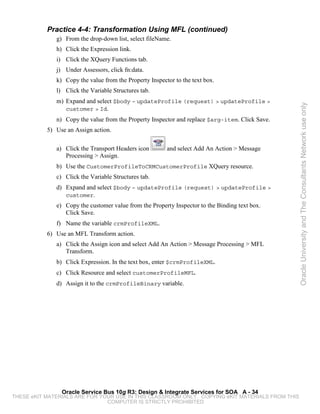
                 Folder. Repeat this step to create folders named “business services” and
                 “WSDLs.”


                 Oracle Service Bus 10g R3: Design & Integrate Services for SOA A - 10
THESE eKIT MATERIALS ARE FOR YOUR USE IN THIS CLASSROOM ONLY. COPYING eKIT MATERIALS FROM THIS
                               COMPUTER IS STRICTLY PROHIBITED
Practice 3-1: Simple Routing (continued)
           3) Add a WSDL resource.
              a) Click the WSDLs directory that you just created.
              b) Select WSDL from the Create Resource drop-down list.
              c) Use the name CustomerServiceWSDL.
              d) Click Browse and navigate to /student/practices/practice3-
                  1/exercise/CustomerService.wsdl.
              e) Click Save.


                                                                                                 Oracle University and The Consultants Network use only
           4) Create a business service.
              a) In the left pane, click the “business services” link under CRM.
              b) Select Business Service from the Create Resource drop-down list.
              c) Use the name CustomerService.
              d) For Service Type, select WSDL Web Service and click Browse.
              e) Select CustomerServiceWSDL.
              f) Select CustomerServiceSoapPort and click Submit.
              g) Click Next, click Last, and then click Save.
           5) Create a proxy service.
              a) In the left pane, click the “proxy services” link under CRM.
              b) Select Proxy Service from the Create Resource drop-down list.
              c) Use the name CustomerService_proxy.
              d) For Service Type, select Business Service and click Browse.
              e) Select CustomerService and click Submit.
              f) Click Last, and then click Save.


                Oracle Service Bus 10g R3: Design & Integrate Services for SOA A - 11
THESE eKIT MATERIALS ARE FOR YOUR USE IN THIS CLASSROOM ONLY. COPYING eKIT MATERIALS FROM THIS
                               COMPUTER IS STRICTLY PROHIBITED
Practice 3-1: Simple Routing (continued)
           6) Activate and test your configuration.
              a) In the left pane, click the Activate button.
              b) Optionally, enter a description (practice 3-1 completed for example) and click
                 Submit.
              c) In the left pane, click the “proxy services” link under CRM.

              d) Click       to launch the Test Console.
              e) Leave the default data and click the Execute button.


                                                                                                  Oracle University and The Consultants Network use only
              f) Check the response document to ensure that there is no error.


                Oracle Service Bus 10g R3: Design & Integrate Services for SOA A - 12
THESE eKIT MATERIALS ARE FOR YOUR USE IN THIS CLASSROOM ONLY. COPYING eKIT MATERIALS FROM THIS
                               COMPUTER IS STRICTLY PROHIBITED
Practice 3-2: Operational Branching
           In this practice, you configure:
               • A message flow
               • A proxy service to use operational branching

           Design
           In this practice, you modify a proxy service’s message flow for the first time.
           OrderManagementService needs to be exposed to the enterprise. This service has two
           methods that are exposed to the enterprise: getOrdersForCustomer and


                                                                                                 Oracle University and The Consultants Network use only
           getOrderStatus. In this practice, you create an operational branch structure, where
           each method gets its own branch. Currently, you only route the service onto the
           appropriate method on OrderManagementService. (The reason for this is that you are
           yet to learn the advanced actions. Remember that when you learn the more advanced
           actions, you can apply them to these earlier practices.) Figure 2 shows the final
           configuration of the operational branch that you create.


           Figure 2: Completed Operational Branch Configuration
           1) Create and configure the order project.
              a) Make sure that you have started your servers.
              b) Open a Web browser and navigate to the Oracle Service Bus Administration
                 Console at http://localhost:7061/sbconsole (you may already have it
                 open).
              c) Log in using weblogic/weblogic as the username/password.
              d) Click the Project Explorer link in the left pane.
              e) In the Change Center, click the Create button.
              f) In the Enter New Project text box, enter Order, and then click Add Project.


                 Oracle Service Bus 10g R3: Design & Integrate Services for SOA A - 13
THESE eKIT MATERIALS ARE FOR YOUR USE IN THIS CLASSROOM ONLY. COPYING eKIT MATERIALS FROM THIS
                               COMPUTER IS STRICTLY PROHIBITED
Practice 3-2: Operational Branching (continued)
              g) Click the link for the Order project that you created.
              h) In the Enter Folder name text box, enter proxy services and click Add
                 Folder. Repeat this step to create folders named “business services” and
                 “WSDLs.”
           2) Import the WSDL.
              a) Click the WSDLs directory that you just created.
              b) Select WSDL from the Create Resource drop-down list.
              c) Use the name OrderManagementServiceWSDL.


                                                                                                 Oracle University and The Consultants Network use only
              d) Click Browse and navigate to /student/practices/practice3-
                  2/exercise/OrderManagementService.wsdl.
              e) Click Save.
           3) Create a business service from OrderManagementServiceWSDL in the Order
              project.
              a) Name: OrderManagementService
              b) Service Type: WSDL Web Service
              c) Port: OrderManagementServiceSoapPort
           4) Create a proxy service from the OrderManagementService business service in the
              Order project.
              a) Name: OrderManagementService_proxy
              b) Service Type: Create from Existing Service
              c) Business Service: OrderManagementService
           5) Configure the message flow to use an operational branch.

              a) Click     to edit the message flow of the proxy service.
              b) Delete the existing route node by clicking it and selecting Delete.
              c) Click OrderManagementService_proxy and select Add Operational Branch.

              d) Click the Branch Node          icon, and then select Edit Branch.
              e) From the Service Operation drop-down list, select getOrdersForCustomer,
                  and then click the Add Branch      icon.
              f) From the Service Operation drop-down list, select getOrderStatus.
              g) Click Save.
              h) Click Save again to save the Message Flow configuration and activate your
                 changes.
           6) Test both branches of your proxy service.


                Oracle Service Bus 10g R3: Design & Integrate Services for SOA A - 14
THESE eKIT MATERIALS ARE FOR YOUR USE IN THIS CLASSROOM ONLY. COPYING eKIT MATERIALS FROM THIS
                               COMPUTER IS STRICTLY PROHIBITED
Practice 3-2: Operational Branching (continued)
              a) Launch the Test Console.
              b) Test both operations. You can switch operations by using the drop-down list at the
                 top. Valid entries for getOrderStatus are 1001,1002, and 1003. Valid entries
                 for getOrdersForCustomer are 1, 2, and 3.


                                                                                                      Oracle University and The Consultants Network use only


                Oracle Service Bus 10g R3: Design & Integrate Services for SOA A - 15
THESE eKIT MATERIALS ARE FOR YOUR USE IN THIS CLASSROOM ONLY. COPYING eKIT MATERIALS FROM THIS
                               COMPUTER IS STRICTLY PROHIBITED
Practice 3-3: Conditional Branching
           In this practice, you:
               • Create a proxy service from a WSDL
               • Configure a conditional branch in a message flow

           Design
           In this practice, you create a conditional branch for a proxy service to retrieve an
           advertisement for a user depending on whether or not the user is a member of the site.
           The incoming message has an attribute called member that contains a Boolean value.


                                                                                                    Oracle University and The Consultants Network use only
           Your conditional branch branches on the member value and calls the appropriate
           advertisement service for the user. The final configuration can be seen in Figure 3.


           Figure 3: Conditional Branch Solution


           1) Create and configure the Ads project.
               a) Click the Project Explorer link in the left pane.
               b) In the Change Center, click the Create button.
               c) In the Enter New Project text box, enter Ads, and then click Add Project.
               d) Click the link for the Ads project that you created.
               e) In the Enter Folder name text box, enter proxy services and click Add Folder.
                  Repeat this step to create folders named “business services” and “WSDLs.”
           2) Import the WSDL for the Advertisement service.
               a) Click the WSDLs directory that you just created.
               b) From the Create Resource drop-down list, select WSDL.
               c) Use the name AdvertisementServiceWSDL.
               d) Click Browse and navigate to /student/practices/practice3-
                   3/exercise/AdvertisementService.wsdl.
               e) Click Save.
               f) Use the same process and add a WSDL resource for
                   /student/practices/practice3-
                   3/exercise/MemberAdvertisementService.wsdl.


                 Oracle Service Bus 10g R3: Design & Integrate Services for SOA A - 16
THESE eKIT MATERIALS ARE FOR YOUR USE IN THIS CLASSROOM ONLY. COPYING eKIT MATERIALS FROM THIS
                               COMPUTER IS STRICTLY PROHIBITED
Practice 3-3: Conditional Branching (continued)
              g) Use the same process and add a WSDL resource for
                  /student/practices/practice3-
                  3/exercise/RegularAdvertisementService.wsdl.
           3) Create a business service from MemberAdvertisementServiceWSDL in the Ads
              project.
              a) Name: MemberAdvertisementService
              b) Service Type: WSDL Web Service
              c) Port: MemberAdvertisementSoapPort


                                                                                                 Oracle University and The Consultants Network use only
           4) Create a business service from RegularAdvertisementServiceWSDL in the Ads
              project.
              a) Name: RegularAdvertisementService
              b) Service Type: WSDL Web Service
              c) Port: RegularAdvertisementSoapPort
           5) Create a proxy service from the AdvertisementService business service in the
              Ads project.
              a) Name: AdvertisementService_proxy
              b) Service Type: WSDL Web Service
              c) Port: AdvertisementSoapPort
           6) Configure the message flow to use an operational branch.

              a) Click     to edit the message flow of the proxy service.
              b) Click AdvertisementService_proxy and select Add Conditional Branch.


              c) Click the Branch Node           icon, and then select Edit Branch.
              d) For the Selected Path, click the Edit link.
              e) In the left pane, click Variable Structures.
              f) From the Select Structure drop-down list, select Body.
              g) Expand $body –getAdvertisement (request) > getAdvertisement >
                 member and select Member.
              h) In the Property Inspector, copy and paste the value to the text box above it.
              i) Click Save.
              j) In the Variable text box, enter body.
              k) Select the ‘=’ operator.
              l) For value, enter ‘true’ (make sure to use the single quotation marks).
              m) Label the branch isMember.


                Oracle Service Bus 10g R3: Design & Integrate Services for SOA A - 17
THESE eKIT MATERIALS ARE FOR YOUR USE IN THIS CLASSROOM ONLY. COPYING eKIT MATERIALS FROM THIS
                               COMPUTER IS STRICTLY PROHIBITED
Practice 3-3: Conditional Branching (continued)
              n) Click Save.
           7) Configure the isMember branch.
              a) Click the isMember link.


              b) Click the Branch icon         and select Add Route.
              c) Click Route Node1 and select Edit Route.
              d) Click the “Add an Action” link and select Communication > Routing.


                                                                                                 Oracle University and The Consultants Network use only
              e) Click the Service link and select MemberAdvertisementService. Click
                 Submit.
              f) Click Invoking Operation, select the getAdvertisement method, and then click
                 Save.
           8) Configure the default branch.
              a) In the left pane, click the Default Branch link.


              b) Click the Default branch icon         and select Add Route.
              c) Click the Route node and select Edit Route.
              d) Click the “Add an Action” link and select Communication > Routing.
              e) Click the Service link and select RegularAdvertisementService.
              f) Select the getAdvertisement method and click Save.
              g) Click Save All.
              h) Activate your changes.


                Oracle Service Bus 10g R3: Design & Integrate Services for SOA A - 18
THESE eKIT MATERIALS ARE FOR YOUR USE IN THIS CLASSROOM ONLY. COPYING eKIT MATERIALS FROM THIS
                               COMPUTER IS STRICTLY PROHIBITED
Practice 3-3: Conditional Branching (continued)
           9) Test both branches of your proxy service.
              a) Launch the Test Console.
              b) Test both operations by setting the member value to both true and false.


                                                                                                 Oracle University and The Consultants Network use only


                Oracle Service Bus 10g R3: Design & Integrate Services for SOA A - 19
THESE eKIT MATERIALS ARE FOR YOUR USE IN THIS CLASSROOM ONLY. COPYING eKIT MATERIALS FROM THIS
                               COMPUTER IS STRICTLY PROHIBITED
Practices for Lesson 4


           In the practices for this lesson, you use more of the different actions to manipulate
           messages and route messages. In the first two practices, you use two new ways to route
           messages by using a Routing Table and a Publish node. In the next set of practices, you
           learn how to create and use transformations. You create the transformations in Oracle
           WebLogic Workshop, and then import them into the OSB Console. In the last set of
           practices, you use both types of callouts (Service and Java) in a message flow of a proxy


                                                                                                       Oracle University and The Consultants Network use only
           service.


                Oracle Service Bus 10g R3: Design & Integrate Services for SOA A - 20
THESE eKIT MATERIALS ARE FOR YOUR USE IN THIS CLASSROOM ONLY. COPYING eKIT MATERIALS FROM THIS
                               COMPUTER IS STRICTLY PROHIBITED
Practice 4-1: Using a Routing Table
           In this practice, you:
               • Create and configure a Routing Table
               • Use the Log action

           Design
           Your business has the ability to ship services to customers through different vendors:
           UPS, Federal Express, and the local postal service. In this practice, you create a Routing
           Table that routes the order to the appropriate vendor based on the ShippingType value


                                                                                                         Oracle University and The Consultants Network use only
           from the incoming message.
           As you have done in the previous practices, you create a new project and import a
           WSDL. In this practice, however, you create a proxy service directly from the WSDL
           because it contains the interface that you want to expose. You also create a business
           service to test that your branching is working properly; the test service echoes back which
           shipping type was used. The reason that you are not accessing the different shipping
           services directly is because they require you to perform transformations that have not
           been discussed yet. In a future practice, you integrate all the parts that you created.

           The result of your message flow configuration can be seen in Figure 4.


                Oracle Service Bus 10g R3: Design & Integrate Services for SOA A - 21
THESE eKIT MATERIALS ARE FOR YOUR USE IN THIS CLASSROOM ONLY. COPYING eKIT MATERIALS FROM THIS
                               COMPUTER IS STRICTLY PROHIBITED
Practice 4-1: Using a Routing Table (continued)


                                                                                                 Oracle University and The Consultants Network use only
           Figure 4: Completed Routing Table
           1) Create the Shipping project.
              a) In the OSB Administration Console, create a new project called Shipping.
              b) Create subfolders named business services, proxy services, and WSDLs.
           2) Import WSDLs.
              a) Navigate to the WSDL folder for the Shipping project.
              b) Add a WSDL resource named OrderServiceWSDL from the
                  /student/practices/practice4-1/exercise/OrderService.wsdl
                  file.


                 Oracle Service Bus 10g R3: Design & Integrate Services for SOA A - 22
THESE eKIT MATERIALS ARE FOR YOUR USE IN THIS CLASSROOM ONLY. COPYING eKIT MATERIALS FROM THIS
                               COMPUTER IS STRICTLY PROHIBITED
Practice 4-1: Using a Routing Table (continued)
           3) Create a business service from OrderService.wsdl in the Shipping project. This
              is the test service. Use the following properties:
              a) Name: ShippingTestService
              b) Service Type: WSDL Web Service
              c) WSDL: OrderServiceWSDL
              d) Port: OrderSoapPort
           4) Create a proxy service from the business service that you just created with the
              following values:


                                                                                                 Oracle University and The Consultants Network use only
              a) Name: ShippingService_proxy
              b) Service Type: Create from an Existing Service
              c) Business Service: ShippingTestService
           5) Add the Routing Table to the message flow.

              a) Click      to edit the message flow of the proxy service.
              b) Click the existing Route node and select Edit Route.

              c) Click the Action icon          and select Delete this Action.
              d) Click the “Add an Action” link and select Communication > Routing Table.
              e) Click the Expression link.
              f) In the left pane, click Variable Structures.
              g) From the select structure drop-down list, select “body.”
              h) Expand $body – shipOrder (request) > shipOrder > ord and select
                 Shipping Type.
              i) In the Property Inspector, copy and paste the value to the text box above it.
              j) Click Save.
           6) Add the case statements to the Routing Table.
              a) Select “=” as the operator.
              b) Enter ‘ups’ in the text box.
              c) Click the Service link and select ShippingTestService. Click Submit.
              d) Select shipOrder as the operation.


              e) Click the Branch icon        and select Insert New Case.
              f) Repeat steps a through d, this time use the value fedex.
              g) Click the Branch icon for your new branch and select Insert Default Case.
              h) Route this branch to ShippingTestService.


                Oracle Service Bus 10g R3: Design & Integrate Services for SOA A - 23
THESE eKIT MATERIALS ARE FOR YOUR USE IN THIS CLASSROOM ONLY. COPYING eKIT MATERIALS FROM THIS
                               COMPUTER IS STRICTLY PROHIBITED
Practice 4-1: Using a Routing Table (continued)
           7) Add logging actions.
              a) In your first branch, under Request Actions, click the “Add an Action” link and
                 select Reporting > Log.
              b) For Expression, select ShippingType as you did before in steps 5f–5j.
              c) In the Annotation text box, insert <<< In the UPS Branch >>>.
              d) Set the Severity Level to Warning.
              e) Repeat step 7 and add logging actions for fedex and the default branch.


                                                                                                          Oracle University and The Consultants Network use only
              f) When completed, click Save, and then click Save again. Activate your changes.
           8) Test your configuration.
              a) Launch the Test Console for ShippingService_proxy.
              b) Enter data and test each branch by changing the ShippingType to ups, fedex, or
                 local (for default). You should see the result of the Log action in the terminal shell
                 with the OSB server running inside it.


                Oracle Service Bus 10g R3: Design & Integrate Services for SOA A - 24
THESE eKIT MATERIALS ARE FOR YOUR USE IN THIS CLASSROOM ONLY. COPYING eKIT MATERIALS FROM THIS
                               COMPUTER IS STRICTLY PROHIBITED
Practice 4-2: Using a Publish Node
           In this practice, you publish to a service asynchronously.

           Design
           In this practice, you learn to use OSB asynchronously by using a Publish node within a
           message flow. Figure 5 shows the architecture of the pieces that you create or use in this
           practice. ServicesDomain contains some services for you to use—for example,
           ProcessOrderService (which for this practice returns nothing) and
           WarehouseFulfillmentQueue (the destination of your published messages). Also not


                                                                                                        Oracle University and The Consultants Network use only
           shown in the diagram is a Message-Driven Enterprise JavaBeans (EJB) that takes
           messages off WarehouseFulfillmentQueue and writes them to a file. You will be
           responsible for creating the proxy and business services on OSBDomain and configuring
           the message flow to use a Publish node.


           Figure 5: Process Order Architecture


           1) Create a business service using Java Message Service (JMS).
               a) Start a change session by clicking Create in the Change Center.
               b) In the Project Explorer, go to the Order project and the business services folder.
               c) Create a business service named WarehouseFulfillmentQueue. This time,
                  select Messaging Service. (In the past, you chose WSDL Web Service.)
               d) Continue to create the service using the following properties:
                   i) RequestMessage Type: Text
                   ii) Protocol: jms
                   iii) Endpoint URI:
                       jms://localhost:7051/mycompany.jms.OrderConnectionFactory
                       /mycompany.jms.WarehouseFulfillmentQueue (Make sure you click
                       the Add button.)
                   iv) Message Type: Text


                 Oracle Service Bus 10g R3: Design & Integrate Services for SOA A - 25
THESE eKIT MATERIALS ARE FOR YOUR USE IN THIS CLASSROOM ONLY. COPYING eKIT MATERIALS FROM THIS
                               COMPUTER IS STRICTLY PROHIBITED
Practice 4-2: Using a Publish Node (continued)
           2) Import WSDL.
              a) Import the ProcessOrderService.wsdl file from
                 /student/practices/practice4-2 to the WSDLs folder in the Order project.
           3) Create a business service from ProcessOrderService.wsdl in the Order project.
              a) Name: ProcessOrderService
              b) Service Type: WSDL Web Service
              c) Port: ProcessOrderServiceSoapPort


                                                                                                 Oracle University and The Consultants Network use only
           4) Create a proxy service from the ProcessOrderService business service in the
              Order project.
              a) Name: ProcessOrderService_proxy
              b) Service Type: Business Service
              c) Port: ProcessOrderService
           5) Configure the message flow.

              a) Click     to edit the message flow of the proxy service.
              b) Click the existing Route node and select Edit Route.
              c) Click the “Add an Action” link and select Communication > Publish.
              d) Click the Service link and select WarehouseFulfillmentQueue.
              e) Save all your changes and activate your configuration.
           6) Test your configuration.
              a) Launch the Test Console for ProcessOrderService_proxy.
              b) Fill in values and execute an order.
              c) Examine the file system by using the File Manager and navigate to
                 /student/domains/ServicesDomain/orders. This is the place to which
                 the message-driven bean (MDB) writes the orders.


                Oracle Service Bus 10g R3: Design & Integrate Services for SOA A - 26
THESE eKIT MATERIALS ARE FOR YOUR USE IN THIS CLASSROOM ONLY. COPYING eKIT MATERIALS FROM THIS
                               COMPUTER IS STRICTLY PROHIBITED
Practice 4-3: Transformation Using an XQuery File
           In this practice, you:
               • Create an XQuery transformation
               • Use an XQuery transformation in OSB

           Design
           In the “Using a Routing Table” practice, you configured a Routing Table to route
           messages to the appropriate shipping method for a customer’s order. At that time, you
           had not discussed how to use transformations with OSB and you used a test service to


                                                                                                         Oracle University and The Consultants Network use only
           confirm that the different branches worked. Now you configure the actual services and
           the transformations for those services.
           You first use the XQuery mapper in WebLogic Workshop to create the appropriate
           transformations for each of the shipping services. You then import the WSDLs and the
           transformations that you created into OSB and create business services for each of the
           different shipping methods. Finally, you edit the proxy service that you originally created
           to use the transformations and route to the appropriate services. The solution to the UPS
           branch can be seen in Figure 6. The other branches are similar to this one.


           Figure 6: UPS Branch Solution


           1) Open WebLogic Workshop and create the necessary projects.
              a) Click the startWorkshop link on your desktop.
              b) Click File > New Project > Oracle Service Bus and select Oracle Service Bus
                 Configuration Project.
              c) Name the project OSB Configuration.
              d) Right-click OSB Configuration and select New > Project > Oracle Service Bus >
                 Oracle Service Bus Project.
              e) Name the project Transformations.


                 Oracle Service Bus 10g R3: Design & Integrate Services for SOA A - 27
THESE eKIT MATERIALS ARE FOR YOUR USE IN THIS CLASSROOM ONLY. COPYING eKIT MATERIALS FROM THIS
                               COMPUTER IS STRICTLY PROHIBITED
Practice 4-3: Transformation Using an XQuery File (continued)
           2) Import resources.
              a) Right-click Transformations and select New > Folder. Name the folder WSDL.
              b) Right-click Transformations and select New > Folder. Name the folder
                 transforms.
              c) Right-click the WSDL folder and select Import > Import.
              d) Select File System.
              e) Click Browse and select /student/practices/practice4-3/exercise.
                 (There should be four files.)


                                                                                                   Oracle University and The Consultants Network use only
              f) Select each of the files in the exercise directory.
              g) Click Finish.
           3) Create the transformation for LocalShippingService.
              a) Right-click the transforms folder and select New > XQuery Transformation.
              b) Name the file LocalTransform.
              c) Expand Transformations > WSDL > OrderService.wsdl.
              d) Highlight shipOrder and click Add. Click Next.
              e) Expand Transformations > WSDL >
                 LocalShippingServiceService.wsdl.
              f) Highlight shipOrder and click Add. Click Finish.
              g) Map the elements from the source to their corresponding elements in the target.
           4) Create the transformation for UPSService.
              a) Right-click the transforms folder and select New > XQuery Transformation.
              b) Name the file UPSTransform.
              c) As before, use shipOrder from the OrderService as the source.
              d) This time, select shipOrder in UPSShippingServiceService as the target.
              e) Map the elements from the source to their corresponding target elements.


                Oracle Service Bus 10g R3: Design & Integrate Services for SOA A - 28
THESE eKIT MATERIALS ARE FOR YOUR USE IN THIS CLASSROOM ONLY. COPYING eKIT MATERIALS FROM THIS
                               COMPUTER IS STRICTLY PROHIBITED
Practice 4-3: Transformation Using an XQuery File (continued)
           5) Create the transformation for FedExShippingService.
              a) Right-click the transforms folder and select Data Transformation > XQuery
                 Transformation.
              b) Name the file FedExTransform.
              c) As before, use shipOrder from the OrderService as the source.
              d) This time, select shipOrder in FedExShippingServiceService as the
                 target.
              e) Map the elements from the source to their corresponding target elements. Note


                                                                                                  Oracle University and The Consultants Network use only
                 that the fedex schema has only a Name field. To concatenate the FirstName
                 and LastName fields, drag them one at a time to the Name field.
           6) Export the XQuery files.
              a) Right-click the transforms directory and select Export.
              b) Expand General and select File System.
              c) Make sure that all the three transforms are selected.
              d) Click Browse and select /student as the directory. Click Finish. You can close
                 Workshop.
           7) Import Resources into OSB.
              a) Import each of the WSDL files from /student/practices/practice4-3 to
                 the WSDLs folder in the Shipping project. (You should import three files.)
              b) Create a folder called transformations in the Shipping project.
              c) Import each of the transformation files that you created from
                 /student/transforms to the transformations folder in the Shipping project.
           8) Create business services for the shipping services.
              a) Create a business service from FedExShippingServiceService.wsdl in the
                 Shipping project.
                  i) Name: FedExShippingService
                  ii) Service Type: WSDL Web Service
                  iii) Port: FedExShippingServiceSoapPort


                Oracle Service Bus 10g R3: Design & Integrate Services for SOA A - 29
THESE eKIT MATERIALS ARE FOR YOUR USE IN THIS CLASSROOM ONLY. COPYING eKIT MATERIALS FROM THIS
                               COMPUTER IS STRICTLY PROHIBITED
Practice 4-3: Transformation Using an XQuery File (continued)
              b) Create a business service from LocalShippingServiceService.wsdl in the
                 Shipping project.
                 i) Name: LocalShippingBusinessService
                 ii) Service Type: WSDL Web Service
                 iii) Port: LocalShippingServiceSoapPort
              c) Create a business service from UPSShippingServiceService.wsdl in the
                 Shipping project.
                 i) Name: UPSShippingBusinessService


                                                                                                   Oracle University and The Consultants Network use only
                 ii) Service Type: WSDL Web Service
                 iii) Port: UPSShippingServiceSoapPort
           9) Configure the message flow for ShippingService_proxy.
              a) Click the Message Flow icon for ShippingService_proxy.
              b) In the Practice 4-1, you connected to a test service. Modify each branch of the
                 Routing Table to route to the appropriate service (UPS, FedEx, or local).
              c) In the UPS branch, click the Log action and select “Add an Action” > Message
                 Processing > Assign.
              d) Click the Expression link.
              e) Click the XQuery Resources link.
              f) Click Browse and select the UPS XQuery transformation.
              g) Click the Variable Structures tab and select “body.”
              h) Expand body > $body – shipOrder(request) and select shipOrder.
              i) Copy the value from the Property Inspector to the Binding text box. Click Save.
              j) Use the variable name transformMsg.
              k) Click the Assign action and select “Add an Action” > Message Processing >
                 Replace.
              l) Click XPath, click the Variable Structures tab, and then select body.
              m) Expand body > $body – shipOrder(request) and select shipOrder.
              n) Copy the value from the Property Inspector to the text box. Click Save.
              o) Use the body variable.
              p) Click Expression. In the text box, use $transformMsg.
              q) Add the Assign and Replace actions to the other two branches and connect them
                 to the appropriate services and transformations.


                Oracle Service Bus 10g R3: Design & Integrate Services for SOA A - 30
THESE eKIT MATERIALS ARE FOR YOUR USE IN THIS CLASSROOM ONLY. COPYING eKIT MATERIALS FROM THIS
                               COMPUTER IS STRICTLY PROHIBITED
Practice 4-3: Transformation Using an XQuery File (continued)
           10) Test your application and test each branch in the Routing Table.
              Note: For the most part, the data does not matter except for shippingType. And when
              you use the UPS service, make sure to use a valid integer. The return value looks
              something like the following:
                  <m:return>sg2c034014-b205-4120-8427-dfaba222917f</m:return>


                                                                                                    Oracle University and The Consultants Network use only


                Oracle Service Bus 10g R3: Design & Integrate Services for SOA A - 31
THESE eKIT MATERIALS ARE FOR YOUR USE IN THIS CLASSROOM ONLY. COPYING eKIT MATERIALS FROM THIS
                               COMPUTER IS STRICTLY PROHIBITED
Practice 4-4: Transformation Using MFL
           In this practice, you:
               • Create a business service that uses the file protocol
               • Use the Transport Headers action
               • Use the Message Format Language (MFL) Transform action

           Design
           In this practice, you use an MFL transformation to turn the submitted XML data into a
           binary format that the corporate customer relationship management (CRM) system can


                                                                                                           Oracle University and The Consultants Network use only
           understand. In this instance, the CRM system will be implemented via a file format, and
           when the practice is completed, you should see the output files.


           You first register a new business service that uses the file protocol and specify a directory
           where the files should go. You then create a proxy service based on a provided WSDL to
           expose the service into the enterprise. The message flow for the proxy service first uses
           the Transport Header action to put the ID for the customer in the header, which is used to
           generate the name of the file. Next, you use an Assign action as you have in the past and
           you run an XQuery transformation that converts the incoming XML format to the XML
           format expected by the MFL Transform. After the message is in the correct format, you
           convert it from XML to binary by using an MFL transform. Then you just need to replace
           the body of the message with the binary that you created. The completed message flow
           configuration can be seen in Figure 7.


           Figure 7: Transformation Solution


                 Oracle Service Bus 10g R3: Design & Integrate Services for SOA A - 32
THESE eKIT MATERIALS ARE FOR YOUR USE IN THIS CLASSROOM ONLY. COPYING eKIT MATERIALS FROM THIS
                               COMPUTER IS STRICTLY PROHIBITED
Practice 4-4: Transformation Using MFL (continued)
           1) Import the resources used for this practice.
              a) In the CRM project, add a new folder called schemas.
              b) In the schemas folder, add an MFL file.
                  i) Name: CustomerProfileMFL
                  ii) Location: student/practices/practice4-
                      4/exercise/CustomerProfile.mfl
              c) Create a transformations folder in the CRM project.


                                                                                                 Oracle University and The Consultants Network use only
              d) In the transformations folder, add an XQuery file.
                  i) Name: CustomerToCRM
                  ii) Location: student/practices/practice4-
                      4/exercise/CustomerProfileToCRMCustomerProfile.xq
              e) Import the student/practices/practice4-
                  4/exercise/CustomerProfileService_proxy.wsdl file to the WSDLs
                  folder.
           2) Create a new file-based business service in the CRM project.
              a) Name: CRMUpdateProfileService
              b) Service Type: Messaging
              c) Request Message Type: Binary
              d) Protocol: File
              e) Endpoint URI: file:///usr/local/osb/crm (Be sure to click Add.)
              f) Prefix: Customer
              g) Suffix: .txt
           3) Create a proxy service from CustomerProfileService_proxy.wsdl in the CRM
              project.
              a) Name: CustomerProfileService_proxy
              b) Service Type: WSDL Web Service
              c) Port: CustomerProfileServiceSoapPort
           4) Configure the file name using a Transport Header.
              a) Edit the message flow for CustomerProfileService_proxy.
              b) Add a route node.
              c) Edit the route node and add a Routing action.
              d) Select CRMUpdateProfileService.
              e) In Request Actions, click Communications > Transport Headers.
              f) Click Add Header.


                Oracle Service Bus 10g R3: Design & Integrate Services for SOA A - 33
THESE eKIT MATERIALS ARE FOR YOUR USE IN THIS CLASSROOM ONLY. COPYING eKIT MATERIALS FROM THIS
                               COMPUTER IS STRICTLY PROHIBITED
Practice 4-4: Transformation Using MFL (continued)
              g) From the drop-down list, select fileName.
              h) Click the Expression link.
              i) Click the XQuery Functions tab.
              j) Under Assessors, click fn:data.
              k) Copy the value from the Property Inspector to the text box.
              l) Click the Variable Structures tab.
              m) Expand and select $body – updateProfile (request) > updateProfile >


                                                                                                 Oracle University and The Consultants Network use only
                 customer > Id.
              n) Copy the value from the Property Inspector and replace $arg-item. Click Save.
           5) Use an Assign action.

              a) Click the Transport Headers icon        and select Add An Action > Message
                 Processing > Assign.
              b) Use the CustomerProfileToCRMCustomerProfile XQuery resource.
              c) Click the Variable Structures tab.
              d) Expand and select $body – updateProfile (request) > updateProfile >
                 customer.
              e) Copy the customer value from the Property Inspector to the Binding text box.
                 Click Save.
              f) Name the variable crmProfileXML.
           6) Use an MFL Transform action.
              a) Click the Assign icon and select Add An Action > Message Processing > MFL
                 Transform.
              b) Click Expression. In the text box, enter $crmProfileXML.
              c) Click Resource and select customerProfileMFL.
              d) Assign it to the crmProfileBinary variable.


                Oracle Service Bus 10g R3: Design & Integrate Services for SOA A - 34
THESE eKIT MATERIALS ARE FOR YOUR USE IN THIS CLASSROOM ONLY. COPYING eKIT MATERIALS FROM THIS
                               COMPUTER IS STRICTLY PROHIBITED
Practice 4-4: Transformation Using MFL (continued)
           7) Use a Replace action.
              a) Click the MFL Transform icon and select Add An Action > Message Processing >
                 Replace.
              b) Click the XPath link.
              c) Click the Variable Structures tab, and expand the structure and select $body –
                 updateProfile (request) > updateProfile.
              d) Copy the value from the Property Inspector to the text box. Click Save.
              e) Enter body as the variable.


                                                                                                  Oracle University and The Consultants Network use only
              f) Click the Expression link and enter $crmProfileBinary. Click Save.
              g) Save and activate all your changes.
           8) Test your configuration.
              a) Open the test console for your proxy service.
              b) Enter some data and click Execute.
              c) If it is successful, you should see a file generated under /usr/local/osb/crm.


                Oracle Service Bus 10g R3: Design & Integrate Services for SOA A - 35
THESE eKIT MATERIALS ARE FOR YOUR USE IN THIS CLASSROOM ONLY. COPYING eKIT MATERIALS FROM THIS
                               COMPUTER IS STRICTLY PROHIBITED
Practice 4-5: Using a Service Callout
           In this practice, you:
               • Use a Service Callout
               • Modify data in an existing message

           Design
           In this practice, you configure the Payment services for your business. A payment order
           arrives and you need to use an outside credit card verification service before the payment
           can be processed. This requires the use of a Service Callout to access the credit card


                                                                                                          Oracle University and The Consultants Network use only
           validation service. Before you can call the credit card service, you use an XQuery
           transformation to store the information that the service needs in a variable. Next, you call
           the service and store the result, and then modify the original message with whether or not
           the credit card is valid. You can see the final configuration in Figure 8.


           Figure 8: Service Callout
           1) Create the project structure and import resources.
               a) Start a change session.
               b) Create a new project named Payment with subfolders named proxy services,
                  business services, transformations, and WSDLs.
               c) Import all WSDL files from /student/practices/practice4-5/exercise
                  into the WSDL folder.
               d) Import all .xq files from /student/practices/practice4-5/exercise
                  into the transformations folder.


                 Oracle Service Bus 10g R3: Design & Integrate Services for SOA A - 36
THESE eKIT MATERIALS ARE FOR YOUR USE IN THIS CLASSROOM ONLY. COPYING eKIT MATERIALS FROM THIS
                               COMPUTER IS STRICTLY PROHIBITED
Practice 4-5: Using a Service Callout (continued)
           2) Create a business service from CreditCardService.wsdl in the Payment project.
              a) Name: CreditCardService
              b) Service Type: WSDL Web Service
              c) Port: CreditCardServiceSoapPort
           3) Create a business service from PaymentService.wsdl in the Payment project.
              a) Name: PaymentService
              b) Service Type: WSDL Web Service


                                                                                                   Oracle University and The Consultants Network use only
              c) Port: PaymentServiceSoapPort
           4) Create a proxy service from the PaymentService business service in the Payment
              project.
              a) Name: PaymentService_proxy
              b) Service Type: Business Service
              c) Business Service: PaymentService
           5) Add an Assign action.
              a) Edit the message flow, and then select Edit Route.
              b) In Request Actions, click “Add an Action” and select Message Processing >
                 Assign.
              c) Click Expression. Select XQuery Resources and ProcessPaymentXQ.
              d) Click Variable Structures. Expand the structure and select ProcessPayment. Copy
                 the value from the Property Inspector to the Binding text box. Click Save.
              e) Enter validateCardRequest as the variable.
           6) Add a Service Callout action.
              a) Click the Assign action and select “Add an Action” > Communication > Service
                 Callout.
              b) Select CreditCardService and invoke validateCard.
              c) Use validateCardRequest as the request document variable.
              d) Use validateCardResponse as the response document variable.


                Oracle Service Bus 10g R3: Design & Integrate Services for SOA A - 37
THESE eKIT MATERIALS ARE FOR YOUR USE IN THIS CLASSROOM ONLY. COPYING eKIT MATERIALS FROM THIS
                               COMPUTER IS STRICTLY PROHIBITED
Practice 4-5: Using a Service Callout (continued)
           7) Add an Assign action to the Response action of the Service Callout.
              a) Expression: fn:data($validateCardResponse/ser:return)
              b) Variable: validateCardResponseValue
           8) Add a Replace after the Service Callout action.
              a) XPath:
                  ./ser:processPayment/ser:order/java:CreditCard/java:Validat
                  ed
              b) Variable: body


                                                                                                   Oracle University and The Consultants Network use only
              c) Expression: $validateCardResponseValue
              d) Select Replace Node Contents.
           9) Save and activate all your changes.
           10) Test your configuration.
              a) Launch the Test Console for the proxy service.
              b) The following conditions will cause the card to fail: empty Cardholder or empty
                 Number fields. The service itself causes a failure 10 percent of the time.


                Oracle Service Bus 10g R3: Design & Integrate Services for SOA A - 38
THESE eKIT MATERIALS ARE FOR YOUR USE IN THIS CLASSROOM ONLY. COPYING eKIT MATERIALS FROM THIS
                               COMPUTER IS STRICTLY PROHIBITED
Practice 4-6: Using a Java Callout
           In this practice, you:
               • Use a Java callout
               • Use the JMS and file protocols

           Design
           As part of buying a product, your business wants to send a confirmation email to each
           customer; this is an activity that can be done asynchronously. The text of the email is
           generic and a Java class has been written that creates the email text based on the customer


                                                                                                            Oracle University and The Consultants Network use only
           ID and an order ID. After the email is generated, it is ready to be sent to the customer.
           You first import the Java Archive (JAR) file that contains the Java class that generates
           the email and an XML schema that refers to the format of the incoming messages. You
           then create the business service that is responsible for sending the email. For this practice,
           you use the file protocol again, but if you know the appropriate settings you could use the
           email protocol. Next, you create a proxy service that uses the JMS protocol to listen on a
           queue for incoming requests. You configure the message flow to call the Java Callout
           object, and then route it to the email service. You can see the resulting message flow in
           Figure 9.


           Figure 9: ConfirmationEmail_proxy Message Flow


           1) Import the needed resources.
              a) In the Order project, add a folder named schemas.
              b) Import /student/practices/pracitce4-
                 6/exercise/OrderConfirmation.xsd to the schemas folder.
              c) Create a folder named java in the Order project.


                 Oracle Service Bus 10g R3: Design & Integrate Services for SOA A - 39
THESE eKIT MATERIALS ARE FOR YOUR USE IN THIS CLASSROOM ONLY. COPYING eKIT MATERIALS FROM THIS
                               COMPUTER IS STRICTLY PROHIBITED
Practice 4-6: Using a Java Callout (continued)
              d) Import /student/practices/practice4-
                 6/exercise/OrderUtilities.jar to the java folder.
           2) Create a new file-based business service in the Order project.
              a) Name: EmailService
              b) Service Type: Messaging
              c) Request Message Type: Text
              d) Protocol: File


                                                                                                 Oracle University and The Consultants Network use only
              e) Endpoint URI: file:///usr/local/osb/email (Be sure to click Add.)
              f) Prefix: email
              g) Suffix: .txt
           3) Create a new proxy service in the Order project with the following details:
              a) Name: ConfirmationEmailQueue_proxy
              b) Service Type: Messaging
              c) Request Message Type: XML
              d) XML Schema: OrderConfirmation (element)
              e) Protocol: JMS
              f) Endpoint URI:
                  jms://localhost:7051/mycompany.jms.OrderConnectionFactory/m
                  ycompany.jms.ConfirmationEmailQueue
              g) Destination Type: Queue
           4) Configure the message flow.
              a) Add a Route node, and then edit it.
              b) Add a Routing node and route it to EmailService.
              c) Add a Transport Header action to Request Actions.
              d) Add a new header with the following values:
                  i) Select file > fileName.
                  ii) Expression: fn:data($body/ord:OrderConfirmation/ord:OrderID)
                  iii) Request Message Type: Text

              e) Click the Transport Headers icon         and add a Message Processing > Java
                 Callout action.
              f) Click the Method link and select Order Utilities.
              g) Expand OrderEmailManager and select the
                 generateConfirmationMessage method. Click Submit.


                Oracle Service Bus 10g R3: Design & Integrate Services for SOA A - 40
THESE eKIT MATERIALS ARE FOR YOUR USE IN THIS CLASSROOM ONLY. COPYING eKIT MATERIALS FROM THIS
                               COMPUTER IS STRICTLY PROHIBITED
Practice 4-6: Using a Java Callout (continued)
              h) For the parameters, click the expression for each and use the fn:data() method
                 for the CustomerID for one and OrderID for the other.
              i) Use the emailMessage variable name as the result value.
              j) Add a Replace node using the following properties:
                  i) XPath: ./ord:OrderConfirmation
                  ii) Variable: body
                  iii) Expression: $emailMessage


                                                                                                  Oracle University and The Consultants Network use only
              k) Save and activate all your changes.
           5) Test your configuration.
              a) Launch the Test Console for ConfirmationEmailQueue_proxy.
              b) Enter some data (integers) and click Execute.
              c) Your confirmation email should be in usr/local/osb/email.


                Oracle Service Bus 10g R3: Design & Integrate Services for SOA A - 41
THESE eKIT MATERIALS ARE FOR YOUR USE IN THIS CLASSROOM ONLY. COPYING eKIT MATERIALS FROM THIS
                               COMPUTER IS STRICTLY PROHIBITED
Practices for Lesson 5


           In the practices for this lesson, you work with error handling, validation, and reporting. In
           the first practice, you validate an incoming request against an XML schema and if there is
           an issue, you raise an error. In the next practice, you use a Reporting action if there is an
           error and you then view the reports that you create in the OSB Console.


                                                                                                           Oracle University and The Consultants Network use only


                 Oracle Service Bus 10g R3: Design & Integrate Services for SOA A - 42
THESE eKIT MATERIALS ARE FOR YOUR USE IN THIS CLASSROOM ONLY. COPYING eKIT MATERIALS FROM THIS
                               COMPUTER IS STRICTLY PROHIBITED
Practice 5-1: Error Handling and Validation
           In this practice, you:
               • Use a Validate action
               • Create and use error handlers

           Design
           In this practice, you add error handling and validation logic to the
           OrderManagementService_proxy proxy service. This is the service that you
           configured in an earlier practice to use an operational branch. In the


                                                                                                        Oracle University and The Consultants Network use only
           getOrdersForCustomer branch, you first add a Validate action to make sure that
           the incoming message matches the correct schema. It is also possible that the order itself
           is not for a valid user; therefore, you create an error handler to handle this. For this
           practice, you use the Log action to write out to the server console but remember that you
           could use any of the actions that have been covered to perform more complex activities.
           You also add the same error handler for the getOrderStatus method. Figure 10
           shows the addition of the Validate action.


           Figure 10: Validate Action
           1) Add a validate node to getOrdersForCustomer.
               a) Open the message flow for OrderManagementService_proxy from the Order
                  project.
               b) Click the getOrdersForCustomer branch, and then edit the Route node.
               c) Click “Add an Action” and select Message Processing > Validate.
                   i)   XPath: ./ser:getOrdersForCustomer/ser:customer
                   ii) Variable: body
                   iii) Resource: OrderManagementServiceWSDL
                   iv) Type: Customer
               d) Click Save.


                 Oracle Service Bus 10g R3: Design & Integrate Services for SOA A - 43
THESE eKIT MATERIALS ARE FOR YOUR USE IN THIS CLASSROOM ONLY. COPYING eKIT MATERIALS FROM THIS
                               COMPUTER IS STRICTLY PROHIBITED
Practice 5-1: Error Handling and Validation (continued)
           2) Configure an error handler for the getOrdersForCustomer branch.
              a) Click the Route node and select Add Route Error Handler.
              b) Click Error Handler and select Add Stage. Then click the stage and select Edit
                 Stage.
              c) Add a Reporting > Log action.
                 i) Expression: $fault
                 ii) <<<<<<<>>>>>> (or some other text that will stand out)


                                                                                                  Oracle University and The Consultants Network use only
                 iii) Severity: Warning
              d) Click the Log icon and add a Flow Control > Reply action.
              e) Set the Reply action to use With Failure. Click Save twice.
           3) Configure an error handler for the getOrdersStatus branch.
              a) In the left pane, click getOrderStatus.
              b) Click the Route node and select Add Route Error Handler.
              c) Click Error Handler and select Add Stage. Then click the stage and select Edit
                 Stage.
              d) Add a Reporting > Log action.
                 i) Expression: $fault
                 ii) <<<<<<<>>>>>> (or something that you will be able to see in the in the
                     console)
                 iii) Severity: Warning
              e) Click the Log icon and add a Flow Control > Reply action.
              f) Set the Reply action to use With Failure. Click Save twice.
              g) Click Save All and activate the changes.


                Oracle Service Bus 10g R3: Design & Integrate Services for SOA A - 44
THESE eKIT MATERIALS ARE FOR YOUR USE IN THIS CLASSROOM ONLY. COPYING eKIT MATERIALS FROM THIS
                               COMPUTER IS STRICTLY PROHIBITED
Practice 5-1: Error Handling and Validation (continued)
           4) Test your configuration.
              a) Test the getOrdersForCustomer method to see that your error handler
                 executes by entering an ID that is invalid; currently the only valid IDs are 1, 2, 3,
                 or 4.
              b) Test the validation by removing one of the three elements and invoking the
                 method.
              c) Bonus: Change the expression in the report to show only the fault string and not
                 the whole $fault variable.


                                                                                                         Oracle University and The Consultants Network use only


                Oracle Service Bus 10g R3: Design & Integrate Services for SOA A - 45
THESE eKIT MATERIALS ARE FOR YOUR USE IN THIS CLASSROOM ONLY. COPYING eKIT MATERIALS FROM THIS
                               COMPUTER IS STRICTLY PROHIBITED
Practice 5-2: Using the Reporting Action
           In this practice, you:
               • Add a Report action
               • Use the Condition builder

           Design
           In this practice, you create a report when invalid credit cards are used. Earlier, when you
           created the Payment project, you checked to see whether a credit card is valid or not.
           Now you report when a credit card is not valid. You add a Report action to the message


                                                                                                         Oracle University and The Consultants Network use only
           flow of PaymentService_proxy if the credit card is not valid. Figure 11 shows the If-Then
           statement that you will add, along with the Report action.


           Figure 11: If-Then Statement


           1) Import the resources for this practice.
               a) Import ProcessPaymentRequestToCreditCardReport.xq from
                  /student/practices/practice5-2/exercise to the transformations
                  folder in the Payment project. Name it ProcessCreditCardXQ.
               b) Import the CreditCardReport.xsd schema from
                   /student/practices/practice5-2/exercise to the schemas folder in the
                   Payment project. Name it CreditCardReport.
           2) Add an If-Then statement.
               a) Open the message flow for PaymentService_proxy and edit the Route node.
               b) Click the Replace icon and select Flow Control > If…Then… node.
               c) Click the Condition link.
               d) Click the Builder link.
               e) Click the Variable Structures tab and select body. Then select $body –
                   processPayment(request) > processPayment > order> CreditCard >
                   Validated.
               f) Copy the value from the Property Inspector to the Operand text box.
               g) Set the operator to =.
               h) For the Value, use the XQuery Function fn:false(). (You can either enter this
                  directly into the Value text box or find fn:false()on the XQuery Functions
                  tab.)


                 Oracle Service Bus 10g R3: Design & Integrate Services for SOA A - 46
THESE eKIT MATERIALS ARE FOR YOUR USE IN THIS CLASSROOM ONLY. COPYING eKIT MATERIALS FROM THIS
                               COMPUTER IS STRICTLY PROHIBITED
Practice 5-2: Using the Reporting Action (continued)
              i) Click Add.
              j) Click Save.
              k) Click “Add an Action” and select Reporting > Report.
              l) Click the Expression link.
              m) Click XQuery Resources and select ProcessCreditCardXQ.
              n) Click Variable Structures and select body. Then select $body –
                 processPayment(request) > processPayment.


                                                                                                   Oracle University and The Consultants Network use only
              o) Copy the value from the Property Inspector to the Binding text box. Click Save.
              p) On the Properties tab, click Add Key and use the following properties:
                  i) Name: OrderID
                  ii) XPath: ./ser:processPayment/ser:order/java:Id
                  iii) Variable: body
              q) Save and activate all your changes.
           3) Test your configuration.
              a) Launch the Test Console for PaymentService_proxy.
              b) Run a test where there is either no number or no name.
              c) In the left pane, click the Operations tab.
              d) Under Reporting, click the Message Reporting link.
              e) Examine your report.


                Oracle Service Bus 10g R3: Design & Integrate Services for SOA A - 47
THESE eKIT MATERIALS ARE FOR YOUR USE IN THIS CLASSROOM ONLY. COPYING eKIT MATERIALS FROM THIS
                               COMPUTER IS STRICTLY PROHIBITED
Practices for Lesson 6


           In the practices for this lesson, you explore more advanced topics with Oracle Service
           Bus (OSB). In the first practice, you create a Split-Join configuration to process parts of a
           message in parallel and return one response to a client. In the second practice, you
           configure OSB to use dynamic routing. In this instance, the incoming message must have
           the desired service to use as part of the request so that it can be properly routed. The last
           practice demonstrates how to configure a proxy service to use Representational State


                                                                                                           Oracle University and The Consultants Network use only
           Transfer (REST).


                 Oracle Service Bus 10g R3: Design & Integrate Services for SOA A - 48
THESE eKIT MATERIALS ARE FOR YOUR USE IN THIS CLASSROOM ONLY. COPYING eKIT MATERIALS FROM THIS
                               COMPUTER IS STRICTLY PROHIBITED
Practice 6-1: Implementing the Split-Join Pattern
           In this practice, you use:
               • Workshop to create a Split-Join configuration
               • A Split-Join configuration in the OSB Console

           Design
           In this practice, you create a split-join configuration that can handle multiple order IDs
           and call a service that processes each of those IDs in parallel. After you create this
           configuration, you configure a business service that represents the flow and expose that


                                                                                                        Oracle University and The Consultants Network use only
           business service with a proxy service. Figure 12 shows the architecture that you will
           implement.


           Figure 12: Split-Join Architecture


           1) Open WebLogic Workshop by double-clicking the shortcut named startWorkshop.
           2) Create a new OSB project and import Resources.
               a) Right-click OSB Configuration and select New > Project >Oracle Service Bus >
                  Oracle Service Bus Project.
                   i) Name the project SplitJoin.
               b) Right-click SplitJoin and select New > Folder.
                   i) Name the folder SJ.
                   ii) Create one folder each for WSDL and business service.
               c) Right-click the WSDL folder and select Import > Import.
                   i) Select File System.
                   ii) Navigate to /student/practices/practice6-1/exercise.
                   iii) Select the check boxes for both WSDL files listed and click Finish.


                 Oracle Service Bus 10g R3: Design & Integrate Services for SOA A - 49
THESE eKIT MATERIALS ARE FOR YOUR USE IN THIS CLASSROOM ONLY. COPYING eKIT MATERIALS FROM THIS
                               COMPUTER IS STRICTLY PROHIBITED
Practice 6-1: Implementing the Split-Join Pattern (continued)
           3) Create a business service; this is the service that the Split-Join calls.
              a) Right-click the business service folder and select New > Business Service. Name
                 the business service checkItem.
              b) This should open the business service configuration screen. If not, double-click
                 the created file.
              c) Select WSDL Web Service.
                  i) Click Browse.
                  ii) Expand SplitJoin > WSDL > CheckItemService.wsdl and select


                                                                                                     Oracle University and The Consultants Network use only
                      CheckItemSoapPort (port).
                  iii) Click Yes to override the previous configuration.
           4) Create the Split-Join file.
              a) Right-click the SJ folder and select New > Split-Join
                  i) Name: orderSJ
                  ii) Expand SplitJoin > WSDL > checkOrderService.wsdl > binding:
                      checkOrderServiceSoapBinding, and then select operation: checkOrderItems.
                  iii) Click Finish.
           5) Add the initial Assign action. This action initializes the response document that is
              returned to the client.
              a) From the Design Palette, drag an Assign action below the Receive action.
              b) On the Properties tab, click the Expression link and enter
              <m:checkOrderResponse xmlns:m="http://com/mycompany/confirm">
              </m:checkOrderResponse>.


              c) Select the response.parameters variable.
           6) Add a For Each action. The For Each action is used to iterate over the IDs entered.
              a) From the Design Palette, drag a For Each action below the Assign action.
              b) On the Properties tab, configure the For Each action.
                  i) Parallel: Yes
                  ii) Counter Variable Name: loop
                  iii) Start Counter Value: 1
                  iv) Final Counter Value: count($request.parameters/bind:ids)
           7) Add an Invoke Service action. This is the service that you want to process the ID
              values you send.
              a) From the Design Palette, drag an Invoke Service action and drop it inside the
                 Scope box of the For Each action.


                 Oracle Service Bus 10g R3: Design & Integrate Services for SOA A - 50
THESE eKIT MATERIALS ARE FOR YOUR USE IN THIS CLASSROOM ONLY. COPYING eKIT MATERIALS FROM THIS
                               COMPUTER IS STRICTLY PROHIBITED
Practice 6-1: Implementing the Split-Join Pattern (continued)
              b) On the Properties tab, click Browse and select SplitJoin > business service >
                 checkItem.biz > binding: CheckItemServiceSoapBinding > operation
                 checkItem.
              c) On the Properties tab, click Input Variable.
                  i) Click the Create Message variable and create a variable named input.
              d) On the Properties tab, click Output Variable.
                  i) Click the Create Message variable and create a variable named result.
           8) Add a parameter variable that is used to pass the parameter to the external service.


                                                                                                       Oracle University and The Consultants Network use only
              a) Right-click the Scope icon         and select Create Variable.
                  i) Name: param
                  ii) Type: string
           9) Add an Assign action. This action is used to create the foundation of the message that
              is sent to the external service.
              a) Drag an Assign action inside the Scope box and above the Invoke Service action.
              b) Click the Assign action that you created.
              c) On the Properties tab, click the Expression link and enter
                  <con:checkItem xmlns:con="http://com/mycompany/confirm">
                         <con:id></con:id>
                  </con:checkItem>.
              d) Select the input.parameters variable.
           10) Add a Copy action to get the value of the ID being processed.
              a) Drag a Copy action and place it below the Assign action in the Assign box.
              b) On the Properties tab, configure the Copy action.
                  i) Select From:
                          (1) Choose Type: Expression
                          (2) Expression:string($request.parameters/con:ids[$loo
                              p])
                  ii) Select To:
                          (1) Choose Type: Expression
                          (2) Expression: $param
           11) Add a Replace action to add the parameter value to the outgoing request.
              a) Drag a Replace action and place it after the Copy action in the Assign box.
              b) On the Properties tab, configure the Replace action.
                  i) XPath: ./con:id


                Oracle Service Bus 10g R3: Design & Integrate Services for SOA A - 51
THESE eKIT MATERIALS ARE FOR YOUR USE IN THIS CLASSROOM ONLY. COPYING eKIT MATERIALS FROM THIS
                               COMPUTER IS STRICTLY PROHIBITED
Practice 6-1: Implementing the Split-Join Pattern (continued)
                          (1) Click >>2 and select Namespace Definitions.
                          (2) Click Add.
                              (a) Prefix: con
                              (b) URI: http://com/mycompany/confirm
                              NOTE: You may get a warning stating that the Namespace already
                              exists
                  ii) Variable: input.parameters


                                                                                                      Oracle University and The Consultants Network use only
                  iii) Expression: $param
                  iv) Replace Node Contents.
           12) Add an Insert action to add the result of the Invoked Service to the message that is
               sent back to the client.
              a) Drag an Insert action after the Invoke Service action.
              b) On the Properties tab, configure the Insert action:
                  i) Expression: $result.parameters/bind:return
                  ii) Location: as first child of
                  iii) XPath: .
                  iv) Variable: response.parameters
           13) Save your work.
           14) Export your configuration.
              a) Right-click OSB Configuration and select Export > Oracle Service Bus –
                 Configuration Jar.
              b) Make sure only SplitJoin is selected.
              c) Export Destination: /student/splitjoinConfig.jar
           15) Load the configuration into the Web Console.
              a) In a browser, open the Oracle Service Bus Administration Console.
              b) Start a change session by clicking Create.
              c) In the left pane, click System Administration.
              d) The Import Resources option is the default. Click Browse and navigate to
                 splitjoinConfig that you exported.
              e) Click Next, and then click Import.
           16) Configure the split-join resource as a business service.
              a) Click the Project Explorer link.
              b) Go to the business service directory in the SplitJoin project.
              c) Create a new business service.


                 Oracle Service Bus 10g R3: Design & Integrate Services for SOA A - 52
THESE eKIT MATERIALS ARE FOR YOUR USE IN THIS CLASSROOM ONLY. COPYING eKIT MATERIALS FROM THIS
                               COMPUTER IS STRICTLY PROHIBITED
Practice 6-1: Implementing the Split-Join Pattern (continued)
                  i) Name: callOrderSplitJoin
                  ii) Service Type: Transport Typed Service
                  iii) Protocol: flow
                  iv) Endpoint URI: flow:SplitJoin/SJ/orderSJ (Click Add.)
           17) Configure a proxy service to expose your work.
              a) Create a folder under the SplitJoin project called proxy services, and then go to
                 that folder.


                                                                                                     Oracle University and The Consultants Network use only
              b) Create a new proxy service.
                  i) Name: checkOrder_proxy
                  ii) Service Type: WSDL Web Service
                  iii) Port: checkOrderSoapPort
              c) Click the Message Flow icon to edit your proxy service.
              d) Add a Route node, and then edit the route.
              e) Click “Add an Action” > Communication > Routing.
              f) Select the callOrderSplitJoin business service and the checkOrderItems operation.
              g) Save and activate your changes.
           18) Test your proxy service.
              a) Launch the Test Console for checkOrder_proxy.
              b) Enter multiple <con:ids>string</con:ids> in the test.
              c) Execute the test; you should see a result for each string that you entered.


                Oracle Service Bus 10g R3: Design & Integrate Services for SOA A - 53
THESE eKIT MATERIALS ARE FOR YOUR USE IN THIS CLASSROOM ONLY. COPYING eKIT MATERIALS FROM THIS
                               COMPUTER IS STRICTLY PROHIBITED
Practice 6-2: Using Dynamic Routing
           In this practice, you:
               • Configure a proxy service that handles dynamic requests
               • Determine where to route an incoming request

           Design
           In this practice, you configure a proxy service that takes requests and dynamically
           decides which service to call. You first import a service bus configuration that contains
           two WSDLs, a business service, and an XQuery. One of the WSDLs and the business


                                                                                                       Oracle University and The Consultants Network use only
           service created from it are for a service that will add the string Hello to an incoming
           string. The XQuery that is provided is a Routing table that maps the logical names
           coming from an incoming request to the actual service. You create a proxy service that
           performs this lookup and routes to the correct service. Your solution should look similar
           to Figure 13.


           Figure 13: Stage Configuration


           1) Import resources into OSB.
               a) In the OSB Console, click Create to start a change session.
               b) In the left pane, click the System Administration tab.
               c) Click Browse and navigate to /student/practices/practice6-
                  2/exercise/sbconfig.jar.
               d) Click Next, and then click Import.
           2) Add a proxy service.
               a) In the left pane, click the Project Explorer link.
               b) Click the Dynamic project.
               c) Create a new folder named proxy services.
               d) Create a new proxy service using the following details:
                   i) Name: DynamicRouting_proxy
                   ii) Service Type: WSDL Web Service
                   iii) WSDL: dynamicWSDL


                 Oracle Service Bus 10g R3: Design & Integrate Services for SOA A - 54
THESE eKIT MATERIALS ARE FOR YOUR USE IN THIS CLASSROOM ONLY. COPYING eKIT MATERIALS FROM THIS
                               COMPUTER IS STRICTLY PROHIBITED
Practice 6-2: Using Dynamic Routing (continued)
                  iv) Port: SayHelloSoapPort
                  v) Get All Headers: Yes
           3) Edit the message flow.
              a) Click DynamicRouting_proxy and select Add Pipeline Pair.
              b) Click the Request Pipeline and select Add Stage.
              c) Click Pipeline Pair node1 and select Add Route.
           4) Edit the Stage node to determine the route destination.


                                                                                                   Oracle University and The Consultants Network use only
              a) Click the Stage node and select Edit Stage.
              b) Add an Assign action to determine the logical name of the service to
                 route.
                  i) Click “Add an Action” > Message Processing > Assign.
                  ii) Expression: $body/exam:sayHello/exam:dest
                  iii) Variable: logicalidentifier
              c) Add an Assign action that stores the routing map of logical to physical.
                  i) Click the Assign action and select “Add an Action” > Message Processing >
                     Assign.
                  ii) Expression: Click XQuery Resources and use routing.
                  iii) Variable: routingtable
              d) Add an Assign action that determines the actual service to invoke, based on the
                 logical name determined earlier.
                  i) Click the Assign action and select “Add an Action” > Message Processing >
                     Assign.
                  ii) Expression:
                      <ctx:route>
                      <ctx:service
                      isProxy='false'>{$routingtable/row[logical/text()=$logica
                      lidentifier]/physical/text()}</ctx:service>
                      </ctx:route>
                  iii) Variable: destination
              e) Add a Delete action from the body before you invoke the service.
                  i) Click the Assign action and select “Add an Action” > Message Processing >
                     Delete.
                  ii) XPath: ./exam:sayHello/exam:dest
                  iii) Variable: body
              f) Click Save.


                Oracle Service Bus 10g R3: Design & Integrate Services for SOA A - 55
THESE eKIT MATERIALS ARE FOR YOUR USE IN THIS CLASSROOM ONLY. COPYING eKIT MATERIALS FROM THIS
                               COMPUTER IS STRICTLY PROHIBITED
Practice 6-2: Using Dynamic Routing (continued)
           5) Edit the Route node and dynamically route to a service.
              a) Click the Route node and select Edit Route.
              b) Click “Add an Action” > Communication > Dynamic Routing.
              c) Expression: $destination
           6) Save and activate all your changes.
           7) Test your configuration.
              a) Click the Launch Test Console icon.


                                                                                                 Oracle University and The Consultants Network use only
              b) Enter Hello as the value for <exam:dest>. The proper value can always be
                 found in the routing XQuery.


                Oracle Service Bus 10g R3: Design & Integrate Services for SOA A - 56
THESE eKIT MATERIALS ARE FOR YOUR USE IN THIS CLASSROOM ONLY. COPYING eKIT MATERIALS FROM THIS
                               COMPUTER IS STRICTLY PROHIBITED
Practice 6-3: Using REST in a Proxy Service
           In this practice, you:
               • Configure a proxy service to use REST
               • Access parameters in a query string in OSB
               • Access parameters in a POST operation

           Design
           In this practice, you configure a few proxy services to handle query string parameters.
           Figure 14 shows the architecture of this practice. The RestService on ServicesDomain


                                                                                                       Oracle University and The Consultants Network use only
           uses a resource bundle for the different data values that it will return. On the OSB
           domain, there are four proxy services. You create two of them: getPartDtls and
           purchasePartPOST. The first three services in the diagram use the GET operation and the
           last uses POST. In the proxy services that you create, you will be responsible for taking
           the parameters out of the query string (in the case of the GET) or taking the parameters
           from the message (POST).


           Figure 14: Services Architecture
           1) Import the service bus configuration.
               a) In the OSB Console, click Create to start a change session.
               b) In the left pane, click the System Administration tab.
               c) Click Browse and navigate to /student/practices/practice6-
                  3/exercise/startingConfig.jar.
               d) Click Next, and then click Import.
           2) Create a new proxy service in the partCatalog project named getPartDtls_proxy with
              the following details:
               a) Service Type: Messaging Service
               b) Request Message Type: Text
               c) Response Message Type: XML
               d) Protocol: http
               e) Endpoint URI: /partdepot/partdtls


                 Oracle Service Bus 10g R3: Design & Integrate Services for SOA A - 57
THESE eKIT MATERIALS ARE FOR YOUR USE IN THIS CLASSROOM ONLY. COPYING eKIT MATERIALS FROM THIS
                               COMPUTER IS STRICTLY PROHIBITED
Practice 6-3: Using REST in a Proxy Service (continued)
              f) Get All Headers: Yes
           3) Edit the message flow for getPartDtls_proxy.
              a) Click getPartDtls_proxy and select Add Pipeline Pair.
              b) Click the Request Pipeline icon and select Add Stage.
              c) Click Stage and select Edit Stage.
              d) Click “Add an Action” > Message Processing > Assign.
                  i) Click the Expression link.


                                                                                                   Oracle University and The Consultants Network use only
                  ii) A file is provided in /student/practices/practice6-
                      3/exercise/getPartDetailsXQuery.txt. Open this file and copy
                      the XQuery below Request: and paste it into the text box. Click Save. This
                      XQuery statement gets the parameter value for the part to be retrieved.
                  iii) Use the variable name param.
              e) Click the Assign action and select “Add an Action” > Message Processing >
                 Replace.
                  i) Click the XPath link, enter “.” and then click Save.
                  ii) Use the body variable.
                  iii) Click the Expression link, enter $param, and then click Save.
                  iv) Select Replace Node Contents.
                  v) Click Save.
              f) Click the Response Pipeline icon and select Add Stage.
              g) Click the Stage to edit it.
              h) Click “Add an Action” > Message Processing > Assign.
                  i) Click the Expression link.
                  ii) In the left pane, click Add Namespace.
                         (1) Prefix: m
                         (2) URI: http://example.org
                         (3) Click Add.
                  iii) Click the XSLT Resources link.
                  iv) Click Browse and select partcatalog.xsl.
                  v) Use the following as Input Document:
                  vi) fn-
                      bea:inlinedXML($body/m:getPartDtlsResponse/m:return/
                      text())
                  vii) Use respXML as the variable.


                Oracle Service Bus 10g R3: Design & Integrate Services for SOA A - 58
THESE eKIT MATERIALS ARE FOR YOUR USE IN THIS CLASSROOM ONLY. COPYING eKIT MATERIALS FROM THIS
                               COMPUTER IS STRICTLY PROHIBITED
Practice 6-3: Using REST in a Proxy Service (continued)
              i) Click the Assign action to add a Replace action.
                 i) XPath: .
                 ii) Variable: body
                 iii) Expression: $respXML
                 iv) Replace the node contents.
              j) Click the Replace action and add a second Replace action.
                 i) XPath:


                                                                                                 Oracle University and The Consultants Network use only
                    ./ctx:transport/ctx:response/tp:headers/http:Content
                    -Type
                 ii) Variable: inbound
                 iii) Expression: “text/html”
                 iv) Replace the node contents.
                 v) Click Save.
              k) Click the Pipeline Pair node and select Add Route.
              l) Click the Route node to edit it.
                 i) Add a Routing action.
                 ii) Select the REST_BS service and the getPartDtls method.
                 iii) Click Save All.
           4) Create a new proxy service named purchasePartPOST_proxy with the following
              details:
              a) Service Type: Messaging Service
              b) Request Message Type: Text
              c) Response Message Type: Text
              d) Protocol: http
              e) Endpoint URI: /partdepot/purchasewithpost
              f) Get All Headers: Yes


                Oracle Service Bus 10g R3: Design & Integrate Services for SOA A - 59
THESE eKIT MATERIALS ARE FOR YOUR USE IN THIS CLASSROOM ONLY. COPYING eKIT MATERIALS FROM THIS
                               COMPUTER IS STRICTLY PROHIBITED
Practice 6-3: Using REST in a Proxy Service (continued)
           5) Configure message flow for purchasePartsPOST_proxy.
              a) Click purchasePartsPOST_proxy and select Add Pipeline Pair.
              b) Click the Request Pipeline icon and select Add Stage.
              c) Click the Stage and select Edit Stage.
              d) Click “Add an Action” > Message Processing > Assign.
                 i) Click the Expression link.
                 ii) A file is provided in /student/practices/practice6-


                                                                                                    Oracle University and The Consultants Network use only
                     3/exercise/purchasePostXQuery.txt. Open this file, copy the
                     XQuery below Request: and paste it into the text box. Click Save. This
                     XQuery statement gets the parameter values for partID and the quantity to be
                     purchased.
                 iii) Use the variable name reqXML.
              e) Click the Assign action and select “Add an Action” > Message Processing >
                 Replace.
                 i) XPath: .
                 ii) Variable: body
                 iii) Expression: $reqXML
                 iv) Replace the node contents.
                 v) Click Save.
              f) Click Response Pipeline and add a Stage. Edit the stage.
              g) Click “Add an Action” > Message Processing > Assign.
                 i) Click Expression. Again, use the file provided but this time, use the XQuery
                    after Response XQuery:
                 ii) In the left pane, click Add Namespace.
                         (1) Prefix: m
                         (2) URI: http://example.org
                         (3) Click Add.
                 iii) Click Save.
                 iv) Use the respStr variable.


                Oracle Service Bus 10g R3: Design & Integrate Services for SOA A - 60
THESE eKIT MATERIALS ARE FOR YOUR USE IN THIS CLASSROOM ONLY. COPYING eKIT MATERIALS FROM THIS
                               COMPUTER IS STRICTLY PROHIBITED
Practice 6-3: Using REST in a Proxy Service (continued)
              h) Click the Assign action and “Add an Action” > Message Processing > Assign.
                  i) Click the Expression link.
                  ii) Click the XSLT Resources link.
                  iii) Click Browse and select partcatalog.xsl.
                  iv) For Input Document, use $respStr.
                  v) Use the variable name respHTML.
              i) Click the Assign action and select “Add an Action” > Message Processing >


                                                                                                  Oracle University and The Consultants Network use only
                 Replace.
                  i) XPath: .
                  ii) Variable: body
                  iii) Expression: $respHTML
                  iv) Replace the node contents.
              j) Click the Replace action and select “Add an Action” > Message Processing >
                 Replace.
                  i) XPath:
                     ./ctx:transport/ctx:response/tp:headers/http:Content
                     -Type
                  ii) Variable: inbound
                  iii) Expression: “text/html”
                  iv) Replace the node contents.
                  v) Click Save.
              k) Click the Pipeline Pair node and select Add Route.
              l) Click the Route node to edit it.
                  i) Add a Routing action.
                  ii) Select the REST_BS service and the purchasePart method.
                  iii) Click Save All.
           6) Activate your changes.
           7) Test the getPartsLDtls service.
              a) In a browser window, go to
                 http://localhost:7061/partdepot/partlist. This calls the
                 provided proxy service that retrieves the available parts.
              b) Click one of the links. This invokes the getPartDetails_proxy service that you
                 created.


                Oracle Service Bus 10g R3: Design & Integrate Services for SOA A - 61
THESE eKIT MATERIALS ARE FOR YOUR USE IN THIS CLASSROOM ONLY. COPYING eKIT MATERIALS FROM THIS
                               COMPUTER IS STRICTLY PROHIBITED
Practice 6-3: Using REST in a Proxy Service (continued)
           8) Test the purchasePartPOST service.
              a) In a browser window, go to
                 http://localhost:7051/restTestApp/purchase.jsp.
              b) Use 00348 as the Part ID and a quantity of 200.


                                                                                                 Oracle University and The Consultants Network use only


                Oracle Service Bus 10g R3: Design & Integrate Services for SOA A - 62
THESE eKIT MATERIALS ARE FOR YOUR USE IN THIS CLASSROOM ONLY. COPYING eKIT MATERIALS FROM THIS
                               COMPUTER IS STRICTLY PROHIBITED
Index


                                                                                                 Oracle University and The Consultants Network use only


THESE eKIT MATERIALS ARE FOR YOUR USE IN THIS CLASSROOM ONLY. COPYING eKIT MATERIALS FROM THIS
                               COMPUTER IS STRICTLY PROHIBITED
A
         Access Services Layer 2-15, 2-17, 2-18, 2-19
     B
         Business services 2-14, 2-15, 2-18, 2-19, 2-20, 2-29, 2-37, 3-5,
              3-7, 3-13, 3-14, 3-44, 5-4, 6-35, 6-65
     C
         Composite Applications Layer 2-15, 2-20
         Condition Builder 4-38, 5-37


                                                                                                 Oracle University and The Consultants Network use only
         Conditional Branch 3-36, 3-38, 3-39, 3-40, 3-43, 3-46, 4-10, 4-57
         Content-based Selection 6-49, 6-53
         Context Variables 3-2, 3-3, 3-17, 3-19, 3-20, 3-21, 3-23, 3-24,
             3-34, 3-36, 3-47, 4-29, 4-57, 4-59, 5-33
     D
         Debug 1-6, 2-4, 5-1, 5-3, 5-19, 5-26, 5-33, 5-38, 5-39, 5-40,
             5-41, 5-42, 5-43
         Dynamic Routing 2-33, 2-41, 4-37, 4-57, 6-2, 6-3, 6-21, 6-39,
             6-40, 6-41, 6-43, 6-44, 6-46, 6-47, 6-48, 6-49, 6-51, 6-60, 6-76
     E
         Enterprise Reference Architecture 2-16
         Enterprise Service Bus (ESB) 2-28, 6-50
     J
         Java callout 4-56, 4-57, 4-64, 4-65, 4-67, 4-68, 6-12, 6-13, 6-68,
              6-71
         JMS 2-29, 2-31, 2-34, 2-37, 2-39, 4-67, 5-10, 5-11, 5-13, 5-30,
              5-31, 5-35, 6-24, 6-25, 6-26, 6-27, 6-28, 6-29, 6-30, 6-31, 6-32,
              6-33, 6-35, 6-36
     L
         Layered Architectural Model 2-15
         Location Transparency 2-32, 2-41
         Log 1-8, 1-10, 2-4, 2-5, 2-10, 2-12, 2-14, 2-15, 2-16, 2-17,
              2-18, 2-20, 2-21, 2-22, 2-39, 3-41, 4-13, 4-18, 4-21, 4-35, 4-37,
              4-44, 5-3, 5-4, 5-19, 5-26, 5-27, 5-30, 5-33, 5-38, 6-8, 6-9,
              6-10, 6-11, 6-12, 6-13, 6-14, 6-16, 6-17, 6-33, 6-42, 6-43, 6-61,
              6-62


THESE eKIT MATERIALS ARE FOR YOUR USE IN THIS CLASSROOM ONLY. COPYING eKIT MATERIALS FROM THIS
              Oracle Service Bus 10g R3: Design & Integrate Services for SOA Index-2
                               COMPUTER IS STRICTLY PROHIBITED
M
      Message Broker 2-16, 2-29, 2-30
      Message Context Model 3-18
      Message Dispatching 3-32, 3-33
      Message Enrichment 2-36, 2-41, 4-57
      Message Flow 1-6, 3-1, 3-2, 3-10, 3-13, 3-19, 3-21, 3-37, 3-39,
          3-41, 3-44, 3-45, 3-46, 3-47, 4-1, 4-10, 4-25, 4-40, 4-43, 4-48,
          4-52, 4-57, 4-64, 5-4, 5-5, 5-16, 5-27, 5-28, 5-31, 5-33, 5-34,


                                                                                                 Oracle University and The Consultants Network use only
          6-4, 6-10, 6-12, 6-41, 6-44, 6-67
      Message Format Language (MFL) 2-31, 4-45, 4-50
      Messaging Service Callout 4-62
      Metadata-based Selection 6-49, 6-52
     O
      Operational Branch 3-36, 3-38, 3-41, 3-42, 3-43, 3-45
      Oracle Service Bus (OSB) 1-5, 2-2, 3-4, 5-2, 5-4, 6-22
     P
         Presentation Services Layer 2-15, 2-19
         Proxy services 2-37, 2-39, 3-4, 3-5, 3-7, 3-10, 3-14, 3-28,
              3-41, 4-57, 6-14, 6-35, 6-36
         Publish Node 4-3, 4-16, 4-17, 4-19, 4-22
         Publish Table 4-18, 4-20, 4-37, 4-48
     Q
      Quality of Service (QoS) 6-22, 6-31
     R
         Report 2-34, 5-2, 5-3, 5-19, 5-21, 5-26, 5-27, 5-28, 5-29, 5-30,
              5-31, 5-32, 5-33, 5-34, 5-35, 5-36, 5-37, 5-38, 5-44
         Representational State Transfer (REST) 6-2, 6-3, 6-21, 6-39,
              6-49, 6-60, 6-61
         REST-ful Web service 6-61, 6-63, 6-74
         Route Node 3-13, 3-38, 4-4, 4-5, 4-6, 4-8, 4-10, 4-26, 4-37,
              4-48, 5-4, 5-7, 5-21, 6-23, 6-24, 6-26, 6-27, 6-30, 6-31
         Routing Table 4-7, 4-8, 4-9, 4-10, 4-18, 4-19, 4-20, 4-21,
              4-37, 6-42, 6-43


THESE eKIT MATERIALS ARE FOR YOUR USE IN THIS CLASSROOM ONLY. COPYING eKIT MATERIALS FROM THIS
              Oracle Service Bus 10g R3: Design & Integrate Services for SOA Index-3
                               COMPUTER IS STRICTLY PROHIBITED
S
         Service callout 4-2, 4-56, 4-57, 4-58, 4-59, 4-60, 4-61, 4-62,
               4-63, 4-65, 4-66, 5-9, 5-12, 5-14, 5-15, 6-24, 6-27, 6-28, 6-30,
               6-70
         Service Infrastructure Layer 2-15, 2-21, 2-22
         Service Orchestration 2-35, 2-41
         Service Versioning 6-49, 6-50, 6-57
         Service-Oriented Architecture (SOA) 2-2, 2-9, 6-65


                                                                                                 Oracle University and The Consultants Network use only
         Shared Business Services Layer 2-15, 2-18, 2-19, 2-20
         SOAP 2-29, 2-31, 2-32, 2-33, 2-34, 2-35, 3-18, 3-20, 3-22, 3-26,
               3-27, 3-29, 3-30, 4-58, 4-59, 4-60, 4-63, 5-8, 5-9, 5-10, 5-13,
               5-14, 5-15, 6-10, 6-63, 6-65, 6-66, 6-68, 6-70, 6-71, 6-72, 6-74
         Split-Join 6-3, 6-4, 6-5, 6-6, 6-7, 6-8, 6-9, 6-10, 6-11,
              6-12, 6-13, 6-15, 6-16, 6-17, 6-18, 6-19, 6-20, 6-21, 6-39, 6-49,
              6-60, 6-76
     T
         Transport Header 4-3, 4-13, 4-14, 4-15, 4-19, 4-55
     V
         Validation 2-35, 2-39, 5-2, 5-3, 5-19, 5-20, 5-21, 5-22, 5-23,
              5-25, 5-26, 5-38, 5-44, 6-13
     W
      Web services 1-4, 2-5, 2-10, 2-34, 2-37, 2-38, 3-5, 3-30, 6-8,
          6-61, 6-65, 6-74
      WebLogic Server 1-8, 6-33
      WSDL 2-37, 3-5, 3-7, 3-9, 3-12, 3-15, 3-30, 3-38, 3-41, 3-44,
          4-21, 4-25, 4-45, 4-63, 5-13, 5-22, 6-8, 6-10, 6-14, 6-17
     X
         XML 1-4, 2-10, 2-31, 2-34, 2-38, 3-5, 3-7, 3-28, 3-29, 3-31,
             3-33, 4-25, 4-29, 4-44, 4-45, 4-46, 4-50, 4-51, 4-58, 4-61, 4-62,
             4-64, 5-6, 5-7, 5-12, 5-13, 5-22, 5-25, 5-39, 5-40, 5-42, 6-42,
             6-43, 6-54, 6-56, 6-57, 6-61, 6-72
         XML schema 3-5, 3-7, 3-29, 4-25, 4-45, 5-22, 5-25, 6-56, 6-57


THESE eKIT MATERIALS ARE FOR YOUR USE IN THIS CLASSROOM ONLY. COPYING eKIT MATERIALS FROM THIS
              Oracle Service Bus 10g R3: Design & Integrate Services for SOA Index-4
                               COMPUTER IS STRICTLY PROHIBITED
X
         XQuery 2-34, 3-19, 4-2, 4-3, 4-7, 4-23, 4-24, 4-25, 4-28, 4-29,
             4-31, 4-32, 4-34, 4-36, 4-38, 4-43, 4-44, 4-45, 4-47, 4-48, 4-49,
             4-51, 4-52, 4-53, 4-54, 4-56, 4-64, 4-68, 5-8, 5-24, 5-31, 5-32,
             5-33, 5-34, 6-12, 6-13, 6-41, 6-42, 6-43, 6-44, 6-51, 6-52, 6-53,
             6-54
         XSLT 2-34, 4-24, 4-64, 6-12


                                                                                                 Oracle University and The Consultants Network use only


THESE eKIT MATERIALS ARE FOR YOUR USE IN THIS CLASSROOM ONLY. COPYING eKIT MATERIALS FROM THIS
              Oracle Service Bus 10g R3: Design & Integrate Services for SOA Index-5
                               COMPUTER IS STRICTLY PROHIBITED
Oracle University and The Consultants Network use only


THESE eKIT MATERIALS ARE FOR YOUR USE IN THIS CLASSROOM ONLY. COPYING eKIT MATERIALS FROM THIS
                               COMPUTER IS STRICTLY PROHIBITED

Osb student guide

  • 1.
    Oracle University andThe Consultants Network use only Oracle Service Bus 10g R3: Design & Integrate Services for SOA Student Guide D56299GC10 Edition 1.0 August 2010 D59152 THESE eKIT MATERIALS ARE FOR YOUR USE IN THIS CLASSROOM ONLY. COPYING eKIT MATERIALS FROM THIS COMPUTER IS STRICTLY PROHIBITED
  • 2.
    Authors Copyright © 2009, 2010, Oracle. All rights reserved. Bill Bunch Disclaimer Tom Hardy This document contains proprietary information and is protected by copyright and other intellectual property laws. You may copy and print this document solely for your own use in an Oracle training Technical Contributors course. The document may not be modified or altered in any way. Except where your use constitutes and Reviewers "fair use" under copyright law, you may not use, share, download, upload, copy, print, display, perform, reproduce, publish, license, post, transmit, or distribute this document in whole or in part Werner Bauer without the express authorization of Oracle. Holger Dindler Rasmussen The information contained in this document is subject to change without notice. If you find any problems in the document, please report them in writing to: Oracle University, 500 Oracle Parkway, Editors Redwood Shores, California 94065 USA. This document is not warranted to be error-free. Raj Kumar Oracle University and The Consultants Network use only Restricted Rights Notice Vijayalakshmi Narasimhan If this documentation is delivered to the United States Government or anyone using the documentation on behalf of the United States Government, the following notice is applicable: Graphic Designer U.S. GOVERNMENT RIGHTS Rajiv Chandrabhanu The U.S. Government’s rights to use, modify, reproduce, release, perform, display, or disclose these training materials are restricted by the terms of the applicable Oracle license agreement and/or the Publisher applicable U.S. Government contract. Giri Venugopal Trademark Notice Oracle is a registered trademark of Oracle Corporation and/or its affiliates. Other names may be trademarks of their respective owners. THESE eKIT MATERIALS ARE FOR YOUR USE IN THIS CLASSROOM ONLY. COPYING eKIT MATERIALS FROM THIS COMPUTER IS STRICTLY PROHIBITED
  • 3.
    Contents 1 Introduction Objectives 1-2 Agenda 1-3 Target Audience 1-4 Course Objectives 1-5 Oracle University and The Consultants Network use only Course Agenda 1-6 Classroom Guidelines 1-7 Course Environment 1-8 Summary 1-9 Practice 1-1 Overview: Obtaining a Grid VM Instance and Accessing Information 1-10 Practice 1-2 Overview: Connecting to Your Allocated Grid VM Instance 1-11 2 Getting Started with Oracle Service Bus Objectives 2-2 Road Map 2-3 Enterprise Challenge 2-4 Point-to-Point Integration 2-5 EAI and BPM 2-6 Service-Oriented Architecture (SOA): Definition 2-8 SOA Further Defined 2-9 Domain Model for SOA Business Strategy and Process 2-11 Six Domain Approach 2-13 Layered Architectural Model 2-14 Enterprise Reference Architecture 2-15 Information and Access Services Layer 2-16 Shared Business Services Layer 2-17 Presentation Services Layer 2-18 Composite Applications Layer 2-19 Service Infrastructure Layer 2-20 Projects and Applications 2-21 Section Summary 2-22 Quiz 2-23 Road Map 2-25 Got Service Mayhem? 2-26 Enter Oracle Service Bus 2-27 OSB as a Message Broker 2-28 Messaging Types 2-30 Location Transparency 2-31 Dynamic Routing 2-32 iii THESE eKIT MATERIALS ARE FOR YOUR USE IN THIS CLASSROOM ONLY. COPYING eKIT MATERIALS FROM THIS COMPUTER IS STRICTLY PROHIBITED
  • 4.
    Transformations 2-33 Service Orchestration 2-34 Message Enrichment 2-35 Security 2-36 Service-Level Agreements (SLA) 2-38 Section Summary 2-39 Quiz 2-40 Summary 2-41 Oracle University and The Consultants Network use only 3 Message Flow Objectives 3-2 Road Map 3-3 What Is OSB Console? 3-4 Projects and Resources 3-5 OSB Projects 3-6 OSB Resource Types 3-7 Business Service 3-8 Creating a Business Service 3-9 Proxy Services 3-10 Creating a Proxy Service 3-11 Difference Between Binding and Port 3-12 Message Flow Elements 3-13 Section Summary 3-14 Quiz 3-15 Practice # 3-1 Overview: Simple Routing 3-16 Road Map 3-17 Message Context Model 3-18 Using Context Variables 3-19 Predefined Context Variables 3-20 User-Defined Context Variables 3-21 Message-Related Variables 3-22 Predefined Context Variable Descriptions 3-23 Variables and Types 3-25 $header Variables 3-26 $body Variables 3-27 $body Binary Content 3-28 $attachments Variable 3-29 $body and RPC 3-30 $fault Variable 3-31 Inbound Message Dispatching 3-32 Outbound Message Dispatching 3-33 Section Summary 3-34 Quiz 3-35 iv THESE eKIT MATERIALS ARE FOR YOUR USE IN THIS CLASSROOM ONLY. COPYING eKIT MATERIALS FROM THIS COMPUTER IS STRICTLY PROHIBITED
  • 5.
    Road Map 3-36 What Is Branching? 3-37 Branching Types 3-38 Conditional Branch 3-39 Operational Branch 3-41 Adding an Operational Branch 3-42 Section Summary 3-43 Quiz 3-44 Practice # 3-2 Overview: Operational Branching 3-45 Oracle University and The Consultants Network use only Practice # 3-3 Overview: Conditional Branching 3-46 Summary 3-47 4 Message Flow Actions Objectives 4-2 Road Map 4-3 Routing Nodes 4-4 Route Node in OSB Console 4-5 Routing Table 4-7 Routing Table in OSB Console 4-8 Routing Table Versus Conditional Branch 4-10 Routing Options 4-11 Routing Options in OSB Console 4-12 Transport Headers 4-13 Publish 4-16 Publish Node in OSB Console 4-17 Publish Table 4-18 Section Summary 4-19 Quiz 4-20 Practice # 4-1 Overview: Using a Routing Table 4-21 Practice # 4-2 Overview: Using a Publish Node 4-22 Road Map 4-23 Expression Editor 4-24 Variable Structures 4-25 Namespace Definitions 4-27 XQuery Functions 4-28 Assign 4-29 Delete 4-30 Insert 4-31 Rename 4-33 Replace 4-34 For Each 4-35 If-Then 4-36 Condition Builder 4-38 v THESE eKIT MATERIALS ARE FOR YOUR USE IN THIS CLASSROOM ONLY. COPYING eKIT MATERIALS FROM THIS COMPUTER IS STRICTLY PROHIBITED
  • 6.
    Reply 4-39 Skip 4-40 Section Summary 4-41 Quiz 4-42 Road Map 4-43 Oracle XQuery Mapper 4-44 Mapping Data 4-45 Creating a Transformation 4-46 Mapping a Transformation 4-47 Oracle University and The Consultants Network use only Using XQuery File in OSB 4-48 XQuery Resource Binding 4-49 MFL 4-50 Using MFL in OSB 4-51 Section Summary 4-52 Quiz 4-53 Practice # 4-3 Overview: Transformation Using an XQuery File 4-54 Practice # 4-4 Overview: Transformation Using MFL 4-55 Road Map 4-56 Service Callouts 4-57 SOAP Document Style Service Callout 4-58 SOAP RPC Style Service Callout 4-59 XML Service Callouts 4-61 Messaging Service Callouts 4-62 Service Callout Actions 4-63 Java Callouts 4-64 Section Summary 4-65 Practice # 4-5 Overview: Using a Service Callout 4-66 Practice # 4-6 Overview: Using a Java Callout 4-67 Summary 4-68 5 Debugging with OSB Objectives 5-2 Road Map 5-3 Error Handler Pipelines 5-4 Error Handlers 5-5 $fault variable 5-7 Error Codes 5-8 Reply Action 5-10 Reply Action in OSB Console 5-11 Transport Errors with Service Callouts 5-12 Error Code BEA-382502 5-13 SOAP Faults with Service Callouts 5-14 Unexpected Responses and Service Callouts 5-15 vi THESE eKIT MATERIALS ARE FOR YOUR USE IN THIS CLASSROOM ONLY. COPYING eKIT MATERIALS FROM THIS COMPUTER IS STRICTLY PROHIBITED
  • 7.
    Resume Action 5-16 Section Summary 5-17 Quiz 5-18 Road Map 5-19 Validation and Error Scenario 5-20 Validation and Error Solution 5-21 Validate Action 5-22 Section Summary 5-23 Quiz 5-24 Oracle University and The Consultants Network use only Practice # 5-1 Overview: Error Handling and Validation 5-25 Road Map 5-26 Reporting Actions 5-27 Reporting Framework 5-28 Reporting Framework Diagram 5-29 JMS Reporting Provider Framework 5-30 Report Action 5-31 Log Action 5-33 Alert Action 5-34 Section Summary 5-35 Quiz 5-36 Practice # 5-2 Overview: Using the Report Action 5-37 Road Map 5-38 OSB Debug Files 5-39 OSB Debug Flags 5-40 Configuration Framework Debug Flags 5-42 Section Summary 5-43 Summary 5-44 6 Best Practices with OSB Objectives 6-2 Road Map 6-3 Introduction 6-4 Split-Join Order: Example 6-5 Static Split-Join 6-6 Dynamic Split-Join 6-7 Creating a Split-Join Configuration 6-8 Receive Node 6-9 Reply Node 6-10 Parallel Node 6-11 Assign Node 6-12 Invoke Service Node 6-14 Input and Output Variables 6-15 Exporting the Split-Join Flow 6-16 vii THESE eKIT MATERIALS ARE FOR YOUR USE IN THIS CLASSROOM ONLY. COPYING eKIT MATERIALS FROM THIS COMPUTER IS STRICTLY PROHIBITED
  • 8.
    Split-Join Flow CreationProcess 6-17 Section Summary 6-18 Quiz 6-19 Practice # 6-1 Overview: Implementing the Split-Join Pattern 6-20 Road Map 6-21 What Is Quality of Service? 6-22 Delivery Guarantees 6-23 Delivery Guarantee Types 6-24 Delivery Guarantee Rules 6-25 Oracle University and The Consultants Network use only Additional Delivery Guarantee Rules 6-26 Overriding the Default Element 6-30 Reliable Messaging Support 6-31 Configuring Delivery Behavior 6-33 HTTP(S) Quality of Service Success 6-34 Handling Unreliable Transports 6-35 Section Summary 6-37 Quiz 6-38 Road Map 6-39 Dynamic Routing 6-40 Dynamic Routing Techniques 6-41 Technique #1 6-42 Sample XML File 6-43 Dynamic Routing Action 6-44 Technique #2 6-45 Section Summary 6-46 Quiz 6-47 Practice # 6-2 Overview: Using Dynamic Routing 6-48 Road Map 6-49 What Is Service Versioning? 6-50 Map of URIs 6-51 Metadata-Based Selection Algorithm 6-52 Content-Based Selection Algorithm 6-53 Content-Based URI File 6-54 Service Interface 6-55 Versioning Input and Output State 6-56 Versioning the Service Interface 6-57 Section Summary 6-58 Quiz 6-59 Road Map 6-60 What Is REST? 6-61 Benefits of REST 6-62 Configuring Proxy Service for REST 6-63 OSB Support for REST 6-64 Example 6-65 viii THESE eKIT MATERIALS ARE FOR YOUR USE IN THIS CLASSROOM ONLY. COPYING eKIT MATERIALS FROM THIS COMPUTER IS STRICTLY PROHIBITED
  • 9.
    Standard Proxy Service:Example 6-66 REST-Ful Proxy Service: Example 6-68 Section Summary 6-73 Quiz 6-74 Practice # 6-3 Overview: Using REST in a Proxy Service 6-75 Summary 6-76 Appendix A: Practices and Solutions Index Oracle University and The Consultants Network use only ix THESE eKIT MATERIALS ARE FOR YOUR USE IN THIS CLASSROOM ONLY. COPYING eKIT MATERIALS FROM THIS COMPUTER IS STRICTLY PROHIBITED
  • 10.
    Oracle University andThe Consultants Network use only THESE eKIT MATERIALS ARE FOR YOUR USE IN THIS CLASSROOM ONLY. COPYING eKIT MATERIALS FROM THIS COMPUTER IS STRICTLY PROHIBITED
  • 11.
    Introduction Oracle University and The Consultants Network use only Copyright © 2009, Oracle. All rights reserved. THESE eKIT MATERIALS ARE FOR YOUR USE IN THIS CLASSROOM ONLY. COPYING eKIT MATERIALS FROM THIS COMPUTER IS STRICTLY PROHIBITED
  • 12.
    Objectives After completing this lesson, you should be able to: • Understand the target audience of the course • Describe the course objectives Oracle University and The Consultants Network use only Copyright © 2009, Oracle. All rights reserved. THESE eKIT MATERIALS ARE FOR YOUR USE IN THIS CLASSROOM ONLY. COPYING eKIT MATERIALS FROM THIS COMPUTER IS STRICTLY PROHIBITED Oracle Service Bus 10g R3: Design & Integrate Services for SOA 1 - 2
  • 13.
    Agenda • Target Audience • Course Objectives • Course Agenda • Classroom Guidelines Oracle University and The Consultants Network use only • Course Environment Copyright © 2009, Oracle. All rights reserved. THESE eKIT MATERIALS ARE FOR YOUR USE IN THIS CLASSROOM ONLY. COPYING eKIT MATERIALS FROM THIS COMPUTER IS STRICTLY PROHIBITED Oracle Service Bus 10g R3: Design & Integrate Services for SOA 1 - 3
  • 14.
    Target Audience • This course is directed at: – SOA Architects – Project Architects – Developers Oracle University and The Consultants Network use only • Prerequisite skills include: – Web Services experience – XML programming experience Copyright © 2009, Oracle. All rights reserved. Target Audience If you are concerned about whether your experience fulfills the course prerequisites, ask the instructor. THESE eKIT MATERIALS ARE FOR YOUR USE IN THIS CLASSROOM ONLY. COPYING eKIT MATERIALS FROM THIS COMPUTER IS STRICTLY PROHIBITED Oracle Service Bus 10g R3: Design & Integrate Services for SOA 1 - 4
  • 15.
    Course Objectives After completing this course, you should be able to: • Understand the Oracle Service Bus (OSB) architecture • Create OSB resources • Enrich and route messages within the Service Bus Oracle University and The Consultants Network use only • Validate messages • Use common OSB design patterns Copyright © 2009, Oracle. All rights reserved. THESE eKIT MATERIALS ARE FOR YOUR USE IN THIS CLASSROOM ONLY. COPYING eKIT MATERIALS FROM THIS COMPUTER IS STRICTLY PROHIBITED Oracle Service Bus 10g R3: Design & Integrate Services for SOA 1 - 5
  • 16.
    Course Agenda • Topics for the First day – Lesson 1: Introduction – Lesson 2: Getting Started with OSB – Lesson 3: Message Flow Oracle University and The Consultants Network use only • Topics for the Second Day – Lesson 4: Message Flow Actions • Topics for the Third Day – Lesson 5: Debugging with OSB – Lesson 6: Best Practices Copyright © 2009, Oracle. All rights reserved. THESE eKIT MATERIALS ARE FOR YOUR USE IN THIS CLASSROOM ONLY. COPYING eKIT MATERIALS FROM THIS COMPUTER IS STRICTLY PROHIBITED Oracle Service Bus 10g R3: Design & Integrate Services for SOA 1 - 6
  • 17.
    Classroom Guidelines Guidelines • The instructor starts each session promptly at the scheduled time. • Ask questions, but be respectful of the topic at hand and Oracle University and The Consultants Network use only the interests of the other students. • Ensure that cell phones and pagers are silent. Copyright © 2009, Oracle. All rights reserved. THESE eKIT MATERIALS ARE FOR YOUR USE IN THIS CLASSROOM ONLY. COPYING eKIT MATERIALS FROM THIS COMPUTER IS STRICTLY PROHIBITED Oracle Service Bus 10g R3: Design & Integrate Services for SOA 1 - 7
  • 18.
    Course Environment Oracle Service Bus Oracle WebLogic 10gR3 provides Server 10.3 provides Service Bus and Java EE applications Service Bus Console. and supporting services. Oracle University and The Consultants Network use only Service Bus WebLogic Server PointBase™ Database Copyright © 2009, Oracle. All rights reserved. Course Environment In this course, the following products are used for the practices: • Application Server: Oracle WebLogic Server 10.3 • Oracle Service Bus 10gR3 Course Environment: The graphic in the slide depicts the environment for the course: OSB, WebLogic Server, and PointBase™ Database. THESE eKIT MATERIALS ARE FOR YOUR USE IN THIS CLASSROOM ONLY. COPYING eKIT MATERIALS FROM THIS COMPUTER IS STRICTLY PROHIBITED Oracle Service Bus 10g R3: Design & Integrate Services for SOA 1 - 8
  • 19.
    Summary In this lesson, you learned how to: • Identify the course objectives • Discuss the course agenda • Discuss the course target audience Oracle University and The Consultants Network use only Copyright © 2009, Oracle. All rights reserved. THESE eKIT MATERIALS ARE FOR YOUR USE IN THIS CLASSROOM ONLY. COPYING eKIT MATERIALS FROM THIS COMPUTER IS STRICTLY PROHIBITED Oracle Service Bus 10g R3: Design & Integrate Services for SOA 1 - 9
  • 20.
    Practice 1-1 Overview:Obtaining a Grid VM Instance and Accessing Information This practice covers the following topics: • Obtaining your vx host name that you connect to and use for the course practices • Obtaining and verifying the username and password Oracle University and The Consultants Network use only information in this document with your instructor in preparation to log in to your allocated VM instance Copyright © 2009, Oracle. All rights reserved. THESE eKIT MATERIALS ARE FOR YOUR USE IN THIS CLASSROOM ONLY. COPYING eKIT MATERIALS FROM THIS COMPUTER IS STRICTLY PROHIBITED Oracle Service Bus 10g R3: Design & Integrate Services for SOA 1 - 10
  • 21.
    Practice 1-2 Overview:Connecting to Your Allocated Grid VM Instance This practice covers how to connect to your allocated VM instance. Oracle University and The Consultants Network use only Copyright © 2009, Oracle. All rights reserved. THESE eKIT MATERIALS ARE FOR YOUR USE IN THIS CLASSROOM ONLY. COPYING eKIT MATERIALS FROM THIS COMPUTER IS STRICTLY PROHIBITED Oracle Service Bus 10g R3: Design & Integrate Services for SOA 1 - 11
  • 22.
    Oracle University andThe Consultants Network use only THESE eKIT MATERIALS ARE FOR YOUR USE IN THIS CLASSROOM ONLY. COPYING eKIT MATERIALS FROM THIS COMPUTER IS STRICTLY PROHIBITED
  • 23.
    Getting Started withOracle Service Bus Oracle University and The Consultants Network use only Copyright © 2009, Oracle. All rights reserved. THESE eKIT MATERIALS ARE FOR YOUR USE IN THIS CLASSROOM ONLY. COPYING eKIT MATERIALS FROM THIS COMPUTER IS STRICTLY PROHIBITED
  • 24.
    Objectives After completing this lesson, you should be able to describe the following: • Service-Oriented Architecture (SOA) • Different service layers in SOA Oracle University and The Consultants Network use only • Role of Oracle Service Bus (OSB) • Features of OSB Copyright © 2009, Oracle. All rights reserved. THESE eKIT MATERIALS ARE FOR YOUR USE IN THIS CLASSROOM ONLY. COPYING eKIT MATERIALS FROM THIS COMPUTER IS STRICTLY PROHIBITED Oracle Service Bus 10g R3: Design & Integrate Services for SOA 2 - 2
  • 25.
    Road Map • Introduction to SOA – SOA Concepts – SOA Architecture – SOA Advantages Oracle University and The Consultants Network use only • Introduction to Oracle Service Bus Copyright © 2009, Oracle. All rights reserved. THESE eKIT MATERIALS ARE FOR YOUR USE IN THIS CLASSROOM ONLY. COPYING eKIT MATERIALS FROM THIS COMPUTER IS STRICTLY PROHIBITED Oracle Service Bus 10g R3: Design & Integrate Services for SOA 2 - 3
  • 26.
    Enterprise Challenge • Application development and integration issues: – Lack of flexibility – Not standards-based – Project costs and long duration Oracle University and The Consultants Network use only • Traditional methodologies: – Point-to-point – Enterprise message bus or middleware – Business process–based integration Copyright © 2009, Oracle. All rights reserved. Enterprise Challenge Enterprises use many different custom-built and out-of-the-box packaged applications to run their business processes. Application integration is used to share information between applications and develop new applications by integrating information from existing applications. Application integration is one of the most critical issues that IT managers face. Traditional application development and integration approaches have not been flexible and standards-based to facilitate, in a timely manner, an agile enterprise IT environment that can support the changing needs of a dynamic organization. In large enterprises, application development means interacting with business data from one or more sources or other applications. That is, application development meant application integration and application integration meant application development. Alternatively, application integration could not be implemented without application development tasks that included developing components, assembling components, connecting components to back-end systems, process flow and workflow implementation, user interface development, testing, and debugging. Three of the most common application integration methodologies were point-to-point, enterprise message bus or middleware (known as Enterprise Application Integration or EAI), and business processes–based integration. THESE eKIT MATERIALS ARE FOR YOUR USE IN THIS CLASSROOM ONLY. COPYING eKIT MATERIALS FROM THIS COMPUTER IS STRICTLY PROHIBITED Oracle Service Bus 10g R3: Design & Integrate Services for SOA 2 - 4
  • 27.
    Point-to-Point Integration «EAI» Siebel «Packaged CRM» Siebel «Client Tier» API API Siebel «Custom «Packaged ERP» SAP «Client SAP Oracle University and The Consultants Network use only Logic» API API Application» SAP «Custom «Client Custom «Mainframe» Custom Logic» API API Application» Custom Application «Custom Custom «App Server» Custom «Client Logic» API API Application» EJB Application Copyright © 2009, Oracle. All rights reserved. Point-to-Point Integration Point-to-point integration has the following problems: • Proprietary messages, APIs • Custom integration links • Duplication of efforts • Lack of open standards • Tight coupling of data and implementation • Skill-set issue • Projects lasting months • Cost (skill, time, and products) • Operational polices embedded in an application • Lack of agility • Slow response by IT to business changes In the point-to-point (or peer-to-peer) integration methodology, applications are integrated with other applications as needed. The interconnections as shown in the slide could be built with Web services as well. But that does not mean that the peer-to-peer implementation shown in the slide is SOA-based; it still is not loosely coupled and intermediary-based, and it lacks a shared infrastructure. Point-to-Point Integration: The graphic in the slide depicts a system with point-to-point THESE integration using multiple APIs. eKIT MATERIALS ARE FOR YOUR USE IN THIS CLASSROOM ONLY. COPYING eKIT MATERIALS FROM THIS COMPUTER IS STRICTLY PROHIBITED Oracle Service Bus 10g R3: Design & Integrate Services for SOA 2 - 5
  • 28.
    EAI and BPM «Client Tier» «VB «Java «Web Application» Application» Application» Oracle University and The Consultants Network use only Message Bus or Middleware C/C++ IDOCs/BAPI «Packaged CRM» «Packaged ERP» Siebel SAP JAM RMI «Mainframe» «App. Server» Custom EJB application application Copyright © 2009, Oracle. All rights reserved. EAI and BPM Because point-to-point integration was complex, costly, and difficult to maintain, another approach was introduced. This approach was called EAI and was based on a message bus, broker, or middleware. In this case, connectivity between each application and the message bus was developed using proprietary bus APIs and application Application Platform Suite (APS). An improvement to the EAI approach is the business process flow–based approach, where a business process flow engine is used with the message bus or middleware to execute process flows that would execute multistep transactions with various systems. Unfortunately, all three approaches required custom or proprietary integration between the message bus and each application; also different and proprietary data formats are involved at each integration point. In addition, each application is tightly coupled to the message bus; all the applications need to know the inner workings of the other applications that they are integrated with. The integration between systems is granular and it is tightly coupled by message types. The business process management (BPM) tools used in the traditional EAI implementations were proprietary and that prevented the use of the best products. The challenge of accessing, integrating, and transforming data (enterprise information integration) has largely been left to developers to perform using manual coding. THESE eKIT MATERIALS ARE FOR YOUR USE IN THIS CLASSROOM ONLY. COPYING eKIT MATERIALS FROM THIS COMPUTER IS STRICTLY PROHIBITED Oracle Service Bus 10g R3: Design & Integrate Services for SOA 2 - 6
  • 29.
    EAI and BPM(continued) The presence of multiple, disparate data sources is a reality in enterprise IT environments. Developers have many tools to combat this data integration challenge. There are adapters for accessing data sources, transformation engines for reformatting data, and replication for creating a physical consolidation of the data. To integrate data sources, developers use these tools to program the integration requirements into applications. EAI and BPM: The graphic in the slide depicts an EAI-based system. Oracle University and The Consultants Network use only THESE eKIT MATERIALS ARE FOR YOUR USE IN THIS CLASSROOM ONLY. COPYING eKIT MATERIALS FROM THIS COMPUTER IS STRICTLY PROHIBITED Oracle Service Bus 10g R3: Design & Integrate Services for SOA 2 - 7
  • 30.
    Service-Oriented Architecture (SOA):Definition Service-Oriented Architecture is an IT strategy that organizes the discrete functions contained in enterprise applications into interoperable, standards-based services that can be combined and reused quickly to meet business needs. Oracle University and The Consultants Network use only Copyright © 2009, Oracle. All rights reserved. THESE eKIT MATERIALS ARE FOR YOUR USE IN THIS CLASSROOM ONLY. COPYING eKIT MATERIALS FROM THIS COMPUTER IS STRICTLY PROHIBITED Oracle Service Bus 10g R3: Design & Integrate Services for SOA 2 - 8
  • 31.
    SOA Further Defined • SOA is an enterprise-level design approach. • It is a collection of services that communicate with one another on a network. • Services are loosely coupled, have well-defined platform- independent interfaces, and are reusable. Oracle University and The Consultants Network use only • SOA is a higher level of application development that focuses on business processes and uses standard interfaces to help mask the underlying technical complexity of the IT environment. • Services provide access to data, business processes, and IT infrastructure, ideally in an asynchronous manner. • SOA typically leverages standards-based integration (XML and Web services) to connect heterogeneous systems. Copyright © 2009, Oracle. All rights reserved. SOA Further Defined SOA-based application development and integration solves many issues and shortcomings of the traditional approaches mentioned earlier. SOA describes a set of well-established patterns that help a client application to connect to a service. These patterns represent mechanisms used to describe a service, to advertise and discover a service, and to communicate with a service. Most communication middleware systems, such as remote procedure call (RPC), Common Object Request Broker Architecture (CORBA), Distributed Component Object Model (DCOM), Enterprise JavaBeans (EJB), and Remote Method Invocation (RMI), rely on similar patterns. However, there are some differences between each implementation and weaknesses among them. The primary issue has been around acceptable standards and interoperability. SOA has built on these technologies and tried to eliminate apparent weaknesses. Each of these technologies has a fixed granularity, function for RPC, object for CORBA, and so on. Services do not have this fixed granularity. Instead, a service can be a function, an object, an application, and so on. SOA is therefore adaptable to any existing system and does not force the system to conform to any particular level of granularity. THESE eKIT MATERIALS ARE FOR YOUR USE IN THIS CLASSROOM ONLY. COPYING eKIT MATERIALS FROM THIS COMPUTER IS STRICTLY PROHIBITED Oracle Service Bus 10g R3: Design & Integrate Services for SOA 2 - 9
  • 32.
    SOA Further Defined(continued) SOA helps information systems to move toward a “leave-and-layer” architecture. Instead of replacing existing architectures, it helps to reuse all existing systems and applications in the company and transform them into agile services. SOA not only covers information from packaged applications, customer applications, and legacy systems, but also the functionality or data from IT infrastructure such as security, content management, search, and so on. The ease with which developers could add functionality that came from these IT infrastructure services resulted in a significant reduction in the time to develop new applications based on SOA. Oracle University and The Consultants Network use only THESE eKIT MATERIALS ARE FOR YOUR USE IN THIS CLASSROOM ONLY. COPYING eKIT MATERIALS FROM THIS COMPUTER IS STRICTLY PROHIBITED Oracle Service Bus 10g R3: Design & Integrate Services for SOA 2 - 10
  • 33.
    Domain Model forSOA Business Strategy and Process Oracle University and The Consultants Network use only Copyright © 2009, Oracle. All rights reserved. Domain Model for SOA Business Strategy and Process The adoption of SOA requires close and permanent alignment of business and IT: • Many services are determined by the business process architecture. • Business processes must be developed and maintained holistically. SOA forces IT to express the technology in business terms: • Fosters business sponsorship • Prevents IT from simply translating requirements into a set of disconnected systems and applications • Closes the “IT gap” Traditionally, business strategy and IT strategy are separated and communicate only on specific needs. To shorten the cycle and improve effectiveness, they need to be aligned together in a closer way. When aligning both (business and IT) strategies, the intersection can benefit through a joined SOA strategy, from which an SOA program can be created and run. Today, the technology is on the edge of being able to effectively support the reengineering of business processes within short time frames. THESE eKIT MATERIALS ARE FOR YOUR USE IN THIS CLASSROOM ONLY. COPYING eKIT MATERIALS FROM THIS COMPUTER IS STRICTLY PROHIBITED Oracle Service Bus 10g R3: Design & Integrate Services for SOA 2 - 11
  • 34.
    Domain Model forSOA Business Strategy and Process (continued) Even if a project needs to be done without taking reuse into account (for example, to realize near-term revenue opportunities), reuse can be introduced within the maintenance cycles (next version) because the pressure to meet the deadline will be off then. Business Strategy and Process: The graphic in the slide shows how SOA architecture is a better choice for business than traditional IT architecture. Oracle University and The Consultants Network use only THESE eKIT MATERIALS ARE FOR YOUR USE IN THIS CLASSROOM ONLY. COPYING eKIT MATERIALS FROM THIS COMPUTER IS STRICTLY PROHIBITED Oracle Service Bus 10g R3: Design & Integrate Services for SOA 2 - 12
  • 35.
    Six Domain Approach “Nontechnical” •SOA-enabled business strategies SOA skills •Business process architecture Business •Construction costs •Reference architectures Strategy & •Business and IT Process •Manageability or availability benefits •Scalability Oracle University and The Consultants Network use only •Key measures Costs & •Security Benefits Architecture Organization & Building •Infrastructure services •Organization design Governance Blocks •Information and access •Funding services •Skill sets Projects •Shared business •Roles and responsibilities & services •Standards Applications •Presentation services •Operational processes and •Composite applications tools •Change management •Existing applications •Key “in-flight” projects “Technical” •Infrastructure construction plans SOA skills Copyright © 2009, Oracle. All rights reserved. Six Domain Approach • Business Strategy and Process: Provides an environment that links the management and measurement of IT with the business strategy, which empowers both to work together for continual process improvement • Architecture: Is an IT environment based on standards, distribution, loose coupling, and business process representation that is designed to respond to change and integrate functionality at an enterprise level • Building Blocks: Is a common, standards-based foundation on which to deliver IT that provides a basis to achieve consistency and maximizes the ability to repeat successes through reuse of implementations and core infrastructure • Projects and Applications: Is the catalog, categorize, and refactor functionality offered by the systems and applications in the enterprise to standardize the manner in which that functionality is offered, while removing redundancy and promoting consistency in business execution • Organization and Governance: Is an organizational structure and mandate to govern and standardize the delivery of IT to ensure that IT meets business needs and maximizes the use of developed functionality • Costs and Benefits: Plan and execute IT implementations to create early and sustainable value that leverages existing investments in IT while accommodating change and growth Six Domain Approach: The graphic in the slide depicts the six domains. THESE eKIT MATERIALS ARE FOR YOUR USE IN THIS CLASSROOM ONLY. COPYING eKIT MATERIALS FROM THIS COMPUTER IS STRICTLY PROHIBITED Oracle Service Bus 10g R3: Design & Integrate Services for SOA 2 - 13
  • 36.
    Layered Architectural Model • A layered architectural model is a conceptual framework for developing Service-Oriented Architectures. • It consists of the following logical layers: – Information and access services layer Oracle University and The Consultants Network use only – Shared business services layer – Presentation services layer – Composite applications layer – Service infrastructure layer Copyright © 2009, Oracle. All rights reserved. Layered Architectural Model A layered model enables interaction between many enterprise application resources, application clients, and services distributed on multiple hosts. An architectural goal is to group similar services in the same layer for both operational efficiency and design stability. THESE eKIT MATERIALS ARE FOR YOUR USE IN THIS CLASSROOM ONLY. COPYING eKIT MATERIALS FROM THIS COMPUTER IS STRICTLY PROHIBITED Oracle Service Bus 10g R3: Design & Integrate Services for SOA 2 - 14
  • 37.
    Enterprise Reference Architecture Oracle University and The Consultants Network use only Copyright © 2009, Oracle. All rights reserved. Enterprise Reference Architecture The architecture separates the users of enterprise functionality from the systems and applications that provide that functionality, placing the infrastructure for services and service delivery between them. The layers of services and their supporting infrastructure are referred to as the “innovation layer.” This layer’s role is to drive change in the way that IT is delivered. Existing applications, data, and middleware form the foundation from which services are drawn. A Service-Oriented Architecture supports and formalizes the existing enterprise activities. Standards-based infrastructure services provide a common basis for the deployment of all other types of service. Infrastructure services include service management to provide location independence, failover, management, and other enterprise quality-of-service attributes. A service bus provides common routing and transformation capabilities in much the same way as a traditional message broker or bus in common middleware solutions. Other common services such as logging, auditing, security, and error handling are provided that can be leveraged by enterprise services to standardize the delivery of these core capabilities. These shared services are deployed in a shared infrastructure. Shared infrastructure is a new concept in many enterprises, but is key to successfully constructing a service-oriented enterprise. Enterprise Reference Architecture: The graphic in the slide denotes the Enterprise Reference Architecture and its clients. THESE eKIT MATERIALS ARE FOR YOUR USE IN THIS CLASSROOM ONLY. COPYING eKIT MATERIALS FROM THIS COMPUTER IS STRICTLY PROHIBITED Oracle Service Bus 10g R3: Design & Integrate Services for SOA 2 - 15
  • 38.
    Information and AccessServices Layer • Provides standards-based access to: – Enterprise information systems – Custom software applications – Message-oriented middleware Oracle University and The Consultants Network use only • Represents two key architectural paradigms: – Encapsulation (interface specific to the resource) – Standardization (standard access to those interfaces) — J2CA adapters — Data Services Platform Information and Access Services Enterprise Data Information and Systems Middleware Copyright © 2009, Oracle. All rights reserved. Information and Access Services Layer The information and access services layer represents the functionality of the existing enterprise. These services are created, or harvested, from existing enterprise resources and deployed on the shared infrastructure to ensure enterprise-class quality of service. This layer standardizes access to functionality and information offered in the enterprise. It encapsulates this functionality and information so that consumers need no prior knowledge of the technology or implementation that underlies the delivery of a service. Employing these key concepts provides a common foundation to access enterprise resources on which to build higher-order and higher-value services targeted at job functions and user communities. In general, it can be expected to be fairly simple to connect to databases. Any modern programming language should provide driver-style APIs to the most common databases. With enterprise applications, it is not as easy. Each vendor provides different APIs. Java has a specification called Java Connector Architecture (J2CA) that specifies how application or adapter vendors can build standards-based adapters that will work with any Java EE–compliant application server. Information and Access Services Layer: The graphic in the slide denotes the information and access services layer above both the enterprise information systems layer and the data and middleware layer. THESE eKIT MATERIALS ARE FOR YOUR USE IN THIS CLASSROOM ONLY. COPYING eKIT MATERIALS FROM THIS COMPUTER IS STRICTLY PROHIBITED Oracle Service Bus 10g R3: Design & Integrate Services for SOA 2 - 16
  • 39.
    Shared Business ServicesLayer • Contains higher-level services that typically make use of lower-level information and access layer services • Implements orchestration and coordination logic • Is the first of the two business process layers: Oracle University and The Consultants Network use only – Simple business process – Fine-grained services Shared Business Services Information and Access Services Copyright © 2009, Oracle. All rights reserved. Shared Business Services Layer The shared business services layer represents the core functionality of the business. It is distinguished from the information and access services layer in that it provides functionality that operates on information, rather than just providing the information itself. That is, the shared business services layer leverages the services in the information and access services layer to provide common business functions. For example, if an employee is represented by an enterprise entity that is encapsulated as an information service, a shared scheduling business service could leverage that employee information service to obtain information to modify the employee’s schedule. Shared Business Services Layer: The graphic in the slide denotes the shared business services layer above the information and access services layer. THESE eKIT MATERIALS ARE FOR YOUR USE IN THIS CLASSROOM ONLY. COPYING eKIT MATERIALS FROM THIS COMPUTER IS STRICTLY PROHIBITED Oracle Service Bus 10g R3: Design & Integrate Services for SOA 2 - 17
  • 40.
    Presentation Services Layer • Consists of reusable user interface components such as portlets • May be used to provide a process-driven, end-user interface Oracle University and The Consultants Network use only • May be accessed within multiple portal applications Presentation Services Shared Business Services Information and Access services Copyright © 2009, Oracle. All rights reserved. Presentation Services Layer The presentation services layer represents the common presentation components that use shared business information and access services to interact with enterprise resources. This layer provides reusable presentation. For example, an account information portlet may represent a presentation service that is used in a customer self-service portal as well as a customer service portal. The account information portlet may make use of a customer information service to get customer information for display. Presentation Services Layer: The graphic in the slide shows the presentation services layer above the shared business services layer, which is above the information and access services layer. THESE eKIT MATERIALS ARE FOR YOUR USE IN THIS CLASSROOM ONLY. COPYING eKIT MATERIALS FROM THIS COMPUTER IS STRICTLY PROHIBITED Oracle Service Bus 10g R3: Design & Integrate Services for SOA 2 - 18
  • 41.
    Composite Applications Layer • Represents the orchestration and assembly into application components or entire applications • Implements high-level multistep business logic • Is the second of the two business process layers: Oracle University and The Consultants Network use only – Composite business processes – Course-grained services Composite Applications Presentation Services Shared Business Services Information and Access Services Copyright © 2009, Oracle. All rights reserved. Composite Applications Layer The composite applications layer orchestrates other services and functions to deliver high-order application functionality for the business. This layer represents business functionality in the way that business users think about and expect to use technology. A customer service portal would be a composite application, as would a new product introduction process. These applications embody business process and allow that process to be managed and measured to provide tight alignment with business needs and expectations. The true benefits of the “Innovation Layer” are realized as business users, working seamlessly with their IT colleagues, build cross-divisional functionality that provides a groundbreaking return on investment. Composite Applications Layer: The graphic in the slide shows that the presentation services and shared business services layers are both part of the composite applications layer. THESE eKIT MATERIALS ARE FOR YOUR USE IN THIS CLASSROOM ONLY. COPYING eKIT MATERIALS FROM THIS COMPUTER IS STRICTLY PROHIBITED Oracle Service Bus 10g R3: Design & Integrate Services for SOA 2 - 19
  • 42.
    Service Infrastructure Layer • A common services layer includes exception handling, message logging, and security. • A Service Broker (Service Bus or ESB) performs translation, transformation, routing, and failover. Oracle University and The Consultants Network use only • Service Management includes: – Versioning, QoS, SLA monitoring and auditing – Services Policy directory Service infrastructure layer Service Management Common Services Service Bus Copyright © 2009, Oracle. All rights reserved. Service Infrastructure Layer Apart from the services layers and the shared infrastructure on which they are deployed, other technology requirements and disciplines must be addressed to satisfy the needs of the overall architecture. Development disciplines such as packaging, deployment, versioning, and change management must be standardized and enforced to provide consistency for the shared service- oriented platform. Deployment platform considerations such as reliability and availability must be accounted for in order to provide the expected enterprise-class quality of service. Service Infrastructure Layer: The graphic in the slide shows that the service infrastructure layer includes Common Services, the Service Bus, and Service Management. THESE eKIT MATERIALS ARE FOR YOUR USE IN THIS CLASSROOM ONLY. COPYING eKIT MATERIALS FROM THIS COMPUTER IS STRICTLY PROHIBITED Oracle Service Bus 10g R3: Design & Integrate Services for SOA 2 - 20
  • 43.
    Projects and Applications Applications Composite Applications Service Infrastructure Layer F G A Infrastructure Services 1 2 3 Service Management Presentation Services Common Services B 1 3 4 5 Service Bus 5 8 Oracle University and The Consultants Network use only C 6 7 5 Shared Business Services D 2 7 8 9 9 10 11 12 7 E 7 10 11 3 Information and Access Services 1 2 4 6 F 8 9 10 11 12 G 1 3 7 9 11 B C D A Cost curve over time E F Services catalog G N 1 2 3 4 5 6 7 8 9 10 11 12 Copyright © 2009, Oracle. All rights reserved. Projects and Applications The diagram shows that though there may be an initial investment that costs more, over time, the costs are reduced. Here, application A has created three services and added them to the company’s infrastructure. The next application, built by a different team, reused a few of the services but also created some new services. Note that though application B reused some of application A’s services, it still took longer to develop. This is because of a longer design time to take reuse into account. Later application F also adds a new service, but it does not take as long as application A or application B (this is because of the teams getting used to designing with SOA in mind). Projects and Applications: The graphic in the slide shows reuse of services over several applications and the cost curve over time. THESE eKIT MATERIALS ARE FOR YOUR USE IN THIS CLASSROOM ONLY. COPYING eKIT MATERIALS FROM THIS COMPUTER IS STRICTLY PROHIBITED Oracle Service Bus 10g R3: Design & Integrate Services for SOA 2 - 21
  • 44.
    Section Summary In this section, you discussed the following: • Different services layers in SOA • Service-oriented architecture Oracle University and The Consultants Network use only Copyright © 2009, Oracle. All rights reserved. THESE eKIT MATERIALS ARE FOR YOUR USE IN THIS CLASSROOM ONLY. COPYING eKIT MATERIALS FROM THIS COMPUTER IS STRICTLY PROHIBITED Oracle Service Bus 10g R3: Design & Integrate Services for SOA 2 - 22
  • 45.
    Quiz Which of the following is not one of the six domains? a. Business Strategy and Process b. Building Blocks c. Projects and Applications Oracle University and The Consultants Network use only d. Open Source e. Costs and Benefits f. Architecture Copyright © 2009, Oracle. All rights reserved. Answer: d THESE eKIT MATERIALS ARE FOR YOUR USE IN THIS CLASSROOM ONLY. COPYING eKIT MATERIALS FROM THIS COMPUTER IS STRICTLY PROHIBITED Oracle Service Bus 10g R3: Design & Integrate Services for SOA 2 - 23
  • 46.
    Quiz An architectural goal is to group similar services in the same layer for both ________ and ________ (choose two). a. ease of programming b. operational efficiency Oracle University and The Consultants Network use only c. optimal granularity d. design stability Copyright © 2009, Oracle. All rights reserved. Answers: b, d THESE eKIT MATERIALS ARE FOR YOUR USE IN THIS CLASSROOM ONLY. COPYING eKIT MATERIALS FROM THIS COMPUTER IS STRICTLY PROHIBITED Oracle Service Bus 10g R3: Design & Integrate Services for SOA 2 - 24
  • 47.
    Road Map • Introduction to SOA • Introduction to Oracle Service Bus – Role of OSB – OSB Features Oracle University and The Consultants Network use only Copyright © 2009, Oracle. All rights reserved. THESE eKIT MATERIALS ARE FOR YOUR USE IN THIS CLASSROOM ONLY. COPYING eKIT MATERIALS FROM THIS COMPUTER IS STRICTLY PROHIBITED Oracle Service Bus 10g R3: Design & Integrate Services for SOA 2 - 25
  • 48.
    Got Service Mayhem? Service Service Service Service Oracle University and The Consultants Network use only Application Application Application Application Copyright © 2009, Oracle. All rights reserved. Got Service Mayhem? The specific challenges faced by enterprise architects who are responsible for messaging and SOA initiatives in today’s enterprise include the following: • Introducing dynamic behavior and run-time configuration capabilities into a system • Reusing services that are developed across the enterprise and managing their life cycle • Ensuring consistent use of the enterprise services • Ensuring that the enterprise services are secure • Ensuring that the enterprise services comply with the IT policies • Monitoring and auditing service usage and managing system outages Applications are typically hard-coded to the services that they use. This can cause maintenance issues when the service being used changes. If services are to be used across the enterprise, the development team that creates the service is possibly different from the development team that built the application. What happens when the service is updated? What if the schema that the service previously used is no longer valid? Got Service Mayhem? The graphic in the slide shows multiple services connected point-to- point with multiple applications. THESE eKIT MATERIALS ARE FOR YOUR USE IN THIS CLASSROOM ONLY. COPYING eKIT MATERIALS FROM THIS COMPUTER IS STRICTLY PROHIBITED Oracle Service Bus 10g R3: Design & Integrate Services for SOA 2 - 26
  • 49.
    Enter Oracle ServiceBus Service Service Service Service Oracle University and The Consultants Network use only Oracle Service Bus Application Application Application Application Copyright © 2009, Oracle. All rights reserved. Enter Oracle Service Bus Oracle Service Bus is a configuration-based, policy-driven Enterprise Service Bus (ESB). It provides a feature-rich console for dynamic service and policy configuration, as well as for system monitoring and operations tasks. Oracle Service Bus facilitates a loosely coupled architecture, facilitates enterprisewide reuse of services, and centralizes management—all of which results in an improved total cost of ownership. The Oracle Service Bus Console enables you to respond rapidly and effectively to changes in your service-oriented environment. With OSB, you can loosely couple the services in your enterprise to have a more flexible environment. Enter Oracle Service Bus: The graphic in the slide depicts multiple services connected to multiple applications through Oracle Service Bus. THESE eKIT MATERIALS ARE FOR YOUR USE IN THIS CLASSROOM ONLY. COPYING eKIT MATERIALS FROM THIS COMPUTER IS STRICTLY PROHIBITED Oracle Service Bus 10g R3: Design & Integrate Services for SOA 2 - 27
  • 50.
    OSB as aMessage Broker OSB configurations can mix and match transports with end-to- end guaranteed delivery if the transport protocol supports it. Oracle University and The Consultants Network use only Service clients Enterprise Service Bus Business services HTTP/SOAP Message brokering HTTP/SOAP Client A Multiprotocol Service A JMS Messaging JMS Client B Service B FTP WS processing FTP Client C Multicommunications Service C SMTP paradigms SMTP Client D Service D File File Client E Service E Copyright © 2009, Oracle. All rights reserved. OSB as a Message Broker OSB supports multiprotocol messaging using: • Hypertext Transmission Protocol, Secure (HTTPS) • Simple Object Access Protocol (SOAP) • Java Message Service (JMS) for store-and-forward and third party messaging products • File/FTP/email (SMTP/POP/IMAP) • Tuxedo • Enterprise JavaBeans (EJB) • Data Services Platform (DSP) • Native MQ THESE eKIT MATERIALS ARE FOR YOUR USE IN THIS CLASSROOM ONLY. COPYING eKIT MATERIALS FROM THIS COMPUTER IS STRICTLY PROHIBITED Oracle Service Bus 10g R3: Design & Integrate Services for SOA 2 - 28
  • 51.
    OSB as aMessage Broker (continued) You can use Oracle Service Bus to resolve differences between service client and business service requirements in the following areas: • Payload contents and schema • Envelope protocols • Transport protocols • Point-to-point and publish and subscribe protocols • One-way and request/response paradigms • Synchronous and asynchronous communication • Security compliance Oracle University and The Consultants Network use only OSB as a Message Broker: The graphic in the slide shows the Enterprise Service Bus acting as a message broker using multiple transports. THESE eKIT MATERIALS ARE FOR YOUR USE IN THIS CLASSROOM ONLY. COPYING eKIT MATERIALS FROM THIS COMPUTER IS STRICTLY PROHIBITED Oracle Service Bus 10g R3: Design & Integrate Services for SOA 2 - 29
  • 52.
    Messaging Types OSB supports the following message types: • JMS with headers • Email (with or without attachments) • Message Format Language (MFL) Oracle University and The Consultants Network use only • Raw data • Text • Simple Object Access Protocol (SOAP) (with or without attachments) • XML (with or without attachments) Copyright © 2009, Oracle. All rights reserved. Messaging Types OSB supports different messaging protocols. The difference between raw data and text is opaque data. With opaque data there is no MFL file associated with it; therefore, there is no schema for the data. The result is that there is no way to validate the data that is contained in it. MFL is an Oracle proprietary language that is used to define rules to transform formatted binary data into XML data. An MFL document is a specialized XML document used to describe the layout of binary data. THESE eKIT MATERIALS ARE FOR YOUR USE IN THIS CLASSROOM ONLY. COPYING eKIT MATERIALS FROM THIS COMPUTER IS STRICTLY PROHIBITED Oracle Service Bus 10g R3: Design & Integrate Services for SOA 2 - 30
  • 53.
    Location Transparency OSB can be used to isolate service location changes. Oracle University and The Consultants Network use only Service Bus Host A SOAP SOAP New Hire Initialize Process Route to Benefits Service HostB Host B Initialize Benefits Service Copyright © 2009, Oracle. All rights reserved. Location Transparency Location Transparency: The graphic in the slide depicts the Service Bus rerouting messages to Host B that originally went to Host A. THESE eKIT MATERIALS ARE FOR YOUR USE IN THIS CLASSROOM ONLY. COPYING eKIT MATERIALS FROM THIS COMPUTER IS STRICTLY PROHIBITED Oracle Service Bus 10g R3: Design & Integrate Services for SOA 2 - 31
  • 54.
    Dynamic Routing Use business rules to determine the destination service. Oracle University and The Consultants Network use only Service Bus New Employee SOAP Title = Service HR Portal Manager SOAP ? Transform New Manager Service Copyright © 2009, Oracle. All rights reserved. Dynamic Routing The graphic in the slide shows messages with the title equal to manager being routed by the Service Bus to the New Manager Service instead of the New Employee Service. THESE eKIT MATERIALS ARE FOR YOUR USE IN THIS CLASSROOM ONLY. COPYING eKIT MATERIALS FROM THIS COMPUTER IS STRICTLY PROHIBITED Oracle Service Bus 10g R3: Design & Integrate Services for SOA 2 - 32
  • 55.
    Transformations Transform messages to match the format of a service. Service Bus Oracle University and The Consultants Network use only Expense SOAP JMS Transform Payroll Service Reimbursement Process FTP Submit Expense Transform Report Service Inventory Management JMS Transform SOAP Check Order App Status Service Copyright © 2009, Oracle. All rights reserved. Transformations When dealing with transformations, OSB supports the following functionality: • Validating incoming messages against schemas • Selecting a target service or services based on the message content or message headers • Transforming messages based on the target service • Transforming messages based on XQuery or XSLT • Transforming both XML and MFL messages • Enriching messages • Performing callouts to Web services to gather additional data for transformation When a message comes to Oracle Service Bus, it can be manipulated in many different ways. One of the most common use cases with OSB is to route a service based on the contents of a message. This is called content-based routing and uses XQuery and XPath to access the contents of the message. You may also find that the format of the incoming message does not exactly match the format of the service that you want to use. In this instance, you can use OSB to transform the message and add or remove any missing message elements. Transformations: The graphic in the slide shows the Service Bus applying transforms to messages before routing them to services. THESE eKIT MATERIALS ARE FOR YOUR USE IN THIS CLASSROOM ONLY. COPYING eKIT MATERIALS FROM THIS COMPUTER IS STRICTLY PROHIBITED Oracle Service Bus 10g R3: Design & Integrate Services for SOA 2 - 33
  • 56.
    Service Orchestration Combine existing services to make new services. Oracle University and The Consultants Network use only Service Bus Account SOAP Validation 1 Service Purchase SOAP Validate Check Price Order Order 2 3 Service process Service 4 Check Inventory Service Copyright © 2009, Oracle. All rights reserved. Service Orchestration The graphic in the slide shows the Service Bus orchestrating several services to create a new service. THESE eKIT MATERIALS ARE FOR YOUR USE IN THIS CLASSROOM ONLY. COPYING eKIT MATERIALS FROM THIS COMPUTER IS STRICTLY PROHIBITED Oracle Service Bus 10g R3: Design & Integrate Services for SOA 2 - 34
  • 57.
    Message Enrichment Insert additional required information into an incoming message. ... Oracle University and The Consultants Network use only <Customer History> ... Service Bus Insurance Call Transform Rate Quote Portal Service Message Service Get Customer History Service Copyright © 2009, Oracle. All rights reserved. Message Enrichment The graphic in the slide shows the Service Bus obtaining customer history from the Get Customer History Service and adding the customer history to the message that goes to the Rate Quote Service. THESE eKIT MATERIALS ARE FOR YOUR USE IN THIS CLASSROOM ONLY. COPYING eKIT MATERIALS FROM THIS COMPUTER IS STRICTLY PROHIBITED Oracle Service Bus 10g R3: Design & Integrate Services for SOA 2 - 35
  • 58.
    Security Security support with OSB includes the following: • Supports authentication, encryption and decryption, and digital signatures as defined in the Web Services Security (WS-Security) specification Oracle University and The Consultants Network use only • Uses secure sockets layer (SSL) to support traditional transport-level security for HTTP and Java Message Service (JMS) transport protocols • Supports one-way and two-way certificate-based authentication • Supports HTTP basic authentication • Supports WS-Policy and WS-PolicyAssertions Copyright © 2009, Oracle. All rights reserved. Security Oracle Service Bus supports HTTPS proxy services and HTTPS business services. HTTPS proxy services receive client requests over the HTTPS protocol. The response to the client is sent over the same HTTPS connection. Proxy services route messages to HTTPS business services over the HTTPS protocol. In this case, the proxy service acts as an HTTPS client, opening an HTTPS connection to the business service. The response from the business service is received over the same HTTPS connection. You can configure Oracle Service Bus to provide transport security over JMS for inbound messages to a proxy service and outbound messages from a proxy service. The connection to JMS servers can be secured using the T3S protocol (T3 over SSL). Though this does not provide end-to-end security for JMS messaging, it does provide: • The option to use a secure SSL channel for communication between Oracle Service Bus and the JMS server for sending or receiving JMS messages • The ability to specify the credentials (username and password) that the Oracle Service Bus proxy services use to authenticate while establishing the connection to a JMS server, or while looking up JMS destinations in the Java Naming and Directory (JNDI) tree, or both The supported security method for email or FTP transport is the username and password needed to connect to the email or the FTP server. You configure WS transport security through WS-Policy files, either from a Web Services THESE Description Language (WSDL)USE IN THIS CLASSROOM ONLY. COPYING eKIT MATERIALS FROM THIS eKIT MATERIALS ARE FOR YOUR or bound directly to the service. COMPUTER IS STRICTLY PROHIBITED Oracle Service Bus 10g R3: Design & Integrate Services for SOA 2 - 36
  • 59.
    Security (continued) To secure email, you must designate a service account as an alias for the username and password in the Oracle Service Bus Console. The service uses the username and password to authenticate to the Simple Mail Transfer Protocol (SMTP) server. To secure FTP, in the Oracle Service Bus Console, select external_user and designate a service account as an alias for the username and password. The service uses the username and password to authenticate to the FTP server. WS-Policy is a specification that allows Web services to use XML to advertise their policies (on security, Quality of Service, and so on) and Web service consumers to specify their policy requirements. Oracle University and The Consultants Network use only WS-PolicyAssertions is a specification that defines a common set of policy assertions for Web services. The assertions defined by this specification cover text encoding, natural language support, versioning of specifications, and predicates. THESE eKIT MATERIALS ARE FOR YOUR USE IN THIS CLASSROOM ONLY. COPYING eKIT MATERIALS FROM THIS COMPUTER IS STRICTLY PROHIBITED Oracle Service Bus 10g R3: Design & Integrate Services for SOA 2 - 37
  • 60.
    Service-Level Agreements (SLA) • Service Level Agreements define the precise level and quality of service to be expected from services. • Administrators can configure alerts for Service Level Agreement rule violations. Oracle University and The Consultants Network use only • The administrator can configure multiple levels of severity for an alert. Copyright © 2009, Oracle. All rights reserved. Service-Level Agreements (SLA) Oracle Service Bus implements service-level agreements (SLAs) and automated responses to SLA violations by enabling you to define rules that specify unacceptable service performance and the system response that you require under those circumstances. You can construct rules that Oracle Service Bus evaluates against its aggregated metrics each time it updates that data. When a rule evaluates to true, it raises an alert. Rules can be configured to generate an alert log that is displayed on the dashboard. In addition, Oracle Service Bus executes the action you specified for the rule when it evaluates to true. You can assign any of the following types of actions to a rule: • Send email notification • Send a JMS message THESE eKIT MATERIALS ARE FOR YOUR USE IN THIS CLASSROOM ONLY. COPYING eKIT MATERIALS FROM THIS COMPUTER IS STRICTLY PROHIBITED Oracle Service Bus 10g R3: Design & Integrate Services for SOA 2 - 38
  • 61.
    Section Summary In this section, you learned about the following: • Role of OSB • Features of OSB Oracle University and The Consultants Network use only Copyright © 2009, Oracle. All rights reserved. THESE eKIT MATERIALS ARE FOR YOUR USE IN THIS CLASSROOM ONLY. COPYING eKIT MATERIALS FROM THIS COMPUTER IS STRICTLY PROHIBITED Oracle Service Bus 10g R3: Design & Integrate Services for SOA 2 - 39
  • 62.
    Quiz Combining existing services to make new services is called: a. Location transparency b. Dynamic routing c. Message enrichment Oracle University and The Consultants Network use only d. Service orchestration e. Security Copyright © 2009, Oracle. All rights reserved. Answer: d THESE eKIT MATERIALS ARE FOR YOUR USE IN THIS CLASSROOM ONLY. COPYING eKIT MATERIALS FROM THIS COMPUTER IS STRICTLY PROHIBITED Oracle Service Bus 10g R3: Design & Integrate Services for SOA 2 - 40
  • 63.
    Summary In this lesson, you should have learned about the following: • Service-oriented architecture • Features of OSB • Role of OSB Oracle University and The Consultants Network use only Copyright © 2009, Oracle. All rights reserved. THESE eKIT MATERIALS ARE FOR YOUR USE IN THIS CLASSROOM ONLY. COPYING eKIT MATERIALS FROM THIS COMPUTER IS STRICTLY PROHIBITED Oracle Service Bus 10g R3: Design & Integrate Services for SOA 2 - 41
  • 64.
    Oracle University andThe Consultants Network use only THESE eKIT MATERIALS ARE FOR YOUR USE IN THIS CLASSROOM ONLY. COPYING eKIT MATERIALS FROM THIS COMPUTER IS STRICTLY PROHIBITED
  • 65.
    Message Flow Oracle University and The Consultants Network use only Copyright © 2009, Oracle. All rights reserved. THESE eKIT MATERIALS ARE FOR YOUR USE IN THIS CLASSROOM ONLY. COPYING eKIT MATERIALS FROM THIS COMPUTER IS STRICTLY PROHIBITED
  • 66.
    Objectives After completing this lesson, you should be able to: • Configure simple routing to a service in a message flow • Use context variables in a message flow • Configure branching in a message flow Oracle University and The Consultants Network use only Copyright © 2009, Oracle. All rights reserved. THESE eKIT MATERIALS ARE FOR YOUR USE IN THIS CLASSROOM ONLY. COPYING eKIT MATERIALS FROM THIS COMPUTER IS STRICTLY PROHIBITED Oracle Service Bus 10g R3: Design & Integrate Services for SOA 3 - 2
  • 67.
    Road Map • OSB Resources – OSB Projects – OSB Resource Types • Context Variables Oracle University and The Consultants Network use only • Branching Copyright © 2009, Oracle. All rights reserved. THESE eKIT MATERIALS ARE FOR YOUR USE IN THIS CLASSROOM ONLY. COPYING eKIT MATERIALS FROM THIS COMPUTER IS STRICTLY PROHIBITED Oracle Service Bus 10g R3: Design & Integrate Services for SOA 3 - 3
  • 68.
    What Is OSBConsole? • The OSB Console enables you to create, manage, and configure your OSB environment. • It allows you to: – Create and manage projects and project folders Oracle University and The Consultants Network use only – Create and manage business and proxy services – Test proxy and business services – Modify the security configuration – Import and export resources Copyright © 2009, Oracle. All rights reserved. What Is OSB Console? The graphic in the slide shows the Oracle Service Bus (OSB) Console with the Project Explorer open. THESE eKIT MATERIALS ARE FOR YOUR USE IN THIS CLASSROOM ONLY. COPYING eKIT MATERIALS FROM THIS COMPUTER IS STRICTLY PROHIBITED Oracle Service Bus 10g R3: Design & Integrate Services for SOA 3 - 4
  • 69.
    Projects and Resources • An OSB project is a container for resources. • Within a project, there are various resources that can be created, including: – Proxy services Oracle University and The Consultants Network use only – Business services – Transformations – Web Services Description Languages (WSDLs) – XML schemas – WS-Policies – Security Service Providers – Java Archives (JARs) – Alert destinations Copyright © 2009, Oracle. All rights reserved. THESE eKIT MATERIALS ARE FOR YOUR USE IN THIS CLASSROOM ONLY. COPYING eKIT MATERIALS FROM THIS COMPUTER IS STRICTLY PROHIBITED Oracle Service Bus 10g R3: Design & Integrate Services for SOA 3 - 5
  • 70.
    OSB Projects An OSB project is a container for the different OSB resources that you create. Oracle University and The Consultants Network use only 2 1 3 4 Copyright © 2009, Oracle. All rights reserved. OSB Projects To create an OSB project, perform the following: 1. Click Create in the OSB Console Change Center. 2. Click Project Explorer. 3. Click Projects in the Project Explorer. 4. Enter the project name and click Add Project. You may then add resources to the project. When the session is complete, return to the Change Center and activate your changes. Folders can be added to projects in a similar fashion. OSB Projects: The graphic in the slide shows the four steps to create a project in the OSB Console. THESE eKIT MATERIALS ARE FOR YOUR USE IN THIS CLASSROOM ONLY. COPYING eKIT MATERIALS FROM THIS COMPUTER IS STRICTLY PROHIBITED Oracle Service Bus 10g R3: Design & Integrate Services for SOA 3 - 6
  • 71.
    OSB Resource Types • Within an OSB project, you can create or import resources, including: – Proxy services – Business services Oracle University and The Consultants Network use only – Transformations – XML schemas – WSDLs Copyright © 2009, Oracle. All rights reserved. OSB Resource Types The graphic in the slide shows the list of resource types available in the OSB Console. THESE eKIT MATERIALS ARE FOR YOUR USE IN THIS CLASSROOM ONLY. COPYING eKIT MATERIALS FROM THIS COMPUTER IS STRICTLY PROHIBITED Oracle Service Bus 10g R3: Design & Integrate Services for SOA 3 - 7
  • 72.
    Business Service • A business service: – Is contained within an OSB project – Defines a protocol used with the service – Defines a URL that is called when the service is invoked Oracle University and The Consultants Network use only • The properties of a business service depend on which protocol is selected. Copyright © 2009, Oracle. All rights reserved. THESE eKIT MATERIALS ARE FOR YOUR USE IN THIS CLASSROOM ONLY. COPYING eKIT MATERIALS FROM THIS COMPUTER IS STRICTLY PROHIBITED Oracle Service Bus 10g R3: Design & Integrate Services for SOA 3 - 8
  • 73.
    Creating a BusinessService 1 2 Oracle University and The Consultants Network use only 3 4 Copyright © 2009, Oracle. All rights reserved. Creating a Business Service To create a business service, perform the following: 1. In the General Configuration pane, enter a Service Name. 2. Select the Service Type. 3. In the Transport Configuration pane, select a Protocol. 4. Configure the Endpoint URI. When you are using a WSDL, the Uniform Resource Identifier (URI) defaults to the service URI of the WSDL. For other protocols, there is no default. Creating a Business Service: The graphic in the slide shows the steps to create a business service. THESE eKIT MATERIALS ARE FOR YOUR USE IN THIS CLASSROOM ONLY. COPYING eKIT MATERIALS FROM THIS COMPUTER IS STRICTLY PROHIBITED Oracle Service Bus 10g R3: Design & Integrate Services for SOA 3 - 9
  • 74.
    Proxy Services • A proxy service is the gateway for applications and services to access OSB. • Each proxy service contains a message flow that allows actions to be performed on a message. Oracle University and The Consultants Network use only • Every proxy service must route to some service. Copyright © 2009, Oracle. All rights reserved. Proxy Services The process for creating a proxy service is similar to that for creating a business service. THESE eKIT MATERIALS ARE FOR YOUR USE IN THIS CLASSROOM ONLY. COPYING eKIT MATERIALS FROM THIS COMPUTER IS STRICTLY PROHIBITED Oracle Service Bus 10g R3: Design & Integrate Services for SOA 3 - 10
  • 75.
    Creating a ProxyService 1 2 Oracle University and The Consultants Network use only 3 4 Copyright © 2009, Oracle. All rights reserved. Creating a Proxy Service To create a proxy service, perform the following: 1. In the General Configuration pane, enter a Service Name. 2. Select the Service Type. 3. In the Transport Configuration pane, select a Protocol. 4. Configure the Endpoint URI. Creating a Proxy Service: The graphic in the slide shows the steps to create a proxy service. THESE eKIT MATERIALS ARE FOR YOUR USE IN THIS CLASSROOM ONLY. COPYING eKIT MATERIALS FROM THIS COMPUTER IS STRICTLY PROHIBITED Oracle Service Bus 10g R3: Design & Integrate Services for SOA 3 - 11
  • 76.
    Difference Between Bindingand Port • When you create a service based on a WSDL resource, base the service either on a WSDL port or on a WSDL binding: – When you create a new service based on a binding in a Oracle University and The Consultants Network use only WSDL resource, you choose the protocol and data format defined in the selected <binding> element in the WSDL resource. – When you create a new service based on a port in a WSDL resource, you choose the binding and the network address defined in the <port> element. • When you create or modify the service, you can change the transport, but you cannot override the data format. Copyright © 2009, Oracle. All rights reserved. Difference Between Binding and Port The port and binding definitions from the original WSDL resource are modified in the effective WSDL depending on a number of factors. See the online documentation for more details. http://download.oracle.com/docs/cd/E13159_01/osb/docs10gr3/userguide/configuringandusings ervices.html#wp1154255 THESE eKIT MATERIALS ARE FOR YOUR USE IN THIS CLASSROOM ONLY. COPYING eKIT MATERIALS FROM THIS COMPUTER IS STRICTLY PROHIBITED Oracle Service Bus 10g R3: Design & Integrate Services for SOA 3 - 12
  • 77.
    Message Flow Elements Proxy Service Message Flow Request Pipeline Response Pipeline Oracle University and The Consultants Network use only Stage 1 Stage 1 Action 1 Action 1 Action n Action n Stage n Stage n Route Node Business Services Copyright © 2009, Oracle. All rights reserved. Message Flow Elements A pipeline is a sequence of stages representing a nonbranching one-way processing path. A pipeline pair node consists of a request pipeline and a response pipeline. Pipelines can also be used for error handlers. Pipelines are one of three types: • Request is used for processing the request path of the message flow. • Response is used for processing the response path of the message flow. • Error pipelines are used as error handlers. A Stage is an element of a proxy service’s message flow, in which you group actions that define the handling of messages. Message Flow Elements: The graphic in the slide depicts a proxy service with a message flow. The message flow consists of a request pipeline and a response pipeline. Both pipelines are multistage. A route node is shown passing messages from the proxy service to the business services. THESE eKIT MATERIALS ARE FOR YOUR USE IN THIS CLASSROOM ONLY. COPYING eKIT MATERIALS FROM THIS COMPUTER IS STRICTLY PROHIBITED Oracle Service Bus 10g R3: Design & Integrate Services for SOA 3 - 13
  • 78.
    Section Summary In this section, you discussed the creation of the following: • OSB projects • Business services and proxy services Oracle University and The Consultants Network use only Copyright © 2009, Oracle. All rights reserved. THESE eKIT MATERIALS ARE FOR YOUR USE IN THIS CLASSROOM ONLY. COPYING eKIT MATERIALS FROM THIS COMPUTER IS STRICTLY PROHIBITED Oracle Service Bus 10g R3: Design & Integrate Services for SOA 3 - 14
  • 79.
    Quiz When you create a new service based on a binding in a WSDL resource, you choose the binding and the network address defined in the <port> element. a. True Oracle University and The Consultants Network use only b. False Copyright © 2009, Oracle. All rights reserved. Answer: b THESE eKIT MATERIALS ARE FOR YOUR USE IN THIS CLASSROOM ONLY. COPYING eKIT MATERIALS FROM THIS COMPUTER IS STRICTLY PROHIBITED Oracle Service Bus 10g R3: Design & Integrate Services for SOA 3 - 15
  • 80.
    Practice # 3-1Overview: Simple Routing This practice covers the following topics: • Creating a proxy service • Creating a business service • Routing a proxy service to a business service Oracle University and The Consultants Network use only • Testing a proxy service Copyright © 2009, Oracle. All rights reserved. THESE eKIT MATERIALS ARE FOR YOUR USE IN THIS CLASSROOM ONLY. COPYING eKIT MATERIALS FROM THIS COMPUTER IS STRICTLY PROHIBITED Oracle Service Bus 10g R3: Design & Integrate Services for SOA 3 - 16
  • 81.
    Road Map • OSB Resources • Context Variables – Message Context – Predefined Context Variables Oracle University and The Consultants Network use only – User-defined Context Variables • Branching Copyright © 2009, Oracle. All rights reserved. THESE eKIT MATERIALS ARE FOR YOUR USE IN THIS CLASSROOM ONLY. COPYING eKIT MATERIALS FROM THIS COMPUTER IS STRICTLY PROHIBITED Oracle Service Bus 10g R3: Design & Integrate Services for SOA 3 - 17
  • 82.
    Message Context Model The OSB message context is a set of properties that holds the message context as well as information about messages as they are routed through Oracle Service Bus. SOAP Message Syntax Oracle University and The Consultants Network use only Envelope Header Header Entry1 Header Entry2 Body – Message payload goes here. Attachments Copyright © 2009, Oracle. All rights reserved. Message Context Model Message context is the state of the message, plus the operational metadata. SOAP Message Syntax: The graphic in the slide shows a Simple Object Access Protocol (SOAP) envelope. Within the envelope is a header, body, and attachments. The header contains multiple header entries. The body contains the message payload. THESE eKIT MATERIALS ARE FOR YOUR USE IN THIS CLASSROOM ONLY. COPYING eKIT MATERIALS FROM THIS COMPUTER IS STRICTLY PROHIBITED Oracle Service Bus 10g R3: Design & Integrate Services for SOA 3 - 18
  • 83.
    Using Context Variables • Context variables are the access point to request and response messages. • Use context variables to: – Reassemble Oracle University and The Consultants Network use only – Modify – Reroute – Make run-time decisions about message processing Copyright © 2009, Oracle. All rights reserved. Using Context Variables The Oracle Service Bus message context is a set of properties that holds message context as well as information about messages as they are routed through Oracle Service Bus. These properties are referred to as context variables; for example, service endpoints are represented by predefined context variables. You typically use XQuery expressions to manipulate the context variables in the message flow that defines a proxy service. THESE eKIT MATERIALS ARE FOR YOUR USE IN THIS CLASSROOM ONLY. COPYING eKIT MATERIALS FROM THIS COMPUTER IS STRICTLY PROHIBITED Oracle Service Bus 10g R3: Design & Integrate Services for SOA 3 - 19
  • 84.
    Predefined Context Variables The message-related predefined context variables include $header, $body, and $attachments. SOAP Message Oracle University and The Consultants Network use only $header $body – Body of Message $attachments Copyright © 2009, Oracle. All rights reserved. Predefined Context Variables The SOAP message is always in $header, $body, and $attachments. They are the state of the message. These variables have no fixed type or schema. Outbound messages are assembled with these context variables. All are user-modifiable, with one exception. You cannot modify binary attachment data, but you can reorder and remove attachments. SOAP Message: The graphic in the slide shows that the SOAP message state is composed of the contents of the $header, $body, and $attachments variables. THESE eKIT MATERIALS ARE FOR YOUR USE IN THIS CLASSROOM ONLY. COPYING eKIT MATERIALS FROM THIS COMPUTER IS STRICTLY PROHIBITED Oracle Service Bus 10g R3: Design & Integrate Services for SOA 3 - 20
  • 85.
    User-Defined Context Variables • Oracle Service Bus also supports user-defined context variables. • By simply entering values in message configuration fields such as return parameter, you cause a user-defined Oracle University and The Consultants Network use only context variable of that name to be created. Copyright © 2009, Oracle. All rights reserved. User-Defined Context Variables In this example, you see a user-defined variable called validateCardResponseValue. In this instance, it gets the result of an Assign action that takes an expression, evaluates it, and changes the result into a variable. You discuss Assign actions in the lesson titled “Message Flow Actions.” THESE eKIT MATERIALS ARE FOR YOUR USE IN THIS CLASSROOM ONLY. COPYING eKIT MATERIALS FROM THIS COMPUTER IS STRICTLY PROHIBITED Oracle Service Bus 10g R3: Design & Integrate Services for SOA 3 - 21
  • 86.
    Message-Related Variables • A message payload is contained in the body variable. • If you want to modify a message while processing it, you must modify these variables. • The decision about which variable’s content to include in Oracle University and The Consultants Network use only an outgoing message is made at the point at which a message is dispatched, published, or routed. Copyright © 2009, Oracle. All rights reserved. Message-Related Variables The decision about which variable’s content to include in an outgoing message is dependent on whether the target endpoint is expecting a SOAP or a non-SOAP message. • In the case that a SOAP message is required, the header and body variables are combined in a SOAP envelope to create the message. • In the case that a non-SOAP message is required, the contents of the Body element in the body variable constitutes the entire message. • In either case, if the service expects attachments, a Multipurpose Internet Mail Extensions (MIME) package is created from the resulting message and the attachments variable. THESE eKIT MATERIALS ARE FOR YOUR USE IN THIS CLASSROOM ONLY. COPYING eKIT MATERIALS FROM THIS COMPUTER IS STRICTLY PROHIBITED Oracle Service Bus 10g R3: Design & Integrate Services for SOA 3 - 22
  • 87.
    Predefined Context VariableDescriptions Context Description Variable header Contains the SOAP headers for SOAP messages (for SOAP messages that contain a SOAP header). The header variable contains an empty SOAP header element for message types other Oracle University and The Consultants Network use only than SOAP. body For the following cases: SOAP messages—Contains the <SOAP:Body> part extracted from the SOAP envelope Non-SOAP, non-binary messages—Contains the entire message content wrapped in a <SOAP:Body> element Binary messages—Contains a <SOAP:Body> wrapped reference to an in-memory copy of the binary message attachments Contains the MIME attachments for a given message Copyright © 2009, Oracle. All rights reserved. Predefined Context Variable Descriptions This table describes the header, body, and attachments context variables. THESE eKIT MATERIALS ARE FOR YOUR USE IN THIS CLASSROOM ONLY. COPYING eKIT MATERIALS FROM THIS COMPUTER IS STRICTLY PROHIBITED Oracle Service Bus 10g R3: Design & Integrate Services for SOA 3 - 23
  • 88.
    Predefined Context VariableDescriptions Context Description Variable inbound Contains information about the proxy service that received a message and the inbound transport headers outbound Contains information about the target service to which a message is Oracle University and The Consultants Network use only to be sent and the outbound transport headers operation Identifies the operation that is being invoked on a proxy service fault Contains information about errors that have occurred during the processing of a message Copyright © 2009, Oracle. All rights reserved. Predefined Context Variable Descriptions (continued) This table describes the inbound, outbound, operation, and fault context variables. THESE eKIT MATERIALS ARE FOR YOUR USE IN THIS CLASSROOM ONLY. COPYING eKIT MATERIALS FROM THIS COMPUTER IS STRICTLY PROHIBITED Oracle Service Bus 10g R3: Design & Integrate Services for SOA 3 - 24
  • 89.
    Variables and Types • At Design Time – All variables (user- and system-defined) are scoped for the entire service. – $outbound, $inbound, $fault, and $operation are Oracle University and The Consultants Network use only typed. Others are not because their contents vary. – User-defined variables are not visible outside the pipeline they are created in. • At Run Time – Variables are automatically created when first assigned a value during execution. – Variables are deleted when the service execution terminates. Copyright © 2009, Oracle. All rights reserved. THESE eKIT MATERIALS ARE FOR YOUR USE IN THIS CLASSROOM ONLY. COPYING eKIT MATERIALS FROM THIS COMPUTER IS STRICTLY PROHIBITED Oracle Service Bus 10g R3: Design & Integrate Services for SOA 3 - 25
  • 90.
    $header Variables • $header has a SOAP header element that points to the <SOAP:Header> element with actual headers as subelements. • If there are non-SOAP messages or SOAP messages without headers, the <SOAP:Header> element is empty. Oracle University and The Consultants Network use only SOAP Envelope $header Header Entry1 Header Entry2 Body Attachments Copyright © 2009, Oracle. All rights reserved. $header Variables The header variable contains the SOAP headers associated with a message. $header Variables: The graphic in the slide shows multiple entries for the SOAP header element. The header element is followed by the body and attachments. THESE eKIT MATERIALS ARE FOR YOUR USE IN THIS CLASSROOM ONLY. COPYING eKIT MATERIALS FROM THIS COMPUTER IS STRICTLY PROHIBITED Oracle Service Bus 10g R3: Design & Integrate Services for SOA 3 - 26
  • 91.
    $body Variables • The core payload for both SOAP and non-SOAP messages is always available via (wrapped in) the Oracle University and The Consultants Network use only <SOAP:Body> element. • If it is a SOAP message, $body points to the actual SOAP Envelope <SOAP:Body> element. Header • Otherwise, the <SOAP:Body> element is created and populated with $body the full message contents, excluding attachments. Attachments Copyright © 2009, Oracle. All rights reserved. $body Variables $body Variables: The graphic in the slide shows the body element in the SOAP envelope. It is preceded by the header and followed by the attachments. THESE eKIT MATERIALS ARE FOR YOUR USE IN THIS CLASSROOM ONLY. COPYING eKIT MATERIALS FROM THIS COMPUTER IS STRICTLY PROHIBITED Oracle Service Bus 10g R3: Design & Integrate Services for SOA 3 - 27
  • 92.
    $body Binary Content • Binary is not text, not XML, not Message Format Language (MFL). • The rule is that binary content is always replaced by a reference XML element. Oracle University and The Consultants Network use only <binary-content ref=…> • The reference is the in-memory hash table. • Binary content is never left in $body (or $attachments) ever. – The benefit is that it supports processing efficiency. – The tradeoff is that binary content cannot be modified. Copyright © 2009, Oracle. All rights reserved. $body Binary Content There are two patterns to deal with: • Binary content is included in the incoming message. • Binary content is not included and is already referenced by a <binary-content ref=…> tag in the message body. Note: You can configure proxy services based on file, email, and FTP to pass content by reference. THESE eKIT MATERIALS ARE FOR YOUR USE IN THIS CLASSROOM ONLY. COPYING eKIT MATERIALS FROM THIS COMPUTER IS STRICTLY PROHIBITED Oracle Service Bus 10g R3: Design & Integrate Services for SOA 3 - 28
  • 93.
    $attachments Variable • $attachments has the attachments element with zero or more attachment subelements. • Each subelement represents an attachment along with its MIME metadata. Oracle University and The Consultants Network use only SOAP Envelope Header Body $attachments Copyright © 2009, Oracle. All rights reserved. $attachments Variable The attachments variable holds the attachments associated with a message. The attachments variable is defined by an XML schema. It consists of a single root node <ctx:attachments> with a <ctx:attachment> subelement for each attachment. The subelements contain information about the attachment (derived from MIME headers) as well as the attachment content. As with most of the other message-related variables, the attachments variable is always set, but if there are no attachments, the attachments variable consists of an empty <ctx:attachments> element. $attachments Variable: The graphic in the slide shows the attachments element within the SOAP envelope. It is preceded by the header and body elements. THESE eKIT MATERIALS ARE FOR YOUR USE IN THIS CLASSROOM ONLY. COPYING eKIT MATERIALS FROM THIS COMPUTER IS STRICTLY PROHIBITED Oracle Service Bus 10g R3: Design & Integrate Services for SOA 3 - 29
  • 94.
    $body and RPC This SOAP body element is an example of a Remote Procedure Call (RPC) from a SOAP message: Oracle University and The Consultants Network use only <soap-env:Body> <ns:operationname> <ns:parametername> parameter (type or element) </ns:parametername> </ns:operationname> </soap-env:Body> Copyright © 2009, Oracle. All rights reserved. $body and RPC Web services can expose one of two styles for binding to their Web operations in the Web Service Description Language (WSDL) contract that describes them: Document or RPC. Be aware that different encodings and Web service styles (doc literal versus RPC, for example) cause the structure of the body variable to change. THESE eKIT MATERIALS ARE FOR YOUR USE IN THIS CLASSROOM ONLY. COPYING eKIT MATERIALS FROM THIS COMPUTER IS STRICTLY PROHIBITED Oracle Service Bus 10g R3: Design & Integrate Services for SOA 3 - 30
  • 95.
    $fault Variable OSB uses the $fault variable to hold: • The error code • The reason for errors thrown by external services Oracle University and The Consultants Network use only Copyright © 2009, Oracle. All rights reserved. $fault Variable There are four core elements within the $fault variable: • errorCode: Holds an error code as a string value • Reason: Contains a brief textual description of the error • Details: Contains arbitrary XML content about the error • Location: Identifies the pipeline and the stage where the error occurred THESE eKIT MATERIALS ARE FOR YOUR USE IN THIS CLASSROOM ONLY. COPYING eKIT MATERIALS FROM THIS COMPUTER IS STRICTLY PROHIBITED Oracle Service Bus 10g R3: Design & Integrate Services for SOA 3 - 31
  • 96.
    Inbound Message Dispatching In inbound message dispatching: • If binary content is included in the message, the reference element is created • If binary content is already referenced, “pass exactly Oracle University and The Consultants Network use only as is” Inbound Messaging Client OSB Copyright © 2009, Oracle. All rights reserved. Inbound Message Dispatching Inbound Messaging: The graphic in the slide shows messaging between the client and the OSB. THESE eKIT MATERIALS ARE FOR YOUR USE IN THIS CLASSROOM ONLY. COPYING eKIT MATERIALS FROM THIS COMPUTER IS STRICTLY PROHIBITED Oracle Service Bus 10g R3: Design & Integrate Services for SOA 3 - 32
  • 97.
    Outbound Message Dispatching • If the <binary-content ref=…> URI is recognized as one that refers to internally managed binary content, the binary content is added back to the body (before the message is sent to its external destination). Oracle University and The Consultants Network use only • Otherwise, the reference XML (<binary-content ref=…>) is sent to the destination as is. Outbound Messaging OSB OSB Proxy Business Service Service Copyright © 2009, Oracle. All rights reserved. Outbound Message Dispatching Outbound Messaging: The graphic in the slide shows outbound messaging between a proxy service and a business service. THESE eKIT MATERIALS ARE FOR YOUR USE IN THIS CLASSROOM ONLY. COPYING eKIT MATERIALS FROM THIS COMPUTER IS STRICTLY PROHIBITED Oracle Service Bus 10g R3: Design & Integrate Services for SOA 3 - 33
  • 98.
    Section Summary In this section, you learned about the following: • Message context variables • Message content model • Predefined context variables Oracle University and The Consultants Network use only Copyright © 2009, Oracle. All rights reserved. THESE eKIT MATERIALS ARE FOR YOUR USE IN THIS CLASSROOM ONLY. COPYING eKIT MATERIALS FROM THIS COMPUTER IS STRICTLY PROHIBITED Oracle Service Bus 10g R3: Design & Integrate Services for SOA 3 - 34
  • 99.
    Quiz Which one of the following is not a predefined context variable? a. header b. body c. attachments Oracle University and The Consultants Network use only d. outbound e. operation f. fault g. None of the above Copyright © 2009, Oracle. All rights reserved. Answer: g THESE eKIT MATERIALS ARE FOR YOUR USE IN THIS CLASSROOM ONLY. COPYING eKIT MATERIALS FROM THIS COMPUTER IS STRICTLY PROHIBITED Oracle Service Bus 10g R3: Design & Integrate Services for SOA 3 - 35
  • 100.
    Road Map • OSB Resources • Context Variables • Branching – Operational Branch Oracle University and The Consultants Network use only – Conditional Branch Copyright © 2009, Oracle. All rights reserved. THESE eKIT MATERIALS ARE FOR YOUR USE IN THIS CLASSROOM ONLY. COPYING eKIT MATERIALS FROM THIS COMPUTER IS STRICTLY PROHIBITED Oracle Service Bus 10g R3: Design & Integrate Services for SOA 3 - 36
  • 101.
    What Is Branching? A branch node allows processing to proceed down exactly one of several possible paths. Oracle University and The Consultants Network use only Copyright © 2009, Oracle. All rights reserved. What Is Branching? Branching is driven by a simple lookup table with each branch tagged with a simple but unique string value. A variable in the message context is designated as the lookup variable for that node, and its value is used to determine which branch to follow. If no branch matches the value of the lookup variable, a default branch is followed. The value of the lookup variable must be set before the branch node is reached. This approach ensures that exceptions do not occur within the branch node itself. A branch node may have several descendants in the message flow tree: one for each branch, including the default branch. What Is Branching? The graphic in the slide shows messages passing between the branching and nonbranching nodes. The branch nodes have multiple possible exit paths. THESE eKIT MATERIALS ARE FOR YOUR USE IN THIS CLASSROOM ONLY. COPYING eKIT MATERIALS FROM THIS COMPUTER IS STRICTLY PROHIBITED Oracle Service Bus 10g R3: Design & Integrate Services for SOA 3 - 37
  • 102.
    Branching Types • There are two types of branching: – Conditional – Operational • Operational branching creates a branch for each WSDL Oracle University and The Consultants Network use only operation defined on the service. • Conditional branching allows the conditional execution of pipeline pairs and route nodes, based on message data. Copyright © 2009, Oracle. All rights reserved. THESE eKIT MATERIALS ARE FOR YOUR USE IN THIS CLASSROOM ONLY. COPYING eKIT MATERIALS FROM THIS COMPUTER IS STRICTLY PROHIBITED Oracle Service Bus 10g R3: Design & Integrate Services for SOA 3 - 38
  • 103.
    Conditional Branch • You can configure a message flow to make decisions through a conditional branch. • Conditional branching is driven by a lookup table with each branch tagged with simple, unique string values. Oracle University and The Consultants Network use only Copyright © 2009, Oracle. All rights reserved. Conditional Branch Use conditional branching to branch based on a specified condition, for example, the document type of a message. Conditional branching is driven by a lookup table with each branch tagged with simple, unique string values—for example, QuantityEqualToOrLessThan150 and QuantityMoreThan150. You can configure a conditional branch to branch based on the value of a variable in the message context (declared, for example, in a stage earlier in the message flow), or you can configure the condition to branch based on the results of an XPath expression defined in the branch itself. At run time, the variable or expression is evaluated and the resulting value is used to determine which branch to follow. If no branch matches the value, the default branch is followed. A branch node may have several descendants in the message flow: one for each branch, including the default branch. You should always define a default branch. You should design the proxy service in such a way that the value of a lookup variable is set before the branch node is reached. THESE eKIT MATERIALS ARE FOR YOUR USE IN THIS CLASSROOM ONLY. COPYING eKIT MATERIALS FROM THIS COMPUTER IS STRICTLY PROHIBITED Oracle Service Bus 10g R3: Design & Integrate Services for SOA 3 - 39
  • 104.
    Conditional Branch (continued) Conditional Branch: The graphic in the slide shows the pop-up menu that appears when you click either a Pipeline Pair node or a Branch node. Add Conditional Branch is selected. To add a conditional branch, click a Pipeline Pair node or a Branch node and select Add Conditional Branch. Oracle University and The Consultants Network use only THESE eKIT MATERIALS ARE FOR YOUR USE IN THIS CLASSROOM ONLY. COPYING eKIT MATERIALS FROM THIS COMPUTER IS STRICTLY PROHIBITED Oracle Service Bus 10g R3: Design & Integrate Services for SOA 3 - 40
  • 105.
    Operational Branch • When message flows define WSDL-based proxy services, operation-specific processing is required. When you create an operational branch node in a message flow, you can build branching logic based on the operations defined in Oracle University and The Consultants Network use only the WSDL. • You must use operational branching when a proxy service is based on a WSDL with multiple operations. You can consider using an operational branch node to handle messages separately for each operation. Copyright © 2009, Oracle. All rights reserved. THESE eKIT MATERIALS ARE FOR YOUR USE IN THIS CLASSROOM ONLY. COPYING eKIT MATERIALS FROM THIS COMPUTER IS STRICTLY PROHIBITED Oracle Service Bus 10g R3: Design & Integrate Services for SOA 3 - 41
  • 106.
    Adding an OperationalBranch Oracle University and The Consultants Network use only Select a Service Operation. Copyright © 2009, Oracle. All rights reserved. Adding an Operational Branch The graphic in the slide shows the OSB Console while an operational branch is created. THESE eKIT MATERIALS ARE FOR YOUR USE IN THIS CLASSROOM ONLY. COPYING eKIT MATERIALS FROM THIS COMPUTER IS STRICTLY PROHIBITED Oracle Service Bus 10g R3: Design & Integrate Services for SOA 3 - 42
  • 107.
    Section Summary In this section, you discussed: • Conditional branching • Operational branching Oracle University and The Consultants Network use only Copyright © 2009, Oracle. All rights reserved. THESE eKIT MATERIALS ARE FOR YOUR USE IN THIS CLASSROOM ONLY. COPYING eKIT MATERIALS FROM THIS COMPUTER IS STRICTLY PROHIBITED Oracle Service Bus 10g R3: Design & Integrate Services for SOA 3 - 43
  • 108.
    Quiz When message flows define WSDL-based business services, operation-specific processing is required. a. True b. False Oracle University and The Consultants Network use only Copyright © 2009, Oracle. All rights reserved. Answer: b THESE eKIT MATERIALS ARE FOR YOUR USE IN THIS CLASSROOM ONLY. COPYING eKIT MATERIALS FROM THIS COMPUTER IS STRICTLY PROHIBITED Oracle Service Bus 10g R3: Design & Integrate Services for SOA 3 - 44
  • 109.
    Practice # 3-2Overview: Operational Branching This practice covers the following topics: • Configuring a message flow • Configuring a proxy service to use operational branching Oracle University and The Consultants Network use only Copyright © 2009, Oracle. All rights reserved. THESE eKIT MATERIALS ARE FOR YOUR USE IN THIS CLASSROOM ONLY. COPYING eKIT MATERIALS FROM THIS COMPUTER IS STRICTLY PROHIBITED Oracle Service Bus 10g R3: Design & Integrate Services for SOA 3 - 45
  • 110.
    Practice # 3-3Overview: Conditional Branching This practice covers the following topics: • Adding a conditional branch to a message flow • Testing a proxy service that has a conditional branch Oracle University and The Consultants Network use only Copyright © 2009, Oracle. All rights reserved. THESE eKIT MATERIALS ARE FOR YOUR USE IN THIS CLASSROOM ONLY. COPYING eKIT MATERIALS FROM THIS COMPUTER IS STRICTLY PROHIBITED Oracle Service Bus 10g R3: Design & Integrate Services for SOA 3 - 46
  • 111.
    Summary In this lesson, you should have learned how to: • Create OSB projects and resources • Use context variables • Configure branching in a message flow Oracle University and The Consultants Network use only Copyright © 2009, Oracle. All rights reserved. THESE eKIT MATERIALS ARE FOR YOUR USE IN THIS CLASSROOM ONLY. COPYING eKIT MATERIALS FROM THIS COMPUTER IS STRICTLY PROHIBITED Oracle Service Bus 10g R3: Design & Integrate Services for SOA 3 - 47
  • 112.
    Oracle University andThe Consultants Network use only THESE eKIT MATERIALS ARE FOR YOUR USE IN THIS CLASSROOM ONLY. COPYING eKIT MATERIALS FROM THIS COMPUTER IS STRICTLY PROHIBITED
  • 113.
    Message Flow Actions Oracle University and The Consultants Network use only Copyright © 2009, Oracle. All rights reserved. THESE eKIT MATERIALS ARE FOR YOUR USE IN THIS CLASSROOM ONLY. COPYING eKIT MATERIALS FROM THIS COMPUTER IS STRICTLY PROHIBITED
  • 114.
    Objectives After completing this lesson, you should be able to: • Use a variety of routing actions • Create and use XQuery transformations • Perform Java and Service callouts Oracle University and The Consultants Network use only Copyright © 2009, Oracle. All rights reserved. THESE eKIT MATERIALS ARE FOR YOUR USE IN THIS CLASSROOM ONLY. COPYING eKIT MATERIALS FROM THIS COMPUTER IS STRICTLY PROHIBITED Oracle Service Bus 10g R3: Design & Integrate Services for SOA 4 - 2
  • 115.
    Road Map • Communications Actions – Routing Nodes – Publish Nodes – Transport Headers Oracle University and The Consultants Network use only • Message Processing Actions • XQuery Mapper and Transformations • Callouts Copyright © 2009, Oracle. All rights reserved. THESE eKIT MATERIALS ARE FOR YOUR USE IN THIS CLASSROOM ONLY. COPYING eKIT MATERIALS FROM THIS COMPUTER IS STRICTLY PROHIBITED Oracle Service Bus 10g R3: Design & Integrate Services for SOA 4 - 3
  • 116.
    Routing Nodes • Are containers used to define the message destination • Are used to perform one-way communication, such as using file or email transport • Represent the boundary between request and response Oracle University and The Consultants Network use only processing for the proxy service: – When the route node dispatches a request message, request processing is considered finished. – When the route node receives a response message, response processing begins. Copyright © 2009, Oracle. All rights reserved. THESE eKIT MATERIALS ARE FOR YOUR USE IN THIS CLASSROOM ONLY. COPYING eKIT MATERIALS FROM THIS COMPUTER IS STRICTLY PROHIBITED Oracle Service Bus 10g R3: Design & Integrate Services for SOA 4 - 4
  • 117.
    Route Node inOSB Console 1 Oracle University and The Consultants Network use only 2 Copyright © 2009, Oracle. All rights reserved. Route Node in OSB Console To create a route node in the OSB Console, perform the following: 1. Click a proxy service or branch node icon, and then click Add Route. 2. To add actions to the route node, click the route node icon, and then click Edit Route. Route Node in OSB Console: The graphic in the slide shows the first two steps for creating a route node. THESE eKIT MATERIALS ARE FOR YOUR USE IN THIS CLASSROOM ONLY. COPYING eKIT MATERIALS FROM THIS COMPUTER IS STRICTLY PROHIBITED Oracle Service Bus 10g R3: Design & Integrate Services for SOA 4 - 5
  • 118.
    Route Node inOSB Console 3 Oracle University and The Consultants Network use only 4 Copyright © 2009, Oracle. All rights reserved. Route Node in OSB Console (continued) 3. Add a Routing action to the route node. 4. Select the Service, and add Request Actions and Response Actions. The graphic in the slide shows the last two steps for creating a route node. THESE eKIT MATERIALS ARE FOR YOUR USE IN THIS CLASSROOM ONLY. COPYING eKIT MATERIALS FROM THIS COMPUTER IS STRICTLY PROHIBITED Oracle Service Bus 10g R3: Design & Integrate Services for SOA 4 - 6
  • 119.
    Routing Table • A Routing Table is a set of routes wrapped in a switch- style condition table. • Different routes are selected based on the results of a single XQuery expression. Oracle University and The Consultants Network use only • Every Routing Table also contains a default branch that is used when none of the other branch expressions is true. Copyright © 2009, Oracle. All rights reserved. THESE eKIT MATERIALS ARE FOR YOUR USE IN THIS CLASSROOM ONLY. COPYING eKIT MATERIALS FROM THIS COMPUTER IS STRICTLY PROHIBITED Oracle Service Bus 10g R3: Design & Integrate Services for SOA 4 - 7
  • 120.
    Routing Table inOSB Console 1 Oracle University and The Consultants Network use only 2 Copyright © 2009, Oracle. All rights reserved. Routing Table in OSB Console To add a Routing Table to a route node, perform the following: 1. Click the route node icon, and then click Edit Route. 2. Add a Routing Table action to the route node. Routing Table in OSB Console: The graphic in the slide shows the first two steps for adding a Routing Table. THESE eKIT MATERIALS ARE FOR YOUR USE IN THIS CLASSROOM ONLY. COPYING eKIT MATERIALS FROM THIS COMPUTER IS STRICTLY PROHIBITED Oracle Service Bus 10g R3: Design & Integrate Services for SOA 4 - 8
  • 121.
    Routing Table inOSB Console 3 Oracle University and The Consultants Network use only Copyright © 2009, Oracle. All rights reserved. Routing Table in OSB Console (continued) 3. Enter a value expression for the Routing Table, select a comparison operator, enter a value expression, select a service and operation, and add request and response actions. The graphic in the slide shows the last step for adding a Routing Table. THESE eKIT MATERIALS ARE FOR YOUR USE IN THIS CLASSROOM ONLY. COPYING eKIT MATERIALS FROM THIS COMPUTER IS STRICTLY PROHIBITED Oracle Service Bus 10g R3: Design & Integrate Services for SOA 4 - 9
  • 122.
    Routing Table VersusConditional Branch • You can use conditional branching to expose the routing alternatives for the message flow at the top-level flow view. • Use conditional branching if the condition that you are branching on is known early in the message flow. Oracle University and The Consultants Network use only Copyright © 2009, Oracle. All rights reserved. Routing Table Versus Conditional Branch You can use conditional branching to expose the routing alternatives for the message flow at the top-level flow view. For example, consider a situation where you want to invoke service A or service B based on a condition known early in the message flow (for example, the message type). You could configure conditional branching in a Routing Table in the route node. However, this makes the branching somewhat more difficult to follow if you are just looking at the top level of the flow. Instead, you could use a conditional branch node to expose this branching in the message flow itself and use simple route nodes as the subflows for each of the branches. THESE eKIT MATERIALS ARE FOR YOUR USE IN THIS CLASSROOM ONLY. COPYING eKIT MATERIALS FROM THIS COMPUTER IS STRICTLY PROHIBITED Oracle Service Bus 10g R3: Design & Integrate Services for SOA 4 - 10
  • 123.
    Routing Options The Routing Options node allows users to modify any or all of the following properties in the outbound request: • URI • Quality of Service Oracle University and The Consultants Network use only • Mode • Retry parameters • Message Priority Copyright © 2009, Oracle. All rights reserved. Routing Options The properties that can be set are: • URI - This option is selected to set the URI for the outbound message • Quality of Service - This option is selected to set the Quality of Service element • Mode - This option is selected to set the mode of the invoked service to Request or Request-Response • Retry parameters - The Retry Count and Retry Intervals can be set for the invoked service • Message Priority - This option is selected to set the message priority THESE eKIT MATERIALS ARE FOR YOUR USE IN THIS CLASSROOM ONLY. COPYING eKIT MATERIALS FROM THIS COMPUTER IS STRICTLY PROHIBITED Oracle Service Bus 10g R3: Design & Integrate Services for SOA 4 - 11
  • 124.
    Routing Options inOSB Console Oracle University and The Consultants Network use only 1 2 Copyright © 2009, Oracle. All rights reserved. Routing Options in OSB Console To add a routing option, perform the following steps: 1. Click Add an Action, and then Routing Options. 2. Select the options required. Routing Options in OSB Console: The graphic in the slide shows how to create a routing options action. THESE eKIT MATERIALS ARE FOR YOUR USE IN THIS CLASSROOM ONLY. COPYING eKIT MATERIALS FROM THIS COMPUTER IS STRICTLY PROHIBITED Oracle Service Bus 10g R3: Design & Integrate Services for SOA 4 - 12
  • 125.
    Transport Headers • The transport headers action allows you to set, delete, or pass through the headers in $inbound or $outbound. • If you set or delete these headers, and then log $inbound or $outbound, you can see the effects of your changes. Oracle University and The Consultants Network use only • However, when the message is sent out, the OSB binding layer may modify or remove some headers in $inbound or $outbound and the underlying transport may in turn ignore some of these headers and use its own values. Copyright © 2009, Oracle. All rights reserved. Transport Headers An important distinction is that any modifications done by the binding layer on a header are done directly to $inbound and $outbound, whereas modifications done by the transport affects only the message’s wire format. For example, although you can specify a value for the outbound Content-Length header, the binding layer deletes it from $outbound when sending the message. Consequently, the modification is visible in the response path—for example, you can see the modified value if you log $outbound. If you set the User-Agent header in $outbound, the HTTP transport ignores it and uses its own value. However, the value in $outbound is not changed. For information about the different headers for each of the supported protocols, refer to the Oracle documentation. THESE eKIT MATERIALS ARE FOR YOUR USE IN THIS CLASSROOM ONLY. COPYING eKIT MATERIALS FROM THIS COMPUTER IS STRICTLY PROHIBITED Oracle Service Bus 10g R3: Design & Integrate Services for SOA 4 - 13
  • 126.
    Transport Headers • The two options with the Transport Header node are: – Pass all Headers through Pipeline – Copy Header from Inbound Request/Outbound Response • Additionally, you can add your own custom headers with Oracle University and The Consultants Network use only the Transport Header node. Copyright © 2009, Oracle. All rights reserved. Transport Headers (continued) The following options are available when you configure a transport headers action: • The Pass all Headers through Pipeline option specifies that at run time, the transport headers action passes all the headers from the inbound message to the outbound message or vice versa. Every header in the source set of headers is copied to the target header set, overwriting any existing values in the target header set. • The Copy Header from Inbound Request and the Copy Header from Outbound Response options specify that at run time, the transport headers action copies the specific header with which this option is associated from the inbound message to the outbound message or vice versa. Use the options in a way that best suits your scenario. Both options result in the headers in the source header set being copied to the target header set, overwriting any existing value in the target set. Note that the Pass all Headers through Pipeline option is executed before the header- specific Copy Header options. In other words, for a given transport headers action configuration, if you select Pass all Headers through Pipeline, there is no need to select the Copy Header option for the given headers. Transport Headers: The graphic shows the check box for the Pass all Headers through Pipeline option. THESE eKIT MATERIALS ARE FOR YOUR USE IN THIS CLASSROOM ONLY. COPYING eKIT MATERIALS FROM THIS COMPUTER IS STRICTLY PROHIBITED Oracle Service Bus 10g R3: Design & Integrate Services for SOA 4 - 14
  • 127.
    Transport Headers Oracle University and The Consultants Network use only Copyright © 2009, Oracle. All rights reserved. Transport Headers (continued) However, you can select Pass all Headers through Pipeline to copy all headers, and subsequently configure the action such that individual headers are deleted by selecting Delete Header for specific headers. Transport Headers: The graphic shows the option buttons for the Copy Header from Inbound Request/Outbound Response options. THESE eKIT MATERIALS ARE FOR YOUR USE IN THIS CLASSROOM ONLY. COPYING eKIT MATERIALS FROM THIS COMPUTER IS STRICTLY PROHIBITED Oracle Service Bus 10g R3: Design & Integrate Services for SOA 4 - 15
  • 128.
    Publish • A Publish node allows you to identify a statically specified target service for a message and to configure how the message is packaged and sent to that service. • Publish nodes call services asynchronously and can have Oracle University and The Consultants Network use only actions executed before they call the service. Copyright © 2009, Oracle. All rights reserved. THESE eKIT MATERIALS ARE FOR YOUR USE IN THIS CLASSROOM ONLY. COPYING eKIT MATERIALS FROM THIS COMPUTER IS STRICTLY PROHIBITED Oracle Service Bus 10g R3: Design & Integrate Services for SOA 4 - 16
  • 129.
    Publish Node inOSB Console 1 Oracle University and The Consultants Network use only 2 Copyright © 2009, Oracle. All rights reserved. Publish Node in OSB Console To add a publish node, perform the following: 1. Click Add an Action, and then select Publish. 2. Select the Service and add a request action to configure how the message is packaged and sent to the service. Publish Node in OSB Console: The graphic in the slide shows how to create a publish node. THESE eKIT MATERIALS ARE FOR YOUR USE IN THIS CLASSROOM ONLY. COPYING eKIT MATERIALS FROM THIS COMPUTER IS STRICTLY PROHIBITED Oracle Service Bus 10g R3: Design & Integrate Services for SOA 4 - 17
  • 130.
    Publish Table • A Publish Table allows you to publish a message to zero or more statically specified services. • The switch-style condition logic is used to determine at run time which services will be used for the publish. Oracle University and The Consultants Network use only • The Publish Table works just like a Routing Table but the service for the branch is called asynchronously. Copyright © 2009, Oracle. All rights reserved. THESE eKIT MATERIALS ARE FOR YOUR USE IN THIS CLASSROOM ONLY. COPYING eKIT MATERIALS FROM THIS COMPUTER IS STRICTLY PROHIBITED Oracle Service Bus 10g R3: Design & Integrate Services for SOA 4 - 18
  • 131.
    Section Summary In this section, you learned about creating the following: • A Routing Table • A Publish Node • A Transport Header Oracle University and The Consultants Network use only Copyright © 2009, Oracle. All rights reserved. THESE eKIT MATERIALS ARE FOR YOUR USE IN THIS CLASSROOM ONLY. COPYING eKIT MATERIALS FROM THIS COMPUTER IS STRICTLY PROHIBITED Oracle Service Bus 10g R3: Design & Integrate Services for SOA 4 - 19
  • 132.
    Quiz The Publish Table works just like a Routing Table but the service for the branch is called ________. a. Synchronously b. Asynchronously Oracle University and The Consultants Network use only Copyright © 2009, Oracle. All rights reserved. Answer: b THESE eKIT MATERIALS ARE FOR YOUR USE IN THIS CLASSROOM ONLY. COPYING eKIT MATERIALS FROM THIS COMPUTER IS STRICTLY PROHIBITED Oracle Service Bus 10g R3: Design & Integrate Services for SOA 4 - 20
  • 133.
    Practice # 4-1Overview: Using a Routing Table This practice covers the following topics: • Creating a proxy service from a WSDL • Creating and configuring a Routing Table • Using the log action Oracle University and The Consultants Network use only Copyright © 2009, Oracle. All rights reserved. THESE eKIT MATERIALS ARE FOR YOUR USE IN THIS CLASSROOM ONLY. COPYING eKIT MATERIALS FROM THIS COMPUTER IS STRICTLY PROHIBITED Oracle Service Bus 10g R3: Design & Integrate Services for SOA 4 - 21
  • 134.
    Practice # 4-2Overview: Using a Publish Node This practice covers the following topics: • Publishing to a service asynchronously • Creating and configuring a publish node Oracle University and The Consultants Network use only Copyright © 2009, Oracle. All rights reserved. THESE eKIT MATERIALS ARE FOR YOUR USE IN THIS CLASSROOM ONLY. COPYING eKIT MATERIALS FROM THIS COMPUTER IS STRICTLY PROHIBITED Oracle Service Bus 10g R3: Design & Integrate Services for SOA 4 - 22
  • 135.
    Road Map • Communications Actions • Message Processing Actions – Expression Editor – CRUD Actions Oracle University and The Consultants Network use only – Flow Control Actions • XQuery Mapper and Transformations • Callouts Copyright © 2009, Oracle. All rights reserved. THESE eKIT MATERIALS ARE FOR YOUR USE IN THIS CLASSROOM ONLY. COPYING eKIT MATERIALS FROM THIS COMPUTER IS STRICTLY PROHIBITED Oracle Service Bus 10g R3: Design & Integrate Services for SOA 4 - 23
  • 136.
    Expression Editor • The Expression editor is used to create XQuery and Extensible Stylesheet Language Transformations (XSLT) expressions. • There are tabs that contain values you can use: Oracle University and The Consultants Network use only – Variable Structures – Namespace Definitions – XQuery Functions • You can also use already created XQuery and XSLT files, in addition to building a new expression. Copyright © 2009, Oracle. All rights reserved. THESE eKIT MATERIALS ARE FOR YOUR USE IN THIS CLASSROOM ONLY. COPYING eKIT MATERIALS FROM THIS COMPUTER IS STRICTLY PROHIBITED Oracle Service Bus 10g R3: Design & Integrate Services for SOA 4 - 24
  • 137.
    Variable Structures The Variable Structures tab gives you access to predefined variables. Oracle University and The Consultants Network use only Copyright © 2009, Oracle. All rights reserved. Variable Structures You can use the Inline XQuery Expression Editor to create variable structures with which you define the structure of a given variable for design purposes. For example, it is easier to browse the XPath variable in the Console rather than view the XML schema of the XPath variable. In a typical programming language, the scope of variables is static. Their names and types are explicitly declared. You can access the variable anywhere within the static scope. In OSB, there are some predefined variables, but you can also dynamically create variables and assign values to them using the assign action or using the loop variable in the for loop. When a value is assigned to a variable, you can access the variable anywhere in the proxy service message flow. The variable type is not declared but the type is essentially the underlying type of the value it contains at any point in time. When you use the Inline XQuery Expression Editor, the XQuery has zero or more inputs and one output. Because you can display the structure of the inputs and the structure of the output visually in the Expression Editor, you do not need to open the XML schema or WSDL resources to see their structure when you create the Inline XQuery. The graphical structure display also enables you to drag simple variable paths along the child axis without predicates into the composed XQuery. THESE eKIT MATERIALS ARE FOR YOUR USE IN THIS CLASSROOM ONLY. COPYING eKIT MATERIALS FROM THIS COMPUTER IS STRICTLY PROHIBITED Oracle Service Bus 10g R3: Design & Integrate Services for SOA 4 - 25
  • 138.
    Variable Structures (continued) Each variable structure mapping entry has a label and maps a variable or variable path to one or more structures. The scope of these mappings is the stage or route node. Because variables are not statically typed, a variable can have different structures at different points (or at the same point) in the stage or route node. Therefore, you can map a variable or variable path to multiple structures, each with a different label. To view the structure, select the corresponding label with a drop-down list. Variable Structures: The graphic in the slide is a screenshot of the body variable structures in the OSB Console. Oracle University and The Consultants Network use only THESE eKIT MATERIALS ARE FOR YOUR USE IN THIS CLASSROOM ONLY. COPYING eKIT MATERIALS FROM THIS COMPUTER IS STRICTLY PROHIBITED Oracle Service Bus 10g R3: Design & Integrate Services for SOA 4 - 26
  • 139.
    Namespace Definitions The Namespace Definitions tab lists all the namespaces that are used in the OSB configuration. Oracle University and The Consultants Network use only Copyright © 2009, Oracle. All rights reserved. Namespace Definitions The graphic is a screenshot of the Namespace Definitions displayed in the OSB Console. THESE eKIT MATERIALS ARE FOR YOUR USE IN THIS CLASSROOM ONLY. COPYING eKIT MATERIALS FROM THIS COMPUTER IS STRICTLY PROHIBITED Oracle Service Bus 10g R3: Design & Integrate Services for SOA 4 - 27
  • 140.
    XQuery Functions A set of functions that can be used to create an expression Oracle University and The Consultants Network use only Copyright © 2009, Oracle. All rights reserved. XQuery Functions To use an XQuery Function, drag it to the expression pane. The graphic in the slide is a screenshot of the XQuery Functions tab, showing the available functions. THESE eKIT MATERIALS ARE FOR YOUR USE IN THIS CLASSROOM ONLY. COPYING eKIT MATERIALS FROM THIS COMPUTER IS STRICTLY PROHIBITED Oracle Service Bus 10g R3: Design & Integrate Services for SOA 4 - 28
  • 141.
    Assign • Assign the result of an XQuery expression to a context variable. • Assign actions are very useful when you want to modify part of a message. Oracle University and The Consultants Network use only XQuery Expression Context Variable Copyright © 2009, Oracle. All rights reserved. Assign The Assign action to used to assign the result of an XQuery expression to a context variable. The Assign action has two parts: • XQuery expression • Context Variable The XQuery expression is used to create the data or value that will be assigned to the named variable. The value could be an XML fragment, complete XML or just a string. The Context variable stores the result of the XQuery expression. This variable could be either a predefined context variable or an user-defined variable. Assign: The graphic in the slide shows an example of the Assign action. Here the result of the XQuery expression is stored in the loanRequestVariable. THESE eKIT MATERIALS ARE FOR YOUR USE IN THIS CLASSROOM ONLY. COPYING eKIT MATERIALS FROM THIS COMPUTER IS STRICTLY PROHIBITED Oracle Service Bus 10g R3: Design & Integrate Services for SOA 4 - 29
  • 142.
    Delete Delete a context variable or a set of nodes specified by an XPath expression. Oracle University and The Consultants Network use only XPath Expression Variable Copyright © 2009, Oracle. All rights reserved. Delete Use the delete node if you need to route a message or execute a callout, and you need to remove a node or set of nodes before the message is sent. Delete: The graphic in the slide shows an example delete action. THESE eKIT MATERIALS ARE FOR YOUR USE IN THIS CLASSROOM ONLY. COPYING eKIT MATERIALS FROM THIS COMPUTER IS STRICTLY PROHIBITED Oracle Service Bus 10g R3: Design & Integrate Services for SOA 4 - 30
  • 143.
    Insert Insert the result of an XQuery expression at an identified place, relative to nodes selected by an XPath expression. Oracle University and The Consultants Network use only Expression XPath Location In Variable Copyright © 2009, Oracle. All rights reserved. Insert Insert actions are very useful for modifying the content of a message. Later in this module, you discuss callout actions, where you call another service to get a value; these values then need to be added into the message. You use the insert action to do this. • Expression: The XQuery expression used to create the data that is inserted at a specified location in a named variable • Location: The location where the insert is performed, relative to the result of the XPath expression. Options are: - Before: As sibling, before each element or attribute selected by the XPath expression - After: As sibling, after each element or attribute selected by the XPath expression - As first child of: As first child of each element identified by the XPath expression. An error occurs if the result of the XPath returns attributes. - As last child of: As last child of each element identified by the XPath expression. An error occurs if the XPath returns attributes. THESE eKIT MATERIALS ARE FOR YOUR USE IN THIS CLASSROOM ONLY. COPYING eKIT MATERIALS FROM THIS COMPUTER IS STRICTLY PROHIBITED Oracle Service Bus 10g R3: Design & Integrate Services for SOA 4 - 31
  • 144.
    Insert (continued) • XPath: Valid configurations include those in which: - XQuery and XPath expressions both return elements - The XQuery and XPath expressions both return attributes, in which case the XQuery expression must return attributes • In Variable: The context variable whose contents are evaluated by the XPath variable defined above. Enter the name of the variable in the text field. Insert: The graphic in the slide shows an example insert action. Oracle University and The Consultants Network use only THESE eKIT MATERIALS ARE FOR YOUR USE IN THIS CLASSROOM ONLY. COPYING eKIT MATERIALS FROM THIS COMPUTER IS STRICTLY PROHIBITED Oracle Service Bus 10g R3: Design & Integrate Services for SOA 4 - 32
  • 145.
    Rename Rename elements selected by an XPath expression without modifying the contents of the element. Oracle University and The Consultants Network use only XPath In Variable Namespace Copyright © 2009, Oracle. All rights reserved. Rename • XPath: An XPath expression used to specify the data (in the named variable) that will be renamed • In Variable: The context variable that holds the element that you want to rename. Enter the name of the variable in this field. • Localname: A local name to use to rename the selected elements. Enter the local name in this field. • Namespace: A namespace to use when renaming the selected elements. Enter the namespace in this field. Rename: The graphic in the slide shows an example rename action. THESE eKIT MATERIALS ARE FOR YOUR USE IN THIS CLASSROOM ONLY. COPYING eKIT MATERIALS FROM THIS COMPUTER IS STRICTLY PROHIBITED Oracle Service Bus 10g R3: Design & Integrate Services for SOA 4 - 33
  • 146.
    Replace • Replace a node or the contents of a node specified by an XPath expression. • The node or its contents are replaced with the value returned by an XQuery expression. Oracle University and The Consultants Network use only XPath In Variable Expression Copyright © 2009, Oracle. All rights reserved. Replace You can use a replace action to replace simple values, elements, and even attributes. An XQuery expression that returns nothing is equivalent to deleting the identified nodes or making them empty, depending on whether the action is replacing entire nodes or only node contents. • XPath: The XPath expression used to specify the data (in the named variable) that will be replaced • In Variable: The name of the context variable • Expression: The XQuery expression used to create the data that replaces the data specified by XPath in the named variable When you finish editing the XQuery expression, select one of the following options: • Replace entire node: To specify that the nodes selected by the XPath expression you defined are replaced along with all of its contents • Replace node contents: To specify that the node is not replaced, only the contents are replaced Note: Selecting the Replace node contents option and leaving the XPath field blank is more efficient than selecting the Replace entire node option and setting the XPath to ./*. Replace: The graphic in the slide shows an example replace action. THESE eKIT MATERIALS ARE FOR YOUR USE IN THIS CLASSROOM ONLY. COPYING eKIT MATERIALS FROM THIS COMPUTER IS STRICTLY PROHIBITED Oracle Service Bus 10g R3: Design & Integrate Services for SOA 4 - 34
  • 147.
    For Each Iterate over a sequence of values and execute a block of actions. Oracle University and The Consultants Network use only For Each Variable XPath In Variable Count Variable Index Variable Copyright © 2009, Oracle. All rights reserved. For Each The For Each statement is very useful when you need to do the same processing logic over a set of elements that are the same. As an example, say you have an Order and you want to check the availability of each of the items in the order. You could use a For Each node to loop over the items in the order and call the service that checks for availability. • For Each Variable: The variable on whose contents the for each actions will be executed. You enter the name of the variable in this field. • XPath: An XPath expression that specifies where, in the structure of the containing context variable, the variable specified in the For Each Variable field is located • In Variable: The context variable containing the variable on whose contents the for each actions will be executed • Index Variable: A variable containing the current number of iterations in the loop • Count Variable: A variable containing the total number of iterations For Each: The graphic in the slide shows an example for each action. THESE eKIT MATERIALS ARE FOR YOUR USE IN THIS CLASSROOM ONLY. COPYING eKIT MATERIALS FROM THIS COMPUTER IS STRICTLY PROHIBITED Oracle Service Bus 10g R3: Design & Integrate Services for SOA 4 - 35
  • 148.
    If-Then Perform an action or set of actions conditionally, based on the Boolean result of an XQuery expression. Condition Oracle University and The Consultants Network use only Copyright © 2009, Oracle. All rights reserved. If-Then An if-then action always contains an if condition plus zero or more else-if conditions, where you define the conditions for the if-then action. An if-then action can also contain an else condition, which defines the default action when no other condition is met. Click the If-then icon to add the else and else-if conditions. THESE eKIT MATERIALS ARE FOR YOUR USE IN THIS CLASSROOM ONLY. COPYING eKIT MATERIALS FROM THIS COMPUTER IS STRICTLY PROHIBITED Oracle Service Bus 10g R3: Design & Integrate Services for SOA 4 - 36
  • 149.
    If-Then (continued) To add or edit a condition, perform the following: 1. Click <Condition> (or condition fragment, if one is already defined) to display the Condition Editor. Define a condition to be evaluated in the if-then action. 2. When you finish editing the condition, add one or more actions that will be executed when the condition evaluates to true. In the route node, you can select only the routing, dynamic routing, or Routing Table actions. However, these actions can contain request and response actions. 3. To add an else-if condition, click Add else-if Condition from the menu. Continue with as many else-if conditions as your logic requires. Oracle University and The Consultants Network use only Condition actions can be nested. However, there is a nesting limit of four cumulative levels in the stage editor. If you attempt to add a fifth level, this nesting action is not displayed. Cumulative levels include all branching actions: If-Then conditions, publish tables, and route tables. For example, you can have two levels of conditionals, and then a publish table with a route table inside it, bringing the total to four levels. If you attempt to add another conditional action (to the last publish table), it is not displayed. If-Then: The graphic in the slide shows an example if-then action, and the menu obtained by clicking an if-then icon. THESE eKIT MATERIALS ARE FOR YOUR USE IN THIS CLASSROOM ONLY. COPYING eKIT MATERIALS FROM THIS COMPUTER IS STRICTLY PROHIBITED Oracle Service Bus 10g R3: Design & Integrate Services for SOA 4 - 37
  • 150.
    Condition Builder 1 Oracle University and The Consultants Network use only 1 2 1 1 Copyright © 2009, Oracle. All rights reserved. Condition Builder 1. Configure the condition by copying variable structures or XQuery functions from Property Inspector, select an operator, and then select a value to compare it with. 2. Make sure you click Add; if you do not, the editor will not use the condition you built. Condition Builder: The graphic in the slide shows a context variable selected and copied to the Operand of the Condition Builder. It also shows the selected comparison operator and the value compared against. THESE eKIT MATERIALS ARE FOR YOUR USE IN THIS CLASSROOM ONLY. COPYING eKIT MATERIALS FROM THIS COMPUTER IS STRICTLY PROHIBITED Oracle Service Bus 10g R3: Design & Integrate Services for SOA 4 - 38
  • 151.
    Reply • Specify that an immediate reply be sent to the invoker. • You can use the reply action in the request, response, or error pipeline. • You can configure the reply action to result in a reply with Oracle University and The Consultants Network use only success or failure. • In the case of reply with failure where the inbound transport is HTTP, the reply action specifies that an immediate reply is sent to the invoker. Copyright © 2009, Oracle. All rights reserved. THESE eKIT MATERIALS ARE FOR YOUR USE IN THIS CLASSROOM ONLY. COPYING eKIT MATERIALS FROM THIS COMPUTER IS STRICTLY PROHIBITED Oracle Service Bus 10g R3: Design & Integrate Services for SOA 4 - 39
  • 152.
    Skip • Specify that at run time, the execution of this stage is skipped and the processing proceeds to the next stage in the message flow. • This action has no parameters and can be used in the Oracle University and The Consultants Network use only request, response, or error pipelines. Copyright © 2009, Oracle. All rights reserved. THESE eKIT MATERIALS ARE FOR YOUR USE IN THIS CLASSROOM ONLY. COPYING eKIT MATERIALS FROM THIS COMPUTER IS STRICTLY PROHIBITED Oracle Service Bus 10g R3: Design & Integrate Services for SOA 4 - 40
  • 153.
    Section Summary In this section, you learned how to: • Modify the contents of a message • Use flow control actions Oracle University and The Consultants Network use only Copyright © 2009, Oracle. All rights reserved. THESE eKIT MATERIALS ARE FOR YOUR USE IN THIS CLASSROOM ONLY. COPYING eKIT MATERIALS FROM THIS COMPUTER IS STRICTLY PROHIBITED Oracle Service Bus 10g R3: Design & Integrate Services for SOA 4 - 41
  • 154.
    Quiz Which of the following are valid actions? a. Assign b. Delete c. Insert Oracle University and The Consultants Network use only d. Rename e. Replace f. For Each g. Reply h. Skip Copyright © 2009, Oracle. All rights reserved. Answers: a, b, c, d, e, f, g, h THESE eKIT MATERIALS ARE FOR YOUR USE IN THIS CLASSROOM ONLY. COPYING eKIT MATERIALS FROM THIS COMPUTER IS STRICTLY PROHIBITED Oracle Service Bus 10g R3: Design & Integrate Services for SOA 4 - 42
  • 155.
    Road Map • Communications Actions • Message Processing Actions • XQuery Mapper and Transformations – Oracle XQuery Mapper Oracle University and The Consultants Network use only – XQuery Transformations – MFL Transformations – Using Transformations in Message Flow • Callouts Copyright © 2009, Oracle. All rights reserved. THESE eKIT MATERIALS ARE FOR YOUR USE IN THIS CLASSROOM ONLY. COPYING eKIT MATERIALS FROM THIS COMPUTER IS STRICTLY PROHIBITED Oracle Service Bus 10g R3: Design & Integrate Services for SOA 4 - 43
  • 156.
    Oracle XQuery Mapper • Workshop for WebLogic includes an XQuery Mapper, which is a visual way to create transformations. • Workshop for WebLogic supports data transformation for the following versions of XQuery: Oracle University and The Consultants Network use only – XQuery 2004: Graphical design view (XQuery Mapper), source view, and test view – XQuery 2002: Source view and test view Copyright © 2009, Oracle. All rights reserved. Oracle XQuery Mapper Oracle XQuery Mapper is a graphical mapping tool that enables you to transform data between XML, non-XML, and Java data types, allowing you to integrate heterogeneous applications rapidly. For example, you can package the data transformations in Oracle WebLogic Integration (WLI) as controls and reuse the controls in multiple business processes and applications. Note: For XQuery 2002–compliant XQuery files, the source view does not show compilation errors. THESE eKIT MATERIALS ARE FOR YOUR USE IN THIS CLASSROOM ONLY. COPYING eKIT MATERIALS FROM THIS COMPUTER IS STRICTLY PROHIBITED Oracle Service Bus 10g R3: Design & Integrate Services for SOA 4 - 44
  • 157.
    Mapping Data Oracle University and The Consultants Network use only Copyright © 2009, Oracle. All rights reserved. Mapping Data You can use XQuery Mapper to transform data between XML, non-XML, and Java data types. For example, XML data that is valid against one schema can be converted to XML that is valid against a different schema. The data can be based on XML schemas, a Web Service Definition Language (WSDL) file, and Message Format Language (MFL) files. When you select the Simple source type, you can transform the standard schema types, such as boolean, byte, double, float, int, long, short, String, and Date, to any other required target data format. A data transformation can have multiple input types, but only one target type. Mapping Data: The graphic in the slide shows that both source XML data (which is valid to a source XML schema) and source non-XML data (valid to an MFL schema) can be transformed by a data transformation built in the Eclipse Development Environment. The output is called the Target XML Data and is valid to the target XML schema. THESE eKIT MATERIALS ARE FOR YOUR USE IN THIS CLASSROOM ONLY. COPYING eKIT MATERIALS FROM THIS COMPUTER IS STRICTLY PROHIBITED Oracle Service Bus 10g R3: Design & Integrate Services for SOA 4 - 45
  • 158.
    Creating a Transformation Oracle University and The Consultants Network use only Copyright © 2009, Oracle. All rights reserved. Creating a Transformation When you create a transformation, you are prompted to list the different source types. These can be XML sources, non-XML sources, or simple types (integer, string, and so on). Then you need to define what the target type of the resulting transformation will be; you may have only one target type. You can perform the following types of data transformations: • Basic element transformations: Mapping a source element to a target element • Basic attribute transformations: Mapping a source attribute to a target attribute • Complex transformations: Mapping a complex source (for example, a repeating element) to a complex target (for example, a nonrepeating element) Creating a Transformation: The graphic in the slide shows the Source Types and Target Types wizard that is used to select the source type and target type for the transformation. THESE eKIT MATERIALS ARE FOR YOUR USE IN THIS CLASSROOM ONLY. COPYING eKIT MATERIALS FROM THIS COMPUTER IS STRICTLY PROHIBITED Oracle Service Bus 10g R3: Design & Integrate Services for SOA 4 - 46
  • 159.
    Mapping a Transformation Drag the source to the target to map the schema elements. Oracle University and The Consultants Network use only Copyright © 2009, Oracle. All rights reserved. Mapping a Transformation Basic element transformation involves mapping a source element to a target element. The source and target elements may have the same name, type, or scope. The following are some examples of the types of basic element transformation that you can perform: • Element to element: A source element is mapped to a target element. • Element combination: Multiple source elements are combined to create a single target element. • Element explosion: XQuery string functions are exploded from a single source element to multiple target elements. Complex transformations involve mapping a complex source (for example, a repeating element) to a complex target (for example, a nonrepeating element). The following are some examples of complex transformations: • Repeating group to repeating group: The source contains a variable number of instances of a group of elements; each source instance is mapped to an instance of the target group. • Repeating group to nonrepeating element: The source contains a variable number of instances of a group of elements; each source group is mapped to an instance of the target element. Mapping a Transformation: The graphic in the slide shows a graphical map of the transformation. THESE eKIT MATERIALS ARE FOR YOUR USE IN THIS CLASSROOM ONLY. COPYING eKIT MATERIALS FROM THIS COMPUTER IS STRICTLY PROHIBITED Oracle Service Bus 10g R3: Design & Integrate Services for SOA 4 - 47
  • 160.
    Using XQuery Filein OSB • XQuery expressions can be used in most of the action types. • In the Expression Editor, instead of using the Expression tab, click XQuery Resource. Oracle University and The Consultants Network use only Copyright © 2009, Oracle. All rights reserved. Using XQuery File in OSB The point in a message flow at which you specify a transformation depends on whether the message format relies on target services—that is, the message format must be in a format that is acceptable by the route destination. This applies when the transformation is performed in a route node or in one of the publish actions. Publish actions identify a target service for a message and configure how the message is packaged and sent to that service. OSB also provides publish table actions. A publish table action consists of a set of routes wrapped in a switch-style condition table. It is a shorthand construct that allows different routes to be selected, based on the results of a single XQuery expression. You perform the transformation on the response or request message regardless of the route destination. In this case, you can configure the transformations in the request or response pipeline stages. Using XQuery File in OSB: The graphic in the slide shows the wizard used to select the file. THESE eKIT MATERIALS ARE FOR YOUR USE IN THIS CLASSROOM ONLY. COPYING eKIT MATERIALS FROM THIS COMPUTER IS STRICTLY PROHIBITED Oracle Service Bus 10g R3: Design & Integrate Services for SOA 4 - 48
  • 161.
    XQuery Resource Binding Oracle University and The Consultants Network use only Copyright © 2009, Oracle. All rights reserved. XQuery Resource Binding You need to bind the variable (in the example in the slide, the shipOrder variable from the body of the message) from the XQuery expression to the source that will contain this data. XQuery Resource Binding: The graphic in the slide shows the wizard used for binding the variable. THESE eKIT MATERIALS ARE FOR YOUR USE IN THIS CLASSROOM ONLY. COPYING eKIT MATERIALS FROM THIS COMPUTER IS STRICTLY PROHIBITED Oracle Service Bus 10g R3: Design & Integrate Services for SOA 4 - 49
  • 162.
    MFL • A Message Format Language (MFL) document is a specialized XML document that is used to describe the layout of binary data. • MFL is a proprietary Oracle format. Oracle University and The Consultants Network use only • You can create MFL documents by using Oracle Format Builder. Copyright © 2009, Oracle. All rights reserved. MFL A Message Format Language (MFL) document is a specialized XML document used to describe the layout of binary data. It is an Oracle proprietary language used to define rules to transform formatted binary data into XML data. An MFL document conforms to mfl.dtd, which includes elements and attributes used to describe each field of data, as well as groupings of fields (groups), repetition, and aggregation. You use Oracle Format Builder to create MFLs. When you define the hierarchy of a binary record, the layout of fields, and the grouping of fields and groups, the information is saved as an MFL document that can then be used to perform run-time translations. You can also use an MFL document in Format Builder to generate the corresponding document type definition (DTD) that describes its content model. THESE eKIT MATERIALS ARE FOR YOUR USE IN THIS CLASSROOM ONLY. COPYING eKIT MATERIALS FROM THIS COMPUTER IS STRICTLY PROHIBITED Oracle Service Bus 10g R3: Design & Integrate Services for SOA 4 - 50
  • 163.
    Using MFL inOSB An MFL Transform node allows you to convert from XML to non-XML data or vice versa. Apply MFL Transformation On <Expression> Oracle University and The Consultants Network use only MFL Resource Variable Copyright © 2009, Oracle. All rights reserved. Using MFL in OSB • Apply MFL Transformation: This specifies the type of transform to be applied (XML to Non-XML or Non-XML to XML). • on <Expression>: This is the variable on which the MFL transformation action is to be performed. This input must be text or binary when transforming to XML and must be XML when transforming to non-XML. Binary content in the message context is represented by the binary content XML element. This XML should be the result of the XQuery expression when the input needs to be binary. • MFL Resource: Select this option to perform an MFL transform action using a static MFL resource. • MFL Resource From: Select this option to specify an MFL resource that will perform the transform action. • Variable: This is the name of the variable to which the result of this transform action is to be assigned. The result is a binary content XML element. Using MFL in OSB: The graphic in the slide shows an example MFL transform action. THESE eKIT MATERIALS ARE FOR YOUR USE IN THIS CLASSROOM ONLY. COPYING eKIT MATERIALS FROM THIS COMPUTER IS STRICTLY PROHIBITED Oracle Service Bus 10g R3: Design & Integrate Services for SOA 4 - 51
  • 164.
    Section Summary In this section, you learned how to: • Create an XQuery transformation • Use XQuery and MFL transformations in a message flow Oracle University and The Consultants Network use only Copyright © 2009, Oracle. All rights reserved. THESE eKIT MATERIALS ARE FOR YOUR USE IN THIS CLASSROOM ONLY. COPYING eKIT MATERIALS FROM THIS COMPUTER IS STRICTLY PROHIBITED Oracle Service Bus 10g R3: Design & Integrate Services for SOA 4 - 52
  • 165.
    Quiz ______ is a proprietary Oracle format. a. XQuery b. MFL Oracle University and The Consultants Network use only Copyright © 2009, Oracle. All rights reserved. Answer: b THESE eKIT MATERIALS ARE FOR YOUR USE IN THIS CLASSROOM ONLY. COPYING eKIT MATERIALS FROM THIS COMPUTER IS STRICTLY PROHIBITED Oracle Service Bus 10g R3: Design & Integrate Services for SOA 4 - 53
  • 166.
    Practice # 4-3Overview: Transformation Using an XQuery File This practice covers the following topics: • Creating XQuery transformations • Using XQuery transformations in OSB Oracle University and The Consultants Network use only Copyright © 2009, Oracle. All rights reserved. THESE eKIT MATERIALS ARE FOR YOUR USE IN THIS CLASSROOM ONLY. COPYING eKIT MATERIALS FROM THIS COMPUTER IS STRICTLY PROHIBITED Oracle Service Bus 10g R3: Design & Integrate Services for SOA 4 - 54
  • 167.
    Practice # 4-4Overview: Transformation Using MFL This practice covers the following topics: • Creating a business service that uses the file protocol • Using the Transport Headers action • Using the MFL Transform action Oracle University and The Consultants Network use only Copyright © 2009, Oracle. All rights reserved. THESE eKIT MATERIALS ARE FOR YOUR USE IN THIS CLASSROOM ONLY. COPYING eKIT MATERIALS FROM THIS COMPUTER IS STRICTLY PROHIBITED Oracle Service Bus 10g R3: Design & Integrate Services for SOA 4 - 55
  • 168.
    Road Map • Communications Actions • Message Processing Actions • XQuery Mapper and Transformations • Callouts Oracle University and The Consultants Network use only – Service Callouts – Java Callouts Copyright © 2009, Oracle. All rights reserved. THESE eKIT MATERIALS ARE FOR YOUR USE IN THIS CLASSROOM ONLY. COPYING eKIT MATERIALS FROM THIS COMPUTER IS STRICTLY PROHIBITED Oracle Service Bus 10g R3: Design & Integrate Services for SOA 4 - 56
  • 169.
    Service Callouts • Service callouts allow for more complex message flows. • Callouts allow you to query another service for a value, that can then be used in the message flow. • There are two types of callout actions: Oracle University and The Consultants Network use only – Service callouts – Java callouts Copyright © 2009, Oracle. All rights reserved. Service Callouts Oracle Service Bus provides a Service Callout action that offers greater flexibility for more sophisticated message flows. Service callouts are message-processing request actions from one message flow that invoke other services registered within Oracle Service Bus. The Service Callout action is used in response to decisions made in complex dynamic routing processing; it is used to perform message enrichment. The Service Callout action is used in a message flow routing stage to call on the destination service to perform some action on the message. The destination service returns a response to the message flow, which gets assigned to a local variable. The variable may be used within the current message flow for conditional branching. Service callouts allow custom Java code to be invoked from within proxy services. Oracle Service Bus supports a Java exit mechanism via a Java Callout action that allows call out to a Plain Old Java Object (POJO). Static methods can be accessed from any POJO. The POJO and its parameters are visible in the OSB Console at design time; the parameters can be mapped to message context variables. THESE eKIT MATERIALS ARE FOR YOUR USE IN THIS CLASSROOM ONLY. COPYING eKIT MATERIALS FROM THIS COMPUTER IS STRICTLY PROHIBITED Oracle Service Bus 10g R3: Design & Integrate Services for SOA 4 - 57
  • 170.
    SOAP Document StyleService Callout • Messages for SOAP Document Style services (including EJB document and document-wrapped services), can be constructed as follows: – The variable assigned for the request document contains the Oracle University and The Consultants Network use only SOAP body. – The variable assigned for the SOAP request header contains the SOAP header. – The response must be a single XML document; it is the content of the SOAP body plus the SOAP header (if specified). Copyright © 2009, Oracle. All rights reserved. THESE eKIT MATERIALS ARE FOR YOUR USE IN THIS CLASSROOM ONLY. COPYING eKIT MATERIALS FROM THIS COMPUTER IS STRICTLY PROHIBITED Oracle Service Bus 10g R3: Design & Integrate Services for SOA 4 - 58
  • 171.
    SOAP RPC StyleService Callout Messages for SOAP RPC Style services (including EJB RPC services) can be constructed as follows: • Request messages are assembled from message context variables. Oracle University and The Consultants Network use only – The SOAP body is built based on the SOAP RPC format (operation wrapper, parameter wrappers, and so on). – The SOAP header is the content of the variable specified for the SOAP request header, if one is specified. – Part as element – The parameter value is the variable content. – Part as simple type – The parameter value is the string representation of the variable content. Copyright © 2009, Oracle. All rights reserved. THESE eKIT MATERIALS ARE FOR YOUR USE IN THIS CLASSROOM ONLY. COPYING eKIT MATERIALS FROM THIS COMPUTER IS STRICTLY PROHIBITED Oracle Service Bus 10g R3: Design & Integrate Services for SOA 4 - 59
  • 172.
    SOAP RPC StyleService Callout – Part as complex type—The parameter corresponds to renaming the root of the variable content after the parameter name. • Response messages are assembled as follows: Oracle University and The Consultants Network use only – The output content is the content of the SOAP header, if a SOAP header is specified. – Part as element—The output content is the child element of the parameter; there is at most one child element. – Part as simple/complex type—The output content is the parameter itself. Copyright © 2009, Oracle. All rights reserved. THESE eKIT MATERIALS ARE FOR YOUR USE IN THIS CLASSROOM ONLY. COPYING eKIT MATERIALS FROM THIS COMPUTER IS STRICTLY PROHIBITED Oracle Service Bus 10g R3: Design & Integrate Services for SOA 4 - 60
  • 173.
    XML Service Callouts • Messages for XML services can be constructed as follows: – The request message is the content of the variable assigned for the request document. – The content of the request variable must be a single XML Oracle University and The Consultants Network use only document. – The output document is the response message. Copyright © 2009, Oracle. All rights reserved. THESE eKIT MATERIALS ARE FOR YOUR USE IN THIS CLASSROOM ONLY. COPYING eKIT MATERIALS FROM THIS COMPUTER IS STRICTLY PROHIBITED Oracle Service Bus 10g R3: Design & Integrate Services for SOA 4 - 61
  • 174.
    Messaging Service Callouts In the case of Messaging services: • The request message is the content of the request variable. The content can be simple text, XML, or binary data represented by an instance of <binary-content Oracle University and The Consultants Network use only ref=.../> reference XML. • The response messages are treated as binary, so the response variable will contain an instance of <binary- content ref= ... /> reference XML, regardless of the actual content received. Copyright © 2009, Oracle. All rights reserved. Messaging Service Callouts For example, if the request message context variable myreq is bound to an XML document of the following format: <hello>there</hello>, the outbound message contains exactly this payload. The response message context variable (myresp) is bound to a reference element similar to the following: <binary-content ref=" cid:1850733759955566502- 2ca29e5c.1079b180f61.-7fd8"/> THESE eKIT MATERIALS ARE FOR YOUR USE IN THIS CLASSROOM ONLY. COPYING eKIT MATERIALS FROM THIS COMPUTER IS STRICTLY PROHIBITED Oracle Service Bus 10g R3: Design & Integrate Services for SOA 4 - 62
  • 175.
    Service Callout Actions Service Invoking Configure Oracle University and The Consultants Network use only Payload Parameters Copyright © 2009, Oracle. All rights reserved. Service Callout Actions • Service: The target service for the Service Callout action • Invoking: The operation to be invoked on the target service. This option appears only if the selected service is WSDL-based and has operations that can be invoked on the service. • Configure Soap Body or Configure Payload Parameters: Specify how you want to configure the request and response messages by selecting one of the following options: - Select Configure SOAP Body to configure the SOAP Body. Selecting this option allows you to use $body directly. This option supports SOAP-RPC encoded, which is not supported when configuring payload parameters or document. - Select Configure Payload Parameters or Configure Payload Document to configure the payload. Any other parameters for a service will depend on the type of service being invoked. Service Callout Actions: The graphic in the slide shows an example Service Callout action. THESE eKIT MATERIALS ARE FOR YOUR USE IN THIS CLASSROOM ONLY. COPYING eKIT MATERIALS FROM THIS COMPUTER IS STRICTLY PROHIBITED Oracle Service Bus 10g R3: Design & Integrate Services for SOA 4 - 63
  • 176.
    Java Callouts • Java Callouts are used to call Plain Old Java Objects (POJO) or Enterprise JavaBeans (EJB). Oracle University and The Consultants Network use only Copyright © 2009, Oracle. All rights reserved. Java Callouts Method: An external Java method to be called from the message flow. Click Browse to select a class and a static method from an archived resource. After you have selected the class and method, a table appears on the Java Callout Properties page: • The Name column lists all the method’s arguments. • The Action column provides an <Expression> or expression_fragment link to the XQuery/XSLT Expression Editor, where you can create an expression to retrieve a value for the argument. Result Value: The variable to which the result is assigned. The label for the field indicates the data type of the result. If the result is a byte array (the only possible array returned), the binary- content XML element is returned. Service Account: An optional Service Account, which can be specified if there is a security context for this Java method THESE eKIT MATERIALS ARE FOR YOUR USE IN THIS CLASSROOM ONLY. COPYING eKIT MATERIALS FROM THIS COMPUTER IS STRICTLY PROHIBITED Oracle Service Bus 10g R3: Design & Integrate Services for SOA 4 - 64
  • 177.
    Section Summary In this section, you learned how to use the following: • Service Callouts • Java Callouts Oracle University and The Consultants Network use only Copyright © 2009, Oracle. All rights reserved. THESE eKIT MATERIALS ARE FOR YOUR USE IN THIS CLASSROOM ONLY. COPYING eKIT MATERIALS FROM THIS COMPUTER IS STRICTLY PROHIBITED Oracle Service Bus 10g R3: Design & Integrate Services for SOA 4 - 65
  • 178.
    Practice # 4-5Overview: Using a Service Callout This practice covers the following topics: • Using a Service Callout action • Modifying data in an existing message Oracle University and The Consultants Network use only Copyright © 2009, Oracle. All rights reserved. THESE eKIT MATERIALS ARE FOR YOUR USE IN THIS CLASSROOM ONLY. COPYING eKIT MATERIALS FROM THIS COMPUTER IS STRICTLY PROHIBITED Oracle Service Bus 10g R3: Design & Integrate Services for SOA 4 - 66
  • 179.
    Practice # 4-6Overview: Using a Java Callout This practice covers the following topics: • Using a Java Callout • Using the JMS and File protocols Oracle University and The Consultants Network use only Copyright © 2009, Oracle. All rights reserved. THESE eKIT MATERIALS ARE FOR YOUR USE IN THIS CLASSROOM ONLY. COPYING eKIT MATERIALS FROM THIS COMPUTER IS STRICTLY PROHIBITED Oracle Service Bus 10g R3: Design & Integrate Services for SOA 4 - 67
  • 180.
    Summary In this lesson, you learned how to: • Use different routing actions • Create and use XQuery transformations • Perform Service and Java Callouts Oracle University and The Consultants Network use only Copyright © 2009, Oracle. All rights reserved. THESE eKIT MATERIALS ARE FOR YOUR USE IN THIS CLASSROOM ONLY. COPYING eKIT MATERIALS FROM THIS COMPUTER IS STRICTLY PROHIBITED Oracle Service Bus 10g R3: Design & Integrate Services for SOA 4 - 68
  • 181.
    Debugging with OSB Oracle University and The Consultants Network use only Copyright © 2009, Oracle. All rights reserved. THESE eKIT MATERIALS ARE FOR YOUR USE IN THIS CLASSROOM ONLY. COPYING eKIT MATERIALS FROM THIS COMPUTER IS STRICTLY PROHIBITED
  • 182.
    Objectives After completing this lesson, you should be able to: • Configure error handling in Oracle Service Bus (OSB) • Configure validation in OSB • Use the reporting action Oracle University and The Consultants Network use only Copyright © 2009, Oracle. All rights reserved. THESE eKIT MATERIALS ARE FOR YOUR USE IN THIS CLASSROOM ONLY. COPYING eKIT MATERIALS FROM THIS COMPUTER IS STRICTLY PROHIBITED Oracle Service Bus 10g R3: Design & Integrate Services for SOA 5 - 2
  • 183.
    Road Map • Error Handling – $fault Variable – Error Codes – Reply Action Oracle University and The Consultants Network use only • Validation • Reporting and Logging • Debug Flag (optional) Copyright © 2009, Oracle. All rights reserved. THESE eKIT MATERIALS ARE FOR YOUR USE IN THIS CLASSROOM ONLY. COPYING eKIT MATERIALS FROM THIS COMPUTER IS STRICTLY PROHIBITED Oracle Service Bus 10g R3: Design & Integrate Services for SOA 5 - 3
  • 184.
    Error Handler Pipelines Proxy Service Message Flow Error Pipeline Request Pipeline Response Pipeline Oracle University and The Consultants Network use only Stage 1 Stage 1 Stage 1 Action 1 Action 1 Action 1 Action n Action n Action n Stage n Stage n Stage n Route Node Endpoint Copyright © 2009, Oracle. All rights reserved. Error Handler Pipelines Oracle Service Bus (OSB) provides a mechanism to handle errors by enabling you to define error handlers. An error handler is a pipeline that allows you to perform various actions such as logging, transformation, and publishing to handle errors appropriately. If an error occurs within a stage, pipeline, or service, a sequence of steps is executed. This sequence of steps constitutes an error pipeline for that stage. Error Handler Pipelines: The graphic in the slide depicts a proxy service with a message flow and an error pipeline. The message flow consists of a request pipeline and a response pipeline. Both pipelines are multistage. The error pipeline is separate from the message flow and is also multistage. A route node is shown passing messages from the proxy service to the business services. THESE eKIT MATERIALS ARE FOR YOUR USE IN THIS CLASSROOM ONLY. COPYING eKIT MATERIALS FROM THIS COMPUTER IS STRICTLY PROHIBITED Oracle Service Bus 10g R3: Design & Integrate Services for SOA 5 - 4
  • 185.
    Error Handlers • An error handler is a special stage where a set of actions can occur if something goes wrong. • The following error handlers are defined: – Stage Oracle University and The Consultants Network use only – Pipeline – Service – System Copyright © 2009, Oracle. All rights reserved. Error Handlers The error handler at the stage level is invoked for handling an error. If the stage-level error handler is not able to handle a given type of error, the pipeline error handler is invoked. If the pipeline-level error handler also fails to handle the error, the service-level error handler is invoked. If the service-level error handler also fails, the error is handled by the system. The scope of the error handlers at various levels in the message flow is summarized as follows: • Stage: Handles all the errors within a stage • Pipeline: Handles all the errors in a pipeline, along with any unhandled errors from any stage in a pipeline • Service: Handles all the errors in a proxy service, along with any unhandled errors in any pipeline in a service Note: All WS-Security errors are handled at this level. • System: Handles all the errors that are not handled anywhere else in a pipeline THESE eKIT MATERIALS ARE FOR YOUR USE IN THIS CLASSROOM ONLY. COPYING eKIT MATERIALS FROM THIS COMPUTER IS STRICTLY PROHIBITED Oracle Service Bus 10g R3: Design & Integrate Services for SOA 5 - 5
  • 186.
    Error Handlers (continued) There are exceptions to the scope of error handlers. For example, an exception thrown by a non- XML transformation at the stage level is caught only by the service-level error handler. Suppose a transformation occurs that transforms XML to MFL for an outgoing proxy service response message; it always occurs in the binding layer. Therefore, if a non-XML output is missing a mandatory field at the stage level, only a service-level error handler can catch this error. Oracle University and The Consultants Network use only THESE eKIT MATERIALS ARE FOR YOUR USE IN THIS CLASSROOM ONLY. COPYING eKIT MATERIALS FROM THIS COMPUTER IS STRICTLY PROHIBITED Oracle Service Bus 10g R3: Design & Integrate Services for SOA 5 - 6
  • 187.
    $fault variable • $fault is a predefined context variable used to hold information about any error that occurs during message processing. • It is populated before the appropriate error handler is Oracle University and The Consultants Network use only invoked. • The $fault variable contains the following attributes: – errorCode – reason – details – location Copyright © 2009, Oracle. All rights reserved. $fault variable • errorCode: Specifies the error code as a string value • reason: Contains a text description of the error • details: Contains the user-defined XML content related to the error • location: Identifies the node, pipeline, and stage in which the error occurred; also identifies whether the error occurred in an error handler. The subelements include: - node: The name of the pipeline, branch, or route node where an error occurred; a string - pipeline: The name of the pipeline where an error occurred (if applicable); a string - stage: The name of the stage where an error occurred (if applicable); a string - error-handler: Indicates whether an error occurred in an error handler; a Boolean THESE eKIT MATERIALS ARE FOR YOUR USE IN THIS CLASSROOM ONLY. COPYING eKIT MATERIALS FROM THIS COMPUTER IS STRICTLY PROHIBITED Oracle Service Bus 10g R3: Design & Integrate Services for SOA 5 - 7
  • 188.
    Error Codes Error Code Range Description BEA– 380000—BEA– 380999 Indicates a transport error (for example, failure to dispatch a message) Oracle University and The Consultants Network use only BEA– 382000—BEA– 382499 Indicates a proxy service run-time error (for example, a stage exception) BEA– 382500—BEA– 382999 Indicates controls tightly integrated with the Page Flow controller BEA– 386000—BEA– 386999 Indicates a WS-Security error (for example, authorization failure) BEA– 394500—BEA– 394999 Indicates an error in the UDDI subsystem Copyright © 2009, Oracle. All rights reserved. Error Codes The table in the slide shows the different error code ranges that the errorCode attribute could have. The contents of the fault variable are modeled after the Simple Object Access Protocol (SOAP) faults to facilitate fault generation when replying from a SOAP-based proxy service. The values for the error codes generated by the OSB correspond to the system error codes and are prefixed with a BEA string. The error codes associated with the errors surface inside the element of the fault context variable. You can access the value using the following XQuery statement: $fault/ctx:errorCode/text() OSB defines three generic error codes for the three classes of possible errors. The format of the generic codes is BEA-xxx000, where xxx represents a generic category as follows: • 380 Transport • 382 Proxy • 386 Security • 394 UDDI Error Codes: This table describes the error code ranges. THESE eKIT MATERIALS ARE FOR YOUR USE IN THIS CLASSROOM ONLY. COPYING eKIT MATERIALS FROM THIS COMPUTER IS STRICTLY PROHIBITED Oracle Service Bus 10g R3: Design & Integrate Services for SOA 5 - 8
  • 189.
    Error Codes (continued) OSB defines unique codes for specific errors. For example: • BEA-382030: Indicates a message parse error (for example, a SOAP proxy service received a non-SOAP message) • BEA-382500: Reserved for the case in which a Service Callout action receives a SOAP Fault response Oracle University and The Consultants Network use only THESE eKIT MATERIALS ARE FOR YOUR USE IN THIS CLASSROOM ONLY. COPYING eKIT MATERIALS FROM THIS COMPUTER IS STRICTLY PROHIBITED Oracle Service Bus 10g R3: Design & Integrate Services for SOA 5 - 9
  • 190.
    Reply Action • Use the Reply action from within an error handler to pass on that there is an error. • The type of error returned depends on the transport used. Oracle University and The Consultants Network use only Transport Error Returned HTTP HTTP 500 JMS Sets the JMS_BEA_Error property to true SOAP SOAP fault Copyright © 2009, Oracle. All rights reserved. Reply Action An error-handling pipeline is invoked if a service invoked by a proxy service returns a SOAP fault or transport error. Any received SOAP fault is stored in $body, so if a Reply with Failure is executed without modifying $body, the original SOAP fault is returned to the client that invoked the service. If a Reply action is not configured, the system error handler generates a new SOAP fault message. The proxy service recognizes that a SOAP fault is returned because an HTTP error status is set, or the JMS property SERVER_Error is set to true. Reply Action: This table shows the error returned for each transport. THESE eKIT MATERIALS ARE FOR YOUR USE IN THIS CLASSROOM ONLY. COPYING eKIT MATERIALS FROM THIS COMPUTER IS STRICTLY PROHIBITED Oracle Service Bus 10g R3: Design & Integrate Services for SOA 5 - 10
  • 191.
    Reply Action inOSB Console The Reply action has only two options: • Reply with Success • Reply with Failure Oracle University and The Consultants Network use only Copyright © 2009, Oracle. All rights reserved. Reply Action in OSB Console There may be a scenario in which you receive a message from an HTTP request and the back- end service is constructed as a Java Message Service (JMS) send one way. In this case, you may want to respond with a success after the message is sent (placed on the outbound transport) to the one-way JMS business service. Reply Action in OSB Console: The graphic in the slide shows a Reply action configured for reply with success. THESE eKIT MATERIALS ARE FOR YOUR USE IN THIS CLASSROOM ONLY. COPYING eKIT MATERIALS FROM THIS COMPUTER IS STRICTLY PROHIBITED Oracle Service Bus 10g R3: Design & Integrate Services for SOA 5 - 11
  • 192.
    Transport Errors withService Callouts External Service Transport Oracle University and The Consultants Network use only Error No Error Error Message Message Payload Payload Available Throws an Message Context Exception Fault Generated (BEA -382502) Copyright © 2009, Oracle. All rights reserved. Transport Errors with Service Callouts When a transport error is received from an external service and there is no error response payload returned to Oracle Service Bus by the transport provider (for example, in the case that an HTTP 403 error code is returned), the Service Callout action throws an exception, which in turn causes the pipeline to raise an error. If there is a payload associated with the transport error—for example, when an HTTP 500 error code is received from the business service and there is an XML payload in the response—a message context fault is generated with the custom error code BEA-382502. THESE eKIT MATERIALS ARE FOR YOUR USE IN THIS CLASSROOM ONLY. COPYING eKIT MATERIALS FROM THIS COMPUTER IS STRICTLY PROHIBITED Oracle Service Bus 10g R3: Design & Integrate Services for SOA 5 - 12
  • 193.
    Error Code BEA-382502 • The following conditions must be met for a BEA-382502 error response code: – (HTTP) The response code must not be 200 or 202. – (JMS) The response must have a property set to indicate Oracle University and The Consultants Network use only that it is an error response. – The content type must be text/xml. – If the service is AnySoap or a WSDL-based SOAP, it must have a SOAP envelope. – If the service type is AnyXML, or a messaging service of type text, OSB returns XML content with a nonsuccessful response code (any code other than 200 or 202). • If the transport is HTTP, the ErrorResponseDetail element also contains the HTTP error code returned with the response. Copyright © 2009, Oracle. All rights reserved. Error Code BEA-382502 If the transport is HTTP, the ErrorResponseDetail element also contains the HTTP error code returned with the response. THESE eKIT MATERIALS ARE FOR YOUR USE IN THIS CLASSROOM ONLY. COPYING eKIT MATERIALS FROM THIS COMPUTER IS STRICTLY PROHIBITED Oracle Service Bus 10g R3: Design & Integrate Services for SOA 5 - 13
  • 194.
    SOAP Faults withService Callouts <xs:element name="ReceivedFaultDetail" type="tns:ReceivedFaultDetail"/> <xs:complexType name="ReceivedFaultDetail"> <xs:sequence> Oracle University and The Consultants Network use only <xs:element name="faultcode" type="xs:QName"/> <xs:element name="faultstring" type="xs:string"/> <xs:element name="detail" minOccurs="0" > <xs:complexType mixed="true" > ... Copyright © 2009, Oracle. All rights reserved. SOAP Faults with Service Callouts In case an external service returns a SOAP fault, the OSB at run time sets up the context variable $fault with: • A custom error code • A description with details of the fault To do so, the contents of the three elements under the <SOAP-ENV:Fault> element in the SOAP fault are extracted and used to construct an OSB fault element THESE eKIT MATERIALS ARE FOR YOUR USE IN THIS CLASSROOM ONLY. COPYING eKIT MATERIALS FROM THIS COMPUTER IS STRICTLY PROHIBITED Oracle Service Bus 10g R3: Design & Integrate Services for SOA 5 - 14
  • 195.
    Unexpected Responses andService Callouts A message context fault is generated when a service returns an unexpected response message. <xs:element name="UnrecognizedResponseDetail" Oracle University and The Consultants Network use only type="tns:UnrecognizedResponseDetail"/> <xs:complexType name="UnrecognizedResponseDetail"> <xs:sequence> <xs:element name="detail" minOccurs="0" type="xs:string" /> <!-- HTTP-specific status/response code --> <xs:element name="http-response-code" type="xs:int" minOccurs="0"/> </xs:sequence> </xs:complexType> Copyright © 2009, Oracle. All rights reserved. Unexpected Responses and Service Callouts A message context fault is generated and initialized with the custom error code BEA-382501, when a service returns a response message that is not what the proxy service run time expects, The details of the fault include the contents of the SOAP-Body element of the response. If the transport is HTTP, the ReceivedFault element also contains the HTTP error code returned with the fault response. THESE eKIT MATERIALS ARE FOR YOUR USE IN THIS CLASSROOM ONLY. COPYING eKIT MATERIALS FROM THIS COMPUTER IS STRICTLY PROHIBITED Oracle Service Bus 10g R3: Design & Integrate Services for SOA 5 - 15
  • 196.
    Resume Action • In a message flow, use the Resume action to resume message flow after an error is handled by an error handler. • This action has no parameters and can be used only in error pipelines. Oracle University and The Consultants Network use only Copyright © 2009, Oracle. All rights reserved. Resume Action Resume Action: The graphic in the slide displays an example Resume action. THESE eKIT MATERIALS ARE FOR YOUR USE IN THIS CLASSROOM ONLY. COPYING eKIT MATERIALS FROM THIS COMPUTER IS STRICTLY PROHIBITED Oracle Service Bus 10g R3: Design & Integrate Services for SOA 5 - 16
  • 197.
    Section Summary In this section, you learned how to use the following: • Error handlers • Reply and Resume actions Oracle University and The Consultants Network use only Copyright © 2009, Oracle. All rights reserved. THESE eKIT MATERIALS ARE FOR YOUR USE IN THIS CLASSROOM ONLY. COPYING eKIT MATERIALS FROM THIS COMPUTER IS STRICTLY PROHIBITED Oracle Service Bus 10g R3: Design & Integrate Services for SOA 5 - 17
  • 198.
    Quiz Which of the following are attributes of the $fault variable? a. errorCode b. reason c. details Oracle University and The Consultants Network use only d. location Copyright © 2009, Oracle. All rights reserved. Answers: a, b, c, d THESE eKIT MATERIALS ARE FOR YOUR USE IN THIS CLASSROOM ONLY. COPYING eKIT MATERIALS FROM THIS COMPUTER IS STRICTLY PROHIBITED Oracle Service Bus 10g R3: Design & Integrate Services for SOA 5 - 18
  • 199.
    Road Map • Error Handling • Validation – Validate Action • Reporting and Logging Oracle University and The Consultants Network use only • Debug Flag (optional) Copyright © 2009, Oracle. All rights reserved. THESE eKIT MATERIALS ARE FOR YOUR USE IN THIS CLASSROOM ONLY. COPYING eKIT MATERIALS FROM THIS COMPUTER IS STRICTLY PROHIBITED Oracle Service Bus 10g R3: Design & Integrate Services for SOA 5 - 19
  • 200.
    Validation and ErrorScenario • The client application may or may not format the incoming message. • How can OSB make sure that the message being passed in an enterprise environment is valid? Oracle University and The Consultants Network use only • A loan application needs to verify that its “Number of Years” field in the loan request is an integer. – If it is not, an error must be raised to inform the administrator of the event. Copyright © 2009, Oracle. All rights reserved. THESE eKIT MATERIALS ARE FOR YOUR USE IN THIS CLASSROOM ONLY. COPYING eKIT MATERIALS FROM THIS COMPUTER IS STRICTLY PROHIBITED Oracle Service Bus 10g R3: Design & Integrate Services for SOA 5 - 20
  • 201.
    Validation and ErrorSolution • A validate stage with a Validate action for the request pipeline • A stage error handler that is configured with a Report action Oracle University and The Consultants Network use only to handle the error processing for the validate stage • A route node to route the loan applicant’s request message after processing Copyright © 2009, Oracle. All rights reserved. Validation and Error Solution Validation and Error Solution: The graphic in the slide shows a proxy service with a “Process Loan Application” pipeline. The request pipeline has a Validate stage. The Validate stage has a stage error handler. The pipeline is followed by a route node. THESE eKIT MATERIALS ARE FOR YOUR USE IN THIS CLASSROOM ONLY. COPYING eKIT MATERIALS FROM THIS COMPUTER IS STRICTLY PROHIBITED Oracle Service Bus 10g R3: Design & Integrate Services for SOA 5 - 21
  • 202.
    Validate Action • It validates elements selected by an XPath expression against an XML schema element or a WSDL resource. • The Validate action enables you to validate only Global elements. Oracle University and The Consultants Network use only • OSB does not support validation against local elements. Against Resource XPath In Variable Raise Error Copyright © 2009, Oracle. All rights reserved. Validate Action • XPath: An XPath expression that specifies the elements to be validated. To create or edit the XPath expression, click <XPath> (or the XPath_fragment, if one is already defined) to display the XPath Expression Editor. • In Variable: The name of the variable to hold the element to be validated. Enter the name of the variable. • Against Resource: An XML schema element or a WSDL resource against which the elements selected by the XPath expression (in the XPath field described earlier) are validated • Save Variable or Raise Error: - To save the result of validation (a Boolean result), select “Save result of validation in variable” and enter the name of the variable in which you want to save the result. - Alternatively, to raise an error if the element fails validation against the WSDL or XML schema element, select “Raise Error on validation failure.” Validate Action: The graphic in the slide shows an example Validate action. THESE eKIT MATERIALS ARE FOR YOUR USE IN THIS CLASSROOM ONLY. COPYING eKIT MATERIALS FROM THIS COMPUTER IS STRICTLY PROHIBITED Oracle Service Bus 10g R3: Design & Integrate Services for SOA 5 - 22
  • 203.
    Section Summary In this section, you learned: • How to use the Validate action • The solution to the Validation and Error scenario Oracle University and The Consultants Network use only Copyright © 2009, Oracle. All rights reserved. THESE eKIT MATERIALS ARE FOR YOUR USE IN THIS CLASSROOM ONLY. COPYING eKIT MATERIALS FROM THIS COMPUTER IS STRICTLY PROHIBITED Oracle Service Bus 10g R3: Design & Integrate Services for SOA 5 - 23
  • 204.
    Quiz The Validate action validates elements selected by an ________ expression. a. XPath b. XQuery Oracle University and The Consultants Network use only Copyright © 2009, Oracle. All rights reserved. Answer: a THESE eKIT MATERIALS ARE FOR YOUR USE IN THIS CLASSROOM ONLY. COPYING eKIT MATERIALS FROM THIS COMPUTER IS STRICTLY PROHIBITED Oracle Service Bus 10g R3: Design & Integrate Services for SOA 5 - 24
  • 205.
    Practice # 5-1Overview: Error Handling and Validation This practice covers the following topics: • Validating an incoming message against an XML schema • Using a Validate action • Creating and using error handlers Oracle University and The Consultants Network use only Copyright © 2009, Oracle. All rights reserved. THESE eKIT MATERIALS ARE FOR YOUR USE IN THIS CLASSROOM ONLY. COPYING eKIT MATERIALS FROM THIS COMPUTER IS STRICTLY PROHIBITED Oracle Service Bus 10g R3: Design & Integrate Services for SOA 5 - 25
  • 206.
    Road Map • Error Handling • Validation • Reporting and Logging – Reporting Framework Oracle University and The Consultants Network use only – Reporting Actions • Debug Flag (optional) Copyright © 2009, Oracle. All rights reserved. THESE eKIT MATERIALS ARE FOR YOUR USE IN THIS CLASSROOM ONLY. COPYING eKIT MATERIALS FROM THIS COMPUTER IS STRICTLY PROHIBITED Oracle Service Bus 10g R3: Design & Integrate Services for SOA 5 - 26
  • 207.
    Reporting Actions • The Reporting Actions category has actions to log or report errors and generate alerts if required in a message flow within a stage. • There are three types of actions: Oracle University and The Consultants Network use only – Report – Log – Alert Copyright © 2009, Oracle. All rights reserved. THESE eKIT MATERIALS ARE FOR YOUR USE IN THIS CLASSROOM ONLY. COPYING eKIT MATERIALS FROM THIS COMPUTER IS STRICTLY PROHIBITED Oracle Service Bus 10g R3: Design & Integrate Services for SOA 5 - 27
  • 208.
    Reporting Framework • OSB contains an extensible framework for creating one or more reporting providers for messages or alerts. • To enable message reporting, first create a Report action. • The Report action allows you to extract information from Oracle University and The Consultants Network use only each message and write it to the OSB Reporting Data Stream. Copyright © 2009, Oracle. All rights reserved. Reporting Framework To enable message reporting, you must first create a Report action in the message flow for the proxy service. The Report action allows you to extract information from each message and write it to the OSB Reporting Data Stream. However, you do not need to configure a Report action for alert reporting. Alert data is always available in the Reporting Data Stream. The information that you need to create your own reporting provider is located in com.bea.wli.reporting in the Javadoc for OSB (http://download.oracle.com/docs/cd/E11036_01/alsb30/javadoc/com/bea/wli/reporting/package -summary.html). The Javadoc provides information about what you need to do for implementing a reporting provider, including how to package it, where it goes, how to deploy it, and the order of deployment. The reporting schema is MessageReporting.xsd, which is located in OSB_HOME/lib/common/reporting-api.jar. THESE eKIT MATERIALS ARE FOR YOUR USE IN THIS CLASSROOM ONLY. COPYING eKIT MATERIALS FROM THIS COMPUTER IS STRICTLY PROHIBITED Oracle Service Bus 10g R3: Design & Integrate Services for SOA 5 - 28
  • 209.
    Reporting Framework Diagram Oracle University and The Consultants Network use only Copyright © 2009, Oracle. All rights reserved. Reporting Framework Diagram As shown in the slide, both report messages and alerts are exported to reporting data streams. In the Report stage, information is extracted by the Report action from each message and written to the Reporting Data Stream with metadata that adheres to MessageReporting.xsd. Similarly, the SLA Manager uses Reporting Data Manager APIs to write to the Alert Reporting Stream with metadata that adheres to AlertReporting.xsd. To develop a reporting provider for alerts or your own message reporting provider, you need to implement the ReportingDataHandler interface and use the ReportingDataManager class. SPI is an acronym for Service Provider Interface. Reporting Framework: The graphic in the slide shows the framework consisting of three layers: the SLA Manager, the ReportingDataManager, and the data handlers. THESE eKIT MATERIALS ARE FOR YOUR USE IN THIS CLASSROOM ONLY. COPYING eKIT MATERIALS FROM THIS COMPUTER IS STRICTLY PROHIBITED Oracle Service Bus 10g R3: Design & Integrate Services for SOA 5 - 29
  • 210.
    JMS Reporting ProviderFramework The JMS Reporting Provider provides a pluggable architecture to capture reporting information from each message Oracle University and The Consultants Network use only using a Report action. Copyright © 2009, Oracle. All rights reserved. JMS Reporting Provider Framework The default JMS Reporting Provider is configured when you create an OSB domain. All the messages across the cluster are aggregated and stored in a JMS Reporting Provider Data Store in a database-specific format. This provider displays information from the JMS Reporting Provider Data Store. The JMS Reporting Provider consists of a producer and a consumer, which are decoupled to improve scalability. The producer is a JMS producer and the Message Driven Bean (MDB) acts as the JMS consumer. The Reporting stage contains the Report actions that collect the reporting information and dispatch the reporting stream to the JMS Reporting Provider through various handle operations in the ReportingDataManager. The JMSReportingDataHandler is the JMS producer of the reporting provider. The JMSReportingDataHandler takes the reporting stream and logs the information to a JMS queue. The MDB listens to the JMS reporting queue, which processes the message asynchronously and stores the data in the JMS Reporting Provider Data Store. JMS Reporting Provider Framework: The graphic in the slide shows the connections between the framework components. THESE eKIT MATERIALS ARE FOR YOUR USE IN THIS CLASSROOM ONLY. COPYING eKIT MATERIALS FROM THIS COMPUTER IS STRICTLY PROHIBITED Oracle Service Bus 10g R3: Design & Integrate Services for SOA 5 - 30
  • 211.
    Report Action The Report action allows you to extract information from each message and write it to the OSB Reporting Data Stream. Oracle University and The Consultants Network use only Expression XPath Key Icon Key Name In Variable Copyright © 2009, Oracle. All rights reserved. Report Action To receive report messages from either the JMS Reporting Provider, which is provided with the OSB installation, or your reporting provider, you must first create a Report action in the message flow for the proxy service. In the Report action, you must specify the information that you want to extract from the message and add to the OSB Reporting Data Stream. However, you need not configure a Report action for alert reporting. Alert data is always available in the Reporting Data Stream. When you configure a Report action, use key values to extract key identifiers from the message. You can configure multiple keys. You can capture information not only from the body of the message but also from any other variable associated with the message, such as header or inbound variables. • Expression: The XQuery expression used to create the data that will be reported THESE eKIT MATERIALS ARE FOR YOUR USE IN THIS CLASSROOM ONLY. COPYING eKIT MATERIALS FROM THIS COMPUTER IS STRICTLY PROHIBITED Oracle Service Bus 10g R3: Design & Integrate Services for SOA 5 - 31
  • 212.
    Report Action (continued) • Search Keys: When you finish editing the XQuery expression, click Add a Key to add a key/value pair to be used to extract key identifiers from any message context variable or message payload. (The rest of the message is ignored.) Keys are a convenient way to identify a message. 1. In the Key Name field, enter a name for the key. 2. In the Key Value column, click <XPath> to create the XPath expression in the XPath Expression Editor. 3. In the In Variable field, enter the name of the variable on which the expression will be executed. Oracle University and The Consultants Network use only 4. Click the Key icon to add additional keys. Report Action: The graphic in the slide shows an example Report action. THESE eKIT MATERIALS ARE FOR YOUR USE IN THIS CLASSROOM ONLY. COPYING eKIT MATERIALS FROM THIS COMPUTER IS STRICTLY PROHIBITED Oracle Service Bus 10g R3: Design & Integrate Services for SOA 5 - 32
  • 213.
    Log Action In a message flow, use the Log action to construct a message to be logged and to define a set of attributes with which it will be logged. Oracle University and The Consultants Network use only Expression Annotation Severity Copyright © 2009, Oracle. All rights reserved. Log Action • Expression: The message context to be logged through XQuery expressions on context variables • Annotation: Notes for this Log action. These notes are logged along with the result of the previously defined expression. • Severity: The severity of the log message. Options are: - Debug: While your application is under development, you may find it useful to create and use messages that provide verbose descriptions of low-level activity within the application. - Info: This is used for reporting normal operations; a low-level informational message. - Warning: A suspicious operation or configuration has occurred but it may not affect normal operation. - Error: A user error has occurred. The system or application can handle the error with no interruption and limited degradation of service. Log Action: The graphic in the slide shows an example Log action. THESE eKIT MATERIALS ARE FOR YOUR USE IN THIS CLASSROOM ONLY. COPYING eKIT MATERIALS FROM THIS COMPUTER IS STRICTLY PROHIBITED Oracle Service Bus 10g R3: Design & Integrate Services for SOA 5 - 33
  • 214.
    Alert Action In a message flow, use the Alert action to generate alerts based on the message context in a pipeline to send to an alert destination. Oracle University and The Consultants Network use only Expression Summary Severity Destination Copyright © 2009, Oracle. All rights reserved. Alert Action Unlike SLA alerts, notifications generated by the Alert action are for business use or reporting errors, and not for monitoring system health. Configure and choose alert destinations with this in mind. • Expression: An XQuery expression that specifies the message context to be added to the alert message • Summary: A short description of the alert. This is the subject line in the case of an email notification and can contain no more than 80 characters. If no description is provided, a predefined subject line that reads, “Oracle Service Bus Alert,” is used. • Severity: The severity level for this alert. Select a level from the list. • Destination: The destination for the alert. To specify a destination, click <Destination> to select an appropriate resource. Alert Action: The graphic in the slide shows an example Alert action. THESE eKIT MATERIALS ARE FOR YOUR USE IN THIS CLASSROOM ONLY. COPYING eKIT MATERIALS FROM THIS COMPUTER IS STRICTLY PROHIBITED Oracle Service Bus 10g R3: Design & Integrate Services for SOA 5 - 34
  • 215.
    Section Summary In this section, you discussed the following: • OSB Reporting Framework • JMS Reporting Provider • Reporting actions Oracle University and The Consultants Network use only Copyright © 2009, Oracle. All rights reserved. THESE eKIT MATERIALS ARE FOR YOUR USE IN THIS CLASSROOM ONLY. COPYING eKIT MATERIALS FROM THIS COMPUTER IS STRICTLY PROHIBITED Oracle Service Bus 10g R3: Design & Integrate Services for SOA 5 - 35
  • 216.
    Quiz How many types of reporting actions are available? a. one b. two c. three Oracle University and The Consultants Network use only d. four Copyright © 2009, Oracle. All rights reserved. Answer: c THESE eKIT MATERIALS ARE FOR YOUR USE IN THIS CLASSROOM ONLY. COPYING eKIT MATERIALS FROM THIS COMPUTER IS STRICTLY PROHIBITED Oracle Service Bus 10g R3: Design & Integrate Services for SOA 5 - 36
  • 217.
    Practice # 5-2Overview: Using the Report Action This practice covers the following topics: • Adding a Report action • Using the Condition Builder • Viewing reports Oracle University and The Consultants Network use only Copyright © 2009, Oracle. All rights reserved. THESE eKIT MATERIALS ARE FOR YOUR USE IN THIS CLASSROOM ONLY. COPYING eKIT MATERIALS FROM THIS COMPUTER IS STRICTLY PROHIBITED Oracle Service Bus 10g R3: Design & Integrate Services for SOA 5 - 37
  • 218.
    Road Map • Error Handling • Validation • Reporting and Logging • Debug Flags (optional) Oracle University and The Consultants Network use only – OSB Debug Files – Debug Codes Copyright © 2009, Oracle. All rights reserved. THESE eKIT MATERIALS ARE FOR YOUR USE IN THIS CLASSROOM ONLY. COPYING eKIT MATERIALS FROM THIS COMPUTER IS STRICTLY PROHIBITED Oracle Service Bus 10g R3: Design & Integrate Services for SOA 5 - 38
  • 219.
    OSB Debug Files • You can enable and disable debugging by modifying the corresponding entries in the following debug XML files, which are located in the root directory of your OSB domain: Oracle University and The Consultants Network use only – alsbdebug.xml: Contains the OSB-related debug flags – configfwkdebug.xml: Contains the configuration-related debug flags • If these files do not exist, empty files are created when the server starts. Copyright © 2009, Oracle. All rights reserved. OSB Debug Files Although debugging should be disabled during normal OSB operation, you may find it helpful to turn on certain debug flags while you are developing your solution and experimenting with it for the first time. For example, you may want to turn on the alert debugging flag when you develop alerts and would like to investigate how the alert engine works. THESE eKIT MATERIALS ARE FOR YOUR USE IN THIS CLASSROOM ONLY. COPYING eKIT MATERIALS FROM THIS COMPUTER IS STRICTLY PROHIBITED Oracle Service Bus 10g R3: Design & Integrate Services for SOA 5 - 39
  • 220.
    OSB Debug Flags Flag Description alsb-stages-transform-runtime- Provides information about transformation- debug related actions alsb-alert-manager-debug Prints an evaluation of alerts Oracle University and The Consultants Network use only alsb-jms-reporting-provider-debug Provides information about the out-of-the-box, JMS-based reporting provider alsb-management-debug Provides information about user and group management in the console alsb-monitoring-debug Provides information about the statistics system alsb-pipeline-debug Provides information about errors that are generated within the pipeline alsb-service-repository-debug Provides information about the various service-related configuration operations Copyright © 2009, Oracle. All rights reserved. OSB Debug Flags You can use these flags in the alsbdebug.xml file. OSB Debug Flags: This table describes seven of the OSB debug flags. THESE eKIT MATERIALS ARE FOR YOUR USE IN THIS CLASSROOM ONLY. COPYING eKIT MATERIALS FROM THIS COMPUTER IS STRICTLY PROHIBITED Oracle Service Bus 10g R3: Design & Integrate Services for SOA 5 - 40
  • 221.
    OSB Debug Flags Flag Description alsb-service-security-manager- Provides information about access control debug alsb-transports-debug Provides transport-related debug information, including transport headers, which is printed Oracle University and The Consultants Network use only per message alsb-wsdl-repository-debug Provides information about the WSDL-related configuration operation alsb-wspolicy-repository-debug Provides information about the WS policy alsb-custom-resource-debug Provides information about the custom resources alsb-mqconnection-debug Provides information about the MQ connection resource alsb-throttling-debug Provides information about the throttling feature Copyright © 2009, Oracle. All rights reserved. OSB Debug Flags (continued) OSB Debug Flags: This table describes seven more OSB debug flags. THESE eKIT MATERIALS ARE FOR YOUR USE IN THIS CLASSROOM ONLY. COPYING eKIT MATERIALS FROM THIS COMPUTER IS STRICTLY PROHIBITED Oracle Service Bus 10g R3: Design & Integrate Services for SOA 5 - 41
  • 222.
    Configuration Framework DebugFlags Flag Description config-fwk-debug Provides information about the general aspects of the OSB configuration config-fwk-transaction-debug Provides low-level debug information about the changes made to in-memory data Oracle University and The Consultants Network use only structures and files; also generates server startup recovery logs config-fwk-deployment-debug Provides debug information about session creation, activation, and distribution of configuration in a cluster config-fwk-component-debug Provides low-level debug information about create, update, delete, and import operations config-fwk-security-debug Provides debug information about encryption and decryption during importing and exporting Copyright © 2009, Oracle. All rights reserved. Configuration Framework Debug Flags You can use these flags in the configwkdebug.xml file. Configuration Framework Debug Flags: This table describes five framework debug flags. THESE eKIT MATERIALS ARE FOR YOUR USE IN THIS CLASSROOM ONLY. COPYING eKIT MATERIALS FROM THIS COMPUTER IS STRICTLY PROHIBITED Oracle Service Bus 10g R3: Design & Integrate Services for SOA 5 - 42
  • 223.
    Section Summary In this section, you discussed the following: • OSB debug flags • Configuration framework debug flags Oracle University and The Consultants Network use only Copyright © 2009, Oracle. All rights reserved. THESE eKIT MATERIALS ARE FOR YOUR USE IN THIS CLASSROOM ONLY. COPYING eKIT MATERIALS FROM THIS COMPUTER IS STRICTLY PROHIBITED Oracle Service Bus 10g R3: Design & Integrate Services for SOA 5 - 43
  • 224.
    Summary In this lesson, you learned about the following: • Error handling and OSB • Validation with OSB • Reporting with OSB Oracle University and The Consultants Network use only Copyright © 2009, Oracle. All rights reserved. THESE eKIT MATERIALS ARE FOR YOUR USE IN THIS CLASSROOM ONLY. COPYING eKIT MATERIALS FROM THIS COMPUTER IS STRICTLY PROHIBITED Oracle Service Bus 10g R3: Design & Integrate Services for SOA 5 - 44
  • 225.
    Best Practices withOSB Oracle University and The Consultants Network use only Copyright © 2009, Oracle. All rights reserved. THESE eKIT MATERIALS ARE FOR YOUR USE IN THIS CLASSROOM ONLY. COPYING eKIT MATERIALS FROM THIS COMPUTER IS STRICTLY PROHIBITED
  • 226.
    Objectives After completing this lesson, you should be able to: • Use the Split Join Flow pattern • Understand quality-of-service issues • Configure dynamic routing Oracle University and The Consultants Network use only • Understand versioning • Understand Representational State Transfer (REST) Copyright © 2009, Oracle. All rights reserved. THESE eKIT MATERIALS ARE FOR YOUR USE IN THIS CLASSROOM ONLY. COPYING eKIT MATERIALS FROM THIS COMPUTER IS STRICTLY PROHIBITED Oracle Service Bus 10g R3: Design & Integrate Services for SOA 6 - 2
  • 227.
    Road Map • Split-Join Pattern – Static Split-Join – Dynamic Split-Join – Split-Join Editor Oracle University and The Consultants Network use only • Delivery Methods • Dynamic Routing • Versioning • Representational State Transfer (REST) Copyright © 2009, Oracle. All rights reserved. THESE eKIT MATERIALS ARE FOR YOUR USE IN THIS CLASSROOM ONLY. COPYING eKIT MATERIALS FROM THIS COMPUTER IS STRICTLY PROHIBITED Oracle Service Bus 10g R3: Design & Integrate Services for SOA 6 - 3
  • 228.
    Introduction • OSB’s Split-Join feature enables you to split a service payload, such as an order, into individual messages for concurrent processing. • There are two patterns supported by the Split-Join feature: Oracle University and The Consultants Network use only – Static Split-Join – Dynamic Split-Join Copyright © 2009, Oracle. All rights reserved. Introduction The Split-Join is a mediation pattern that can be used by a transport typed business service in an OSB message flow. Split-Join allows you to send message requests to multiple services concurrently, thus enhancing performance in comparison to sending them sequentially. Split- Join achieves this task by splitting an input message into individual messages, routing them concurrently to their destinations, and then aggregating the responses into one overall message. OSB’s Split-Join feature enables you to split a service payload, such as an order, into individual messages for concurrent processing. Concurrent processing, as opposed to sequential processing, greatly improves service performance. Split-Join achieves this task by splitting an input message payload into submessages (split), routing them concurrently to their destinations, and then aggregating the responses into one overall return message (join). This process of payload splitting and response aggregation is called a Split-Join pattern. THESE eKIT MATERIALS ARE FOR YOUR USE IN THIS CLASSROOM ONLY. COPYING eKIT MATERIALS FROM THIS COMPUTER IS STRICTLY PROHIBITED Oracle Service Bus 10g R3: Design & Integrate Services for SOA 6 - 4
  • 229.
    Split-Join Order: Example Oracle University and The Consultants Network use only Copyright © 2009, Oracle. All rights reserved. Split-Join Order: Example Split-Joins are particularly useful for optimizing overall response times in scenarios where payloads delivered by faster systems are directed to responding services on slower systems. Without Split-Join, individual messages in a payload are normally resolved in sequential order by the recipient, which can take a long time if the responding system is slow. (The overall response time is the sum of the individual response times for each message.) With Split-Join, multiple messages are processed simultaneously, which reduces the burden on the responding system and greatly enhances response times. (The overall response time is roughly that of the longest individual message’s response time plus some minor system overhead.) Split-Join Order Example: The graphic in the slide shows an order being processed by the OSB. THESE eKIT MATERIALS ARE FOR YOUR USE IN THIS CLASSROOM ONLY. COPYING eKIT MATERIALS FROM THIS COMPUTER IS STRICTLY PROHIBITED Oracle Service Bus 10g R3: Design & Integrate Services for SOA 6 - 5
  • 230.
    Static Split-Join • You can use the Static Split-Join to create a fixed number of message requests (as opposed to an unknown number). • For instance, a customer places an order for a cable package that includes three separate services: internet Oracle University and The Consultants Network use only service, TV service, and telephone service. • In the Static use case, you could execute all three requests in separate parallel branches to improve the performance time over standard sequential execution. Copyright © 2009, Oracle. All rights reserved. THESE eKIT MATERIALS ARE FOR YOUR USE IN THIS CLASSROOM ONLY. COPYING eKIT MATERIALS FROM THIS COMPUTER IS STRICTLY PROHIBITED Oracle Service Bus 10g R3: Design & Integrate Services for SOA 6 - 6
  • 231.
    Dynamic Split-Join • You can use the Dynamic Split-Join to create a variable number of message requests. • For instance, a retailer places a batch order containing a variable number of individual purchase orders. Oracle University and The Consultants Network use only • In the Dynamic use case, you could parse the batch order and create a separate message request for each purchase. Like the Static use case, these messages can then be executed in parallel for improved performance. Copyright © 2009, Oracle. All rights reserved. THESE eKIT MATERIALS ARE FOR YOUR USE IN THIS CLASSROOM ONLY. COPYING eKIT MATERIALS FROM THIS COMPUTER IS STRICTLY PROHIBITED Oracle Service Bus 10g R3: Design & Integrate Services for SOA 6 - 7
  • 232.
    Creating a Split-JoinConfiguration • Every Split-Join is based on a Web Services Description Language (WSDL) Oracle University and The Consultants Network use only operation. • When you first create a Split-Join, you will be asked to browse to the appropriate WSDL file and to select this operation as part of the creation process. Copyright © 2009, Oracle. All rights reserved. Creating a Split-Join Configuration A Split-Join Configuration must be created in Workshop for WebLogic. Creating a Split-Join Configuration: The graphic in the slide shows specifying the operation step in the Split-Join creation wizard. THESE eKIT MATERIALS ARE FOR YOUR USE IN THIS CLASSROOM ONLY. COPYING eKIT MATERIALS FROM THIS COMPUTER IS STRICTLY PROHIBITED Oracle Service Bus 10g R3: Design & Integrate Services for SOA 6 - 8
  • 233.
    Receive Node A Receive is generated whenever you create a new Split-Join. The Receive places incoming request data in a variable and makes the contents available for later nodes to use. Oracle University and The Consultants Network use only Copyright © 2009, Oracle. All rights reserved. Receive Node Receive Node: The graphic in the slide shows the properties of a Split-Join receive node in Workshop for WebLogic. THESE eKIT MATERIALS ARE FOR YOUR USE IN THIS CLASSROOM ONLY. COPYING eKIT MATERIALS FROM THIS COMPUTER IS STRICTLY PROHIBITED Oracle Service Bus 10g R3: Design & Integrate Services for SOA 6 - 9
  • 234.
    Reply Node • A global Reply is generated whenever you create a new Split-Join. • The global Reply sends a response back to the invoking OSB message flow. However, you may also create a local Oracle University and The Consultants Network use only Reply to an Error Handler. Copyright © 2009, Oracle. All rights reserved. Reply Node The Reply can either send a Response or a Fault back to the client depending on how you configure the variable. The Fault options that are available vary depending on whether the Reply is global or local. • A global Reply (that is, a Reply at the end of a Split-Join) can never have a SOAP Fault but can have a WSDL Fault. This is why the SOAP Fault option is always disabled. • A local Reply (that is, a Reply attached to an Error Handler) can have either a WSDL Fault or a SOAP Fault. WSDL Faults are available only if they are defined in the WSDL on which the Split-Join is based. The SOAP Fault option is always available provided that one has been previously defined in the Error Handler. Note: Switching back and forth between the Response and Fault buttons will clear either configuration. For instance, if you have previously selected “Propagate SOAP Fault” for the Fault configuration and you then switch to the “Response” configuration, “Propagate SOAP Fault” is deselected. Reply Node: The graphic in the slide shows the properties of the reply node in Workshop for WebLogic. THESE eKIT MATERIALS ARE FOR YOUR USE IN THIS CLASSROOM ONLY. COPYING eKIT MATERIALS FROM THIS COMPUTER IS STRICTLY PROHIBITED Oracle Service Bus 10g R3: Design & Integrate Services for SOA 6 - 10
  • 235.
    Parallel Node • The Parallel node is a placeholder for a fixed number of processing branches, each with its own scope. • Two branches are generated by default. Oracle University and The Consultants Network use only Adds more scopes (branches) Copyright © 2009, Oracle. All rights reserved. Parallel Node The Parallel node is where you will put your processing logic for the Split-Join flow. Parallel Node: The graphic in the slide shows a parallel node with two branches in Workshop for WebLogic. THESE eKIT MATERIALS ARE FOR YOUR USE IN THIS CLASSROOM ONLY. COPYING eKIT MATERIALS FROM THIS COMPUTER IS STRICTLY PROHIBITED Oracle Service Bus 10g R3: Design & Integrate Services for SOA 6 - 11
  • 236.
    Assign Node The Assign node is used for data manipulation, including initializing and updating a variable. It is composed of a set of one or more operations that can be added and/or edited in the Assign toolbar. Oracle University and The Consultants Network use only Copyright © 2009, Oracle. All rights reserved. Assign Node The Assign operations include Assign, Copy, Delete, Insert, Java Callout, Log, and Replace. Every Assign is composed of one or more of these operations, which you can add to the Assign using the Design Palette. In addition, each operation has its own configuration dialog or editor. Note: The Assign operations in the Split-Join editor are essentially the same as the corresponding actions in the OSB Console. However, one important difference is that when you use the XQueryXSLT or XPath Editors to edit expressions in the Split-Join context, only the variables and namespaces internal to the Split-Join are available. • Assign: Assign the result of an XQuery expression to a variable. • Copy: Copy the information specified by an XPath 1.0 expression from a source document to a destination document. (This operation is unique to Split-Join and has no corresponding Action in the Workshop for WebLogic Message Flow editor, as described in Adding a Copy Operation in the documentation. The URL for the documentation is : http://download.oracle.com/docs/cd/E13159_01/osb/docs10gr3/eclipsehelp/tasks.html#wp 1151005). • Delete: Delete a set of nodes specified by an XPath expression. Note: Unlike the OSB delete, only an XPath expression may be deleted in a Split-Join, not the entire variable. THESE eKIT MATERIALS ARE FOR YOUR USE IN THIS CLASSROOM ONLY. COPYING eKIT MATERIALS FROM THIS COMPUTER IS STRICTLY PROHIBITED Oracle Service Bus 10g R3: Design & Integrate Services for SOA 6 - 12
  • 237.
    Assign Node (continued) • Insert: Insert the result of an XQuery expression at an identified place relative to the nodes selected by an XPath expression. • Java Callout: Invoke a Java method for processing such as validation, transformation, and logging. • Log: Log Split-Join data at a specified severity to the server log file. • Replace: Replace a node or the contents of a node specified by an XPath expression. Assign Node: The graphic in the slide shows the assign operations in the Workshop for WebLogic Design Palette. Oracle University and The Consultants Network use only THESE eKIT MATERIALS ARE FOR YOUR USE IN THIS CLASSROOM ONLY. COPYING eKIT MATERIALS FROM THIS COMPUTER IS STRICTLY PROHIBITED Oracle Service Bus 10g R3: Design & Integrate Services for SOA 6 - 13
  • 238.
    Invoke Service Node • The Invoke Service is used to invoke external, WSDL- based business or proxy services. • You must select an operation on which to base the Invoke Service. You must select this operation before you can Oracle University and The Consultants Network use only configure Input and Output variables. Copyright © 2009, Oracle. All rights reserved. Invoke Service Node Invoke Service Node: The graphic in the slide shows the properties of the Invoke Service node in Workshop for WebLogic. THESE eKIT MATERIALS ARE FOR YOUR USE IN THIS CLASSROOM ONLY. COPYING eKIT MATERIALS FROM THIS COMPUTER IS STRICTLY PROHIBITED Oracle Service Bus 10g R3: Design & Integrate Services for SOA 6 - 14
  • 239.
    Input and OutputVariables • An Invoke External Service requires both an Input variable and an Output variable, unless it is a one-way invocation. • Either type of variable can be global (that is, available within the entire Split-Join) or local (that is, available within Oracle University and The Consultants Network use only a particular context Scope). Copyright © 2009, Oracle. All rights reserved. THESE eKIT MATERIALS ARE FOR YOUR USE IN THIS CLASSROOM ONLY. COPYING eKIT MATERIALS FROM THIS COMPUTER IS STRICTLY PROHIBITED Oracle Service Bus 10g R3: Design & Integrate Services for SOA 6 - 15
  • 240.
    Exporting the Split-JoinFlow • A Split-Join is used by a particular transport typed business service. • If you do not have an appropriate business service, you must create one before you can export or test your Oracle University and The Consultants Network use only Split-Join. There are two ways to create a business service: 1. Create the business service manually in Workshop for WebLogic or the OSB Console. 2. Generate the business service from the Split-Join (.flow) menu. Copyright © 2009, Oracle. All rights reserved. Exporting the Split-Join Flow A Split-Join is used by a particular transport typed business service. If you do not have an appropriate business service, you must create one before you export or test your Split-Join. There are two ways to create a business service: 1. Create the business service manually in Workshop for WebLogic or the OSB Console. 2. Generate the business service from the Split-Join (.flow) menu: a. Right-click the Split-Join (.flow) file in the Workshop for WebLogic Project Explorer to open the Split-Join menu. b. Select Oracle Service Bus. c. Select Generate Business Service. d. Name and save the new service in a project. After you create the business service, you can export the Split-Join provided that it has no errors. Note: It is a helpful practice to place the associated business service in the same OSB project as the Split-Join. It can also be useful to give the business service the same name as the Split-Join so that they are easily correlated. THESE eKIT MATERIALS ARE FOR YOUR USE IN THIS CLASSROOM ONLY. COPYING eKIT MATERIALS FROM THIS COMPUTER IS STRICTLY PROHIBITED Oracle Service Bus 10g R3: Design & Integrate Services for SOA 6 - 16
  • 241.
    Split-Join Flow CreationProcess 1. Create a new Split-Join flow. 2. Add an Assign. 3. Add a Parallel node. 4. Add Assign Actions for each branch. Oracle University and The Consultants Network use only 5. Add an Invoke External Service. 6. Add an Assign Action for each branch. 7. Export and test. Copyright © 2009, Oracle. All rights reserved. Split-Join Flow Creation Process 1. Create a new Split-Join based on the WSDL operation that you want to use. 2. The first Assign contains an Assign operation that prepares the Response variable in a form such that the later nodes can work on the data in it (that is, Copy, Insert, Assign, Replace, and Delete the data). This output message is relayed to the final Reply node in the Split- Join and, in turn, returned to the original client. 3. Add a Parallel node and add the required branches. 4. The first Assign in each Parallel branch copies the data into a variable. The Assigns are the same for each branch and would be for additional branches as well. 5. Call the external service to execute the business logic. 6. The final Assigns take the results of the external service invocations and put them into the output message using a Replace operation. The aggregated response is then sent to the original client in the final Reply node, which requires no further configuration. 7. Generate a business service for your Split-Join flow, and then use it in an OSB configuration. THESE eKIT MATERIALS ARE FOR YOUR USE IN THIS CLASSROOM ONLY. COPYING eKIT MATERIALS FROM THIS COMPUTER IS STRICTLY PROHIBITED Oracle Service Bus 10g R3: Design & Integrate Services for SOA 6 - 17
  • 242.
    Section Summary In this section, you discussed the following: • Split-Join pattern • Creation of a Split-Join flow • Components for a Split-Join flow Oracle University and The Consultants Network use only Copyright © 2009, Oracle. All rights reserved. THESE eKIT MATERIALS ARE FOR YOUR USE IN THIS CLASSROOM ONLY. COPYING eKIT MATERIALS FROM THIS COMPUTER IS STRICTLY PROHIBITED Oracle Service Bus 10g R3: Design & Integrate Services for SOA 6 - 18
  • 243.
    Quiz You can use the _____ Split-Join to create a variable number of message requests. a. Static b. Dynamic Oracle University and The Consultants Network use only Copyright © 2009, Oracle. All rights reserved. Answer: b THESE eKIT MATERIALS ARE FOR YOUR USE IN THIS CLASSROOM ONLY. COPYING eKIT MATERIALS FROM THIS COMPUTER IS STRICTLY PROHIBITED Oracle Service Bus 10g R3: Design & Integrate Services for SOA 6 - 19
  • 244.
    Practice # 6-1Overview: Implementing the Split-Join Pattern This practice covers the following topics: • Creating a Split-Join flow • Configuring a proxy service to use a Split-Join flow Oracle University and The Consultants Network use only Copyright © 2009, Oracle. All rights reserved. THESE eKIT MATERIALS ARE FOR YOUR USE IN THIS CLASSROOM ONLY. COPYING eKIT MATERIALS FROM THIS COMPUTER IS STRICTLY PROHIBITED Oracle Service Bus 10g R3: Design & Integrate Services for SOA 6 - 20
  • 245.
    Road Map • Split-Join Pattern • Delivery Methods – Delivery Guarantee Types – Delivery Guarantee Rules Oracle University and The Consultants Network use only – Reliable Messaging • Dynamic Routing • Versioning • Representational State Transfer (REST) Copyright © 2009, Oracle. All rights reserved. THESE eKIT MATERIALS ARE FOR YOUR USE IN THIS CLASSROOM ONLY. COPYING eKIT MATERIALS FROM THIS COMPUTER IS STRICTLY PROHIBITED Oracle Service Bus 10g R3: Design & Integrate Services for SOA 6 - 21
  • 246.
    What Is Qualityof Service? Specifies the quality of service expected when sending or receiving a message OSB Oracle University and The Consultants Network use only Should the mailman try to deliver this message at once, exactly once, or give it his best effort? Client Service Copyright © 2009, Oracle. All rights reserved. What Is Quality of Service? Quality of Service (QoS) is important because it allows you to determine the routing behavior of messages. What Is Quality of Service: The graphic in the slide shows a client sending a message to a service through Oracle Service Bus (OSB). THESE eKIT MATERIALS ARE FOR YOUR USE IN THIS CLASSROOM ONLY. COPYING eKIT MATERIALS FROM THIS COMPUTER IS STRICTLY PROHIBITED Oracle Service Bus 10g R3: Design & Integrate Services for SOA 6 - 22
  • 247.
    Delivery Guarantees • OSB supports reliable messaging. • When messages are routed to another service from a route node, the default quality of service element in $outbound is either exactly once or best effort. Oracle University and The Consultants Network use only • The value of the qualityOfService element in the outbound context variable provides OSB with a hint for the desired delivery behavior. Copyright © 2009, Oracle. All rights reserved. THESE eKIT MATERIALS ARE FOR YOUR USE IN THIS CLASSROOM ONLY. COPYING eKIT MATERIALS FROM THIS COMPUTER IS STRICTLY PROHIBITED Oracle Service Bus 10g R3: Design & Integrate Services for SOA 6 - 23
  • 248.
    Delivery Guarantee Types Delivery Reliability Description Exactly once Exactly once means reliability is optimized. Exactly once delivery reliability is a hint, not a directive. When exactly once is specified, exactly once reliability is provided (if Oracle University and The Consultants Network use only possible). At least once At least once delivery semantics are attempted if exactly once is not possible, but the qualityOfService element is exactly once. Best effort Best effort delivery is performed if exactly once and at least once delivery semantics are not possible, but the qualityOfService element is exactly once. Best effort means that performance or availability is optimized. Copyright © 2009, Oracle. All rights reserved. Delivery Guarantee Types The default value of the qualityOfService element is exactly-once for a Route Node action if the proxy service inbound transport is as follows: • Email • FTP • File • JMS/XA • Secure File Transfer Protocol (SFTP) • Transactional Tuxedo The default value of the qualityOfService element is best-effort for the following: • Service Callout action: Always best-effort, modifiable • Publish action: Defaults to best-effort, modifiable Note: When the value of the qualityOfService element is best-effort for a Publish action, all errors are ignored. However, when the value of the qualityOfService element is best-effort for a Route Node action or a Service Callout action, any error raises an exception. Delivery Guarantee Types: This table describes the delivery reliability for each type. THESE eKIT MATERIALS ARE FOR YOUR USE IN THIS CLASSROOM ONLY. COPYING eKIT MATERIALS FROM THIS COMPUTER IS STRICTLY PROHIBITED Oracle Service Bus 10g R3: Design & Integrate Services for SOA 6 - 24
  • 249.
    Delivery Guarantee Rules • The delivery guarantee supported when a proxy service publishes a message or routes a request to a business service depends on the following conditions: – The value of the qualityOfService element Oracle University and The Consultants Network use only – The inbound transport (and connection factory if applicable) – The outbound transport (and connection factory if applicable) Copyright © 2009, Oracle. All rights reserved. Delivery Guarantee Rules However, if the inbound proxy service is not Java Message Service (JMS) and the invoker is another proxy service, the inbound transport of the invoking proxy service is responsible for the delivery guarantee. This is because a proxy service that invokes another proxy service is optimized into a direct invocation if the transport of the invoked proxy service is not JMS. No delivery guarantee is provided for responses from a proxy service. The delivery guarantee process is triggered after OSB receives a message. Configuring the environment to maximize this occurrence is the key. To support at least once and exactly once delivery guarantees with JMS, you must exploit JMS transactions and configure a retry count and retry interval on the JMS queue. This ensures that the message is redelivered in the event of a server crash or a failure that is not handled in an error handler with a Reply or Resume action. File, FTP, and email transports also internally use a JMS/XA queue. The default retry count for a proxy service with a JMS/XA transport is 1. THESE eKIT MATERIALS ARE FOR YOUR USE IN THIS CLASSROOM ONLY. COPYING eKIT MATERIALS FROM THIS COMPUTER IS STRICTLY PROHIBITED Oracle Service Bus 10g R3: Design & Integrate Services for SOA 6 - 25
  • 250.
    Additional Delivery GuaranteeRules • If the transport of the inbound proxy service is file, FTP, email, transactional Tuxedo, or JMS/XA, the request processing is performed in a transaction. • When the qualityOfService element is set to exactly Oracle University and The Consultants Network use only once, any Route Node and Publish actions executed in the request flow to a transactional destination are performed in the same transaction. Copyright © 2009, Oracle. All rights reserved. THESE eKIT MATERIALS ARE FOR YOUR USE IN THIS CLASSROOM ONLY. COPYING eKIT MATERIALS FROM THIS COMPUTER IS STRICTLY PROHIBITED Oracle Service Bus 10g R3: Design & Integrate Services for SOA 6 - 26
  • 251.
    Additional Delivery GuaranteeRules • When the qualityOfService element is set to best effort for any action in a Route Node, Service Callout, or Publish, actions are executed outside of the request flow transaction. Oracle University and The Consultants Network use only • If an error occurs during request processing, but is caught by a user error handler that manages the error (by using the Resume or Reply action), the message is considered successfully processed and the transaction commits. A transaction is aborted if the system error handler receives the error—that is, if the error is not handled before reaching the system level. The transaction is also aborted if a server failure occurs during request pipeline processing. Copyright © 2009, Oracle. All rights reserved. Additional Delivery Guarantee Rules When the qualityOfService element is set to best-effort for any action in a Route Node, Service Callout or Publish actions are executed outside of the request flow transaction. Specifically, for JMS, Tuxedo, Transactional Tuxedo, or Enterprise JavaBeans (EJB) transport, the request flow transaction is suspended and the transactional Tuxedo work is done without a transaction or in a separate transaction that is immediately committed. THESE eKIT MATERIALS ARE FOR YOUR USE IN THIS CLASSROOM ONLY. COPYING eKIT MATERIALS FROM THIS COMPUTER IS STRICTLY PROHIBITED Oracle Service Bus 10g R3: Design & Integrate Services for SOA 6 - 27
  • 252.
    Additional Delivery GuaranteeRules • If a response is received by a proxy service that uses a JMS/XA transport to business service (and the proxy inbound is not transactional Tuxedo), the response processing is performed in a single transaction. Oracle University and The Consultants Network use only – When the qualityOfService element is set to exactly- once, all Route, Service Callout, and Publish actions are performed in the same transaction. – When the qualityOfService element is set to best-effort, all Publish actions and Service Callout actions are executed outside of the response flow transaction. – The proxy service responses that are executed in the response flow to a JMS/XA destination are always performed in the same transaction, regardless of the qualityOfService setting. Copyright © 2009, Oracle. All rights reserved. Additional Delivery Guarantee Rules (continued) When the qualityOfService element is set to best-effort, all Publish actions and Service Callout actions are executed outside of the response flow transaction. Specifically, for JMS, EJB, or transactional Tuxedo types of transports, the response flow transaction is suspended and the service is invoked without a transaction or in a separate transaction that is immediately committed. THESE eKIT MATERIALS ARE FOR YOUR USE IN THIS CLASSROOM ONLY. COPYING eKIT MATERIALS FROM THIS COMPUTER IS STRICTLY PROHIBITED Oracle Service Bus 10g R3: Design & Integrate Services for SOA 6 - 28
  • 253.
    Additional Delivery GuaranteeRules • If the proxy service inbound transport is transactional Tuxedo, the request processing and response processing are performed in this transaction. • You encounter a run-time error when the inbound transport Oracle University and The Consultants Network use only is transactional Tuxedo and the outbound transport is an asynchronous transport, for example, JMS/XA. Copyright © 2009, Oracle. All rights reserved. THESE eKIT MATERIALS ARE FOR YOUR USE IN THIS CLASSROOM ONLY. COPYING eKIT MATERIALS FROM THIS COMPUTER IS STRICTLY PROHIBITED Oracle Service Bus 10g R3: Design & Integrate Services for SOA 6 - 29
  • 254.
    Overriding the DefaultElement • You can override the default qualityOfService (QoS) element attribute for the following: – Route Node action – Publish action Oracle University and The Consultants Network use only Copyright © 2009, Oracle. All rights reserved. Overriding the Default Element You cannot override the qualityOfService element attribute for a Service Callout action. To override the qualityOfService element attribute, you must set qualityOfService in the outbound message context variable ($outbound). The value of the qualityOfService element is used only for a proxy service’s outbound transport in the case of HTTP, Hypertext Transmission Protocol, Secure (HTTPS), or JMS transports. THESE eKIT MATERIALS ARE FOR YOUR USE IN THIS CLASSROOM ONLY. COPYING eKIT MATERIALS FROM THIS COMPUTER IS STRICTLY PROHIBITED Oracle Service Bus 10g R3: Design & Integrate Services for SOA 6 - 30
  • 255.
    Reliable Messaging Support • How is exactly once determined for JMS/XA in/out transport? – If the received message is dispatched to outbound JMS/XA transport without message loss, there is success. Oracle University and The Consultants Network use only Transport OSB Transport Proxy Business JMS JMS/XA JMS/XA JMS Destination Service Service Destination Definition Copyright © 2009, Oracle. All rights reserved. Reliable Messaging Support Oracle Service Bus supports reliable messaging. When messages are routed to another service from a route node, the default quality of service (QoS) is exactly once if the proxy transport is JMS/XA. Exactly once reliability means that messages are delivered from inbound to outbound exactly once, assuming that a terminating error does not occur before the outbound message send is initiated. Exactly once delivery reliability is a hint, not a directive. When exactly once is specified, exactly once reliability is provided if possible. If exactly once is not possible, at least once delivery semantics are attempted; if that is not possible, best effort delivery is performed. Reliable Messaging Support: The graphic in the slide shows a schematic of JMS/XA in/out transport. THESE eKIT MATERIALS ARE FOR YOUR USE IN THIS CLASSROOM ONLY. COPYING eKIT MATERIALS FROM THIS COMPUTER IS STRICTLY PROHIBITED Oracle Service Bus 10g R3: Design & Integrate Services for SOA 6 - 31
  • 256.
    Reliable Messaging Support • JMS/XA inbound and NON-JMS/XA outbound: The QoS goal is exactly once. • QoS Success: Message is transferred at least once from the input transport to the output transport without loss of Oracle University and The Consultants Network use only the message. • QoS fallback sequence: – exactly once > at least once > best effort Transport Transport OSB File JMS Proxy Business FTP JMS/XA JMS Destination Service Service Email Destination Definition HTTP HTTPS Copyright © 2009, Oracle. All rights reserved. Reliable Messaging Support (continued) At least once semantics means that the message is delivered to outbound from inbound at least once, assuming that a terminating error does not occur before the outbound message send is initiated. If failover URLs are specified, at least once semantics are provided with respect to at least one of the URLs. Best effort means that there is no reliable messaging and no elimination of duplicate messages— however, performance is optimized. Reliable Messaging Support: The graphic in the slide shows a schematic of JMS/XA inbound and non-JMS/XA outbound transport. THESE eKIT MATERIALS ARE FOR YOUR USE IN THIS CLASSROOM ONLY. COPYING eKIT MATERIALS FROM THIS COMPUTER IS STRICTLY PROHIBITED Oracle Service Bus 10g R3: Design & Integrate Services for SOA 6 - 32
  • 257.
    Configuring Delivery Behavior • When the inbound transport is JMS or JMS/XA: – Delivery guarantees are based on JMS inbound retries – Configure retryCount and determine what to do if the count is exhausted in the WebLogic Server Administration Console Oracle University and The Consultants Network use only Delivery guarantees are based on JMS inbound retries. Client OSB Copyright © 2009, Oracle. All rights reserved. Configuring Delivery Behavior If the proxy inbound is JMS/XA and if the outbound transport for a Publish action or a Route action is JMS/XA, the system ensures that the message is transferred exactly once from the input transport to the output transport without loss of message or duplication of delivery. For the remainder of the transport protocols (email, FTP, file, HTTP, HTTPS, and JMS/nonXA), when the proxy inbound is JMS/XA, the system ensures that the message is transferred at least once from the input transport to the output transport without loss of message. Configuring Delivery Behavior: The graphic in the slide is a representation of the communication between the client and OSB. THESE eKIT MATERIALS ARE FOR YOUR USE IN THIS CLASSROOM ONLY. COPYING eKIT MATERIALS FROM THIS COMPUTER IS STRICTLY PROHIBITED Oracle Service Bus 10g R3: Design & Integrate Services for SOA 6 - 33
  • 258.
    HTTP(S) Quality ofService Success • Any response from the target service, including an error response, regardless of QoS: – If the target server is not running or the message delivery timeout is reached, no response is received; QoS is not met. Oracle University and The Consultants Network use only Service returning error Service OSB via HTTP Copyright © 2009, Oracle. All rights reserved. HTTP(S) Quality of Service Success The guarantee of delivering the message at least once for HTTP(S) requires further explanation. Even for a case in which a target service responds (with a fault or HTTP status), it is assumed that the delivery completed. In other words, even though the target service returned an authentication error or page not found error (for example), the server was available and the service had an opportunity to process the message. However, if the proxy server or the target server crashes during message transfer, the target server is not running, or the response times out, the message is redelivered. HTTP(S) Quality of Service Success: The graphic in the slide shows a service returning an error via HTTP. THESE eKIT MATERIALS ARE FOR YOUR USE IN THIS CLASSROOM ONLY. COPYING eKIT MATERIALS FROM THIS COMPUTER IS STRICTLY PROHIBITED Oracle Service Bus 10g R3: Design & Integrate Services for SOA 6 - 34
  • 259.
    Handling Unreliable Transports • To make unreliable transports (non-JMS/XA) reliable: – Refactor the proxy service – Refactor the business services • To refactor the proxy service: Oracle University and The Consultants Network use only – Split the service into two proxy services. The first one uses the unreliable transport whose only task is to quickly route to the second proxy service that uses a JMS/XA transport. – Ensure at least once delivery semantics to the second proxy service Copyright © 2009, Oracle. All rights reserved. Handling Unreliable Transports Split the service into two proxy services. The first one uses the unreliable transport whose only task is to quickly route to the second proxy service that uses a JMS/XA transport. Using this technique, the message that arrives is immediately persisted in the JMS queue by the first proxy, and the second proxy can reliably process it in the background without the fear of losing the message and with a guarantee of an at least once semantics (or in some cases, an exactly once semantics) with respect to the second proxy service. THESE eKIT MATERIALS ARE FOR YOUR USE IN THIS CLASSROOM ONLY. COPYING eKIT MATERIALS FROM THIS COMPUTER IS STRICTLY PROHIBITED Oracle Service Bus 10g R3: Design & Integrate Services for SOA 6 - 35
  • 260.
    Handling Unreliable Transports • To refactor the business service, use a JMS/XA proxy service as the front end that other proxy services can route to. • This ensures at least once delivery semantics. Oracle University and The Consultants Network use only Copyright © 2009, Oracle. All rights reserved. THESE eKIT MATERIALS ARE FOR YOUR USE IN THIS CLASSROOM ONLY. COPYING eKIT MATERIALS FROM THIS COMPUTER IS STRICTLY PROHIBITED Oracle Service Bus 10g R3: Design & Integrate Services for SOA 6 - 36
  • 261.
    Section Summary In this section, you discussed the following: • Delivery guarantee types • Delivery guarantee rules • Reliable messaging Oracle University and The Consultants Network use only Copyright © 2009, Oracle. All rights reserved. THESE eKIT MATERIALS ARE FOR YOUR USE IN THIS CLASSROOM ONLY. COPYING eKIT MATERIALS FROM THIS COMPUTER IS STRICTLY PROHIBITED Oracle Service Bus 10g R3: Design & Integrate Services for SOA 6 - 37
  • 262.
    Quiz Which of the following are valid delivery guarantee types? a. Exactly once b. At least once c. At most once Oracle University and The Consultants Network use only d. Best effort Copyright © 2009, Oracle. All rights reserved. Answers: a, b, d THESE eKIT MATERIALS ARE FOR YOUR USE IN THIS CLASSROOM ONLY. COPYING eKIT MATERIALS FROM THIS COMPUTER IS STRICTLY PROHIBITED Oracle Service Bus 10g R3: Design & Integrate Services for SOA 6 - 38
  • 263.
    Road Map • Split-Join Pattern • Delivery Methods • Dynamic Routing – Dynamic Routing Techniques Oracle University and The Consultants Network use only – Dynamic Routing Action • Versioning • Representational State Transfer (REST) Copyright © 2009, Oracle. All rights reserved. THESE eKIT MATERIALS ARE FOR YOUR USE IN THIS CLASSROOM ONLY. COPYING eKIT MATERIALS FROM THIS COMPUTER IS STRICTLY PROHIBITED Oracle Service Bus 10g R3: Design & Integrate Services for SOA 6 - 39
  • 264.
    Dynamic Routing Dynamic routing allows for another layer of abstraction from the client to the service bus. Oracle University and The Consultants Network use only Proxy BusServA Client Determine Service A or B BusServB OSB Copyright © 2009, Oracle. All rights reserved. Dynamic Routing With dynamic routing, the URL that the client calls will be generic. It is then up to the proxy service to determine the correct service that it should route to. Dynamic Routing: The graphic in the slide shows a proxy service determining where to route a message using dynamic routing. THESE eKIT MATERIALS ARE FOR YOUR USE IN THIS CLASSROOM ONLY. COPYING eKIT MATERIALS FROM THIS COMPUTER IS STRICTLY PROHIBITED Oracle Service Bus 10g R3: Design & Integrate Services for SOA 6 - 40
  • 265.
    Dynamic Routing Techniques • There are two techniques that can be used with dynamic routing: – In a message flow pipeline, design an XQuery expression to dynamically set the fully qualified service name in OSB and Oracle University and The Consultants Network use only use the dynamic Route or dynamic Publish actions. – Configure a proxy service to route or publish messages to a business service. Then, in the request actions section for the Route action or Publish action, add a Routing Options action that dynamically specifies the URI of a service. Copyright © 2009, Oracle. All rights reserved. THESE eKIT MATERIALS ARE FOR YOUR USE IN THIS CLASSROOM ONLY. COPYING eKIT MATERIALS FROM THIS COMPUTER IS STRICTLY PROHIBITED Oracle Service Bus 10g R3: Design & Integrate Services for SOA 6 - 41
  • 266.
    Technique #1 • An XML file or the XQuery resource can be maintained easily. • At run time, you provide the entry in the Routing table that will determine the routing or publishing destination of the Oracle University and The Consultants Network use only proxy service. • The XML file or the XQuery resource contains a Routing table, which maps a logical identifier (such as the name of a company) to the physical identifier (the fully qualified name of the service in OSB). • The logical identifier, which is extracted from the message, maps on to the physical identifier, which is the name of the service that you want to invoke. Copyright © 2009, Oracle. All rights reserved. Technique #1 To use the dynamic Route action, you need the fully qualified name of the service in OSB. THESE eKIT MATERIALS ARE FOR YOUR USE IN THIS CLASSROOM ONLY. COPYING eKIT MATERIALS FROM THIS COMPUTER IS STRICTLY PROHIBITED Oracle Service Bus 10g R3: Design & Integrate Services for SOA 6 - 42
  • 267.
    Sample XML File <routing> <row> <logical>Oracle</logical> Oracle University and The Consultants Network use only <physical>default/goldservice</physical> </row> <row> <logical>ABC Corp</logical> <physical>default/silverservice</physical> </row> </routing> Copyright © 2009, Oracle. All rights reserved. Sample XML File This slide shows a sample routing file. Map each logical name used but map a client service to the actual service that should be called. In a pipeline, the logical identifier is obtained with an XPath into the message. You assign the XML table in the XQuery resource to a variable. You implement a query against the variable in the Routing table to extract the physical identifier based on the corresponding logical identifier. Using this variable, you will be able to invoke the required service. The following sections describe how to implement dynamic routing. THESE eKIT MATERIALS ARE FOR YOUR USE IN THIS CLASSROOM ONLY. COPYING eKIT MATERIALS FROM THIS COMPUTER IS STRICTLY PROHIBITED Oracle Service Bus 10g R3: Design & Integrate Services for SOA 6 - 43
  • 268.
    Dynamic Routing Action • In a message flow, use a dynamic routing action to assign a route for a message based on the routing information available in an XQuery resource. • This is a terminal action, which means that you cannot add Oracle University and The Consultants Network use only another action after this one. However, this action can contain request and response actions. Service Copyright © 2009, Oracle. All rights reserved. Dynamic Routing Action Service: An XQuery expression that defines the route to be taken by a message. Enter an XQuery expression, the result of which is similar to: <ctx:route> <ctx:service isProxy='true'>{$service}</ctx:service> <ctx:operation>{$operation}</ctx:operation> </ctx:route> If a proxy service is being invoked, the isProxy attribute should be set to true. The service name is the fully qualified service name. The operation element is optional. Dynamic Routing Action: The graphic in the slide shows the creation of a dynamic routing action in the OSB Console. THESE eKIT MATERIALS ARE FOR YOUR USE IN THIS CLASSROOM ONLY. COPYING eKIT MATERIALS FROM THIS COMPUTER IS STRICTLY PROHIBITED Oracle Service Bus 10g R3: Design & Integrate Services for SOA 6 - 44
  • 269.
    Technique #2 • Configure a proxy service to route or publish messages to a business service. • Then in the request actions section for the Route action or Publish action, add a Routing Options action that Oracle University and The Consultants Network use only dynamically specifies the URI of a service. • With this technique, to send usernames and passwords in its outbound requests, the proxy service uses the service account of the statically defined business service, regardless of the URI to which the request is actually sent. Copyright © 2009, Oracle. All rights reserved. Technique #2 This technique is used when the overview of the interface is fixed. The overview of the interface includes message types, port types, and binding, and excludes the concrete interface. The concrete interface is the transport URL at which the service is located. THESE eKIT MATERIALS ARE FOR YOUR USE IN THIS CLASSROOM ONLY. COPYING eKIT MATERIALS FROM THIS COMPUTER IS STRICTLY PROHIBITED Oracle Service Bus 10g R3: Design & Integrate Services for SOA 6 - 45
  • 270.
    Section Summary In this section, you learned how to: • Use dynamic routing • Create a dynamic routing action Oracle University and The Consultants Network use only Copyright © 2009, Oracle. All rights reserved. THESE eKIT MATERIALS ARE FOR YOUR USE IN THIS CLASSROOM ONLY. COPYING eKIT MATERIALS FROM THIS COMPUTER IS STRICTLY PROHIBITED Oracle Service Bus 10g R3: Design & Integrate Services for SOA 6 - 46
  • 271.
    Quiz There are three techniques that are used for dynamic routing. a. True b. False Oracle University and The Consultants Network use only Copyright © 2009, Oracle. All rights reserved. Answer: b THESE eKIT MATERIALS ARE FOR YOUR USE IN THIS CLASSROOM ONLY. COPYING eKIT MATERIALS FROM THIS COMPUTER IS STRICTLY PROHIBITED Oracle Service Bus 10g R3: Design & Integrate Services for SOA 6 - 47
  • 272.
    Practice # 6-2Overview: Using Dynamic Routing This practice covers the following topics: • Configuring a routing file • Configuring a proxy service to use dynamic routing Oracle University and The Consultants Network use only Copyright © 2009, Oracle. All rights reserved. THESE eKIT MATERIALS ARE FOR YOUR USE IN THIS CLASSROOM ONLY. COPYING eKIT MATERIALS FROM THIS COMPUTER IS STRICTLY PROHIBITED Oracle Service Bus 10g R3: Design & Integrate Services for SOA 6 - 48
  • 273.
    Road Map • Split-Join Pattern • Delivery Methods • Dynamic Routing • Versioning Oracle University and The Consultants Network use only – What Is Service Versioning? – Metadata-Based Selection Algorithm – Content-Based Selection Algorithm – Versioning the Service Interface • Representational State Transfer (REST) Copyright © 2009, Oracle. All rights reserved. THESE eKIT MATERIALS ARE FOR YOUR USE IN THIS CLASSROOM ONLY. COPYING eKIT MATERIALS FROM THIS COMPUTER IS STRICTLY PROHIBITED Oracle Service Bus 10g R3: Design & Integrate Services for SOA 6 - 49
  • 274.
    What Is ServiceVersioning? • Service versioning is mediating a service consumer’s interaction with the versions of a service. • Enterprise Service Bus (ESB) should provide a single immutable URL to the client. Oracle University and The Consultants Network use only • When new versions of the service are created, it is up to the ESB to resolve the route to the right service. • It is important to view the URI as an identifier to represent a resource, not the resource itself. Copyright © 2009, Oracle. All rights reserved. What Is Service Versioning? For an ESB, service versioning is all about mediating a service consumer’s interaction with the versions of a service. Here, the ESB presents the service consumer with a single immutable URL, which represents all the implementations of a given service that exist. Different service consumers submit service requests to this single immutable URL simultaneously, and the ESB determines which version of the service implementation needs to be invoked. Each of these service implementations conforms to an interface that the service had at one point in time. This interface consists of: • The return type, if any, that the service had or has • The input arguments, if any, that the service had or has Note: You intentionally do not include the name of the service (or operation) here, because this is something that is not supposed to change over time. If you “rename” the service name (or operation), you are effectively creating a “new service,” not making a “new version” of an existing one. THESE eKIT MATERIALS ARE FOR YOUR USE IN THIS CLASSROOM ONLY. COPYING eKIT MATERIALS FROM THIS COMPUTER IS STRICTLY PROHIBITED Oracle Service Bus 10g R3: Design & Integrate Services for SOA 6 - 50
  • 275.
    Map of URIs • The server where the service is located must maintain a list of the different URIs for the service. • Like the dynamic routing map, this should be stored as an XQuery resource. Oracle University and The Consultants Network use only • After there is a map of the URIs, you will need a way to select them. The algorithms include: – Metadata-based Version Selection – Content-based Version Selection Copyright © 2009, Oracle. All rights reserved. THESE eKIT MATERIALS ARE FOR YOUR USE IN THIS CLASSROOM ONLY. COPYING eKIT MATERIALS FROM THIS COMPUTER IS STRICTLY PROHIBITED Oracle Service Bus 10g R3: Design & Integrate Services for SOA 6 - 51
  • 276.
    Metadata-Based Selection Algorithm • This algorithm relies on the service information to be sent as part of the metadata of the message. • This is not always possible because it is based on the consumer. Oracle University and The Consultants Network use only • When it is possible, the selection algorithm can be something as simple as using the built-in fn:concat() XQuery functions to append the service request’s version- related metadata to the service resource’s URI. Example URI Map: fn:concat(http://localhost:7001/svurest, $metadata/@version, "/services/FinancialStatementGeneration") Copyright © 2009, Oracle. All rights reserved. Metadata-Based Selection Algorithm When the origin server or service uses data in the metadata for a service request to select a version representation unique resource identifier (URI), it is referred to as a metadata-based selection algorithm. This is a well-performing selection algorithm, but it is not always possible (or feasible) to reengineer service consumers so that they provide the metadata needed to drive it, when they submit a service request. When it is possible, however, the selection algorithm can be something as simple as using the built-in fn:concat() XQuery functions to append the service request’s version-related metadata to the service resource’s URI. The code in the slide provides an example of the recipient list and algorithm that is used with the metadata-based version selection. What is noteworthy here is that there is only one item in the recipient list. This is because the service consumer should always be able to refer to the service resource using a single URI. Ideally, this single URI is the one that was defined for the service resource, when it was first published. The assumption here is that an XPath expression has already determined the presence of version-related metadata in the service request. THESE eKIT MATERIALS ARE FOR YOUR USE IN THIS CLASSROOM ONLY. COPYING eKIT MATERIALS FROM THIS COMPUTER IS STRICTLY PROHIBITED Oracle Service Bus 10g R3: Design & Integrate Services for SOA 6 - 52
  • 277.
    Content-Based Selection Algorithm • This algorithm uses the information in the payload of a service request to determine the version representation to invoke. • XQuery is used as before, but there are additional Oracle University and The Consultants Network use only conditional statements. Copyright © 2009, Oracle. All rights reserved. Content-Based Selection Algorithm When the origin server or service uses information in the payload of a service request to determine the version representation to invoke, it is said to be using a content-based version selection algorithm. A recipient list (implemented as an XQuery resource) is still used here, but an additional conditional sequence needs to be established to function. As implied by the name, this conditional sequence consists of a series of Boolean expressions, which are built from the elements or attributes in the payload of the service request. THESE eKIT MATERIALS ARE FOR YOUR USE IN THIS CLASSROOM ONLY. COPYING eKIT MATERIALS FROM THIS COMPUTER IS STRICTLY PROHIBITED Oracle Service Bus 10g R3: Design & Integrate Services for SOA 6 - 53
  • 278.
    Content-Based URI File Example URI Map: let $BooleanArray := ( fn:exists($request/bus:ACTION), fn:not(fn:empty(fn:index-of(('SELECT', 'COPY', 'RENAME'),$request/bus:ACTION)))) Oracle University and The Consultants Network use only let $VersionRepresentationURIs := ( "http://localhost:7001/sv022004/services/FinancialStatementGen eration", "http://localhost:7001/sv032005/services/FinancialStatementGen eration", "http://localhost:7001/sv062005/services/FinancialStatementGen eration" ) let $index := index-of($BooleanArray, true())return if (not(empty($index))) then ( $VersionRepresentationURIs[xs:int($index)] ) else ( "" ) Copyright © 2009, Oracle. All rights reserved. Content-Based URI File As you can see, this is more complex than the recipient list and algorithm used for the metadata- based method. The key differences are the following: • There is a Boolean sequence containing conditional expressions that is built from the XQuery or XPath functions. • There is a version representation URI string sequence (as opposed to a single one) being maintained in the XQuery resource. The items in this string sequence have a positional relationship with the items in the Boolean sequence. For instance, the first item in the Boolean sequence relates to the first item in the string sequence. The second one relates to the second item in the string sequence, and so on. A given version representation URI can appear in the string sequence multiple times, but each of these relates only to the Boolean sequence item with the same positional value as the string sequence item. The recipient list was implemented as an XQuery resource in your content-based version representation selection approach, but this could easily have been an external XML document read by using the built-in fn:doc() XQuery function. THESE eKIT MATERIALS ARE FOR YOUR USE IN THIS CLASSROOM ONLY. COPYING eKIT MATERIALS FROM THIS COMPUTER IS STRICTLY PROHIBITED Oracle Service Bus 10g R3: Design & Integrate Services for SOA 6 - 54
  • 279.
    Service Interface • You need to have a way of keeping track of what has changed with the interface as well as the different version numbers. • The Service interface is made up of: Oracle University and The Consultants Network use only – Activity identifier – Inputs – Output Copyright © 2009, Oracle. All rights reserved. Service Interface A versioned service should strictly limit its interface to being an activity identifier and the state used to perform this activity. The performance of this activity may or may not produce state that needs to be returned to the service consumer. Whether it does or does not is itself considered to be “version-specific” behavior, and therefore, something associated with a version of it. For instance, version 02.2008 of a service could use the Request-Reply Message Exchange Pattern (MEP), while version 06.2009 of it could use the One-way (or Fire-and-Forget) MEP. THESE eKIT MATERIALS ARE FOR YOUR USE IN THIS CLASSROOM ONLY. COPYING eKIT MATERIALS FROM THIS COMPUTER IS STRICTLY PROHIBITED Oracle Service Bus 10g R3: Design & Integrate Services for SOA 6 - 55
  • 280.
    Versioning Input andOutput State The XML schema provides you with some powerful mechanisms for versioning the state of your service. Example schema: Oracle University and The Consultants Network use only <xs:schema xmlns:xs="http://www.w3.org/2001/XMLSchema"> <xs:complexType name="RiskAttributesType"> <xs:sequence> <xs:element name="cusip" type="xs:string" minOccurs="0"/> <xs:element name="sedol" type="xs:string" minOccurs="0"/> <xs:element name="isin" type="xs:string" minOccurs="0"/> <xs:element name="rate_of_return" type="xs:float” minOccurs="0"/> <xs:element name="prepayment_pcnt" type="xs:float" minOccurs="0"/> <xs:element name=”duration" type="xs:float" minOccurs="0"/> <xs:element name="interest" type="xs:float" minOccurs="0"/> <xs:element name="principal" type="xs:float" minOccurs="0"/> <xs:element name="credit_quality" type="xs:float" minOccurs="0"/> <xs:element name="maturity_date" type="xs:date" minOccurs="0"/> </xs:sequence> </xs:complexType></xs:schema> Copyright © 2009, Oracle. All rights reserved. Versioning Input and Output State The slide shows the XML schema for the RiskAttribute type that contains all the attributes used in every version of your input state types. It needs to contain all the attributes because derivation-by-restriction is the only mechanism that you can safely use when redefining your types. You will end up having different XML schema documents for the definitions because some versions may add and remove elements. THESE eKIT MATERIALS ARE FOR YOUR USE IN THIS CLASSROOM ONLY. COPYING eKIT MATERIALS FROM THIS COMPUTER IS STRICTLY PROHIBITED Oracle Service Bus 10g R3: Design & Integrate Services for SOA 6 - 56
  • 281.
    Versioning the ServiceInterface • Assign a URI to the service’s interface (name + inputs + outputs). • Have an XML schema for the service and append the date to differentiate versions. Oracle University and The Consultants Network use only Copyright © 2009, Oracle. All rights reserved. Versioning the Service Interface If you recall, a service’s interface consists of a nonchanging activity identifier, plus the version of input and output state that goes with an abstract representation of a “service behavior snapshot.” This abstract representation is then assigned a URI, so that it can be used in a REST- based service versioning scheme. Service interface versioning involves XML schema also, but this time you would want to use a targetNamespace attribute to designate the version. The URI for the version uses the mm.yyyy format, not the major.minor format used with the input and output state. This was borrowed from how specifications are versioned. THESE eKIT MATERIALS ARE FOR YOUR USE IN THIS CLASSROOM ONLY. COPYING eKIT MATERIALS FROM THIS COMPUTER IS STRICTLY PROHIBITED Oracle Service Bus 10g R3: Design & Integrate Services for SOA 6 - 57
  • 282.
    Section Summary In this section, you learned how to use versioning with OSB. Oracle University and The Consultants Network use only Copyright © 2009, Oracle. All rights reserved. THESE eKIT MATERIALS ARE FOR YOUR USE IN THIS CLASSROOM ONLY. COPYING eKIT MATERIALS FROM THIS COMPUTER IS STRICTLY PROHIBITED Oracle Service Bus 10g R3: Design & Integrate Services for SOA 6 - 58
  • 283.
    Quiz How many selection algorithms did you discuss in this section? a. One b. Two c. Three Oracle University and The Consultants Network use only d. Four Copyright © 2009, Oracle. All rights reserved. Answer: b THESE eKIT MATERIALS ARE FOR YOUR USE IN THIS CLASSROOM ONLY. COPYING eKIT MATERIALS FROM THIS COMPUTER IS STRICTLY PROHIBITED Oracle Service Bus 10g R3: Design & Integrate Services for SOA 6 - 59
  • 284.
    Road Map • Split-Join Pattern • Delivery Methods • Dynamic Routing • Versioning Oracle University and The Consultants Network use only • Representational State Transfer (REST) – What is REST? – Benefits of REST – Configure Proxy Service for REST – OSB Support for REST Copyright © 2009, Oracle. All rights reserved. THESE eKIT MATERIALS ARE FOR YOUR USE IN THIS CLASSROOM ONLY. COPYING eKIT MATERIALS FROM THIS COMPUTER IS STRICTLY PROHIBITED Oracle Service Bus 10g R3: Design & Integrate Services for SOA 6 - 60
  • 285.
    What Is REST? • An architectural style that exploits the existing technology and protocols of the Web, including HTTP and XML • An alternative to standards-based Web services development Oracle University and The Consultants Network use only Copyright © 2009, Oracle. All rights reserved. What Is REST? Representational state transfer (REST) is a style of software architecture for distributed hypermedia systems such as the World Wide Web. REST was introduced in 2000 in the doctoral dissertation of Roy Fielding (http://www.ics.uci.edu/~taylor/documents/2002-REST-TOIT.pdf), one of the principal authors of the Hypertext Transfer Protocol (HTTP) specification. REST requires a uniform interface. It does not permit application-specific interfaces. A REST- ful Web service uses the HTTP interface, which supports four basic application methods: • GET • POST • PUT • DELETE A REST-ful Web service is a collection of resources. The interface for the Web service is defined by: • The URI for the Web service, such as http://www.example.com/resources/documents • The Multipurpose Internet Mail Extensions (MIME) type of the data supported by the Web service (usually XML, JSON, or YAML) • A set of operations supported by the Web service using HTTP methods JSON = JavaScript Object Notation THESE YAML = YAML Ain't a Markup LanguageCLASSROOM ONLY. eKIT MATERIALS ARE FOR YOUR USE IN THIS COPYING eKIT MATERIALS FROM THIS COMPUTER IS STRICTLY PROHIBITED Oracle Service Bus 10g R3: Design & Integrate Services for SOA 6 - 61
  • 286.
    Benefits of REST • Scalability • Simplified implementation • Increased reusability • Lower overhead Oracle University and The Consultants Network use only Copyright © 2009, Oracle. All rights reserved. Benefits of REST For more information about REST, see http://blogs.oracle.com/jamesbayer/2008/07/using_rest_with_oracle_service.html and http://download.oracle.com/docs/cd/E13159_01/osb/docs10gr3/pdf/httppollertransport.pdf. THESE eKIT MATERIALS ARE FOR YOUR USE IN THIS CLASSROOM ONLY. COPYING eKIT MATERIALS FROM THIS COMPUTER IS STRICTLY PROHIBITED Oracle Service Bus 10g R3: Design & Integrate Services for SOA 6 - 62
  • 287.
    Configuring Proxy Servicefor REST REST-ful Proxy Service Oracle University and The Consultants Network use only SOAP Proxy Service Copyright © 2009, Oracle. All rights reserved. Configuring Proxy Service for REST The screenshots in the slide compare the configuration of a SOAP-based Web service to a REST-ful Web service. • Service Type: The REST-ful Web service’s service type is Messaging Service, not Simplified Object Access Protocol (SOAP). • Message Type Configuration: Because the REST-ful Web service’s service type is Messaging Service, you can configure the request and response message type. • Endpoint URI: The REST-ful Web service’s endpoint URI is a simple name that identifies the service, and does not denote hierarchy. Configure Proxy Service for REST: The graphic in the slide compares the configuration for a SOAP Web service and a REST-ful service. THESE eKIT MATERIALS ARE FOR YOUR USE IN THIS CLASSROOM ONLY. COPYING eKIT MATERIALS FROM THIS COMPUTER IS STRICTLY PROHIBITED Oracle Service Bus 10g R3: Design & Integrate Services for SOA 6 - 63
  • 288.
    OSB Support forREST • OSB provides placeholder variables for handling REST- based requests: – $inbound/transport/request/http:http-method – $outbound/transport/request/http:http-method Oracle University and The Consultants Network use only – $inbound/transport/request/http:query-string – $outbound/transport/request/http:query-string – $inbound/transport/request/http:relative-URI – $outbound/transport/request/http:relative-URI Copyright © 2009, Oracle. All rights reserved. OSB Support for REST Oracle Service Bus provides the following placeholder variables for handling REST-based requests for inbound and outbound communication: • $inbound or $outbound/transport/request/http:http-method: For handling HTTP methods such as GET, PUT, HEAD, POST, and DELETE • $inbound or $outbound/transport/request/http:query-string: For handling query strings in a URL. For example, in the URL http://localhost:7021/myproxy/weather?operation=temperature&pincode=80439/, the query string is operation=temperature&pincode=80439. • $inbound or $outbound/transport/request/http:relative-URI: For handling relative portions of a REST resource URL (relative to the proxy service URI). For example, in the URL http://localhost:7021/myproxy/weather, /weather is a relative URL to http://localhost:7021/myproxy. THESE eKIT MATERIALS ARE FOR YOUR USE IN THIS CLASSROOM ONLY. COPYING eKIT MATERIALS FROM THIS COMPUTER IS STRICTLY PROHIBITED Oracle Service Bus 10g R3: Design & Integrate Services for SOA 6 - 64
  • 289.
    Example In the following example: • A Movie Retrieval Web Services exists – Input: Movie ID – Output: SOAP response with Title, Rating, and ID Oracle University and The Consultants Network use only • An existing OSB Proxy Service provides a SOAP interface • An OSB REST-ful Proxy Service is needed – Invoked using HTTP GET – Responds with a JavaScript Object Notation (JSON) document (that is, text) – Should use the existing Movie Retrieval Web Service Copyright © 2009, Oracle. All rights reserved. Example As part of the Service-Oriented Architecture (SOA) approach, REST-ful services should reuse existing business services and simply provide a layer that reformats the normal output (in this case, SOAP) in accordance with the defined proxy configuration (in this case, text). THESE eKIT MATERIALS ARE FOR YOUR USE IN THIS CLASSROOM ONLY. COPYING eKIT MATERIALS FROM THIS COMPUTER IS STRICTLY PROHIBITED Oracle Service Bus 10g R3: Design & Integrate Services for SOA 6 - 65
  • 290.
    Standard Proxy Service:Example Running the SOAP-based OSB Proxy Service Oracle University and The Consultants Network use only Copyright © 2009, Oracle. All rights reserved. Standard Proxy Service: Example In the example in the slide, a SOAP request is sent to the standard proxy service and a SOAP response is returned. THESE eKIT MATERIALS ARE FOR YOUR USE IN THIS CLASSROOM ONLY. COPYING eKIT MATERIALS FROM THIS COMPUTER IS STRICTLY PROHIBITED Oracle Service Bus 10g R3: Design & Integrate Services for SOA 6 - 66
  • 291.
    Standard Proxy Service:Example The configured OSB proxy service: Oracle University and The Consultants Network use only Copyright © 2009, Oracle. All rights reserved. Standard Proxy Service: Example (continued) The screenshots in the slide show a standard proxy service configuration. The message flow map for the proxy service simply routes the incoming request to the Movie Retrieval Web Service. THESE eKIT MATERIALS ARE FOR YOUR USE IN THIS CLASSROOM ONLY. COPYING eKIT MATERIALS FROM THIS COMPUTER IS STRICTLY PROHIBITED Oracle Service Bus 10g R3: Design & Integrate Services for SOA 6 - 67
  • 292.
    REST-Ful Proxy Service:Example Create the REST-ful proxy service that returns a JSON (text) document: • The service is available at the /MovieREST URI. • The Movie ID is provided after the URI Oracle University and The Consultants Network use only – /MovieRest/1 (for movie ID 1) – /MovieRest/3 (for movie ID 3) • The movie ID is available using $inbound/ctx:transport/ctx:request/http:rel ative-URI. • A Java Callout (convertToJson) is used to convert the Movie Web Service SOAP response document to a JSON (text) document. Copyright © 2009, Oracle. All rights reserved. THESE eKIT MATERIALS ARE FOR YOUR USE IN THIS CLASSROOM ONLY. COPYING eKIT MATERIALS FROM THIS COMPUTER IS STRICTLY PROHIBITED Oracle Service Bus 10g R3: Design & Integrate Services for SOA 6 - 68
  • 293.
    REST-Ful Proxy Service:Example 1 Oracle University and The Consultants Network use only REST-ful Proxy Service 2 JSON (text) Response Copyright © 2009, Oracle. All rights reserved. REST-Ful Proxy Service: Example 1. The REST-ful proxy service is called via a client interface. 2. The invoked URL contains the endpoint URL for the REST-ful proxy service as well as the ID of the request Movie. The result is a JSON (text) document. THESE eKIT MATERIALS ARE FOR YOUR USE IN THIS CLASSROOM ONLY. COPYING eKIT MATERIALS FROM THIS COMPUTER IS STRICTLY PROHIBITED Oracle Service Bus 10g R3: Design & Integrate Services for SOA 6 - 69
  • 294.
    REST-Ful Proxy Service:Example Oracle University and The Consultants Network use only Copyright © 2009, Oracle. All rights reserved. REST-Ful Proxy Service: Example (continued) The Assign action is used to create an input document (input) in accordance with the input to the Movie Retrieval Web Service. Assign uses the expression {$inbound/ctx:transport/ctx:request/http:relative-URI/text()} to retrieve the movie ID (1,2, or 3) from the URL. The Service Callout action is used to invoke the Movie Retrieval Web Service. The resulting SOAP response is then saved in variable output. THESE eKIT MATERIALS ARE FOR YOUR USE IN THIS CLASSROOM ONLY. COPYING eKIT MATERIALS FROM THIS COMPUTER IS STRICTLY PROHIBITED Oracle Service Bus 10g R3: Design & Integrate Services for SOA 6 - 70
  • 295.
    REST-Ful Proxy Service:Example Oracle University and The Consultants Network use only Copyright © 2009, Oracle. All rights reserved. REST-Ful Proxy Service: Example (continued) A Java Callout action is used to convert the SOAP response document into a JSON (text) document. The new jsonResult text document is then returned as the proxy’s response (using the Replace action). THESE eKIT MATERIALS ARE FOR YOUR USE IN THIS CLASSROOM ONLY. COPYING eKIT MATERIALS FROM THIS COMPUTER IS STRICTLY PROHIBITED Oracle Service Bus 10g R3: Design & Integrate Services for SOA 6 - 71
  • 296.
    REST-Ful Proxy Service:Example The convertToJson Java service uses XML utilities to convert the SOAP document into a JSON document. public static String convertToJson(XmlObject object) { System.out.println( object.xmlText() ); Oracle University and The Consultants Network use only StringBuffer sb = new StringBuffer( "{" ); XmlObject[] rootNode = object.selectChildren(QNameSet.ALL); XmlObject[] children = rootNode[0].selectChildren(QNameSet.ALL); for( int i=0; i<children.length; i++) { XmlObject current = children[i]; Node node = children[i].getDomNode(); XmlCursor cursor = current.newCursor(); sb.append('"').append( node.getNodeName() ).append('"').append(':'). append('"').append( cursor.getTextValue() ).append('"'); if( (i+1) < children.length ) sb.append(','); } sb.append('}'); return sb.toString(); } Copyright © 2009, Oracle. All rights reserved. REST-Ful Proxy Service: Example (continued) In the code shown in the slide, the required try/catch block has been removed for brevity. THESE eKIT MATERIALS ARE FOR YOUR USE IN THIS CLASSROOM ONLY. COPYING eKIT MATERIALS FROM THIS COMPUTER IS STRICTLY PROHIBITED Oracle Service Bus 10g R3: Design & Integrate Services for SOA 6 - 72
  • 297.
    Section Summary In this section, you learned: • What REST-ful services are • How to configure a REST-ful proxy service Oracle University and The Consultants Network use only Copyright © 2009, Oracle. All rights reserved. THESE eKIT MATERIALS ARE FOR YOUR USE IN THIS CLASSROOM ONLY. COPYING eKIT MATERIALS FROM THIS COMPUTER IS STRICTLY PROHIBITED Oracle Service Bus 10g R3: Design & Integrate Services for SOA 6 - 73
  • 298.
    Quiz REST-ful Web services are based on the SOAP protocol. a. True b. False Oracle University and The Consultants Network use only Copyright © 2009, Oracle. All rights reserved. Answer: b THESE eKIT MATERIALS ARE FOR YOUR USE IN THIS CLASSROOM ONLY. COPYING eKIT MATERIALS FROM THIS COMPUTER IS STRICTLY PROHIBITED Oracle Service Bus 10g R3: Design & Integrate Services for SOA 6 - 74
  • 299.
    Practice # 6-3Overview: Using REST in a Proxy Service This practice covers the following topics: • Configuring a proxy service to use REST • Testing a proxy service using REST Oracle University and The Consultants Network use only Copyright © 2009, Oracle. All rights reserved. THESE eKIT MATERIALS ARE FOR YOUR USE IN THIS CLASSROOM ONLY. COPYING eKIT MATERIALS FROM THIS COMPUTER IS STRICTLY PROHIBITED Oracle Service Bus 10g R3: Design & Integrate Services for SOA 6 - 75
  • 300.
    Summary In this lesson, you learned about the following: • Split-Join design pattern • Delivery methods for a service • Dynamic routing Oracle University and The Consultants Network use only • Versioning • REST Copyright © 2009, Oracle. All rights reserved. THESE eKIT MATERIALS ARE FOR YOUR USE IN THIS CLASSROOM ONLY. COPYING eKIT MATERIALS FROM THIS COMPUTER IS STRICTLY PROHIBITED Oracle Service Bus 10g R3: Design & Integrate Services for SOA 6 - 76
  • 301.
    Appendix A Practices and Solutions Oracle University and The Consultants Network use only THESE eKIT MATERIALS ARE FOR YOUR USE IN THIS CLASSROOM ONLY. COPYING eKIT MATERIALS FROM THIS COMPUTER IS STRICTLY PROHIBITED
  • 302.
    Table of Contents Practices for Lesson 1 ......................................................................................................... 3 Practice 1-1: Obtaining a Grid VM Instance and Access Information ........................... 4 Practice 1-2: Connecting to Your Allocated Grid VM Instance ..................................... 5 Practices for Lesson 3 ......................................................................................................... 9 Practice 3-1: Simple Routing ........................................................................................ 10 Practice 3-2: Operational Branching............................................................................. 13 Practice 3-3: Conditional Branching ............................................................................. 16 Oracle University and The Consultants Network use only Practices for Lesson 4 ....................................................................................................... 20 Practice 4-1: Using a Routing Table ............................................................................. 21 Practice 4-2: Using a Publish Node .............................................................................. 25 Practice 4-3: Transformation Using an XQuery File .................................................... 27 Practice 4-4: Transformation Using MFL..................................................................... 32 Practice 4-5: Using a Service Callout ........................................................................... 36 Practice 4-6: Using a Java Callout ................................................................................ 39 Practices for Lesson 5 ....................................................................................................... 42 Practice 5-1: Error Handling and Validation ................................................................ 43 Practice 5-2: Using the Reporting Action ..................................................................... 46 Practices for Lesson 6 ....................................................................................................... 48 Practice 6-1: Implementing the Split-Join Pattern ........................................................ 49 Practice 6-2: Using Dynamic Routing .......................................................................... 54 Practice 6-3: Using REST in a Proxy Service .............................................................. 57 Oracle Service Bus 10g R3: Design & Integrate Services for SOA A - 2 THESE eKIT MATERIALS ARE FOR YOUR USE IN THIS CLASSROOM ONLY. COPYING eKIT MATERIALS FROM THIS COMPUTER IS STRICTLY PROHIBITED
  • 303.
    Practices for Lesson1 The goal of this practice is to: • Obtain a Grid VM instance for your course practice environment • Identify the username and password information needed to log in and create an NX desktop session • Connect to your assigned Grid VM instance and examine the desktop Note: At the end of each day, it is recommended that you perform the following tasks: Oracle University and The Consultants Network use only 1. Close your Web browser. 2. Terminate your NX client session by selecting the Terminate option when closing the NX Client session window. If you perform the preceding steps, at the start of each subsequent practice session, you can use the NX Client Windows desktop shortcut (created in this practice) to connect to your Grid VM instance to start a new session (or reconnect to a disconnected session). Additional Note: Each NX Client session has a session screen timeout, which causes the screen to be locked with a password. You need to enter only the password to unlock the screen and resume the session. Refer to the table in the previous section for the screen- lock password. Oracle Service Bus 10g R3: Design & Integrate Services for SOA A - 3 THESE eKIT MATERIALS ARE FOR YOUR USE IN THIS CLASSROOM ONLY. COPYING eKIT MATERIALS FROM THIS COMPUTER IS STRICTLY PROHIBITED
  • 304.
    Practice 1-1: Obtaininga Grid VM Instance and Access Information In this practice, you obtain your own Grid VM instance host name and verify that you have the username and password necessary to access the VM instance. 1) Obtain your vx host name in the form of vxnnnn.us.oracle.com that you connect to and use for the course practices. 2) Obtain and verify the username and password information in this document with your instructor in preparation to log in to your allocated VM instance. Oracle University and The Consultants Network use only Oracle Service Bus 10g R3: Design & Integrate Services for SOA A - 4 THESE eKIT MATERIALS ARE FOR YOUR USE IN THIS CLASSROOM ONLY. COPYING eKIT MATERIALS FROM THIS COMPUTER IS STRICTLY PROHIBITED
  • 305.
    Practice 1-2: Connectingto Your Allocated Grid VM Instance In this practice, you use the NX Client software, which is installed on your PC desktop to create an NX client session that connects to your Grid VM machine that hosts the Oracle Service-Oriented Architecture (SOA) Suite software: 1) On your Windows desktop, select Start > All Programs > NX Client for Windows > NX Connection Wizard: Oracle University and The Consultants Network use only Note: The NX Connection Wizard window appears. To set up your NX Client connection with the NX Connection Wizard, use the information in the following table. 1. The first column in the table provides the screen page description that identifies the context. 2. The second column provides the field names and the values that you need to enter, and also the action that you need to perform. Step Screen/Page Description Choices or Values a. Welcome Click Next. b. Session Session: vxNNNN (Replace NNNN with your assigned VM instance number.) Host: vxNNNN.us.oracle.com Accept the defaults for all other values. Click Next. c. Desktop Select the GNOME option from the drop- down list at the top right. d. Configuration Completed Accept the defaults (to create a desktop shortcut). Click Finish. Note: The NX Login window should appear after you click Finish. Note: Alternatively, use the following screenshots to perform this task: Oracle Service Bus 10g R3: Design & Integrate Services for SOA A - 5 THESE eKIT MATERIALS ARE FOR YOUR USE IN THIS CLASSROOM ONLY. COPYING eKIT MATERIALS FROM THIS COMPUTER IS STRICTLY PROHIBITED
  • 306.
    Practice 1-2: Connectingto Your Allocated Grid VM Instance (continued) a) Oracle University and The Consultants Network use only b) Oracle Service Bus 10g R3: Design & Integrate Services for SOA A - 6 THESE eKIT MATERIALS ARE FOR YOUR USE IN THIS CLASSROOM ONLY. COPYING eKIT MATERIALS FROM THIS COMPUTER IS STRICTLY PROHIBITED
  • 307.
    Practice 1-2: Connectingto Your Allocated Grid VM Instance (continued) c) Oracle University and The Consultants Network use only d) Oracle Service Bus 10g R3: Design & Integrate Services for SOA A - 7 THESE eKIT MATERIALS ARE FOR YOUR USE IN THIS CLASSROOM ONLY. COPYING eKIT MATERIALS FROM THIS COMPUTER IS STRICTLY PROHIBITED
  • 308.
    Practice 1-2: Connectingto Your Allocated Grid VM Instance (continued) 2) In the NX Login window, enter your allocated username and password to connect to your Grid VM instance. Use the following table for assistance: Step Screen/Page Description Choices or Values a. NOMACHINE login Username: oracle Password: oracle Session: vxNNNN Note: NNNN refers to the Grid VM instance number for your machine. Oracle University and The Consultants Network use only Click Login. b. vxNNNN session Verify that you are connected to your Grid VM instance and can view the desktop. Note: Alternatively, use the following screenshot to perform this task: a) Note: For subsequent NX Client sessions (after you terminate the existing one), you can double-click the desktop icon created on your Windows machine. Oracle Service Bus 10g R3: Design & Integrate Services for SOA A - 8 THESE eKIT MATERIALS ARE FOR YOUR USE IN THIS CLASSROOM ONLY. COPYING eKIT MATERIALS FROM THIS COMPUTER IS STRICTLY PROHIBITED
  • 309.
    Practices for Lesson3 In the practices for this lesson, you learn how to create the main resources within Oracle Service Bus (OSB). • In the first practice, you create a simple route from a proxy service to a business service. • In the remaining practices for this lesson, you learn how to use branching with OSB. In the first branching practice, you learn how to branch based on the Oracle University and The Consultants Network use only operation of the incoming request. In the second branch practice, you use a conditional branch based on whether or not a user is a member of the site. Oracle Service Bus 10g R3: Design & Integrate Services for SOA A - 9 THESE eKIT MATERIALS ARE FOR YOUR USE IN THIS CLASSROOM ONLY. COPYING eKIT MATERIALS FROM THIS COMPUTER IS STRICTLY PROHIBITED
  • 310.
    Practice 3-1: SimpleRouting In this practice, you: • Create a proxy service • Create a business service • Test a proxy service Design This practice introduces you to creating an OSB configuration. You have a customer service application that needs to be exposed via Oracle Service Bus. Figure 1 shows the Oracle University and The Consultants Network use only architecture that you build. The customer service application has a Web service deployed on ServicesDomain. In this practice, you create a very simple routing scenario in which you import a Web Services Description Language (WSDL), create a business service from that WSDL, and then create a proxy service from that business service. This practice also introduces you to the different steps in creating the basic OSB resources. The following steps are fairly detailed. As you progress through this course, you see that for these basic types, the instructions are not as detailed. Use this practice as a reference. Figure 1: Customer Service Configuration Design 1) Start the servers. a) Click startOSB to start Oracle Service Bus from the desktop. When you are prompted, select Run in Terminal so that the server runs in a terminal shell. b) Click startServices to start Oracle Service Bus from the desktop. When you are prompted, select Run in Terminal so that the server runs in a terminal shell. 2) Create and configure the CRM project. a) Open a Web browser and navigate to the Oracle Service Bus Administration Console at http://localhost:7061/sbconsole. b) Log in using weblogic/weblogic as the username/password. c) Click the Project Explorer link in the left pane. d) In the Change Center, click the Create button. e) In the Enter New Project text box, enter CRM, and then click Add Project. f) Click the link for the CRM project that you created. g) In the Enter Folder name text box, enter proxy services and click Add Folder. Repeat this step to create folders named “business services” and “WSDLs.” Oracle Service Bus 10g R3: Design & Integrate Services for SOA A - 10 THESE eKIT MATERIALS ARE FOR YOUR USE IN THIS CLASSROOM ONLY. COPYING eKIT MATERIALS FROM THIS COMPUTER IS STRICTLY PROHIBITED
  • 311.
    Practice 3-1: SimpleRouting (continued) 3) Add a WSDL resource. a) Click the WSDLs directory that you just created. b) Select WSDL from the Create Resource drop-down list. c) Use the name CustomerServiceWSDL. d) Click Browse and navigate to /student/practices/practice3- 1/exercise/CustomerService.wsdl. e) Click Save. Oracle University and The Consultants Network use only 4) Create a business service. a) In the left pane, click the “business services” link under CRM. b) Select Business Service from the Create Resource drop-down list. c) Use the name CustomerService. d) For Service Type, select WSDL Web Service and click Browse. e) Select CustomerServiceWSDL. f) Select CustomerServiceSoapPort and click Submit. g) Click Next, click Last, and then click Save. 5) Create a proxy service. a) In the left pane, click the “proxy services” link under CRM. b) Select Proxy Service from the Create Resource drop-down list. c) Use the name CustomerService_proxy. d) For Service Type, select Business Service and click Browse. e) Select CustomerService and click Submit. f) Click Last, and then click Save. Oracle Service Bus 10g R3: Design & Integrate Services for SOA A - 11 THESE eKIT MATERIALS ARE FOR YOUR USE IN THIS CLASSROOM ONLY. COPYING eKIT MATERIALS FROM THIS COMPUTER IS STRICTLY PROHIBITED
  • 312.
    Practice 3-1: SimpleRouting (continued) 6) Activate and test your configuration. a) In the left pane, click the Activate button. b) Optionally, enter a description (practice 3-1 completed for example) and click Submit. c) In the left pane, click the “proxy services” link under CRM. d) Click to launch the Test Console. e) Leave the default data and click the Execute button. Oracle University and The Consultants Network use only f) Check the response document to ensure that there is no error. Oracle Service Bus 10g R3: Design & Integrate Services for SOA A - 12 THESE eKIT MATERIALS ARE FOR YOUR USE IN THIS CLASSROOM ONLY. COPYING eKIT MATERIALS FROM THIS COMPUTER IS STRICTLY PROHIBITED
  • 313.
    Practice 3-2: OperationalBranching In this practice, you configure: • A message flow • A proxy service to use operational branching Design In this practice, you modify a proxy service’s message flow for the first time. OrderManagementService needs to be exposed to the enterprise. This service has two methods that are exposed to the enterprise: getOrdersForCustomer and Oracle University and The Consultants Network use only getOrderStatus. In this practice, you create an operational branch structure, where each method gets its own branch. Currently, you only route the service onto the appropriate method on OrderManagementService. (The reason for this is that you are yet to learn the advanced actions. Remember that when you learn the more advanced actions, you can apply them to these earlier practices.) Figure 2 shows the final configuration of the operational branch that you create. Figure 2: Completed Operational Branch Configuration 1) Create and configure the order project. a) Make sure that you have started your servers. b) Open a Web browser and navigate to the Oracle Service Bus Administration Console at http://localhost:7061/sbconsole (you may already have it open). c) Log in using weblogic/weblogic as the username/password. d) Click the Project Explorer link in the left pane. e) In the Change Center, click the Create button. f) In the Enter New Project text box, enter Order, and then click Add Project. Oracle Service Bus 10g R3: Design & Integrate Services for SOA A - 13 THESE eKIT MATERIALS ARE FOR YOUR USE IN THIS CLASSROOM ONLY. COPYING eKIT MATERIALS FROM THIS COMPUTER IS STRICTLY PROHIBITED
  • 314.
    Practice 3-2: OperationalBranching (continued) g) Click the link for the Order project that you created. h) In the Enter Folder name text box, enter proxy services and click Add Folder. Repeat this step to create folders named “business services” and “WSDLs.” 2) Import the WSDL. a) Click the WSDLs directory that you just created. b) Select WSDL from the Create Resource drop-down list. c) Use the name OrderManagementServiceWSDL. Oracle University and The Consultants Network use only d) Click Browse and navigate to /student/practices/practice3- 2/exercise/OrderManagementService.wsdl. e) Click Save. 3) Create a business service from OrderManagementServiceWSDL in the Order project. a) Name: OrderManagementService b) Service Type: WSDL Web Service c) Port: OrderManagementServiceSoapPort 4) Create a proxy service from the OrderManagementService business service in the Order project. a) Name: OrderManagementService_proxy b) Service Type: Create from Existing Service c) Business Service: OrderManagementService 5) Configure the message flow to use an operational branch. a) Click to edit the message flow of the proxy service. b) Delete the existing route node by clicking it and selecting Delete. c) Click OrderManagementService_proxy and select Add Operational Branch. d) Click the Branch Node icon, and then select Edit Branch. e) From the Service Operation drop-down list, select getOrdersForCustomer, and then click the Add Branch icon. f) From the Service Operation drop-down list, select getOrderStatus. g) Click Save. h) Click Save again to save the Message Flow configuration and activate your changes. 6) Test both branches of your proxy service. Oracle Service Bus 10g R3: Design & Integrate Services for SOA A - 14 THESE eKIT MATERIALS ARE FOR YOUR USE IN THIS CLASSROOM ONLY. COPYING eKIT MATERIALS FROM THIS COMPUTER IS STRICTLY PROHIBITED
  • 315.
    Practice 3-2: OperationalBranching (continued) a) Launch the Test Console. b) Test both operations. You can switch operations by using the drop-down list at the top. Valid entries for getOrderStatus are 1001,1002, and 1003. Valid entries for getOrdersForCustomer are 1, 2, and 3. Oracle University and The Consultants Network use only Oracle Service Bus 10g R3: Design & Integrate Services for SOA A - 15 THESE eKIT MATERIALS ARE FOR YOUR USE IN THIS CLASSROOM ONLY. COPYING eKIT MATERIALS FROM THIS COMPUTER IS STRICTLY PROHIBITED
  • 316.
    Practice 3-3: ConditionalBranching In this practice, you: • Create a proxy service from a WSDL • Configure a conditional branch in a message flow Design In this practice, you create a conditional branch for a proxy service to retrieve an advertisement for a user depending on whether or not the user is a member of the site. The incoming message has an attribute called member that contains a Boolean value. Oracle University and The Consultants Network use only Your conditional branch branches on the member value and calls the appropriate advertisement service for the user. The final configuration can be seen in Figure 3. Figure 3: Conditional Branch Solution 1) Create and configure the Ads project. a) Click the Project Explorer link in the left pane. b) In the Change Center, click the Create button. c) In the Enter New Project text box, enter Ads, and then click Add Project. d) Click the link for the Ads project that you created. e) In the Enter Folder name text box, enter proxy services and click Add Folder. Repeat this step to create folders named “business services” and “WSDLs.” 2) Import the WSDL for the Advertisement service. a) Click the WSDLs directory that you just created. b) From the Create Resource drop-down list, select WSDL. c) Use the name AdvertisementServiceWSDL. d) Click Browse and navigate to /student/practices/practice3- 3/exercise/AdvertisementService.wsdl. e) Click Save. f) Use the same process and add a WSDL resource for /student/practices/practice3- 3/exercise/MemberAdvertisementService.wsdl. Oracle Service Bus 10g R3: Design & Integrate Services for SOA A - 16 THESE eKIT MATERIALS ARE FOR YOUR USE IN THIS CLASSROOM ONLY. COPYING eKIT MATERIALS FROM THIS COMPUTER IS STRICTLY PROHIBITED
  • 317.
    Practice 3-3: ConditionalBranching (continued) g) Use the same process and add a WSDL resource for /student/practices/practice3- 3/exercise/RegularAdvertisementService.wsdl. 3) Create a business service from MemberAdvertisementServiceWSDL in the Ads project. a) Name: MemberAdvertisementService b) Service Type: WSDL Web Service c) Port: MemberAdvertisementSoapPort Oracle University and The Consultants Network use only 4) Create a business service from RegularAdvertisementServiceWSDL in the Ads project. a) Name: RegularAdvertisementService b) Service Type: WSDL Web Service c) Port: RegularAdvertisementSoapPort 5) Create a proxy service from the AdvertisementService business service in the Ads project. a) Name: AdvertisementService_proxy b) Service Type: WSDL Web Service c) Port: AdvertisementSoapPort 6) Configure the message flow to use an operational branch. a) Click to edit the message flow of the proxy service. b) Click AdvertisementService_proxy and select Add Conditional Branch. c) Click the Branch Node icon, and then select Edit Branch. d) For the Selected Path, click the Edit link. e) In the left pane, click Variable Structures. f) From the Select Structure drop-down list, select Body. g) Expand $body –getAdvertisement (request) > getAdvertisement > member and select Member. h) In the Property Inspector, copy and paste the value to the text box above it. i) Click Save. j) In the Variable text box, enter body. k) Select the ‘=’ operator. l) For value, enter ‘true’ (make sure to use the single quotation marks). m) Label the branch isMember. Oracle Service Bus 10g R3: Design & Integrate Services for SOA A - 17 THESE eKIT MATERIALS ARE FOR YOUR USE IN THIS CLASSROOM ONLY. COPYING eKIT MATERIALS FROM THIS COMPUTER IS STRICTLY PROHIBITED
  • 318.
    Practice 3-3: ConditionalBranching (continued) n) Click Save. 7) Configure the isMember branch. a) Click the isMember link. b) Click the Branch icon and select Add Route. c) Click Route Node1 and select Edit Route. d) Click the “Add an Action” link and select Communication > Routing. Oracle University and The Consultants Network use only e) Click the Service link and select MemberAdvertisementService. Click Submit. f) Click Invoking Operation, select the getAdvertisement method, and then click Save. 8) Configure the default branch. a) In the left pane, click the Default Branch link. b) Click the Default branch icon and select Add Route. c) Click the Route node and select Edit Route. d) Click the “Add an Action” link and select Communication > Routing. e) Click the Service link and select RegularAdvertisementService. f) Select the getAdvertisement method and click Save. g) Click Save All. h) Activate your changes. Oracle Service Bus 10g R3: Design & Integrate Services for SOA A - 18 THESE eKIT MATERIALS ARE FOR YOUR USE IN THIS CLASSROOM ONLY. COPYING eKIT MATERIALS FROM THIS COMPUTER IS STRICTLY PROHIBITED
  • 319.
    Practice 3-3: ConditionalBranching (continued) 9) Test both branches of your proxy service. a) Launch the Test Console. b) Test both operations by setting the member value to both true and false. Oracle University and The Consultants Network use only Oracle Service Bus 10g R3: Design & Integrate Services for SOA A - 19 THESE eKIT MATERIALS ARE FOR YOUR USE IN THIS CLASSROOM ONLY. COPYING eKIT MATERIALS FROM THIS COMPUTER IS STRICTLY PROHIBITED
  • 320.
    Practices for Lesson4 In the practices for this lesson, you use more of the different actions to manipulate messages and route messages. In the first two practices, you use two new ways to route messages by using a Routing Table and a Publish node. In the next set of practices, you learn how to create and use transformations. You create the transformations in Oracle WebLogic Workshop, and then import them into the OSB Console. In the last set of practices, you use both types of callouts (Service and Java) in a message flow of a proxy Oracle University and The Consultants Network use only service. Oracle Service Bus 10g R3: Design & Integrate Services for SOA A - 20 THESE eKIT MATERIALS ARE FOR YOUR USE IN THIS CLASSROOM ONLY. COPYING eKIT MATERIALS FROM THIS COMPUTER IS STRICTLY PROHIBITED
  • 321.
    Practice 4-1: Usinga Routing Table In this practice, you: • Create and configure a Routing Table • Use the Log action Design Your business has the ability to ship services to customers through different vendors: UPS, Federal Express, and the local postal service. In this practice, you create a Routing Table that routes the order to the appropriate vendor based on the ShippingType value Oracle University and The Consultants Network use only from the incoming message. As you have done in the previous practices, you create a new project and import a WSDL. In this practice, however, you create a proxy service directly from the WSDL because it contains the interface that you want to expose. You also create a business service to test that your branching is working properly; the test service echoes back which shipping type was used. The reason that you are not accessing the different shipping services directly is because they require you to perform transformations that have not been discussed yet. In a future practice, you integrate all the parts that you created. The result of your message flow configuration can be seen in Figure 4. Oracle Service Bus 10g R3: Design & Integrate Services for SOA A - 21 THESE eKIT MATERIALS ARE FOR YOUR USE IN THIS CLASSROOM ONLY. COPYING eKIT MATERIALS FROM THIS COMPUTER IS STRICTLY PROHIBITED
  • 322.
    Practice 4-1: Usinga Routing Table (continued) Oracle University and The Consultants Network use only Figure 4: Completed Routing Table 1) Create the Shipping project. a) In the OSB Administration Console, create a new project called Shipping. b) Create subfolders named business services, proxy services, and WSDLs. 2) Import WSDLs. a) Navigate to the WSDL folder for the Shipping project. b) Add a WSDL resource named OrderServiceWSDL from the /student/practices/practice4-1/exercise/OrderService.wsdl file. Oracle Service Bus 10g R3: Design & Integrate Services for SOA A - 22 THESE eKIT MATERIALS ARE FOR YOUR USE IN THIS CLASSROOM ONLY. COPYING eKIT MATERIALS FROM THIS COMPUTER IS STRICTLY PROHIBITED
  • 323.
    Practice 4-1: Usinga Routing Table (continued) 3) Create a business service from OrderService.wsdl in the Shipping project. This is the test service. Use the following properties: a) Name: ShippingTestService b) Service Type: WSDL Web Service c) WSDL: OrderServiceWSDL d) Port: OrderSoapPort 4) Create a proxy service from the business service that you just created with the following values: Oracle University and The Consultants Network use only a) Name: ShippingService_proxy b) Service Type: Create from an Existing Service c) Business Service: ShippingTestService 5) Add the Routing Table to the message flow. a) Click to edit the message flow of the proxy service. b) Click the existing Route node and select Edit Route. c) Click the Action icon and select Delete this Action. d) Click the “Add an Action” link and select Communication > Routing Table. e) Click the Expression link. f) In the left pane, click Variable Structures. g) From the select structure drop-down list, select “body.” h) Expand $body – shipOrder (request) > shipOrder > ord and select Shipping Type. i) In the Property Inspector, copy and paste the value to the text box above it. j) Click Save. 6) Add the case statements to the Routing Table. a) Select “=” as the operator. b) Enter ‘ups’ in the text box. c) Click the Service link and select ShippingTestService. Click Submit. d) Select shipOrder as the operation. e) Click the Branch icon and select Insert New Case. f) Repeat steps a through d, this time use the value fedex. g) Click the Branch icon for your new branch and select Insert Default Case. h) Route this branch to ShippingTestService. Oracle Service Bus 10g R3: Design & Integrate Services for SOA A - 23 THESE eKIT MATERIALS ARE FOR YOUR USE IN THIS CLASSROOM ONLY. COPYING eKIT MATERIALS FROM THIS COMPUTER IS STRICTLY PROHIBITED
  • 324.
    Practice 4-1: Usinga Routing Table (continued) 7) Add logging actions. a) In your first branch, under Request Actions, click the “Add an Action” link and select Reporting > Log. b) For Expression, select ShippingType as you did before in steps 5f–5j. c) In the Annotation text box, insert <<< In the UPS Branch >>>. d) Set the Severity Level to Warning. e) Repeat step 7 and add logging actions for fedex and the default branch. Oracle University and The Consultants Network use only f) When completed, click Save, and then click Save again. Activate your changes. 8) Test your configuration. a) Launch the Test Console for ShippingService_proxy. b) Enter data and test each branch by changing the ShippingType to ups, fedex, or local (for default). You should see the result of the Log action in the terminal shell with the OSB server running inside it. Oracle Service Bus 10g R3: Design & Integrate Services for SOA A - 24 THESE eKIT MATERIALS ARE FOR YOUR USE IN THIS CLASSROOM ONLY. COPYING eKIT MATERIALS FROM THIS COMPUTER IS STRICTLY PROHIBITED
  • 325.
    Practice 4-2: Usinga Publish Node In this practice, you publish to a service asynchronously. Design In this practice, you learn to use OSB asynchronously by using a Publish node within a message flow. Figure 5 shows the architecture of the pieces that you create or use in this practice. ServicesDomain contains some services for you to use—for example, ProcessOrderService (which for this practice returns nothing) and WarehouseFulfillmentQueue (the destination of your published messages). Also not Oracle University and The Consultants Network use only shown in the diagram is a Message-Driven Enterprise JavaBeans (EJB) that takes messages off WarehouseFulfillmentQueue and writes them to a file. You will be responsible for creating the proxy and business services on OSBDomain and configuring the message flow to use a Publish node. Figure 5: Process Order Architecture 1) Create a business service using Java Message Service (JMS). a) Start a change session by clicking Create in the Change Center. b) In the Project Explorer, go to the Order project and the business services folder. c) Create a business service named WarehouseFulfillmentQueue. This time, select Messaging Service. (In the past, you chose WSDL Web Service.) d) Continue to create the service using the following properties: i) RequestMessage Type: Text ii) Protocol: jms iii) Endpoint URI: jms://localhost:7051/mycompany.jms.OrderConnectionFactory /mycompany.jms.WarehouseFulfillmentQueue (Make sure you click the Add button.) iv) Message Type: Text Oracle Service Bus 10g R3: Design & Integrate Services for SOA A - 25 THESE eKIT MATERIALS ARE FOR YOUR USE IN THIS CLASSROOM ONLY. COPYING eKIT MATERIALS FROM THIS COMPUTER IS STRICTLY PROHIBITED
  • 326.
    Practice 4-2: Usinga Publish Node (continued) 2) Import WSDL. a) Import the ProcessOrderService.wsdl file from /student/practices/practice4-2 to the WSDLs folder in the Order project. 3) Create a business service from ProcessOrderService.wsdl in the Order project. a) Name: ProcessOrderService b) Service Type: WSDL Web Service c) Port: ProcessOrderServiceSoapPort Oracle University and The Consultants Network use only 4) Create a proxy service from the ProcessOrderService business service in the Order project. a) Name: ProcessOrderService_proxy b) Service Type: Business Service c) Port: ProcessOrderService 5) Configure the message flow. a) Click to edit the message flow of the proxy service. b) Click the existing Route node and select Edit Route. c) Click the “Add an Action” link and select Communication > Publish. d) Click the Service link and select WarehouseFulfillmentQueue. e) Save all your changes and activate your configuration. 6) Test your configuration. a) Launch the Test Console for ProcessOrderService_proxy. b) Fill in values and execute an order. c) Examine the file system by using the File Manager and navigate to /student/domains/ServicesDomain/orders. This is the place to which the message-driven bean (MDB) writes the orders. Oracle Service Bus 10g R3: Design & Integrate Services for SOA A - 26 THESE eKIT MATERIALS ARE FOR YOUR USE IN THIS CLASSROOM ONLY. COPYING eKIT MATERIALS FROM THIS COMPUTER IS STRICTLY PROHIBITED
  • 327.
    Practice 4-3: TransformationUsing an XQuery File In this practice, you: • Create an XQuery transformation • Use an XQuery transformation in OSB Design In the “Using a Routing Table” practice, you configured a Routing Table to route messages to the appropriate shipping method for a customer’s order. At that time, you had not discussed how to use transformations with OSB and you used a test service to Oracle University and The Consultants Network use only confirm that the different branches worked. Now you configure the actual services and the transformations for those services. You first use the XQuery mapper in WebLogic Workshop to create the appropriate transformations for each of the shipping services. You then import the WSDLs and the transformations that you created into OSB and create business services for each of the different shipping methods. Finally, you edit the proxy service that you originally created to use the transformations and route to the appropriate services. The solution to the UPS branch can be seen in Figure 6. The other branches are similar to this one. Figure 6: UPS Branch Solution 1) Open WebLogic Workshop and create the necessary projects. a) Click the startWorkshop link on your desktop. b) Click File > New Project > Oracle Service Bus and select Oracle Service Bus Configuration Project. c) Name the project OSB Configuration. d) Right-click OSB Configuration and select New > Project > Oracle Service Bus > Oracle Service Bus Project. e) Name the project Transformations. Oracle Service Bus 10g R3: Design & Integrate Services for SOA A - 27 THESE eKIT MATERIALS ARE FOR YOUR USE IN THIS CLASSROOM ONLY. COPYING eKIT MATERIALS FROM THIS COMPUTER IS STRICTLY PROHIBITED
  • 328.
    Practice 4-3: TransformationUsing an XQuery File (continued) 2) Import resources. a) Right-click Transformations and select New > Folder. Name the folder WSDL. b) Right-click Transformations and select New > Folder. Name the folder transforms. c) Right-click the WSDL folder and select Import > Import. d) Select File System. e) Click Browse and select /student/practices/practice4-3/exercise. (There should be four files.) Oracle University and The Consultants Network use only f) Select each of the files in the exercise directory. g) Click Finish. 3) Create the transformation for LocalShippingService. a) Right-click the transforms folder and select New > XQuery Transformation. b) Name the file LocalTransform. c) Expand Transformations > WSDL > OrderService.wsdl. d) Highlight shipOrder and click Add. Click Next. e) Expand Transformations > WSDL > LocalShippingServiceService.wsdl. f) Highlight shipOrder and click Add. Click Finish. g) Map the elements from the source to their corresponding elements in the target. 4) Create the transformation for UPSService. a) Right-click the transforms folder and select New > XQuery Transformation. b) Name the file UPSTransform. c) As before, use shipOrder from the OrderService as the source. d) This time, select shipOrder in UPSShippingServiceService as the target. e) Map the elements from the source to their corresponding target elements. Oracle Service Bus 10g R3: Design & Integrate Services for SOA A - 28 THESE eKIT MATERIALS ARE FOR YOUR USE IN THIS CLASSROOM ONLY. COPYING eKIT MATERIALS FROM THIS COMPUTER IS STRICTLY PROHIBITED
  • 329.
    Practice 4-3: TransformationUsing an XQuery File (continued) 5) Create the transformation for FedExShippingService. a) Right-click the transforms folder and select Data Transformation > XQuery Transformation. b) Name the file FedExTransform. c) As before, use shipOrder from the OrderService as the source. d) This time, select shipOrder in FedExShippingServiceService as the target. e) Map the elements from the source to their corresponding target elements. Note Oracle University and The Consultants Network use only that the fedex schema has only a Name field. To concatenate the FirstName and LastName fields, drag them one at a time to the Name field. 6) Export the XQuery files. a) Right-click the transforms directory and select Export. b) Expand General and select File System. c) Make sure that all the three transforms are selected. d) Click Browse and select /student as the directory. Click Finish. You can close Workshop. 7) Import Resources into OSB. a) Import each of the WSDL files from /student/practices/practice4-3 to the WSDLs folder in the Shipping project. (You should import three files.) b) Create a folder called transformations in the Shipping project. c) Import each of the transformation files that you created from /student/transforms to the transformations folder in the Shipping project. 8) Create business services for the shipping services. a) Create a business service from FedExShippingServiceService.wsdl in the Shipping project. i) Name: FedExShippingService ii) Service Type: WSDL Web Service iii) Port: FedExShippingServiceSoapPort Oracle Service Bus 10g R3: Design & Integrate Services for SOA A - 29 THESE eKIT MATERIALS ARE FOR YOUR USE IN THIS CLASSROOM ONLY. COPYING eKIT MATERIALS FROM THIS COMPUTER IS STRICTLY PROHIBITED
  • 330.
    Practice 4-3: TransformationUsing an XQuery File (continued) b) Create a business service from LocalShippingServiceService.wsdl in the Shipping project. i) Name: LocalShippingBusinessService ii) Service Type: WSDL Web Service iii) Port: LocalShippingServiceSoapPort c) Create a business service from UPSShippingServiceService.wsdl in the Shipping project. i) Name: UPSShippingBusinessService Oracle University and The Consultants Network use only ii) Service Type: WSDL Web Service iii) Port: UPSShippingServiceSoapPort 9) Configure the message flow for ShippingService_proxy. a) Click the Message Flow icon for ShippingService_proxy. b) In the Practice 4-1, you connected to a test service. Modify each branch of the Routing Table to route to the appropriate service (UPS, FedEx, or local). c) In the UPS branch, click the Log action and select “Add an Action” > Message Processing > Assign. d) Click the Expression link. e) Click the XQuery Resources link. f) Click Browse and select the UPS XQuery transformation. g) Click the Variable Structures tab and select “body.” h) Expand body > $body – shipOrder(request) and select shipOrder. i) Copy the value from the Property Inspector to the Binding text box. Click Save. j) Use the variable name transformMsg. k) Click the Assign action and select “Add an Action” > Message Processing > Replace. l) Click XPath, click the Variable Structures tab, and then select body. m) Expand body > $body – shipOrder(request) and select shipOrder. n) Copy the value from the Property Inspector to the text box. Click Save. o) Use the body variable. p) Click Expression. In the text box, use $transformMsg. q) Add the Assign and Replace actions to the other two branches and connect them to the appropriate services and transformations. Oracle Service Bus 10g R3: Design & Integrate Services for SOA A - 30 THESE eKIT MATERIALS ARE FOR YOUR USE IN THIS CLASSROOM ONLY. COPYING eKIT MATERIALS FROM THIS COMPUTER IS STRICTLY PROHIBITED
  • 331.
    Practice 4-3: TransformationUsing an XQuery File (continued) 10) Test your application and test each branch in the Routing Table. Note: For the most part, the data does not matter except for shippingType. And when you use the UPS service, make sure to use a valid integer. The return value looks something like the following: <m:return>sg2c034014-b205-4120-8427-dfaba222917f</m:return> Oracle University and The Consultants Network use only Oracle Service Bus 10g R3: Design & Integrate Services for SOA A - 31 THESE eKIT MATERIALS ARE FOR YOUR USE IN THIS CLASSROOM ONLY. COPYING eKIT MATERIALS FROM THIS COMPUTER IS STRICTLY PROHIBITED
  • 332.
    Practice 4-4: TransformationUsing MFL In this practice, you: • Create a business service that uses the file protocol • Use the Transport Headers action • Use the Message Format Language (MFL) Transform action Design In this practice, you use an MFL transformation to turn the submitted XML data into a binary format that the corporate customer relationship management (CRM) system can Oracle University and The Consultants Network use only understand. In this instance, the CRM system will be implemented via a file format, and when the practice is completed, you should see the output files. You first register a new business service that uses the file protocol and specify a directory where the files should go. You then create a proxy service based on a provided WSDL to expose the service into the enterprise. The message flow for the proxy service first uses the Transport Header action to put the ID for the customer in the header, which is used to generate the name of the file. Next, you use an Assign action as you have in the past and you run an XQuery transformation that converts the incoming XML format to the XML format expected by the MFL Transform. After the message is in the correct format, you convert it from XML to binary by using an MFL transform. Then you just need to replace the body of the message with the binary that you created. The completed message flow configuration can be seen in Figure 7. Figure 7: Transformation Solution Oracle Service Bus 10g R3: Design & Integrate Services for SOA A - 32 THESE eKIT MATERIALS ARE FOR YOUR USE IN THIS CLASSROOM ONLY. COPYING eKIT MATERIALS FROM THIS COMPUTER IS STRICTLY PROHIBITED
  • 333.
    Practice 4-4: TransformationUsing MFL (continued) 1) Import the resources used for this practice. a) In the CRM project, add a new folder called schemas. b) In the schemas folder, add an MFL file. i) Name: CustomerProfileMFL ii) Location: student/practices/practice4- 4/exercise/CustomerProfile.mfl c) Create a transformations folder in the CRM project. Oracle University and The Consultants Network use only d) In the transformations folder, add an XQuery file. i) Name: CustomerToCRM ii) Location: student/practices/practice4- 4/exercise/CustomerProfileToCRMCustomerProfile.xq e) Import the student/practices/practice4- 4/exercise/CustomerProfileService_proxy.wsdl file to the WSDLs folder. 2) Create a new file-based business service in the CRM project. a) Name: CRMUpdateProfileService b) Service Type: Messaging c) Request Message Type: Binary d) Protocol: File e) Endpoint URI: file:///usr/local/osb/crm (Be sure to click Add.) f) Prefix: Customer g) Suffix: .txt 3) Create a proxy service from CustomerProfileService_proxy.wsdl in the CRM project. a) Name: CustomerProfileService_proxy b) Service Type: WSDL Web Service c) Port: CustomerProfileServiceSoapPort 4) Configure the file name using a Transport Header. a) Edit the message flow for CustomerProfileService_proxy. b) Add a route node. c) Edit the route node and add a Routing action. d) Select CRMUpdateProfileService. e) In Request Actions, click Communications > Transport Headers. f) Click Add Header. Oracle Service Bus 10g R3: Design & Integrate Services for SOA A - 33 THESE eKIT MATERIALS ARE FOR YOUR USE IN THIS CLASSROOM ONLY. COPYING eKIT MATERIALS FROM THIS COMPUTER IS STRICTLY PROHIBITED
  • 334.
    Practice 4-4: TransformationUsing MFL (continued) g) From the drop-down list, select fileName. h) Click the Expression link. i) Click the XQuery Functions tab. j) Under Assessors, click fn:data. k) Copy the value from the Property Inspector to the text box. l) Click the Variable Structures tab. m) Expand and select $body – updateProfile (request) > updateProfile > Oracle University and The Consultants Network use only customer > Id. n) Copy the value from the Property Inspector and replace $arg-item. Click Save. 5) Use an Assign action. a) Click the Transport Headers icon and select Add An Action > Message Processing > Assign. b) Use the CustomerProfileToCRMCustomerProfile XQuery resource. c) Click the Variable Structures tab. d) Expand and select $body – updateProfile (request) > updateProfile > customer. e) Copy the customer value from the Property Inspector to the Binding text box. Click Save. f) Name the variable crmProfileXML. 6) Use an MFL Transform action. a) Click the Assign icon and select Add An Action > Message Processing > MFL Transform. b) Click Expression. In the text box, enter $crmProfileXML. c) Click Resource and select customerProfileMFL. d) Assign it to the crmProfileBinary variable. Oracle Service Bus 10g R3: Design & Integrate Services for SOA A - 34 THESE eKIT MATERIALS ARE FOR YOUR USE IN THIS CLASSROOM ONLY. COPYING eKIT MATERIALS FROM THIS COMPUTER IS STRICTLY PROHIBITED
  • 335.
    Practice 4-4: TransformationUsing MFL (continued) 7) Use a Replace action. a) Click the MFL Transform icon and select Add An Action > Message Processing > Replace. b) Click the XPath link. c) Click the Variable Structures tab, and expand the structure and select $body – updateProfile (request) > updateProfile. d) Copy the value from the Property Inspector to the text box. Click Save. e) Enter body as the variable. Oracle University and The Consultants Network use only f) Click the Expression link and enter $crmProfileBinary. Click Save. g) Save and activate all your changes. 8) Test your configuration. a) Open the test console for your proxy service. b) Enter some data and click Execute. c) If it is successful, you should see a file generated under /usr/local/osb/crm. Oracle Service Bus 10g R3: Design & Integrate Services for SOA A - 35 THESE eKIT MATERIALS ARE FOR YOUR USE IN THIS CLASSROOM ONLY. COPYING eKIT MATERIALS FROM THIS COMPUTER IS STRICTLY PROHIBITED
  • 336.
    Practice 4-5: Usinga Service Callout In this practice, you: • Use a Service Callout • Modify data in an existing message Design In this practice, you configure the Payment services for your business. A payment order arrives and you need to use an outside credit card verification service before the payment can be processed. This requires the use of a Service Callout to access the credit card Oracle University and The Consultants Network use only validation service. Before you can call the credit card service, you use an XQuery transformation to store the information that the service needs in a variable. Next, you call the service and store the result, and then modify the original message with whether or not the credit card is valid. You can see the final configuration in Figure 8. Figure 8: Service Callout 1) Create the project structure and import resources. a) Start a change session. b) Create a new project named Payment with subfolders named proxy services, business services, transformations, and WSDLs. c) Import all WSDL files from /student/practices/practice4-5/exercise into the WSDL folder. d) Import all .xq files from /student/practices/practice4-5/exercise into the transformations folder. Oracle Service Bus 10g R3: Design & Integrate Services for SOA A - 36 THESE eKIT MATERIALS ARE FOR YOUR USE IN THIS CLASSROOM ONLY. COPYING eKIT MATERIALS FROM THIS COMPUTER IS STRICTLY PROHIBITED
  • 337.
    Practice 4-5: Usinga Service Callout (continued) 2) Create a business service from CreditCardService.wsdl in the Payment project. a) Name: CreditCardService b) Service Type: WSDL Web Service c) Port: CreditCardServiceSoapPort 3) Create a business service from PaymentService.wsdl in the Payment project. a) Name: PaymentService b) Service Type: WSDL Web Service Oracle University and The Consultants Network use only c) Port: PaymentServiceSoapPort 4) Create a proxy service from the PaymentService business service in the Payment project. a) Name: PaymentService_proxy b) Service Type: Business Service c) Business Service: PaymentService 5) Add an Assign action. a) Edit the message flow, and then select Edit Route. b) In Request Actions, click “Add an Action” and select Message Processing > Assign. c) Click Expression. Select XQuery Resources and ProcessPaymentXQ. d) Click Variable Structures. Expand the structure and select ProcessPayment. Copy the value from the Property Inspector to the Binding text box. Click Save. e) Enter validateCardRequest as the variable. 6) Add a Service Callout action. a) Click the Assign action and select “Add an Action” > Communication > Service Callout. b) Select CreditCardService and invoke validateCard. c) Use validateCardRequest as the request document variable. d) Use validateCardResponse as the response document variable. Oracle Service Bus 10g R3: Design & Integrate Services for SOA A - 37 THESE eKIT MATERIALS ARE FOR YOUR USE IN THIS CLASSROOM ONLY. COPYING eKIT MATERIALS FROM THIS COMPUTER IS STRICTLY PROHIBITED
  • 338.
    Practice 4-5: Usinga Service Callout (continued) 7) Add an Assign action to the Response action of the Service Callout. a) Expression: fn:data($validateCardResponse/ser:return) b) Variable: validateCardResponseValue 8) Add a Replace after the Service Callout action. a) XPath: ./ser:processPayment/ser:order/java:CreditCard/java:Validat ed b) Variable: body Oracle University and The Consultants Network use only c) Expression: $validateCardResponseValue d) Select Replace Node Contents. 9) Save and activate all your changes. 10) Test your configuration. a) Launch the Test Console for the proxy service. b) The following conditions will cause the card to fail: empty Cardholder or empty Number fields. The service itself causes a failure 10 percent of the time. Oracle Service Bus 10g R3: Design & Integrate Services for SOA A - 38 THESE eKIT MATERIALS ARE FOR YOUR USE IN THIS CLASSROOM ONLY. COPYING eKIT MATERIALS FROM THIS COMPUTER IS STRICTLY PROHIBITED
  • 339.
    Practice 4-6: Usinga Java Callout In this practice, you: • Use a Java callout • Use the JMS and file protocols Design As part of buying a product, your business wants to send a confirmation email to each customer; this is an activity that can be done asynchronously. The text of the email is generic and a Java class has been written that creates the email text based on the customer Oracle University and The Consultants Network use only ID and an order ID. After the email is generated, it is ready to be sent to the customer. You first import the Java Archive (JAR) file that contains the Java class that generates the email and an XML schema that refers to the format of the incoming messages. You then create the business service that is responsible for sending the email. For this practice, you use the file protocol again, but if you know the appropriate settings you could use the email protocol. Next, you create a proxy service that uses the JMS protocol to listen on a queue for incoming requests. You configure the message flow to call the Java Callout object, and then route it to the email service. You can see the resulting message flow in Figure 9. Figure 9: ConfirmationEmail_proxy Message Flow 1) Import the needed resources. a) In the Order project, add a folder named schemas. b) Import /student/practices/pracitce4- 6/exercise/OrderConfirmation.xsd to the schemas folder. c) Create a folder named java in the Order project. Oracle Service Bus 10g R3: Design & Integrate Services for SOA A - 39 THESE eKIT MATERIALS ARE FOR YOUR USE IN THIS CLASSROOM ONLY. COPYING eKIT MATERIALS FROM THIS COMPUTER IS STRICTLY PROHIBITED
  • 340.
    Practice 4-6: Usinga Java Callout (continued) d) Import /student/practices/practice4- 6/exercise/OrderUtilities.jar to the java folder. 2) Create a new file-based business service in the Order project. a) Name: EmailService b) Service Type: Messaging c) Request Message Type: Text d) Protocol: File Oracle University and The Consultants Network use only e) Endpoint URI: file:///usr/local/osb/email (Be sure to click Add.) f) Prefix: email g) Suffix: .txt 3) Create a new proxy service in the Order project with the following details: a) Name: ConfirmationEmailQueue_proxy b) Service Type: Messaging c) Request Message Type: XML d) XML Schema: OrderConfirmation (element) e) Protocol: JMS f) Endpoint URI: jms://localhost:7051/mycompany.jms.OrderConnectionFactory/m ycompany.jms.ConfirmationEmailQueue g) Destination Type: Queue 4) Configure the message flow. a) Add a Route node, and then edit it. b) Add a Routing node and route it to EmailService. c) Add a Transport Header action to Request Actions. d) Add a new header with the following values: i) Select file > fileName. ii) Expression: fn:data($body/ord:OrderConfirmation/ord:OrderID) iii) Request Message Type: Text e) Click the Transport Headers icon and add a Message Processing > Java Callout action. f) Click the Method link and select Order Utilities. g) Expand OrderEmailManager and select the generateConfirmationMessage method. Click Submit. Oracle Service Bus 10g R3: Design & Integrate Services for SOA A - 40 THESE eKIT MATERIALS ARE FOR YOUR USE IN THIS CLASSROOM ONLY. COPYING eKIT MATERIALS FROM THIS COMPUTER IS STRICTLY PROHIBITED
  • 341.
    Practice 4-6: Usinga Java Callout (continued) h) For the parameters, click the expression for each and use the fn:data() method for the CustomerID for one and OrderID for the other. i) Use the emailMessage variable name as the result value. j) Add a Replace node using the following properties: i) XPath: ./ord:OrderConfirmation ii) Variable: body iii) Expression: $emailMessage Oracle University and The Consultants Network use only k) Save and activate all your changes. 5) Test your configuration. a) Launch the Test Console for ConfirmationEmailQueue_proxy. b) Enter some data (integers) and click Execute. c) Your confirmation email should be in usr/local/osb/email. Oracle Service Bus 10g R3: Design & Integrate Services for SOA A - 41 THESE eKIT MATERIALS ARE FOR YOUR USE IN THIS CLASSROOM ONLY. COPYING eKIT MATERIALS FROM THIS COMPUTER IS STRICTLY PROHIBITED
  • 342.
    Practices for Lesson5 In the practices for this lesson, you work with error handling, validation, and reporting. In the first practice, you validate an incoming request against an XML schema and if there is an issue, you raise an error. In the next practice, you use a Reporting action if there is an error and you then view the reports that you create in the OSB Console. Oracle University and The Consultants Network use only Oracle Service Bus 10g R3: Design & Integrate Services for SOA A - 42 THESE eKIT MATERIALS ARE FOR YOUR USE IN THIS CLASSROOM ONLY. COPYING eKIT MATERIALS FROM THIS COMPUTER IS STRICTLY PROHIBITED
  • 343.
    Practice 5-1: ErrorHandling and Validation In this practice, you: • Use a Validate action • Create and use error handlers Design In this practice, you add error handling and validation logic to the OrderManagementService_proxy proxy service. This is the service that you configured in an earlier practice to use an operational branch. In the Oracle University and The Consultants Network use only getOrdersForCustomer branch, you first add a Validate action to make sure that the incoming message matches the correct schema. It is also possible that the order itself is not for a valid user; therefore, you create an error handler to handle this. For this practice, you use the Log action to write out to the server console but remember that you could use any of the actions that have been covered to perform more complex activities. You also add the same error handler for the getOrderStatus method. Figure 10 shows the addition of the Validate action. Figure 10: Validate Action 1) Add a validate node to getOrdersForCustomer. a) Open the message flow for OrderManagementService_proxy from the Order project. b) Click the getOrdersForCustomer branch, and then edit the Route node. c) Click “Add an Action” and select Message Processing > Validate. i) XPath: ./ser:getOrdersForCustomer/ser:customer ii) Variable: body iii) Resource: OrderManagementServiceWSDL iv) Type: Customer d) Click Save. Oracle Service Bus 10g R3: Design & Integrate Services for SOA A - 43 THESE eKIT MATERIALS ARE FOR YOUR USE IN THIS CLASSROOM ONLY. COPYING eKIT MATERIALS FROM THIS COMPUTER IS STRICTLY PROHIBITED
  • 344.
    Practice 5-1: ErrorHandling and Validation (continued) 2) Configure an error handler for the getOrdersForCustomer branch. a) Click the Route node and select Add Route Error Handler. b) Click Error Handler and select Add Stage. Then click the stage and select Edit Stage. c) Add a Reporting > Log action. i) Expression: $fault ii) <<<<<<<>>>>>> (or some other text that will stand out) Oracle University and The Consultants Network use only iii) Severity: Warning d) Click the Log icon and add a Flow Control > Reply action. e) Set the Reply action to use With Failure. Click Save twice. 3) Configure an error handler for the getOrdersStatus branch. a) In the left pane, click getOrderStatus. b) Click the Route node and select Add Route Error Handler. c) Click Error Handler and select Add Stage. Then click the stage and select Edit Stage. d) Add a Reporting > Log action. i) Expression: $fault ii) <<<<<<<>>>>>> (or something that you will be able to see in the in the console) iii) Severity: Warning e) Click the Log icon and add a Flow Control > Reply action. f) Set the Reply action to use With Failure. Click Save twice. g) Click Save All and activate the changes. Oracle Service Bus 10g R3: Design & Integrate Services for SOA A - 44 THESE eKIT MATERIALS ARE FOR YOUR USE IN THIS CLASSROOM ONLY. COPYING eKIT MATERIALS FROM THIS COMPUTER IS STRICTLY PROHIBITED
  • 345.
    Practice 5-1: ErrorHandling and Validation (continued) 4) Test your configuration. a) Test the getOrdersForCustomer method to see that your error handler executes by entering an ID that is invalid; currently the only valid IDs are 1, 2, 3, or 4. b) Test the validation by removing one of the three elements and invoking the method. c) Bonus: Change the expression in the report to show only the fault string and not the whole $fault variable. Oracle University and The Consultants Network use only Oracle Service Bus 10g R3: Design & Integrate Services for SOA A - 45 THESE eKIT MATERIALS ARE FOR YOUR USE IN THIS CLASSROOM ONLY. COPYING eKIT MATERIALS FROM THIS COMPUTER IS STRICTLY PROHIBITED
  • 346.
    Practice 5-2: Usingthe Reporting Action In this practice, you: • Add a Report action • Use the Condition builder Design In this practice, you create a report when invalid credit cards are used. Earlier, when you created the Payment project, you checked to see whether a credit card is valid or not. Now you report when a credit card is not valid. You add a Report action to the message Oracle University and The Consultants Network use only flow of PaymentService_proxy if the credit card is not valid. Figure 11 shows the If-Then statement that you will add, along with the Report action. Figure 11: If-Then Statement 1) Import the resources for this practice. a) Import ProcessPaymentRequestToCreditCardReport.xq from /student/practices/practice5-2/exercise to the transformations folder in the Payment project. Name it ProcessCreditCardXQ. b) Import the CreditCardReport.xsd schema from /student/practices/practice5-2/exercise to the schemas folder in the Payment project. Name it CreditCardReport. 2) Add an If-Then statement. a) Open the message flow for PaymentService_proxy and edit the Route node. b) Click the Replace icon and select Flow Control > If…Then… node. c) Click the Condition link. d) Click the Builder link. e) Click the Variable Structures tab and select body. Then select $body – processPayment(request) > processPayment > order> CreditCard > Validated. f) Copy the value from the Property Inspector to the Operand text box. g) Set the operator to =. h) For the Value, use the XQuery Function fn:false(). (You can either enter this directly into the Value text box or find fn:false()on the XQuery Functions tab.) Oracle Service Bus 10g R3: Design & Integrate Services for SOA A - 46 THESE eKIT MATERIALS ARE FOR YOUR USE IN THIS CLASSROOM ONLY. COPYING eKIT MATERIALS FROM THIS COMPUTER IS STRICTLY PROHIBITED
  • 347.
    Practice 5-2: Usingthe Reporting Action (continued) i) Click Add. j) Click Save. k) Click “Add an Action” and select Reporting > Report. l) Click the Expression link. m) Click XQuery Resources and select ProcessCreditCardXQ. n) Click Variable Structures and select body. Then select $body – processPayment(request) > processPayment. Oracle University and The Consultants Network use only o) Copy the value from the Property Inspector to the Binding text box. Click Save. p) On the Properties tab, click Add Key and use the following properties: i) Name: OrderID ii) XPath: ./ser:processPayment/ser:order/java:Id iii) Variable: body q) Save and activate all your changes. 3) Test your configuration. a) Launch the Test Console for PaymentService_proxy. b) Run a test where there is either no number or no name. c) In the left pane, click the Operations tab. d) Under Reporting, click the Message Reporting link. e) Examine your report. Oracle Service Bus 10g R3: Design & Integrate Services for SOA A - 47 THESE eKIT MATERIALS ARE FOR YOUR USE IN THIS CLASSROOM ONLY. COPYING eKIT MATERIALS FROM THIS COMPUTER IS STRICTLY PROHIBITED
  • 348.
    Practices for Lesson6 In the practices for this lesson, you explore more advanced topics with Oracle Service Bus (OSB). In the first practice, you create a Split-Join configuration to process parts of a message in parallel and return one response to a client. In the second practice, you configure OSB to use dynamic routing. In this instance, the incoming message must have the desired service to use as part of the request so that it can be properly routed. The last practice demonstrates how to configure a proxy service to use Representational State Oracle University and The Consultants Network use only Transfer (REST). Oracle Service Bus 10g R3: Design & Integrate Services for SOA A - 48 THESE eKIT MATERIALS ARE FOR YOUR USE IN THIS CLASSROOM ONLY. COPYING eKIT MATERIALS FROM THIS COMPUTER IS STRICTLY PROHIBITED
  • 349.
    Practice 6-1: Implementingthe Split-Join Pattern In this practice, you use: • Workshop to create a Split-Join configuration • A Split-Join configuration in the OSB Console Design In this practice, you create a split-join configuration that can handle multiple order IDs and call a service that processes each of those IDs in parallel. After you create this configuration, you configure a business service that represents the flow and expose that Oracle University and The Consultants Network use only business service with a proxy service. Figure 12 shows the architecture that you will implement. Figure 12: Split-Join Architecture 1) Open WebLogic Workshop by double-clicking the shortcut named startWorkshop. 2) Create a new OSB project and import Resources. a) Right-click OSB Configuration and select New > Project >Oracle Service Bus > Oracle Service Bus Project. i) Name the project SplitJoin. b) Right-click SplitJoin and select New > Folder. i) Name the folder SJ. ii) Create one folder each for WSDL and business service. c) Right-click the WSDL folder and select Import > Import. i) Select File System. ii) Navigate to /student/practices/practice6-1/exercise. iii) Select the check boxes for both WSDL files listed and click Finish. Oracle Service Bus 10g R3: Design & Integrate Services for SOA A - 49 THESE eKIT MATERIALS ARE FOR YOUR USE IN THIS CLASSROOM ONLY. COPYING eKIT MATERIALS FROM THIS COMPUTER IS STRICTLY PROHIBITED
  • 350.
    Practice 6-1: Implementingthe Split-Join Pattern (continued) 3) Create a business service; this is the service that the Split-Join calls. a) Right-click the business service folder and select New > Business Service. Name the business service checkItem. b) This should open the business service configuration screen. If not, double-click the created file. c) Select WSDL Web Service. i) Click Browse. ii) Expand SplitJoin > WSDL > CheckItemService.wsdl and select Oracle University and The Consultants Network use only CheckItemSoapPort (port). iii) Click Yes to override the previous configuration. 4) Create the Split-Join file. a) Right-click the SJ folder and select New > Split-Join i) Name: orderSJ ii) Expand SplitJoin > WSDL > checkOrderService.wsdl > binding: checkOrderServiceSoapBinding, and then select operation: checkOrderItems. iii) Click Finish. 5) Add the initial Assign action. This action initializes the response document that is returned to the client. a) From the Design Palette, drag an Assign action below the Receive action. b) On the Properties tab, click the Expression link and enter <m:checkOrderResponse xmlns:m="http://com/mycompany/confirm"> </m:checkOrderResponse>. c) Select the response.parameters variable. 6) Add a For Each action. The For Each action is used to iterate over the IDs entered. a) From the Design Palette, drag a For Each action below the Assign action. b) On the Properties tab, configure the For Each action. i) Parallel: Yes ii) Counter Variable Name: loop iii) Start Counter Value: 1 iv) Final Counter Value: count($request.parameters/bind:ids) 7) Add an Invoke Service action. This is the service that you want to process the ID values you send. a) From the Design Palette, drag an Invoke Service action and drop it inside the Scope box of the For Each action. Oracle Service Bus 10g R3: Design & Integrate Services for SOA A - 50 THESE eKIT MATERIALS ARE FOR YOUR USE IN THIS CLASSROOM ONLY. COPYING eKIT MATERIALS FROM THIS COMPUTER IS STRICTLY PROHIBITED
  • 351.
    Practice 6-1: Implementingthe Split-Join Pattern (continued) b) On the Properties tab, click Browse and select SplitJoin > business service > checkItem.biz > binding: CheckItemServiceSoapBinding > operation checkItem. c) On the Properties tab, click Input Variable. i) Click the Create Message variable and create a variable named input. d) On the Properties tab, click Output Variable. i) Click the Create Message variable and create a variable named result. 8) Add a parameter variable that is used to pass the parameter to the external service. Oracle University and The Consultants Network use only a) Right-click the Scope icon and select Create Variable. i) Name: param ii) Type: string 9) Add an Assign action. This action is used to create the foundation of the message that is sent to the external service. a) Drag an Assign action inside the Scope box and above the Invoke Service action. b) Click the Assign action that you created. c) On the Properties tab, click the Expression link and enter <con:checkItem xmlns:con="http://com/mycompany/confirm"> <con:id></con:id> </con:checkItem>. d) Select the input.parameters variable. 10) Add a Copy action to get the value of the ID being processed. a) Drag a Copy action and place it below the Assign action in the Assign box. b) On the Properties tab, configure the Copy action. i) Select From: (1) Choose Type: Expression (2) Expression:string($request.parameters/con:ids[$loo p]) ii) Select To: (1) Choose Type: Expression (2) Expression: $param 11) Add a Replace action to add the parameter value to the outgoing request. a) Drag a Replace action and place it after the Copy action in the Assign box. b) On the Properties tab, configure the Replace action. i) XPath: ./con:id Oracle Service Bus 10g R3: Design & Integrate Services for SOA A - 51 THESE eKIT MATERIALS ARE FOR YOUR USE IN THIS CLASSROOM ONLY. COPYING eKIT MATERIALS FROM THIS COMPUTER IS STRICTLY PROHIBITED
  • 352.
    Practice 6-1: Implementingthe Split-Join Pattern (continued) (1) Click >>2 and select Namespace Definitions. (2) Click Add. (a) Prefix: con (b) URI: http://com/mycompany/confirm NOTE: You may get a warning stating that the Namespace already exists ii) Variable: input.parameters Oracle University and The Consultants Network use only iii) Expression: $param iv) Replace Node Contents. 12) Add an Insert action to add the result of the Invoked Service to the message that is sent back to the client. a) Drag an Insert action after the Invoke Service action. b) On the Properties tab, configure the Insert action: i) Expression: $result.parameters/bind:return ii) Location: as first child of iii) XPath: . iv) Variable: response.parameters 13) Save your work. 14) Export your configuration. a) Right-click OSB Configuration and select Export > Oracle Service Bus – Configuration Jar. b) Make sure only SplitJoin is selected. c) Export Destination: /student/splitjoinConfig.jar 15) Load the configuration into the Web Console. a) In a browser, open the Oracle Service Bus Administration Console. b) Start a change session by clicking Create. c) In the left pane, click System Administration. d) The Import Resources option is the default. Click Browse and navigate to splitjoinConfig that you exported. e) Click Next, and then click Import. 16) Configure the split-join resource as a business service. a) Click the Project Explorer link. b) Go to the business service directory in the SplitJoin project. c) Create a new business service. Oracle Service Bus 10g R3: Design & Integrate Services for SOA A - 52 THESE eKIT MATERIALS ARE FOR YOUR USE IN THIS CLASSROOM ONLY. COPYING eKIT MATERIALS FROM THIS COMPUTER IS STRICTLY PROHIBITED
  • 353.
    Practice 6-1: Implementingthe Split-Join Pattern (continued) i) Name: callOrderSplitJoin ii) Service Type: Transport Typed Service iii) Protocol: flow iv) Endpoint URI: flow:SplitJoin/SJ/orderSJ (Click Add.) 17) Configure a proxy service to expose your work. a) Create a folder under the SplitJoin project called proxy services, and then go to that folder. Oracle University and The Consultants Network use only b) Create a new proxy service. i) Name: checkOrder_proxy ii) Service Type: WSDL Web Service iii) Port: checkOrderSoapPort c) Click the Message Flow icon to edit your proxy service. d) Add a Route node, and then edit the route. e) Click “Add an Action” > Communication > Routing. f) Select the callOrderSplitJoin business service and the checkOrderItems operation. g) Save and activate your changes. 18) Test your proxy service. a) Launch the Test Console for checkOrder_proxy. b) Enter multiple <con:ids>string</con:ids> in the test. c) Execute the test; you should see a result for each string that you entered. Oracle Service Bus 10g R3: Design & Integrate Services for SOA A - 53 THESE eKIT MATERIALS ARE FOR YOUR USE IN THIS CLASSROOM ONLY. COPYING eKIT MATERIALS FROM THIS COMPUTER IS STRICTLY PROHIBITED
  • 354.
    Practice 6-2: UsingDynamic Routing In this practice, you: • Configure a proxy service that handles dynamic requests • Determine where to route an incoming request Design In this practice, you configure a proxy service that takes requests and dynamically decides which service to call. You first import a service bus configuration that contains two WSDLs, a business service, and an XQuery. One of the WSDLs and the business Oracle University and The Consultants Network use only service created from it are for a service that will add the string Hello to an incoming string. The XQuery that is provided is a Routing table that maps the logical names coming from an incoming request to the actual service. You create a proxy service that performs this lookup and routes to the correct service. Your solution should look similar to Figure 13. Figure 13: Stage Configuration 1) Import resources into OSB. a) In the OSB Console, click Create to start a change session. b) In the left pane, click the System Administration tab. c) Click Browse and navigate to /student/practices/practice6- 2/exercise/sbconfig.jar. d) Click Next, and then click Import. 2) Add a proxy service. a) In the left pane, click the Project Explorer link. b) Click the Dynamic project. c) Create a new folder named proxy services. d) Create a new proxy service using the following details: i) Name: DynamicRouting_proxy ii) Service Type: WSDL Web Service iii) WSDL: dynamicWSDL Oracle Service Bus 10g R3: Design & Integrate Services for SOA A - 54 THESE eKIT MATERIALS ARE FOR YOUR USE IN THIS CLASSROOM ONLY. COPYING eKIT MATERIALS FROM THIS COMPUTER IS STRICTLY PROHIBITED
  • 355.
    Practice 6-2: UsingDynamic Routing (continued) iv) Port: SayHelloSoapPort v) Get All Headers: Yes 3) Edit the message flow. a) Click DynamicRouting_proxy and select Add Pipeline Pair. b) Click the Request Pipeline and select Add Stage. c) Click Pipeline Pair node1 and select Add Route. 4) Edit the Stage node to determine the route destination. Oracle University and The Consultants Network use only a) Click the Stage node and select Edit Stage. b) Add an Assign action to determine the logical name of the service to route. i) Click “Add an Action” > Message Processing > Assign. ii) Expression: $body/exam:sayHello/exam:dest iii) Variable: logicalidentifier c) Add an Assign action that stores the routing map of logical to physical. i) Click the Assign action and select “Add an Action” > Message Processing > Assign. ii) Expression: Click XQuery Resources and use routing. iii) Variable: routingtable d) Add an Assign action that determines the actual service to invoke, based on the logical name determined earlier. i) Click the Assign action and select “Add an Action” > Message Processing > Assign. ii) Expression: <ctx:route> <ctx:service isProxy='false'>{$routingtable/row[logical/text()=$logica lidentifier]/physical/text()}</ctx:service> </ctx:route> iii) Variable: destination e) Add a Delete action from the body before you invoke the service. i) Click the Assign action and select “Add an Action” > Message Processing > Delete. ii) XPath: ./exam:sayHello/exam:dest iii) Variable: body f) Click Save. Oracle Service Bus 10g R3: Design & Integrate Services for SOA A - 55 THESE eKIT MATERIALS ARE FOR YOUR USE IN THIS CLASSROOM ONLY. COPYING eKIT MATERIALS FROM THIS COMPUTER IS STRICTLY PROHIBITED
  • 356.
    Practice 6-2: UsingDynamic Routing (continued) 5) Edit the Route node and dynamically route to a service. a) Click the Route node and select Edit Route. b) Click “Add an Action” > Communication > Dynamic Routing. c) Expression: $destination 6) Save and activate all your changes. 7) Test your configuration. a) Click the Launch Test Console icon. Oracle University and The Consultants Network use only b) Enter Hello as the value for <exam:dest>. The proper value can always be found in the routing XQuery. Oracle Service Bus 10g R3: Design & Integrate Services for SOA A - 56 THESE eKIT MATERIALS ARE FOR YOUR USE IN THIS CLASSROOM ONLY. COPYING eKIT MATERIALS FROM THIS COMPUTER IS STRICTLY PROHIBITED
  • 357.
    Practice 6-3: UsingREST in a Proxy Service In this practice, you: • Configure a proxy service to use REST • Access parameters in a query string in OSB • Access parameters in a POST operation Design In this practice, you configure a few proxy services to handle query string parameters. Figure 14 shows the architecture of this practice. The RestService on ServicesDomain Oracle University and The Consultants Network use only uses a resource bundle for the different data values that it will return. On the OSB domain, there are four proxy services. You create two of them: getPartDtls and purchasePartPOST. The first three services in the diagram use the GET operation and the last uses POST. In the proxy services that you create, you will be responsible for taking the parameters out of the query string (in the case of the GET) or taking the parameters from the message (POST). Figure 14: Services Architecture 1) Import the service bus configuration. a) In the OSB Console, click Create to start a change session. b) In the left pane, click the System Administration tab. c) Click Browse and navigate to /student/practices/practice6- 3/exercise/startingConfig.jar. d) Click Next, and then click Import. 2) Create a new proxy service in the partCatalog project named getPartDtls_proxy with the following details: a) Service Type: Messaging Service b) Request Message Type: Text c) Response Message Type: XML d) Protocol: http e) Endpoint URI: /partdepot/partdtls Oracle Service Bus 10g R3: Design & Integrate Services for SOA A - 57 THESE eKIT MATERIALS ARE FOR YOUR USE IN THIS CLASSROOM ONLY. COPYING eKIT MATERIALS FROM THIS COMPUTER IS STRICTLY PROHIBITED
  • 358.
    Practice 6-3: UsingREST in a Proxy Service (continued) f) Get All Headers: Yes 3) Edit the message flow for getPartDtls_proxy. a) Click getPartDtls_proxy and select Add Pipeline Pair. b) Click the Request Pipeline icon and select Add Stage. c) Click Stage and select Edit Stage. d) Click “Add an Action” > Message Processing > Assign. i) Click the Expression link. Oracle University and The Consultants Network use only ii) A file is provided in /student/practices/practice6- 3/exercise/getPartDetailsXQuery.txt. Open this file and copy the XQuery below Request: and paste it into the text box. Click Save. This XQuery statement gets the parameter value for the part to be retrieved. iii) Use the variable name param. e) Click the Assign action and select “Add an Action” > Message Processing > Replace. i) Click the XPath link, enter “.” and then click Save. ii) Use the body variable. iii) Click the Expression link, enter $param, and then click Save. iv) Select Replace Node Contents. v) Click Save. f) Click the Response Pipeline icon and select Add Stage. g) Click the Stage to edit it. h) Click “Add an Action” > Message Processing > Assign. i) Click the Expression link. ii) In the left pane, click Add Namespace. (1) Prefix: m (2) URI: http://example.org (3) Click Add. iii) Click the XSLT Resources link. iv) Click Browse and select partcatalog.xsl. v) Use the following as Input Document: vi) fn- bea:inlinedXML($body/m:getPartDtlsResponse/m:return/ text()) vii) Use respXML as the variable. Oracle Service Bus 10g R3: Design & Integrate Services for SOA A - 58 THESE eKIT MATERIALS ARE FOR YOUR USE IN THIS CLASSROOM ONLY. COPYING eKIT MATERIALS FROM THIS COMPUTER IS STRICTLY PROHIBITED
  • 359.
    Practice 6-3: UsingREST in a Proxy Service (continued) i) Click the Assign action to add a Replace action. i) XPath: . ii) Variable: body iii) Expression: $respXML iv) Replace the node contents. j) Click the Replace action and add a second Replace action. i) XPath: Oracle University and The Consultants Network use only ./ctx:transport/ctx:response/tp:headers/http:Content -Type ii) Variable: inbound iii) Expression: “text/html” iv) Replace the node contents. v) Click Save. k) Click the Pipeline Pair node and select Add Route. l) Click the Route node to edit it. i) Add a Routing action. ii) Select the REST_BS service and the getPartDtls method. iii) Click Save All. 4) Create a new proxy service named purchasePartPOST_proxy with the following details: a) Service Type: Messaging Service b) Request Message Type: Text c) Response Message Type: Text d) Protocol: http e) Endpoint URI: /partdepot/purchasewithpost f) Get All Headers: Yes Oracle Service Bus 10g R3: Design & Integrate Services for SOA A - 59 THESE eKIT MATERIALS ARE FOR YOUR USE IN THIS CLASSROOM ONLY. COPYING eKIT MATERIALS FROM THIS COMPUTER IS STRICTLY PROHIBITED
  • 360.
    Practice 6-3: UsingREST in a Proxy Service (continued) 5) Configure message flow for purchasePartsPOST_proxy. a) Click purchasePartsPOST_proxy and select Add Pipeline Pair. b) Click the Request Pipeline icon and select Add Stage. c) Click the Stage and select Edit Stage. d) Click “Add an Action” > Message Processing > Assign. i) Click the Expression link. ii) A file is provided in /student/practices/practice6- Oracle University and The Consultants Network use only 3/exercise/purchasePostXQuery.txt. Open this file, copy the XQuery below Request: and paste it into the text box. Click Save. This XQuery statement gets the parameter values for partID and the quantity to be purchased. iii) Use the variable name reqXML. e) Click the Assign action and select “Add an Action” > Message Processing > Replace. i) XPath: . ii) Variable: body iii) Expression: $reqXML iv) Replace the node contents. v) Click Save. f) Click Response Pipeline and add a Stage. Edit the stage. g) Click “Add an Action” > Message Processing > Assign. i) Click Expression. Again, use the file provided but this time, use the XQuery after Response XQuery: ii) In the left pane, click Add Namespace. (1) Prefix: m (2) URI: http://example.org (3) Click Add. iii) Click Save. iv) Use the respStr variable. Oracle Service Bus 10g R3: Design & Integrate Services for SOA A - 60 THESE eKIT MATERIALS ARE FOR YOUR USE IN THIS CLASSROOM ONLY. COPYING eKIT MATERIALS FROM THIS COMPUTER IS STRICTLY PROHIBITED
  • 361.
    Practice 6-3: UsingREST in a Proxy Service (continued) h) Click the Assign action and “Add an Action” > Message Processing > Assign. i) Click the Expression link. ii) Click the XSLT Resources link. iii) Click Browse and select partcatalog.xsl. iv) For Input Document, use $respStr. v) Use the variable name respHTML. i) Click the Assign action and select “Add an Action” > Message Processing > Oracle University and The Consultants Network use only Replace. i) XPath: . ii) Variable: body iii) Expression: $respHTML iv) Replace the node contents. j) Click the Replace action and select “Add an Action” > Message Processing > Replace. i) XPath: ./ctx:transport/ctx:response/tp:headers/http:Content -Type ii) Variable: inbound iii) Expression: “text/html” iv) Replace the node contents. v) Click Save. k) Click the Pipeline Pair node and select Add Route. l) Click the Route node to edit it. i) Add a Routing action. ii) Select the REST_BS service and the purchasePart method. iii) Click Save All. 6) Activate your changes. 7) Test the getPartsLDtls service. a) In a browser window, go to http://localhost:7061/partdepot/partlist. This calls the provided proxy service that retrieves the available parts. b) Click one of the links. This invokes the getPartDetails_proxy service that you created. Oracle Service Bus 10g R3: Design & Integrate Services for SOA A - 61 THESE eKIT MATERIALS ARE FOR YOUR USE IN THIS CLASSROOM ONLY. COPYING eKIT MATERIALS FROM THIS COMPUTER IS STRICTLY PROHIBITED
  • 362.
    Practice 6-3: UsingREST in a Proxy Service (continued) 8) Test the purchasePartPOST service. a) In a browser window, go to http://localhost:7051/restTestApp/purchase.jsp. b) Use 00348 as the Part ID and a quantity of 200. Oracle University and The Consultants Network use only Oracle Service Bus 10g R3: Design & Integrate Services for SOA A - 62 THESE eKIT MATERIALS ARE FOR YOUR USE IN THIS CLASSROOM ONLY. COPYING eKIT MATERIALS FROM THIS COMPUTER IS STRICTLY PROHIBITED
  • 363.
    Index Oracle University and The Consultants Network use only THESE eKIT MATERIALS ARE FOR YOUR USE IN THIS CLASSROOM ONLY. COPYING eKIT MATERIALS FROM THIS COMPUTER IS STRICTLY PROHIBITED
  • 364.
    A Access Services Layer 2-15, 2-17, 2-18, 2-19 B Business services 2-14, 2-15, 2-18, 2-19, 2-20, 2-29, 2-37, 3-5, 3-7, 3-13, 3-14, 3-44, 5-4, 6-35, 6-65 C Composite Applications Layer 2-15, 2-20 Condition Builder 4-38, 5-37 Oracle University and The Consultants Network use only Conditional Branch 3-36, 3-38, 3-39, 3-40, 3-43, 3-46, 4-10, 4-57 Content-based Selection 6-49, 6-53 Context Variables 3-2, 3-3, 3-17, 3-19, 3-20, 3-21, 3-23, 3-24, 3-34, 3-36, 3-47, 4-29, 4-57, 4-59, 5-33 D Debug 1-6, 2-4, 5-1, 5-3, 5-19, 5-26, 5-33, 5-38, 5-39, 5-40, 5-41, 5-42, 5-43 Dynamic Routing 2-33, 2-41, 4-37, 4-57, 6-2, 6-3, 6-21, 6-39, 6-40, 6-41, 6-43, 6-44, 6-46, 6-47, 6-48, 6-49, 6-51, 6-60, 6-76 E Enterprise Reference Architecture 2-16 Enterprise Service Bus (ESB) 2-28, 6-50 J Java callout 4-56, 4-57, 4-64, 4-65, 4-67, 4-68, 6-12, 6-13, 6-68, 6-71 JMS 2-29, 2-31, 2-34, 2-37, 2-39, 4-67, 5-10, 5-11, 5-13, 5-30, 5-31, 5-35, 6-24, 6-25, 6-26, 6-27, 6-28, 6-29, 6-30, 6-31, 6-32, 6-33, 6-35, 6-36 L Layered Architectural Model 2-15 Location Transparency 2-32, 2-41 Log 1-8, 1-10, 2-4, 2-5, 2-10, 2-12, 2-14, 2-15, 2-16, 2-17, 2-18, 2-20, 2-21, 2-22, 2-39, 3-41, 4-13, 4-18, 4-21, 4-35, 4-37, 4-44, 5-3, 5-4, 5-19, 5-26, 5-27, 5-30, 5-33, 5-38, 6-8, 6-9, 6-10, 6-11, 6-12, 6-13, 6-14, 6-16, 6-17, 6-33, 6-42, 6-43, 6-61, 6-62 THESE eKIT MATERIALS ARE FOR YOUR USE IN THIS CLASSROOM ONLY. COPYING eKIT MATERIALS FROM THIS Oracle Service Bus 10g R3: Design & Integrate Services for SOA Index-2 COMPUTER IS STRICTLY PROHIBITED
  • 365.
    M Message Broker 2-16, 2-29, 2-30 Message Context Model 3-18 Message Dispatching 3-32, 3-33 Message Enrichment 2-36, 2-41, 4-57 Message Flow 1-6, 3-1, 3-2, 3-10, 3-13, 3-19, 3-21, 3-37, 3-39, 3-41, 3-44, 3-45, 3-46, 3-47, 4-1, 4-10, 4-25, 4-40, 4-43, 4-48, 4-52, 4-57, 4-64, 5-4, 5-5, 5-16, 5-27, 5-28, 5-31, 5-33, 5-34, Oracle University and The Consultants Network use only 6-4, 6-10, 6-12, 6-41, 6-44, 6-67 Message Format Language (MFL) 2-31, 4-45, 4-50 Messaging Service Callout 4-62 Metadata-based Selection 6-49, 6-52 O Operational Branch 3-36, 3-38, 3-41, 3-42, 3-43, 3-45 Oracle Service Bus (OSB) 1-5, 2-2, 3-4, 5-2, 5-4, 6-22 P Presentation Services Layer 2-15, 2-19 Proxy services 2-37, 2-39, 3-4, 3-5, 3-7, 3-10, 3-14, 3-28, 3-41, 4-57, 6-14, 6-35, 6-36 Publish Node 4-3, 4-16, 4-17, 4-19, 4-22 Publish Table 4-18, 4-20, 4-37, 4-48 Q Quality of Service (QoS) 6-22, 6-31 R Report 2-34, 5-2, 5-3, 5-19, 5-21, 5-26, 5-27, 5-28, 5-29, 5-30, 5-31, 5-32, 5-33, 5-34, 5-35, 5-36, 5-37, 5-38, 5-44 Representational State Transfer (REST) 6-2, 6-3, 6-21, 6-39, 6-49, 6-60, 6-61 REST-ful Web service 6-61, 6-63, 6-74 Route Node 3-13, 3-38, 4-4, 4-5, 4-6, 4-8, 4-10, 4-26, 4-37, 4-48, 5-4, 5-7, 5-21, 6-23, 6-24, 6-26, 6-27, 6-30, 6-31 Routing Table 4-7, 4-8, 4-9, 4-10, 4-18, 4-19, 4-20, 4-21, 4-37, 6-42, 6-43 THESE eKIT MATERIALS ARE FOR YOUR USE IN THIS CLASSROOM ONLY. COPYING eKIT MATERIALS FROM THIS Oracle Service Bus 10g R3: Design & Integrate Services for SOA Index-3 COMPUTER IS STRICTLY PROHIBITED
  • 366.
    S Service callout 4-2, 4-56, 4-57, 4-58, 4-59, 4-60, 4-61, 4-62, 4-63, 4-65, 4-66, 5-9, 5-12, 5-14, 5-15, 6-24, 6-27, 6-28, 6-30, 6-70 Service Infrastructure Layer 2-15, 2-21, 2-22 Service Orchestration 2-35, 2-41 Service Versioning 6-49, 6-50, 6-57 Service-Oriented Architecture (SOA) 2-2, 2-9, 6-65 Oracle University and The Consultants Network use only Shared Business Services Layer 2-15, 2-18, 2-19, 2-20 SOAP 2-29, 2-31, 2-32, 2-33, 2-34, 2-35, 3-18, 3-20, 3-22, 3-26, 3-27, 3-29, 3-30, 4-58, 4-59, 4-60, 4-63, 5-8, 5-9, 5-10, 5-13, 5-14, 5-15, 6-10, 6-63, 6-65, 6-66, 6-68, 6-70, 6-71, 6-72, 6-74 Split-Join 6-3, 6-4, 6-5, 6-6, 6-7, 6-8, 6-9, 6-10, 6-11, 6-12, 6-13, 6-15, 6-16, 6-17, 6-18, 6-19, 6-20, 6-21, 6-39, 6-49, 6-60, 6-76 T Transport Header 4-3, 4-13, 4-14, 4-15, 4-19, 4-55 V Validation 2-35, 2-39, 5-2, 5-3, 5-19, 5-20, 5-21, 5-22, 5-23, 5-25, 5-26, 5-38, 5-44, 6-13 W Web services 1-4, 2-5, 2-10, 2-34, 2-37, 2-38, 3-5, 3-30, 6-8, 6-61, 6-65, 6-74 WebLogic Server 1-8, 6-33 WSDL 2-37, 3-5, 3-7, 3-9, 3-12, 3-15, 3-30, 3-38, 3-41, 3-44, 4-21, 4-25, 4-45, 4-63, 5-13, 5-22, 6-8, 6-10, 6-14, 6-17 X XML 1-4, 2-10, 2-31, 2-34, 2-38, 3-5, 3-7, 3-28, 3-29, 3-31, 3-33, 4-25, 4-29, 4-44, 4-45, 4-46, 4-50, 4-51, 4-58, 4-61, 4-62, 4-64, 5-6, 5-7, 5-12, 5-13, 5-22, 5-25, 5-39, 5-40, 5-42, 6-42, 6-43, 6-54, 6-56, 6-57, 6-61, 6-72 XML schema 3-5, 3-7, 3-29, 4-25, 4-45, 5-22, 5-25, 6-56, 6-57 THESE eKIT MATERIALS ARE FOR YOUR USE IN THIS CLASSROOM ONLY. COPYING eKIT MATERIALS FROM THIS Oracle Service Bus 10g R3: Design & Integrate Services for SOA Index-4 COMPUTER IS STRICTLY PROHIBITED
  • 367.
    X XQuery 2-34, 3-19, 4-2, 4-3, 4-7, 4-23, 4-24, 4-25, 4-28, 4-29, 4-31, 4-32, 4-34, 4-36, 4-38, 4-43, 4-44, 4-45, 4-47, 4-48, 4-49, 4-51, 4-52, 4-53, 4-54, 4-56, 4-64, 4-68, 5-8, 5-24, 5-31, 5-32, 5-33, 5-34, 6-12, 6-13, 6-41, 6-42, 6-43, 6-44, 6-51, 6-52, 6-53, 6-54 XSLT 2-34, 4-24, 4-64, 6-12 Oracle University and The Consultants Network use only THESE eKIT MATERIALS ARE FOR YOUR USE IN THIS CLASSROOM ONLY. COPYING eKIT MATERIALS FROM THIS Oracle Service Bus 10g R3: Design & Integrate Services for SOA Index-5 COMPUTER IS STRICTLY PROHIBITED
  • 368.
    Oracle University andThe Consultants Network use only THESE eKIT MATERIALS ARE FOR YOUR USE IN THIS CLASSROOM ONLY. COPYING eKIT MATERIALS FROM THIS COMPUTER IS STRICTLY PROHIBITED