
SharePoint 2010: Automated scripted deploymentJulien Lebutte1
SharePoint 2010 :Automated scripted deploymentJulien LebutteSharePoint Infrastructure Designer3+ years in SharePointMCITP SharePoint :TS: Microsoft SharePoint 2010, ConfiguringPRO: Microsoft SharePoint 2010, AdministratorJulien.lebutte@ordina.be      @jlebutte
AgendaWhy create a scripted install?AdvantagesInstallation processQ&A - Contact
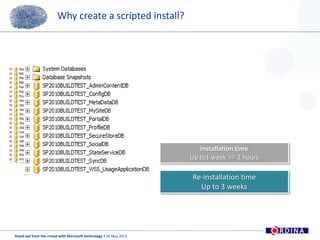
Why create a scripted install?Installation timeUp to1 week 2 hoursRe-installation timeUp to 3 weeks
AdvantagesInstall all the server roles and prerequisitesStandardization of the SharePoint install between environment/servers farmControl the naming convention of the Db/Application pool/web-AppAlways up to date install by using slipstreaming sourceSpeed up your installation timeLogging on the PowerShell/batch screenFile logging for post-install checkup
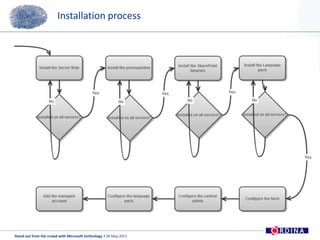
Installation process
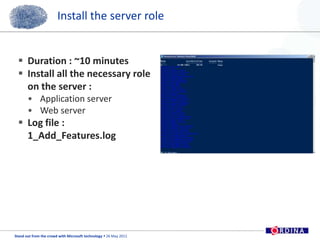
Install the server roleDuration : ~10 minutesInstall all the necessary role on the server :Application serverWeb serverLog file : 1_Add_Features.log
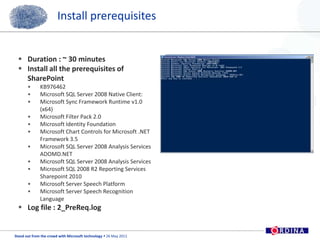
Install prerequisitesDuration : ~ 30 minutesInstall all the prerequisites of SharePointKB976462 Microsoft SQL Server 2008 Native Client: Microsoft Sync Framework Runtime v1.0 (x64) Microsoft Filter Pack 2.0Microsoft Identity FoundationMicrosoft Chart Controls for Microsoft .NET Framework 3.5 Microsoft SQL Server 2008 Analysis Services ADOMD.NET Microsoft SQL Server 2008 Analysis ServicesMicrosoft SQL 2008 R2 Reporting Services Sharepoint 2010Microsoft Server Speech PlatformMicrosoft Server Speech Recognition LanguageLog file : 2_PreReq.log
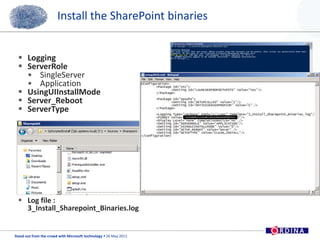
Install the SharePoint binariesDuration : ~ 15 minutesInstall the SharePoint binaries from Y:\Sources\Sharepoint\+ Setup2010.xml for the configurationLog file : 3_Install_Sharepoint_Binaries.log
Install the SharePoint binariesLoggingServerRoleSingleServerApplicationUsingUIInstallModeServer_RebootServerTypeLog file : 3_Install_Sharepoint_Binaries.log
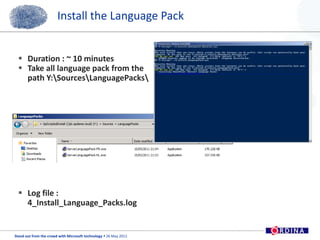
Install the Language PackDuration : ~ 10 minutesTake all language pack from the path Y:\Sources\LanguagePacks\Log file : 4_Install_Language_Packs.log
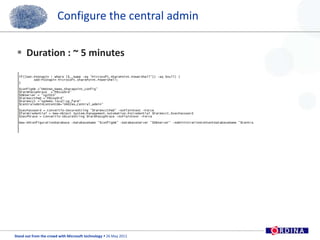
Configure the central admin Duration : ~ 5 minutes
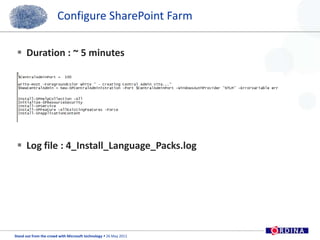
Configure SharePoint Farm Duration : ~ 5 minutesLog file : 4_Install_Language_Packs.log
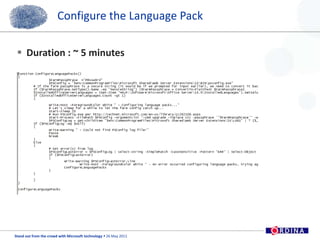
Configure the Language PackDuration : ~ 5 minutes
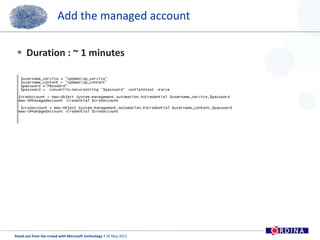
Add the managed accountDuration : ~ 1 minutes
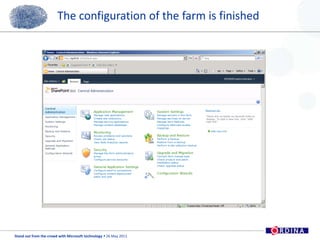
The configuration of the farm is finished
SharePoint 2010 :Automated scripted deploymentQ & A ?Contact info:Julien.lebutte@ordina.be       @jlebutte
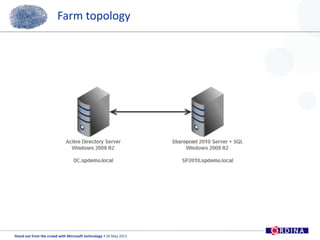
Farm topology
Follow Ordina…19Share your thoughts via #SOFTC Follow us on twitter: @OrdinaBEFind the presentationsonwww.slideshare.net/ordinaBeBe informed atwww.linkedin.com/company/ordina-belgium

Ordina SOFTC Presentation - SharePoint - Automated scripted deployment

  • 1.
    SharePoint 2010: Automatedscripted deploymentJulien Lebutte1
  • 2.
    SharePoint 2010 :Automatedscripted deploymentJulien LebutteSharePoint Infrastructure Designer3+ years in SharePointMCITP SharePoint :TS: Microsoft SharePoint 2010, ConfiguringPRO: Microsoft SharePoint 2010, AdministratorJulien.lebutte@ordina.be @jlebutte
  • 3.
    AgendaWhy create ascripted install?AdvantagesInstallation processQ&A - Contact
  • 4.
    Why create ascripted install?Installation timeUp to1 week 2 hoursRe-installation timeUp to 3 weeks
  • 5.
    AdvantagesInstall all theserver roles and prerequisitesStandardization of the SharePoint install between environment/servers farmControl the naming convention of the Db/Application pool/web-AppAlways up to date install by using slipstreaming sourceSpeed up your installation timeLogging on the PowerShell/batch screenFile logging for post-install checkup
  • 6.
  • 7.
    Install the serverroleDuration : ~10 minutesInstall all the necessary role on the server :Application serverWeb serverLog file : 1_Add_Features.log
  • 8.
    Install prerequisitesDuration :~ 30 minutesInstall all the prerequisites of SharePointKB976462 Microsoft SQL Server 2008 Native Client: Microsoft Sync Framework Runtime v1.0 (x64) Microsoft Filter Pack 2.0Microsoft Identity FoundationMicrosoft Chart Controls for Microsoft .NET Framework 3.5 Microsoft SQL Server 2008 Analysis Services ADOMD.NET Microsoft SQL Server 2008 Analysis ServicesMicrosoft SQL 2008 R2 Reporting Services Sharepoint 2010Microsoft Server Speech PlatformMicrosoft Server Speech Recognition LanguageLog file : 2_PreReq.log
  • 9.
    Install the SharePointbinariesDuration : ~ 15 minutesInstall the SharePoint binaries from Y:\Sources\Sharepoint\+ Setup2010.xml for the configurationLog file : 3_Install_Sharepoint_Binaries.log
  • 10.
    Install the SharePointbinariesLoggingServerRoleSingleServerApplicationUsingUIInstallModeServer_RebootServerTypeLog file : 3_Install_Sharepoint_Binaries.log
  • 11.
    Install the LanguagePackDuration : ~ 10 minutesTake all language pack from the path Y:\Sources\LanguagePacks\Log file : 4_Install_Language_Packs.log
  • 12.
    Configure the centraladmin Duration : ~ 5 minutes
  • 13.
    Configure SharePoint FarmDuration : ~ 5 minutesLog file : 4_Install_Language_Packs.log
  • 14.
    Configure the LanguagePackDuration : ~ 5 minutes
  • 15.
    Add the managedaccountDuration : ~ 1 minutes
  • 16.
    The configuration ofthe farm is finished
  • 17.
    SharePoint 2010 :Automatedscripted deploymentQ & A ?Contact info:Julien.lebutte@ordina.be @jlebutte
  • 18.
  • 19.
    Follow Ordina…19Share yourthoughts via #SOFTC Follow us on twitter: @OrdinaBEFind the presentationsonwww.slideshare.net/ordinaBeBe informed atwww.linkedin.com/company/ordina-belgium