ORACLE FUSION HCM
SETUP DOCUMENT
Tasks
ORACLE FUSION HCM ................................................................................................................................................ 1
SETUP DOCUMENT ...................................................................................................................................................... 1
Overview............................................................................................................................................................................ 3
Oracle Fusion Applications Super User for User Management and Configuration .............................................. 3
IT Security Manager Role for User and Role Management ............................................................................................... 3
Generating the Setup Task List .......................................................................................................................................... 5
Defining Implementation Users ......................................................................................................................................... 6
Setting Up Basic Enterprise Structures .............................................................................................................................. 9
Defining Application Users.............................................................................................................................................. 12
Overview
This document provides a high-level introduction to some key tasks that implementers
of Oracle Fusion Human Capital Management (Oracle Fusion HCM) must perform.
These tasks, which are largely focused on the successful creation of implementation and
application users, constitute the first steps in the implementation process after
installation and provisioning of Oracle Fusion HCM are complete.
The tasks presented in this document are intended for a quick introduction or pilot
implementation. This document does not include all setup and security tasks that are
appropriate for a complete implementation of Oracle Fusion HCM.
Oracle Fusion Applications Super User for User Management and
Configuration
By default, the super user created when installing and provisioning Oracle Fusion
Applications (FAADMIN, by default) has no e-mail address; however, user
management and configuration require that the super user has an e-mail address.
Complete the tasks in the following table to create the super user’s e-mail address.
Task Description
1. Update the Oracle
Fusion Applications
super user ID in LDAP
As a user with administrative privileges in the Oracle Identity
Management (IDM) domain, run the following command from the
Oracle home directory in that IDM environment:
$IDM_ORACLE_HOME /bin/ldapmodify –h oid_host -p
oid_port -D "cn=orcladmin" –w password_for_orcladmin
<<EOF
dn: dn_of_super_user_entry
changetype: modify replace: mail
mail:e-mail_address
EOF
where:
IDM_ORACLE_HOME, oid_host, and oid_portare variables whose
values are determined by your installed environment.
dn_of_super_user_entryis the distinguished name of the user entry in
LDAP; for example, cn=faadmin,cn=users,dc=mycompany,dc=com
e-mail_address is a fully qualified e-mail address in the format
user@domain.com
2.Sign in to OIM Use the OIM system administrator user name and password.
3. Reconcile LDAP and
OIM
Click the Advanced link in the upper right of the interface.
Click Search Scheduled Jobs in the System Administration tasks.
Enter LDAP User Create and Update Full Reconciliation in the
Search Scheduled Jobs field.
Select the job in the search results.
Click Run Now to reconcile user updates based on the change log
from LDAP.
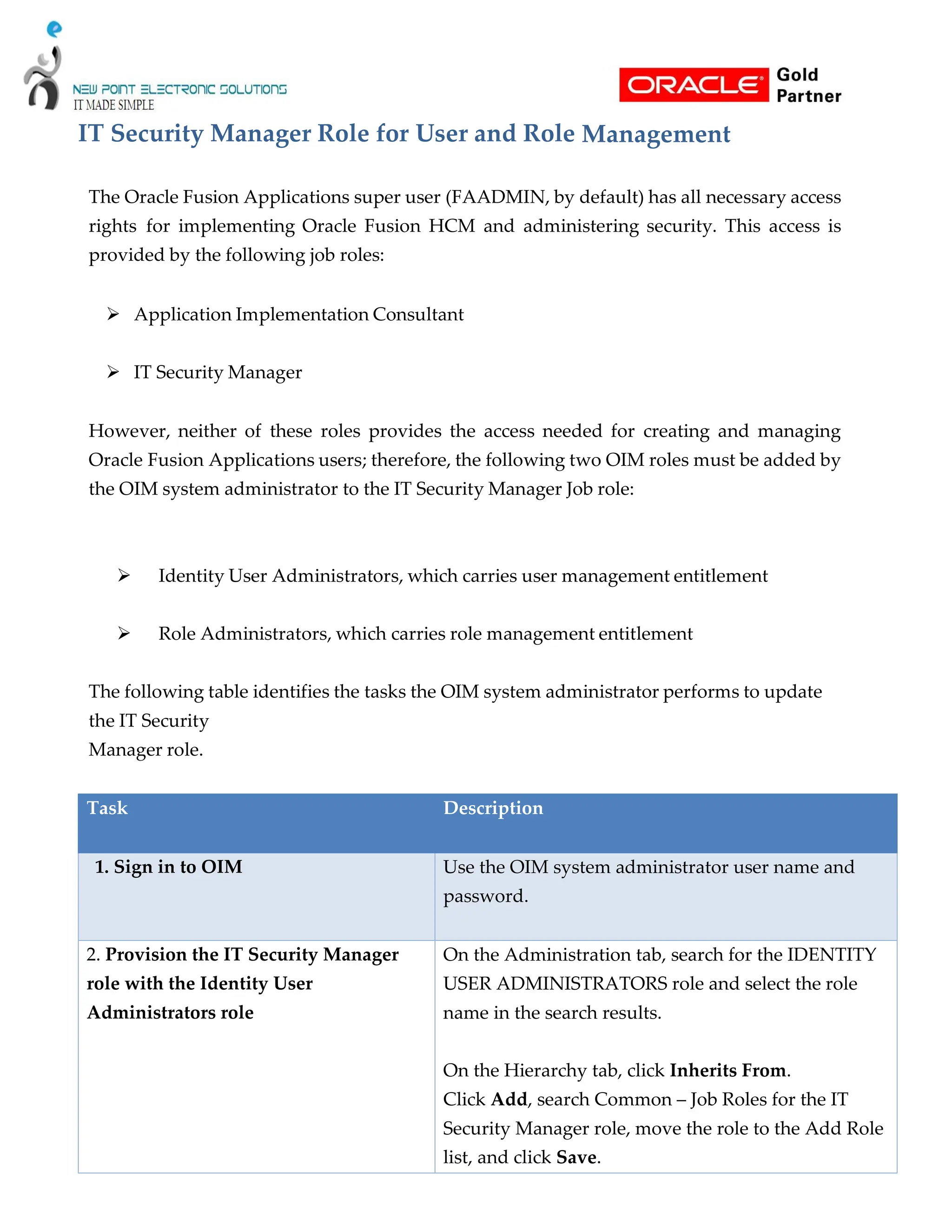
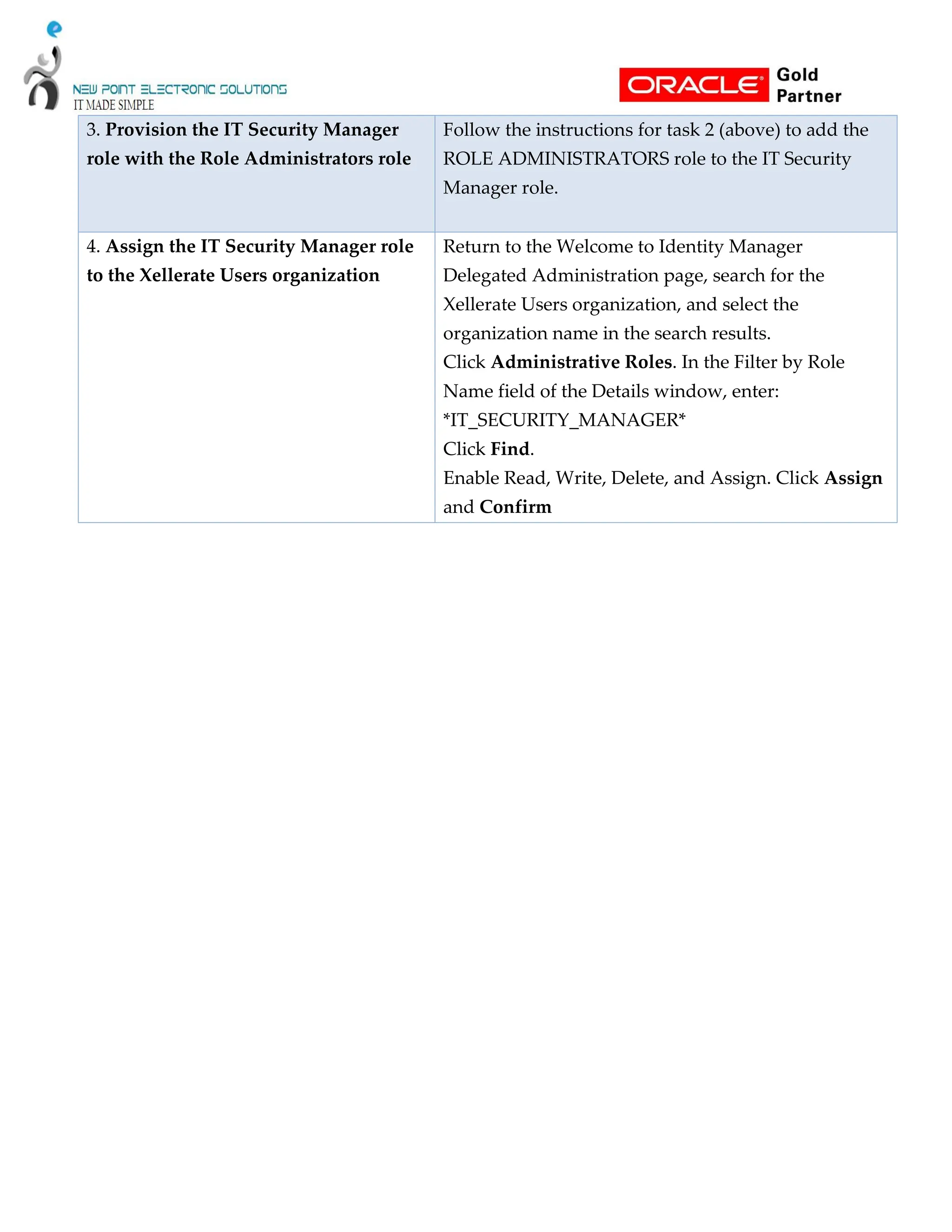
IT Security Manager Role for User and Role Management
The Oracle Fusion Applications super user (FAADMIN, by default) has all necessary access
rights for implementing Oracle Fusion HCM and administering security. This access is
provided by the following job roles:
 Application Implementation Consultant
 IT Security Manager
However, neither of these roles provides the access needed for creating and managing
Oracle Fusion Applications users; therefore, the following two OIM roles must be added by
the OIM system administrator to the IT Security Manager Job role:
 Identity User Administrators, which carries user management entitlement
 Role Administrators, which carries role management entitlement
The following table identifies the tasks the OIM system administrator performs to update
the IT Security
Manager role.
Task Description
1. Sign in to OIM Use the OIM system administrator user name and
password.
2. Provision the IT Security Manager
role with the Identity User
Administrators role
On the Administration tab, search for the IDENTITY
USER ADMINISTRATORS role and select the role
name in the search results.
On the Hierarchy tab, click Inherits From.
Click Add, search Common – Job Roles for the IT
Security Manager role, move the role to the Add Role
list, and click Save.
3. Provision the IT Security Manager
role with the Role Administrators role
Follow the instructions for task 2 (above) to add the
ROLE ADMINISTRATORS role to the IT Security
Manager role.
4. Assign the IT Security Manager role
to the Xellerate Users organization
Return to the Welcome to Identity Manager
Delegated Administration page, search for the
Xellerate Users organization, and select the
organization name in the search results.
Click Administrative Roles. In the Filter by Role
Name field of the Details window, enter:
*IT_SECURITY_MANAGER*
Click Find.
Enable Read, Write, Delete, and Assign. Click Assign
and Confirm
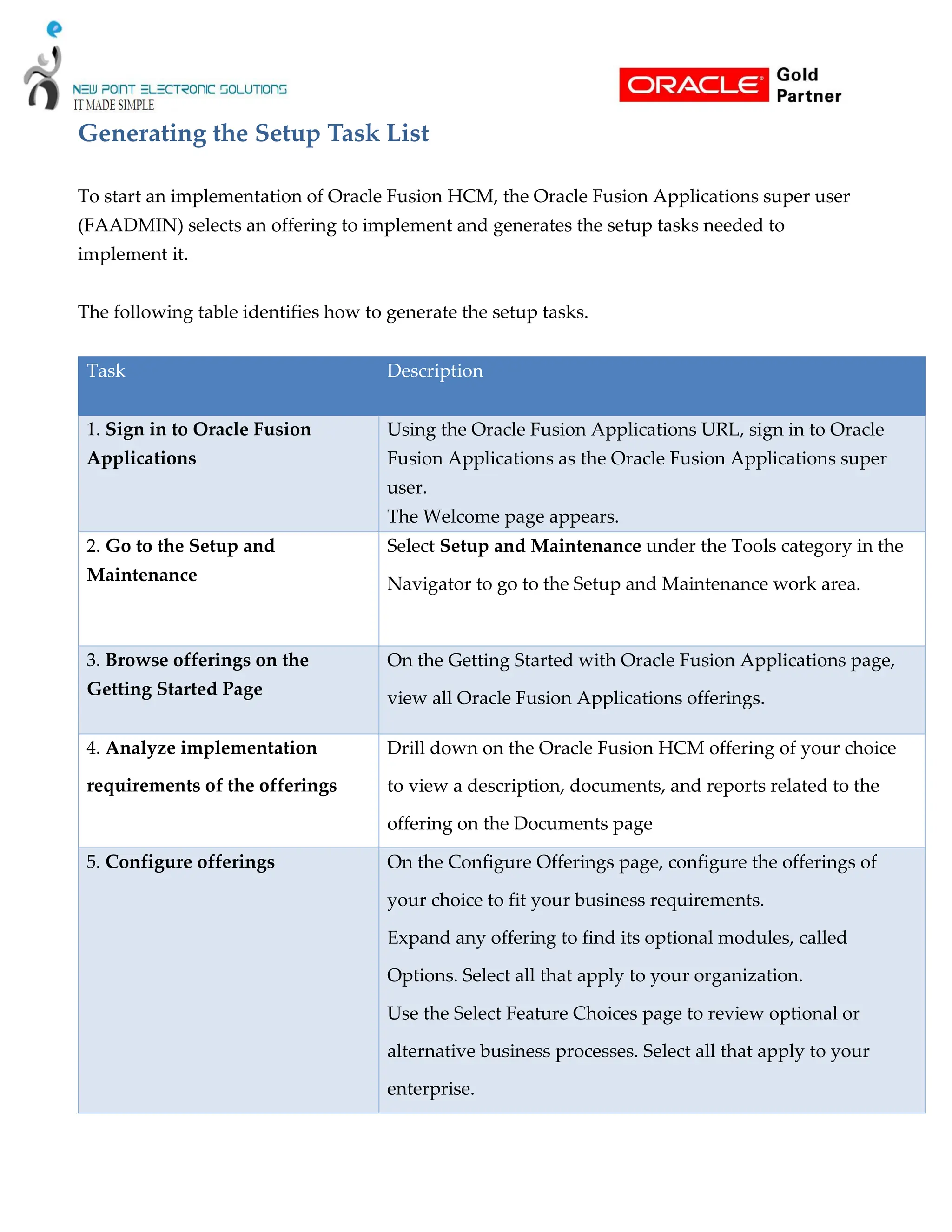
Generating the Setup Task List
To start an implementation of Oracle Fusion HCM, the Oracle Fusion Applications super user
(FAADMIN) selects an offering to implement and generates the setup tasks needed to
implement it.
The following table identifies how to generate the setup tasks.
Task Description
1. Sign in to Oracle Fusion
Applications
Using the Oracle Fusion Applications URL, sign in to Oracle
Fusion Applications as the Oracle Fusion Applications super
user.
The Welcome page appears.
2. Go to the Setup and
Maintenance
Select Setup and Maintenance under the Tools category in the
Navigator to go to the Setup and Maintenance work area.
3. Browse offerings on the
Getting Started Page
On the Getting Started with Oracle Fusion Applications page,
view all Oracle Fusion Applications offerings.
4. Analyze implementation
requirements of the offerings
Drill down on the Oracle Fusion HCM offering of your choice
to view a description, documents, and reports related to the
offering on the Documents page
5. Configure offerings On the Configure Offerings page, configure the offerings of
your choice to fit your business requirements.
Expand any offering to find its optional modules, called
Options. Select all that apply to your organization.
Use the Select Feature Choices page to review optional or
alternative business processes. Select all that apply to your
enterprise.
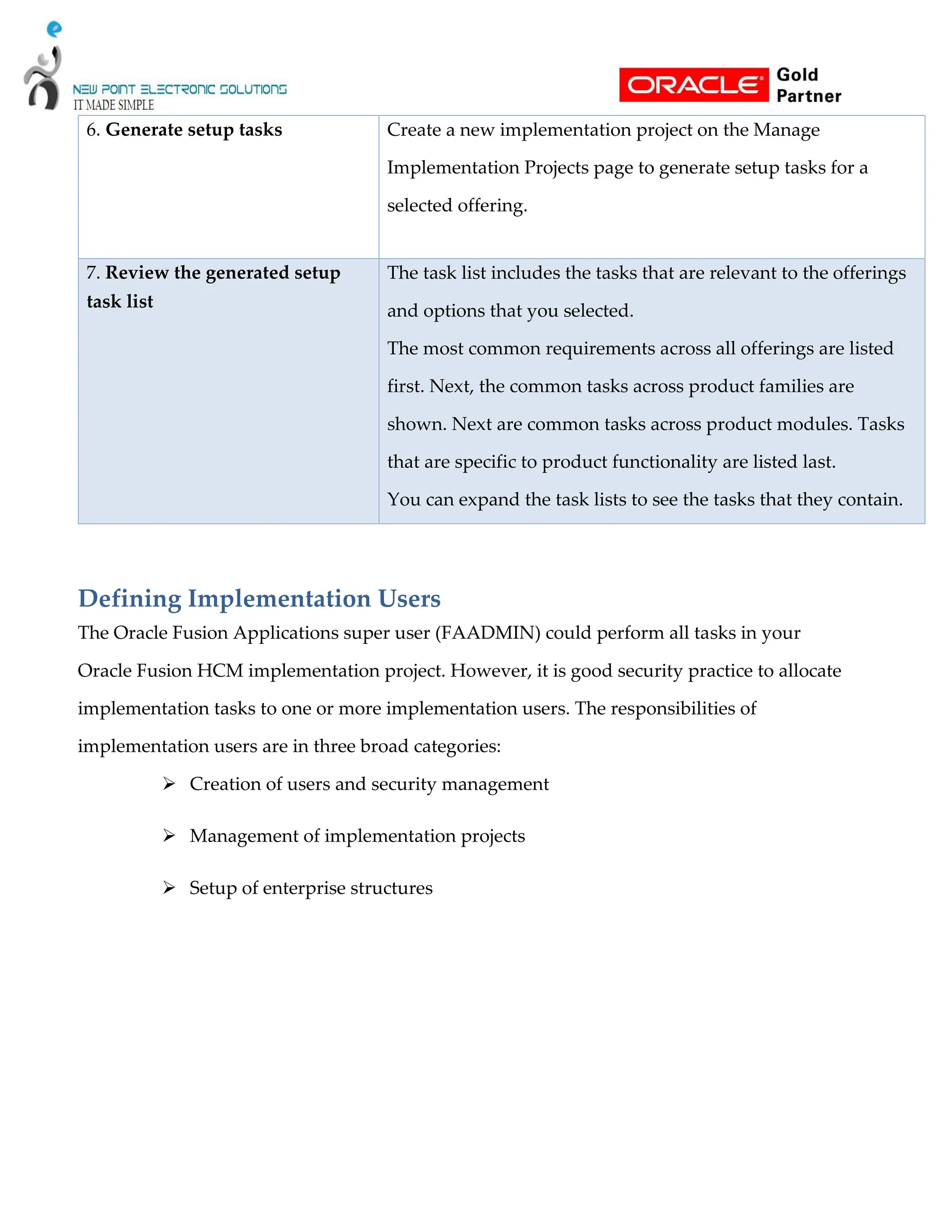
6. Generate setup tasks Create a new implementation project on the Manage
Implementation Projects page to generate setup tasks for a
selected offering.
7. Review the generated setup
task list
The task list includes the tasks that are relevant to the offerings
and options that you selected.
The most common requirements across all offerings are listed
first. Next, the common tasks across product families are
shown. Next are common tasks across product modules. Tasks
that are specific to product functionality are listed last.
You can expand the task lists to see the tasks that they contain.
Defining Implementation Users
The Oracle Fusion Applications super user (FAADMIN) could perform all tasks in your
Oracle Fusion HCM implementation project. However, it is good security practice to allocate
implementation tasks to one or more implementation users. The responsibilities of
implementation users are in three broad categories:
 Creation of users and security management
 Management of implementation projects
 Setup of enterprise structures
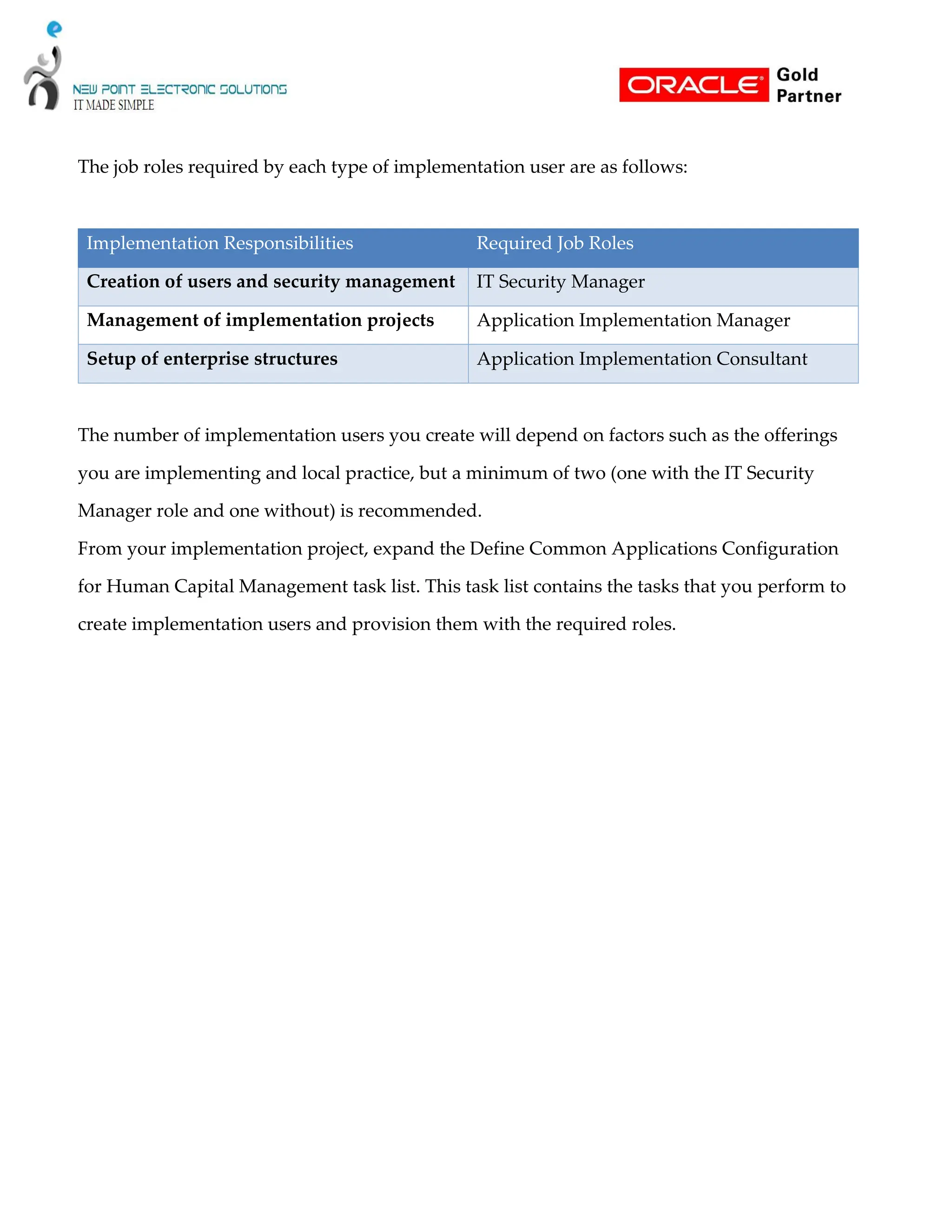
The job roles required by each type of implementation user are as follows:
Implementation Responsibilities Required Job Roles
Creation of users and security management IT Security Manager
Management of implementation projects Application Implementation Manager
Setup of enterprise structures Application Implementation Consultant
The number of implementation users you create will depend on factors such as the offerings
you are implementing and local practice, but a minimum of two (one with the IT Security
Manager role and one without) is recommended.
From your implementation project, expand the Define Common Applications Configuration
for Human Capital Management task list. This task list contains the tasks that you perform to
create implementation users and provision them with the required roles.
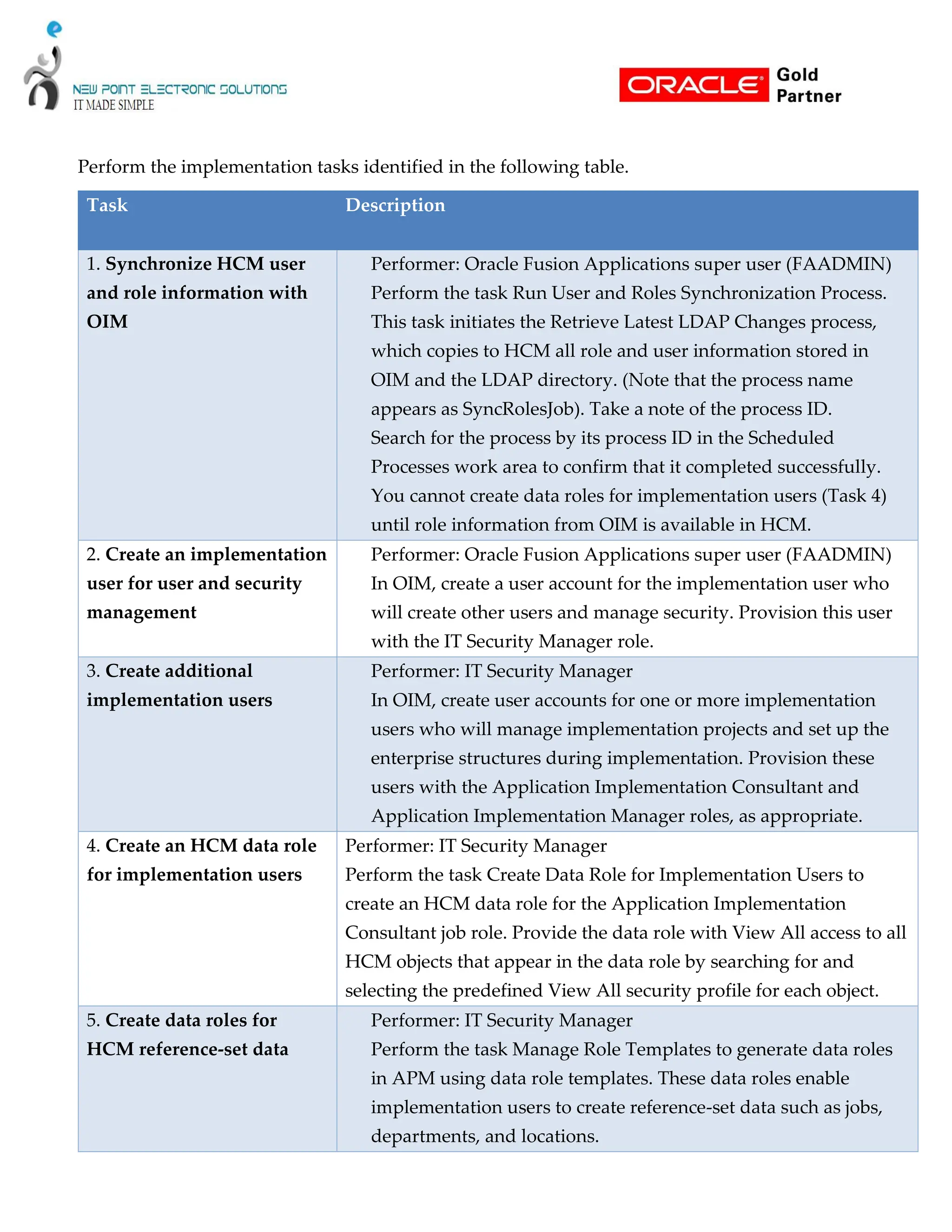
Perform the implementation tasks identified in the following table.
Task Description
1. Synchronize HCM user
and role information with
OIM
Performer: Oracle Fusion Applications super user (FAADMIN)
Perform the task Run User and Roles Synchronization Process.
This task initiates the Retrieve Latest LDAP Changes process,
which copies to HCM all role and user information stored in
OIM and the LDAP directory. (Note that the process name
appears as SyncRolesJob). Take a note of the process ID.
Search for the process by its process ID in the Scheduled
Processes work area to confirm that it completed successfully.
You cannot create data roles for implementation users (Task 4)
until role information from OIM is available in HCM.
2. Create an implementation
user for user and security
management
Performer: Oracle Fusion Applications super user (FAADMIN)
In OIM, create a user account for the implementation user who
will create other users and manage security. Provision this user
with the IT Security Manager role.
3. Create additional
implementation users
Performer: IT Security Manager
In OIM, create user accounts for one or more implementation
users who will manage implementation projects and set up the
enterprise structures during implementation. Provision these
users with the Application Implementation Consultant and
Application Implementation Manager roles, as appropriate.
4. Create an HCM data role
for implementation users
Performer: IT Security Manager
Perform the task Create Data Role for Implementation Users to
create an HCM data role for the Application Implementation
Consultant job role. Provide the data role with View All access to all
HCM objects that appear in the data role by searching for and
selecting the predefined View All security profile for each object.
5. Create data roles for
HCM reference-set data
Performer: IT Security Manager
Perform the task Manage Role Templates to generate data roles
in APM using data role templates. These data roles enable
implementation users to create reference-set data such as jobs,
departments, and locations.
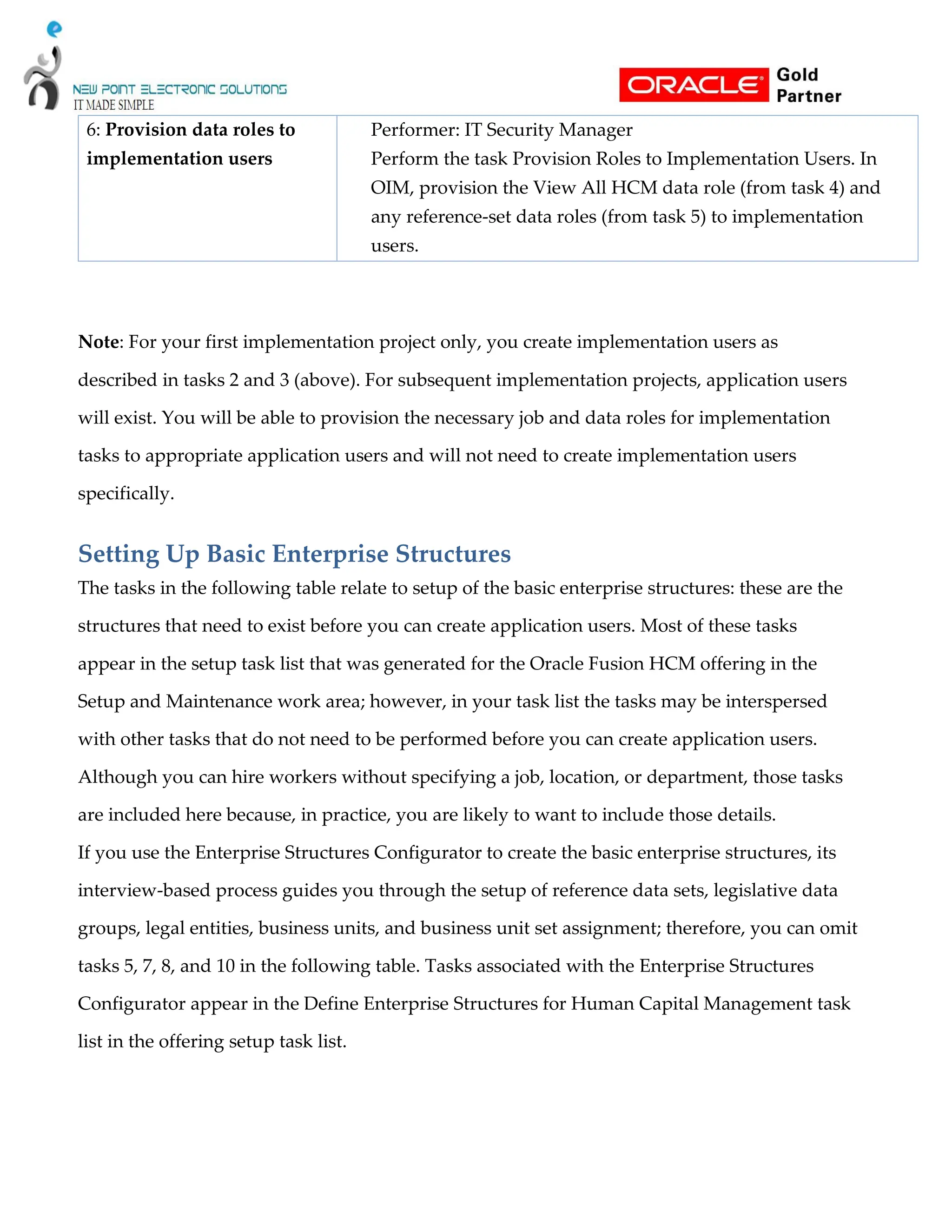
6: Provision data roles to
implementation users
Performer: IT Security Manager
Perform the task Provision Roles to Implementation Users. In
OIM, provision the View All HCM data role (from task 4) and
any reference-set data roles (from task 5) to implementation
users.
Note: For your first implementation project only, you create implementation users as
described in tasks 2 and 3 (above). For subsequent implementation projects, application users
will exist. You will be able to provision the necessary job and data roles for implementation
tasks to appropriate application users and will not need to create implementation users
specifically.
Setting Up Basic Enterprise Structures
The tasks in the following table relate to setup of the basic enterprise structures: these are the
structures that need to exist before you can create application users. Most of these tasks
appear in the setup task list that was generated for the Oracle Fusion HCM offering in the
Setup and Maintenance work area; however, in your task list the tasks may be interspersed
with other tasks that do not need to be performed before you can create application users.
Although you can hire workers without specifying a job, location, or department, those tasks
are included here because, in practice, you are likely to want to include those details.
If you use the Enterprise Structures Configurator to create the basic enterprise structures, its
interview-based process guides you through the setup of reference data sets, legislative data
groups, legal entities, business units, and business unit set assignment; therefore, you can omit
tasks 5, 7, 8, and 10 in the following table. Tasks associated with the Enterprise Structures
Configurator appear in the Define Enterprise Structures for Human Capital Management task
list in the offering setup task list.
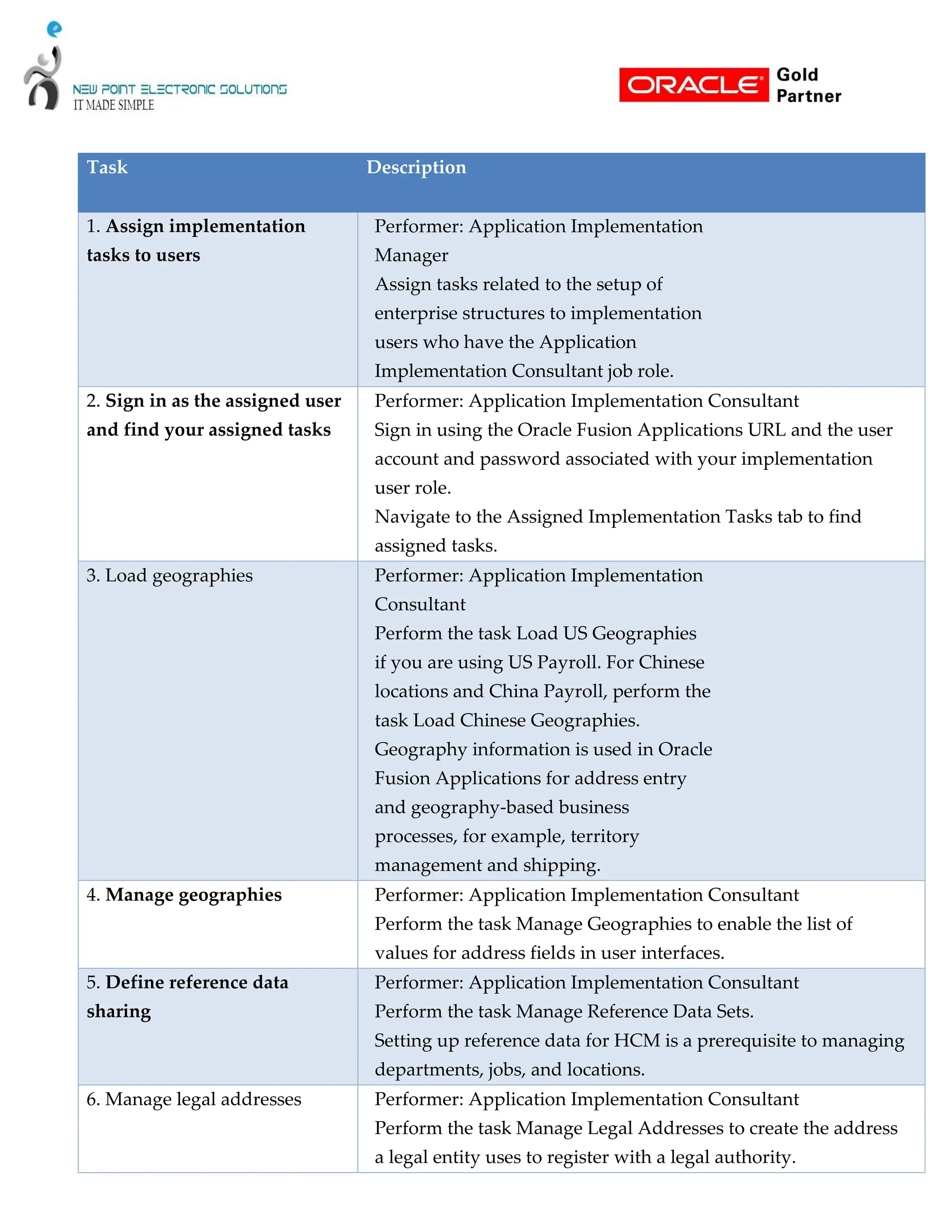
Task Description
1. Assign implementation
tasks to users
Performer: Application Implementation
Manager
Assign tasks related to the setup of
enterprise structures to implementation
users who have the Application
Implementation Consultant job role.
2. Sign in as the assigned user
and find your assigned tasks
Performer: Application Implementation Consultant
Sign in using the Oracle Fusion Applications URL and the user
account and password associated with your implementation
user role.
Navigate to the Assigned Implementation Tasks tab to find
assigned tasks.
3. Load geographies Performer: Application Implementation
Consultant
Perform the task Load US Geographies
if you are using US Payroll. For Chinese
locations and China Payroll, perform the
task Load Chinese Geographies.
Geography information is used in Oracle
Fusion Applications for address entry
and geography-based business
processes, for example, territory
management and shipping.
4. Manage geographies Performer: Application Implementation Consultant
Perform the task Manage Geographies to enable the list of
values for address fields in user interfaces.
5. Define reference data
sharing
Performer: Application Implementation Consultant
Perform the task Manage Reference Data Sets.
Setting up reference data for HCM is a prerequisite to managing
departments, jobs, and locations.
6. Manage legal addresses Performer: Application Implementation Consultant
Perform the task Manage Legal Addresses to create the address
a legal entity uses to register with a legal authority.
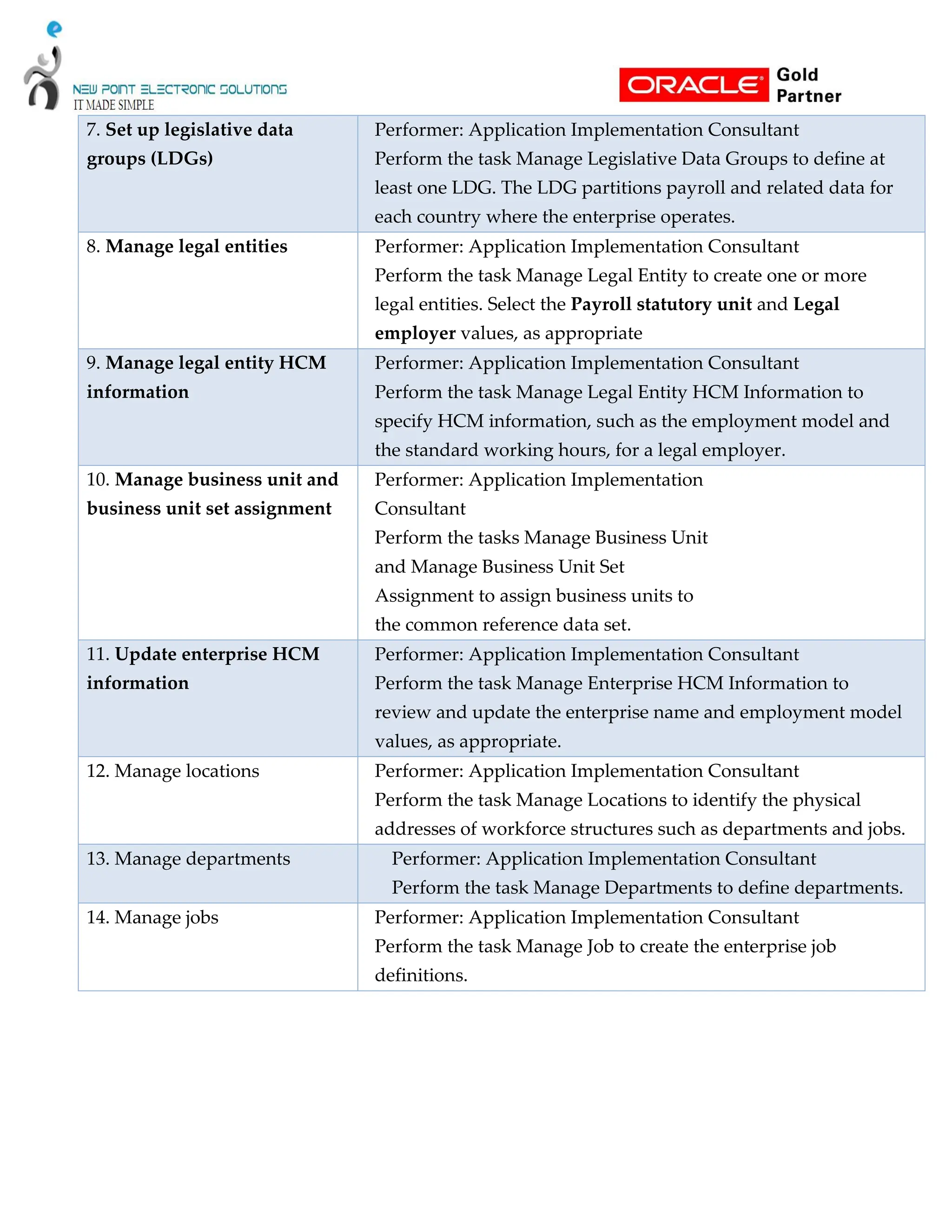
7. Set up legislative data
groups (LDGs)
Performer: Application Implementation Consultant
Perform the task Manage Legislative Data Groups to define at
least one LDG. The LDG partitions payroll and related data for
each country where the enterprise operates.
8. Manage legal entities Performer: Application Implementation Consultant
Perform the task Manage Legal Entity to create one or more
legal entities. Select the Payroll statutory unit and Legal
employer values, as appropriate
9. Manage legal entity HCM
information
Performer: Application Implementation Consultant
Perform the task Manage Legal Entity HCM Information to
specify HCM information, such as the employment model and
the standard working hours, for a legal employer.
10. Manage business unit and
business unit set assignment
Performer: Application Implementation
Consultant
Perform the tasks Manage Business Unit
and Manage Business Unit Set
Assignment to assign business units to
the common reference data set.
11. Update enterprise HCM
information
Performer: Application Implementation Consultant
Perform the task Manage Enterprise HCM Information to
review and update the enterprise name and employment model
values, as appropriate.
12. Manage locations Performer: Application Implementation Consultant
Perform the task Manage Locations to identify the physical
addresses of workforce structures such as departments and jobs.
13. Manage departments Performer: Application Implementation Consultant
Perform the task Manage Departments to define departments.
14. Manage jobs Performer: Application Implementation Consultant
Perform the task Manage Job to create the enterprise job
definitions.
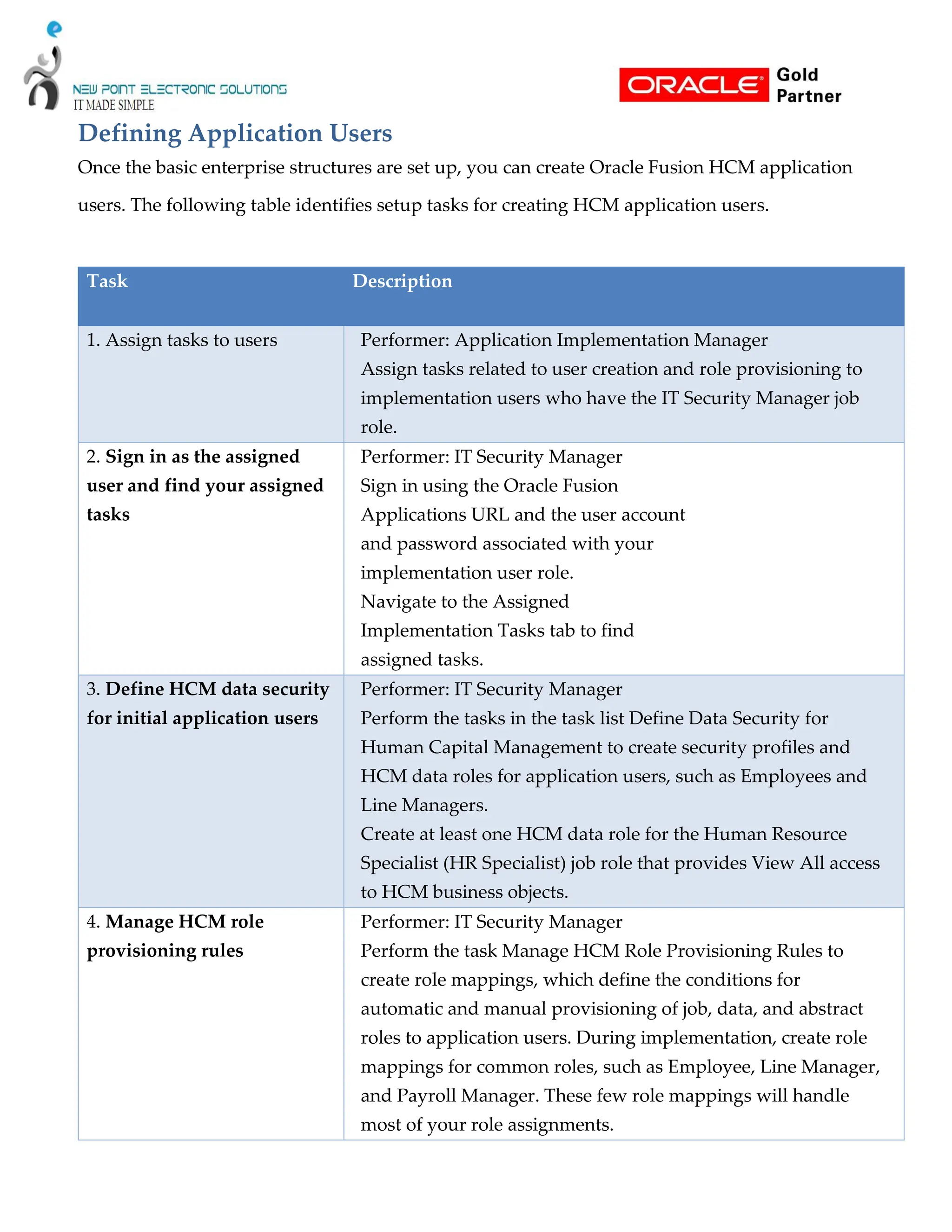
Defining Application Users
Once the basic enterprise structures are set up, you can create Oracle Fusion HCM application
users. The following table identifies setup tasks for creating HCM application users.
Task Description
1. Assign tasks to users Performer: Application Implementation Manager
Assign tasks related to user creation and role provisioning to
implementation users who have the IT Security Manager job
role.
2. Sign in as the assigned
user and find your assigned
tasks
Performer: IT Security Manager
Sign in using the Oracle Fusion
Applications URL and the user account
and password associated with your
implementation user role.
Navigate to the Assigned
Implementation Tasks tab to find
assigned tasks.
3. Define HCM data security
for initial application users
Performer: IT Security Manager
Perform the tasks in the task list Define Data Security for
Human Capital Management to create security profiles and
HCM data roles for application users, such as Employees and
Line Managers.
Create at least one HCM data role for the Human Resource
Specialist (HR Specialist) job role that provides View All access
to HCM business objects.
4. Manage HCM role
provisioning rules
Performer: IT Security Manager
Perform the task Manage HCM Role Provisioning Rules to
create role mappings, which define the conditions for
automatic and manual provisioning of job, data, and abstract
roles to application users. During implementation, create role
mappings for common roles, such as Employee, Line Manager,
and Payroll Manager. These few role mappings will handle
most of your role assignments.
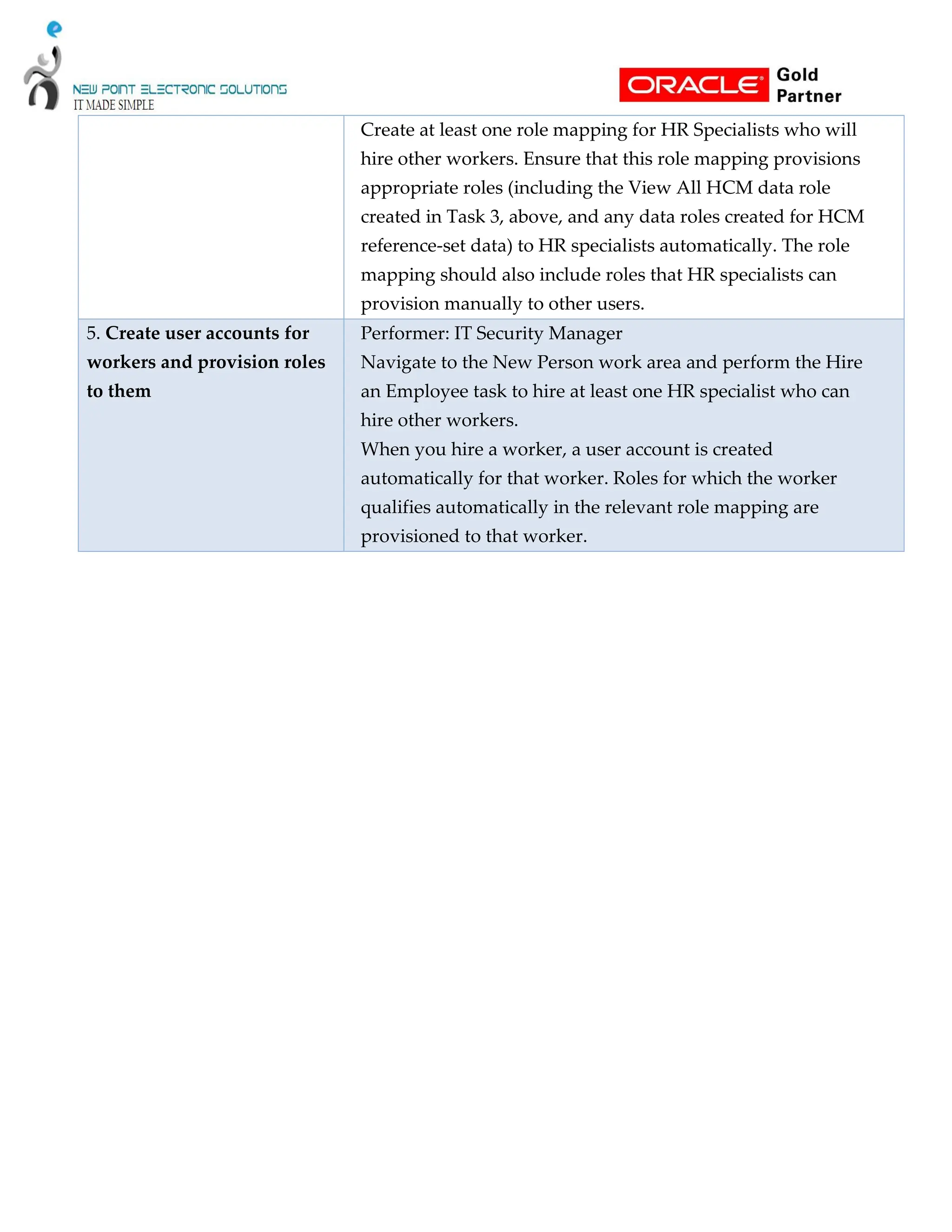
Create at least one role mapping for HR Specialists who will
hire other workers. Ensure that this role mapping provisions
appropriate roles (including the View All HCM data role
created in Task 3, above, and any data roles created for HCM
reference-set data) to HR specialists automatically. The role
mapping should also include roles that HR specialists can
provision manually to other users.
5. Create user accounts for
workers and provision roles
to them
Performer: IT Security Manager
Navigate to the New Person work area and perform the Hire
an Employee task to hire at least one HR specialist who can
hire other workers.
When you hire a worker, a user account is created
automatically for that worker. Roles for which the worker
qualifies automatically in the relevant role mapping are
provisioned to that worker.

Oracle Human Capital Management Setup Document

  • 1.
  • 2.
    Tasks ORACLE FUSION HCM................................................................................................................................................ 1 SETUP DOCUMENT ...................................................................................................................................................... 1 Overview............................................................................................................................................................................ 3 Oracle Fusion Applications Super User for User Management and Configuration .............................................. 3 IT Security Manager Role for User and Role Management ............................................................................................... 3 Generating the Setup Task List .......................................................................................................................................... 5 Defining Implementation Users ......................................................................................................................................... 6 Setting Up Basic Enterprise Structures .............................................................................................................................. 9 Defining Application Users.............................................................................................................................................. 12
  • 3.
    Overview This document providesa high-level introduction to some key tasks that implementers of Oracle Fusion Human Capital Management (Oracle Fusion HCM) must perform. These tasks, which are largely focused on the successful creation of implementation and application users, constitute the first steps in the implementation process after installation and provisioning of Oracle Fusion HCM are complete. The tasks presented in this document are intended for a quick introduction or pilot implementation. This document does not include all setup and security tasks that are appropriate for a complete implementation of Oracle Fusion HCM. Oracle Fusion Applications Super User for User Management and Configuration By default, the super user created when installing and provisioning Oracle Fusion Applications (FAADMIN, by default) has no e-mail address; however, user management and configuration require that the super user has an e-mail address. Complete the tasks in the following table to create the super user’s e-mail address. Task Description 1. Update the Oracle Fusion Applications super user ID in LDAP As a user with administrative privileges in the Oracle Identity Management (IDM) domain, run the following command from the Oracle home directory in that IDM environment: $IDM_ORACLE_HOME /bin/ldapmodify –h oid_host -p oid_port -D "cn=orcladmin" –w password_for_orcladmin <<EOF dn: dn_of_super_user_entry changetype: modify replace: mail mail:e-mail_address
  • 4.
    EOF where: IDM_ORACLE_HOME, oid_host, andoid_portare variables whose values are determined by your installed environment. dn_of_super_user_entryis the distinguished name of the user entry in LDAP; for example, cn=faadmin,cn=users,dc=mycompany,dc=com e-mail_address is a fully qualified e-mail address in the format user@domain.com 2.Sign in to OIM Use the OIM system administrator user name and password. 3. Reconcile LDAP and OIM Click the Advanced link in the upper right of the interface. Click Search Scheduled Jobs in the System Administration tasks. Enter LDAP User Create and Update Full Reconciliation in the Search Scheduled Jobs field. Select the job in the search results. Click Run Now to reconcile user updates based on the change log from LDAP.
  • 5.
    IT Security ManagerRole for User and Role Management The Oracle Fusion Applications super user (FAADMIN, by default) has all necessary access rights for implementing Oracle Fusion HCM and administering security. This access is provided by the following job roles:  Application Implementation Consultant  IT Security Manager However, neither of these roles provides the access needed for creating and managing Oracle Fusion Applications users; therefore, the following two OIM roles must be added by the OIM system administrator to the IT Security Manager Job role:  Identity User Administrators, which carries user management entitlement  Role Administrators, which carries role management entitlement The following table identifies the tasks the OIM system administrator performs to update the IT Security Manager role. Task Description 1. Sign in to OIM Use the OIM system administrator user name and password. 2. Provision the IT Security Manager role with the Identity User Administrators role On the Administration tab, search for the IDENTITY USER ADMINISTRATORS role and select the role name in the search results. On the Hierarchy tab, click Inherits From. Click Add, search Common – Job Roles for the IT Security Manager role, move the role to the Add Role list, and click Save.
  • 6.
    3. Provision theIT Security Manager role with the Role Administrators role Follow the instructions for task 2 (above) to add the ROLE ADMINISTRATORS role to the IT Security Manager role. 4. Assign the IT Security Manager role to the Xellerate Users organization Return to the Welcome to Identity Manager Delegated Administration page, search for the Xellerate Users organization, and select the organization name in the search results. Click Administrative Roles. In the Filter by Role Name field of the Details window, enter: *IT_SECURITY_MANAGER* Click Find. Enable Read, Write, Delete, and Assign. Click Assign and Confirm
  • 7.
    Generating the SetupTask List To start an implementation of Oracle Fusion HCM, the Oracle Fusion Applications super user (FAADMIN) selects an offering to implement and generates the setup tasks needed to implement it. The following table identifies how to generate the setup tasks. Task Description 1. Sign in to Oracle Fusion Applications Using the Oracle Fusion Applications URL, sign in to Oracle Fusion Applications as the Oracle Fusion Applications super user. The Welcome page appears. 2. Go to the Setup and Maintenance Select Setup and Maintenance under the Tools category in the Navigator to go to the Setup and Maintenance work area. 3. Browse offerings on the Getting Started Page On the Getting Started with Oracle Fusion Applications page, view all Oracle Fusion Applications offerings. 4. Analyze implementation requirements of the offerings Drill down on the Oracle Fusion HCM offering of your choice to view a description, documents, and reports related to the offering on the Documents page 5. Configure offerings On the Configure Offerings page, configure the offerings of your choice to fit your business requirements. Expand any offering to find its optional modules, called Options. Select all that apply to your organization. Use the Select Feature Choices page to review optional or alternative business processes. Select all that apply to your enterprise.
  • 8.
    6. Generate setuptasks Create a new implementation project on the Manage Implementation Projects page to generate setup tasks for a selected offering. 7. Review the generated setup task list The task list includes the tasks that are relevant to the offerings and options that you selected. The most common requirements across all offerings are listed first. Next, the common tasks across product families are shown. Next are common tasks across product modules. Tasks that are specific to product functionality are listed last. You can expand the task lists to see the tasks that they contain. Defining Implementation Users The Oracle Fusion Applications super user (FAADMIN) could perform all tasks in your Oracle Fusion HCM implementation project. However, it is good security practice to allocate implementation tasks to one or more implementation users. The responsibilities of implementation users are in three broad categories:  Creation of users and security management  Management of implementation projects  Setup of enterprise structures
  • 9.
    The job rolesrequired by each type of implementation user are as follows: Implementation Responsibilities Required Job Roles Creation of users and security management IT Security Manager Management of implementation projects Application Implementation Manager Setup of enterprise structures Application Implementation Consultant The number of implementation users you create will depend on factors such as the offerings you are implementing and local practice, but a minimum of two (one with the IT Security Manager role and one without) is recommended. From your implementation project, expand the Define Common Applications Configuration for Human Capital Management task list. This task list contains the tasks that you perform to create implementation users and provision them with the required roles.
  • 10.
    Perform the implementationtasks identified in the following table. Task Description 1. Synchronize HCM user and role information with OIM Performer: Oracle Fusion Applications super user (FAADMIN) Perform the task Run User and Roles Synchronization Process. This task initiates the Retrieve Latest LDAP Changes process, which copies to HCM all role and user information stored in OIM and the LDAP directory. (Note that the process name appears as SyncRolesJob). Take a note of the process ID. Search for the process by its process ID in the Scheduled Processes work area to confirm that it completed successfully. You cannot create data roles for implementation users (Task 4) until role information from OIM is available in HCM. 2. Create an implementation user for user and security management Performer: Oracle Fusion Applications super user (FAADMIN) In OIM, create a user account for the implementation user who will create other users and manage security. Provision this user with the IT Security Manager role. 3. Create additional implementation users Performer: IT Security Manager In OIM, create user accounts for one or more implementation users who will manage implementation projects and set up the enterprise structures during implementation. Provision these users with the Application Implementation Consultant and Application Implementation Manager roles, as appropriate. 4. Create an HCM data role for implementation users Performer: IT Security Manager Perform the task Create Data Role for Implementation Users to create an HCM data role for the Application Implementation Consultant job role. Provide the data role with View All access to all HCM objects that appear in the data role by searching for and selecting the predefined View All security profile for each object. 5. Create data roles for HCM reference-set data Performer: IT Security Manager Perform the task Manage Role Templates to generate data roles in APM using data role templates. These data roles enable implementation users to create reference-set data such as jobs, departments, and locations.
  • 11.
    6: Provision dataroles to implementation users Performer: IT Security Manager Perform the task Provision Roles to Implementation Users. In OIM, provision the View All HCM data role (from task 4) and any reference-set data roles (from task 5) to implementation users. Note: For your first implementation project only, you create implementation users as described in tasks 2 and 3 (above). For subsequent implementation projects, application users will exist. You will be able to provision the necessary job and data roles for implementation tasks to appropriate application users and will not need to create implementation users specifically. Setting Up Basic Enterprise Structures The tasks in the following table relate to setup of the basic enterprise structures: these are the structures that need to exist before you can create application users. Most of these tasks appear in the setup task list that was generated for the Oracle Fusion HCM offering in the Setup and Maintenance work area; however, in your task list the tasks may be interspersed with other tasks that do not need to be performed before you can create application users. Although you can hire workers without specifying a job, location, or department, those tasks are included here because, in practice, you are likely to want to include those details. If you use the Enterprise Structures Configurator to create the basic enterprise structures, its interview-based process guides you through the setup of reference data sets, legislative data groups, legal entities, business units, and business unit set assignment; therefore, you can omit tasks 5, 7, 8, and 10 in the following table. Tasks associated with the Enterprise Structures Configurator appear in the Define Enterprise Structures for Human Capital Management task list in the offering setup task list.
  • 12.
    Task Description 1. Assignimplementation tasks to users Performer: Application Implementation Manager Assign tasks related to the setup of enterprise structures to implementation users who have the Application Implementation Consultant job role. 2. Sign in as the assigned user and find your assigned tasks Performer: Application Implementation Consultant Sign in using the Oracle Fusion Applications URL and the user account and password associated with your implementation user role. Navigate to the Assigned Implementation Tasks tab to find assigned tasks. 3. Load geographies Performer: Application Implementation Consultant Perform the task Load US Geographies if you are using US Payroll. For Chinese locations and China Payroll, perform the task Load Chinese Geographies. Geography information is used in Oracle Fusion Applications for address entry and geography-based business processes, for example, territory management and shipping. 4. Manage geographies Performer: Application Implementation Consultant Perform the task Manage Geographies to enable the list of values for address fields in user interfaces. 5. Define reference data sharing Performer: Application Implementation Consultant Perform the task Manage Reference Data Sets. Setting up reference data for HCM is a prerequisite to managing departments, jobs, and locations. 6. Manage legal addresses Performer: Application Implementation Consultant Perform the task Manage Legal Addresses to create the address a legal entity uses to register with a legal authority.
  • 13.
    7. Set uplegislative data groups (LDGs) Performer: Application Implementation Consultant Perform the task Manage Legislative Data Groups to define at least one LDG. The LDG partitions payroll and related data for each country where the enterprise operates. 8. Manage legal entities Performer: Application Implementation Consultant Perform the task Manage Legal Entity to create one or more legal entities. Select the Payroll statutory unit and Legal employer values, as appropriate 9. Manage legal entity HCM information Performer: Application Implementation Consultant Perform the task Manage Legal Entity HCM Information to specify HCM information, such as the employment model and the standard working hours, for a legal employer. 10. Manage business unit and business unit set assignment Performer: Application Implementation Consultant Perform the tasks Manage Business Unit and Manage Business Unit Set Assignment to assign business units to the common reference data set. 11. Update enterprise HCM information Performer: Application Implementation Consultant Perform the task Manage Enterprise HCM Information to review and update the enterprise name and employment model values, as appropriate. 12. Manage locations Performer: Application Implementation Consultant Perform the task Manage Locations to identify the physical addresses of workforce structures such as departments and jobs. 13. Manage departments Performer: Application Implementation Consultant Perform the task Manage Departments to define departments. 14. Manage jobs Performer: Application Implementation Consultant Perform the task Manage Job to create the enterprise job definitions.
  • 14.
    Defining Application Users Oncethe basic enterprise structures are set up, you can create Oracle Fusion HCM application users. The following table identifies setup tasks for creating HCM application users. Task Description 1. Assign tasks to users Performer: Application Implementation Manager Assign tasks related to user creation and role provisioning to implementation users who have the IT Security Manager job role. 2. Sign in as the assigned user and find your assigned tasks Performer: IT Security Manager Sign in using the Oracle Fusion Applications URL and the user account and password associated with your implementation user role. Navigate to the Assigned Implementation Tasks tab to find assigned tasks. 3. Define HCM data security for initial application users Performer: IT Security Manager Perform the tasks in the task list Define Data Security for Human Capital Management to create security profiles and HCM data roles for application users, such as Employees and Line Managers. Create at least one HCM data role for the Human Resource Specialist (HR Specialist) job role that provides View All access to HCM business objects. 4. Manage HCM role provisioning rules Performer: IT Security Manager Perform the task Manage HCM Role Provisioning Rules to create role mappings, which define the conditions for automatic and manual provisioning of job, data, and abstract roles to application users. During implementation, create role mappings for common roles, such as Employee, Line Manager, and Payroll Manager. These few role mappings will handle most of your role assignments.
  • 15.
    Create at leastone role mapping for HR Specialists who will hire other workers. Ensure that this role mapping provisions appropriate roles (including the View All HCM data role created in Task 3, above, and any data roles created for HCM reference-set data) to HR specialists automatically. The role mapping should also include roles that HR specialists can provision manually to other users. 5. Create user accounts for workers and provision roles to them Performer: IT Security Manager Navigate to the New Person work area and perform the Hire an Employee task to hire at least one HR specialist who can hire other workers. When you hire a worker, a user account is created automatically for that worker. Roles for which the worker qualifies automatically in the relevant role mapping are provisioned to that worker.