OPEN FOOD FOUNDATION
A Mini Project Report
Submitted in partial fulfillment of the requirements for the award of the degree
of
Bachelor of Technology
In
Computer Science & Engineering
By
P.Thirupathi (16UC1A0539)
B.Vani (16UC1A0514)
D.Vaishnavi (16UC1A0520)
S.Soni (16UC1A0547)
Under the Guidance of
Dr.A.Kiranmayee
Department of Computer Science & Engineering
TALLA PADMAVATHI COLLEGE OF ENGINEERING
SOMIDI , KAZIPET , WARANGAL – Urban-506003
Approved by AICTE, New Delhi. Affiliated to JNTUH
An ISO 9001:2015 Institution, NAAC Accredited (2019-20)
TALLA PADMAVATHI COLLEGE OF ENGINEERING
SOMIDI , KAZIPET , WARANGAL – Urban-506003
Approved by AICTE, New Delhi. Affiliated to JNTUH
An ISO 9001:2015 Institution, NAAC Accredited
DEPARTMENT OF COMPUTER SCIENCE AND ENGINEERING
CERTIFICATE
This is to certify that the Mini Project Report entitled ““OPEN FOOD FOUNDATION”
is a bonafide work of the student bearing Roll No. P.Thirupathi (16UC1A0539), B.Vani
(16UC1A0514),D.Vaishnavi (16UC1A0520), S.Soni (16UC1A0547) submitted in
partial fulfillment of the requirements for the award of the degree of BACHELOR OF
TECHNOLOGY in computer science and Engineering during the academic year (2019-
2020).
GUIDE H.O.D PRINCIPAL
EXTERNAL EXAMINAR
ACKNOWLEDGEMENT
The successful completion of any task would be incomplete without mention of names of the
people, whose constant guidance and encouragement crown all the efforts with success.
First and foremost we express our full gratitude to, Dr.A.Kiranmayee, Principal Talla
Padmavathi College of engineering, for enabling us to complete this work successfully. It is my
duty to convey sincere thanks to my project guide.
We express our heart full thanks to Mrs. K.Deepika Madam head of Department
computer science and Engineering for supporting us through this entire mini project.
We express our full gratitude to Dr. A.Kiranmayee Madam Principal for supporting
and encouraging in all the activities.
Sri T. Mallesham Sir Secretary and Chairman of Talla Padmavathi College of
engineering, for giving us this opportunity for the successful completion of our mini project.
We are very much thankful to Mr. T.Vamshi Sir and T.Chaitanya Madam. Director of
TPCE for his encouragement and support and entire beloved faculty for all their help.
P.Thirupathi (16UC1A0539)
B.Vani (16UC1A0514)
D.Vaishnavi (16UC1A0520)
S.Soni (16UC1A0547)
INDEX
S.No Contents Page No.
Abstract
1. Introduction………………………………………………….1
1.1 Introduction
1.2 Purpose
1.3 Motivation
1.4 Scope
2. Literature Survey……………………………………………....2
3. System Analysis……………………………………………….4
3.1 Introduction
3.2 Analysis Model
3.3 Existing System
3.4 Proposed System
3.5 Modules
4. Software Requirements Specification…………………………7
4.1 Functional Requirements
4.2 Performance
4.3 Hardware Requirements
4.4 Software Requirements
5. System Design………………………………………………...10
5.1 Introduction
5.2 Data Flow Diagrams
5.3 UML Diagrams
6. Technology Description………………………………………20
6.1 Java
6.2 Android
6.3 Firebase
7. Coding and Implementation…………………………………..28
8. Testing………………………………………………………….33
8.1 Usability and Beta Testing
8.2 Performance Testing
8.3 Functional Testing
9. Output Screenshots……………………………………………..35
10. Conclusion……………………………………………………...41
11. Future Scope……………………………………………………42
12. Reference………………………………………………………..43
ABSTRACT
The project aims to satisfy the requirements of needy organization
through food donations. Food is a basic need for every living being.
Daily lots of food is wasted by many people globally.“Open Food
Foundation” is a project which aims to provide food to orphans or
needy. By this lives of many people suffering from lack of food will be
saved, at the same time we can overcome the problems of wastage of
food. The person who donates food will register by giving his details
(address) in the application. So that all the orphanages will automatically
receive a notification. The orphanages can view the details of the user
who has registered and any one of the orphanages which are nearby will
respond. So that this notifications will be disabled for all the other
orphanages.
1
1. INTRODUCTION
1.1 Introduction
In highly populated countries like India, food wastage is a disturbing issue. The streets,
garbage bins and landfills have ample proof to prove it. Marriages, canteens, restaurants, social
and family get-togethers and functions expel out so much food. Food wastage is not only an
indication of hunger or pollution, but also of many economic problems. The high standard of
living has resulted in the wastage of food, clothes, etc. because of quick changes in habits and
lifestyle. Instead of wasting these things we can put them in use by donating them to various
organizations such as orphanages, old age homes, etc. The product is a web application which
aims to establish a link between restaurants and the charity homes/needy households to enable
excess food donation.
Food donation portal is internet-based application that provides a platform for donating
leftover food to all needy people/organizations. The portal is shown to be an effective means of
donating food to organizations, etc. over the internet. In highly populated countries like India,
food wastage is a big issue. The garbage bins, streets and landfills have ample proof to prove it.
Canteens, marriages, restaurants, social and family get-togethers and functions expel out so
much food. Food wastage is not only an indication of pollution or hunger, but also of many
economic problems. The high standard of living has resulted in the wastage of food. Because of
quick changes in habits and lifestyle instead of wasting food, the system can put them in use by
donating them to various organizations such as old age homes, orphanages, etc. The product is an
internet-based website application that basically aims at charity through donations.
Many people, institutes wish to donate things to needy organizations. Also, many
organizations wish to ask for various things required by them such as clothes, food grains,
utensils, etc. But there is no source available through which they can satisfy their requirements.
Thereby, an web based application has been developed through which people can donate food
items as per their capacity and the application also allows organizations to put up their requests,
that is items required by them, if any.
1.2 Purpose of the project
The main purpose of the project is to help the needy people through food
donations. Donation of food is an important avenue for eliminating food wastage.
2
1.3 Motivation:
Extant literature on the main motivations that affect Food Waste is limited and fragmented, since
it focuses on single or few variables, sometimes assuming behavioural and other times socio-
demographic perspectives.
However, avoidable food waste also comes from the following identified behavioural
antecedents: excessive purchase, over preparation, and inappropriate conservation.
1.4 Scope:
The scope of this project is to implement a cell phone application for user to obtain wastage
food/organizations information easily through the Internet on the Android. The portal is shown to
be an effective means of donating food to organizations, etc. over the internet to the
administrator. However, since we’ve already set up a server for the phone to access. It makes a
sense if the web server is set up as a web application so that the organizations can see
information through the web.
3
2. Literature Survey
The broad concepts of food loss and waste will be explained. Finally the food loss and waste
reduction will be revealed in this section.
There are:
- Over 1/3 of all food produced globally goes to waste.
- In most developed countries, over half of the food waste takes at some place.
- In the present world there are billions of hungry people.
Over 1/3 of all food produced globally goes to waste:
Global quantitative food losses and waste per year are roughly 30% for cereals, 40-50% for
root crops, fruits and vegetables, 20% for oil seeds, meat and dairy plus 35% for fish.
In most developed countries, over half of the food waste takes at some place:
And yet in Indian households we waste 7 million tones of it every year, 5 million of which is
edible.
In the present world there are nearly billions of hungry people:
Our food system is currently responsible for approximately 60% of global terrestrial biodiversity
loss, 24% of greenhouse gas emissions and 33% of degraded soils.
4
3. SYSTEM OF ANALYSIS
3.1 Introduction:
Introduces the systems development life cycle (SDLC), the fundamental four-phase model
(planning, analysis, design, and implementation) common to all information systems
development projects. It describes the evolution of system development methodologies and
discusses the roles and skills required of a systems analyst. The chapter then overviews the basic
characteristics of object-oriented systems and the fundamentals of object-oriented systems
analysis and design and closes with a description of the Unified Process and its extensions and
the Unified Understand the evolution of systems development methodologies.
 Be familiar with the different roles played by and the skills of a systems analyst
 Be familiar with the basic characteristics of object-oriented systems
 Be familiar with the fundamental principles of object-oriented systems analysis and
design
 Be familiar with the Unified Process, its extensions, and the Unified Modeling Language
Modeling Language:
 Requirements Analysis
 Project planning
 System design
 Detail design
 Coding
 Unit testing
 System integration & testing
3.2 Analysis model:
This project food redistribution is an enormously successful social innovation that tackles
with food waste and food poverty. The user’s details are maintained confidential because it
maintains a separate account for each user.
5
3.3 Existing system:
In existing system if anyone have extra food because of any function or in their home it will be
become waste because instantly there is no way to share with anyone if they are having lots of
food. Even if they want to give that extra food to any orphanage or poor people they don’t have
time or don’t have an idea about that
So that we have create an application for sponsor that extra food to poor people or nearby
orphanage.
3.4 Proposed system:
In proposed system we are reduce that food wastage using that application.
This project is food redistribution is an enormously successful social innovation that tackles
food waste and food poverty. The admin collect foods from donator through their nearby agent
then provide to nearest orphanages or poor people. After receiving the food from the agent by
admin and give alert message to that donator through this way we can reduce food wastage
problem.
3.5 Module description:
In this project consist of the different types of module.
The modules are:
1. Donator Module
2. Agent Module
3. Admin Module
Admin Module
In admin module, the administrator maintains the agent details as well as the
donator details. The administrator collects the food from the agent. The administrator gives the
orphanage details directly to the donator.
6
Donator Module
In donator module, the donators give the wastage of food to the orphanage. The
donator gives the request to the admin for the purpose of to collect the wastage food. The
donators view the orphanage details and agent details.
Agent Module
In Agent module, the agent maintains the orphanage details. It can also maintain
the donator details. The agent gives the request to the admin for collect the food from the
donator. After collect the food the agent give the alert message for the donator.
7
4. SOFTWARE REQUIREMENTS SPECIFICATIONS
Software requirements specification establishes the basis for an agreement between
customers and contractors or suppliers on how the software product should function (in a market-
driven project, these roles may be played by the marketing and development divisions).
Software requirements specification is a rigorous assessment of requirements before the
more specific system design stages, and its goal is to reduce later redesign. It should also provide
a realistic basis for estimating product costs, risks, and schedules. Used appropriately, software
requirements specifications can help prevent software project failure.
The software requirements specification document lists sufficient and necessary requirements
for the project development. To derive the requirements, the developer needs to have clear and
thorough understanding of the products under development. This is achieved through detailed
and continuous communications with the project team and customer throughout the software
development process.
The main purpose for preparing this document life cycle (SDLC) and a describes the
complete requirements of the systems. It means for the use by the development and will be the
basic during testing phase. Any changes made to the requirements in the future will have to go
through formal changes approval process.
4.1 Functional requirements:
A functional requirement defines a function of a system or its component, where a
function is described as a specification of behavior between outputs and inputs.
Functional requirements may involve calculations, technical details, data manipulation and
processing and other specific functionality that define what a system is supposed to accomplish.
Behavioral requirements describing all the cases where the system uses the functional
requirements are captured in use cases.
Functional requirements are supported by requirements (also known as "quality
requirements"), which impose constraints on the design or implementation (such as performance
requirements, security, or reliability). Generally, functional requirements are expressed in the
form "system must do <requirement>," while non-functional requirements take the form "system
shall be <requirement>."The plan for implementing functional requirements is detailed in the
system design, whereas non functional requirements are detailed in the system architecture.
8
4.2 Performance requirements:
In identifying and quantifying performance requirements, it is important to identify the
reasoning behind a particular requirement. This is part of the general capacity planning process.
Users might be basing their statements of requirements on assumptions about the logic of the
program that do not match the programmer's assumptions.
At a minimum, a set of performance requirements should document the following:
 The maximum satisfactory response time to be experienced most of the time for each
distinct type of user-computer interaction, along with a definition of most of the time.
Response time is measured from the time that the user performs the action that says "Go"
until the user receives enough feedback from the computer to continue the task. It is the
user's subjective wait time. It is not from entry to a subroutine until the first write
statement.
 If the user denies interest in response time and indicates that only the result is of interest,
you can ask whether "ten times your current estimate of stand-alone execution time"
would be acceptable. If the answer is "yes," you can proceed to discuss throughput.
Otherwise, you can continue the discussion of response time with the user's full attention.
 The response time that is minimally acceptable the rest of the time. A longer response
time can cause users to think the system is down. You also need to specify rest of the
time; for example, the peak minute of a day, 1 percent of interactions. Response time
degradations can be more costly or painful at a particular time of the day.
 The typical throughput required and the times it will be taking place. This is not a casual
consideration. For example, the requirement for one program might be that it runs twice a
day: at 10:00 a.m. and 3:15 p.m. If this is a CPU-limited program that runs for 15 minutes
and is planned to run on a multiuser system, some negotiation is in order.
 The size and timing of maximum-throughput periods.
 The mix of requests expected and how the mix varies with time.
 The number of users per machine and total number of users, if this is a multiuser
application. This description should include the times these users log on and off, as well
as their assumed rates of keystrokes, completed requests, and think times. You may want
to investigate whether think times vary systematically with the preceding and following
request.
 Any assumptions that the user is making about the machines the workload will run on. If
the user has a specific existing machine in mind, make sure you know that early on.
Similarly, if the user is assuming a particular type, size, cost, location, interconnection, or
any other variable that will constrain your ability to satisfy the preceding requirements,
that assumption also becomes part of the requirements. Satisfaction will probably not be
assessed on the system where the program is developed, tested, or first installed.
9
4.3 Hardware requirements:
 DISK SPACE : 500MB
 RAM : 512 MB FOR WINDOWS
 compatible mouse and keyboard
4.4 Software requirements:
 Operating system : windows 7
 Front end : Android
 Back end : Firebase
10
5. SYSTEM DESIGN
5.1 Introduction:
One of the most interesting, and most difficult, of the tasks that we may undertake in our
careers as engineers or computer scientists is the design of an entire system. A system is a set of
interacting parts, generally too large to be built by a single person, created for some particular
purpose. We work with systems all the time. The operating systems that control our machines are
systems.
The layers of hardware and software that allow the programs on these machines to interact
with each other over a network are systems. Even most applications that we use are systems,
whether we know it or not. As engineers, we know that the way to solve a large problem is to
break it into a set of interacting smaller problems.
Each of these smaller problems can then be decomposed into even smaller problems, until
after enough iteration we have a problem that can be solved on its own. Each gives us a set of
components, and deciding what those components are and how they fit together is the activity of
system design.
But to say that all software has a design does not entail that all software is designed.
Designing a system requires that someone think about the right way to decompose the
functionality, and how to create a small set of abstractions that can be re-used and re-combined
to provide the needed functionality.
The notion that anything that shows some kind of design is therefore the result of some
conscious activity of design is a confusion that is based on an ambiguity in the term “design.” On
one sense of the word, design is a property of some object such as a program, a system, or the
like that merely indicates that there are parts that interact.
On another sense of the word, design indicates the activity of determining what the parts of
some larger whole should be, and how those parts will fit together. While anything that is the
result of the activity of design will itself have a design, it does not follow that anything that has
the property of a design is therefore the result of the activity of design.
11
System workflow:
A workflow system is a platform that combines several discrete tools into one cohesive
application that automates processes involving both machine and human tasks, usually in a linear
sequence. However, task sequences can also be dynamic and/or parallel depending on actions
taken or the needs of the process.
A process builder is used to build an automated workflow process. A "process" refers to a
series of tasks that take place in order to achieve a business outcome. The process proceeds in a
sequence determined by actions or pre-defined business rules. Using a process builder in a
workflow system involves illustrating these activities and rules as well as identifying the actions
whether they are automated, from another system or human-based. Drag, drop and connect tasks
to create a custom workflow that streamlines your business process
A form designer allows users to build sophisticated, dynamic forms that are used to gather
input from end-users (employees, customers, vendors, etc.) that then feed into the process. In
some cases, the information gathered will determine the path of the process. For instance, if an
end-user selects "HR" as their department in a form, the process may route the information to
someone in HR. Most modern form design tools include the ability to show or hide elements
based on inputs (or known user information) as well as perform calculations live within the form.
A workflow engine is an application that runs with a workflow automation system and makes
decisions automatically based on preset rules. These decisions usually involve transitioning to a
specific path, task or action in a workflow definition, for instance assigning a task to someone or
saving a document to a specific folder in a document management system.
All data and metrics captured during the execution of a process are stored in the workflow
system. Data can be compared over time or against SLAs (service level agreements) to track the
performance of anyone involved in the process. Reports and information can be displayed in real
time and scheduled for distribution when users need them. Visual reports and dashboards can
help paint a complete picture that can easily be shared around your organization.
Self-service portals provide a consistent, user-friendly Web portal for employees to make
requests, manage requests and track request status. On the back-end, administrators in IT, HR,
Finance, Operations, etc. can create workflows and rules to automatically route requests based on
a variety of factors, fulfill employee requests and analyze performance.
 Improve compliance with audit trails.
 Increase output and increase productivity (this goes for people handling requests
as well as requestors).
12
 Streamline and speed up internal processes by reducing manual entry and request
handling.
 Reduce errors and re-work.
 Reduce risk of improperly approved requests.
 A unified, personalized request experience for employees.
 Drastically reduce paperwork and associated costs and waste.
 Reduce the need for manual decision making and handling with business rules.
 Track request status (completed, pending, or in-progress, etc.) in real time
 Better align tasks with the appropriate skill sets.
 Identify performance trends (group and individual) over time.
 Reduced license overhead for enterprise systems (ERP, CRM, etc.)
 Monitor team progress against Service Level Agreements.
 Identify and remove process barriers or bottlenecks.
5.2 Data-Flow Analysis:
Data-flow analysis is a technique for gathering information about the possible set of values
calculated at various points in a computer program. A program's control flow graph (CFG) is
used to determine those parts of a program to which a particular value assigned to a variable
might propagate. The information gathered is often used by compilers when optimizing a
program. A canonical example of a data-flow analysis is reaching definitions.
A simple way to perform data-flow analysis of programs is to set up data-flow equations for
each node of the control flow graph and solve them by repeatedly calculating the output from the
input locally at each node until the whole system stabilizes, i.e., it reaches a fix point. This
general approach was developed by Gary Kildall while teaching at the Naval Postgraduate
School.
Data-flow analysis is the process of collecting information about the way the variables are
used, defined in the program. It attempts to obtain particular information at each point in a
procedure. Usually, it is enough to obtain this information at the boundaries of basic blocks,
since from that it is easy to compute the information at points in the basic block. In forward flow
analysis, the exit state of a block is a function of the block's entry state. This function is the
composition of the effects of the statements in the block. The entry state of a block is a function
of the exit states of its predecessors.
Each particular type of data-flow analysis has its own specific transfer function and joins
operation. Some data-flow problems require backward flow analysis. This follows the same plan,
13
except that the transfer function is applied to the exit state yielding the entry state, and the joint
operation works on the entry states of the successors to yield the exit state.
If the control flow graph does not contain cycles (there were no explicit or implicit loops in
the procedure) algorithm The entry point (in forward flow) plays an important role: Since it has
no solving the equations is straightforward. The control flow graph can then be topologically
sorted; running in the order of this sort, the entry states can be computed at the start of each
block, since all predecessors of that block have already been processed, so their exit states are
available. If the control flow graph does contain cycles, a more advanced is required.
It is easy to improve on the algorithm above by noticing that the in-state of a block will not
change if the out-states of its predecessors don't change. Therefore, we introduce a work list: a
list of blocks that still need to be processed. Whenever the out-state of a block changes, we add
its successors to the work list. In each iteration, a block is removed from the work list. Its out-
state is computed. If the out-state changed, the block's successors are added to the work list. For
efficiency, a block should not be in the work list more than once.
The algorithm is started by putting information generating blocks in the work list. It
terminates when the work list is empty.
Data-flow analysis is inherently flow-sensitive. Data-flow analysis is typically path-
insensitive, though it is possible to define data-flow equations that yield a path-sensitive analysis.
 A flow-sensitive analysis takes into account the order of statements in a program. For
example, a flow-insensitive pointer alias analysis may determine "variables x and y may refer
to the same location", while a flow-sensitive analysis may determine "after statement 20,
variables x and y may refer to the same location".
 A path-sensitive analysis computes different pieces of analysis information dependent on
the predicates at conditional branch instructions. For instance, if a branch contains a
condition x>0, then on the fall-through path, the analysis would assume that x<=0 and on the
target of the branch it would assume that indeed x>0 holds.
 A context-sensitive analysis is an interprocedural analysis that considers the calling context
when analyzing the target of a function call. In particular, using context information one
can jump back to the original call site, whereas without that information, the analysis
information has to be propagated back to all possible call sites, potentially losing precision.
14
Fig 5.2.1 Data Flow Diagram for Open Food Foundation
5.3 UML Diagrams:
Unified Modeling language (UML) is a standardized modeling language enabling
developers to specify, visualize, construct and document artifacts of a software system. Thus,
UML makes these artifacts scalable, secure and robust in execution. UML is an important aspect
involved in object-oriented software development. It uses graphic notation to create visual
models of software systems.
The UML architecture is based on the Meta object facility, which defines the foundation for
creating modeling language. They are precise enough to generate the entire application.
A fully executable UML can be deployed to multiple platforms using different technologies
and can be used with all processes throughout the software developed cycle.
15
UML is designed to enable users to develop an expressive, ready to use visual modeling
language. In addition, it supports high level development concepts such as frameworks, patterns
and collaborations. UML includes a collection of elements such as:
 Programming Language Statements
 Actors: specify a role played by a user or any other system interacting with the subject.
 Activities: These are tasks, which must take place in order to fulfill an operation contract.
They are represented in activity diagrams.
 Business Process: includes a collection of tasks producing a specific service for
customers and is visualized with a flowchart as a sequence of activities.
 Logical and Reusable Software Components
UML diagrams can be divided into two categories. The first type includes six diagram types
representing structural information. The second includes the remaining seven representing
general types of behavior. Structure diagrams are used in documenting the architecture of
software systems and are involved in the system being modeled.
Different structure diagrams are:
 Class diagram
 Use case diagram
 Sequence diagram
 State chart diagram
 Activity diagram
UML diagrams represent static and dynamic views of a system model. The static view
includes class diagrams and composite structure diagrams, which emphasize static structure of
systems using objects, attributes, operations and relations. The dynamic view represents
collaboration among objects and changes to internal states of objects through sequence, activity
and state machine diagrams. A wide variety of UML modeling tools are available to simplify the
modeling process, including IBM Rational Rose, Rational Rhapsody, Magic Draw UML, Star
UML, Argo UML, Umbrello, BOUML, Power Designer and Dia.
Class diagram:
Class Diagram represents system class, attributes and relationships among the classes.
In software engineering, a class diagram in the Unified Modeling Language (UML) is a
type of static structure diagram that describes the structure of a system by showing the
system's classes, their attributes, operations (or methods), and the relationships among objects.
The class diagram is the main building block of object-oriented modeling. It is used for
general conceptual modeling of the systematic of the application, and for detailed modeling
16
translating the models into programming code. Class diagrams can also be used for data
modeling. The classes in a class diagram represent both the main elements, interactions in the
application, and the classes to be programmed.
 The top compartment contains the name of the class. It is printed in bold and
centered, and the first letter is capitalized.
 The middle compartment contains the attributes of the class. They are left-aligned
and the first letter is lowercase.
 The bottom compartment contains the operations the class can execute. They are also
left-aligned and the first letter is lowercase.
Fig 5.3.1 Class Diagram for Open food foundation
17
Use Case diagram:
Use Case Diagram describes functionality of a system in terms of actors, goals as use cases
and dependencies among the use cases.
A use case diagram at its simplest is a representation of a user's interaction with the system
that shows the relationship between the user and the different use cases in which the user is
involved.
A use case diagram can identify the different types of users of a system and the different use
cases and will often be accompanied by other types of diagrams as well. The use cases are
represented by either circles or ellipse
Fig 5.3.2 Use Case Diagram for Open food foundation
18
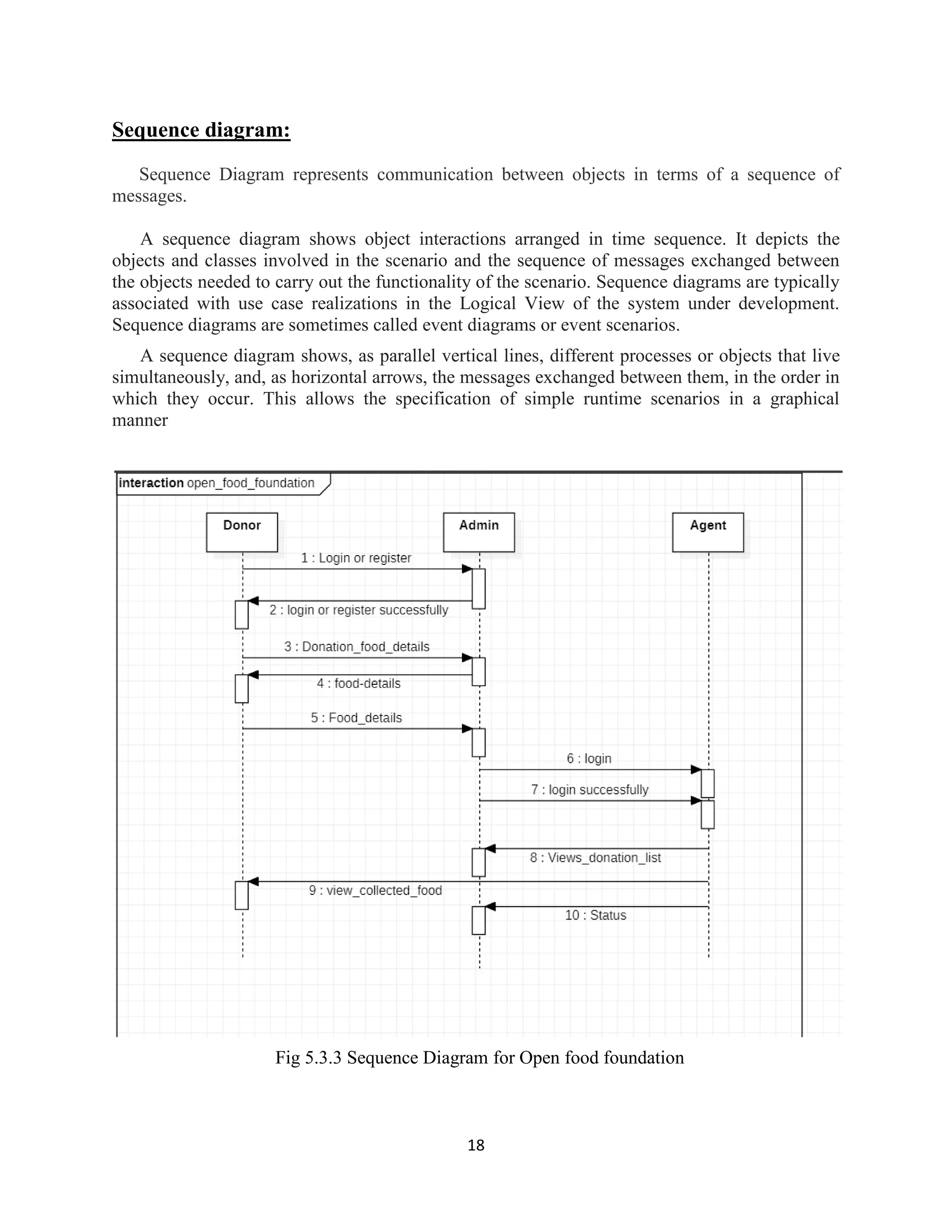
Sequence diagram:
Sequence Diagram represents communication between objects in terms of a sequence of
messages.
A sequence diagram shows object interactions arranged in time sequence. It depicts the
objects and classes involved in the scenario and the sequence of messages exchanged between
the objects needed to carry out the functionality of the scenario. Sequence diagrams are typically
associated with use case realizations in the Logical View of the system under development.
Sequence diagrams are sometimes called event diagrams or event scenarios.
A sequence diagram shows, as parallel vertical lines, different processes or objects that live
simultaneously, and, as horizontal arrows, the messages exchanged between them, in the order in
which they occur. This allows the specification of simple runtime scenarios in a graphical
manner
Fig 5.3.3 Sequence Diagram for Open food foundation
19
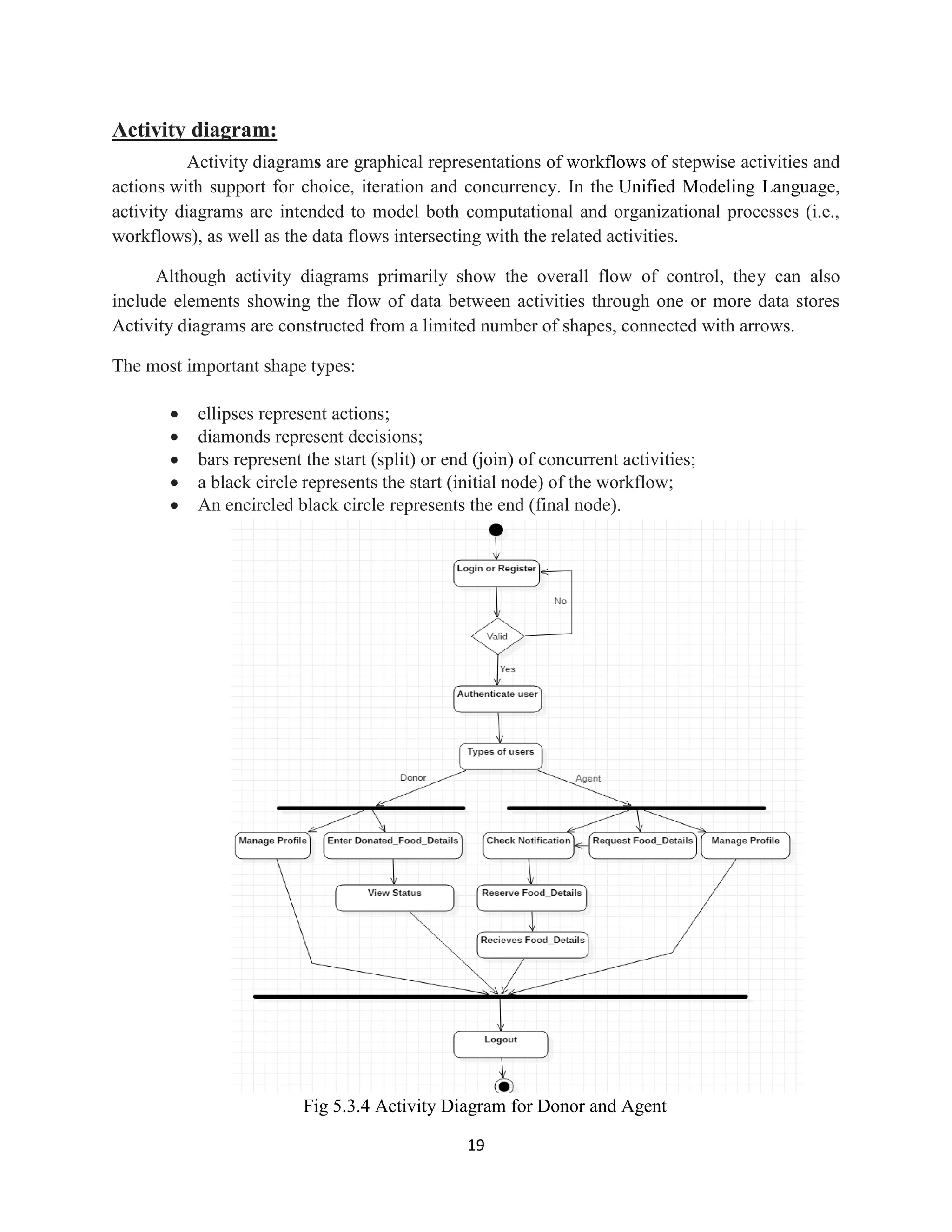
Activity diagram:
Activity diagrams are graphical representations of workflows of stepwise activities and
actions with support for choice, iteration and concurrency. In the Unified Modeling Language,
activity diagrams are intended to model both computational and organizational processes (i.e.,
workflows), as well as the data flows intersecting with the related activities.
Although activity diagrams primarily show the overall flow of control, they can also
include elements showing the flow of data between activities through one or more data stores
Activity diagrams are constructed from a limited number of shapes, connected with arrows.
The most important shape types:
 ellipses represent actions;
 diamonds represent decisions;
 bars represent the start (split) or end (join) of concurrent activities;
 a black circle represents the start (initial node) of the workflow;
 An encircled black circle represents the end (final node).
Fig 5.3.4 Activity Diagram for Donor and Agent
20
6. TECHNOLO ICAL DESCRIPTION
6.1 JAVA:
Java is general-purpose computer-programming language that is concurrent, class-based, object-
oriented, and specifically designed to have as few implementation dependencies as possible. It is
intended to let application developers "write once, run anywhere" (WORA), meaning
that compiled Java code can run on all platforms that support Java without the need for
recompilation. Java applications are typically compiled to byte code that can run on any Java
virtual machine (JVM) regardless of computer architecture. As of 2016, Java is one of the
most popular programming languages in use, particularly for client-server web applications, with
a reported 9 million developers. Java was originally developed by James Gosling at Sun
Microsystems(which has since been acquired by Oracle Corporation) and released in 1995 as a
core component of Sun Microsystems' Java platform. The language derives much of
its syntax from C and C++, but it has fewer low-level facilities original and reference
implementation Java compilers, virtual machines, and class libraries were originally released by
Sun under proprietary licenses. As of May 2007, in compliance with the specifications of
the Java Community Process, Sun relicensed most of its Java technologies under the GNU
General Public License. Others have also developed alternative implementations of these Sun
technologies, such as the GNU Compiler for Java (byte code compiler), GNU Class
path (standard libraries), and IcedTea-Web (browser plugin for applets).her of them
 It must be "simple, object-oriented, and familiar".
 It must be "robust and secure".
 It must be "architecture-neutral and portable".
 It must execute with "high performance".
 It must be "interpreted, threaded, and dynamic".
6.2 ANDROID:
Introduction:
Android is a Linux based operating system it is designed primarily for touch screen mobile
devices such as smart phones and tablet computers. The operating system have developed a lot in
last 15 years starting from black and white phones to recent smart phones or mini computers.
One of the most widely used mobile OS these days is android. The android is software that was
founded in Palo Alto of California in 2003.
21
The android is a powerful operating system and it supports large number of applications in
Smartphone’s. These applications are more comfortable and advanced for the users. The
hardware that supports android software is based on ARM architecture platform. The android is
an open source operating system means that it’s free and any one can use it. The android has got
millions of apps available that can help you managing your life one or other way and it is
available low cost in market at that reasons android is very popular.
22
The android development supports with the full java programming language. Even other
packages that are API and JSE are not supported. The first version 1.0 of android development
kit (SDK) was released in 2008 and latest updated version is jelly bean.
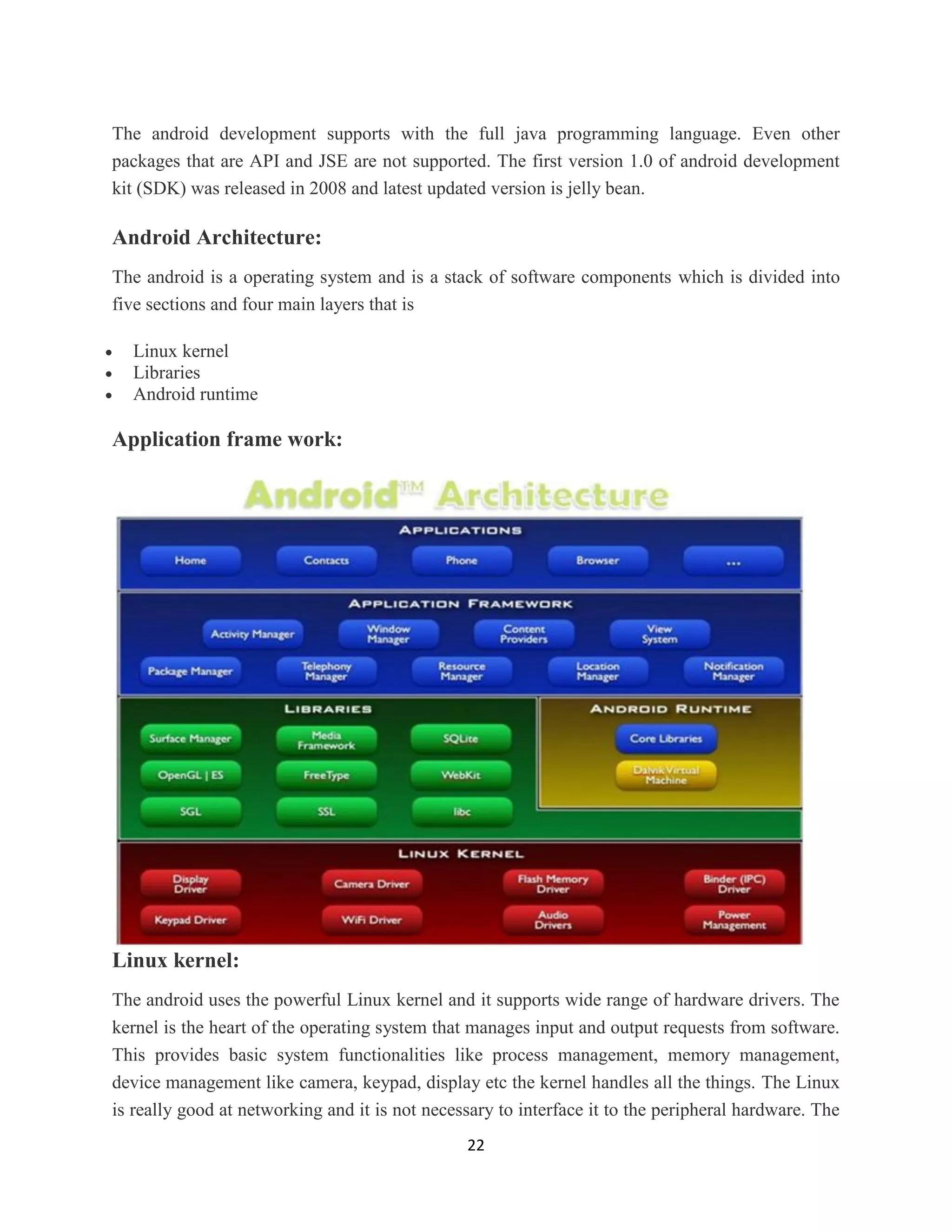
Android Architecture:
The android is a operating system and is a stack of software components which is divided into
five sections and four main layers that is
 Linux kernel
 Libraries
 Android runtime
Application frame work:
Linux kernel:
The android uses the powerful Linux kernel and it supports wide range of hardware drivers. The
kernel is the heart of the operating system that manages input and output requests from software.
This provides basic system functionalities like process management, memory management,
device management like camera, keypad, display etc the kernel handles all the things. The Linux
is really good at networking and it is not necessary to interface it to the peripheral hardware. The
23
kernel itself does not interact directly with the user but rather interacts with the shell and other
programs as well as with the hard ware devices on the system.
Libraries:
The on top of a Linux kennel there is a set of libraries including open source web browser such
as webkit, library libc. These libraries are used to play and record audio and video. The SQLite is
a data base which is useful for storage and sharing of application data. The SSL libraries are
responsible for internet security etc.
Android Runtime:
The android runtime provides a key component called Dalvik Virtual Machine which is a kind of
java virtual machine. It is specially designed and optimized for android. The Dalvik VM is the
process virtual machine in the android operating system. It is software that runs apps on android
devices.
The Dalvik VM makes use of Linux core features like memory management and multithreading
which is in a java language. The Dalvik VM enables every android application to run it own
process. The Dalvik VM executes the files in the .dex format.
Application frame work:
The application frame work layer provides many higher level services to applications such as
windows manager, view system, package manager, resource manager etc. The application
developers are allowed to make use of these services in their application.
Applications and Features:
We find all the android applications at the top layer and you will write your application and
install on this layer. Examples of such applications are contacts, books, browsers, services etc.
Each application performs a different role in the overall applications.
Features:
 Head set layout
 Storage
 Connectivity: GSM/EDGE, IDEN, CDMA, Bluetooth, WI-FI, EDGE,3G,NFC, LTE,GPS.
 Messaging: SMS, MMS, C2DM (could to device messaging), GCM (Google could
messaging)
 Multilanguage support
 Multi touch
24
 Video calling
 Screen capture
 External storage
 Streaming media support
 Optimized graphics
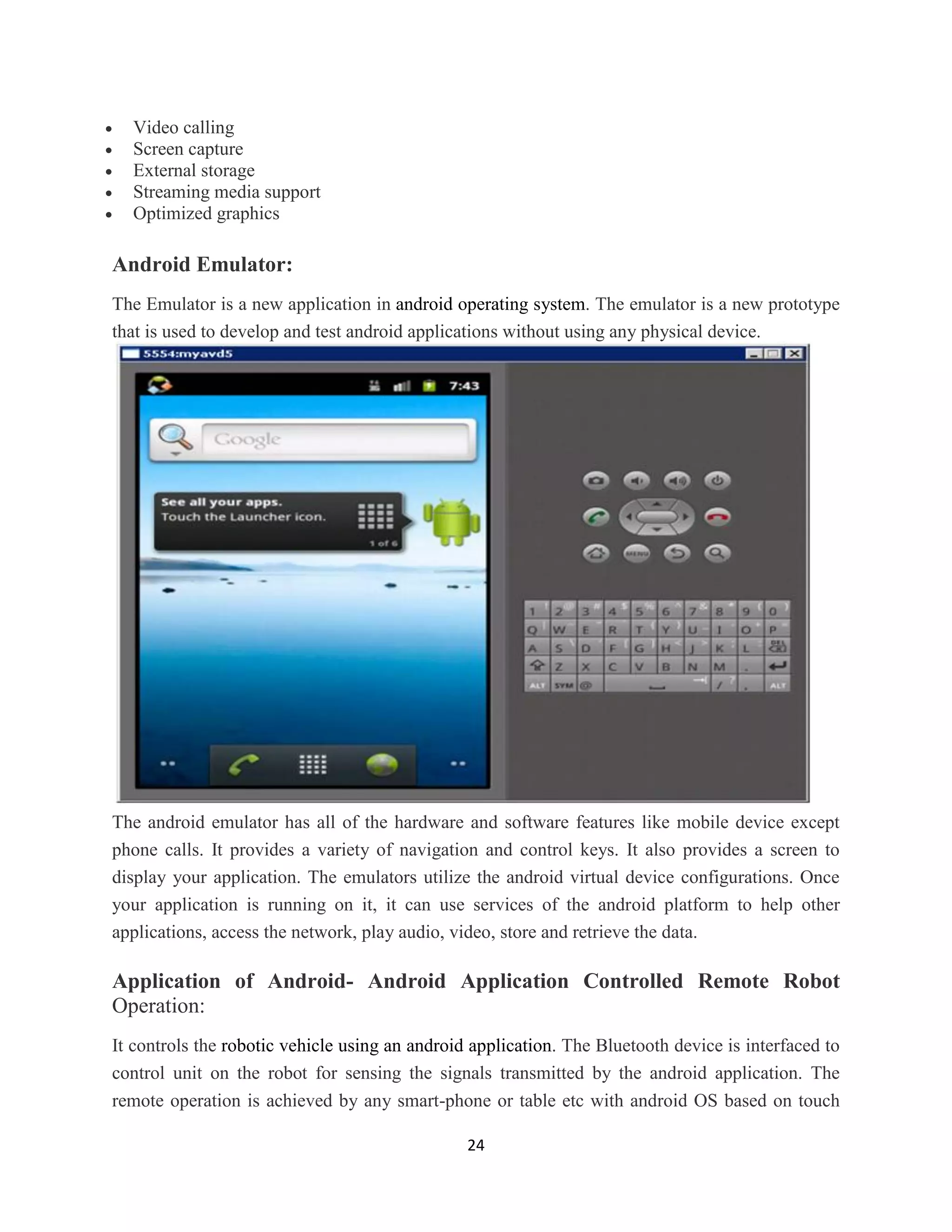
Android Emulator:
The Emulator is a new application in android operating system. The emulator is a new prototype
that is used to develop and test android applications without using any physical device.
The android emulator has all of the hardware and software features like mobile device except
phone calls. It provides a variety of navigation and control keys. It also provides a screen to
display your application. The emulators utilize the android virtual device configurations. Once
your application is running on it, it can use services of the android platform to help other
applications, access the network, play audio, video, store and retrieve the data.
Application of Android- Android Application Controlled Remote Robot
Operation:
It controls the robotic vehicle using an android application. The Bluetooth device is interfaced to
control unit on the robot for sensing the signals transmitted by the android application. The
remote operation is achieved by any smart-phone or table etc with android OS based on touch
25
screen operation. The transmitting end uses an android application device remote through which
commands are transmitted and at the receiver side , these commands are used for controlling the
robot in all directions such as forward ,backward and left or right etc.
The receiver end movement is achieved by two motors that are interfaced to the microcontroller.
The serial communication data sent from the android application is received by a Bluetooth
receiver that is interfaced to the microcontroller.
Advantages:
 Android is Linux based open source operating system , it can be developed by any one
 Easy access to the android apps
 You can replace the battery and mass storage, disk drive and UDB option
 Its supports all Google services
 The operating system is able to inform you of a new SMS and Emails or latest updates.
 It supports Multitasking
 Android phone can also function as a router to share internet
 Its free to customize
 Can install a modified ROM
 Its supports 2D and 3D graphics
6.3 FIREBASE :
Firebase is a mobile and web app development platform that provides developers with a plethora
of tools and services to help them develop high-quality apps, grow their user base, and earn more
profit.
A Brief History
Back in 2011, before Firebase was Firebase, it was a startup called Envolve. As Envolve, it
provided developers with an API that enabled the integration of online chat functionality into
their website.
That people used Envolve to pass application data that was more than just chat messages.
Developers were using Envolve to sync application data such as a game state in real time across
their users.
This led the founders of Envolve, James Tamplin and Andrew Lee, to separate the chat system
and the real-time architecture. In April 2012, Firebase was created as a separate company that
26
provided Backend-as-a-Service with real-time functionality. After it was acquired by Google in
2014, Firebase rapidly evolved into the multifunctional behemoth of a mobile and web platform
that it is today.
Realtime Database:
The Firebase Realtime Database is a cloud-hosted NoSQL database that lets you store and
sync between your users in realtime. The Realtime Database is really just one big JSON object
that the developers can manage in realtime. With just a single API, the Firebase database
provides your app with both the current value of the data and any updates to that data.
Realtime syncing makes it easy for your users to access their data from any device, be it web or
mobile. Realtime Database also helps your users collaborate with one another. Another amazing
benefit of Realtime Database is that it ships with mobile and web SDKs, allowing you to build
your apps without the need for servers. When your users go offline, the Realtime Database SDKs
use local cache on the device to serve and store changes. When the device comes online, the
local data is automatically synchronized.
The Realtime Database can also integrate with Firebase Authentication to provide a simple
and intuitive authentication process.
27
Authentication
Firebase Authentication provides backend services, easy-to-use SDKs, and ready-made UI
libraries to authenticate users to your app. Normally, it would take you months to set up your
own authentication system. And even after that, you would need to keep a dedicated team to
maintain that system. But if you use Firebase, you can set up the entire system in under 10 lines
of code that will handle everything for you, including complex operations like account merging.
You can authenticate your app’s users through the following methods:
 Email & Password
 Phone numbers
 Other mehods
28
7. CODING AND IMPLEMENTATION
Introduction
Coding (or programming) is the construction of software. Coding involves writing a ‘recipe’,
which in Computing is called an algorithm, in a so called programming language that a computer
can understand. When the computer runs the code we wrote, it follows the ‘recipe’, step by step
Computer programming is the process of designing and building an executable computer
program for accomplishing a specific computing task. Programming involves tasks such as
analysis, generating algorithms, profiling algorithms' accuracy and resource consumption, and
the implementation of algorithms in a chosen program language (commonly referred to
as coding).
The source code of a program is written in one or more programming languages. The purpose of
programming is to find a sequence of instructions that will automate the performance of a task
for solving a given problem. The process of programming thus often requires expertise in several
different subjects, including knowledge of the application domain, specialized algorithms, and
formal logic.
Related programming tasks include testing, debugging, maintaining a program's source code,
implementation of build systems, and management of derived artifacts such as machine code of
computer programs. These might be considered part of the programming process, but often the
term software development is used for this larger process with the
term programming, implementation, or coding reserved for the actual writing of source
code. Software engineering combines engineering techniques with software development
practices.
Sample code:
package com.example.android.fooddonation;
public class Item {
private String food;
private String userId;
private String id;
public Item(String food, String userId, String id) {
this.food = food;
this.userId = userId;
this.id = id;
}
public Item() {
this.food = "";
this.userId = "";
}
public String getFood() {
return food;
}
public void setFood(String food) {
29
this.food = food;
}
public String getUserId() {
return userId;
}
public void setUserId(String userId) {
this.userId = userId;
}
public String getId() {
return id;
}
public void setId(String id) {
this.id = id;
}
@Override
public String toString() {
return food + " " + userId;
}
}
Home page code:
package com.example.android.fooddonation;
import java.util.ArrayList;
import java.util.List;
public class MainActivity extends AppCompatActivity
implements NavigationView.OnNavigationItemSelectedListener {
public static final int NAV_MY_DONATIONS = R.id.nav_my_donations;
public static final int NAV_REQUESTS = R.id.nav_requests;
public static final int NAV_DONATIONS = R.id.nav_donations;
private int selectedNav;
private DrawerLayout drawer;
private DatabaseReference databaseReference =
FirebaseDatabase.getInstance().getReference("donations");
private RecyclerView recyclerView;
private ProgressBar progressBar;
private TextView textViewEmpty;
private FirebaseAuth firebaseAuth;
@Override
protected void onCreate(Bundle savedInstanceState) {
super.onCreate(savedInstanceState);
setContentView(R.layout.activity_main);
Toolbar toolbar = (Toolbar) findViewById(R.id.toolbar);
setSupportActionBar(toolbar);
firebaseAuth = FirebaseAuth.getInstance();
recyclerView = findViewById(R.id.list_donations);
DividerItemDecoration dividerItemDecoration = new
DividerItemDecoration(MainActivity.this, new
30
LinearLayoutManager(MainActivity.this).getOrientation());
recyclerView.addItemDecoration(dividerItemDecoration);
FloatingActionButton fab = (FloatingActionButton) findViewById(R.id.fab);
fab.setOnClickListener(new View.OnClickListener() {
@Override
public void onClick(View view) {
startActivityForResult(new Intent(MainActivity.this,
DonationActivity.class), 0);
}
});
drawer = (DrawerLayout) findViewById(R.id.drawer_layout);
ActionBarDrawerToggle toggle = new ActionBarDrawerToggle(
this, drawer, toolbar, R.string.navigation_drawer_open,
R.string.navigation_drawer_close);
drawer.addDrawerListener(toggle);
toggle.syncState();
NavigationView navigationView = (NavigationView) findViewById(R.id.nav_view);
navigationView.setNavigationItemSelectedListener(this);
navigationView.setCheckedItem(NAV_DONATIONS);
selectedNav = NAV_DONATIONS;
progressBar = findViewById(R.id.progressBar_list);
textViewEmpty = findViewById(R.id.text_list_empty);
}
@Override
protected void onStart() {
super.onStart();
getData();
}
private void getData() {
progressBar.setVisibility(View.VISIBLE);
recyclerView.setVisibility(View.GONE);
Query finalReference = databaseReference.orderByChild("donation");
switch (selectedNav) {
case NAV_DONATIONS:
finalReference =
databaseReference.orderByChild("donation").equalTo(true);
break;
case NAV_REQUESTS:
finalReference =
databaseReference.orderByChild("donation").equalTo(false);
break;
case NAV_MY_DONATIONS:
finalReference =
databaseReference.orderByChild("userId").equalTo(firebaseAuth.getUid());
break;
}
finalReference.addValueEventListener(new ValueEventListener() {
@Override
public void onDataChange(@NonNull DataSnapshot dataSnapshot) {
List<Item> names = new ArrayList<>();
for (DataSnapshot snapshot : dataSnapshot.getChildren()) {
Donation donation = snapshot.getValue(Donation.class);
31
Item item = new Item();
item.setFood(donation.getFood());
item.setId(snapshot.getKey());
item.setUserId(donation.getUserId());
names.add(item);
}
progressBar.setVisibility(View.GONE);
recyclerView.setAdapter(new DonationAdapter(MainActivity.this,
names));
recyclerView.setLayoutManager(new
LinearLayoutManager(MainActivity.this));
if (names.isEmpty()) {
textViewEmpty.setText("No items found");
textViewEmpty.setVisibility(View.VISIBLE);
recyclerView.setVisibility(View.GONE);
} else {
textViewEmpty.setVisibility(View.GONE);
recyclerView.setVisibility(View.VISIBLE);
}
}
@Override
public void onCancelled(@NonNull DatabaseError databaseError) {
Log.e("Database Error", databaseError.getMessage());
}
});
}
@Override
public void onBackPressed() {
DrawerLayout drawer = (DrawerLayout) findViewById(R.id.drawer_layout);
if (drawer.isDrawerOpen(GravityCompat.START)) {
drawer.closeDrawer(GravityCompat.START);
} else {
super.onBackPressed();
}
}
@Override
public boolean onCreateOptionsMenu(Menu menu) {
getMenuInflater().inflate(R.menu.main, menu);
return true;
}
@Override
public boolean onOptionsItemSelected(MenuItem item) {
int id = item.getItemId();
if (id == R.id.action_settings) {
startActivity(new Intent(this, AccountActivity.class));
return true;
} else if (id == R.id.action_sign_out) {
firebaseAuth.signOut();
startActivity(new Intent(this, LoginActivity.class));
finish();
}
return super.onOptionsItemSelected(item);
}
32
@Override
public boolean onNavigationItemSelected(MenuItem item) {
int id = item.getItemId();
selectedNav = id;
switch (id) {
case NAV_DONATIONS:
setTitle("Food Donations");
getData();
break;
case NAV_REQUESTS:
setTitle("Donation Requests");
getData();
break;
case NAV_MY_DONATIONS:
setTitle("My Donations");
getData();
break;
}
drawer.closeDrawer(GravityCompat.START);
return true;
}
}
33
8. TESTING
8.1 Usability and Beta Testing:
Now that basic functions are tested, it’s time to make sure that the mobile application is easy to
use and provides a satisfactory user experience. This phase requires maintaining cross-platform
matrix to ensure the platform coverage achieved by beta testers.
Once the app is tested in-house, release the beta version of the application to market.
Compatibility testing:
Mobile devices vary between platforms, models, and operating system versions. It’s essential to
select a subset of devices relevant to your application.
User Interface testing:
User experience is key for apps to be accepted by end users. Check usability issues, navigation,
and content. Test menus, options, buttons, bookmarks, history, settings, and navigation flow of
the application.
Interface testing:
Testing of menu options, buttons, bookmarks, history, settings, and navigation flow of the
application.
External factors testing:
Mobile device applications must also contend with interactions and interruptions from other
device features like various network connection types, SD cards, phone calls, and assorted device
settings.
Accessibility testing:
Mobile devices have a diverse demographic of users so it is important to ensure that your
application is widely accessible.
8.2 Performance Testing:
Mobile device applications have less overall device memory and power available so must handle
themselves very efficiently. Test app performance by changing the connection from 2G, 3G to
WIFI, responsiveness, battery consumption, stability, etc.
It’s a great practice to test your application for scalability and performance issues.
34
8.3 Functional Testing:
App functionality should be fully tested, with special consideration given to installation, updates,
sign-up and login, provisioning, device-specific functions, and error messages.
Functional testing can, for the most part, be carried out in the same way you would perform it on
any other kind of application. For this reason, we won’t go into specifics other than pointing out
areas that are of particular importance for mobile apps.
Keep in mind that functional testing should include testing all application features and not be
focused solely on these areas.
In addition to functional testing, you should also be running the following tests:
 Installation test
 Upgrades testing
 Operational testing
 Sign-up and Login
 Provisioning
 Device-specific functions
 Error messages
 Low-level resource testing: memory usage, auto-deletion, etc
 Services testing: both on- and offline
Device Testing:
Execute test cases and scripts in all the previously identified devices, in the cloud, and/or in
physical devices in the lab or via testing tools.
Test Case and Script Design
Prepare a test case document for each and every feature and functionality.
In addition to functional test cases, some special cases should also be covered:
 Battery usage
 App speed
 Data requirements
 Memory
35
9. OUTPUT SCREENSHOTS
Fig 9.1 Sign in Page
36
Fig 9.2 Login Page
37
Fig 9.3 List of donations
38
Fig 9.4 Donation Requests
39
Fig 9.5 Donation Page
40
Fig 9.6 Update page
41
10. CONCLUSION
The development of this product surely prompts many new areas of investigation. This product
has wide scope of implementation by making it live. Moreover this product creates many
benefits for the business and the community. By taking it online it will help many people
throughout the city by donating food daily.
Hundreds of thousands of tons of food are either lost or wasted while millions of people
suffer from malnutrition. A plausible initiative is the food donation portal in which large retail
chains and potentially other organizations can donate food. This food is collected and delivered
by Third Party vendor to NGO in need. Food donation portal will help thousands of people that
suffer from starvation and also consume food that are wasted with no reason.. As consequence,
research and actions are needed to improve the efficiency of food donation portal.
42
11. FUTURE SCOPE
The optimal path is identified using the extended SPF algorithm based MAS technique. The
different Floyd’s algorithms could be identified and applied to find the optimal path in the power
system network. This approach could be developed by including the operating frequency of the
network as additional constraint. The same technique can be used to obtain different restoration
plans for the given network
43
12. REFERENCES
 Komal Raut, Nimesh Shah, Akash Thorat, “ Food donation portal”
http://ijarcet.org/wpcontent/uploads/IJARCET-VOL-5-ISSUE-4-906-908.pdf
 Dhruvi Shah, Adnan Ansari, Ruchi Sharma,“ Helping Hands”
http://ijsrd.com/Article.php?manuscript=IJSRDV4I110485
 Hitesh Raut, Swapnil Rajput, Danjhan Nalavade, “Smartphone based food supply chain for
Aurangabad city using GIS location based and google web services”
https://ieeexplore.ieee.org/document/7580874/metrics
 Aaron Ciaght, Adolfo Villafiorita,“ Beyond food sharing: Supporting food wastage reduction
using ICT” http://esatjournals.net/ijret/2016v05/i04/IJRET20160504058.pdf
 Amir Saxena. Khushi Verma, Aadit Patil, “ Development of a food supply chain by PHP”
https://www.ncbi.nlm.nih.gov/pmc/articles/PMC2610113/
 Source code for “Open Food Foundation” https://github.com/thirupathi-chintu/open-food-
foundation
 The Unified Modeling Language User Guide by Grady Booch, James Rumbaugh, Ivar Jacobson
from Rational software corporation

OPEN FOOD FOUNDATION

  • 1.
    OPEN FOOD FOUNDATION AMini Project Report Submitted in partial fulfillment of the requirements for the award of the degree of Bachelor of Technology In Computer Science & Engineering By P.Thirupathi (16UC1A0539) B.Vani (16UC1A0514) D.Vaishnavi (16UC1A0520) S.Soni (16UC1A0547) Under the Guidance of Dr.A.Kiranmayee Department of Computer Science & Engineering TALLA PADMAVATHI COLLEGE OF ENGINEERING SOMIDI , KAZIPET , WARANGAL – Urban-506003 Approved by AICTE, New Delhi. Affiliated to JNTUH An ISO 9001:2015 Institution, NAAC Accredited (2019-20)
  • 2.
    TALLA PADMAVATHI COLLEGEOF ENGINEERING SOMIDI , KAZIPET , WARANGAL – Urban-506003 Approved by AICTE, New Delhi. Affiliated to JNTUH An ISO 9001:2015 Institution, NAAC Accredited DEPARTMENT OF COMPUTER SCIENCE AND ENGINEERING CERTIFICATE This is to certify that the Mini Project Report entitled ““OPEN FOOD FOUNDATION” is a bonafide work of the student bearing Roll No. P.Thirupathi (16UC1A0539), B.Vani (16UC1A0514),D.Vaishnavi (16UC1A0520), S.Soni (16UC1A0547) submitted in partial fulfillment of the requirements for the award of the degree of BACHELOR OF TECHNOLOGY in computer science and Engineering during the academic year (2019- 2020). GUIDE H.O.D PRINCIPAL EXTERNAL EXAMINAR
  • 3.
    ACKNOWLEDGEMENT The successful completionof any task would be incomplete without mention of names of the people, whose constant guidance and encouragement crown all the efforts with success. First and foremost we express our full gratitude to, Dr.A.Kiranmayee, Principal Talla Padmavathi College of engineering, for enabling us to complete this work successfully. It is my duty to convey sincere thanks to my project guide. We express our heart full thanks to Mrs. K.Deepika Madam head of Department computer science and Engineering for supporting us through this entire mini project. We express our full gratitude to Dr. A.Kiranmayee Madam Principal for supporting and encouraging in all the activities. Sri T. Mallesham Sir Secretary and Chairman of Talla Padmavathi College of engineering, for giving us this opportunity for the successful completion of our mini project. We are very much thankful to Mr. T.Vamshi Sir and T.Chaitanya Madam. Director of TPCE for his encouragement and support and entire beloved faculty for all their help. P.Thirupathi (16UC1A0539) B.Vani (16UC1A0514) D.Vaishnavi (16UC1A0520) S.Soni (16UC1A0547)
  • 4.
    INDEX S.No Contents PageNo. Abstract 1. Introduction………………………………………………….1 1.1 Introduction 1.2 Purpose 1.3 Motivation 1.4 Scope 2. Literature Survey……………………………………………....2 3. System Analysis……………………………………………….4 3.1 Introduction 3.2 Analysis Model 3.3 Existing System 3.4 Proposed System 3.5 Modules 4. Software Requirements Specification…………………………7 4.1 Functional Requirements 4.2 Performance 4.3 Hardware Requirements 4.4 Software Requirements 5. System Design………………………………………………...10 5.1 Introduction 5.2 Data Flow Diagrams 5.3 UML Diagrams 6. Technology Description………………………………………20 6.1 Java 6.2 Android 6.3 Firebase 7. Coding and Implementation…………………………………..28
  • 5.
    8. Testing………………………………………………………….33 8.1 Usabilityand Beta Testing 8.2 Performance Testing 8.3 Functional Testing 9. Output Screenshots……………………………………………..35 10. Conclusion……………………………………………………...41 11. Future Scope……………………………………………………42 12. Reference………………………………………………………..43
  • 6.
    ABSTRACT The project aimsto satisfy the requirements of needy organization through food donations. Food is a basic need for every living being. Daily lots of food is wasted by many people globally.“Open Food Foundation” is a project which aims to provide food to orphans or needy. By this lives of many people suffering from lack of food will be saved, at the same time we can overcome the problems of wastage of food. The person who donates food will register by giving his details (address) in the application. So that all the orphanages will automatically receive a notification. The orphanages can view the details of the user who has registered and any one of the orphanages which are nearby will respond. So that this notifications will be disabled for all the other orphanages.
  • 7.
    1 1. INTRODUCTION 1.1 Introduction Inhighly populated countries like India, food wastage is a disturbing issue. The streets, garbage bins and landfills have ample proof to prove it. Marriages, canteens, restaurants, social and family get-togethers and functions expel out so much food. Food wastage is not only an indication of hunger or pollution, but also of many economic problems. The high standard of living has resulted in the wastage of food, clothes, etc. because of quick changes in habits and lifestyle. Instead of wasting these things we can put them in use by donating them to various organizations such as orphanages, old age homes, etc. The product is a web application which aims to establish a link between restaurants and the charity homes/needy households to enable excess food donation. Food donation portal is internet-based application that provides a platform for donating leftover food to all needy people/organizations. The portal is shown to be an effective means of donating food to organizations, etc. over the internet. In highly populated countries like India, food wastage is a big issue. The garbage bins, streets and landfills have ample proof to prove it. Canteens, marriages, restaurants, social and family get-togethers and functions expel out so much food. Food wastage is not only an indication of pollution or hunger, but also of many economic problems. The high standard of living has resulted in the wastage of food. Because of quick changes in habits and lifestyle instead of wasting food, the system can put them in use by donating them to various organizations such as old age homes, orphanages, etc. The product is an internet-based website application that basically aims at charity through donations. Many people, institutes wish to donate things to needy organizations. Also, many organizations wish to ask for various things required by them such as clothes, food grains, utensils, etc. But there is no source available through which they can satisfy their requirements. Thereby, an web based application has been developed through which people can donate food items as per their capacity and the application also allows organizations to put up their requests, that is items required by them, if any. 1.2 Purpose of the project The main purpose of the project is to help the needy people through food donations. Donation of food is an important avenue for eliminating food wastage.
  • 8.
    2 1.3 Motivation: Extant literatureon the main motivations that affect Food Waste is limited and fragmented, since it focuses on single or few variables, sometimes assuming behavioural and other times socio- demographic perspectives. However, avoidable food waste also comes from the following identified behavioural antecedents: excessive purchase, over preparation, and inappropriate conservation. 1.4 Scope: The scope of this project is to implement a cell phone application for user to obtain wastage food/organizations information easily through the Internet on the Android. The portal is shown to be an effective means of donating food to organizations, etc. over the internet to the administrator. However, since we’ve already set up a server for the phone to access. It makes a sense if the web server is set up as a web application so that the organizations can see information through the web.
  • 9.
    3 2. Literature Survey Thebroad concepts of food loss and waste will be explained. Finally the food loss and waste reduction will be revealed in this section. There are: - Over 1/3 of all food produced globally goes to waste. - In most developed countries, over half of the food waste takes at some place. - In the present world there are billions of hungry people. Over 1/3 of all food produced globally goes to waste: Global quantitative food losses and waste per year are roughly 30% for cereals, 40-50% for root crops, fruits and vegetables, 20% for oil seeds, meat and dairy plus 35% for fish. In most developed countries, over half of the food waste takes at some place: And yet in Indian households we waste 7 million tones of it every year, 5 million of which is edible. In the present world there are nearly billions of hungry people: Our food system is currently responsible for approximately 60% of global terrestrial biodiversity loss, 24% of greenhouse gas emissions and 33% of degraded soils.
  • 10.
    4 3. SYSTEM OFANALYSIS 3.1 Introduction: Introduces the systems development life cycle (SDLC), the fundamental four-phase model (planning, analysis, design, and implementation) common to all information systems development projects. It describes the evolution of system development methodologies and discusses the roles and skills required of a systems analyst. The chapter then overviews the basic characteristics of object-oriented systems and the fundamentals of object-oriented systems analysis and design and closes with a description of the Unified Process and its extensions and the Unified Understand the evolution of systems development methodologies.  Be familiar with the different roles played by and the skills of a systems analyst  Be familiar with the basic characteristics of object-oriented systems  Be familiar with the fundamental principles of object-oriented systems analysis and design  Be familiar with the Unified Process, its extensions, and the Unified Modeling Language Modeling Language:  Requirements Analysis  Project planning  System design  Detail design  Coding  Unit testing  System integration & testing 3.2 Analysis model: This project food redistribution is an enormously successful social innovation that tackles with food waste and food poverty. The user’s details are maintained confidential because it maintains a separate account for each user.
  • 11.
    5 3.3 Existing system: Inexisting system if anyone have extra food because of any function or in their home it will be become waste because instantly there is no way to share with anyone if they are having lots of food. Even if they want to give that extra food to any orphanage or poor people they don’t have time or don’t have an idea about that So that we have create an application for sponsor that extra food to poor people or nearby orphanage. 3.4 Proposed system: In proposed system we are reduce that food wastage using that application. This project is food redistribution is an enormously successful social innovation that tackles food waste and food poverty. The admin collect foods from donator through their nearby agent then provide to nearest orphanages or poor people. After receiving the food from the agent by admin and give alert message to that donator through this way we can reduce food wastage problem. 3.5 Module description: In this project consist of the different types of module. The modules are: 1. Donator Module 2. Agent Module 3. Admin Module Admin Module In admin module, the administrator maintains the agent details as well as the donator details. The administrator collects the food from the agent. The administrator gives the orphanage details directly to the donator.
  • 12.
    6 Donator Module In donatormodule, the donators give the wastage of food to the orphanage. The donator gives the request to the admin for the purpose of to collect the wastage food. The donators view the orphanage details and agent details. Agent Module In Agent module, the agent maintains the orphanage details. It can also maintain the donator details. The agent gives the request to the admin for collect the food from the donator. After collect the food the agent give the alert message for the donator.
  • 13.
    7 4. SOFTWARE REQUIREMENTSSPECIFICATIONS Software requirements specification establishes the basis for an agreement between customers and contractors or suppliers on how the software product should function (in a market- driven project, these roles may be played by the marketing and development divisions). Software requirements specification is a rigorous assessment of requirements before the more specific system design stages, and its goal is to reduce later redesign. It should also provide a realistic basis for estimating product costs, risks, and schedules. Used appropriately, software requirements specifications can help prevent software project failure. The software requirements specification document lists sufficient and necessary requirements for the project development. To derive the requirements, the developer needs to have clear and thorough understanding of the products under development. This is achieved through detailed and continuous communications with the project team and customer throughout the software development process. The main purpose for preparing this document life cycle (SDLC) and a describes the complete requirements of the systems. It means for the use by the development and will be the basic during testing phase. Any changes made to the requirements in the future will have to go through formal changes approval process. 4.1 Functional requirements: A functional requirement defines a function of a system or its component, where a function is described as a specification of behavior between outputs and inputs. Functional requirements may involve calculations, technical details, data manipulation and processing and other specific functionality that define what a system is supposed to accomplish. Behavioral requirements describing all the cases where the system uses the functional requirements are captured in use cases. Functional requirements are supported by requirements (also known as "quality requirements"), which impose constraints on the design or implementation (such as performance requirements, security, or reliability). Generally, functional requirements are expressed in the form "system must do <requirement>," while non-functional requirements take the form "system shall be <requirement>."The plan for implementing functional requirements is detailed in the system design, whereas non functional requirements are detailed in the system architecture.
  • 14.
    8 4.2 Performance requirements: Inidentifying and quantifying performance requirements, it is important to identify the reasoning behind a particular requirement. This is part of the general capacity planning process. Users might be basing their statements of requirements on assumptions about the logic of the program that do not match the programmer's assumptions. At a minimum, a set of performance requirements should document the following:  The maximum satisfactory response time to be experienced most of the time for each distinct type of user-computer interaction, along with a definition of most of the time. Response time is measured from the time that the user performs the action that says "Go" until the user receives enough feedback from the computer to continue the task. It is the user's subjective wait time. It is not from entry to a subroutine until the first write statement.  If the user denies interest in response time and indicates that only the result is of interest, you can ask whether "ten times your current estimate of stand-alone execution time" would be acceptable. If the answer is "yes," you can proceed to discuss throughput. Otherwise, you can continue the discussion of response time with the user's full attention.  The response time that is minimally acceptable the rest of the time. A longer response time can cause users to think the system is down. You also need to specify rest of the time; for example, the peak minute of a day, 1 percent of interactions. Response time degradations can be more costly or painful at a particular time of the day.  The typical throughput required and the times it will be taking place. This is not a casual consideration. For example, the requirement for one program might be that it runs twice a day: at 10:00 a.m. and 3:15 p.m. If this is a CPU-limited program that runs for 15 minutes and is planned to run on a multiuser system, some negotiation is in order.  The size and timing of maximum-throughput periods.  The mix of requests expected and how the mix varies with time.  The number of users per machine and total number of users, if this is a multiuser application. This description should include the times these users log on and off, as well as their assumed rates of keystrokes, completed requests, and think times. You may want to investigate whether think times vary systematically with the preceding and following request.  Any assumptions that the user is making about the machines the workload will run on. If the user has a specific existing machine in mind, make sure you know that early on. Similarly, if the user is assuming a particular type, size, cost, location, interconnection, or any other variable that will constrain your ability to satisfy the preceding requirements, that assumption also becomes part of the requirements. Satisfaction will probably not be assessed on the system where the program is developed, tested, or first installed.
  • 15.
    9 4.3 Hardware requirements: DISK SPACE : 500MB  RAM : 512 MB FOR WINDOWS  compatible mouse and keyboard 4.4 Software requirements:  Operating system : windows 7  Front end : Android  Back end : Firebase
  • 16.
    10 5. SYSTEM DESIGN 5.1Introduction: One of the most interesting, and most difficult, of the tasks that we may undertake in our careers as engineers or computer scientists is the design of an entire system. A system is a set of interacting parts, generally too large to be built by a single person, created for some particular purpose. We work with systems all the time. The operating systems that control our machines are systems. The layers of hardware and software that allow the programs on these machines to interact with each other over a network are systems. Even most applications that we use are systems, whether we know it or not. As engineers, we know that the way to solve a large problem is to break it into a set of interacting smaller problems. Each of these smaller problems can then be decomposed into even smaller problems, until after enough iteration we have a problem that can be solved on its own. Each gives us a set of components, and deciding what those components are and how they fit together is the activity of system design. But to say that all software has a design does not entail that all software is designed. Designing a system requires that someone think about the right way to decompose the functionality, and how to create a small set of abstractions that can be re-used and re-combined to provide the needed functionality. The notion that anything that shows some kind of design is therefore the result of some conscious activity of design is a confusion that is based on an ambiguity in the term “design.” On one sense of the word, design is a property of some object such as a program, a system, or the like that merely indicates that there are parts that interact. On another sense of the word, design indicates the activity of determining what the parts of some larger whole should be, and how those parts will fit together. While anything that is the result of the activity of design will itself have a design, it does not follow that anything that has the property of a design is therefore the result of the activity of design.
  • 17.
    11 System workflow: A workflowsystem is a platform that combines several discrete tools into one cohesive application that automates processes involving both machine and human tasks, usually in a linear sequence. However, task sequences can also be dynamic and/or parallel depending on actions taken or the needs of the process. A process builder is used to build an automated workflow process. A "process" refers to a series of tasks that take place in order to achieve a business outcome. The process proceeds in a sequence determined by actions or pre-defined business rules. Using a process builder in a workflow system involves illustrating these activities and rules as well as identifying the actions whether they are automated, from another system or human-based. Drag, drop and connect tasks to create a custom workflow that streamlines your business process A form designer allows users to build sophisticated, dynamic forms that are used to gather input from end-users (employees, customers, vendors, etc.) that then feed into the process. In some cases, the information gathered will determine the path of the process. For instance, if an end-user selects "HR" as their department in a form, the process may route the information to someone in HR. Most modern form design tools include the ability to show or hide elements based on inputs (or known user information) as well as perform calculations live within the form. A workflow engine is an application that runs with a workflow automation system and makes decisions automatically based on preset rules. These decisions usually involve transitioning to a specific path, task or action in a workflow definition, for instance assigning a task to someone or saving a document to a specific folder in a document management system. All data and metrics captured during the execution of a process are stored in the workflow system. Data can be compared over time or against SLAs (service level agreements) to track the performance of anyone involved in the process. Reports and information can be displayed in real time and scheduled for distribution when users need them. Visual reports and dashboards can help paint a complete picture that can easily be shared around your organization. Self-service portals provide a consistent, user-friendly Web portal for employees to make requests, manage requests and track request status. On the back-end, administrators in IT, HR, Finance, Operations, etc. can create workflows and rules to automatically route requests based on a variety of factors, fulfill employee requests and analyze performance.  Improve compliance with audit trails.  Increase output and increase productivity (this goes for people handling requests as well as requestors).
  • 18.
    12  Streamline andspeed up internal processes by reducing manual entry and request handling.  Reduce errors and re-work.  Reduce risk of improperly approved requests.  A unified, personalized request experience for employees.  Drastically reduce paperwork and associated costs and waste.  Reduce the need for manual decision making and handling with business rules.  Track request status (completed, pending, or in-progress, etc.) in real time  Better align tasks with the appropriate skill sets.  Identify performance trends (group and individual) over time.  Reduced license overhead for enterprise systems (ERP, CRM, etc.)  Monitor team progress against Service Level Agreements.  Identify and remove process barriers or bottlenecks. 5.2 Data-Flow Analysis: Data-flow analysis is a technique for gathering information about the possible set of values calculated at various points in a computer program. A program's control flow graph (CFG) is used to determine those parts of a program to which a particular value assigned to a variable might propagate. The information gathered is often used by compilers when optimizing a program. A canonical example of a data-flow analysis is reaching definitions. A simple way to perform data-flow analysis of programs is to set up data-flow equations for each node of the control flow graph and solve them by repeatedly calculating the output from the input locally at each node until the whole system stabilizes, i.e., it reaches a fix point. This general approach was developed by Gary Kildall while teaching at the Naval Postgraduate School. Data-flow analysis is the process of collecting information about the way the variables are used, defined in the program. It attempts to obtain particular information at each point in a procedure. Usually, it is enough to obtain this information at the boundaries of basic blocks, since from that it is easy to compute the information at points in the basic block. In forward flow analysis, the exit state of a block is a function of the block's entry state. This function is the composition of the effects of the statements in the block. The entry state of a block is a function of the exit states of its predecessors. Each particular type of data-flow analysis has its own specific transfer function and joins operation. Some data-flow problems require backward flow analysis. This follows the same plan,
  • 19.
    13 except that thetransfer function is applied to the exit state yielding the entry state, and the joint operation works on the entry states of the successors to yield the exit state. If the control flow graph does not contain cycles (there were no explicit or implicit loops in the procedure) algorithm The entry point (in forward flow) plays an important role: Since it has no solving the equations is straightforward. The control flow graph can then be topologically sorted; running in the order of this sort, the entry states can be computed at the start of each block, since all predecessors of that block have already been processed, so their exit states are available. If the control flow graph does contain cycles, a more advanced is required. It is easy to improve on the algorithm above by noticing that the in-state of a block will not change if the out-states of its predecessors don't change. Therefore, we introduce a work list: a list of blocks that still need to be processed. Whenever the out-state of a block changes, we add its successors to the work list. In each iteration, a block is removed from the work list. Its out- state is computed. If the out-state changed, the block's successors are added to the work list. For efficiency, a block should not be in the work list more than once. The algorithm is started by putting information generating blocks in the work list. It terminates when the work list is empty. Data-flow analysis is inherently flow-sensitive. Data-flow analysis is typically path- insensitive, though it is possible to define data-flow equations that yield a path-sensitive analysis.  A flow-sensitive analysis takes into account the order of statements in a program. For example, a flow-insensitive pointer alias analysis may determine "variables x and y may refer to the same location", while a flow-sensitive analysis may determine "after statement 20, variables x and y may refer to the same location".  A path-sensitive analysis computes different pieces of analysis information dependent on the predicates at conditional branch instructions. For instance, if a branch contains a condition x>0, then on the fall-through path, the analysis would assume that x<=0 and on the target of the branch it would assume that indeed x>0 holds.  A context-sensitive analysis is an interprocedural analysis that considers the calling context when analyzing the target of a function call. In particular, using context information one can jump back to the original call site, whereas without that information, the analysis information has to be propagated back to all possible call sites, potentially losing precision.
  • 20.
    14 Fig 5.2.1 DataFlow Diagram for Open Food Foundation 5.3 UML Diagrams: Unified Modeling language (UML) is a standardized modeling language enabling developers to specify, visualize, construct and document artifacts of a software system. Thus, UML makes these artifacts scalable, secure and robust in execution. UML is an important aspect involved in object-oriented software development. It uses graphic notation to create visual models of software systems. The UML architecture is based on the Meta object facility, which defines the foundation for creating modeling language. They are precise enough to generate the entire application. A fully executable UML can be deployed to multiple platforms using different technologies and can be used with all processes throughout the software developed cycle.
  • 21.
    15 UML is designedto enable users to develop an expressive, ready to use visual modeling language. In addition, it supports high level development concepts such as frameworks, patterns and collaborations. UML includes a collection of elements such as:  Programming Language Statements  Actors: specify a role played by a user or any other system interacting with the subject.  Activities: These are tasks, which must take place in order to fulfill an operation contract. They are represented in activity diagrams.  Business Process: includes a collection of tasks producing a specific service for customers and is visualized with a flowchart as a sequence of activities.  Logical and Reusable Software Components UML diagrams can be divided into two categories. The first type includes six diagram types representing structural information. The second includes the remaining seven representing general types of behavior. Structure diagrams are used in documenting the architecture of software systems and are involved in the system being modeled. Different structure diagrams are:  Class diagram  Use case diagram  Sequence diagram  State chart diagram  Activity diagram UML diagrams represent static and dynamic views of a system model. The static view includes class diagrams and composite structure diagrams, which emphasize static structure of systems using objects, attributes, operations and relations. The dynamic view represents collaboration among objects and changes to internal states of objects through sequence, activity and state machine diagrams. A wide variety of UML modeling tools are available to simplify the modeling process, including IBM Rational Rose, Rational Rhapsody, Magic Draw UML, Star UML, Argo UML, Umbrello, BOUML, Power Designer and Dia. Class diagram: Class Diagram represents system class, attributes and relationships among the classes. In software engineering, a class diagram in the Unified Modeling Language (UML) is a type of static structure diagram that describes the structure of a system by showing the system's classes, their attributes, operations (or methods), and the relationships among objects. The class diagram is the main building block of object-oriented modeling. It is used for general conceptual modeling of the systematic of the application, and for detailed modeling
  • 22.
    16 translating the modelsinto programming code. Class diagrams can also be used for data modeling. The classes in a class diagram represent both the main elements, interactions in the application, and the classes to be programmed.  The top compartment contains the name of the class. It is printed in bold and centered, and the first letter is capitalized.  The middle compartment contains the attributes of the class. They are left-aligned and the first letter is lowercase.  The bottom compartment contains the operations the class can execute. They are also left-aligned and the first letter is lowercase. Fig 5.3.1 Class Diagram for Open food foundation
  • 23.
    17 Use Case diagram: UseCase Diagram describes functionality of a system in terms of actors, goals as use cases and dependencies among the use cases. A use case diagram at its simplest is a representation of a user's interaction with the system that shows the relationship between the user and the different use cases in which the user is involved. A use case diagram can identify the different types of users of a system and the different use cases and will often be accompanied by other types of diagrams as well. The use cases are represented by either circles or ellipse Fig 5.3.2 Use Case Diagram for Open food foundation
  • 24.
    18 Sequence diagram: Sequence Diagramrepresents communication between objects in terms of a sequence of messages. A sequence diagram shows object interactions arranged in time sequence. It depicts the objects and classes involved in the scenario and the sequence of messages exchanged between the objects needed to carry out the functionality of the scenario. Sequence diagrams are typically associated with use case realizations in the Logical View of the system under development. Sequence diagrams are sometimes called event diagrams or event scenarios. A sequence diagram shows, as parallel vertical lines, different processes or objects that live simultaneously, and, as horizontal arrows, the messages exchanged between them, in the order in which they occur. This allows the specification of simple runtime scenarios in a graphical manner Fig 5.3.3 Sequence Diagram for Open food foundation
  • 25.
    19 Activity diagram: Activity diagramsare graphical representations of workflows of stepwise activities and actions with support for choice, iteration and concurrency. In the Unified Modeling Language, activity diagrams are intended to model both computational and organizational processes (i.e., workflows), as well as the data flows intersecting with the related activities. Although activity diagrams primarily show the overall flow of control, they can also include elements showing the flow of data between activities through one or more data stores Activity diagrams are constructed from a limited number of shapes, connected with arrows. The most important shape types:  ellipses represent actions;  diamonds represent decisions;  bars represent the start (split) or end (join) of concurrent activities;  a black circle represents the start (initial node) of the workflow;  An encircled black circle represents the end (final node). Fig 5.3.4 Activity Diagram for Donor and Agent
  • 26.
    20 6. TECHNOLO ICALDESCRIPTION 6.1 JAVA: Java is general-purpose computer-programming language that is concurrent, class-based, object- oriented, and specifically designed to have as few implementation dependencies as possible. It is intended to let application developers "write once, run anywhere" (WORA), meaning that compiled Java code can run on all platforms that support Java without the need for recompilation. Java applications are typically compiled to byte code that can run on any Java virtual machine (JVM) regardless of computer architecture. As of 2016, Java is one of the most popular programming languages in use, particularly for client-server web applications, with a reported 9 million developers. Java was originally developed by James Gosling at Sun Microsystems(which has since been acquired by Oracle Corporation) and released in 1995 as a core component of Sun Microsystems' Java platform. The language derives much of its syntax from C and C++, but it has fewer low-level facilities original and reference implementation Java compilers, virtual machines, and class libraries were originally released by Sun under proprietary licenses. As of May 2007, in compliance with the specifications of the Java Community Process, Sun relicensed most of its Java technologies under the GNU General Public License. Others have also developed alternative implementations of these Sun technologies, such as the GNU Compiler for Java (byte code compiler), GNU Class path (standard libraries), and IcedTea-Web (browser plugin for applets).her of them  It must be "simple, object-oriented, and familiar".  It must be "robust and secure".  It must be "architecture-neutral and portable".  It must execute with "high performance".  It must be "interpreted, threaded, and dynamic". 6.2 ANDROID: Introduction: Android is a Linux based operating system it is designed primarily for touch screen mobile devices such as smart phones and tablet computers. The operating system have developed a lot in last 15 years starting from black and white phones to recent smart phones or mini computers. One of the most widely used mobile OS these days is android. The android is software that was founded in Palo Alto of California in 2003.
  • 27.
    21 The android isa powerful operating system and it supports large number of applications in Smartphone’s. These applications are more comfortable and advanced for the users. The hardware that supports android software is based on ARM architecture platform. The android is an open source operating system means that it’s free and any one can use it. The android has got millions of apps available that can help you managing your life one or other way and it is available low cost in market at that reasons android is very popular.
  • 28.
    22 The android developmentsupports with the full java programming language. Even other packages that are API and JSE are not supported. The first version 1.0 of android development kit (SDK) was released in 2008 and latest updated version is jelly bean. Android Architecture: The android is a operating system and is a stack of software components which is divided into five sections and four main layers that is  Linux kernel  Libraries  Android runtime Application frame work: Linux kernel: The android uses the powerful Linux kernel and it supports wide range of hardware drivers. The kernel is the heart of the operating system that manages input and output requests from software. This provides basic system functionalities like process management, memory management, device management like camera, keypad, display etc the kernel handles all the things. The Linux is really good at networking and it is not necessary to interface it to the peripheral hardware. The
  • 29.
    23 kernel itself doesnot interact directly with the user but rather interacts with the shell and other programs as well as with the hard ware devices on the system. Libraries: The on top of a Linux kennel there is a set of libraries including open source web browser such as webkit, library libc. These libraries are used to play and record audio and video. The SQLite is a data base which is useful for storage and sharing of application data. The SSL libraries are responsible for internet security etc. Android Runtime: The android runtime provides a key component called Dalvik Virtual Machine which is a kind of java virtual machine. It is specially designed and optimized for android. The Dalvik VM is the process virtual machine in the android operating system. It is software that runs apps on android devices. The Dalvik VM makes use of Linux core features like memory management and multithreading which is in a java language. The Dalvik VM enables every android application to run it own process. The Dalvik VM executes the files in the .dex format. Application frame work: The application frame work layer provides many higher level services to applications such as windows manager, view system, package manager, resource manager etc. The application developers are allowed to make use of these services in their application. Applications and Features: We find all the android applications at the top layer and you will write your application and install on this layer. Examples of such applications are contacts, books, browsers, services etc. Each application performs a different role in the overall applications. Features:  Head set layout  Storage  Connectivity: GSM/EDGE, IDEN, CDMA, Bluetooth, WI-FI, EDGE,3G,NFC, LTE,GPS.  Messaging: SMS, MMS, C2DM (could to device messaging), GCM (Google could messaging)  Multilanguage support  Multi touch
  • 30.
    24  Video calling Screen capture  External storage  Streaming media support  Optimized graphics Android Emulator: The Emulator is a new application in android operating system. The emulator is a new prototype that is used to develop and test android applications without using any physical device. The android emulator has all of the hardware and software features like mobile device except phone calls. It provides a variety of navigation and control keys. It also provides a screen to display your application. The emulators utilize the android virtual device configurations. Once your application is running on it, it can use services of the android platform to help other applications, access the network, play audio, video, store and retrieve the data. Application of Android- Android Application Controlled Remote Robot Operation: It controls the robotic vehicle using an android application. The Bluetooth device is interfaced to control unit on the robot for sensing the signals transmitted by the android application. The remote operation is achieved by any smart-phone or table etc with android OS based on touch
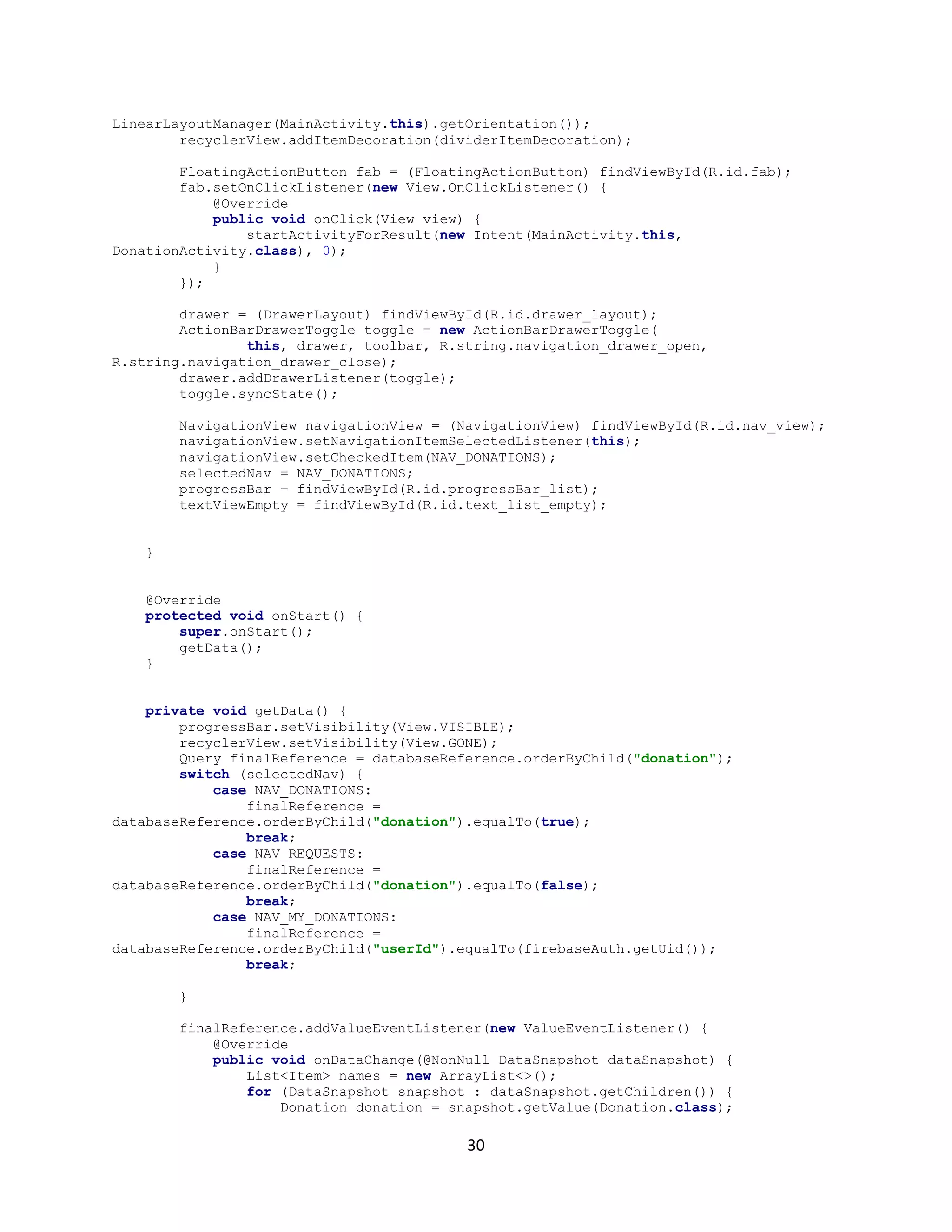
  • 31.
    25 screen operation. Thetransmitting end uses an android application device remote through which commands are transmitted and at the receiver side , these commands are used for controlling the robot in all directions such as forward ,backward and left or right etc. The receiver end movement is achieved by two motors that are interfaced to the microcontroller. The serial communication data sent from the android application is received by a Bluetooth receiver that is interfaced to the microcontroller. Advantages:  Android is Linux based open source operating system , it can be developed by any one  Easy access to the android apps  You can replace the battery and mass storage, disk drive and UDB option  Its supports all Google services  The operating system is able to inform you of a new SMS and Emails or latest updates.  It supports Multitasking  Android phone can also function as a router to share internet  Its free to customize  Can install a modified ROM  Its supports 2D and 3D graphics 6.3 FIREBASE : Firebase is a mobile and web app development platform that provides developers with a plethora of tools and services to help them develop high-quality apps, grow their user base, and earn more profit. A Brief History Back in 2011, before Firebase was Firebase, it was a startup called Envolve. As Envolve, it provided developers with an API that enabled the integration of online chat functionality into their website. That people used Envolve to pass application data that was more than just chat messages. Developers were using Envolve to sync application data such as a game state in real time across their users. This led the founders of Envolve, James Tamplin and Andrew Lee, to separate the chat system and the real-time architecture. In April 2012, Firebase was created as a separate company that
  • 32.
    26 provided Backend-as-a-Service withreal-time functionality. After it was acquired by Google in 2014, Firebase rapidly evolved into the multifunctional behemoth of a mobile and web platform that it is today. Realtime Database: The Firebase Realtime Database is a cloud-hosted NoSQL database that lets you store and sync between your users in realtime. The Realtime Database is really just one big JSON object that the developers can manage in realtime. With just a single API, the Firebase database provides your app with both the current value of the data and any updates to that data. Realtime syncing makes it easy for your users to access their data from any device, be it web or mobile. Realtime Database also helps your users collaborate with one another. Another amazing benefit of Realtime Database is that it ships with mobile and web SDKs, allowing you to build your apps without the need for servers. When your users go offline, the Realtime Database SDKs use local cache on the device to serve and store changes. When the device comes online, the local data is automatically synchronized. The Realtime Database can also integrate with Firebase Authentication to provide a simple and intuitive authentication process.
  • 33.
    27 Authentication Firebase Authentication providesbackend services, easy-to-use SDKs, and ready-made UI libraries to authenticate users to your app. Normally, it would take you months to set up your own authentication system. And even after that, you would need to keep a dedicated team to maintain that system. But if you use Firebase, you can set up the entire system in under 10 lines of code that will handle everything for you, including complex operations like account merging. You can authenticate your app’s users through the following methods:  Email & Password  Phone numbers  Other mehods
  • 34.
    28 7. CODING ANDIMPLEMENTATION Introduction Coding (or programming) is the construction of software. Coding involves writing a ‘recipe’, which in Computing is called an algorithm, in a so called programming language that a computer can understand. When the computer runs the code we wrote, it follows the ‘recipe’, step by step Computer programming is the process of designing and building an executable computer program for accomplishing a specific computing task. Programming involves tasks such as analysis, generating algorithms, profiling algorithms' accuracy and resource consumption, and the implementation of algorithms in a chosen program language (commonly referred to as coding). The source code of a program is written in one or more programming languages. The purpose of programming is to find a sequence of instructions that will automate the performance of a task for solving a given problem. The process of programming thus often requires expertise in several different subjects, including knowledge of the application domain, specialized algorithms, and formal logic. Related programming tasks include testing, debugging, maintaining a program's source code, implementation of build systems, and management of derived artifacts such as machine code of computer programs. These might be considered part of the programming process, but often the term software development is used for this larger process with the term programming, implementation, or coding reserved for the actual writing of source code. Software engineering combines engineering techniques with software development practices. Sample code: package com.example.android.fooddonation; public class Item { private String food; private String userId; private String id; public Item(String food, String userId, String id) { this.food = food; this.userId = userId; this.id = id; } public Item() { this.food = ""; this.userId = ""; } public String getFood() { return food; } public void setFood(String food) {
  • 35.
    29 this.food = food; } publicString getUserId() { return userId; } public void setUserId(String userId) { this.userId = userId; } public String getId() { return id; } public void setId(String id) { this.id = id; } @Override public String toString() { return food + " " + userId; } } Home page code: package com.example.android.fooddonation; import java.util.ArrayList; import java.util.List; public class MainActivity extends AppCompatActivity implements NavigationView.OnNavigationItemSelectedListener { public static final int NAV_MY_DONATIONS = R.id.nav_my_donations; public static final int NAV_REQUESTS = R.id.nav_requests; public static final int NAV_DONATIONS = R.id.nav_donations; private int selectedNav; private DrawerLayout drawer; private DatabaseReference databaseReference = FirebaseDatabase.getInstance().getReference("donations"); private RecyclerView recyclerView; private ProgressBar progressBar; private TextView textViewEmpty; private FirebaseAuth firebaseAuth; @Override protected void onCreate(Bundle savedInstanceState) { super.onCreate(savedInstanceState); setContentView(R.layout.activity_main); Toolbar toolbar = (Toolbar) findViewById(R.id.toolbar); setSupportActionBar(toolbar); firebaseAuth = FirebaseAuth.getInstance(); recyclerView = findViewById(R.id.list_donations); DividerItemDecoration dividerItemDecoration = new DividerItemDecoration(MainActivity.this, new
  • 36.
    30 LinearLayoutManager(MainActivity.this).getOrientation()); recyclerView.addItemDecoration(dividerItemDecoration); FloatingActionButton fab =(FloatingActionButton) findViewById(R.id.fab); fab.setOnClickListener(new View.OnClickListener() { @Override public void onClick(View view) { startActivityForResult(new Intent(MainActivity.this, DonationActivity.class), 0); } }); drawer = (DrawerLayout) findViewById(R.id.drawer_layout); ActionBarDrawerToggle toggle = new ActionBarDrawerToggle( this, drawer, toolbar, R.string.navigation_drawer_open, R.string.navigation_drawer_close); drawer.addDrawerListener(toggle); toggle.syncState(); NavigationView navigationView = (NavigationView) findViewById(R.id.nav_view); navigationView.setNavigationItemSelectedListener(this); navigationView.setCheckedItem(NAV_DONATIONS); selectedNav = NAV_DONATIONS; progressBar = findViewById(R.id.progressBar_list); textViewEmpty = findViewById(R.id.text_list_empty); } @Override protected void onStart() { super.onStart(); getData(); } private void getData() { progressBar.setVisibility(View.VISIBLE); recyclerView.setVisibility(View.GONE); Query finalReference = databaseReference.orderByChild("donation"); switch (selectedNav) { case NAV_DONATIONS: finalReference = databaseReference.orderByChild("donation").equalTo(true); break; case NAV_REQUESTS: finalReference = databaseReference.orderByChild("donation").equalTo(false); break; case NAV_MY_DONATIONS: finalReference = databaseReference.orderByChild("userId").equalTo(firebaseAuth.getUid()); break; } finalReference.addValueEventListener(new ValueEventListener() { @Override public void onDataChange(@NonNull DataSnapshot dataSnapshot) { List<Item> names = new ArrayList<>(); for (DataSnapshot snapshot : dataSnapshot.getChildren()) { Donation donation = snapshot.getValue(Donation.class);
  • 37.
    31 Item item =new Item(); item.setFood(donation.getFood()); item.setId(snapshot.getKey()); item.setUserId(donation.getUserId()); names.add(item); } progressBar.setVisibility(View.GONE); recyclerView.setAdapter(new DonationAdapter(MainActivity.this, names)); recyclerView.setLayoutManager(new LinearLayoutManager(MainActivity.this)); if (names.isEmpty()) { textViewEmpty.setText("No items found"); textViewEmpty.setVisibility(View.VISIBLE); recyclerView.setVisibility(View.GONE); } else { textViewEmpty.setVisibility(View.GONE); recyclerView.setVisibility(View.VISIBLE); } } @Override public void onCancelled(@NonNull DatabaseError databaseError) { Log.e("Database Error", databaseError.getMessage()); } }); } @Override public void onBackPressed() { DrawerLayout drawer = (DrawerLayout) findViewById(R.id.drawer_layout); if (drawer.isDrawerOpen(GravityCompat.START)) { drawer.closeDrawer(GravityCompat.START); } else { super.onBackPressed(); } } @Override public boolean onCreateOptionsMenu(Menu menu) { getMenuInflater().inflate(R.menu.main, menu); return true; } @Override public boolean onOptionsItemSelected(MenuItem item) { int id = item.getItemId(); if (id == R.id.action_settings) { startActivity(new Intent(this, AccountActivity.class)); return true; } else if (id == R.id.action_sign_out) { firebaseAuth.signOut(); startActivity(new Intent(this, LoginActivity.class)); finish(); } return super.onOptionsItemSelected(item); }
  • 38.
    32 @Override public boolean onNavigationItemSelected(MenuItemitem) { int id = item.getItemId(); selectedNav = id; switch (id) { case NAV_DONATIONS: setTitle("Food Donations"); getData(); break; case NAV_REQUESTS: setTitle("Donation Requests"); getData(); break; case NAV_MY_DONATIONS: setTitle("My Donations"); getData(); break; } drawer.closeDrawer(GravityCompat.START); return true; } }
  • 39.
    33 8. TESTING 8.1 Usabilityand Beta Testing: Now that basic functions are tested, it’s time to make sure that the mobile application is easy to use and provides a satisfactory user experience. This phase requires maintaining cross-platform matrix to ensure the platform coverage achieved by beta testers. Once the app is tested in-house, release the beta version of the application to market. Compatibility testing: Mobile devices vary between platforms, models, and operating system versions. It’s essential to select a subset of devices relevant to your application. User Interface testing: User experience is key for apps to be accepted by end users. Check usability issues, navigation, and content. Test menus, options, buttons, bookmarks, history, settings, and navigation flow of the application. Interface testing: Testing of menu options, buttons, bookmarks, history, settings, and navigation flow of the application. External factors testing: Mobile device applications must also contend with interactions and interruptions from other device features like various network connection types, SD cards, phone calls, and assorted device settings. Accessibility testing: Mobile devices have a diverse demographic of users so it is important to ensure that your application is widely accessible. 8.2 Performance Testing: Mobile device applications have less overall device memory and power available so must handle themselves very efficiently. Test app performance by changing the connection from 2G, 3G to WIFI, responsiveness, battery consumption, stability, etc. It’s a great practice to test your application for scalability and performance issues.
  • 40.
    34 8.3 Functional Testing: Appfunctionality should be fully tested, with special consideration given to installation, updates, sign-up and login, provisioning, device-specific functions, and error messages. Functional testing can, for the most part, be carried out in the same way you would perform it on any other kind of application. For this reason, we won’t go into specifics other than pointing out areas that are of particular importance for mobile apps. Keep in mind that functional testing should include testing all application features and not be focused solely on these areas. In addition to functional testing, you should also be running the following tests:  Installation test  Upgrades testing  Operational testing  Sign-up and Login  Provisioning  Device-specific functions  Error messages  Low-level resource testing: memory usage, auto-deletion, etc  Services testing: both on- and offline Device Testing: Execute test cases and scripts in all the previously identified devices, in the cloud, and/or in physical devices in the lab or via testing tools. Test Case and Script Design Prepare a test case document for each and every feature and functionality. In addition to functional test cases, some special cases should also be covered:  Battery usage  App speed  Data requirements  Memory
  • 41.
  • 42.
  • 43.
    37 Fig 9.3 Listof donations
  • 44.
  • 45.
  • 46.
  • 47.
    41 10. CONCLUSION The developmentof this product surely prompts many new areas of investigation. This product has wide scope of implementation by making it live. Moreover this product creates many benefits for the business and the community. By taking it online it will help many people throughout the city by donating food daily. Hundreds of thousands of tons of food are either lost or wasted while millions of people suffer from malnutrition. A plausible initiative is the food donation portal in which large retail chains and potentially other organizations can donate food. This food is collected and delivered by Third Party vendor to NGO in need. Food donation portal will help thousands of people that suffer from starvation and also consume food that are wasted with no reason.. As consequence, research and actions are needed to improve the efficiency of food donation portal.
  • 48.
    42 11. FUTURE SCOPE Theoptimal path is identified using the extended SPF algorithm based MAS technique. The different Floyd’s algorithms could be identified and applied to find the optimal path in the power system network. This approach could be developed by including the operating frequency of the network as additional constraint. The same technique can be used to obtain different restoration plans for the given network
  • 49.
    43 12. REFERENCES  KomalRaut, Nimesh Shah, Akash Thorat, “ Food donation portal” http://ijarcet.org/wpcontent/uploads/IJARCET-VOL-5-ISSUE-4-906-908.pdf  Dhruvi Shah, Adnan Ansari, Ruchi Sharma,“ Helping Hands” http://ijsrd.com/Article.php?manuscript=IJSRDV4I110485  Hitesh Raut, Swapnil Rajput, Danjhan Nalavade, “Smartphone based food supply chain for Aurangabad city using GIS location based and google web services” https://ieeexplore.ieee.org/document/7580874/metrics  Aaron Ciaght, Adolfo Villafiorita,“ Beyond food sharing: Supporting food wastage reduction using ICT” http://esatjournals.net/ijret/2016v05/i04/IJRET20160504058.pdf  Amir Saxena. Khushi Verma, Aadit Patil, “ Development of a food supply chain by PHP” https://www.ncbi.nlm.nih.gov/pmc/articles/PMC2610113/  Source code for “Open Food Foundation” https://github.com/thirupathi-chintu/open-food- foundation  The Unified Modeling Language User Guide by Grady Booch, James Rumbaugh, Ivar Jacobson from Rational software corporation