CS3135/CS2135
Object Oriented Programming (Java)
BSCS-3 / MCS-3
Lecture # 12
Event Handling
Part-2
Event Handling
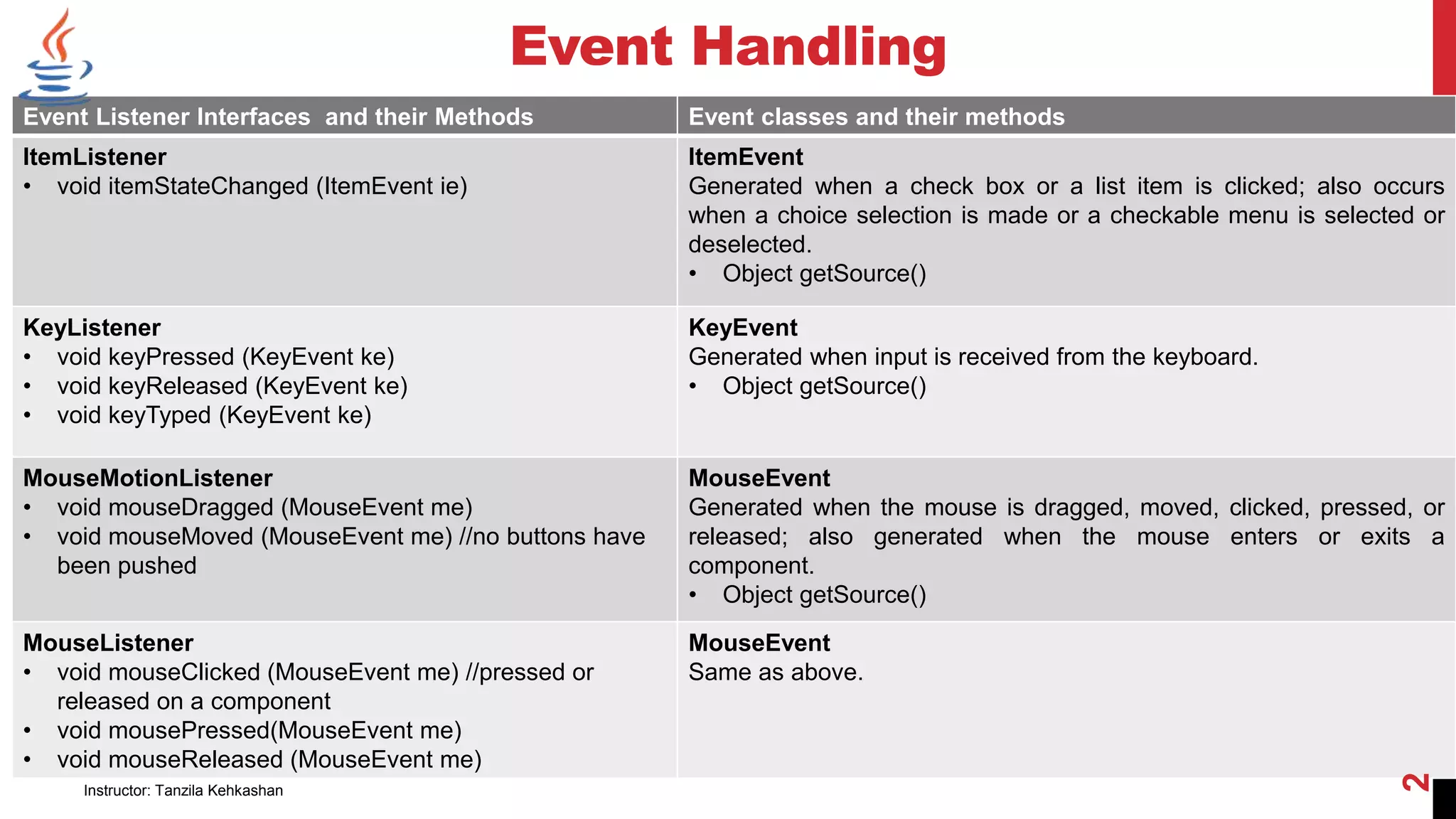
Event Listener Interfaces and their Methods Event classes and their methods
ItemListener
• void itemStateChanged (ItemEvent ie)
ItemEvent
Generated when a check box or a list item is clicked; also occurs
when a choice selection is made or a checkable menu is selected or
deselected.
• Object getSource()
KeyListener
• void keyPressed (KeyEvent ke)
• void keyReleased (KeyEvent ke)
• void keyTyped (KeyEvent ke)
KeyEvent
Generated when input is received from the keyboard.
• Object getSource()
MouseMotionListener
• void mouseDragged (MouseEvent me)
• void mouseMoved (MouseEvent me) //no buttons have
been pushed
MouseEvent
Generated when the mouse is dragged, moved, clicked, pressed, or
released; also generated when the mouse enters or exits a
component.
• Object getSource()
MouseListener
• void mouseClicked (MouseEvent me) //pressed or
released on a component
• void mousePressed(MouseEvent me)
• void mouseReleased (MouseEvent me)
MouseEvent
Same as above.
Instructor: Tanzila Kehkashan
2
Event Handling
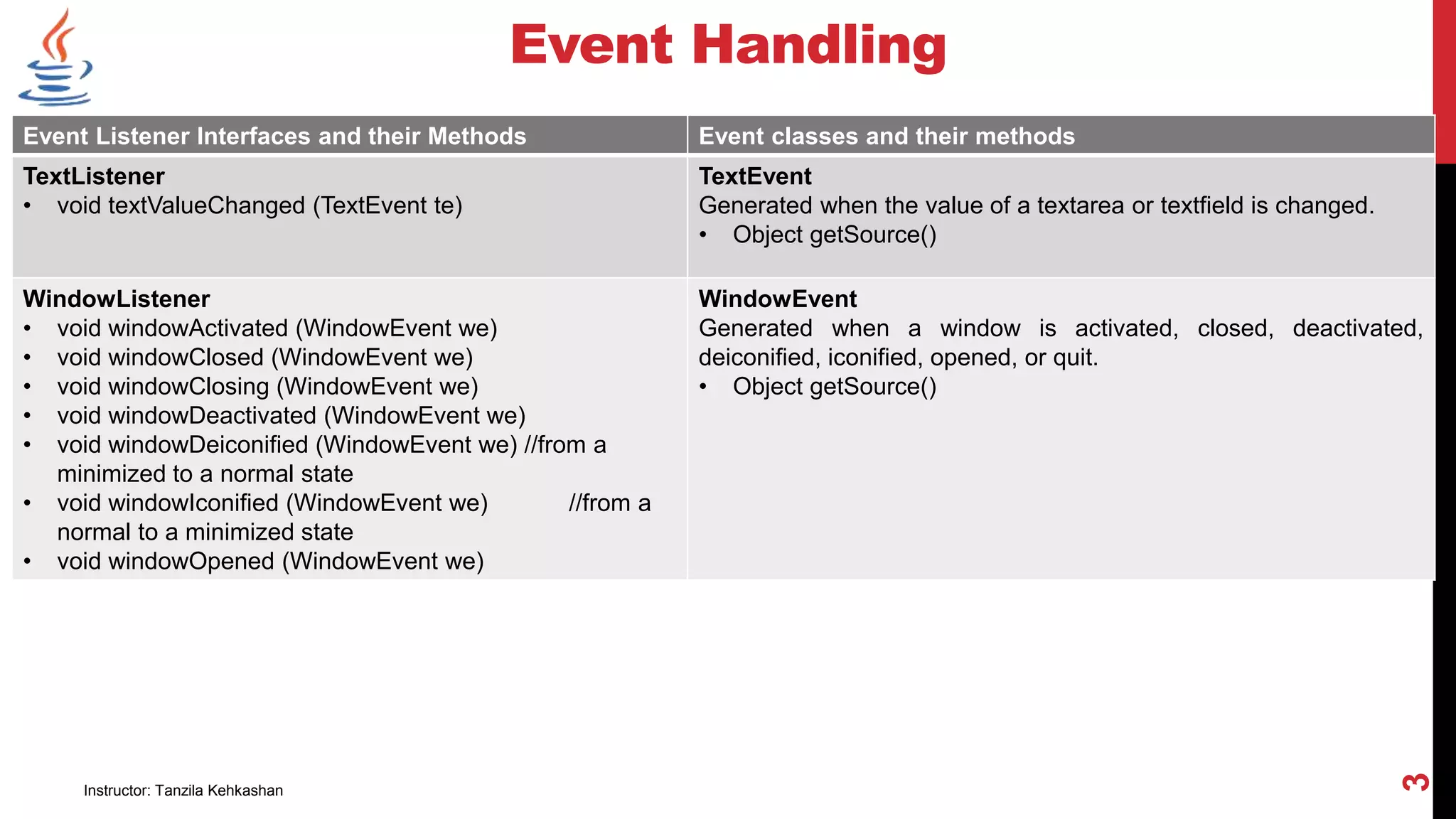
Event Listener Interfaces and their Methods Event classes and their methods
TextListener
• void textValueChanged (TextEvent te)
TextEvent
Generated when the value of a textarea or textfield is changed.
• Object getSource()
WindowListener
• void windowActivated (WindowEvent we)
• void windowClosed (WindowEvent we)
• void windowClosing (WindowEvent we)
• void windowDeactivated (WindowEvent we)
• void windowDeiconified (WindowEvent we) //from a
minimized to a normal state
• void windowIconified (WindowEvent we) //from a
normal to a minimized state
• void windowOpened (WindowEvent we)
WindowEvent
Generated when a window is activated, closed, deactivated,
deiconified, iconified, opened, or quit.
• Object getSource()
Instructor: Tanzila Kehkashan
3
Event Handling
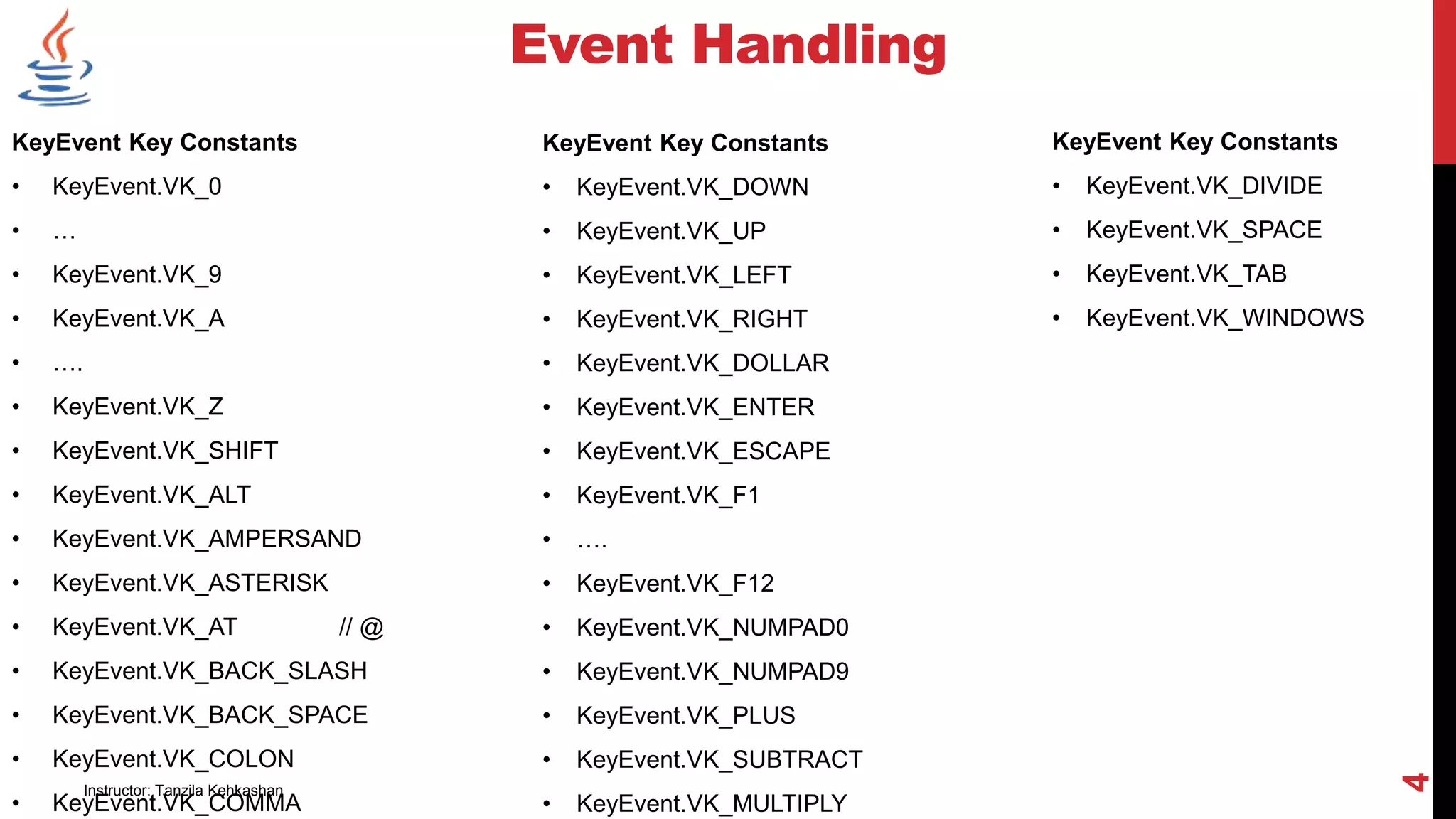
KeyEvent Key Constants
• KeyEvent.VK_0
• …
• KeyEvent.VK_9
• KeyEvent.VK_A
• ….
• KeyEvent.VK_Z
• KeyEvent.VK_SHIFT
• KeyEvent.VK_ALT
• KeyEvent.VK_AMPERSAND
• KeyEvent.VK_ASTERISK
• KeyEvent.VK_AT // @
• KeyEvent.VK_BACK_SLASH
• KeyEvent.VK_BACK_SPACE
• KeyEvent.VK_COLON
• KeyEvent.VK_COMMA
KeyEvent Key Constants
• KeyEvent.VK_DOWN
• KeyEvent.VK_UP
• KeyEvent.VK_LEFT
• KeyEvent.VK_RIGHT
• KeyEvent.VK_DOLLAR
• KeyEvent.VK_ENTER
• KeyEvent.VK_ESCAPE
• KeyEvent.VK_F1
• ….
• KeyEvent.VK_F12
• KeyEvent.VK_NUMPAD0
• KeyEvent.VK_NUMPAD9
• KeyEvent.VK_PLUS
• KeyEvent.VK_SUBTRACT
• KeyEvent.VK_MULTIPLY
KeyEvent Key Constants
• KeyEvent.VK_DIVIDE
• KeyEvent.VK_SPACE
• KeyEvent.VK_TAB
• KeyEvent.VK_WINDOWS
Instructor: Tanzila Kehkashan
4
Instructor: Tanzila Kehkashan
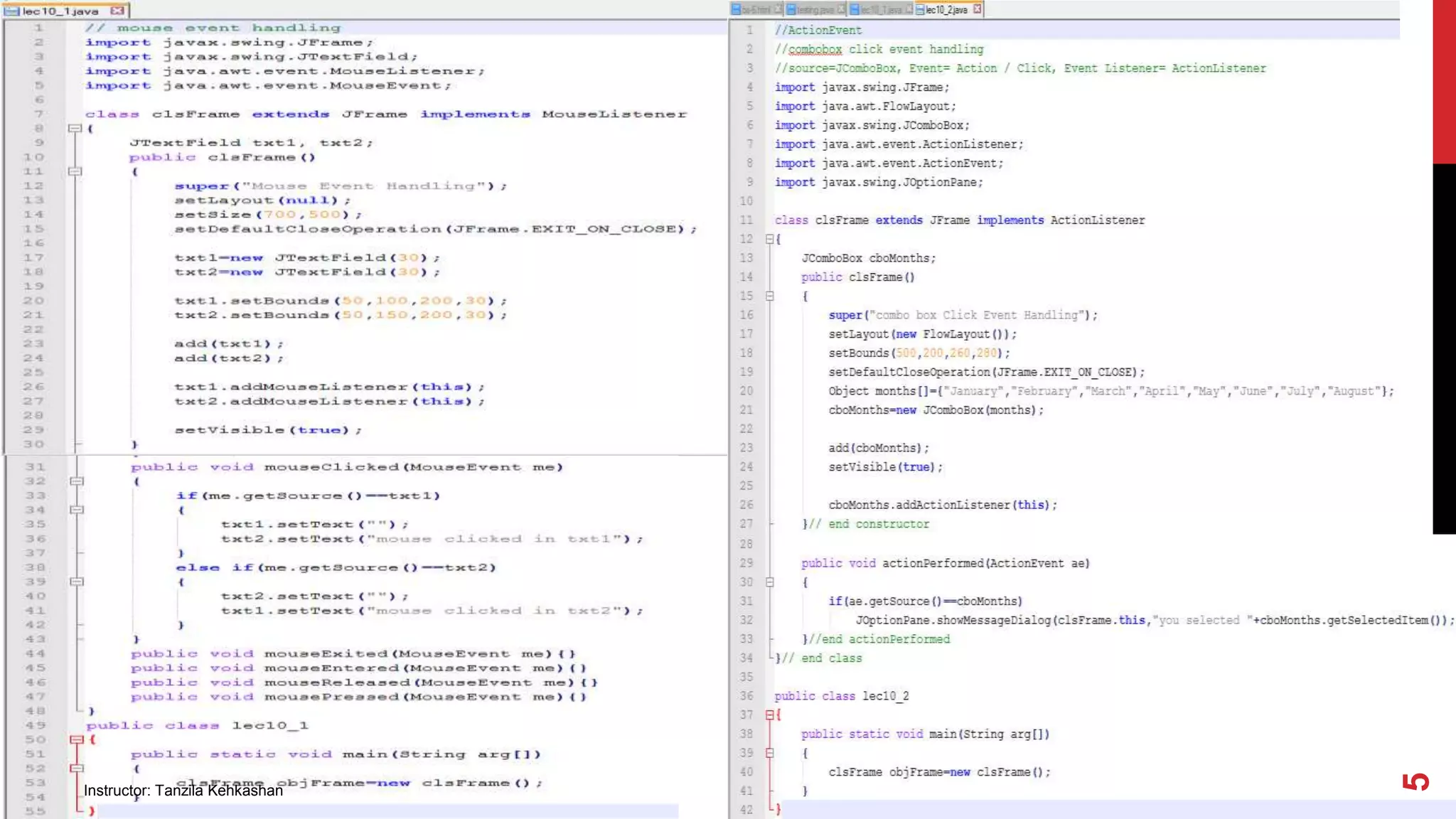
5
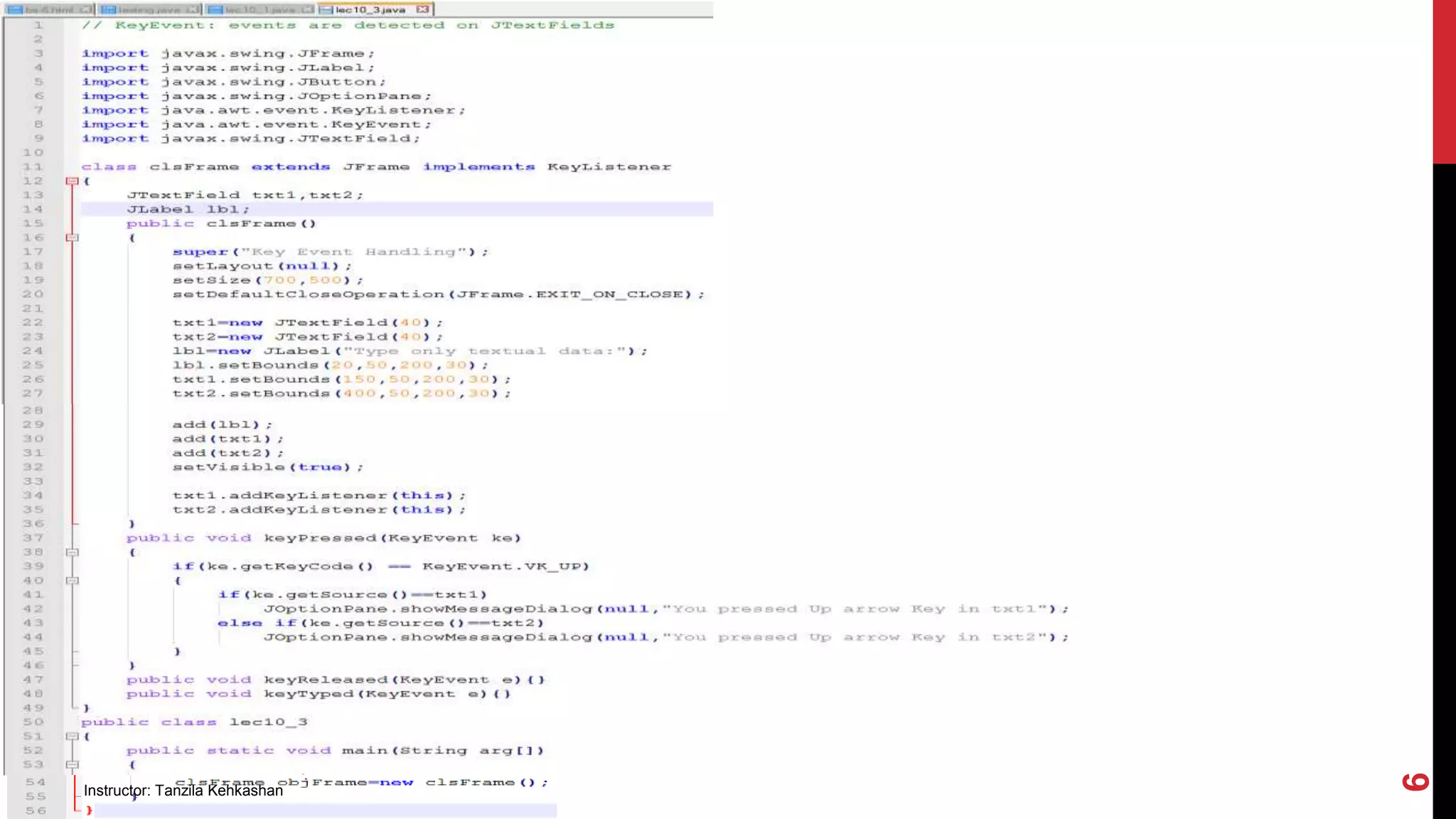
Instructor: Tanzila Kehkashan
6
ASSIGNMENT
Q#1: Write a program which has two buttons. After each click, the program
determines how many times that specific button has been clicked.
Q#2: Make online admission form of student in three steps.
• In 1st frame, get personal bio-data of student,
• In 2nd frame, get academic record of student, and
• In 3rd frame, display all the information of student you collected in previous two
frames.
Instructor: Tanzila Kehkashan
7
ASSIGNMENT
Write a program which consists of two drop down Lists and four buttons having
captions “>”, “>>”, “<”, “<<”. When user clicks on button “>”, selected item from
left list moves towards right list. Rest of three buttons work accordingly.
Instructor: Tanzila Kehkashan
8
Instructor: Tanzila Kehkashan
9

OOP Lecture 12-EventHandling2.pptx

  • 1.
    CS3135/CS2135 Object Oriented Programming(Java) BSCS-3 / MCS-3 Lecture # 12 Event Handling Part-2
  • 2.
    Event Handling Event ListenerInterfaces and their Methods Event classes and their methods ItemListener • void itemStateChanged (ItemEvent ie) ItemEvent Generated when a check box or a list item is clicked; also occurs when a choice selection is made or a checkable menu is selected or deselected. • Object getSource() KeyListener • void keyPressed (KeyEvent ke) • void keyReleased (KeyEvent ke) • void keyTyped (KeyEvent ke) KeyEvent Generated when input is received from the keyboard. • Object getSource() MouseMotionListener • void mouseDragged (MouseEvent me) • void mouseMoved (MouseEvent me) //no buttons have been pushed MouseEvent Generated when the mouse is dragged, moved, clicked, pressed, or released; also generated when the mouse enters or exits a component. • Object getSource() MouseListener • void mouseClicked (MouseEvent me) //pressed or released on a component • void mousePressed(MouseEvent me) • void mouseReleased (MouseEvent me) MouseEvent Same as above. Instructor: Tanzila Kehkashan 2
  • 3.
    Event Handling Event ListenerInterfaces and their Methods Event classes and their methods TextListener • void textValueChanged (TextEvent te) TextEvent Generated when the value of a textarea or textfield is changed. • Object getSource() WindowListener • void windowActivated (WindowEvent we) • void windowClosed (WindowEvent we) • void windowClosing (WindowEvent we) • void windowDeactivated (WindowEvent we) • void windowDeiconified (WindowEvent we) //from a minimized to a normal state • void windowIconified (WindowEvent we) //from a normal to a minimized state • void windowOpened (WindowEvent we) WindowEvent Generated when a window is activated, closed, deactivated, deiconified, iconified, opened, or quit. • Object getSource() Instructor: Tanzila Kehkashan 3
  • 4.
    Event Handling KeyEvent KeyConstants • KeyEvent.VK_0 • … • KeyEvent.VK_9 • KeyEvent.VK_A • …. • KeyEvent.VK_Z • KeyEvent.VK_SHIFT • KeyEvent.VK_ALT • KeyEvent.VK_AMPERSAND • KeyEvent.VK_ASTERISK • KeyEvent.VK_AT // @ • KeyEvent.VK_BACK_SLASH • KeyEvent.VK_BACK_SPACE • KeyEvent.VK_COLON • KeyEvent.VK_COMMA KeyEvent Key Constants • KeyEvent.VK_DOWN • KeyEvent.VK_UP • KeyEvent.VK_LEFT • KeyEvent.VK_RIGHT • KeyEvent.VK_DOLLAR • KeyEvent.VK_ENTER • KeyEvent.VK_ESCAPE • KeyEvent.VK_F1 • …. • KeyEvent.VK_F12 • KeyEvent.VK_NUMPAD0 • KeyEvent.VK_NUMPAD9 • KeyEvent.VK_PLUS • KeyEvent.VK_SUBTRACT • KeyEvent.VK_MULTIPLY KeyEvent Key Constants • KeyEvent.VK_DIVIDE • KeyEvent.VK_SPACE • KeyEvent.VK_TAB • KeyEvent.VK_WINDOWS Instructor: Tanzila Kehkashan 4
  • 5.
  • 6.
  • 7.
    ASSIGNMENT Q#1: Write aprogram which has two buttons. After each click, the program determines how many times that specific button has been clicked. Q#2: Make online admission form of student in three steps. • In 1st frame, get personal bio-data of student, • In 2nd frame, get academic record of student, and • In 3rd frame, display all the information of student you collected in previous two frames. Instructor: Tanzila Kehkashan 7
  • 8.
    ASSIGNMENT Write a programwhich consists of two drop down Lists and four buttons having captions “>”, “>>”, “<”, “<<”. When user clicks on button “>”, selected item from left list moves towards right list. Rest of three buttons work accordingly. Instructor: Tanzila Kehkashan 8
  • 9.