CS3135/CS2135
Object Oriented Programming (Java)
BSCS-3 / MCS-3
Lecture # 13
Color
Font
ImageIcon
java.awt.Color
• Color(int, int, int) // red, green, blue ranging from 0 to 255
• Color brighter()
• Color darker()
• int getRed()
• int getGreen()
• int getBlue()
• Color.BLACK • Color.BLUE • Color.CYAN • Color.DARK_GRAY • Color.GRAY
• Color.GREEN • Color.LIGHT_GRAY • Color.MAGENTA • Color.ORANGE
• Color.PINK • Color.RED • Color.WHITE • Color.YELLOW
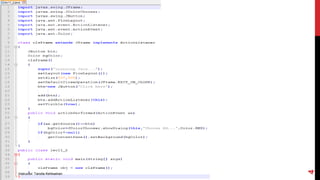
JColorChooser class in javax.swing.JColorChooser
• Color showDialog(Component, String, Color) //component, title of dialogbox, initial color
Color
Instructor: Tanzila Kehkashan
2
Instructor: Tanzila Kehkashan
3
Instructor: Tanzila Kehkashan
4
Font
java.awt.Font
• Font(String, int, int) //font name, style constant, size
• boolean isBold()
• boolean isItalic()
• boolean isPlain()
Style Constants
• Font.PLAIN
• Font.BOLD
• Font.ITALIC
Instructor: Tanzila Kehkashan
5
Instructor: Tanzila Kehkashan
6
ImageIcon
javax.swing.ImageIcon
• ImageIcon()
• ImageIcon(String)
• ImageIcon(URL)
Instructor: Tanzila Kehkashan
7
Instructor: Tanzila Kehkashan
8

OOP Lecture 13-Color,Font,ImageIcon.pptx