
Practical Training Seminar
on
ONLINE TEST MANAGEMENT
SYSTEM
Prepared By:
Prateek Agarwal
Summer Training Objective
 It provides students the opportunity to enhance their practical skills for their commitment with
near future.
 Students will develop their practical skills that will help them to interface with practical work
situations directly applicable to their careers.
 It is an opportunity to gain exposure to different industries, new companies and diverse functions.
 It will reduce the gap between the Institutional experience and Industry experience of a student.
 It provides students an exposed knowledge of the formal functional activities of a Industry.
About WEBMITRA
 WebMitra - is a Jodhpur based, Website and Software development company having a regional
office in Jaipur.
 It offers services like web designing, web development, web hosting and SEO.
 The company’s expertize is focused on web Designing and Development of the projects for the
Professional, Corporate business houses.
 It has initiated to help business enterprises achieve efficiency and effectiveness by taking them into
the e-world, being partners in e-revolution.
 The company offer cost effective solutions with a difference!
 The strength lies in the workforce which translates into a highly effective and efficient outfit and It
Supplies quality products and services and also ensures customer satisfaction.
 It is the only ORACLE certified center in Rajasthan.
Trainee @ Webmitra
 Mr. Abhishek Jain, Software Developer by profession completed his Engineering from
Arya Engineering College, Kukas.
 He is the MD and Founder of WebMitra.
 Having an experience of about 10 years in Development field, he has trained more than
5000 CS/IT professionals.
 Experienced Trainer in computer languages like JAVA Technologies and its Frameworks,
HTML, JAVASCRIPT, WEB SERVICES etc.
 Specializations – OCPWCD, OCPJWS etc.
 Currently maintaining various Commercial Projects throughout India.
Technology Selection and Project Implementation
The first and foremost thing is the technology selection:
 JAVA - Portability, reliability, platform independent, simple, object oriented, security, Ease of Implementation
 ADVANCED JAVA – Built-in libraries, API support, extendibility, Inter-operatibilty, multithreading support, ease in remote
database access, web services, including Servlets, JSP, Struts etc.
 JAVASCRIPT – Responsible for Action on Event without interaction of Server, field by field validation, animation with round
trips etc.
 XML – Stands for Extensible Mark Up Language and it is used for setting property and describing data
 APACHE TOMCAT – It has a web container which allows us to execute Servlets and JSP Code Snippets. It provides pure
JAVA and HTTP web environment.
 MY-SQL SERVER – Used to access database. It has flexibility, reliability, robust transactional support, security, low total
cost, easy up gradation techniques etc.
 HTML – For creating web pages, referencing other websites, follows W3C, full CSS3 support, 2D/3D Graphics support, local
storage etc.
Introduction to Online Test Management System
 Online Test is a way of organizing Online Exams for the Students.
 Online test also helps in practicing for the students at their own PC’s also.
 It has become more frequent with the technology evolution.
 Most of the Software Company’s are conducting online test for the selection of
the employees.
 It gradually decreases the time interval and helps the organizations to
incorporate with their selection process.
 Even Educational Institutes are conducting exams for selecting students or
nourishing their technical skills.
Scope of the Project
 SCOPE
The Online Test Management System helps in conducting and maintaining the
exams online in a proficient manner. It also provides:
 Better Time Management
 Online Access
 No Unauthenticated Access
 Facilities
 Accuracy
 Security
 Efficiency
 Flexibility
Proposed System
 The need is to computerized the tests. There are various attributes and properties of the
a user which will help us to maintain and manage database through this software.
 Student Username
 Student Name
 Student Password
 Student User type
 Student Email
 Student Mobile No
 There are basically 3 test sections which helps users to select their skills to test.
 C Section
 C++ Section
 Java Section
Technologies Learned
 HTML (Brief)
 It stands for Hyper Text Mark Up language
 It is used to create web pages having a .html or .htm file extension.
 It is World Wide Web Consortium (W3C) standard.
 Web browser reads html files and compose them to visible or audible web pages.
 Html elements are building blocks of a web site
 Various languages can be embedded into it like javascript, php etc.
 Web browsers can also refers to Cascading Style Sheets CSS to define look and layout
of data
Technologies Learned
 CSS (Brief)
 It stands for Cascading Style Sheets.
 It is a style sheet language.
 It is also a World Wide Web Consortium (W3C) standard.
 Used to style web pages and interfaces written in HTML, XHTML.
 It can be easily embedded into HTML externally or internally.
 CSS file extension is .css.
 CSS can allow same markup page to be presented in different styles for different
rendering methods
 It can also be used to allow the web page to display differently depending on the
screen size or device on which it is being viewed
Technologies Learned
 JAVASCRIPT (Brief)
 It is a dynamic computer programming language
 It does form validation without interacting with remote server
 Easy to use, secured, reliable
 Many Inbuilt functions for different functionalities
 It is most commonly used as part of web browsers, whose implementations
allow client-side scripts to interact with the user, control the browser
 It is also being used in server-side network programming, game development and
the creation of desktop and mobile applications
Technologies Learned
 XML (Brief)
 It stands for Extensible Mark Up Language
 The design goals of XML emphasize simplicity, generality, and usability over
the Internet
 XML has come into common use for the interchange of data over the Internet.
 It defines a set of rules for encoding documents in a format that is both human-
readable and machine-readable
 Many application programming interfaces (APIs) have been developed to aid
software developers with processing XML data
 It also defines the media types application/xml and text/xml
Technologies Learned
 APACHE TOMCAT (Brief)
 It is also known as Web Container.
 It is an open source web server and servlet container developed by the Apache
Software Foundation(ASF).
 Tomcat implements the Java Servlet and the Java Server Pages (JSP) specifications
from Oracle, and provides a "pure Java" HTTP web server environment for Java code
to run in.
 On startup it deploys all the directories which are under webapps folder
 In case of SERVLETS each time we re-compile SERVLET source code then we must
have to restart TOMCAT SERVER
 It provides Flexibility, Reliability, Real Time Execution
Technologies Learned
 CGI (Brief)
 It stands for Common Gateway Interface.
 Common Gateway Interface (CGI) is a standard method used to generate dynamic
content on Web pages and Web applications.
 CGI, when implemented on a Web server, provides an interface between the Web
server and programs that generate the Web content.
Technologies Learned
 SERVLETS (Brief)
 CGI were process oriented and thus a new process was created every time when
web clients requests to the remote web server.
 As JAVA is thread based programming model and it is light weight hence it was
preferred over CGI.
 CGI methodology creates new process each time whereas SERVLETS uses the same
parent thread and on a new web request it creates sub threads each capable of
performing a specific task.
Technologies Learned
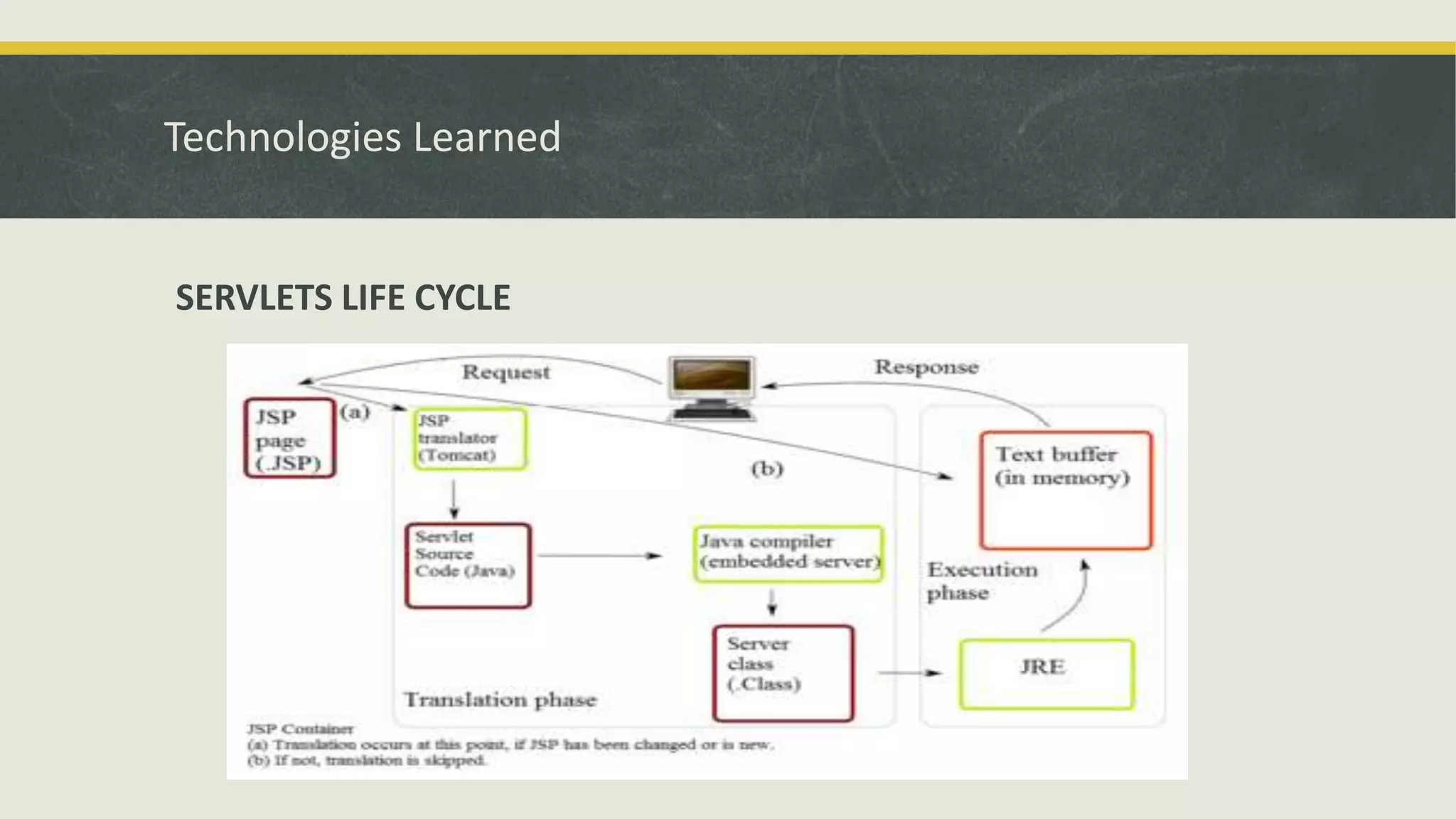
SERVLETS LIFE CYCLE
Technologies Learned
 SERVLET EVOLUTION
 The servlet is a Java programming language class used to extend the capabilities of
a server by using extends keyword.
 Although servlets can respond to any types of requests, they are commonly used to
extend the applications hosted by web servers
 Process or store data that was submitted from an HTML form.
 Provides dynamic content such as the results of a database query
 It has built in API’s for sharing data and accessing data form remote server or website.
 To deploy and run a servlet, a web container (APACHE TOMCAT) must be used.
 The package javax.servlet.http defines HTTP-specific subclasses of the generic servlet
elements, including session management objects that track multiple requests and
responses between the web server and a client.
Technologies Learned
 JSP (Brief)
 Java Server Pages (JSP) is a technology that helps software developers create dynamically
generated web pages based on HTML,XML, or other document types.
 JSP is advancement over Servlet Technology.
 JSP is similar to PHP, but it uses the Java programming language.
 JSPs are usually used to deliver HTML and XML documents, but through the use of
Output Stream, they can deliver other types of data as well.
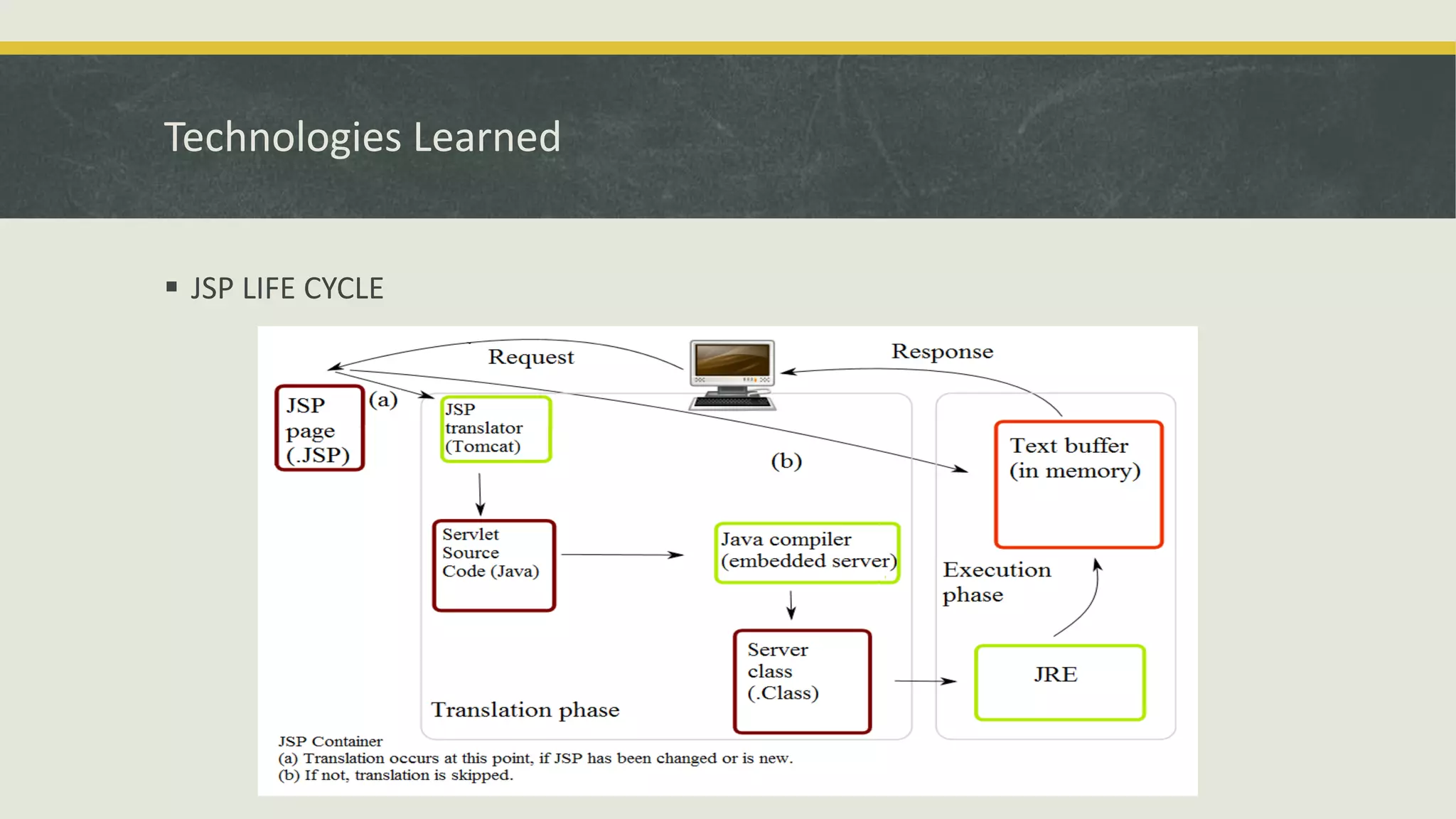
 JSPs are translated into servlets at runtime.
 JSP also uses APACHE TOMCAT but no need to restart it.
 It provides scriplets to write JSP code in html or even jsp pages
 JSP can be used independently or as the view component of a server-side model–view–
controller design, normally with JavaBeans
Technologies Learned
 JSP LIFE CYCLE
Technologies Learned
 JDBC Connectivity with My-SQL (Brief)
 JDBC stands for JAVA DATABASE CONNECTIVITY
 Various Drivers are used to connect MY-SQL database with JAVA source code.
 Driver type 2 is used to connect the back end(RDBMS) with the front end(CMS)
 JAVA provides java.sql package in which various several classes and interfaces are
available.
 Connection is established using Class.forName(driver) and also the username ,
password and port number (3306) of the database.
 After Connection establishment operations like DDL, DML, DCL can be easily used.
 We can also locate the database remotely.
Technologies Learned
 Online Test Management System (Brief)
 Online Test Management System is a Online Place to test your skills by giving the
exams online.
 Data can be stored or retrieved also required information about tests, schedules,
sections, users, etc.
 Conducting Tests.
 Updating Sections and Users.
 Deleting Sections and Users.
 Provides Secured Transactions.
 Authenticated Session Managements
References
http://en.wikipedia.org/wiki/JavaServer_Pages
http://en.wikipedia.org/wiki/Java_Servlet
http://en.wikipedia.org/wiki/Apache_Struts
https://tomcat.apache.org/tomcat-5.5-doc/servletapi/
http://en.wikipedia.org/wiki/Java_(programming_language)
THANK YOU!

Online test management system

  • 1.
    Practical Training Seminar on ONLINETEST MANAGEMENT SYSTEM Prepared By: Prateek Agarwal
  • 2.
    Summer Training Objective It provides students the opportunity to enhance their practical skills for their commitment with near future.  Students will develop their practical skills that will help them to interface with practical work situations directly applicable to their careers.  It is an opportunity to gain exposure to different industries, new companies and diverse functions.  It will reduce the gap between the Institutional experience and Industry experience of a student.  It provides students an exposed knowledge of the formal functional activities of a Industry.
  • 3.
    About WEBMITRA  WebMitra- is a Jodhpur based, Website and Software development company having a regional office in Jaipur.  It offers services like web designing, web development, web hosting and SEO.  The company’s expertize is focused on web Designing and Development of the projects for the Professional, Corporate business houses.  It has initiated to help business enterprises achieve efficiency and effectiveness by taking them into the e-world, being partners in e-revolution.  The company offer cost effective solutions with a difference!  The strength lies in the workforce which translates into a highly effective and efficient outfit and It Supplies quality products and services and also ensures customer satisfaction.  It is the only ORACLE certified center in Rajasthan.
  • 4.
    Trainee @ Webmitra Mr. Abhishek Jain, Software Developer by profession completed his Engineering from Arya Engineering College, Kukas.  He is the MD and Founder of WebMitra.  Having an experience of about 10 years in Development field, he has trained more than 5000 CS/IT professionals.  Experienced Trainer in computer languages like JAVA Technologies and its Frameworks, HTML, JAVASCRIPT, WEB SERVICES etc.  Specializations – OCPWCD, OCPJWS etc.  Currently maintaining various Commercial Projects throughout India.
  • 5.
    Technology Selection andProject Implementation The first and foremost thing is the technology selection:  JAVA - Portability, reliability, platform independent, simple, object oriented, security, Ease of Implementation  ADVANCED JAVA – Built-in libraries, API support, extendibility, Inter-operatibilty, multithreading support, ease in remote database access, web services, including Servlets, JSP, Struts etc.  JAVASCRIPT – Responsible for Action on Event without interaction of Server, field by field validation, animation with round trips etc.  XML – Stands for Extensible Mark Up Language and it is used for setting property and describing data  APACHE TOMCAT – It has a web container which allows us to execute Servlets and JSP Code Snippets. It provides pure JAVA and HTTP web environment.  MY-SQL SERVER – Used to access database. It has flexibility, reliability, robust transactional support, security, low total cost, easy up gradation techniques etc.  HTML – For creating web pages, referencing other websites, follows W3C, full CSS3 support, 2D/3D Graphics support, local storage etc.
  • 6.
    Introduction to OnlineTest Management System  Online Test is a way of organizing Online Exams for the Students.  Online test also helps in practicing for the students at their own PC’s also.  It has become more frequent with the technology evolution.  Most of the Software Company’s are conducting online test for the selection of the employees.  It gradually decreases the time interval and helps the organizations to incorporate with their selection process.  Even Educational Institutes are conducting exams for selecting students or nourishing their technical skills.
  • 7.
    Scope of theProject  SCOPE The Online Test Management System helps in conducting and maintaining the exams online in a proficient manner. It also provides:  Better Time Management  Online Access  No Unauthenticated Access  Facilities  Accuracy  Security  Efficiency  Flexibility
  • 8.
    Proposed System  Theneed is to computerized the tests. There are various attributes and properties of the a user which will help us to maintain and manage database through this software.  Student Username  Student Name  Student Password  Student User type  Student Email  Student Mobile No  There are basically 3 test sections which helps users to select their skills to test.  C Section  C++ Section  Java Section
  • 9.
    Technologies Learned  HTML(Brief)  It stands for Hyper Text Mark Up language  It is used to create web pages having a .html or .htm file extension.  It is World Wide Web Consortium (W3C) standard.  Web browser reads html files and compose them to visible or audible web pages.  Html elements are building blocks of a web site  Various languages can be embedded into it like javascript, php etc.  Web browsers can also refers to Cascading Style Sheets CSS to define look and layout of data
  • 10.
    Technologies Learned  CSS(Brief)  It stands for Cascading Style Sheets.  It is a style sheet language.  It is also a World Wide Web Consortium (W3C) standard.  Used to style web pages and interfaces written in HTML, XHTML.  It can be easily embedded into HTML externally or internally.  CSS file extension is .css.  CSS can allow same markup page to be presented in different styles for different rendering methods  It can also be used to allow the web page to display differently depending on the screen size or device on which it is being viewed
  • 11.
    Technologies Learned  JAVASCRIPT(Brief)  It is a dynamic computer programming language  It does form validation without interacting with remote server  Easy to use, secured, reliable  Many Inbuilt functions for different functionalities  It is most commonly used as part of web browsers, whose implementations allow client-side scripts to interact with the user, control the browser  It is also being used in server-side network programming, game development and the creation of desktop and mobile applications
  • 12.
    Technologies Learned  XML(Brief)  It stands for Extensible Mark Up Language  The design goals of XML emphasize simplicity, generality, and usability over the Internet  XML has come into common use for the interchange of data over the Internet.  It defines a set of rules for encoding documents in a format that is both human- readable and machine-readable  Many application programming interfaces (APIs) have been developed to aid software developers with processing XML data  It also defines the media types application/xml and text/xml
  • 13.
    Technologies Learned  APACHETOMCAT (Brief)  It is also known as Web Container.  It is an open source web server and servlet container developed by the Apache Software Foundation(ASF).  Tomcat implements the Java Servlet and the Java Server Pages (JSP) specifications from Oracle, and provides a "pure Java" HTTP web server environment for Java code to run in.  On startup it deploys all the directories which are under webapps folder  In case of SERVLETS each time we re-compile SERVLET source code then we must have to restart TOMCAT SERVER  It provides Flexibility, Reliability, Real Time Execution
  • 14.
    Technologies Learned  CGI(Brief)  It stands for Common Gateway Interface.  Common Gateway Interface (CGI) is a standard method used to generate dynamic content on Web pages and Web applications.  CGI, when implemented on a Web server, provides an interface between the Web server and programs that generate the Web content.
  • 15.
    Technologies Learned  SERVLETS(Brief)  CGI were process oriented and thus a new process was created every time when web clients requests to the remote web server.  As JAVA is thread based programming model and it is light weight hence it was preferred over CGI.  CGI methodology creates new process each time whereas SERVLETS uses the same parent thread and on a new web request it creates sub threads each capable of performing a specific task.
  • 16.
  • 17.
    Technologies Learned  SERVLETEVOLUTION  The servlet is a Java programming language class used to extend the capabilities of a server by using extends keyword.  Although servlets can respond to any types of requests, they are commonly used to extend the applications hosted by web servers  Process or store data that was submitted from an HTML form.  Provides dynamic content such as the results of a database query  It has built in API’s for sharing data and accessing data form remote server or website.  To deploy and run a servlet, a web container (APACHE TOMCAT) must be used.  The package javax.servlet.http defines HTTP-specific subclasses of the generic servlet elements, including session management objects that track multiple requests and responses between the web server and a client.
  • 18.
    Technologies Learned  JSP(Brief)  Java Server Pages (JSP) is a technology that helps software developers create dynamically generated web pages based on HTML,XML, or other document types.  JSP is advancement over Servlet Technology.  JSP is similar to PHP, but it uses the Java programming language.  JSPs are usually used to deliver HTML and XML documents, but through the use of Output Stream, they can deliver other types of data as well.  JSPs are translated into servlets at runtime.  JSP also uses APACHE TOMCAT but no need to restart it.  It provides scriplets to write JSP code in html or even jsp pages  JSP can be used independently or as the view component of a server-side model–view– controller design, normally with JavaBeans
  • 19.
  • 20.
    Technologies Learned  JDBCConnectivity with My-SQL (Brief)  JDBC stands for JAVA DATABASE CONNECTIVITY  Various Drivers are used to connect MY-SQL database with JAVA source code.  Driver type 2 is used to connect the back end(RDBMS) with the front end(CMS)  JAVA provides java.sql package in which various several classes and interfaces are available.  Connection is established using Class.forName(driver) and also the username , password and port number (3306) of the database.  After Connection establishment operations like DDL, DML, DCL can be easily used.  We can also locate the database remotely.
  • 21.
    Technologies Learned  OnlineTest Management System (Brief)  Online Test Management System is a Online Place to test your skills by giving the exams online.  Data can be stored or retrieved also required information about tests, schedules, sections, users, etc.  Conducting Tests.  Updating Sections and Users.  Deleting Sections and Users.  Provides Secured Transactions.  Authenticated Session Managements
  • 22.
  • 23.