ONLINE INSTRUCTIONAL TUTORIAL  By  Zhiyan Rashid  EDUU564 Dr. Combs
  HOW  TO BURN CD OR DVD ON YOUR VISTA-BASED PC  1.  Place the blank or partially recorded CD or DVD in the CD/DVD compartment.
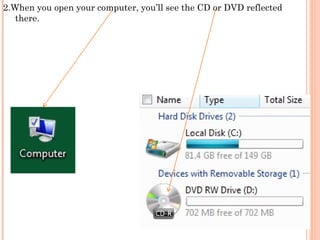
2.When you open your computer, you’ll see the CD or DVD reflected there.
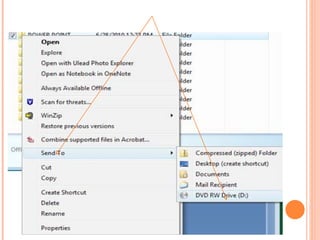
HOW  TO BURN CD OR DVD ON YOUR VISTA-BASED PC 3.  You have one of two options: a) Drag any item you want to burn on the CD/DVD and drop it on the icon, or b) right click on the item (file[s] and/or folder[s]) and choose SEND TO > DVD RW DRIVE.
 
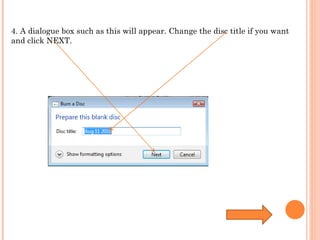
4. A dialogue box such as this will appear. Change the disc title if you want and click NEXT.
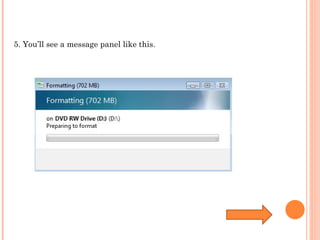
5. You’ll see a message panel like this.
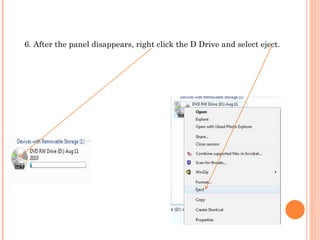
6. After the panel disappears, right click the D Drive and select eject.
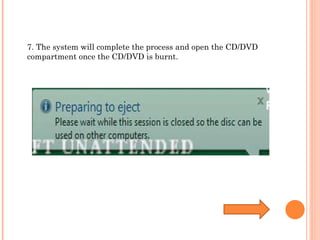
7. The system will complete the process and open the CD/DVD compartment once the CD/DVD is burnt.
QUESTIONS!
THANK YOU

Online instructional tutorial

  • 1.
    ONLINE INSTRUCTIONAL TUTORIAL By Zhiyan Rashid EDUU564 Dr. Combs
  • 2.
    HOW TO BURN CD OR DVD ON YOUR VISTA-BASED PC 1. Place the blank or partially recorded CD or DVD in the CD/DVD compartment.
  • 3.
    2.When you openyour computer, you’ll see the CD or DVD reflected there.
  • 4.
    HOW TOBURN CD OR DVD ON YOUR VISTA-BASED PC 3. You have one of two options: a) Drag any item you want to burn on the CD/DVD and drop it on the icon, or b) right click on the item (file[s] and/or folder[s]) and choose SEND TO > DVD RW DRIVE.
  • 5.
  • 6.
    4. A dialoguebox such as this will appear. Change the disc title if you want and click NEXT.
  • 7.
    5. You’ll seea message panel like this.
  • 8.
    6. After thepanel disappears, right click the D Drive and select eject.
  • 9.
    7. The systemwill complete the process and open the CD/DVD compartment once the CD/DVD is burnt.
  • 10.
  • 11.