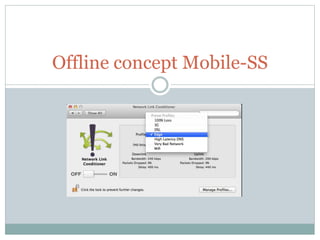
Offline concept Mobile-SS
What we discuss here.. 
 Why we should care about offline mode? 
 3 Steps implementing offline mode 
 Data conflict (detection and solution)
Why we should care about offline mode? 
 The most used smartophone apps are trying more and more to provide 
content while offline. People still can do their activity even when the 
network is off. For example, apps like Evernote even let users create 
and edit notes while offline. 
 Sometimes there is no mobile network at all, e.g. in the subway. In the 
train the network can go up and down. Sometimes it's slow, sometimes 
it's fast. The biggest cities in the world have 4G now, but even in these 
big cities there are still a lot of areas where the moblie network is slow. 
 Moblie networks are different: latency is high, speed is very 
inconsistent, which is the worst in terms of user experince (Ilya 
Grigorik from Google: "Faster Websites: Crash Course on Frontend 
Performance (Part 1/2)", Devoxx 2012)
3 Steps implementing offline mode 
 Function to check internet connectivity (Android 
Flow) 
 Storing data Locally (Mobile application Flow) 
 Store data from server into local storage when it’s available 
(sync) 
 Leveraging http caching mechanisms (Rest API) 
 Cache-control 
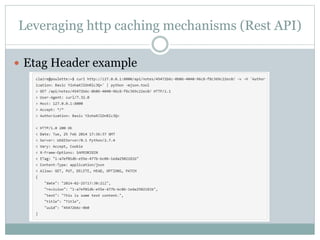
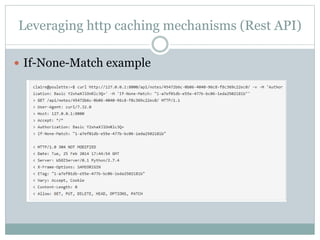
 Etag and If-None-Match 
 Last-Modified and If-Modified-Since
Leveraging http caching mechanisms (Rest API) 
 Etag Header example
Leveraging http caching mechanisms (Rest API) 
 If-None-Match example
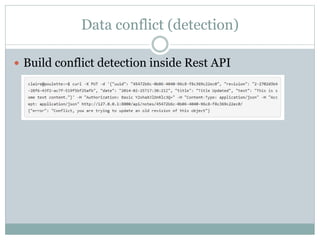
Data conflict (detection) 
 Build conflict detection inside Rest API
Data conflict (Solutions) 
 How to solve conflict 
 show to the user both data (the current version on the device, 
and the current version on the server) and let him keep what 
he wants. 
 Or, letting the latest version in time win.
Reference 
 https://www.clairereynaud.net/blog/adding-offline-mode- 
to-your-mobile-app/
Offline concept Mobile apps

Offline concept Mobile apps

  • 1.
  • 2.
    What we discusshere..  Why we should care about offline mode?  3 Steps implementing offline mode  Data conflict (detection and solution)
  • 3.
    Why we shouldcare about offline mode?  The most used smartophone apps are trying more and more to provide content while offline. People still can do their activity even when the network is off. For example, apps like Evernote even let users create and edit notes while offline.  Sometimes there is no mobile network at all, e.g. in the subway. In the train the network can go up and down. Sometimes it's slow, sometimes it's fast. The biggest cities in the world have 4G now, but even in these big cities there are still a lot of areas where the moblie network is slow.  Moblie networks are different: latency is high, speed is very inconsistent, which is the worst in terms of user experince (Ilya Grigorik from Google: "Faster Websites: Crash Course on Frontend Performance (Part 1/2)", Devoxx 2012)
  • 5.
    3 Steps implementingoffline mode  Function to check internet connectivity (Android Flow)  Storing data Locally (Mobile application Flow)  Store data from server into local storage when it’s available (sync)  Leveraging http caching mechanisms (Rest API)  Cache-control  Etag and If-None-Match  Last-Modified and If-Modified-Since
  • 6.
    Leveraging http cachingmechanisms (Rest API)  Etag Header example
  • 7.
    Leveraging http cachingmechanisms (Rest API)  If-None-Match example
  • 8.
    Data conflict (detection)  Build conflict detection inside Rest API
  • 9.
    Data conflict (Solutions)  How to solve conflict  show to the user both data (the current version on the device, and the current version on the server) and let him keep what he wants.  Or, letting the latest version in time win.
  • 10.