Object Detection with
Tensorflow
Agend
a
▪ Intro
▪ What is Object Detection
▪ State of Object Detection
▪ Tensorflow Object Detection API
▪ Preparing Data
▪ Training & Evaluating
▪ Links
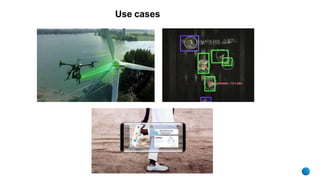
Use cases
What is Object
Detection
www.eliftech.com
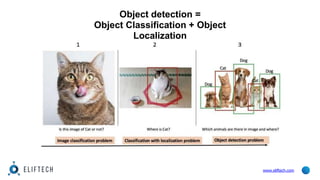
Object detection =
Object Classification + Object
Localization
www.eliftech.com
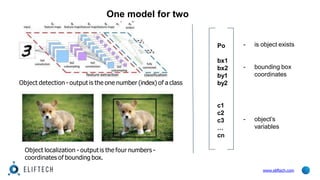
One model for two
tasks?
Object detection - output is the one number (index) of a class
Object localization - output is the four numbers -
coordinates of bounding box.
Po
bx1
bx2
by1
by2
c1
c2
c3
…
cn
- is object exists
www.eliftech.com
- bounding box
coordinates
- object’s
variables
State of Object
Detection
www.eliftech.com
Approache
s
www.eliftech.com
▪ Classical approach (Haar features) - first OD real time framework (Viola-Jones)
▪ Deep learning approach - now state of the art in OD
▪ OverFeat
▪ R-CNN
▪ Fast R-CNN
▪ YOLO
▪ Faster R-CNN
▪ SSD and R-FCN
Deep learning
approach
OverFeat- published in 2013, multi-scale sliding
window algorithm using Convolutional Neural
Networks (CNNs).
l
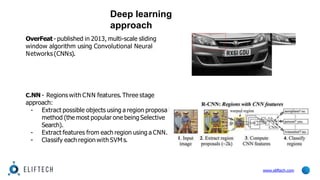
C.NN - Regions with CNN features.Three stage
approach:
- Extract possible objects using a region proposa
method (the most popular one being Selective
Search).
- Extract features from each region using a CNN.
- Classify each region with SVM s.
www.eliftech.com
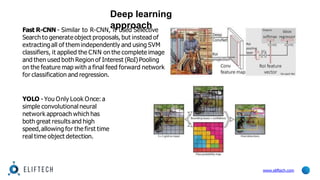
Fast R-CNN - Similar to R-CNN, it used Selective
Search to generate object proposals, but instead of
extractingall of them independently and using SVM
classifiers, it applied the CNN on the complete image
and then used both Region of Interest (RoI) Pooling
on the feature map with a final feed forward network
for classification and regression.
YOLO - You Only Look Once: a
simple convolutional neural
network approach which has
both great results and high
speed,allowing for the first time
real time object detection.
Deep learning
approach
www.eliftech.com
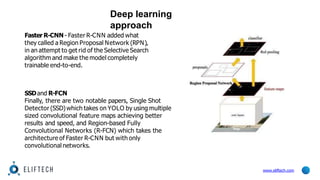
Faster R-CNN - Faster R-CNN added what
they called a Region Proposal Network (RPN),
in an attempt to get rid of the Selective Search
algorithm and make the model completely
trainable end-to-end.
SSDand R-FCN
Finally, there are two notable papers, Single Shot
Detector (SSD)which takes on YOLO by using multiple
sized convolutional feature maps achieving better
results and speed, and Region-based Fully
Convolutional Networks (R-FCN) which takes the
architecture of Faster R-CNN but with only
convolutional networks.
Deep learning
approach
www.eliftech.com
Tensorflow
Object
Detection API
www.eliftech.com
TF Object Detection
API
▪ Open Source from 2017-07-15
▪ Built on top of TensorFlow
▪ Contains trainable detection models
▪ Contains frozen weights
▪ Contains Jupyter Notebook
▪ Makes easy to construct, train and deploy
object detection models
www.eliftech.com
Getting
started
www.eliftech.com
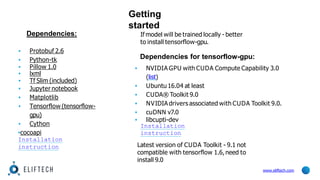
Dependencies:
▪ Protobuf 2.6
▪ Python-tk
▪ Pillow 1.0
▪ lxml
▪ Tf Slim (included)
▪ Jupyter notebook
▪ Matplotlib
▪ Tensorflow (tensorflow-
gpu)
▪ Cython
▪cocoapi
Installation
instruction
If model will be trained locally - better
to install tensorflow-gpu.
Dependencies for tensorflow-gpu:
▪ NVIDIA GPU with CUDA Compute Capability 3.0
(list)
▪ Ubuntu 16.04 at least
▪ CUDA® Toolkit 9.0
▪ NVIDIA drivers associated with CUDA Toolkit 9.0.
▪ cuDNN v7.0
▪ libcupti-dev
Installation
instruction
Latest version of CUDA Toolkit - 9.1 not
compatible with tensorflow 1.6,need to
install 9.0
Creating a
dataset
www.eliftech.com
Datase
t
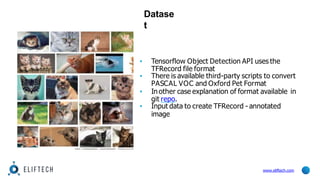
▪ Tensorflow Object Detection API uses the
TFRecord file format
▪ There is available third-party scripts to convert
PASCAL VOC and Oxford Pet Format
▪ In other case explanation of format available in
git repo.
▪ Input data to create TFRecord - annotated
image
www.eliftech.com
Getting
images
www.eliftech.com
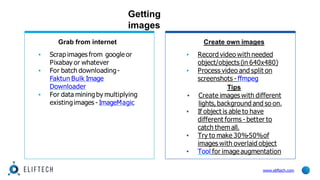
Grab from internet
▪ Scrap images from google or
Pixabay or whatever
▪ For batch downloading-
Faktun Bulk Image
Downloader
▪ For data miningby multiplying
existingimages - ImageMagic
Create own images
▪ Record video with needed
object/objects (in 640x480)
▪ Process video and split on
screenshots - ffmpeg
Tips
▪ Create images with different
lights,background and so on.
▪ If object is able to have
different forms - better to
catch them all.
▪ Try to make 30%-50%of
images with overlaid object
▪ Tool for image augmentation
Labeling (Annotation) an
images
Tool
s
▪ LabelImg
▪ FIAT (Fast Image Data
Annotation Tool)
www.eliftech.com
▪ input:images
▪ output:.xml files with
boundingboxes coordinates
Creating
TFRecord
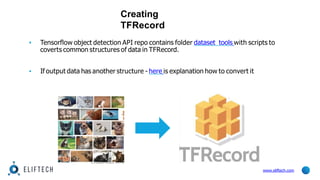
▪ Tensorflow object detection API repo contains folder dataset_tools with scripts to
coverts common structures of data in TFRecord.
▪ If output data has another structure - here is explanation how to convert it
www.eliftech.com
Trainin
g
www.eliftech.com
Preparing model
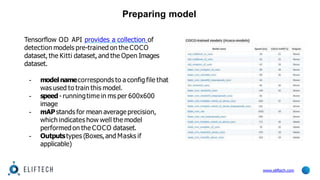
Tensorflow OD API provides a collection of
detection models pre-trained on the COCO
dataset, the Kitti dataset, and the Open Images
dataset.
- modelnamecorresponds to a config file that
was used to train this model.
- speed- runningtime in ms per 600x600
image
- mAPstands for mean average precision,
which indicates how well the model
performed on the COCO dataset.
- Outputstypes (Boxes,and Masks if
applicable)
www.eliftech.com
Configurin
g
● label.pbtx
● pipeline.config
www.eliftech.com
train_config: {
fine_tune_checkpoint: "<path_to_model.ckpt>"
num_steps: 200000
}
train_input_reader {
label_map_path: "<path_to_labels.pbtxt>"
tf_record_input_reader {
input_path: "<path_to_train.record>"
}
}
eval_config {
num_examples: 8000
max_evals: 10
use_moving_averages: false
}
eval_input_reader {
label_map_path: "<path_to_labels.pbtxt>"
shuffle: false
num_readers: 1
tf_record_input_reader {
input_path: "<path_to_test.record>"
}
}
● Folders structure instruction
Training &
Evaluating
www.eliftech.com
# From the tensorflow/models/research directory
python object_detection/eval.py 
--logtostderr 
--pipeline_config_path=${PATH_TO_YOUR_PIPELINE_CONFIG} 
--checkpoint_dir=${PATH_TO_TRAIN_DIR} 
--eval_dir=${PATH_TO_EVAL_DIR}
# From the tensorflow/models/research directory
python object_detection/train.py
--logtostderr
--
pipeline_config_path=/tensorflow/models/object_detection/samples/configs/ssd_mobilenet_v1_p
ets.config
--train_dir=${PATH_TO_ROOT_TRAIN_FOLDER}
Converting
www.eliftech.com
Link
s
www.eliftech.com
▪ https://towardsdatascience.com/how-to-train-your-own-object-detector-with-
tensorflows-object-detector-api-bec72ecfe1d9
▪ https://www.kdnuggets.com/2017/10/deep-learning-object-detection-
comprehensive-review.html
▪ http://www.machinelearninguru.com/deep_learning/tensorflow/basics/tfrecord/tfreco
rd.html
▪ https://www.coursera.org/learn/convolutional-neural-networks
▪ https://medium.com/comet-app/review-of-deep-learning-algorithms-for-object-
detection-c1f3d437b852
▪ https://towardsdatascience.com/evolution-of-object-detection-and-localization-
algorithms-e241021d8bad
▪ https://medium.freecodecamp.org/how-to-play-quidditch-using-the-tensorflow-
object-detection-api-b0742b99065d

odtslide-180529073940.pptx

  • 1.
  • 2.
    Agend a ▪ Intro ▪ Whatis Object Detection ▪ State of Object Detection ▪ Tensorflow Object Detection API ▪ Preparing Data ▪ Training & Evaluating ▪ Links
  • 3.
  • 5.
  • 6.
    Object detection = ObjectClassification + Object Localization www.eliftech.com
  • 7.
    One model fortwo tasks? Object detection - output is the one number (index) of a class Object localization - output is the four numbers - coordinates of bounding box. Po bx1 bx2 by1 by2 c1 c2 c3 … cn - is object exists www.eliftech.com - bounding box coordinates - object’s variables
  • 8.
  • 9.
    Approache s www.eliftech.com ▪ Classical approach(Haar features) - first OD real time framework (Viola-Jones) ▪ Deep learning approach - now state of the art in OD ▪ OverFeat ▪ R-CNN ▪ Fast R-CNN ▪ YOLO ▪ Faster R-CNN ▪ SSD and R-FCN
  • 10.
    Deep learning approach OverFeat- publishedin 2013, multi-scale sliding window algorithm using Convolutional Neural Networks (CNNs). l C.NN - Regions with CNN features.Three stage approach: - Extract possible objects using a region proposa method (the most popular one being Selective Search). - Extract features from each region using a CNN. - Classify each region with SVM s. www.eliftech.com
  • 11.
    Fast R-CNN -Similar to R-CNN, it used Selective Search to generate object proposals, but instead of extractingall of them independently and using SVM classifiers, it applied the CNN on the complete image and then used both Region of Interest (RoI) Pooling on the feature map with a final feed forward network for classification and regression. YOLO - You Only Look Once: a simple convolutional neural network approach which has both great results and high speed,allowing for the first time real time object detection. Deep learning approach www.eliftech.com
  • 12.
    Faster R-CNN -Faster R-CNN added what they called a Region Proposal Network (RPN), in an attempt to get rid of the Selective Search algorithm and make the model completely trainable end-to-end. SSDand R-FCN Finally, there are two notable papers, Single Shot Detector (SSD)which takes on YOLO by using multiple sized convolutional feature maps achieving better results and speed, and Region-based Fully Convolutional Networks (R-FCN) which takes the architecture of Faster R-CNN but with only convolutional networks. Deep learning approach www.eliftech.com
  • 13.
  • 14.
    TF Object Detection API ▪Open Source from 2017-07-15 ▪ Built on top of TensorFlow ▪ Contains trainable detection models ▪ Contains frozen weights ▪ Contains Jupyter Notebook ▪ Makes easy to construct, train and deploy object detection models www.eliftech.com
  • 15.
    Getting started www.eliftech.com Dependencies: ▪ Protobuf 2.6 ▪Python-tk ▪ Pillow 1.0 ▪ lxml ▪ Tf Slim (included) ▪ Jupyter notebook ▪ Matplotlib ▪ Tensorflow (tensorflow- gpu) ▪ Cython ▪cocoapi Installation instruction If model will be trained locally - better to install tensorflow-gpu. Dependencies for tensorflow-gpu: ▪ NVIDIA GPU with CUDA Compute Capability 3.0 (list) ▪ Ubuntu 16.04 at least ▪ CUDA® Toolkit 9.0 ▪ NVIDIA drivers associated with CUDA Toolkit 9.0. ▪ cuDNN v7.0 ▪ libcupti-dev Installation instruction Latest version of CUDA Toolkit - 9.1 not compatible with tensorflow 1.6,need to install 9.0
  • 16.
  • 17.
    Datase t ▪ Tensorflow ObjectDetection API uses the TFRecord file format ▪ There is available third-party scripts to convert PASCAL VOC and Oxford Pet Format ▪ In other case explanation of format available in git repo. ▪ Input data to create TFRecord - annotated image www.eliftech.com
  • 18.
    Getting images www.eliftech.com Grab from internet ▪Scrap images from google or Pixabay or whatever ▪ For batch downloading- Faktun Bulk Image Downloader ▪ For data miningby multiplying existingimages - ImageMagic Create own images ▪ Record video with needed object/objects (in 640x480) ▪ Process video and split on screenshots - ffmpeg Tips ▪ Create images with different lights,background and so on. ▪ If object is able to have different forms - better to catch them all. ▪ Try to make 30%-50%of images with overlaid object ▪ Tool for image augmentation
  • 19.
    Labeling (Annotation) an images Tool s ▪LabelImg ▪ FIAT (Fast Image Data Annotation Tool) www.eliftech.com ▪ input:images ▪ output:.xml files with boundingboxes coordinates
  • 20.
    Creating TFRecord ▪ Tensorflow objectdetection API repo contains folder dataset_tools with scripts to coverts common structures of data in TFRecord. ▪ If output data has another structure - here is explanation how to convert it www.eliftech.com
  • 21.
  • 22.
    Preparing model Tensorflow ODAPI provides a collection of detection models pre-trained on the COCO dataset, the Kitti dataset, and the Open Images dataset. - modelnamecorresponds to a config file that was used to train this model. - speed- runningtime in ms per 600x600 image - mAPstands for mean average precision, which indicates how well the model performed on the COCO dataset. - Outputstypes (Boxes,and Masks if applicable) www.eliftech.com
  • 23.
    Configurin g ● label.pbtx ● pipeline.config www.eliftech.com train_config:{ fine_tune_checkpoint: "<path_to_model.ckpt>" num_steps: 200000 } train_input_reader { label_map_path: "<path_to_labels.pbtxt>" tf_record_input_reader { input_path: "<path_to_train.record>" } } eval_config { num_examples: 8000 max_evals: 10 use_moving_averages: false } eval_input_reader { label_map_path: "<path_to_labels.pbtxt>" shuffle: false num_readers: 1 tf_record_input_reader { input_path: "<path_to_test.record>" } } ● Folders structure instruction
  • 24.
    Training & Evaluating www.eliftech.com # Fromthe tensorflow/models/research directory python object_detection/eval.py --logtostderr --pipeline_config_path=${PATH_TO_YOUR_PIPELINE_CONFIG} --checkpoint_dir=${PATH_TO_TRAIN_DIR} --eval_dir=${PATH_TO_EVAL_DIR} # From the tensorflow/models/research directory python object_detection/train.py --logtostderr -- pipeline_config_path=/tensorflow/models/object_detection/samples/configs/ssd_mobilenet_v1_p ets.config --train_dir=${PATH_TO_ROOT_TRAIN_FOLDER}
  • 25.
  • 26.
    Link s www.eliftech.com ▪ https://towardsdatascience.com/how-to-train-your-own-object-detector-with- tensorflows-object-detector-api-bec72ecfe1d9 ▪ https://www.kdnuggets.com/2017/10/deep-learning-object-detection- comprehensive-review.html ▪http://www.machinelearninguru.com/deep_learning/tensorflow/basics/tfrecord/tfreco rd.html ▪ https://www.coursera.org/learn/convolutional-neural-networks ▪ https://medium.com/comet-app/review-of-deep-learning-algorithms-for-object- detection-c1f3d437b852 ▪ https://towardsdatascience.com/evolution-of-object-detection-and-localization- algorithms-e241021d8bad ▪ https://medium.freecodecamp.org/how-to-play-quidditch-using-the-tensorflow- object-detection-api-b0742b99065d