Nurturing API Platforms with API
Analytics
Oct 14, 2020
Hello!
Rukshan Premathunga
Tanya Madurapperuma
Associate Technical Lead
tanya@wso2.com
rukshan@wso2.com
Technical Lead
● What and Why?
● Stakeholders
● Architecture
● Introduction to Analytics Dashboards
⦿ Analytics Dashboards
⦿ Dashboard Access Control
⦿ Dashboard Customization and Deployment
⦿ Custom Widget Generation
● Analytics Reporting Capabilities
● Discussion on Analytics Scenarios
● Demo
● Q&A
Agenda
3
● Multiple nodes in the API ecosystem
● Thousands of applications, API calls, users
● Numerous information passthrough
⦿ User locations
⦿ Devices
⦿ Applications and API
⦿ Multiple DC/Regions
⦿ Endpoints
What is API Analytics?
4
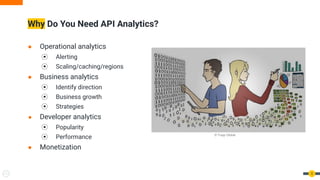
● Operational analytics
⦿ Alerting
⦿ Scaling/caching/regions
● Business analytics
⦿ Identify direction
⦿ Business growth
⦿ Strategies
● Developer analytics
⦿ Popularity
⦿ Performance
● Monetization
Why Do You Need API Analytics?
5
© Trupp Global
● Managers
● Architects
● DevOps Engineers
● API developers
● Application developers
Analytics Stakeholders
6
© https://www.clipartmax.com/
Analytics Architecture
7
● SSO enabled portals
● Separate runtime for worker and
dashboard
Analytics Architecture
8
● Gateway publishes an event when
⦿ A successful request happens
⦾ org.wso2.apimgt.statistics.request
⦿ A fault happens
⦾ org.wso2.apimgt.statistics.fault
⦿ Throttled out
⦾ org.wso2.apimgt.statistics.throttle
● WSO2 Siddhi engine is used for
⦿ Siddhi aggregation
⦿ Purging
⦿ Multiple sink and sources
● Analyzing in real time
● Siddhi aggregations support granularity level summarization
● Traffic analysis
● API error analysis
⦿ Response code
⦿ Runtime errors
⦿ Throttling
● Performance analysis
● End user analytics
⦿ Device/browser/platforms
⦿ Geo location
● Developer analytics
⦿ API/Application/Subscription creation
⦿ Signup
Available Analytics
9
Introduction to Analytics Dashboards
Analytics Dashboards
11
● Business analytics
● Monitoring
● API analytics
● Application analytics
● Reports
● Focus on business insights of APIs
⦿ Popular devices and regions
⦾ Localizations
⦾ Development
⦾ Promotions/Marketings
⦿ Monetization plans
⦿ Identify external systems and partnership
● Business growth
⦿ API usage
⦿ Increase of APIs/applications
⦿ Subscription creations
⦿ User signup
Business Analytics
12
● Support long term data
● Multiple analytics data
⦿ Top summary widgets
⦿ Both API and application analytics
⦿ Usage, traffic, performance, faults analysis
⦿ Geo location and user device
⦿ Drill down scenarios
● Targets admin users and managers
⦿ Admin users and users of internal/analytics role can view by default
● Ability to see analytics of any APIs, apps
Business Analytics
13
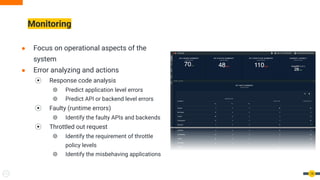
● Focus on operational aspects of the
system
● Error analyzing and actions
⦿ Response code analysis
⦾ Predict application level errors
⦾ Predict API or backend level errors
⦿ Faulty (runtime errors)
⦾ Identify the faulty APIs and backends
⦿ Throttled out request
⦾ Identify the requirement of throttle
policy levels
⦾ Identify the misbehaving applications
Monitoring
14
● API performance analysis
⦿ Latency breakdown of resources
⦿ Identify the performance degradation points
⦿ Take actions to mitigate performance issues
⦾ Inform developers about higher latencies
⦾ Identify performance pattern and take actions
⧁ TPS
⦾ Improve performance by
⧁ Introducing cache, regions
⧁ Vertical scaling(TPS, complexity)
⦿ Compare improvements across API versions
Monitoring
15
● Traffic analysis
⦿ Identify the pattern and take action
⦾ Sudden increase
⦾ Sudden decrease
⦿ Predict capacity requirement
⦾ Scaling API Manager system
⦾ Scaling backend system
⦾ Ensure limits with throttling policies
Monitoring
16
● Targets to admin users and managers
⦿ Admin users and users of internal/analytics role can view by default
● Displays short term data to take an action
● By default time ranged is fixed to per day and week
● Able to see analytics of any APIs, apps
Monitoring
17
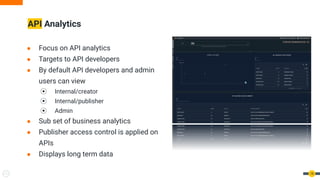
● Focus on API analytics
● Targets to API developers
● By default API developers and admin
users can view
⦿ Internal/creator
⦿ Internal/publisher
⦿ Admin
● Sub set of business analytics
● Publisher access control is applied on
APIs
● Displays long term data
API Analytics
18
● Analyze traffic pattern
⦿ Popular APIs
⦿ Identify APIs to deprecate
⦿ Identify required subscription policies
● Identify the performance issues of APIs
⦿ Mediation path
⦿ Backend services
● Resource usage pattern
⦿ Create products with popular resources
API Analytics
19
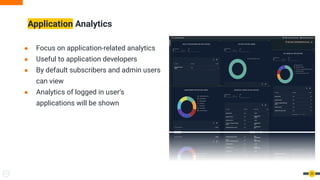
● Focus on application-related analytics
● Useful to application developers
● By default subscribers and admin users
can view
● Analytics of logged in user’s
applications will be shown
Application Analytics
20
● Analyze traffic pattern
⦿ Popularity of the application
⦿ Identify required subscription policy
● Usage patterns of end user
⦿ Identify the application users, type of users (login platforms)
⦿ Identify the application throttling policies
● Fault analysis
⦿ Identify the faulty APIs of an application
⦿ Contact API developer/support team
Application Analytics
21
● Dashboard supports scope based access control
● Each dashboard supports the following permissions
⦿ View - view the dashboard and cannot edit or change the
settings of a dashboard
⦿ Edit - can either edit the dashboard or view the dashboard.
Editing the dashboard includes adding/removing widgets,
adding/removing pages to/from the dashboard, changing the
layout of the dashboard
⦿ Owner - have access to the Dashboard Settings page to
change the dashboard access control
● Logged in user should have required scopes to
view/edit/own the dashboard
Dashboard Access Control
22
● Customizations are not allowed in default dashboards
⦿ Permission changes are allowed
⦿ Dashboard name and URL are not allowed
⦿ Changes in dashboard design are not allowed
● Supports creating copies of dashboards
⦿ Duplicate options supports creating copies to
perform desired customizations
⦿ Deploy the exported dashboard with the
customization in required environments
Dashboard Customization and Deployment
23
● Required when
⦿ Creating new widgets
⦿ Customizing existing widgets
● Widget is a react component inherited from a parent widget
● Yeoman script to generate a widget skeleton
● OOTB support for UI charting libraries
⦿ VizGrammer and Victory
● Ability to use any desired charting libraries
● Easy deployment mechanism
⦿ Copy to
<Analytics_home>/wso2/dashboard/deployment/web-ui-apps/analytics-dashboard
/extensions/widgets
Custom Widget Generation
24
Analytics Reporting Capabilities
● Monetizations and billing requirements
● Share and analyze later
● Feed to different analytics systems
Why Do You Need Reporting Capabilities?
26
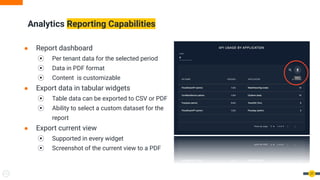
● Report dashboard
⦿ Per tenant data for the selected period
⦿ Data in PDF format
⦿ Content is customizable
● Export data in tabular widgets
⦿ Table data can be exported to CSV or PDF
⦿ Ability to select a custom dataset for the
report
● Export current view
⦿ Supported in every widget
⦿ Screenshot of the current view to a PDF
Analytics Reporting Capabilities
27
Demo
Question Time!
29
● Download and try-out
⦿ wso2.com/api-management
● Slack Channel
⦿ wso2-apim.slack.com
● Github
⦿ github.com/wso2/product-apim
⦿ github.com/wso2/analytics-apim
30
wso2.com
Thanks!

Nurturing API Platforms with API Analytics

  • 1.
    Nurturing API Platformswith API Analytics Oct 14, 2020
  • 2.
    Hello! Rukshan Premathunga Tanya Madurapperuma AssociateTechnical Lead tanya@wso2.com rukshan@wso2.com Technical Lead
  • 3.
    ● What andWhy? ● Stakeholders ● Architecture ● Introduction to Analytics Dashboards ⦿ Analytics Dashboards ⦿ Dashboard Access Control ⦿ Dashboard Customization and Deployment ⦿ Custom Widget Generation ● Analytics Reporting Capabilities ● Discussion on Analytics Scenarios ● Demo ● Q&A Agenda 3
  • 4.
    ● Multiple nodesin the API ecosystem ● Thousands of applications, API calls, users ● Numerous information passthrough ⦿ User locations ⦿ Devices ⦿ Applications and API ⦿ Multiple DC/Regions ⦿ Endpoints What is API Analytics? 4
  • 5.
    ● Operational analytics ⦿Alerting ⦿ Scaling/caching/regions ● Business analytics ⦿ Identify direction ⦿ Business growth ⦿ Strategies ● Developer analytics ⦿ Popularity ⦿ Performance ● Monetization Why Do You Need API Analytics? 5 © Trupp Global
  • 6.
    ● Managers ● Architects ●DevOps Engineers ● API developers ● Application developers Analytics Stakeholders 6 © https://www.clipartmax.com/
  • 7.
    Analytics Architecture 7 ● SSOenabled portals ● Separate runtime for worker and dashboard
  • 8.
    Analytics Architecture 8 ● Gatewaypublishes an event when ⦿ A successful request happens ⦾ org.wso2.apimgt.statistics.request ⦿ A fault happens ⦾ org.wso2.apimgt.statistics.fault ⦿ Throttled out ⦾ org.wso2.apimgt.statistics.throttle ● WSO2 Siddhi engine is used for ⦿ Siddhi aggregation ⦿ Purging ⦿ Multiple sink and sources ● Analyzing in real time ● Siddhi aggregations support granularity level summarization
  • 9.
    ● Traffic analysis ●API error analysis ⦿ Response code ⦿ Runtime errors ⦿ Throttling ● Performance analysis ● End user analytics ⦿ Device/browser/platforms ⦿ Geo location ● Developer analytics ⦿ API/Application/Subscription creation ⦿ Signup Available Analytics 9
  • 10.
  • 11.
    Analytics Dashboards 11 ● Businessanalytics ● Monitoring ● API analytics ● Application analytics ● Reports
  • 12.
    ● Focus onbusiness insights of APIs ⦿ Popular devices and regions ⦾ Localizations ⦾ Development ⦾ Promotions/Marketings ⦿ Monetization plans ⦿ Identify external systems and partnership ● Business growth ⦿ API usage ⦿ Increase of APIs/applications ⦿ Subscription creations ⦿ User signup Business Analytics 12
  • 13.
    ● Support longterm data ● Multiple analytics data ⦿ Top summary widgets ⦿ Both API and application analytics ⦿ Usage, traffic, performance, faults analysis ⦿ Geo location and user device ⦿ Drill down scenarios ● Targets admin users and managers ⦿ Admin users and users of internal/analytics role can view by default ● Ability to see analytics of any APIs, apps Business Analytics 13
  • 14.
    ● Focus onoperational aspects of the system ● Error analyzing and actions ⦿ Response code analysis ⦾ Predict application level errors ⦾ Predict API or backend level errors ⦿ Faulty (runtime errors) ⦾ Identify the faulty APIs and backends ⦿ Throttled out request ⦾ Identify the requirement of throttle policy levels ⦾ Identify the misbehaving applications Monitoring 14
  • 15.
    ● API performanceanalysis ⦿ Latency breakdown of resources ⦿ Identify the performance degradation points ⦿ Take actions to mitigate performance issues ⦾ Inform developers about higher latencies ⦾ Identify performance pattern and take actions ⧁ TPS ⦾ Improve performance by ⧁ Introducing cache, regions ⧁ Vertical scaling(TPS, complexity) ⦿ Compare improvements across API versions Monitoring 15
  • 16.
    ● Traffic analysis ⦿Identify the pattern and take action ⦾ Sudden increase ⦾ Sudden decrease ⦿ Predict capacity requirement ⦾ Scaling API Manager system ⦾ Scaling backend system ⦾ Ensure limits with throttling policies Monitoring 16
  • 17.
    ● Targets toadmin users and managers ⦿ Admin users and users of internal/analytics role can view by default ● Displays short term data to take an action ● By default time ranged is fixed to per day and week ● Able to see analytics of any APIs, apps Monitoring 17
  • 18.
    ● Focus onAPI analytics ● Targets to API developers ● By default API developers and admin users can view ⦿ Internal/creator ⦿ Internal/publisher ⦿ Admin ● Sub set of business analytics ● Publisher access control is applied on APIs ● Displays long term data API Analytics 18
  • 19.
    ● Analyze trafficpattern ⦿ Popular APIs ⦿ Identify APIs to deprecate ⦿ Identify required subscription policies ● Identify the performance issues of APIs ⦿ Mediation path ⦿ Backend services ● Resource usage pattern ⦿ Create products with popular resources API Analytics 19
  • 20.
    ● Focus onapplication-related analytics ● Useful to application developers ● By default subscribers and admin users can view ● Analytics of logged in user’s applications will be shown Application Analytics 20
  • 21.
    ● Analyze trafficpattern ⦿ Popularity of the application ⦿ Identify required subscription policy ● Usage patterns of end user ⦿ Identify the application users, type of users (login platforms) ⦿ Identify the application throttling policies ● Fault analysis ⦿ Identify the faulty APIs of an application ⦿ Contact API developer/support team Application Analytics 21
  • 22.
    ● Dashboard supportsscope based access control ● Each dashboard supports the following permissions ⦿ View - view the dashboard and cannot edit or change the settings of a dashboard ⦿ Edit - can either edit the dashboard or view the dashboard. Editing the dashboard includes adding/removing widgets, adding/removing pages to/from the dashboard, changing the layout of the dashboard ⦿ Owner - have access to the Dashboard Settings page to change the dashboard access control ● Logged in user should have required scopes to view/edit/own the dashboard Dashboard Access Control 22
  • 23.
    ● Customizations arenot allowed in default dashboards ⦿ Permission changes are allowed ⦿ Dashboard name and URL are not allowed ⦿ Changes in dashboard design are not allowed ● Supports creating copies of dashboards ⦿ Duplicate options supports creating copies to perform desired customizations ⦿ Deploy the exported dashboard with the customization in required environments Dashboard Customization and Deployment 23
  • 24.
    ● Required when ⦿Creating new widgets ⦿ Customizing existing widgets ● Widget is a react component inherited from a parent widget ● Yeoman script to generate a widget skeleton ● OOTB support for UI charting libraries ⦿ VizGrammer and Victory ● Ability to use any desired charting libraries ● Easy deployment mechanism ⦿ Copy to <Analytics_home>/wso2/dashboard/deployment/web-ui-apps/analytics-dashboard /extensions/widgets Custom Widget Generation 24
  • 25.
  • 26.
    ● Monetizations andbilling requirements ● Share and analyze later ● Feed to different analytics systems Why Do You Need Reporting Capabilities? 26
  • 27.
    ● Report dashboard ⦿Per tenant data for the selected period ⦿ Data in PDF format ⦿ Content is customizable ● Export data in tabular widgets ⦿ Table data can be exported to CSV or PDF ⦿ Ability to select a custom dataset for the report ● Export current view ⦿ Supported in every widget ⦿ Screenshot of the current view to a PDF Analytics Reporting Capabilities 27
  • 28.
  • 29.
  • 30.
    ● Download andtry-out ⦿ wso2.com/api-management ● Slack Channel ⦿ wso2-apim.slack.com ● Github ⦿ github.com/wso2/product-apim ⦿ github.com/wso2/analytics-apim 30
  • 31.