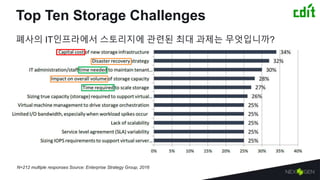
Top Ten StorageChallenges
폐사의 IT인프라에서 스토리지에 관련된 최대 과제는 무엇입니까?
N=212 multiple responses Source: Enterprise Strategy Group, 2016
4.
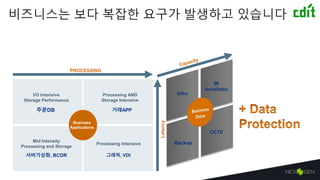
비즈니스는 보다 복잡한요구가 발생하고 있습니다
Latency
I/O Intensive
Storage Performance
주문DB
Processing AND
Storage Intensive
거래APP
Mid Intensity
Processing and Storage
서버가상화, BCDR
Processing Intensive
그래픽, VDI
Business
Applications
PROCESSING
CCTV
BI
Annalistic
Backup
Infra
5.
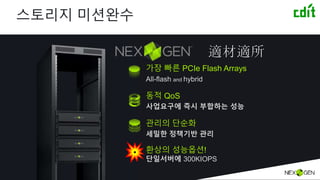
스토리지 미션완수
가장 빠른PCIe Flash Arrays
All-flash and hybrid
동적 QoS
사업요구에 즉시 부합하는 성능
관리의 단순화
세밀한 정책기반 관리
환상의 성능옵션!
단일서버에 300KIOPS
適材適所
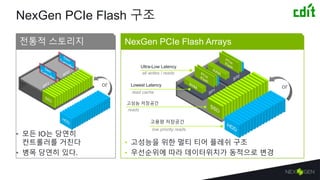
NexGen PCIe Flash구조
• 모든 IO는 당연히
컨트롤러를 거친다
• 병목 당연히 있다.
• 고성능을 위한 멀티 티어 플레쉬 구조
• 우선순위에 따라 데이터위치가 동적으로 변경
전통적 스토리지 NexGen PCIe Flash Arrays
Ultra-Low Latency
고성능 저장공간
Lowest Latency
고용량 저장공간
or or
all writes / reads
read cache
reads
low priority reads
8.
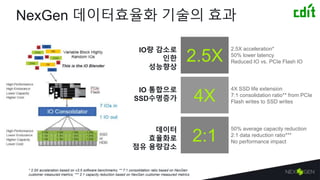
NexGen 데이터효율화 기술의효과
2.5X acceleration*
50% lower latency
Reduced IO vs. PCIe Flash IO2.5X
4X
4X SSD life extension
7:1 consolidation ratio** from PCIe
Flash writes to SSD writes
2:1
50% average capacity reduction
2:1 data reduction ratio***
No performance impact
* 2.5X acceleration based on v3.5 software benchmarks; ** 7:1 consolidation ratio based on NexGen
customer measured metrics; *** 2:1 capacity reduction based on NexGen customer measured metrics
IO 통합으로
SSD수명증가
데이터
효율화로
점유 용량감소
IO량 감소로
인한
성능향상
9.
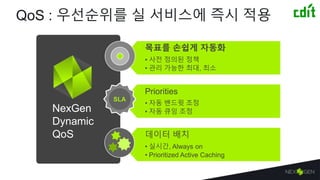
목표를 손쉽게 자동화
•사전 정의된 정책
• 관리 가능한 최대, 최소
Priorities
• 자동 밴드윗 조정
• 자동 큐잉 조정
데이터 배치
• 실시간, Always on
• Prioritized Active Caching
QoS : 우선순위를 실 서비스에 즉시 적용
SLA
NexGen
Dynamic
QoS
10.
40K
30K
20K
10K
IOPS
0
40K
30K
20K
10K
IOPS
0
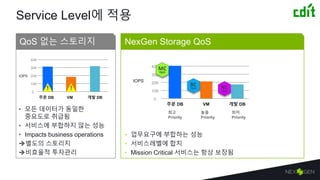
Service Level에 적용
•모든 데이터가 동일한
중요도로 취급됨
• 서비스에 부합하지 않는 성능
• Impacts business operations
별도의 스토리지
비효율적 투자관리
• 업무요구에 부합하는 성능
• 서비스레벨에 합치
• Mission Critical 서비스는 항상 보장됨
QoS 없는 스토리지 NexGen Storage QoS
! !
VM주문 DB 개발 DB
VM주문 DB 개발 DB
최고
Priority
높음
Priority
최저
Priority
11.
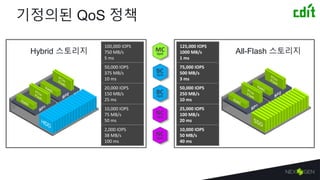
기정의된 QoS 정책
125,000IOPS
1000 MB/s
1 ms
75,000 IOPS
500 MB/s
3 ms
50,000 IOPS
250 MB/s
10 ms
25,000 IOPS
100 MB/s
20 ms
10,000 IOPS
50 MB/s
40 ms
100,000 IOPS
750 MB/s
5 ms
50,000 IOPS
375 MB/s
10 ms
20,000 IOPS
150 MB/s
25 ms
10,000 IOPS
75 MB/s
50 ms
2,000 IOPS
38 MB/s
100 ms
Hybrid 스토리지 All-Flash 스토리지
12.
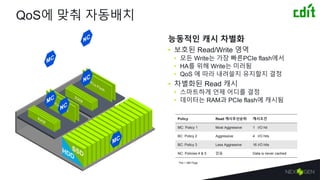
QoS에 맞춰 자동배치
능동적인캐시 차별화
• 보호된 Read/Write 영역
• 모든 Write는 가장 빠른PCIe flash에서
• HA를 위해 Write는 미러됨
• QoS 에 따라 내려쓸지 유지할지 결정
• 차별화된 Read 캐시
• 스마트하게 언제 어디를 결정
• 데이터는 RAM과 PCIe flash에 캐시됨
Policy Read 캐시우선순위 캐시조건
MC: Policy 1 Most Aggressive 1 I/O hit
BC: Policy 2 Aggressive 4 I/O hits
BC: Policy 3 Less Aggressive 16 I/O hits
NC: Policies 4 & 5 없음 Data is never cached
*Per 1 MB Page
13.
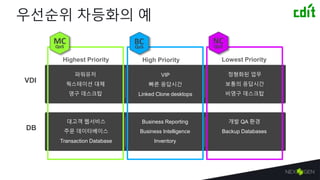
우선순위 차등화의 예
HighestPriority High Priority Lowest Priority
파워유저
웍스테이션 대체
영구 데스크탑
VIP
빠른 응답시간
Linked Clone desktops
정형화된 업무
보통의 응답시간
비영구 데스크탑
대고객 웹서비스
주문 데이터베이스
Transaction Database
Business Reporting
Business Intelligence
Inventory
개발 QA 환경
Backup Databases
VDI
DB
14.
Log Temp DBData
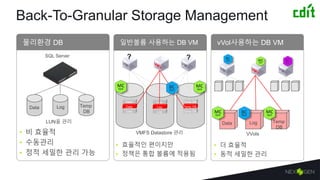
Back-To-GranularStorage Management
물리환경 DB 일반볼륨 사용하는 DB VM vVol사용하는 DB VM
VMFS Datastore 관리
• 더 효율적
• 동적 세밀한 관리
SQL Server
Log Temp DBData
Log Temp DBData
• 효율적인 편이지만
• 정책은 통합 볼륨에 적용됨
• 비 효율적
• 수동관리
• 정적 세밀한 관리 가능
VVols
Data Log Temp
DB
Data Log Temp
DB
LUN을 관리
? ?
15.
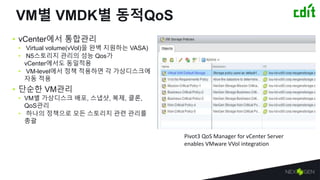
VM별 VMDK별 동적QoS
•vCenter에서 통합관리
• Virtual volume(vVol)을 완벽 지원하는 VASA)
• N5스토리지 관리의 성능 Qos가
vCenter에서도 동일적용
• VM-level에서 정책 적용하면 각 가상디스크에
자동 적용
• 단순한 VM관리
• VM별 가상디스크 배포, 스냅샷, 복제, 클론,
QoS관리
• 하나의 정책으로 모든 스토리지 관련 관리를
총괄
Pivot3 QoS Manager for vCenter Server
enables VMware VVol integration
16.
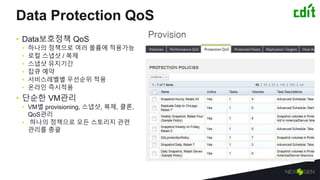
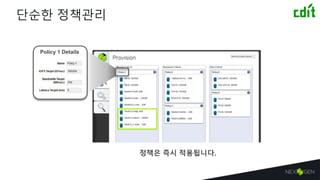
Data Protection QoS
•Data보호정책 QoS
• 하나의 정책으로 여러 볼륨에 적용가능
• 로컬 스냅샷 / 복제
• 스냅샷 유지기간
• 잡큐 예약
• 서비스레벨별 우선순위 적용
• 온라인 즉시적용
• 단순한 VM관리
• VM별 provisioning, 스냅샷, 복제, 클론,
QoS관리
• 하나의 정책으로 모든 스토리지 관련
관리를 총괄
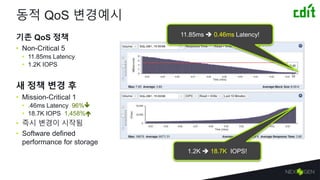
동적 QoS 변경예시
기존QoS 정책
• Non-Critical 5
• 11.85ms Latency
• 1.2K IOPS
새 정책 변경 후
• Mission-Critical 1
• .46ms Latency 96%
• 18.7K IOPS 1,458%
• 즉시 변경이 시작됨
• Software defined
performance for storage
11.85ms 0.46ms Latency!
1.2K 18.7K IOPS!
19.
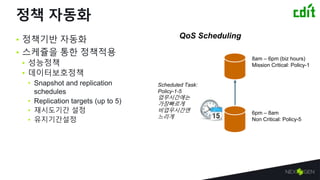
정책 자동화
• 정책기반자동화
• 스케쥴을 통한 정책적용
• 성능정책
• 데이터보호정책
• Snapshot and replication
schedules
• Replication targets (up to 5)
• 재시도기간 설정
• 유지기간설정
6pm – 8am
Non Critical: Policy-5
8am – 6pm (biz hours)
Mission Critical: Policy-1
Scheduled Task:
Policy-1-5
업무시간에는
가장빠르게
비업무시간엔
느리게
QoS Scheduling
20.
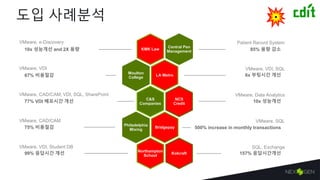
도입 사례분석
LA Metro67%비용절감
10x 성능개선NCS
Credit
Philadelphia
Mixing75% 비용절감
Kolcraft 157% 응답시간개선
KMK Law10x 성능개선 and 2X 용량
Moulton
College
C&S
Companies77% VDI 배포시간 개선
Bridgepay 500% increase in monthly transactions
Northampton
School99% 응답시간 개선
Central Pen
Management 85% 용량 감소
6x 부팅시간 개선
Patient Record System
VMware, VDI, SQL
VMware, Data Analytics
VMware, SQL
SQL, Exchange
VMware, e-Discovery
VMware, VDI
VMware, CAD/CAM, VDI, SQL, SharePoint
VMware, CAD/CAM
VMware, VDI, Student DB
21.
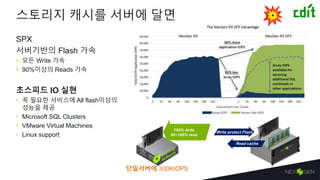
스토리지 캐시를 서버에달면
SPX
서버기반의 Flash 가속
• 모든 Write 가속
• 90%이상의 Reads 가속
초스피드 IO 실현
• 꼭 필요한 서비스에 All flash이상의
성능을 제공
• Microsoft SQL Clusters
• VMware Virtual Machines
• Linux support
Write protect Flash
100% write
90~100% read
Read cache
단일서버에 300KIOPS
22.
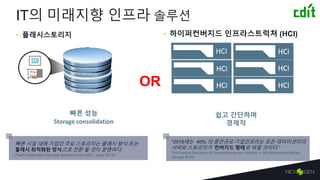
빠른 성능
Storage consolidation
PCIe
Flash
IT의미래지향 인프라 솔루션
• 플래시스토리지 • 하이퍼컨버지드 인프라스트럭쳐 (HCI)
빠른 시일 내에 기업의 주요 스토리지는 플래시 방식 또는
플래시 최적화된 방식으로 전환 될 것이 분명하다.
Flash-Optimized Storage Architectures (IDC, June 2014)
“2018에는 40% 의 중간규모 기업인프라는 모든 데이터센터의
서버와 스토리지가 컨버지드 형태로 바뀔 것이다.”
The Positive Disruption of Hyperconvergence Adoption in the Midmarket (Gartner,
January 2016)
쉽고 간단하며
경제적
OR
23.
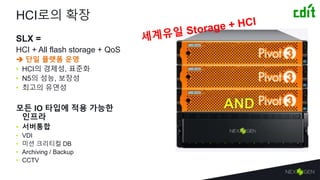
HCI로의 확장
SLX =
HCI+ All flash storage + QoS
단일 플랫폼 운영
• HCI의 경제성, 표준화
• N5의 성능, 보장성
• 최고의 유연성
모든 IO 타입에 적용 가능한
인프라
• 서버통합
• VDI
• 미션 크리티컬 DB
• Archiving / Backup
• CCTV
24.
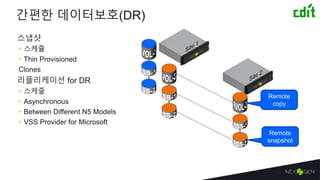
간편한 데이터보호(DR)
스냅샷
• 스케쥴
•Thin Provisioned
Clones
리플리케이션 for DR
• 스케줄
• Asynchronous
• Between Different N5 Models
• VSS Provider for Microsoft
Remote
copy
Remote
snapshot
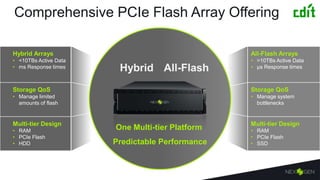
Comprehensive PCIe FlashArray Offering
Hybrid Arrays
• <10TBs Active Data
• ms Response times
Storage QoS
• Manage limited
amounts of flash
Multi-tier Design
• RAM
• PCIe Flash
• HDD
All-Flash Arrays
• >10TBs Active Data
• µs Response times
Storage QoS
• Manage system
bottlenecks
Multi-tier Design
• RAM
• PCIe Flash
• SSD
Hybrid All-Flash
One Multi-tier Platform
Predictable Performance
27.
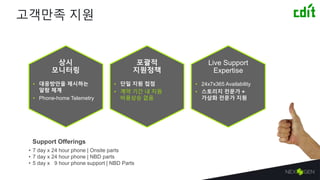
고객만족 지원
Live Support
Expertise
•24x7x365 Availability
• 스토리지 전문가 +
가상화 전문가 지원
상시
모니터링
• 대응방안을 제시하는
알람 체계
• Phone-home Telemetry
포괄적
지원정책
• 단일 지원 접점
• 계약 기간 내 지원
비용상승 없음
Support Offerings
• 7 day x 24 hour phone | Onsite parts
• 7 day x 24 hour phone | NBD parts
• 5 day x 9 hour phone support | NBD Parts
#4 IT에서 가장 어렵고도 복잡하지만 가장 변화하기 어려운 부분이 바로 스토리지
관련 어려움들을 차례로 나열해보면 비용, 관리시간, 성능보장, DR등이 우선순위로 모든기업들이 비슷한 고민을 안고 있음
#5 특히나 모든 사업기반들이 IT통합되면서 계산성능과 맞물려 응답시간에 대한요구 뿐만 아니라 용량에 대한 요구도 다양해지고 있으며
특히 데이터의 보호에 대한 것들까지 가세되면서 워크로드타입으로만 데이터를 분류하는 것은 이미 전시대적이라고 할수 있다.
예를들어 과거에는 DB는 빠른 스토리지에, 개발은 저가스토리지에, 가상화는 일반스토리지에 하는것이 어쩔수 없는 선택이지만
이제는 DB중에서도 더 빨라야하거나 개발중에서도 한시적으로 더 빠른 성능을 요구할수 도 있는 것이다.
특히 Business Intelligent 입장에서보면 많은양의 데이터를 포함하면서도 분석시에는 빠른 응답을 해낼수 있어야하기 때문에
과거와 같은 정적인 기술적 워크로드 타입으로만 분류하여 사용하는것은
비효율적이며, 빠른 비즈니스 변화요구에 충분히 대응하지 못할 뿐아니라
결국 비경제적 투자를 하게된다.
즉이제는 즉재적소에 성능, 용량을 보자할 수 있는 스토리지 전략이 필요하다.
#6 먼저 넥스젠은 그 누구보다 빠르다. 그이유는 다음장에
둘째 아무리 빠른 아우토반이 마련되어 있더라도 한꺼번에 몰리는 상황이면 응급차가 이동할수 없다.
미션크리티컬한 서비스는 성능과 안정성이 보장되어야한다.
셋째 높게 날면 세밀히 볼수 없고 낮게 날면 멀리 볼수 없다.
다시 말해 분류를 세밀히 하지않으면 관리는 쉬우나 각 업무의 특성에 최적화된 성능이나 민첩성을 제공하기 어렵다. 관리에드는 시간도 마찬가지다
마지막으로 어느조직이나 한두개의 특별히 빠른 성능을 요구하는 서비스가 있을수 있는데. 단지 이를 위해서 전체를 AF로 바꾸는것 또한 낭비다.
Add PCI scale
Show HDD and SSD attach
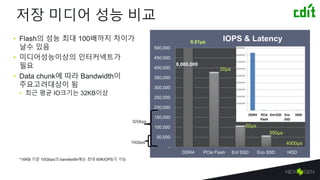
#7 큰범주로 메모리까지를 저장장치로 보았을때 (인메모리 DB가 쓰이는 이유) 최근 쓰이고 있는 DDR4 메모리는 8백만 IOPS에 달한다.
거기에 비해 일반 기업형 SSD는 십만 정도로 80배의 성능차이가 있다.
그리고 넥스젠이 사용하는 PCI플래쉬는 현재까지 나와있는 가장 빠른 낸드플래쉬로 38만IOPS이상의 성능을 나타낸다.
PC용 SSD대비 6배, 기업형 SSD에 대비해서도 3배이상 빠르다.
#9 NexGen data reduction technologies deliver performance, endurance and capacity benefits for our All-fash arrays.
#10 We believe that QoS will be a requirement for the next generation of all-flash arrays. NexGen’s dynamic QoS simplifies performance management and delivers more consistent application performance. Rather than make admins manually input performance targets, we’ve done the work, by creating five simple to assign policies. for them unlike other QoS offerings that force end users to react to a noisy neighbor and manually input minimums, maximums, and burst settings for every single volume in the system.
NexGen’s Dynamic Storage QoS has three distinct attributes. The first is that it allows customers to apply performance targets to Volumes and VMs. This manages min and max performance levels in terms of IOPS, TP and Latency.
Predefined policies control everything, including how data is prioritized, including intelligent BW throttling and queuing to ensure service levels are met.
Finally, since we’re a multi-tier architecture, real-time data placement is paramount. This is where features like prioritized active cache ensures that flash is prioritized for more critical workloads.
Emphasize dynamic QoS simplifies performance management and delivers more consistent application performance, unlike other QoS offerings that force end users to react to a noisy neighbor and manually input minimums, maximums, and burst settings for every single volume in the system.
Often times customers don’t realize how much performance to provision, NexGen’s patented QoS uses massive amounts of performance data collected from production environments to pre-define 5 simple policies that automate performance management. This is especially important for customers considering using Vmware vSphere 6 with virtual volumes (VVOLs). VVOLs can increase the number of objects in a data storage system by 30 times, there is no way users can scale by manually inputing minimums and maximums on every single VVOL.
PRIORITIES
Another shortcoming of other QoS engines is the ability to over-provision system performance. Just like thin provisioning in the capacity world, the ability to over provision is key to maximum utilization of resources. QoS engines with manual minimum, maximum, and burst settings leave users stranded when it comes to over provisioning as without a way to prioritize between the various performance targets during the times where the system is encountering contention (due to over provisioining), the system can’t make the right trade-offs and ensure mission critical apps get consistent performance.
PLACEMENT
There is a proliferation of new types of non-volatile media including several different types of flash. The only way to ensure customers achieve the most affordable all flash system while avoiding latency spikes and contention is to use multiple tiers of flash managed by a QoS engine. NexGen designed it’s architected all management capabilities around the concept of QoS in anticipation of using the best of all worlds from multiple media types and types yet to be discovered.
VVOL INTEGRATION
Our policies are integrated with Vmware’s Storage Based Policy engine (SPBM), that radically simplifies VM-level performance management. Changing performance is as simple as changing a selection on the drop down menu item – end users notice the change in seconds.
#12 Policy based QoS allows any one managing storage to easily assign priorities to a vm or volume. There are 5 preconfigured QoS policies.
You’re looking at the QoS policy for the NexGen n-1500 all flash array.
One of the our two existing hybrid policies is shown below so you can see the difference between QoS for multi-tier w/ HDD vs. multi-tier all-flash.
Keep in mind that each set of polices were designed. To align w/ the amount of flash in the system.
#14 Why does QoS matter in practice? Because customer data is not homogeneious.
They have different performance requirements and SLAs.
Take for example VDI. ….
#15 For SQL customers, this allows customers to attain the granular performance mgmt. that exists with stand-alone instances.
Policies can be assigned to VMFS, and now with VVLos support, wach instance gets granular performance management.
Our policies are integrated with Vmware’s Storage Based Policy engine (SPBM), that radically simplifies VM-level performance management. Changing performance is as simple as changing a selection on the drop down menu item – end users notice the change in seconds.
#27 2015 4x 6-core Intel Xeon E5645 2.4GHz (2x CPU per storage processor), 24x physical cores / 48 cores with hyper-threading
#28 We’re very excited for the upcoming release of our multi-tier all-flash, and believe that QoS as a key element to enable the next generation of all flash arrays. Our data reduction technologies and Dynamic QoS play a vital role in ensuring our customers get efficient predicable storage results from their all-flash arrays.



![[오픈소스컨설팅]Virtualization kvm-rhev](https://cdn.slidesharecdn.com/ss_thumbnails/virtualization-kvm-rhev-140407012113-phpapp01-thumbnail.jpg?width=640&height=640&fit=bounds)


![[IBM 서버] 가장 강력한 보안을 자랑하는 서버시스템 Linuxone 을 소개합니다.](https://cdn.slidesharecdn.com/ss_thumbnails/1-181108050502-thumbnail.jpg?width=640&height=640&fit=bounds)
![[IBM 서버] POWER9](https://cdn.slidesharecdn.com/ss_thumbnails/11-181108055028-thumbnail.jpg?width=640&height=640&fit=bounds)
![2.[d2 오픈세미나]네이버클라우드 시스템 아키텍처 및 활용 방안](https://cdn.slidesharecdn.com/ss_thumbnails/2-140905001236-phpapp02-thumbnail.jpg?width=640&height=640&fit=bounds)

![[OpenStack Days Korea 2016] Track2 - How to speed up OpenStack network with P...](https://cdn.slidesharecdn.com/ss_thumbnails/22kulcloud-160226172151-thumbnail.jpg?width=640&height=640&fit=bounds)
![[OpenStack Days Korea 2016] Track3 - 방송제작용 UHD 스트로지 구성 및 테스트](https://cdn.slidesharecdn.com/ss_thumbnails/35kbs-160226173801-thumbnail.jpg?width=640&height=640&fit=bounds)
![[IBM 김상훈] AI 최적화 플랫폼 IBM AC922 소개와 활용 사례](https://cdn.slidesharecdn.com/ss_thumbnails/1-181029060038-thumbnail.jpg?width=640&height=640&fit=bounds)


![[오픈소스컨설팅] About Storage Cloud](https://cdn.slidesharecdn.com/ss_thumbnails/dist-140126195610-phpapp01-thumbnail.jpg?width=640&height=640&fit=bounds)


![3.[d2 오픈세미나]분산시스템 개발 및 교훈 n base arc](https://cdn.slidesharecdn.com/ss_thumbnails/3-140905000012-phpapp01-thumbnail.jpg?width=640&height=640&fit=bounds)

![[142]편광을 활용한6 dof 전현기](https://cdn.slidesharecdn.com/ss_thumbnails/1426dof-161023161025-thumbnail.jpg?width=640&height=640&fit=bounds)


![[231]운영체제 수준에서의 데이터베이스 성능 분석과 최적화](https://cdn.slidesharecdn.com/ss_thumbnails/231-171017003147-thumbnail.jpg?width=640&height=640&fit=bounds)


![[AWS Migration Workshop] SQL Server Performance on AWS](https://cdn.slidesharecdn.com/ss_thumbnails/fy19q2awsmigrationworkshop-minseokkang-190619062924-thumbnail.jpg?width=640&height=640&fit=bounds)


