Customer Query Resolution and Response Tracking System An Overview
Driver for the discussions Newgen has done elaborate work in the space of Customer Query Resolution and Prospect Tracking System Discuss on how the detailed projects done in the above mentioned space can be replicated for quick sales Educate the sales team on the projects where such systems have been implemented
Cases under discussion Sahara Life Insurance Corporation HSBC Bank FIC Banks internal processes
Sahara Life Insurance Corporation Customer Query Resolution
Query Resolution For Sahara Life The Participants Are : Customer Helpdesk Operations
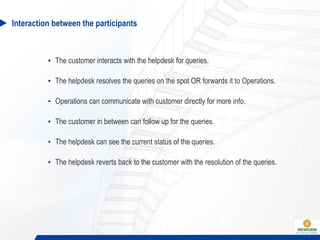
Interaction between the participants The customer interacts with the helpdesk for queries. The helpdesk resolves the queries on the spot OR forwards it to Operations. Operations can communicate with customer directly for more info. The customer in between can follow up for the queries. The helpdesk can see the current status of the queries. The helpdesk reverts back to the customer with the resolution of the queries.
Helpdesk Tasks HELPDESK Search And Display Customer Details View Call And  Query History View Actions Performed On Query Log And Resolve  Query Instantly Forward Unresolved Calls To Operations Log Any Further  Follow Up  Log Prospect  Data  Close Calls  And Queries
Helpdesk Interface Search and view customer details, which include : Personal, Policy and Agent details. Call and query details. The current status of each query and what all actions have been performed on the query till date. Log new calls and queries for the customer. Forward queries to operations which need further consultation and can’t be resolved instantly. Log follow up details. Close calls and queries. Log Prospect customer data into the system. Activities of the helpdesk user :
Entities Customer Policy Call Query Workitem
Relationships 1 Customer   Many Policies. 1 Customer   Many Calls. 1 Call   Many Queries 1 Query   1 Policy. 1 Query   1 Workitem(If forwarded to operations).
Types of queries Instant   Which can be resolved instantly. Forwarding   Which need further consultation.
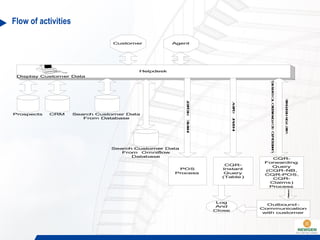
Flow of activities
Helpdesk Screen
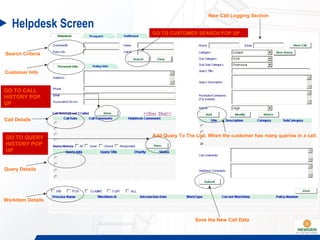
Helpdesk Screen Search Criteria Customer Info Call Details Query Details Workitem Details New Call Logging Section Add Query To The List. When the customer has many queries in a call. Save the New Call Data GO TO CALL HISTORY POP UP GO TO QUERY HISTORY POP UP GO TO CUSTOMER SEARCH POP UP
Customer search and details Customer search section. Customer details : Personal, policy and agent. Call history section : Call section and query section. For each call there can be multiple queries. Workitem section.
New call Taking note of customer phone number and email. In case further consultation is required the user selects parameters to identify the query so that it goes to the right desk for resolution. Filling  query title and description. Resolution comments are given so as to log instantly resolved query. Add to list : To log multiple queries in the same call. Submit : When all the queries are added to the list, the user can save the data.
Pop up for customer search results When the customer search is based on name then there can be multiple customers by the same name. This pop up shows the list of customers with the searched name. The details are seen in the figure below.
Call history pop up The pop up gives details of a call when the user wants to see the details of a particular selected call from the main screen. The Pop up gives the list of all the queries in a call. It also shows the customer comments and helpdesk comments.
Query history pop up The pop up gives details of a particular query in a call when the user wants to see the details of a particular selected query from the main screen. The pop up gives the details of the actions performed on the query and the user comments at every step. The user has the option to put the customer follow up comments and the helpdesk follow up comments, when the customer enquires about the status of his call. The user can put the response comments as well when communicating back the resolution to the customer.
Query history pop up
Prospect Details All sales queries will also be logged by the helpdesk. The sales query will be mailed to the respective branch.
HSBC Bank Request Manager
Request Manager Purpose Lodging requests for different Banking processes as  Change of address Debit/ATM card related etc Searching on the Requests lodged earlier Route the Requests for resolution through the workflow Monitor the status of the requests
Highlights Customised and comprehensive interface for lodging, searching the requests Tracking pending requests and taking appropriate actions Maintaining customer and request details for quick search Monitoring and tracking of the request status and corrective actions on SLAs
Comprehensive RM Screen
Lodging a New Request
Selecting Request Type
Request Details Search
Request Modification
Request Details
Routing Requests
FIC Prospect Tracking System
Prospecting System Overview
Mapping Operations to the System System creates individual queues for all the Branches Relationship Managers (RM) work on the field to generate prospects RM logs the prospect data into the system with a Follow Up Date System generates a Prospect ID In-built Scheduler – creates Work Items corresponding to prospects on follow up dates RM is presented a list of prospects everyday and visits them RM logs status of the follow up in the system Based on RM decision(s) the system decides further routing of the Prospect Another process such as Loan Booking maybe initiated if prospect is converted to customer Prospect / Customer data is always available to the RM on the system for Viewing & Updating
Prospect Creation Interface
Prospect Details Interface  Prospect Search
Prospect Details Update Interface
Banks Internal Processes
Automating Banks Internal Processes In a bank, there are hundreds of processes which are worked upon in an adhoc manner by employees These include Account Opening Approvals Issuance of stationary  Normally these processes are worked upon on Emails Emails inherently have issues related to credibility and tracking These processes can be automated through Workflows which offer benefits as End to end monitoring and tracking of requests Operational Risk Management Managing internal SLA for request handling
Thank You

Newgen solution Customer Query Resolution and Response Tracking System

  • 1.
    Customer Query Resolutionand Response Tracking System An Overview
  • 2.
    Driver for thediscussions Newgen has done elaborate work in the space of Customer Query Resolution and Prospect Tracking System Discuss on how the detailed projects done in the above mentioned space can be replicated for quick sales Educate the sales team on the projects where such systems have been implemented
  • 3.
    Cases under discussionSahara Life Insurance Corporation HSBC Bank FIC Banks internal processes
  • 4.
    Sahara Life InsuranceCorporation Customer Query Resolution
  • 5.
    Query Resolution ForSahara Life The Participants Are : Customer Helpdesk Operations
  • 6.
    Interaction between theparticipants The customer interacts with the helpdesk for queries. The helpdesk resolves the queries on the spot OR forwards it to Operations. Operations can communicate with customer directly for more info. The customer in between can follow up for the queries. The helpdesk can see the current status of the queries. The helpdesk reverts back to the customer with the resolution of the queries.
  • 7.
    Helpdesk Tasks HELPDESKSearch And Display Customer Details View Call And Query History View Actions Performed On Query Log And Resolve Query Instantly Forward Unresolved Calls To Operations Log Any Further Follow Up Log Prospect Data Close Calls And Queries
  • 8.
    Helpdesk Interface Searchand view customer details, which include : Personal, Policy and Agent details. Call and query details. The current status of each query and what all actions have been performed on the query till date. Log new calls and queries for the customer. Forward queries to operations which need further consultation and can’t be resolved instantly. Log follow up details. Close calls and queries. Log Prospect customer data into the system. Activities of the helpdesk user :
  • 9.
    Entities Customer PolicyCall Query Workitem
  • 10.
    Relationships 1 Customer Many Policies. 1 Customer  Many Calls. 1 Call  Many Queries 1 Query  1 Policy. 1 Query  1 Workitem(If forwarded to operations).
  • 11.
    Types of queriesInstant  Which can be resolved instantly. Forwarding  Which need further consultation.
  • 12.
  • 13.
  • 14.
    Helpdesk Screen SearchCriteria Customer Info Call Details Query Details Workitem Details New Call Logging Section Add Query To The List. When the customer has many queries in a call. Save the New Call Data GO TO CALL HISTORY POP UP GO TO QUERY HISTORY POP UP GO TO CUSTOMER SEARCH POP UP
  • 15.
    Customer search anddetails Customer search section. Customer details : Personal, policy and agent. Call history section : Call section and query section. For each call there can be multiple queries. Workitem section.
  • 16.
    New call Takingnote of customer phone number and email. In case further consultation is required the user selects parameters to identify the query so that it goes to the right desk for resolution. Filling query title and description. Resolution comments are given so as to log instantly resolved query. Add to list : To log multiple queries in the same call. Submit : When all the queries are added to the list, the user can save the data.
  • 17.
    Pop up forcustomer search results When the customer search is based on name then there can be multiple customers by the same name. This pop up shows the list of customers with the searched name. The details are seen in the figure below.
  • 18.
    Call history popup The pop up gives details of a call when the user wants to see the details of a particular selected call from the main screen. The Pop up gives the list of all the queries in a call. It also shows the customer comments and helpdesk comments.
  • 19.
    Query history popup The pop up gives details of a particular query in a call when the user wants to see the details of a particular selected query from the main screen. The pop up gives the details of the actions performed on the query and the user comments at every step. The user has the option to put the customer follow up comments and the helpdesk follow up comments, when the customer enquires about the status of his call. The user can put the response comments as well when communicating back the resolution to the customer.
  • 20.
  • 21.
    Prospect Details Allsales queries will also be logged by the helpdesk. The sales query will be mailed to the respective branch.
  • 22.
  • 23.
    Request Manager PurposeLodging requests for different Banking processes as Change of address Debit/ATM card related etc Searching on the Requests lodged earlier Route the Requests for resolution through the workflow Monitor the status of the requests
  • 24.
    Highlights Customised andcomprehensive interface for lodging, searching the requests Tracking pending requests and taking appropriate actions Maintaining customer and request details for quick search Monitoring and tracking of the request status and corrective actions on SLAs
  • 25.
  • 26.
  • 27.
  • 28.
  • 29.
  • 30.
  • 31.
  • 32.
  • 33.
  • 34.
    Mapping Operations tothe System System creates individual queues for all the Branches Relationship Managers (RM) work on the field to generate prospects RM logs the prospect data into the system with a Follow Up Date System generates a Prospect ID In-built Scheduler – creates Work Items corresponding to prospects on follow up dates RM is presented a list of prospects everyday and visits them RM logs status of the follow up in the system Based on RM decision(s) the system decides further routing of the Prospect Another process such as Loan Booking maybe initiated if prospect is converted to customer Prospect / Customer data is always available to the RM on the system for Viewing & Updating
  • 35.
  • 36.
  • 37.
  • 38.
  • 39.
    Automating Banks InternalProcesses In a bank, there are hundreds of processes which are worked upon in an adhoc manner by employees These include Account Opening Approvals Issuance of stationary Normally these processes are worked upon on Emails Emails inherently have issues related to credibility and tracking These processes can be automated through Workflows which offer benefits as End to end monitoring and tracking of requests Operational Risk Management Managing internal SLA for request handling
  • 40.