27-Jan-17
1
Networked User Interface
X Window System
27-Jan-17
2
Networked User Interfaces
 A major task of client machines is to provide the means for users to interact with remote
servers.
 There are roughly two ways in which this interaction can be supported.
 For each remote service the client machine will have a separate counterpart that can
contact the service over the network.
 Example: an agenda running on a user’s PDA that needs to synchronize with a
remote, possibly shared agenda.
 to provide direct access to remote services by only offering a convenient user
interface.
 Effectively, this means that the client machine is used only as a terminal with
no need for local storag leading to an application-neutral solutions.
27-Jan-17
3
Cont’d....
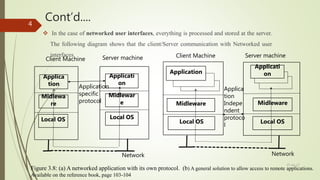
 In the case of networked user interfaces, everything is processed and stored at the server.
The following diagram shows that the client/Server communication with Networked user
interfaces
Applica
tion
Midlewa
re
Local OS
Applicati
on
Local OS
Midlewar
e
Application
Midleware
Local OS
Applicati
on
Local OS
Midleware
Client Machine Server machine Client Machine Server machine
Application
specific
protocol
Applica
tion
Indepe
ndent
protoco
l
Network Network
Figure 3.8: (a) A networked application with its own protocol. (b) A general solution to allow access to remote applications.
Available on the reference book, page 103-104
27-Jan-17
4
Cont’d...
 In the case of networked user interfaces
 everything is processed and stored at the server
 Example: the X window system
 It is one of the oldest and still widely used networked user interface.
 X window system
 is a GUI that runs on Linux and many UNIX operating systems
 Like windows and macintosh operating system,
It provides an easy-to-use
Graphical method of operating the computer. 27-Jan-17
5
Cont’d...
 Programmers may also develop applications that run on the X Window system and support GUI
components such as
Windows, dialog boxes, buttons, and pull-down menus
 Although you can easly use the X Window system to run programs stored on your local computer,
 you can also run applications over a network
 X Window uses Client/Server model where a program can run on one computer but display its
output on another.
 In X Window netwok terminology,
 the desktop system that the user runs a program from is called X server
 The system that hosts and executes the program is clled the X client.
27-Jan-17
6
Cont’d...
 In X window jargon, the temrs cleint and server mean the oposite
 The terms are reversed because the X Window server (on the desktop) performs operations
requested by the client (on the host system).
 The X Window System, generally referred to simply as X, is used to control bit-mapped
terminals,
 which include a monitor, keyboard, and a pointing device such as a mouse.
 In a sense, X can be viewed as that part of an operating system that controls the
terminal.
 The heart of the system is formed by what we shall call the X kernel.
27-Jan-17
7
Cont’d...
The X kernel contains all the terminal-specific device drivers, and as
such, is generally highly hardware dependent.
The X kernel offers a relatively low-level interface for controlling
the screen, but also for capturing events from the keyboard and
mouse.
This interface is made available to applications as a library called
Xlib.
The interesting aspect of X is that the X kernel and the X
applications need not necessarily reside on the same machine. 27-Jan-17
8
Cont’d...
In particular, X provides the X protocol, which is an
application-level communication protocol by which an
instance of Xlib can exchange data and events with the X
kernel.
For example, Xlib can send requests to the X kernel for creating
or killing a window, setting colors, and defining the type of
cursor to display, among many other requests.
In turn, the X kernel will react to local events such as keyboard
and mouse input by sending event packets back to Xlib. 27-Jan-17
9
Cont’d...
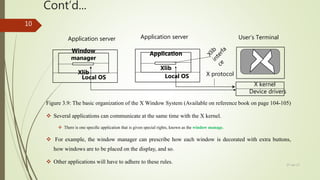
Figure 3.9: The basic organization of the X Window System (Available on reference book on page 104-105)
 Several applications can communicate at the same time with the X kernel.
 There is one specific application that is given special rights, known as the window manage.
 For example, the window manager can prescribe how each window is decorated with extra buttons,
how windows are to be placed on the display, and so.
 Other applications will have to adhere to these rules.
Window
manager
Xlib
Local OS
Application
Xlib
Local OS
X kernel
Device drivers
X protocol
Application server Application server User’s Terminal
27-Jan-17
10
THE END.
Thank You!!!
27-Jan-17
11

Networked user interface

  • 1.
  • 2.
    Networked User Interface XWindow System 27-Jan-17 2
  • 3.
    Networked User Interfaces A major task of client machines is to provide the means for users to interact with remote servers.  There are roughly two ways in which this interaction can be supported.  For each remote service the client machine will have a separate counterpart that can contact the service over the network.  Example: an agenda running on a user’s PDA that needs to synchronize with a remote, possibly shared agenda.  to provide direct access to remote services by only offering a convenient user interface.  Effectively, this means that the client machine is used only as a terminal with no need for local storag leading to an application-neutral solutions. 27-Jan-17 3
  • 4.
    Cont’d....  In thecase of networked user interfaces, everything is processed and stored at the server. The following diagram shows that the client/Server communication with Networked user interfaces Applica tion Midlewa re Local OS Applicati on Local OS Midlewar e Application Midleware Local OS Applicati on Local OS Midleware Client Machine Server machine Client Machine Server machine Application specific protocol Applica tion Indepe ndent protoco l Network Network Figure 3.8: (a) A networked application with its own protocol. (b) A general solution to allow access to remote applications. Available on the reference book, page 103-104 27-Jan-17 4
  • 5.
    Cont’d...  In thecase of networked user interfaces  everything is processed and stored at the server  Example: the X window system  It is one of the oldest and still widely used networked user interface.  X window system  is a GUI that runs on Linux and many UNIX operating systems  Like windows and macintosh operating system, It provides an easy-to-use Graphical method of operating the computer. 27-Jan-17 5
  • 6.
    Cont’d...  Programmers mayalso develop applications that run on the X Window system and support GUI components such as Windows, dialog boxes, buttons, and pull-down menus  Although you can easly use the X Window system to run programs stored on your local computer,  you can also run applications over a network  X Window uses Client/Server model where a program can run on one computer but display its output on another.  In X Window netwok terminology,  the desktop system that the user runs a program from is called X server  The system that hosts and executes the program is clled the X client. 27-Jan-17 6
  • 7.
    Cont’d...  In Xwindow jargon, the temrs cleint and server mean the oposite  The terms are reversed because the X Window server (on the desktop) performs operations requested by the client (on the host system).  The X Window System, generally referred to simply as X, is used to control bit-mapped terminals,  which include a monitor, keyboard, and a pointing device such as a mouse.  In a sense, X can be viewed as that part of an operating system that controls the terminal.  The heart of the system is formed by what we shall call the X kernel. 27-Jan-17 7
  • 8.
    Cont’d... The X kernelcontains all the terminal-specific device drivers, and as such, is generally highly hardware dependent. The X kernel offers a relatively low-level interface for controlling the screen, but also for capturing events from the keyboard and mouse. This interface is made available to applications as a library called Xlib. The interesting aspect of X is that the X kernel and the X applications need not necessarily reside on the same machine. 27-Jan-17 8
  • 9.
    Cont’d... In particular, Xprovides the X protocol, which is an application-level communication protocol by which an instance of Xlib can exchange data and events with the X kernel. For example, Xlib can send requests to the X kernel for creating or killing a window, setting colors, and defining the type of cursor to display, among many other requests. In turn, the X kernel will react to local events such as keyboard and mouse input by sending event packets back to Xlib. 27-Jan-17 9
  • 10.
    Cont’d... Figure 3.9: Thebasic organization of the X Window System (Available on reference book on page 104-105)  Several applications can communicate at the same time with the X kernel.  There is one specific application that is given special rights, known as the window manage.  For example, the window manager can prescribe how each window is decorated with extra buttons, how windows are to be placed on the display, and so.  Other applications will have to adhere to these rules. Window manager Xlib Local OS Application Xlib Local OS X kernel Device drivers X protocol Application server Application server User’s Terminal 27-Jan-17 10
  • 11.