Dr. Vijeta Khare
ACN
Unit-1
Network Layer
hhxdxgfcfgcfh
2
Network Layer
• Design issues
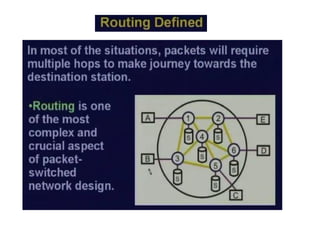
• Routing
• Congestion
• Internetworking
• Internet Protocols
• Multimedia or QoS
3
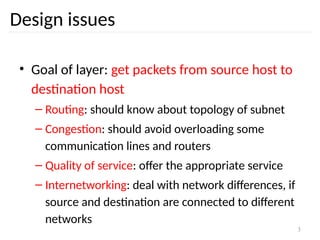
Design issues
• Goal of layer: get packets from source host to
destination host
– Routing: should know about topology of subnet
– Congestion: should avoid overloading some
communication lines and routers
– Quality of service: offer the appropriate service
– Internetworking: deal with network differences, if
source and destination are connected to different
networks
4
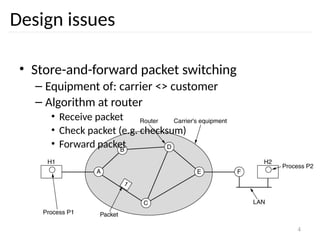
Design issues
• Store-and-forward packet switching
– Equipment of: carrier <> customer
– Algorithm at router
• Receive packet
• Check packet (e.g. checksum)
• Forward packet
5
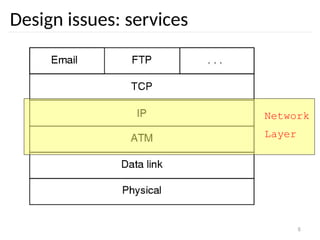
Design issues: services
• Interface
– Important: = interface between carrier and
customer
– Designed with following goals in mind:
• Services should be independent of the subnet
technology
• Transport layer should be shielded from the number,
type, topology of the subnets
• Network addresses should use a uniform numbering
plan, even across LANs and WANs
6
Design issues: services
• Connection-oriented <> Connectionless
– PTTs: connection-oriented
• 100 years of experience with the world-wide
telephone system
• Connection time  billing!
– Internet
• Subnets are inherently unreliable
– Real issue: where to put the complexity as
some/many applications require reliable transfer
(~ connection-oriented service)
7
Design issues: services
• Connection-oriented <> Connectionless (cont.)
– In favour of connectionless service
• Computing power is cheap: hosts can handle the
complexity
• Subnet is a large, long lasting investment: keep it
simple
• For some applications speedy delivery (low, constant
delay) is important
– In favour of connection-oriented service
• Users want a reliable trouble-free service
• Some services are easier to provide on top of
connection-oriented service
– Examples
8
Design issues: services
Network
Layer
9
7
4
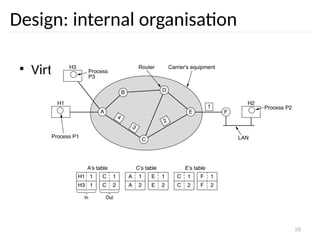
Design: internal organisation
• Virtual circuits
– Routes chosen at connection time
– Connection identified by a virtual circuit number
(VCn)
– Primary service of subnet is connection-oriented
Physical
Data Link
Network
Transport
Physical
Data Link
Network
Transport
Routing problem: map
[Incoming line, VCn]
[outgoing line, VCn]
10
Design: internal organisation
• Virtual circuits
11
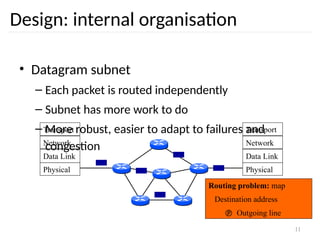
Design: internal organisation
• Datagram subnet
– Each packet is routed independently
– Subnet has more work to do
– More robust, easier to adapt to failures and
congestion
Physical
Data Link
Network
Transport
Physical
Data Link
Network
Transport
Routing problem: map
Destination address
 Outgoing line
12
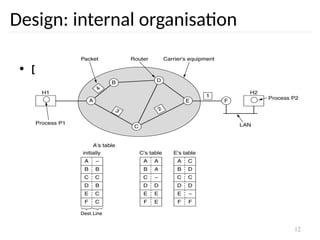
Design: internal organisation
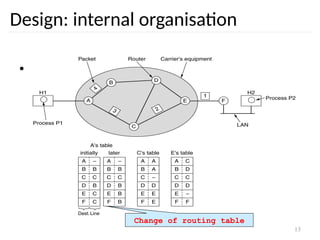
• Datagram subnet
13
Design: internal organisation
• Datagram subnet
Change of routing table
14
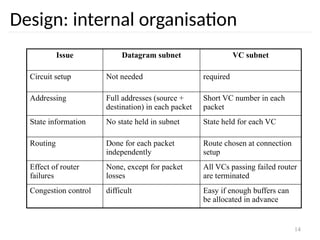
Design: internal organisation
Issue Datagram subnet VC subnet
Circuit setup Not needed required
Addressing Full addresses (source +
destination) in each packet
Short VC number in each
packet
State information No state held in subnet State held for each VC
Routing Done for each packet
independently
Route chosen at connection
setup
Effect of router
failures
None, except for packet
losses
All VCs passing failed router
are terminated
Congestion control difficult Easy if enough buffers can
be allocated in advance
15
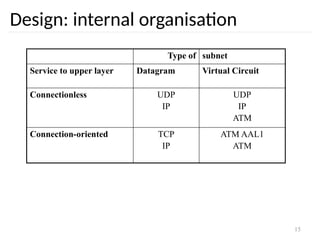
Design: internal organisation
Type of subnet
Service to upper layer Datagram Virtual Circuit
Connectionless UDP
IP
UDP
IP
ATM
Connection-oriented TCP
IP
ATM AAL1
ATM
16
Network Layer
• Design issues
• Routing
• Congestion
• Internetworking
• Internet Protocols
• Multimedia or Qos
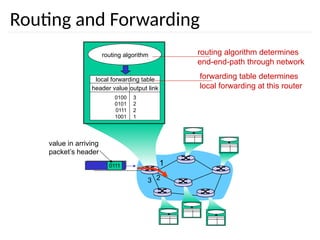
Routing and Forwarding
1
2
3
0111
value in arriving
packet’s header
routing algorithm
local forwarding table
header value output link
0100
0101
0111
1001
3
2
2
1
routing algorithm determines
end-end-path through network
forwarding table determines
local forwarding at this router
18
19
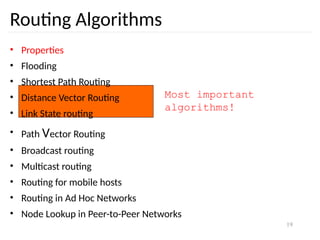
Most important
algorithms!
Routing Algorithms
• Properties
• Flooding
• Shortest Path Routing
• Distance Vector Routing
• Link State routing
• Path Vector Routing
• Broadcast routing
• Multicast routing
• Routing for mobile hosts
• Routing in Ad Hoc Networks
• Node Lookup in Peer-to-Peer Networks
20
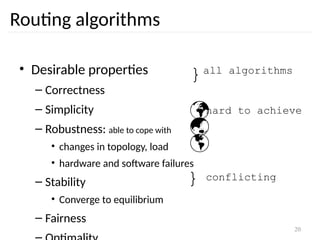
Routing algorithms
• Desirable properties
– Correctness
– Simplicity
– Robustness: able to cope with
• changes in topology, load
• hardware and software failures
– Stability
• Converge to equilibrium
– Fairness
}all algorithms



hard to achieve
} conflicting
21
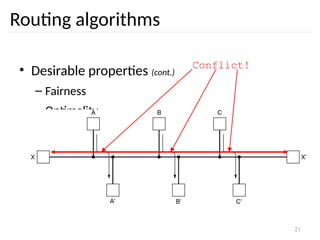
Routing algorithms
• Desirable properties (cont.)
– Fairness
– Optimality
Conflict!
22
Routing algorithms
• Taxonomy
– Non adaptive
• Routing decisions computed in advance, off-line and
downloaded
– Adaptive
• To changes in
– Topology
– Load
• Get information
– Locally
– From adjacent routers
Routing: flooding
 Every packet is sent out on every outgoing line except the one it
arrived at
 Sometimes useful
✔ Robust algorithm: e.g. military applications
✔ Broadcast
✔ Comparison purposes: always shortest path
 Selective flooding
✔ Use only those lines that are going approximately in right direction
✔ Still working?
23
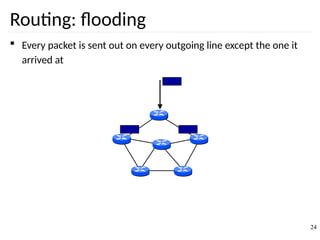
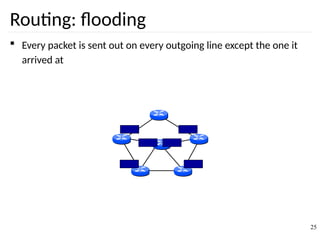
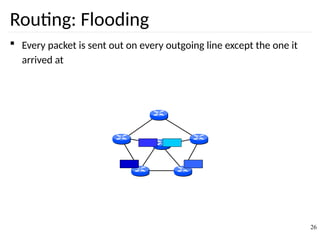
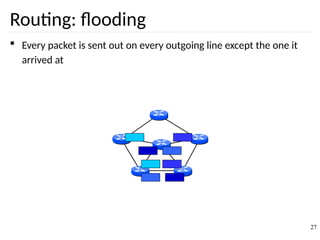
Routing: flooding
 Every packet is sent out on every outgoing line except the one it
arrived at
24
Routing: flooding
 Every packet is sent out on every outgoing line except the one it
arrived at
25
Routing: Flooding
 Every packet is sent out on every outgoing line except the one it
arrived at
26
Routing: flooding
 Every packet is sent out on every outgoing line except the one it
arrived at
27
Routing: flooding
 Every packet is sent out on every outgoing line except the one it
arrived at
 Duplicates!! How to limit?
✔ Hop counter
 Decrement in each router
 Discard packet if counter is 0
 Initialisation?
✔ Sequence number in packet
 Avoid sending the same packet a second time
 Keep in each router per source a list of packets already seen
 Useful?
28
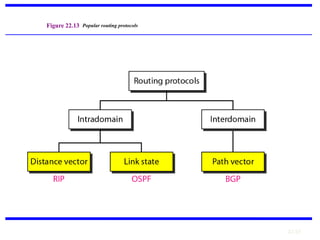
22.29
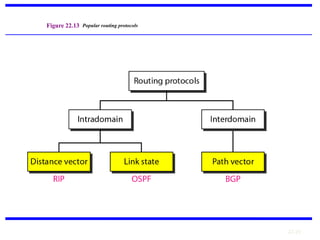
Figure 22.13 Popular routing protocols
30
Routing: Shortest path
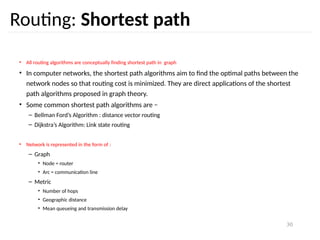
• All routing algorithms are conceptually finding shortest path in graph
• In computer networks, the shortest path algorithms aim to find the optimal paths between the
network nodes so that routing cost is minimized. They are direct applications of the shortest
path algorithms proposed in graph theory.
• Some common shortest path algorithms are −
– Bellman Ford’s Algorithm : distance vector routing
– Dijkstra’s Algorithm: Link state routing
• Network is represented in the form of :
– Graph
• Node = router
• Arc = communication line
– Metric
• Number of hops
• Geographic distance
• Mean queueing and transmission delay
31
Routing: shortest path
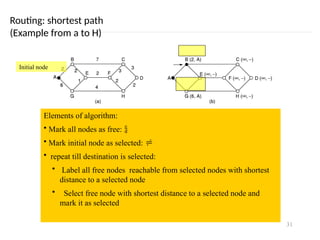
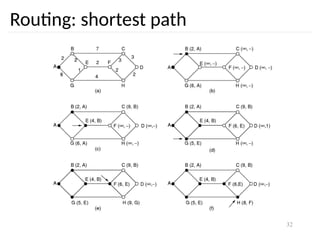
(Example from a to H)
Initial node
Elements of algorithm:
• Mark all nodes as free: 
• Mark initial node as selected: 
• repeat till destination is selected:
• Label all free nodes reachable from selected nodes with shortest
distance to a selected node
• Select free node with shortest distance to a selected node and
mark it as selected
32
Routing: shortest path
33
Routing: link state
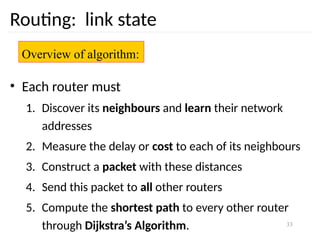
• Each router must
1. Discover its neighbours and learn their network
addresses
2. Measure the delay or cost to each of its neighbours
3. Construct a packet with these distances
4. Send this packet to all other routers
5. Compute the shortest path to every other router
through Dijkstra’s Algorithm.
Overview of algorithm:
34
Routing: link state
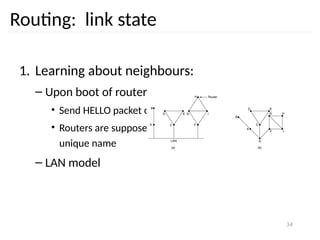
1. Learning about neighbours:
– Upon boot of router
• Send HELLO packet on each point-to-point line
• Routers are supposed to send reply with a globally
unique name
– LAN model
35
Routing: link state
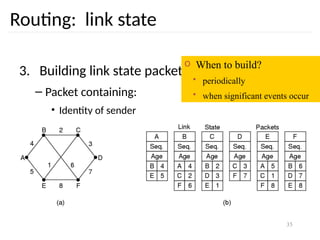
3. Building link state packets
– Packet containing:
• Identity of sender
• Sequence number + age
• For each neighbour: name + distance
o When to build?
• periodically
• when significant events occur
36
Routing: link state
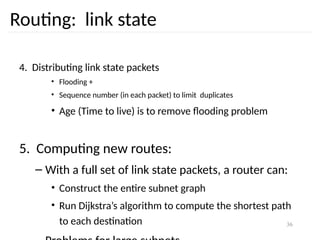
4. Distributing link state packets
• Flooding +
• Sequence number (in each packet) to limit duplicates
• Age (Time to live) is to remove flooding problem
5. Computing new routes:
– With a full set of link state packets, a router can:
• Construct the entire subnet graph
• Run Dijkstra’s algorithm to compute the shortest path
to each destination
Dijkstra’s Algorithm(Link State Routing Algorithm)
 It computes the least-cost path from one node (source node) to all
other nodes in the network.
 Its iterative and after the kth
least-cost paths are known to k
destination nodes.
 Notation:
✔ c(x,y): link cost from node x to y; = ∞ if not direct neighbours
✔ D(v): current value of cost of path from source to destination v
✔ p(v): predecessor node along path from source to v
✔ N': set of nodes whose least cost path definitively known
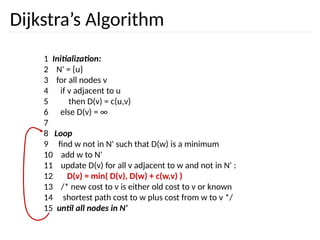
Dijkstra’s Algorithm
1 Initialization:
2 N' = {u}
3 for all nodes v
4 if v adjacent to u
5 then D(v) = c(u,v)
6 else D(v) = ∞
7
8 Loop
9 find w not in N' such that D(w) is a minimum
10 add w to N'
11 update D(v) for all v adjacent to w and not in N' :
12 D(v) = min( D(v), D(w) + c(w,v) )
13 /* new cost to v is either old cost to v or known
14 shortest path cost to w plus cost from w to v */
15 until all nodes in N'
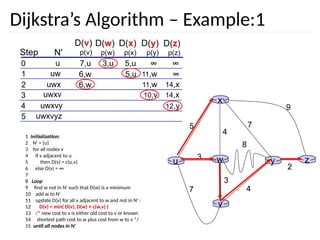
Dijkstra’s Algorithm – Example:1
w
3
4
v
x
u
5
3
7 4
y
8
z
2
7
9
Step N'
D(v)
p(v)
0
1
2
3
4
5
D(w)
p(w)
D(x)
p(x)
D(y)
p(y)
D(z)
p(z)
u ∞
∞
7,u 3,u 5,u
uw ∞
11,w
6,w 5,u
14,x
11,w
6,w
uwx
uwxv 14,x
10,v
uwxvy 12,y
uwxvyz
1 Initialization:
2 N' = {u}
3 for all nodes v
4 if v adjacent to u
5 then D(v) = c(u,v)
6 else D(v) = ∞
7
8 Loop
9 find w not in N' such that D(w) is a minimum
10 add w to N'
11 update D(v) for all v adjacent to w and not in N' :
12 D(v) = min( D(v), D(w) + c(w,v) )
13 /* new cost to v is either old cost to v or known
14 shortest path cost to w plus cost from w to v */
15 until all nodes in N'
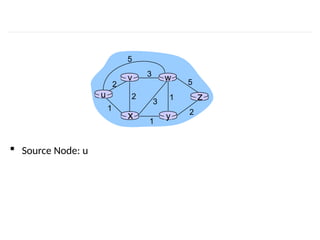
 Source Node: u
u
y
x
w
v
z
2
2
1
3
1
1
2
5
3
5
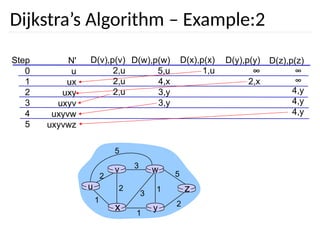
Dijkstra’s Algorithm – Example:2
Step
0
1
2
3
4
5
N'
u
ux
uxy
uxyv
uxyvw
uxyvwz
D(v),p(v)
2,u
2,u
2,u
D(w),p(w)
5,u
4,x
3,y
3,y
D(x),p(x)
1,u
D(y),p(y)
∞
2,x
D(z),p(z)
∞
∞
4,y
4,y
4,y
u
y
x
w
v
z
2
2
1
3
1
1
2
5
3
5
42
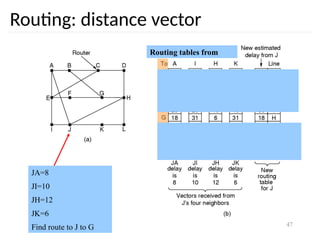
Routing: distance vector
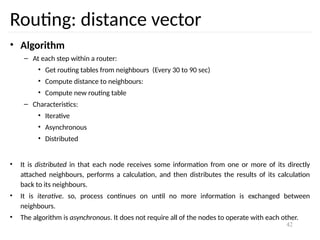
• Algorithm
– At each step within a router:
• Get routing tables from neighbours (Every 30 to 90 sec)
• Compute distance to neighbours:
• Compute new routing table
– Characteristics:
• Iterative
• Asynchronous
• Distributed
• It is distributed in that each node receives some information from one or more of its directly
attached neighbours, performs a calculation, and then distributes the results of its calculation
back to its neighbours.
• It is iterative. so, process continues on until no more information is exchanged between
neighbours.
• The algorithm is asynchronous. It does not require all of the nodes to operate with each other.
43
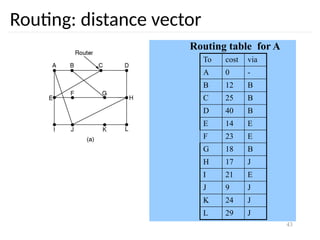
Routing: distance vector
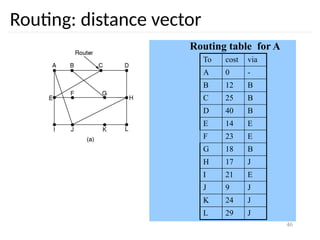
Routing table for A
To cost via
A 0 -
B 12 B
C 25 B
D 40 B
E 14 E
F 23 E
G 18 B
H 17 J
I 21 E
J 9 J
K 24 J
L 29 J
44
Routing: distance vector
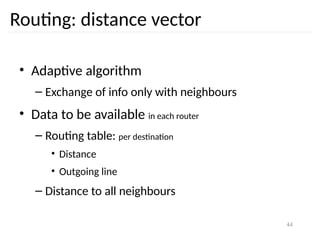
• Adaptive algorithm
– Exchange of info only with neighbours
• Data to be available in each router
– Routing table: per destination
• Distance
• Outgoing line
– Distance to all neighbours
46
Routing: distance vector
Routing table for A
To cost via
A 0 -
B 12 B
C 25 B
D 40 B
E 14 E
F 23 E
G 18 B
H 17 J
I 21 E
J 9 J
K 24 J
L 29 J
47
Routing: distance vector
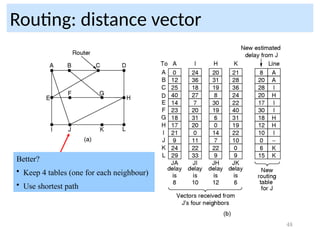
Routing tables from
JA=8
JI=10
JH=12
JK=6
Find route to J to G
48
Routing: distance vector
Better?
• Keep 4 tables (one for each neighbour)
• Use shortest path
49
Routing: distance vector
• Distributed algorithm
– Triggers:
• Change in delay to neighbour
• Receive new table from neighbour
– Update local tables
– If changed: forward routing tables to neighbours
Problems – Count to infinity problem which
can be solved by splitting horizon.
– Good news spread fast and bad news
50
Routing: distance vector
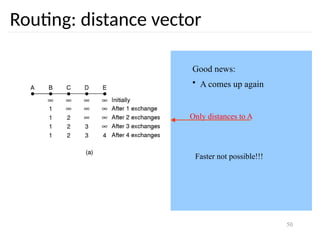
Good news:
• A comes up again
Only distances to A
Faster not possible!!!
51
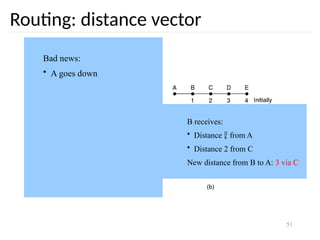
Routing: distance vector
Bad news:
• A goes down
B receives:
• Distance  from A
• Distance 2 from C
New distance from B to A: 3 via C
52
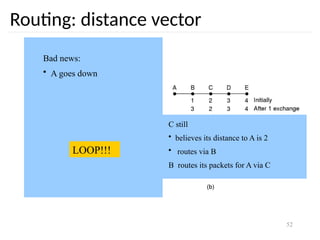
Routing: distance vector
Bad news:
• A goes down
C still
• believes its distance to A is 2
• routes via B
B routes its packets for A via C
LOOP!!!
53
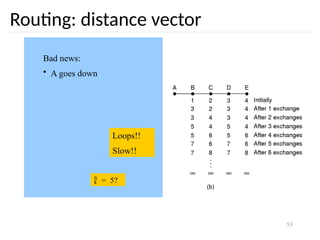
Routing: distance vector
Bad news:
• A goes down
Loops!!
Slow!!
 = 5?
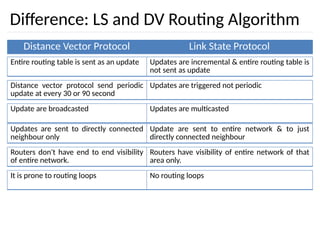
Difference: LS and DV Routing Algorithm
Distance Vector Protocol Link State Protocol
Entire routing table is sent as an update Updates are incremental & entire routing table is
not sent as update
Distance vector protocol send periodic
update at every 30 or 90 second
Updates are triggered not periodic
Update are broadcasted Updates are multicasted
Updates are sent to directly connected
neighbour only
Update are sent to entire network & to just
directly connected neighbour
Routers don't have end to end visibility
of entire network.
Routers have visibility of entire network of that
area only.
It is prone to routing loops No routing loops
22.55
Figure 22.13 Popular routing protocols
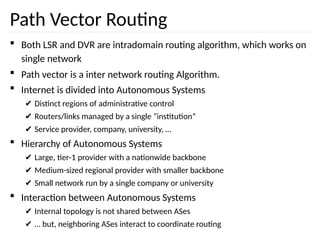
Path Vector Routing
 Both LSR and DVR are intradomain routing algorithm, which works on
single network
 Path vector is a inter network routing Algorithm.
 Internet is divided into Autonomous Systems
✔ Distinct regions of administrative control
✔ Routers/links managed by a single “institution”
✔ Service provider, company, university, …
 Hierarchy of Autonomous Systems
✔ Large, tier-1 provider with a nationwide backbone
✔ Medium-sized regional provider with smaller backbone
✔ Small network run by a single company or university
 Interaction between Autonomous Systems
✔ Internal topology is not shared between ASes
✔ … but, neighboring ASes interact to coordinate routing
57
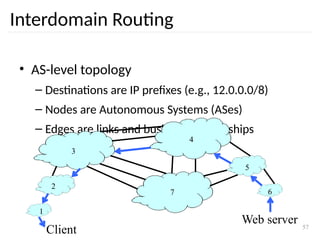
Interdomain Routing
• AS-level topology
– Destinations are IP prefixes (e.g., 12.0.0.0/8)
– Nodes are Autonomous Systems (ASes)
– Edges are links and business relationships
1
2
3
4
5
6
7
Client
Web server
58
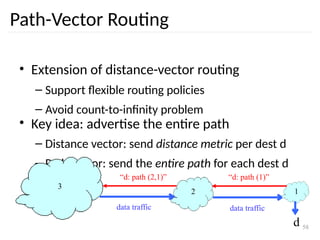
Path-Vector Routing
• Extension of distance-vector routing
– Support flexible routing policies
– Avoid count-to-infinity problem
• Key idea: advertise the entire path
– Distance vector: send distance metric per dest d
– Path vector: send the entire path for each dest d
3
2 1
d
“d: path (2,1)” “d: path (1)”
data traffic data traffic
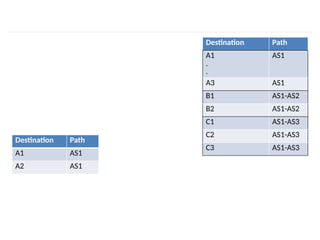
Destination Path
A1 AS1
A2 AS1
Destination Path
A1
.
.
AS1
A3 AS1
B1 AS1-AS2
B2 AS1-AS2
C1 AS1-AS3
C2 AS1-AS3
C3 AS1-AS3
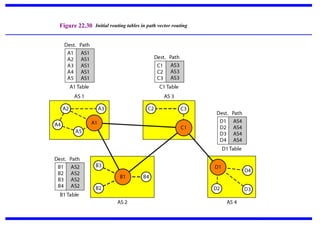
Figure 22.30 Initial routing tables in path vector routing
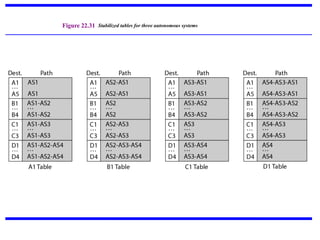
Figure 22.31 Stabilized tables for three autonomous systems
62
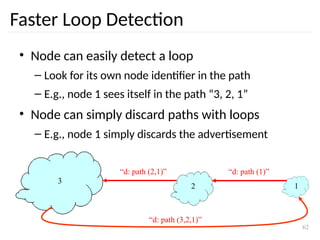
Faster Loop Detection
• Node can easily detect a loop
– Look for its own node identifier in the path
– E.g., node 1 sees itself in the path “3, 2, 1”
• Node can simply discard paths with loops
– E.g., node 1 simply discards the advertisement
3
2 1
“d: path (2,1)” “d: path (1)”
“d: path (3,2,1)”
63
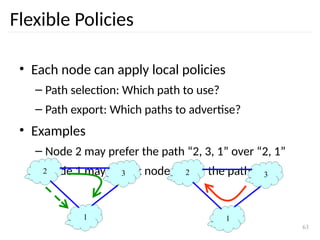
Flexible Policies
• Each node can apply local policies
– Path selection: Which path to use?
– Path export: Which paths to advertise?
• Examples
– Node 2 may prefer the path “2, 3, 1” over “2, 1”
– Node 1 may not let node 3 hear the path “1, 2”
2 3
1
2 3
1
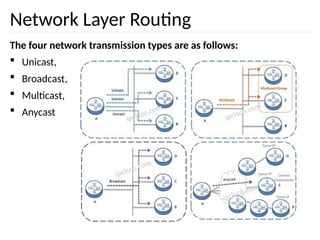
Network Layer Routing
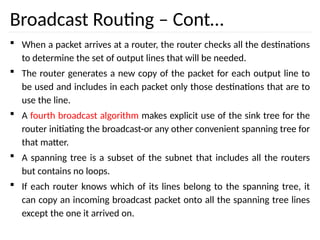
The four network transmission types are as follows:
 Unicast,
 Broadcast,
 Multicast,
 Anycast
Broadcast Routing
 Host need to send messages to many or all other hosts.
 For example
✔ A service distributing weather reports
✔ Stock market updates
✔ Live radio programs
 In Short, Sending a packet to all destinations simultaneously is called
broadcasting.
 First broadcasting method that simply send a distinct packet to each
destination.
 So, it waste of bandwidth, but it also requires the source to have a
complete list of all destinations.
 In practice this may be the only possibility, but it is the least desirable of
the methods.
Broadcast Routing – Cont…
 Flooding is Second method. Although flooding is for ordinary
point-to-point communication, for broadcasting it might rate
serious consideration, especially if none of the methods are
applicable.
 The problem with flooding as a broadcast technique is the same
problem it has as a point-to-point routing algorithm.
 It generates too many packets and consumes too much
bandwidth.
 A third algorithm is Multi Destination Routing.
 If this method is used, each packet contains either a list of
destinations or a bit map indicating the desired destinations.
Broadcast Routing – Cont…
 When a packet arrives at a router, the router checks all the destinations
to determine the set of output lines that will be needed.
 The router generates a new copy of the packet for each output line to
be used and includes in each packet only those destinations that are to
use the line.
 A fourth broadcast algorithm makes explicit use of the sink tree for the
router initiating the broadcast-or any other convenient spanning tree for
that matter.
 A spanning tree is a subset of the subnet that includes all the routers
but contains no loops.
 If each router knows which of its lines belong to the spanning tree, it
can copy an incoming broadcast packet onto all the spanning tree lines
except the one it arrived on.
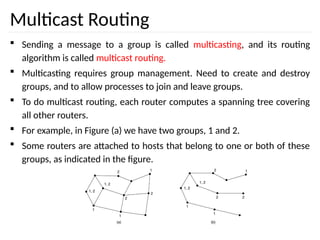
Multicast Routing
 Sending a message to a group is called multicasting, and its routing
algorithm is called multicast routing.
 Multicasting requires group management. Need to create and destroy
groups, and to allow processes to join and leave groups.
 To do multicast routing, each router computes a spanning tree covering
all other routers.
 For example, in Figure (a) we have two groups, 1 and 2.
 Some routers are attached to hosts that belong to one or both of these
groups, as indicated in the figure.
Multicast Routing – Cont…
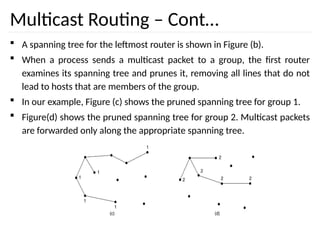
 A spanning tree for the leftmost router is shown in Figure (b).
 When a process sends a multicast packet to a group, the first router
examines its spanning tree and prunes it, removing all lines that do not
lead to hosts that are members of the group.
 In our example, Figure (c) shows the pruned spanning tree for group 1.
 Figure(d) shows the pruned spanning tree for group 2. Multicast packets
are forwarded only along the appropriate spanning tree.
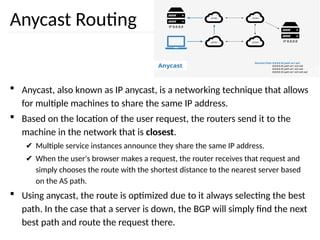
Anycast Routing
 Anycast, also known as IP anycast, is a networking technique that allows
for multiple machines to share the same IP address.
 Based on the location of the user request, the routers send it to the
machine in the network that is closest.
✔ Multiple service instances announce they share the same IP address.
✔ When the user's browser makes a request, the router receives that request and
simply chooses the route with the shortest distance to the nearest server based
on the AS path.
 Using anycast, the route is optimized due to it always selecting the best
path. In the case that a server is down, the BGP will simply find the next
best path and route the request there.
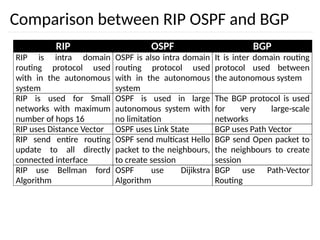
Comparison between RIP OSPF and BGP
RIP OSPF BGP
RIP is intra domain
routing protocol used
with in the autonomous
system
OSPF is also intra domain
routing protocol used
with in the autonomous
system
It is inter domain routing
protocol used between
the autonomous system
RIP is used for Small
networks with maximum
number of hops 16
OSPF is used in large
autonomous system with
no limitation
The BGP protocol is used
for very large-scale
networks
RIP uses Distance Vector OSPF uses Link State BGP uses Path Vector
RIP send entire routing
update to all directly
connected interface
OSPF send multicast Hello
packet to the neighbours,
to create session
BGP send Open packet to
the neighbours to create
session
RIP use Bellman ford
Algorithm
OSPF use Dijikstra
Algorithm
BGP use Path-Vector
Routing
72
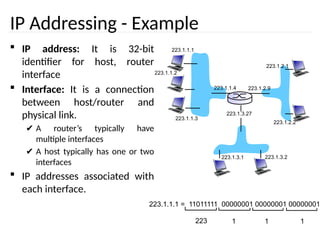
IP Addressing - Example
 IP address: It is 32-bit
identifier for host, router
interface
 Interface: It is a connection
between host/router and
physical link.
✔ A router’s typically have
multiple interfaces
✔ A host typically has one or two
interfaces
 IP addresses associated with
each interface.
223.1.1.1
223.1.1.2
223.1.1.3
223.1.1.4 223.1.2.9
223.1.2.2
223.1.2.1
223.1.3.2
223.1.3.1
223.1.3.27
223.1.1.1 = 11011111 00000001 00000001 00000001
223 1 1
1
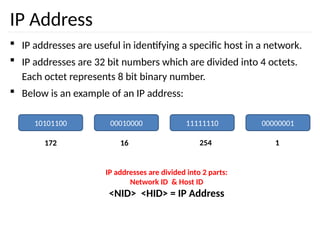
IP Address
 IP addresses are useful in identifying a specific host in a network.
 IP addresses are 32 bit numbers which are divided into 4 octets.
Each octet represents 8 bit binary number.
 Below is an example of an IP address:
10101100 00010000 11111110 00000001
172 16 254 1
IP addresses are divided into 2 parts:
Network ID & Host ID
<NID> <HID> = IP Address
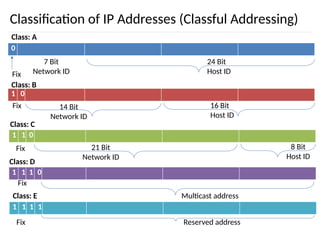
Classification of IP Addresses (Classful Addressing)
0
Class: A
Fix
7 Bit
Network ID
24 Bit
Host ID
1 0
Class: B
Fix 14 Bit
Network ID
16 Bit
Host ID
1 1 0
Class: C
Fix 21 Bit
Network ID
8 Bit
Host ID
1 1 1 0
Class: D
Fix
Multicast address
1 1 1 1
Class: E
Fix Reserved address
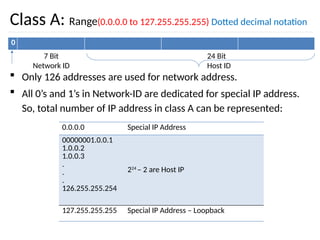
Class A: Range(0.0.0.0 to 127.255.255.255) Dotted decimal notation
 Only 126 addresses are used for network address.
 All 0’s and 1’s in Network-ID are dedicated for special IP address.
So, total number of IP address in class A can be represented:
0
7 Bit
Network ID
24 Bit
Host ID
0.0.0.0 Special IP Address
00000001.0.0.1
1.0.0.2
1.0.0.3
.
.
.
126.255.255.254
224
– 2 are Host IP
127.255.255.255 Special IP Address – Loopback
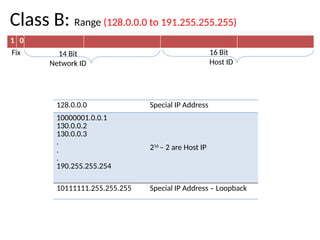
Class B: Range (128.0.0.0 to 191.255.255.255)
1 0
Fix 14 Bit
Network ID
16 Bit
Host ID
128.0.0.0 Special IP Address
10000001.0.0.1
130.0.0.2
130.0.0.3
.
.
.
190.255.255.254
216
– 2 are Host IP
10111111.255.255.255 Special IP Address – Loopback
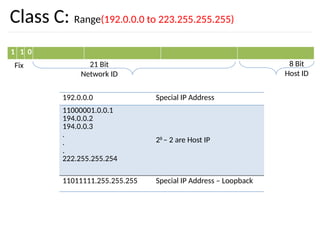
Class C: Range(192.0.0.0 to 223.255.255.255)
1 1 0
Fix 21 Bit
Network ID
8 Bit
Host ID
192.0.0.0 Special IP Address
11000001.0.0.1
194.0.0.2
194.0.0.3
.
.
.
222.255.255.254
28
– 2 are Host IP
11011111.255.255.255 Special IP Address – Loopback
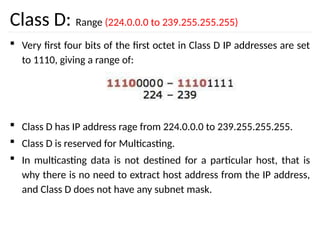
Class D: Range (224.0.0.0 to 239.255.255.255)
 Very first four bits of the first octet in Class D IP addresses are set
to 1110, giving a range of:
 Class D has IP address rage from 224.0.0.0 to 239.255.255.255.
 Class D is reserved for Multicasting.
 In multicasting data is not destined for a particular host, that is
why there is no need to extract host address from the IP address,
and Class D does not have any subnet mask.
Class E: (240.0.0.0 to 255.255.255.255)
 This IP Class is reserved for experimental purposes only for R&D or
Study.
 IP addresses in this class ranges from 240.0.0.0 to
255.255.255.254.
 Like Class D, this class too is not equipped with any subnet mask.
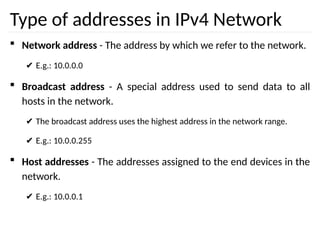
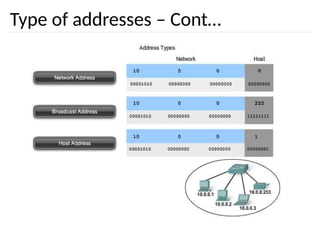
Type of addresses in IPv4 Network
 Network address - The address by which we refer to the network.
✔ E.g.: 10.0.0.0
 Broadcast address - A special address used to send data to all
hosts in the network.
✔ The broadcast address uses the highest address in the network range.
✔ E.g.: 10.0.0.255
 Host addresses - The addresses assigned to the end devices in the
network.
✔ E.g.: 10.0.0.1
Type of addresses – Cont…
Assignment
1. Change the following IP addresses from dotted-decimal notation to binary notation.
a. 114.34.2.8
b. 129.14.6.8
2. Change the following IP addresses from binary notation to dotted-decimal notation.
a. 01111111 11110000 01100111 01111101
b. 10101111 11000000 11111000 00011101
3. Find the class of the following IP addresses.
a. 11110111 11110011 10000111 11011101
b. 10101111 11000000 11110000 00011101
4. Find the netid and the hostid of the following IP addresses.
a. 114.34.2.8
b. 132.56.8.6
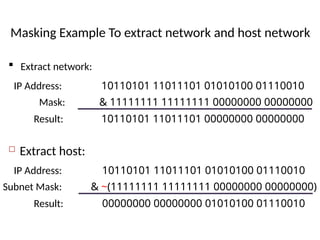
Masking Example To extract network and host network
83
 Extract network:
 Extract host:
10110101 11011101 01010100 01110010
IP Address:
& 11111111 11111111 00000000 00000000
Mask:
10110101 11011101 00000000 00000000
Result:
10110101 11011101 01010100 01110010
IP Address:
& ~(11111111 11111111 00000000 00000000)
Subnet Mask:
00000000 00000000 01010100 01110010
Result:
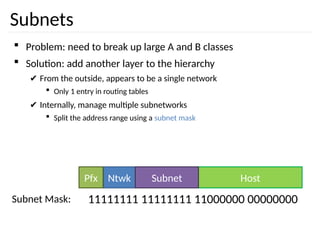
Subnets
84
 Problem: need to break up large A and B classes
 Solution: add another layer to the hierarchy
✔ From the outside, appears to be a single network
 Only 1 entry in routing tables
✔ Internally, manage multiple subnetworks
 Split the address range using a subnet mask
Host
Ntwk
Pfx Subnet
11111111 11111111 11000000 00000000
Subnet Mask:
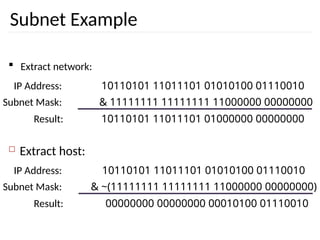
Subnet Example
85
 Extract network:
 Extract host:
10110101 11011101 01010100 01110010
IP Address:
& 11111111 11111111 11000000 00000000
Subnet Mask:
10110101 11011101 01000000 00000000
Result:
10110101 11011101 01010100 01110010
IP Address:
& ~(11111111 11111111 11000000 00000000)
Subnet Mask:
00000000 00000000 00010100 01110010
Result:
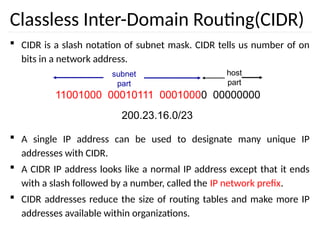
Classless Inter-Domain Routing(CIDR)
 CIDR is a slash notation of subnet mask. CIDR tells us number of on
bits in a network address.
 A single IP address can be used to designate many unique IP
addresses with CIDR.
 A CIDR IP address looks like a normal IP address except that it ends
with a slash followed by a number, called the IP network prefix.
 CIDR addresses reduce the size of routing tables and make more IP
addresses available within organizations.
11001000 00010111 00010000 00000000
subnet
part
host
part
200.23.16.0/23
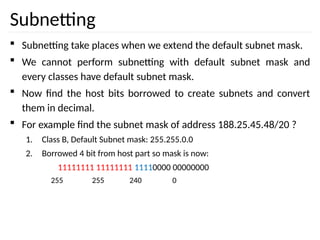
Subnetting
 Subnetting take places when we extend the default subnet mask.
 We cannot perform subnetting with default subnet mask and
every classes have default subnet mask.
 Now find the host bits borrowed to create subnets and convert
them in decimal.
 For example find the subnet mask of address 188.25.45.48/20 ?
1. Class B, Default Subnet mask: 255.255.0.0
2. Borrowed 4 bit from host part so mask is now:
11111111 11111111 11110000 00000000
255 255 240 0
How many subnets from given subnet mask?
 To calculate the number of subnets provided by given subnet
mask we use 2N
, where N = number of bits borrowed from host
bits to create subnets.
 For example in 192.168.1.0/27, N is 3.
 By looking at address we can determined that this address is
belong to class C and default subnet mask 255.255.255.0 [/24 in
CIDR].
 In given address we borrowed 27 - 24 = 3 host bits to create
subnets.
 Now 23
= 8, so our answer is 8 (number of subnets ).
What are the total hosts?
 Total hosts are the hosts available per subnet
 To calculate total hosts use formula 2H
= Total hosts
 H is the number of host bits
 For example in address 192.168.1.0/26
 We have 32 - 26
1. [Total bits in IP address - Bits consumed by network address] = 6
2. Total hosts per subnet would be 26
= 64
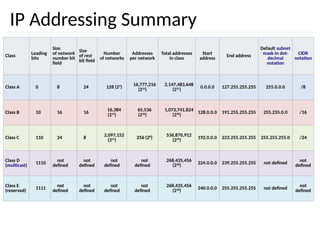
IP Addressing Summary
Class Leading
bits
Size
of network
number bit
field
Size
of rest
bit field
Number
of networks
Addresses
per network
Total addresses
in class
Start
address
End address
Default subnet
mask in dot-
decimal
notation
CIDR
notation
Class A 0 8 24 128 (27
)
16,777,216
(224
)
2,147,483,648
(231
)
0.0.0.0 127.255.255.255 255.0.0.0 /8
Class B 10 16 16
16,384
(214
)
65,536
(216
)
1,073,741,824
(230
)
128.0.0.0 191.255.255.255 255.255.0.0 /16
Class C 110 24 8
2,097,152
(221
)
256 (28
)
536,870,912
(229
)
192.0.0.0 223.255.255.255 255.255.255.0 /24
Class D
(multicast)
1110
not
defined
not
defined
not
defined
not
defined
268,435,456
(228
)
224.0.0.0 239.255.255.255 not defined
not
defined
Class E
(reserved) 1111
not
defined
not
defined
not
defined
not
defined
268,435,456
(228
) 240.0.0.0 255.255.255.255 not defined
not
defined
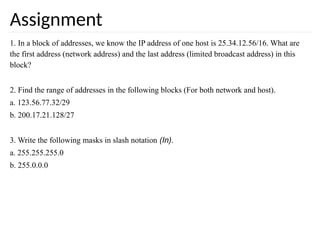
Assignment
1. In a block of addresses, we know the IP address of one host is 25.34.12.56/16. What are
the first address (network address) and the last address (limited broadcast address) in this
block?
2. Find the range of addresses in the following blocks (For both network and host).
a. 123.56.77.32/29
b. 200.17.21.128/27
3. Write the following masks in slash notation (In).
a. 255.255.255.0
b. 255.0.0.0
21.92
21-1 ADDRESS MAPPING
The delivery of a packet to a host or a router requires
two levels of addressing: logical and physical. We need
to be able to map a logical address to its corresponding
physical address and vice versa. This can be done by
using either static or dynamic mapping.
Mapping Logical to Physical Address
Mapping Physical to Logical Address
Topics discussed in this section:
21.93
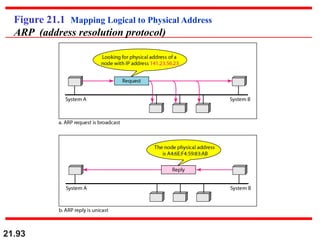
Figure 21.1 Mapping Logical to Physical Address
ARP (address resolution protocol)
21.94
ARP can be useful if the ARP reply is
cached (kept in cache memory for a
while).
Note
21.95
Mapping Physical to Logical
Address: RARP
21.96
Reverse Address Resolution
Protocol (ARP)
97
• The IP (Internet Protocol) relies on several other protocols to
perform necessary control and routing functions:
• Control functions (ICMP): [**ping and traceroute**]
• Multicast signaling (IGMP)
• Setting up routing tables (RIP, OSPF, BGP, PIM, …)
Control
Routing
ICMP IGMP
RIP OSPF BGP PIM
Internet Control Message Protocol (ICMP)
98
Overview
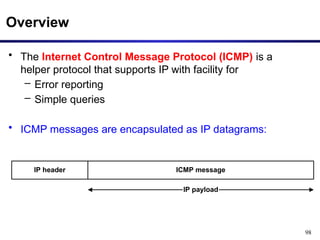
• The Internet Control Message Protocol (ICMP) is a
helper protocol that supports IP with facility for
– Error reporting
– Simple queries
• ICMP messages are encapsulated as IP datagrams:
IP header ICMP message
IP payload
99
ICMP message format
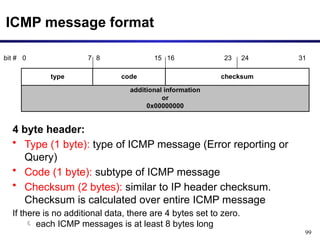
additional information
or
0x00000000
type code checksum
bit # 0 15 23 24
8 31
7 16
4 byte header:
• Type (1 byte): type of ICMP message (Error reporting or
Query)
• Code (1 byte): subtype of ICMP message
• Checksum (2 bytes): similar to IP header checksum.
Checksum is calculated over entire ICMP message
If there is no additional data, there are 4 bytes set to zero.
 each ICMP messages is at least 8 bytes long
100
ICMP Query message
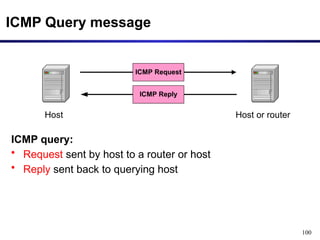
ICMP query:
• Request sent by host to a router or host
• Reply sent back to querying host
Host
ICMP Request
Host or router
ICMP Reply
101
ICMP Error message
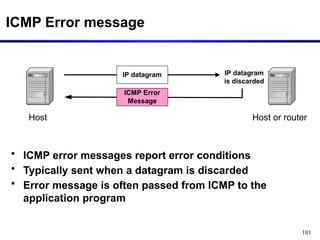
• ICMP error messages report error conditions
• Typically sent when a datagram is discarded
• Error message is often passed from ICMP to the
application program
Host
IP datagram
Host or router
ICMP Error
Message
IP datagram
is discarded
102
ICMP Error message
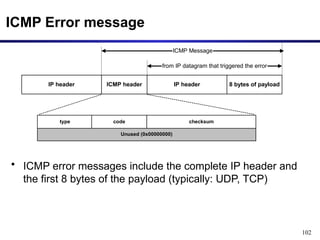
• ICMP error messages include the complete IP header and
the first 8 bytes of the payload (typically: UDP, TCP)
Unused (0x00000000)
IP header ICMP header IP header 8 bytes of payload
ICMP Message
from IP datagram that triggered the error
type code checksum
103
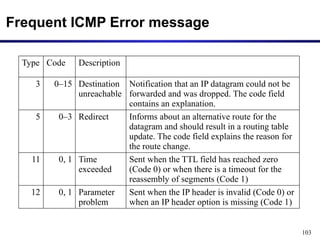
Frequent ICMP Error message
Type Code Description
3 0–15 Destination
unreachable
Notification that an IP datagram could not be
forwarded and was dropped. The code field
contains an explanation.
5 0–3 Redirect Informs about an alternative route for the
datagram and should result in a routing table
update. The code field explains the reason for
the route change.
11 0, 1 Time
exceeded
Sent when the TTL field has reached zero
(Code 0) or when there is a timeout for the
reassembly of segments (Code 1)
12 0, 1 Parameter
problem
Sent when the IP header is invalid (Code 0) or
when an IP header option is missing (Code 1)
104
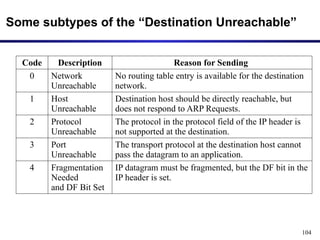
Some subtypes of the “Destination Unreachable”
Code Description Reason for Sending
0 Network
Unreachable
No routing table entry is available for the destination
network.
1 Host
Unreachable
Destination host should be directly reachable, but
does not respond to ARP Requests.
2 Protocol
Unreachable
The protocol in the protocol field of the IP header is
not supported at the destination.
3 Port
Unreachable
The transport protocol at the destination host cannot
pass the datagram to an application.
4 Fragmentation
Needed
and DF Bit Set
IP datagram must be fragmented, but the DF bit in the
IP header is set.
IGMP
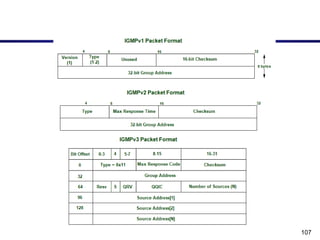
• The Internet Group Management Protocol (IGMP) is a protocol that allows
several devices to share one IP address so they can all receive the same
data.
• IGMP is a network layer protocol used to set up multicasting on networks
that use the Internet Protocol version 4
• Applications:
• Streaming – Multicast routing protocol are used for audio and video
streaming over the network i.e., either one-to-many or many-to-many.
• Gaming – Internet group management protocol is often used in simulation
games which has multiple users over the network such as online games.
• Web Conferencing tools – Video conferencing is a new method to meet
people from your own convenience and IGMP connects to the users for
conferencing and transfers the message/data packets efficiently.
106
How does IGMP work?
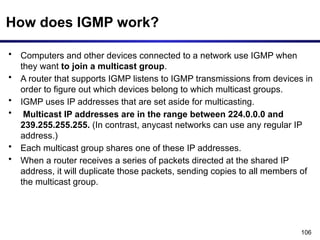
• Computers and other devices connected to a network use IGMP when
they want to join a multicast group.
• A router that supports IGMP listens to IGMP transmissions from devices in
order to figure out which devices belong to which multicast groups.
• IGMP uses IP addresses that are set aside for multicasting.
• Multicast IP addresses are in the range between 224.0.0.0 and
239.255.255.255. (In contrast, anycast networks can use any regular IP
address.)
• Each multicast group shares one of these IP addresses.
• When a router receives a series of packets directed at the shared IP
address, it will duplicate those packets, sending copies to all members of
the multicast group.
107
108
Working:
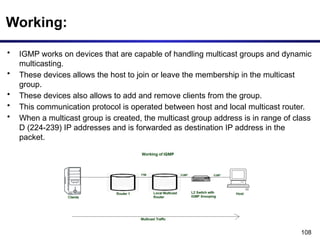
• IGMP works on devices that are capable of handling multicast groups and dynamic
multicasting.
• These devices allows the host to join or leave the membership in the multicast
group.
• These devices also allows to add and remove clients from the group.
• This communication protocol is operated between host and local multicast router.
• When a multicast group is created, the multicast group address is in range of class
D (224-239) IP addresses and is forwarded as destination IP address in the
packet.
21.109
DHCP provides static and dynamic
address allocation that can be
manual or automatic.
Note
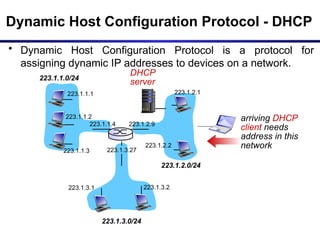
Dynamic Host Configuration Protocol - DHCP
• Dynamic Host Configuration Protocol is a protocol for
assigning dynamic IP addresses to devices on a network.
223.1.1.0/24
223.1.2.0/24
223.1.3.0/24
223.1.1.1
223.1.1.3
223.1.1.4 223.1.2.9
223.1.3.2
223.1.3.1
223.1.1.2
223.1.3.27
223.1.2.2
223.1.2.1
DHCP
server
arriving DHCP
client needs
address in this
network
DHCP – Cont…
• With dynamic addressing, a device can have a different IP
address every time it connects to the network.
• In some systems, the device's IP address can even change
while it is still connected.
• It allows reuse of addresses (only hold address while
connected “on”).
• It also support mobile users who want to join network.
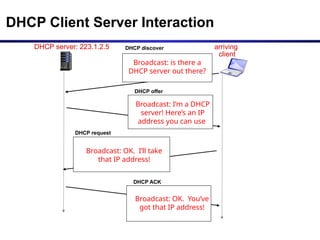
DHCP Client Server Interaction
DHCP server: 223.1.2.5 arriving
client
DHCP discover
src : 0.0.0.0, 68
dest.: 255.255.255.255,67
yiaddr: 0.0.0.0
transaction ID: 654
DHCP offer
src: 223.1.2.5, 67
dest: 255.255.255.255, 68
yiaddrr: 223.1.2.4
transaction ID: 654
lifetime: 3600 secs
DHCP request
src: 0.0.0.0, 68
dest:: 255.255.255.255, 67
yiaddrr: 223.1.2.4
transaction ID: 655
lifetime: 3600 secs
DHCP ACK
src: 223.1.2.5, 67
dest: 255.255.255.255, 68
yiaddrr: 223.1.2.4
transaction ID: 655
lifetime: 3600 secs
Broadcast: is there a
DHCP server out there?
Broadcast: I’m a DHCP
server! Here’s an IP
address you can use
Broadcast: OK. I’ll take
that IP address!
Broadcast: OK. You’ve
got that IP address!
113
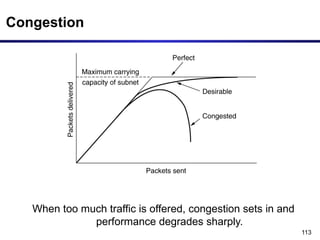
Congestion
When too much traffic is offered, congestion sets in and
performance degrades sharply.
114
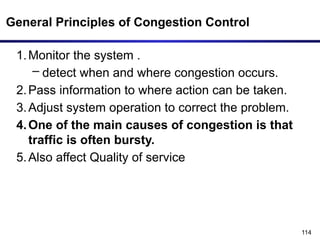
General Principles of Congestion Control
1.Monitor the system .
– detect when and where congestion occurs.
2.Pass information to where action can be taken.
3.Adjust system operation to correct the problem.
4.One of the main causes of congestion is that
traffic is often bursty.
5.Also affect Quality of service
115
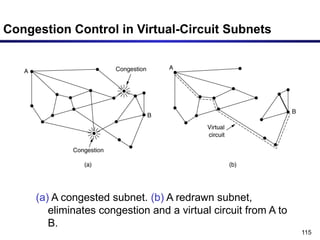
Congestion Control in Virtual-Circuit Subnets
(a) A congested subnet. (b) A redrawn subnet,
eliminates congestion and a virtual circuit from A to
B.
116
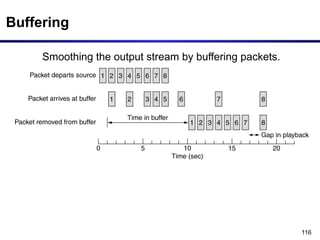
Buffering
Smoothing the output stream by buffering packets.
117
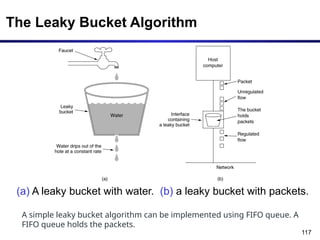
The Leaky Bucket Algorithm
(a) A leaky bucket with water. (b) a leaky bucket with packets.
A simple leaky bucket algorithm can be implemented using FIFO queue. A
FIFO queue holds the packets.
Tanenbaum Chapter 5 Network 118
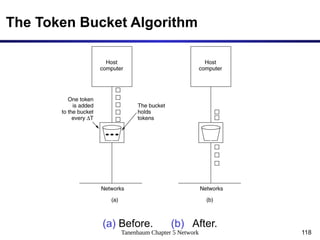
The Token Bucket Algorithm
(a) Before. (b) After.
5-34
119
• Step 1 − In regular intervals tokens are thrown into the bucket
f.
• Step 2 − The bucket has a maximum capacity f.
• Step 3 − If the packet is ready, then a token is removed from
the bucket, and the packet is sent.
• Step 4 − Suppose, if there is no token in the bucket, the
packet cannot be sent.
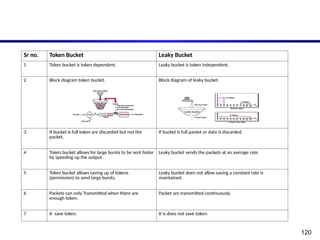
120
Sr no. Token Bucket Leaky Bucket
1 Token bucket is token dependent. Leaky bucket is token independent.
2 Block diagram token bucket. Block diagram of leaky bucket.
3 If bucket is full token are discarded but not the
packet.
If bucket is full packet or data is discarded.
4 Token bucket allows for large bursts to be sent faster
by speeding up the output.
Leaky bucket sends the packets at an average rate.
5 Token bucket allows saving up of tokens
(permission) to send large bursts.
Leaky bucket does not allow saving a constant rate is
maintained.
6 Packets can only Transmitted when there are
enough token.
Packet are transmitted continuously.
7 It save token. It is does not save token.
Thank You

Network layer. pptx

  • 1.
  • 2.
    2 Network Layer • Designissues • Routing • Congestion • Internetworking • Internet Protocols • Multimedia or QoS
  • 3.
    3 Design issues • Goalof layer: get packets from source host to destination host – Routing: should know about topology of subnet – Congestion: should avoid overloading some communication lines and routers – Quality of service: offer the appropriate service – Internetworking: deal with network differences, if source and destination are connected to different networks
  • 4.
    4 Design issues • Store-and-forwardpacket switching – Equipment of: carrier <> customer – Algorithm at router • Receive packet • Check packet (e.g. checksum) • Forward packet
  • 5.
    5 Design issues: services •Interface – Important: = interface between carrier and customer – Designed with following goals in mind: • Services should be independent of the subnet technology • Transport layer should be shielded from the number, type, topology of the subnets • Network addresses should use a uniform numbering plan, even across LANs and WANs
  • 6.
    6 Design issues: services •Connection-oriented <> Connectionless – PTTs: connection-oriented • 100 years of experience with the world-wide telephone system • Connection time  billing! – Internet • Subnets are inherently unreliable – Real issue: where to put the complexity as some/many applications require reliable transfer (~ connection-oriented service)
  • 7.
    7 Design issues: services •Connection-oriented <> Connectionless (cont.) – In favour of connectionless service • Computing power is cheap: hosts can handle the complexity • Subnet is a large, long lasting investment: keep it simple • For some applications speedy delivery (low, constant delay) is important – In favour of connection-oriented service • Users want a reliable trouble-free service • Some services are easier to provide on top of connection-oriented service – Examples
  • 8.
  • 9.
    9 7 4 Design: internal organisation •Virtual circuits – Routes chosen at connection time – Connection identified by a virtual circuit number (VCn) – Primary service of subnet is connection-oriented Physical Data Link Network Transport Physical Data Link Network Transport Routing problem: map [Incoming line, VCn] [outgoing line, VCn]
  • 10.
  • 11.
    11 Design: internal organisation •Datagram subnet – Each packet is routed independently – Subnet has more work to do – More robust, easier to adapt to failures and congestion Physical Data Link Network Transport Physical Data Link Network Transport Routing problem: map Destination address  Outgoing line
  • 12.
  • 13.
    13 Design: internal organisation •Datagram subnet Change of routing table
  • 14.
    14 Design: internal organisation IssueDatagram subnet VC subnet Circuit setup Not needed required Addressing Full addresses (source + destination) in each packet Short VC number in each packet State information No state held in subnet State held for each VC Routing Done for each packet independently Route chosen at connection setup Effect of router failures None, except for packet losses All VCs passing failed router are terminated Congestion control difficult Easy if enough buffers can be allocated in advance
  • 15.
    15 Design: internal organisation Typeof subnet Service to upper layer Datagram Virtual Circuit Connectionless UDP IP UDP IP ATM Connection-oriented TCP IP ATM AAL1 ATM
  • 16.
    16 Network Layer • Designissues • Routing • Congestion • Internetworking • Internet Protocols • Multimedia or Qos
  • 17.
    Routing and Forwarding 1 2 3 0111 valuein arriving packet’s header routing algorithm local forwarding table header value output link 0100 0101 0111 1001 3 2 2 1 routing algorithm determines end-end-path through network forwarding table determines local forwarding at this router
  • 18.
  • 19.
    19 Most important algorithms! Routing Algorithms •Properties • Flooding • Shortest Path Routing • Distance Vector Routing • Link State routing • Path Vector Routing • Broadcast routing • Multicast routing • Routing for mobile hosts • Routing in Ad Hoc Networks • Node Lookup in Peer-to-Peer Networks
  • 20.
    20 Routing algorithms • Desirableproperties – Correctness – Simplicity – Robustness: able to cope with • changes in topology, load • hardware and software failures – Stability • Converge to equilibrium – Fairness }all algorithms    hard to achieve } conflicting
  • 21.
    21 Routing algorithms • Desirableproperties (cont.) – Fairness – Optimality Conflict!
  • 22.
    22 Routing algorithms • Taxonomy –Non adaptive • Routing decisions computed in advance, off-line and downloaded – Adaptive • To changes in – Topology – Load • Get information – Locally – From adjacent routers
  • 23.
    Routing: flooding  Everypacket is sent out on every outgoing line except the one it arrived at  Sometimes useful ✔ Robust algorithm: e.g. military applications ✔ Broadcast ✔ Comparison purposes: always shortest path  Selective flooding ✔ Use only those lines that are going approximately in right direction ✔ Still working? 23
  • 24.
    Routing: flooding  Everypacket is sent out on every outgoing line except the one it arrived at 24
  • 25.
    Routing: flooding  Everypacket is sent out on every outgoing line except the one it arrived at 25
  • 26.
    Routing: Flooding  Everypacket is sent out on every outgoing line except the one it arrived at 26
  • 27.
    Routing: flooding  Everypacket is sent out on every outgoing line except the one it arrived at 27
  • 28.
    Routing: flooding  Everypacket is sent out on every outgoing line except the one it arrived at  Duplicates!! How to limit? ✔ Hop counter  Decrement in each router  Discard packet if counter is 0  Initialisation? ✔ Sequence number in packet  Avoid sending the same packet a second time  Keep in each router per source a list of packets already seen  Useful? 28
  • 29.
    22.29 Figure 22.13 Popularrouting protocols
  • 30.
    30 Routing: Shortest path •All routing algorithms are conceptually finding shortest path in graph • In computer networks, the shortest path algorithms aim to find the optimal paths between the network nodes so that routing cost is minimized. They are direct applications of the shortest path algorithms proposed in graph theory. • Some common shortest path algorithms are − – Bellman Ford’s Algorithm : distance vector routing – Dijkstra’s Algorithm: Link state routing • Network is represented in the form of : – Graph • Node = router • Arc = communication line – Metric • Number of hops • Geographic distance • Mean queueing and transmission delay
  • 31.
    31 Routing: shortest path (Examplefrom a to H) Initial node Elements of algorithm: • Mark all nodes as free:  • Mark initial node as selected:  • repeat till destination is selected: • Label all free nodes reachable from selected nodes with shortest distance to a selected node • Select free node with shortest distance to a selected node and mark it as selected
  • 32.
  • 33.
    33 Routing: link state •Each router must 1. Discover its neighbours and learn their network addresses 2. Measure the delay or cost to each of its neighbours 3. Construct a packet with these distances 4. Send this packet to all other routers 5. Compute the shortest path to every other router through Dijkstra’s Algorithm. Overview of algorithm:
  • 34.
    34 Routing: link state 1.Learning about neighbours: – Upon boot of router • Send HELLO packet on each point-to-point line • Routers are supposed to send reply with a globally unique name – LAN model
  • 35.
    35 Routing: link state 3.Building link state packets – Packet containing: • Identity of sender • Sequence number + age • For each neighbour: name + distance o When to build? • periodically • when significant events occur
  • 36.
    36 Routing: link state 4.Distributing link state packets • Flooding + • Sequence number (in each packet) to limit duplicates • Age (Time to live) is to remove flooding problem 5. Computing new routes: – With a full set of link state packets, a router can: • Construct the entire subnet graph • Run Dijkstra’s algorithm to compute the shortest path to each destination
  • 37.
    Dijkstra’s Algorithm(Link StateRouting Algorithm)  It computes the least-cost path from one node (source node) to all other nodes in the network.  Its iterative and after the kth least-cost paths are known to k destination nodes.  Notation: ✔ c(x,y): link cost from node x to y; = ∞ if not direct neighbours ✔ D(v): current value of cost of path from source to destination v ✔ p(v): predecessor node along path from source to v ✔ N': set of nodes whose least cost path definitively known
  • 38.
    Dijkstra’s Algorithm 1 Initialization: 2N' = {u} 3 for all nodes v 4 if v adjacent to u 5 then D(v) = c(u,v) 6 else D(v) = ∞ 7 8 Loop 9 find w not in N' such that D(w) is a minimum 10 add w to N' 11 update D(v) for all v adjacent to w and not in N' : 12 D(v) = min( D(v), D(w) + c(w,v) ) 13 /* new cost to v is either old cost to v or known 14 shortest path cost to w plus cost from w to v */ 15 until all nodes in N'
  • 39.
    Dijkstra’s Algorithm –Example:1 w 3 4 v x u 5 3 7 4 y 8 z 2 7 9 Step N' D(v) p(v) 0 1 2 3 4 5 D(w) p(w) D(x) p(x) D(y) p(y) D(z) p(z) u ∞ ∞ 7,u 3,u 5,u uw ∞ 11,w 6,w 5,u 14,x 11,w 6,w uwx uwxv 14,x 10,v uwxvy 12,y uwxvyz 1 Initialization: 2 N' = {u} 3 for all nodes v 4 if v adjacent to u 5 then D(v) = c(u,v) 6 else D(v) = ∞ 7 8 Loop 9 find w not in N' such that D(w) is a minimum 10 add w to N' 11 update D(v) for all v adjacent to w and not in N' : 12 D(v) = min( D(v), D(w) + c(w,v) ) 13 /* new cost to v is either old cost to v or known 14 shortest path cost to w plus cost from w to v */ 15 until all nodes in N'
  • 40.
     Source Node:u u y x w v z 2 2 1 3 1 1 2 5 3 5
  • 41.
    Dijkstra’s Algorithm –Example:2 Step 0 1 2 3 4 5 N' u ux uxy uxyv uxyvw uxyvwz D(v),p(v) 2,u 2,u 2,u D(w),p(w) 5,u 4,x 3,y 3,y D(x),p(x) 1,u D(y),p(y) ∞ 2,x D(z),p(z) ∞ ∞ 4,y 4,y 4,y u y x w v z 2 2 1 3 1 1 2 5 3 5
  • 42.
    42 Routing: distance vector •Algorithm – At each step within a router: • Get routing tables from neighbours (Every 30 to 90 sec) • Compute distance to neighbours: • Compute new routing table – Characteristics: • Iterative • Asynchronous • Distributed • It is distributed in that each node receives some information from one or more of its directly attached neighbours, performs a calculation, and then distributes the results of its calculation back to its neighbours. • It is iterative. so, process continues on until no more information is exchanged between neighbours. • The algorithm is asynchronous. It does not require all of the nodes to operate with each other.
  • 43.
    43 Routing: distance vector Routingtable for A To cost via A 0 - B 12 B C 25 B D 40 B E 14 E F 23 E G 18 B H 17 J I 21 E J 9 J K 24 J L 29 J
  • 44.
    44 Routing: distance vector •Adaptive algorithm – Exchange of info only with neighbours • Data to be available in each router – Routing table: per destination • Distance • Outgoing line – Distance to all neighbours
  • 46.
    46 Routing: distance vector Routingtable for A To cost via A 0 - B 12 B C 25 B D 40 B E 14 E F 23 E G 18 B H 17 J I 21 E J 9 J K 24 J L 29 J
  • 47.
    47 Routing: distance vector Routingtables from JA=8 JI=10 JH=12 JK=6 Find route to J to G
  • 48.
    48 Routing: distance vector Better? •Keep 4 tables (one for each neighbour) • Use shortest path
  • 49.
    49 Routing: distance vector •Distributed algorithm – Triggers: • Change in delay to neighbour • Receive new table from neighbour – Update local tables – If changed: forward routing tables to neighbours Problems – Count to infinity problem which can be solved by splitting horizon. – Good news spread fast and bad news
  • 50.
    50 Routing: distance vector Goodnews: • A comes up again Only distances to A Faster not possible!!!
  • 51.
    51 Routing: distance vector Badnews: • A goes down B receives: • Distance  from A • Distance 2 from C New distance from B to A: 3 via C
  • 52.
    52 Routing: distance vector Badnews: • A goes down C still • believes its distance to A is 2 • routes via B B routes its packets for A via C LOOP!!!
  • 53.
    53 Routing: distance vector Badnews: • A goes down Loops!! Slow!!  = 5?
  • 54.
    Difference: LS andDV Routing Algorithm Distance Vector Protocol Link State Protocol Entire routing table is sent as an update Updates are incremental & entire routing table is not sent as update Distance vector protocol send periodic update at every 30 or 90 second Updates are triggered not periodic Update are broadcasted Updates are multicasted Updates are sent to directly connected neighbour only Update are sent to entire network & to just directly connected neighbour Routers don't have end to end visibility of entire network. Routers have visibility of entire network of that area only. It is prone to routing loops No routing loops
  • 55.
    22.55 Figure 22.13 Popularrouting protocols
  • 56.
    Path Vector Routing Both LSR and DVR are intradomain routing algorithm, which works on single network  Path vector is a inter network routing Algorithm.  Internet is divided into Autonomous Systems ✔ Distinct regions of administrative control ✔ Routers/links managed by a single “institution” ✔ Service provider, company, university, …  Hierarchy of Autonomous Systems ✔ Large, tier-1 provider with a nationwide backbone ✔ Medium-sized regional provider with smaller backbone ✔ Small network run by a single company or university  Interaction between Autonomous Systems ✔ Internal topology is not shared between ASes ✔ … but, neighboring ASes interact to coordinate routing
  • 57.
    57 Interdomain Routing • AS-leveltopology – Destinations are IP prefixes (e.g., 12.0.0.0/8) – Nodes are Autonomous Systems (ASes) – Edges are links and business relationships 1 2 3 4 5 6 7 Client Web server
  • 58.
    58 Path-Vector Routing • Extensionof distance-vector routing – Support flexible routing policies – Avoid count-to-infinity problem • Key idea: advertise the entire path – Distance vector: send distance metric per dest d – Path vector: send the entire path for each dest d 3 2 1 d “d: path (2,1)” “d: path (1)” data traffic data traffic
  • 59.
    Destination Path A1 AS1 A2AS1 Destination Path A1 . . AS1 A3 AS1 B1 AS1-AS2 B2 AS1-AS2 C1 AS1-AS3 C2 AS1-AS3 C3 AS1-AS3
  • 60.
    Figure 22.30 Initialrouting tables in path vector routing
  • 61.
    Figure 22.31 Stabilizedtables for three autonomous systems
  • 62.
    62 Faster Loop Detection •Node can easily detect a loop – Look for its own node identifier in the path – E.g., node 1 sees itself in the path “3, 2, 1” • Node can simply discard paths with loops – E.g., node 1 simply discards the advertisement 3 2 1 “d: path (2,1)” “d: path (1)” “d: path (3,2,1)”
  • 63.
    63 Flexible Policies • Eachnode can apply local policies – Path selection: Which path to use? – Path export: Which paths to advertise? • Examples – Node 2 may prefer the path “2, 3, 1” over “2, 1” – Node 1 may not let node 3 hear the path “1, 2” 2 3 1 2 3 1
  • 64.
    Network Layer Routing Thefour network transmission types are as follows:  Unicast,  Broadcast,  Multicast,  Anycast
  • 65.
    Broadcast Routing  Hostneed to send messages to many or all other hosts.  For example ✔ A service distributing weather reports ✔ Stock market updates ✔ Live radio programs  In Short, Sending a packet to all destinations simultaneously is called broadcasting.  First broadcasting method that simply send a distinct packet to each destination.  So, it waste of bandwidth, but it also requires the source to have a complete list of all destinations.  In practice this may be the only possibility, but it is the least desirable of the methods.
  • 66.
    Broadcast Routing –Cont…  Flooding is Second method. Although flooding is for ordinary point-to-point communication, for broadcasting it might rate serious consideration, especially if none of the methods are applicable.  The problem with flooding as a broadcast technique is the same problem it has as a point-to-point routing algorithm.  It generates too many packets and consumes too much bandwidth.  A third algorithm is Multi Destination Routing.  If this method is used, each packet contains either a list of destinations or a bit map indicating the desired destinations.
  • 67.
    Broadcast Routing –Cont…  When a packet arrives at a router, the router checks all the destinations to determine the set of output lines that will be needed.  The router generates a new copy of the packet for each output line to be used and includes in each packet only those destinations that are to use the line.  A fourth broadcast algorithm makes explicit use of the sink tree for the router initiating the broadcast-or any other convenient spanning tree for that matter.  A spanning tree is a subset of the subnet that includes all the routers but contains no loops.  If each router knows which of its lines belong to the spanning tree, it can copy an incoming broadcast packet onto all the spanning tree lines except the one it arrived on.
  • 68.
    Multicast Routing  Sendinga message to a group is called multicasting, and its routing algorithm is called multicast routing.  Multicasting requires group management. Need to create and destroy groups, and to allow processes to join and leave groups.  To do multicast routing, each router computes a spanning tree covering all other routers.  For example, in Figure (a) we have two groups, 1 and 2.  Some routers are attached to hosts that belong to one or both of these groups, as indicated in the figure.
  • 69.
    Multicast Routing –Cont…  A spanning tree for the leftmost router is shown in Figure (b).  When a process sends a multicast packet to a group, the first router examines its spanning tree and prunes it, removing all lines that do not lead to hosts that are members of the group.  In our example, Figure (c) shows the pruned spanning tree for group 1.  Figure(d) shows the pruned spanning tree for group 2. Multicast packets are forwarded only along the appropriate spanning tree.
  • 70.
    Anycast Routing  Anycast,also known as IP anycast, is a networking technique that allows for multiple machines to share the same IP address.  Based on the location of the user request, the routers send it to the machine in the network that is closest. ✔ Multiple service instances announce they share the same IP address. ✔ When the user's browser makes a request, the router receives that request and simply chooses the route with the shortest distance to the nearest server based on the AS path.  Using anycast, the route is optimized due to it always selecting the best path. In the case that a server is down, the BGP will simply find the next best path and route the request there.
  • 71.
    Comparison between RIPOSPF and BGP RIP OSPF BGP RIP is intra domain routing protocol used with in the autonomous system OSPF is also intra domain routing protocol used with in the autonomous system It is inter domain routing protocol used between the autonomous system RIP is used for Small networks with maximum number of hops 16 OSPF is used in large autonomous system with no limitation The BGP protocol is used for very large-scale networks RIP uses Distance Vector OSPF uses Link State BGP uses Path Vector RIP send entire routing update to all directly connected interface OSPF send multicast Hello packet to the neighbours, to create session BGP send Open packet to the neighbours to create session RIP use Bellman ford Algorithm OSPF use Dijikstra Algorithm BGP use Path-Vector Routing
  • 72.
    72 IP Addressing -Example  IP address: It is 32-bit identifier for host, router interface  Interface: It is a connection between host/router and physical link. ✔ A router’s typically have multiple interfaces ✔ A host typically has one or two interfaces  IP addresses associated with each interface. 223.1.1.1 223.1.1.2 223.1.1.3 223.1.1.4 223.1.2.9 223.1.2.2 223.1.2.1 223.1.3.2 223.1.3.1 223.1.3.27 223.1.1.1 = 11011111 00000001 00000001 00000001 223 1 1 1
  • 73.
    IP Address  IPaddresses are useful in identifying a specific host in a network.  IP addresses are 32 bit numbers which are divided into 4 octets. Each octet represents 8 bit binary number.  Below is an example of an IP address: 10101100 00010000 11111110 00000001 172 16 254 1 IP addresses are divided into 2 parts: Network ID & Host ID <NID> <HID> = IP Address
  • 74.
    Classification of IPAddresses (Classful Addressing) 0 Class: A Fix 7 Bit Network ID 24 Bit Host ID 1 0 Class: B Fix 14 Bit Network ID 16 Bit Host ID 1 1 0 Class: C Fix 21 Bit Network ID 8 Bit Host ID 1 1 1 0 Class: D Fix Multicast address 1 1 1 1 Class: E Fix Reserved address
  • 75.
    Class A: Range(0.0.0.0to 127.255.255.255) Dotted decimal notation  Only 126 addresses are used for network address.  All 0’s and 1’s in Network-ID are dedicated for special IP address. So, total number of IP address in class A can be represented: 0 7 Bit Network ID 24 Bit Host ID 0.0.0.0 Special IP Address 00000001.0.0.1 1.0.0.2 1.0.0.3 . . . 126.255.255.254 224 – 2 are Host IP 127.255.255.255 Special IP Address – Loopback
  • 76.
    Class B: Range(128.0.0.0 to 191.255.255.255) 1 0 Fix 14 Bit Network ID 16 Bit Host ID 128.0.0.0 Special IP Address 10000001.0.0.1 130.0.0.2 130.0.0.3 . . . 190.255.255.254 216 – 2 are Host IP 10111111.255.255.255 Special IP Address – Loopback
  • 77.
    Class C: Range(192.0.0.0to 223.255.255.255) 1 1 0 Fix 21 Bit Network ID 8 Bit Host ID 192.0.0.0 Special IP Address 11000001.0.0.1 194.0.0.2 194.0.0.3 . . . 222.255.255.254 28 – 2 are Host IP 11011111.255.255.255 Special IP Address – Loopback
  • 78.
    Class D: Range(224.0.0.0 to 239.255.255.255)  Very first four bits of the first octet in Class D IP addresses are set to 1110, giving a range of:  Class D has IP address rage from 224.0.0.0 to 239.255.255.255.  Class D is reserved for Multicasting.  In multicasting data is not destined for a particular host, that is why there is no need to extract host address from the IP address, and Class D does not have any subnet mask.
  • 79.
    Class E: (240.0.0.0to 255.255.255.255)  This IP Class is reserved for experimental purposes only for R&D or Study.  IP addresses in this class ranges from 240.0.0.0 to 255.255.255.254.  Like Class D, this class too is not equipped with any subnet mask.
  • 80.
    Type of addressesin IPv4 Network  Network address - The address by which we refer to the network. ✔ E.g.: 10.0.0.0  Broadcast address - A special address used to send data to all hosts in the network. ✔ The broadcast address uses the highest address in the network range. ✔ E.g.: 10.0.0.255  Host addresses - The addresses assigned to the end devices in the network. ✔ E.g.: 10.0.0.1
  • 81.
    Type of addresses– Cont…
  • 82.
    Assignment 1. Change thefollowing IP addresses from dotted-decimal notation to binary notation. a. 114.34.2.8 b. 129.14.6.8 2. Change the following IP addresses from binary notation to dotted-decimal notation. a. 01111111 11110000 01100111 01111101 b. 10101111 11000000 11111000 00011101 3. Find the class of the following IP addresses. a. 11110111 11110011 10000111 11011101 b. 10101111 11000000 11110000 00011101 4. Find the netid and the hostid of the following IP addresses. a. 114.34.2.8 b. 132.56.8.6
  • 83.
    Masking Example Toextract network and host network 83  Extract network:  Extract host: 10110101 11011101 01010100 01110010 IP Address: & 11111111 11111111 00000000 00000000 Mask: 10110101 11011101 00000000 00000000 Result: 10110101 11011101 01010100 01110010 IP Address: & ~(11111111 11111111 00000000 00000000) Subnet Mask: 00000000 00000000 01010100 01110010 Result:
  • 84.
    Subnets 84  Problem: needto break up large A and B classes  Solution: add another layer to the hierarchy ✔ From the outside, appears to be a single network  Only 1 entry in routing tables ✔ Internally, manage multiple subnetworks  Split the address range using a subnet mask Host Ntwk Pfx Subnet 11111111 11111111 11000000 00000000 Subnet Mask:
  • 85.
    Subnet Example 85  Extractnetwork:  Extract host: 10110101 11011101 01010100 01110010 IP Address: & 11111111 11111111 11000000 00000000 Subnet Mask: 10110101 11011101 01000000 00000000 Result: 10110101 11011101 01010100 01110010 IP Address: & ~(11111111 11111111 11000000 00000000) Subnet Mask: 00000000 00000000 00010100 01110010 Result:
  • 86.
    Classless Inter-Domain Routing(CIDR) CIDR is a slash notation of subnet mask. CIDR tells us number of on bits in a network address.  A single IP address can be used to designate many unique IP addresses with CIDR.  A CIDR IP address looks like a normal IP address except that it ends with a slash followed by a number, called the IP network prefix.  CIDR addresses reduce the size of routing tables and make more IP addresses available within organizations. 11001000 00010111 00010000 00000000 subnet part host part 200.23.16.0/23
  • 87.
    Subnetting  Subnetting takeplaces when we extend the default subnet mask.  We cannot perform subnetting with default subnet mask and every classes have default subnet mask.  Now find the host bits borrowed to create subnets and convert them in decimal.  For example find the subnet mask of address 188.25.45.48/20 ? 1. Class B, Default Subnet mask: 255.255.0.0 2. Borrowed 4 bit from host part so mask is now: 11111111 11111111 11110000 00000000 255 255 240 0
  • 88.
    How many subnetsfrom given subnet mask?  To calculate the number of subnets provided by given subnet mask we use 2N , where N = number of bits borrowed from host bits to create subnets.  For example in 192.168.1.0/27, N is 3.  By looking at address we can determined that this address is belong to class C and default subnet mask 255.255.255.0 [/24 in CIDR].  In given address we borrowed 27 - 24 = 3 host bits to create subnets.  Now 23 = 8, so our answer is 8 (number of subnets ).
  • 89.
    What are thetotal hosts?  Total hosts are the hosts available per subnet  To calculate total hosts use formula 2H = Total hosts  H is the number of host bits  For example in address 192.168.1.0/26  We have 32 - 26 1. [Total bits in IP address - Bits consumed by network address] = 6 2. Total hosts per subnet would be 26 = 64
  • 90.
    IP Addressing Summary ClassLeading bits Size of network number bit field Size of rest bit field Number of networks Addresses per network Total addresses in class Start address End address Default subnet mask in dot- decimal notation CIDR notation Class A 0 8 24 128 (27 ) 16,777,216 (224 ) 2,147,483,648 (231 ) 0.0.0.0 127.255.255.255 255.0.0.0 /8 Class B 10 16 16 16,384 (214 ) 65,536 (216 ) 1,073,741,824 (230 ) 128.0.0.0 191.255.255.255 255.255.0.0 /16 Class C 110 24 8 2,097,152 (221 ) 256 (28 ) 536,870,912 (229 ) 192.0.0.0 223.255.255.255 255.255.255.0 /24 Class D (multicast) 1110 not defined not defined not defined not defined 268,435,456 (228 ) 224.0.0.0 239.255.255.255 not defined not defined Class E (reserved) 1111 not defined not defined not defined not defined 268,435,456 (228 ) 240.0.0.0 255.255.255.255 not defined not defined
  • 91.
    Assignment 1. In ablock of addresses, we know the IP address of one host is 25.34.12.56/16. What are the first address (network address) and the last address (limited broadcast address) in this block? 2. Find the range of addresses in the following blocks (For both network and host). a. 123.56.77.32/29 b. 200.17.21.128/27 3. Write the following masks in slash notation (In). a. 255.255.255.0 b. 255.0.0.0
  • 92.
    21.92 21-1 ADDRESS MAPPING Thedelivery of a packet to a host or a router requires two levels of addressing: logical and physical. We need to be able to map a logical address to its corresponding physical address and vice versa. This can be done by using either static or dynamic mapping. Mapping Logical to Physical Address Mapping Physical to Logical Address Topics discussed in this section:
  • 93.
    21.93 Figure 21.1 MappingLogical to Physical Address ARP (address resolution protocol)
  • 94.
    21.94 ARP can beuseful if the ARP reply is cached (kept in cache memory for a while). Note
  • 95.
    21.95 Mapping Physical toLogical Address: RARP
  • 96.
  • 97.
    97 • The IP(Internet Protocol) relies on several other protocols to perform necessary control and routing functions: • Control functions (ICMP): [**ping and traceroute**] • Multicast signaling (IGMP) • Setting up routing tables (RIP, OSPF, BGP, PIM, …) Control Routing ICMP IGMP RIP OSPF BGP PIM Internet Control Message Protocol (ICMP)
  • 98.
    98 Overview • The InternetControl Message Protocol (ICMP) is a helper protocol that supports IP with facility for – Error reporting – Simple queries • ICMP messages are encapsulated as IP datagrams: IP header ICMP message IP payload
  • 99.
    99 ICMP message format additionalinformation or 0x00000000 type code checksum bit # 0 15 23 24 8 31 7 16 4 byte header: • Type (1 byte): type of ICMP message (Error reporting or Query) • Code (1 byte): subtype of ICMP message • Checksum (2 bytes): similar to IP header checksum. Checksum is calculated over entire ICMP message If there is no additional data, there are 4 bytes set to zero.  each ICMP messages is at least 8 bytes long
  • 100.
    100 ICMP Query message ICMPquery: • Request sent by host to a router or host • Reply sent back to querying host Host ICMP Request Host or router ICMP Reply
  • 101.
    101 ICMP Error message •ICMP error messages report error conditions • Typically sent when a datagram is discarded • Error message is often passed from ICMP to the application program Host IP datagram Host or router ICMP Error Message IP datagram is discarded
  • 102.
    102 ICMP Error message •ICMP error messages include the complete IP header and the first 8 bytes of the payload (typically: UDP, TCP) Unused (0x00000000) IP header ICMP header IP header 8 bytes of payload ICMP Message from IP datagram that triggered the error type code checksum
  • 103.
    103 Frequent ICMP Errormessage Type Code Description 3 0–15 Destination unreachable Notification that an IP datagram could not be forwarded and was dropped. The code field contains an explanation. 5 0–3 Redirect Informs about an alternative route for the datagram and should result in a routing table update. The code field explains the reason for the route change. 11 0, 1 Time exceeded Sent when the TTL field has reached zero (Code 0) or when there is a timeout for the reassembly of segments (Code 1) 12 0, 1 Parameter problem Sent when the IP header is invalid (Code 0) or when an IP header option is missing (Code 1)
  • 104.
    104 Some subtypes ofthe “Destination Unreachable” Code Description Reason for Sending 0 Network Unreachable No routing table entry is available for the destination network. 1 Host Unreachable Destination host should be directly reachable, but does not respond to ARP Requests. 2 Protocol Unreachable The protocol in the protocol field of the IP header is not supported at the destination. 3 Port Unreachable The transport protocol at the destination host cannot pass the datagram to an application. 4 Fragmentation Needed and DF Bit Set IP datagram must be fragmented, but the DF bit in the IP header is set.
  • 105.
    IGMP • The InternetGroup Management Protocol (IGMP) is a protocol that allows several devices to share one IP address so they can all receive the same data. • IGMP is a network layer protocol used to set up multicasting on networks that use the Internet Protocol version 4 • Applications: • Streaming – Multicast routing protocol are used for audio and video streaming over the network i.e., either one-to-many or many-to-many. • Gaming – Internet group management protocol is often used in simulation games which has multiple users over the network such as online games. • Web Conferencing tools – Video conferencing is a new method to meet people from your own convenience and IGMP connects to the users for conferencing and transfers the message/data packets efficiently.
  • 106.
    106 How does IGMPwork? • Computers and other devices connected to a network use IGMP when they want to join a multicast group. • A router that supports IGMP listens to IGMP transmissions from devices in order to figure out which devices belong to which multicast groups. • IGMP uses IP addresses that are set aside for multicasting. • Multicast IP addresses are in the range between 224.0.0.0 and 239.255.255.255. (In contrast, anycast networks can use any regular IP address.) • Each multicast group shares one of these IP addresses. • When a router receives a series of packets directed at the shared IP address, it will duplicate those packets, sending copies to all members of the multicast group.
  • 107.
  • 108.
    108 Working: • IGMP workson devices that are capable of handling multicast groups and dynamic multicasting. • These devices allows the host to join or leave the membership in the multicast group. • These devices also allows to add and remove clients from the group. • This communication protocol is operated between host and local multicast router. • When a multicast group is created, the multicast group address is in range of class D (224-239) IP addresses and is forwarded as destination IP address in the packet.
  • 109.
    21.109 DHCP provides staticand dynamic address allocation that can be manual or automatic. Note
  • 110.
    Dynamic Host ConfigurationProtocol - DHCP • Dynamic Host Configuration Protocol is a protocol for assigning dynamic IP addresses to devices on a network. 223.1.1.0/24 223.1.2.0/24 223.1.3.0/24 223.1.1.1 223.1.1.3 223.1.1.4 223.1.2.9 223.1.3.2 223.1.3.1 223.1.1.2 223.1.3.27 223.1.2.2 223.1.2.1 DHCP server arriving DHCP client needs address in this network
  • 111.
    DHCP – Cont… •With dynamic addressing, a device can have a different IP address every time it connects to the network. • In some systems, the device's IP address can even change while it is still connected. • It allows reuse of addresses (only hold address while connected “on”). • It also support mobile users who want to join network.
  • 112.
    DHCP Client ServerInteraction DHCP server: 223.1.2.5 arriving client DHCP discover src : 0.0.0.0, 68 dest.: 255.255.255.255,67 yiaddr: 0.0.0.0 transaction ID: 654 DHCP offer src: 223.1.2.5, 67 dest: 255.255.255.255, 68 yiaddrr: 223.1.2.4 transaction ID: 654 lifetime: 3600 secs DHCP request src: 0.0.0.0, 68 dest:: 255.255.255.255, 67 yiaddrr: 223.1.2.4 transaction ID: 655 lifetime: 3600 secs DHCP ACK src: 223.1.2.5, 67 dest: 255.255.255.255, 68 yiaddrr: 223.1.2.4 transaction ID: 655 lifetime: 3600 secs Broadcast: is there a DHCP server out there? Broadcast: I’m a DHCP server! Here’s an IP address you can use Broadcast: OK. I’ll take that IP address! Broadcast: OK. You’ve got that IP address!
  • 113.
    113 Congestion When too muchtraffic is offered, congestion sets in and performance degrades sharply.
  • 114.
    114 General Principles ofCongestion Control 1.Monitor the system . – detect when and where congestion occurs. 2.Pass information to where action can be taken. 3.Adjust system operation to correct the problem. 4.One of the main causes of congestion is that traffic is often bursty. 5.Also affect Quality of service
  • 115.
    115 Congestion Control inVirtual-Circuit Subnets (a) A congested subnet. (b) A redrawn subnet, eliminates congestion and a virtual circuit from A to B.
  • 116.
    116 Buffering Smoothing the outputstream by buffering packets.
  • 117.
    117 The Leaky BucketAlgorithm (a) A leaky bucket with water. (b) a leaky bucket with packets. A simple leaky bucket algorithm can be implemented using FIFO queue. A FIFO queue holds the packets.
  • 118.
    Tanenbaum Chapter 5Network 118 The Token Bucket Algorithm (a) Before. (b) After. 5-34
  • 119.
    119 • Step 1− In regular intervals tokens are thrown into the bucket f. • Step 2 − The bucket has a maximum capacity f. • Step 3 − If the packet is ready, then a token is removed from the bucket, and the packet is sent. • Step 4 − Suppose, if there is no token in the bucket, the packet cannot be sent.
  • 120.
    120 Sr no. TokenBucket Leaky Bucket 1 Token bucket is token dependent. Leaky bucket is token independent. 2 Block diagram token bucket. Block diagram of leaky bucket. 3 If bucket is full token are discarded but not the packet. If bucket is full packet or data is discarded. 4 Token bucket allows for large bursts to be sent faster by speeding up the output. Leaky bucket sends the packets at an average rate. 5 Token bucket allows saving up of tokens (permission) to send large bursts. Leaky bucket does not allow saving a constant rate is maintained. 6 Packets can only Transmitted when there are enough token. Packet are transmitted continuously. 7 It save token. It is does not save token.
  • 121.