IP Multicast
Learn toconfigure, install and troubleshot multicast
in cisco routers and switches.
2.
Multicast Routing
• Thepurpose of a multicast routing protocol is to allow routers to work together
to efficiently deliver copies of multicast packets to interested receivers.
• Routing the multicast traffic is very different than routing unicast traffic.
• To forward unicast packets, router checks the destination IP address, check
routing table & finds out the next hop address to forward the packets.
• We use unicast routing to route IPv4/IPv6 packets in networks with Static Routing
or Dynamic Protocols. But, this method can’t be used for routing multicast
packets.
• The routing table we refer is Unicast Routing table, however, it does not carry any
information on Multicast class D addresses.
3.
Multicast
Routing
Protocols
1. PIM
2. DMVRP– Legacy Protocol
3. MOSPF – Legacy protocol
PIM ( Protocol Independent Multicast) – is
the latest protocol being used for routing the
multicast traffic across the network.
PIM fully depends upon the unicast routing
table irrespective of the routing protocol
being used.
4.
PIM ( ProtocolIndependent Multicast)
PIM is fully supported by Cisco IOS, therefore, being used widely for
routing multicast.
It supports three different modes
1. Dense Mode
2. Sparse Mode
3. Sparse-Dense Mode
PIM – DenseMode
In IP multicast, there is no protocol for the source to communicate or register or
notify the routers.
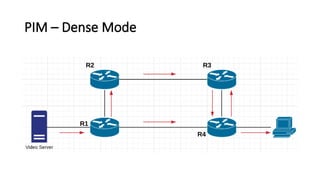
In Dense mode, source starts sending multicast IP Packets to the router and then
router floods it via all interfaces except from where it’s received. This will be
repeated by every router.
Router will send Prune message for not accepting multicast traffic from other
router in two cases.
Case 1 - When router doesn’t have any interested receiver directly connected to it’s
interface or via L2 switch.
Case 2 – When router doesn’t have any connection to downstream router that
require multicast traffic.
7.
PIM – DenseMode
Notice that router does not send the IP packets backward. There will be
scenarios when loop may occur.
To prevent multicast forwarding loops, IP multicast always performs an RPF
check.
RPF stands for Reverse Path Forwarding.
When router receives same traffic from multiple neighbors, then it checks
the Unicast route to the source of the traffic to determine the shortest path.
After that multicast traffic will be accepted only thru the shortest path & it
will reject the traffic from other neighbor. This is how it avoids loop.
8.
PIM – DenseMode
It means the path from Source ( Video Server) to Destination ( receiver)
will always be shortest.
This kind of tree is known as SPT ( Shortest Path Tree) or Source Tree.
So, Dense mode works in Flood & Prune method.
In Dense mode, we noticed that there is unnecessary advertisement of
multicast traffic with the use of flooding by Routers. So, it consumes
resources.
In Dense mode, we noticed that multicast traffic will be flooded by
router unless it’s neighbor tells to stop sending it.
PIM – SparseMode
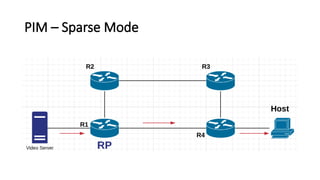
In Sparse Mode, multicast traffic will only be sent when there is a
request from neighboring router.
It uses concept of RP ( Rendezvous Point).
All multicast traffic will be routed to RP router. Once there is request
from any router to receive the multicast traffic, then they need to use
the route from unicast routing table to reach RP.
Thereafter, flow of multicast traffic will start. So, it saves lot of
resources.
RP can be configured dynamically as well as Statically.
11.
PIM – SparseMode
In Sparse Mode, multicast traffic will only be sent when there is a
request from neighboring router.
It uses concept of RP ( Rendezvous Point).
All multicast traffic will be routed to RP router. Once there is request
from any router to receive the multicast traffic, then they need to use
the route from unicast routing table to reach RP.
Thereafter, flow of multicast traffic will start. So, it saves lot of
resources.
RP can be configured dynamically as well as Statically.
12.
PIM – SparseMode
So multicast traffic will be routed via RP, so this kind of tree is known as
Shared Tree.