by Damien Berezenkoby Damien Berezenko
NetApp against
ransomware
How to survive in the future
by Damien Berezenkoby Damien Berezenko
Examples of unsuccessful backups
and recoveries. Notpetya & others
Error analysis shows how to protect your data in the future
by Damien Berezenko
Software replication is not enough
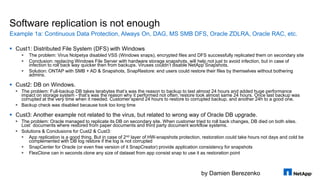
 Cust1: Distributed File System (DFS) with Windows
 The problem: Virus Notpetya disabled VSS (Windows snaps), encrypted files and DFS successfully replicated them on secondary site
 Conclusion: replacing Windows File Server with hardware storage snapshots, will help not just to avoid infection, but in case of
infection to roll back way quicker then from backups. Viruses couldn’t disable NetApp Snapshots.
 Solution: ONTAP with SMB + AD & Snapshots, SnapRestore: end users could restore their files by themselves without bothering
admins.
 Cust2: DB on Windows.
 The problem: Full-backup DB takes terabytes that’s was the reason to backup to last almost 24 hours and added huge performance
impact on storage system - that’s was the reason why it performed not often; restore took almost same 24 hours. Once last backup was
corrupted at the very time when it needed. Customer spend 24 hours to restore to corrupted backup, and another 24h to a good one.
 Backup check was disabled because took too long time
 Cust3: Another example not related to the virus, but related to wrong way of Oracle DB upgrade.
 The problem: Oracle managed to replicate its DB on secondary site. When customer tried to roll back changes, DB died on both sites.
Lost documents where restored from paper documents and third party document workflow systems.
 Solutions & Conclusions for Cust2 & Cust3:
 App replication is a good thing. But in case of 2nd layer of HW-snapshots protection, restoration could take hours not days and cold be
complemented with DB log restore if the log is not corrupted
 SnapCenter for Oracle (or even free version of it SnapCreator) provide application consistency for snapshots
 FlexClone can in seconds clone any size of dataset from app consist snap to use it as restoration point
Example 1a: Continuous Data Protection, Always On, DAG, MS SMB DFS, Oracle ZDLRA, Oracle RAC, etc.
by Damien Berezenko
Software replication is not enough
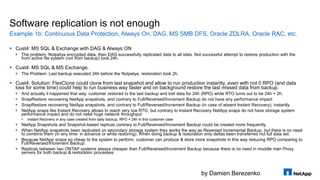
 Cust4: MS SQL & Exchange with DAG & Always ON
 The problem: Notpetya encrypted data, then DAG successfully replicated data to all sites. Not successful attempt to restore production with the
from active file system (not from backup) took 24h.
 Cust4: MS SQL & MS Exchange.
 The Problem: Last backup executed 24h before the Notpetya, restoration took 2h.
 Cust4. Solution: FlexClone could clone from last snapshot and allow to run production instantly, even with not 0 RPO (and data
loss for some time) could help to run business way faster and on background restore the last missed data from backup.
 And actually it happened that way, customer restored to the last backup and lost data for 24h (RPO) while RTO turns out to be 24h + 2h.
 SnapRestore recovering NetApp snapshots, and contrary to Full/Reversed/Increment Backup do not have any performance impact
 SnapRestore recovering NetApp snapshots, and contrary to Full/Reversed/Increment Backup (in case of absent Instant Recovery), instantly
 NetApp snaps like Instant Recovery allows to reach very low RTO, but contrary to Instant Recovery NetApp snaps do not have storage system
performance impact and do not need huge network throughput.
 Instant Recovery in any case created from daily backup, RPO = 24h in this customer case
 NetApp Snapshots and Snapshot-based replicas contrary to Full/Reversed/Increment Backup could be created more frequently.
 When NetApp snapshots been replicated on secondary storage system they works the way as Reversed Incremental Backup, but there is no need
to combine them (in any time: in advance or while restoring). When doing backup & restoration only deltas been transferred not full data set.
 Because NetApp snaps so cheap to the system to perform, customer can produce & store more snapshots in this way reducing RPO comparing to
Full/Reversed/Increment Backup.
 Replicas between two ONTAP systems always cheaper than Full/Reversed/Increment Backup because there is no need in muddle man Proxy
servers for both backup & restoration processes
Example 1b: Continuous Data Protection, Always On, DAG, MS SMB DFS, Oracle ZDLRA, Oracle RAC, etc.
by Damien Berezenko
Unsuccessful backup and recovery on storage systems
 Cust5: storage system with Linux infected
 The Problem: Virus (not the Notpetya) on storage system with Linux (not NetApp), but targeted ordinary
Linux systems not storage systems, but managed to destroy some of the data. Customer spent a week
before they found backup to which they can restore.
 Availability of read-only snapshots like SnapLock would prevent data to be destroyed even if the virus
would manage to get in ONTAP.
 Cust6: Example not related to the virus. Storage System with bug
 The Problem: storage system (not NetApp) destroyed data.
 Solution: Secondary site with function of backup test; SnapMirror with XDP data replication (metadata not
replicated) to mitigate situation of storing on secondary site same corrupted data; Disk Scrubbing for silent
error checking
 Minor firmware differences on primary & secondary sites (Version Flexible SnapMirror)
Example 2
by Damien Berezenko
Who will restore the backup software itself?
 Cust7: A backup system with it’s DB containing info about backups encrypted
 The Problem: A backup system with it’s DB containing info about backups worked on Windows and was
encrypted by Notpetya. Last backup of DB itself also been stored on Windows machine and also
successfully was encrypted by the virus. Backups themselves where on type library. Without Backup
system and it’s DB it was hard to find data:
 Re checking all types took 2 days to index where and which backups are
 Backup system and it’s DB is first on a queue system which must be backed up by storage
snapshots! It must be able to restore very quickly!
 Just existence of storage snapshots would greatly increase speed of recovery. While FlexClone or
SnapRestore can restore data in seconds.
 Replacing type library with AltaVault even without DB index of backups, would allow to restore way quickly:
 First of all last backups will be stored in local cache and will be restored quickly
 Second of all data restoration with AltaVault is simple because it is represented to end user as NAS file system where
it is very easy to sort backup files by creation/modification date to find the last ones
Example 3
by Damien Berezenko
Why hypervisor’s snapshots not enough?
 Cust8: Cyber attack on a government agency where directed on deletion of config files on virtual
machines like VMX
 The problem: Attack took very small time and encrypted VMX config files. Data with VMDK remain in place.
Weeks of restoration process.
 Availability of storage snapshots would allow to fast restore entire infrastructure in hours not weeks.
 Cust9: Another cyber-attack on a government agency
 The problem: The cyber-attack directed on corruption of config files for network devices like switches & routers
 WORM technologies like SnapLock will protect NAS storage from config files corruption & reference copies of
key components of infrastructure
 Many network devices have ability to download their config files from NFS/CIFS/TFTP/FTP/HTTP
 On SnapLock NAS you can put reference virtual machine with Linux, which can mount Read-Only NFS/CIFS to
export that data over TFTP/FTP/HTTP (ONTAP could do it by itself) and to store there DHCP
 SnapLock will protect data even from users with administrative privileges, that’s allows you to be sure that data
not been deleted or corrupted, and backdoors where not build-in in to your firmware’s & golden images after
cyber attack
Example 4
© 2016 NetApp, Inc. All rights reserved. NetApp Confidential – Limited Use7
by Damien Berezenko
Who said the clouds could more secure?
 Multiple businesses with their infrastructure in cloud providers got Notpetya
 The Problem: Businesses in the cloud where suffering from Notpetya the same way as on-premises
infrastructures
 Many US Cloud providers have NetApp FAS/ONTAP storage systems, which can give it as service in form
of «Storage system as service» or in form of «NAS of LUNs as service». Existence of HW snapshots
would increase speed of data restoration.
 Amazon, Azure & IBM Cloud provide as service:
 Cloud Volumes ONTAP is SDS storage system with nearly the same functionality as HW FAS/AFF appliances but in
form of virtual machine running for you by service provider with CIFS, NFS, iSCSI protocols and most importantly
things like snapshots, replication based on snapshots, (Metro) High Availability & FabricPool
 Cloud Volume Services – its HW all flash AFF systems provided in form of Storage system as service
 AVA-c – replacement for type libraries, stores data on any Swift/S3 compatible storage, for end user looks like NAS
 If you are using other Cloud Providers, you can run there:
 AVA-v – The same AltaVault in form of virtual machine for ESXi, Hyper-V or KVM.
 ONTAP Select is SDS storage system with nearly the same functionality as HW FAS/AFF appliances but in form of
virtual machine, with CIFS, NGS, iSCSI protocols and support of snapshots, snapshot-based replication, (Metro) High
Availability, clusterization up to 8 nodes: for HDD or SSD media. SSDs supports FabricPool too.
Example 5
by Damien Berezenko
Who said the clouds could help?
This example not related to Notpetya virus, but also real case
 Why inside cloud you need to build highly available infrastructure, while cloud providers
saying their cloud is highly available by itself? Well it is kind of tricky thing.
 Many people thing cloud provider responsible for customer data and always keep services highly available
for them. But that’s simply not the case.
 While all cloud providers climes their services been highly available, all of them without exception would
recommend you to have backups, haven’t you think why?
 Because any cloud providers have in reality very limited responsibility your data and service availability.
 Natural disasters, human error, HW failures and SW bugs still exists in cloud as they exists on premise
Example 6
by Damien Berezenko
Who said the clouds could help? Cont.
 Inside a cloud provider you have to ensure your data safe & available ib worst case
scenario, not the cloud provider.
 So snapshot-based replication like SnapMirror or SnapVault between NetApp FAS/Cloud Volumes
ONTAP/Cloud Volume Services/ ONTAP Select, AltaVault enables you to perform backups more
frequently, to provide you more points to restore compare to backup without those technologies.
 Cloud also could shutdown. The thing is usually it is not shuts down entirely but in rither
in segments.
 Cloud Volumes ONTAP/ Cloud Volumes Service/ONTAP Select enables you to build highly available
storage
 You can build Highly Available Metro Cluster between zones in the cloud or even between cloud providers
 This kind of protection allows not just to keep your data highly available, which is by itself not enough, but
you will be able to restore data in case of any other “Logical data corruption” or “physical errors”
 ONTAP Select can be clustered up to 8х nodes which allows to transparently migrate data among them. (
cluster interconnect should be 10Gb/s and no worse then 5ms RTT latency, preferably 0.1ms.
Example 6
by Damien Berezenkoby Damien Berezenko
NetApp Technologies
On guard of your data
by Damien Berezenko
Extend your data center
What is FabricPool?
© 2017 NetApp, Inc. All rights reserved. NetApp Confidential – Limited Use12
Data Copy
(Backup/DR)
Snapshot®
Production
Data
Storage
All Flash
Public/Private
Cloud
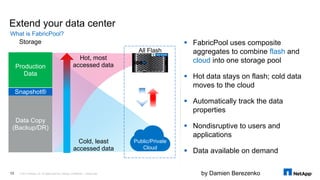
 FabricPool uses composite
aggregates to combine flash and
cloud into one storage pool
 Hot data stays on flash; cold data
moves to the cloud
 Automatically track the data
properties
 Nondisruptive to users and
applications
 Data available on demand
Hot, most
accessed data
Cold, least
accessed data
by Damien Berezenko
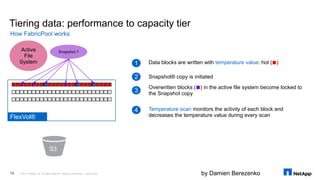
Tiering data: performance to capacity tier
How FabricPool works
© 2017 NetApp, Inc. All rights reserved. NetApp Confidential – Limited Use13
S3
Data blocks are written with temperature value: hot ( )1
2 Snapshot® copy is initiated
3
Overwritten blocks ( ) in the active file system become locked to
the Snapshot copy
Active
File
System
Snapshot 1
4 Temperature scan monitors the activity of each block and
decreases the temperature value during every scanFlexVol®
by Damien Berezenko
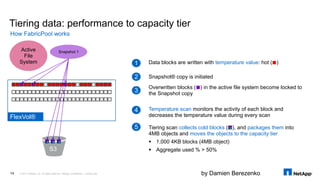
Tiering data: performance to capacity tier
How FabricPool works
© 2017 NetApp, Inc. All rights reserved. NetApp Confidential – Limited Use14
S3
Data blocks are written with temperature value: hot ( )1
2 Snapshot® copy is initiated
3
Overwritten blocks ( ) in the active file system become locked to
the Snapshot copy
Active
File
System
Snapshot 1
4 Temperature scan monitors the activity of each block and
decreases the temperature value during every scan
5 Tiering scan collects cold blocks ( ), and packages them into
4MB objects and moves the objects to the capacity tier
 1,000 4KB blocks (4MB object)
 Aggregate used % > 50%
FlexVol®
by Damien Berezenko
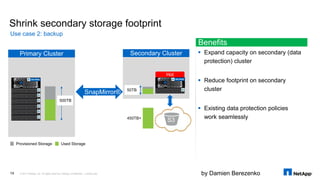
Secondary ClusterPrimary Cluster
Shrink secondary storage footprint
Use case 2: backup
© 2017 NetApp, Inc. All rights reserved. NetApp Confidential – Limited Use15
Provisioned Storage Used Storage
500TB
50TB
450TB+
SnapMirror®
Hot
S3
Benefits
 Expand capacity on secondary (data
protection) cluster
 Reduce footprint on secondary
cluster
 Existing data protection policies
work seamlessly
by Damien Berezenko
Hot
Cold
Snap Policy Daily Weekly
Weekly Unlabeled
Mirror Policy
Vault Policy
Daily
ONTAP Physical
Snapshot ™
StorageGRID ©
ONTAP
Virtual Cloud
Physical
AltaVault
Virtual Cloud
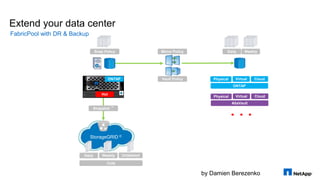
Extend your data center
FabricPool with DR & Backup
by Damien Berezenko
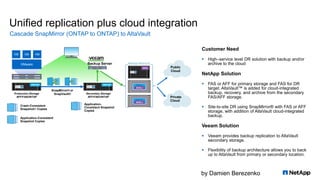
Unified replication plus cloud integration
Cascade SnapMirror (ONTAP to ONTAP) to AltaVault
Production Storage
AFF/FASONTAP
SnapMirror® or
SnapVault®
Public
Cloud
Private
Cloud
Crash-Consistent
Snapshot Copies
Application-Consistent
Snapshot Copies
Application-
Consistent Snapshot
Copies
VMware
VM VM VM
Backup Server
Secondary Storage
AFF/FAS/ONTAP
Customer Need
 High–service level DR solution with backup and/or
archive to the cloud
NetApp Solution
 FAS or AFF for primary storage and FAS for DR
target. AltaVault™ is added for cloud-integrated
backup, recovery, and archive from the secondary
FAS/AFF storage.
 Site-to-site DR using SnapMirror® with FAS or AFF
storage, with addition of AltaVault cloud-integrated
backup.
Veeam Solution
 Veeam provides backup replication to AltaVault
secondary storage.
 Flexibility of backup architecture allows you to back
up to AltaVault from primary or secondary location.
ONTAPONTAP
AVA
AVA-v
AVA-v
by Damien Berezenko
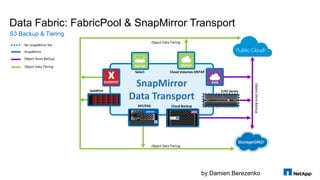
Data Fabric: FabricPool & SnapMirror Transport
S3 Backup & Tiering
ONTA
P
ONTA
P
AVASnapMirror
Data Transport
ONTAPONTAP
ELEMENT
Select
SolidFire
Object Data Tiering
Object Data Tiering
ObjectStoreBackup
E/EF-Series
AFF/FAS
ONTAP
Cloud Backup
AVA
No SnapMirror Yet
SnapMirror
Object Store Backup
Object Data Tiering
Cloud Volumes ONTAP
by Damien Berezenko
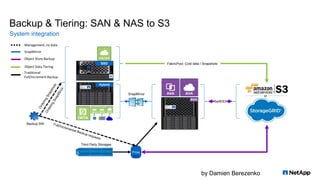
Backup & Tiering: SAN & NAS to S3
System integration
SSD
AVA
Hybrid
or
Swift/S3
SnapMirror
FabricPool: Cold data / Snapshots
Backup SW
Proxy
Third Party Storages
ONTA
P
ONTA
P
ONTA
P
ONTA
P
9
Management, no data
SnapMirror
Object Store Backup
Object Data Tiering
Traditional
Full/Increment Backup
by Damien Berezenkoby Damien Berezenko
What conclusions can be drawn?
Snapshots, snapshots and snapshots again
by Damien Berezenko
Conclusions
 Test your backups. FlexClone will help.
 At least simple script which testing that your OS (from clone), successfully can load and at least basic SQL
SELECT from your DB works, can improve situation radically.
 Many backup systems have SandBox functionality to automate that process (FlexClone helps a lot)
 HW snapshots & snapshot-based replicas. SnapMirror, SnapRestore – helps to make more
backups, more points to restore, and recovery from snapshot in seconds
 You should consider to avoid: Windows Workstation & Windows File Server. Keep your Backup SW
& it’s DB on two different OS system types
 Replace Workstations with VDI and Windows File Servers with ONTAP for CIFS. Give to end user ability to restore
his/here data by themselves. Grpup policies, user profiles & data store on ONTAP NAS
 Fully move to SMB 3.0 and dump Win XP/Vista
 For key infrastructure components use BOTH backups:
 Continuous Data Protection (Always On/DAG/Oracle RAC etc.)
 HW assistant snapshots can be used as quick restoration point in worse case scenario like cyber attack to run your
business. Use FlexClone, SnapRestore, SnapCenter or analogs like Veeam, CommVault etc.
For a full-fledged backup strategy, you’ll need
21
by Damien Berezenko
Conclusions
 Monitor your NAS with specialized SW using ONTAP Fpolicy
 Configure your ONTAP to monitor if encryption happening on your NAS with
 Varonis, Prolion DataAnalyzer, Cleondis SnapGuard and other file screening SW
 Configure antivirus systems with your NAS
 Symantec, TrendMicro, ComputerAssociates, McAfee, Sophos, Kaspersky
 Store your backup SW on NAS (Vmware on NFS Datastore, Hyper-V on CIFS), create HW storage snapshots
that NAS. Free SnapCreator will allow you to create «red button» for backup SW shutdown, and creation of
ONTAP storage snap and power on your machine back:
 If backup SW leaves on Windows, install SnapCreator on Linux and vice versa
 SnapCenter will make it easier then SnapCreator but it is not free
 Key components, FW, Golden images and configs rarely modified you can store on WORM NAS storage. In
this case you will be sure that no one deleted of modified your data and viruses not been build in after attack.
NAS
22
by Damien Berezenko
Conclusions
 Do not use SAN if you do not have additional functionality!
 Use NFS & CIFS (Ethernet) for your file shares containerization & virtualization. Free SnapCreator, will not increase recovery speed, but
increase backup speed so you’ll have more restoration points, and they will be app consistent.
 In case of need fast restoration ask NetApp for temporary licenses, it’s very fast
 Always enable Dedup & thin provisioning, you’ll save a lot of space which can be used for snapshots
 Blocks from deleted files will return to your storage so you can see increase of space in your NAS share, Dedup will also return space you your NAS share,
which is not available or complicated in SAN. You’ll see free space on storage from hosts also, which is not the case with SAN
 Snaps on NAS share appears in that share as directories so data could be copied from it manually. While with SAN architecturally designed in a way so snaps
from LUN’s do not appears in the LUN’s themselves.
 If you bought a storage with SAN without additional functionality
 You have to monitor free space on storage, this is the price for SAN!
 Use HW snapshots with SnapCreator
 In case of need fast restoration ask NetApp for temporary licenses, it’s very fast
 Or you can do NDMP copy for your LUN from a snapshot and reconfigure host to use copied LUN in case of restoration need
 Always enable dedup and UNMAP with tin LUNs
 For both NAS & SAN
 Things like dedup & UNMAP helps to save space, which can be used for snapshots
 In all new models of NetApp FAS/AFF 2600/2700/8200/9000/A200/A220/A300/A700/A800 and newer enable all what you got:
 Inline Compression & Dedup, Post Compression & Dedup, Data Compaction & Zero Detection, Aggregate Dedup. If possible use FabricPool
In case of very tight budgets or “No money, but you should to hold on” (C)
23
by Damien Berezenko
Conclusions
 Configure Storage Monitoring:
 Autosupport / Active IQ. Register on myautosupport.netapp.com
 Install OnCommand Unified Manager
 Configure storage to send alerts to both Autosupport AND to your email
 Configure monitoring systems like Nagios / Zabbix / Splunk / Icinga / Graphana, SNMP compatible etc
 Update your firmware regularly,
 Segment your network
General
24
by Damien Berezenko© 2016 NetApp, Inc. All rights reserved. --- NETAPP CONFIDENTIAL ---25
Share YOUR experience!

NetApp against ransomware

  • 1.
    by Damien BerezenkobyDamien Berezenko NetApp against ransomware How to survive in the future
  • 2.
    by Damien BerezenkobyDamien Berezenko Examples of unsuccessful backups and recoveries. Notpetya & others Error analysis shows how to protect your data in the future
  • 3.
    by Damien Berezenko Softwarereplication is not enough  Cust1: Distributed File System (DFS) with Windows  The problem: Virus Notpetya disabled VSS (Windows snaps), encrypted files and DFS successfully replicated them on secondary site  Conclusion: replacing Windows File Server with hardware storage snapshots, will help not just to avoid infection, but in case of infection to roll back way quicker then from backups. Viruses couldn’t disable NetApp Snapshots.  Solution: ONTAP with SMB + AD & Snapshots, SnapRestore: end users could restore their files by themselves without bothering admins.  Cust2: DB on Windows.  The problem: Full-backup DB takes terabytes that’s was the reason to backup to last almost 24 hours and added huge performance impact on storage system - that’s was the reason why it performed not often; restore took almost same 24 hours. Once last backup was corrupted at the very time when it needed. Customer spend 24 hours to restore to corrupted backup, and another 24h to a good one.  Backup check was disabled because took too long time  Cust3: Another example not related to the virus, but related to wrong way of Oracle DB upgrade.  The problem: Oracle managed to replicate its DB on secondary site. When customer tried to roll back changes, DB died on both sites. Lost documents where restored from paper documents and third party document workflow systems.  Solutions & Conclusions for Cust2 & Cust3:  App replication is a good thing. But in case of 2nd layer of HW-snapshots protection, restoration could take hours not days and cold be complemented with DB log restore if the log is not corrupted  SnapCenter for Oracle (or even free version of it SnapCreator) provide application consistency for snapshots  FlexClone can in seconds clone any size of dataset from app consist snap to use it as restoration point Example 1a: Continuous Data Protection, Always On, DAG, MS SMB DFS, Oracle ZDLRA, Oracle RAC, etc.
  • 4.
    by Damien Berezenko Softwarereplication is not enough  Cust4: MS SQL & Exchange with DAG & Always ON  The problem: Notpetya encrypted data, then DAG successfully replicated data to all sites. Not successful attempt to restore production with the from active file system (not from backup) took 24h.  Cust4: MS SQL & MS Exchange.  The Problem: Last backup executed 24h before the Notpetya, restoration took 2h.  Cust4. Solution: FlexClone could clone from last snapshot and allow to run production instantly, even with not 0 RPO (and data loss for some time) could help to run business way faster and on background restore the last missed data from backup.  And actually it happened that way, customer restored to the last backup and lost data for 24h (RPO) while RTO turns out to be 24h + 2h.  SnapRestore recovering NetApp snapshots, and contrary to Full/Reversed/Increment Backup do not have any performance impact  SnapRestore recovering NetApp snapshots, and contrary to Full/Reversed/Increment Backup (in case of absent Instant Recovery), instantly  NetApp snaps like Instant Recovery allows to reach very low RTO, but contrary to Instant Recovery NetApp snaps do not have storage system performance impact and do not need huge network throughput.  Instant Recovery in any case created from daily backup, RPO = 24h in this customer case  NetApp Snapshots and Snapshot-based replicas contrary to Full/Reversed/Increment Backup could be created more frequently.  When NetApp snapshots been replicated on secondary storage system they works the way as Reversed Incremental Backup, but there is no need to combine them (in any time: in advance or while restoring). When doing backup & restoration only deltas been transferred not full data set.  Because NetApp snaps so cheap to the system to perform, customer can produce & store more snapshots in this way reducing RPO comparing to Full/Reversed/Increment Backup.  Replicas between two ONTAP systems always cheaper than Full/Reversed/Increment Backup because there is no need in muddle man Proxy servers for both backup & restoration processes Example 1b: Continuous Data Protection, Always On, DAG, MS SMB DFS, Oracle ZDLRA, Oracle RAC, etc.
  • 5.
    by Damien Berezenko Unsuccessfulbackup and recovery on storage systems  Cust5: storage system with Linux infected  The Problem: Virus (not the Notpetya) on storage system with Linux (not NetApp), but targeted ordinary Linux systems not storage systems, but managed to destroy some of the data. Customer spent a week before they found backup to which they can restore.  Availability of read-only snapshots like SnapLock would prevent data to be destroyed even if the virus would manage to get in ONTAP.  Cust6: Example not related to the virus. Storage System with bug  The Problem: storage system (not NetApp) destroyed data.  Solution: Secondary site with function of backup test; SnapMirror with XDP data replication (metadata not replicated) to mitigate situation of storing on secondary site same corrupted data; Disk Scrubbing for silent error checking  Minor firmware differences on primary & secondary sites (Version Flexible SnapMirror) Example 2
  • 6.
    by Damien Berezenko Whowill restore the backup software itself?  Cust7: A backup system with it’s DB containing info about backups encrypted  The Problem: A backup system with it’s DB containing info about backups worked on Windows and was encrypted by Notpetya. Last backup of DB itself also been stored on Windows machine and also successfully was encrypted by the virus. Backups themselves where on type library. Without Backup system and it’s DB it was hard to find data:  Re checking all types took 2 days to index where and which backups are  Backup system and it’s DB is first on a queue system which must be backed up by storage snapshots! It must be able to restore very quickly!  Just existence of storage snapshots would greatly increase speed of recovery. While FlexClone or SnapRestore can restore data in seconds.  Replacing type library with AltaVault even without DB index of backups, would allow to restore way quickly:  First of all last backups will be stored in local cache and will be restored quickly  Second of all data restoration with AltaVault is simple because it is represented to end user as NAS file system where it is very easy to sort backup files by creation/modification date to find the last ones Example 3
  • 7.
    by Damien Berezenko Whyhypervisor’s snapshots not enough?  Cust8: Cyber attack on a government agency where directed on deletion of config files on virtual machines like VMX  The problem: Attack took very small time and encrypted VMX config files. Data with VMDK remain in place. Weeks of restoration process.  Availability of storage snapshots would allow to fast restore entire infrastructure in hours not weeks.  Cust9: Another cyber-attack on a government agency  The problem: The cyber-attack directed on corruption of config files for network devices like switches & routers  WORM technologies like SnapLock will protect NAS storage from config files corruption & reference copies of key components of infrastructure  Many network devices have ability to download their config files from NFS/CIFS/TFTP/FTP/HTTP  On SnapLock NAS you can put reference virtual machine with Linux, which can mount Read-Only NFS/CIFS to export that data over TFTP/FTP/HTTP (ONTAP could do it by itself) and to store there DHCP  SnapLock will protect data even from users with administrative privileges, that’s allows you to be sure that data not been deleted or corrupted, and backdoors where not build-in in to your firmware’s & golden images after cyber attack Example 4 © 2016 NetApp, Inc. All rights reserved. NetApp Confidential – Limited Use7
  • 8.
    by Damien Berezenko Whosaid the clouds could more secure?  Multiple businesses with their infrastructure in cloud providers got Notpetya  The Problem: Businesses in the cloud where suffering from Notpetya the same way as on-premises infrastructures  Many US Cloud providers have NetApp FAS/ONTAP storage systems, which can give it as service in form of «Storage system as service» or in form of «NAS of LUNs as service». Existence of HW snapshots would increase speed of data restoration.  Amazon, Azure & IBM Cloud provide as service:  Cloud Volumes ONTAP is SDS storage system with nearly the same functionality as HW FAS/AFF appliances but in form of virtual machine running for you by service provider with CIFS, NFS, iSCSI protocols and most importantly things like snapshots, replication based on snapshots, (Metro) High Availability & FabricPool  Cloud Volume Services – its HW all flash AFF systems provided in form of Storage system as service  AVA-c – replacement for type libraries, stores data on any Swift/S3 compatible storage, for end user looks like NAS  If you are using other Cloud Providers, you can run there:  AVA-v – The same AltaVault in form of virtual machine for ESXi, Hyper-V or KVM.  ONTAP Select is SDS storage system with nearly the same functionality as HW FAS/AFF appliances but in form of virtual machine, with CIFS, NGS, iSCSI protocols and support of snapshots, snapshot-based replication, (Metro) High Availability, clusterization up to 8 nodes: for HDD or SSD media. SSDs supports FabricPool too. Example 5
  • 9.
    by Damien Berezenko Whosaid the clouds could help? This example not related to Notpetya virus, but also real case  Why inside cloud you need to build highly available infrastructure, while cloud providers saying their cloud is highly available by itself? Well it is kind of tricky thing.  Many people thing cloud provider responsible for customer data and always keep services highly available for them. But that’s simply not the case.  While all cloud providers climes their services been highly available, all of them without exception would recommend you to have backups, haven’t you think why?  Because any cloud providers have in reality very limited responsibility your data and service availability.  Natural disasters, human error, HW failures and SW bugs still exists in cloud as they exists on premise Example 6
  • 10.
    by Damien Berezenko Whosaid the clouds could help? Cont.  Inside a cloud provider you have to ensure your data safe & available ib worst case scenario, not the cloud provider.  So snapshot-based replication like SnapMirror or SnapVault between NetApp FAS/Cloud Volumes ONTAP/Cloud Volume Services/ ONTAP Select, AltaVault enables you to perform backups more frequently, to provide you more points to restore compare to backup without those technologies.  Cloud also could shutdown. The thing is usually it is not shuts down entirely but in rither in segments.  Cloud Volumes ONTAP/ Cloud Volumes Service/ONTAP Select enables you to build highly available storage  You can build Highly Available Metro Cluster between zones in the cloud or even between cloud providers  This kind of protection allows not just to keep your data highly available, which is by itself not enough, but you will be able to restore data in case of any other “Logical data corruption” or “physical errors”  ONTAP Select can be clustered up to 8х nodes which allows to transparently migrate data among them. ( cluster interconnect should be 10Gb/s and no worse then 5ms RTT latency, preferably 0.1ms. Example 6
  • 11.
    by Damien BerezenkobyDamien Berezenko NetApp Technologies On guard of your data
  • 12.
    by Damien Berezenko Extendyour data center What is FabricPool? © 2017 NetApp, Inc. All rights reserved. NetApp Confidential – Limited Use12 Data Copy (Backup/DR) Snapshot® Production Data Storage All Flash Public/Private Cloud  FabricPool uses composite aggregates to combine flash and cloud into one storage pool  Hot data stays on flash; cold data moves to the cloud  Automatically track the data properties  Nondisruptive to users and applications  Data available on demand Hot, most accessed data Cold, least accessed data
  • 13.
    by Damien Berezenko Tieringdata: performance to capacity tier How FabricPool works © 2017 NetApp, Inc. All rights reserved. NetApp Confidential – Limited Use13 S3 Data blocks are written with temperature value: hot ( )1 2 Snapshot® copy is initiated 3 Overwritten blocks ( ) in the active file system become locked to the Snapshot copy Active File System Snapshot 1 4 Temperature scan monitors the activity of each block and decreases the temperature value during every scanFlexVol®
  • 14.
    by Damien Berezenko Tieringdata: performance to capacity tier How FabricPool works © 2017 NetApp, Inc. All rights reserved. NetApp Confidential – Limited Use14 S3 Data blocks are written with temperature value: hot ( )1 2 Snapshot® copy is initiated 3 Overwritten blocks ( ) in the active file system become locked to the Snapshot copy Active File System Snapshot 1 4 Temperature scan monitors the activity of each block and decreases the temperature value during every scan 5 Tiering scan collects cold blocks ( ), and packages them into 4MB objects and moves the objects to the capacity tier  1,000 4KB blocks (4MB object)  Aggregate used % > 50% FlexVol®
  • 15.
    by Damien Berezenko SecondaryClusterPrimary Cluster Shrink secondary storage footprint Use case 2: backup © 2017 NetApp, Inc. All rights reserved. NetApp Confidential – Limited Use15 Provisioned Storage Used Storage 500TB 50TB 450TB+ SnapMirror® Hot S3 Benefits  Expand capacity on secondary (data protection) cluster  Reduce footprint on secondary cluster  Existing data protection policies work seamlessly
  • 16.
    by Damien Berezenko Hot Cold SnapPolicy Daily Weekly Weekly Unlabeled Mirror Policy Vault Policy Daily ONTAP Physical Snapshot ™ StorageGRID © ONTAP Virtual Cloud Physical AltaVault Virtual Cloud Extend your data center FabricPool with DR & Backup
  • 17.
    by Damien Berezenko Unifiedreplication plus cloud integration Cascade SnapMirror (ONTAP to ONTAP) to AltaVault Production Storage AFF/FASONTAP SnapMirror® or SnapVault® Public Cloud Private Cloud Crash-Consistent Snapshot Copies Application-Consistent Snapshot Copies Application- Consistent Snapshot Copies VMware VM VM VM Backup Server Secondary Storage AFF/FAS/ONTAP Customer Need  High–service level DR solution with backup and/or archive to the cloud NetApp Solution  FAS or AFF for primary storage and FAS for DR target. AltaVault™ is added for cloud-integrated backup, recovery, and archive from the secondary FAS/AFF storage.  Site-to-site DR using SnapMirror® with FAS or AFF storage, with addition of AltaVault cloud-integrated backup. Veeam Solution  Veeam provides backup replication to AltaVault secondary storage.  Flexibility of backup architecture allows you to back up to AltaVault from primary or secondary location. ONTAPONTAP AVA AVA-v AVA-v
  • 18.
    by Damien Berezenko DataFabric: FabricPool & SnapMirror Transport S3 Backup & Tiering ONTA P ONTA P AVASnapMirror Data Transport ONTAPONTAP ELEMENT Select SolidFire Object Data Tiering Object Data Tiering ObjectStoreBackup E/EF-Series AFF/FAS ONTAP Cloud Backup AVA No SnapMirror Yet SnapMirror Object Store Backup Object Data Tiering Cloud Volumes ONTAP
  • 19.
    by Damien Berezenko Backup& Tiering: SAN & NAS to S3 System integration SSD AVA Hybrid or Swift/S3 SnapMirror FabricPool: Cold data / Snapshots Backup SW Proxy Third Party Storages ONTA P ONTA P ONTA P ONTA P 9 Management, no data SnapMirror Object Store Backup Object Data Tiering Traditional Full/Increment Backup
  • 20.
    by Damien BerezenkobyDamien Berezenko What conclusions can be drawn? Snapshots, snapshots and snapshots again
  • 21.
    by Damien Berezenko Conclusions Test your backups. FlexClone will help.  At least simple script which testing that your OS (from clone), successfully can load and at least basic SQL SELECT from your DB works, can improve situation radically.  Many backup systems have SandBox functionality to automate that process (FlexClone helps a lot)  HW snapshots & snapshot-based replicas. SnapMirror, SnapRestore – helps to make more backups, more points to restore, and recovery from snapshot in seconds  You should consider to avoid: Windows Workstation & Windows File Server. Keep your Backup SW & it’s DB on two different OS system types  Replace Workstations with VDI and Windows File Servers with ONTAP for CIFS. Give to end user ability to restore his/here data by themselves. Grpup policies, user profiles & data store on ONTAP NAS  Fully move to SMB 3.0 and dump Win XP/Vista  For key infrastructure components use BOTH backups:  Continuous Data Protection (Always On/DAG/Oracle RAC etc.)  HW assistant snapshots can be used as quick restoration point in worse case scenario like cyber attack to run your business. Use FlexClone, SnapRestore, SnapCenter or analogs like Veeam, CommVault etc. For a full-fledged backup strategy, you’ll need 21
  • 22.
    by Damien Berezenko Conclusions Monitor your NAS with specialized SW using ONTAP Fpolicy  Configure your ONTAP to monitor if encryption happening on your NAS with  Varonis, Prolion DataAnalyzer, Cleondis SnapGuard and other file screening SW  Configure antivirus systems with your NAS  Symantec, TrendMicro, ComputerAssociates, McAfee, Sophos, Kaspersky  Store your backup SW on NAS (Vmware on NFS Datastore, Hyper-V on CIFS), create HW storage snapshots that NAS. Free SnapCreator will allow you to create «red button» for backup SW shutdown, and creation of ONTAP storage snap and power on your machine back:  If backup SW leaves on Windows, install SnapCreator on Linux and vice versa  SnapCenter will make it easier then SnapCreator but it is not free  Key components, FW, Golden images and configs rarely modified you can store on WORM NAS storage. In this case you will be sure that no one deleted of modified your data and viruses not been build in after attack. NAS 22
  • 23.
    by Damien Berezenko Conclusions Do not use SAN if you do not have additional functionality!  Use NFS & CIFS (Ethernet) for your file shares containerization & virtualization. Free SnapCreator, will not increase recovery speed, but increase backup speed so you’ll have more restoration points, and they will be app consistent.  In case of need fast restoration ask NetApp for temporary licenses, it’s very fast  Always enable Dedup & thin provisioning, you’ll save a lot of space which can be used for snapshots  Blocks from deleted files will return to your storage so you can see increase of space in your NAS share, Dedup will also return space you your NAS share, which is not available or complicated in SAN. You’ll see free space on storage from hosts also, which is not the case with SAN  Snaps on NAS share appears in that share as directories so data could be copied from it manually. While with SAN architecturally designed in a way so snaps from LUN’s do not appears in the LUN’s themselves.  If you bought a storage with SAN without additional functionality  You have to monitor free space on storage, this is the price for SAN!  Use HW snapshots with SnapCreator  In case of need fast restoration ask NetApp for temporary licenses, it’s very fast  Or you can do NDMP copy for your LUN from a snapshot and reconfigure host to use copied LUN in case of restoration need  Always enable dedup and UNMAP with tin LUNs  For both NAS & SAN  Things like dedup & UNMAP helps to save space, which can be used for snapshots  In all new models of NetApp FAS/AFF 2600/2700/8200/9000/A200/A220/A300/A700/A800 and newer enable all what you got:  Inline Compression & Dedup, Post Compression & Dedup, Data Compaction & Zero Detection, Aggregate Dedup. If possible use FabricPool In case of very tight budgets or “No money, but you should to hold on” (C) 23
  • 24.
    by Damien Berezenko Conclusions Configure Storage Monitoring:  Autosupport / Active IQ. Register on myautosupport.netapp.com  Install OnCommand Unified Manager  Configure storage to send alerts to both Autosupport AND to your email  Configure monitoring systems like Nagios / Zabbix / Splunk / Icinga / Graphana, SNMP compatible etc  Update your firmware regularly,  Segment your network General 24
  • 25.
    by Damien Berezenko©2016 NetApp, Inc. All rights reserved. --- NETAPP CONFIDENTIAL ---25 Share YOUR experience!