.NET e C#
16 horas de explanação, diálogo e prática
Julho 2016
por Luiz Henrique Rauber Rodrigues
luizrauber@gmail.com - fb.com/luizrauber
Exceto onde tiver outra referência, este é material é Creative Commons com Atribuição-CompartilhaIgual (CC
BY-SA). Pode copiar, alterar e redistribuir à vontade, mesmo para fins comerciais, mas desde que me cite e
licenciem as novas criações sob termos idênticos. Like Free Software :)
CC BY-SA luizrauber@gmail.com || fb.com/luizrauber 2/156
Mas primeiro….
Conselhos Richard Feynman (1918-1988), Nobel de Física em 1965
2 tipos de sabedoria: “Saber o nome de algo” e o “Saber algo”
1) Escolha um conceito; tema ou objetivo do que quer saber
2) Escreva-o como se estivesse ensinando uma criança; nada subentendido
3) Volte no tema e pesquise sobre ele; especifique o 1-2 da forma 2)
4) Revise e simplifique ainda mais; sem jargões e sabendo usar analogias
http://www.bbc.com/portuguese/geral-36750825
CC BY-SA luizrauber@gmail.com || fb.com/luizrauber 3/156
Manifesto para o desenvolvimento ágil de software
Estamos descobrindo maneiras melhores de desenvolver software fazendo-o
nós mesmos e ajudando outros a fazê-lo. Através deste trabalho, passamos a
valorizar:
Indivíduos e interação entre eles mais que processos e ferramentas
Software em funcionamento mais que documentação abrangente
Colaboração com o cliente mais que negociação de contratos
Responder a mudanças mais que seguir um plano
Ou seja, mesmo havendo valor nos itens à direita, valorizamos mais os itens à
esquerda.
http://www.manifestoagil.com.br/
CC BY-SA luizrauber@gmail.com || fb.com/luizrauber 4/156
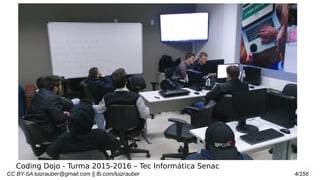
Coding Dojo - Turma 2015-2016 – Tec Informática Senac
CC BY-SA luizrauber@gmail.com || fb.com/luizrauber 5/156
Instalar o VS.Net Community
#pastas c: d:
CC BY-SA luizrauber@gmail.com || fb.com/luizrauber 6/156
.NET
Framework → Arcabouço → Plataforma para
desenvolvimento e execução de softwares em
multi-plataformas de sistemas operacionais
CC BY-SA luizrauber@gmail.com || fb.com/luizrauber 7/156
.NET não é linguagem!
CC BY-SA luizrauber@gmail.com || fb.com/luizrauber 8/156
.NET Framework SDK (~130MB)
Software Development Kit (SDK) com classes,
interfaces, compiladores e tutoriais (quick start)
http://msdn.microsoft.com/downloads/default.asp?
url=/downloads/sample.asp?url
=/msdn-files/027/000/976/msdncompositedoc.xml
CC BY-SA luizrauber@gmail.com || fb.com/luizrauber 9/156
História… anúncio pra teste em 2000, lançamento
em 2002, Beta 1 e 2 neste tempo…
Comunidade testou desde pre-release
CC BY-SA luizrauber@gmail.com || fb.com/luizrauber 10/156
Para MS, o sucesso dela depende do sucesso do
.NET
Tão importante quanto a transição do DOS para
Windows
CC BY-SA luizrauber@gmail.com || fb.com/luizrauber 11/156
“it is a set of technologies that work together
seamlessly to solve your business problems.”
(INDIA, 2015)
CC BY-SA luizrauber@gmail.com || fb.com/luizrauber 12/156
Qual o “set of technologies”?
CC BY-SA luizrauber@gmail.com || fb.com/luizrauber 13/156
Qual o “set of technologies”?
ASP.NET
Aplicações executadas em browser
INDIA, 2015
CC BY-SA luizrauber@gmail.com || fb.com/luizrauber 14/156
Qual o “set of technologies”?
Windows Form:
RCP (Rich Cliente Plataform)
INDIA, 2015
CC BY-SA luizrauber@gmail.com || fb.com/luizrauber 15/156
Qual o “set of technologies”?
Console Applications:
Scripts para modo DOS
INDIA, 2015
CC BY-SA luizrauber@gmail.com || fb.com/luizrauber 16/156
Qual o “set of technologies”?
Component Libraries:
Módulos com lógica de negócio
INDIA, 2015
CC BY-SA luizrauber@gmail.com || fb.com/luizrauber 17/156
Qual o “set of technologies”?
Windows Custom Controls:
Controle como o ActiveX para desktop
INDIA, 2015
CC BY-SA luizrauber@gmail.com || fb.com/luizrauber 18/156
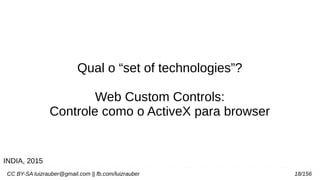
Qual o “set of technologies”?
Web Custom Controls:
Controle como o ActiveX para browser
INDIA, 2015
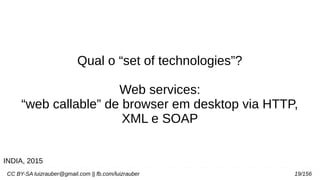
CC BY-SA luizrauber@gmail.com || fb.com/luizrauber 19/156
Qual o “set of technologies”?
Web services:
“web callable” de browser em desktop via HTTP,
XML e SOAP
INDIA, 2015
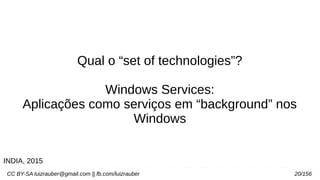
CC BY-SA luizrauber@gmail.com || fb.com/luizrauber 20/156
Qual o “set of technologies”?
Windows Services:
Aplicações como serviços em “background” nos
Windows
INDIA, 2015
CC BY-SA luizrauber@gmail.com || fb.com/luizrauber 21/156
Features .NET
CC BY-SA luizrauber@gmail.com || fb.com/luizrauber 22/156
Features .NET
Rich Functionality out of the box
Centenas de classes prontas com detalhes de I/O
e comunicação de rede
INDIA, 2015
CC BY-SA luizrauber@gmail.com || fb.com/luizrauber 23/156
Features .NET
Easy development of web applications
ASP.NET com programação orientada a eventos,
que “provide advanced user interface elements
(like calendar and grids) that save lot of coding
from programmer’s side.”
INDIA, 2015
CC BY-SA luizrauber@gmail.com || fb.com/luizrauber 24/156
Features .NET
OOPs Support
“Object is mother of all.” - Visual Basic.NET
suporta objetos do tipos inteiros e caracteres (C+
+ não)
INDIA, 2015
CC BY-SA luizrauber@gmail.com || fb.com/luizrauber 25/156
Features .NET
Multi-Language Support
Suporta mais de 20 linguagens, linkando com
Visual Basic.NET, C# (pronounced as C-sharp),
Jscript.NET and Managed C++ (a dialect of Visual
C++)
“A beleza do suporte multi-línguagens reside no
fato de que, embora a sintaxe da linguagem de cada uma é diferente, a
base de capacidades de cada linguagem permanece em pé de
igualdade com os outros.”
INDIA, 2015
CC BY-SA luizrauber@gmail.com || fb.com/luizrauber 26/156
Features .NET
Multi-Device Support
Para PDAs, mobiles and handheld PCs tem .NET
Compact Framework and Mobile Internet
Toolkit
INDIA, 2015
CC BY-SA luizrauber@gmail.com || fb.com/luizrauber 27/156
Features .NET
Automatic memory management
garbage collector
INDIA, 2015
CC BY-SA luizrauber@gmail.com || fb.com/luizrauber 28/156
Features .NET
Compatibility with COM and COM+
Para aplicações legadas com COM components e
ActiveX controls com compatibilidade em .NET e
migração de COM+ para .NET
INDIA, 2015
CC BY-SA luizrauber@gmail.com || fb.com/luizrauber 29/156
Features .NET
No more DLL Hell
Conflitos de DLL eram comuns no COM World
“one version of component across machine”.
Agora aplicações podem usar suas cópias de
DLL e não precisam acesso ao registro.
INDIA, 2015
CC BY-SA luizrauber@gmail.com || fb.com/luizrauber 30/156
Features .NET
Strong XML support
“.NET is the only platform that has built with XML
right into the core framework. .NET tries to
harness power of XML in every possible
Way” - HTTP, XML and SOAP
INDIA, 2015
CC BY-SA luizrauber@gmail.com || fb.com/luizrauber 31/156
Features .NET
Ease of deployment and configuration
.NET não precisa acesso registro. Implantação
XCOPY. “Configuration is another area where
.NET – especially ASP.NET – shines over
traditional languages. The configuration is done
via special files having special XML vocabulary.”
INDIA, 2015
CC BY-SA luizrauber@gmail.com || fb.com/luizrauber 32/156
Features .NET
Security
“Windows platform was always criticized for poor
security mechanisms. Microsoft has taken great
efforts to make .NET platform safe and secure for
enterprise applications. Features such as type
safety, code access security and role based
authentication make overall application more
robust and secure.”INDIA, 2015
CC BY-SA luizrauber@gmail.com || fb.com/luizrauber 33/156
.NET
O Java da Microsoft
CC BY-SA luizrauber@gmail.com || fb.com/luizrauber 34/156
CC BY-SA luizrauber@gmail.com || fb.com/luizrauber 35/156http://4.bp.blogspot.com/-DqJ88qjRZqQ/TZN648rP6WI/AAAAAAAAAAo/Bb2YQDMZDyw/s1600/IMG_5788.JPG
CC BY-SA luizrauber@gmail.com || fb.com/luizrauber 36/156
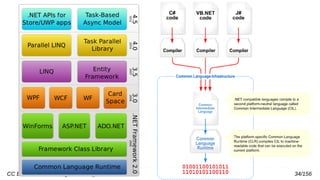
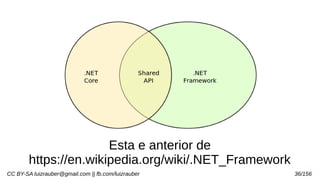
Esta e anterior de
https://en.wikipedia.org/wiki/.NET_Framework
CC BY-SA luizrauber@gmail.com || fb.com/luizrauber 37/156
Code Management é como o .NET vê o código,
não nós.
CC BY-SA luizrauber@gmail.com || fb.com/luizrauber 38/156
Indiferente a linguagem nativa, o .NET compila a
aplicação pra Microsoft Intermediate Language
(MSIL) que é executada pelo Common Language
Runtime (CLR)
CC BY-SA luizrauber@gmail.com || fb.com/luizrauber 39/156
Vantagens da Common Language Runtime (CLR)
- Tem tempo de execução comum para todas as
linguagens na plataforma .NET
INDIA, 2015
CC BY-SA luizrauber@gmail.com || fb.com/luizrauber 40/156
Vantagens da Common Language Runtime (CLR)
- Prove serviços como gerenciamento de
memória, gerenciamento de threads e
comunicação remota.
INDIA, 2015
CC BY-SA luizrauber@gmail.com || fb.com/luizrauber 41/156
Vantagens da Common Language Runtime (CLR)
- Ele impõe segurança estrita de tipo e outras
formas de precisão de código que garantam a
segurança e robustez da aplicação.
INDIA, 2015
CC BY-SA luizrauber@gmail.com || fb.com/luizrauber 42/156
Vantagens da Common Language Runtime (CLR)
- Responsável pelo Common Type System, que
permite que classes interoperar/ herdar entre
linguagens. “So your COBOL.NET program can
interoperate with your C#, VB.NET, Eiffel.NET and
with any other .NET language programs.”
INDIA, 2015
CC BY-SA luizrauber@gmail.com || fb.com/luizrauber 43/156
Vantagens da Common Language Runtime (CLR)
- Ele oferece um mecanismo para manipulação
de exceção entre linguagens (cross-language
exception handling)
INDIA, 2015
CC BY-SA luizrauber@gmail.com || fb.com/luizrauber 44/156
Vantagens da Common Language Runtime (CLR)
- Ele fornece uma maneira mais elegante de
resolver os problemas de controle de versão
(versioning issues) - também referida como “DLL
Hell” no clássico modelo COM.
INDIA, 2015
CC BY-SA luizrauber@gmail.com || fb.com/luizrauber 45/156
Vantagens da Common Language Runtime (CLR)
- Verifica o código e marca como “type-safe”,
permitindo “isolamento” por ter poucas chances
de causar falhas de memória.
INDIA, 2015
CC BY-SA luizrauber@gmail.com || fb.com/luizrauber 46/156
Código que foi marcado pelo runtime (tempo
execução) é marcado como código gerenciado
(managed code).
Código gerenciado requer um “runtime host”, que
carrega o processo de execução, criando o
domínio da aplicação (e seus processos) e
carrega o código de usuário nos domínios da
aplicação.
CC BY-SA luizrauber@gmail.com || fb.com/luizrauber 47/156
.NET fornece os próprios, mas pode-se escrever
runtime hosts próprios (por API).
INDIA, 2015
CC BY-SA luizrauber@gmail.com || fb.com/luizrauber 48/156
.
CC BY-SA luizrauber@gmail.com || fb.com/luizrauber 49/156
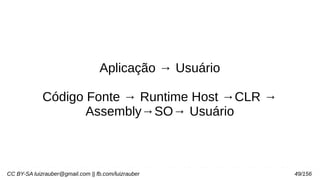
Aplicação → Usuário
Código Fonte → Runtime Host →CLR →
Assembly→SO→ Usuário
CC BY-SA luizrauber@gmail.com || fb.com/luizrauber 50/156
Assembly? .exe + .dll?
Assembly é o arquivo de montagem, não a
linguagem Assembly
CC BY-SA luizrauber@gmail.com || fb.com/luizrauber 51/156
“a montagem” é uma entidade “self-describing” de
implantação do .NET que é um conjunto de tipos
e recursos que formam uma unidade lógica de
funcionalidade.
1 ou 2 “manifestos”
INDIA, 2015
CC BY-SA luizrauber@gmail.com || fb.com/luizrauber 52/156
Manifest, id assembly, versão, tabela arquivos e
referências a dependências.
Manifest data, tipos e classes públicas,
referências externas, outros módulos e MSIL
(ildasm - IL Disassembler)
INDIA, 2015
CC BY-SA luizrauber@gmail.com || fb.com/luizrauber 53/156
1 ou mais assemblies,
Se +1, tem manifest data com 1 ou mais módulos
Se +1 módulo, pode ser mais de 1 linguagem
Execução da linguagem só quando chamada
Ex. de uso de multi-módulos
CC BY-SA luizrauber@gmail.com || fb.com/luizrauber 54/156
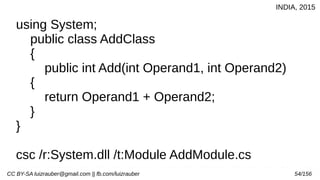
using System;
public class AddClass
{
public int Add(int Operand1, int Operand2)
{
return Operand1 + Operand2;
}
}
csc /r:System.dll /t:Module AddModule.cs
INDIA, 2015
CC BY-SA luizrauber@gmail.com || fb.com/luizrauber 55/156
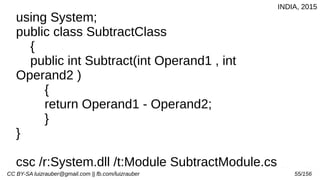
using System;
public class SubtractClass
{
public int Subtract(int Operand1 , int
Operand2 )
{
return Operand1 - Operand2;
}
}
csc /r:System.dll /t:Module SubtractModule.cs
INDIA, 2015
CC BY-SA luizrauber@gmail.com || fb.com/luizrauber 56/156
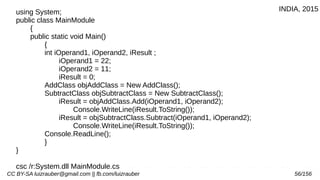
using System;
public class MainModule
{
public static void Main()
{
int iOperand1, iOperand2, iResult ;
iOperand1 = 22;
iOperand2 = 11;
iResult = 0;
AddClass objAddClass = New AddClass();
SubtractClass objSubtractClass = New SubtractClass();
iResult = objAddClass.Add(iOperand1, iOperand2);
Console.WriteLine(iResult.ToString());
iResult = objSubtractClass.Subtract(iOperand1, iOperand2);
Console.WriteLine(iResult.ToString());
Console.ReadLine();
}
}
csc /r:System.dll MainModule.cs
INDIA, 2015
CC BY-SA luizrauber@gmail.com || fb.com/luizrauber 57/156
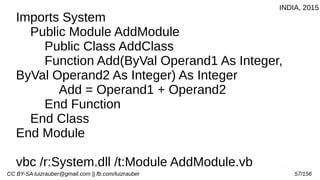
Imports System
Public Module AddModule
Public Class AddClass
Function Add(ByVal Operand1 As Integer,
ByVal Operand2 As Integer) As Integer
Add = Operand1 + Operand2
End Function
End Class
End Module
vbc /r:System.dll /t:Module AddModule.vb
INDIA, 2015
CC BY-SA luizrauber@gmail.com || fb.com/luizrauber 58/156
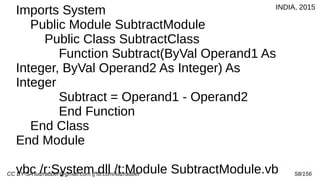
Imports System
Public Module SubtractModule
Public Class SubtractClass
Function Subtract(ByVal Operand1 As
Integer, ByVal Operand2 As Integer) As
Integer
Subtract = Operand1 - Operand2
End Function
End Class
End Module
vbc /r:System.dll /t:Module SubtractModule.vb
INDIA, 2015
CC BY-SA luizrauber@gmail.com || fb.com/luizrauber 59/156
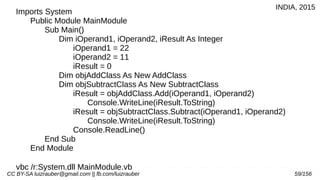
Imports System
Public Module MainModule
Sub Main()
Dim iOperand1, iOperand2, iResult As Integer
iOperand1 = 22
iOperand2 = 11
iResult = 0
Dim objAddClass As New AddClass
Dim objSubtractClass As New SubtractClass
iResult = objAddClass.Add(iOperand1, iOperand2)
Console.WriteLine(iResult.ToString)
iResult = objSubtractClass.Subtract(iOperand1, iOperand2)
Console.WriteLine(iResult.ToString)
Console.ReadLine()
End Sub
End Module
vbc /r:System.dll MainModule.vb
INDIA, 2015
CC BY-SA luizrauber@gmail.com || fb.com/luizrauber 60/156
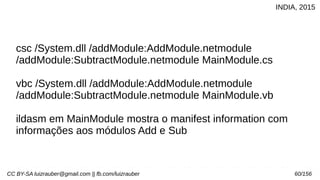
csc /System.dll /addModule:AddModule.netmodule
/addModule:SubtractModule.netmodule MainModule.cs
vbc /System.dll /addModule:AddModule.netmodule
/addModule:SubtractModule.netmodule MainModule.vb
ildasm em MainModule mostra o manifest information com
informações aos módulos Add e Sub
INDIA, 2015
CC BY-SA luizrauber@gmail.com || fb.com/luizrauber 61/156
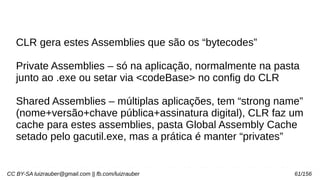
CLR gera estes Assemblies que são os “bytecodes”
Private Assemblies – só na aplicação, normalmente na pasta
junto ao .exe ou setar via <codeBase> no config do CLR
Shared Assemblies – múltiplas aplicações, tem “strong name”
(nome+versão+chave pública+assinatura digital), CLR faz um
cache para estes assemblies, pasta Global Assembly Cache
setado pelo gacutil.exe, mas a prática é manter “privates”
CC BY-SA luizrauber@gmail.com || fb.com/luizrauber 62/156
Ai assemblies sendo executados pelo Windows e,
conflito de recursos, um aplicativo interferindo no
outro (acidentalmente ou intencionalmente)...
CC BY-SA luizrauber@gmail.com || fb.com/luizrauber 63/156
Domínios das aplicações!
Application Domains
.NET tira a responsabilidade de manter a
individualidade (e respectivos endereços e
recursos) e/ou comunicação (e troca de contexto)
dos processos do SO ou “host”, diminuindo a
carga da CPU e o thrashing.
(*não achei o algoritmo de escalonamento)
INDIA, 2015
CC BY-SA luizrauber@gmail.com || fb.com/luizrauber 64/156
CLR usa o “domínio da aplicação” para “isolar” as
aplicações em execução.
Além de isolar, dá pra setar políticas de
seguranças próprias pra cada App Domain.
INDIA, 2015
CC BY-SA luizrauber@gmail.com || fb.com/luizrauber 65/156
Num único processo pode conter vários “app
domain” isolados como se fossem vários
processos.
CC BY-SA luizrauber@gmail.com || fb.com/luizrauber 66/156
E/ou as aplicações podem se comunicar, mas só
através do CLR que copia (torna local e no
mesmo domínio) ou proxy (torna remoto e em
domínios diferentes) – ambos casos no manifest
metadata do assembly público, deve ter qual
objeto que terá comunicação porque a call será
pela propriedade do JIT na compilação
INDIA, 2015
CC BY-SA luizrauber@gmail.com || fb.com/luizrauber 67/156
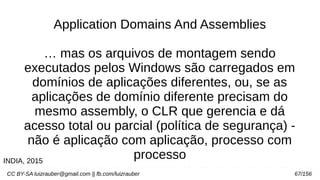
Application Domains And Assemblies
… mas os arquivos de montagem sendo
executados pelos Windows são carregados em
domínios de aplicações diferentes, ou, se as
aplicações de domínio diferente precisam do
mesmo assembly, o CLR que gerencia e dá
acesso total ou parcial (política de segurança) -
não é aplicação com aplicação, processo com
processoINDIA, 2015
CC BY-SA luizrauber@gmail.com || fb.com/luizrauber 68/156
Configuração do App Domain
uma classe (com métodos de criação, carregar e
descarregar assemblies) ligada ao namespace
Ex. C# e VB
INDIA, 2015
CC BY-SA luizrauber@gmail.com || fb.com/luizrauber 69/156
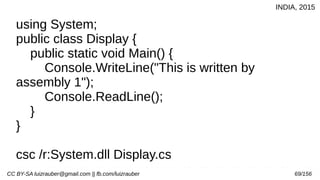
using System;
public class Display {
public static void Main() {
Console.WriteLine("This is written by
assembly 1");
Console.ReadLine();
}
}
csc /r:System.dll Display.cs
INDIA, 2015
CC BY-SA luizrauber@gmail.com || fb.com/luizrauber 70/156
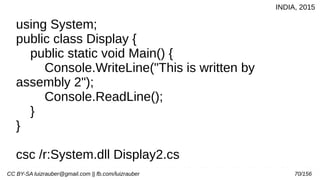
using System;
public class Display {
public static void Main() {
Console.WriteLine("This is written by
assembly 2");
Console.ReadLine();
}
}
csc /r:System.dll Display2.cs
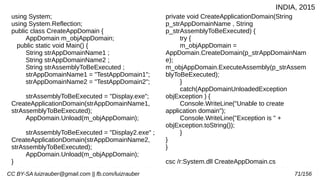
INDIA, 2015
CC BY-SA luizrauber@gmail.com || fb.com/luizrauber 71/156
using System;
using System.Reflection;
public class CreateAppDomain {
AppDomain m_objAppDomain;
public static void Main() {
String strAppDomainName1 ;
String strAppDomainName2 ;
String strAssemblyToBeExecuted ;
strAppDomainName1 = "TestAppDomain1";
strAppDomainName2 = "TestAppDomain2";
strAssemblyToBeExecuted = "Display.exe";
CreateApplicationDomain(strAppDomainName1,
strAssemblyToBeExecuted);
AppDomain.Unload(m_objAppDomain);
strAssemblyToBeExecuted = "Display2.exe" ;
CreateApplicationDomain(strAppDomainName2,
strAssemblyToBeExecuted);
AppDomain.Unload(m_objAppDomain);
}
private void CreateApplicationDomain(String
p_strAppDomainName , String
p_strAssemblyToBeExecuted) {
try {
m_objAppDomain =
AppDomain.CreateDomain(p_strAppDomainNam
e);
m_objAppDomain.ExecuteAssembly(p_strAssem
blyToBeExecuted);
}
catch(AppDomainUnloadedException
objException ) {
Console.WriteLine("Unable to create
application domain");
Console.WriteLine("Exception is " +
objException.toString());
}
}
}
csc /r:System.dll CreateAppDomain.cs
INDIA, 2015
CC BY-SA luizrauber@gmail.com || fb.com/luizrauber 72/156
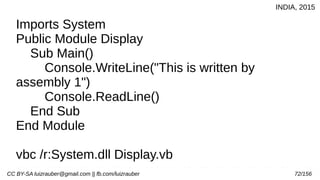
Imports System
Public Module Display
Sub Main()
Console.WriteLine("This is written by
assembly 1")
Console.ReadLine()
End Sub
End Module
vbc /r:System.dll Display.vb
INDIA, 2015
CC BY-SA luizrauber@gmail.com || fb.com/luizrauber 73/156
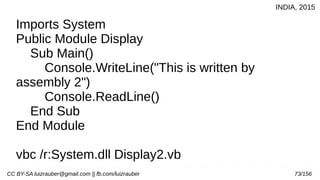
Imports System
Public Module Display
Sub Main()
Console.WriteLine("This is written by
assembly 2")
Console.ReadLine()
End Sub
End Module
vbc /r:System.dll Display2.vb
INDIA, 2015
CC BY-SA luizrauber@gmail.com || fb.com/luizrauber 74/156
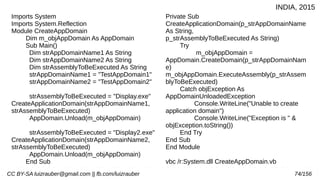
Imports System
Imports System.Reflection
Module CreateAppDomain
Dim m_objAppDomain As AppDomain
Sub Main()
Dim strAppDomainName1 As String
Dim strAppDomainName2 As String
Dim strAssemblyToBeExecuted As String
strAppDomainName1 = "TestAppDomain1"
strAppDomainName2 = "TestAppDomain2"
strAssemblyToBeExecuted = "Display.exe"
CreateApplicationDomain(strAppDomainName1,
strAssemblyToBeExecuted)
AppDomain.Unload(m_objAppDomain)
strAssemblyToBeExecuted = "Display2.exe"
CreateApplicationDomain(strAppDomainName2,
strAssemblyToBeExecuted)
AppDomain.Unload(m_objAppDomain)
End Sub
Private Sub
CreateApplicationDomain(p_strAppDomainName
As String,
p_strAssemblyToBeExecuted As String)
Try
m_objAppDomain =
AppDomain.CreateDomain(p_strAppDomainNam
e)
m_objAppDomain.ExecuteAssembly(p_strAssem
blyToBeExecuted)
Catch objException As
AppDomainUnloadedException
Console.WriteLine("Unable to create
application domain")
Console.WriteLine("Exception is " &
objException.toString())
End Try
End Sub
End Module
vbc /r:System.dll CreateAppDomain.vb
INDIA, 2015
CC BY-SA luizrauber@gmail.com || fb.com/luizrauber 75/156
Microsoft Common Object File Format (COFF)
Pai do Portable Executable (PE) File Format
Carrega o “essencial” pra memória (executáveis,
objetos, dlls) para executar os executáveis
https://msdn.microsoft.com/en-
us/windows/hardware/gg463119.aspx
CC BY-SA luizrauber@gmail.com || fb.com/luizrauber 76/156
“show me the code”
https://github.com/Microsoft/dotnet
CC BY-SA luizrauber@gmail.com || fb.com/luizrauber 77/156
VS.NET
“cases you require some Integrated Development
Environment (IDE) that allows for Rapid Action
Development (RAD). The new Visual Studio.NET
is such an IDE.”
http://visualstudio.com/
CC BY-SA luizrauber@gmail.com || fb.com/luizrauber 78/156
VS.NET
“Drag and Drop design
IntelliSense features
Syntax highlighting and auto-syntax checking
Excellent debugging tools
Integration with version control software such as
Visual Source Safe (VSS)
Easy project management”
http://visualstudio.com/
CC BY-SA luizrauber@gmail.com || fb.com/luizrauber 79/156
VS.NET (INDIA, 2015)
Professional
Enterprise Developer
Enterprise Architect
CC BY-SA luizrauber@gmail.com || fb.com/luizrauber 80/156
CC BY-SA luizrauber@gmail.com || fb.com/luizrauber 81/156
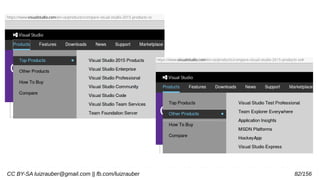
VS.NET (INDIA, 2015)
Professional
Enterprise Developer
Enterprise Architect
CC BY-SA luizrauber@gmail.com || fb.com/luizrauber 82/156
CC BY-SA luizrauber@gmail.com || fb.com/luizrauber 83/156
Acessar comparação
https://www.visualstudio.com/en-
us/products/compare-visual-studio-2015-
products-vs
CC BY-SA luizrauber@gmail.com || fb.com/luizrauber 84/156
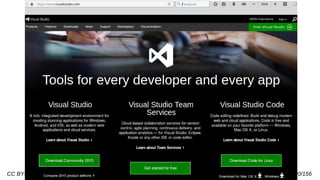
VS.NET
https://www.visualstudio.com/
Visual Studio
Visual Studio Team Services
Visual Studio Code
Visual Studio Enterprise 2015
CC BY-SA luizrauber@gmail.com || fb.com/luizrauber 85/156
VS.NET
https://www.visualstudio.com/
Visual Studio (~7,5GB)
“free for individual developers, open source
projects, academic research, education, and small
professional teams.”
CC BY-SA luizrauber@gmail.com || fb.com/luizrauber 86/156
VS.NET
https://www.visualstudio.com/
Visual Studio
debugger/ refatoração, linguagens da MS e
Xamarin (Cordova, Unity, Node.js, Python, JS,
Angular, JQuery, Bootstrap, Django, Backbone.js
com plugins) com integração git/GitHub e Visual
Studio Team Services
CC BY-SA luizrauber@gmail.com || fb.com/luizrauber 87/156
VS.NET
https://www.visualstudio.com/
Visual Studio
Xamarin University courses on-demand,
Pluralsight training, Azure credits, and more as
part of Visual Studio Dev Essentials.
CC BY-SA luizrauber@gmail.com || fb.com/luizrauber 88/156
C#
C++ da Microsoft para o .NET, padronizado na
European Computer Manufacturers Association
(ECMA) e na International Standards
Organization (ISO)
CC BY-SA luizrauber@gmail.com || fb.com/luizrauber 89/156
C#
Propósito geral; Compilada; Estruturada e OO;
Suporte Componentes; Multiplataforma
(Desktop/Web e .NET/ Mono); Java Like :)
CC BY-SA luizrauber@gmail.com || fb.com/luizrauber 90/156
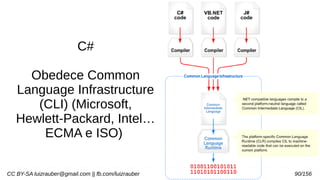
C#
Obedece Common
Language Infrastructure
(CLI) (Microsoft,
Hewlett-Packard, Intel…
ECMA e ISO)
CC BY-SA luizrauber@gmail.com || fb.com/luizrauber 91/156
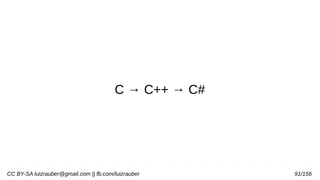
C → C++ → C#
CC BY-SA luizrauber@gmail.com || fb.com/luizrauber 92/156
using System;
namespace HelloWorldApplication
{
class HelloWorld
{
static void Main(string[] args)
{
Console.WriteLine("Hello World");
Console.ReadKey(); //se usando o VS.NET
}
}
}TutorialsPoint: C#, 2014
CC BY-SA luizrauber@gmail.com || fb.com/luizrauber 93/156
CC BY-SA luizrauber@gmail.com || fb.com/luizrauber 94/156
TutorialsPoint: C#, 2014
CC BY-SA luizrauber@gmail.com || fb.com/luizrauber 95/156
System.ValueType
TutorialsPoint: C#, 2014
CC BY-SA luizrauber@gmail.com || fb.com/luizrauber 96/156
System.ValueType
TutorialsPoint: C#, 2014
CC BY-SA luizrauber@gmail.com || fb.com/luizrauber 97/156
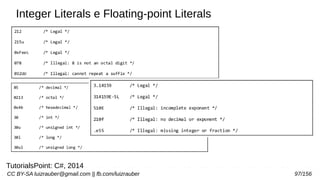
Integer Literals e Floating-point Literals
TutorialsPoint: C#, 2014
CC BY-SA luizrauber@gmail.com || fb.com/luizrauber 98/156
TutorialsPoint: C#, 2014
CC BY-SA luizrauber@gmail.com || fb.com/luizrauber 99/156
TutorialsPoint: C#, 2014
CC BY-SA luizrauber@gmail.com || fb.com/luizrauber 100/156
TutorialsPoint: C#, 2014
CC BY-SA luizrauber@gmail.com || fb.com/luizrauber 101/156
TutorialsPoint: C#, 2014
CC BY-SA luizrauber@gmail.com || fb.com/luizrauber 102/156
TutorialsPoint: C#, 2014
CC BY-SA luizrauber@gmail.com || fb.com/luizrauber 103/156
TutorialsPoint: C#, 2014
CC BY-SA luizrauber@gmail.com || fb.com/luizrauber 104/156
TutorialsPoint: C#, 2014
CC BY-SA luizrauber@gmail.com || fb.com/luizrauber 105/156
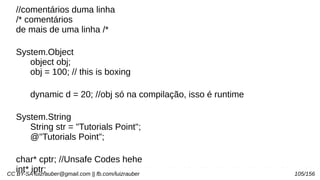
//comentários duma linha
/* comentários
de mais de uma linha /*
System.Object
object obj;
obj = 100; // this is boxing
dynamic d = 20; //obj só na compilação, isso é runtime
System.String
String str = "Tutorials Point";
@"Tutorials Point";
char* cptr; //Unsafe Codes hehe
int* iptr;
CC BY-SA luizrauber@gmail.com || fb.com/luizrauber 106/156
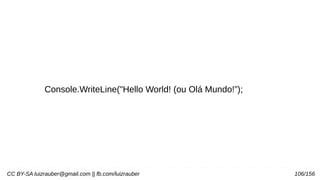
Console.WriteLine("Hello World! (ou Olá Mundo!”);
CC BY-SA luizrauber@gmail.com || fb.com/luizrauber 107/156
using System;
namespace ProgramHelloWorld
{
class Program
{
static void Main(string[] args)
{
Console.WriteLine("Hello World! (ou Olá Mundo!”);
Console.ReadLine();
}
}
}
Hello World!
TutorialsPoint: C#, 2014
CC BY-SA luizrauber@gmail.com || fb.com/luizrauber 108/156
using System;
namespace DeclaringConstants
{
class Program
{
static void Main(string[] args)
{
const double pi = 3.14159; // constant declaration
double r;
Console.WriteLine("Enter Radius: ");
r = Convert.ToDouble(Console.ReadLine());
double areaCircle = pi * r * r;
Console.WriteLine("Radius: {0}, Area: {1}", r, areaCircle);
Console.ReadLine();
}
}
}
Enter Radius:
3
Radius: 3, Area: 28.27431
CC BY-SA luizrauber@gmail.com || fb.com/luizrauber 109/156
ToBoolean
ToByte
ToChar
ToDateTime
ToDecimal
ToDouble
ToInt16
ToInt32
ToInt64
ToSbyte
ToSingle
ToString
ToType
...
namespace TypeConversionApplication
{
class StringConversion
{
static void Main(string[] args)
{
int i = 75;
float f = 53.005f;
double d = 2345.7652;
bool b = true;
Console.WriteLine(i.ToString());
Console.WriteLine(f.ToString());
Console.WriteLine(d.ToString());
Console.WriteLine(b.ToString());
Console.ReadKey();
}
}
}
75
53.005
2345.7652
True
CC BY-SA luizrauber@gmail.com || fb.com/luizrauber 110/156
using System;
namespace DeclaringConstants
{
class Program
{
static void Main(string[] args)
{
const double pi = 3.14159; // constant declaration
double r;
Console.WriteLine("Enter Radius: ");
r = Convert.ToDouble(Console.ReadLine());
double areaCircle = pi * r * r;
Console.WriteLine("Radius: {0}, Area: {1}", r, areaCircle);
Console.ReadLine();
}
}
}
Enter Radius:
3
Radius: 3, Area: 28.27431
TutorialsPoint: C#, 2014
CC BY-SA luizrauber@gmail.com || fb.com/luizrauber 111/156
using System;
namespace OperatorsAppl
{
class Program
{
static void Main(string[] args)
{
int a = 21;
int b = 10;
int c;
c = a + b;
Console.WriteLine("Line 1 - Value of c is {0}", c);
c = a – b;
Console.WriteLine("Line 2 - Value of c is {0}", c);
c = a * b;
Console.WriteLine("Line 3 - Value of c is {0}", c);
c = a / b;
Console.WriteLine("Line 4 - Value of c is {0}", c);
c = a % b;
Console.WriteLine("Line 5 - Value of c is {0}", c);
c = a++;
Console.WriteLine("Line 6 - Value of c is {0}", c);
c = a--;
Console.WriteLine("Line 7 - Value of c is {0}", c);
Console.ReadLine();
}
}
}
Line 1 - Value of c is 31
Line 2 - Value of c is 11
Line 3 - Value of c is 210
Line 4 - Value of c is 2
Line 5 - Value of c is 1
Line 6 - Value of c is 22
Line 7 - Value of c is 20
TutorialsPoint: C#, 2014
CC BY-SA luizrauber@gmail.com || fb.com/luizrauber 112/156
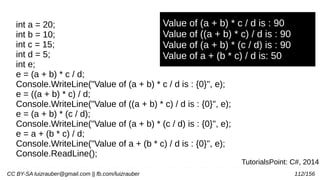
int a = 20;
int b = 10;
int c = 15;
int d = 5;
int e;
e = (a + b) * c / d;
Console.WriteLine("Value of (a + b) * c / d is : {0}", e);
e = ((a + b) * c) / d;
Console.WriteLine("Value of ((a + b) * c) / d is : {0}", e);
e = (a + b) * (c / d);
Console.WriteLine("Value of (a + b) * (c / d) is : {0}", e);
e = a + (b * c) / d;
Console.WriteLine("Value of a + (b * c) / d is : {0}", e);
Console.ReadLine();
Value of (a + b) * c / d is : 90
Value of ((a + b) * c) / d is : 90
Value of (a + b) * (c / d) is : 90
Value of a + (b * c) / d is: 50
TutorialsPoint: C#, 2014
CC BY-SA luizrauber@gmail.com || fb.com/luizrauber 113/156
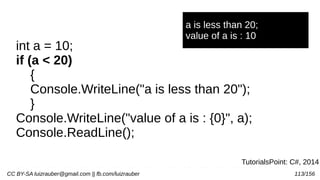
int a = 10;
if (a < 20)
{
Console.WriteLine("a is less than 20");
}
Console.WriteLine("value of a is : {0}", a);
Console.ReadLine();
a is less than 20;
value of a is : 10
TutorialsPoint: C#, 2014
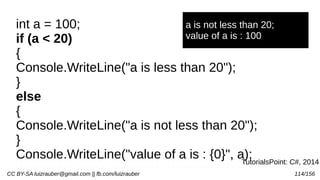
CC BY-SA luizrauber@gmail.com || fb.com/luizrauber 114/156
int a = 100;
if (a < 20)
{
Console.WriteLine("a is less than 20");
}
else
{
Console.WriteLine("a is not less than 20");
}
Console.WriteLine("value of a is : {0}", a);
a is not less than 20;
value of a is : 100
TutorialsPoint: C#, 2014
CC BY-SA luizrauber@gmail.com || fb.com/luizrauber 115/156
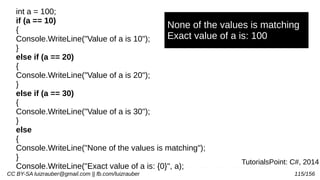
int a = 100;
if (a == 10)
{
Console.WriteLine("Value of a is 10");
}
else if (a == 20)
{
Console.WriteLine("Value of a is 20");
}
else if (a == 30)
{
Console.WriteLine("Value of a is 30");
}
else
{
Console.WriteLine("None of the values is matching");
}
Console.WriteLine("Exact value of a is: {0}", a);
None of the values is matching
Exact value of a is: 100
TutorialsPoint: C#, 2014
CC BY-SA luizrauber@gmail.com || fb.com/luizrauber 116/156
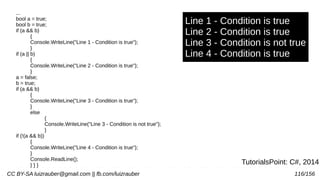
...
bool a = true;
bool b = true;
if (a && b)
{
Console.WriteLine("Line 1 - Condition is true");
}
if (a || b)
{
Console.WriteLine("Line 2 - Condition is true");
}
a = false;
b = true;
if (a && b)
{
Console.WriteLine("Line 3 - Condition is true");
}
else
{
Console.WriteLine("Line 3 - Condition is not true");
}
if (!(a && b))
{
Console.WriteLine("Line 4 - Condition is true");
}
Console.ReadLine();
} } }
Line 1 - Condition is true
Line 2 - Condition is true
Line 3 - Condition is not true
Line 4 - Condition is true
TutorialsPoint: C#, 2014
CC BY-SA luizrauber@gmail.com || fb.com/luizrauber 117/156
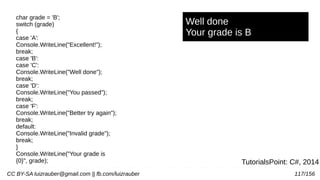
char grade = 'B';
switch (grade)
{
case 'A':
Console.WriteLine("Excellent!");
break;
case 'B':
case 'C':
Console.WriteLine("Well done");
break;
case 'D':
Console.WriteLine("You passed");
break;
case 'F':
Console.WriteLine("Better try again");
break;
default:
Console.WriteLine("Invalid grade");
break;
}
Console.WriteLine("Your grade is
{0}", grade);
Well done
Your grade is B
TutorialsPoint: C#, 2014
CC BY-SA luizrauber@gmail.com || fb.com/luizrauber 118/156
int a = 20
while (a < 20)
{
Console.WriteLine("value of a: {0}", a);
a++;
}
********************************************
int a=20
do
{
Console.WriteLine("value of a: {0}", a);
a = a + 1;
} while (a < 20);
*******************************************
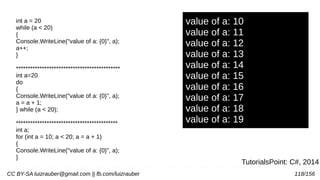
int a;
for (int a = 10; a < 20; a = a + 1)
{
Console.WriteLine("value of a: {0}", a);
}
value of a: 10
value of a: 11
value of a: 12
value of a: 13
value of a: 14
value of a: 15
value of a: 16
value of a: 17
value of a: 18
value of a: 19
TutorialsPoint: C#, 2014
CC BY-SA luizrauber@gmail.com || fb.com/luizrauber 119/156TutorialsPoint: C#, 2014
TutorialsPoint: C#, 2014
CC BY-SA luizrauber@gmail.com || fb.com/luizrauber 120/156TutorialsPoint: C#, 2014
TutorialsPoint: C#, 2014
CC BY-SA luizrauber@gmail.com || fb.com/luizrauber 121/156
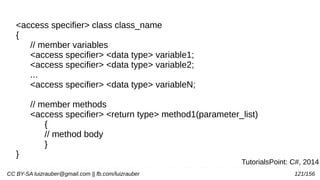
<access specifier> class class_name
{
// member variables
<access specifier> <data type> variable1;
<access specifier> <data type> variable2;
...
<access specifier> <data type> variableN;
// member methods
<access specifier> <return type> method1(parameter_list)
{
// method body
}
}
TutorialsPoint: C#, 2014
CC BY-SA luizrauber@gmail.com || fb.com/luizrauber 122/156
class Box
{
public double length;
public double breadth;
public double height;
}
class Boxtester
{
static void Main(string[] args)
{
Box Box1 = new Box();
Box Box2 = new Box();
double volume = 0.0;
Box1.height = 5.0;
Box1.length = 6.0;
Box1.breadth = 7.0;
Box2.height = 10.0;
Box2.length = 12.0;
Box2.breadth = 13.0;
volume = Box1.height * Box1.length * Box1.breadth;
Console.WriteLine("Volume of Box1 : {0}",
volume);
volume = Box2.height * Box2.length * Box2.breadth;
Console.WriteLine("Volume of Box2 : {0}", volume);
Console.ReadKey();
}
}
Volume of Box1 : 210
Volume of Box2 : 1560
CC BY-SA luizrauber@gmail.com || fb.com/luizrauber 123/156
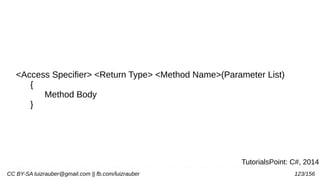
<Access Specifier> <Return Type> <Method Name>(Parameter List)
{
Method Body
}
TutorialsPoint: C#, 2014
CC BY-SA luizrauber@gmail.com || fb.com/luizrauber 124/156
namespace CalculatorApplication
{
class NumberManipulator
{
public int FindMax(int num1, int
num2)
{
int result;
if (num1 > num2)
result = num1;
else
result = num2;
return result;
}
static void Main(string[] args)
{
int a = 100;
int b = 200;
int ret;
NumberManipulator n = new
NumberManipulator();
ret = n.FindMax(a, b);
Console.WriteLine("Max value is : {0}",
ret );
Console.ReadLine();
}
} Max value is : 200
CC BY-SA luizrauber@gmail.com || fb.com/luizrauber 125/156
public int factorial(int num)
{
int result;
if (num == 1)
{
return 1;
}
else
{
result = factorial(num - 1) * num;
return result;
}
}
static void Main(string[] args)
{
NumberManipulator n = new
NumberManipulator();
Console.WriteLine("Factorial of 6 is : {0}",
n.factorial(6));
Console.WriteLine("Factorial of 7 is : {0}",
n.factorial(7));
Console.WriteLine("Factorial of 8 is : {0}",
n.factorial(8));
Console.ReadLine();
}
Factorial of 6 is: 720
Factorial of 7 is: 5040
Factorial of 8 is: 40320
CC BY-SA luizrauber@gmail.com || fb.com/luizrauber 126/156
class Line
{
private double length;
public Line() {
Console.WriteLine("Object is being created");
}
public void setLength( double len ) {
length = len;
}
public double getLength() {
return length;
}
~Line()
{
Console.WriteLine("Object is being deleted");
}
static void Main(string[] args)
{
Line line = new Line();
line.setLength(6.0);
Console.WriteLine("Length of line : {0}",
line.getLength());
Console.ReadKey();
}
Object is being created
Length of line : 6
Object is being deleted
CC BY-SA luizrauber@gmail.com || fb.com/luizrauber 127/156
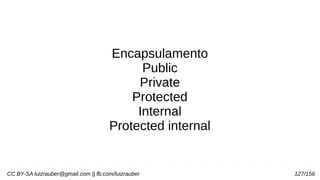
Encapsulamento
Public
Private
Protected
Internal
Protected internal
CC BY-SA luizrauber@gmail.com || fb.com/luizrauber 128/156
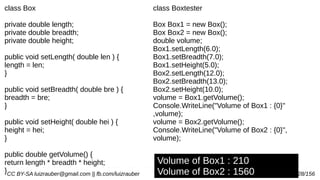
class Box
private double length;
private double breadth;
private double height;
public void setLength( double len ) {
length = len;
}
public void setBreadth( double bre ) {
breadth = bre;
}
public void setHeight( double hei ) {
height = hei;
}
public double getVolume() {
return length * breadth * height;
}
class Boxtester
Box Box1 = new Box();
Box Box2 = new Box();
double volume;
Box1.setLength(6.0);
Box1.setBreadth(7.0);
Box1.setHeight(5.0);
Box2.setLength(12.0);
Box2.setBreadth(13.0);
Box2.setHeight(10.0);
volume = Box1.getVolume();
Console.WriteLine("Volume of Box1 : {0}"
,volume);
volume = Box2.getVolume();
Console.WriteLine("Volume of Box2 : {0}",
volume);
Volume of Box1 : 210
Volume of Box2 : 1560
CC BY-SA luizrauber@gmail.com || fb.com/luizrauber 129/156
public void getValues(out int x, out int y )
{
Console.WriteLine("Enter the first value: ");
x = Convert.ToInt32(Console.ReadLine());
Console.WriteLine("Enter the second value:
");
y = Convert.ToInt32(Console.ReadLine());
}
static void Main(string[] args)
{
NumberManipulator n = new
NumberManipulator();
int a , b;
n.getValues(out a, out b);
Console.WriteLine("After method call, value
of a : {0}", a);
Console.WriteLine("After method call, value
of b : {0}", b);
Console.ReadLine();
}
Enter the first value:
7
Enter the second value:
8
After method call, value of a : 7
After method call, value of b : 8
TutorialsPoint: C#, 2014
CC BY-SA luizrauber@gmail.com || fb.com/luizrauber 130/156
using System;
namespace RectangleApplication
{
class Rectangle
{
double length;
double width;
public void Acceptdetails()
{
length = 4.5;
width = 3.5;
}
public double GetArea()
{
return length * width;
}
public void Display()
{
Console.WriteLine("Length: {0}", length);
Console.WriteLine("Width: {0}", width);
Console.WriteLine("Area: {0}", GetArea());
}
}
class ExecuteRectangle
{
static void Main(string[] args)
{
Rectangle r = new Rectangle();
r.Acceptdetails();
r.Display();
Console.ReadLine();
}
}
}
Length: 4.5
Width: 3.5
Area: 15.75
CC BY-SA luizrauber@gmail.com || fb.com/luizrauber 131/156
namespace RectangleApplication
{
class Rectangle
{
private double length;
private double width;
public void Acceptdetails()
{
Console.WriteLine("Enter Length: ");
length = Convert.ToDouble(Console.ReadLine());
Console.WriteLine("Enter Width: ");
width = Convert.ToDouble(Console.ReadLine());
}
public double GetArea()
{
return length * width;
}
public void Display()
{
Console.Write("Length: {0}", length);
Console.Write("Width: {0}", width);
Console.Write("Area: {0}", GetArea());
}
class ExecuteRectangle
{
static void Main(string[] args)
{
Rectangle r = new Rectangle();
r.Acceptdetails();
r.Display();
Console.ReadLine();
}
}
}
Enter Length:
4.4
Enter Width:
3.3
Length: 4.4
Width: 3.3
Area: 14.52
CC BY-SA luizrauber@gmail.com || fb.com/luizrauber 132/156
class Shape {
public void setWidth(int w) {
width = w;
}
public void setHeight(int h) {
height = h;
}
protected int width;
protected int height;
}
class Rectangle: Shape {
public int getArea() {
return (width * height);
}
}
class RectangleTester
{
static void Main(string[] args)
{
Rectangle Rect = new Rectangle();
Rect.setWidth(5);
Rect.setHeight(7);
Console.WriteLine("Total area: {0}",
Rect.getArea());
Console.ReadKey();
}
Total area: 35
CC BY-SA luizrauber@gmail.com || fb.com/luizrauber 133/156
class Printdata
{
void print(int i) {
Console.WriteLine("Printing int: {0}", i );
}
void print(double f) {
Console.WriteLine("Printing float: {0}" ,
f);
}
void print(string s) {
Console.WriteLine("Printing string: {0}",
s);
}
static void Main(string[] args)
{
Printdata p = new Printdata();
// Call print to print integer
p.print(5);
// Call print to print float
p.print(500.263);
// Call print to print string
p.print("Hello");
Console.ReadKey();
}
Printing int: 5
Printing float: 500.263
Printing string: HelloTutorialsPoint: C#, 2014
CC BY-SA luizrauber@gmail.com || fb.com/luizrauber 134/156
class Box
{
private double length;
private double breadth;
private double height;
public double getVolume() {
return length * breadth * height;
}
public void setLength( double len ){
length = len;
}
public void setBreadth( double bre ) {
breadth = bre;
}
public void setHeight( double hei ){
height = hei;
}
// Overload + operator to add two Box objects.
public static Box operator+ (Box b, Box c) {
Box box = new Box();
box.length = b.length + c.length;
box.breadth = b.breadth + c.breadth;
box.height = b.height + c.height;
return box;
}
class Tester {
static void Main(string[] args) {
Box Box1 = new Box(); // Declare Box1 of type Box
Box Box2 = new Box(); // Declare Box2 of type Box
Box Box3 = new Box(); // Declare Box3 of type Box
double volume = 0.0; // Store the volume of a box here
Box1.setLength(6.0); Box1.setBreadth(7.0); Box1.setHeight(5.0);
Box2.setLength(12.0); Box2.setBreadth(13.0); Box2.setHeight(10.0);
volume = Box1.getVolume();
Console.WriteLine("Volume of Box1 : {0}", volume);
volume = Box2.getVolume();
Console.WriteLine("Volume of Box2 : {0}", volume);
Box3 = Box1 + Box2;
volume = Box3.getVolume();
Console.WriteLine("Volume of Box3 : {0}", volume);
Console.ReadKey();
Volume of Box1 : 210
Volume of Box2 : 1560
Volume of Box3 : 5400
TutorialsPoint: C#, 2014
CC BY-SA luizrauber@gmail.com || fb.com/luizrauber 135/156
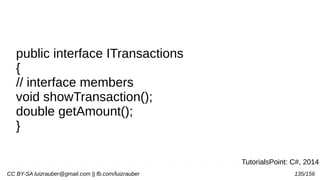
public interface ITransactions
{
// interface members
void showTransaction();
double getAmount();
}
TutorialsPoint: C#, 2014
CC BY-SA luizrauber@gmail.com || fb.com/luizrauber 136/156
using System.Collections.Generic;
using System.Linq;
using System.Text;
namespace InterfaceApplication {
public interface Itransactions {
// interface members
void showTransaction();
double getAmount();
}
public class Transaction : Itransactions {
private string tCode; private string date;
private double amount;
public Transaction() {
tCode = " "; date = " "; amount = 0.0;
}
public Transaction(string c, string d, double a) {
tCode = c; date = d; amount = a;
}
public double getAmount() {
return amount;
}
Transaction: 001
Date: 8/10/2012
Amount: 78900
Transaction: 002
Date: 9/10/2012
Amount: 451900
public void showTransaction() {
Console.WriteLine("Transaction: {0}", tCode);
Console.WriteLine("Date: {0}", date);
Console.WriteLine("Amount: {0}", getAmount());
}
class Tester
{
static void Main(string[] args)
{
Transaction t1 = new Transaction("001", "8/10/2012",
78900.00);
Transaction t2 = new Transaction("002", "9/10/2012",
451900.00);
t1.showTransaction();
t2.showTransaction();
Console.ReadKey();
}
}
CC BY-SA luizrauber@gmail.com || fb.com/luizrauber 137/156
Abrir o VS.Net Community
Olhar pra ele, ignorar e abrir um “Word”
e criar um projeto pra premissas de
Gerenciamento de Projeto
(recomendo Plan. GP com TA e Riscos)
:)
CC BY-SA luizrauber@gmail.com || fb.com/luizrauber 138/156
class EnumProgram
{
enum Days { Sun, Mon, tue, Wed, thu, Fri, Sat };
}
static void Main(string[] args)
{
int WeekdayStart = (int)Days.Mon;
int WeekdayEnd = (int)Days.Fri;
Console.WriteLine("Monday: {0}", WeekdayStart);
Console.WriteLine("Friday: {0}", WeekdayEnd);
Console.ReadKey();
}
.
Monday: 1
Friday: 5
CC BY-SA luizrauber@gmail.com || fb.com/luizrauber 139/156
static void Main(string[] args)
{
int [ ] n = new int[10];
int i,j;
for ( i = 0; i < 10; i++ )
{
n[ i ] = i + 100;
}
for (j = 0; j < 10; j++ )
{
Console.WriteLine("Element[{0}] = {1}", j, n[j]);
}
Console.ReadKey();
}
.
Element[0] = 100
Element[1] = 101
Element[2] = 102
Element[3] = 103
Element[4] = 104
Element[5] = 105
Element[6] = 106
Element[7] = 107
Element[8] = 108
Element[9] = 109
CC BY-SA luizrauber@gmail.com || fb.com/luizrauber 140/156
static void Main(string[] args)
{
int [ ] n = new int[10];
int i;
for (i = 0; i < 10; i++ )
{
n[ i ] = i + 100;
}
foreach (int j in n )
{
i = j-100;
Console.WriteLine("Element[{0}] = {1}", i, j);
i++;
}
Console.ReadKey();
}
.
Element[0] = 100
Element[1] = 101
Element[2] = 102
Element[3] = 103
Element[4] = 104
Element[5] = 105
Element[6] = 106
Element[7] = 107
Element[8] = 108
Element[9] = 109
CC BY-SA luizrauber@gmail.com || fb.com/luizrauber 141/156
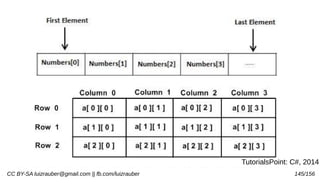
static void Main(string[] args)
{
int[,] a = new int[5, 2] {{0,0}, {1,2}, {2,4}, {3,6}, {4,8} };
int i, j;
for (i = 0; i < 5; i++)
{
for (j = 0; j < 2; j++)
{
Console.WriteLine("a[{0},{1}] = {2}", i, j, a[i,j]);
}
}
Console.ReadKey();
}
.
a[0,0]: 0
a[0,1]: 0
a[1,0]: 1
a[1,1]: 2
a[2,0]: 2
a[2,1]: 4
a[3,0]: 3
A[3,1]: 6
a[4,0]: 4
a[4,1]: 8TutorialsPoint: C#, 2014
CC BY-SA luizrauber@gmail.com || fb.com/luizrauber 142/156
static void Main(string[] args)
{
int[,] numeros = new int[5, 2] {{0,0}, {1,2}, {2,4}, {3,6}, {4,8} };
int i, j;
for (i = 0; i < numeros.Length; i++)
{
Console.WriteLine("Tamanho vetor", numeros[i,j]);
}
Console.ReadKey();
}
.
a[0,0]: 0
a[0,1]: 0
a[1,0]: 1
a[1,1]: 2
a[2,0]: 2
a[2,1]: 4
a[3,0]: 3
A[3,1]: 6
a[4,0]: 4
a[4,1]: 8
TutorialsPoint: C#, 2014
CC BY-SA luizrauber@gmail.com || fb.com/luizrauber 143/156
static void Main(string[] args)
{
int[,] numeros = new int[5, 2] {{0,0}, {1,2}, {2,4}, {3,6}, {4,8} };
int i, j;
for (i = 0; i < numeros.GetLength(0); i++)
{
for (j = 0; j < numeros.GetLength(1); j++)
{
Console.WriteLine("a[{0},{1}] = {2}", i, j, numeros[i,j]);
}
}
Console.ReadKey();
}
.
a[0,0]: 0
a[0,1]: 0
a[1,0]: 1
a[1,1]: 2
a[2,0]: 2
a[2,1]: 4
a[3,0]: 3
A[3,1]: 6
a[4,0]: 4
a[4,1]: 8
TutorialsPoint: C#, 2014
CC BY-SA luizrauber@gmail.com || fb.com/luizrauber 144/156
double getAverage(int[] arr, int size)
{
int i;
double avg;
int sum = 0;
for (i = 0; i < size; ++i)
{
sum += arr[i];
}
avg = (double)sum / size;
return avg;
}
static void Main(string[] args)
{
MyArray app = new MyArray();
/* an int array with 5 elements */
int [] balance = new int[]{1000, 2, 3, 17,
50};
double avg;
/* pass pointer to the array as an
argument */
avg = app.getAverage(balance, 5 ) ;
/* output the returned value */
Console.WriteLine( "Average value is: {0}
", avg );
Average value is: 214.4
CC BY-SA luizrauber@gmail.com || fb.com/luizrauber 145/156
TutorialsPoint: C#, 2014
CC BY-SA luizrauber@gmail.com || fb.com/luizrauber 146/156
String → Propriedades Char ou Length
//from string literal and string concatenation
string fname, lname;
fname = "Rowan";
lname = "Atkinson";
string fullname = fname + lname;
Console.WriteLine("Full Name: {0}", fullname);
//by using string constructor
char[] letters = { 'H', 'e', 'l', 'l','o' };
string greetings = new string(letters);
Console.WriteLine("Greetings: {0}", greetings);
//methods returning string
string[] sarray = { "Hello", "From", "Tutorials",
"Point" };
string message = String.Join(" ", sarray);
Console.WriteLine("Message: {0}", message);
//formatting method to convert a value
DateTime waiting = new DateTime(2012, 10, 10,
17, 58, 1);
string chat = String.Format("Message sent at {0:t}
on {0:D}",
waiting);
Console.WriteLine("Message: {0}", chat);
Console.ReadKey() ;
Full Name: RowanAtkinson
Greetings: Hello
Message: Hello From Tutorials Point
Message: Message sent at 5:58 PM
on Wednesday, October 10, 2012
CC BY-SA luizrauber@gmail.com || fb.com/luizrauber 147/156
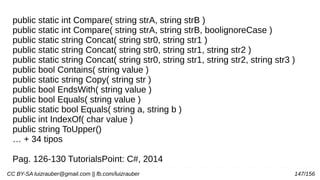
public static int Compare( string strA, string strB )
public static int Compare( string strA, string strB, boolignoreCase )
public static string Concat( string str0, string str1 )
public static string Concat( string str0, string str1, string str2 )
public static string Concat( string str0, string str1, string str2, string str3 )
public bool Contains( string value )
public static string Copy( string str )
public bool EndsWith( string value )
public bool Equals( string value )
public static bool Equals( string a, string b )
public int IndexOf( char value )
public string ToUpper()
… + 34 tipos
Pag. 126-130 TutorialsPoint: C#, 2014
CC BY-SA luizrauber@gmail.com || fb.com/luizrauber 148/156
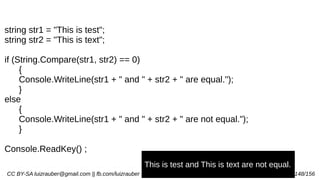
string str1 = "This is test";
string str2 = "This is text";
if (String.Compare(str1, str2) == 0)
{
Console.WriteLine(str1 + " and " + str2 + " are equal.");
}
else
{
Console.WriteLine(str1 + " and " + str2 + " are not equal.");
}
Console.ReadKey() ;
This is test and This is text are not equal.
CC BY-SA luizrauber@gmail.com || fb.com/luizrauber 149/156
string str = "Last night I dreamt of San Pedro";
Console.WriteLine(str);
string substr = str.Substring(23);
Console.WriteLine(substr);
****************************************
string[] starray = new string[]{"Down the way nights are dark",
"And the sun shines daily on the mountain top",
"I took a trip on a sailing ship",
"And when I reached Jamaica",
"I made a stop"};
string str = String.Join("n", starray);
Console.WriteLine(str);
San Pedro
Down the way nights are dark
And the sun shines daily on the mountain top
I took a trip on a sailing ship
And when I reached Jamaica
I made a stop
CC BY-SA luizrauber@gmail.com || fb.com/luizrauber 150/156
Agora sim
Criar o Projeto no VS.Net Community
Desenvolver a aplicação
Discurtimos os resultados
CC BY-SA luizrauber@gmail.com || fb.com/luizrauber 151/156
using System;
struct Books
{
public string title;
public string author;
public string subject;
public int book_id;
};
public class testStructure
{
public static void Main(string[] args)
{
Books Book1;
Books Book2;
Book1.title = "C Programming";
Book1.author = "Nuha Ali";
Book1.subject = "C Programming Tutorial";
Book1.book_id = 6495407;
Idem pro Book2….
Console.WriteLine( "Book 1 title : {0}", Book1.title);
Console.WriteLine("Book 1 author : {0}", Book1.author);
Console.WriteLine("Book 1 subject : {0}",
Book1.subject);
Console.WriteLine("Book 1 book_id :{0}",
Book1.book_id);
Idem pro Book2…
Book 1 title : C Programming
Book 1 author : Nuha Ali
Book 1 subject : C Programming Tutorial
Book 1 book_id : 6495407
Idem pro Book2….
CC BY-SA luizrauber@gmail.com || fb.com/luizrauber 152/156
struct Books
{
private string title;
private string author;
private string subject;
private int book_id;
public void getValues(string t, string a, string s, int
id)
{
title = t;
author = a;
subject = s;
book_id = id;
}
public void display()
{
Console.WriteLine("Title : {0}", title);
Console.WriteLine("Author : {0}", author);
Console.WriteLine("Subject : {0}", subject);
Console.WriteLine("Book_id :{0}", book_id);
}
};
public class testStructure
{
public static void Main(string[] args)
{
Books Book1 = new Books();
Book1.getValues("C Programming",
"Nuha Ali", "C Programming Tutorial",6495407);
Book1.display();
}
}
Title : C Programming
Author : Nuha Ali
Subject : C Programming Tutorial
Book_id : 6495407id : 6495407
CC BY-SA luizrauber@gmail.com || fb.com/luizrauber 153/156
Structs é um acréscimo no C# sobre C/C++
Podem ter métodos, campos, indexadores,
propriedades, operadores e e eventos. Quase
uma classe, mas classes são tipos de referência
e estruturas são tipos de valor, também estruturas
não suportam herança
CC BY-SA luizrauber@gmail.com || fb.com/luizrauber 154/156
Classes (encapsulamento)… 143-155
Herança… 156-162
Polimorfismo… 163-169
Operadores… 170-180
Interfaces… 181-183
Namespaces… 189
Preprocessor… 190-193
Expressões regulares… 194-207
Tratamento exceções… 208-213
I/O Arquivos… 214-233
Atributos… 234-242
Reflection… 243-250
Propriedades… 251-258
Indexers… 259-265
Delegates… 266-271
Eventos… 272-278
Collections… 279-284
Hastable Class (SortedList, Stack, Queue, BitArray)... 285-301
Generics… 302-308
Métodos Anonimos… 309-311
Unsafe Codes… 312-317
MultiThreading… 318-328
CC BY-SA luizrauber@gmail.com || fb.com/luizrauber 155/156
Vamos as “janelas”
Introdução ao Visual C# e ao Visual Basic
https://msdn.microsoft.com/pt-br/library/dd492171.aspx
Tutorial 1 e 2
CC BY-SA luizrauber@gmail.com || fb.com/luizrauber 156/156
Referências
http://vb.net-informations.com/
https://en.wikipedia.org/wiki/.NET_Framework
https://www.visualstudio.com/
https://blogs.msdn.microsoft.com/dotnet/
http://www.tutorialspoint.com/tutorialslibrary.htm
INDIA, 2015 download.microsoft.com/download/.../dotnet
%20tutorial%20for%20beginners.pdf
http://elemarjr.com/pt/2014/12/10/entendendo-a-compilacao-
do-c-csc-exe-e-jit/
http://blog.seguranca-informatica.pt/os-segredos-de-um-exe-
pe-file-portable-executable/

.Net (dotnet) e C# (csharp)

  • 1.
    .NET e C# 16horas de explanação, diálogo e prática Julho 2016 por Luiz Henrique Rauber Rodrigues luizrauber@gmail.com - fb.com/luizrauber Exceto onde tiver outra referência, este é material é Creative Commons com Atribuição-CompartilhaIgual (CC BY-SA). Pode copiar, alterar e redistribuir à vontade, mesmo para fins comerciais, mas desde que me cite e licenciem as novas criações sob termos idênticos. Like Free Software :)
  • 2.
    CC BY-SA luizrauber@gmail.com|| fb.com/luizrauber 2/156 Mas primeiro…. Conselhos Richard Feynman (1918-1988), Nobel de Física em 1965 2 tipos de sabedoria: “Saber o nome de algo” e o “Saber algo” 1) Escolha um conceito; tema ou objetivo do que quer saber 2) Escreva-o como se estivesse ensinando uma criança; nada subentendido 3) Volte no tema e pesquise sobre ele; especifique o 1-2 da forma 2) 4) Revise e simplifique ainda mais; sem jargões e sabendo usar analogias http://www.bbc.com/portuguese/geral-36750825
  • 3.
    CC BY-SA luizrauber@gmail.com|| fb.com/luizrauber 3/156 Manifesto para o desenvolvimento ágil de software Estamos descobrindo maneiras melhores de desenvolver software fazendo-o nós mesmos e ajudando outros a fazê-lo. Através deste trabalho, passamos a valorizar: Indivíduos e interação entre eles mais que processos e ferramentas Software em funcionamento mais que documentação abrangente Colaboração com o cliente mais que negociação de contratos Responder a mudanças mais que seguir um plano Ou seja, mesmo havendo valor nos itens à direita, valorizamos mais os itens à esquerda. http://www.manifestoagil.com.br/
  • 4.
    CC BY-SA luizrauber@gmail.com|| fb.com/luizrauber 4/156 Coding Dojo - Turma 2015-2016 – Tec Informática Senac
  • 5.
    CC BY-SA luizrauber@gmail.com|| fb.com/luizrauber 5/156 Instalar o VS.Net Community #pastas c: d:
  • 6.
    CC BY-SA luizrauber@gmail.com|| fb.com/luizrauber 6/156 .NET Framework → Arcabouço → Plataforma para desenvolvimento e execução de softwares em multi-plataformas de sistemas operacionais
  • 7.
    CC BY-SA luizrauber@gmail.com|| fb.com/luizrauber 7/156 .NET não é linguagem!
  • 8.
    CC BY-SA luizrauber@gmail.com|| fb.com/luizrauber 8/156 .NET Framework SDK (~130MB) Software Development Kit (SDK) com classes, interfaces, compiladores e tutoriais (quick start) http://msdn.microsoft.com/downloads/default.asp? url=/downloads/sample.asp?url =/msdn-files/027/000/976/msdncompositedoc.xml
  • 9.
    CC BY-SA luizrauber@gmail.com|| fb.com/luizrauber 9/156 História… anúncio pra teste em 2000, lançamento em 2002, Beta 1 e 2 neste tempo… Comunidade testou desde pre-release
  • 10.
    CC BY-SA luizrauber@gmail.com|| fb.com/luizrauber 10/156 Para MS, o sucesso dela depende do sucesso do .NET Tão importante quanto a transição do DOS para Windows
  • 11.
    CC BY-SA luizrauber@gmail.com|| fb.com/luizrauber 11/156 “it is a set of technologies that work together seamlessly to solve your business problems.” (INDIA, 2015)
  • 12.
    CC BY-SA luizrauber@gmail.com|| fb.com/luizrauber 12/156 Qual o “set of technologies”?
  • 13.
    CC BY-SA luizrauber@gmail.com|| fb.com/luizrauber 13/156 Qual o “set of technologies”? ASP.NET Aplicações executadas em browser INDIA, 2015
  • 14.
    CC BY-SA luizrauber@gmail.com|| fb.com/luizrauber 14/156 Qual o “set of technologies”? Windows Form: RCP (Rich Cliente Plataform) INDIA, 2015
  • 15.
    CC BY-SA luizrauber@gmail.com|| fb.com/luizrauber 15/156 Qual o “set of technologies”? Console Applications: Scripts para modo DOS INDIA, 2015
  • 16.
    CC BY-SA luizrauber@gmail.com|| fb.com/luizrauber 16/156 Qual o “set of technologies”? Component Libraries: Módulos com lógica de negócio INDIA, 2015
  • 17.
    CC BY-SA luizrauber@gmail.com|| fb.com/luizrauber 17/156 Qual o “set of technologies”? Windows Custom Controls: Controle como o ActiveX para desktop INDIA, 2015
  • 18.
    CC BY-SA luizrauber@gmail.com|| fb.com/luizrauber 18/156 Qual o “set of technologies”? Web Custom Controls: Controle como o ActiveX para browser INDIA, 2015
  • 19.
    CC BY-SA luizrauber@gmail.com|| fb.com/luizrauber 19/156 Qual o “set of technologies”? Web services: “web callable” de browser em desktop via HTTP, XML e SOAP INDIA, 2015
  • 20.
    CC BY-SA luizrauber@gmail.com|| fb.com/luizrauber 20/156 Qual o “set of technologies”? Windows Services: Aplicações como serviços em “background” nos Windows INDIA, 2015
  • 21.
    CC BY-SA luizrauber@gmail.com|| fb.com/luizrauber 21/156 Features .NET
  • 22.
    CC BY-SA luizrauber@gmail.com|| fb.com/luizrauber 22/156 Features .NET Rich Functionality out of the box Centenas de classes prontas com detalhes de I/O e comunicação de rede INDIA, 2015
  • 23.
    CC BY-SA luizrauber@gmail.com|| fb.com/luizrauber 23/156 Features .NET Easy development of web applications ASP.NET com programação orientada a eventos, que “provide advanced user interface elements (like calendar and grids) that save lot of coding from programmer’s side.” INDIA, 2015
  • 24.
    CC BY-SA luizrauber@gmail.com|| fb.com/luizrauber 24/156 Features .NET OOPs Support “Object is mother of all.” - Visual Basic.NET suporta objetos do tipos inteiros e caracteres (C+ + não) INDIA, 2015
  • 25.
    CC BY-SA luizrauber@gmail.com|| fb.com/luizrauber 25/156 Features .NET Multi-Language Support Suporta mais de 20 linguagens, linkando com Visual Basic.NET, C# (pronounced as C-sharp), Jscript.NET and Managed C++ (a dialect of Visual C++) “A beleza do suporte multi-línguagens reside no fato de que, embora a sintaxe da linguagem de cada uma é diferente, a base de capacidades de cada linguagem permanece em pé de igualdade com os outros.” INDIA, 2015
  • 26.
    CC BY-SA luizrauber@gmail.com|| fb.com/luizrauber 26/156 Features .NET Multi-Device Support Para PDAs, mobiles and handheld PCs tem .NET Compact Framework and Mobile Internet Toolkit INDIA, 2015
  • 27.
    CC BY-SA luizrauber@gmail.com|| fb.com/luizrauber 27/156 Features .NET Automatic memory management garbage collector INDIA, 2015
  • 28.
    CC BY-SA luizrauber@gmail.com|| fb.com/luizrauber 28/156 Features .NET Compatibility with COM and COM+ Para aplicações legadas com COM components e ActiveX controls com compatibilidade em .NET e migração de COM+ para .NET INDIA, 2015
  • 29.
    CC BY-SA luizrauber@gmail.com|| fb.com/luizrauber 29/156 Features .NET No more DLL Hell Conflitos de DLL eram comuns no COM World “one version of component across machine”. Agora aplicações podem usar suas cópias de DLL e não precisam acesso ao registro. INDIA, 2015
  • 30.
    CC BY-SA luizrauber@gmail.com|| fb.com/luizrauber 30/156 Features .NET Strong XML support “.NET is the only platform that has built with XML right into the core framework. .NET tries to harness power of XML in every possible Way” - HTTP, XML and SOAP INDIA, 2015
  • 31.
    CC BY-SA luizrauber@gmail.com|| fb.com/luizrauber 31/156 Features .NET Ease of deployment and configuration .NET não precisa acesso registro. Implantação XCOPY. “Configuration is another area where .NET – especially ASP.NET – shines over traditional languages. The configuration is done via special files having special XML vocabulary.” INDIA, 2015
  • 32.
    CC BY-SA luizrauber@gmail.com|| fb.com/luizrauber 32/156 Features .NET Security “Windows platform was always criticized for poor security mechanisms. Microsoft has taken great efforts to make .NET platform safe and secure for enterprise applications. Features such as type safety, code access security and role based authentication make overall application more robust and secure.”INDIA, 2015
  • 33.
    CC BY-SA luizrauber@gmail.com|| fb.com/luizrauber 33/156 .NET O Java da Microsoft
  • 34.
    CC BY-SA luizrauber@gmail.com|| fb.com/luizrauber 34/156
  • 35.
    CC BY-SA luizrauber@gmail.com|| fb.com/luizrauber 35/156http://4.bp.blogspot.com/-DqJ88qjRZqQ/TZN648rP6WI/AAAAAAAAAAo/Bb2YQDMZDyw/s1600/IMG_5788.JPG
  • 36.
    CC BY-SA luizrauber@gmail.com|| fb.com/luizrauber 36/156 Esta e anterior de https://en.wikipedia.org/wiki/.NET_Framework
  • 37.
    CC BY-SA luizrauber@gmail.com|| fb.com/luizrauber 37/156 Code Management é como o .NET vê o código, não nós.
  • 38.
    CC BY-SA luizrauber@gmail.com|| fb.com/luizrauber 38/156 Indiferente a linguagem nativa, o .NET compila a aplicação pra Microsoft Intermediate Language (MSIL) que é executada pelo Common Language Runtime (CLR)
  • 39.
    CC BY-SA luizrauber@gmail.com|| fb.com/luizrauber 39/156 Vantagens da Common Language Runtime (CLR) - Tem tempo de execução comum para todas as linguagens na plataforma .NET INDIA, 2015
  • 40.
    CC BY-SA luizrauber@gmail.com|| fb.com/luizrauber 40/156 Vantagens da Common Language Runtime (CLR) - Prove serviços como gerenciamento de memória, gerenciamento de threads e comunicação remota. INDIA, 2015
  • 41.
    CC BY-SA luizrauber@gmail.com|| fb.com/luizrauber 41/156 Vantagens da Common Language Runtime (CLR) - Ele impõe segurança estrita de tipo e outras formas de precisão de código que garantam a segurança e robustez da aplicação. INDIA, 2015
  • 42.
    CC BY-SA luizrauber@gmail.com|| fb.com/luizrauber 42/156 Vantagens da Common Language Runtime (CLR) - Responsável pelo Common Type System, que permite que classes interoperar/ herdar entre linguagens. “So your COBOL.NET program can interoperate with your C#, VB.NET, Eiffel.NET and with any other .NET language programs.” INDIA, 2015
  • 43.
    CC BY-SA luizrauber@gmail.com|| fb.com/luizrauber 43/156 Vantagens da Common Language Runtime (CLR) - Ele oferece um mecanismo para manipulação de exceção entre linguagens (cross-language exception handling) INDIA, 2015
  • 44.
    CC BY-SA luizrauber@gmail.com|| fb.com/luizrauber 44/156 Vantagens da Common Language Runtime (CLR) - Ele fornece uma maneira mais elegante de resolver os problemas de controle de versão (versioning issues) - também referida como “DLL Hell” no clássico modelo COM. INDIA, 2015
  • 45.
    CC BY-SA luizrauber@gmail.com|| fb.com/luizrauber 45/156 Vantagens da Common Language Runtime (CLR) - Verifica o código e marca como “type-safe”, permitindo “isolamento” por ter poucas chances de causar falhas de memória. INDIA, 2015
  • 46.
    CC BY-SA luizrauber@gmail.com|| fb.com/luizrauber 46/156 Código que foi marcado pelo runtime (tempo execução) é marcado como código gerenciado (managed code). Código gerenciado requer um “runtime host”, que carrega o processo de execução, criando o domínio da aplicação (e seus processos) e carrega o código de usuário nos domínios da aplicação.
  • 47.
    CC BY-SA luizrauber@gmail.com|| fb.com/luizrauber 47/156 .NET fornece os próprios, mas pode-se escrever runtime hosts próprios (por API). INDIA, 2015
  • 48.
    CC BY-SA luizrauber@gmail.com|| fb.com/luizrauber 48/156 .
  • 49.
    CC BY-SA luizrauber@gmail.com|| fb.com/luizrauber 49/156 Aplicação → Usuário Código Fonte → Runtime Host →CLR → Assembly→SO→ Usuário
  • 50.
    CC BY-SA luizrauber@gmail.com|| fb.com/luizrauber 50/156 Assembly? .exe + .dll? Assembly é o arquivo de montagem, não a linguagem Assembly
  • 51.
    CC BY-SA luizrauber@gmail.com|| fb.com/luizrauber 51/156 “a montagem” é uma entidade “self-describing” de implantação do .NET que é um conjunto de tipos e recursos que formam uma unidade lógica de funcionalidade. 1 ou 2 “manifestos” INDIA, 2015
  • 52.
    CC BY-SA luizrauber@gmail.com|| fb.com/luizrauber 52/156 Manifest, id assembly, versão, tabela arquivos e referências a dependências. Manifest data, tipos e classes públicas, referências externas, outros módulos e MSIL (ildasm - IL Disassembler) INDIA, 2015
  • 53.
    CC BY-SA luizrauber@gmail.com|| fb.com/luizrauber 53/156 1 ou mais assemblies, Se +1, tem manifest data com 1 ou mais módulos Se +1 módulo, pode ser mais de 1 linguagem Execução da linguagem só quando chamada Ex. de uso de multi-módulos
  • 54.
    CC BY-SA luizrauber@gmail.com|| fb.com/luizrauber 54/156 using System; public class AddClass { public int Add(int Operand1, int Operand2) { return Operand1 + Operand2; } } csc /r:System.dll /t:Module AddModule.cs INDIA, 2015
  • 55.
    CC BY-SA luizrauber@gmail.com|| fb.com/luizrauber 55/156 using System; public class SubtractClass { public int Subtract(int Operand1 , int Operand2 ) { return Operand1 - Operand2; } } csc /r:System.dll /t:Module SubtractModule.cs INDIA, 2015
  • 56.
    CC BY-SA luizrauber@gmail.com|| fb.com/luizrauber 56/156 using System; public class MainModule { public static void Main() { int iOperand1, iOperand2, iResult ; iOperand1 = 22; iOperand2 = 11; iResult = 0; AddClass objAddClass = New AddClass(); SubtractClass objSubtractClass = New SubtractClass(); iResult = objAddClass.Add(iOperand1, iOperand2); Console.WriteLine(iResult.ToString()); iResult = objSubtractClass.Subtract(iOperand1, iOperand2); Console.WriteLine(iResult.ToString()); Console.ReadLine(); } } csc /r:System.dll MainModule.cs INDIA, 2015
  • 57.
    CC BY-SA luizrauber@gmail.com|| fb.com/luizrauber 57/156 Imports System Public Module AddModule Public Class AddClass Function Add(ByVal Operand1 As Integer, ByVal Operand2 As Integer) As Integer Add = Operand1 + Operand2 End Function End Class End Module vbc /r:System.dll /t:Module AddModule.vb INDIA, 2015
  • 58.
    CC BY-SA luizrauber@gmail.com|| fb.com/luizrauber 58/156 Imports System Public Module SubtractModule Public Class SubtractClass Function Subtract(ByVal Operand1 As Integer, ByVal Operand2 As Integer) As Integer Subtract = Operand1 - Operand2 End Function End Class End Module vbc /r:System.dll /t:Module SubtractModule.vb INDIA, 2015
  • 59.
    CC BY-SA luizrauber@gmail.com|| fb.com/luizrauber 59/156 Imports System Public Module MainModule Sub Main() Dim iOperand1, iOperand2, iResult As Integer iOperand1 = 22 iOperand2 = 11 iResult = 0 Dim objAddClass As New AddClass Dim objSubtractClass As New SubtractClass iResult = objAddClass.Add(iOperand1, iOperand2) Console.WriteLine(iResult.ToString) iResult = objSubtractClass.Subtract(iOperand1, iOperand2) Console.WriteLine(iResult.ToString) Console.ReadLine() End Sub End Module vbc /r:System.dll MainModule.vb INDIA, 2015
  • 60.
    CC BY-SA luizrauber@gmail.com|| fb.com/luizrauber 60/156 csc /System.dll /addModule:AddModule.netmodule /addModule:SubtractModule.netmodule MainModule.cs vbc /System.dll /addModule:AddModule.netmodule /addModule:SubtractModule.netmodule MainModule.vb ildasm em MainModule mostra o manifest information com informações aos módulos Add e Sub INDIA, 2015
  • 61.
    CC BY-SA luizrauber@gmail.com|| fb.com/luizrauber 61/156 CLR gera estes Assemblies que são os “bytecodes” Private Assemblies – só na aplicação, normalmente na pasta junto ao .exe ou setar via <codeBase> no config do CLR Shared Assemblies – múltiplas aplicações, tem “strong name” (nome+versão+chave pública+assinatura digital), CLR faz um cache para estes assemblies, pasta Global Assembly Cache setado pelo gacutil.exe, mas a prática é manter “privates”
  • 62.
    CC BY-SA luizrauber@gmail.com|| fb.com/luizrauber 62/156 Ai assemblies sendo executados pelo Windows e, conflito de recursos, um aplicativo interferindo no outro (acidentalmente ou intencionalmente)...
  • 63.
    CC BY-SA luizrauber@gmail.com|| fb.com/luizrauber 63/156 Domínios das aplicações! Application Domains .NET tira a responsabilidade de manter a individualidade (e respectivos endereços e recursos) e/ou comunicação (e troca de contexto) dos processos do SO ou “host”, diminuindo a carga da CPU e o thrashing. (*não achei o algoritmo de escalonamento) INDIA, 2015
  • 64.
    CC BY-SA luizrauber@gmail.com|| fb.com/luizrauber 64/156 CLR usa o “domínio da aplicação” para “isolar” as aplicações em execução. Além de isolar, dá pra setar políticas de seguranças próprias pra cada App Domain. INDIA, 2015
  • 65.
    CC BY-SA luizrauber@gmail.com|| fb.com/luizrauber 65/156 Num único processo pode conter vários “app domain” isolados como se fossem vários processos.
  • 66.
    CC BY-SA luizrauber@gmail.com|| fb.com/luizrauber 66/156 E/ou as aplicações podem se comunicar, mas só através do CLR que copia (torna local e no mesmo domínio) ou proxy (torna remoto e em domínios diferentes) – ambos casos no manifest metadata do assembly público, deve ter qual objeto que terá comunicação porque a call será pela propriedade do JIT na compilação INDIA, 2015
  • 67.
    CC BY-SA luizrauber@gmail.com|| fb.com/luizrauber 67/156 Application Domains And Assemblies … mas os arquivos de montagem sendo executados pelos Windows são carregados em domínios de aplicações diferentes, ou, se as aplicações de domínio diferente precisam do mesmo assembly, o CLR que gerencia e dá acesso total ou parcial (política de segurança) - não é aplicação com aplicação, processo com processoINDIA, 2015
  • 68.
    CC BY-SA luizrauber@gmail.com|| fb.com/luizrauber 68/156 Configuração do App Domain uma classe (com métodos de criação, carregar e descarregar assemblies) ligada ao namespace Ex. C# e VB INDIA, 2015
  • 69.
    CC BY-SA luizrauber@gmail.com|| fb.com/luizrauber 69/156 using System; public class Display { public static void Main() { Console.WriteLine("This is written by assembly 1"); Console.ReadLine(); } } csc /r:System.dll Display.cs INDIA, 2015
  • 70.
    CC BY-SA luizrauber@gmail.com|| fb.com/luizrauber 70/156 using System; public class Display { public static void Main() { Console.WriteLine("This is written by assembly 2"); Console.ReadLine(); } } csc /r:System.dll Display2.cs INDIA, 2015
  • 71.
    CC BY-SA luizrauber@gmail.com|| fb.com/luizrauber 71/156 using System; using System.Reflection; public class CreateAppDomain { AppDomain m_objAppDomain; public static void Main() { String strAppDomainName1 ; String strAppDomainName2 ; String strAssemblyToBeExecuted ; strAppDomainName1 = "TestAppDomain1"; strAppDomainName2 = "TestAppDomain2"; strAssemblyToBeExecuted = "Display.exe"; CreateApplicationDomain(strAppDomainName1, strAssemblyToBeExecuted); AppDomain.Unload(m_objAppDomain); strAssemblyToBeExecuted = "Display2.exe" ; CreateApplicationDomain(strAppDomainName2, strAssemblyToBeExecuted); AppDomain.Unload(m_objAppDomain); } private void CreateApplicationDomain(String p_strAppDomainName , String p_strAssemblyToBeExecuted) { try { m_objAppDomain = AppDomain.CreateDomain(p_strAppDomainNam e); m_objAppDomain.ExecuteAssembly(p_strAssem blyToBeExecuted); } catch(AppDomainUnloadedException objException ) { Console.WriteLine("Unable to create application domain"); Console.WriteLine("Exception is " + objException.toString()); } } } csc /r:System.dll CreateAppDomain.cs INDIA, 2015
  • 72.
    CC BY-SA luizrauber@gmail.com|| fb.com/luizrauber 72/156 Imports System Public Module Display Sub Main() Console.WriteLine("This is written by assembly 1") Console.ReadLine() End Sub End Module vbc /r:System.dll Display.vb INDIA, 2015
  • 73.
    CC BY-SA luizrauber@gmail.com|| fb.com/luizrauber 73/156 Imports System Public Module Display Sub Main() Console.WriteLine("This is written by assembly 2") Console.ReadLine() End Sub End Module vbc /r:System.dll Display2.vb INDIA, 2015
  • 74.
    CC BY-SA luizrauber@gmail.com|| fb.com/luizrauber 74/156 Imports System Imports System.Reflection Module CreateAppDomain Dim m_objAppDomain As AppDomain Sub Main() Dim strAppDomainName1 As String Dim strAppDomainName2 As String Dim strAssemblyToBeExecuted As String strAppDomainName1 = "TestAppDomain1" strAppDomainName2 = "TestAppDomain2" strAssemblyToBeExecuted = "Display.exe" CreateApplicationDomain(strAppDomainName1, strAssemblyToBeExecuted) AppDomain.Unload(m_objAppDomain) strAssemblyToBeExecuted = "Display2.exe" CreateApplicationDomain(strAppDomainName2, strAssemblyToBeExecuted) AppDomain.Unload(m_objAppDomain) End Sub Private Sub CreateApplicationDomain(p_strAppDomainName As String, p_strAssemblyToBeExecuted As String) Try m_objAppDomain = AppDomain.CreateDomain(p_strAppDomainNam e) m_objAppDomain.ExecuteAssembly(p_strAssem blyToBeExecuted) Catch objException As AppDomainUnloadedException Console.WriteLine("Unable to create application domain") Console.WriteLine("Exception is " & objException.toString()) End Try End Sub End Module vbc /r:System.dll CreateAppDomain.vb INDIA, 2015
  • 75.
    CC BY-SA luizrauber@gmail.com|| fb.com/luizrauber 75/156 Microsoft Common Object File Format (COFF) Pai do Portable Executable (PE) File Format Carrega o “essencial” pra memória (executáveis, objetos, dlls) para executar os executáveis https://msdn.microsoft.com/en- us/windows/hardware/gg463119.aspx
  • 76.
    CC BY-SA luizrauber@gmail.com|| fb.com/luizrauber 76/156 “show me the code” https://github.com/Microsoft/dotnet
  • 77.
    CC BY-SA luizrauber@gmail.com|| fb.com/luizrauber 77/156 VS.NET “cases you require some Integrated Development Environment (IDE) that allows for Rapid Action Development (RAD). The new Visual Studio.NET is such an IDE.” http://visualstudio.com/
  • 78.
    CC BY-SA luizrauber@gmail.com|| fb.com/luizrauber 78/156 VS.NET “Drag and Drop design IntelliSense features Syntax highlighting and auto-syntax checking Excellent debugging tools Integration with version control software such as Visual Source Safe (VSS) Easy project management” http://visualstudio.com/
  • 79.
    CC BY-SA luizrauber@gmail.com|| fb.com/luizrauber 79/156 VS.NET (INDIA, 2015) Professional Enterprise Developer Enterprise Architect
  • 80.
    CC BY-SA luizrauber@gmail.com|| fb.com/luizrauber 80/156
  • 81.
    CC BY-SA luizrauber@gmail.com|| fb.com/luizrauber 81/156 VS.NET (INDIA, 2015) Professional Enterprise Developer Enterprise Architect
  • 82.
    CC BY-SA luizrauber@gmail.com|| fb.com/luizrauber 82/156
  • 83.
    CC BY-SA luizrauber@gmail.com|| fb.com/luizrauber 83/156 Acessar comparação https://www.visualstudio.com/en- us/products/compare-visual-studio-2015- products-vs
  • 84.
    CC BY-SA luizrauber@gmail.com|| fb.com/luizrauber 84/156 VS.NET https://www.visualstudio.com/ Visual Studio Visual Studio Team Services Visual Studio Code Visual Studio Enterprise 2015
  • 85.
    CC BY-SA luizrauber@gmail.com|| fb.com/luizrauber 85/156 VS.NET https://www.visualstudio.com/ Visual Studio (~7,5GB) “free for individual developers, open source projects, academic research, education, and small professional teams.”
  • 86.
    CC BY-SA luizrauber@gmail.com|| fb.com/luizrauber 86/156 VS.NET https://www.visualstudio.com/ Visual Studio debugger/ refatoração, linguagens da MS e Xamarin (Cordova, Unity, Node.js, Python, JS, Angular, JQuery, Bootstrap, Django, Backbone.js com plugins) com integração git/GitHub e Visual Studio Team Services
  • 87.
    CC BY-SA luizrauber@gmail.com|| fb.com/luizrauber 87/156 VS.NET https://www.visualstudio.com/ Visual Studio Xamarin University courses on-demand, Pluralsight training, Azure credits, and more as part of Visual Studio Dev Essentials.
  • 88.
    CC BY-SA luizrauber@gmail.com|| fb.com/luizrauber 88/156 C# C++ da Microsoft para o .NET, padronizado na European Computer Manufacturers Association (ECMA) e na International Standards Organization (ISO)
  • 89.
    CC BY-SA luizrauber@gmail.com|| fb.com/luizrauber 89/156 C# Propósito geral; Compilada; Estruturada e OO; Suporte Componentes; Multiplataforma (Desktop/Web e .NET/ Mono); Java Like :)
  • 90.
    CC BY-SA luizrauber@gmail.com|| fb.com/luizrauber 90/156 C# Obedece Common Language Infrastructure (CLI) (Microsoft, Hewlett-Packard, Intel… ECMA e ISO)
  • 91.
    CC BY-SA luizrauber@gmail.com|| fb.com/luizrauber 91/156 C → C++ → C#
  • 92.
    CC BY-SA luizrauber@gmail.com|| fb.com/luizrauber 92/156 using System; namespace HelloWorldApplication { class HelloWorld { static void Main(string[] args) { Console.WriteLine("Hello World"); Console.ReadKey(); //se usando o VS.NET } } }TutorialsPoint: C#, 2014
  • 93.
    CC BY-SA luizrauber@gmail.com|| fb.com/luizrauber 93/156
  • 94.
    CC BY-SA luizrauber@gmail.com|| fb.com/luizrauber 94/156 TutorialsPoint: C#, 2014
  • 95.
    CC BY-SA luizrauber@gmail.com|| fb.com/luizrauber 95/156 System.ValueType TutorialsPoint: C#, 2014
  • 96.
    CC BY-SA luizrauber@gmail.com|| fb.com/luizrauber 96/156 System.ValueType TutorialsPoint: C#, 2014
  • 97.
    CC BY-SA luizrauber@gmail.com|| fb.com/luizrauber 97/156 Integer Literals e Floating-point Literals TutorialsPoint: C#, 2014
  • 98.
    CC BY-SA luizrauber@gmail.com|| fb.com/luizrauber 98/156 TutorialsPoint: C#, 2014
  • 99.
    CC BY-SA luizrauber@gmail.com|| fb.com/luizrauber 99/156 TutorialsPoint: C#, 2014
  • 100.
    CC BY-SA luizrauber@gmail.com|| fb.com/luizrauber 100/156 TutorialsPoint: C#, 2014
  • 101.
    CC BY-SA luizrauber@gmail.com|| fb.com/luizrauber 101/156 TutorialsPoint: C#, 2014
  • 102.
    CC BY-SA luizrauber@gmail.com|| fb.com/luizrauber 102/156 TutorialsPoint: C#, 2014
  • 103.
    CC BY-SA luizrauber@gmail.com|| fb.com/luizrauber 103/156 TutorialsPoint: C#, 2014
  • 104.
    CC BY-SA luizrauber@gmail.com|| fb.com/luizrauber 104/156 TutorialsPoint: C#, 2014
  • 105.
    CC BY-SA luizrauber@gmail.com|| fb.com/luizrauber 105/156 //comentários duma linha /* comentários de mais de uma linha /* System.Object object obj; obj = 100; // this is boxing dynamic d = 20; //obj só na compilação, isso é runtime System.String String str = "Tutorials Point"; @"Tutorials Point"; char* cptr; //Unsafe Codes hehe int* iptr;
  • 106.
    CC BY-SA luizrauber@gmail.com|| fb.com/luizrauber 106/156 Console.WriteLine("Hello World! (ou Olá Mundo!”);
  • 107.
    CC BY-SA luizrauber@gmail.com|| fb.com/luizrauber 107/156 using System; namespace ProgramHelloWorld { class Program { static void Main(string[] args) { Console.WriteLine("Hello World! (ou Olá Mundo!”); Console.ReadLine(); } } } Hello World! TutorialsPoint: C#, 2014
  • 108.
    CC BY-SA luizrauber@gmail.com|| fb.com/luizrauber 108/156 using System; namespace DeclaringConstants { class Program { static void Main(string[] args) { const double pi = 3.14159; // constant declaration double r; Console.WriteLine("Enter Radius: "); r = Convert.ToDouble(Console.ReadLine()); double areaCircle = pi * r * r; Console.WriteLine("Radius: {0}, Area: {1}", r, areaCircle); Console.ReadLine(); } } } Enter Radius: 3 Radius: 3, Area: 28.27431
  • 109.
    CC BY-SA luizrauber@gmail.com|| fb.com/luizrauber 109/156 ToBoolean ToByte ToChar ToDateTime ToDecimal ToDouble ToInt16 ToInt32 ToInt64 ToSbyte ToSingle ToString ToType ... namespace TypeConversionApplication { class StringConversion { static void Main(string[] args) { int i = 75; float f = 53.005f; double d = 2345.7652; bool b = true; Console.WriteLine(i.ToString()); Console.WriteLine(f.ToString()); Console.WriteLine(d.ToString()); Console.WriteLine(b.ToString()); Console.ReadKey(); } } } 75 53.005 2345.7652 True
  • 110.
    CC BY-SA luizrauber@gmail.com|| fb.com/luizrauber 110/156 using System; namespace DeclaringConstants { class Program { static void Main(string[] args) { const double pi = 3.14159; // constant declaration double r; Console.WriteLine("Enter Radius: "); r = Convert.ToDouble(Console.ReadLine()); double areaCircle = pi * r * r; Console.WriteLine("Radius: {0}, Area: {1}", r, areaCircle); Console.ReadLine(); } } } Enter Radius: 3 Radius: 3, Area: 28.27431 TutorialsPoint: C#, 2014
  • 111.
    CC BY-SA luizrauber@gmail.com|| fb.com/luizrauber 111/156 using System; namespace OperatorsAppl { class Program { static void Main(string[] args) { int a = 21; int b = 10; int c; c = a + b; Console.WriteLine("Line 1 - Value of c is {0}", c); c = a – b; Console.WriteLine("Line 2 - Value of c is {0}", c); c = a * b; Console.WriteLine("Line 3 - Value of c is {0}", c); c = a / b; Console.WriteLine("Line 4 - Value of c is {0}", c); c = a % b; Console.WriteLine("Line 5 - Value of c is {0}", c); c = a++; Console.WriteLine("Line 6 - Value of c is {0}", c); c = a--; Console.WriteLine("Line 7 - Value of c is {0}", c); Console.ReadLine(); } } } Line 1 - Value of c is 31 Line 2 - Value of c is 11 Line 3 - Value of c is 210 Line 4 - Value of c is 2 Line 5 - Value of c is 1 Line 6 - Value of c is 22 Line 7 - Value of c is 20 TutorialsPoint: C#, 2014
  • 112.
    CC BY-SA luizrauber@gmail.com|| fb.com/luizrauber 112/156 int a = 20; int b = 10; int c = 15; int d = 5; int e; e = (a + b) * c / d; Console.WriteLine("Value of (a + b) * c / d is : {0}", e); e = ((a + b) * c) / d; Console.WriteLine("Value of ((a + b) * c) / d is : {0}", e); e = (a + b) * (c / d); Console.WriteLine("Value of (a + b) * (c / d) is : {0}", e); e = a + (b * c) / d; Console.WriteLine("Value of a + (b * c) / d is : {0}", e); Console.ReadLine(); Value of (a + b) * c / d is : 90 Value of ((a + b) * c) / d is : 90 Value of (a + b) * (c / d) is : 90 Value of a + (b * c) / d is: 50 TutorialsPoint: C#, 2014
  • 113.
    CC BY-SA luizrauber@gmail.com|| fb.com/luizrauber 113/156 int a = 10; if (a < 20) { Console.WriteLine("a is less than 20"); } Console.WriteLine("value of a is : {0}", a); Console.ReadLine(); a is less than 20; value of a is : 10 TutorialsPoint: C#, 2014
  • 114.
    CC BY-SA luizrauber@gmail.com|| fb.com/luizrauber 114/156 int a = 100; if (a < 20) { Console.WriteLine("a is less than 20"); } else { Console.WriteLine("a is not less than 20"); } Console.WriteLine("value of a is : {0}", a); a is not less than 20; value of a is : 100 TutorialsPoint: C#, 2014
  • 115.
    CC BY-SA luizrauber@gmail.com|| fb.com/luizrauber 115/156 int a = 100; if (a == 10) { Console.WriteLine("Value of a is 10"); } else if (a == 20) { Console.WriteLine("Value of a is 20"); } else if (a == 30) { Console.WriteLine("Value of a is 30"); } else { Console.WriteLine("None of the values is matching"); } Console.WriteLine("Exact value of a is: {0}", a); None of the values is matching Exact value of a is: 100 TutorialsPoint: C#, 2014
  • 116.
    CC BY-SA luizrauber@gmail.com|| fb.com/luizrauber 116/156 ... bool a = true; bool b = true; if (a && b) { Console.WriteLine("Line 1 - Condition is true"); } if (a || b) { Console.WriteLine("Line 2 - Condition is true"); } a = false; b = true; if (a && b) { Console.WriteLine("Line 3 - Condition is true"); } else { Console.WriteLine("Line 3 - Condition is not true"); } if (!(a && b)) { Console.WriteLine("Line 4 - Condition is true"); } Console.ReadLine(); } } } Line 1 - Condition is true Line 2 - Condition is true Line 3 - Condition is not true Line 4 - Condition is true TutorialsPoint: C#, 2014
  • 117.
    CC BY-SA luizrauber@gmail.com|| fb.com/luizrauber 117/156 char grade = 'B'; switch (grade) { case 'A': Console.WriteLine("Excellent!"); break; case 'B': case 'C': Console.WriteLine("Well done"); break; case 'D': Console.WriteLine("You passed"); break; case 'F': Console.WriteLine("Better try again"); break; default: Console.WriteLine("Invalid grade"); break; } Console.WriteLine("Your grade is {0}", grade); Well done Your grade is B TutorialsPoint: C#, 2014
  • 118.
    CC BY-SA luizrauber@gmail.com|| fb.com/luizrauber 118/156 int a = 20 while (a < 20) { Console.WriteLine("value of a: {0}", a); a++; } ******************************************** int a=20 do { Console.WriteLine("value of a: {0}", a); a = a + 1; } while (a < 20); ******************************************* int a; for (int a = 10; a < 20; a = a + 1) { Console.WriteLine("value of a: {0}", a); } value of a: 10 value of a: 11 value of a: 12 value of a: 13 value of a: 14 value of a: 15 value of a: 16 value of a: 17 value of a: 18 value of a: 19 TutorialsPoint: C#, 2014
  • 119.
    CC BY-SA luizrauber@gmail.com|| fb.com/luizrauber 119/156TutorialsPoint: C#, 2014 TutorialsPoint: C#, 2014
  • 120.
    CC BY-SA luizrauber@gmail.com|| fb.com/luizrauber 120/156TutorialsPoint: C#, 2014 TutorialsPoint: C#, 2014
  • 121.
    CC BY-SA luizrauber@gmail.com|| fb.com/luizrauber 121/156 <access specifier> class class_name { // member variables <access specifier> <data type> variable1; <access specifier> <data type> variable2; ... <access specifier> <data type> variableN; // member methods <access specifier> <return type> method1(parameter_list) { // method body } } TutorialsPoint: C#, 2014
  • 122.
    CC BY-SA luizrauber@gmail.com|| fb.com/luizrauber 122/156 class Box { public double length; public double breadth; public double height; } class Boxtester { static void Main(string[] args) { Box Box1 = new Box(); Box Box2 = new Box(); double volume = 0.0; Box1.height = 5.0; Box1.length = 6.0; Box1.breadth = 7.0; Box2.height = 10.0; Box2.length = 12.0; Box2.breadth = 13.0; volume = Box1.height * Box1.length * Box1.breadth; Console.WriteLine("Volume of Box1 : {0}", volume); volume = Box2.height * Box2.length * Box2.breadth; Console.WriteLine("Volume of Box2 : {0}", volume); Console.ReadKey(); } } Volume of Box1 : 210 Volume of Box2 : 1560
  • 123.
    CC BY-SA luizrauber@gmail.com|| fb.com/luizrauber 123/156 <Access Specifier> <Return Type> <Method Name>(Parameter List) { Method Body } TutorialsPoint: C#, 2014
  • 124.
    CC BY-SA luizrauber@gmail.com|| fb.com/luizrauber 124/156 namespace CalculatorApplication { class NumberManipulator { public int FindMax(int num1, int num2) { int result; if (num1 > num2) result = num1; else result = num2; return result; } static void Main(string[] args) { int a = 100; int b = 200; int ret; NumberManipulator n = new NumberManipulator(); ret = n.FindMax(a, b); Console.WriteLine("Max value is : {0}", ret ); Console.ReadLine(); } } Max value is : 200
  • 125.
    CC BY-SA luizrauber@gmail.com|| fb.com/luizrauber 125/156 public int factorial(int num) { int result; if (num == 1) { return 1; } else { result = factorial(num - 1) * num; return result; } } static void Main(string[] args) { NumberManipulator n = new NumberManipulator(); Console.WriteLine("Factorial of 6 is : {0}", n.factorial(6)); Console.WriteLine("Factorial of 7 is : {0}", n.factorial(7)); Console.WriteLine("Factorial of 8 is : {0}", n.factorial(8)); Console.ReadLine(); } Factorial of 6 is: 720 Factorial of 7 is: 5040 Factorial of 8 is: 40320
  • 126.
    CC BY-SA luizrauber@gmail.com|| fb.com/luizrauber 126/156 class Line { private double length; public Line() { Console.WriteLine("Object is being created"); } public void setLength( double len ) { length = len; } public double getLength() { return length; } ~Line() { Console.WriteLine("Object is being deleted"); } static void Main(string[] args) { Line line = new Line(); line.setLength(6.0); Console.WriteLine("Length of line : {0}", line.getLength()); Console.ReadKey(); } Object is being created Length of line : 6 Object is being deleted
  • 127.
    CC BY-SA luizrauber@gmail.com|| fb.com/luizrauber 127/156 Encapsulamento Public Private Protected Internal Protected internal
  • 128.
    CC BY-SA luizrauber@gmail.com|| fb.com/luizrauber 128/156 class Box private double length; private double breadth; private double height; public void setLength( double len ) { length = len; } public void setBreadth( double bre ) { breadth = bre; } public void setHeight( double hei ) { height = hei; } public double getVolume() { return length * breadth * height; } class Boxtester Box Box1 = new Box(); Box Box2 = new Box(); double volume; Box1.setLength(6.0); Box1.setBreadth(7.0); Box1.setHeight(5.0); Box2.setLength(12.0); Box2.setBreadth(13.0); Box2.setHeight(10.0); volume = Box1.getVolume(); Console.WriteLine("Volume of Box1 : {0}" ,volume); volume = Box2.getVolume(); Console.WriteLine("Volume of Box2 : {0}", volume); Volume of Box1 : 210 Volume of Box2 : 1560
  • 129.
    CC BY-SA luizrauber@gmail.com|| fb.com/luizrauber 129/156 public void getValues(out int x, out int y ) { Console.WriteLine("Enter the first value: "); x = Convert.ToInt32(Console.ReadLine()); Console.WriteLine("Enter the second value: "); y = Convert.ToInt32(Console.ReadLine()); } static void Main(string[] args) { NumberManipulator n = new NumberManipulator(); int a , b; n.getValues(out a, out b); Console.WriteLine("After method call, value of a : {0}", a); Console.WriteLine("After method call, value of b : {0}", b); Console.ReadLine(); } Enter the first value: 7 Enter the second value: 8 After method call, value of a : 7 After method call, value of b : 8 TutorialsPoint: C#, 2014
  • 130.
    CC BY-SA luizrauber@gmail.com|| fb.com/luizrauber 130/156 using System; namespace RectangleApplication { class Rectangle { double length; double width; public void Acceptdetails() { length = 4.5; width = 3.5; } public double GetArea() { return length * width; } public void Display() { Console.WriteLine("Length: {0}", length); Console.WriteLine("Width: {0}", width); Console.WriteLine("Area: {0}", GetArea()); } } class ExecuteRectangle { static void Main(string[] args) { Rectangle r = new Rectangle(); r.Acceptdetails(); r.Display(); Console.ReadLine(); } } } Length: 4.5 Width: 3.5 Area: 15.75
  • 131.
    CC BY-SA luizrauber@gmail.com|| fb.com/luizrauber 131/156 namespace RectangleApplication { class Rectangle { private double length; private double width; public void Acceptdetails() { Console.WriteLine("Enter Length: "); length = Convert.ToDouble(Console.ReadLine()); Console.WriteLine("Enter Width: "); width = Convert.ToDouble(Console.ReadLine()); } public double GetArea() { return length * width; } public void Display() { Console.Write("Length: {0}", length); Console.Write("Width: {0}", width); Console.Write("Area: {0}", GetArea()); } class ExecuteRectangle { static void Main(string[] args) { Rectangle r = new Rectangle(); r.Acceptdetails(); r.Display(); Console.ReadLine(); } } } Enter Length: 4.4 Enter Width: 3.3 Length: 4.4 Width: 3.3 Area: 14.52
  • 132.
    CC BY-SA luizrauber@gmail.com|| fb.com/luizrauber 132/156 class Shape { public void setWidth(int w) { width = w; } public void setHeight(int h) { height = h; } protected int width; protected int height; } class Rectangle: Shape { public int getArea() { return (width * height); } } class RectangleTester { static void Main(string[] args) { Rectangle Rect = new Rectangle(); Rect.setWidth(5); Rect.setHeight(7); Console.WriteLine("Total area: {0}", Rect.getArea()); Console.ReadKey(); } Total area: 35
  • 133.
    CC BY-SA luizrauber@gmail.com|| fb.com/luizrauber 133/156 class Printdata { void print(int i) { Console.WriteLine("Printing int: {0}", i ); } void print(double f) { Console.WriteLine("Printing float: {0}" , f); } void print(string s) { Console.WriteLine("Printing string: {0}", s); } static void Main(string[] args) { Printdata p = new Printdata(); // Call print to print integer p.print(5); // Call print to print float p.print(500.263); // Call print to print string p.print("Hello"); Console.ReadKey(); } Printing int: 5 Printing float: 500.263 Printing string: HelloTutorialsPoint: C#, 2014
  • 134.
    CC BY-SA luizrauber@gmail.com|| fb.com/luizrauber 134/156 class Box { private double length; private double breadth; private double height; public double getVolume() { return length * breadth * height; } public void setLength( double len ){ length = len; } public void setBreadth( double bre ) { breadth = bre; } public void setHeight( double hei ){ height = hei; } // Overload + operator to add two Box objects. public static Box operator+ (Box b, Box c) { Box box = new Box(); box.length = b.length + c.length; box.breadth = b.breadth + c.breadth; box.height = b.height + c.height; return box; } class Tester { static void Main(string[] args) { Box Box1 = new Box(); // Declare Box1 of type Box Box Box2 = new Box(); // Declare Box2 of type Box Box Box3 = new Box(); // Declare Box3 of type Box double volume = 0.0; // Store the volume of a box here Box1.setLength(6.0); Box1.setBreadth(7.0); Box1.setHeight(5.0); Box2.setLength(12.0); Box2.setBreadth(13.0); Box2.setHeight(10.0); volume = Box1.getVolume(); Console.WriteLine("Volume of Box1 : {0}", volume); volume = Box2.getVolume(); Console.WriteLine("Volume of Box2 : {0}", volume); Box3 = Box1 + Box2; volume = Box3.getVolume(); Console.WriteLine("Volume of Box3 : {0}", volume); Console.ReadKey(); Volume of Box1 : 210 Volume of Box2 : 1560 Volume of Box3 : 5400 TutorialsPoint: C#, 2014
  • 135.
    CC BY-SA luizrauber@gmail.com|| fb.com/luizrauber 135/156 public interface ITransactions { // interface members void showTransaction(); double getAmount(); } TutorialsPoint: C#, 2014
  • 136.
    CC BY-SA luizrauber@gmail.com|| fb.com/luizrauber 136/156 using System.Collections.Generic; using System.Linq; using System.Text; namespace InterfaceApplication { public interface Itransactions { // interface members void showTransaction(); double getAmount(); } public class Transaction : Itransactions { private string tCode; private string date; private double amount; public Transaction() { tCode = " "; date = " "; amount = 0.0; } public Transaction(string c, string d, double a) { tCode = c; date = d; amount = a; } public double getAmount() { return amount; } Transaction: 001 Date: 8/10/2012 Amount: 78900 Transaction: 002 Date: 9/10/2012 Amount: 451900 public void showTransaction() { Console.WriteLine("Transaction: {0}", tCode); Console.WriteLine("Date: {0}", date); Console.WriteLine("Amount: {0}", getAmount()); } class Tester { static void Main(string[] args) { Transaction t1 = new Transaction("001", "8/10/2012", 78900.00); Transaction t2 = new Transaction("002", "9/10/2012", 451900.00); t1.showTransaction(); t2.showTransaction(); Console.ReadKey(); } }
  • 137.
    CC BY-SA luizrauber@gmail.com|| fb.com/luizrauber 137/156 Abrir o VS.Net Community Olhar pra ele, ignorar e abrir um “Word” e criar um projeto pra premissas de Gerenciamento de Projeto (recomendo Plan. GP com TA e Riscos) :)
  • 138.
    CC BY-SA luizrauber@gmail.com|| fb.com/luizrauber 138/156 class EnumProgram { enum Days { Sun, Mon, tue, Wed, thu, Fri, Sat }; } static void Main(string[] args) { int WeekdayStart = (int)Days.Mon; int WeekdayEnd = (int)Days.Fri; Console.WriteLine("Monday: {0}", WeekdayStart); Console.WriteLine("Friday: {0}", WeekdayEnd); Console.ReadKey(); } . Monday: 1 Friday: 5
  • 139.
    CC BY-SA luizrauber@gmail.com|| fb.com/luizrauber 139/156 static void Main(string[] args) { int [ ] n = new int[10]; int i,j; for ( i = 0; i < 10; i++ ) { n[ i ] = i + 100; } for (j = 0; j < 10; j++ ) { Console.WriteLine("Element[{0}] = {1}", j, n[j]); } Console.ReadKey(); } . Element[0] = 100 Element[1] = 101 Element[2] = 102 Element[3] = 103 Element[4] = 104 Element[5] = 105 Element[6] = 106 Element[7] = 107 Element[8] = 108 Element[9] = 109
  • 140.
    CC BY-SA luizrauber@gmail.com|| fb.com/luizrauber 140/156 static void Main(string[] args) { int [ ] n = new int[10]; int i; for (i = 0; i < 10; i++ ) { n[ i ] = i + 100; } foreach (int j in n ) { i = j-100; Console.WriteLine("Element[{0}] = {1}", i, j); i++; } Console.ReadKey(); } . Element[0] = 100 Element[1] = 101 Element[2] = 102 Element[3] = 103 Element[4] = 104 Element[5] = 105 Element[6] = 106 Element[7] = 107 Element[8] = 108 Element[9] = 109
  • 141.
    CC BY-SA luizrauber@gmail.com|| fb.com/luizrauber 141/156 static void Main(string[] args) { int[,] a = new int[5, 2] {{0,0}, {1,2}, {2,4}, {3,6}, {4,8} }; int i, j; for (i = 0; i < 5; i++) { for (j = 0; j < 2; j++) { Console.WriteLine("a[{0},{1}] = {2}", i, j, a[i,j]); } } Console.ReadKey(); } . a[0,0]: 0 a[0,1]: 0 a[1,0]: 1 a[1,1]: 2 a[2,0]: 2 a[2,1]: 4 a[3,0]: 3 A[3,1]: 6 a[4,0]: 4 a[4,1]: 8TutorialsPoint: C#, 2014
  • 142.
    CC BY-SA luizrauber@gmail.com|| fb.com/luizrauber 142/156 static void Main(string[] args) { int[,] numeros = new int[5, 2] {{0,0}, {1,2}, {2,4}, {3,6}, {4,8} }; int i, j; for (i = 0; i < numeros.Length; i++) { Console.WriteLine("Tamanho vetor", numeros[i,j]); } Console.ReadKey(); } . a[0,0]: 0 a[0,1]: 0 a[1,0]: 1 a[1,1]: 2 a[2,0]: 2 a[2,1]: 4 a[3,0]: 3 A[3,1]: 6 a[4,0]: 4 a[4,1]: 8 TutorialsPoint: C#, 2014
  • 143.
    CC BY-SA luizrauber@gmail.com|| fb.com/luizrauber 143/156 static void Main(string[] args) { int[,] numeros = new int[5, 2] {{0,0}, {1,2}, {2,4}, {3,6}, {4,8} }; int i, j; for (i = 0; i < numeros.GetLength(0); i++) { for (j = 0; j < numeros.GetLength(1); j++) { Console.WriteLine("a[{0},{1}] = {2}", i, j, numeros[i,j]); } } Console.ReadKey(); } . a[0,0]: 0 a[0,1]: 0 a[1,0]: 1 a[1,1]: 2 a[2,0]: 2 a[2,1]: 4 a[3,0]: 3 A[3,1]: 6 a[4,0]: 4 a[4,1]: 8 TutorialsPoint: C#, 2014
  • 144.
    CC BY-SA luizrauber@gmail.com|| fb.com/luizrauber 144/156 double getAverage(int[] arr, int size) { int i; double avg; int sum = 0; for (i = 0; i < size; ++i) { sum += arr[i]; } avg = (double)sum / size; return avg; } static void Main(string[] args) { MyArray app = new MyArray(); /* an int array with 5 elements */ int [] balance = new int[]{1000, 2, 3, 17, 50}; double avg; /* pass pointer to the array as an argument */ avg = app.getAverage(balance, 5 ) ; /* output the returned value */ Console.WriteLine( "Average value is: {0} ", avg ); Average value is: 214.4
  • 145.
    CC BY-SA luizrauber@gmail.com|| fb.com/luizrauber 145/156 TutorialsPoint: C#, 2014
  • 146.
    CC BY-SA luizrauber@gmail.com|| fb.com/luizrauber 146/156 String → Propriedades Char ou Length //from string literal and string concatenation string fname, lname; fname = "Rowan"; lname = "Atkinson"; string fullname = fname + lname; Console.WriteLine("Full Name: {0}", fullname); //by using string constructor char[] letters = { 'H', 'e', 'l', 'l','o' }; string greetings = new string(letters); Console.WriteLine("Greetings: {0}", greetings); //methods returning string string[] sarray = { "Hello", "From", "Tutorials", "Point" }; string message = String.Join(" ", sarray); Console.WriteLine("Message: {0}", message); //formatting method to convert a value DateTime waiting = new DateTime(2012, 10, 10, 17, 58, 1); string chat = String.Format("Message sent at {0:t} on {0:D}", waiting); Console.WriteLine("Message: {0}", chat); Console.ReadKey() ; Full Name: RowanAtkinson Greetings: Hello Message: Hello From Tutorials Point Message: Message sent at 5:58 PM on Wednesday, October 10, 2012
  • 147.
    CC BY-SA luizrauber@gmail.com|| fb.com/luizrauber 147/156 public static int Compare( string strA, string strB ) public static int Compare( string strA, string strB, boolignoreCase ) public static string Concat( string str0, string str1 ) public static string Concat( string str0, string str1, string str2 ) public static string Concat( string str0, string str1, string str2, string str3 ) public bool Contains( string value ) public static string Copy( string str ) public bool EndsWith( string value ) public bool Equals( string value ) public static bool Equals( string a, string b ) public int IndexOf( char value ) public string ToUpper() … + 34 tipos Pag. 126-130 TutorialsPoint: C#, 2014
  • 148.
    CC BY-SA luizrauber@gmail.com|| fb.com/luizrauber 148/156 string str1 = "This is test"; string str2 = "This is text"; if (String.Compare(str1, str2) == 0) { Console.WriteLine(str1 + " and " + str2 + " are equal."); } else { Console.WriteLine(str1 + " and " + str2 + " are not equal."); } Console.ReadKey() ; This is test and This is text are not equal.
  • 149.
    CC BY-SA luizrauber@gmail.com|| fb.com/luizrauber 149/156 string str = "Last night I dreamt of San Pedro"; Console.WriteLine(str); string substr = str.Substring(23); Console.WriteLine(substr); **************************************** string[] starray = new string[]{"Down the way nights are dark", "And the sun shines daily on the mountain top", "I took a trip on a sailing ship", "And when I reached Jamaica", "I made a stop"}; string str = String.Join("n", starray); Console.WriteLine(str); San Pedro Down the way nights are dark And the sun shines daily on the mountain top I took a trip on a sailing ship And when I reached Jamaica I made a stop
  • 150.
    CC BY-SA luizrauber@gmail.com|| fb.com/luizrauber 150/156 Agora sim Criar o Projeto no VS.Net Community Desenvolver a aplicação Discurtimos os resultados
  • 151.
    CC BY-SA luizrauber@gmail.com|| fb.com/luizrauber 151/156 using System; struct Books { public string title; public string author; public string subject; public int book_id; }; public class testStructure { public static void Main(string[] args) { Books Book1; Books Book2; Book1.title = "C Programming"; Book1.author = "Nuha Ali"; Book1.subject = "C Programming Tutorial"; Book1.book_id = 6495407; Idem pro Book2…. Console.WriteLine( "Book 1 title : {0}", Book1.title); Console.WriteLine("Book 1 author : {0}", Book1.author); Console.WriteLine("Book 1 subject : {0}", Book1.subject); Console.WriteLine("Book 1 book_id :{0}", Book1.book_id); Idem pro Book2… Book 1 title : C Programming Book 1 author : Nuha Ali Book 1 subject : C Programming Tutorial Book 1 book_id : 6495407 Idem pro Book2….
  • 152.
    CC BY-SA luizrauber@gmail.com|| fb.com/luizrauber 152/156 struct Books { private string title; private string author; private string subject; private int book_id; public void getValues(string t, string a, string s, int id) { title = t; author = a; subject = s; book_id = id; } public void display() { Console.WriteLine("Title : {0}", title); Console.WriteLine("Author : {0}", author); Console.WriteLine("Subject : {0}", subject); Console.WriteLine("Book_id :{0}", book_id); } }; public class testStructure { public static void Main(string[] args) { Books Book1 = new Books(); Book1.getValues("C Programming", "Nuha Ali", "C Programming Tutorial",6495407); Book1.display(); } } Title : C Programming Author : Nuha Ali Subject : C Programming Tutorial Book_id : 6495407id : 6495407
  • 153.
    CC BY-SA luizrauber@gmail.com|| fb.com/luizrauber 153/156 Structs é um acréscimo no C# sobre C/C++ Podem ter métodos, campos, indexadores, propriedades, operadores e e eventos. Quase uma classe, mas classes são tipos de referência e estruturas são tipos de valor, também estruturas não suportam herança
  • 154.
    CC BY-SA luizrauber@gmail.com|| fb.com/luizrauber 154/156 Classes (encapsulamento)… 143-155 Herança… 156-162 Polimorfismo… 163-169 Operadores… 170-180 Interfaces… 181-183 Namespaces… 189 Preprocessor… 190-193 Expressões regulares… 194-207 Tratamento exceções… 208-213 I/O Arquivos… 214-233 Atributos… 234-242 Reflection… 243-250 Propriedades… 251-258 Indexers… 259-265 Delegates… 266-271 Eventos… 272-278 Collections… 279-284 Hastable Class (SortedList, Stack, Queue, BitArray)... 285-301 Generics… 302-308 Métodos Anonimos… 309-311 Unsafe Codes… 312-317 MultiThreading… 318-328
  • 155.
    CC BY-SA luizrauber@gmail.com|| fb.com/luizrauber 155/156 Vamos as “janelas” Introdução ao Visual C# e ao Visual Basic https://msdn.microsoft.com/pt-br/library/dd492171.aspx Tutorial 1 e 2
  • 156.
    CC BY-SA luizrauber@gmail.com|| fb.com/luizrauber 156/156 Referências http://vb.net-informations.com/ https://en.wikipedia.org/wiki/.NET_Framework https://www.visualstudio.com/ https://blogs.msdn.microsoft.com/dotnet/ http://www.tutorialspoint.com/tutorialslibrary.htm INDIA, 2015 download.microsoft.com/download/.../dotnet %20tutorial%20for%20beginners.pdf http://elemarjr.com/pt/2014/12/10/entendendo-a-compilacao- do-c-csc-exe-e-jit/ http://blog.seguranca-informatica.pt/os-segredos-de-um-exe- pe-file-portable-executable/