MySQL Network Protocol: A walkthrough
Daniël van Eeden
PingCAP
FOSDEM, February 2025
Agenda
Introduction
Connection Setup
Handshake
TLS & Compression
Authentication
Command Phase
Queries & resultsets
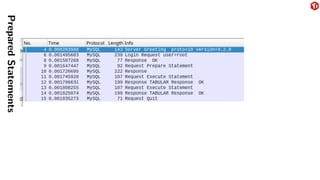
Prepared statements
Replication
Who am I?
Daniël van Eeden.
Working for PingCAP on TiDB (MySQL Compatible database, written in Go). Long
time MySQL user.
Who am I?
Daniël van Eeden.
Working for PingCAP on TiDB (MySQL Compatible database, written in Go). Long
time MySQL user. Interested in the MySQL protocol because of contributions to:
▶ Wireshark
▶ go-mysql
▶ TiDB
▶ MySQL
▶ DBD::mysql (Perl)
Why you should care about the MySQL Protocol
▶ Troubleshooting: protocol related bugs happen
▶ Performance: reduce roundtrips
▶ Cost: reduce bandwidth cost
▶ Contribute: add protocol support to new languages, tools, etc
Definitions & Scope
The MySQL Protocol is the protocol that is used between a client application and a
MySQL or MySQL Compatible server.
This is nowadays known as the ”Classic” protocol. There is also a ”X Protocol”, which
is newer and based on protobuf, but this is out of scope of this presentation.
The protocol can be used over a UNIX socket or over TCP.
Protocol information
The documentation for the protocol is made available by Oracle/MySQL on
https://dev.mysql.com/doc/dev/mysql-server/latest/PAGE_
PROTOCOL.html and is using doxygen.
The MySQL Protocol does not have a formal specification. But it is documented. And
MySQL Server, Client, Connectors, etc can be seen as refrence implementations.
So when working with the protocol it is often useful to look at the documentation, but
often you have to look at network traces with tools like Wireshark as well. And in a
few cases it helps to look at the MySQL server and client source code.
Who implements the protocol?
▶ MySQL Server
▶ TiDB
▶ Vitess (vtgate)
▶ MariaDB Server
▶ ProxySQL (including the admin
interface)
▶ MySQL Connector/J
▶ PHP with mysqlnd
▶ MySQL Connector/Python
▶ MySQL C API (libmysqlclient)
▶ MySQL Client
▶ DBD::mysql (Perl)
▶ mysqlclient (Python)
▶ Wireshark
▶ go-mysql (both client and server)
▶ go-sql-driver
▶ ClickHouse
... and much more ...
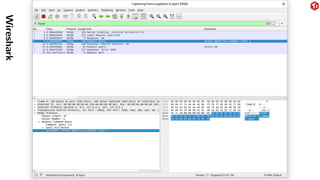
Using Wireshark with MySQL
Capture traffic and analyze
▶ Capture pcap file with tcpdump and analyze with Wireshark.
▶ Capture and analyze with Wireshark directly.
▶ Or use tshark (Wireshark CLI), especially with automation.
▶ Set -s 65535 with older tcpdump versions to capture complete packets.
Hints for the MySQL side
▶ Use -h 127.0.0.1, not localhost to avoid using a UNIX socket.
▶ Use --ssl-mode=DISABLED
▶ Use port 3306, or use Decode As . . . in Wireshark to set the protocol
▶ Use mysql as display filter to hide TCP info.
▶ Start capturing from the beginning of the connection to allow Wireshark to see
what protocol features are in use.
Wireshark
Connection Setup
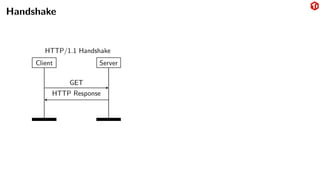
Who sends the first message?
With HTTP the client sends the first message. With MySQL the server sends the first
message.
Versioning
The Classic protocol has versions: V9 and V10. And V10 is used since MySQL 3.21.0
(1998). So basically the version number is useless.
The MySQL protocol instead uses capability flags to indicate features.
Handshake
Client Server
GET
HTTP Response
HTTP/1.1 Handshake
Handshake
Client Server
Handshake
Handshake Response
extra auth (optional)
OK
command mode
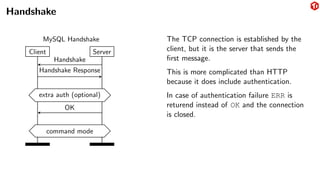
MySQL Handshake The TCP connection is established by the
client, but it is the server that sends the
first message.
This is more complicated than HTTP
because it does include authentication.
In case of authentication failure ERR is
returend instead of OK and the connection
is closed.
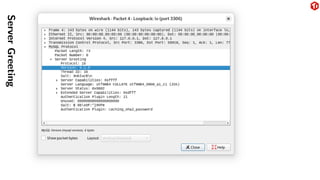
Handshake
HandshakeV10 (a.k.a. Server Greeting)
This contains:
1. Server Version (string)
2. Connection ID
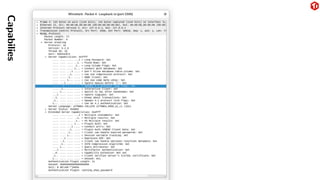
3. Capability flags (4 bytes)
4. Authentication Scramble
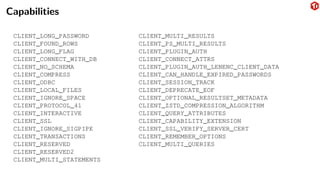
Capabilities
CLIENT_LONG_PASSWORD
CLIENT_FOUND_ROWS
CLIENT_LONG_FLAG
CLIENT_CONNECT_WITH_DB
CLIENT_NO_SCHEMA
CLIENT_COMPRESS
CLIENT_ODBC
CLIENT_LOCAL_FILES
CLIENT_IGNORE_SPACE
CLIENT_PROTOCOL_41
CLIENT_INTERACTIVE
CLIENT_SSL
CLIENT_IGNORE_SIGPIPE
CLIENT_TRANSACTIONS
CLIENT_RESERVED
CLIENT_RESERVED2
CLIENT_MULTI_STATEMENTS
CLIENT_MULTI_RESULTS
CLIENT_PS_MULTI_RESULTS
CLIENT_PLUGIN_AUTH
CLIENT_CONNECT_ATTRS
CLIENT_PLUGIN_AUTH_LENENC_CLIENT_DATA
CLIENT_CAN_HANDLE_EXPIRED_PASSWORDS
CLIENT_SESSION_TRACK
CLIENT_DEPRECATE_EOF
CLIENT_OPTIONAL_RESULTSET_METADATA
CLIENT_ZSTD_COMPRESSION_ALGORITHM
CLIENT_QUERY_ATTRIBUTES
CLIENT_CAPABILITY_EXTENSION
CLIENT_SSL_VERIFY_SERVER_CERT
CLIENT_REMEMBER_OPTIONS
CLIENT_MULTI_QUERIES
Server
Greeting
Capabilies
Handshake Response
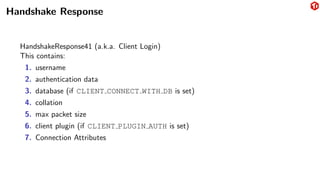
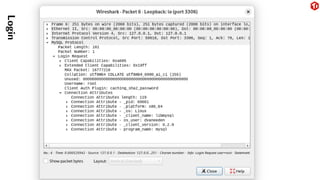
HandshakeResponse41 (a.k.a. Client Login)
This contains:
1. username
2. authentication data
3. database (if CLIENT CONNECT WITH DB is set)
4. collation
5. max packet size
6. client plugin (if CLIENT PLUGIN AUTH is set)
7. Connection Attributes
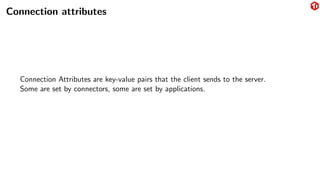
Connection attributes
Connection Attributes are key-value pairs that the client sends to the server.
Some are set by connectors, some are set by applications.
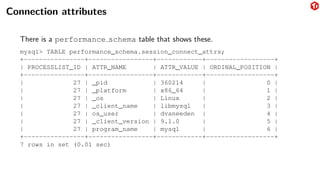
Connection attributes
There is a performance schema table that shows these.
mysql> TABLE performance_schema.session_connect_attrs;
+----------------+-----------------+------------+------------------+
| PROCESSLIST_ID | ATTR_NAME | ATTR_VALUE | ORDINAL_POSITION |
+----------------+-----------------+------------+------------------+
| 27 | _pid | 360214 | 0 |
| 27 | _platform | x86_64 | 1 |
| 27 | _os | Linux | 2 |
| 27 | _client_name | libmysql | 3 |
| 27 | os_user | dvaneeden | 4 |
| 27 | _client_version | 9.1.0 | 5 |
| 27 | program_name | mysql | 6 |
+----------------+-----------------+------------+------------------+
7 rows in set (0.01 sec)
Login
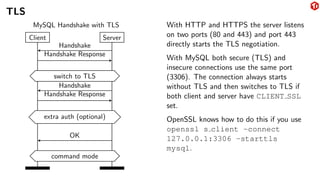
TLS
Client Server
Handshake
Handshake Response
switch to TLS
Handshake
Handshake Response
extra auth (optional)
OK
command mode
MySQL Handshake with TLS With HTTP and HTTPS the server listens
on two ports (80 and 443) and port 443
directly starts the TLS negotiation.
With MySQL both secure (TLS) and
insecure connections use the same port
(3306). The connection always starts
without TLS and then switches to TLS if
both client and server have CLIENT SSL
set.
OpenSSL knows how to do this if you use
openssl s client -connect
127.0.0.1:3306 -starttls
mysql.
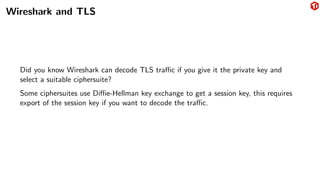
Wireshark and TLS
Did you know Wireshark can decode TLS traffic if you give it the private key and
select a suitable ciphersuite?
Some ciphersuites use Diffie-Hellman key exchange to get a session key, this requires
export of the session key if you want to decode the traffic.
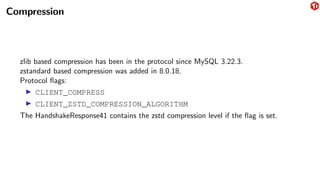
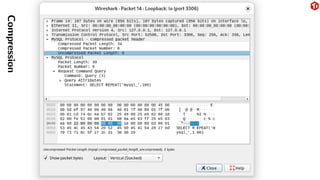
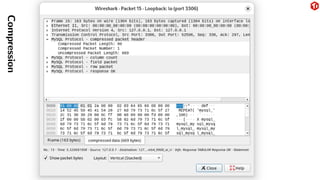
Compression
zlib based compression has been in the protocol since MySQL 3.22.3.
zstandard based compression was added in 8.0.18.
Protocol flags:
▶ CLIENT_COMPRESS
▶ CLIENT_ZSTD_COMPRESSION_ALGORITHM
The HandshakeResponse41 contains the zstd compression level if the flag is set.
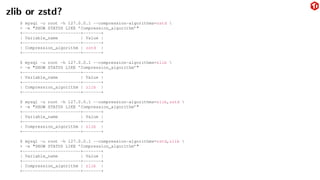
zlib or zstd?
$ mysql -u root -h 127.0.0.1 --compression-algorithms=zstd 
> -e "SHOW STATUS LIKE ’Compression_algorithm’"
+-----------------------+-------+
| Variable_name | Value |
+-----------------------+-------+
| Compression_algorithm | zstd |
+-----------------------+-------+
$ mysql -u root -h 127.0.0.1 --compression-algorithms=zlib 
> -e "SHOW STATUS LIKE ’Compression_algorithm’"
+-----------------------+-------+
| Variable_name | Value |
+-----------------------+-------+
| Compression_algorithm | zlib |
+-----------------------+-------+
$ mysql -u root -h 127.0.0.1 --compression-algorithms=zlib,zstd 
> -e "SHOW STATUS LIKE ’Compression_algorithm’"
+-----------------------+-------+
| Variable_name | Value |
+-----------------------+-------+
| Compression_algorithm | zlib |
+-----------------------+-------+
$ mysql -u root -h 127.0.0.1 --compression-algorithms=zstd,zlib 
> -e "SHOW STATUS LIKE ’Compression_algorithm’"
+-----------------------+-------+
| Variable_name | Value |
+-----------------------+-------+
| Compression_algorithm | zlib |
+-----------------------+-------+
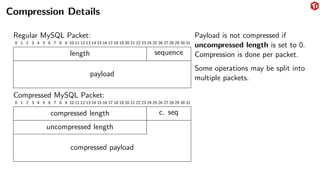
Compression Details
Regular MySQL Packet:
0 1 2 3 4 5 6 7 8 9 10 11 12 13 14 15 16 17 18 19 20 21 22 23 24 25 26 27 28 29 30 31
length sequence
payload
Compressed MySQL Packet:
0 1 2 3 4 5 6 7 8 9 10 11 12 13 14 15 16 17 18 19 20 21 22 23 24 25 26 27 28 29 30 31
compressed length c. seq
uncompressed length
compressed payload
Payload is not compressed if
uncompressed length is set to 0.
Compression is done per packet.
Some operations may be split into
multiple packets.
Compression
Compression
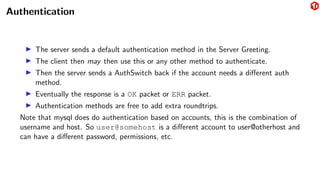
Authentication
▶ The server sends a default authentication method in the Server Greeting.
▶ The client then may then use this or any other method to authenticate.
▶ Then the server sends a AuthSwitch back if the account needs a different auth
method.
▶ Eventually the response is a OK packet or ERR packet.
▶ Authentication methods are free to add extra roundtrips.
Note that mysql does do authentication based on accounts, this is the combination of
username and host. So user@somehost is a different account to user@otherhost and
can have a different password, permissions, etc.
Authentication
When migrating to a newer authentication method the server announced default and
the client default might be wrong for a specific account. This increases the
AuthSwitch roundtrips. Especially for Perl, PHP, etc this might be costly as they tend
not to use persistent connections.
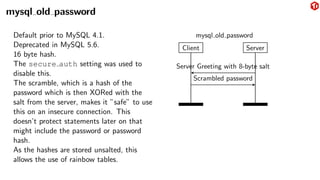
mysql old password
Default prior to MySQL 4.1.
Deprecated in MySQL 5.6.
16 byte hash.
The secure auth setting was used to
disable this.
The scramble, which is a hash of the
password which is then XORed with the
salt from the server, makes it ”safe” to use
this on an insecure connection. This
doesn’t protect statements later on that
might include the password or password
hash.
As the hashes are stored unsalted, this
allows the use of rainbow tables.
Client Server
Server Greeting with 8-byte salt
Scrambled password
mysql old password
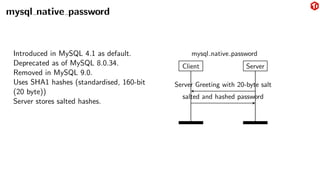
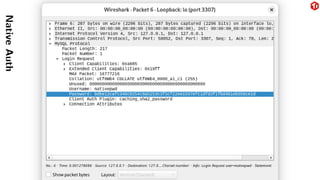
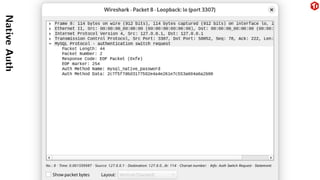
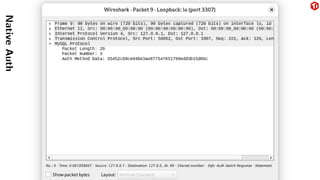
mysql native password
Introduced in MySQL 4.1 as default.
Deprecated as of MySQL 8.0.34.
Removed in MySQL 9.0.
Uses SHA1 hashes (standardised, 160-bit
(20 byte))
Server stores salted hashes.
Client Server
Server Greeting with 20-byte salt
salted and hashed password
mysql native password
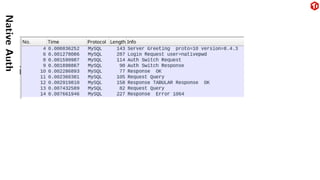
Native
Auth
Native
Auth
Native
Auth
Native
Auth
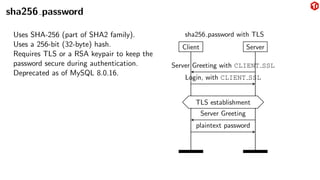
sha256 password
Uses SHA-256 (part of SHA2 family).
Uses a 256-bit (32-byte) hash.
Requires TLS or a RSA keypair to keep the
password secure during authentication.
Deprecated as of MySQL 8.0.16.
Client Server
Server Greeting with CLIENT SSL
Login, with CLIENT SSL
TLS establishment
Server Greeting
plaintext password
sha256 password with TLS
RSA keypair
Automatically generated.
How to distribute the public keys of your server to the clients securely is up to the user.
So is key rollover, etc.
Only protects the authentication part of the connection.
There is the --get-server-public-key option to request the public key over a
MySQL connection. But this connection is not secure and open to a
man-in-the-middle attack.
A TOFU (Trust On First Use) would have somewhat improved this.
No hostname validation.
TLS takes care of all of this.
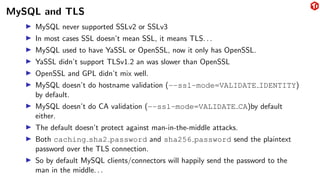
MySQL and TLS
▶ MySQL never supported SSLv2 or SSLv3
▶ In most cases SSL doesn’t mean SSL, it means TLS. . .
▶ MySQL used to have YaSSL or OpenSSL, now it only has OpenSSL.
▶ YaSSL didn’t support TLSv1.2 an was slower than OpenSSL
▶ OpenSSL and GPL didn’t mix well.
▶ MySQL doesn’t do hostname validation (--ssl-mode=VALIDATE IDENTITY)
by default.
▶ MySQL doesn’t do CA validation (--ssl-mode=VALIDATE CA)by default
either.
▶ The default doesn’t protect against man-in-the-middle attacks.
▶ Both caching sha2 password and sha256 password send the plaintext
password over the TLS connection.
▶ So by default MySQL clients/connectors will happily send the password to the
man in the middle. . .
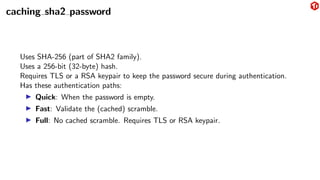
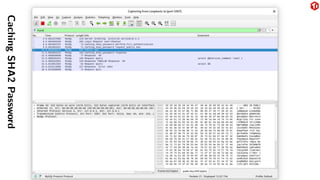
caching sha2 password
Uses SHA-256 (part of SHA2 family).
Uses a 256-bit (32-byte) hash.
Requires TLS or a RSA keypair to keep the password secure during authentication.
Has these authentication paths:
▶ Quick: When the password is empty.
▶ Fast: Validate the (cached) scramble.
▶ Full: No cached scramble. Requires TLS or RSA keypair.
Caching
SHA2
Password
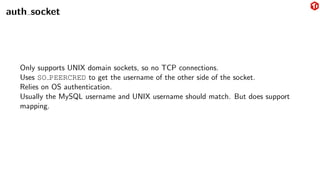
auth socket
Only supports UNIX domain sockets, so no TCP connections.
Uses SO PEERCRED to get the username of the other side of the socket.
Relies on OS authentication.
Usually the MySQL username and UNIX username should match. But does support
mapping.
Multi Factor Authentication
AuthNextFactor packets are sent by the server after each method.
mysql clear password
Only a client-side plugin.
Useful with PAM and simple LDAP authentiction.
Queries & resultsets
▶ Text Protocol: COM QUERY
▶ Binary Protocol: Prepared statements
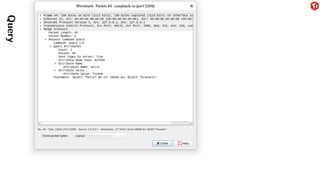
COM QUERY
COM_QUERY
<query>
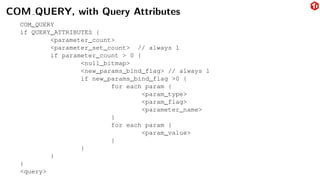
COM QUERY, with Query Attributes
COM_QUERY
if QUERY_ATTRIBUTES {
<parameter_count>
<parameter_set_count> // always 1
if parameter_count > 0 {
<null_bitmap>
<new_params_bind_flag> // always 1
if new_params_bind_flag >0 {
for each param {
<param_type>
<param_flag>
<parameter_name>
}
for each param {
<param_value>
}
}
}
}
<query>
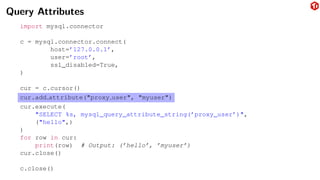
Query Attributes
import mysql.connector
c = mysql.connector.connect(
host=’127.0.0.1’,
user=’root’,
ssl_disabled=True,
)
cur = c.cursor()
cur.add attribute("proxy user", "myuser")
cur.execute(
"SELECT %s, mysql_query_attribute_string(’proxy_user’)",
("hello",)
)
for row in cur:
print(row) # Output: (’hello’, ’myuser’)
cur.close()
c.close()
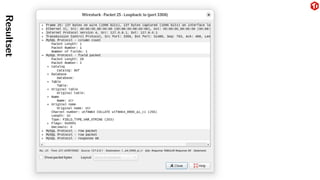
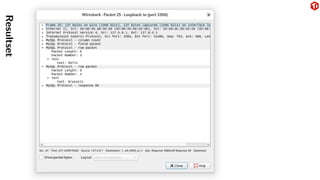
Query
Resultsets
Result is one of these:
▶ ERR-packet
▶ OK-packet
▶ LOCAL INFILE request
▶ Text resultset
Text Resultset
▶ Field count
▶ List of fields
▶ Intermediate EOF
▶ List of rows
Resultset
Resultset
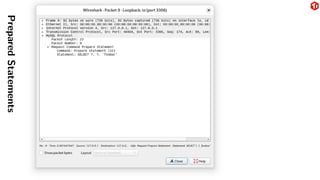
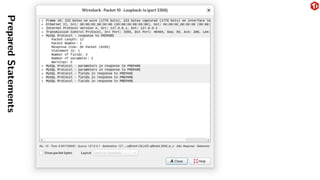
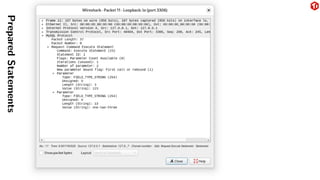
Prepared statements
▶ Prepare: Just COM STMT PREPARE with the query.
▶ Response: Metadata about number of parameters, etc
▶ Execute: COM STMT EXECUTE with the ID of the prepare and a list of
parameters.
Note that some drivers might do a client side prepare emulation to avoid the roundtrip.
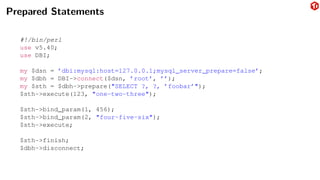
Prepared Statements
#!/bin/perl
use v5.40;
use DBI;
my $dsn = ’dbi:mysql:host=127.0.0.1;mysql_server_prepare=false’;
my $dbh = DBI->connect($dsn, ’root’, ’’);
my $sth = $dbh->prepare("SELECT ?, ?, ’foobar’");
$sth->execute(123, "one-two-three");
$sth->bind_param(1, 456);
$sth->bind_param(2, "four-five-six");
$sth->execute;
$sth->finish;
$dbh->disconnect;
Prepared
Statements
Prepared
Statements
Prepared
Statements
Prepared
Statements
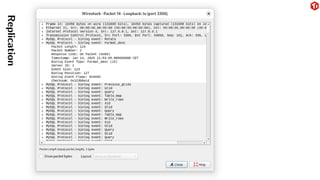
Replication
▶ Connection setup as usual
▶ Optional: COM REGISTER REPLICA to register the relica
(for SHOW REPLICAS)
▶ COM BINLOG DUMP or COM BINLOG DUMP GTID to start binlog stream.
▶ binlog stream is mostly identical to the binlog files on disk
▶ binlog stream consistes of a series of events.
Replication
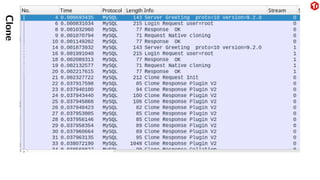
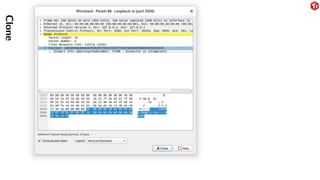
Clone
▶ Clones the data files of a MySQL instance
▶ Uses multiple connections
Clone
Clone
Query Cache & DEPRECATE EOF
The (now removed) Query Cache in MySQL did not cache queries.
The Query Cache cached network packets with results. The query matching was very
simple. Different case? Different comment? Different query!
The DEPRECATE EOF flag changed how result packets looked like. This flag is per
connection. The cache lookup didn’t check if the connection was using the same
setting for this flag.
The results that were cached were not respecting the setting of this flag and didn’t
properly follow the protocol.
https://bugs.mysql.com/bug.php?id=83346
Questions?
Thank you!
Daniel.van.Eeden@pingcap.com
https://gitlab.com/wireshark/wireshark/
https://www.wireshark.org/
https://dev.mysql.com/doc/dev/mysql-server/latest/PAGE_PROTOCOL.html

MySQL Network Protocol: A walktrhough

  • 1.
    MySQL Network Protocol:A walkthrough Daniël van Eeden PingCAP FOSDEM, February 2025
  • 2.
    Agenda Introduction Connection Setup Handshake TLS &Compression Authentication Command Phase Queries & resultsets Prepared statements Replication
  • 3.
    Who am I? Daniëlvan Eeden. Working for PingCAP on TiDB (MySQL Compatible database, written in Go). Long time MySQL user.
  • 4.
    Who am I? Daniëlvan Eeden. Working for PingCAP on TiDB (MySQL Compatible database, written in Go). Long time MySQL user. Interested in the MySQL protocol because of contributions to: ▶ Wireshark ▶ go-mysql ▶ TiDB ▶ MySQL ▶ DBD::mysql (Perl)
  • 5.
    Why you shouldcare about the MySQL Protocol ▶ Troubleshooting: protocol related bugs happen ▶ Performance: reduce roundtrips ▶ Cost: reduce bandwidth cost ▶ Contribute: add protocol support to new languages, tools, etc
  • 6.
    Definitions & Scope TheMySQL Protocol is the protocol that is used between a client application and a MySQL or MySQL Compatible server. This is nowadays known as the ”Classic” protocol. There is also a ”X Protocol”, which is newer and based on protobuf, but this is out of scope of this presentation. The protocol can be used over a UNIX socket or over TCP.
  • 7.
    Protocol information The documentationfor the protocol is made available by Oracle/MySQL on https://dev.mysql.com/doc/dev/mysql-server/latest/PAGE_ PROTOCOL.html and is using doxygen. The MySQL Protocol does not have a formal specification. But it is documented. And MySQL Server, Client, Connectors, etc can be seen as refrence implementations. So when working with the protocol it is often useful to look at the documentation, but often you have to look at network traces with tools like Wireshark as well. And in a few cases it helps to look at the MySQL server and client source code.
  • 8.
    Who implements theprotocol? ▶ MySQL Server ▶ TiDB ▶ Vitess (vtgate) ▶ MariaDB Server ▶ ProxySQL (including the admin interface) ▶ MySQL Connector/J ▶ PHP with mysqlnd ▶ MySQL Connector/Python ▶ MySQL C API (libmysqlclient) ▶ MySQL Client ▶ DBD::mysql (Perl) ▶ mysqlclient (Python) ▶ Wireshark ▶ go-mysql (both client and server) ▶ go-sql-driver ▶ ClickHouse ... and much more ...
  • 9.
    Using Wireshark withMySQL Capture traffic and analyze ▶ Capture pcap file with tcpdump and analyze with Wireshark. ▶ Capture and analyze with Wireshark directly. ▶ Or use tshark (Wireshark CLI), especially with automation. ▶ Set -s 65535 with older tcpdump versions to capture complete packets. Hints for the MySQL side ▶ Use -h 127.0.0.1, not localhost to avoid using a UNIX socket. ▶ Use --ssl-mode=DISABLED ▶ Use port 3306, or use Decode As . . . in Wireshark to set the protocol ▶ Use mysql as display filter to hide TCP info. ▶ Start capturing from the beginning of the connection to allow Wireshark to see what protocol features are in use.
  • 10.
  • 11.
    Connection Setup Who sendsthe first message? With HTTP the client sends the first message. With MySQL the server sends the first message. Versioning The Classic protocol has versions: V9 and V10. And V10 is used since MySQL 3.21.0 (1998). So basically the version number is useless. The MySQL protocol instead uses capability flags to indicate features.
  • 12.
  • 13.
    Handshake Client Server Handshake Handshake Response extraauth (optional) OK command mode MySQL Handshake The TCP connection is established by the client, but it is the server that sends the first message. This is more complicated than HTTP because it does include authentication. In case of authentication failure ERR is returend instead of OK and the connection is closed.
  • 14.
    Handshake HandshakeV10 (a.k.a. ServerGreeting) This contains: 1. Server Version (string) 2. Connection ID 3. Capability flags (4 bytes) 4. Authentication Scramble
  • 15.
  • 16.
  • 17.
  • 18.
    Handshake Response HandshakeResponse41 (a.k.a.Client Login) This contains: 1. username 2. authentication data 3. database (if CLIENT CONNECT WITH DB is set) 4. collation 5. max packet size 6. client plugin (if CLIENT PLUGIN AUTH is set) 7. Connection Attributes
  • 19.
    Connection attributes Connection Attributesare key-value pairs that the client sends to the server. Some are set by connectors, some are set by applications.
  • 20.
    Connection attributes There isa performance schema table that shows these. mysql> TABLE performance_schema.session_connect_attrs; +----------------+-----------------+------------+------------------+ | PROCESSLIST_ID | ATTR_NAME | ATTR_VALUE | ORDINAL_POSITION | +----------------+-----------------+------------+------------------+ | 27 | _pid | 360214 | 0 | | 27 | _platform | x86_64 | 1 | | 27 | _os | Linux | 2 | | 27 | _client_name | libmysql | 3 | | 27 | os_user | dvaneeden | 4 | | 27 | _client_version | 9.1.0 | 5 | | 27 | program_name | mysql | 6 | +----------------+-----------------+------------+------------------+ 7 rows in set (0.01 sec)
  • 21.
  • 22.
    TLS Client Server Handshake Handshake Response switchto TLS Handshake Handshake Response extra auth (optional) OK command mode MySQL Handshake with TLS With HTTP and HTTPS the server listens on two ports (80 and 443) and port 443 directly starts the TLS negotiation. With MySQL both secure (TLS) and insecure connections use the same port (3306). The connection always starts without TLS and then switches to TLS if both client and server have CLIENT SSL set. OpenSSL knows how to do this if you use openssl s client -connect 127.0.0.1:3306 -starttls mysql.
  • 23.
    Wireshark and TLS Didyou know Wireshark can decode TLS traffic if you give it the private key and select a suitable ciphersuite? Some ciphersuites use Diffie-Hellman key exchange to get a session key, this requires export of the session key if you want to decode the traffic.
  • 24.
    Compression zlib based compressionhas been in the protocol since MySQL 3.22.3. zstandard based compression was added in 8.0.18. Protocol flags: ▶ CLIENT_COMPRESS ▶ CLIENT_ZSTD_COMPRESSION_ALGORITHM The HandshakeResponse41 contains the zstd compression level if the flag is set.
  • 25.
    zlib or zstd? $mysql -u root -h 127.0.0.1 --compression-algorithms=zstd > -e "SHOW STATUS LIKE ’Compression_algorithm’" +-----------------------+-------+ | Variable_name | Value | +-----------------------+-------+ | Compression_algorithm | zstd | +-----------------------+-------+ $ mysql -u root -h 127.0.0.1 --compression-algorithms=zlib > -e "SHOW STATUS LIKE ’Compression_algorithm’" +-----------------------+-------+ | Variable_name | Value | +-----------------------+-------+ | Compression_algorithm | zlib | +-----------------------+-------+ $ mysql -u root -h 127.0.0.1 --compression-algorithms=zlib,zstd > -e "SHOW STATUS LIKE ’Compression_algorithm’" +-----------------------+-------+ | Variable_name | Value | +-----------------------+-------+ | Compression_algorithm | zlib | +-----------------------+-------+ $ mysql -u root -h 127.0.0.1 --compression-algorithms=zstd,zlib > -e "SHOW STATUS LIKE ’Compression_algorithm’" +-----------------------+-------+ | Variable_name | Value | +-----------------------+-------+ | Compression_algorithm | zlib | +-----------------------+-------+
  • 26.
    Compression Details Regular MySQLPacket: 0 1 2 3 4 5 6 7 8 9 10 11 12 13 14 15 16 17 18 19 20 21 22 23 24 25 26 27 28 29 30 31 length sequence payload Compressed MySQL Packet: 0 1 2 3 4 5 6 7 8 9 10 11 12 13 14 15 16 17 18 19 20 21 22 23 24 25 26 27 28 29 30 31 compressed length c. seq uncompressed length compressed payload Payload is not compressed if uncompressed length is set to 0. Compression is done per packet. Some operations may be split into multiple packets.
  • 27.
  • 28.
  • 29.
    Authentication ▶ The serversends a default authentication method in the Server Greeting. ▶ The client then may then use this or any other method to authenticate. ▶ Then the server sends a AuthSwitch back if the account needs a different auth method. ▶ Eventually the response is a OK packet or ERR packet. ▶ Authentication methods are free to add extra roundtrips. Note that mysql does do authentication based on accounts, this is the combination of username and host. So user@somehost is a different account to user@otherhost and can have a different password, permissions, etc.
  • 30.
    Authentication When migrating toa newer authentication method the server announced default and the client default might be wrong for a specific account. This increases the AuthSwitch roundtrips. Especially for Perl, PHP, etc this might be costly as they tend not to use persistent connections.
  • 31.
    mysql old password Defaultprior to MySQL 4.1. Deprecated in MySQL 5.6. 16 byte hash. The secure auth setting was used to disable this. The scramble, which is a hash of the password which is then XORed with the salt from the server, makes it ”safe” to use this on an insecure connection. This doesn’t protect statements later on that might include the password or password hash. As the hashes are stored unsalted, this allows the use of rainbow tables. Client Server Server Greeting with 8-byte salt Scrambled password mysql old password
  • 32.
    mysql native password Introducedin MySQL 4.1 as default. Deprecated as of MySQL 8.0.34. Removed in MySQL 9.0. Uses SHA1 hashes (standardised, 160-bit (20 byte)) Server stores salted hashes. Client Server Server Greeting with 20-byte salt salted and hashed password mysql native password
  • 33.
  • 34.
  • 35.
  • 36.
  • 37.
    sha256 password Uses SHA-256(part of SHA2 family). Uses a 256-bit (32-byte) hash. Requires TLS or a RSA keypair to keep the password secure during authentication. Deprecated as of MySQL 8.0.16. Client Server Server Greeting with CLIENT SSL Login, with CLIENT SSL TLS establishment Server Greeting plaintext password sha256 password with TLS
  • 38.
    RSA keypair Automatically generated. Howto distribute the public keys of your server to the clients securely is up to the user. So is key rollover, etc. Only protects the authentication part of the connection. There is the --get-server-public-key option to request the public key over a MySQL connection. But this connection is not secure and open to a man-in-the-middle attack. A TOFU (Trust On First Use) would have somewhat improved this. No hostname validation. TLS takes care of all of this.
  • 39.
    MySQL and TLS ▶MySQL never supported SSLv2 or SSLv3 ▶ In most cases SSL doesn’t mean SSL, it means TLS. . . ▶ MySQL used to have YaSSL or OpenSSL, now it only has OpenSSL. ▶ YaSSL didn’t support TLSv1.2 an was slower than OpenSSL ▶ OpenSSL and GPL didn’t mix well. ▶ MySQL doesn’t do hostname validation (--ssl-mode=VALIDATE IDENTITY) by default. ▶ MySQL doesn’t do CA validation (--ssl-mode=VALIDATE CA)by default either. ▶ The default doesn’t protect against man-in-the-middle attacks. ▶ Both caching sha2 password and sha256 password send the plaintext password over the TLS connection. ▶ So by default MySQL clients/connectors will happily send the password to the man in the middle. . .
  • 40.
    caching sha2 password UsesSHA-256 (part of SHA2 family). Uses a 256-bit (32-byte) hash. Requires TLS or a RSA keypair to keep the password secure during authentication. Has these authentication paths: ▶ Quick: When the password is empty. ▶ Fast: Validate the (cached) scramble. ▶ Full: No cached scramble. Requires TLS or RSA keypair.
  • 41.
  • 42.
    auth socket Only supportsUNIX domain sockets, so no TCP connections. Uses SO PEERCRED to get the username of the other side of the socket. Relies on OS authentication. Usually the MySQL username and UNIX username should match. But does support mapping.
  • 43.
    Multi Factor Authentication AuthNextFactorpackets are sent by the server after each method.
  • 44.
    mysql clear password Onlya client-side plugin. Useful with PAM and simple LDAP authentiction.
  • 45.
    Queries & resultsets ▶Text Protocol: COM QUERY ▶ Binary Protocol: Prepared statements
  • 46.
  • 47.
    COM QUERY, withQuery Attributes COM_QUERY if QUERY_ATTRIBUTES { <parameter_count> <parameter_set_count> // always 1 if parameter_count > 0 { <null_bitmap> <new_params_bind_flag> // always 1 if new_params_bind_flag >0 { for each param { <param_type> <param_flag> <parameter_name> } for each param { <param_value> } } } } <query>
  • 48.
    Query Attributes import mysql.connector c= mysql.connector.connect( host=’127.0.0.1’, user=’root’, ssl_disabled=True, ) cur = c.cursor() cur.add attribute("proxy user", "myuser") cur.execute( "SELECT %s, mysql_query_attribute_string(’proxy_user’)", ("hello",) ) for row in cur: print(row) # Output: (’hello’, ’myuser’) cur.close() c.close()
  • 49.
  • 50.
    Resultsets Result is oneof these: ▶ ERR-packet ▶ OK-packet ▶ LOCAL INFILE request ▶ Text resultset
  • 51.
    Text Resultset ▶ Fieldcount ▶ List of fields ▶ Intermediate EOF ▶ List of rows
  • 52.
  • 53.
  • 54.
    Prepared statements ▶ Prepare:Just COM STMT PREPARE with the query. ▶ Response: Metadata about number of parameters, etc ▶ Execute: COM STMT EXECUTE with the ID of the prepare and a list of parameters. Note that some drivers might do a client side prepare emulation to avoid the roundtrip.
  • 55.
    Prepared Statements #!/bin/perl use v5.40; useDBI; my $dsn = ’dbi:mysql:host=127.0.0.1;mysql_server_prepare=false’; my $dbh = DBI->connect($dsn, ’root’, ’’); my $sth = $dbh->prepare("SELECT ?, ?, ’foobar’"); $sth->execute(123, "one-two-three"); $sth->bind_param(1, 456); $sth->bind_param(2, "four-five-six"); $sth->execute; $sth->finish; $dbh->disconnect;
  • 56.
  • 57.
  • 58.
  • 59.
  • 60.
    Replication ▶ Connection setupas usual ▶ Optional: COM REGISTER REPLICA to register the relica (for SHOW REPLICAS) ▶ COM BINLOG DUMP or COM BINLOG DUMP GTID to start binlog stream. ▶ binlog stream is mostly identical to the binlog files on disk ▶ binlog stream consistes of a series of events.
  • 61.
  • 62.
    Clone ▶ Clones thedata files of a MySQL instance ▶ Uses multiple connections
  • 63.
  • 64.
  • 65.
    Query Cache &DEPRECATE EOF The (now removed) Query Cache in MySQL did not cache queries. The Query Cache cached network packets with results. The query matching was very simple. Different case? Different comment? Different query! The DEPRECATE EOF flag changed how result packets looked like. This flag is per connection. The cache lookup didn’t check if the connection was using the same setting for this flag. The results that were cached were not respecting the setting of this flag and didn’t properly follow the protocol. https://bugs.mysql.com/bug.php?id=83346
  • 66.