MySQL Tutorial By:  John Bouchard II Bruce Harris
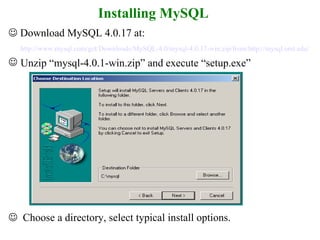
Installing MySQL    Download MySQL 4.0.17 at:  http://www.mysql.com/get/Downloads/MySQL-4.0/mysql-4.0.17-win.zip/from/http://mysql.orst.edu/ Unzip “mysql-4.0.1-win.zip” and execute “setup.exe”    Choose a directory, select typical install options.
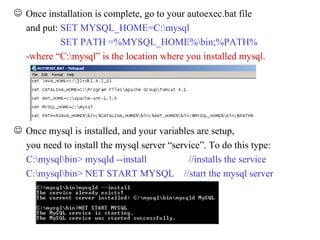
Once installation is complete, go to your autoexec.bat file and put:  SET MYSQL_HOME=C:\mysql SET PATH =%MYSQL_HOME%\bin;%PATH% -where “C:\mysql” is the location where you installed mysql. Once mysql is installed, and your variables are setup, you need to install the mysql server “service”. To do this type:  C:\mysql\bin> mysqld --install  //installs the service C:\mysql\bin> NET START MYSQL  //start the mysql server
Connecting to the MySQL Server SYNTAX:  mysql -h host -u user -p  << EXAMPLE >> C:\mysql\bin> mysql –h localhost –u root –p NOTE: THE DEFAULT PASSWORD FOR ROOT IS BLANK !!!
Changing “ROOT” password    GET USER FIRST:  C:\mysql\bin> mysql -u root mysql     CHANGE PASSWORD SYNTAX: mysql> UPDATE user SET Password=PASSWORD('new_password')  WHERE user='root';  mysql> FLUSH PRIVILEGES;   DON NOT FORGET THE   “  ;  “ semi-colon
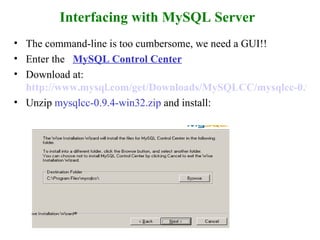
Interfacing with MySQL Server The command-line is too cumbersome, we need a GUI!! Enter the  MySQL Control Center   Download at:   http://www.mysql.com/get/Downloads/MySQLCC/mysqlcc-0.9.4-win32.zip/from/http://mysql.orst.edu/ Unzip  mysqlcc-0.9.4-win32.zip  and install:
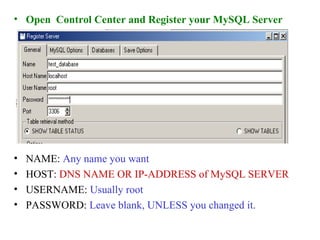
Open  Control Center and Register your MySQL Server NAME:  Any name you want HOST:  DNS NAME OR IP-ADDRESS of MySQL SERVER USERNAME:  Usually root PASSWORD:  Leave blank, UNLESS you changed it.
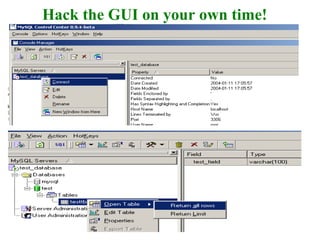
Hack the GUI on your own time!
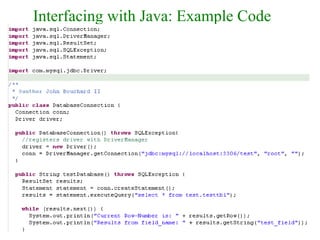
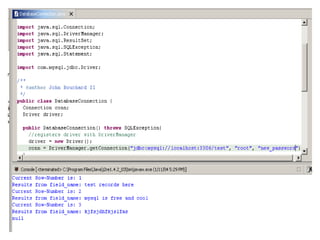
Interfacing with Java: Important Points Use ConnectorJ  “JDBC Driver” Include  mysql-connector-java-3.0.10-stable-bin.jar  in your java project Import  com.mysql.jdbc.Driver; Get to know the  java.sql.*  Package! Understand “DriverManager” and its relationship with a “Connection”. OTHER CLASSES OF USE: ResultSet  -  The format Data is retrieved from a Database. Statement  -  Used to query a Database for a ResultSet. CallStatement   -  Execute a StoredProcedure in the database to  obtain a ResultSet.
Interfacing with Java: Example Code
 

Mysql

  • 1.
    MySQL Tutorial By: John Bouchard II Bruce Harris
  • 2.
    Installing MySQL  Download MySQL 4.0.17 at: http://www.mysql.com/get/Downloads/MySQL-4.0/mysql-4.0.17-win.zip/from/http://mysql.orst.edu/ Unzip “mysql-4.0.1-win.zip” and execute “setup.exe”  Choose a directory, select typical install options.
  • 3.
    Once installation iscomplete, go to your autoexec.bat file and put: SET MYSQL_HOME=C:\mysql SET PATH =%MYSQL_HOME%\bin;%PATH% -where “C:\mysql” is the location where you installed mysql. Once mysql is installed, and your variables are setup, you need to install the mysql server “service”. To do this type: C:\mysql\bin> mysqld --install //installs the service C:\mysql\bin> NET START MYSQL //start the mysql server
  • 4.
    Connecting to theMySQL Server SYNTAX: mysql -h host -u user -p << EXAMPLE >> C:\mysql\bin> mysql –h localhost –u root –p NOTE: THE DEFAULT PASSWORD FOR ROOT IS BLANK !!!
  • 5.
    Changing “ROOT” password GET USER FIRST: C:\mysql\bin> mysql -u root mysql  CHANGE PASSWORD SYNTAX: mysql> UPDATE user SET Password=PASSWORD('new_password') WHERE user='root'; mysql> FLUSH PRIVILEGES; DON NOT FORGET THE “ ; “ semi-colon
  • 6.
    Interfacing with MySQLServer The command-line is too cumbersome, we need a GUI!! Enter the MySQL Control Center Download at: http://www.mysql.com/get/Downloads/MySQLCC/mysqlcc-0.9.4-win32.zip/from/http://mysql.orst.edu/ Unzip mysqlcc-0.9.4-win32.zip and install:
  • 7.
    Open ControlCenter and Register your MySQL Server NAME: Any name you want HOST: DNS NAME OR IP-ADDRESS of MySQL SERVER USERNAME: Usually root PASSWORD: Leave blank, UNLESS you changed it.
  • 8.
    Hack the GUIon your own time!
  • 9.
    Interfacing with Java:Important Points Use ConnectorJ “JDBC Driver” Include mysql-connector-java-3.0.10-stable-bin.jar in your java project Import com.mysql.jdbc.Driver; Get to know the java.sql.* Package! Understand “DriverManager” and its relationship with a “Connection”. OTHER CLASSES OF USE: ResultSet - The format Data is retrieved from a Database. Statement - Used to query a Database for a ResultSet. CallStatement - Execute a StoredProcedure in the database to obtain a ResultSet.
  • 10.
  • 11.