MY SYSAUXTABLESPACEIS FULL
Pleasehelp me
2
 Together we are 1500 specialists at 34 locations in
Switzerland, Germany and Austria with a focus on Data &
Applied Intelligence.
 Together we support you in the intelligent end-to-end use
of your data.
 We cover the entire spectrum: from the development and
operation of data platforms and solutions, to the
refinement of data as well as consulting and training.
 We achieve this through the unique combination of Trivadis'
technological expertise and Accenture's strategic know-
how in the field of data.
TRIVADIS & ACCENTURE: #1 FOR DATA & AI
3
BUSINESS
ANALYTICS
BUSINESS
AUTOMATION
MODERNE DATEN-
PLATTFORMEN
MODERNE CLOUD-
INFRASTRUKTUR
OUR RANGE OF SERVICE
HI!
MARKUS FLECHTNER
PRINCIPAL CONSULTANT
 Trivadis Germany GmbH
 Studied Mathematics a long time ago
 Focus
o Oracle High Availability
o Database Upgrade + Migration
 Teacher: RAC, New Features, Multitenant, PostgreSQL
 Twitter @markusdba
 Blog: markusdba.net|.de
 Co-author of the book "Der Oracle DBA (2016)"
5 AGENDA
 Introduction
 Which components occupy space in SYSAUX?
 How to cleanup the SYSAUX Tablespace?
 How to keep the SYSAUX tablespace small?
 Conclusion & more information
6
INTRODUCTION
7 INTRODUCTION
 Until Oracle Database 9i there was the SYSTEM tablespace only
o All database components stored their data their
 With Oracle Database 10g Oracle introduced the SYSAUX tablespace
o Data of many database components was moved to SYSAUX
 Oracle says "if SYSAUX is not available, the database will not fail" (but only components
which store data in SYSAUX)
8 SPACE ISSUES WITH SYSAUX
 Since Oracle 10g more and more components store their data in SYSAUX
 It keeps growing
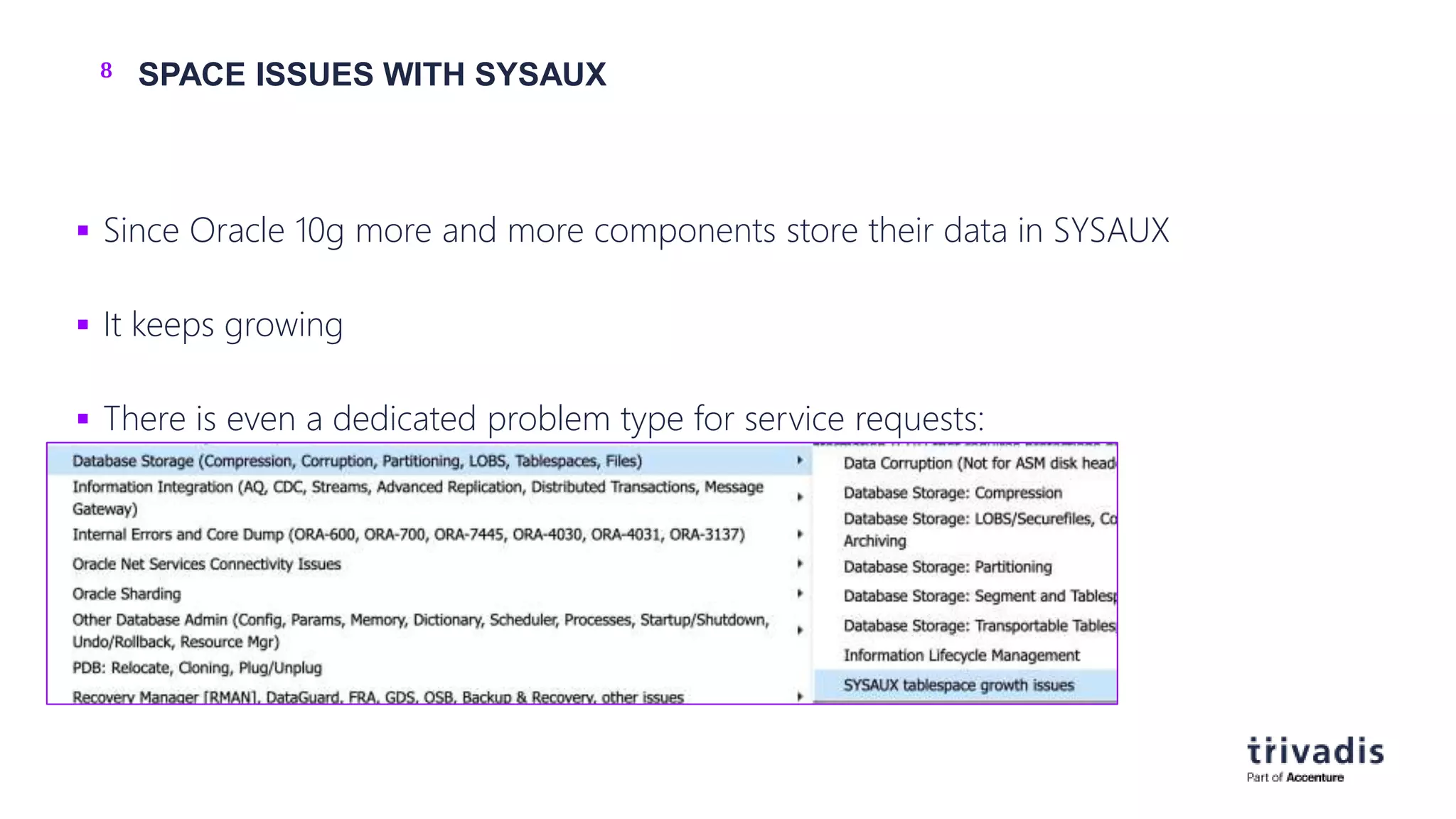
 There is even a dedicated problem type for service requests:
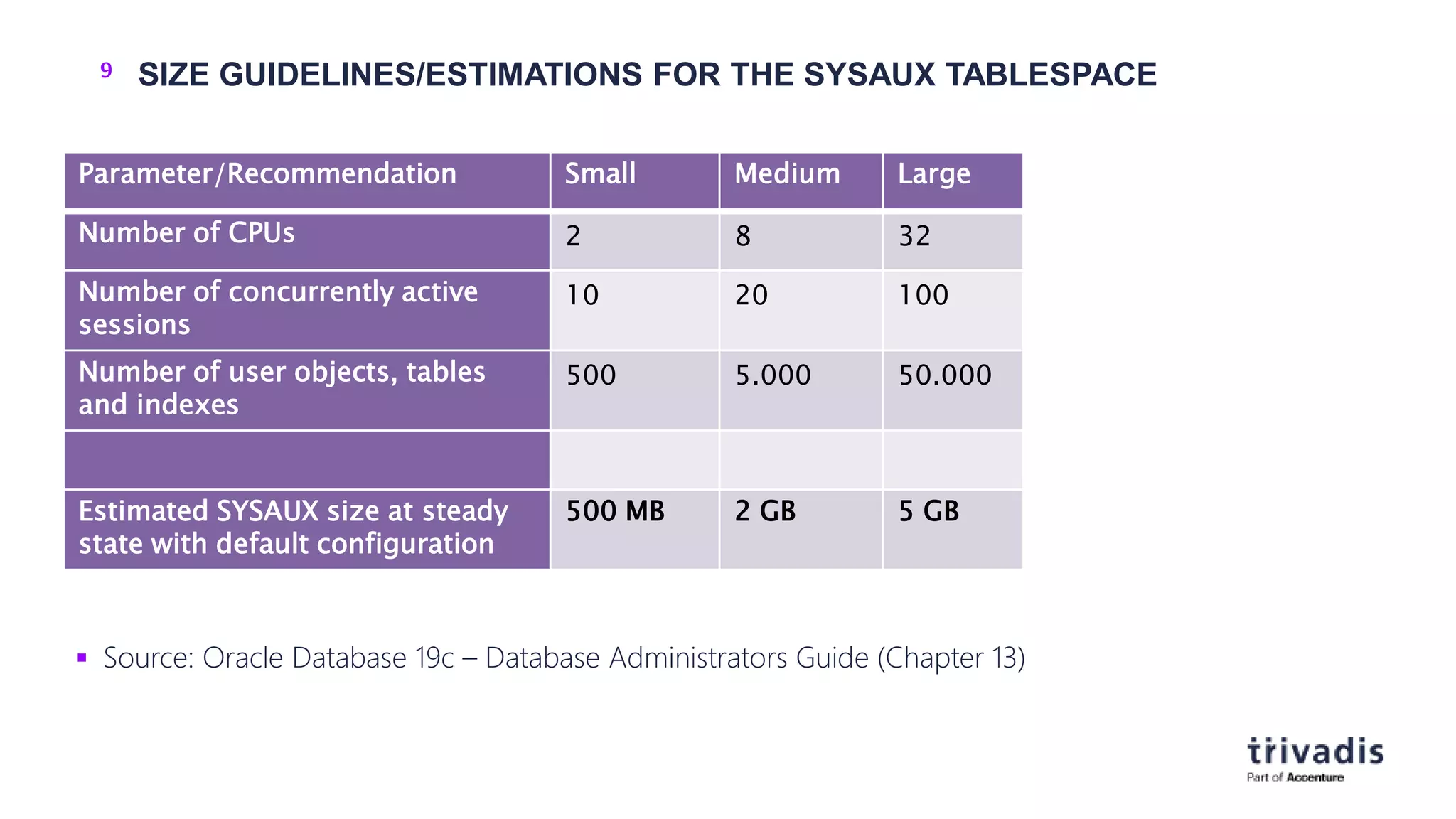
9 SIZE GUIDELINES/ESTIMATIONS FOR THE SYSAUX TABLESPACE
 Source: Oracle Database 19c – Database Administrators Guide (Chapter 13)
Parameter/Recommendation Small Medium Large
Number of CPUs 2 8 32
Number of concurrently active
sessions
10 20 100
Number of user objects, tables
and indexes
500 5.000 50.000
Estimated SYSAUX size at steady
state with default configuration
500 MB 2 GB 5 GB
10
WHICHCOMPONENTSOCCUPYSPACE IN SYSAUX?
11 THE ENTRYPOINT: V$SYSAUX_OCCUPANTS
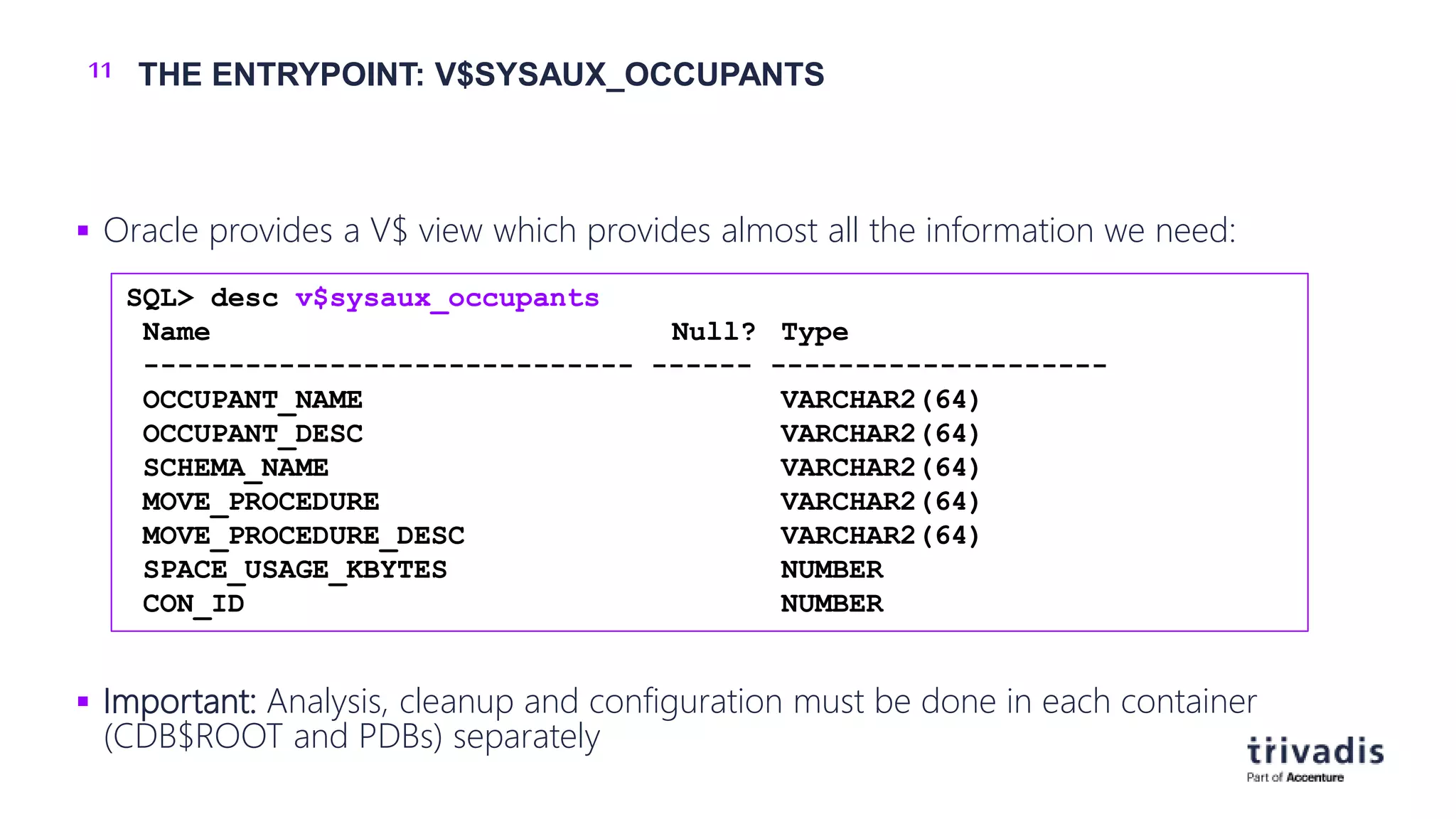
 Oracle provides a V$ view which provides almost all the information we need:
 Important: Analysis, cleanup and configuration must be done in each container
(CDB$ROOT and PDBs) separately
SQL> desc v$sysaux_occupants
Name Null? Type
----------------------------- ------ --------------------
OCCUPANT_NAME VARCHAR2(64)
OCCUPANT_DESC VARCHAR2(64)
SCHEMA_NAME VARCHAR2(64)
MOVE_PROCEDURE VARCHAR2(64)
MOVE_PROCEDURE_DESC VARCHAR2(64)
SPACE_USAGE_KBYTES NUMBER
CON_ID NUMBER
12 ISSUES WITH V$SYSAUX_OCCUPANTS (1)
 In a Container Database when in CDB$ROOT, V$SYSAUX_OCCUPANTS shows the
current container only (i.e. CDB$ROOT)
o No global view possible
o SR open
 Other issues (public bugs from MOS):
o Bug 16767759 AUDSYS schema is not present in V$SYSAUX_OCCUPANTS
o Open since 12.1.0.1, fixed in 12.2
o Bug 10404641 V$sysaux_occupants.space_usage_kbytes may not be accurate
o Open since 10.2.0.4, fixed in 18.1
13 ISSUES WITH V$SYSAUX_OCCUPANTS (2)
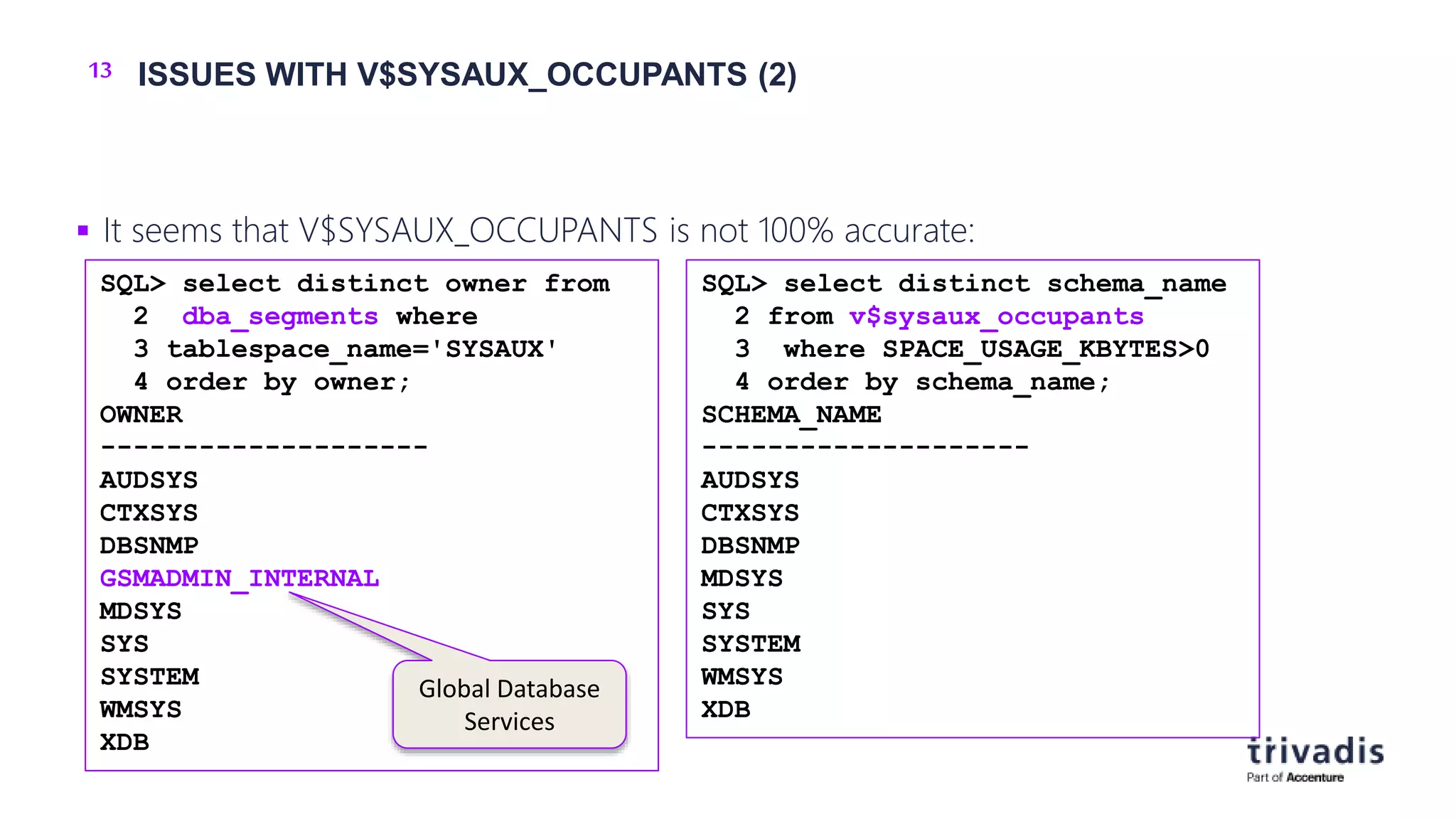
 It seems that V$SYSAUX_OCCUPANTS is not 100% accurate:
SQL> select distinct schema_name
2 from v$sysaux_occupants
3 where SPACE_USAGE_KBYTES>0
4 order by schema_name;
SCHEMA_NAME
--------------------
AUDSYS
CTXSYS
DBSNMP
MDSYS
SYS
SYSTEM
WMSYS
XDB
SQL> select distinct owner from
2 dba_segments where
3 tablespace_name='SYSAUX'
4 order by owner;
OWNER
--------------------
AUDSYS
CTXSYS
DBSNMP
GSMADMIN_INTERNAL
MDSYS
SYS
SYSTEM
WMSYS
XDB
Global Database
Services
14 EXAMPLE OUTPUT: V$SYSAUX_OCCUPANTS
SQL> select OCCUPANT_NAME,OCCUPANT_DESC, SPACE_USAGE_KBYTES USED_KB
2 from V$SYSAUX_OCCUPANTS where SPACE_USAGE_KBYTES>0
3 order by SPACE_USAGE_KBYTES desc
4 fetch first 10 rows only;
OCCUPANT_NAME OCCUPANT_DESC USED_KB
--------------- ------------------------------------------------------- ----------
SM/AWR Server Manageability - Automatic Workload Repository 137024
SDO Oracle Spatial 132096
XDB XDB 104448
AO Analytical Workspace Object Table 49536
AUDSYS AUDSYS schema objects 47680
SM/OPTSTAT Server Manageability - Optimizer Statistics History 39680
SM/OTHER Server Manageability - Other Components 33088
SM/ADVISOR Server Manageability - Advisor Framework 13440
LOGMNR LogMiner 11264
WM Workspace Manager 7488
15 TOP OCCUPANTS – THE USUAL SUSPECTS
 SM/OPTSTAT - old optimizer statistics
 SM/ADVISOR – the various advisors
 SM/AWR – AWR data
 SM/OTHER - DB Feature Usage, Alert History etc.
 SQL_MANAGEMENT_BASE – SQL baselines
 AUDSYS – audit data
16 OCCUPANTS WHICH TYPICALLY DO NOT OCCUPY SPACE
SQL> select occupant_name,occupant_desc from v$sysaux_occupants
2 where space_usage_kbytes=0;
OCCUPANT_NAME OCCUPANT_DESC
------------------------ ----------------------------------------------------------------
AUDIT_TABLES DB audit tables
XSAMD OLAP Catalog
XSOQHIST OLAP API History Tables
STATSPACK Statspack Repository
ORDIM Oracle Multimedia ORDSYS Components
ORDIM/ORDDATA Oracle Multimedia ORDDATA Components
ORDIM/ORDPLUGINS Oracle Multimedia ORDPLUGINS Components
ORDIM/SI_INFORMTN_SCHEMA Oracle Multimedia SI_INFORMTN_SCHEMA Components
EM Enterprise Manager Repository
ULTRASEARCH Oracle Ultra Search
ULTRASEARCH_DEMO_USER Oracle Ultra Search Demo User
EXPRESSION_FILTER Expression Filter System
TSM Oracle Transparent Session Migration User
17 OCCUPANTS WHICH ARE DESUPPORTED (AND CAN BE IGNORED)
 Oracle Streams
o Desupported since Oracle Database 19c
 Enterprise Manager Repository
o Used by OEM Database Control (until Oracle Database 11g Release 2)
o Can be removed in Oracle Database 12c and higher:
Script $ORACLE_HOME/rdbms/admin/emremove.sql
18 DETAILED ANALYSIS OF AWR DATA IN SYSAUX
 The script $ORACLE_HOME/rdbms/admin/awrinfo.sql provides more information about
the AWR components in SYSAUX
o And about the other occupants, too (e.g. largest segments)
[…]
**********************************
(3a) Space usage by AWR components (per database)
**********************************
COMPONENT MB % AWR KB_PER_SNAP MB_PER_DAY MB_PER_WEEK TABLE% : INDEX%
--------- --------- ------ ------------ ---------- ----------- ----------------
FIXED 89.7 69.4 5,402 21.1 147.7 47% : 53%
EVENTS 10.4 8.1 629 2.5 17.2 39% : 61%
SPACE 9.3 7.2 561 2.2 15.3 50% : 50%
SQLPLAN 7.8 6.0 467 1.8 12.8 66% : 34%
SQL 4.8 3.7 286 1.1 7.8 50% : 50%
ASH 2.4 1.9 147 0.6 4.0 69% : 31%
RAC 1.6 1.3 98 0.4 2.7 50% : 50%
SQLBIND 1.2 0.9 72 0.3 2.0 47% : 53%
SQLTEXT 1.2 0.9 72 0.3 2.0 68% : 32%
[…]
19 SIZE ESTIMATION FOR THE SYSAUX TABLESPACE - UTLSYXSZ.SQL
 The script $ORACLE_HOME/rdbms/admin/utlsyxsz.sql can help to estimate the required
size of the SYSAUX tablespace
o You have to provide some information like snapshot interval, retention etc.
[…]
| ***************************************************
| Summary of SYSAUX Space Estimation
| ***************************************************
| Est size of SDO 297.1 MB
| Est size of XDB 66.1 MB
| Est size of SM/ADVISOR 63.8 MB
| Est size of AUDSYS 53.2 MB
| Est size of SM/OTHER 50.0 MB
| Est size of AO 45.8 MB
| Est size of LOGMNR 10.8 MB
| Est size of WM 6.6 MB
[…]
| Est size of Others 201.4 MB
| Est size of SM/AWR 708.7 MB
| Est size of SM/OPTSTAT 37.0 MB
|
| ~~~~~~~~~~~~~~~~~~~~~~~~~~~~~~~~~~~~~~~~~~~~~~~~~~~
| Total Estimated SYSAUX size: 1,558.6 MB
| ~~~~~~~~~~~~~~~~~~~~~~~~~~~~~~~~~~~~~~~~~~~~~~~~~~~
| *************************************************** […]
20
HOW TOCLEANUPTHE SYSAUXTABLESPACE?
21 HOW TO REDUCE THE SIZE OF THE SYSAUX TABLESPACE
 Option 1:
o Reorganize tables and indexes in SYSAUX
 Option 2:
o Move the component out of the SYSAUX Tablespace
 Option 3 (AWR-related data)
o Cleanup data used by the occupant
o Define appropriate retention parameters
 And
o … don't forget to resize the datafiles afterwards
o ... with AUTOEXTENSIBLE datafiles you may not detect
a fastly growing SYSAUX tablespace
22 REORGANIZE TABLES AND INDEXES IN SYSAUX
 As we know it:
o Don't forget to rebuild indexes after moving a table
o $ORACLE_HOME/rdbms/admin/awrinfo.sql will show the largest segments
 Do not reorganize XDB objects!
 More information:
o How to Reduce SYSAUX Tablespace Occupancy Due to Fragmented
TABLEs and INDEXes (Doc ID 1563921.1)
o Reducing SYSAUX Fragmentation of TABLEs and INDEXes Caused
by Statistics Related Activities (Doc ID 1271178.1)
ALTER TABLE .. MOVE TABLESPACE SYSAUX ONLINE;
ALTER INDEX .. REBUILD TABLESPACE SYSAUX ONLINE;
23 MOVE DATA OUT OF THE SYSAUX TABLESPACE
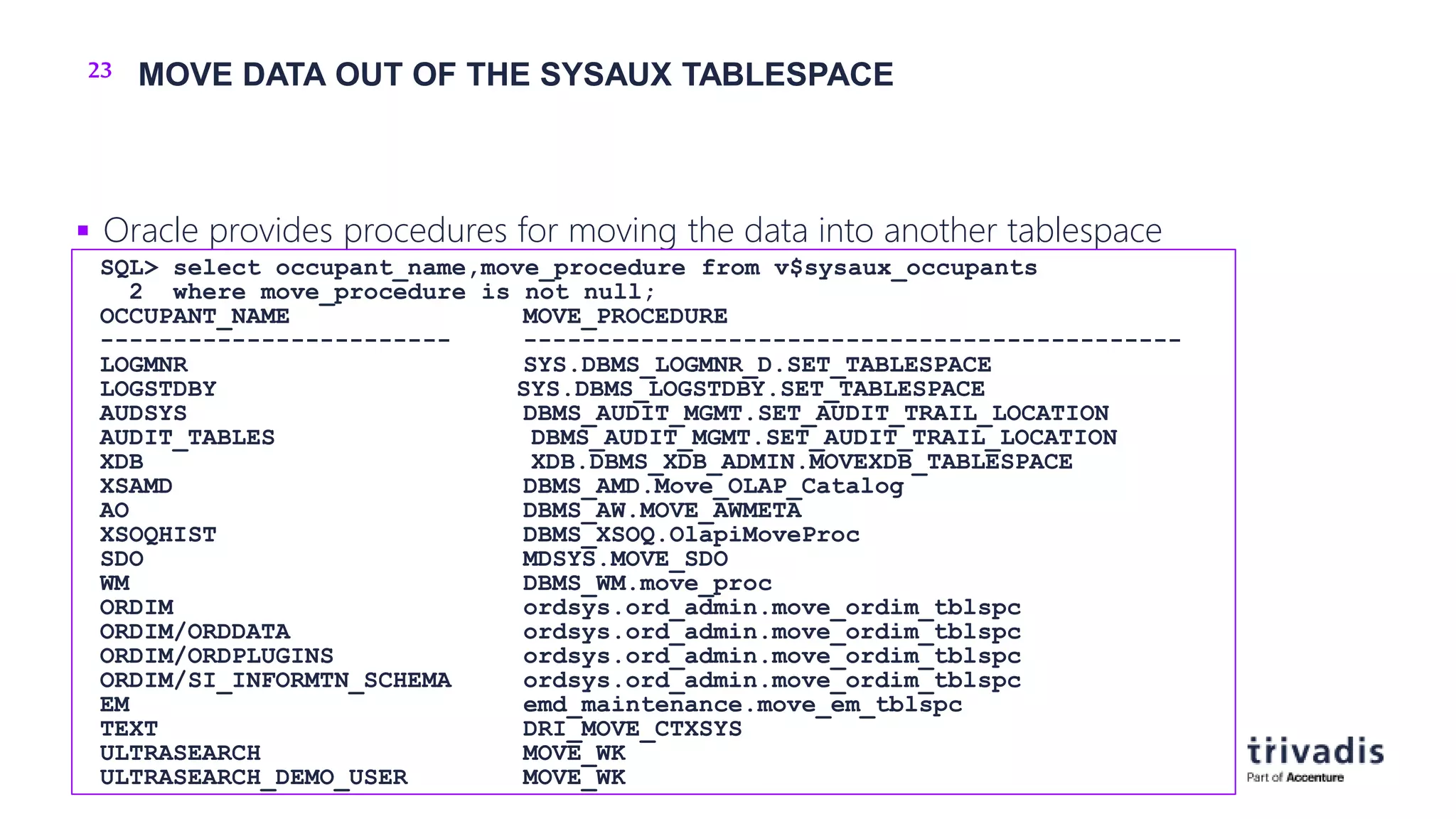
 Oracle provides procedures for moving the data into another tablespace
SQL> select occupant_name,move_procedure from v$sysaux_occupants
2 where move_procedure is not null;
OCCUPANT_NAME MOVE_PROCEDURE
------------------------ ---------------------------------------------
LOGMNR SYS.DBMS_LOGMNR_D.SET_TABLESPACE
LOGSTDBY SYS.DBMS_LOGSTDBY.SET_TABLESPACE
AUDSYS DBMS_AUDIT_MGMT.SET_AUDIT_TRAIL_LOCATION
AUDIT_TABLES DBMS_AUDIT_MGMT.SET_AUDIT_TRAIL_LOCATION
XDB XDB.DBMS_XDB_ADMIN.MOVEXDB_TABLESPACE
XSAMD DBMS_AMD.Move_OLAP_Catalog
AO DBMS_AW.MOVE_AWMETA
XSOQHIST DBMS_XSOQ.OlapiMoveProc
SDO MDSYS.MOVE_SDO
WM DBMS_WM.move_proc
ORDIM ordsys.ord_admin.move_ordim_tblspc
ORDIM/ORDDATA ordsys.ord_admin.move_ordim_tblspc
ORDIM/ORDPLUGINS ordsys.ord_admin.move_ordim_tblspc
ORDIM/SI_INFORMTN_SCHEMA ordsys.ord_admin.move_ordim_tblspc
EM emd_maintenance.move_em_tblspc
TEXT DRI_MOVE_CTXSYS
ULTRASEARCH MOVE_WK
ULTRASEARCH_DEMO_USER MOVE_WK
24 MOVE PROCEDURE – EXAMPLE: AUDIT-DATA (1)
 Procedure DBMS_AUDIT_MGMT.SET_AUDIT_TRAIL_LOCATION
 Values for AUDIT_TRAIL_TYPE
o AUDIT_TRAIL_AUD_STD (Tables AUD$ and FGA_LOG$)
o AUDIT_TRAIL_FGA_STD (FGA_LOG$)
o AUDIT_TRAIL_DB_STD (AUD$)
o AUDIT_TRAIL_UNIFIED (unified audit data)
PROCEDURE SET_AUDIT_TRAIL_LOCATION
Argument Name Type In/Out Default?
------------------------------ ----------------------- ------ --------
AUDIT_TRAIL_TYPE BINARY_INTEGER IN
AUDIT_TRAIL_LOCATION_VALUE VARCHAR2 IN
25 MOVE PROCEDURE – EXAMPLE: AUDIT-DATA (2)
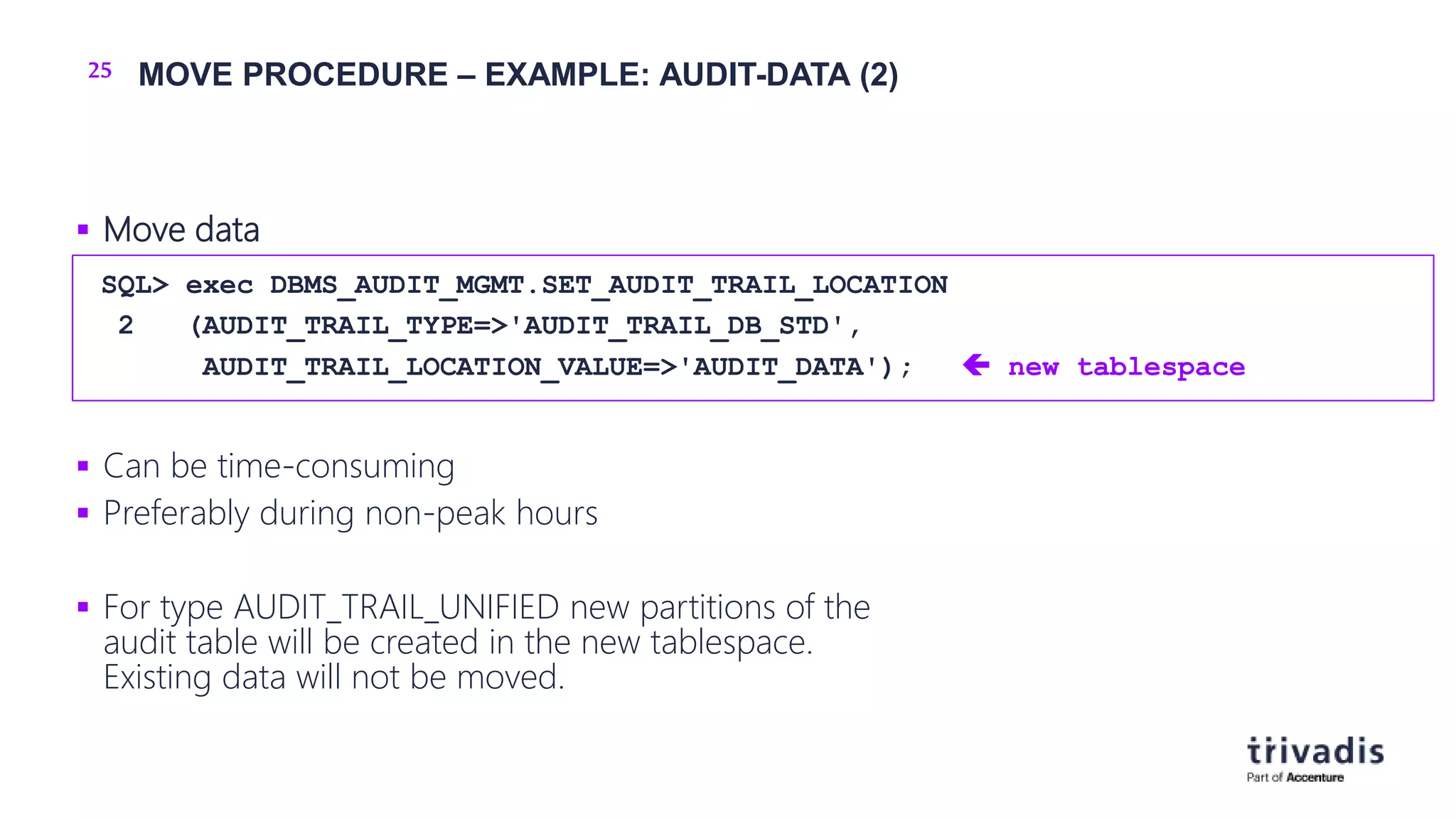
 Move data
 Can be time-consuming
 Preferably during non-peak hours
 For type AUDIT_TRAIL_UNIFIED new partitions of the
audit table will be created in the new tablespace.
Existing data will not be moved.
SQL> exec DBMS_AUDIT_MGMT.SET_AUDIT_TRAIL_LOCATION
2 (AUDIT_TRAIL_TYPE=>'AUDIT_TRAIL_DB_STD',
AUDIT_TRAIL_LOCATION_VALUE=>'AUDIT_DATA');  new tablespace
26 REDUCE DATA IN SYSAUX – SM/OPTSTAT
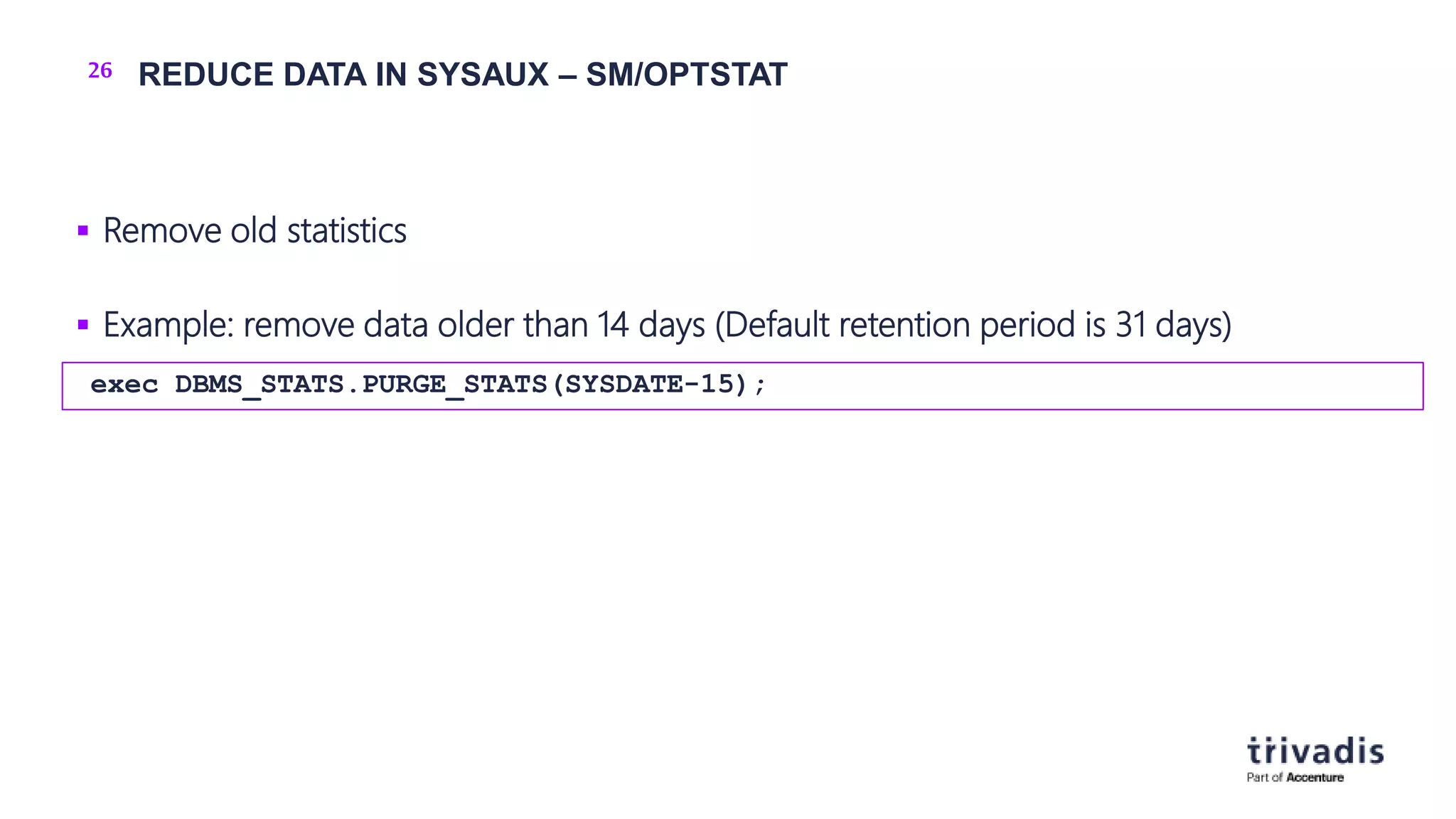
 Remove old statistics
 Example: remove data older than 14 days (Default retention period is 31 days)
exec DBMS_STATS.PURGE_STATS(SYSDATE-15);
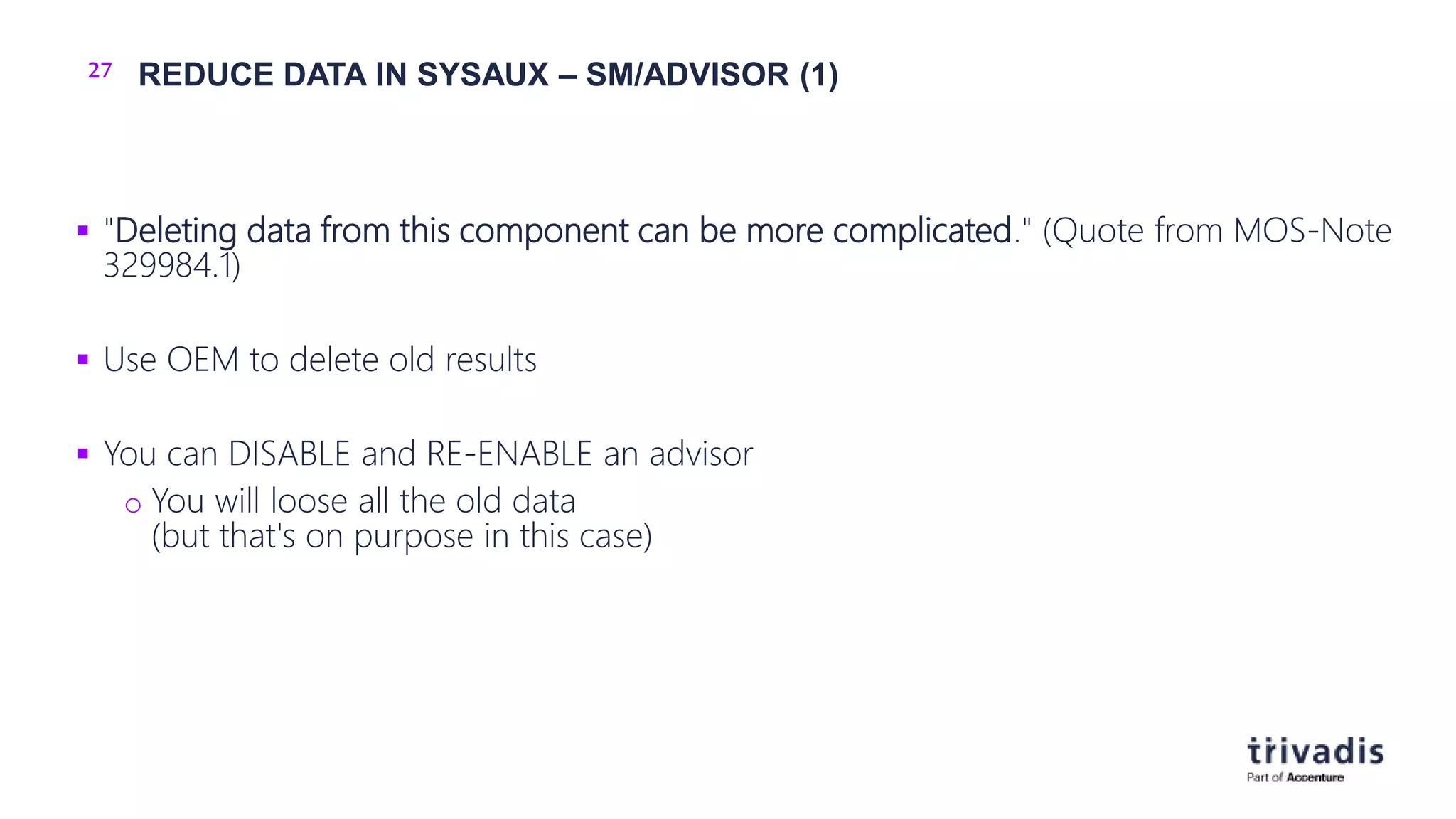
27 REDUCE DATA IN SYSAUX – SM/ADVISOR (1)
 "Deleting data from this component can be more complicated." (Quote from MOS-Note
329984.1)
 Use OEM to delete old results
 You can DISABLE and RE-ENABLE an advisor
o You will loose all the old data
(but that's on purpose in this case)
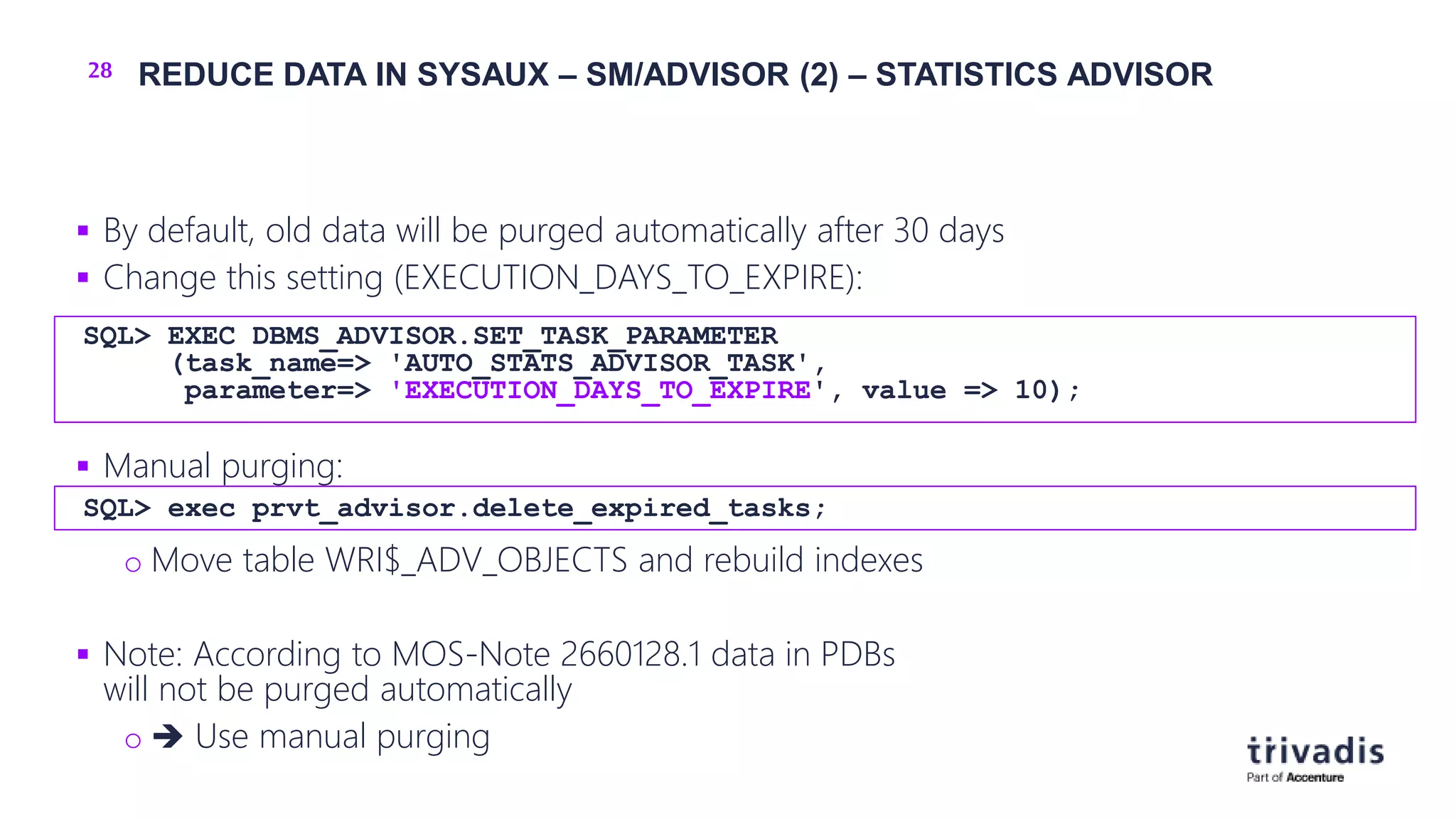
28 REDUCE DATA IN SYSAUX – SM/ADVISOR (2) – STATISTICS ADVISOR
 By default, old data will be purged automatically after 30 days
 Change this setting (EXECUTION_DAYS_TO_EXPIRE):
 Manual purging:
o Move table WRI$_ADV_OBJECTS and rebuild indexes
 Note: According to MOS-Note 2660128.1 data in PDBs
will not be purged automatically
o  Use manual purging
SQL> EXEC DBMS_ADVISOR.SET_TASK_PARAMETER
(task_name=> 'AUTO_STATS_ADVISOR_TASK',
parameter=> 'EXECUTION_DAYS_TO_EXPIRE', value => 10);
SQL> exec prvt_advisor.delete_expired_tasks;
29 REDUCE DATA IN SYSAUX – SM/AWR (1)
 Reduce the retention period  Older data will be deleted
 Current retention period (example: 31 days):
 Change retention period (example: back to the default of 8 days)
SQL> SELECT retention FROM dba_hist_wr_control;
RETENTION
---------------------------------------------------------------------------
+00031 00:00:00.0
SQL> exec DBMS_WORKLOAD_REPOSITORY.MODIFY_SNAPSHOT_SETTINGS
(retention=>8*1440);
30 REDUCE DATA IN SYSAUX – SM/AWR (2)
 Remove a range of AWR snapshots
DBMS_WORKLOAD_REPOSITORY.DROP_SNAPSHOT_RANGE(
low_snap_id IN NUMBER,
high_snap_id IN NUMBER
dbid IN NUMBER DEFAULT NULL);
31 REDUCE DATA IN SYSAUX – SM/SQL_MANAGEMENT_BASE (1)
 Options
o Reduce retention period
o Reduce available space in SYSAUX
o Remove unused SQL Plan baselines
o Restrict the plans which will be gathered
32 REDUCE DATA IN SYSAUX – SM/SQL_MANAGEMENT_BASE (2)
 Reduce retention period & reduce available space in SYSAUX
 Current configuration
 Change configuration
SQL> SELECT PARAMETER_NAME, PARAMETER_VALUE from DBA_SQL_MANAGEMENT_CONFIG;
PARAMETER_NAME PARAMETER_VALUE
---------------------------------------- ------------------------------
[..]
PLAN_RETENTION_WEEKS 53
SPACE_BUDGET_PERCENT 10
SQL> Exec DBMS_SPM.CONFIGURE('PLAN_RETENTION_WEEKS',26);
SQL> Exec DBMS_SPM.Configure('SPACE_BUDGET_PERCENT',5);
33 REDUCE DATA IN SYSAUX – SM/SQL_MANAGEMENT_BASE (3)
 Remove unused SQL Plan baselines
 Step 1: Find out the sql_handle
 Step 2: Remove SQL Plan baseline for this handle
 More information: SQL Tuning Guide, Chapter 28.6
SQL> SELECT SQL_HANDLE, SQL_TEXT, PLAN_NAME, ORIGIN, ENABLED, ACCEPTED
2 FROM DBA_SQL_PLAN_BASELINES
3 WHERE SQL_TEXT LIKE '<your_sql_text>';
DECLARE
v_dropped_plans number;
BEGIN
v_dropped_plans := DBMS_SPM.DROP_SQL_PLAN_BASELINE (
sql_handle => '<handle_from_step_1>'
);
DBMS_OUTPUT.PUT_LINE('dropped ' || v_dropped_plans || ' plans');
END;
/
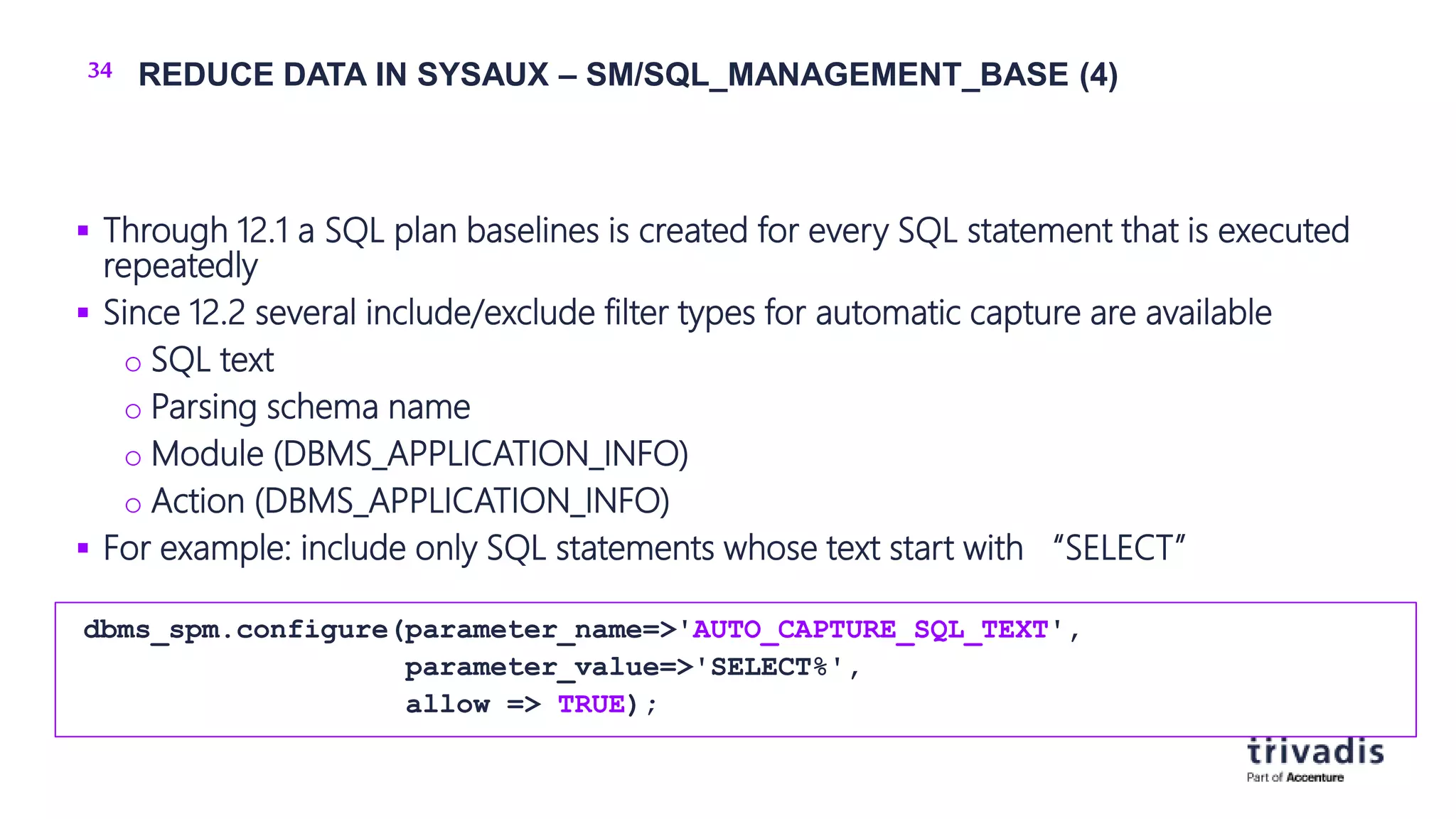
34 REDUCE DATA IN SYSAUX – SM/SQL_MANAGEMENT_BASE (4)
 Through 12.1 a SQL plan baselines is created for every SQL statement that is executed
repeatedly
 Since 12.2 several include/exclude filter types for automatic capture are available
o SQL text
o Parsing schema name
o Module (DBMS_APPLICATION_INFO)
o Action (DBMS_APPLICATION_INFO)
 For example: include only SQL statements whose text start with “SELECT”
dbms_spm.configure(parameter_name=>'AUTO_CAPTURE_SQL_TEXT',
parameter_value=>'SELECT%',
allow => TRUE);
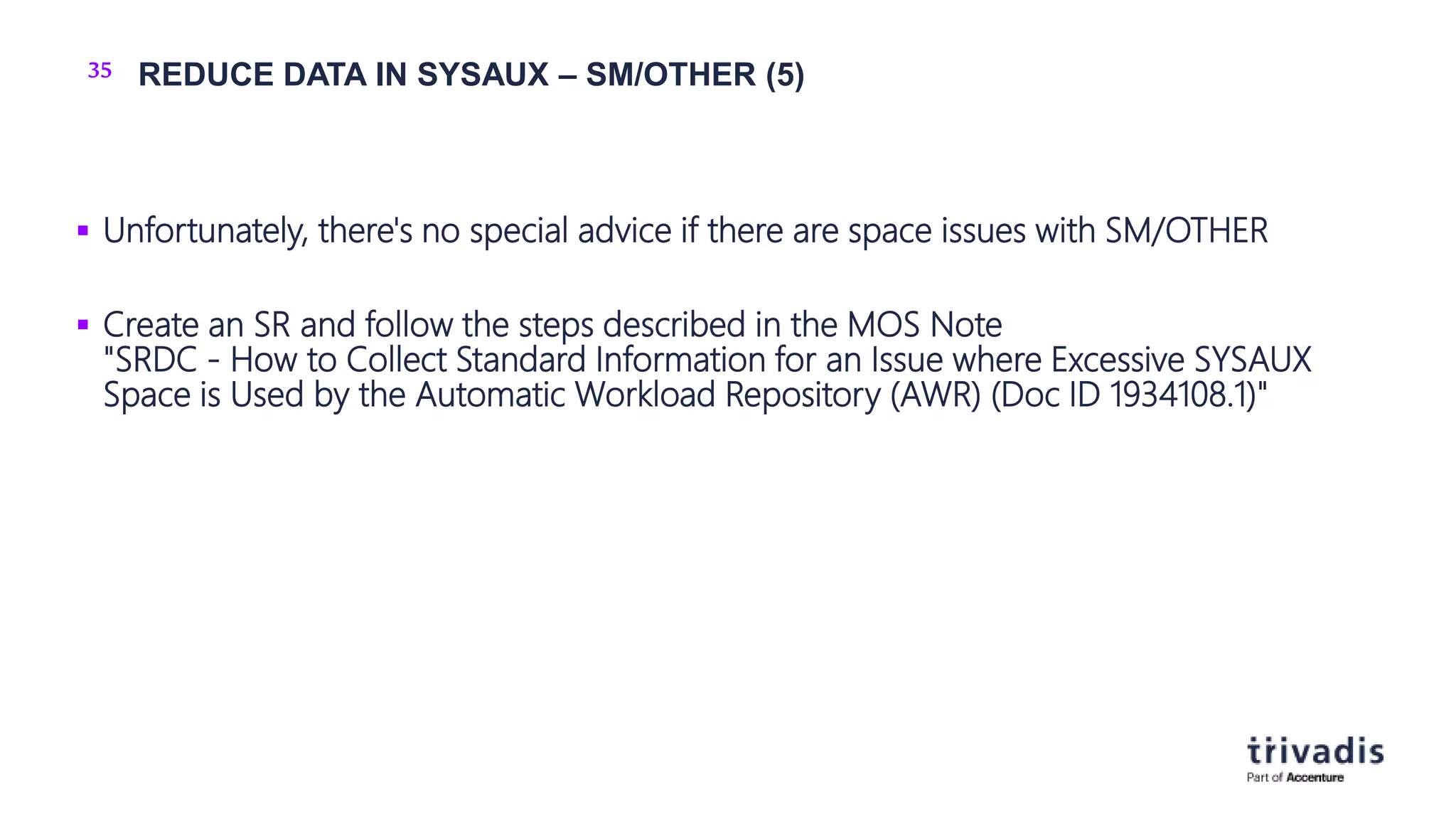
35 REDUCE DATA IN SYSAUX – SM/OTHER (5)
 Unfortunately, there's no special advice if there are space issues with SM/OTHER
 Create an SR and follow the steps described in the MOS Note
"SRDC - How to Collect Standard Information for an Issue where Excessive SYSAUX
Space is Used by the Automatic Workload Repository (AWR) (Doc ID 1934108.1)"
36 CHECK THE STATISTICS LEVEL
 Level "ALL" may lead to a huge amount of data in SYSAUX
 Recommendation:
o Keep the default value "TYPICAL"
SQL> show parameter STATISTICS_LEVEL
NAME TYPE VALUE
------------------------------------ ----------- ------------------------------
statistics_level string TYPICAL
37
HOW TOKEEPTHE SYSAUXTABLESPACESMALL?
38 A STITCH IN TIME SAVES NINE
 Soon after creating a database:
o Use dedicated tablespaces
o Move Audit-Data out of the SYSAUX tablespace
o Use a dedicated tablespace for Statspack data (schema PERFSTAT)
o Don't use AUTOEXTENSIBLE for SYSAUX (or set it to a reasonable value)
o But don't forget to monitor your tablespaces 
o Keep Statistics Level "Typical"
o Define appropriate retention periods for AWR related data
o Disable unnecessary advisors
Vorbeugen ist besser als heilen
39 DEFINE RETENTION POLICIES (1)
REM SM/OPTSTAT
REM retention period in days (Default: 31 days)
exec dbms_stats.alter_stats_history_retention(7);
REM SM/ADVISOR
REM retention period Statistics Advisor (default: 30 days)
EXEC DBMS_SQLTUNE.SET_TUNING_TASK_PARAMETER (
task_name => 'AUTO_STATS_ADVISOR_TASK',
parameter => 'EXECUTION_DAYS_TO_EXPIRE',
value => 14);
40 DEFINE RETENTION POLICIES (2)
REM SM/AWR
REM retention period defined in minutes (1 day = 1440 minutes)
exec DBMS_WORKLOAD_REPOSITORY.MODIFY_SNAPSHOT_SETTINGS(retention=>8*1440);
REM SQL_MANAGEMENT_BASE
REM retention period defined in weeks
Exec DBMS_SPM.CONFIGURE('PLAN_RETENTION_WEEKS',26);
REM or percentage of space in SYSAUX
Exec DBMS_SPM.Configure('SPACE_BUDGET_PERCENT',5);
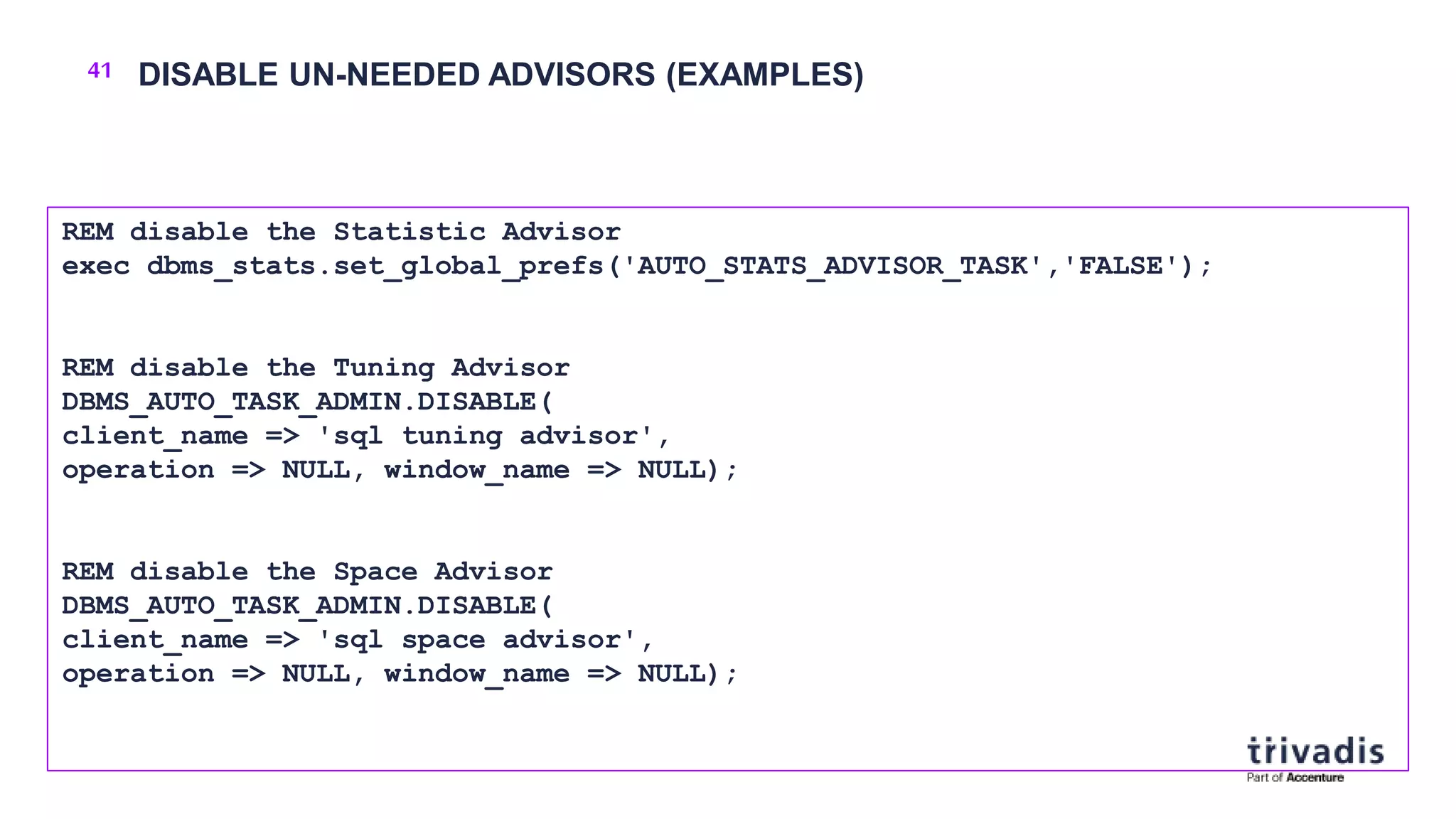
41 DISABLE UN-NEEDED ADVISORS (EXAMPLES)
REM disable the Statistic Advisor
exec dbms_stats.set_global_prefs('AUTO_STATS_ADVISOR_TASK','FALSE');
REM disable the Tuning Advisor
DBMS_AUTO_TASK_ADMIN.DISABLE(
client_name => 'sql tuning advisor',
operation => NULL, window_name => NULL);
REM disable the Space Advisor
DBMS_AUTO_TASK_ADMIN.DISABLE(
client_name => 'sql space advisor',
operation => NULL, window_name => NULL);
42
CONCLUSION&
MORE INFORMATION
43 CONCLUSION
 More and more components are using the SYSAUX tablespace
 SYSAUX needs your attention
o To detect massive growth
 Use dedicated tablespaces where applicable
 Set retention policies soon after database creation
44 MORE INFORMATION – MOS-NOTES (1)
 Troubleshooting Issues with SYSAUX Space Usage (Doc ID 1399365.1)
 General Guidelines for SYSAUX Space Issues (Doc ID 552880.1)
 How to Reduce SYSAUX Tablespace Occupancy Due to Fragmented TABLEs and INDEXes (Doc ID
1563921.1)
 Tips if Your SYSAUX Tablespace Grows Rapidly or Too Large (Doc ID 1292724.1)
 Usage and Storage Management of SYSAUX tablespace occupants SM/AWR, SM/ADVISOR,
SM/OPTSTAT and SM/OTHER (Doc ID 329984.1)
 SRDC - How to Collect Standard Information for an Issue where Excessive SYSAUX Space is Used by the
Automatic Workload Repository (AWR) (Doc ID 1934108.1)
 SYSAUX Tablespace Filled With WRI$_EMX_FILES | What is WRI$EMX_FILES (Doc ID 2639664.1)
 SYSAUX Tablespace Grows Quite Fast Due to Apply Spilling (Doc ID 556183.1)
 SYSAUX Tablespace Growing Due to SYS.SCHEDULER$_JOB_OUTPUT LOB Column (Doc ID 2095104.1)
45 MORE INFORMATION – MOS-NOTES (2)
 Bug 8553944 - SYSAUX tablespace grows (Doc ID 8553944.8)
 How To Recreate the SYSAUX Tablespace (Doc ID 468116.1)
 SYSAUX Tablespace Space Issue Because Of dbms_comparison (Doc ID 2089484.1)
 Exports Fail Because SYSAUX Tablespace Needs Recovery (Doc ID 1497195.1)
 Bug 14373728 - Old Statistics not Purged from SYSAUX Tablespace (Doc ID 14373728.8)
 HEATMAP Segment Size Is Large In SYSAUX Even When Heatmap=Off (Doc ID 2024036.1)
 SYSAUX New Mandatory Tablespace in Oracle 10g and higher (Doc ID 243246.1)
 ZDLRA: SM/ADVISOR using more space in SYSAUX (Doc ID 2730556.1)
 How to Relocate the SYSAUX Tablespace (Doc ID 301186.1)
 SYSAUX Tablespace Is Getting Filled Frequently with COMPARISON_ROW_DIF$ (Doc ID 2087865.1)
 Abnormal High Space Usage in Sysaux Tablespace - Unable to Purge (Doc ID 1360000.1)
 Large Growth of SYSAUX Tablespace with Table WRH$_SQL_PLAN Taking Lot of Space (Doc ID
2475149.1)
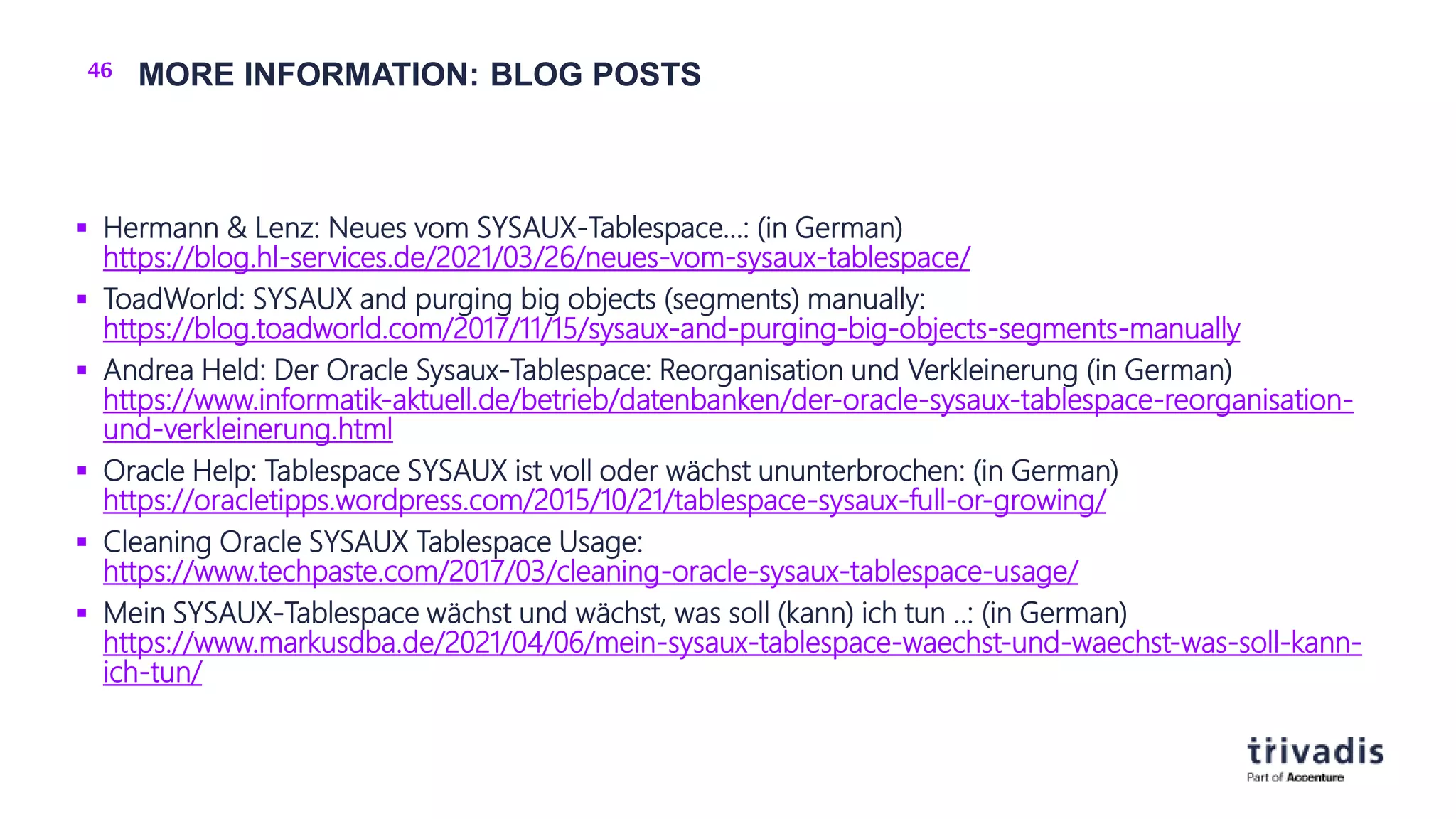
46 MORE INFORMATION: BLOG POSTS
 Hermann & Lenz: Neues vom SYSAUX-Tablespace…: (in German)
https://blog.hl-services.de/2021/03/26/neues-vom-sysaux-tablespace/
 ToadWorld: SYSAUX and purging big objects (segments) manually:
https://blog.toadworld.com/2017/11/15/sysaux-and-purging-big-objects-segments-manually
 Andrea Held: Der Oracle Sysaux-Tablespace: Reorganisation und Verkleinerung (in German)
https://www.informatik-aktuell.de/betrieb/datenbanken/der-oracle-sysaux-tablespace-reorganisation-
und-verkleinerung.html
 Oracle Help: Tablespace SYSAUX ist voll oder wächst ununterbrochen: (in German)
https://oracletipps.wordpress.com/2015/10/21/tablespace-sysaux-full-or-growing/
 Cleaning Oracle SYSAUX Tablespace Usage:
https://www.techpaste.com/2017/03/cleaning-oracle-sysaux-tablespace-usage/
 Mein SYSAUX-Tablespace wächst und wächst, was soll (kann) ich tun ..: (in German)
https://www.markusdba.de/2021/04/06/mein-sysaux-tablespace-waechst-und-waechst-was-soll-kann-
ich-tun/
QUESTIONS & ANSWERS
MARKUS FLECHTNER
 Markus.flechtner@trivadis.com
 Twitter @markusdba
 Blog: markusdba.net
TOGETHERWEARE
#1 PARTNER FOR BUSINESSES TOHARNESSTHE
POWEROFDATA
FOR A SMARTER LIFE
My SYSAUX tablespace is full - please help

My SYSAUX tablespace is full - please help

  • 1.
  • 2.
    2  Together weare 1500 specialists at 34 locations in Switzerland, Germany and Austria with a focus on Data & Applied Intelligence.  Together we support you in the intelligent end-to-end use of your data.  We cover the entire spectrum: from the development and operation of data platforms and solutions, to the refinement of data as well as consulting and training.  We achieve this through the unique combination of Trivadis' technological expertise and Accenture's strategic know- how in the field of data. TRIVADIS & ACCENTURE: #1 FOR DATA & AI
  • 3.
  • 4.
    HI! MARKUS FLECHTNER PRINCIPAL CONSULTANT Trivadis Germany GmbH  Studied Mathematics a long time ago  Focus o Oracle High Availability o Database Upgrade + Migration  Teacher: RAC, New Features, Multitenant, PostgreSQL  Twitter @markusdba  Blog: markusdba.net|.de  Co-author of the book "Der Oracle DBA (2016)"
  • 5.
    5 AGENDA  Introduction Which components occupy space in SYSAUX?  How to cleanup the SYSAUX Tablespace?  How to keep the SYSAUX tablespace small?  Conclusion & more information
  • 6.
  • 7.
    7 INTRODUCTION  UntilOracle Database 9i there was the SYSTEM tablespace only o All database components stored their data their  With Oracle Database 10g Oracle introduced the SYSAUX tablespace o Data of many database components was moved to SYSAUX  Oracle says "if SYSAUX is not available, the database will not fail" (but only components which store data in SYSAUX)
  • 8.
    8 SPACE ISSUESWITH SYSAUX  Since Oracle 10g more and more components store their data in SYSAUX  It keeps growing  There is even a dedicated problem type for service requests:
  • 9.
    9 SIZE GUIDELINES/ESTIMATIONSFOR THE SYSAUX TABLESPACE  Source: Oracle Database 19c – Database Administrators Guide (Chapter 13) Parameter/Recommendation Small Medium Large Number of CPUs 2 8 32 Number of concurrently active sessions 10 20 100 Number of user objects, tables and indexes 500 5.000 50.000 Estimated SYSAUX size at steady state with default configuration 500 MB 2 GB 5 GB
  • 10.
  • 11.
    11 THE ENTRYPOINT:V$SYSAUX_OCCUPANTS  Oracle provides a V$ view which provides almost all the information we need:  Important: Analysis, cleanup and configuration must be done in each container (CDB$ROOT and PDBs) separately SQL> desc v$sysaux_occupants Name Null? Type ----------------------------- ------ -------------------- OCCUPANT_NAME VARCHAR2(64) OCCUPANT_DESC VARCHAR2(64) SCHEMA_NAME VARCHAR2(64) MOVE_PROCEDURE VARCHAR2(64) MOVE_PROCEDURE_DESC VARCHAR2(64) SPACE_USAGE_KBYTES NUMBER CON_ID NUMBER
  • 12.
    12 ISSUES WITHV$SYSAUX_OCCUPANTS (1)  In a Container Database when in CDB$ROOT, V$SYSAUX_OCCUPANTS shows the current container only (i.e. CDB$ROOT) o No global view possible o SR open  Other issues (public bugs from MOS): o Bug 16767759 AUDSYS schema is not present in V$SYSAUX_OCCUPANTS o Open since 12.1.0.1, fixed in 12.2 o Bug 10404641 V$sysaux_occupants.space_usage_kbytes may not be accurate o Open since 10.2.0.4, fixed in 18.1
  • 13.
    13 ISSUES WITHV$SYSAUX_OCCUPANTS (2)  It seems that V$SYSAUX_OCCUPANTS is not 100% accurate: SQL> select distinct schema_name 2 from v$sysaux_occupants 3 where SPACE_USAGE_KBYTES>0 4 order by schema_name; SCHEMA_NAME -------------------- AUDSYS CTXSYS DBSNMP MDSYS SYS SYSTEM WMSYS XDB SQL> select distinct owner from 2 dba_segments where 3 tablespace_name='SYSAUX' 4 order by owner; OWNER -------------------- AUDSYS CTXSYS DBSNMP GSMADMIN_INTERNAL MDSYS SYS SYSTEM WMSYS XDB Global Database Services
  • 14.
    14 EXAMPLE OUTPUT:V$SYSAUX_OCCUPANTS SQL> select OCCUPANT_NAME,OCCUPANT_DESC, SPACE_USAGE_KBYTES USED_KB 2 from V$SYSAUX_OCCUPANTS where SPACE_USAGE_KBYTES>0 3 order by SPACE_USAGE_KBYTES desc 4 fetch first 10 rows only; OCCUPANT_NAME OCCUPANT_DESC USED_KB --------------- ------------------------------------------------------- ---------- SM/AWR Server Manageability - Automatic Workload Repository 137024 SDO Oracle Spatial 132096 XDB XDB 104448 AO Analytical Workspace Object Table 49536 AUDSYS AUDSYS schema objects 47680 SM/OPTSTAT Server Manageability - Optimizer Statistics History 39680 SM/OTHER Server Manageability - Other Components 33088 SM/ADVISOR Server Manageability - Advisor Framework 13440 LOGMNR LogMiner 11264 WM Workspace Manager 7488
  • 15.
    15 TOP OCCUPANTS– THE USUAL SUSPECTS  SM/OPTSTAT - old optimizer statistics  SM/ADVISOR – the various advisors  SM/AWR – AWR data  SM/OTHER - DB Feature Usage, Alert History etc.  SQL_MANAGEMENT_BASE – SQL baselines  AUDSYS – audit data
  • 16.
    16 OCCUPANTS WHICHTYPICALLY DO NOT OCCUPY SPACE SQL> select occupant_name,occupant_desc from v$sysaux_occupants 2 where space_usage_kbytes=0; OCCUPANT_NAME OCCUPANT_DESC ------------------------ ---------------------------------------------------------------- AUDIT_TABLES DB audit tables XSAMD OLAP Catalog XSOQHIST OLAP API History Tables STATSPACK Statspack Repository ORDIM Oracle Multimedia ORDSYS Components ORDIM/ORDDATA Oracle Multimedia ORDDATA Components ORDIM/ORDPLUGINS Oracle Multimedia ORDPLUGINS Components ORDIM/SI_INFORMTN_SCHEMA Oracle Multimedia SI_INFORMTN_SCHEMA Components EM Enterprise Manager Repository ULTRASEARCH Oracle Ultra Search ULTRASEARCH_DEMO_USER Oracle Ultra Search Demo User EXPRESSION_FILTER Expression Filter System TSM Oracle Transparent Session Migration User
  • 17.
    17 OCCUPANTS WHICHARE DESUPPORTED (AND CAN BE IGNORED)  Oracle Streams o Desupported since Oracle Database 19c  Enterprise Manager Repository o Used by OEM Database Control (until Oracle Database 11g Release 2) o Can be removed in Oracle Database 12c and higher: Script $ORACLE_HOME/rdbms/admin/emremove.sql
  • 18.
    18 DETAILED ANALYSISOF AWR DATA IN SYSAUX  The script $ORACLE_HOME/rdbms/admin/awrinfo.sql provides more information about the AWR components in SYSAUX o And about the other occupants, too (e.g. largest segments) […] ********************************** (3a) Space usage by AWR components (per database) ********************************** COMPONENT MB % AWR KB_PER_SNAP MB_PER_DAY MB_PER_WEEK TABLE% : INDEX% --------- --------- ------ ------------ ---------- ----------- ---------------- FIXED 89.7 69.4 5,402 21.1 147.7 47% : 53% EVENTS 10.4 8.1 629 2.5 17.2 39% : 61% SPACE 9.3 7.2 561 2.2 15.3 50% : 50% SQLPLAN 7.8 6.0 467 1.8 12.8 66% : 34% SQL 4.8 3.7 286 1.1 7.8 50% : 50% ASH 2.4 1.9 147 0.6 4.0 69% : 31% RAC 1.6 1.3 98 0.4 2.7 50% : 50% SQLBIND 1.2 0.9 72 0.3 2.0 47% : 53% SQLTEXT 1.2 0.9 72 0.3 2.0 68% : 32% […]
  • 19.
    19 SIZE ESTIMATIONFOR THE SYSAUX TABLESPACE - UTLSYXSZ.SQL  The script $ORACLE_HOME/rdbms/admin/utlsyxsz.sql can help to estimate the required size of the SYSAUX tablespace o You have to provide some information like snapshot interval, retention etc. […] | *************************************************** | Summary of SYSAUX Space Estimation | *************************************************** | Est size of SDO 297.1 MB | Est size of XDB 66.1 MB | Est size of SM/ADVISOR 63.8 MB | Est size of AUDSYS 53.2 MB | Est size of SM/OTHER 50.0 MB | Est size of AO 45.8 MB | Est size of LOGMNR 10.8 MB | Est size of WM 6.6 MB […] | Est size of Others 201.4 MB | Est size of SM/AWR 708.7 MB | Est size of SM/OPTSTAT 37.0 MB | | ~~~~~~~~~~~~~~~~~~~~~~~~~~~~~~~~~~~~~~~~~~~~~~~~~~~ | Total Estimated SYSAUX size: 1,558.6 MB | ~~~~~~~~~~~~~~~~~~~~~~~~~~~~~~~~~~~~~~~~~~~~~~~~~~~ | *************************************************** […]
  • 20.
  • 21.
    21 HOW TOREDUCE THE SIZE OF THE SYSAUX TABLESPACE  Option 1: o Reorganize tables and indexes in SYSAUX  Option 2: o Move the component out of the SYSAUX Tablespace  Option 3 (AWR-related data) o Cleanup data used by the occupant o Define appropriate retention parameters  And o … don't forget to resize the datafiles afterwards o ... with AUTOEXTENSIBLE datafiles you may not detect a fastly growing SYSAUX tablespace
  • 22.
    22 REORGANIZE TABLESAND INDEXES IN SYSAUX  As we know it: o Don't forget to rebuild indexes after moving a table o $ORACLE_HOME/rdbms/admin/awrinfo.sql will show the largest segments  Do not reorganize XDB objects!  More information: o How to Reduce SYSAUX Tablespace Occupancy Due to Fragmented TABLEs and INDEXes (Doc ID 1563921.1) o Reducing SYSAUX Fragmentation of TABLEs and INDEXes Caused by Statistics Related Activities (Doc ID 1271178.1) ALTER TABLE .. MOVE TABLESPACE SYSAUX ONLINE; ALTER INDEX .. REBUILD TABLESPACE SYSAUX ONLINE;
  • 23.
    23 MOVE DATAOUT OF THE SYSAUX TABLESPACE  Oracle provides procedures for moving the data into another tablespace SQL> select occupant_name,move_procedure from v$sysaux_occupants 2 where move_procedure is not null; OCCUPANT_NAME MOVE_PROCEDURE ------------------------ --------------------------------------------- LOGMNR SYS.DBMS_LOGMNR_D.SET_TABLESPACE LOGSTDBY SYS.DBMS_LOGSTDBY.SET_TABLESPACE AUDSYS DBMS_AUDIT_MGMT.SET_AUDIT_TRAIL_LOCATION AUDIT_TABLES DBMS_AUDIT_MGMT.SET_AUDIT_TRAIL_LOCATION XDB XDB.DBMS_XDB_ADMIN.MOVEXDB_TABLESPACE XSAMD DBMS_AMD.Move_OLAP_Catalog AO DBMS_AW.MOVE_AWMETA XSOQHIST DBMS_XSOQ.OlapiMoveProc SDO MDSYS.MOVE_SDO WM DBMS_WM.move_proc ORDIM ordsys.ord_admin.move_ordim_tblspc ORDIM/ORDDATA ordsys.ord_admin.move_ordim_tblspc ORDIM/ORDPLUGINS ordsys.ord_admin.move_ordim_tblspc ORDIM/SI_INFORMTN_SCHEMA ordsys.ord_admin.move_ordim_tblspc EM emd_maintenance.move_em_tblspc TEXT DRI_MOVE_CTXSYS ULTRASEARCH MOVE_WK ULTRASEARCH_DEMO_USER MOVE_WK
  • 24.
    24 MOVE PROCEDURE– EXAMPLE: AUDIT-DATA (1)  Procedure DBMS_AUDIT_MGMT.SET_AUDIT_TRAIL_LOCATION  Values for AUDIT_TRAIL_TYPE o AUDIT_TRAIL_AUD_STD (Tables AUD$ and FGA_LOG$) o AUDIT_TRAIL_FGA_STD (FGA_LOG$) o AUDIT_TRAIL_DB_STD (AUD$) o AUDIT_TRAIL_UNIFIED (unified audit data) PROCEDURE SET_AUDIT_TRAIL_LOCATION Argument Name Type In/Out Default? ------------------------------ ----------------------- ------ -------- AUDIT_TRAIL_TYPE BINARY_INTEGER IN AUDIT_TRAIL_LOCATION_VALUE VARCHAR2 IN
  • 25.
    25 MOVE PROCEDURE– EXAMPLE: AUDIT-DATA (2)  Move data  Can be time-consuming  Preferably during non-peak hours  For type AUDIT_TRAIL_UNIFIED new partitions of the audit table will be created in the new tablespace. Existing data will not be moved. SQL> exec DBMS_AUDIT_MGMT.SET_AUDIT_TRAIL_LOCATION 2 (AUDIT_TRAIL_TYPE=>'AUDIT_TRAIL_DB_STD', AUDIT_TRAIL_LOCATION_VALUE=>'AUDIT_DATA');  new tablespace
  • 26.
    26 REDUCE DATAIN SYSAUX – SM/OPTSTAT  Remove old statistics  Example: remove data older than 14 days (Default retention period is 31 days) exec DBMS_STATS.PURGE_STATS(SYSDATE-15);
  • 27.
    27 REDUCE DATAIN SYSAUX – SM/ADVISOR (1)  "Deleting data from this component can be more complicated." (Quote from MOS-Note 329984.1)  Use OEM to delete old results  You can DISABLE and RE-ENABLE an advisor o You will loose all the old data (but that's on purpose in this case)
  • 28.
    28 REDUCE DATAIN SYSAUX – SM/ADVISOR (2) – STATISTICS ADVISOR  By default, old data will be purged automatically after 30 days  Change this setting (EXECUTION_DAYS_TO_EXPIRE):  Manual purging: o Move table WRI$_ADV_OBJECTS and rebuild indexes  Note: According to MOS-Note 2660128.1 data in PDBs will not be purged automatically o  Use manual purging SQL> EXEC DBMS_ADVISOR.SET_TASK_PARAMETER (task_name=> 'AUTO_STATS_ADVISOR_TASK', parameter=> 'EXECUTION_DAYS_TO_EXPIRE', value => 10); SQL> exec prvt_advisor.delete_expired_tasks;
  • 29.
    29 REDUCE DATAIN SYSAUX – SM/AWR (1)  Reduce the retention period  Older data will be deleted  Current retention period (example: 31 days):  Change retention period (example: back to the default of 8 days) SQL> SELECT retention FROM dba_hist_wr_control; RETENTION --------------------------------------------------------------------------- +00031 00:00:00.0 SQL> exec DBMS_WORKLOAD_REPOSITORY.MODIFY_SNAPSHOT_SETTINGS (retention=>8*1440);
  • 30.
    30 REDUCE DATAIN SYSAUX – SM/AWR (2)  Remove a range of AWR snapshots DBMS_WORKLOAD_REPOSITORY.DROP_SNAPSHOT_RANGE( low_snap_id IN NUMBER, high_snap_id IN NUMBER dbid IN NUMBER DEFAULT NULL);
  • 31.
    31 REDUCE DATAIN SYSAUX – SM/SQL_MANAGEMENT_BASE (1)  Options o Reduce retention period o Reduce available space in SYSAUX o Remove unused SQL Plan baselines o Restrict the plans which will be gathered
  • 32.
    32 REDUCE DATAIN SYSAUX – SM/SQL_MANAGEMENT_BASE (2)  Reduce retention period & reduce available space in SYSAUX  Current configuration  Change configuration SQL> SELECT PARAMETER_NAME, PARAMETER_VALUE from DBA_SQL_MANAGEMENT_CONFIG; PARAMETER_NAME PARAMETER_VALUE ---------------------------------------- ------------------------------ [..] PLAN_RETENTION_WEEKS 53 SPACE_BUDGET_PERCENT 10 SQL> Exec DBMS_SPM.CONFIGURE('PLAN_RETENTION_WEEKS',26); SQL> Exec DBMS_SPM.Configure('SPACE_BUDGET_PERCENT',5);
  • 33.
    33 REDUCE DATAIN SYSAUX – SM/SQL_MANAGEMENT_BASE (3)  Remove unused SQL Plan baselines  Step 1: Find out the sql_handle  Step 2: Remove SQL Plan baseline for this handle  More information: SQL Tuning Guide, Chapter 28.6 SQL> SELECT SQL_HANDLE, SQL_TEXT, PLAN_NAME, ORIGIN, ENABLED, ACCEPTED 2 FROM DBA_SQL_PLAN_BASELINES 3 WHERE SQL_TEXT LIKE '<your_sql_text>'; DECLARE v_dropped_plans number; BEGIN v_dropped_plans := DBMS_SPM.DROP_SQL_PLAN_BASELINE ( sql_handle => '<handle_from_step_1>' ); DBMS_OUTPUT.PUT_LINE('dropped ' || v_dropped_plans || ' plans'); END; /
  • 34.
    34 REDUCE DATAIN SYSAUX – SM/SQL_MANAGEMENT_BASE (4)  Through 12.1 a SQL plan baselines is created for every SQL statement that is executed repeatedly  Since 12.2 several include/exclude filter types for automatic capture are available o SQL text o Parsing schema name o Module (DBMS_APPLICATION_INFO) o Action (DBMS_APPLICATION_INFO)  For example: include only SQL statements whose text start with “SELECT” dbms_spm.configure(parameter_name=>'AUTO_CAPTURE_SQL_TEXT', parameter_value=>'SELECT%', allow => TRUE);
  • 35.
    35 REDUCE DATAIN SYSAUX – SM/OTHER (5)  Unfortunately, there's no special advice if there are space issues with SM/OTHER  Create an SR and follow the steps described in the MOS Note "SRDC - How to Collect Standard Information for an Issue where Excessive SYSAUX Space is Used by the Automatic Workload Repository (AWR) (Doc ID 1934108.1)"
  • 36.
    36 CHECK THESTATISTICS LEVEL  Level "ALL" may lead to a huge amount of data in SYSAUX  Recommendation: o Keep the default value "TYPICAL" SQL> show parameter STATISTICS_LEVEL NAME TYPE VALUE ------------------------------------ ----------- ------------------------------ statistics_level string TYPICAL
  • 37.
  • 38.
    38 A STITCHIN TIME SAVES NINE  Soon after creating a database: o Use dedicated tablespaces o Move Audit-Data out of the SYSAUX tablespace o Use a dedicated tablespace for Statspack data (schema PERFSTAT) o Don't use AUTOEXTENSIBLE for SYSAUX (or set it to a reasonable value) o But don't forget to monitor your tablespaces  o Keep Statistics Level "Typical" o Define appropriate retention periods for AWR related data o Disable unnecessary advisors Vorbeugen ist besser als heilen
  • 39.
    39 DEFINE RETENTIONPOLICIES (1) REM SM/OPTSTAT REM retention period in days (Default: 31 days) exec dbms_stats.alter_stats_history_retention(7); REM SM/ADVISOR REM retention period Statistics Advisor (default: 30 days) EXEC DBMS_SQLTUNE.SET_TUNING_TASK_PARAMETER ( task_name => 'AUTO_STATS_ADVISOR_TASK', parameter => 'EXECUTION_DAYS_TO_EXPIRE', value => 14);
  • 40.
    40 DEFINE RETENTIONPOLICIES (2) REM SM/AWR REM retention period defined in minutes (1 day = 1440 minutes) exec DBMS_WORKLOAD_REPOSITORY.MODIFY_SNAPSHOT_SETTINGS(retention=>8*1440); REM SQL_MANAGEMENT_BASE REM retention period defined in weeks Exec DBMS_SPM.CONFIGURE('PLAN_RETENTION_WEEKS',26); REM or percentage of space in SYSAUX Exec DBMS_SPM.Configure('SPACE_BUDGET_PERCENT',5);
  • 41.
    41 DISABLE UN-NEEDEDADVISORS (EXAMPLES) REM disable the Statistic Advisor exec dbms_stats.set_global_prefs('AUTO_STATS_ADVISOR_TASK','FALSE'); REM disable the Tuning Advisor DBMS_AUTO_TASK_ADMIN.DISABLE( client_name => 'sql tuning advisor', operation => NULL, window_name => NULL); REM disable the Space Advisor DBMS_AUTO_TASK_ADMIN.DISABLE( client_name => 'sql space advisor', operation => NULL, window_name => NULL);
  • 42.
  • 43.
    43 CONCLUSION  Moreand more components are using the SYSAUX tablespace  SYSAUX needs your attention o To detect massive growth  Use dedicated tablespaces where applicable  Set retention policies soon after database creation
  • 44.
    44 MORE INFORMATION– MOS-NOTES (1)  Troubleshooting Issues with SYSAUX Space Usage (Doc ID 1399365.1)  General Guidelines for SYSAUX Space Issues (Doc ID 552880.1)  How to Reduce SYSAUX Tablespace Occupancy Due to Fragmented TABLEs and INDEXes (Doc ID 1563921.1)  Tips if Your SYSAUX Tablespace Grows Rapidly or Too Large (Doc ID 1292724.1)  Usage and Storage Management of SYSAUX tablespace occupants SM/AWR, SM/ADVISOR, SM/OPTSTAT and SM/OTHER (Doc ID 329984.1)  SRDC - How to Collect Standard Information for an Issue where Excessive SYSAUX Space is Used by the Automatic Workload Repository (AWR) (Doc ID 1934108.1)  SYSAUX Tablespace Filled With WRI$_EMX_FILES | What is WRI$EMX_FILES (Doc ID 2639664.1)  SYSAUX Tablespace Grows Quite Fast Due to Apply Spilling (Doc ID 556183.1)  SYSAUX Tablespace Growing Due to SYS.SCHEDULER$_JOB_OUTPUT LOB Column (Doc ID 2095104.1)
  • 45.
    45 MORE INFORMATION– MOS-NOTES (2)  Bug 8553944 - SYSAUX tablespace grows (Doc ID 8553944.8)  How To Recreate the SYSAUX Tablespace (Doc ID 468116.1)  SYSAUX Tablespace Space Issue Because Of dbms_comparison (Doc ID 2089484.1)  Exports Fail Because SYSAUX Tablespace Needs Recovery (Doc ID 1497195.1)  Bug 14373728 - Old Statistics not Purged from SYSAUX Tablespace (Doc ID 14373728.8)  HEATMAP Segment Size Is Large In SYSAUX Even When Heatmap=Off (Doc ID 2024036.1)  SYSAUX New Mandatory Tablespace in Oracle 10g and higher (Doc ID 243246.1)  ZDLRA: SM/ADVISOR using more space in SYSAUX (Doc ID 2730556.1)  How to Relocate the SYSAUX Tablespace (Doc ID 301186.1)  SYSAUX Tablespace Is Getting Filled Frequently with COMPARISON_ROW_DIF$ (Doc ID 2087865.1)  Abnormal High Space Usage in Sysaux Tablespace - Unable to Purge (Doc ID 1360000.1)  Large Growth of SYSAUX Tablespace with Table WRH$_SQL_PLAN Taking Lot of Space (Doc ID 2475149.1)
  • 46.
    46 MORE INFORMATION:BLOG POSTS  Hermann & Lenz: Neues vom SYSAUX-Tablespace…: (in German) https://blog.hl-services.de/2021/03/26/neues-vom-sysaux-tablespace/  ToadWorld: SYSAUX and purging big objects (segments) manually: https://blog.toadworld.com/2017/11/15/sysaux-and-purging-big-objects-segments-manually  Andrea Held: Der Oracle Sysaux-Tablespace: Reorganisation und Verkleinerung (in German) https://www.informatik-aktuell.de/betrieb/datenbanken/der-oracle-sysaux-tablespace-reorganisation- und-verkleinerung.html  Oracle Help: Tablespace SYSAUX ist voll oder wächst ununterbrochen: (in German) https://oracletipps.wordpress.com/2015/10/21/tablespace-sysaux-full-or-growing/  Cleaning Oracle SYSAUX Tablespace Usage: https://www.techpaste.com/2017/03/cleaning-oracle-sysaux-tablespace-usage/  Mein SYSAUX-Tablespace wächst und wächst, was soll (kann) ich tun ..: (in German) https://www.markusdba.de/2021/04/06/mein-sysaux-tablespace-waechst-und-waechst-was-soll-kann- ich-tun/
  • 47.
    QUESTIONS & ANSWERS MARKUSFLECHTNER  Markus.flechtner@trivadis.com  Twitter @markusdba  Blog: markusdba.net
  • 48.
    TOGETHERWEARE #1 PARTNER FORBUSINESSES TOHARNESSTHE POWEROFDATA FOR A SMARTER LIFE

Editor's Notes

  • #2 Here is a note With another paragraph.
  • #14 SQL> select owner,segment_type,segment_name from dba_segments where tablespace_name='SYSAUX' and owner='GSMADMIN_INTERNAL' order by owner,segment_type,segment_name; OWNER                SEGMENT_TYPE       SEGMENT_NAME -------------------- ------------------ -------------------------------- GSMADMIN_INTERNAL    INDEX              SYS_C005615 GSMADMIN_INTERNAL    INDEX              SYS_C005618 GSMADMIN_INTERNAL    INDEX              SYS_C007067 GSMADMIN_INTERNAL    INDEX              SYS_IOT_TOP_21105 GSMADMIN_INTERNAL    INDEX              SYS_IOT_TOP_21107 GSMADMIN_INTERNAL    INDEX              SYS_IOT_TOP_21110 GSMADMIN_INTERNAL    INDEX              SYS_IOT_TOP_21113 GSMADMIN_INTERNAL    LOBINDEX           SYS_IL0000021096C00036$$ GSMADMIN_INTERNAL    LOBINDEX           SYS_IL0000072053C00008$$ GSMADMIN_INTERNAL    LOBINDEX           SYS_IL0000072053C00009$$ GSMADMIN_INTERNAL    LOBSEGMENT         SYS_LOB0000021096C00036$$ GSMADMIN_INTERNAL    LOBSEGMENT         SYS_LOB0000072053C00008$$ GSMADMIN_INTERNAL    LOBSEGMENT         SYS_LOB0000072053C00009$$ GSMADMIN_INTERNAL    TABLE              AQ$_CHANGE_LOG_QUEUE_TABLE_L GSMADMIN_INTERNAL    TABLE              AQ$_CHANGE_LOG_QUEUE_TABLE_S GSMADMIN_INTERNAL    TABLE              CHANGE_LOG_QUEUE_TABLE GSMADMIN_INTERNAL    TABLE              CLOUD GSMADMIN_INTERNAL    TABLE              DDLID$ GSMADMIN_INTERNAL    TABLE              SYS_IOT_OVER_21110 SQL> select sum(bytes)/1024/1024 from  dba_segments where tablespace_name='SYSAUX' and owner='GSMADMIN_INTERNAL'; SUM(BYTES)/1024/1024 --------------------                1.375
  • #20 SQL> @?/rdbms/admin/utlsyxsz.sql This script estimates the space required for the SYSAUX tablespace. ~~~~~~~~~~~~~~~~~~~~~~~~~~~~~~~~~~~~~~~~~~~~~~~~~~~~~~~~~~~~~~~~~~~ Specify the Report File Name ~~~~~~~~~~~~~~~~~~~~~~~~~~~~ The default report file name is utlsyxsz.txt. To use this name, press <return> to continue, otherwise enter an alternative. Enter value for report_name: sysaux_cdbroot.txt Using the report name sysaux_cdbroot.txt ~~~~~~~~~~~~~~~~~~~~~~~~~~~~~ SYSAUX Size Estimation Report ~~~~~~~~~~~~~~~~~~~~~~~~~~~~~ Estimated at 10:20:57 on Mar 18, 2022 ( Friday ) in Timezone +01:00 DB_NAME HOST_PLATFORM INST STARTUP_TIME PAR ----------- ---------------------------------------- ----- ----------------- --- * INFRACDB einstein.markusdba.local - Linux x86 64- 1 10:17:23 (03/18) NO bit ~~~~~~~~~~~~~~~~~~~~ Current SYSAUX usage ~~~~~~~~~~~~~~~~~~~~ | Total SYSAUX size: 1,109.2 MB | | Total size of SM/AWR 245.8 MB ( 22.2% of SYSAUX ) | Total size of SM/OPTSTAT 50.6 MB ( 4.6% of SYSAUX ) | Total size of SDO 297.1 MB ( 26.8% of SYSAUX ) | Total size of XDB 66.1 MB ( 6.0% of SYSAUX ) | Total size of SM/ADVISOR 63.8 MB ( 5.8% of SYSAUX ) | Total size of AUDSYS 53.2 MB ( 4.8% of SYSAUX ) | Total size of SM/OTHER 50.0 MB ( 4.5% of SYSAUX ) | Total size of AO 45.8 MB ( 4.1% of SYSAUX ) | Total size of LOGMNR 10.8 MB ( 1.0% of SYSAUX ) | Total size of WM 6.6 MB ( 0.6% of SYSAUX ) | Total size of SMON_SCN_TIME 3.3 MB ( 0.3% of SYSAUX ) | Total size of PL/SCOPE 2.9 MB ( 0.3% of SYSAUX ) | Total size of TEXT 2.8 MB ( 0.3% of SYSAUX ) | Total size of SQL_MANAGEMENT_BASE 2.7 MB ( 0.2% of SYSAUX ) | Total size of JOB_SCHEDULER 2.1 MB ( 0.2% of SYSAUX ) | Total size of STREAMS 1.7 MB ( 0.2% of SYSAUX ) | Total size of LOGSTDBY 1.6 MB ( 0.1% of SYSAUX ) | Total size of EM_MONITORING_USER 0.6 MB ( 0.1% of SYSAUX ) | Total size of AUTO_TASK 0.6 MB ( 0.1% of SYSAUX ) | Total size of Others 201.4 MB ( 18.2% of SYSAUX ) | ~~~~~~~~~~~~~~~~~~~~ AWR Space Estimation ~~~~~~~~~~~~~~~~~~~~ | To estimate the size of the Automatic Workload Repository (AWR) | in SYSAUX, we need the following values: | | - Interval Setting (minutes) | - Retention Setting (days) | - Number of Instances | - Average Number of Active Sessions | - Number of Datafiles | | For 'Interval Setting', | Press <return> to use the current value: 60.0 minutes | otherwise enter an alternative | Enter value for interval: ** Value for 'Interval Setting': 60 | | For 'Retention Setting', | Press <return> to use the current value: 8.00 days | otherwise enter an alternative | Enter value for retention: ** Value for 'Retention Setting': 8 | | For 'Number of Instances', | Press <return> to use the current value: 1.00 | otherwise enter an alternative | Enter value for num_instances: ** Value for 'Number of Instances': 1 | | For 'Average Number of Active Sessions', | Press <return> to use the current value: 36.0 | otherwise enter an alternative | Enter value for active_sessions: ** Value for 'Average Number of Active Sessions': 36 | *************************************************** | Estimated size of AWR: 708.7 MB | | The AWR estimate was computed using | the following values: | | Interval - 60 minutes | Retention - 8.00 days | Num Instances - 1 | Active Sessions - 36.00 | Datafiles - 4 | *************************************************** ~~~~~~~~~~~~~~~~~~~~~~~~~~~~~~~~~~~~~~~ Optimizer Stat History Space Estimation ~~~~~~~~~~~~~~~~~~~~~~~~~~~~~~~~~~~~~~~ | To estimate the size of the Optimizer Statistics History | we need the following values: | | - Number of Tables in the Database | - Number of Partitions in the Database | - Statistics Retention Period (days) | - DML Activity in the Database (level) | | For 'Number of Tables', | Press <return> to use the current value: 147.0 | otherwise enter an alternative <a positive integer> | Enter value for number_of_tables: ** Value for 'Number of Tables': 147 | | For 'Number of Partitions', | Press <return> to use the current value: 6.00 | otherwise enter an alternative <a positive integer> | Enter value for number_of_partitions: ** Value for 'Number of Partitions': 6 | | For 'Statistics Retention', | Press <return> to use the current value: 31.0 days | otherwise enter an alternative <a positive integer> | Enter value for stats_retention: ** Value for 'Statistics Retention': 31 | | For 'DML Activity', | Press <return> to use the current value: 2 <medium> | otherwise enter an alternative <1=low, 2=medium, 3=high> | Enter value for dml_activity: ** Value for 'DML Activity': 2 | *************************************************** | Estimated size of Stats history 37.0 MB | | The space for Optimizer Statistics history was | estimated using the following values: | | Tables - 147 | Indexes - 203 | Columns - 1,073 | Partitions - 6 | Indexes on Partitions - 18 | Columns in Partitions - 636 | Stats Retention in Days - 31 | Level of DML Activity - Medium | *************************************************** ~~~~~~~~~~~~~~~~~~~~~~ Estimated SYSAUX usage ~~~~~~~~~~~~~~~~~~~~~~ | ~~~~~~~~~~~~~~~~~~~~~~~~~~~~~~~~~~~~~~~~~~~~~~~~~~~ | Estimated size of AWR: 708.7 MB | | The AWR estimate was computed using | the following values: | | Interval - 60 minutes | Retention - 8.00 days | Num Instances - 1 | Active Sessions - 36.00 | Datafiles - 4 | ~~~~~~~~~~~~~~~~~~~~~~~~~~~~~~~~~~~~~~~~~~~~~~~~~~~ | Estimated size of Stats history 37.0 MB | | The space for Optimizer Statistics history was | estimated using the following values: | | Tables - 147 | Indexes - 203 | Columns - 1,073 | Partitions - 6 | Indexes on Partitions - 18 | Columns in Partitions - 636 | Stats Retention in Days - 31 | Level of DML Activity - Medium | ~~~~~~~~~~~~~~~~~~~~~~~~~~~~~~~~~~~~~~~~~~~~~~~~~~~ | For all the other components, the estimate | is equal to the current space usage of | the component. | ~~~~~~~~~~~~~~~~~~~~~~~~~~~~~~~~~~~~~~~~~~~~~~~~~~~ | | | *************************************************** | Summary of SYSAUX Space Estimation | *************************************************** | Est size of SDO 297.1 MB | Est size of XDB 66.1 MB | Est size of SM/ADVISOR 63.8 MB | Est size of AUDSYS 53.2 MB | Est size of SM/OTHER 50.0 MB | Est size of AO 45.8 MB | Est size of LOGMNR 10.8 MB | Est size of WM 6.6 MB | Est size of SMON_SCN_TIME 3.3 MB | Est size of PL/SCOPE 2.9 MB | Est size of TEXT 2.8 MB | Est size of SQL_MANAGEMENT_BASE 2.7 MB | Est size of JOB_SCHEDULER 2.1 MB | Est size of STREAMS 1.7 MB | Est size of LOGSTDBY 1.6 MB | Est size of EM_MONITORING_USER 0.6 MB | Est size of AUTO_TASK 0.6 MB | Est size of Others 201.4 MB | Est size of SM/AWR 708.7 MB | Est size of SM/OPTSTAT 37.0 MB | | ~~~~~~~~~~~~~~~~~~~~~~~~~~~~~~~~~~~~~~~~~~~~~~~~~~~ | Total Estimated SYSAUX size: 1,558.6 MB | ~~~~~~~~~~~~~~~~~~~~~~~~~~~~~~~~~~~~~~~~~~~~~~~~~~~ | *************************************************** End of Report