Alcatel-Lucent
My Instant Communicator
Social Networks

Release 3.0

Alcatel-Lucent My Instant Communicator (My IC) Social Networks is an application that integrates
Microsoft Outlook®, Windows Live Messenger® (formerly named MSN®), Facebook, Skype™ and
Yahoo! with the Alcatel-Lucent OmniPCX™ Office Rich Communication Edition (RCE). It enables
users to optimize communications by providing consolidated presence information and by
presenting a variety of communication options — voice, email, Short Message Service (SMS)
­
and Instant Messaging (IM) — all through existing social media.
My IC Social Networks was designed to address the need for small and medium businesses
(SMBs) to deliver enhanced unified communications and to improve productivity. Most users
have Microsoft Outlook, and this simple Outlook plug-in enables them to communicate with
all their contacts from within Outlook. There’s no need to open separate applications.

Key features
•	 Directory federation of local contacts,
internal corporate contacts and external
social media contacts
•	 Presence federation of telephony status,
social media presence and calendar
availability provided to internal contacts
and propagated to external contacts
•	 One communications interface for
telephony control, contact management,
social media integration and presence
federation

Key benefits
•	 Provides a variety of communication
options
•	 Makes it easier to reach someone when
they are available, thanks to presence
information
•	 Shortens communication setup times,
for greater productivity

Detailed features
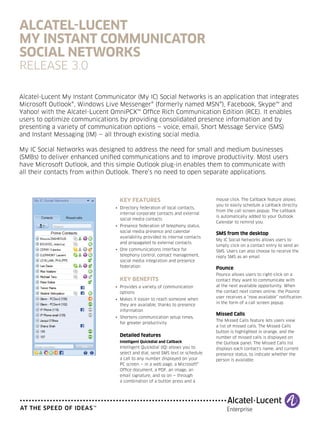
Intelligent Quickdial and Callback

Intelligent Quickdial (IQ) allows you to
select and dial, send SMS text or schedule
a call to any number displayed on your
PC screen — in a web page, a Microsoft®
Office document, a PDF, an image, an
email signature, and so on — through
a combination of a button press and a

mouse click. The Callback feature allows
you to easily schedule a callback directly
from the call screen popup. The callback
is automatically added to your Outlook
Calendar to remind you.

SMS from the desktop
My IC Social Networks allows users to
simply click on a contact entry to send an
SMS. Users can also choose to receive the
reply SMS as an email.

Pounce
Pounce allows users to right-click on a
contact they want to communicate with
at the next available opportunity. When
the contact next comes online, the Pounce
user receives a “now available” notification
in the form of a call screen popup.

Missed Calls
The Missed Calls feature lets users view
a list of missed calls. The Missed Calls
button is highlighted in orange, and the
number of missed calls is displayed on
the Outlook panel. The Missed Calls list
displays each contact’s name, and current
presence status, to indicate whether the
person is available.
Technical specifications

My IC Social Networks toolbar
and context menu
When a user highlights an email, the My
IC Social Networks toolbar displays the
sender’s current telephony, Facebook,
Skype, Windows Live Messenger and
Yahoo! presence status. If the user
right-clicks on a contact, a context menu
displays all the communication methods
available to make contact with the person:
•	 Click to call
•	 Click to IM

System requirements
Software

•	 Alcatel-Lucent OmniPCX Office RCE,
Release 9.0 or later
•	 Facebook
•	 Microsoft® Exchange 2003, 2007 or 2010
•	 Microsoft .NET Framework Release 3.5
Service Pack 1 (available from the
Microsoft website)
•	 Microsoft Outlook 2003, 2007 or
2010 (32-bit)

•	 Click to email

Connectivity
•	 TAPI client: Release 2.0; direct connections
to OmniPCX Office RCE for up to 25 users
•	 TAPI server: Release2.1; direct connections
to OmniPCX Office RCE for more than 25
users

Contact sources
•	 Corporate contacts: Active Directory, LDAP
•	 Local contacts: Microsoft Outlook contacts
•	 PBX Phonebook
•	 Social networks contacts: Facebook, Live
Messenger, Skype, Yahoo Messenger

This allows the user to select the preferred
form of communication.

•	 Microsoft Telephony Application
Programming Interface (TAPI) driver,
Release 6.4.2710.001 or later

Call Dialog Window

•	 Microsoft® Windows® 7 Professional,
Ultimate or Enterprise (32- or 64-bit)

•	 Chinese

•	 Microsoft® Windows Vista® SP2 Business,
Ultimate or Enterprise (32- or 64-bit)

•	 English

For both incoming and outgoing calls, the
Call Dialog window pops up and displays:
•	 The contact’s name and number

•	 Microsoft Windows XP Professional,
Service Pack 3

•	 Duration of call

•	 Microsoft Windows Live Messenger,
Release 14.0 or later

	 IM through Facebook, Skype,
Windows Live Messenger or
Yahoo during the call

Languages
•	 Dutch
•	 French
•	 German
•	 Italian
•	 Portuguese

•	 Skype, Release 3.8.0.188 or later

If a user cannot answer an incoming call,
he/she can schedule a callback by pushing
a button in the popup. This action opens
a new event in the Outlook Calendar. The
user schedules a time to call back. Outlook
alerts the user when the time to call back
arrives. Then, the user can simply press a
Call button to initiate the call.

•	 Russian

•	 Yahoo!, Release 10.0 or later

•	 Spanish

Hardware (recommended)

•	 32-bit (x86) or 64-bit (x64) GHz processor
•	 1 GB of system memory
•	 Minimum 30 MB of available hard drive
•	 Minimum 10-Mb/s network connection

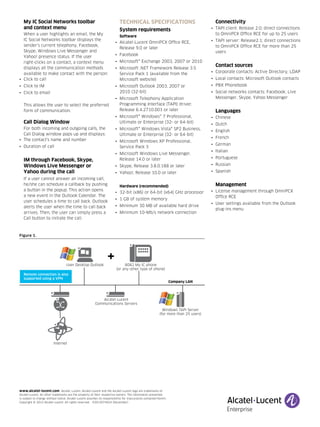
Figure 1.

User Desktop Outlook

+

8082 My IC phone
(or any other type of ohone)

Remote connection is also
supported using a VPN

Company LAN

Alcatel-Lucent
Communications Servers
Windows TAPI Server
(for more than 25 users)

Internet

www.alcatel-lucent.com Alcatel, Lucent, Alcatel-Lucent and the Alcatel-Lucent logo are trademarks of
Alcatel-Lucent. All other trademarks are the property of their respective owners. The information presented
is subject to change without notice. Alcatel-Lucent assumes no responsibility for inaccuracies contained herein.
Copyright © 2012 Alcatel-Lucent. All rights reserved.   E2012074924 (December)

Management
•	 License management through OmniPCX
Office RCE
•	 User settings available from the Outlook
plug-ins menu

My ic_social_networks_data_sheet

  • 1.
    Alcatel-Lucent My Instant Communicator SocialNetworks Release 3.0 Alcatel-Lucent My Instant Communicator (My IC) Social Networks is an application that integrates Microsoft Outlook®, Windows Live Messenger® (formerly named MSN®), Facebook, Skype™ and Yahoo! with the Alcatel-Lucent OmniPCX™ Office Rich Communication Edition (RCE). It enables users to optimize communications by providing consolidated presence information and by presenting a variety of communication options — voice, email, Short Message Service (SMS) ­ and Instant Messaging (IM) — all through existing social media. My IC Social Networks was designed to address the need for small and medium businesses (SMBs) to deliver enhanced unified communications and to improve productivity. Most users have Microsoft Outlook, and this simple Outlook plug-in enables them to communicate with all their contacts from within Outlook. There’s no need to open separate applications. Key features • Directory federation of local contacts, internal corporate contacts and external social media contacts • Presence federation of telephony status, social media presence and calendar availability provided to internal contacts and propagated to external contacts • One communications interface for telephony control, contact management, social media integration and presence federation Key benefits • Provides a variety of communication options • Makes it easier to reach someone when they are available, thanks to presence information • Shortens communication setup times, for greater productivity Detailed features Intelligent Quickdial and Callback Intelligent Quickdial (IQ) allows you to select and dial, send SMS text or schedule a call to any number displayed on your PC screen — in a web page, a Microsoft® Office document, a PDF, an image, an email signature, and so on — through a combination of a button press and a mouse click. The Callback feature allows you to easily schedule a callback directly from the call screen popup. The callback is automatically added to your Outlook Calendar to remind you. SMS from the desktop My IC Social Networks allows users to simply click on a contact entry to send an SMS. Users can also choose to receive the reply SMS as an email. Pounce Pounce allows users to right-click on a contact they want to communicate with at the next available opportunity. When the contact next comes online, the Pounce user receives a “now available” notification in the form of a call screen popup. Missed Calls The Missed Calls feature lets users view a list of missed calls. The Missed Calls button is highlighted in orange, and the number of missed calls is displayed on the Outlook panel. The Missed Calls list displays each contact’s name, and current presence status, to indicate whether the person is available.
  • 2.
    Technical specifications My ICSocial Networks toolbar and context menu When a user highlights an email, the My IC Social Networks toolbar displays the sender’s current telephony, Facebook, Skype, Windows Live Messenger and Yahoo! presence status. If the user right-clicks on a contact, a context menu displays all the communication methods available to make contact with the person: • Click to call • Click to IM System requirements Software • Alcatel-Lucent OmniPCX Office RCE, Release 9.0 or later • Facebook • Microsoft® Exchange 2003, 2007 or 2010 • Microsoft .NET Framework Release 3.5 Service Pack 1 (available from the Microsoft website) • Microsoft Outlook 2003, 2007 or 2010 (32-bit) • Click to email Connectivity • TAPI client: Release 2.0; direct connections to OmniPCX Office RCE for up to 25 users • TAPI server: Release2.1; direct connections to OmniPCX Office RCE for more than 25 users Contact sources • Corporate contacts: Active Directory, LDAP • Local contacts: Microsoft Outlook contacts • PBX Phonebook • Social networks contacts: Facebook, Live Messenger, Skype, Yahoo Messenger This allows the user to select the preferred form of communication. • Microsoft Telephony Application Programming Interface (TAPI) driver, Release 6.4.2710.001 or later Call Dialog Window • Microsoft® Windows® 7 Professional, Ultimate or Enterprise (32- or 64-bit) • Chinese • Microsoft® Windows Vista® SP2 Business, Ultimate or Enterprise (32- or 64-bit) • English For both incoming and outgoing calls, the Call Dialog window pops up and displays: • The contact’s name and number • Microsoft Windows XP Professional, Service Pack 3 • Duration of call • Microsoft Windows Live Messenger, Release 14.0 or later IM through Facebook, Skype, Windows Live Messenger or Yahoo during the call Languages • Dutch • French • German • Italian • Portuguese • Skype, Release 3.8.0.188 or later If a user cannot answer an incoming call, he/she can schedule a callback by pushing a button in the popup. This action opens a new event in the Outlook Calendar. The user schedules a time to call back. Outlook alerts the user when the time to call back arrives. Then, the user can simply press a Call button to initiate the call. • Russian • Yahoo!, Release 10.0 or later • Spanish Hardware (recommended) • 32-bit (x86) or 64-bit (x64) GHz processor • 1 GB of system memory • Minimum 30 MB of available hard drive • Minimum 10-Mb/s network connection Figure 1. User Desktop Outlook + 8082 My IC phone (or any other type of ohone) Remote connection is also supported using a VPN Company LAN Alcatel-Lucent Communications Servers Windows TAPI Server (for more than 25 users) Internet www.alcatel-lucent.com Alcatel, Lucent, Alcatel-Lucent and the Alcatel-Lucent logo are trademarks of Alcatel-Lucent. All other trademarks are the property of their respective owners. The information presented is subject to change without notice. Alcatel-Lucent assumes no responsibility for inaccuracies contained herein. Copyright © 2012 Alcatel-Lucent. All rights reserved. E2012074924 (December) Management • License management through OmniPCX Office RCE • User settings available from the Outlook plug-ins menu