All contents © MuleSoft, LLC
28 Ottobre 2022
MILANO MuleSoft Meetup Group
Batch Processing Best Practices - Luca Bonaldo
Introduzione a CI/CD con Mulesoft - Paolo Petronzi
All contents © MuleSoft, LLC
MuleSoft Meetup Milano – Luca Bonaldo, Software developer
Batch Processing
All contents © MuleSoft, LLC
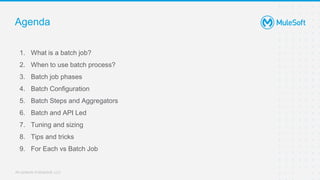
Agenda
1. What is a batch job?
2. When to use batch process?
3. Batch job phases
4. Batch Configuration
5. Batch Steps and Aggregators
6. Batch and API Led
7. Tuning and sizing
8. Tips and tricks
9. For Each vs Batch Job
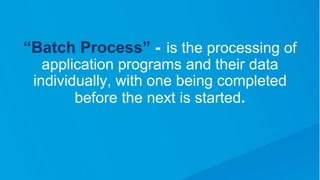
“Batch Process” - is the processing of
application programs and their data
individually, with one being completed
before the next is started.
All contents © MuleSoft, LLC
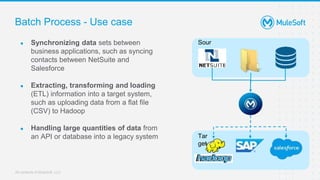
Batch Process - Use case
● Synchronizing data sets between
business applications, such as syncing
contacts between NetSuite and
Salesforce
● Extracting, transforming and loading
(ETL) information into a target system,
such as uploading data from a flat file
(CSV) to Hadoop
● Handling large quantities of data from
an API or database into a legacy system
Sour
ce
Tar
get
All contents © MuleSoft, LLC
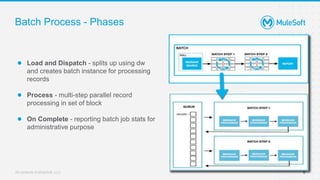
Batch Process - Phases
6
● Load and Dispatch - splits up using dw
and creates batch instance for processing
records
● Process - multi-step parallel record
processing in set of block
● On Complete - reporting batch job stats for
administrative purpose
All contents © MuleSoft, LLC
Batch Process - Phases
7
[Transform:
optional]
Aggregator
Processing
errors
Extract
Load
Completion:
Status
reporting
Batch steps
Batch
job
All contents © MuleSoft, LLC
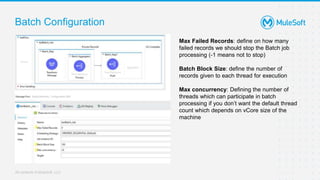
Batch Configuration
Max Failed Records: define on how many
failed records we should stop the Batch job
processing (-1 means not to stop)
Batch Block Size: define the number of
records given to each thread for execution
Max concurrency: Defining the number of
threads which can participate in batch
processing if you don’t want the default thread
count which depends on vCore size of the
machine
All contents © MuleSoft, LLC
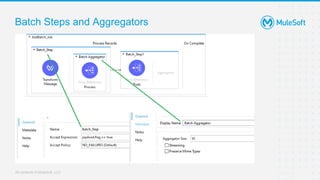
Batch Steps and Aggregators
All contents © MuleSoft, LLC
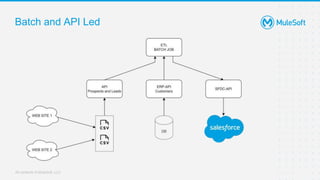
Batch and API Led
All contents © MuleSoft, LLC
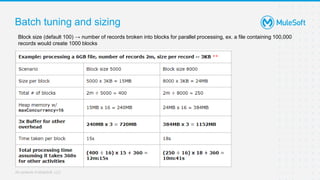
Batch tuning and sizing
Block size (default 100) → number of records broken into blocks for parallel processing, ex. a file containing 100,000
records would create 1000 blocks
All contents © MuleSoft, LLC
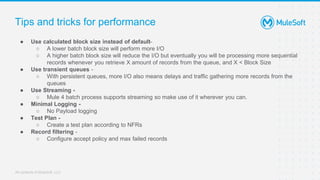
Tips and tricks for performance
● Use calculated block size instead of default-
○ A lower batch block size will perform more I/O
○ A higher batch block size will reduce the I/O but eventually you will be processing more sequential
records whenever you retrieve X amount of records from the queue, and X < Block Size
● Use transient queues -
○ With persistent queues, more I/O also means delays and traffic gathering more records from the
queues
● Use Streaming -
○ Mule 4 batch process supports streaming so make use of it wherever you can.
● Minimal Logging -
○ No Payload logging
● Test Plan -
○ Create a test plan according to NFRs
● Record filtering -
○ Configure accept policy and max failed records
All contents © MuleSoft, LLC
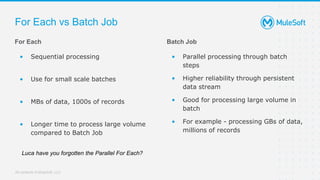
Batch Job
• Parallel processing through batch
steps
• Higher reliability through persistent
data stream
• Good for processing large volume in
batch
• For example - processing GBs of data,
millions of records
For Each vs Batch Job
For Each
• Sequential processing
• Use for small scale batches
• MBs of data, 1000s of records
• Longer time to process large volume
compared to Batch Job
Luca have you forgotten the Parallel For Each?
All contents © MuleSoft, LLC
MuleSoft Meetup Milano – Paolo Umberto Petronzi, Software Architect
Introduzione a CI/CD con Mulesoft
All contents © MuleSoft, LLC
Agenda
1. Intro
2. Continuous Integration
3. Continuous Delivery
4. CI/CD in Mulesoft
All contents © MuleSoft, LLC
1 - Intro
All contents © MuleSoft, LLC
Intro
Goals
● Anticipate risks
● Left-shift of testing phase to the early stages of software development
● Reduce time to market
● Improve code quality
● Lighten software development and delivery process
All contents © MuleSoft, LLC
2 - Continuous
Integration
All contents © MuleSoft, LLC
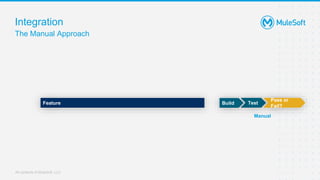
Integration
The Manual Approach
Feature Test
Pass or
Fail?
Build
Manual
All contents © MuleSoft, LLC
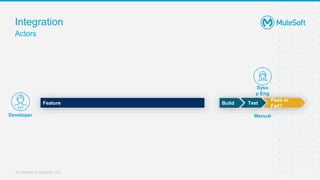
Integration
Actors
Feature
Syso
p Eng
Test
Pass or
Fail?
Build
Manual
Developer
All contents © MuleSoft, LLC
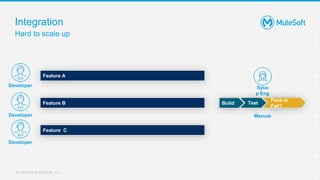
Integration
Hard to scale up
Feature A
Feature B
Syso
p Eng
Test
Pass or
Fail?
Build
Feature C
Manual
Developer
Developer
Developer
All contents © MuleSoft, LLC
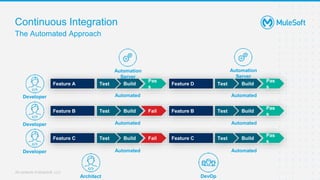
Continuous Integration
The Automated Approach
Developer
Feature A
Feature B
Feature C
Build
Pas
s
Test
Build Fail
Test
Build Fail
Test
Feature D
Feature B
Feature C
Build
Pas
s
Test
Build
Test
Build
Test
Pas
s
Pas
s
Automation
Server
Automated
Automated
Automated
Automated
Automated
Automated
Architect DevOp
Developer
Developer
Automation
Server
All contents © MuleSoft, LLC
2 - Continuous Delivery
All contents © MuleSoft, LLC
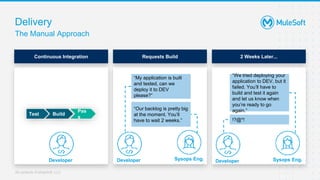
Delivery
The Manual Approach
Requests Build
Sysops Eng.
Developer
Build
Pas
s
Test
Continuous Integration 2 Weeks Later...
“My application is built
and tested, can we
deploy it to DEV
please?”
“Our backlog is pretty big
at the moment. You’ll
have to wait 2 weeks.”
“We tried deploying your
application to DEV, but it
failed. You’ll have to
build and test it again
and let us know when
you’re ready to go
again.”
!?@*!
Developer Sysops Eng.
Developer
All contents © MuleSoft, LLC
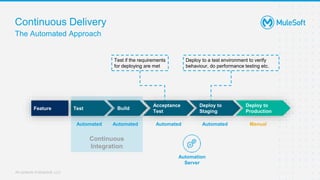
Continuous Delivery
The Automated Approach
Continuous
Integration
Build
Test
Acceptance
Test
Deploy to
Staging
Deploy to
Production
Automated Manual
Test if the requirements
for deploying are met
Deploy to a test environment to verify
behaviour, do performance testing etc.
Feature
Automated
Automated
Automated
Automation
Server
All contents © MuleSoft, LLC
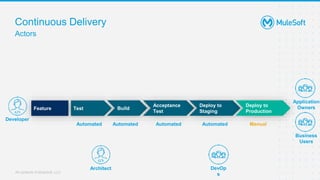
Continuous Delivery
Actors
Build
Test
Acceptance
Test
Deploy to
Staging
Deploy to
Production
Automated Manual
Feature
Automated
Automated
Automated
Developer
Application
Owners
Business
Users
Architect DevOp
s
All contents © MuleSoft, LLC
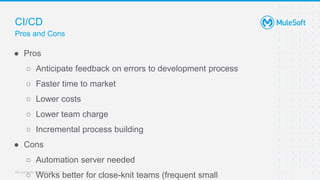
CI/CD
Pros and Cons
● Pros
○ Anticipate feedback on errors to development process
○ Faster time to market
○ Lower costs
○ Lower team charge
○ Incremental process building
● Cons
○ Automation server needed
○ Works better for close-knit teams (frequent small
All contents © MuleSoft, LLC
3 - CI/CD in Mulesoft
All contents © MuleSoft, LLC
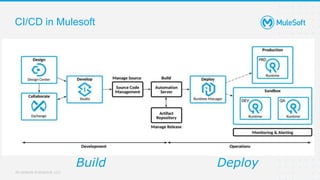
CI/CD in Mulesoft
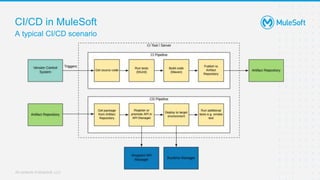
Build Deploy
All contents © MuleSoft, LLC
CI/CD in Mulesoft
Tooling flexibility
● Mule projects are made of XML and properties files
○ versionable in any Version Control System
● Maven-based lifecycles
○ automatable by Continuous Integration Tools
● JAR Artifacts can be stored in any Artifact Repository
All contents © MuleSoft, LLC
CI/CD in Mulesoft
Mule Maven Plugin
● Enables to automate Maven lifecycles of Mule apps
● Allows to deploy everywhere:
○ CloudHub
○ CloudHub 2.0
○ Anypoint Runtime Fabric
○ On-premises
All contents © MuleSoft, LLC
CI/CD in Mulesoft
Anypoint Platform APIs
● Authentication
● Design Center
● Exchange
● Management Center
○ Access Manager
○ API Manager
○ Runtime Manager
○ Visualizer
○ Secret Manager
All contents © MuleSoft, LLC
CI/CD in Mulesoft
Anypoint CLI
● Scripting + command-line (Anypoint Platform / Anypoint PCE)
○ Account
○ API Manager
○ CloudHub (Apps, VPCs, DLBs)
○ CloudHub 2.0
○ Local Servers, Server Groups and Clusters
○ Runtime Fabric
○ Design Center
○ Exchange
All contents © MuleSoft, LLC
CI/CD in MuleSoft
A typical CI/CD scenario
All contents © MuleSoft, LLC
Next Meetup
(The best is yet to come!)
All contents © MuleSoft, LLC
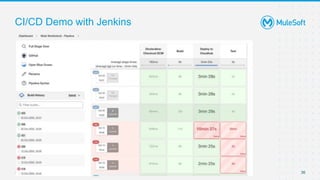
CI/CD Demo with Jenkins
36
All contents © MuleSoft, LLC
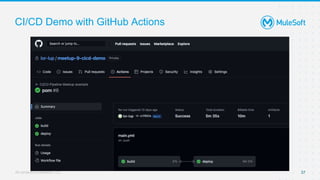
CI/CD Demo with GitHub Actions
37
All contents © MuleSoft, LLC
Diventa il prossimo Meetup Speaker!
● Mostra alla community un vero caso d’uso di CI/CD
● Condividi un argomento che può essere interessante
all’indirizzo email meetup@florence-consulting.it
● Sceglieremo la proposta più originale
● Riceverai un voucher per partecipare ad un corso
MuleSoft a tua scelta
● Riceverai gadgets della MuleSoft community
38
All contents © MuleSoft, LLC
GRAZIE!
We Are Hiring!
All contents © MuleSoft, LLC
Contattaci all’indirizzo meetup@florence-
consulting.it
Hai ancora domande e vuoi
approfondire in separata sede?
Invia il tuo feedback
Finito l’evento riceverai una e-mail per inviare il
tuo feedback: facci sapere con precisione quali
sono i topic che ti piacerebbe approfondire
insieme!
We Are Hiring!
All contents © MuleSoft, LLC
Thank You

Mulesoft Meetup Milano #9 - Batch Processing and CI/CD

  • 1.
    All contents ©MuleSoft, LLC 28 Ottobre 2022 MILANO MuleSoft Meetup Group Batch Processing Best Practices - Luca Bonaldo Introduzione a CI/CD con Mulesoft - Paolo Petronzi
  • 2.
    All contents ©MuleSoft, LLC MuleSoft Meetup Milano – Luca Bonaldo, Software developer Batch Processing
  • 3.
    All contents ©MuleSoft, LLC Agenda 1. What is a batch job? 2. When to use batch process? 3. Batch job phases 4. Batch Configuration 5. Batch Steps and Aggregators 6. Batch and API Led 7. Tuning and sizing 8. Tips and tricks 9. For Each vs Batch Job
  • 4.
    “Batch Process” -is the processing of application programs and their data individually, with one being completed before the next is started.
  • 5.
    All contents ©MuleSoft, LLC Batch Process - Use case ● Synchronizing data sets between business applications, such as syncing contacts between NetSuite and Salesforce ● Extracting, transforming and loading (ETL) information into a target system, such as uploading data from a flat file (CSV) to Hadoop ● Handling large quantities of data from an API or database into a legacy system Sour ce Tar get
  • 6.
    All contents ©MuleSoft, LLC Batch Process - Phases 6 ● Load and Dispatch - splits up using dw and creates batch instance for processing records ● Process - multi-step parallel record processing in set of block ● On Complete - reporting batch job stats for administrative purpose
  • 7.
    All contents ©MuleSoft, LLC Batch Process - Phases 7 [Transform: optional] Aggregator Processing errors Extract Load Completion: Status reporting Batch steps Batch job
  • 8.
    All contents ©MuleSoft, LLC Batch Configuration Max Failed Records: define on how many failed records we should stop the Batch job processing (-1 means not to stop) Batch Block Size: define the number of records given to each thread for execution Max concurrency: Defining the number of threads which can participate in batch processing if you don’t want the default thread count which depends on vCore size of the machine
  • 9.
    All contents ©MuleSoft, LLC Batch Steps and Aggregators
  • 10.
    All contents ©MuleSoft, LLC Batch and API Led
  • 11.
    All contents ©MuleSoft, LLC Batch tuning and sizing Block size (default 100) → number of records broken into blocks for parallel processing, ex. a file containing 100,000 records would create 1000 blocks
  • 12.
    All contents ©MuleSoft, LLC Tips and tricks for performance ● Use calculated block size instead of default- ○ A lower batch block size will perform more I/O ○ A higher batch block size will reduce the I/O but eventually you will be processing more sequential records whenever you retrieve X amount of records from the queue, and X < Block Size ● Use transient queues - ○ With persistent queues, more I/O also means delays and traffic gathering more records from the queues ● Use Streaming - ○ Mule 4 batch process supports streaming so make use of it wherever you can. ● Minimal Logging - ○ No Payload logging ● Test Plan - ○ Create a test plan according to NFRs ● Record filtering - ○ Configure accept policy and max failed records
  • 13.
    All contents ©MuleSoft, LLC Batch Job • Parallel processing through batch steps • Higher reliability through persistent data stream • Good for processing large volume in batch • For example - processing GBs of data, millions of records For Each vs Batch Job For Each • Sequential processing • Use for small scale batches • MBs of data, 1000s of records • Longer time to process large volume compared to Batch Job Luca have you forgotten the Parallel For Each?
  • 14.
    All contents ©MuleSoft, LLC MuleSoft Meetup Milano – Paolo Umberto Petronzi, Software Architect Introduzione a CI/CD con Mulesoft
  • 15.
    All contents ©MuleSoft, LLC Agenda 1. Intro 2. Continuous Integration 3. Continuous Delivery 4. CI/CD in Mulesoft
  • 16.
    All contents ©MuleSoft, LLC 1 - Intro
  • 17.
    All contents ©MuleSoft, LLC Intro Goals ● Anticipate risks ● Left-shift of testing phase to the early stages of software development ● Reduce time to market ● Improve code quality ● Lighten software development and delivery process
  • 18.
    All contents ©MuleSoft, LLC 2 - Continuous Integration
  • 19.
    All contents ©MuleSoft, LLC Integration The Manual Approach Feature Test Pass or Fail? Build Manual
  • 20.
    All contents ©MuleSoft, LLC Integration Actors Feature Syso p Eng Test Pass or Fail? Build Manual Developer
  • 21.
    All contents ©MuleSoft, LLC Integration Hard to scale up Feature A Feature B Syso p Eng Test Pass or Fail? Build Feature C Manual Developer Developer Developer
  • 22.
    All contents ©MuleSoft, LLC Continuous Integration The Automated Approach Developer Feature A Feature B Feature C Build Pas s Test Build Fail Test Build Fail Test Feature D Feature B Feature C Build Pas s Test Build Test Build Test Pas s Pas s Automation Server Automated Automated Automated Automated Automated Automated Architect DevOp Developer Developer Automation Server
  • 23.
    All contents ©MuleSoft, LLC 2 - Continuous Delivery
  • 24.
    All contents ©MuleSoft, LLC Delivery The Manual Approach Requests Build Sysops Eng. Developer Build Pas s Test Continuous Integration 2 Weeks Later... “My application is built and tested, can we deploy it to DEV please?” “Our backlog is pretty big at the moment. You’ll have to wait 2 weeks.” “We tried deploying your application to DEV, but it failed. You’ll have to build and test it again and let us know when you’re ready to go again.” !?@*! Developer Sysops Eng. Developer
  • 25.
    All contents ©MuleSoft, LLC Continuous Delivery The Automated Approach Continuous Integration Build Test Acceptance Test Deploy to Staging Deploy to Production Automated Manual Test if the requirements for deploying are met Deploy to a test environment to verify behaviour, do performance testing etc. Feature Automated Automated Automated Automation Server
  • 26.
    All contents ©MuleSoft, LLC Continuous Delivery Actors Build Test Acceptance Test Deploy to Staging Deploy to Production Automated Manual Feature Automated Automated Automated Developer Application Owners Business Users Architect DevOp s
  • 27.
    All contents ©MuleSoft, LLC CI/CD Pros and Cons ● Pros ○ Anticipate feedback on errors to development process ○ Faster time to market ○ Lower costs ○ Lower team charge ○ Incremental process building ● Cons ○ Automation server needed ○ Works better for close-knit teams (frequent small
  • 28.
    All contents ©MuleSoft, LLC 3 - CI/CD in Mulesoft
  • 29.
    All contents ©MuleSoft, LLC CI/CD in Mulesoft Build Deploy
  • 30.
    All contents ©MuleSoft, LLC CI/CD in Mulesoft Tooling flexibility ● Mule projects are made of XML and properties files ○ versionable in any Version Control System ● Maven-based lifecycles ○ automatable by Continuous Integration Tools ● JAR Artifacts can be stored in any Artifact Repository
  • 31.
    All contents ©MuleSoft, LLC CI/CD in Mulesoft Mule Maven Plugin ● Enables to automate Maven lifecycles of Mule apps ● Allows to deploy everywhere: ○ CloudHub ○ CloudHub 2.0 ○ Anypoint Runtime Fabric ○ On-premises
  • 32.
    All contents ©MuleSoft, LLC CI/CD in Mulesoft Anypoint Platform APIs ● Authentication ● Design Center ● Exchange ● Management Center ○ Access Manager ○ API Manager ○ Runtime Manager ○ Visualizer ○ Secret Manager
  • 33.
    All contents ©MuleSoft, LLC CI/CD in Mulesoft Anypoint CLI ● Scripting + command-line (Anypoint Platform / Anypoint PCE) ○ Account ○ API Manager ○ CloudHub (Apps, VPCs, DLBs) ○ CloudHub 2.0 ○ Local Servers, Server Groups and Clusters ○ Runtime Fabric ○ Design Center ○ Exchange
  • 34.
    All contents ©MuleSoft, LLC CI/CD in MuleSoft A typical CI/CD scenario
  • 35.
    All contents ©MuleSoft, LLC Next Meetup (The best is yet to come!)
  • 36.
    All contents ©MuleSoft, LLC CI/CD Demo with Jenkins 36
  • 37.
    All contents ©MuleSoft, LLC CI/CD Demo with GitHub Actions 37
  • 38.
    All contents ©MuleSoft, LLC Diventa il prossimo Meetup Speaker! ● Mostra alla community un vero caso d’uso di CI/CD ● Condividi un argomento che può essere interessante all’indirizzo email meetup@florence-consulting.it ● Sceglieremo la proposta più originale ● Riceverai un voucher per partecipare ad un corso MuleSoft a tua scelta ● Riceverai gadgets della MuleSoft community 38
  • 39.
    All contents ©MuleSoft, LLC GRAZIE! We Are Hiring!
  • 40.
    All contents ©MuleSoft, LLC Contattaci all’indirizzo meetup@florence- consulting.it Hai ancora domande e vuoi approfondire in separata sede? Invia il tuo feedback Finito l’evento riceverai una e-mail per inviare il tuo feedback: facci sapere con precisione quali sono i topic che ti piacerebbe approfondire insieme! We Are Hiring!
  • 41.
    All contents ©MuleSoft, LLC Thank You