

MOVING MOUNTAINS THROUGH MEASUREMENT
Chris Clymer
Director of Security
MRK
Jack Nichelson
Director of Infrastructure & Security
Chart Industries
Jason Middaugh
Director of Infrastructure& Security
Cliffs Natural Resources
INTRODUCTION
 Why are we here?
 What are our goals?
 What will you gain from this presentation?
WHAT WILL YOU GET FROM THIS PRESENTATION?
 A repeatable process for measuring security performance
 A playbook you can start executing on tomorrow
 Methods for explaining security to your CEO
 Tools for justifying security budget
WHAT WONT YOU GET FROM THIS PRESENTATION?
 Our favorite metrics
 Details on how to build the best spreadsheet
 Instructions on using fancy reporting tools
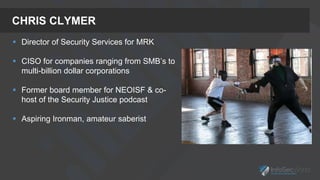
CHRIS CLYMER
 Director of Security Services for MRK
 CISO for companies ranging from SMB’s to
multi-billion dollar corporations
 Former board member for NEOISF & co-
host of the Security Justice podcast
 Aspiring Ironman, amateur saberist
JASON MIDDAUGH
 Director of Infrastructure & Security Services at Cliffs
Natural Resources
 Holds a bachelor’s degree in information
systems/operations management from the University
of Toledo, an executive master’s degree in business
administration from The Ohio State University, and
holds several IT based certifications (CISSP, MCSE,
VCP, CCNA, CCDA).
 Chair member of the North East Ohio Cyber
Consortium. Selected and currently attending the FBI
Citizens Academy.
 Skiing enthusiast
Jack Nichelson “Solving Problems, is my Passion”
 Director of Infrastructure & Security for Chart Industries.
 Executive MBA from Baldwin-Wallace University
 Recognized as one of the “People Who Made a Difference
in Security” by the SANS Institute and Received the
CSO50 award for connecting security initiatives to
business value.
 Adviser for Baldwin Wallace’s, State winner Collegiate
Cyber Defense Competition (CCDC) team.
I defend my companies competitive advantage by helping solve business problems through
technology to work faster and safer.
JACK NICHELSON
WHY METRICS?
WHY METRICS?
 Can only improve what you can measure
 Without measurement, security is purely artistry and witchcraft
 Because security wants a seat at the big table
 Business units that report to the board will have some way to demonstrate their performance
 Because you need to know what’s working, and what needs your
attention
 Because you want to buy more security toys next year
 Because you want to add more staff
HOW I’VE USED THEM
 Drive team performance
 Explain security to the board
 Justify past expense
 Justify FUTURE expense
 Keep myself honest
HOW I’VE USED THEM
4,600 8,190 6,200 6,900 9,100 9,100 4,600 4,800 7,600 8,425 7,532
16,968 15,786 15,865
26,661 30,449
284
13,893
2,018 2,009 2,675 3,610 4,009
62 103
638
1,727
3,030
35,864 62,404
105,617
112,804
125,653 132,645
11,009 15,900 17,006
16,101
20,782
14,680
12,910
63,501
55,696
10,850
84,630
90,752
14
64 34
12
17
25
46
32
11
11
8
5
32,591
40,002 39,208
50,312
62,075
18,019
71,813
132,555
168,133
133,940
222,326
234,943
0
50000
100000
150000
200000
250000
Dec-14 Jan-15 Feb-15 Mar-15 Apr-15 May-15 June-15 July-15 Aug-15 Sept-15 Oct-15 Nov-15
Total # of New Security
Incidents
Total # of Malicious
Websites Auto-Blocked
Attacks Auto-
Prevented by IPS
(Critical/High)
Total # of Malware
Auto-Handled
Total # of Phishing
Auto-Handled
• IPS Tuned
• AV
Signature
Issue
• New Web Filter
HOW I’VE USED THEM
4,600 8,190 6,200 6,900 9,100 9,100 4,600 4,800 7,600 8,425 7,532
16,968 15,786 15,865
26,661 30,449
284
13,893
2,018 2,009 2,675 3,610 4,009
62 103
638
1,727
3,030
35,864 62,404
105,617
112,804
125,653 132,645
11,009 15,900 17,006
16,101
20,782
14,680
12,910
63,501
55,696
10,850
84,630
90,752
14
64 34
12
17
25
46
32
11
11
8
5
32,591
40,002 39,208
50,312
62,075
18,019
71,813
132,555
168,133
133,940
222,326
234,943
0
50000
100000
150000
200000
250000
Dec-14 Jan-15 Feb-15 Mar-15 Apr-15 May-15 June-15 July-15 Aug-15 Sept-15 Oct-15 Nov-15
Total # of New Security
Incidents
Total # of Malicious
Websites Auto-Blocked
Attacks Auto-
Prevented by IPS
(Critical/High)
Total # of Malware
Auto-Handled
Total # of Phishing
Auto-Handled
• IPS Tuned
• AV
Signature
Issue
• New Web Filter
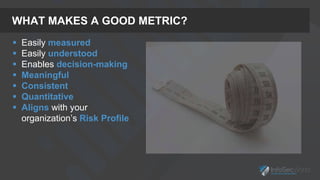
WHAT MAKES A GOOD METRIC?
 Easily measured
 Easily understood
 Enables decision-making
 Meaningful
 Consistent
 Quantitative
 Aligns with your
organization’s Risk Profile
MY PROCESS
1. Define the problem
2. Identify your resources
3. Build a rough draft
4. Review with stakeholders
5. Rinse & repeat
MY PROCESS
1. Define the problem
a. Where is the pain?
b. Find your stakeholders
c. What is working/what isn’t?
2. Identify your resources
a. What is readily available?
b. Tools, process, people
c. Don’t dwell on nice-to-haves
3. Build a rough draft
a. Won’t be perfect the first time
b. Make sure its easy to repeat
4. Review with stakeholders
a. Above and below
b. Have them contribute
c. Get them to buy-in
5. Rinse & repeat
a. Run the process
b. See what works and what doesn’t
c. Adjust where needed
JASON'S STORY
FIRST STEPS – GETTING STARTED
 Know your audience and speak their language
 Leverage existing tools that you already have
 Anticipate what others will ask or what conclusions they
will draw from the metrics you are presenting
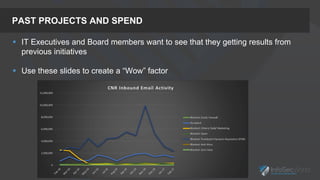
PAST PROJECTS AND SPEND
 IT Executives and Board members want to see that they getting results from
previous initiatives
 Use these slides to create a “Wow” factor
CURRENTLY MEASURED METRICS
 Your goal should be to eventually get to at least 13 months of revolving data
 Play the Game of Thrones, or in this case the Game of Met-tricks
LEVERAGE METRICS FOR YOUR FUTURE NEEDS
 Use your metrics to help
justify additional capital
 Help predict when you are
going to run out or need
more
 Show capability gaps that
you want to fill
 Justify additional
resources
HOW AND WHERE DO I GET STARTED?
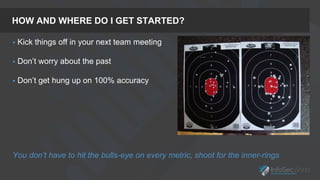
 Kick things off in your next team meeting
 Don’t worry about the past
 Don’t get hung up on 100% accuracy
You don’t have to hit the bulls-eye on every metric, shoot for the inner-rings
SUMMARY
 Know your audience - Speak their language
 Think Past – Leverage metrics to justify and
put historic spend at ease
 Think Present – Collect and analyze your data;
do not be afraid to burn it down and start again
 Think Future – Continually set the stage and
constantly communicate when and where you
are going to need additional resources with
metrics
 Get Started! – You do not have to hit the
bullseye
JACK'S JOURNEY
BE PROACTIVE
Change starts from within, so you have to make the decision to focus
on the things you can influence rather than reacting to the things
outside of your control.
Manage Yourself:
 Where and how are you spending your time & energy throughout the day?
 Make a list of the things that concern you and things you can Influence.
Ask yourself these 3 questions every day:
 Did I do my best to spend my time on things I can influence?
 Did I do my best to set and communicate clear goals?
 Did I do my best to make progress toward goal achievement?
“The 1st metric you need to track is yourself”
BEGIN WITH THE END IN MIND
If your ladder is not leaning against the right wall, every step you
take gets you to the wrong place faster.
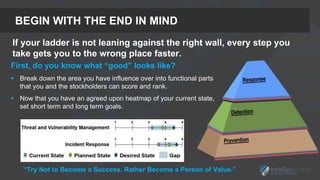
First, do you know what “good” looks like?
 Break down the area you have influence over into functional parts
that you and the stockholders can score and rank.
 Now that you have an agreed upon heatmap of your current state,
set short term and long term goals.
“Try Not to Become a Success. Rather Become a Person of Value.”
PROBLEM STATEMENT
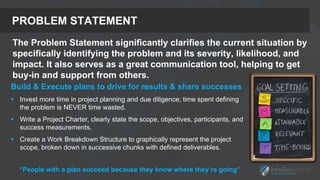
The Problem Statement significantly clarifies the current situation by
specifically identifying the problem and its severity, likelihood, and
impact. It also serves as a great communication tool, helping to get
buy-in and support from others.
Build & Execute plans to drive for results & share successes
 Invest more time in project planning and due diligence; time spent defining
the problem is NEVER time wasted.
 Write a Project Charter, clearly state the scope, objectives, participants, and
success measurements.
 Create a Work Breakdown Structure to graphically represent the project
scope, broken down in successive chunks with defined deliverables.
“People with a plan succeed because they know where they’re going”
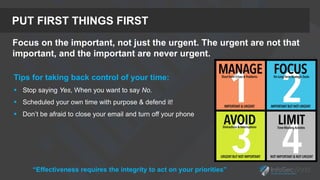
PUT FIRST THINGS FIRST
Focus on the important, not just the urgent. The urgent are not that
important, and the important are never urgent.
Tips for taking back control of your time:
 Stop saying Yes, When you want to say No.
 Scheduled your own time with purpose & defend it!
 Don’t be afraid to close your email and turn off your phone
“Effectiveness requires the integrity to act on your priorities”
CHART PERFORMANCE & ADJUST
Gemba (現場) is a Japanese term referring to the place where value is
created. The idea of Gemba is that the problems are visible, and the
best improvement ideas will come from going to the Gemba.
“Good security is not something you have, it’s something you do” - Wendy Nather
SUMMARY – KEY TAKEAWAYS
 Be Proactive – Focus on what you can influence
 Begin with the end in mind – Define practical outcomes
 Create a Problem Statement – A goal without a plan is just a wish
 Put first thing first – Plan weekly, act daily
 Chart Performance & Adjust – Shine a light on the problem
“Think about how you can simplify security – make it easy – and focus on the basics.” - Dave Kennedy
WRAPPING UP
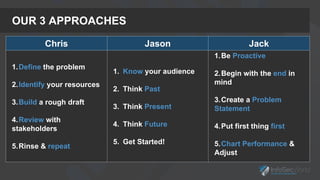
OUR 3 APPROACHES
Chris Jason Jack
1.Define the problem
2.Identify your resources
3.Build a rough draft
4.Review with
stakeholders
5.Rinse & repeat
1. Know your audience
2. Think Past
3. Think Present
4. Think Future
5. Get Started!
1.Be Proactive
2.Begin with the end in
mind
3.Create a Problem
Statement
4.Put first thing first
5.Chart Performance &
Adjust
THANK YOU
Chris Clymer
Chris@ChrisClymer.com
@ChrisClymer
Jack Nichelson
Jack@Nichelson.net
@Jack0lope
Jason Middaugh
Jason.Middaugh@CliffsNR.com
@Jason_Middaugh
APPENDIX
REFERENCES
 Security Metrics – Andrew Jacquith
 Security Data Visualization – Greg Conti
 Pragmatic Security Metrics – W. Krag Brotby & Gary Hinson
 Security Metrics Mailing list - http://www.securitymetrics.org/mailing-list.html
 NACD Cyber Risk Oversight Handbook 2016 - NACD
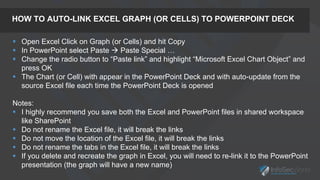
HOW TO AUTO-LINK EXCEL GRAPH (OR CELLS) TO POWERPOINT DECK
 Open Excel Click on Graph (or Cells) and hit Copy
 In PowerPoint select Paste  Paste Special …
 Change the radio button to “Paste link” and highlight “Microsoft Excel Chart Object” and
press OK
 The Chart (or Cell) with appear in the PowerPoint Deck and with auto-update from the
source Excel file each time the PowerPoint Deck is opened
Notes:
 I highly recommend you save both the Excel and PowerPoint files in shared workspace
like SharePoint
 Do not rename the Excel file, it will break the links
 Do not move the location of the Excel file, it will break the links
 Do not rename the tabs in the Excel file, it will break the links
 If you delete and recreate the graph in Excel, you will need to re-link it to the PowerPoint
presentation (the graph will have a new name)
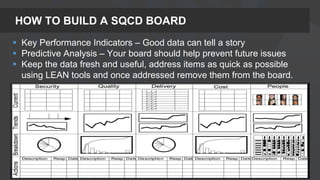
HOW TO BUILD A SQCD BOARD
 Key Performance Indicators – Good data can tell a story
 Predictive Analysis – Your board should help prevent future issues
 Keep the data fresh and useful, address items as quick as possible
using LEAN tools and once addressed remove them from the board.
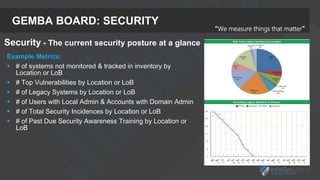
GEMBA BOARD: SECURITY
“We measure things that matter”
Example Metrics:
 # of systems not monitored & tracked in inventory by
Location or LoB
 # Top Vulnerabilities by Location or LoB
 # of Legacy Systems by Location or LoB
 # of Users with Local Admin & Accounts with Domain Admin
 # of Total Security Incidences by Location or LoB
 # of Past Due Security Awareness Training by Location or
LoB
Security - The current security posture at a glance
GEMBA BOARD: QUALITY
Example Metrics:
 # of Servers & Workstation missing OS & App patches
(30 day SLA)
 # of infections/Re-Images tickets (3 day SLA)
 # of Security Event tickets (5 day SLA)
 # of Security Request tickets (15 days SAL)
 Cause Mapping Analysis to find root cause of problems
Quality – Results for SLA goals of
events & requests
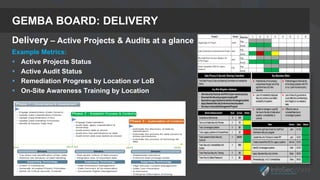
GEMBA BOARD: DELIVERY
Delivery – Active Projects & Audits at a glance
Example Metrics:
 Active Projects Status
 Active Audit Status
 Remediation Progress by Location or LoB
 On-Site Awareness Training by Location
GEMBA BOARD: COST
Cost – P&L at a glance
Example Metrics:
 Operating budget spending plan (OPEX & CAPEX)
 ROIC Qualitatively Rating of Perceived Value
 Support Agreements Costs & Renew dates
 Consultant Support Agreements Costs & Renew dates
 Running total of cost savings
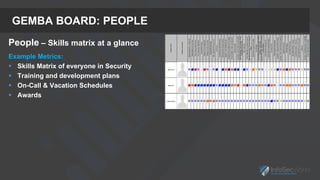
GEMBA BOARD: PEOPLE
People – Skills matrix at a glance
Example Metrics:
 Skills Matrix of everyone in Security
 Training and development plans
 On-Call & Vacation Schedules
 Awards
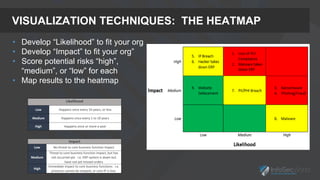
VISUALIZATION TECHNIQUES: THE HEATMAP
Impact
Low No threat to core business function impact
Medium
Threat to core business function impact, but has
not occurred yet. i.e. ERP system is down but
have not yet missed orders
High
Immediate impact to core business functions. i.e.
products cannot be shipped, or core IP is lost.
Likelihood
Low Happens once every 10 years, or less
Medium Happens once every 1 to 10 years
High Happens once or more a year
• Develop “Likelihood” to fit your org
• Develop “Impact” to fit your org”
• Score potential risks “high”,
“medium”, or “low” for each
• Map results to the heatmap
VISUALIZATION TECHNIQUES: RISK REGISTER
VISUALIZATION: MULTI-LAYERED DEFENSE STRATEGY
95% of systems are patched
within 30 days.
Once discovered - improve tools.
Block about 27,500 intrusions & 880 virus / month
Detect & fix 20 viruses & 3,500 exploits / month
Block 1.6 million emails & Stop 22,000 virus / month
Successful
Unknown Attacks
IPS
Spam Filter
Admin Rights Removal
Anti Virus & MalwareBytes
Employee User Security Training
Hardware refresh & Laptop Encryption
Password management
Patching strategy
Outside independent measurement of security outcomes
Block 1.6m /month bad IP’s
and 600,000 / month bad URLs
C
o
n
t
a
i
n
P
r
e
v
e
n
t
Independent penetration testingAttackers
BitSight
Score
Firewall / Open DNS IP Filter / Web Filter
2600 Users no longer have Admin Rights
97% of Laptops are now encrypted
VISUALIZATION TECHNIQUES: CLUSTERED STACKED GRAPH
3
4
3 3
4
5
4 4 4 4
6
3
3
2
2
4
4
3
4
2
6
8
8
8
8
8
7
6
6
2
2 2
2
2
2
2
2
2
2
2
17 17
16
15
16
19
17
15
16
10
0
5
10
15
20
# of Open Low Vulns
# of Open Moderate Vulns
# of Open Important Vulns
# of Open Critical Vulns
 Good for showing
portions of a whole
over time
 Quick visual indicator
on where things stand
 Examples:
 Vulnerabilities by
criticality/month
 Incidents by criticality/month
 Total block events (AV, FW,
Proxy, etc.)
VISUALIZATION TECHNIQUES: CLUSTERED STACKED GRAPH
Steps to create:
 Select your data, and create a
“stacked column chart” in Excel
 Make sure each data element is
setup as a “stacked column”
 To create a total for each
column, include this in your
source data, and enter it as a
“Line” under chart type. Give the
line a blank “fill” and “line” and
you’ll get the numbers only
 Be sure your data includes a
total row
For more, see: http://www.exceldashboardtemplates.com/how-to-easily-
create-a-stacked-clustered-column-chart-in-excel/
VISUALIZATION TECHNIQUES: THE SCORECARD
 Captures day-to-day operations in security
 One-page roll-up that can be presented to CIO, or used internally
 “Operations” section captures work being done: creating firewall rules,
patching systems, conducting awareness events
 The “Risk” section captures visibility into risk at the organization.
Number of scans, open vulnerabilities
 To the far right is the legend explaining the thresholds for each item
VISUALIZATION TECHNIQUES: THE SCORECARD

Moving Mountains Through Measurement

  • 1.
    MOVING MOUNTAINS THROUGHMEASUREMENT Chris Clymer Director of Security MRK Jack Nichelson Director of Infrastructure & Security Chart Industries Jason Middaugh Director of Infrastructure& Security Cliffs Natural Resources
  • 2.
    INTRODUCTION  Why arewe here?  What are our goals?  What will you gain from this presentation?
  • 3.
    WHAT WILL YOUGET FROM THIS PRESENTATION?  A repeatable process for measuring security performance  A playbook you can start executing on tomorrow  Methods for explaining security to your CEO  Tools for justifying security budget
  • 4.
    WHAT WONT YOUGET FROM THIS PRESENTATION?  Our favorite metrics  Details on how to build the best spreadsheet  Instructions on using fancy reporting tools
  • 5.
    CHRIS CLYMER  Directorof Security Services for MRK  CISO for companies ranging from SMB’s to multi-billion dollar corporations  Former board member for NEOISF & co- host of the Security Justice podcast  Aspiring Ironman, amateur saberist
  • 6.
    JASON MIDDAUGH  Directorof Infrastructure & Security Services at Cliffs Natural Resources  Holds a bachelor’s degree in information systems/operations management from the University of Toledo, an executive master’s degree in business administration from The Ohio State University, and holds several IT based certifications (CISSP, MCSE, VCP, CCNA, CCDA).  Chair member of the North East Ohio Cyber Consortium. Selected and currently attending the FBI Citizens Academy.  Skiing enthusiast
  • 7.
    Jack Nichelson “SolvingProblems, is my Passion”  Director of Infrastructure & Security for Chart Industries.  Executive MBA from Baldwin-Wallace University  Recognized as one of the “People Who Made a Difference in Security” by the SANS Institute and Received the CSO50 award for connecting security initiatives to business value.  Adviser for Baldwin Wallace’s, State winner Collegiate Cyber Defense Competition (CCDC) team. I defend my companies competitive advantage by helping solve business problems through technology to work faster and safer. JACK NICHELSON
  • 8.
  • 9.
    WHY METRICS?  Canonly improve what you can measure  Without measurement, security is purely artistry and witchcraft  Because security wants a seat at the big table  Business units that report to the board will have some way to demonstrate their performance  Because you need to know what’s working, and what needs your attention  Because you want to buy more security toys next year  Because you want to add more staff
  • 10.
    HOW I’VE USEDTHEM  Drive team performance  Explain security to the board  Justify past expense  Justify FUTURE expense  Keep myself honest
  • 11.
    HOW I’VE USEDTHEM 4,600 8,190 6,200 6,900 9,100 9,100 4,600 4,800 7,600 8,425 7,532 16,968 15,786 15,865 26,661 30,449 284 13,893 2,018 2,009 2,675 3,610 4,009 62 103 638 1,727 3,030 35,864 62,404 105,617 112,804 125,653 132,645 11,009 15,900 17,006 16,101 20,782 14,680 12,910 63,501 55,696 10,850 84,630 90,752 14 64 34 12 17 25 46 32 11 11 8 5 32,591 40,002 39,208 50,312 62,075 18,019 71,813 132,555 168,133 133,940 222,326 234,943 0 50000 100000 150000 200000 250000 Dec-14 Jan-15 Feb-15 Mar-15 Apr-15 May-15 June-15 July-15 Aug-15 Sept-15 Oct-15 Nov-15 Total # of New Security Incidents Total # of Malicious Websites Auto-Blocked Attacks Auto- Prevented by IPS (Critical/High) Total # of Malware Auto-Handled Total # of Phishing Auto-Handled • IPS Tuned • AV Signature Issue • New Web Filter
  • 12.
    HOW I’VE USEDTHEM 4,600 8,190 6,200 6,900 9,100 9,100 4,600 4,800 7,600 8,425 7,532 16,968 15,786 15,865 26,661 30,449 284 13,893 2,018 2,009 2,675 3,610 4,009 62 103 638 1,727 3,030 35,864 62,404 105,617 112,804 125,653 132,645 11,009 15,900 17,006 16,101 20,782 14,680 12,910 63,501 55,696 10,850 84,630 90,752 14 64 34 12 17 25 46 32 11 11 8 5 32,591 40,002 39,208 50,312 62,075 18,019 71,813 132,555 168,133 133,940 222,326 234,943 0 50000 100000 150000 200000 250000 Dec-14 Jan-15 Feb-15 Mar-15 Apr-15 May-15 June-15 July-15 Aug-15 Sept-15 Oct-15 Nov-15 Total # of New Security Incidents Total # of Malicious Websites Auto-Blocked Attacks Auto- Prevented by IPS (Critical/High) Total # of Malware Auto-Handled Total # of Phishing Auto-Handled • IPS Tuned • AV Signature Issue • New Web Filter
  • 13.
    WHAT MAKES AGOOD METRIC?  Easily measured  Easily understood  Enables decision-making  Meaningful  Consistent  Quantitative  Aligns with your organization’s Risk Profile
  • 14.
    MY PROCESS 1. Definethe problem 2. Identify your resources 3. Build a rough draft 4. Review with stakeholders 5. Rinse & repeat
  • 15.
    MY PROCESS 1. Definethe problem a. Where is the pain? b. Find your stakeholders c. What is working/what isn’t? 2. Identify your resources a. What is readily available? b. Tools, process, people c. Don’t dwell on nice-to-haves 3. Build a rough draft a. Won’t be perfect the first time b. Make sure its easy to repeat 4. Review with stakeholders a. Above and below b. Have them contribute c. Get them to buy-in 5. Rinse & repeat a. Run the process b. See what works and what doesn’t c. Adjust where needed
  • 16.
  • 17.
    FIRST STEPS –GETTING STARTED  Know your audience and speak their language  Leverage existing tools that you already have  Anticipate what others will ask or what conclusions they will draw from the metrics you are presenting
  • 18.
    PAST PROJECTS ANDSPEND  IT Executives and Board members want to see that they getting results from previous initiatives  Use these slides to create a “Wow” factor
  • 19.
    CURRENTLY MEASURED METRICS Your goal should be to eventually get to at least 13 months of revolving data  Play the Game of Thrones, or in this case the Game of Met-tricks
  • 20.
    LEVERAGE METRICS FORYOUR FUTURE NEEDS  Use your metrics to help justify additional capital  Help predict when you are going to run out or need more  Show capability gaps that you want to fill  Justify additional resources
  • 21.
    HOW AND WHEREDO I GET STARTED?  Kick things off in your next team meeting  Don’t worry about the past  Don’t get hung up on 100% accuracy You don’t have to hit the bulls-eye on every metric, shoot for the inner-rings
  • 22.
    SUMMARY  Know youraudience - Speak their language  Think Past – Leverage metrics to justify and put historic spend at ease  Think Present – Collect and analyze your data; do not be afraid to burn it down and start again  Think Future – Continually set the stage and constantly communicate when and where you are going to need additional resources with metrics  Get Started! – You do not have to hit the bullseye
  • 23.
  • 24.
    BE PROACTIVE Change startsfrom within, so you have to make the decision to focus on the things you can influence rather than reacting to the things outside of your control. Manage Yourself:  Where and how are you spending your time & energy throughout the day?  Make a list of the things that concern you and things you can Influence. Ask yourself these 3 questions every day:  Did I do my best to spend my time on things I can influence?  Did I do my best to set and communicate clear goals?  Did I do my best to make progress toward goal achievement? “The 1st metric you need to track is yourself”
  • 25.
    BEGIN WITH THEEND IN MIND If your ladder is not leaning against the right wall, every step you take gets you to the wrong place faster. First, do you know what “good” looks like?  Break down the area you have influence over into functional parts that you and the stockholders can score and rank.  Now that you have an agreed upon heatmap of your current state, set short term and long term goals. “Try Not to Become a Success. Rather Become a Person of Value.”
  • 26.
    PROBLEM STATEMENT The ProblemStatement significantly clarifies the current situation by specifically identifying the problem and its severity, likelihood, and impact. It also serves as a great communication tool, helping to get buy-in and support from others. Build & Execute plans to drive for results & share successes  Invest more time in project planning and due diligence; time spent defining the problem is NEVER time wasted.  Write a Project Charter, clearly state the scope, objectives, participants, and success measurements.  Create a Work Breakdown Structure to graphically represent the project scope, broken down in successive chunks with defined deliverables. “People with a plan succeed because they know where they’re going”
  • 27.
    PUT FIRST THINGSFIRST Focus on the important, not just the urgent. The urgent are not that important, and the important are never urgent. Tips for taking back control of your time:  Stop saying Yes, When you want to say No.  Scheduled your own time with purpose & defend it!  Don’t be afraid to close your email and turn off your phone “Effectiveness requires the integrity to act on your priorities”
  • 28.
    CHART PERFORMANCE &ADJUST Gemba (現場) is a Japanese term referring to the place where value is created. The idea of Gemba is that the problems are visible, and the best improvement ideas will come from going to the Gemba. “Good security is not something you have, it’s something you do” - Wendy Nather
  • 29.
    SUMMARY – KEYTAKEAWAYS  Be Proactive – Focus on what you can influence  Begin with the end in mind – Define practical outcomes  Create a Problem Statement – A goal without a plan is just a wish  Put first thing first – Plan weekly, act daily  Chart Performance & Adjust – Shine a light on the problem “Think about how you can simplify security – make it easy – and focus on the basics.” - Dave Kennedy
  • 30.
  • 31.
    OUR 3 APPROACHES ChrisJason Jack 1.Define the problem 2.Identify your resources 3.Build a rough draft 4.Review with stakeholders 5.Rinse & repeat 1. Know your audience 2. Think Past 3. Think Present 4. Think Future 5. Get Started! 1.Be Proactive 2.Begin with the end in mind 3.Create a Problem Statement 4.Put first thing first 5.Chart Performance & Adjust
  • 32.
    THANK YOU Chris Clymer Chris@ChrisClymer.com @ChrisClymer JackNichelson Jack@Nichelson.net @Jack0lope Jason Middaugh Jason.Middaugh@CliffsNR.com @Jason_Middaugh
  • 33.
  • 34.
    REFERENCES  Security Metrics– Andrew Jacquith  Security Data Visualization – Greg Conti  Pragmatic Security Metrics – W. Krag Brotby & Gary Hinson  Security Metrics Mailing list - http://www.securitymetrics.org/mailing-list.html  NACD Cyber Risk Oversight Handbook 2016 - NACD
  • 35.
    HOW TO AUTO-LINKEXCEL GRAPH (OR CELLS) TO POWERPOINT DECK  Open Excel Click on Graph (or Cells) and hit Copy  In PowerPoint select Paste  Paste Special …  Change the radio button to “Paste link” and highlight “Microsoft Excel Chart Object” and press OK  The Chart (or Cell) with appear in the PowerPoint Deck and with auto-update from the source Excel file each time the PowerPoint Deck is opened Notes:  I highly recommend you save both the Excel and PowerPoint files in shared workspace like SharePoint  Do not rename the Excel file, it will break the links  Do not move the location of the Excel file, it will break the links  Do not rename the tabs in the Excel file, it will break the links  If you delete and recreate the graph in Excel, you will need to re-link it to the PowerPoint presentation (the graph will have a new name)
  • 36.
    HOW TO BUILDA SQCD BOARD  Key Performance Indicators – Good data can tell a story  Predictive Analysis – Your board should help prevent future issues  Keep the data fresh and useful, address items as quick as possible using LEAN tools and once addressed remove them from the board.
  • 37.
    GEMBA BOARD: SECURITY “Wemeasure things that matter” Example Metrics:  # of systems not monitored & tracked in inventory by Location or LoB  # Top Vulnerabilities by Location or LoB  # of Legacy Systems by Location or LoB  # of Users with Local Admin & Accounts with Domain Admin  # of Total Security Incidences by Location or LoB  # of Past Due Security Awareness Training by Location or LoB Security - The current security posture at a glance
  • 38.
    GEMBA BOARD: QUALITY ExampleMetrics:  # of Servers & Workstation missing OS & App patches (30 day SLA)  # of infections/Re-Images tickets (3 day SLA)  # of Security Event tickets (5 day SLA)  # of Security Request tickets (15 days SAL)  Cause Mapping Analysis to find root cause of problems Quality – Results for SLA goals of events & requests
  • 39.
    GEMBA BOARD: DELIVERY Delivery– Active Projects & Audits at a glance Example Metrics:  Active Projects Status  Active Audit Status  Remediation Progress by Location or LoB  On-Site Awareness Training by Location
  • 40.
    GEMBA BOARD: COST Cost– P&L at a glance Example Metrics:  Operating budget spending plan (OPEX & CAPEX)  ROIC Qualitatively Rating of Perceived Value  Support Agreements Costs & Renew dates  Consultant Support Agreements Costs & Renew dates  Running total of cost savings
  • 41.
    GEMBA BOARD: PEOPLE People– Skills matrix at a glance Example Metrics:  Skills Matrix of everyone in Security  Training and development plans  On-Call & Vacation Schedules  Awards
  • 42.
    VISUALIZATION TECHNIQUES: THEHEATMAP Impact Low No threat to core business function impact Medium Threat to core business function impact, but has not occurred yet. i.e. ERP system is down but have not yet missed orders High Immediate impact to core business functions. i.e. products cannot be shipped, or core IP is lost. Likelihood Low Happens once every 10 years, or less Medium Happens once every 1 to 10 years High Happens once or more a year • Develop “Likelihood” to fit your org • Develop “Impact” to fit your org” • Score potential risks “high”, “medium”, or “low” for each • Map results to the heatmap
  • 43.
  • 44.
    VISUALIZATION: MULTI-LAYERED DEFENSESTRATEGY 95% of systems are patched within 30 days. Once discovered - improve tools. Block about 27,500 intrusions & 880 virus / month Detect & fix 20 viruses & 3,500 exploits / month Block 1.6 million emails & Stop 22,000 virus / month Successful Unknown Attacks IPS Spam Filter Admin Rights Removal Anti Virus & MalwareBytes Employee User Security Training Hardware refresh & Laptop Encryption Password management Patching strategy Outside independent measurement of security outcomes Block 1.6m /month bad IP’s and 600,000 / month bad URLs C o n t a i n P r e v e n t Independent penetration testingAttackers BitSight Score Firewall / Open DNS IP Filter / Web Filter 2600 Users no longer have Admin Rights 97% of Laptops are now encrypted
  • 45.
    VISUALIZATION TECHNIQUES: CLUSTEREDSTACKED GRAPH 3 4 3 3 4 5 4 4 4 4 6 3 3 2 2 4 4 3 4 2 6 8 8 8 8 8 7 6 6 2 2 2 2 2 2 2 2 2 2 2 17 17 16 15 16 19 17 15 16 10 0 5 10 15 20 # of Open Low Vulns # of Open Moderate Vulns # of Open Important Vulns # of Open Critical Vulns  Good for showing portions of a whole over time  Quick visual indicator on where things stand  Examples:  Vulnerabilities by criticality/month  Incidents by criticality/month  Total block events (AV, FW, Proxy, etc.)
  • 46.
    VISUALIZATION TECHNIQUES: CLUSTEREDSTACKED GRAPH Steps to create:  Select your data, and create a “stacked column chart” in Excel  Make sure each data element is setup as a “stacked column”  To create a total for each column, include this in your source data, and enter it as a “Line” under chart type. Give the line a blank “fill” and “line” and you’ll get the numbers only  Be sure your data includes a total row For more, see: http://www.exceldashboardtemplates.com/how-to-easily- create-a-stacked-clustered-column-chart-in-excel/
  • 47.
    VISUALIZATION TECHNIQUES: THESCORECARD  Captures day-to-day operations in security  One-page roll-up that can be presented to CIO, or used internally  “Operations” section captures work being done: creating firewall rules, patching systems, conducting awareness events  The “Risk” section captures visibility into risk at the organization. Number of scans, open vulnerabilities  To the far right is the legend explaining the thresholds for each item
  • 48.

Editor's Notes

  • #3 Chris kicks off Why are we here – all 3 of us have struggled with how to steer security programs in the right direction when the only clear KPI is a breach. We’ve found that finding the right things to measure can help us keep security heading in the right direction What are our goals – explain the value in metrics, and show you practical ways to do it
  • #5 We don’t have a “favorite metric” We’ll keep anything more tactical to the appendix and supplementary whitepapers
  • #10 If you come to your CEO making demands with zero data backing it up, don’t expect to get what you want
  • #11 Need to tell a few specific stories on these bullets
  • #12 Need to tell a few specific stories on these bullets
  • #13 Need to tell a few specific stories on these bullets
  • #14 Should take no more than an hour per month to gather Might target your IT team or the board…should be understandable by either one Should drive decisions Should be related to goals you care about. Don’t measure it if its not important! Should be something you can record the same way each month, or you cant depend on it Should be based on data, not fuzzy qual stuff if possible Needs to match your orgs risk appetitve, not someone else‘s
  • #15 High level process overview
  • #16 Walk through the steps in a little more detail, but don’t dwell…lots of other things to cover
  • #17 Chris hands off to Jason after setting Jason and Jack up to tell stories of what they’ve specifically done in their metrics programs
  • #18 Step 1 - Know your audience and speak their language Who is going to see these reports? Your Board (and some IT Executives) will not understand terms like “SIEM” or “Pass the Hash”. Dumb it down, use very simple terms the “Alerting” and “Password High-jacking” You can be more technical with IT and Security peers Leverage existing tools that you already have Do not go out and buy some fancy metrics package Use Excel to track metrics and to build out graphs Use PowerPoint to put the entire deck together Leverage SharePoint as a repository to automatically link everything together Anticipate what others will ask or what conclusions they will draw from the metrics you are presenting Does it paint a good or bad picture? Is your team doing a good or bad job Ask your mom, wife, or kids; who are not in IT what they think? Ask them what conclusion they draw from a slide You might be surprised on what they think Don’t show all metrics that you are collecting day-one You might need 6-12 months of data before any thoughtful conclusions can be drawn Think Past – Present – and Future
  • #19 IT Executives and Board members want to see that they getting results from previous initiatives Remember last year when we asked for a quarter-million dollars for Next Generation Firewalls? Here are the statics on the traffic we are able to now successfully blocking over the past several months Makes them feel good that the previous spend was implemented successfully and growing the protection and shrinking the risk of the company Increases probability that next time you ask for capital it will get approved Use these slides to create a “Wow” factor Remember last year when we ask for $100 thousand to upgrade our email security platform? In November our email security platforms blocked over 10 million messages and over, and over 65 thousand of those message contained a virus, malware, attachment with malicious macros or some other form of malicious content Could you imagine if we did not have this platform? Or the additional SPAM you would have received? Or the damage that any of malware (that was blocked) could have caused)? Helps to reinforce the fact that we are under constant attack from external and internal forces Paints the picture that “doing nothing” is not an option
  • #20 Your goal should be to eventually get to at least 13 months of revolving data This time frame will show and paint the picture of both progress and trends Play the Game of Thrones or in this case the Game of Met-tricks : What is the game of Met-tricks It does not involve chopping off someone head, un-dead zombies, saying “Winter is Coming”, or a really good looking blonde with three pet dragons The game of manipulating data to have to have it show in a more (or less) favorable way and guide others in a direction you want them to go Constantly evaluate the data in the metrics you are collecting The story might not be what you originally thought it was going to be Adjust and reevaluate as needed Example: The first few months on reporting vulnerability data many be too ugly to report Maybe report a sub-set of the data Or maybe don’t report it at all and wait 13 months! Then you can show a picture of progress instead of a dismal picture with only 2-3 months of data
  • #21 Use your metrics to help justify additional capital Help predict when you are going to run out or need more Show capability gaps that you want to fill Justify Additional Resources Use this to avoid having to walk in to your CIO and state we are out of capacity and have to upgrade now Use this to set the stage months in advance so there is no surprises when you have to ask for additional capacity This will earn you “Street Cred” with your audience
  • #22 Kick things off in your next team meeting Get everyone involved and start small Get each member of your team to track one (different) statistic each month The statistic they choose should be fairly easy to collect and report on Shoot for no more then a 15-30 minute time to collect, trend, and report on the metric Otherwise team members with lose focus and stop recording/reporting Who cares about the past? Don’t waste your teams time on attempting to put together statics from the last 13 months Unless they are readily available Don’t get hung up on 100% accuracy No one cares the exact number of incidents per month (2,713 vs 2,700) especially when aggregating across multiple products and platforms. If can get reasonable close, think 95 percentile, get close but don’t spend hours/days of time to be 100% accurate You don’t have to hit the bulls-eye on every metric, shoot for the inner-rings
  • #23 First of all: SPOILER ALERT And then, if any of you say “I called Cersei burning down Kings Landing and wiping out all those characters”, I am going to call shenanigans But that goes to my point – you might not see where the data is going, so analyze, then adjust, and maybe you might even have to start fresh
  • #24 Chris hands off to Jason after setting Jason and Jack up to tell stories of what they’ve specifically done in their metrics programs
  • #25 Change Starts with You Gaining an awareness of the areas in which we expend our energies in is a giant step in becoming proactive. The Circle of Concern and Circle of Influence Proactive people focus their efforts on their Circle of Influence and they only work on the things they can do something about The Dilbert principle - any task more than 2 steps away from the customer is a waste of time
  • #26 Do you know where you want to go and why? Can you easily show others how you came to pick this direction and support your decision? Breaking big hard things down into small functional parts and scoring & ranking them with others will really help you quickly target in on your pain and ensure others agree on what are the top pain points. Start at the epicenter, on what won’t change. - Focus on fewer problems that provide bigger returns and value back to the end users. Identify: Conduct analyses that will give you actionable insight
  • #27 A good goal should scare you a little, and excite you a lot. The time you spend aligning with others and creating clear problem statements will save you time communicating and getting the support of others to help work on the solution. The time you spend up front will same you time down the road and greatly improve the likelihood of the project succeeding. Align - Build & execute project plan
  • #28 A good goal should scare you a little, and excite you a lot. Metrics will help you see if the changes you have made are effective Get yourself off the treadmill of reacting to events through your day
  • #29 A good goal should scare you a little, and excite you a lot.
  • #30 A good goal should scare you a little, and excite you a lot.
  • #32 High level process overview
  • #37 A good goal should scare you a little, and excite you a lot.
  • #38 A good goal should scare you a little, and excite you a lot.
  • #46 Need to adjust dates for current year, Oct/Nov Want larger numbers for “wow” factor
  • #47 Need to adjust dates for current year, Oct/Nov Want larger numbers for “wow” factor