What is monitor?
Describe its types?
Monitor
Here is a concise definition of a monitor:
A monitor is an electronic display device that shows visual
information from a computer, laptop, or other electronic
device, typically in the form of text, images, or video.
Types of monitor
Here are the names of different types of monitors:
1. CRT Monitor
2. LCD Monitor
3. LED Monitor
4. OLED Monitor
5. IPS Monitor
6. TN Monitor
7. QLED Monitor
8. 4K Monitor
9. Curved Monitor
• 10. Gaming Monitor
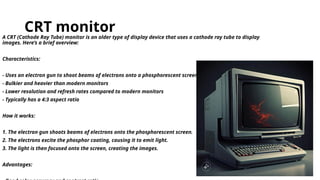
CRT monitor
A CRT (Cathode Ray Tube) monitor is an older type of display device that uses a cathode ray tube to display
images. Here’s a brief overview:
Characteristics:
- Uses an electron gun to shoot beams of electrons onto a phosphorescent screen
- Bulkier and heavier than modern monitors
- Lower resolution and refresh rates compared to modern monitors
- Typically has a 4:3 aspect ratio
How it works:
1. The electron gun shoots beams of electrons onto the phosphorescent screen.
2. The electrons excite the phosphor coating, causing it to emit light.
3. The light is then focused onto the screen, creating the images.
Advantages:
Disadvantages
Here are the top 5 disadvantages of a CRT (Cathode Ray Tube) monitor:
1. _Bulky and Heavy_: CRT monitors are large and heavy, making them difficult to move or transport.
2. _Higher Power Consumption_: CRT monitors consume more power than modern monitors, increasing
energy costs and heat generation.
3. _Contains Toxic Materials_: CRT monitors contain toxic materials like lead and mercury, which can be
hazardous to the environment and human health.
4. _Limited Viewing Angles_: CRT monitors have limited viewing angles, making it difficult to view the
screen from the side.
• 5. _Flicker and Eye Strain_: CRT monitors can cause flicker and eye strain due to the scanning electron
beam.
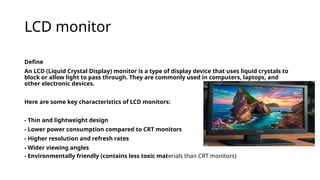
LCD monitor
Define
An LCD (Liquid Crystal Display) monitor is a type of display device that uses liquid crystals to
block or allow light to pass through. They are commonly used in computers, laptops, and
other electronic devices.
Here are some key characteristics of LCD monitors:
- Thin and lightweight design
- Lower power consumption compared to CRT monitors
- Higher resolution and refresh rates
- Wider viewing angles
- Environmentally friendly (contains less toxic materials than CRT monitors)
LED monitor
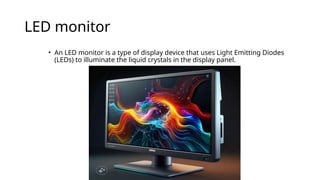
• An LED monitor is a type of display device that uses Light Emitting Diodes
(LEDs) to illuminate the liquid crystals in the display panel.
OLED monitor
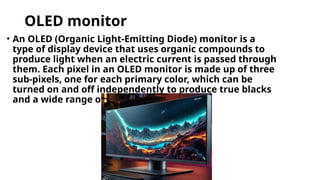
• An OLED (Organic Light-Emitting Diode) monitor is a
type of display device that uses organic compounds to
produce light when an electric current is passed through
them. Each pixel in an OLED monitor is made up of three
sub-pixels, one for each primary color, which can be
turned on and off independently to produce true blacks
and a wide range of colors.
IPS monitor
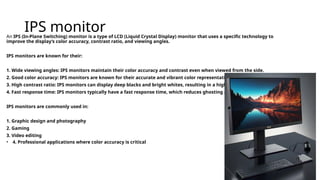
An IPS (In-Plane Switching) monitor is a type of LCD (Liquid Crystal Display) monitor that uses a specific technology to
improve the display’s color accuracy, contrast ratio, and viewing angles.
IPS monitors are known for their:
1. Wide viewing angles: IPS monitors maintain their color accuracy and contrast even when viewed from the side.
2. Good color accuracy: IPS monitors are known for their accurate and vibrant color representation.
3. High contrast ratio: IPS monitors can display deep blacks and bright whites, resulting in a high contrast ratio.
4. Fast response time: IPS monitors typically have a fast response time, which reduces ghosting and blurring.
IPS monitors are commonly used in:
1. Graphic design and photography
2. Gaming
3. Video editing
• 4. Professional applications where color accuracy is critical
TN monitor
A TN (Twisted Nematic) monitor is a type of LCD (Liquid Crystal Display) monitor that uses a specific technology to control the liquid crystals in the display
panel.
TN monitors are known for their:
1. Fast response time: TN monitors typically have a fast response time, which reduces ghosting and blurring.
2. Low input lag: TN monitors often have low input lag, making them suitable for gaming and other real-time applications.
3. Affordable price: TN monitors are generally less expensive than IPS or VA monitors.
However, TN monitors also have some limitations:
1. Limited viewing angles: TN monitors can suffer from decreased brightness and color accuracy when viewed from the side.
2. Lower color accuracy: TN monitors may not have the same level of color accuracy as IPS or VA monitors.
3. Lower contrast ratio: TN monitors may not be able to produce the same level of contrast as IPS or VA monitors.
TN monitors are commonly used in:
1. Gaming monitors
2. Budget-friendly monitors
3. General office work
• 4. Basic multimedia applications
QLED monitor
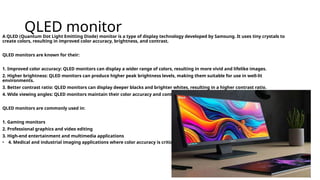
A QLED (Quantum Dot Light Emitting Diode) monitor is a type of display technology developed by Samsung. It uses tiny crystals to
create colors, resulting in improved color accuracy, brightness, and contrast.
QLED monitors are known for their:
1. Improved color accuracy: QLED monitors can display a wider range of colors, resulting in more vivid and lifelike images.
2. Higher brightness: QLED monitors can produce higher peak brightness levels, making them suitable for use in well-lit
environments.
3. Better contrast ratio: QLED monitors can display deeper blacks and brighter whites, resulting in a higher contrast ratio.
4. Wide viewing angles: QLED monitors maintain their color accuracy and contrast even when viewed from the side.
QLED monitors are commonly used in:
1. Gaming monitors
2. Professional graphics and video editing
3. High-end entertainment and multimedia applications
• 4. Medical and industrial imaging applications where color accuracy is critical.
4K monitor
A 4K monitor is a type of display device that has a resolution of 3840 x 2160 pixels or higher. This is four times the resolution of a Full HD (1080p)
monitor, hence the name “4K”.
4K monitors are known for their:
1. High resolution: 4K monitors display a much higher number of pixels than lower-resolution monitors, resulting in a more detailed
and crisp image.
2. Improved color accuracy: 4K monitors often have wider color gamuts and higher color accuracy, making them suitable for
applications where color accuracy is critical.
3. Increased screen real estate: With a higher resolution, 4K monitors can display more content on the screen at once, making them
ideal for multitasking and productivity.
4K monitors are commonly used in:
1. Professional video editing and production
2. Gaming
3. Graphic design and photography
4. Medical imaging and diagnostics
• 5. Home entertainment and multimedia applications.
Curved monitor
A curved monitor is a type of display device that has a curved screen, rather than a flat one. The curvature of the screen is designed to provide a
more immersive viewing experience, with the goal of wrapping the image around the viewer’s field of vision.
Curved monitors are known for their:
1. Immersive experience: The curved screen provides a more engaging and immersive viewing experience, especially for gaming and video content.
2. Reduced eye movement: The curved screen allows the viewer’s eyes to focus on the center of the screen, reducing the need for eye movement and
providing a more comfortable viewing experience.
3. Wider field of view: The curved screen provides a wider field of view, making it easier to take in all the action on the screen.
Curved monitors are commonly used in:
1. Gaming
2. Video editing and production
3. Graphic design and animation
4. Home entertainment and multimedia applications
5. Simulation and training applications
It’s worth noting that curved monitors are available in different curvature radii, such as:
- 1800R: A relatively mild curvature, suitable for most users.
- 3000R: A more pronounced curvature, providing a more immersive experience.
• - 4000R: An even more extreme curvature, providing a highly immersive experience.
Gaming monitor
A gaming monitor is a type of display device specifically designed for gaming. These monitors typically have features that enhance the gaming experience, such as:
1. Fast response time: Quickly responds to changes in the image, reducing ghosting and blurring.
2. High refresh rate: Displays more frames per second, resulting in smoother and more responsive gameplay.
3. Low input lag: Minimizes the delay between the user’s actions and the on-screen response.
4. High-resolution display: Provides detailed and crisp visuals, enhancing the overall gaming experience.
5. Wide color gamut: Displays a wider range of colors, resulting in more vivid and immersive graphics.
6. NVIDIA G-Sync or AMD FreeSync: Adaptive synchronization technologies that eliminate screen tearing and stuttering.
7. HDR (High Dynamic Range) support: Enhances contrast and color accuracy, providing a more realistic gaming experience.
8. Customizable settings: Allows gamers to adjust settings such as brightness, contrast, and color temperature to suit their preferences.
Gaming monitors come in various sizes, resolutions, and panel types, including:
- TN (Twisted Nematic) panels: Fast response time and low input lag, but may lack in color accuracy.
- IPS (In-Plane Switching) panels: Good color accuracy and wide viewing angles, but may have slower response times.
- VA (Vertical Alignment) panels: Good contrast ratio and color accuracy, but may have slower response times.
- OLED (Organic Light-Emitting Diode) panels: Excellent contrast ratio, color accuracy, and response time, but may be more expensive.
When choosing a gaming monitor, consider factors such as:
- Resolution: 1080p, 1440p, or 4K
- Refresh rate: 60Hz, 120Hz, 144Hz, or 240Hz
- Response time: 5ms, 2ms, or 1ms
- Panel type: TN, IPS, VA, or OLED
- Connectivity: HDMI, DisplayPort, USB, and other ports
• - Budget: Gaming monitors can range from a few hundred to several thousand dollars.

Monitor component of Computer output.pptx

  • 1.
  • 3.
    Monitor Here is aconcise definition of a monitor: A monitor is an electronic display device that shows visual information from a computer, laptop, or other electronic device, typically in the form of text, images, or video.
  • 4.
    Types of monitor Hereare the names of different types of monitors: 1. CRT Monitor 2. LCD Monitor 3. LED Monitor 4. OLED Monitor 5. IPS Monitor 6. TN Monitor 7. QLED Monitor 8. 4K Monitor 9. Curved Monitor • 10. Gaming Monitor
  • 5.
    CRT monitor A CRT(Cathode Ray Tube) monitor is an older type of display device that uses a cathode ray tube to display images. Here’s a brief overview: Characteristics: - Uses an electron gun to shoot beams of electrons onto a phosphorescent screen - Bulkier and heavier than modern monitors - Lower resolution and refresh rates compared to modern monitors - Typically has a 4:3 aspect ratio How it works: 1. The electron gun shoots beams of electrons onto the phosphorescent screen. 2. The electrons excite the phosphor coating, causing it to emit light. 3. The light is then focused onto the screen, creating the images. Advantages:
  • 6.
    Disadvantages Here are thetop 5 disadvantages of a CRT (Cathode Ray Tube) monitor: 1. _Bulky and Heavy_: CRT monitors are large and heavy, making them difficult to move or transport. 2. _Higher Power Consumption_: CRT monitors consume more power than modern monitors, increasing energy costs and heat generation. 3. _Contains Toxic Materials_: CRT monitors contain toxic materials like lead and mercury, which can be hazardous to the environment and human health. 4. _Limited Viewing Angles_: CRT monitors have limited viewing angles, making it difficult to view the screen from the side. • 5. _Flicker and Eye Strain_: CRT monitors can cause flicker and eye strain due to the scanning electron beam.
  • 7.
    LCD monitor Define An LCD(Liquid Crystal Display) monitor is a type of display device that uses liquid crystals to block or allow light to pass through. They are commonly used in computers, laptops, and other electronic devices. Here are some key characteristics of LCD monitors: - Thin and lightweight design - Lower power consumption compared to CRT monitors - Higher resolution and refresh rates - Wider viewing angles - Environmentally friendly (contains less toxic materials than CRT monitors)
  • 8.
    LED monitor • AnLED monitor is a type of display device that uses Light Emitting Diodes (LEDs) to illuminate the liquid crystals in the display panel.
  • 9.
    OLED monitor • AnOLED (Organic Light-Emitting Diode) monitor is a type of display device that uses organic compounds to produce light when an electric current is passed through them. Each pixel in an OLED monitor is made up of three sub-pixels, one for each primary color, which can be turned on and off independently to produce true blacks and a wide range of colors.
  • 10.
    IPS monitor An IPS(In-Plane Switching) monitor is a type of LCD (Liquid Crystal Display) monitor that uses a specific technology to improve the display’s color accuracy, contrast ratio, and viewing angles. IPS monitors are known for their: 1. Wide viewing angles: IPS monitors maintain their color accuracy and contrast even when viewed from the side. 2. Good color accuracy: IPS monitors are known for their accurate and vibrant color representation. 3. High contrast ratio: IPS monitors can display deep blacks and bright whites, resulting in a high contrast ratio. 4. Fast response time: IPS monitors typically have a fast response time, which reduces ghosting and blurring. IPS monitors are commonly used in: 1. Graphic design and photography 2. Gaming 3. Video editing • 4. Professional applications where color accuracy is critical
  • 11.
    TN monitor A TN(Twisted Nematic) monitor is a type of LCD (Liquid Crystal Display) monitor that uses a specific technology to control the liquid crystals in the display panel. TN monitors are known for their: 1. Fast response time: TN monitors typically have a fast response time, which reduces ghosting and blurring. 2. Low input lag: TN monitors often have low input lag, making them suitable for gaming and other real-time applications. 3. Affordable price: TN monitors are generally less expensive than IPS or VA monitors. However, TN monitors also have some limitations: 1. Limited viewing angles: TN monitors can suffer from decreased brightness and color accuracy when viewed from the side. 2. Lower color accuracy: TN monitors may not have the same level of color accuracy as IPS or VA monitors. 3. Lower contrast ratio: TN monitors may not be able to produce the same level of contrast as IPS or VA monitors. TN monitors are commonly used in: 1. Gaming monitors 2. Budget-friendly monitors 3. General office work • 4. Basic multimedia applications
  • 12.
    QLED monitor A QLED(Quantum Dot Light Emitting Diode) monitor is a type of display technology developed by Samsung. It uses tiny crystals to create colors, resulting in improved color accuracy, brightness, and contrast. QLED monitors are known for their: 1. Improved color accuracy: QLED monitors can display a wider range of colors, resulting in more vivid and lifelike images. 2. Higher brightness: QLED monitors can produce higher peak brightness levels, making them suitable for use in well-lit environments. 3. Better contrast ratio: QLED monitors can display deeper blacks and brighter whites, resulting in a higher contrast ratio. 4. Wide viewing angles: QLED monitors maintain their color accuracy and contrast even when viewed from the side. QLED monitors are commonly used in: 1. Gaming monitors 2. Professional graphics and video editing 3. High-end entertainment and multimedia applications • 4. Medical and industrial imaging applications where color accuracy is critical.
  • 13.
    4K monitor A 4Kmonitor is a type of display device that has a resolution of 3840 x 2160 pixels or higher. This is four times the resolution of a Full HD (1080p) monitor, hence the name “4K”. 4K monitors are known for their: 1. High resolution: 4K monitors display a much higher number of pixels than lower-resolution monitors, resulting in a more detailed and crisp image. 2. Improved color accuracy: 4K monitors often have wider color gamuts and higher color accuracy, making them suitable for applications where color accuracy is critical. 3. Increased screen real estate: With a higher resolution, 4K monitors can display more content on the screen at once, making them ideal for multitasking and productivity. 4K monitors are commonly used in: 1. Professional video editing and production 2. Gaming 3. Graphic design and photography 4. Medical imaging and diagnostics • 5. Home entertainment and multimedia applications.
  • 14.
    Curved monitor A curvedmonitor is a type of display device that has a curved screen, rather than a flat one. The curvature of the screen is designed to provide a more immersive viewing experience, with the goal of wrapping the image around the viewer’s field of vision. Curved monitors are known for their: 1. Immersive experience: The curved screen provides a more engaging and immersive viewing experience, especially for gaming and video content. 2. Reduced eye movement: The curved screen allows the viewer’s eyes to focus on the center of the screen, reducing the need for eye movement and providing a more comfortable viewing experience. 3. Wider field of view: The curved screen provides a wider field of view, making it easier to take in all the action on the screen. Curved monitors are commonly used in: 1. Gaming 2. Video editing and production 3. Graphic design and animation 4. Home entertainment and multimedia applications 5. Simulation and training applications It’s worth noting that curved monitors are available in different curvature radii, such as: - 1800R: A relatively mild curvature, suitable for most users. - 3000R: A more pronounced curvature, providing a more immersive experience. • - 4000R: An even more extreme curvature, providing a highly immersive experience.
  • 15.
    Gaming monitor A gamingmonitor is a type of display device specifically designed for gaming. These monitors typically have features that enhance the gaming experience, such as: 1. Fast response time: Quickly responds to changes in the image, reducing ghosting and blurring. 2. High refresh rate: Displays more frames per second, resulting in smoother and more responsive gameplay. 3. Low input lag: Minimizes the delay between the user’s actions and the on-screen response. 4. High-resolution display: Provides detailed and crisp visuals, enhancing the overall gaming experience. 5. Wide color gamut: Displays a wider range of colors, resulting in more vivid and immersive graphics. 6. NVIDIA G-Sync or AMD FreeSync: Adaptive synchronization technologies that eliminate screen tearing and stuttering. 7. HDR (High Dynamic Range) support: Enhances contrast and color accuracy, providing a more realistic gaming experience. 8. Customizable settings: Allows gamers to adjust settings such as brightness, contrast, and color temperature to suit their preferences. Gaming monitors come in various sizes, resolutions, and panel types, including: - TN (Twisted Nematic) panels: Fast response time and low input lag, but may lack in color accuracy. - IPS (In-Plane Switching) panels: Good color accuracy and wide viewing angles, but may have slower response times. - VA (Vertical Alignment) panels: Good contrast ratio and color accuracy, but may have slower response times. - OLED (Organic Light-Emitting Diode) panels: Excellent contrast ratio, color accuracy, and response time, but may be more expensive. When choosing a gaming monitor, consider factors such as: - Resolution: 1080p, 1440p, or 4K - Refresh rate: 60Hz, 120Hz, 144Hz, or 240Hz - Response time: 5ms, 2ms, or 1ms - Panel type: TN, IPS, VA, or OLED - Connectivity: HDMI, DisplayPort, USB, and other ports • - Budget: Gaming monitors can range from a few hundred to several thousand dollars.