REG EXP
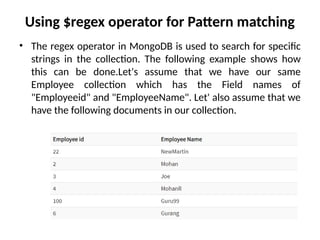
Using $regex operator for Pattern matching
• The regex operator in MongoDB is used to search for specific
strings in the collection. The following example shows how
this can be done.Let's assume that we have our same
Employee collection which has the Field names of
"Employeeid" and "EmployeeName". Let' also assume that we
have the following documents in our collection.
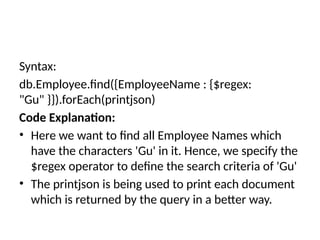
Syntax:
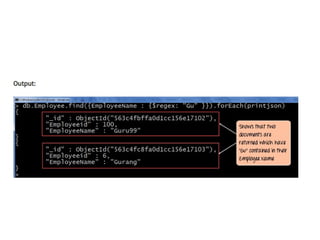
db.Employee.find({EmployeeName : {$regex:
"Gu" }}).forEach(printjson)
Code Explanation:
• Here we want to find all Employee Names which
have the characters 'Gu' in it. Hence, we specify the
$regex operator to define the search criteria of 'Gu'
• The printjson is being used to print each document
which is returned by the query in a better way.
MongoDB Logical Query Operator - $and $not $or
• Logical Operator - $and
• The MongoDB $and operator performs a logical
AND operation on an array of two or more
expressions and retrieves the documents which
satisfy all the expressions in the array.
• The $and operator uses short-circuit evaluation.
If the first expression (e.g. <expression1>)
evaluates to false, MongoDB will not evaluate
the remaining expressions.
Syntax:
{ $and: [ { <exp1> }, { <exp2> } , ... , { <expN> } ] }
Eg: If we want to select all documents from the collection
"student" which satisfying the condition -
1. sex of student is Female and
2. class of the student is VI and
3. grd_point of the student is greater than equal to 31
the following mongodb command can be used :
• db.student.find({$and:[{"sex":"Male"},{"grd_point":{ $gte:
31 }},{"class":"VI"}]}).pretty();
• Logical Operator - $not
• The MongoDB $not operator performs a logical
NOT operation on the given expression and
fetches selected documents that do not match
the expression and the document that do not
contain the field as well, specified in the
expression.
• Syntax:
• { field: { $not: { <expression> } } }
Example of MongoDB Logical Operator - $not
• If we want to select all documents from the
collection "student" which satisfying the
condition -
• age of the student is at least 12
the following mongodb command can be used :
• >db.student.find( {"age": { $not: {$lt :
12}}}).pretty();
MongoDB Evaluation Query operator - $where
The MongoDB $where operator is used to match
documents that satisfy a JavaScript expression. A
string containing a JavaScript expression or a
JavaScript function can be pass using the $where
operator. The JavaScript expression or function
may be referred as this or obj.
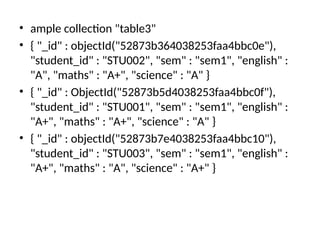
• ample collection "table3"
• { "_id" : objectId("52873b364038253faa4bbc0e"),
"student_id" : "STU002", "sem" : "sem1", "english" :
"A", "maths" : "A+", "science" : "A" }
• { "_id" : ObjectId("52873b5d4038253faa4bbc0f"),
"student_id" : "STU001", "sem" : "sem1", "english" :
"A+", "maths" : "A+", "science" : "A" }
• { "_id" : objectId("52873b7e4038253faa4bbc10"),
"student_id" : "STU003", "sem" : "sem1", "english" :
"A+", "maths" : "A", "science" : "A+" }
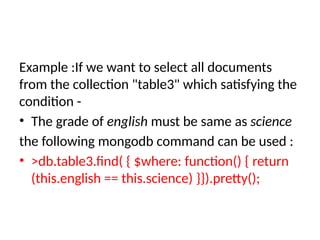
Example :If we want to select all documents
from the collection "table3" which satisfying the
condition -
• The grade of english must be same as science
the following mongodb command can be used :
• >db.table3.find( { $where: function() { return
(this.english == this.science) }}).pretty();

Mongo DB REG EXP and Logical Operator.pptx

  • 1.
  • 2.
    Using $regex operatorfor Pattern matching • The regex operator in MongoDB is used to search for specific strings in the collection. The following example shows how this can be done.Let's assume that we have our same Employee collection which has the Field names of "Employeeid" and "EmployeeName". Let' also assume that we have the following documents in our collection.
  • 3.
    Syntax: db.Employee.find({EmployeeName : {$regex: "Gu"}}).forEach(printjson) Code Explanation: • Here we want to find all Employee Names which have the characters 'Gu' in it. Hence, we specify the $regex operator to define the search criteria of 'Gu' • The printjson is being used to print each document which is returned by the query in a better way.
  • 5.
    MongoDB Logical QueryOperator - $and $not $or • Logical Operator - $and • The MongoDB $and operator performs a logical AND operation on an array of two or more expressions and retrieves the documents which satisfy all the expressions in the array. • The $and operator uses short-circuit evaluation. If the first expression (e.g. <expression1>) evaluates to false, MongoDB will not evaluate the remaining expressions.
  • 6.
    Syntax: { $and: [{ <exp1> }, { <exp2> } , ... , { <expN> } ] } Eg: If we want to select all documents from the collection "student" which satisfying the condition - 1. sex of student is Female and 2. class of the student is VI and 3. grd_point of the student is greater than equal to 31 the following mongodb command can be used : • db.student.find({$and:[{"sex":"Male"},{"grd_point":{ $gte: 31 }},{"class":"VI"}]}).pretty();
  • 7.
    • Logical Operator- $not • The MongoDB $not operator performs a logical NOT operation on the given expression and fetches selected documents that do not match the expression and the document that do not contain the field as well, specified in the expression. • Syntax: • { field: { $not: { <expression> } } }
  • 8.
    Example of MongoDBLogical Operator - $not • If we want to select all documents from the collection "student" which satisfying the condition - • age of the student is at least 12 the following mongodb command can be used : • >db.student.find( {"age": { $not: {$lt : 12}}}).pretty();
  • 9.
    MongoDB Evaluation Queryoperator - $where The MongoDB $where operator is used to match documents that satisfy a JavaScript expression. A string containing a JavaScript expression or a JavaScript function can be pass using the $where operator. The JavaScript expression or function may be referred as this or obj.
  • 10.
    • ample collection"table3" • { "_id" : objectId("52873b364038253faa4bbc0e"), "student_id" : "STU002", "sem" : "sem1", "english" : "A", "maths" : "A+", "science" : "A" } • { "_id" : ObjectId("52873b5d4038253faa4bbc0f"), "student_id" : "STU001", "sem" : "sem1", "english" : "A+", "maths" : "A+", "science" : "A" } • { "_id" : objectId("52873b7e4038253faa4bbc10"), "student_id" : "STU003", "sem" : "sem1", "english" : "A+", "maths" : "A", "science" : "A+" }
  • 11.
    Example :If wewant to select all documents from the collection "table3" which satisfying the condition - • The grade of english must be same as science the following mongodb command can be used : • >db.table3.find( { $where: function() { return (this.english == this.science) }}).pretty();