Monaeo is a location data analytics software
that serves to help enterprises and high
net-worth individuals manage tax exposures
created by business travel.
BRIEF
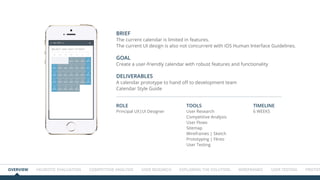
The current calendar is limited in features.
The current UI design is also not concurrent with iOS Human Interface Guidelines.
GOAL
Create a user-friendly calendar with robust features and functionality
DELIVERABLES
A calendar prototype to hand off to development team
Calendar Style Guide
ROLE
Principal UX|UI Designer
Tools
User Research
Competitive Analysis
User Flows
Sitemap
Wireframes | Sketch
Prototyping | Flinto
User Testing
TIMELINE
6 WEEKS
Overview HEURISTIC EVALUATION COMPETITIVE ANALYSIS USER RESEARCH Exploring the solution WIREFRAMES USER TESTING Prototype
Heuristic Evaluation of the current app
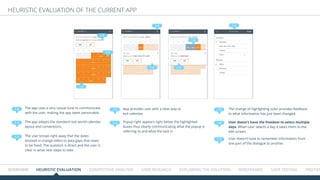
The app uses a very casual tone to communicate
with the user, making the app seem personable.
The app adopts the standard real world calendar
layout and conventions.
Popup right appears right below the highlighted
boxes thus clearly communicating what the popup is
referring to and what the task is.
The change of highlighting color provides feedback
to what information has just been changed.
User doesn’t have the freedom to select multiple
days. When user selects a day it takes them to the
edit screen.
User doesn’t have to remember information from
one part of the dialogue to another.
1.0
1.1
1.3
1.5
1.6
1.2
1.4 1.7
1.1
The user knows right away that the dates
blocked in orange refers to data gaps that need
to be fixed. The question is direct and the user is
clear in what next steps to take.
App provides user with a clear way to
exit calendar.
1.2
1.31.0
1.4
1.5
1.6
1.7
Heuristic Evaluation of the current app
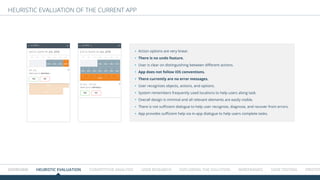
Action options are very linear.
There is no undo feature.
User is clear on distinguishing between different actions.
App does not follow iOS conventions.
There currently are no error messages.
User recognizes objects, actions, and options.
System remembers frequently used locations to help users along task.
Overall design is minimal and all relevant elements are easily visible.
There is not sufficient dialogue to help user recognize, diagnose, and recover from errors.
App provides sufficient help via in-app dialogue to help users complete tasks.
Overview HEURISTIC EVALUATION COMPETITIVE ANALYSIS USER RESEARCH Exploring the solution WIREFRAMES USER TESTING Prototype
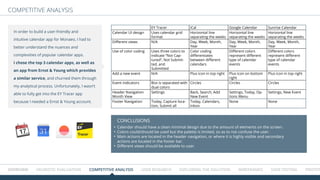
EY Tracer iCal Google Calendar Sunrise Calendar
Calendar UI design Uses calendar grid
format
Horizontal line
separating the weeks
Horizontal line
separating the weeks
Horizontal line
separating the weeks
Different views N/A Day, Week, Month,
Year
Day, Week, Month,
Year
Day, Week, Month,
Year
Use of color coding Uses three colors to
indicate ā€œNot Cap-
turedā€, Not Submit-
ted, and
Submitted
Color coding
differentiates
between different
calendars
Different colors
represent different
type of calendar
events
Different colors
represent different
type of calendar
events
Add a new event N/A Plus icon in top right Plus icon on bottom
right
Plus icon in top right
Event indicators Box is separated with
dual colors
Circles Circles Circles
Header Navigation
Month View
Settings Back, Search, Add
New Event
Settings, Today, Op-
tions Menu
Settings, New Event
Footer Navigation Today, Capture loca-
tion, Submit all
Today, Calendars,
Inbox
None None
Calendar should have a clean minimal design due to the amount of elements on the screen.
Colors could/should be used but the palette is limited, so as to not confuse the user.
Main actions are located in the header navigation, or where it is highly visible and secondary
actions are located in the footer bar.
Different views should be available to user.
ConclusionS
COMpetitive analysis
In order to build a user-friendly and
intuitive calendar app for Monaeo, I had to
better understand the nuances and
complexities of popular calendar apps.
I chose the top 3 calendar apps, as well as
an app from Ernst & Young which provides
a similar service, and churned them through
my analytical process. Unfortunately, I wasn’t
able to fully get into the EY Tracer app
because I needed a Ernst & Young account.
Overview HEURISTIC EVALUATION COMPETITIVE ANALYSIS USER RESEARCH Exploring the solution WIREFRAMES USER TESTING Prototype
COMpetitive analysis / EY TRACER
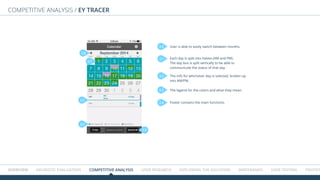
User is able to easily switch between months.
Each day is split into halves (AM and PM).
The day box is split vertically to be able to
communicate the status of that day.
The info for whichever day is selected, broken up
into AM/PM.
The legend for the colors and what they mean.
Footer contains the main functions.
2.0
2.0
2.1
2.2
2.3
2.4
2.2
2.3
2.4
2.1
Overview HEURISTIC EVALUATION COMPETITIVE ANALYSIS USER RESEARCH Exploring the solution WIREFRAMES USER TESTING Prototype
USER RESEARCH
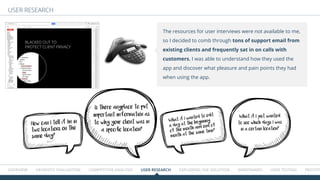
The resources for user interviews were not available to me,
so I decided to comb through tons of support email from
existing clients and frequently sat in on calls with
customers. I was able to understand how they used the
app and discover what pleasure and pain points they had
when using the app.
BLACKED OUT TO
PROTECT CLIENT PRIVACY
How can I tell if I’m in
two locations on the
same day?
What if I wanted to edit
a day at the beginning
of the month and end of
month at the same time?
Is there anyplace to put
important imformation as
to why your client was in
a specific location?
What if I just wanted
to see which days I was
in a certain location?
Overview HEURISTIC EVALUATION COMPETITIVE ANALYSIS USER RESEARCH Exploring the solution WIREFRAMES USER TESTING Prototype
PROFILE
GENDER
AGE
LOCATION
OCCUPATION
Frequent Traveler
Male
52
NEW YORK
Senior VP
BIOGRAPHY
TECH
GOALS
FRUSTRATIONS
FEATURES NEEDED
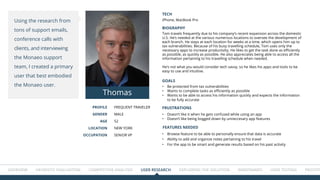
Tom travels frequently due to his company’s recent expansion across the domestic
U.S. He’s needed at the various numerous locations to oversee the development of
each branch. He stays at each location for weeks at a time, which opens him up to
tax vulnerabilities. Because of his busy travelling schedule, Tom uses only the
necessary apps to increase productivity. He likes to get the task done as efficiently
as possible, as quickly as possible. He also appreciates being able to access all the
information pertaining to his travelling schedule when needed.
He’s not what you would consider tech savvy, so he likes his apps and tools to be
easy to use and intuitive.
iPhone, MacBook Pro
•	 Browse feature to be able to personally ensure that data is accurate
•	 Ability to add and organize notes pertaining to his travel
•	 For the app to be smart and generate results based on his past activity
•	 Be protected from tax vulnerabilities
•	 Wants to complete tasks as efficiently as possible
•	 Wants to be able to access his information quickly and expects the information
to be fully accurate
•	 Doesn’t like it when he gets confused while using an app
•	 Doesn’t like being bogged down by unneccesary app features
Using the research from
tons of support emails,
conference calls with
clients, and interviewing
the Monaeo support
team, I created a primary
user that best embodied
the Monaeo user.
Thomas
Overview HEURISTIC EVALUATION COMPETITIVE ANALYSIS USER RESEARCH Exploring the solution WIREFRAMES USER TESTING Prototype
USER FLOW CONFIRMING GAPS
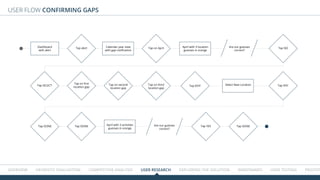
Dashboard
with alert
Calendar year view
with gap notification
April with 3 location
guesses in orange
April with 3 activities
guesses in orange
Select New Location
Are our guesses
correct?
Are our guesses
correct?
Tap alert Tap on April Tap NO
Tap YES
Tap on first
location gap
Tap on second
location gap
Tap on third
location gap
Tap EDIT Tap NYC
Tap DONE Tap DONE Tap DONE
Tap SELECT
Overview HEURISTIC EVALUATION COMPETITIVE ANALYSIS USER RESEARCH Exploring the solution WIREFRAMES USER TESTING Prototype
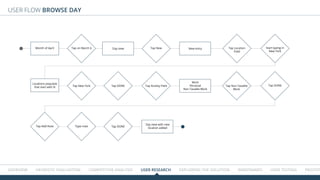
USER FLOW Browse day
Month of April
Locations populate
that start with N
Day view New entry
Work
Personal
Non Taxable Work
Day view with new
location added
Tap on March 6 Tap New Start typing in
New York
Tap Location
Field
Tap New York Tap DONE
Tap DONE
Tap Activity Field Tap Non Taxable
Work
Tap DONE
Tap Add Note Type note
Overview HEURISTIC EVALUATION COMPETITIVE ANALYSIS USER RESEARCH Exploring the solution WIREFRAMES USER TESTING Prototype
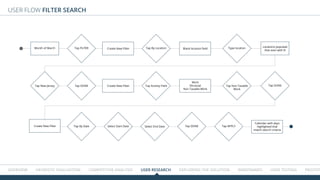
USER FLOW FILTER SEARCH
Month of March Locations populate
that start with N
Create New Filter
Create New Filter
Create New Filter
Blank location field
Work
Personal
Non Taxable Work
Calendar with days
highlighted that
match search criteria
Tap FILTER Tap By Location Type location
Tap New Jersey Tap DONE
Select End Date
Tap Activity Field Tap Non Taxable
Work
Tap DONE
Tap DONE Tap APPLYTap By Date Select Start Date
EXPLORING THE SOLUTION
Overview HEURISTIC EVALUATION COMPETITIVE ANALYSIS USER RESEARCH Exploring the solution WIREFRAMES USER TESTING Prototype
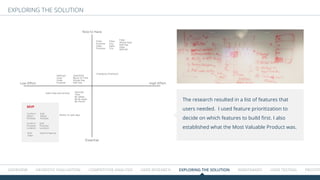
The research resulted in a list of features that
users needed. I used feature prioritization to
decide on which features to build first. I also
established what the Most Valuable Product was.
Essential
Nice to Have
Low Effort High Effort
View/Edit:
Block of Time:
Whole Day
Half Day
Edit:
Purpose
Location
Confirm:
Purpose
Location
Settings:
Color
Code
Purpose
Settings
View:
By Week
By Bi-week
By Month
Edit:
Select
Multiple
Confirm:
Select
Multiple
Edit:
Gaps
Filter:
Whole Day/
Half Day
Data:
WD/HD
Filter:
City
Data:
City
Filter:
Purpose
Data:
Purpose
Submit feature
Ability to split days
Changing Champion
Add notes and photos
MVP
12 Users
Overview HEURISTIC EVALUATION COMPETITIVE ANALYSIS USER RESEARCH Exploring the solution WIREFRAMES USER TESTING Prototype
Design Studio
A | B testing
A B C
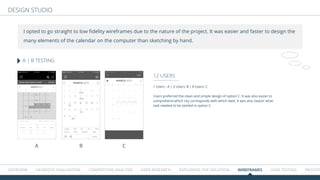
I opted to go straight to low fidelity wireframes due to the nature of the project. It was easier and faster to design the
many elements of the calendar on the computer than sketching by hand.
1 Users : A | 2 Users: B | 8 Users: C
Users preferred the clean and simple design of option C. It was also easier to
comprehend which city corresponds with which date. It was also clearer what
task needed to be tackled in option C.
Overview HEURISTIC EVALUATION COMPETITIVE ANALYSIS USER RESEARCH Exploring the solution WIREFRAMES USER TESTING Prototype
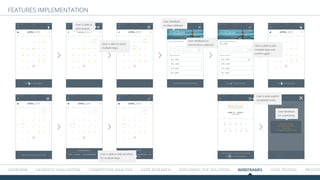
FeatureS implementation
User is able to select
multiple days.
User is able to
edit location
User feedback
on days selected
User feedback on
new location selected User is able to edit
multiple days and
confirm gaps.
User is able to edit activities
for multiple days
User is able submit
completed tasks.
User feedback
for submitting.
Overview HEURISTIC EVALUATION COMPETITIVE ANALYSIS USER RESEARCH Exploring the solution WIREFRAMES USER TESTING Prototype
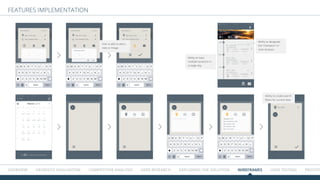
FeatureS implementation
User is able to add a
note or image.
Ability to have
multiple locations in
a single day.
Ability to designate
the ā€œchampionā€ or
main location.
Ability to create search
filters for current data
Overview HEURISTIC EVALUATION COMPETITIVE ANALYSIS USER RESEARCH Exploring the solution WIREFRAMES USER TESTING Prototype
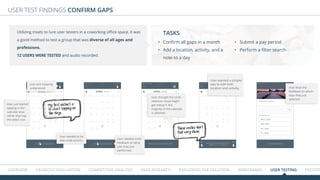
USER TEST FINDINGS CONFIRM GAPS
User just started
tapping in the
calendar area
rather than tap
the select icon.
Icon isn’t instantly
understood.
User needed to be
able undo actions.
User needed more
feedback on what
task they just
performed.
User liked the
feedback on which
days they just
selected.
User thought the circle
selection visual might
get messy if the
majority of the calendar
is selected.
User wanted a simpler
way to edit both
location and activity.
Utilizing treats to lure user testers in a coworking office space, it was
a good method to test a group that was diverse of all ages and
professions.
12 users were tested and audio recorded.
•	 Confirm all gaps in a month
•	 Add a location, activity, and a
note to a day
•	 Submit a pay period
•	 Perform a filter search
TASKS
My first instinct is
to start tapping on
the days.
These circles don’t
feel very clean
Overview HEURISTIC EVALUATION COMPETITIVE ANALYSIS USER RESEARCH Exploring the solution WIREFRAMES USER TESTING Prototype
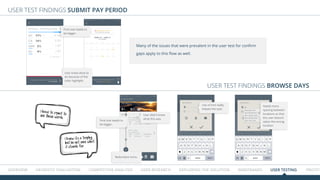
USER TEST FINDINGS submit Pay period
USER TEST FINDINGS BROWSE DAYS
Font size needs to
be bigger.
Font size needs to
be bigger.
User didn’t know
what this was.
Use of hint really
helped the task.
Redundant icons.
User knew what to
do because of the
color highlight.
Many of the issues that were prevalent in the user test for confirm
gaps apply to this flow as well.
Needs more
spacing between
locations so that
the user doesn’t
select the wrong
location
I know it’s a trophy,
but I’m not sure what
it stands for.
I have to squint to
see those words.
HEURISTIC EVALUATION COMPETITIVE ANALYSIS USER RESEARCH Exploring the solution WIREFRAMES USER TESTING Prototype FInal
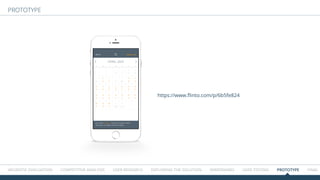
https://www.flinto.com/p/6b5fe824
PRototype
ALUATION COMPETITIVE ANALYSIS USER RESEARCH Exploring the solution WIREFRAMES USER TESTING Prototype FINAL ITERATION SITEM
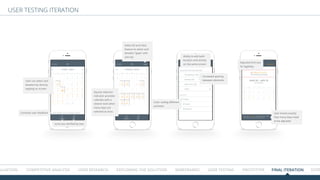
USER TESTING ITERATION
User can select and
deselect by directly
tapping on screen
Select All and Clear
feature to select and
deselect ā€œgapsā€ with
one tap Ability to edit both
location and activity
on the same screen
Increased spacing
between elements
Adjusted font size
for legibility
User knows exactly
how many days need
to be adjusted
Color coding different
activities
Square selection
indicator provides
calendar with a
cleaner look when
many days are
selected at once.
Icons are clarified by text.
Constant user feedback
ALUATION COMPETITIVE ANALYSIS USER RESEARCH Exploring the solution WIREFRAMES USER TESTING Prototype FINAL ITERATION SITEM
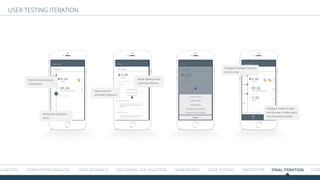
USER TESTING ITERATION
Removed extraneous
information
Made adding notes
a primary feature
Easy access to
secondary features
Removed redundant
icons
Changed champion location
icon to a star
Feedback makes it clear
that the star is referring to
the champion location
OMPETITIVE ANALYSIS USER RESEARCH Exploring the solution WIREFRAMES USER TESTING Prototype FINAL ITERATION SITEMAP
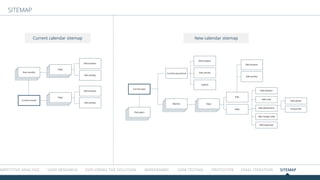
SITEMAP
New calendar sitemapCurrent calendar sitemap
Current month
Days
Days
Edit location
Edit location
Edit activity
Edit activity
Past months
Current year
Edit location
Edit location
Edit activity
Edit
View
Add note
Add location
Add attachment
Take photo
Choose file
Add charge code
Add expenses
Edit activity
Submit
Past years
Months
Current pay period
Days

Monaeo Calendar Case Study

  • 1.
    Monaeo is alocation data analytics software that serves to help enterprises and high net-worth individuals manage tax exposures created by business travel.
  • 2.
    BRIEF The current calendaris limited in features. The current UI design is also not concurrent with iOS Human Interface Guidelines. GOAL Create a user-friendly calendar with robust features and functionality DELIVERABLES A calendar prototype to hand off to development team Calendar Style Guide ROLE Principal UX|UI Designer Tools User Research Competitive Analysis User Flows Sitemap Wireframes | Sketch Prototyping | Flinto User Testing TIMELINE 6 WEEKS Overview HEURISTIC EVALUATION COMPETITIVE ANALYSIS USER RESEARCH Exploring the solution WIREFRAMES USER TESTING Prototype
  • 3.
    Overview HEURISTIC EVALUATIONCOMPETITIVE ANALYSIS USER RESEARCH Exploring the solution WIREFRAMES USER TESTING Prototype Heuristic Evaluation of the current app The app uses a very casual tone to communicate with the user, making the app seem personable. The app adopts the standard real world calendar layout and conventions. Popup right appears right below the highlighted boxes thus clearly communicating what the popup is referring to and what the task is. The change of highlighting color provides feedback to what information has just been changed. User doesn’t have the freedom to select multiple days. When user selects a day it takes them to the edit screen. User doesn’t have to remember information from one part of the dialogue to another. 1.0 1.1 1.3 1.5 1.6 1.2 1.4 1.7 1.1 The user knows right away that the dates blocked in orange refers to data gaps that need to be fixed. The question is direct and the user is clear in what next steps to take. App provides user with a clear way to exit calendar. 1.2 1.31.0 1.4 1.5 1.6 1.7
  • 4.
    Heuristic Evaluation ofthe current app Action options are very linear. There is no undo feature. User is clear on distinguishing between different actions. App does not follow iOS conventions. There currently are no error messages. User recognizes objects, actions, and options. System remembers frequently used locations to help users along task. Overall design is minimal and all relevant elements are easily visible. There is not sufficient dialogue to help user recognize, diagnose, and recover from errors. App provides sufficient help via in-app dialogue to help users complete tasks. Overview HEURISTIC EVALUATION COMPETITIVE ANALYSIS USER RESEARCH Exploring the solution WIREFRAMES USER TESTING Prototype
  • 5.
    EY Tracer iCalGoogle Calendar Sunrise Calendar Calendar UI design Uses calendar grid format Horizontal line separating the weeks Horizontal line separating the weeks Horizontal line separating the weeks Different views N/A Day, Week, Month, Year Day, Week, Month, Year Day, Week, Month, Year Use of color coding Uses three colors to indicate ā€œNot Cap- turedā€, Not Submit- ted, and Submitted Color coding differentiates between different calendars Different colors represent different type of calendar events Different colors represent different type of calendar events Add a new event N/A Plus icon in top right Plus icon on bottom right Plus icon in top right Event indicators Box is separated with dual colors Circles Circles Circles Header Navigation Month View Settings Back, Search, Add New Event Settings, Today, Op- tions Menu Settings, New Event Footer Navigation Today, Capture loca- tion, Submit all Today, Calendars, Inbox None None Calendar should have a clean minimal design due to the amount of elements on the screen. Colors could/should be used but the palette is limited, so as to not confuse the user. Main actions are located in the header navigation, or where it is highly visible and secondary actions are located in the footer bar. Different views should be available to user. ConclusionS COMpetitive analysis In order to build a user-friendly and intuitive calendar app for Monaeo, I had to better understand the nuances and complexities of popular calendar apps. I chose the top 3 calendar apps, as well as an app from Ernst & Young which provides a similar service, and churned them through my analytical process. Unfortunately, I wasn’t able to fully get into the EY Tracer app because I needed a Ernst & Young account. Overview HEURISTIC EVALUATION COMPETITIVE ANALYSIS USER RESEARCH Exploring the solution WIREFRAMES USER TESTING Prototype
  • 6.
    Overview HEURISTIC EVALUATIONCOMPETITIVE ANALYSIS USER RESEARCH Exploring the solution WIREFRAMES USER TESTING Prototype COMpetitive analysis / EY TRACER User is able to easily switch between months. Each day is split into halves (AM and PM). The day box is split vertically to be able to communicate the status of that day. The info for whichever day is selected, broken up into AM/PM. The legend for the colors and what they mean. Footer contains the main functions. 2.0 2.0 2.1 2.2 2.3 2.4 2.2 2.3 2.4 2.1
  • 7.
    Overview HEURISTIC EVALUATIONCOMPETITIVE ANALYSIS USER RESEARCH Exploring the solution WIREFRAMES USER TESTING Prototype USER RESEARCH The resources for user interviews were not available to me, so I decided to comb through tons of support email from existing clients and frequently sat in on calls with customers. I was able to understand how they used the app and discover what pleasure and pain points they had when using the app. BLACKED OUT TO PROTECT CLIENT PRIVACY How can I tell if I’m in two locations on the same day? What if I wanted to edit a day at the beginning of the month and end of month at the same time? Is there anyplace to put important imformation as to why your client was in a specific location? What if I just wanted to see which days I was in a certain location?
  • 8.
    Overview HEURISTIC EVALUATIONCOMPETITIVE ANALYSIS USER RESEARCH Exploring the solution WIREFRAMES USER TESTING Prototype PROFILE GENDER AGE LOCATION OCCUPATION Frequent Traveler Male 52 NEW YORK Senior VP BIOGRAPHY TECH GOALS FRUSTRATIONS FEATURES NEEDED Tom travels frequently due to his company’s recent expansion across the domestic U.S. He’s needed at the various numerous locations to oversee the development of each branch. He stays at each location for weeks at a time, which opens him up to tax vulnerabilities. Because of his busy travelling schedule, Tom uses only the necessary apps to increase productivity. He likes to get the task done as efficiently as possible, as quickly as possible. He also appreciates being able to access all the information pertaining to his travelling schedule when needed. He’s not what you would consider tech savvy, so he likes his apps and tools to be easy to use and intuitive. iPhone, MacBook Pro • Browse feature to be able to personally ensure that data is accurate • Ability to add and organize notes pertaining to his travel • For the app to be smart and generate results based on his past activity • Be protected from tax vulnerabilities • Wants to complete tasks as efficiently as possible • Wants to be able to access his information quickly and expects the information to be fully accurate • Doesn’t like it when he gets confused while using an app • Doesn’t like being bogged down by unneccesary app features Using the research from tons of support emails, conference calls with clients, and interviewing the Monaeo support team, I created a primary user that best embodied the Monaeo user. Thomas
  • 9.
    Overview HEURISTIC EVALUATIONCOMPETITIVE ANALYSIS USER RESEARCH Exploring the solution WIREFRAMES USER TESTING Prototype USER FLOW CONFIRMING GAPS Dashboard with alert Calendar year view with gap notification April with 3 location guesses in orange April with 3 activities guesses in orange Select New Location Are our guesses correct? Are our guesses correct? Tap alert Tap on April Tap NO Tap YES Tap on first location gap Tap on second location gap Tap on third location gap Tap EDIT Tap NYC Tap DONE Tap DONE Tap DONE Tap SELECT
  • 10.
    Overview HEURISTIC EVALUATIONCOMPETITIVE ANALYSIS USER RESEARCH Exploring the solution WIREFRAMES USER TESTING Prototype USER FLOW Browse day Month of April Locations populate that start with N Day view New entry Work Personal Non Taxable Work Day view with new location added Tap on March 6 Tap New Start typing in New York Tap Location Field Tap New York Tap DONE Tap DONE Tap Activity Field Tap Non Taxable Work Tap DONE Tap Add Note Type note
  • 11.
    Overview HEURISTIC EVALUATIONCOMPETITIVE ANALYSIS USER RESEARCH Exploring the solution WIREFRAMES USER TESTING Prototype USER FLOW FILTER SEARCH Month of March Locations populate that start with N Create New Filter Create New Filter Create New Filter Blank location field Work Personal Non Taxable Work Calendar with days highlighted that match search criteria Tap FILTER Tap By Location Type location Tap New Jersey Tap DONE Select End Date Tap Activity Field Tap Non Taxable Work Tap DONE Tap DONE Tap APPLYTap By Date Select Start Date
  • 12.
    EXPLORING THE SOLUTION OverviewHEURISTIC EVALUATION COMPETITIVE ANALYSIS USER RESEARCH Exploring the solution WIREFRAMES USER TESTING Prototype The research resulted in a list of features that users needed. I used feature prioritization to decide on which features to build first. I also established what the Most Valuable Product was. Essential Nice to Have Low Effort High Effort View/Edit: Block of Time: Whole Day Half Day Edit: Purpose Location Confirm: Purpose Location Settings: Color Code Purpose Settings View: By Week By Bi-week By Month Edit: Select Multiple Confirm: Select Multiple Edit: Gaps Filter: Whole Day/ Half Day Data: WD/HD Filter: City Data: City Filter: Purpose Data: Purpose Submit feature Ability to split days Changing Champion Add notes and photos MVP
  • 13.
    12 Users Overview HEURISTICEVALUATION COMPETITIVE ANALYSIS USER RESEARCH Exploring the solution WIREFRAMES USER TESTING Prototype Design Studio A | B testing A B C I opted to go straight to low fidelity wireframes due to the nature of the project. It was easier and faster to design the many elements of the calendar on the computer than sketching by hand. 1 Users : A | 2 Users: B | 8 Users: C Users preferred the clean and simple design of option C. It was also easier to comprehend which city corresponds with which date. It was also clearer what task needed to be tackled in option C.
  • 14.
    Overview HEURISTIC EVALUATIONCOMPETITIVE ANALYSIS USER RESEARCH Exploring the solution WIREFRAMES USER TESTING Prototype FeatureS implementation User is able to select multiple days. User is able to edit location User feedback on days selected User feedback on new location selected User is able to edit multiple days and confirm gaps. User is able to edit activities for multiple days User is able submit completed tasks. User feedback for submitting.
  • 15.
    Overview HEURISTIC EVALUATIONCOMPETITIVE ANALYSIS USER RESEARCH Exploring the solution WIREFRAMES USER TESTING Prototype FeatureS implementation User is able to add a note or image. Ability to have multiple locations in a single day. Ability to designate the ā€œchampionā€ or main location. Ability to create search filters for current data
  • 16.
    Overview HEURISTIC EVALUATIONCOMPETITIVE ANALYSIS USER RESEARCH Exploring the solution WIREFRAMES USER TESTING Prototype USER TEST FINDINGS CONFIRM GAPS User just started tapping in the calendar area rather than tap the select icon. Icon isn’t instantly understood. User needed to be able undo actions. User needed more feedback on what task they just performed. User liked the feedback on which days they just selected. User thought the circle selection visual might get messy if the majority of the calendar is selected. User wanted a simpler way to edit both location and activity. Utilizing treats to lure user testers in a coworking office space, it was a good method to test a group that was diverse of all ages and professions. 12 users were tested and audio recorded. • Confirm all gaps in a month • Add a location, activity, and a note to a day • Submit a pay period • Perform a filter search TASKS My first instinct is to start tapping on the days. These circles don’t feel very clean
  • 17.
    Overview HEURISTIC EVALUATIONCOMPETITIVE ANALYSIS USER RESEARCH Exploring the solution WIREFRAMES USER TESTING Prototype USER TEST FINDINGS submit Pay period USER TEST FINDINGS BROWSE DAYS Font size needs to be bigger. Font size needs to be bigger. User didn’t know what this was. Use of hint really helped the task. Redundant icons. User knew what to do because of the color highlight. Many of the issues that were prevalent in the user test for confirm gaps apply to this flow as well. Needs more spacing between locations so that the user doesn’t select the wrong location I know it’s a trophy, but I’m not sure what it stands for. I have to squint to see those words.
  • 18.
    HEURISTIC EVALUATION COMPETITIVEANALYSIS USER RESEARCH Exploring the solution WIREFRAMES USER TESTING Prototype FInal https://www.flinto.com/p/6b5fe824 PRototype
  • 19.
    ALUATION COMPETITIVE ANALYSISUSER RESEARCH Exploring the solution WIREFRAMES USER TESTING Prototype FINAL ITERATION SITEM USER TESTING ITERATION User can select and deselect by directly tapping on screen Select All and Clear feature to select and deselect ā€œgapsā€ with one tap Ability to edit both location and activity on the same screen Increased spacing between elements Adjusted font size for legibility User knows exactly how many days need to be adjusted Color coding different activities Square selection indicator provides calendar with a cleaner look when many days are selected at once. Icons are clarified by text. Constant user feedback
  • 20.
    ALUATION COMPETITIVE ANALYSISUSER RESEARCH Exploring the solution WIREFRAMES USER TESTING Prototype FINAL ITERATION SITEM USER TESTING ITERATION Removed extraneous information Made adding notes a primary feature Easy access to secondary features Removed redundant icons Changed champion location icon to a star Feedback makes it clear that the star is referring to the champion location
  • 21.
    OMPETITIVE ANALYSIS USERRESEARCH Exploring the solution WIREFRAMES USER TESTING Prototype FINAL ITERATION SITEMAP SITEMAP New calendar sitemapCurrent calendar sitemap Current month Days Days Edit location Edit location Edit activity Edit activity Past months Current year Edit location Edit location Edit activity Edit View Add note Add location Add attachment Take photo Choose file Add charge code Add expenses Edit activity Submit Past years Months Current pay period Days