IoT Network Protocols and Their
Vulnerabilities
Module-II
Syllabus:
• IoT Communication Protocols: MQTT, CoAP, AMQP, Zigbee, Bluetooth Low
Energy (BLE), and 6LoWPAN, Security features and vulnerabilities in IoT
protocols
• Wireless Security in IoT: Security in Wi-Fi, Bluetooth, Zigbee, Challenges in
securing low-power wireless networks
• Common Threats to IoT Networks: Replay attacks, Eavesdropping, Sybil attacks,
Sinkhole attacks
IoT communication protocols
• In this topic we study about various IoT communication protocols.
1) Bluetooth:
• Bluetooth was invented in 1994 at Ericsson, a telecommunications company in
Sweden.
• And it was introduced to create ad hoc, short-range wireless networks that allowed
devices to connect with one another.
• IEEE defined Bluetooth using standard IEEE 802.15.
• There are various versions of Bluetooth such as:
(i) Bluetooth 1.1, Bluetooth 1.2 are known as Basic Rate (BR). They support speed
upto 1Mbps.
(ii) Bluetooth 2.0 is known as Enhanced Data Rate (EDR), allows transmission
speeds up to 3 Mbps.
(iii) Bluetooth 3.0, known as High Speed (HS), provides data rates up to 24 Mbps.
(iv) Bluetooth 4.0, known as Low Energy (BLE), is simple and more efficient; offers
1 Mbps and achieves lower power consumption for use in medical devices.
• Presently, the latest Bluetooth version is Bluetooth 6.0.
• Bluetooth, specifically BLE, has become the preferred technology for IoT devices.
• This is mainly because of its ability to use minimum power while facilitating data
exchanges.
• Gaussian frequency shift keying (GFSK) is a method of modulation used for digital
communication and is one method used in Bluetooth technology.
• It operates in the unlicensed Industrial, Scientific, and Medical (ISM) radio
frequency (RF) 2.4 GHz spectrum and has a range from between 0.5–1 m to 100 m.
• One main advantage of the technology is its ability to transmit both voice and data
simultaneously.
• However, the 2.4 GHz radio frequency spectrum is shared with many consumer
appliances which could cause interference. For this reason, Bluetooth technology
uses hops in the Bluetooth frequency at 1600 hops per second.
 Bluetooth piconet:
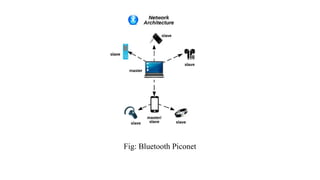
• A piconet is a spontaneous, ad hoc network that enables two or more Bluetooth
devices to communicate with one another.
• In the network, one device is designated as the master, while all other devices are
designated as slaves. There can only be one master device, which serves as the
controlling device in the piconet.
• There can be up to seven active slave devices. These devices are able to request
and transmit data to the master device.
• The connection between a cell phone (master) and a smartwatch (slave) is an
example of a simple Bluetooth piconet.
• Figure below provides an illustration of a sample Bluetooth piconet.
Fig: Bluetooth Piconet
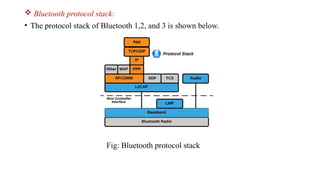
 Bluetooth protocol stack:
• The protocol stack of Bluetooth 1,2, and 3 is shown below.
Fig: Bluetooth protocol stack
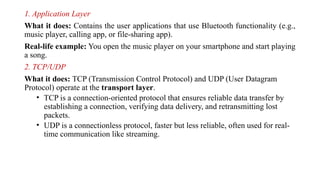
1. Application Layer
What it does: Contains the user applications that use Bluetooth functionality (e.g.,
music player, calling app, or file-sharing app).
Real-life example: You open the music player on your smartphone and start playing
a song.
2. TCP/UDP
What it does: TCP (Transmission Control Protocol) and UDP (User Datagram
Protocol) operate at the transport layer.
• TCP is a connection-oriented protocol that ensures reliable data transfer by
establishing a connection, verifying data delivery, and retransmitting lost
packets.
• UDP is a connectionless protocol, faster but less reliable, often used for real-
time communication like streaming.
Real-life example:
• TCP: Downloading a file over Bluetooth where the system ensures the entire
file is received without errors.
• UDP: Streaming audio from your phone to a Bluetooth speaker where minor
packet losses don’t significantly affect sound quality.
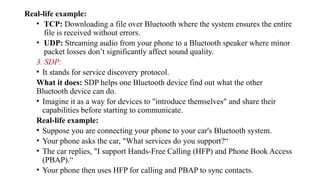
3. SDP:
• It stands for service discovery protocol.
What it does: SDP helps one Bluetooth device find out what the other
Bluetooth device can do.
• Imagine it as a way for devices to "introduce themselves" and share their
capabilities before starting to communicate.
Real-life example:
• Suppose you are connecting your phone to your car's Bluetooth system.
• Your phone asks the car, "What services do you support?“
• The car replies, "I support Hands-Free Calling (HFP) and Phone Book Access
(PBAP).“
• Your phone then uses HFP for calling and PBAP to sync contacts.
4) L2CAP:
What it does:
• Data Multiplexing: Manages multiple data types (e.g., audio, file transfer) on one
Bluetooth connection.
• Segmentation/Reassembly: Splits large data packets for transmission and
reassembles them at the receiver.
• Quality of Service (QoS): Ensures time-sensitive data (like audio) is prioritized.
Real-life example:
1.Streaming Music: L2CAP ensures smooth music playback by giving priority to
audio data while also handling commands like play/pause.
2.File Transfer: If sending a large file, L2CAP divides it into smaller pieces for
sending and reassembles them at the receiver.
5) HCI:
• It stands for Host Controller Interface.
What it does: Acts as the bridge between the software (host) and hardware
(controller), enabling communication through commands and events.
Real-life example: When you pair your smartphone with a wireless keyboard, the
HCI sends connection commands from the phone’s OS to the Bluetooth chip and
receives status updates about the pairing process.
6) LMP:
• It stands for Link Manager Protocol.
What it does: LMP manages and controls the link between Bluetooth devices,
handling tasks like pairing, authentication, encryption, and power management.
• It works at the controller level to ensure secure and efficient communication
between devices.
Real-life example: When you pair your phone with a Bluetooth headset, LMP
handles the exchange of security keys, sets up encryption for secure audio
transmission, and manages the connection to maintain stable communication.
7) Baseband:
What it does: The baseband layer is responsible for the core Bluetooth communication,
including data encoding/decoding, packet formatting, and scheduling transmission and
reception of packets over the physical channel.
• It ensures that data is correctly sent and received between devices using Bluetooth.
Real-life Example:
• When you stream music from your smartphone to a Bluetooth speaker, the baseband layer
splits the audio data into packets, schedules their transmission over the Bluetooth
frequency, and ensures the speaker correctly decodes and plays the audio.
8) Bluetooth radio:
What it does: The Bluetooth Radio is the lowest layer of the Bluetooth stack responsible
for the physical transmission and reception of radio frequency (RF) signals.
• It handles the actual wireless communication over the 2.4 GHz ISM band, converting
digital data into RF signals for transmission and RF signals back into digital data for
reception.
Real-life Example:
• When you send a file from your smartphone to another via Bluetooth, the Bluetooth
Radio converts the file's digital data into RF signals, transmits it over the air, and ensures
that the receiving device's Bluetooth Radio converts the RF signals back into the file's
digital data.
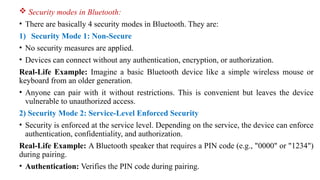
 Security modes in Bluetooth:
• There are basically 4 security modes in Bluetooth. They are:
1) Security Mode 1: Non-Secure
• No security measures are applied.
• Devices can connect without any authentication, encryption, or authorization.
Real-Life Example: Imagine a basic Bluetooth device like a simple wireless mouse or
keyboard from an older generation.
• Anyone can pair with it without restrictions. This is convenient but leaves the device
vulnerable to unauthorized access.
2) Security Mode 2: Service-Level Enforced Security
• Security is enforced at the service level. Depending on the service, the device can enforce
authentication, confidentiality, and authorization.
Real-Life Example: A Bluetooth speaker that requires a PIN code (e.g., "0000" or "1234")
during pairing.
• Authentication: Verifies the PIN code during pairing.
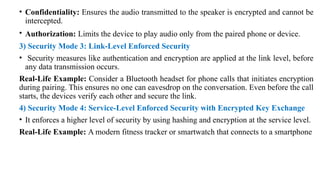
• Confidentiality: Ensures the audio transmitted to the speaker is encrypted and cannot be
intercepted.
• Authorization: Limits the device to play audio only from the paired phone or device.
3) Security Mode 3: Link-Level Enforced Security
• Security measures like authentication and encryption are applied at the link level, before
any data transmission occurs.
Real-Life Example: Consider a Bluetooth headset for phone calls that initiates encryption
during pairing. This ensures no one can eavesdrop on the conversation. Even before the call
starts, the devices verify each other and secure the link.
4) Security Mode 4: Service-Level Enforced Security with Encrypted Key Exchange
• It enforces a higher level of security by using hashing and encryption at the service level.
Real-Life Example: A modern fitness tracker or smartwatch that connects to a smartphone
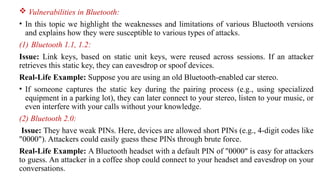
 Vulnerabilities in Bluetooth:
• In this topic we highlight the weaknesses and limitations of various Bluetooth versions
and explains how they were susceptible to various types of attacks.
(1) Bluetooth 1.1, 1.2:
Issue: Link keys, based on static unit keys, were reused across sessions. If an attacker
retrieves this static key, they can eavesdrop or spoof devices.
Real-Life Example: Suppose you are using an old Bluetooth-enabled car stereo.
• If someone captures the static key during the pairing process (e.g., using specialized
equipment in a parking lot), they can later connect to your stereo, listen to your music, or
even interfere with your calls without your knowledge.
(2) Bluetooth 2.0:
Issue: They have weak PINs. Here, devices are allowed short PINs (e.g., 4-digit codes like
"0000"). Attackers could easily guess these PINs through brute force.
Real-Life Example: A Bluetooth headset with a default PIN of "0000" is easy for attackers
to guess. An attacker in a coffee shop could connect to your headset and eavesdrop on your
conversations.
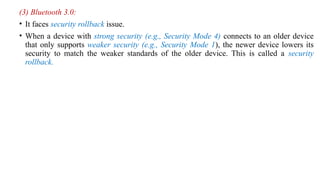
(3) Bluetooth 3.0:
• It faces security rollback issue.
• When a device with strong security (e.g., Security Mode 4) connects to an older device
that only supports weaker security (e.g., Security Mode 1), the newer device lowers its
security to match the weaker standards of the older device. This is called a security
rollback.
2) Wi-Fi:
• Wi-Fi means Wireless Fidelity.
• It is also known as WLAN ( wireless local area network).
• Its basic IEEE standard is 802.11.
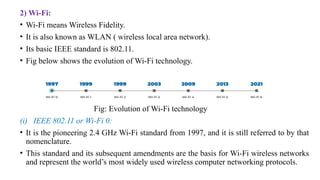
• Fig below shows the evolution of Wi-Fi technology.
Fig: Evolution of Wi-Fi technology
(i) IEEE 802.11 or Wi-Fi 0:
• It is the pioneering 2.4 GHz Wi-Fi standard from 1997, and it is still referred to by that
nomenclature.
• This standard and its subsequent amendments are the basis for Wi-Fi wireless networks
and represent the world’s most widely used wireless computer networking protocols.
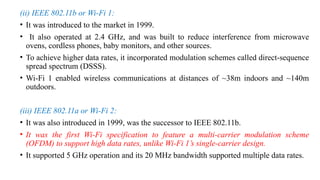
(ii) IEEE 802.11b or Wi-Fi 1:
• It was introduced to the market in 1999.
• It also operated at 2.4 GHz, and was built to reduce interference from microwave
ovens, cordless phones, baby monitors, and other sources.
• To achieve higher data rates, it incorporated modulation schemes called direct-sequence
spread spectrum (DSSS).
• Wi-Fi 1 enabled wireless communications at distances of ~38m indoors and ~140m
outdoors.
(iii) IEEE 802.11a or Wi-Fi 2:
• It was also introduced in 1999, was the successor to IEEE 802.11b.
• It was the first Wi-Fi specification to feature a multi-carrier modulation scheme
(OFDM) to support high data rates, unlike Wi-Fi 1’s single-carrier design.
• It supported 5 GHz operation and its 20 MHz bandwidth supported multiple data rates.
(iv) IEEE 802.11g or Wi-Fi 3:
• It was introduced in 2003.
• It allowed for faster data rates of up to 54 Mbit/s in the same 2.4 GHz frequency band
as IEEE 802.11b, thanks to an OFDM multi-carrier modulation scheme and other
enhancements.
• This was appealing to mass market users, as 2.4 GHz devices were less expensive than
5 GHz devices.
(v) IEEE 802.11n or Wi-Fi 4:
• It was introduced in 2009 to support the 2.4 GHz and 5GHz frequency bands, with up to
600 Mbit/s data rates, multiple channels within each frequency band, and other features.
• IEEE 802.11n data throughputs enabled the use of WLAN networks in place of wired
networks, a significant feature enabling new use cases and reduced operational costs for
end users and IT organizations.
(vi) IEEE 802.11ac or Wi-Fi 5:
• It was introduced in 2013 to support data rates at up to 3.5 Gbit/s, with still-greater
bandwidth, additional channels, better modulation, and other features.
• It was the first Wi-Fi standard to enable the use of multiple input/multiple output
(MIMO) technology so that multiple antennas could be used on both sending and
receiving devices to reduce errors and boost speed.
(vii) IEEE 802.11ax or Wi-Fi 6:
• It was introduced in 2021 to support data rates at up to 9.6 Gbit/s.
• It's designed to handle today's crowded networks, where many devices are connected at
the same time.
• Wi-Fi 6 is better because instead of just giving one device all that speed, it splits the
speed efficiently among multiple devices, so everyone gets good performance.
(viii) IEEE 802.11be or Wi-Fi 7:
• It was introduced in 2024 to support data rates at up to 46 Gbit/s.
• It supports up to 320 MHz channels.
• Can simultaneously use multiple frequency bands (2.4 GHz, 5 GHz, and 6 GHz) for
improved performance and lower latency.
• Designed for ultra-low latency and can handle more devices, making it ideal for
applications like high-definition video streaming, gaming, and smart homes.
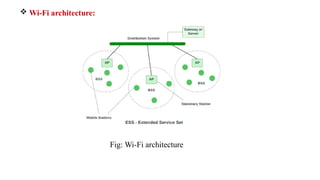
 Wi-Fi architecture:
Fig: Wi-Fi architecture
1) Access Point:
• It is a device in a Wi-Fi network that acts as a hub or bridge.
• It allows wireless devices (like smartphones, laptops, etc.) to connect to a wired
network (e.g., the internet).
• Example is Wi-Fi router.
2) Basic Service Set (BSS):
• It is the smallest building block of a Wi-Fi network. It consists of:
One access point and the devices (stations) connected to it.
3) Extended Service Set (ESS):
• An ESS is created by combining multiple BSSs.
• Each BSS has its own access point, but they are connected through a distribution system
to form a larger network.
• This allows devices to move from one BSS (Wi-Fi hotspot) to another without losing
connection.
4) Distribution System (DS):
• It is the "behind-the-scenes" system that connects multiple access points and allows
them to communicate.
• It links all the BSSs together to create an ESS.
5) Gateway:
• A Gateway connects your local network (Wi-Fi) to other networks, such as the internet.
• Example: In your home, Wi-Fi router acts as the gateway. It connects your devices to
your internet service provider (ISP).
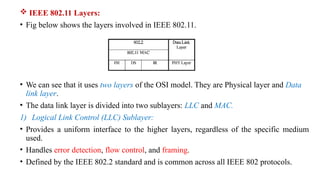
 IEEE 802.11 Layers:
• Fig below shows the layers involved in IEEE 802.11.
• We can see that it uses two layers of the OSI model. They are Physical layer and Data
link layer.
• The data link layer is divided into two sublayers: LLC and MAC.
1) Logical Link Control (LLC) Sublayer:
• Provides a uniform interface to the higher layers, regardless of the specific medium
used.
• Handles error detection, flow control, and framing.
• Defined by the IEEE 802.2 standard and is common across all IEEE 802 protocols.
2) Media Access Control (MAC) Sublayer:
• Responsible for managing how devices access the shared wireless medium.
• Handles framing, addressing (e.g., MAC addresses), and ensuring reliable delivery
(e.g., through acknowledgments and retransmissions).
• Plays a crucial role in collision avoidance, as wireless networks operate in a shared
medium where simultaneous transmissions can interfere.
In particular, the MAC sublayer ensures that only one device transmits at a time using
Carrier Sense Multiple Access with Collision Avoidance (CSMA/CA).
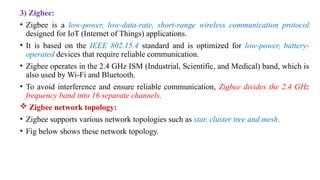
3) Zigbee:
• Zigbee is a low-power, low-data-rate, short-range wireless communication protocol
designed for IoT (Internet of Things) applications.
• It is based on the IEEE 802.15.4 standard and is optimized for low-power, battery-
operated devices that require reliable communication.
• Zigbee operates in the 2.4 GHz ISM (Industrial, Scientific, and Medical) band, which is
also used by Wi-Fi and Bluetooth.
• To avoid interference and ensure reliable communication, Zigbee divides the 2.4 GHz
frequency band into 16 separate channels.
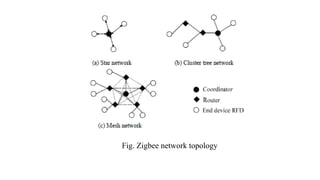
 Zigbee network topology:
• Zigbee supports various network topologies such as star, cluster tree and mesh.
• Fig below shows these network topology.
Fig. Zigbee network topology
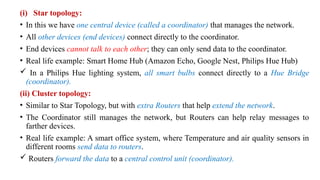
(i) Star topology:
• In this we have one central device (called a coordinator) that manages the network.
• All other devices (end devices) connect directly to the coordinator.
• End devices cannot talk to each other; they can only send data to the coordinator.
• Real life example: Smart Home Hub (Amazon Echo, Google Nest, Philips Hue Hub)
 In a Philips Hue lighting system, all smart bulbs connect directly to a Hue Bridge
(coordinator).
(ii) Cluster topology:
• Similar to Star Topology, but with extra Routers that help extend the network.
• The Coordinator still manages the network, but Routers can help relay messages to
farther devices.
• Real life example: A smart office system, where Temperature and air quality sensors in
different rooms send data to routers.
 Routers forward the data to a central control unit (coordinator).
(iii) Mesh topology:
• No single point of failure—every device can talk to multiple other devices.
• Routers help pass messages between devices, creating multiple paths for data to
travel.
• If one route fails, data finds an alternative route (self-healing property).
• Full peer-to-peer communication, meaning devices can talk to each other without
needing the coordinator.
• Real life example: Smart Home Automation (Zigbee-enabled Smart Lights,
Sensors, and Switches)
 In a Zigbee-based smart home system, if a smart bulb cannot directly reach the
coordinator, it sends the signal through another bulb acting as a router.
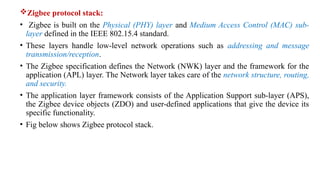
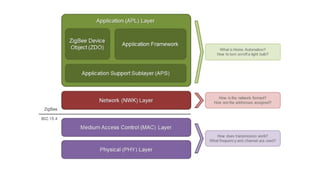
Zigbee protocol stack:
• Zigbee is built on the Physical (PHY) layer and Medium Access Control (MAC) sub-
layer defined in the IEEE 802.15.4 standard.
• These layers handle low-level network operations such as addressing and message
transmission/reception.
• The Zigbee specification defines the Network (NWK) layer and the framework for the
application (APL) layer. The Network layer takes care of the network structure, routing,
and security.
• The application layer framework consists of the Application Support sub-layer (APS),
the Zigbee device objects (ZDO) and user-defined applications that give the device its
specific functionality.
• Fig below shows Zigbee protocol stack.
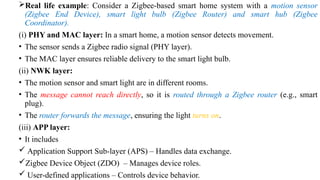
Real life example: Consider a Zigbee-based smart home system with a motion sensor
(Zigbee End Device), smart light bulb (Zigbee Router) and smart hub (Zigbee
Coordinator).
(i) PHY and MAC layer: In a smart home, a motion sensor detects movement.
• The sensor sends a Zigbee radio signal (PHY layer).
• The MAC layer ensures reliable delivery to the smart light bulb.
(ii) NWK layer:
• The motion sensor and smart light are in different rooms.
• The message cannot reach directly, so it is routed through a Zigbee router (e.g., smart
plug).
• The router forwards the message, ensuring the light turns on.
(iii) APP layer:
• It includes
 Application Support Sub-layer (APS) – Handles data exchange.
Zigbee Device Object (ZDO) – Manages device roles.
 User-defined applications – Controls device behavior.
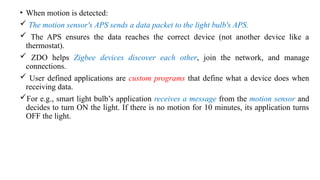
• When motion is detected:
 The motion sensor's APS sends a data packet to the light bulb's APS.
 The APS ensures the data reaches the correct device (not another device like a
thermostat).
 ZDO helps Zigbee devices discover each other, join the network, and manage
connections.
 User defined applications are custom programs that define what a device does when
receiving data.
For e.g., smart light bulb’s application receives a message from the motion sensor and
decides to turn ON the light. If there is no motion for 10 minutes, its application turns
OFF the light.
Zigbee Security:
• We know that Zigbee is known for its low power consumption, low data rates, and
mesh networking capabilities.
• However, despite having built-in security mechanisms, Zigbee is vulnerable to various
security attacks.
 Zigbee Vulnerabilities:
• Zigbee networks are vulnerable due to several weaknesses in their design. These
weaknesses includes
(i) Key management issues:
• Zigbee uses 128-bit AES encryption, but network keys can be leaked during
transmission.
• Attackers can sniff (eavesdrop on) network keys and use them to decrypt
communications.
• Some Zigbee devices store encryption keys in memory without protection, making them
easy to extract.
(ii) Weak Authentication and Access Control:
• Devices joining a Zigbee network do not always authenticate properly.
• Attackers can impersonate a legitimate device and gain access.
(iii) Unencrypted Communications:
• Some Zigbee network headers and control messages are not encrypted, allowing
attackers to intercept and analyze data traffic.
• This can be used to map the network structure and identify connected devices.
(iv) Battery Drain Issues:
• Many Zigbee devices are battery-powered and wake up periodically to check for
updates.
• Attackers can flood a device with requests, forcing it to wake up frequently and drain its
battery.
(v) Lack of Replay Protection:
• A replay attack happens when an attacker captures a valid message sent between
devices and replays it later to trick the system.
 e.g., Your smart home system sends "Turn on the Light" to a Zigbee bulb.
 An attacker records this message.
 Even if you're not home, the attacker can replay the message to turn on the light.
• Zigbee messages use sequence numbers/ time stamps to prevent replay attacks.
• Replay protection prevents old messages from being reused by attackers. It ensures that
a device only accepts new and valid commands.
• If the device resets, the counter starts over, allowing attackers to replay old messages
and manipulate devices.
Zigbee Attacks:
1) Reconnaissance (Information Gathering) Attacks:
• These attacks collect information about the Zigbee network to prepare for more
advanced attacks.
(i) Network Discovery Attack:
• Attackers eavesdrop on Zigbee traffic to identify active devices, network topology, and
encryption keys.
(ii) Key Sniffing Attack:
• Zigbee encryption keys are sometimes transmitted unencrypted.
• Attackers can capture and extract these keys, allowing them to decrypt all future
communications.
2) Device Manipulation Attacks:
• These attacks modify the behavior of Zigbee devices.
(i) Replay Attack:
• Attackers record a valid message (e.g., "Turn on the light") and resend it later.
• This can allow attackers to control Zigbee devices without authorization.
(ii) Fake Device Injection:
• Some Zigbee networks do not authenticate new devices properly.
• Attackers can add a rogue device that acts as a spy or sends false commands.
(iii) ACK Spoofing Attack:
• Zigbee devices expect acknowledgments (ACK) for sent messages.
• Attackers can fake ACK messages to disrupt communication or cause devices to ignore
real messages.
3) Denial of Service (DoS) Attacks:
• DoS attacks disrupt the Zigbee network by making devices or the entire network
unusable.
(i) Battery Drain Attack:
• Many Zigbee devices operate on batteries and have low power consumption.
• Attackers can flood a device with fake requests, forcing it to wake up repeatedly and
drain its battery.
(ii) Jamming Attack:
• Attackers transmit noise on the Zigbee frequency to block communication.
• This prevents devices from receiving or sending messages.
4) MQTT:
• It stands for Message Queuing Telemetry Transport.
• It is a communications protocol designed for IoT devices with extremely high latency
and restricted low bandwidth.
• Thus, it is a machine to machine (M2M) protocol.
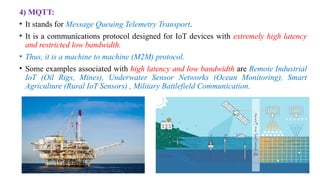
• Some examples associated with high latency and low bandwidth are Remote Industrial
IoT (Oil Rigs, Mines), Underwater Sensor Networks (Ocean Monitoring), Smart
Agriculture (Rural IoT Sensors) , Military Battlefield Communication.
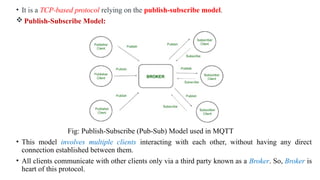
• It is a TCP-based protocol relying on the publish-subscribe model.
 Publish-Subscribe Model:
Fig: Publish-Subscribe (Pub-Sub) Model used in MQTT
• This model involves multiple clients interacting with each other, without having any direct
connection established between them.
• All clients communicate with other clients only via a third party known as a Broker. So, Broker is
heart of this protocol.
• To understand this Pub-Sub model, we need to understand the following terms.
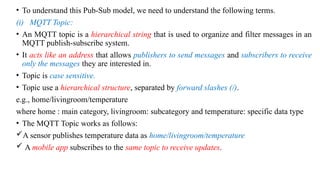
(i) MQTT Topic:
• An MQTT topic is a hierarchical string that is used to organize and filter messages in an
MQTT publish-subscribe system.
• It acts like an address that allows publishers to send messages and subscribers to receive
only the messages they are interested in.
• Topic is case sensitive.
• Topic use a hierarchical structure, separated by forward slashes (/).
e.g., home/livingroom/temperature
where home : main category, livingroom: subcategory and temperature: specific data type
• The MQTT Topic works as follows:
A sensor publishes temperature data as home/livingroom/temperature
 A mobile app subscribes to the same topic to receive updates.
(ii) MQTT Broker:
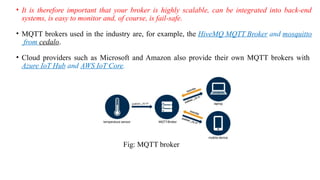
• The MQTT broker is the center of every Publish / Subscribe protocol. Depending on the
implementation, a broker can manage up to thousands of simultaneously
connected MQTT clients.
• The broker is responsible for receiving all messages, filtering the messages, determining
who subscribed to each message and sending the message to those subscribed clients.
• The Broker also holds the sessions of all persistent clients, including subscriptions and
missed messages.
• Another task of the Broker is the authentication and authorization of clients. Usually the
broker is extensible, which facilitates custom authentification, authorization and
integration with backend systems.
• Integration is especially important, because the Broker is often the component directly
exposed on the Internet, serves many clients and has to forward messages to downstream
analysis and processing systems.
• It is therefore important that your broker is highly scalable, can be integrated into back-end
systems, is easy to monitor and, of course, is fail-safe.
• MQTT brokers used in the industry are, for example, the HiveMQ MQTT Broker and mosquitto
from cedalo.
• Cloud providers such as Microsoft and Amazon also provide their own MQTT brokers with
Azure IoT Hub and AWS IoT Core.
Fig: MQTT broker

Module_II_for_me.pptxDASFFFFFFFFFFFFFFFFFFFFFFFFFFFFFFFFFFFFFFFFFFFFFFFFFFFFFFFFFFFFFFFFFFFFF

  • 1.
    IoT Network Protocolsand Their Vulnerabilities Module-II
  • 2.
    Syllabus: • IoT CommunicationProtocols: MQTT, CoAP, AMQP, Zigbee, Bluetooth Low Energy (BLE), and 6LoWPAN, Security features and vulnerabilities in IoT protocols • Wireless Security in IoT: Security in Wi-Fi, Bluetooth, Zigbee, Challenges in securing low-power wireless networks • Common Threats to IoT Networks: Replay attacks, Eavesdropping, Sybil attacks, Sinkhole attacks
  • 3.
    IoT communication protocols •In this topic we study about various IoT communication protocols. 1) Bluetooth: • Bluetooth was invented in 1994 at Ericsson, a telecommunications company in Sweden. • And it was introduced to create ad hoc, short-range wireless networks that allowed devices to connect with one another. • IEEE defined Bluetooth using standard IEEE 802.15. • There are various versions of Bluetooth such as: (i) Bluetooth 1.1, Bluetooth 1.2 are known as Basic Rate (BR). They support speed upto 1Mbps. (ii) Bluetooth 2.0 is known as Enhanced Data Rate (EDR), allows transmission speeds up to 3 Mbps.
  • 4.
    (iii) Bluetooth 3.0,known as High Speed (HS), provides data rates up to 24 Mbps. (iv) Bluetooth 4.0, known as Low Energy (BLE), is simple and more efficient; offers 1 Mbps and achieves lower power consumption for use in medical devices. • Presently, the latest Bluetooth version is Bluetooth 6.0. • Bluetooth, specifically BLE, has become the preferred technology for IoT devices. • This is mainly because of its ability to use minimum power while facilitating data exchanges. • Gaussian frequency shift keying (GFSK) is a method of modulation used for digital communication and is one method used in Bluetooth technology. • It operates in the unlicensed Industrial, Scientific, and Medical (ISM) radio frequency (RF) 2.4 GHz spectrum and has a range from between 0.5–1 m to 100 m. • One main advantage of the technology is its ability to transmit both voice and data simultaneously. • However, the 2.4 GHz radio frequency spectrum is shared with many consumer appliances which could cause interference. For this reason, Bluetooth technology uses hops in the Bluetooth frequency at 1600 hops per second.
  • 5.
     Bluetooth piconet: •A piconet is a spontaneous, ad hoc network that enables two or more Bluetooth devices to communicate with one another. • In the network, one device is designated as the master, while all other devices are designated as slaves. There can only be one master device, which serves as the controlling device in the piconet. • There can be up to seven active slave devices. These devices are able to request and transmit data to the master device. • The connection between a cell phone (master) and a smartwatch (slave) is an example of a simple Bluetooth piconet. • Figure below provides an illustration of a sample Bluetooth piconet.
  • 6.
  • 7.
     Bluetooth protocolstack: • The protocol stack of Bluetooth 1,2, and 3 is shown below. Fig: Bluetooth protocol stack
  • 8.
    1. Application Layer Whatit does: Contains the user applications that use Bluetooth functionality (e.g., music player, calling app, or file-sharing app). Real-life example: You open the music player on your smartphone and start playing a song. 2. TCP/UDP What it does: TCP (Transmission Control Protocol) and UDP (User Datagram Protocol) operate at the transport layer. • TCP is a connection-oriented protocol that ensures reliable data transfer by establishing a connection, verifying data delivery, and retransmitting lost packets. • UDP is a connectionless protocol, faster but less reliable, often used for real- time communication like streaming.
  • 9.
    Real-life example: • TCP:Downloading a file over Bluetooth where the system ensures the entire file is received without errors. • UDP: Streaming audio from your phone to a Bluetooth speaker where minor packet losses don’t significantly affect sound quality. 3. SDP: • It stands for service discovery protocol. What it does: SDP helps one Bluetooth device find out what the other Bluetooth device can do. • Imagine it as a way for devices to "introduce themselves" and share their capabilities before starting to communicate. Real-life example: • Suppose you are connecting your phone to your car's Bluetooth system. • Your phone asks the car, "What services do you support?“ • The car replies, "I support Hands-Free Calling (HFP) and Phone Book Access (PBAP).“ • Your phone then uses HFP for calling and PBAP to sync contacts.
  • 10.
    4) L2CAP: What itdoes: • Data Multiplexing: Manages multiple data types (e.g., audio, file transfer) on one Bluetooth connection. • Segmentation/Reassembly: Splits large data packets for transmission and reassembles them at the receiver. • Quality of Service (QoS): Ensures time-sensitive data (like audio) is prioritized. Real-life example: 1.Streaming Music: L2CAP ensures smooth music playback by giving priority to audio data while also handling commands like play/pause. 2.File Transfer: If sending a large file, L2CAP divides it into smaller pieces for sending and reassembles them at the receiver.
  • 11.
    5) HCI: • Itstands for Host Controller Interface. What it does: Acts as the bridge between the software (host) and hardware (controller), enabling communication through commands and events. Real-life example: When you pair your smartphone with a wireless keyboard, the HCI sends connection commands from the phone’s OS to the Bluetooth chip and receives status updates about the pairing process. 6) LMP: • It stands for Link Manager Protocol. What it does: LMP manages and controls the link between Bluetooth devices, handling tasks like pairing, authentication, encryption, and power management. • It works at the controller level to ensure secure and efficient communication between devices. Real-life example: When you pair your phone with a Bluetooth headset, LMP handles the exchange of security keys, sets up encryption for secure audio transmission, and manages the connection to maintain stable communication.
  • 12.
    7) Baseband: What itdoes: The baseband layer is responsible for the core Bluetooth communication, including data encoding/decoding, packet formatting, and scheduling transmission and reception of packets over the physical channel. • It ensures that data is correctly sent and received between devices using Bluetooth. Real-life Example: • When you stream music from your smartphone to a Bluetooth speaker, the baseband layer splits the audio data into packets, schedules their transmission over the Bluetooth frequency, and ensures the speaker correctly decodes and plays the audio. 8) Bluetooth radio: What it does: The Bluetooth Radio is the lowest layer of the Bluetooth stack responsible for the physical transmission and reception of radio frequency (RF) signals. • It handles the actual wireless communication over the 2.4 GHz ISM band, converting digital data into RF signals for transmission and RF signals back into digital data for reception.
  • 13.
    Real-life Example: • Whenyou send a file from your smartphone to another via Bluetooth, the Bluetooth Radio converts the file's digital data into RF signals, transmits it over the air, and ensures that the receiving device's Bluetooth Radio converts the RF signals back into the file's digital data.
  • 14.
     Security modesin Bluetooth: • There are basically 4 security modes in Bluetooth. They are: 1) Security Mode 1: Non-Secure • No security measures are applied. • Devices can connect without any authentication, encryption, or authorization. Real-Life Example: Imagine a basic Bluetooth device like a simple wireless mouse or keyboard from an older generation. • Anyone can pair with it without restrictions. This is convenient but leaves the device vulnerable to unauthorized access. 2) Security Mode 2: Service-Level Enforced Security • Security is enforced at the service level. Depending on the service, the device can enforce authentication, confidentiality, and authorization. Real-Life Example: A Bluetooth speaker that requires a PIN code (e.g., "0000" or "1234") during pairing. • Authentication: Verifies the PIN code during pairing.
  • 15.
    • Confidentiality: Ensuresthe audio transmitted to the speaker is encrypted and cannot be intercepted. • Authorization: Limits the device to play audio only from the paired phone or device. 3) Security Mode 3: Link-Level Enforced Security • Security measures like authentication and encryption are applied at the link level, before any data transmission occurs. Real-Life Example: Consider a Bluetooth headset for phone calls that initiates encryption during pairing. This ensures no one can eavesdrop on the conversation. Even before the call starts, the devices verify each other and secure the link. 4) Security Mode 4: Service-Level Enforced Security with Encrypted Key Exchange • It enforces a higher level of security by using hashing and encryption at the service level. Real-Life Example: A modern fitness tracker or smartwatch that connects to a smartphone
  • 16.
     Vulnerabilities inBluetooth: • In this topic we highlight the weaknesses and limitations of various Bluetooth versions and explains how they were susceptible to various types of attacks. (1) Bluetooth 1.1, 1.2: Issue: Link keys, based on static unit keys, were reused across sessions. If an attacker retrieves this static key, they can eavesdrop or spoof devices. Real-Life Example: Suppose you are using an old Bluetooth-enabled car stereo. • If someone captures the static key during the pairing process (e.g., using specialized equipment in a parking lot), they can later connect to your stereo, listen to your music, or even interfere with your calls without your knowledge. (2) Bluetooth 2.0: Issue: They have weak PINs. Here, devices are allowed short PINs (e.g., 4-digit codes like "0000"). Attackers could easily guess these PINs through brute force. Real-Life Example: A Bluetooth headset with a default PIN of "0000" is easy for attackers to guess. An attacker in a coffee shop could connect to your headset and eavesdrop on your conversations.
  • 17.
    (3) Bluetooth 3.0: •It faces security rollback issue. • When a device with strong security (e.g., Security Mode 4) connects to an older device that only supports weaker security (e.g., Security Mode 1), the newer device lowers its security to match the weaker standards of the older device. This is called a security rollback.
  • 18.
    2) Wi-Fi: • Wi-Fimeans Wireless Fidelity. • It is also known as WLAN ( wireless local area network). • Its basic IEEE standard is 802.11. • Fig below shows the evolution of Wi-Fi technology. Fig: Evolution of Wi-Fi technology (i) IEEE 802.11 or Wi-Fi 0: • It is the pioneering 2.4 GHz Wi-Fi standard from 1997, and it is still referred to by that nomenclature. • This standard and its subsequent amendments are the basis for Wi-Fi wireless networks and represent the world’s most widely used wireless computer networking protocols.
  • 19.
    (ii) IEEE 802.11bor Wi-Fi 1: • It was introduced to the market in 1999. • It also operated at 2.4 GHz, and was built to reduce interference from microwave ovens, cordless phones, baby monitors, and other sources. • To achieve higher data rates, it incorporated modulation schemes called direct-sequence spread spectrum (DSSS). • Wi-Fi 1 enabled wireless communications at distances of ~38m indoors and ~140m outdoors. (iii) IEEE 802.11a or Wi-Fi 2: • It was also introduced in 1999, was the successor to IEEE 802.11b. • It was the first Wi-Fi specification to feature a multi-carrier modulation scheme (OFDM) to support high data rates, unlike Wi-Fi 1’s single-carrier design. • It supported 5 GHz operation and its 20 MHz bandwidth supported multiple data rates.
  • 20.
    (iv) IEEE 802.11gor Wi-Fi 3: • It was introduced in 2003. • It allowed for faster data rates of up to 54 Mbit/s in the same 2.4 GHz frequency band as IEEE 802.11b, thanks to an OFDM multi-carrier modulation scheme and other enhancements. • This was appealing to mass market users, as 2.4 GHz devices were less expensive than 5 GHz devices. (v) IEEE 802.11n or Wi-Fi 4: • It was introduced in 2009 to support the 2.4 GHz and 5GHz frequency bands, with up to 600 Mbit/s data rates, multiple channels within each frequency band, and other features. • IEEE 802.11n data throughputs enabled the use of WLAN networks in place of wired networks, a significant feature enabling new use cases and reduced operational costs for end users and IT organizations.
  • 21.
    (vi) IEEE 802.11acor Wi-Fi 5: • It was introduced in 2013 to support data rates at up to 3.5 Gbit/s, with still-greater bandwidth, additional channels, better modulation, and other features. • It was the first Wi-Fi standard to enable the use of multiple input/multiple output (MIMO) technology so that multiple antennas could be used on both sending and receiving devices to reduce errors and boost speed. (vii) IEEE 802.11ax or Wi-Fi 6: • It was introduced in 2021 to support data rates at up to 9.6 Gbit/s. • It's designed to handle today's crowded networks, where many devices are connected at the same time. • Wi-Fi 6 is better because instead of just giving one device all that speed, it splits the speed efficiently among multiple devices, so everyone gets good performance.
  • 22.
    (viii) IEEE 802.11beor Wi-Fi 7: • It was introduced in 2024 to support data rates at up to 46 Gbit/s. • It supports up to 320 MHz channels. • Can simultaneously use multiple frequency bands (2.4 GHz, 5 GHz, and 6 GHz) for improved performance and lower latency. • Designed for ultra-low latency and can handle more devices, making it ideal for applications like high-definition video streaming, gaming, and smart homes.
  • 23.
     Wi-Fi architecture: Fig:Wi-Fi architecture
  • 24.
    1) Access Point: •It is a device in a Wi-Fi network that acts as a hub or bridge. • It allows wireless devices (like smartphones, laptops, etc.) to connect to a wired network (e.g., the internet). • Example is Wi-Fi router. 2) Basic Service Set (BSS): • It is the smallest building block of a Wi-Fi network. It consists of: One access point and the devices (stations) connected to it. 3) Extended Service Set (ESS): • An ESS is created by combining multiple BSSs. • Each BSS has its own access point, but they are connected through a distribution system to form a larger network. • This allows devices to move from one BSS (Wi-Fi hotspot) to another without losing connection.
  • 25.
    4) Distribution System(DS): • It is the "behind-the-scenes" system that connects multiple access points and allows them to communicate. • It links all the BSSs together to create an ESS. 5) Gateway: • A Gateway connects your local network (Wi-Fi) to other networks, such as the internet. • Example: In your home, Wi-Fi router acts as the gateway. It connects your devices to your internet service provider (ISP).
  • 26.
     IEEE 802.11Layers: • Fig below shows the layers involved in IEEE 802.11. • We can see that it uses two layers of the OSI model. They are Physical layer and Data link layer. • The data link layer is divided into two sublayers: LLC and MAC. 1) Logical Link Control (LLC) Sublayer: • Provides a uniform interface to the higher layers, regardless of the specific medium used. • Handles error detection, flow control, and framing. • Defined by the IEEE 802.2 standard and is common across all IEEE 802 protocols.
  • 27.
    2) Media AccessControl (MAC) Sublayer: • Responsible for managing how devices access the shared wireless medium. • Handles framing, addressing (e.g., MAC addresses), and ensuring reliable delivery (e.g., through acknowledgments and retransmissions). • Plays a crucial role in collision avoidance, as wireless networks operate in a shared medium where simultaneous transmissions can interfere. In particular, the MAC sublayer ensures that only one device transmits at a time using Carrier Sense Multiple Access with Collision Avoidance (CSMA/CA).
  • 28.
    3) Zigbee: • Zigbeeis a low-power, low-data-rate, short-range wireless communication protocol designed for IoT (Internet of Things) applications. • It is based on the IEEE 802.15.4 standard and is optimized for low-power, battery- operated devices that require reliable communication. • Zigbee operates in the 2.4 GHz ISM (Industrial, Scientific, and Medical) band, which is also used by Wi-Fi and Bluetooth. • To avoid interference and ensure reliable communication, Zigbee divides the 2.4 GHz frequency band into 16 separate channels.  Zigbee network topology: • Zigbee supports various network topologies such as star, cluster tree and mesh. • Fig below shows these network topology.
  • 29.
  • 30.
    (i) Star topology: •In this we have one central device (called a coordinator) that manages the network. • All other devices (end devices) connect directly to the coordinator. • End devices cannot talk to each other; they can only send data to the coordinator. • Real life example: Smart Home Hub (Amazon Echo, Google Nest, Philips Hue Hub)  In a Philips Hue lighting system, all smart bulbs connect directly to a Hue Bridge (coordinator). (ii) Cluster topology: • Similar to Star Topology, but with extra Routers that help extend the network. • The Coordinator still manages the network, but Routers can help relay messages to farther devices. • Real life example: A smart office system, where Temperature and air quality sensors in different rooms send data to routers.  Routers forward the data to a central control unit (coordinator).
  • 31.
    (iii) Mesh topology: •No single point of failure—every device can talk to multiple other devices. • Routers help pass messages between devices, creating multiple paths for data to travel. • If one route fails, data finds an alternative route (self-healing property). • Full peer-to-peer communication, meaning devices can talk to each other without needing the coordinator. • Real life example: Smart Home Automation (Zigbee-enabled Smart Lights, Sensors, and Switches)  In a Zigbee-based smart home system, if a smart bulb cannot directly reach the coordinator, it sends the signal through another bulb acting as a router.
  • 32.
    Zigbee protocol stack: •Zigbee is built on the Physical (PHY) layer and Medium Access Control (MAC) sub- layer defined in the IEEE 802.15.4 standard. • These layers handle low-level network operations such as addressing and message transmission/reception. • The Zigbee specification defines the Network (NWK) layer and the framework for the application (APL) layer. The Network layer takes care of the network structure, routing, and security. • The application layer framework consists of the Application Support sub-layer (APS), the Zigbee device objects (ZDO) and user-defined applications that give the device its specific functionality. • Fig below shows Zigbee protocol stack.
  • 34.
    Real life example:Consider a Zigbee-based smart home system with a motion sensor (Zigbee End Device), smart light bulb (Zigbee Router) and smart hub (Zigbee Coordinator). (i) PHY and MAC layer: In a smart home, a motion sensor detects movement. • The sensor sends a Zigbee radio signal (PHY layer). • The MAC layer ensures reliable delivery to the smart light bulb. (ii) NWK layer: • The motion sensor and smart light are in different rooms. • The message cannot reach directly, so it is routed through a Zigbee router (e.g., smart plug). • The router forwards the message, ensuring the light turns on. (iii) APP layer: • It includes  Application Support Sub-layer (APS) – Handles data exchange. Zigbee Device Object (ZDO) – Manages device roles.  User-defined applications – Controls device behavior.
  • 35.
    • When motionis detected:  The motion sensor's APS sends a data packet to the light bulb's APS.  The APS ensures the data reaches the correct device (not another device like a thermostat).  ZDO helps Zigbee devices discover each other, join the network, and manage connections.  User defined applications are custom programs that define what a device does when receiving data. For e.g., smart light bulb’s application receives a message from the motion sensor and decides to turn ON the light. If there is no motion for 10 minutes, its application turns OFF the light.
  • 36.
    Zigbee Security: • Weknow that Zigbee is known for its low power consumption, low data rates, and mesh networking capabilities. • However, despite having built-in security mechanisms, Zigbee is vulnerable to various security attacks.  Zigbee Vulnerabilities: • Zigbee networks are vulnerable due to several weaknesses in their design. These weaknesses includes (i) Key management issues: • Zigbee uses 128-bit AES encryption, but network keys can be leaked during transmission. • Attackers can sniff (eavesdrop on) network keys and use them to decrypt communications. • Some Zigbee devices store encryption keys in memory without protection, making them easy to extract.
  • 37.
    (ii) Weak Authenticationand Access Control: • Devices joining a Zigbee network do not always authenticate properly. • Attackers can impersonate a legitimate device and gain access. (iii) Unencrypted Communications: • Some Zigbee network headers and control messages are not encrypted, allowing attackers to intercept and analyze data traffic. • This can be used to map the network structure and identify connected devices. (iv) Battery Drain Issues: • Many Zigbee devices are battery-powered and wake up periodically to check for updates. • Attackers can flood a device with requests, forcing it to wake up frequently and drain its battery.
  • 38.
    (v) Lack ofReplay Protection: • A replay attack happens when an attacker captures a valid message sent between devices and replays it later to trick the system.  e.g., Your smart home system sends "Turn on the Light" to a Zigbee bulb.  An attacker records this message.  Even if you're not home, the attacker can replay the message to turn on the light. • Zigbee messages use sequence numbers/ time stamps to prevent replay attacks. • Replay protection prevents old messages from being reused by attackers. It ensures that a device only accepts new and valid commands. • If the device resets, the counter starts over, allowing attackers to replay old messages and manipulate devices.
  • 39.
    Zigbee Attacks: 1) Reconnaissance(Information Gathering) Attacks: • These attacks collect information about the Zigbee network to prepare for more advanced attacks. (i) Network Discovery Attack: • Attackers eavesdrop on Zigbee traffic to identify active devices, network topology, and encryption keys. (ii) Key Sniffing Attack: • Zigbee encryption keys are sometimes transmitted unencrypted. • Attackers can capture and extract these keys, allowing them to decrypt all future communications. 2) Device Manipulation Attacks: • These attacks modify the behavior of Zigbee devices.
  • 40.
    (i) Replay Attack: •Attackers record a valid message (e.g., "Turn on the light") and resend it later. • This can allow attackers to control Zigbee devices without authorization. (ii) Fake Device Injection: • Some Zigbee networks do not authenticate new devices properly. • Attackers can add a rogue device that acts as a spy or sends false commands. (iii) ACK Spoofing Attack: • Zigbee devices expect acknowledgments (ACK) for sent messages. • Attackers can fake ACK messages to disrupt communication or cause devices to ignore real messages.
  • 41.
    3) Denial ofService (DoS) Attacks: • DoS attacks disrupt the Zigbee network by making devices or the entire network unusable. (i) Battery Drain Attack: • Many Zigbee devices operate on batteries and have low power consumption. • Attackers can flood a device with fake requests, forcing it to wake up repeatedly and drain its battery. (ii) Jamming Attack: • Attackers transmit noise on the Zigbee frequency to block communication. • This prevents devices from receiving or sending messages.
  • 42.
    4) MQTT: • Itstands for Message Queuing Telemetry Transport. • It is a communications protocol designed for IoT devices with extremely high latency and restricted low bandwidth. • Thus, it is a machine to machine (M2M) protocol. • Some examples associated with high latency and low bandwidth are Remote Industrial IoT (Oil Rigs, Mines), Underwater Sensor Networks (Ocean Monitoring), Smart Agriculture (Rural IoT Sensors) , Military Battlefield Communication.
  • 43.
    • It isa TCP-based protocol relying on the publish-subscribe model.  Publish-Subscribe Model: Fig: Publish-Subscribe (Pub-Sub) Model used in MQTT • This model involves multiple clients interacting with each other, without having any direct connection established between them. • All clients communicate with other clients only via a third party known as a Broker. So, Broker is heart of this protocol.
  • 44.
    • To understandthis Pub-Sub model, we need to understand the following terms. (i) MQTT Topic: • An MQTT topic is a hierarchical string that is used to organize and filter messages in an MQTT publish-subscribe system. • It acts like an address that allows publishers to send messages and subscribers to receive only the messages they are interested in. • Topic is case sensitive. • Topic use a hierarchical structure, separated by forward slashes (/). e.g., home/livingroom/temperature where home : main category, livingroom: subcategory and temperature: specific data type • The MQTT Topic works as follows: A sensor publishes temperature data as home/livingroom/temperature  A mobile app subscribes to the same topic to receive updates.
  • 45.
    (ii) MQTT Broker: •The MQTT broker is the center of every Publish / Subscribe protocol. Depending on the implementation, a broker can manage up to thousands of simultaneously connected MQTT clients. • The broker is responsible for receiving all messages, filtering the messages, determining who subscribed to each message and sending the message to those subscribed clients. • The Broker also holds the sessions of all persistent clients, including subscriptions and missed messages. • Another task of the Broker is the authentication and authorization of clients. Usually the broker is extensible, which facilitates custom authentification, authorization and integration with backend systems. • Integration is especially important, because the Broker is often the component directly exposed on the Internet, serves many clients and has to forward messages to downstream analysis and processing systems.
  • 46.
    • It istherefore important that your broker is highly scalable, can be integrated into back-end systems, is easy to monitor and, of course, is fail-safe. • MQTT brokers used in the industry are, for example, the HiveMQ MQTT Broker and mosquitto from cedalo. • Cloud providers such as Microsoft and Amazon also provide their own MQTT brokers with Azure IoT Hub and AWS IoT Core. Fig: MQTT broker