A © 2014 B. 1
1
Module Objectives
• Upon completing this module, you will be able to:
• Understand the concept of Goods receipt
• Overview of various types of Goods Receipt
scenarios
• Other goods receipts.
• Demo on Goods Receipt scenarios.
A © 2014 B. 2
• Concept of Goods receipt process
• Overview of various types of Goods Receipt scenarios
• Other goods receipts.
• Demo on Goods Receipt scenarios.
Agenda
A © 2014 B. 3
• Concept of Goods receipt process
• Overview of various types of Goods Receipt scenarios
• Other goods receipts.
• Demo on Goods Receipt scenarios.
Agenda
A © 2014 B. 4
Goods Receipt
• A Goods Receipt (GR) is a goods movement with which the receipt of goods
from a vendor or from production is posted.
• A goods receipt leads to an increase in warehouse stock.
• All transactions that bring about a change in stock are entered real time in SAP
R/3.
• Stock is updated real time at the time of posting of a goods receipt.
• Goods receipts are processed against the open purchase order quantity.
• The open purchase order quantity is the quantity still to be delivered for an
ordered item. It is calculated as the difference between the quantity ordered
and the quantity delivered to date.
• The movement type in SAP R/3 system is a three digit key used to differentiate
between goods movements. Examples of such goods movements are goods
receipts, goods issues, or transfer posting.
A © 2014 B. 5
Goods Receipt
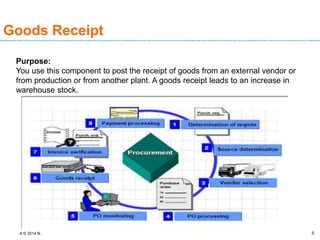
Purpose:
You use this component to post the receipt of goods from an external vendor or
from production or from another plant. A goods receipt leads to an increase in
warehouse stock.
A © 2014 B. 6
Goods Receipt
•Goods receipts can be categorized into 2 types:
• Planned goods receipts and
• Unplanned goods receipts.
• Planning a goods receipt in advance means storing certain information that is
important for the goods receipt before the actual goods receipt is posted.
• Advantages of Planned GR:
• Simplify and accelerate the goods receipt process and to better organize the
work at the goods receiving point.
• Materials Planning can monitor the stocks of ordered or manufactured
materials and achieve an optimal inventory balance.
• Planned receipts are also important for determining whether you have
received materials promised by vendors or in-house production. Without them,
the system cannot establish a link between orders and received material.
A © 2014 B. 7
Goods Receipt
Features of planned Goods receipt processes:
• Depending on the source of information (that is, the document in which the
data relevant to planning is stored), the system distinguishes between three
types of planned goods receipts:
• Planned goods receipts using purchase orders: Purchase orders contain all of
the information needed for planning the goods receipt.
• Planned goods receipts using production orders: Production orders contain all
information necessary to plan a goods receipt.
• Planned goods receipts using reservations: If your company does not have
the MM Purchasing component or the PP Production Orders component, you
enter reservations to plan goods receipts from the vendor or from production.
A © 2014 B. 8
• Concept of Goods receipt process
• Overview of various types of Goods Receipt scenarios
• Other goods receipts.
• Demo on Goods Receipt scenarios.
Agenda
A © 2014 B. 9
Goods Receipt
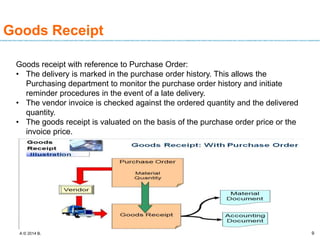
Goods receipt with reference to Purchase Order:
• The delivery is marked in the purchase order history. This allows the
Purchasing department to monitor the purchase order history and initiate
reminder procedures in the event of a late delivery.
• The vendor invoice is checked against the ordered quantity and the delivered
quantity.
• The goods receipt is valuated on the basis of the purchase order price or the
invoice price.
A © 2014 B. 10
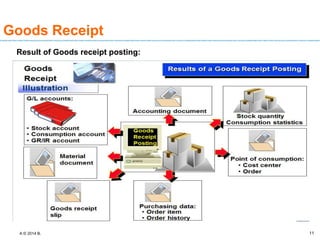
Effects of Goods Receipt
Below are the subsequent actions/process/document posted along with
the goods receipt
• Material document is created
• Accounting document is created if the goods movement is relevant for
Accounting.
• Stock & Consumption A/c updated
• Stock and value updated in material master
• PO /PO history update
• Inspection lot is created for QM relevant materials.
A © 2014 B. 11
Goods Receipt
Result of Goods receipt posting:
A © 2014 B. 12
Goods Receipt
Goods receipts for the warehouse can be posted to three different stock types:
• To unrestricted-use stock
• To stock in quality inspection
• To blocked stock
You can define in the purchase order whether or not the material is to be posted
to stock in quality inspection. However, at the time of goods receipt you decide to
which stock type the material is posted.
A © 2014 B. 13
Goods Receipt
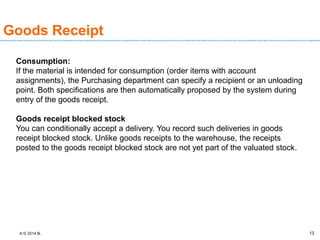
Consumption:
If the material is intended for consumption (order items with account
assignments), the Purchasing department can specify a recipient or an unloading
point. Both specifications are then automatically proposed by the system during
entry of the goods receipt.
Goods receipt blocked stock
You can conditionally accept a delivery. You record such deliveries in goods
receipt blocked stock. Unlike goods receipts to the warehouse, the receipts
posted to the goods receipt blocked stock are not yet part of the valuated stock.
A © 2014 B. 14
Goods Receipt
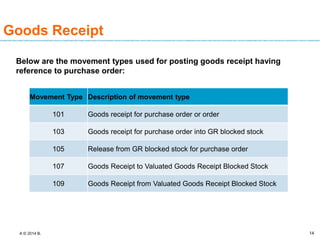
Below are the movement types used for posting goods receipt having
reference to purchase order:
Movement Type Description of movement type
101 Goods receipt for purchase order or order
103 Goods receipt for purchase order into GR blocked stock
105 Release from GR blocked stock for purchase order
107 Goods Receipt to Valuated Goods Receipt Blocked Stock
109 Goods Receipt from Valuated Goods Receipt Blocked Stock
A © 2014 B. 15
Goods Receipt
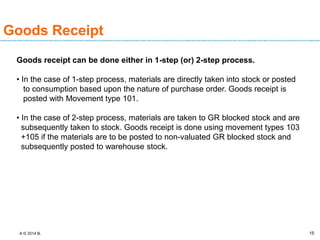
Goods receipt can be done either in 1-step (or) 2-step process.
• In the case of 1-step process, materials are directly taken into stock or posted
to consumption based upon the nature of purchase order. Goods receipt is
posted with Movement type 101.
• In the case of 2-step process, materials are taken to GR blocked stock and are
subsequently taken to stock. Goods receipt is done using movement types 103
+105 if the materials are to be posted to non-valuated GR blocked stock and
subsequently posted to warehouse stock.
A © 2014 B. 16
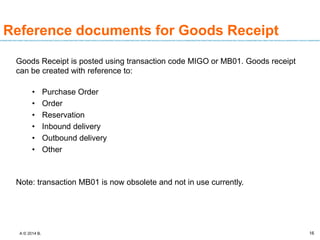
Reference documents for Goods Receipt
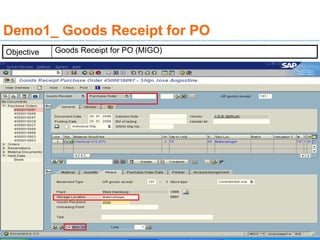
Goods Receipt is posted using transaction code MIGO or MB01. Goods receipt
can be created with reference to:
• Purchase Order
• Order
• Reservation
• Inbound delivery
• Outbound delivery
• Other
Note: transaction MB01 is now obsolete and not in use currently.
A © 2014 B.
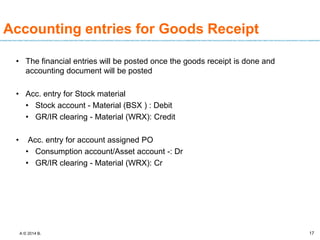
Accounting entries for Goods Receipt
• The financial entries will be posted once the goods receipt is done and
accounting document will be posted
• Acc. entry for Stock material
• Stock account - Material (BSX ) : Debit
• GR/IR clearing - Material (WRX): Credit
• Acc. entry for account assigned PO
• Consumption account/Asset account -: Dr
• GR/IR clearing - Material (WRX): Cr
17
A © 2014 B. 18
• Concept of Goods receipt process
• Overview of various types of Goods Receipt scenarios
• Other goods receipts.
• Demo on Goods Receipt scenarios.
Agenda
A © 2014 B.
Goods receipt without reference
Document
• Goods Receipt can be created without reference by using option others
• The others is usually used for scenario like initial stock upload, free sample or
free goods or goods received without Purchase order and etc
• There will be no preceding document for reference or tracking
19
A © 2014 B.
Goods receipt without reference
Document
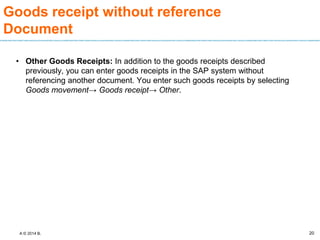
• Other Goods Receipts: In addition to the goods receipts described
previously, you can enter goods receipts in the SAP system without
referencing another document. You enter such goods receipts by selecting
Goods movement→ Goods receipt→ Other.
20
A © 2014 B.
Goods receipt without reference
Document
Scope of Functions
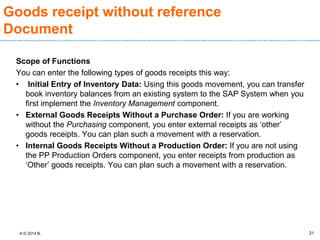
You can enter the following types of goods receipts this way:
• Initial Entry of Inventory Data: Using this goods movement, you can transfer
book inventory balances from an existing system to the SAP System when you
first implement the Inventory Management component.
• External Goods Receipts Without a Purchase Order: If you are working
without the Purchasing component, you enter external receipts as ‘other’
goods receipts. You can plan such a movement with a reservation.
• Internal Goods Receipts Without a Production Order: If you are not using
the PP Production Orders component, you enter receipts from production as
‘Other’ goods receipts. You can plan such a movement with a reservation.
21
A © 2014 B.
Goods receipt without reference
Document
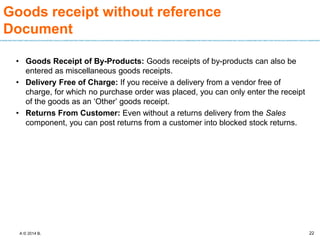
• Goods Receipt of By-Products: Goods receipts of by-products can also be
entered as miscellaneous goods receipts.
• Delivery Free of Charge: If you receive a delivery from a vendor free of
charge, for which no purchase order was placed, you can only enter the receipt
of the goods as an ‘Other’ goods receipt.
• Returns From Customer: Even without a returns delivery from the Sales
component, you can post returns from a customer into blocked stock returns.
22
A © 2014 B.
Goods receipt without reference
Document
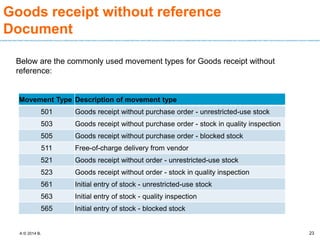
Below are the commonly used movement types for Goods receipt without
reference:
23
Movement Type Description of movement type
501 Goods receipt without purchase order - unrestricted-use stock
503 Goods receipt without purchase order - stock in quality inspection
505 Goods receipt without purchase order - blocked stock
511 Free-of-charge delivery from vendor
521 Goods receipt without order - unrestricted-use stock
523 Goods receipt without order - stock in quality inspection
561 Initial entry of stock - unrestricted-use stock
563 Initial entry of stock - quality inspection
565 Initial entry of stock - blocked stock
A © 2014 B.
Accounting entries for Goods Receipt
without reference
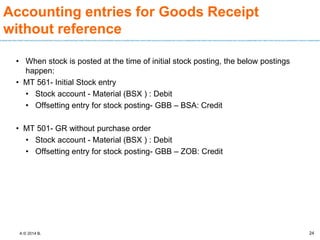
• When stock is posted at the time of initial stock posting, the below postings
happen:
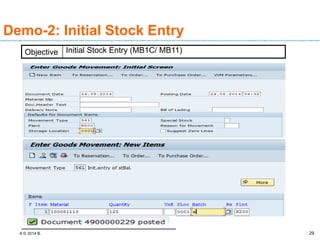
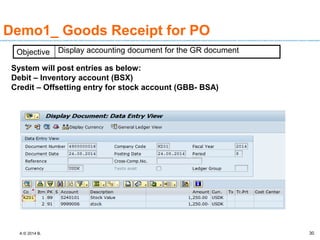
• MT 561- Initial Stock entry
• Stock account - Material (BSX ) : Debit
• Offsetting entry for stock posting- GBB – BSA: Credit
• MT 501- GR without purchase order
• Stock account - Material (BSX ) : Debit
• Offsetting entry for stock posting- GBB – ZOB: Credit
24
A © 2014 B. 25
• Concept of Goods receipt process
• Overview of various types of Goods Receipt scenarios
• Other goods receipts.
• Demo on Goods Receipt scenarios.
Agenda
A © 2014 B. 26
Demo1_ Goods Receipt for PO
Objective Goods Receipt for PO (MIGO)
A © 2014 B. 27
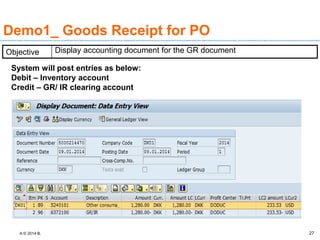
Demo1_ Goods Receipt for PO
System will post entries as below:
Debit – Inventory account
Credit – GR/ IR clearing account
Objective Display accounting document for the GR document
A © 2014 B. 28
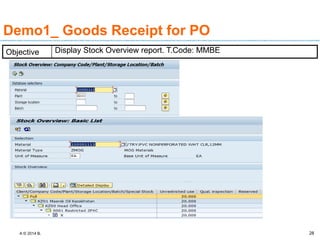
Demo1_ Goods Receipt for PO
Objective Display Stock Overview report. T.Code: MMBE
A © 2014 B. 29
Demo-2: Initial Stock Entry
Objective Initial Stock Entry (MB1C/ MB11)
A © 2014 B. 30
Demo1_ Goods Receipt for PO
System will post entries as below:
Debit – Inventory account (BSX)
Credit – Offsetting entry for stock account (GBB- BSA)
Objective Display accounting document for the GR document
A © 2014 B. 31
Quiz/Check point
• Questions/Discussions :
• What are effects of goods receipt?
A © 2014 B. 32
Questions and Comments
• What questions or comments
do you have?

Module_8_Unit_24.pptx

  • 1.
    A © 2014B. 1 1 Module Objectives • Upon completing this module, you will be able to: • Understand the concept of Goods receipt • Overview of various types of Goods Receipt scenarios • Other goods receipts. • Demo on Goods Receipt scenarios.
  • 2.
    A © 2014B. 2 • Concept of Goods receipt process • Overview of various types of Goods Receipt scenarios • Other goods receipts. • Demo on Goods Receipt scenarios. Agenda
  • 3.
    A © 2014B. 3 • Concept of Goods receipt process • Overview of various types of Goods Receipt scenarios • Other goods receipts. • Demo on Goods Receipt scenarios. Agenda
  • 4.
    A © 2014B. 4 Goods Receipt • A Goods Receipt (GR) is a goods movement with which the receipt of goods from a vendor or from production is posted. • A goods receipt leads to an increase in warehouse stock. • All transactions that bring about a change in stock are entered real time in SAP R/3. • Stock is updated real time at the time of posting of a goods receipt. • Goods receipts are processed against the open purchase order quantity. • The open purchase order quantity is the quantity still to be delivered for an ordered item. It is calculated as the difference between the quantity ordered and the quantity delivered to date. • The movement type in SAP R/3 system is a three digit key used to differentiate between goods movements. Examples of such goods movements are goods receipts, goods issues, or transfer posting.
  • 5.
    A © 2014B. 5 Goods Receipt Purpose: You use this component to post the receipt of goods from an external vendor or from production or from another plant. A goods receipt leads to an increase in warehouse stock.
  • 6.
    A © 2014B. 6 Goods Receipt •Goods receipts can be categorized into 2 types: • Planned goods receipts and • Unplanned goods receipts. • Planning a goods receipt in advance means storing certain information that is important for the goods receipt before the actual goods receipt is posted. • Advantages of Planned GR: • Simplify and accelerate the goods receipt process and to better organize the work at the goods receiving point. • Materials Planning can monitor the stocks of ordered or manufactured materials and achieve an optimal inventory balance. • Planned receipts are also important for determining whether you have received materials promised by vendors or in-house production. Without them, the system cannot establish a link between orders and received material.
  • 7.
    A © 2014B. 7 Goods Receipt Features of planned Goods receipt processes: • Depending on the source of information (that is, the document in which the data relevant to planning is stored), the system distinguishes between three types of planned goods receipts: • Planned goods receipts using purchase orders: Purchase orders contain all of the information needed for planning the goods receipt. • Planned goods receipts using production orders: Production orders contain all information necessary to plan a goods receipt. • Planned goods receipts using reservations: If your company does not have the MM Purchasing component or the PP Production Orders component, you enter reservations to plan goods receipts from the vendor or from production.
  • 8.
    A © 2014B. 8 • Concept of Goods receipt process • Overview of various types of Goods Receipt scenarios • Other goods receipts. • Demo on Goods Receipt scenarios. Agenda
  • 9.
    A © 2014B. 9 Goods Receipt Goods receipt with reference to Purchase Order: • The delivery is marked in the purchase order history. This allows the Purchasing department to monitor the purchase order history and initiate reminder procedures in the event of a late delivery. • The vendor invoice is checked against the ordered quantity and the delivered quantity. • The goods receipt is valuated on the basis of the purchase order price or the invoice price.
  • 10.
    A © 2014B. 10 Effects of Goods Receipt Below are the subsequent actions/process/document posted along with the goods receipt • Material document is created • Accounting document is created if the goods movement is relevant for Accounting. • Stock & Consumption A/c updated • Stock and value updated in material master • PO /PO history update • Inspection lot is created for QM relevant materials.
  • 11.
    A © 2014B. 11 Goods Receipt Result of Goods receipt posting:
  • 12.
    A © 2014B. 12 Goods Receipt Goods receipts for the warehouse can be posted to three different stock types: • To unrestricted-use stock • To stock in quality inspection • To blocked stock You can define in the purchase order whether or not the material is to be posted to stock in quality inspection. However, at the time of goods receipt you decide to which stock type the material is posted.
  • 13.
    A © 2014B. 13 Goods Receipt Consumption: If the material is intended for consumption (order items with account assignments), the Purchasing department can specify a recipient or an unloading point. Both specifications are then automatically proposed by the system during entry of the goods receipt. Goods receipt blocked stock You can conditionally accept a delivery. You record such deliveries in goods receipt blocked stock. Unlike goods receipts to the warehouse, the receipts posted to the goods receipt blocked stock are not yet part of the valuated stock.
  • 14.
    A © 2014B. 14 Goods Receipt Below are the movement types used for posting goods receipt having reference to purchase order: Movement Type Description of movement type 101 Goods receipt for purchase order or order 103 Goods receipt for purchase order into GR blocked stock 105 Release from GR blocked stock for purchase order 107 Goods Receipt to Valuated Goods Receipt Blocked Stock 109 Goods Receipt from Valuated Goods Receipt Blocked Stock
  • 15.
    A © 2014B. 15 Goods Receipt Goods receipt can be done either in 1-step (or) 2-step process. • In the case of 1-step process, materials are directly taken into stock or posted to consumption based upon the nature of purchase order. Goods receipt is posted with Movement type 101. • In the case of 2-step process, materials are taken to GR blocked stock and are subsequently taken to stock. Goods receipt is done using movement types 103 +105 if the materials are to be posted to non-valuated GR blocked stock and subsequently posted to warehouse stock.
  • 16.
    A © 2014B. 16 Reference documents for Goods Receipt Goods Receipt is posted using transaction code MIGO or MB01. Goods receipt can be created with reference to: • Purchase Order • Order • Reservation • Inbound delivery • Outbound delivery • Other Note: transaction MB01 is now obsolete and not in use currently.
  • 17.
    A © 2014B. Accounting entries for Goods Receipt • The financial entries will be posted once the goods receipt is done and accounting document will be posted • Acc. entry for Stock material • Stock account - Material (BSX ) : Debit • GR/IR clearing - Material (WRX): Credit • Acc. entry for account assigned PO • Consumption account/Asset account -: Dr • GR/IR clearing - Material (WRX): Cr 17
  • 18.
    A © 2014B. 18 • Concept of Goods receipt process • Overview of various types of Goods Receipt scenarios • Other goods receipts. • Demo on Goods Receipt scenarios. Agenda

  • 19.
    A © 2014B. Goods receipt without reference Document • Goods Receipt can be created without reference by using option others • The others is usually used for scenario like initial stock upload, free sample or free goods or goods received without Purchase order and etc • There will be no preceding document for reference or tracking 19
  • 20.
    A © 2014B. Goods receipt without reference Document • Other Goods Receipts: In addition to the goods receipts described previously, you can enter goods receipts in the SAP system without referencing another document. You enter such goods receipts by selecting Goods movement→ Goods receipt→ Other. 20
  • 21.
    A © 2014B. Goods receipt without reference Document Scope of Functions You can enter the following types of goods receipts this way: • Initial Entry of Inventory Data: Using this goods movement, you can transfer book inventory balances from an existing system to the SAP System when you first implement the Inventory Management component. • External Goods Receipts Without a Purchase Order: If you are working without the Purchasing component, you enter external receipts as ‘other’ goods receipts. You can plan such a movement with a reservation. • Internal Goods Receipts Without a Production Order: If you are not using the PP Production Orders component, you enter receipts from production as ‘Other’ goods receipts. You can plan such a movement with a reservation. 21
  • 22.
    A © 2014B. Goods receipt without reference Document • Goods Receipt of By-Products: Goods receipts of by-products can also be entered as miscellaneous goods receipts. • Delivery Free of Charge: If you receive a delivery from a vendor free of charge, for which no purchase order was placed, you can only enter the receipt of the goods as an ‘Other’ goods receipt. • Returns From Customer: Even without a returns delivery from the Sales component, you can post returns from a customer into blocked stock returns. 22
  • 23.
    A © 2014B. Goods receipt without reference Document Below are the commonly used movement types for Goods receipt without reference: 23 Movement Type Description of movement type 501 Goods receipt without purchase order - unrestricted-use stock 503 Goods receipt without purchase order - stock in quality inspection 505 Goods receipt without purchase order - blocked stock 511 Free-of-charge delivery from vendor 521 Goods receipt without order - unrestricted-use stock 523 Goods receipt without order - stock in quality inspection 561 Initial entry of stock - unrestricted-use stock 563 Initial entry of stock - quality inspection 565 Initial entry of stock - blocked stock
  • 24.
    A © 2014B. Accounting entries for Goods Receipt without reference • When stock is posted at the time of initial stock posting, the below postings happen: • MT 561- Initial Stock entry • Stock account - Material (BSX ) : Debit • Offsetting entry for stock posting- GBB – BSA: Credit • MT 501- GR without purchase order • Stock account - Material (BSX ) : Debit • Offsetting entry for stock posting- GBB – ZOB: Credit 24
  • 25.
    A © 2014B. 25 • Concept of Goods receipt process • Overview of various types of Goods Receipt scenarios • Other goods receipts. • Demo on Goods Receipt scenarios. Agenda
  • 26.
    A © 2014B. 26 Demo1_ Goods Receipt for PO Objective Goods Receipt for PO (MIGO)
  • 27.
    A © 2014B. 27 Demo1_ Goods Receipt for PO System will post entries as below: Debit – Inventory account Credit – GR/ IR clearing account Objective Display accounting document for the GR document
  • 28.
    A © 2014B. 28 Demo1_ Goods Receipt for PO Objective Display Stock Overview report. T.Code: MMBE
  • 29.
    A © 2014B. 29 Demo-2: Initial Stock Entry Objective Initial Stock Entry (MB1C/ MB11)
  • 30.
    A © 2014B. 30 Demo1_ Goods Receipt for PO System will post entries as below: Debit – Inventory account (BSX) Credit – Offsetting entry for stock account (GBB- BSA) Objective Display accounting document for the GR document
  • 31.
    A © 2014B. 31 Quiz/Check point • Questions/Discussions : • What are effects of goods receipt?
  • 32.
    A © 2014B. 32 Questions and Comments • What questions or comments do you have?

Editor's Notes