Modern Web Development
@ipeychev
Evolution of the Web
frameworks and libraries
2006 2015
Pros Cons
Cross browser API
Powerful DOM queries
OOTB Ajax
Plugins system
Tight coupling with HTML tags
Tracking DOM events is hard
Misleading API
("on" might be on or delegate, it
depends)
Slow
2006 2014
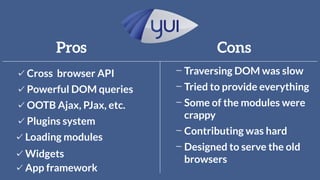
Pros Cons
Cross browser API
Powerful DOM queries
OOTB Ajax, PJax, etc.
Plugins system
Traversing DOM was slow
Some of the modules were
crappy
Tried to provide everything
Contributing was hard
Loading modules
Widgets
App framework
Designed to serve the old
browsers
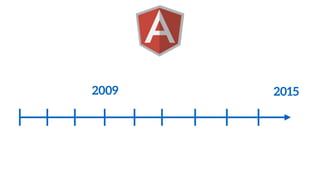
2009 2015
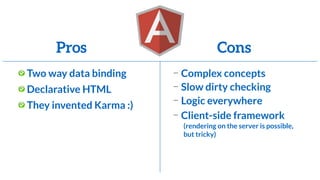
Pros Cons
Two way data binding
Declarative HTML
Complex concepts
Slow dirty checking
Logic everywhere
Client-side framework
(rendering on the server is possible,
but tricky)
They invented Karma :)
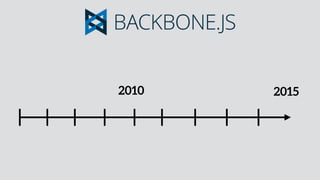
2010 2015
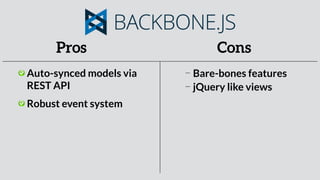
Pros Cons
Auto-synced models via
REST API
Robust event system
Bare-bones features
jQuery like views
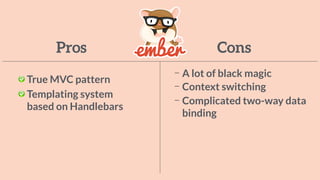
2011 2015
Pros Cons
True MVC pattern
Templating system
based on Handlebars
A lot of black magic
Context switching
Complicated two-way data
binding
2013 2015
REACT
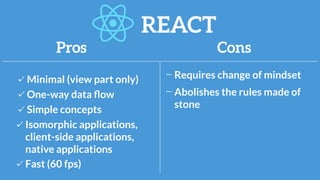
Pros Cons
Minimal (view part only)
One-way data flow
Requires change of mindset
Simple concepts
Fast (60 fps)
Isomorphic applications,
client-side applications,
native applications
Abolishes the rules made of
stone
REACT
React in a nutshell
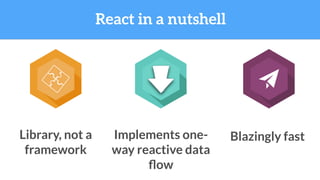
React in a nutshell
Library, not a
framework
Implements one-
way reactive data
flow
Blazingly fast
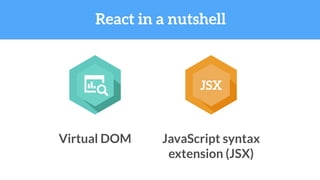
React in a nutshell
Virtual DOM
JSX
JavaScript syntax
extension (JSX)
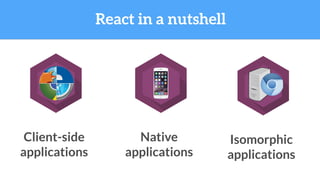
React in a nutshell
Native
applications
Isomorphic
applications
Client-side
applications
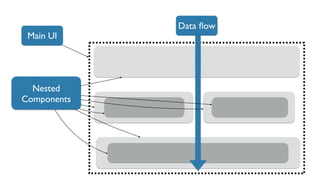
Creating UI with React
Main UI
Nested
Components
Data flow
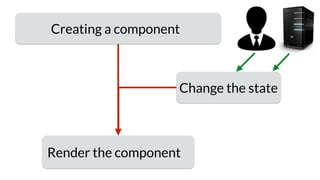
Creating a component
Render the component
Change the state
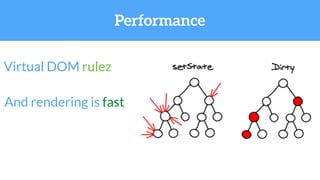
And rendering is fast
Virtual DOM rulez
Performance
EcmaScript 6 and 7
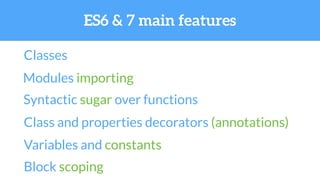
ES6 & 7 main features
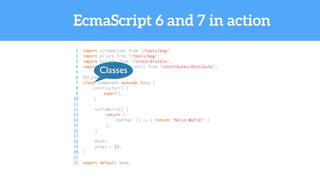
Classes
Modules importing
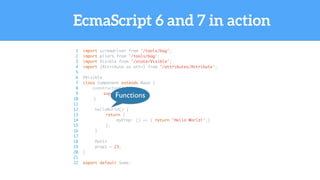
Syntactic sugar over functions
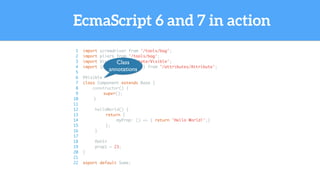
Class and properties decorators (annotations)
Variables and constants
Block scoping
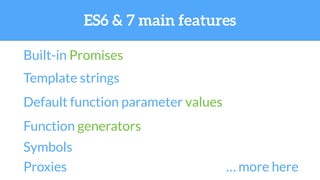
Built-in Promises
Template strings
Default function parameter values
Function generators
Symbols
Proxies … more here
ES6 & 7 main features
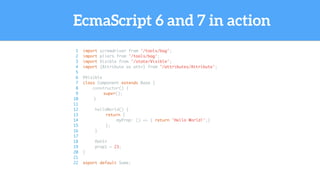
EcmaScript 6 and 7 in action
1 import screwdriver from '/tools/bag';
2 import pliers from '/tools/bag';
3 import Visible from '/state/Visible';
4 import {Attribute as attr} from '/attributes/Attribute';
5
6 @Visible
7 class Component extends Base {
8 constructor() {
9 super();
10 }
11
12 helloWorld() {
13 return {
14 myProp: () => { return 'Hello World!';}
15 };
16 }
17
18 @attr
19 prop1 = 23;
20 }
21
22 export default Some;
EcmaScript 6 and 7 in action
1 import screwdriver from '/tools/bag';
2 import pliers from '/tools/bag';
3 import Visible from '/state/Visible';
4 import {Attribute as attr} from '/attributes/Attribute';
5
6 @Visible
7 class Component extends Base {
8 constructor() {
9 super();
10 }
11
12 helloWorld() {
13 return {
14 myProp: () => { return 'Hello World!';}
15 };
16 }
17
18 @attr
19 prop1 = 23;
20 }
21
22 export default Some;
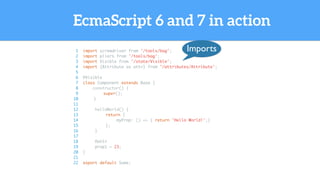
Imports
EcmaScript 6 and 7 in action
1 import screwdriver from '/tools/bag';
2 import pliers from '/tools/bag';
3 import Visible from '/state/Visible';
4 import {Attribute as attr} from '/attributes/Attribute';
5
6 @Visible
7 class Component extends Base {
8 constructor() {
9 super();
10 }
11
12 helloWorld() {
13 return {
14 myProp: () => { return 'Hello World!';}
15 };
16 }
17
18 @attr
19 prop1 = 23;
20 }
21
22 export default Some;
Class
annotations
EcmaScript 6 and 7 in action
1 import screwdriver from '/tools/bag';
2 import pliers from '/tools/bag';
3 import Visible from '/state/Visible';
4 import {Attribute as attr} from '/attributes/Attribute';
5
6 @Visible
7 class Component extends Base {
8 constructor() {
9 super();
10 }
11
12 helloWorld() {
13 return {
14 myProp: () => { return 'Hello World!';}
15 };
16 }
17
18 @attr
19 prop1 = 23;
20 }
21
22 export default Some;
Classes
EcmaScript 6 and 7 in action
1 import screwdriver from '/tools/bag';
2 import pliers from '/tools/bag';
3 import Visible from '/state/Visible';
4 import {Attribute as attr} from '/attributes/Attribute';
5
6 @Visible
7 class Component extends Base {
8 constructor() {
9 super();
10 }
11
12 helloWorld() {
13 return {
14 myProp: () => { return 'Hello World!';}
15 };
16 }
17
18 @attr
19 prop1 = 23;
20 }
21
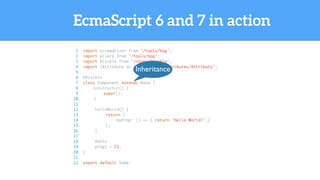
22 export default Some;
Inheritance
EcmaScript 6 and 7 in action
1 import screwdriver from '/tools/bag';
2 import pliers from '/tools/bag';
3 import Visible from '/state/Visible';
4 import {Attribute as attr} from '/attributes/Attribute';
5
6 @Visible
7 class Component extends Base {
8 constructor() {
9 super();
10 }
11
12 helloWorld() {
13 return {
14 myProp: () => { return 'Hello World!';}
15 };
16 }
17
18 @attr
19 prop1 = 23;
20 }
21
22 export default Some;
Functions
EcmaScript 6 and 7 in action
1 import screwdriver from '/tools/bag';
2 import pliers from '/tools/bag';
3 import Visible from '/state/Visible';
4 import {Attribute as attr} from '/attributes/Attribute';
5
6 @Visible
7 class Component extends Base {
8 constructor() {
9 super();
10 }
11
12 helloWorld() {
13 return {
14 myProp: () => { return 'Hello World!';}
15 };
16 }
17
18 @attr
19 prop1 = 23;
20 }
21
22 export default Some;
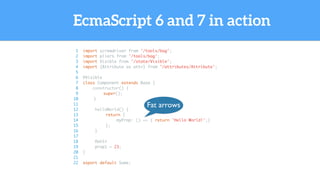
Fat arrows
EcmaScript 6 and 7 in action
1 import screwdriver from '/tools/bag';
2 import pliers from '/tools/bag';
3 import Visible from '/state/Visible';
4 import {Attribute as attr} from '/attributes/Attribute';
5
6 @Visible
7 class Component extends Base {
8 constructor() {
9 super();
10 }
11
12 helloWorld() {
13 return {
14 myProp: () => { return 'Hello World!';}
15 };
16 }
17
18 @attr
19 prop1 = 23;
20 }
21
22 export default Some;
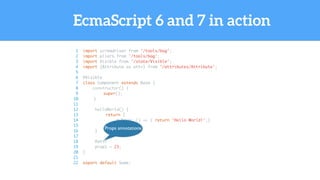
Props annotations
EcmaScript 6 and 7 in action
1 import screwdriver from '/tools/bag';
2 import pliers from '/tools/bag';
3 import Visible from '/state/Visible';
4 import {Attribute as attr} from '/attributes/Attribute';
5
6 @Visible
7 class Component extends Base {
8 constructor() {
9 super();
10 }
11
12 helloWorld() {
13 return {
14 myProp: () => { return 'Hello World!';}
15 };
16 }
17
18 @attr
19 prop1 = 23;
20 }
21
22 export default Some;
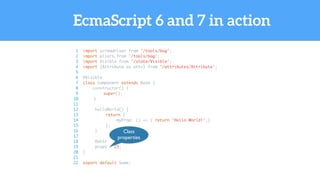
Class
properties
EcmaScript 6 and 7 in action
1 import screwdriver from '/tools/bag';
2 import pliers from '/tools/bag';
3 import Visible from '/state/Visible';
4 import {Attribute as attr} from '/attributes/Attribute';
5
6 @Visible
7 class Component extends Base {
8 constructor() {
9 super();
10 }
11
12 helloWorld() {
13 return {
14 myProp: () => { return 'Hello World!';}
15 };
16 }
17
18 @attr
19 prop1 = 23;
20 }
21
22 export default Some;
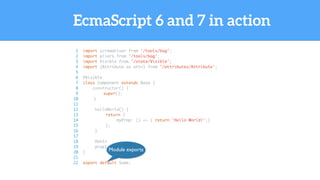
Module exports
What is the
situation
now?
One-way directional data flow wins
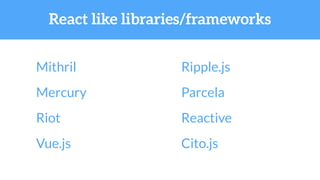
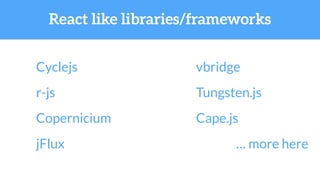
Plenty of React-wanna-be frameworks
and libraries
Plenty of Flux implementations
React like libraries/frameworks
Mithril
Mercury
Vue.js
Ripple.js
Riot Reactive
Cito.js
Hyperd
React like libraries/frameworks
Cyclejs
r-js
Copernicium
jFlux
vbridge
Tungsten.js
Cape.js
… more here
Plenty of Virtual DOM implementations
A lot of on GitHub
as part of framework/library or just like a module
The other frameworks evolve
Ember changes to benefit from React’s ideas
Angular too
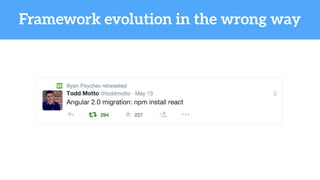
Framework evolution in the wrong way
Reactive programming
(warning - changes the mindset)
Changes the way we think about
asynchronous programming
Everything is Observable
Reactive programming
including the events
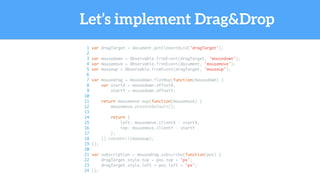
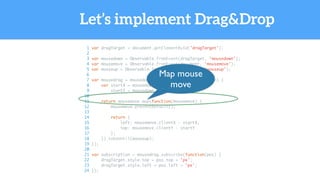
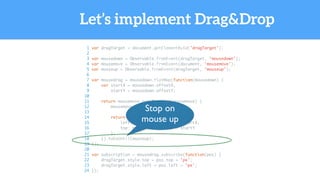
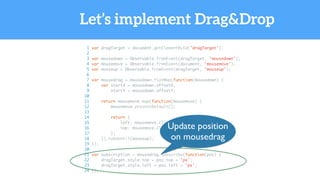
Let’s implement Drag&Drop
1 var dragTarget = document.getElementById('dragTarget');
2
3 var mousedown = Observable.fromEvent(dragTarget, 'mousedown');
4 var mousemove = Observable.fromEvent(document, 'mousemove');
5 var mouseup = Observable.fromEvent(dragTarget, 'mouseup');
6
7 var mousedrag = mousedown.flatMap(function(mousedown) {
8 var startX = mousedown.offsetX,
9 startY = mousedown.offsetY;
10
11 return mousemove.map(function(mousemove) {
12 mousemove.preventDefault();
13
14 return {
15 left: mousemove.clientX - startX,
16 top: mousemove.clientY - startY
17 };
18 }).takeUntil(mouseup);
19 });
20
21 var subscription = mousedrag.subscribe(function(pos) {
22 dragTarget.style.top = pos.top + 'px';
23 dragTarget.style.left = pos.left + 'px';
24 });
Let’s implement Drag&Drop
1 var dragTarget = document.getElementById('dragTarget');
2
3 var mousedown = Observable.fromEvent(dragTarget, 'mousedown');
4 var mousemove = Observable.fromEvent(document, 'mousemove');
5 var mouseup = Observable.fromEvent(dragTarget, 'mouseup');
6
7 var mousedrag = mousedown.flatMap(function(mousedown) {
8 var startX = mousedown.offsetX,
9 startY = mousedown.offsetY;
10
11 return mousemove.map(function(mousemove) {
12 mousemove.preventDefault();
13
14 return {
15 left: mousemove.clientX - startX,
16 top: mousemove.clientY - startY
17 };
18 }).takeUntil(mouseup);
19 });
20
21 var subscription = mousedrag.subscribe(function(pos) {
22 dragTarget.style.top = pos.top + 'px';
23 dragTarget.style.left = pos.left + 'px';
24 });
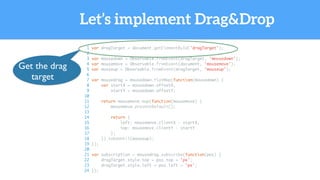
Get the drag
target
Let’s implement Drag&Drop
1 var dragTarget = document.getElementById('dragTarget');
2
3 var mousedown = Observable.fromEvent(dragTarget, 'mousedown');
4 var mousemove = Observable.fromEvent(document, 'mousemove');
5 var mouseup = Observable.fromEvent(dragTarget, 'mouseup');
6
7 var mousedrag = mousedown.flatMap(function(mousedown) {
8 var startX = mousedown.offsetX,
9 startY = mousedown.offsetY;
10
11 return mousemove.map(function(mousemove) {
12 mousemove.preventDefault();
13
14 return {
15 left: mousemove.clientX - startX,
16 top: mousemove.clientY - startY
17 };
18 }).takeUntil(mouseup);
19 });
20
21 var subscription = mousedrag.subscribe(function(pos) {
22 dragTarget.style.top = pos.top + 'px';
23 dragTarget.style.left = pos.left + 'px';
24 });
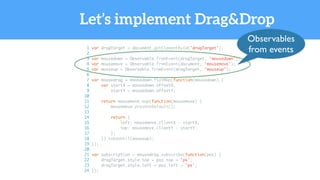
Observables
from events
Let’s implement Drag&Drop
1 var dragTarget = document.getElementById('dragTarget');
2
3 var mousedown = Observable.fromEvent(dragTarget, 'mousedown');
4 var mousemove = Observable.fromEvent(document, 'mousemove');
5 var mouseup = Observable.fromEvent(dragTarget, 'mouseup');
6
7 var mousedrag = mousedown.flatMap(function(mousedown) {
8 var startX = mousedown.offsetX,
9 startY = mousedown.offsetY;
10
11 return mousemove.map(function(mousemove) {
12 mousemove.preventDefault();
13
14 return {
15 left: mousemove.clientX - startX,
16 top: mousemove.clientY - startY
17 };
18 }).takeUntil(mouseup);
19 });
20
21 var subscription = mousedrag.subscribe(function(pos) {
22 dragTarget.style.top = pos.top + 'px';
23 dragTarget.style.left = pos.left + 'px';
24 });
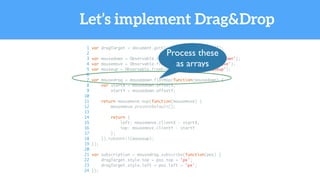
Process these
as arrays
Let’s implement Drag&Drop
1 var dragTarget = document.getElementById('dragTarget');
2
3 var mousedown = Observable.fromEvent(dragTarget, 'mousedown');
4 var mousemove = Observable.fromEvent(document, 'mousemove');
5 var mouseup = Observable.fromEvent(dragTarget, 'mouseup');
6
7 var mousedrag = mousedown.flatMap(function(mousedown) {
8 var startX = mousedown.offsetX,
9 startY = mousedown.offsetY;
10
11 return mousemove.map(function(mousemove) {
12 mousemove.preventDefault();
13
14 return {
15 left: mousemove.clientX - startX,
16 top: mousemove.clientY - startY
17 };
18 }).takeUntil(mouseup);
19 });
20
21 var subscription = mousedrag.subscribe(function(pos) {
22 dragTarget.style.top = pos.top + 'px';
23 dragTarget.style.left = pos.left + 'px';
24 });
Map mouse
move
Let’s implement Drag&Drop
1 var dragTarget = document.getElementById('dragTarget');
2
3 var mousedown = Observable.fromEvent(dragTarget, 'mousedown');
4 var mousemove = Observable.fromEvent(document, 'mousemove');
5 var mouseup = Observable.fromEvent(dragTarget, 'mouseup');
6
7 var mousedrag = mousedown.flatMap(function(mousedown) {
8 var startX = mousedown.offsetX,
9 startY = mousedown.offsetY;
10
11 return mousemove.map(function(mousemove) {
12 mousemove.preventDefault();
13
14 return {
15 left: mousemove.clientX - startX,
16 top: mousemove.clientY - startY
17 };
18 }).takeUntil(mouseup);
19 });
20
21 var subscription = mousedrag.subscribe(function(pos) {
22 dragTarget.style.top = pos.top + 'px';
23 dragTarget.style.left = pos.left + 'px';
24 });
Stop on
mouse up
Let’s implement Drag&Drop
1 var dragTarget = document.getElementById('dragTarget');
2
3 var mousedown = Observable.fromEvent(dragTarget, 'mousedown');
4 var mousemove = Observable.fromEvent(document, 'mousemove');
5 var mouseup = Observable.fromEvent(dragTarget, 'mouseup');
6
7 var mousedrag = mousedown.flatMap(function(mousedown) {
8 var startX = mousedown.offsetX,
9 startY = mousedown.offsetY;
10
11 return mousemove.map(function(mousemove) {
12 mousemove.preventDefault();
13
14 return {
15 left: mousemove.clientX - startX,
16 top: mousemove.clientY - startY
17 };
18 }).takeUntil(mouseup);
19 });
20
21 var subscription = mousedrag.subscribe(function(pos) {
22 dragTarget.style.top = pos.top + 'px';
23 dragTarget.style.left = pos.left + 'px';
24 });
Update position
on mousedrag
CSS
acronym for CSS Seriously Sucks ;)
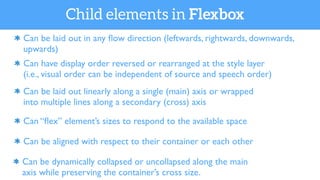
Flexbox
Can be dynamically collapsed or uncollapsed along the main
axis while preserving the container’s cross size.
Can be laid out in any flow direction (leftwards, rightwards, downwards,
upwards)
Can have display order reversed or rearranged at the style layer
(i.e., visual order can be independent of source and speech order)
Can be laid out linearly along a single (main) axis or wrapped
into multiple lines along a secondary (cross) axis
Can “flex” element’s sizes to respond to the available space
Can be aligned with respect to their container or each other
Child elements in Flexbox
Modular CSS
Every time you add CSS rule,
Global CSS sucks
you risk clashing with something else
Webpack’s CSS modules
CSS as modules,
local scope by default
Webpack’s CSS Modules
The CSS for a module is isolated,
despite of class names like ‘.main’
Webpack’s CSS Modules
You can extend
and import classes
Webpack’s CSS Modules
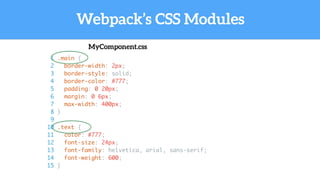
MyComponent.css
1 .main {
2 border-width: 2px;
3 border-style: solid;
4 border-color: #777;
5 padding: 0 20px;
6 margin: 0 6px;
7 max-width: 400px;
8 }
9
10 .text {
11 color: #777;
12 font-size: 24px;
13 font-family: helvetica, arial, sans-serif;
14 font-weight: 600;
15 }
Webpack’s CSS Modules
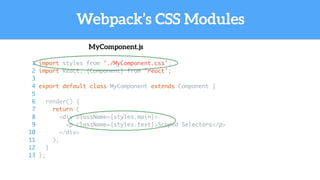
MyComponent.js
1 import styles from './MyComponent.css';
2 import React, {Component} from 'react';
3
4 export default class MyComponent extends Component {
5
6 render() {
7 return (
8 <div className={styles.main}>
9 <p className={styles.text}>Scoped Selectors</p>
10 </div>
11 );
12 }
13 };
Webpack’s CSS Modules
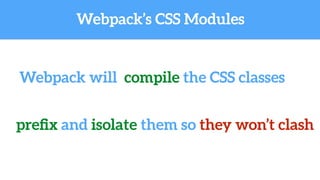
Webpack will compile the CSS classes
prefix and isolate them so they won’t clash
Webpack’s CSS Modules
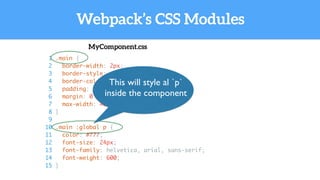
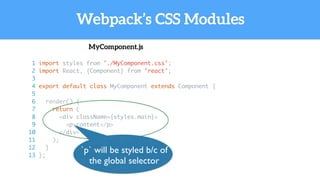
Global selectors are available
(but please avoid them)
1 .main {
2 border-width: 2px;
3 border-style: solid;
4 border-color: #777;
5 padding: 0 20px;
6 margin: 0 6px;
7 max-width: 400px;
8 }
9
10 .main :global p {
11 color: #777;
12 font-size: 24px;
13 font-family: helvetica, arial, sans-serif;
14 font-weight: 600;
15 }
Webpack’s CSS Modules
MyComponent.css
This will style al `p`
inside the component
Webpack’s CSS Modules
MyComponent.js
1 import styles from './MyComponent.css';
2 import React, {Component} from 'react';
3
4 export default class MyComponent extends Component {
5
6 render() {
7 return (
8 <div className={styles.main}>
9 <p>content</p>
10 </div>
11 );
12 }
13 };
`p` will be styled b/c of
the global selector
Webpack’s CSS Modules
CSS inheritance from shared modules
Webpack’s CSS Modules
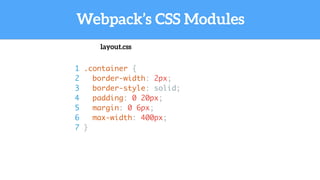
1 .container {
2 border-width: 2px;
3 border-style: solid;
4 padding: 0 20px;
5 margin: 0 6px;
6 max-width: 400px;
7 }
layout.css
Webpack’s CSS Modules
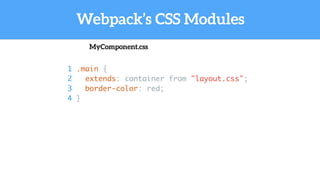
1 .main {
2 extends: container from "layout.css";
3 border-color: red;
4 }
MyComponent.css
This is CSS finally fixed
Testing
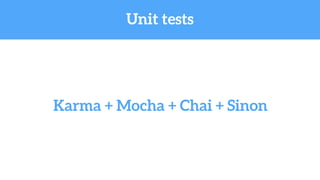
Unit tests
Karma + Mocha + Chai + Sinon
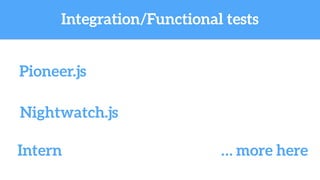
Integration/Functional tests
Pioneer.js
Nightwatch.js
Intern … more here
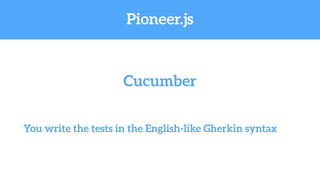
Pioneer.js
You write the tests in the English-like Gherkin syntax
Cucumber
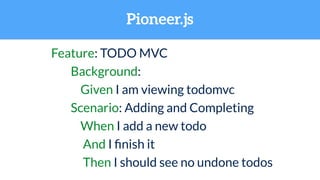
Pioneer.js
Feature: TODO MVC
Background:
Given I am viewing todomvc
Scenario: Adding and Completing
When I add a new todo
And I finish it
Then I should see no undone todos
Pioneer.js
1 module.exports = function() {
2 this.Given(/^I am viewing todomvc$/, function() {
3 return this.driver.visit('http://todomvc.com/architecture-examples/backbone/');
4 });
5
6 this.When(/^I add a new todo$/, function() {
7 return this.Widget.fill({
8 selector: '#new-todo',
9 value: ['doge', Driver.Key.Enter]
10 })
11 });
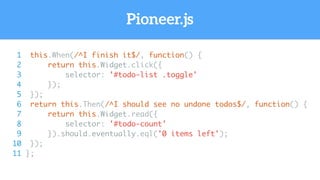
Pioneer.js
1 this.When(/^I finish it$/, function() {
2 return this.Widget.click({
3 selector: '#todo-list .toggle'
4 });
5 });
6 return this.Then(/^I should see no undone todos$/, function() {
7 return this.Widget.read({
8 selector: '#todo-count'
9 }).should.eventually.eql('0 items left');
10 });
11 };
Future
?
!
It is yours, work on it
Thank you!
ipeychev

Modern Web Developement

  • 1.
  • 2.
    Evolution of theWeb frameworks and libraries
  • 3.
  • 4.
    Pros Cons Cross browserAPI Powerful DOM queries OOTB Ajax Plugins system Tight coupling with HTML tags Tracking DOM events is hard Misleading API ("on" might be on or delegate, it depends) Slow
  • 5.
  • 6.
    Pros Cons Cross browserAPI Powerful DOM queries OOTB Ajax, PJax, etc. Plugins system Traversing DOM was slow Some of the modules were crappy Tried to provide everything Contributing was hard Loading modules Widgets App framework Designed to serve the old browsers
  • 7.
  • 8.
    Pros Cons Two waydata binding Declarative HTML Complex concepts Slow dirty checking Logic everywhere Client-side framework (rendering on the server is possible, but tricky) They invented Karma :)
  • 9.
  • 10.
    Pros Cons Auto-synced modelsvia REST API Robust event system Bare-bones features jQuery like views
  • 11.
  • 12.
    Pros Cons True MVCpattern Templating system based on Handlebars A lot of black magic Context switching Complicated two-way data binding
  • 13.
  • 14.
    Pros Cons Minimal (viewpart only) One-way data flow Requires change of mindset Simple concepts Fast (60 fps) Isomorphic applications, client-side applications, native applications Abolishes the rules made of stone REACT
  • 15.
    React in anutshell
  • 16.
    React in anutshell Library, not a framework Implements one- way reactive data flow Blazingly fast
  • 17.
    React in anutshell Virtual DOM JSX JavaScript syntax extension (JSX)
  • 18.
    React in anutshell Native applications Isomorphic applications Client-side applications
  • 19.
  • 20.
  • 21.
    Creating a component Renderthe component Change the state
  • 22.
    And rendering isfast Virtual DOM rulez Performance
  • 23.
  • 24.
    ES6 & 7main features Classes Modules importing Syntactic sugar over functions Class and properties decorators (annotations) Variables and constants Block scoping
  • 25.
    Built-in Promises Template strings Defaultfunction parameter values Function generators Symbols Proxies … more here ES6 & 7 main features
  • 26.
    EcmaScript 6 and7 in action 1 import screwdriver from '/tools/bag'; 2 import pliers from '/tools/bag'; 3 import Visible from '/state/Visible'; 4 import {Attribute as attr} from '/attributes/Attribute'; 5 6 @Visible 7 class Component extends Base { 8 constructor() { 9 super(); 10 } 11 12 helloWorld() { 13 return { 14 myProp: () => { return 'Hello World!';} 15 }; 16 } 17 18 @attr 19 prop1 = 23; 20 } 21 22 export default Some;
  • 27.
    EcmaScript 6 and7 in action 1 import screwdriver from '/tools/bag'; 2 import pliers from '/tools/bag'; 3 import Visible from '/state/Visible'; 4 import {Attribute as attr} from '/attributes/Attribute'; 5 6 @Visible 7 class Component extends Base { 8 constructor() { 9 super(); 10 } 11 12 helloWorld() { 13 return { 14 myProp: () => { return 'Hello World!';} 15 }; 16 } 17 18 @attr 19 prop1 = 23; 20 } 21 22 export default Some; Imports
  • 28.
    EcmaScript 6 and7 in action 1 import screwdriver from '/tools/bag'; 2 import pliers from '/tools/bag'; 3 import Visible from '/state/Visible'; 4 import {Attribute as attr} from '/attributes/Attribute'; 5 6 @Visible 7 class Component extends Base { 8 constructor() { 9 super(); 10 } 11 12 helloWorld() { 13 return { 14 myProp: () => { return 'Hello World!';} 15 }; 16 } 17 18 @attr 19 prop1 = 23; 20 } 21 22 export default Some; Class annotations
  • 29.
    EcmaScript 6 and7 in action 1 import screwdriver from '/tools/bag'; 2 import pliers from '/tools/bag'; 3 import Visible from '/state/Visible'; 4 import {Attribute as attr} from '/attributes/Attribute'; 5 6 @Visible 7 class Component extends Base { 8 constructor() { 9 super(); 10 } 11 12 helloWorld() { 13 return { 14 myProp: () => { return 'Hello World!';} 15 }; 16 } 17 18 @attr 19 prop1 = 23; 20 } 21 22 export default Some; Classes
  • 30.
    EcmaScript 6 and7 in action 1 import screwdriver from '/tools/bag'; 2 import pliers from '/tools/bag'; 3 import Visible from '/state/Visible'; 4 import {Attribute as attr} from '/attributes/Attribute'; 5 6 @Visible 7 class Component extends Base { 8 constructor() { 9 super(); 10 } 11 12 helloWorld() { 13 return { 14 myProp: () => { return 'Hello World!';} 15 }; 16 } 17 18 @attr 19 prop1 = 23; 20 } 21 22 export default Some; Inheritance
  • 31.
    EcmaScript 6 and7 in action 1 import screwdriver from '/tools/bag'; 2 import pliers from '/tools/bag'; 3 import Visible from '/state/Visible'; 4 import {Attribute as attr} from '/attributes/Attribute'; 5 6 @Visible 7 class Component extends Base { 8 constructor() { 9 super(); 10 } 11 12 helloWorld() { 13 return { 14 myProp: () => { return 'Hello World!';} 15 }; 16 } 17 18 @attr 19 prop1 = 23; 20 } 21 22 export default Some; Functions
  • 32.
    EcmaScript 6 and7 in action 1 import screwdriver from '/tools/bag'; 2 import pliers from '/tools/bag'; 3 import Visible from '/state/Visible'; 4 import {Attribute as attr} from '/attributes/Attribute'; 5 6 @Visible 7 class Component extends Base { 8 constructor() { 9 super(); 10 } 11 12 helloWorld() { 13 return { 14 myProp: () => { return 'Hello World!';} 15 }; 16 } 17 18 @attr 19 prop1 = 23; 20 } 21 22 export default Some; Fat arrows
  • 33.
    EcmaScript 6 and7 in action 1 import screwdriver from '/tools/bag'; 2 import pliers from '/tools/bag'; 3 import Visible from '/state/Visible'; 4 import {Attribute as attr} from '/attributes/Attribute'; 5 6 @Visible 7 class Component extends Base { 8 constructor() { 9 super(); 10 } 11 12 helloWorld() { 13 return { 14 myProp: () => { return 'Hello World!';} 15 }; 16 } 17 18 @attr 19 prop1 = 23; 20 } 21 22 export default Some; Props annotations
  • 34.
    EcmaScript 6 and7 in action 1 import screwdriver from '/tools/bag'; 2 import pliers from '/tools/bag'; 3 import Visible from '/state/Visible'; 4 import {Attribute as attr} from '/attributes/Attribute'; 5 6 @Visible 7 class Component extends Base { 8 constructor() { 9 super(); 10 } 11 12 helloWorld() { 13 return { 14 myProp: () => { return 'Hello World!';} 15 }; 16 } 17 18 @attr 19 prop1 = 23; 20 } 21 22 export default Some; Class properties
  • 35.
    EcmaScript 6 and7 in action 1 import screwdriver from '/tools/bag'; 2 import pliers from '/tools/bag'; 3 import Visible from '/state/Visible'; 4 import {Attribute as attr} from '/attributes/Attribute'; 5 6 @Visible 7 class Component extends Base { 8 constructor() { 9 super(); 10 } 11 12 helloWorld() { 13 return { 14 myProp: () => { return 'Hello World!';} 15 }; 16 } 17 18 @attr 19 prop1 = 23; 20 } 21 22 export default Some; Module exports
  • 36.
  • 37.
  • 38.
    Plenty of React-wanna-beframeworks and libraries Plenty of Flux implementations
  • 39.
  • 40.
  • 41.
    Plenty of VirtualDOM implementations A lot of on GitHub as part of framework/library or just like a module
  • 42.
    The other frameworksevolve Ember changes to benefit from React’s ideas Angular too
  • 43.
  • 44.
    Reactive programming (warning -changes the mindset)
  • 45.
    Changes the waywe think about asynchronous programming
  • 46.
    Everything is Observable Reactiveprogramming including the events
  • 47.
    Let’s implement Drag&Drop 1var dragTarget = document.getElementById('dragTarget'); 2 3 var mousedown = Observable.fromEvent(dragTarget, 'mousedown'); 4 var mousemove = Observable.fromEvent(document, 'mousemove'); 5 var mouseup = Observable.fromEvent(dragTarget, 'mouseup'); 6 7 var mousedrag = mousedown.flatMap(function(mousedown) { 8 var startX = mousedown.offsetX, 9 startY = mousedown.offsetY; 10 11 return mousemove.map(function(mousemove) { 12 mousemove.preventDefault(); 13 14 return { 15 left: mousemove.clientX - startX, 16 top: mousemove.clientY - startY 17 }; 18 }).takeUntil(mouseup); 19 }); 20 21 var subscription = mousedrag.subscribe(function(pos) { 22 dragTarget.style.top = pos.top + 'px'; 23 dragTarget.style.left = pos.left + 'px'; 24 });
  • 48.
    Let’s implement Drag&Drop 1var dragTarget = document.getElementById('dragTarget'); 2 3 var mousedown = Observable.fromEvent(dragTarget, 'mousedown'); 4 var mousemove = Observable.fromEvent(document, 'mousemove'); 5 var mouseup = Observable.fromEvent(dragTarget, 'mouseup'); 6 7 var mousedrag = mousedown.flatMap(function(mousedown) { 8 var startX = mousedown.offsetX, 9 startY = mousedown.offsetY; 10 11 return mousemove.map(function(mousemove) { 12 mousemove.preventDefault(); 13 14 return { 15 left: mousemove.clientX - startX, 16 top: mousemove.clientY - startY 17 }; 18 }).takeUntil(mouseup); 19 }); 20 21 var subscription = mousedrag.subscribe(function(pos) { 22 dragTarget.style.top = pos.top + 'px'; 23 dragTarget.style.left = pos.left + 'px'; 24 }); Get the drag target
  • 49.
    Let’s implement Drag&Drop 1var dragTarget = document.getElementById('dragTarget'); 2 3 var mousedown = Observable.fromEvent(dragTarget, 'mousedown'); 4 var mousemove = Observable.fromEvent(document, 'mousemove'); 5 var mouseup = Observable.fromEvent(dragTarget, 'mouseup'); 6 7 var mousedrag = mousedown.flatMap(function(mousedown) { 8 var startX = mousedown.offsetX, 9 startY = mousedown.offsetY; 10 11 return mousemove.map(function(mousemove) { 12 mousemove.preventDefault(); 13 14 return { 15 left: mousemove.clientX - startX, 16 top: mousemove.clientY - startY 17 }; 18 }).takeUntil(mouseup); 19 }); 20 21 var subscription = mousedrag.subscribe(function(pos) { 22 dragTarget.style.top = pos.top + 'px'; 23 dragTarget.style.left = pos.left + 'px'; 24 }); Observables from events
  • 50.
    Let’s implement Drag&Drop 1var dragTarget = document.getElementById('dragTarget'); 2 3 var mousedown = Observable.fromEvent(dragTarget, 'mousedown'); 4 var mousemove = Observable.fromEvent(document, 'mousemove'); 5 var mouseup = Observable.fromEvent(dragTarget, 'mouseup'); 6 7 var mousedrag = mousedown.flatMap(function(mousedown) { 8 var startX = mousedown.offsetX, 9 startY = mousedown.offsetY; 10 11 return mousemove.map(function(mousemove) { 12 mousemove.preventDefault(); 13 14 return { 15 left: mousemove.clientX - startX, 16 top: mousemove.clientY - startY 17 }; 18 }).takeUntil(mouseup); 19 }); 20 21 var subscription = mousedrag.subscribe(function(pos) { 22 dragTarget.style.top = pos.top + 'px'; 23 dragTarget.style.left = pos.left + 'px'; 24 }); Process these as arrays
  • 51.
    Let’s implement Drag&Drop 1var dragTarget = document.getElementById('dragTarget'); 2 3 var mousedown = Observable.fromEvent(dragTarget, 'mousedown'); 4 var mousemove = Observable.fromEvent(document, 'mousemove'); 5 var mouseup = Observable.fromEvent(dragTarget, 'mouseup'); 6 7 var mousedrag = mousedown.flatMap(function(mousedown) { 8 var startX = mousedown.offsetX, 9 startY = mousedown.offsetY; 10 11 return mousemove.map(function(mousemove) { 12 mousemove.preventDefault(); 13 14 return { 15 left: mousemove.clientX - startX, 16 top: mousemove.clientY - startY 17 }; 18 }).takeUntil(mouseup); 19 }); 20 21 var subscription = mousedrag.subscribe(function(pos) { 22 dragTarget.style.top = pos.top + 'px'; 23 dragTarget.style.left = pos.left + 'px'; 24 }); Map mouse move
  • 52.
    Let’s implement Drag&Drop 1var dragTarget = document.getElementById('dragTarget'); 2 3 var mousedown = Observable.fromEvent(dragTarget, 'mousedown'); 4 var mousemove = Observable.fromEvent(document, 'mousemove'); 5 var mouseup = Observable.fromEvent(dragTarget, 'mouseup'); 6 7 var mousedrag = mousedown.flatMap(function(mousedown) { 8 var startX = mousedown.offsetX, 9 startY = mousedown.offsetY; 10 11 return mousemove.map(function(mousemove) { 12 mousemove.preventDefault(); 13 14 return { 15 left: mousemove.clientX - startX, 16 top: mousemove.clientY - startY 17 }; 18 }).takeUntil(mouseup); 19 }); 20 21 var subscription = mousedrag.subscribe(function(pos) { 22 dragTarget.style.top = pos.top + 'px'; 23 dragTarget.style.left = pos.left + 'px'; 24 }); Stop on mouse up
  • 53.
    Let’s implement Drag&Drop 1var dragTarget = document.getElementById('dragTarget'); 2 3 var mousedown = Observable.fromEvent(dragTarget, 'mousedown'); 4 var mousemove = Observable.fromEvent(document, 'mousemove'); 5 var mouseup = Observable.fromEvent(dragTarget, 'mouseup'); 6 7 var mousedrag = mousedown.flatMap(function(mousedown) { 8 var startX = mousedown.offsetX, 9 startY = mousedown.offsetY; 10 11 return mousemove.map(function(mousemove) { 12 mousemove.preventDefault(); 13 14 return { 15 left: mousemove.clientX - startX, 16 top: mousemove.clientY - startY 17 }; 18 }).takeUntil(mouseup); 19 }); 20 21 var subscription = mousedrag.subscribe(function(pos) { 22 dragTarget.style.top = pos.top + 'px'; 23 dragTarget.style.left = pos.left + 'px'; 24 }); Update position on mousedrag
  • 55.
    CSS acronym for CSSSeriously Sucks ;)
  • 56.
  • 57.
    Can be dynamicallycollapsed or uncollapsed along the main axis while preserving the container’s cross size. Can be laid out in any flow direction (leftwards, rightwards, downwards, upwards) Can have display order reversed or rearranged at the style layer (i.e., visual order can be independent of source and speech order) Can be laid out linearly along a single (main) axis or wrapped into multiple lines along a secondary (cross) axis Can “flex” element’s sizes to respond to the available space Can be aligned with respect to their container or each other Child elements in Flexbox
  • 58.
  • 59.
    Every time youadd CSS rule, Global CSS sucks you risk clashing with something else
  • 60.
  • 61.
    CSS as modules, localscope by default
  • 62.
    Webpack’s CSS Modules TheCSS for a module is isolated, despite of class names like ‘.main’
  • 63.
    Webpack’s CSS Modules Youcan extend and import classes
  • 64.
    Webpack’s CSS Modules MyComponent.css 1.main { 2 border-width: 2px; 3 border-style: solid; 4 border-color: #777; 5 padding: 0 20px; 6 margin: 0 6px; 7 max-width: 400px; 8 } 9 10 .text { 11 color: #777; 12 font-size: 24px; 13 font-family: helvetica, arial, sans-serif; 14 font-weight: 600; 15 }
  • 65.
    Webpack’s CSS Modules MyComponent.js 1import styles from './MyComponent.css'; 2 import React, {Component} from 'react'; 3 4 export default class MyComponent extends Component { 5 6 render() { 7 return ( 8 <div className={styles.main}> 9 <p className={styles.text}>Scoped Selectors</p> 10 </div> 11 ); 12 } 13 };
  • 66.
    Webpack’s CSS Modules Webpackwill compile the CSS classes prefix and isolate them so they won’t clash
  • 67.
    Webpack’s CSS Modules Globalselectors are available (but please avoid them)
  • 68.
    1 .main { 2border-width: 2px; 3 border-style: solid; 4 border-color: #777; 5 padding: 0 20px; 6 margin: 0 6px; 7 max-width: 400px; 8 } 9 10 .main :global p { 11 color: #777; 12 font-size: 24px; 13 font-family: helvetica, arial, sans-serif; 14 font-weight: 600; 15 } Webpack’s CSS Modules MyComponent.css This will style al `p` inside the component
  • 69.
    Webpack’s CSS Modules MyComponent.js 1import styles from './MyComponent.css'; 2 import React, {Component} from 'react'; 3 4 export default class MyComponent extends Component { 5 6 render() { 7 return ( 8 <div className={styles.main}> 9 <p>content</p> 10 </div> 11 ); 12 } 13 }; `p` will be styled b/c of the global selector
  • 70.
    Webpack’s CSS Modules CSSinheritance from shared modules
  • 71.
    Webpack’s CSS Modules 1.container { 2 border-width: 2px; 3 border-style: solid; 4 padding: 0 20px; 5 margin: 0 6px; 6 max-width: 400px; 7 } layout.css
  • 72.
    Webpack’s CSS Modules 1.main { 2 extends: container from "layout.css"; 3 border-color: red; 4 } MyComponent.css
  • 73.
    This is CSSfinally fixed
  • 74.
  • 76.
    Unit tests Karma +Mocha + Chai + Sinon
  • 77.
  • 78.
    Pioneer.js You write thetests in the English-like Gherkin syntax Cucumber
  • 79.
    Pioneer.js Feature: TODO MVC Background: GivenI am viewing todomvc Scenario: Adding and Completing When I add a new todo And I finish it Then I should see no undone todos
  • 80.
    Pioneer.js 1 module.exports =function() { 2 this.Given(/^I am viewing todomvc$/, function() { 3 return this.driver.visit('http://todomvc.com/architecture-examples/backbone/'); 4 }); 5 6 this.When(/^I add a new todo$/, function() { 7 return this.Widget.fill({ 8 selector: '#new-todo', 9 value: ['doge', Driver.Key.Enter] 10 }) 11 });
  • 81.
    Pioneer.js 1 this.When(/^I finishit$/, function() { 2 return this.Widget.click({ 3 selector: '#todo-list .toggle' 4 }); 5 }); 6 return this.Then(/^I should see no undone todos$/, function() { 7 return this.Widget.read({ 8 selector: '#todo-count' 9 }).should.eventually.eql('0 items left'); 10 }); 11 };
  • 82.
  • 83.
  • 84.
  • 85.
    It is yours,work on it
  • 86.