There is tremendous buzz surrounding the value and opportunity
Apple’s Passbook create for both consumers and retailers. No longer do
consumers have to remember to bring their paper coupons and plastic
loyalty cards when shopping. Instead, they can store them on their
smartphones and be reminded of offers when they are near a store and
when an offer or a promotion is about to end — making them the
ultimate shopping companion because they deliver on the promise of
consumer convenience.
For retailers, Mobile Wallets provide opportunities to easily send
personalized offers and distribute dynamic loyalty cards and reward
certificates, which in turn translates into increased foot traffic, higher
conversion rates and improved loyalty – all through a cost effective
location-based marketing program.
Our definitive Mobile Wallet Handbook showcases the building blocks
of creating and executing successful mobile wallet programs: strategic
guidance on how to get started, activation ideas, creative calls-to-action,
best practices and design tips and tricks you need to know before you
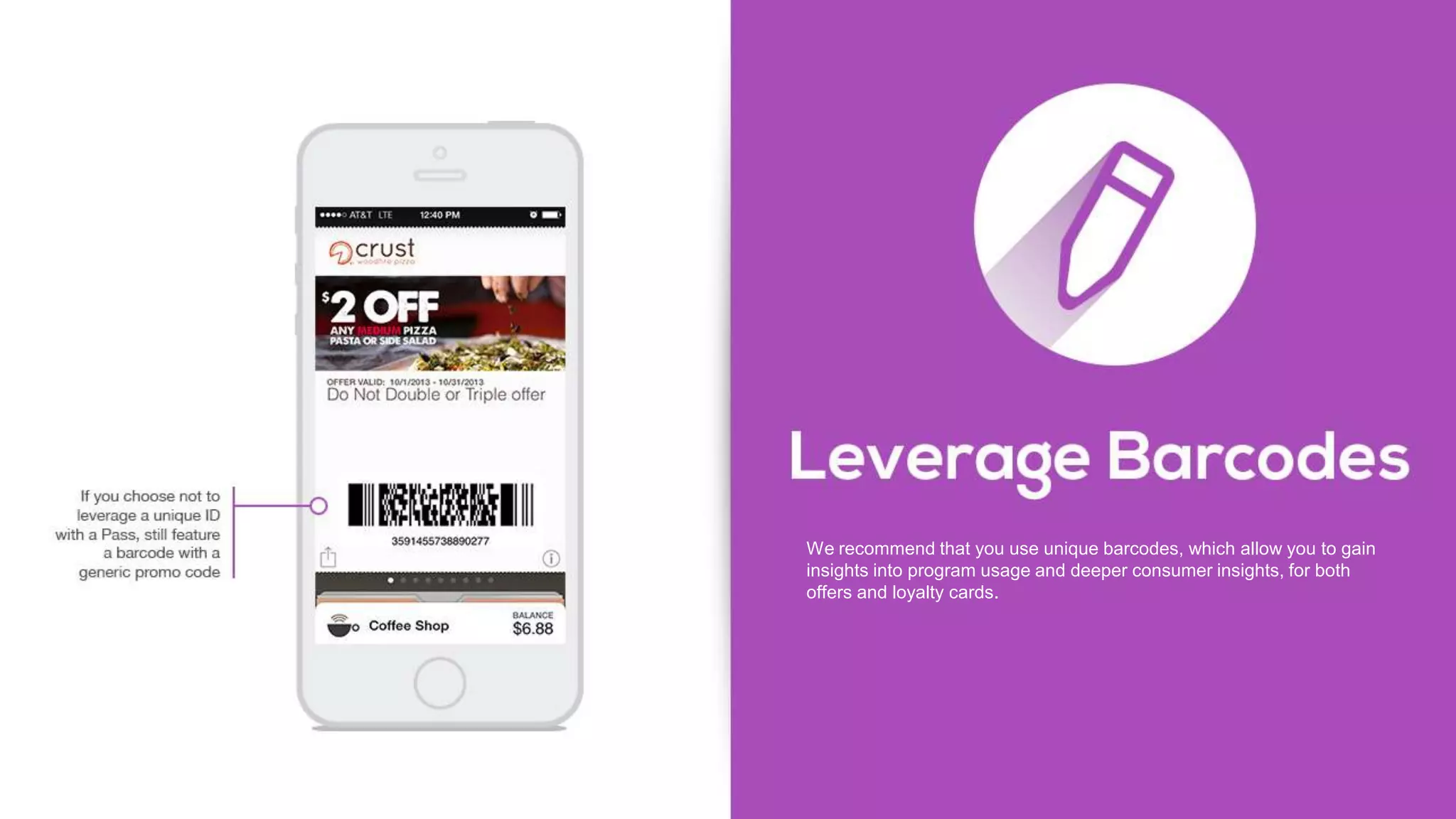
launch your next (or first) mobile wallet program. We will also show you
how to optimize your programs to make your customers take notice and
action.
Clothing retailer:
• 78-percent increase add to wallet rate by shoppers who
clicked-through on a call to action (post-click engagement
opportunity)
• 14-percent redemption rate in-store by shoppers who saved
the offer to their wallet (increase in revenue)
• 72-percent offer retention rate after the offer expired
(creating a perpetual presence on the phone)
Large department store retailer:
• 64-percent increase in conversions from mobile wallet over
mobile web coupon
• 24-percent increase in average order value over mobile
web coupon
• $2.30 in net revenue for every $1 spent on program costs
Specialty retailer:
• 7.7-percent lift in email conversion using mobile wallet
• 7.3-percent incremental revenue per email sent
• 6.6-percent increase in total sales using mobile wallet
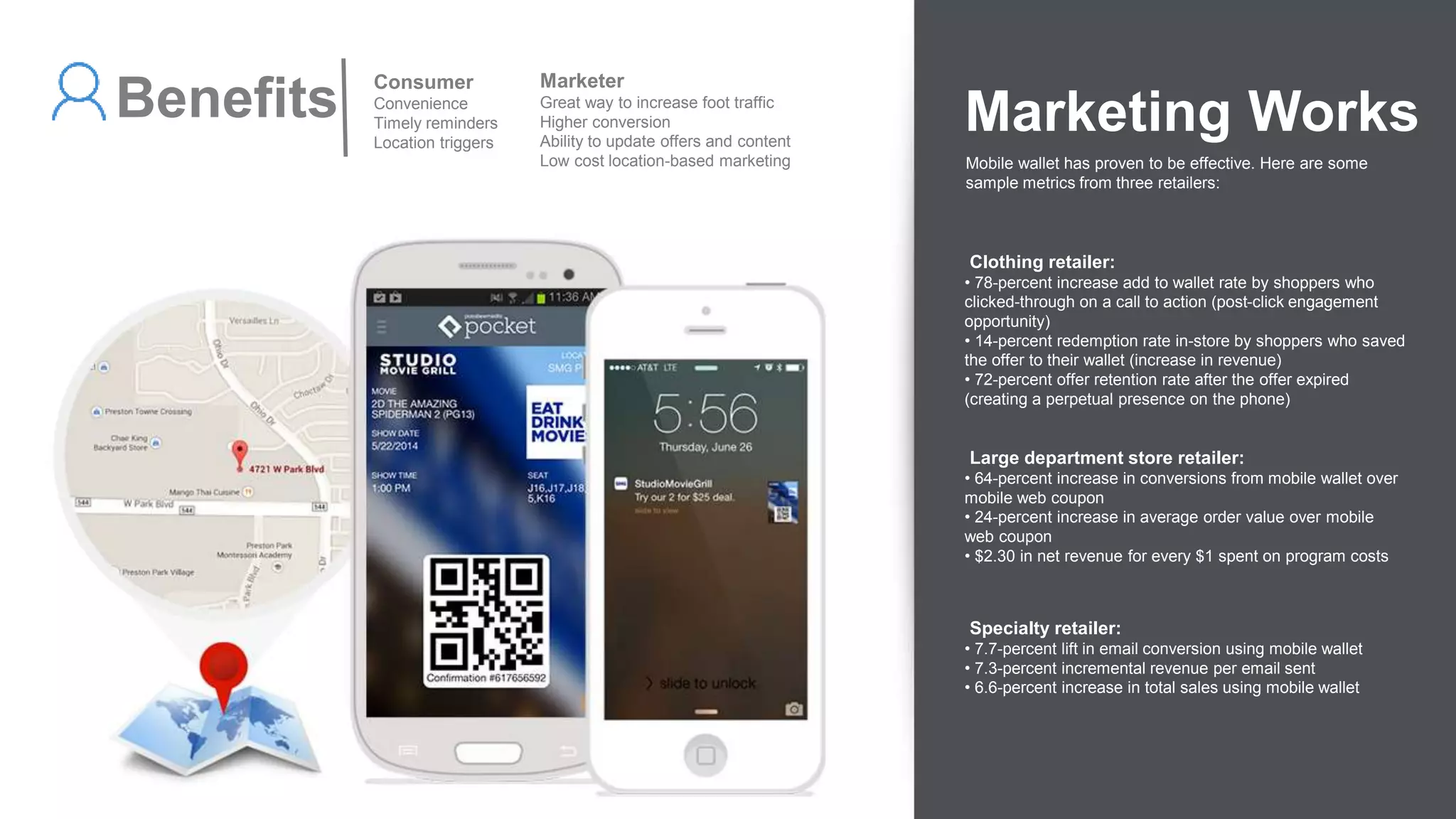
Marketing Works
Mobile wallet has proven to be effective. Here are some
sample metrics from three retailers:
Benefits Consumer
Convenience
Timely reminders
Location triggers
Marketer
Great way to increase foot traffic
Higher conversion
Ability to update offers and content
Low cost location-based marketing
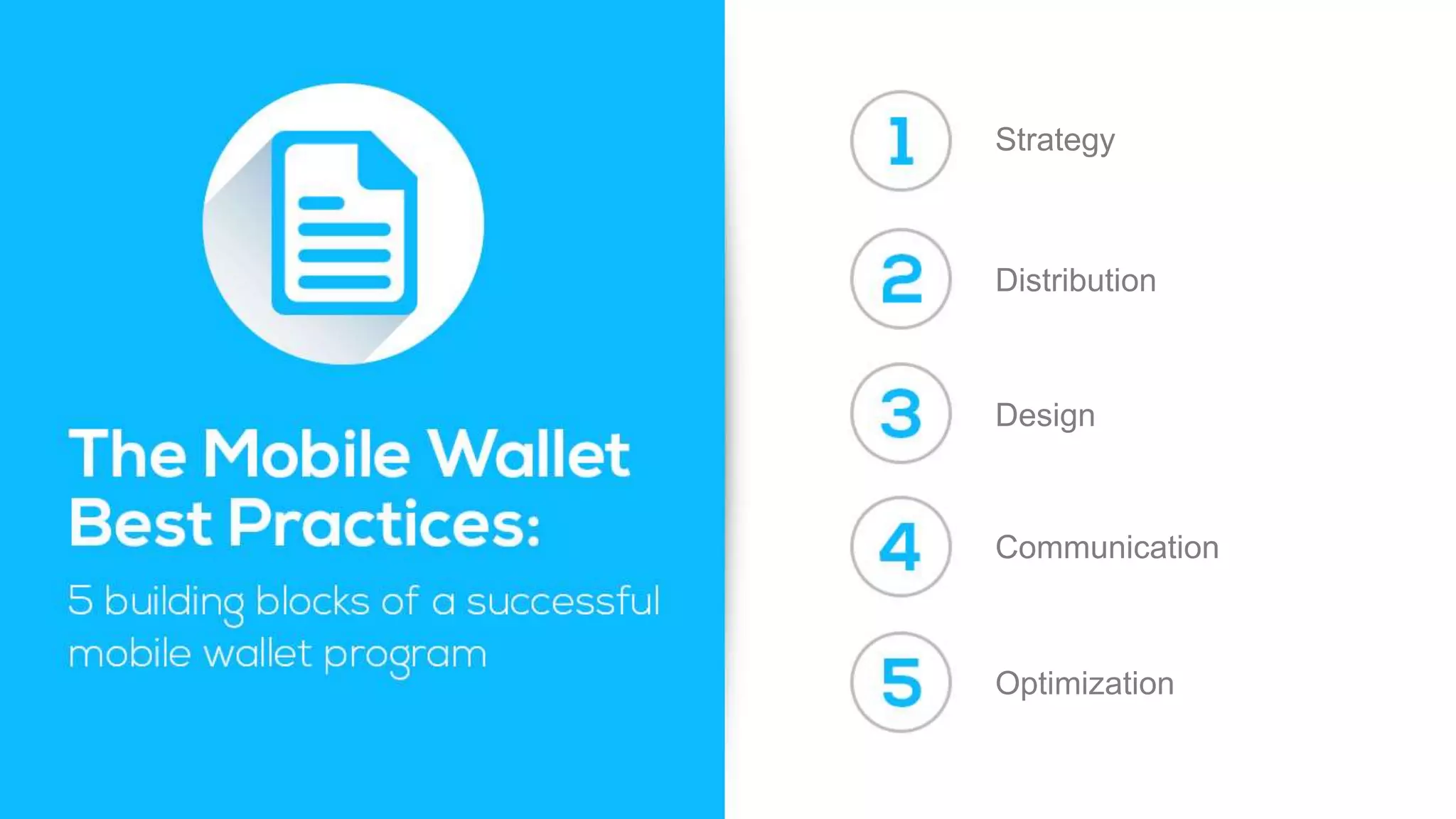
Strategy
Distribution
Design
Communication
Optimization
Before you get started with mobile wallet, it’s critical to understand what
you are trying to accomplish with the program.
These goals can include:
Increasing redemption rates for offers
Driving additional foot traffic
Extending digital loyalty programs to improve overall lifetime value and
minimize breakage of reward certificates
Or simply trying to extend your brand promise to address consumer
demand for convenience -having your brand’s content centralized in a
single mobile wallet on their phone when they are ready to transact
Once you’ve decided what is driving you to provide mobile wallet content
to your customers, next you want to decide what content to activate and
push to the mobile wallet. If you are trying to test and learn, then pick the
biggest events/promotions and activate those to learn how your
customers interact with your content.
Once you’ve got the right offer or event, it’s equally important to
understand what success looks like and then set the program up to
measure its effectiveness.
A great place to start is looking at the promotions you currently have
planned – usually around big events or holidays that you have
developed an integrated marketing program around. For instance, if you
think about Memorial Day – retailers typically run big promotions to drive
in-store traffic over the three-day weekend. Is there a promotion you
have planned that would work as a mobile wallet offer? Translating a
print or online coupon into mobile wallet content is really easy – and
there is no downside to getting that content stored on your customers’
mobile phones so that you have a location-aware channel activated for
your big weekend sale.
Define what success looks like
Whether launching your first mobile wallet program or your fifth, it is
imperative to take an assessment of where you are today, where you
want to go and where mobile wallet fits into your overall marketing
strategy. Mobile wallet content should be used to communicate relevant
promotions or events – and creating a rhythm with your customers will
be important to drive adoption. Our recommendation is to start broad
with your first program and then continue to refine your strategy, trying
different approaches to maximize results with your audience. When you
consider that the consumer is the only one that can delete mobile wallet
content, you will want to outline the right strategy so that your customers
don’t have a dozen promotions in one month stored on their phone.
Offer-driven retailers (more than one big promotion per month) are
exploring the concept of a perpetual offer – one that stays on their
customers’ phones and toggles between active and inactive based on
the promotion cycle.
Lastly, it’s important to outline KPIs that you want to measure with each
program that you run. Test early and test often is our recommendation
for marketers running their first few mobile wallet programs.
Things to test include:
• What type of CTAs are driving the highest “add” rates?
• What channels are having the highest conversion rates?
• What is my redemption rate for mobile wallet compared to mobile
web and email?
• What impact will retargeting customers who haven’t added content to
their mobile wallet have to drive additional “adds?”
• What impact does messaging to installed mobile wallet content have
on my program results?
Maximizing reach
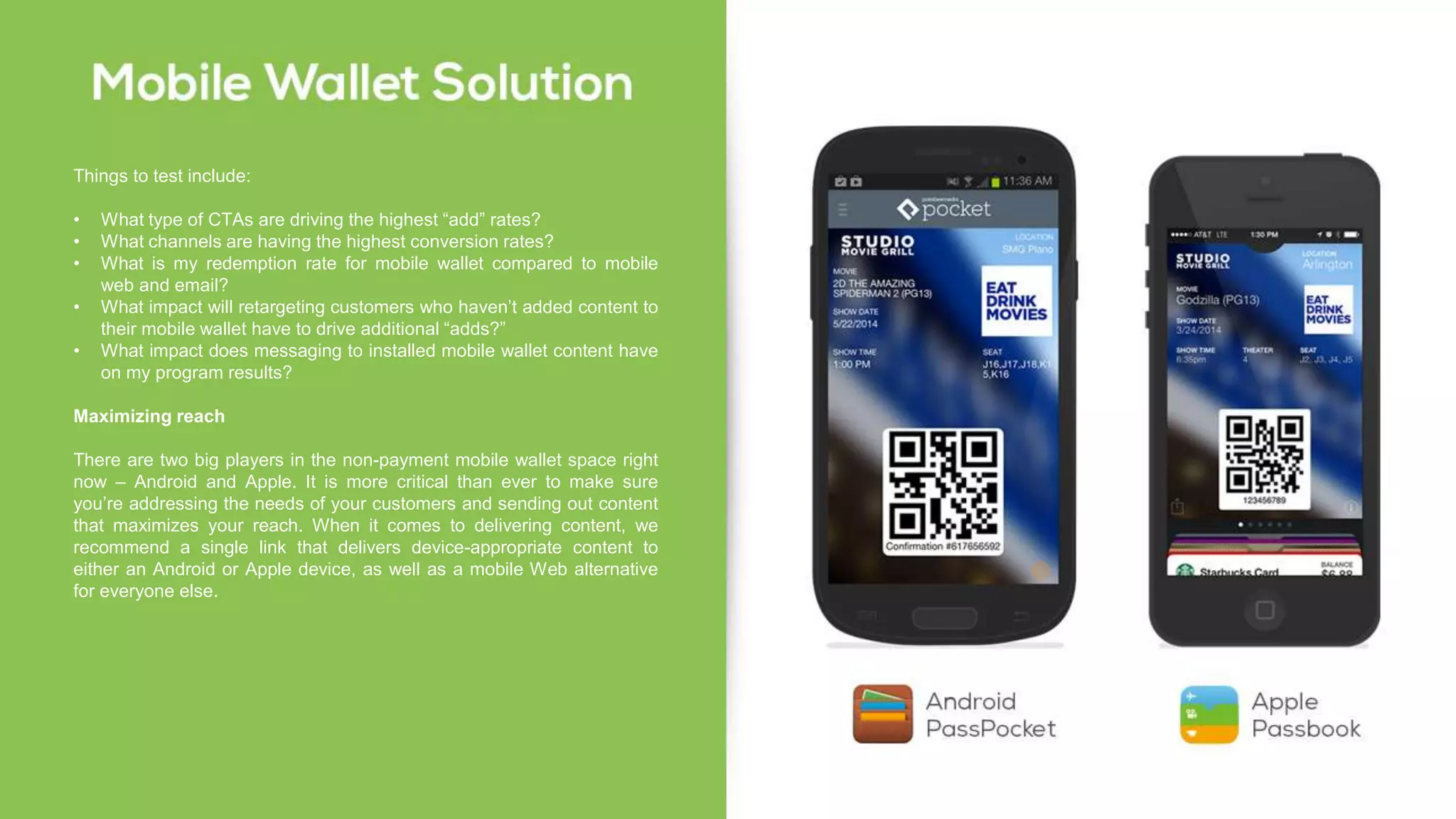
There are two big players in the non-payment mobile wallet space right
now – Android and Apple. It is more critical than ever to make sure
you’re addressing the needs of your customers and sending out content
that maximizes your reach. When it comes to delivering content, we
recommend a single link that delivers device-appropriate content to
either an Android or Apple device, as well as a mobile Web alternative
for everyone else.
Now that you have outlined your mobile wallet strategy, it is time to get
your content onto the phones of your consumers. There are a number of
ways to drive engagement by simply activating existing marketing
channels with a mobile wallet call to action.
Consider all of the ways to drive adoption when deciding how
aggressive you want to be with activating your mobile wallet programs.
It is important to note that you don’t need to have an app to distribute
mobile wallet content. You can use text, email, direct mail, mobile ads,
social media and more. In fact, our recent mobile wallet consumer data*
shows that email and text are the two most preferred methods for mobile
wallet distribution.
Once you have decided the marketing channels you are going to use, it
is time to think about your promotion strategy. Be sure to test and
measure different methods and channels to find out which work best for
your audience. An easy way to do this is to assign different promo codes
or keywords to each channel and then work with your wallet partner to
close the loop from offer, to channel, to transaction – comparing average
order value and redemption rates. Here are some creative calls to action
to get your mobile wallet content into the hands of your consumers.
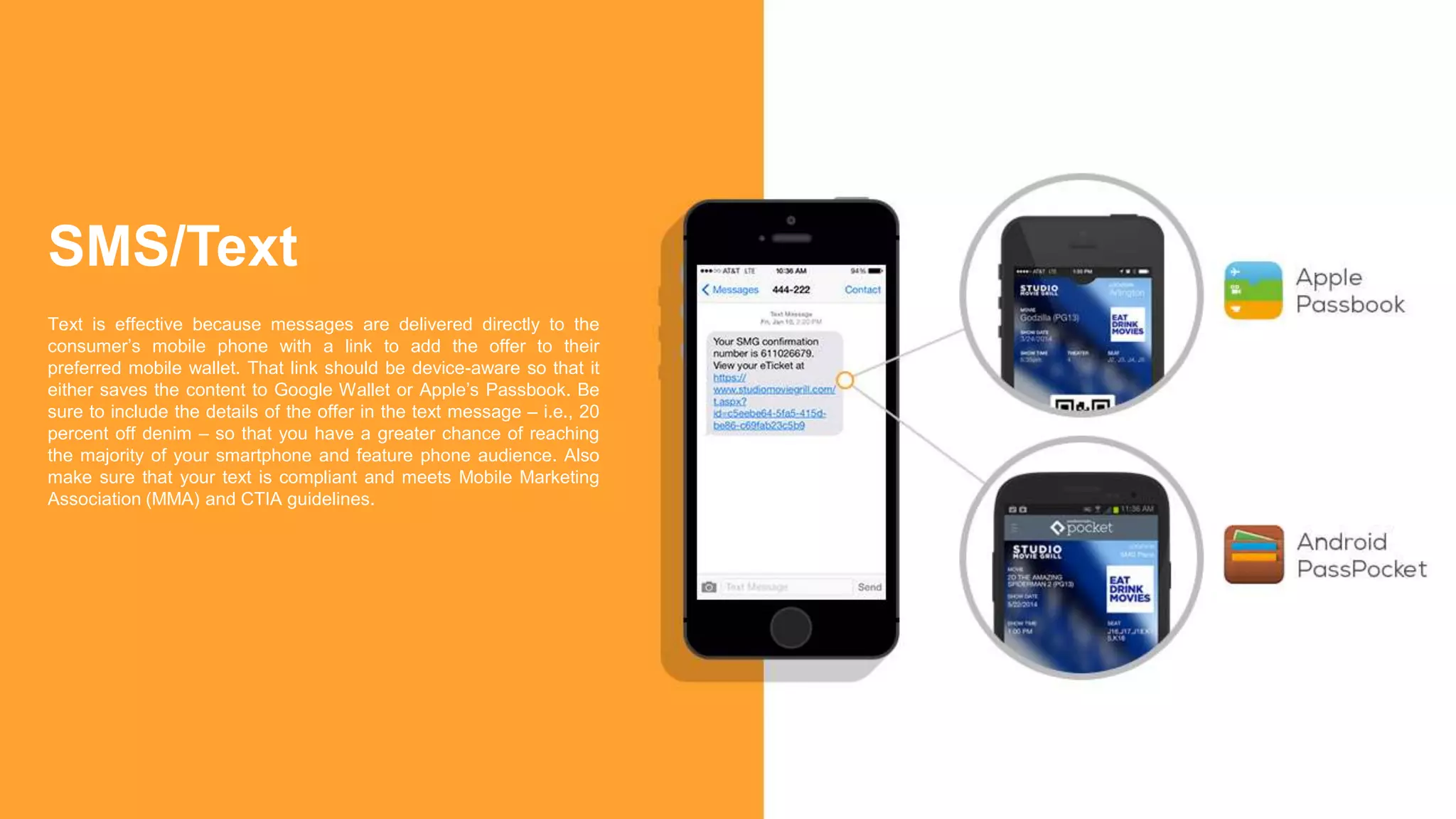
Text is effective because messages are delivered directly to the
consumer’s mobile phone with a link to add the offer to their
preferred mobile wallet. That link should be device-aware so that it
either saves the content to Google Wallet or Apple’s Passbook. Be
sure to include the details of the offer in the text message – i.e., 20
percent off denim – so that you have a greater chance of reaching
the majority of your smartphone and feature phone audience. Also
make sure that your text is compliant and meets Mobile Marketing
Association (MMA) and CTIA guidelines.
SMS/Text
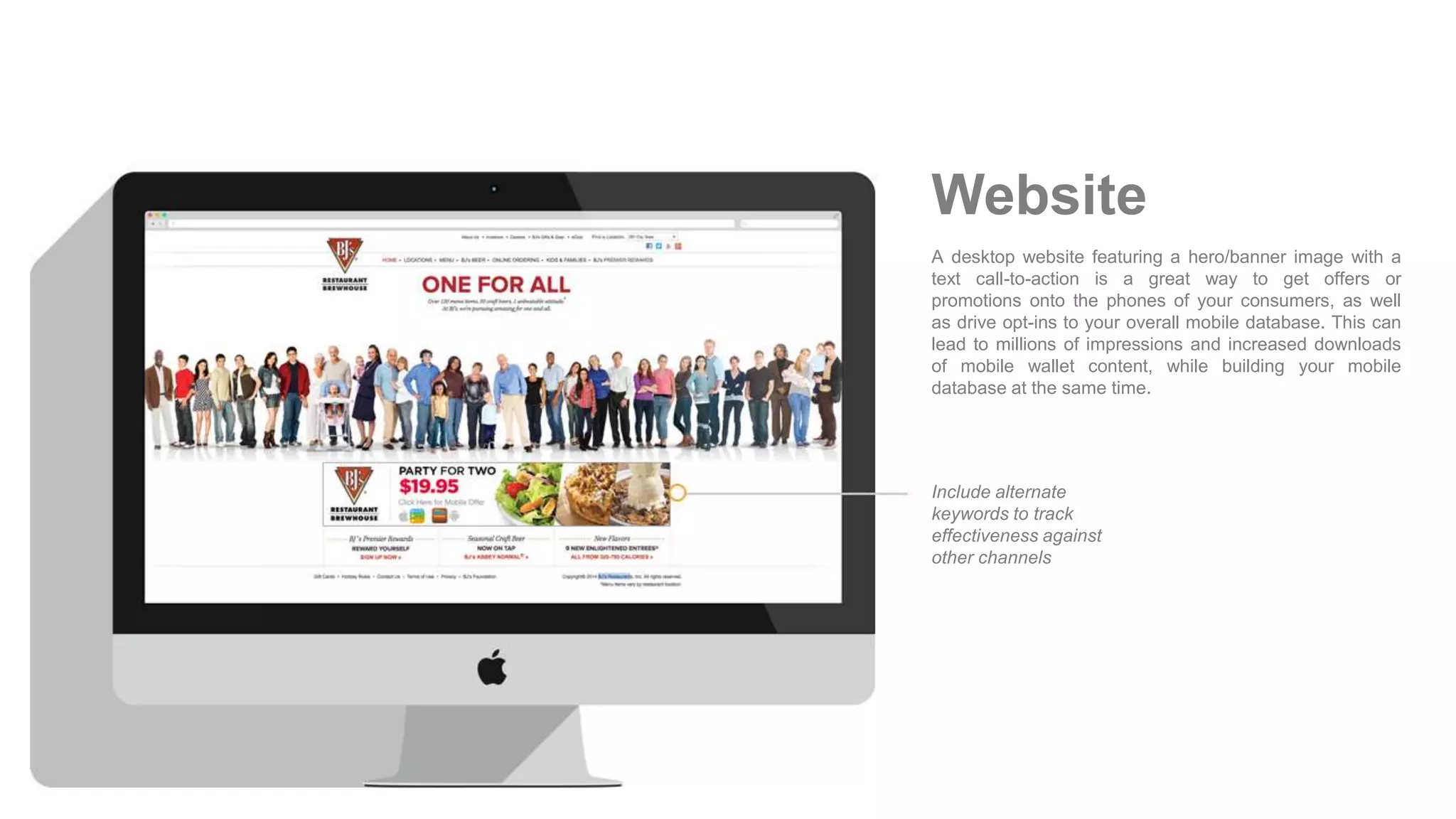
A desktop website featuring a hero/banner image with a
text call-to-action is a great way to get offers or
promotions onto the phones of your consumers, as well
as drive opt-ins to your overall mobile database. This can
lead to millions of impressions and increased downloads
of mobile wallet content, while building your mobile
database at the same time.
Include alternate
keywords to track
effectiveness against
other channels
Website
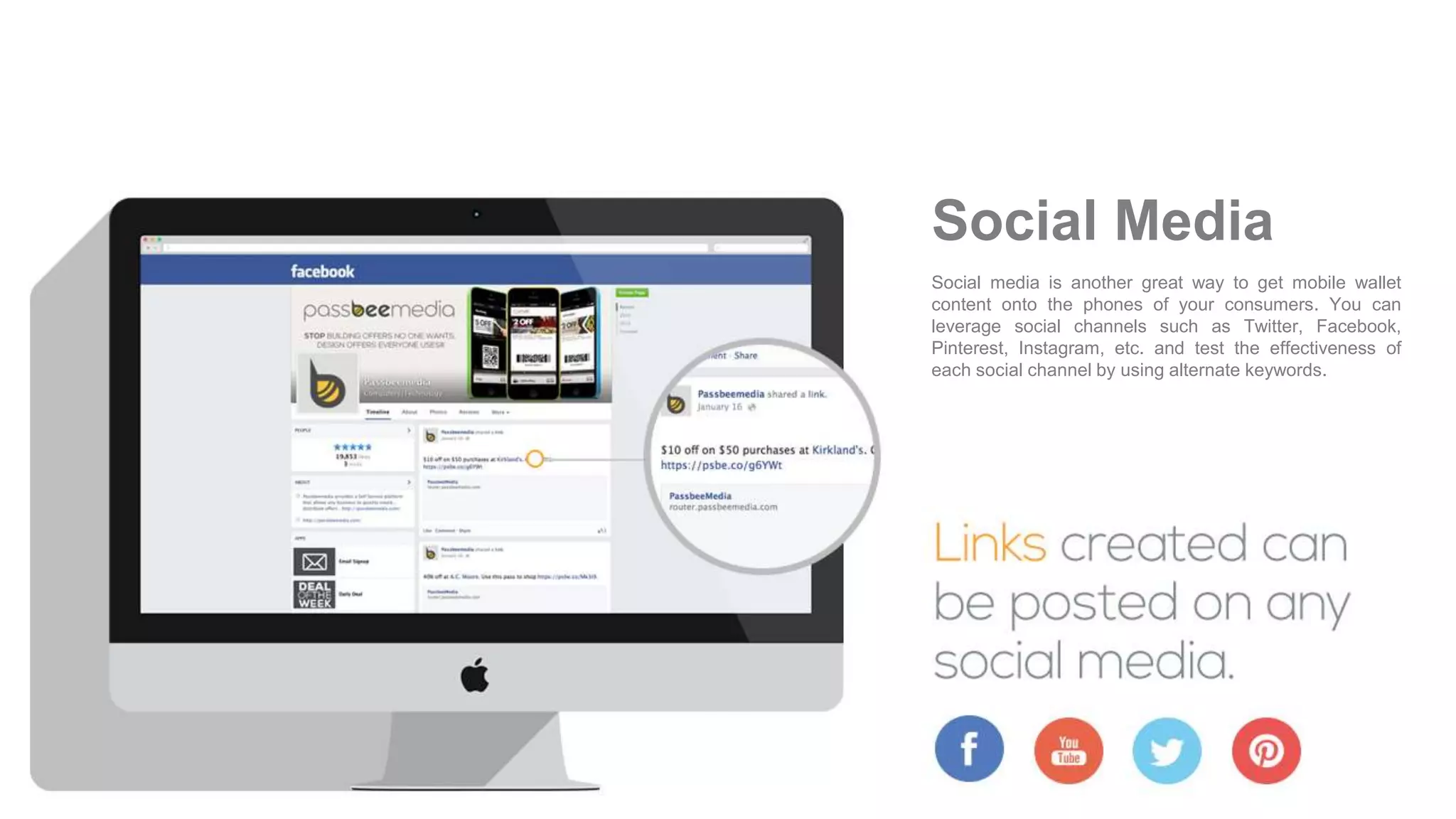
Social media is another great way to get mobile wallet
content onto the phones of your consumers. You can
leverage social channels such as Twitter, Facebook,
Pinterest, Instagram, etc. and test the effectiveness of
each social channel by using alternate keywords.
Social Media
Both Android Pass Pocket and Apple’s Passbook have similar — yet
different — approaches to presenting content, with design templates for
each. The strongest use cases for most retailers are to activate
coupons/offers and promotional content via Apple’s Passbook, but there
is another equally impactful opportunity to create digital loyalty cards
and reward certificates that can also be stored in mobile wallets. In this
section, we will share design tips, tricks and best practices to help you
create successful mobile wallet programs that will drive in-store traffic.
Unlike Google Wallet, which has a continuous scroll, Apple’s Passbook
template has a defined front and back of the Pass, with multiple content
fields allowing for personalized content. The consumer can flip the Pass
over to receive additional information and links.
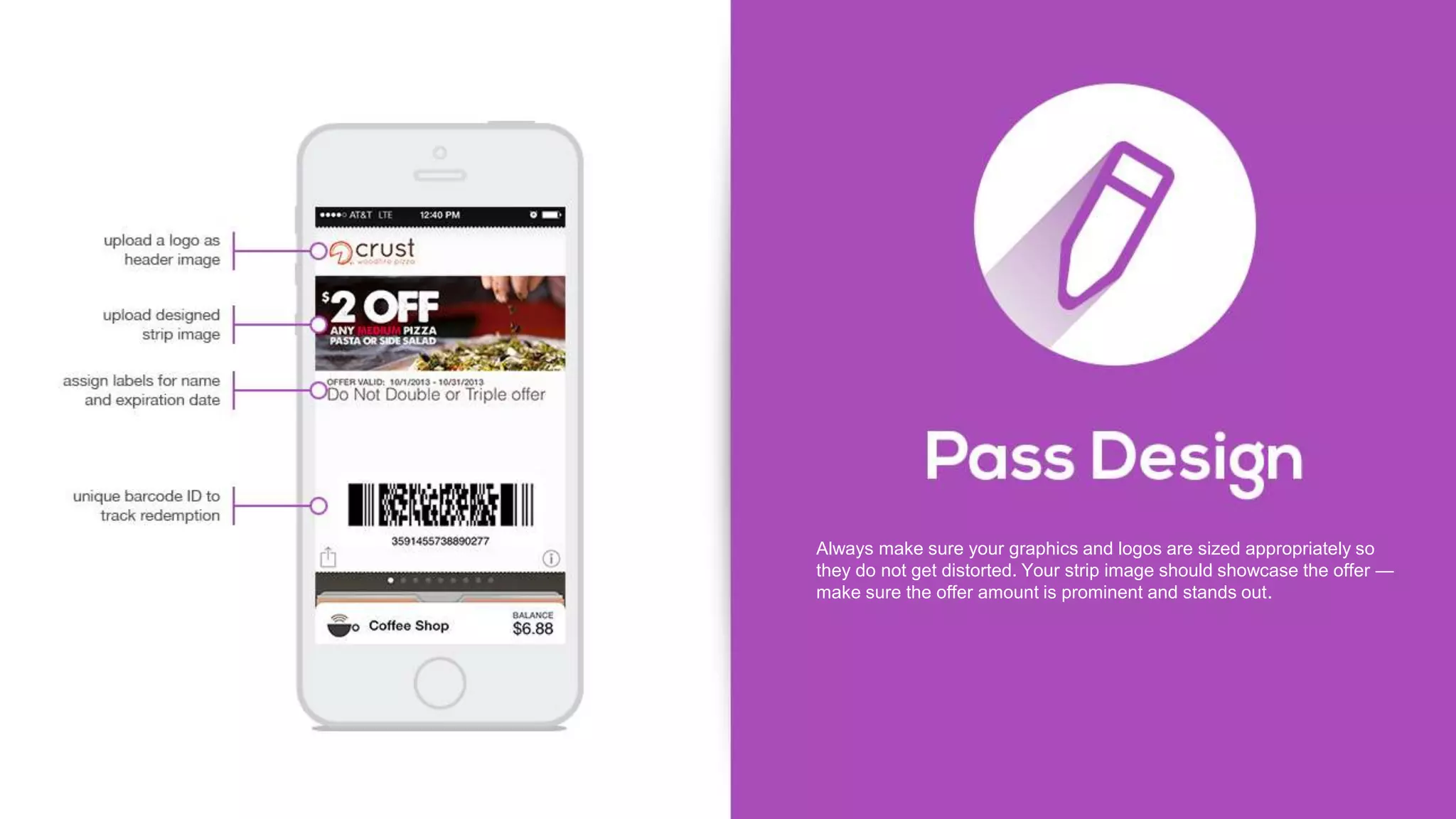
Always make sure your graphics and logos are sized appropriately so
they do not get distorted. Your strip image should showcase the offer —
make sure the offer amount is prominent and stands out.
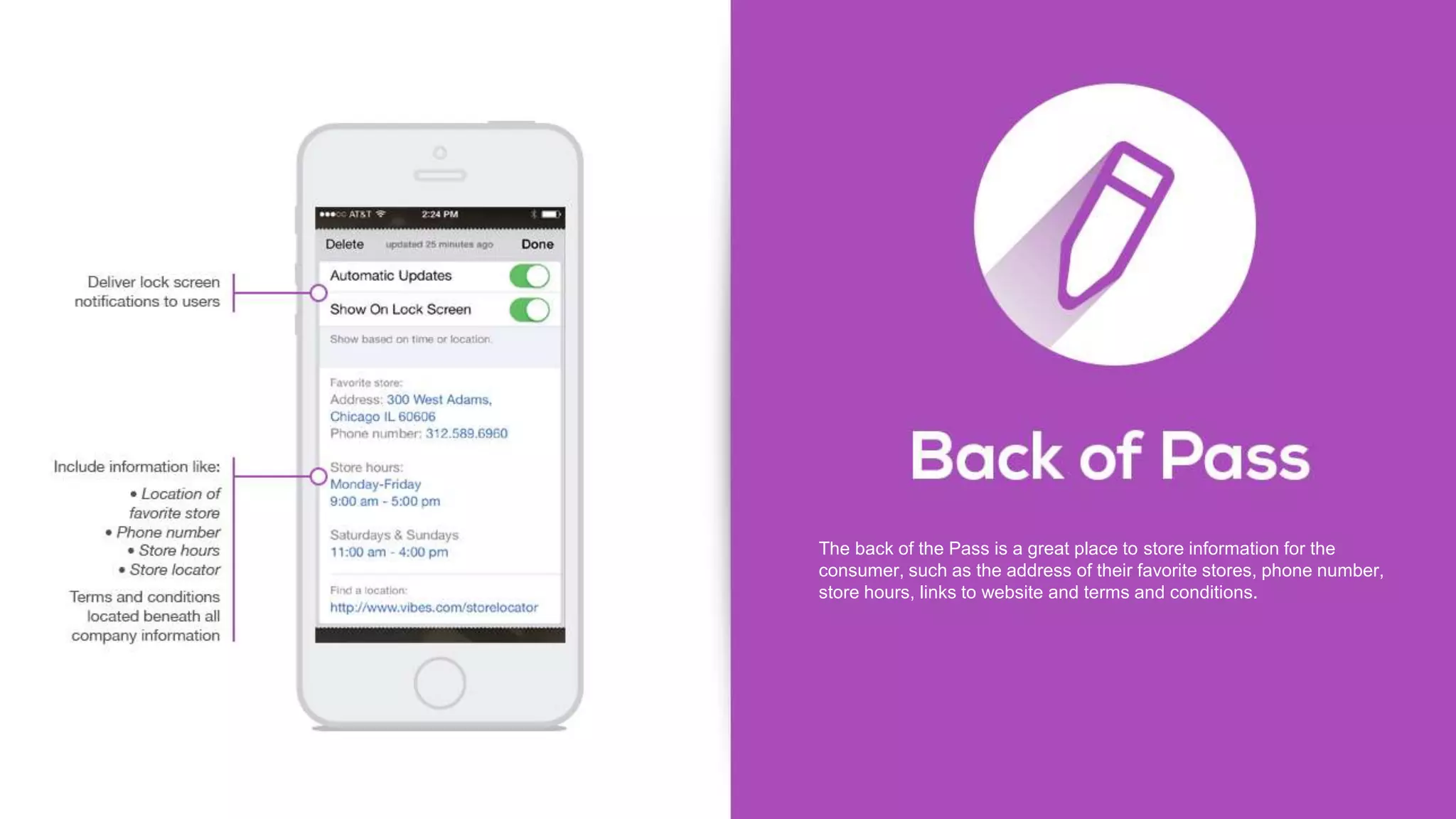
The back of the Pass is a great place to store information for the
consumer, such as the address of their favorite stores, phone number,
store hours, links to website and terms and conditions.
We recommend that you use unique barcodes, which allow you to gain
insights into program usage and deeper consumer insights, for both
offers and loyalty cards.
You also want to consider consumers that don’t have an Android or
Apple device. By using a mobile Web page as the fall back, you still
have an opportunity to get them the offer that they can bookmark and
save for redemption.
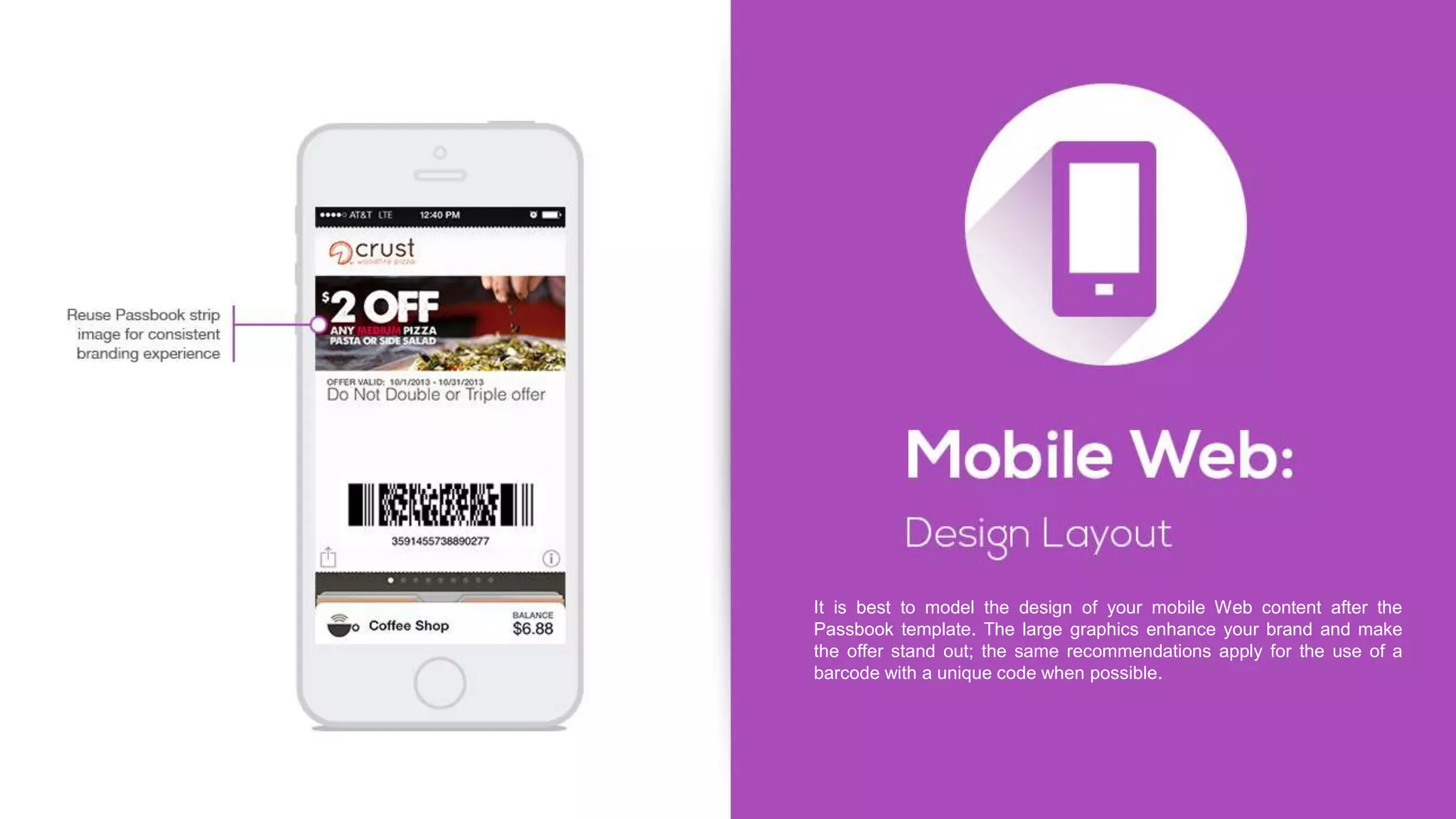
It is best to model the design of your mobile Web content after the
Passbook template. The large graphics enhance your brand and make
the offer stand out; the same recommendations apply for the use of a
barcode with a unique code when possible.
One of the most innovative features of the mobile wallet is the ability to
communicate with your consumers through notifications. Both Google
Wallet and Apple’s Passbook offer opportunities to leverage notifications
as a way to remind consumers of active offers and special promotions,
both with a subtle reminder when they are nearby or with an active
content push before a promotion ends. In this section, we illustrate how
Google Wallet and Apple’s Passbook notify consumers once content
has been installed in the mobile wallet.
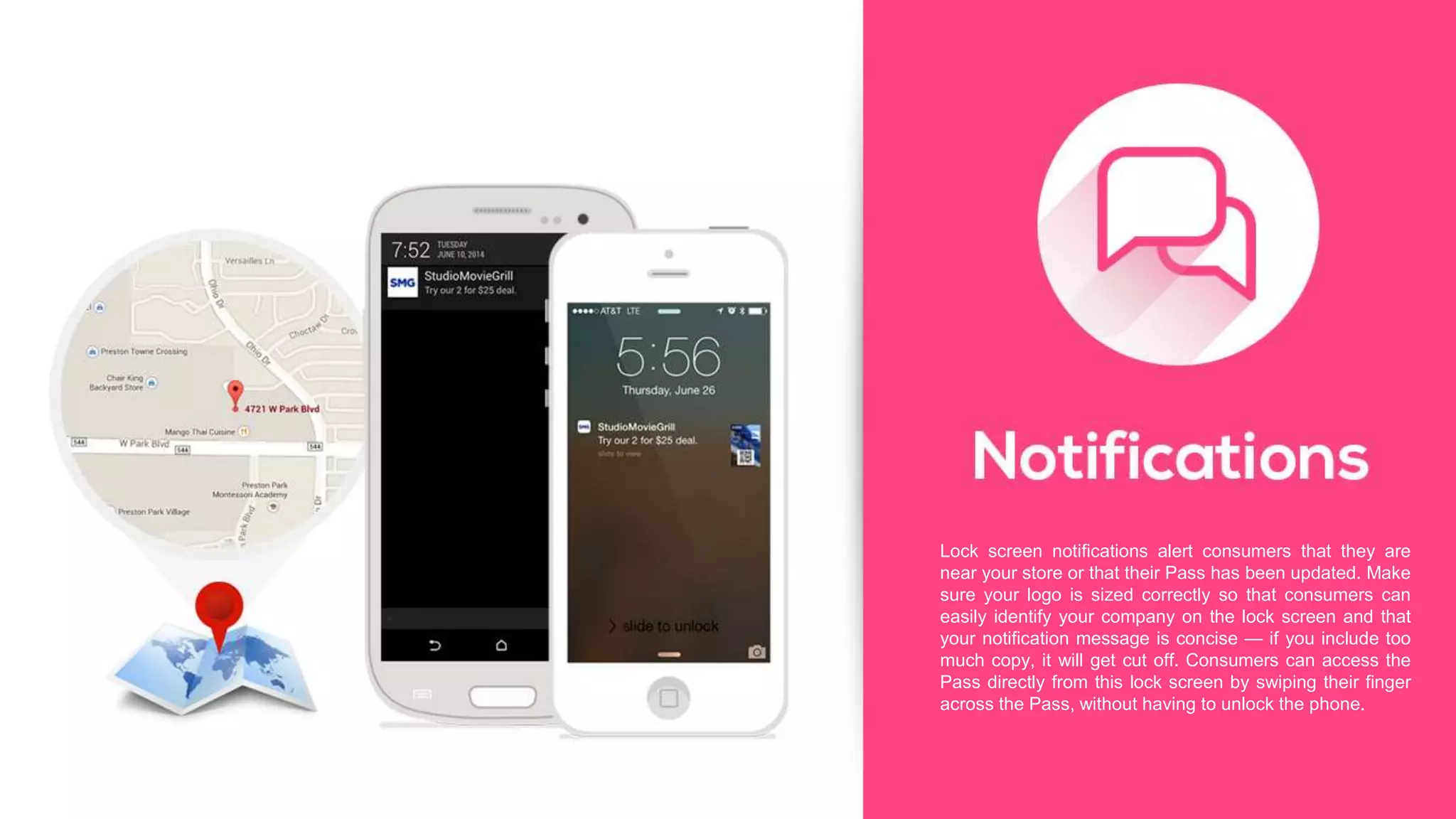
Lock screen notifications alert consumers that they are
near your store or that their Pass has been updated. Make
sure your logo is sized correctly so that consumers can
easily identify your company on the lock screen and that
your notification message is concise — if you include too
much copy, it will get cut off. Consumers can access the
Pass directly from this lock screen by swiping their finger
across the Pass, without having to unlock the phone.
Mobile wallets allow you to run cost-effective, location-based marketing
programs. Location delivers one of the biggest promises of consumer
convenience. It can remind consumers when they are nearby so that
they don’t miss out on an offer or promotion.
There are two ways to get location information – you can look at
past/historical shopping preferences and customize every mobile wallet
experience by passing along that location information. Another option is
to give the control to the consumer to choose their favorite locations by
adding a location finder mobile web page before they save the content
to either Apple’s Passbook or Google Wallet. Here is how you can
leverage location to drive in-store traffic.
One of the most powerful features of mobile wallets is that they are
GPS-enabled, location-aware devices. You can use latitude and
longitude coordinates near your store to trigger notifications. The more
precise the location trigger, the better. This means using the latitude and
longitude of the closest entrance to your store. It is important to note that
with Apple’s Passbook each individual Pass has the ability to store 10
different locations. Once the consumer is within 100-meters of the
location, they will receive a notification on their lock screen. With
PassPocket, the number of locations is unlimited and the notifications
are stored in the notification center of the phone. We encourage you to
be specific with your location-based messages. For example “20% off at
the Water Tower Mall Style.” is more effective then “20% off at Style.”
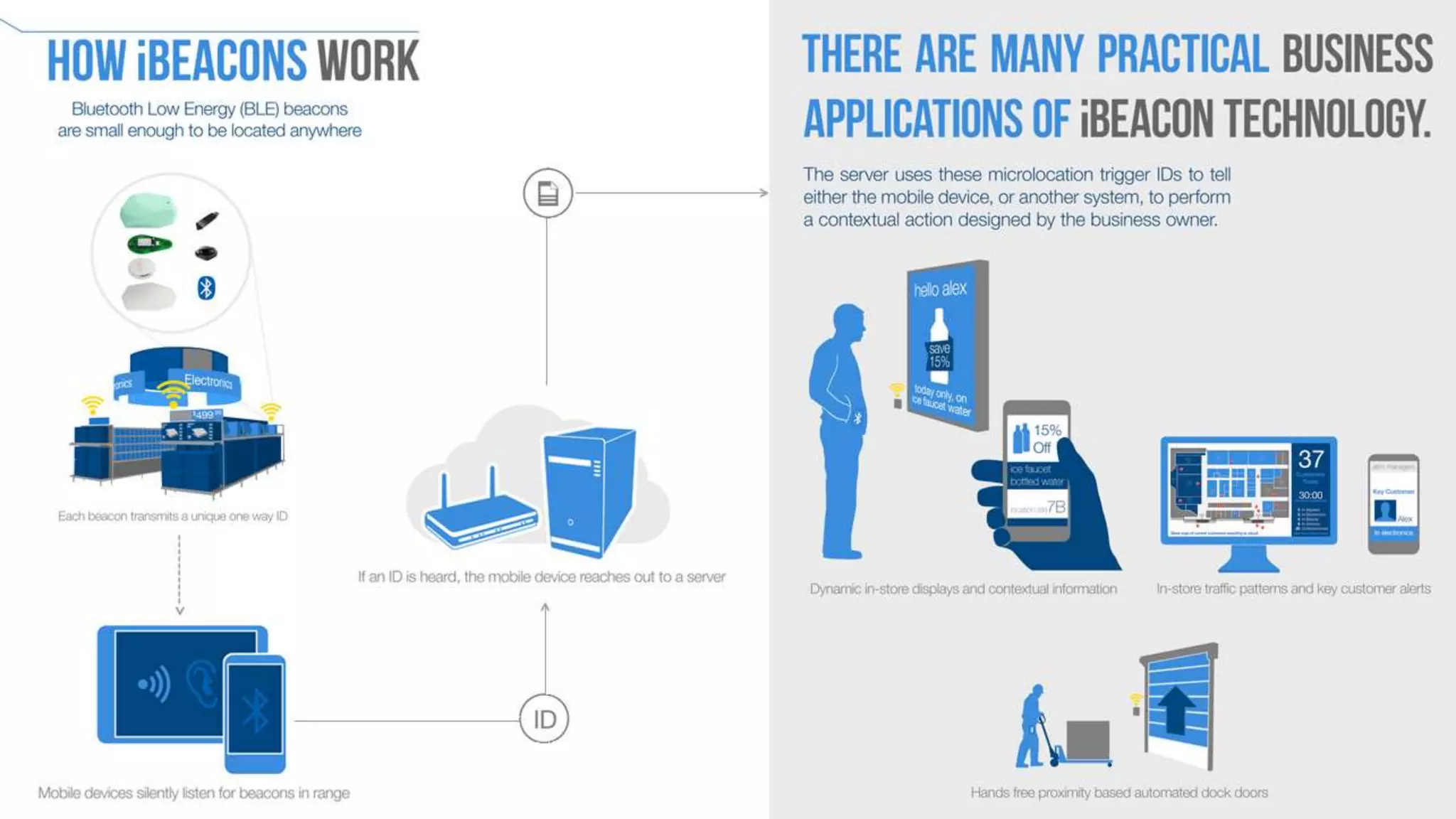
Beacon technology introduces a new world of hyper-location targeting
(not leveraging GPS) which allows marketers to trigger timely and
relevant information to their consumers based on their exact locations
within a retail store. iBeacons — which are currently Passbook specific
— address the 10-location limit in Passbook because beacon IDs can be
shared across stores.
With this technology, it is no longer just about the location of your store
and receiving a notification due to proximity, these offers and loyalty
cards can actually be activated by a customer’s location within a store.
For example, if a retailer has an offer for 20 percent off menswear,
consumers can receive a notification when they are in the menswear
section of a store.
iBeacons provide a cost-effective alternative to geo-targeting because
you don’t need to invest in large-scale infrastructure. We recommend
installing the low-cost hardware in a few stores to test and learn.
You have your mobile wallet program in place, now what? In order to
keep your programs fresh and effective, you always want to make sure
that you are getting the most value out of your programs. This means
you are sending out timely notifications, leveraging and managing
locations, testing creative and updating content as appropriate. Here are
three ways to optimize your mobile wallet programs.
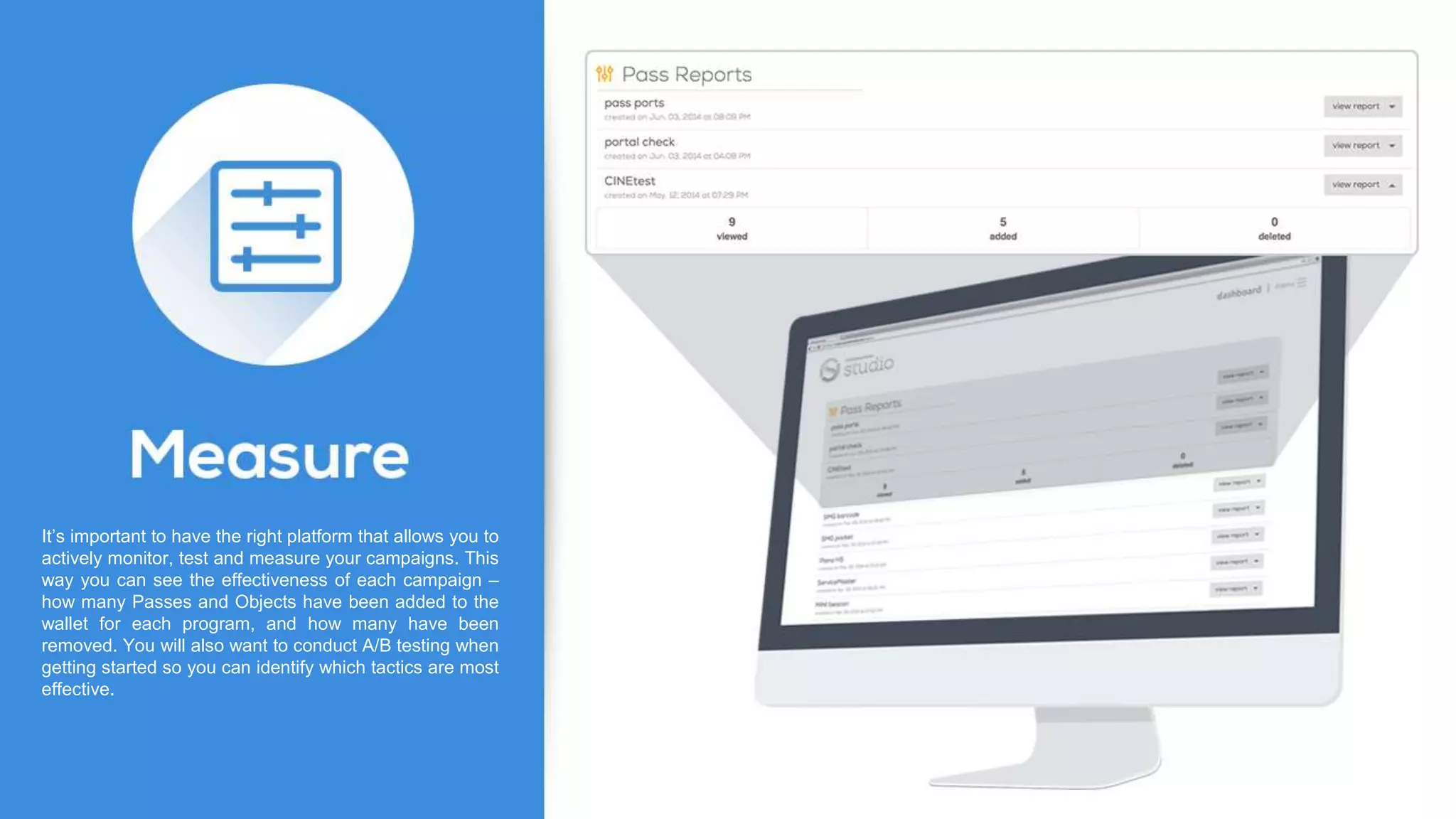
It’s important to have the right platform that allows you to
actively monitor, test and measure your campaigns. This
way you can see the effectiveness of each campaign –
how many Passes and Objects have been added to the
wallet for each program, and how many have been
removed. You will also want to conduct A/B testing when
getting started so you can identify which tactics are most
effective.
Now that we’ve shown you how to run effective mobile wallet programs,
it is time to get started. To summarize the key points outlined in this
handbook, we put together a short mobile wallet activation checklist to
help you either launch your first mobile wallet program or take your
program to the next level.
If you are looking for a mobile wallet partner and platform to help you
launch and manage your wallet programs, you can contact us at
support@passbeemedia.com and a member of the team will be in touch
shortly.
Determine use cases for your business and
define your objectives
Promote your mobile wallet content through
multiple marketing channels
Create your mobile wallet content utilizing
design best practices
Leverage location based triggers
Test and measure to get the most value out of
your mobile wallet programs
© 2014 Passbee Media, Inc. All Rights Reserved. Confidential & Proprietary

Mobile web is dead heres why

  • 2.
    There is tremendousbuzz surrounding the value and opportunity Apple’s Passbook create for both consumers and retailers. No longer do consumers have to remember to bring their paper coupons and plastic loyalty cards when shopping. Instead, they can store them on their smartphones and be reminded of offers when they are near a store and when an offer or a promotion is about to end — making them the ultimate shopping companion because they deliver on the promise of consumer convenience. For retailers, Mobile Wallets provide opportunities to easily send personalized offers and distribute dynamic loyalty cards and reward certificates, which in turn translates into increased foot traffic, higher conversion rates and improved loyalty – all through a cost effective location-based marketing program. Our definitive Mobile Wallet Handbook showcases the building blocks of creating and executing successful mobile wallet programs: strategic guidance on how to get started, activation ideas, creative calls-to-action, best practices and design tips and tricks you need to know before you launch your next (or first) mobile wallet program. We will also show you how to optimize your programs to make your customers take notice and action.
  • 3.
    Clothing retailer: • 78-percentincrease add to wallet rate by shoppers who clicked-through on a call to action (post-click engagement opportunity) • 14-percent redemption rate in-store by shoppers who saved the offer to their wallet (increase in revenue) • 72-percent offer retention rate after the offer expired (creating a perpetual presence on the phone) Large department store retailer: • 64-percent increase in conversions from mobile wallet over mobile web coupon • 24-percent increase in average order value over mobile web coupon • $2.30 in net revenue for every $1 spent on program costs Specialty retailer: • 7.7-percent lift in email conversion using mobile wallet • 7.3-percent incremental revenue per email sent • 6.6-percent increase in total sales using mobile wallet Marketing Works Mobile wallet has proven to be effective. Here are some sample metrics from three retailers: Benefits Consumer Convenience Timely reminders Location triggers Marketer Great way to increase foot traffic Higher conversion Ability to update offers and content Low cost location-based marketing
  • 4.
  • 5.
    Before you getstarted with mobile wallet, it’s critical to understand what you are trying to accomplish with the program. These goals can include: Increasing redemption rates for offers Driving additional foot traffic Extending digital loyalty programs to improve overall lifetime value and minimize breakage of reward certificates Or simply trying to extend your brand promise to address consumer demand for convenience -having your brand’s content centralized in a single mobile wallet on their phone when they are ready to transact Once you’ve decided what is driving you to provide mobile wallet content to your customers, next you want to decide what content to activate and push to the mobile wallet. If you are trying to test and learn, then pick the biggest events/promotions and activate those to learn how your customers interact with your content. Once you’ve got the right offer or event, it’s equally important to understand what success looks like and then set the program up to measure its effectiveness. A great place to start is looking at the promotions you currently have planned – usually around big events or holidays that you have developed an integrated marketing program around. For instance, if you think about Memorial Day – retailers typically run big promotions to drive in-store traffic over the three-day weekend. Is there a promotion you have planned that would work as a mobile wallet offer? Translating a print or online coupon into mobile wallet content is really easy – and
  • 6.
    there is nodownside to getting that content stored on your customers’ mobile phones so that you have a location-aware channel activated for your big weekend sale. Define what success looks like Whether launching your first mobile wallet program or your fifth, it is imperative to take an assessment of where you are today, where you want to go and where mobile wallet fits into your overall marketing strategy. Mobile wallet content should be used to communicate relevant promotions or events – and creating a rhythm with your customers will be important to drive adoption. Our recommendation is to start broad with your first program and then continue to refine your strategy, trying different approaches to maximize results with your audience. When you consider that the consumer is the only one that can delete mobile wallet content, you will want to outline the right strategy so that your customers don’t have a dozen promotions in one month stored on their phone. Offer-driven retailers (more than one big promotion per month) are exploring the concept of a perpetual offer – one that stays on their customers’ phones and toggles between active and inactive based on the promotion cycle. Lastly, it’s important to outline KPIs that you want to measure with each program that you run. Test early and test often is our recommendation for marketers running their first few mobile wallet programs.
  • 7.
    Things to testinclude: • What type of CTAs are driving the highest “add” rates? • What channels are having the highest conversion rates? • What is my redemption rate for mobile wallet compared to mobile web and email? • What impact will retargeting customers who haven’t added content to their mobile wallet have to drive additional “adds?” • What impact does messaging to installed mobile wallet content have on my program results? Maximizing reach There are two big players in the non-payment mobile wallet space right now – Android and Apple. It is more critical than ever to make sure you’re addressing the needs of your customers and sending out content that maximizes your reach. When it comes to delivering content, we recommend a single link that delivers device-appropriate content to either an Android or Apple device, as well as a mobile Web alternative for everyone else.
  • 8.
    Now that youhave outlined your mobile wallet strategy, it is time to get your content onto the phones of your consumers. There are a number of ways to drive engagement by simply activating existing marketing channels with a mobile wallet call to action. Consider all of the ways to drive adoption when deciding how aggressive you want to be with activating your mobile wallet programs.
  • 9.
    It is importantto note that you don’t need to have an app to distribute mobile wallet content. You can use text, email, direct mail, mobile ads, social media and more. In fact, our recent mobile wallet consumer data* shows that email and text are the two most preferred methods for mobile wallet distribution. Once you have decided the marketing channels you are going to use, it is time to think about your promotion strategy. Be sure to test and measure different methods and channels to find out which work best for your audience. An easy way to do this is to assign different promo codes or keywords to each channel and then work with your wallet partner to close the loop from offer, to channel, to transaction – comparing average order value and redemption rates. Here are some creative calls to action to get your mobile wallet content into the hands of your consumers.
  • 10.
    Text is effectivebecause messages are delivered directly to the consumer’s mobile phone with a link to add the offer to their preferred mobile wallet. That link should be device-aware so that it either saves the content to Google Wallet or Apple’s Passbook. Be sure to include the details of the offer in the text message – i.e., 20 percent off denim – so that you have a greater chance of reaching the majority of your smartphone and feature phone audience. Also make sure that your text is compliant and meets Mobile Marketing Association (MMA) and CTIA guidelines. SMS/Text
  • 11.
    A desktop websitefeaturing a hero/banner image with a text call-to-action is a great way to get offers or promotions onto the phones of your consumers, as well as drive opt-ins to your overall mobile database. This can lead to millions of impressions and increased downloads of mobile wallet content, while building your mobile database at the same time. Include alternate keywords to track effectiveness against other channels Website
  • 12.
    Social media isanother great way to get mobile wallet content onto the phones of your consumers. You can leverage social channels such as Twitter, Facebook, Pinterest, Instagram, etc. and test the effectiveness of each social channel by using alternate keywords. Social Media
  • 13.
    Both Android PassPocket and Apple’s Passbook have similar — yet different — approaches to presenting content, with design templates for each. The strongest use cases for most retailers are to activate coupons/offers and promotional content via Apple’s Passbook, but there is another equally impactful opportunity to create digital loyalty cards and reward certificates that can also be stored in mobile wallets. In this section, we will share design tips, tricks and best practices to help you create successful mobile wallet programs that will drive in-store traffic.
  • 14.
    Unlike Google Wallet,which has a continuous scroll, Apple’s Passbook template has a defined front and back of the Pass, with multiple content fields allowing for personalized content. The consumer can flip the Pass over to receive additional information and links.
  • 15.
    Always make sureyour graphics and logos are sized appropriately so they do not get distorted. Your strip image should showcase the offer — make sure the offer amount is prominent and stands out.
  • 16.
    The back ofthe Pass is a great place to store information for the consumer, such as the address of their favorite stores, phone number, store hours, links to website and terms and conditions.
  • 17.
    We recommend thatyou use unique barcodes, which allow you to gain insights into program usage and deeper consumer insights, for both offers and loyalty cards.
  • 18.
    You also wantto consider consumers that don’t have an Android or Apple device. By using a mobile Web page as the fall back, you still have an opportunity to get them the offer that they can bookmark and save for redemption.
  • 19.
    It is bestto model the design of your mobile Web content after the Passbook template. The large graphics enhance your brand and make the offer stand out; the same recommendations apply for the use of a barcode with a unique code when possible.
  • 20.
    One of themost innovative features of the mobile wallet is the ability to communicate with your consumers through notifications. Both Google Wallet and Apple’s Passbook offer opportunities to leverage notifications as a way to remind consumers of active offers and special promotions, both with a subtle reminder when they are nearby or with an active content push before a promotion ends. In this section, we illustrate how Google Wallet and Apple’s Passbook notify consumers once content has been installed in the mobile wallet.
  • 21.
    Lock screen notificationsalert consumers that they are near your store or that their Pass has been updated. Make sure your logo is sized correctly so that consumers can easily identify your company on the lock screen and that your notification message is concise — if you include too much copy, it will get cut off. Consumers can access the Pass directly from this lock screen by swiping their finger across the Pass, without having to unlock the phone.
  • 22.
    Mobile wallets allowyou to run cost-effective, location-based marketing programs. Location delivers one of the biggest promises of consumer convenience. It can remind consumers when they are nearby so that they don’t miss out on an offer or promotion. There are two ways to get location information – you can look at past/historical shopping preferences and customize every mobile wallet experience by passing along that location information. Another option is to give the control to the consumer to choose their favorite locations by adding a location finder mobile web page before they save the content to either Apple’s Passbook or Google Wallet. Here is how you can leverage location to drive in-store traffic.
  • 23.
    One of themost powerful features of mobile wallets is that they are GPS-enabled, location-aware devices. You can use latitude and longitude coordinates near your store to trigger notifications. The more precise the location trigger, the better. This means using the latitude and longitude of the closest entrance to your store. It is important to note that with Apple’s Passbook each individual Pass has the ability to store 10 different locations. Once the consumer is within 100-meters of the location, they will receive a notification on their lock screen. With PassPocket, the number of locations is unlimited and the notifications are stored in the notification center of the phone. We encourage you to be specific with your location-based messages. For example “20% off at the Water Tower Mall Style.” is more effective then “20% off at Style.”
  • 24.
    Beacon technology introducesa new world of hyper-location targeting (not leveraging GPS) which allows marketers to trigger timely and relevant information to their consumers based on their exact locations within a retail store. iBeacons — which are currently Passbook specific — address the 10-location limit in Passbook because beacon IDs can be shared across stores. With this technology, it is no longer just about the location of your store and receiving a notification due to proximity, these offers and loyalty cards can actually be activated by a customer’s location within a store. For example, if a retailer has an offer for 20 percent off menswear, consumers can receive a notification when they are in the menswear section of a store. iBeacons provide a cost-effective alternative to geo-targeting because you don’t need to invest in large-scale infrastructure. We recommend installing the low-cost hardware in a few stores to test and learn.
  • 26.
    You have yourmobile wallet program in place, now what? In order to keep your programs fresh and effective, you always want to make sure that you are getting the most value out of your programs. This means you are sending out timely notifications, leveraging and managing locations, testing creative and updating content as appropriate. Here are three ways to optimize your mobile wallet programs.
  • 27.
    It’s important tohave the right platform that allows you to actively monitor, test and measure your campaigns. This way you can see the effectiveness of each campaign – how many Passes and Objects have been added to the wallet for each program, and how many have been removed. You will also want to conduct A/B testing when getting started so you can identify which tactics are most effective.
  • 28.
    Now that we’veshown you how to run effective mobile wallet programs, it is time to get started. To summarize the key points outlined in this handbook, we put together a short mobile wallet activation checklist to help you either launch your first mobile wallet program or take your program to the next level. If you are looking for a mobile wallet partner and platform to help you launch and manage your wallet programs, you can contact us at support@passbeemedia.com and a member of the team will be in touch shortly. Determine use cases for your business and define your objectives Promote your mobile wallet content through multiple marketing channels Create your mobile wallet content utilizing design best practices Leverage location based triggers Test and measure to get the most value out of your mobile wallet programs
  • 29.
    © 2014 PassbeeMedia, Inc. All Rights Reserved. Confidential & Proprietary