MICROCONTROLLERS
MODULE -2
Prof BINDU H M
DSCE
INSTRUCTION SYNTAX
• Instruction : Command given to system, to do a particular task.
• LABEL : OPCODE OPERAND ; COMMENT
INSTRUCTION SYNTAX
Label:
• It allows program to refer to a line of code by name.
• It facilitates the user for referring any given instruction in given
program.
• Generally used to change sequence of execution.
• Labels must be unique.
• Can use special characters.
• Reserved words cannot be used.
INSTRUCTION SYNTAX
Opcode:
• Mnemonics produce opcodes which contains symbolic representation
of operation.
• MOV, ADD, MUL etc
• Actual machine level operation codes are generated by assembler
which is fed to internal circuitry.
INSTRUCTION SYNTAX
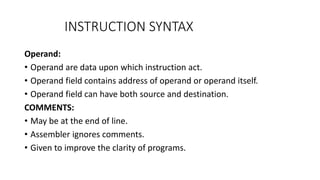
Operand:
• Operand are data upon which instruction act.
• Operand field contains address of operand or operand itself.
• Operand field can have both source and destination.
COMMENTS:
• May be at the end of line.
• Assembler ignores comments.
• Given to improve the clarity of programs.
EXAMPLE
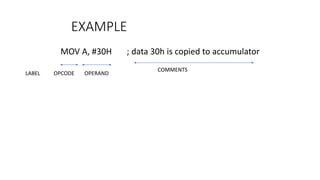
MOV A, #30H ; data 30h is copied to accumulator
OPCODE OPERAND
COMMENTS
LABEL
ADDRESSING MODES
• The term addressing mode refers to the way in which the operand of
an instruction is specified.
• Rule for interpreting or modifying address field of instruction before
operand is actually executed.
• Various for each controller/processor architecture
ADDRESSING MODES OF 8051
Supports 5 types of addressing modes:
• Immediate addressing mode
• Register addressing mode
• Direct addressing mode
• Indirect addressing mode
• Indexed addressing mode
IMMEDIATE ADDRESSING MODE
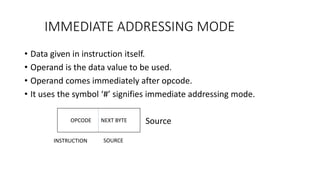
• Data given in instruction itself.
• Operand is the data value to be used.
• Operand comes immediately after opcode.
• It uses the symbol ‘#’ signifies immediate addressing mode.
Source
OPCODE NEXT BYTE
INSTRUCTION SOURCE
IMMEDIATE ADDRESSING MODE
EXAMPLES
• MOV A , #35H:
This instruction will move the value 35h to the accumulator register
i.e A.
• MOV DPTR, #9001H:
This will move the immediate value 9001h into DPTR register.
It can also be given as
MOV DPH, #90H
MOV DPL,#01H
REGISTER ADDRESSING MODE
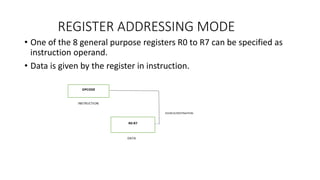
• One of the 8 general purpose registers R0 to R7 can be specified as
instruction operand.
• Data is given by the register in instruction.
REGISTER ADDRESSING MODE
Examples
• ADD A, R5 :
This instruction adds the contents R5+A and store the result in A.
• MOV A , R0:
Contents of R0 are moved to A(Accumulator)
• MOV R6, A:
Contents of A are moved to R6.
• MOV DPTR, A: X
Cannot move data between a 16-bit register and 8-bit register.
• MOV R0, R1 : X
Not allowed to move data between 2 RAM registers.(would allow too many
combinations!)
DIRECT ADDRESSING MODE
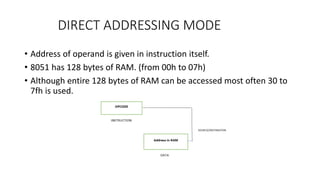
• Address of operand is given in instruction itself.
• 8051 has 128 bytes of RAM. (from 00h to 07h)
• Although entire 128 bytes of RAM can be accessed most often 30 to
7fh is used.
DIRECT ADDRESSING MODE
Examples:
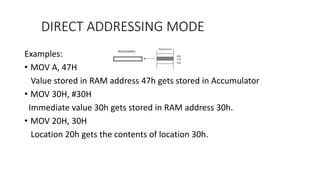
• MOV A, 47H
Value stored in RAM address 47h gets stored in Accumulator
• MOV 30H, #30H
Immediate value 30h gets stored in RAM address 30h.
• MOV 20H, 30H
Location 20h gets the contents of location 30h.
INDIRECT ADDRESSING MODE
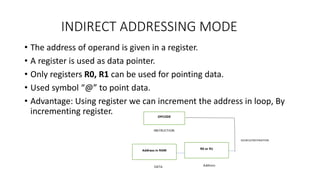
• The address of operand is given in a register.
• A register is used as data pointer.
• Only registers R0, R1 can be used for pointing data.
• Used symbol “@” to point data.
• Advantage: Using register we can increment the address in loop, By
incrementing register.
INDIRECT ADDRESSING MODE
Examples:
• MOV A, @R0
R0 has 54h which is used as address of internal RAM , that contains operand
data.
• MOV @R0, A
[R0] A; Internal RAM location pointed by R0 gets value of A.
• MOVX A, @DPTR ; ‘X’ represents accessing external memory.
‘A’ gets contents of external RAM location whose address is given by DPTR.
If DPTR = 2000h, then A gets content stored in external RAM location 2000h
INDIRECT ADDRESSING MODE
Examples:
• MOVX @DPTR, A
A is stored at external RAM whose address is given by DPTR.
• MOVX A, @R0
A gets the contents of external RAM whose address is given by R0
• MOVX @R1, A
A is stored at external RAM whose address is given by R1.
INDEXED ADDRESSING MODE
• This mode is used to access data from code memory or program
memory.
• Every instruction has ‘C’ to indicate code memory.
• ROM has permanent data which is stored in look up table. To access
look up table address is given as sum of two registers i.e base address
+ offset address.
• One register acts as base and other as index.
• Usually PC/DPTR is used as base and accumulator as offset.
INDEXED ADDRESSING MODE
Examples
• MOVC A, @A+DPTR
MOVC : moves data from external code memory.
If DPTR = 0400h
A = 05h
DPTR+A 0405h
Therefore, here the contents in external ROM address 0405h is moved
to accumulator.
INDEXED ADDRESSING MODE
• MOVC A, @A+PC
If A = 40h
PC = 08h
A+ PC 48h
Therefore, here the contents in external ROM address 48h is moved to
accumulator.
INSTRUCTIONS IN 8051
Different types of instructions in 8051 are:
• Data transfer instructions
• Arithmetic instructions
• Logical instructions
• Program Control instructions
• Other Special instructions
DATA TRANSFER INSTRUCTIONS
• Data transfer instructions are used to move data from one location to
other.
• 8051 has 28 different instructions under data transfer group.
• Flags are not affected by using data transfer instruction.(‘P’ flag can
change when A is changed during data transfer)
• Data transfer are used to transfer data between internal RAM and
SFR.
• Data can also be transferred between internal and external RAM
using indirect addressing mode.
DATA TRANSFER INSTRUCTIONS
Some of the data transfer group of instructions are:
• MOV
• MOVX
• MOVC
• PUSH
• POP
• XCH
DATA TRANSFER INSTRUCTIONS
• MOV
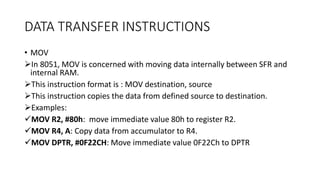
In 8051, MOV is concerned with moving data internally between SFR and
internal RAM.
This instruction format is : MOV destination, source
This instruction copies the data from defined source to destination.
Examples:
MOV R2, #80h: move immediate value 80h to register R2.
MOV R4, A: Copy data from accumulator to R4.
MOV DPTR, #0F22CH: Move immediate value 0F22Ch to DPTR
DATA TRANSFER INSTRUCTIONS
• MOV
Examples:
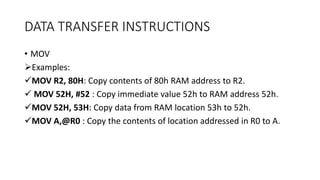
MOV R2, 80H: Copy contents of 80h RAM address to R2.
 MOV 52H, #52 : Copy immediate value 52h to RAM address 52h.
MOV 52H, 53H: Copy data from RAM location 53h to 52h.
MOV A,@R0 : Copy the contents of location addressed in R0 to A.
DATA TRANSFER INSTRUCTIONS
• MOVX:
8051 the external memory can be addressed using indirect
addressing mode only.
DPTR is used to hold address of external data (16-bit register)
R0 and R1 can also be used.
All external moves can be done through A.
DATA TRANSFER INSTRUCTIONS
Examples:
MOVX @DPTR, A ; Copy the data from A to address specified by
DPTR
MOVX A, @DPTR; Copy the data from address specified in DPTR to A.
DATA TRANSFER INSTRUCTIONS
• MOVC
MOV instructions operate on RAM, normally volatile.
Program tables need to be stored in ROM, which is nonvolatile
memory.
MOVC is used to read data from internal code.
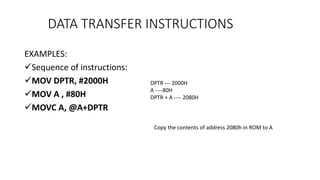
EXAMPLES:
Sequence of instructions:
MOV DPTR, #2000H
MOV A , #80H
MOVC A, @A+DPTR
DATA TRANSFER INSTRUCTIONS
DPTR --- 2000H
A ----80H
DPTR + A ---- 2080H
Copy the contents of address 2080h in ROM to A
• PUSH & POP
Push and Pop are for stack only.
PUSH 4CH
POP 80H
DATA TRANSFER INSTRUCTIONS
• XCH
A special XCH (exchange) will actually swap data between source and
destination.
Instruction must only use registers.
XCHD is special case of exchange where lower nibbles are exchanged.
DATA TRANSFER INSTRUCTIONS
• EXAMPLES
XCH A, R3 ; Exchange btw A and R3
XCH A, @RO; Exchange btw A and RAM location whose address is in
R0
XCH A, 0AH ; Exchange btw A and RAM location 0Ah
DATA TRANSFER INSTRUCTIONS
ARITHMETIC INSTRUCTIONS
Some arithmetic instructions are:
• ADDITION
• ADDITION WITH CARRY
• SUBTRACTION WITH BORROW
• INCREMENT
• DECREMENT
• MULTIPLY
• DIVIDE
• DECIMAL ADJUST AFTER ADDITION
FLAGS – C, AC, OV, P
ADDITION INSTRUCTIONS
• Register A is used to hold the result of any addition operation.
• Flags affected by various operations:
The C (Carry) flag is set to 1 if addition resulted in carry out of
accumulator ‘s MSB bit , otherwise clear.
The Auxiliary carry flag is set to 1 if there is carry out from position 3
of accumulator.
For signed numbers the OV flag is set to 1, if there is arithmetic
overflow.
• Simple addition is done with 8051 on 8-bit numbers. Also 16-bit and
24 bit are added with multiple byte arithmetic.
Examples
• ADD A, #n:
ADD A, #25h :- A – A+25H
adds register A with immediate value 25h and stores in register A.
• ADD A, Rn
ADD A, R0 ; A—A+R0
Adds register A with value of R0 and store in register A.
ADDITION INSTRUCTIONS
• ADD A, addr
ADD A, 25H; A—A+[25H]
Add A register with contents of RAM address of 25h and store in A register.
• ADD A, @Rn
ADD A, @R0; A– A+[R0]
Adds A register with contents of location pointed by register. Result is stored
in A.
If R0= 20h,
The 20h is Ram location from where contents should be added.
If 20h has value 35h then A—A+35H.
ADDITION INSTRUCTIONS
41H
35H
ABH
40H
21H
20H
19H
18H
ADDITION INSTRUCTIONS
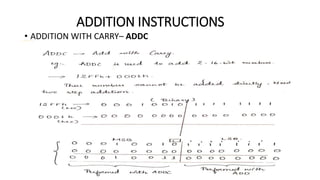
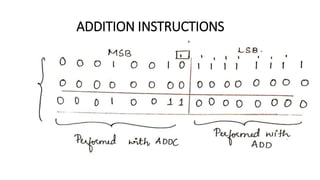
• ADDITION WITH CARRY– ADDC
ADDITION INSTRUCTIONS
• ADDC A, #n
ADDC A, #25h ; A– A+ 25H +C.F
Add register A with 25h with previous addition carry flag.
• ADDC A, Rn
ADDC A, R0; A – A + R0 + C.F
Add A register with value of RAM register along with carry of previous
addition . Store result in A.
ADDITION INSTRUCTIONS
• ADDC A, addr
ADDC A, 25H ; A– A+[25H] + C.F
Add A register with contents of RAM location of 25h along with carry
flag.
• ADDC A, @Rp
ADDC A, @R0 ; A– A +[R0] + C.F
Add A register with contents of location pointed by R0, with carry flag
of previous addition and store in register A.
ADDITION INSTRUCTIONS
SUBTRACTION INSTRUCTIONS
• Computer subtraction can be achieved using 2’s complement
arithmetic.
• Most computers also provide instructions to directly subtract signed
or unsigned numbers.
• The accumulator, register A, will contain the result (difference) of the
subtraction operation.
• The C (carry) flag is treated as a borrow flag, which is always
subtracted from the minuend during a subtraction operation.
• SUBB A, #n
“Subtract with Borrow”
SUBB is used when we want to subtract the two large numbers like
16bit.
First lower bytes are subtracted. If lower needs borrow CF is set .
Carry will be subtracted from higher bytes.
No SUB instruction(CLR C)
SUBB A, #25h – Performs subtraction of contents of register A with
25h along with carry flag(borrow) stores result in register A.
SUBTRACTION INSTRUCTIONS
• SUBB A, Rr
A--- A- R0-Carry flag(if borrow exists with previous operation)
Contents of register A is subtracted with R0 along with carry
flag(borrow from previous stage) result is stored in accumulator(A)
SUBTRACTION INSTRUCTIONS
• SUBB A, addr
SUBB A, 25h
A– A-[25h]-carry flag(if borrow exists)
Contents of Register A are subtracted with contents of RAM location
25h with CF and result is stored in Register A.
SUBTRACTION INSTRUCTIONS
• SUBB A, @Rn
SUBB A, @Ro
A—A-[Ro]-CF(borrow if exists)
Contents of register A are subtracted with RAM location pointed by
register Ro along with carry flag and result is stored in accumulator A.
SUBTRACTION INSTRUCTIONS
INCREMENT/DECREMENT INSTRUCTIONS
• The increment (INC) instruction has the effect of simply adding a binary 1 to a
number while a decrement (DEC) instruction has the effect of subtracting a
binary 1 from a number.
• The increment and decrement instructions can use the addressing modes:
direct, indirect and register.
• The flags C, AC, and OV are not affected by the increment or decrement
instructions. If a value of FFh is increment it overflows to 00h. If a value of 00h is
decrement it underflows to FFh.
• The DPTR can overflow from FFFFh to 0000h. The DPTR register cannot be
decremented using a DEC instruction.
INCREMENT INSTRUCTIONS
• INC A
A—A+1
Increments the value of register A and stores in register A.
• INC Rr
INC R0
Increments the value of R0 and stores in R0
• INC addr
INC 25h ; [25h]—[25h]+1
Increments the contents of memory address and stores the result in
same location.
• INC @Rp
INC @R0
[@R0] – [@R0]+1
Increments the contents of memory location pointed by R0, Stores the
result in same location.
• INC DPTR
DPTR—DPTR+1
Increments the 16-bit value of DPTR and stores in DPTR.(Requires 2
clock cycles).
INCREMENT INSTRUCTIONS
DECREMENT INSTRUCTIONS
• DEC A
DEC A; A—A-1
Decrements the value A register and stores in A register.
• DEC Rr
DEC R0; R0—R0-1
Decrements the register of RAM register R0 and stores in R0.
• DEC addr
DEC 25h; [25H]—[25H]-1
Decrements the contents of memory address and stores back in same
location .
• DEC @Rp
DEC @R0
[@R0]—[@R0]-1
Decrements the contents of memory location pointed by R0, store in
same location.
DECREMENT INSTRUCTIONS
MULTIPLY/DIVIDE INSTRUCTIONS
• The 8051 supports 8-bit multiplication and division. This is low
precision (8 bit) arithmetic but is useful for many simple control
applications.
• For the MUL or DIV instructions the A and B registers must be used
and only unsigned numbers are supported.
• MUL AB – A X B
Multiplies 8 bit values of A and B
Stores 16bit in A and B
B(higher bytes) and A(lower bytes)
Requires 4 clock cycles.
MULTIPLY/DIVIDE INSTRUCTIONS
• DIV AB
A/B
Divides 8 bit value of A register by 8bit value of B register.
B– Stores the remainder
A– Stores the quotient
No of clock cycles = 4
If B= 00h, then instruction will be aborted. A and B will get garbage
value. Indicated by Overflow flag.
MULTIPLY/DIVIDE INSTRUCTIONS
LOGICAL OPERATIONS
• Most control applications implement control logic using Boolean
operators to act on the data.
• Most microcomputers provide a set of Boolean instructions that act
on byte level data.
• However, the 8051 (somewhat uniquely) additionally provides
Boolean instruction which can operate on bit level data.
• The destination address of the operation can be the accumulator
(register A), a general register, or a direct address.
• Status flags are not affected by these logical operations (unless PSW is
directly manipulated).
LOGICAL INSTRUCTIONS
• AND
• OR
• XOR
• CLEAR
• COMPLIMENT
• ROTATE
• ROTATE WITH CARRY
• SWAP
• NO OPERATION
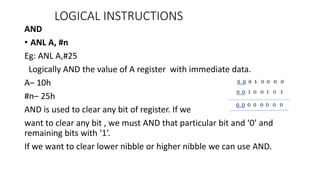
AND
• ANL A, #n
Eg: ANL A,#25
Logically AND the value of A register with immediate data.
A– 10h
#n– 25h
AND is used to clear any bit of register. If we
want to clear any bit , we must AND that particular bit and ‘0’ and
remaining bits with ‘1’.
If we want to clear lower nibble or higher nibble we can use AND.
LOGICAL INSTRUCTIONS
• ANL A, Rr
eg : ANL A, R0
Logically AND the values of A with RAM register and store in A register.
• ANL A, addr
ANL A, 25H
Logically AND value of A and contents of RAM location 25h and store in
A register.
• ANL A, @Rp
ANL A, @R0
Logically AND value of A register with contents pointed by location R0
and store in register A.
LOGICAL INSTRUCTIONS
• ANL addr, A
ANL 25H, A
[25H]– [25H] AND A
Logically AND contents of address with content of A. Store in register
A.
• ANL addr, #n
ANL 25H, #30H
[25H]—[25H] AND 30H
Logically AND the contents of address 25h and immediate value 30h.
Store at address 25h.
LOGICAL INSTRUCTIONS
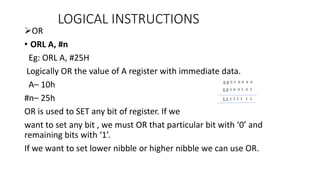
OR
• ORL A, #n
Eg: ORL A, #25H
Logically OR the value of A register with immediate data.
A– 10h
#n– 25h
OR is used to SET any bit of register. If we
want to set any bit , we must OR that particular bit with ‘0’ and
remaining bits with ‘1’.
If we want to set lower nibble or higher nibble we can use OR.
LOGICAL INSTRUCTIONS
• ORL A, Rr
eg : ORL A, R0
Logically OR the values of A with RAM register and store in A register.
• ORL A, addr
ORL A, 25H
Logically OR value of A and contents of RAM location 25h and store in
A register.
• ORL A, @Rp
ORL A, @R0
Logically OR value of A register with contents pointed by location R0
and store in register A.
LOGICAL INSTRUCTIONS
• ORL addr, A
ORL 25H, A
[25H]– [25H] OR A
Logically OR contents of address with content of A. Store in register A.
• ORL addr, #n
ORL 25H, #30H
[25H]—[25H] OR 30H
Logically OR the contents of address 25h and immediate value 30h.
Store at address 25h.
LOGICAL INSTRUCTIONS
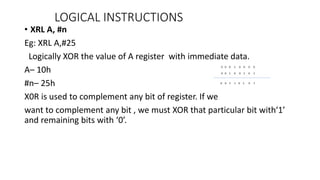
• XRL A, #n
Eg: XRL A,#25
Logically XOR the value of A register with immediate data.
A– 10h
#n– 25h
X0R is used to complement any bit of register. If we
want to complement any bit , we must XOR that particular bit with‘1’
and remaining bits with ‘0’.
LOGICAL INSTRUCTIONS
• XRL A, Rr
eg : XRL A, R0
Logically XOR the values of A with RAM register and store in A register.
• XRL A, addr
XRL A, 25H
Logically XOR value of A and contents of RAM location 25h and store in
A register.
• XRL A, @Rp
XRL A, @R0
Logically XOR value of A register with contents pointed by location R0
and store in register A.
LOGICAL INSTRUCTIONS
• XRL addr, A
XRL 25H, A
[25H]– [25H] XOR A
Logically XOR contents of address with content of A. Store in register
A.
• XRL addr, #n
XRL 25H, #30H
[25H]—[25H] OR 30H
Logically XOR the contents of address 25h and immediate value 30h.
Store at address 25h.
LOGICAL INSTRUCTIONS
ROTATE
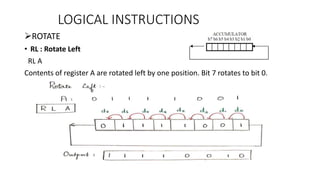
• RL : Rotate Left
RL A
Contents of register A are rotated left by one position. Bit 7 rotates to bit 0.
LOGICAL INSTRUCTIONS
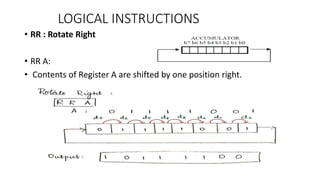
• RR : Rotate Right
• RR A:
• Contents of Register A are shifted by one position right.
LOGICAL INSTRUCTIONS
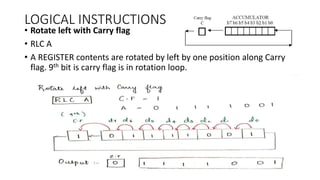
• Rotate left with Carry flag
• RLC A
• A REGISTER contents are rotated by left by one position along Carry
flag. 9th bit is carry flag is in rotation loop.
LOGICAL INSTRUCTIONS
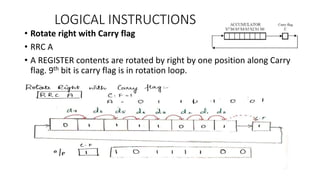
• Rotate right with Carry flag
• RRC A
• A REGISTER contents are rotated by right by one position along Carry
flag. 9th bit is carry flag is in rotation loop.
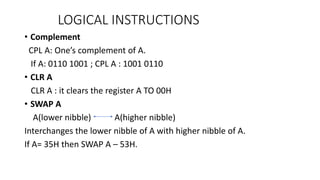
• Complement
CPL A: One’s complement of A.
If A: 0110 1001 ; CPL A : 1001 0110
• CLR A
CLR A : it clears the register A TO 00H
• SWAP A
A(lower nibble) A(higher nibble)
Interchanges the lower nibble of A with higher nibble of A.
If A= 35H then SWAP A – 53H.
LOGICAL INSTRUCTIONS
• NOP
No operation ; PC—PC+1
Used to produce delays. Increments PC.
LOGICAL INSTRUCTIONS
PROGRAM CONTROL INSTRUCTIONS
BRANCH/PROGRAM CONTROL
• SJMP, AJMP & LJMP
• ACALL & LCALL
• RET & RETI
• CJNE
• DJNE
• JC & JNC
• JZ & JNZ
8051 has 3 types of jump instructions:
• SJMP
• AJMP
• LJMP
PROGRAM CONTROL INSTRUCTIONS
SHORT JUMP (SJMP)
• SJMP (short jump) uses a single byte address.
• This address is a signed 8-bit number and allows the program to
branch to a distance – 128 bytes back from the current PC address or
+127 bytes forward from the current PC address.
• The address mode used with this form of jumping (or branching) is
referred to as relative addressing, introduced earlier, as the jump is
calculated relative to the current PC address.
• Format: SJMP raddr(raddr: relative address)
• PC—PC +raddr
• Eg: SJMP label
PROGRAM CONTROL INSTRUCTIONS
LONG JUMP
• LJMP (long jump) causes the program to branch to a destination
address defined by the 16-bit operand in the jump instruction.
• Because a 16-bit address is used the instruction can cause a jump to
any location within the 64KByte program space (216 = 64K).
• Some example instructions are:
• LJMP LABEL_X ; Jump to the specified label
• LJMP 0F200h ; Jump to address 0F200h
• LJMP @A+DPTR ; Jump to address which is the sum of DPTR and Reg.
A
PROGRAM CONTROL INSTRUCTIONS
ABSOLUTE JUMP
• AJMP absolute jump using short address
• Jumps within 2KByte address boundary.
• Program memory of 64KB is divided to 32 pages each page is 2KB .
We can jump anywhere within 2KB of same page.
• JMP
• JMP @A+DPTR
PROGRAM CONTROL INSTRUCTIONS
LCALL “LONG CALL”
• This instruction is used to call a subroutine at a specified address. o
The address is 16 bits long so the call can be made to any location
within the 64KByte memory space.
• When a LCALL instruction is executed the current PC content is
automatically pushed onto the stack of the PC.
• When the program returns from the subroutine the PC contents is
returned from the stack so that the program can resume operation
from the point where the LCALL was made.
• The return from subroutine is achieved using the RET instruction,
which simply pops the PC back from the stack
PROGRAM CONTROL INSTRUCTIONS
ACALL : ABSOLUTE CALL
• The ACALL instruction is logically similar to the LCALL but has a limited
address range similar to the AJMP instruction. (2KByte space)
• CALL is a generic call instruction supported by many 8051
assemblers.
• The assembler will decide which type of call instruction, LCALL or
ACALL, to use so as to choose the most efficient instruction.
PROGRAM CONTROL INSTRUCTIONS
RET:
• Returns from ordinary subroutine.
• Used to return address from subroutine to main program.
• Used after CALL instruction.
• Return address popped from stack and put to stack.
RETI :
• Return from ISR and enable interrupts.
• Return from Interrupt service routines.
• Control returns to main program at next instruction after where interrupt
occurred.
• Return address popped from stack and put to stack.
PROGRAM CONTROL INSTRUCTIONS
 Conditional Jumps
A conditional jump instructions can have two possible executions
depending on condition.
If the condition is true, program will jump to branch location
specified by label.
If condition is false, program will simply proceed to next instruction.
All conditional jumps are short jumps.
PROGRAM CONTROL INSTRUCTIONS
 DJNZ – Decrement and Jump if not equal to 0.
• DJNZ Rr, radd
eg : DJNZ R7, back
Decrement the contents of register R7 and if not equal to ‘0’ go to
back.
This is used to create a loop initialize the loop R7. At the end we give
DJNZ . Back refers to start of loop.
This instruction will decrement contents of R7, check if R7 has
become 0 or not . If R7 is not equal to 0, program will jump to back.
Once R7 becomes 0, program will jump out of loop and proceed.
PROGRAM CONTROL INSTRUCTIONS
• DJNZ addr, addr
eg: DJNZ 25H, back
Decrement the contents of RAM location 25h, if not equal to 0, go to
back.
Count is in memory address instead of register.
Decrements the contents of 25h and then checks if equal to 0 or not.
PROGRAM CONTROL INSTRUCTIONS
• CJNE : Compare and jump if not equal.
 CJNE A, #n, radd
eg : CJNE A, #25h
Compare the contents of A with 25h and if not equal jump to down.
If equal proceed with normal execution.
 CJNE A, addr, radd
eg : CJNE A, 25h, down
Compare the contents of location 25h . If not equal jump to label
down.
PROGRAM CONTROL INSTRUCTIONS
 CJNE Rr, #n, radd
eg : CJNE R0, #25h, down
Compare R0, with immediate value 25h. If not equal jump to label
down.
 CJNE @Rp, #n, radd
eg : CJNE @R0, #25h, down
Compare [R0] with 25h. If not equal jump to down.
PROGRAM CONTROL INSTRUCTIONS
 JC raddr
Jump if Carry is generated.
• Eg : JC down
If Carry flag = 1, jump to label down.
This instruction is used to check carry flag.
If carry flag is not equal to 1, then it proceeds with normal flow.
 JNC raddr
Jump if Carry flag = 0.
JNC down
If C.F= 0 then jump to down label.
PROGRAM CONTROL INSTRUCTIONS
 JZ raddr
eg : JZ down
If A register = 0 , then jump to location down.
else proceeds with normal flow.
 JNZ raddr
eg : JNZ down
If A register is not equal to 0, jump to label down.
PROGRAM CONTROL INSTRUCTIONS
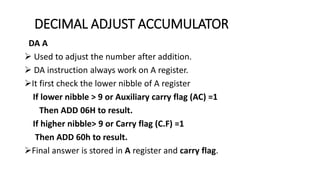
DECIMAL ADJUST ACCUMULATOR
DA A
 Used to adjust the number after addition.
 DA instruction always work on A register.
It first check the lower nibble of A register
If lower nibble > 9 or Auxiliary carry flag (AC) =1
Then ADD 06H to result.
If higher nibble> 9 or Carry flag (C.F) =1
Then ADD 60h to result.
Final answer is stored in A register and carry flag.
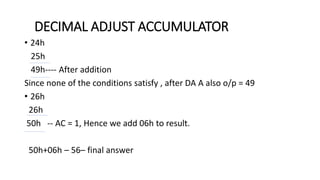
• 24h
25h
49h---- After addition
Since none of the conditions satisfy , after DA A also o/p = 49
• 26h
26h
50h -- AC = 1, Hence we add 06h to result.
50h+06h – 56– final answer
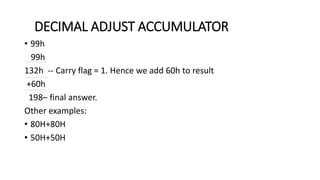
DECIMAL ADJUST ACCUMULATOR
• 99h
99h
132h -- Carry flag = 1. Hence we add 60h to result
+60h
198– final answer.
Other examples:
• 80H+80H
• 50H+50H
DECIMAL ADJUST ACCUMULATOR

MICROCONTROLLERS-module2 (7).pptx

  • 1.
  • 2.
    INSTRUCTION SYNTAX • Instruction: Command given to system, to do a particular task. • LABEL : OPCODE OPERAND ; COMMENT
  • 3.
    INSTRUCTION SYNTAX Label: • Itallows program to refer to a line of code by name. • It facilitates the user for referring any given instruction in given program. • Generally used to change sequence of execution. • Labels must be unique. • Can use special characters. • Reserved words cannot be used.
  • 4.
    INSTRUCTION SYNTAX Opcode: • Mnemonicsproduce opcodes which contains symbolic representation of operation. • MOV, ADD, MUL etc • Actual machine level operation codes are generated by assembler which is fed to internal circuitry.
  • 5.
    INSTRUCTION SYNTAX Operand: • Operandare data upon which instruction act. • Operand field contains address of operand or operand itself. • Operand field can have both source and destination. COMMENTS: • May be at the end of line. • Assembler ignores comments. • Given to improve the clarity of programs.
  • 6.
    EXAMPLE MOV A, #30H; data 30h is copied to accumulator OPCODE OPERAND COMMENTS LABEL
  • 7.
    ADDRESSING MODES • Theterm addressing mode refers to the way in which the operand of an instruction is specified. • Rule for interpreting or modifying address field of instruction before operand is actually executed. • Various for each controller/processor architecture
  • 8.
    ADDRESSING MODES OF8051 Supports 5 types of addressing modes: • Immediate addressing mode • Register addressing mode • Direct addressing mode • Indirect addressing mode • Indexed addressing mode
  • 9.
    IMMEDIATE ADDRESSING MODE •Data given in instruction itself. • Operand is the data value to be used. • Operand comes immediately after opcode. • It uses the symbol ‘#’ signifies immediate addressing mode. Source OPCODE NEXT BYTE INSTRUCTION SOURCE
  • 10.
    IMMEDIATE ADDRESSING MODE EXAMPLES •MOV A , #35H: This instruction will move the value 35h to the accumulator register i.e A. • MOV DPTR, #9001H: This will move the immediate value 9001h into DPTR register. It can also be given as MOV DPH, #90H MOV DPL,#01H
  • 11.
    REGISTER ADDRESSING MODE •One of the 8 general purpose registers R0 to R7 can be specified as instruction operand. • Data is given by the register in instruction.
  • 12.
    REGISTER ADDRESSING MODE Examples •ADD A, R5 : This instruction adds the contents R5+A and store the result in A. • MOV A , R0: Contents of R0 are moved to A(Accumulator) • MOV R6, A: Contents of A are moved to R6. • MOV DPTR, A: X Cannot move data between a 16-bit register and 8-bit register. • MOV R0, R1 : X Not allowed to move data between 2 RAM registers.(would allow too many combinations!)
  • 13.
    DIRECT ADDRESSING MODE •Address of operand is given in instruction itself. • 8051 has 128 bytes of RAM. (from 00h to 07h) • Although entire 128 bytes of RAM can be accessed most often 30 to 7fh is used.
  • 14.
    DIRECT ADDRESSING MODE Examples: •MOV A, 47H Value stored in RAM address 47h gets stored in Accumulator • MOV 30H, #30H Immediate value 30h gets stored in RAM address 30h. • MOV 20H, 30H Location 20h gets the contents of location 30h.
  • 15.
    INDIRECT ADDRESSING MODE •The address of operand is given in a register. • A register is used as data pointer. • Only registers R0, R1 can be used for pointing data. • Used symbol “@” to point data. • Advantage: Using register we can increment the address in loop, By incrementing register.
  • 16.
    INDIRECT ADDRESSING MODE Examples: •MOV A, @R0 R0 has 54h which is used as address of internal RAM , that contains operand data. • MOV @R0, A [R0] A; Internal RAM location pointed by R0 gets value of A. • MOVX A, @DPTR ; ‘X’ represents accessing external memory. ‘A’ gets contents of external RAM location whose address is given by DPTR. If DPTR = 2000h, then A gets content stored in external RAM location 2000h
  • 17.
    INDIRECT ADDRESSING MODE Examples: •MOVX @DPTR, A A is stored at external RAM whose address is given by DPTR. • MOVX A, @R0 A gets the contents of external RAM whose address is given by R0 • MOVX @R1, A A is stored at external RAM whose address is given by R1.
  • 18.
    INDEXED ADDRESSING MODE •This mode is used to access data from code memory or program memory. • Every instruction has ‘C’ to indicate code memory. • ROM has permanent data which is stored in look up table. To access look up table address is given as sum of two registers i.e base address + offset address. • One register acts as base and other as index. • Usually PC/DPTR is used as base and accumulator as offset.
  • 19.
    INDEXED ADDRESSING MODE Examples •MOVC A, @A+DPTR MOVC : moves data from external code memory. If DPTR = 0400h A = 05h DPTR+A 0405h Therefore, here the contents in external ROM address 0405h is moved to accumulator.
  • 20.
    INDEXED ADDRESSING MODE •MOVC A, @A+PC If A = 40h PC = 08h A+ PC 48h Therefore, here the contents in external ROM address 48h is moved to accumulator.
  • 21.
    INSTRUCTIONS IN 8051 Differenttypes of instructions in 8051 are: • Data transfer instructions • Arithmetic instructions • Logical instructions • Program Control instructions • Other Special instructions
  • 22.
    DATA TRANSFER INSTRUCTIONS •Data transfer instructions are used to move data from one location to other. • 8051 has 28 different instructions under data transfer group. • Flags are not affected by using data transfer instruction.(‘P’ flag can change when A is changed during data transfer) • Data transfer are used to transfer data between internal RAM and SFR. • Data can also be transferred between internal and external RAM using indirect addressing mode.
  • 23.
    DATA TRANSFER INSTRUCTIONS Someof the data transfer group of instructions are: • MOV • MOVX • MOVC • PUSH • POP • XCH
  • 24.
    DATA TRANSFER INSTRUCTIONS •MOV In 8051, MOV is concerned with moving data internally between SFR and internal RAM. This instruction format is : MOV destination, source This instruction copies the data from defined source to destination. Examples: MOV R2, #80h: move immediate value 80h to register R2. MOV R4, A: Copy data from accumulator to R4. MOV DPTR, #0F22CH: Move immediate value 0F22Ch to DPTR
  • 25.
    DATA TRANSFER INSTRUCTIONS •MOV Examples: MOV R2, 80H: Copy contents of 80h RAM address to R2.  MOV 52H, #52 : Copy immediate value 52h to RAM address 52h. MOV 52H, 53H: Copy data from RAM location 53h to 52h. MOV A,@R0 : Copy the contents of location addressed in R0 to A.
  • 26.
    DATA TRANSFER INSTRUCTIONS •MOVX: 8051 the external memory can be addressed using indirect addressing mode only. DPTR is used to hold address of external data (16-bit register) R0 and R1 can also be used. All external moves can be done through A.
  • 27.
    DATA TRANSFER INSTRUCTIONS Examples: MOVX@DPTR, A ; Copy the data from A to address specified by DPTR MOVX A, @DPTR; Copy the data from address specified in DPTR to A.
  • 28.
    DATA TRANSFER INSTRUCTIONS •MOVC MOV instructions operate on RAM, normally volatile. Program tables need to be stored in ROM, which is nonvolatile memory. MOVC is used to read data from internal code.
  • 29.
    EXAMPLES: Sequence of instructions: MOVDPTR, #2000H MOV A , #80H MOVC A, @A+DPTR DATA TRANSFER INSTRUCTIONS DPTR --- 2000H A ----80H DPTR + A ---- 2080H Copy the contents of address 2080h in ROM to A
  • 30.
    • PUSH &POP Push and Pop are for stack only. PUSH 4CH POP 80H DATA TRANSFER INSTRUCTIONS
  • 31.
    • XCH A specialXCH (exchange) will actually swap data between source and destination. Instruction must only use registers. XCHD is special case of exchange where lower nibbles are exchanged. DATA TRANSFER INSTRUCTIONS
  • 32.
    • EXAMPLES XCH A,R3 ; Exchange btw A and R3 XCH A, @RO; Exchange btw A and RAM location whose address is in R0 XCH A, 0AH ; Exchange btw A and RAM location 0Ah DATA TRANSFER INSTRUCTIONS
  • 33.
    ARITHMETIC INSTRUCTIONS Some arithmeticinstructions are: • ADDITION • ADDITION WITH CARRY • SUBTRACTION WITH BORROW • INCREMENT • DECREMENT • MULTIPLY • DIVIDE • DECIMAL ADJUST AFTER ADDITION FLAGS – C, AC, OV, P
  • 34.
    ADDITION INSTRUCTIONS • RegisterA is used to hold the result of any addition operation. • Flags affected by various operations: The C (Carry) flag is set to 1 if addition resulted in carry out of accumulator ‘s MSB bit , otherwise clear. The Auxiliary carry flag is set to 1 if there is carry out from position 3 of accumulator. For signed numbers the OV flag is set to 1, if there is arithmetic overflow. • Simple addition is done with 8051 on 8-bit numbers. Also 16-bit and 24 bit are added with multiple byte arithmetic.
  • 35.
    Examples • ADD A,#n: ADD A, #25h :- A – A+25H adds register A with immediate value 25h and stores in register A. • ADD A, Rn ADD A, R0 ; A—A+R0 Adds register A with value of R0 and store in register A. ADDITION INSTRUCTIONS
  • 36.
    • ADD A,addr ADD A, 25H; A—A+[25H] Add A register with contents of RAM address of 25h and store in A register. • ADD A, @Rn ADD A, @R0; A– A+[R0] Adds A register with contents of location pointed by register. Result is stored in A. If R0= 20h, The 20h is Ram location from where contents should be added. If 20h has value 35h then A—A+35H. ADDITION INSTRUCTIONS 41H 35H ABH 40H 21H 20H 19H 18H
  • 37.
  • 38.
  • 39.
    • ADDC A,#n ADDC A, #25h ; A– A+ 25H +C.F Add register A with 25h with previous addition carry flag. • ADDC A, Rn ADDC A, R0; A – A + R0 + C.F Add A register with value of RAM register along with carry of previous addition . Store result in A. ADDITION INSTRUCTIONS
  • 40.
    • ADDC A,addr ADDC A, 25H ; A– A+[25H] + C.F Add A register with contents of RAM location of 25h along with carry flag. • ADDC A, @Rp ADDC A, @R0 ; A– A +[R0] + C.F Add A register with contents of location pointed by R0, with carry flag of previous addition and store in register A. ADDITION INSTRUCTIONS
  • 41.
    SUBTRACTION INSTRUCTIONS • Computersubtraction can be achieved using 2’s complement arithmetic. • Most computers also provide instructions to directly subtract signed or unsigned numbers. • The accumulator, register A, will contain the result (difference) of the subtraction operation. • The C (carry) flag is treated as a borrow flag, which is always subtracted from the minuend during a subtraction operation.
  • 42.
    • SUBB A,#n “Subtract with Borrow” SUBB is used when we want to subtract the two large numbers like 16bit. First lower bytes are subtracted. If lower needs borrow CF is set . Carry will be subtracted from higher bytes. No SUB instruction(CLR C) SUBB A, #25h – Performs subtraction of contents of register A with 25h along with carry flag(borrow) stores result in register A. SUBTRACTION INSTRUCTIONS
  • 43.
    • SUBB A,Rr A--- A- R0-Carry flag(if borrow exists with previous operation) Contents of register A is subtracted with R0 along with carry flag(borrow from previous stage) result is stored in accumulator(A) SUBTRACTION INSTRUCTIONS
  • 44.
    • SUBB A,addr SUBB A, 25h A– A-[25h]-carry flag(if borrow exists) Contents of Register A are subtracted with contents of RAM location 25h with CF and result is stored in Register A. SUBTRACTION INSTRUCTIONS
  • 45.
    • SUBB A,@Rn SUBB A, @Ro A—A-[Ro]-CF(borrow if exists) Contents of register A are subtracted with RAM location pointed by register Ro along with carry flag and result is stored in accumulator A. SUBTRACTION INSTRUCTIONS
  • 46.
    INCREMENT/DECREMENT INSTRUCTIONS • Theincrement (INC) instruction has the effect of simply adding a binary 1 to a number while a decrement (DEC) instruction has the effect of subtracting a binary 1 from a number. • The increment and decrement instructions can use the addressing modes: direct, indirect and register. • The flags C, AC, and OV are not affected by the increment or decrement instructions. If a value of FFh is increment it overflows to 00h. If a value of 00h is decrement it underflows to FFh. • The DPTR can overflow from FFFFh to 0000h. The DPTR register cannot be decremented using a DEC instruction.
  • 47.
    INCREMENT INSTRUCTIONS • INCA A—A+1 Increments the value of register A and stores in register A. • INC Rr INC R0 Increments the value of R0 and stores in R0 • INC addr INC 25h ; [25h]—[25h]+1 Increments the contents of memory address and stores the result in same location.
  • 48.
    • INC @Rp INC@R0 [@R0] – [@R0]+1 Increments the contents of memory location pointed by R0, Stores the result in same location. • INC DPTR DPTR—DPTR+1 Increments the 16-bit value of DPTR and stores in DPTR.(Requires 2 clock cycles). INCREMENT INSTRUCTIONS
  • 49.
    DECREMENT INSTRUCTIONS • DECA DEC A; A—A-1 Decrements the value A register and stores in A register. • DEC Rr DEC R0; R0—R0-1 Decrements the register of RAM register R0 and stores in R0. • DEC addr DEC 25h; [25H]—[25H]-1 Decrements the contents of memory address and stores back in same location .
  • 50.
    • DEC @Rp DEC@R0 [@R0]—[@R0]-1 Decrements the contents of memory location pointed by R0, store in same location. DECREMENT INSTRUCTIONS
  • 51.
    MULTIPLY/DIVIDE INSTRUCTIONS • The8051 supports 8-bit multiplication and division. This is low precision (8 bit) arithmetic but is useful for many simple control applications. • For the MUL or DIV instructions the A and B registers must be used and only unsigned numbers are supported.
  • 52.
    • MUL AB– A X B Multiplies 8 bit values of A and B Stores 16bit in A and B B(higher bytes) and A(lower bytes) Requires 4 clock cycles. MULTIPLY/DIVIDE INSTRUCTIONS
  • 53.
    • DIV AB A/B Divides8 bit value of A register by 8bit value of B register. B– Stores the remainder A– Stores the quotient No of clock cycles = 4 If B= 00h, then instruction will be aborted. A and B will get garbage value. Indicated by Overflow flag. MULTIPLY/DIVIDE INSTRUCTIONS
  • 54.
    LOGICAL OPERATIONS • Mostcontrol applications implement control logic using Boolean operators to act on the data. • Most microcomputers provide a set of Boolean instructions that act on byte level data. • However, the 8051 (somewhat uniquely) additionally provides Boolean instruction which can operate on bit level data. • The destination address of the operation can be the accumulator (register A), a general register, or a direct address. • Status flags are not affected by these logical operations (unless PSW is directly manipulated).
  • 55.
    LOGICAL INSTRUCTIONS • AND •OR • XOR • CLEAR • COMPLIMENT • ROTATE • ROTATE WITH CARRY • SWAP • NO OPERATION
  • 56.
    AND • ANL A,#n Eg: ANL A,#25 Logically AND the value of A register with immediate data. A– 10h #n– 25h AND is used to clear any bit of register. If we want to clear any bit , we must AND that particular bit and ‘0’ and remaining bits with ‘1’. If we want to clear lower nibble or higher nibble we can use AND. LOGICAL INSTRUCTIONS
  • 57.
    • ANL A,Rr eg : ANL A, R0 Logically AND the values of A with RAM register and store in A register. • ANL A, addr ANL A, 25H Logically AND value of A and contents of RAM location 25h and store in A register. • ANL A, @Rp ANL A, @R0 Logically AND value of A register with contents pointed by location R0 and store in register A. LOGICAL INSTRUCTIONS
  • 58.
    • ANL addr,A ANL 25H, A [25H]– [25H] AND A Logically AND contents of address with content of A. Store in register A. • ANL addr, #n ANL 25H, #30H [25H]—[25H] AND 30H Logically AND the contents of address 25h and immediate value 30h. Store at address 25h. LOGICAL INSTRUCTIONS
  • 59.
    OR • ORL A,#n Eg: ORL A, #25H Logically OR the value of A register with immediate data. A– 10h #n– 25h OR is used to SET any bit of register. If we want to set any bit , we must OR that particular bit with ‘0’ and remaining bits with ‘1’. If we want to set lower nibble or higher nibble we can use OR. LOGICAL INSTRUCTIONS
  • 60.
    • ORL A,Rr eg : ORL A, R0 Logically OR the values of A with RAM register and store in A register. • ORL A, addr ORL A, 25H Logically OR value of A and contents of RAM location 25h and store in A register. • ORL A, @Rp ORL A, @R0 Logically OR value of A register with contents pointed by location R0 and store in register A. LOGICAL INSTRUCTIONS
  • 61.
    • ORL addr,A ORL 25H, A [25H]– [25H] OR A Logically OR contents of address with content of A. Store in register A. • ORL addr, #n ORL 25H, #30H [25H]—[25H] OR 30H Logically OR the contents of address 25h and immediate value 30h. Store at address 25h. LOGICAL INSTRUCTIONS
  • 62.
    • XRL A,#n Eg: XRL A,#25 Logically XOR the value of A register with immediate data. A– 10h #n– 25h X0R is used to complement any bit of register. If we want to complement any bit , we must XOR that particular bit with‘1’ and remaining bits with ‘0’. LOGICAL INSTRUCTIONS
  • 63.
    • XRL A,Rr eg : XRL A, R0 Logically XOR the values of A with RAM register and store in A register. • XRL A, addr XRL A, 25H Logically XOR value of A and contents of RAM location 25h and store in A register. • XRL A, @Rp XRL A, @R0 Logically XOR value of A register with contents pointed by location R0 and store in register A. LOGICAL INSTRUCTIONS
  • 64.
    • XRL addr,A XRL 25H, A [25H]– [25H] XOR A Logically XOR contents of address with content of A. Store in register A. • XRL addr, #n XRL 25H, #30H [25H]—[25H] OR 30H Logically XOR the contents of address 25h and immediate value 30h. Store at address 25h. LOGICAL INSTRUCTIONS
  • 65.
    ROTATE • RL :Rotate Left RL A Contents of register A are rotated left by one position. Bit 7 rotates to bit 0. LOGICAL INSTRUCTIONS
  • 66.
    • RR :Rotate Right • RR A: • Contents of Register A are shifted by one position right. LOGICAL INSTRUCTIONS
  • 67.
    LOGICAL INSTRUCTIONS • Rotateleft with Carry flag • RLC A • A REGISTER contents are rotated by left by one position along Carry flag. 9th bit is carry flag is in rotation loop.
  • 68.
    LOGICAL INSTRUCTIONS • Rotateright with Carry flag • RRC A • A REGISTER contents are rotated by right by one position along Carry flag. 9th bit is carry flag is in rotation loop.
  • 69.
    • Complement CPL A:One’s complement of A. If A: 0110 1001 ; CPL A : 1001 0110 • CLR A CLR A : it clears the register A TO 00H • SWAP A A(lower nibble) A(higher nibble) Interchanges the lower nibble of A with higher nibble of A. If A= 35H then SWAP A – 53H. LOGICAL INSTRUCTIONS
  • 70.
    • NOP No operation; PC—PC+1 Used to produce delays. Increments PC. LOGICAL INSTRUCTIONS
  • 71.
    PROGRAM CONTROL INSTRUCTIONS BRANCH/PROGRAMCONTROL • SJMP, AJMP & LJMP • ACALL & LCALL • RET & RETI • CJNE • DJNE • JC & JNC • JZ & JNZ
  • 72.
    8051 has 3types of jump instructions: • SJMP • AJMP • LJMP PROGRAM CONTROL INSTRUCTIONS
  • 73.
    SHORT JUMP (SJMP) •SJMP (short jump) uses a single byte address. • This address is a signed 8-bit number and allows the program to branch to a distance – 128 bytes back from the current PC address or +127 bytes forward from the current PC address. • The address mode used with this form of jumping (or branching) is referred to as relative addressing, introduced earlier, as the jump is calculated relative to the current PC address. • Format: SJMP raddr(raddr: relative address) • PC—PC +raddr • Eg: SJMP label PROGRAM CONTROL INSTRUCTIONS
  • 74.
    LONG JUMP • LJMP(long jump) causes the program to branch to a destination address defined by the 16-bit operand in the jump instruction. • Because a 16-bit address is used the instruction can cause a jump to any location within the 64KByte program space (216 = 64K). • Some example instructions are: • LJMP LABEL_X ; Jump to the specified label • LJMP 0F200h ; Jump to address 0F200h • LJMP @A+DPTR ; Jump to address which is the sum of DPTR and Reg. A PROGRAM CONTROL INSTRUCTIONS
  • 75.
    ABSOLUTE JUMP • AJMPabsolute jump using short address • Jumps within 2KByte address boundary. • Program memory of 64KB is divided to 32 pages each page is 2KB . We can jump anywhere within 2KB of same page. • JMP • JMP @A+DPTR PROGRAM CONTROL INSTRUCTIONS
  • 76.
    LCALL “LONG CALL” •This instruction is used to call a subroutine at a specified address. o The address is 16 bits long so the call can be made to any location within the 64KByte memory space. • When a LCALL instruction is executed the current PC content is automatically pushed onto the stack of the PC. • When the program returns from the subroutine the PC contents is returned from the stack so that the program can resume operation from the point where the LCALL was made. • The return from subroutine is achieved using the RET instruction, which simply pops the PC back from the stack PROGRAM CONTROL INSTRUCTIONS
  • 77.
    ACALL : ABSOLUTECALL • The ACALL instruction is logically similar to the LCALL but has a limited address range similar to the AJMP instruction. (2KByte space) • CALL is a generic call instruction supported by many 8051 assemblers. • The assembler will decide which type of call instruction, LCALL or ACALL, to use so as to choose the most efficient instruction. PROGRAM CONTROL INSTRUCTIONS
  • 78.
    RET: • Returns fromordinary subroutine. • Used to return address from subroutine to main program. • Used after CALL instruction. • Return address popped from stack and put to stack. RETI : • Return from ISR and enable interrupts. • Return from Interrupt service routines. • Control returns to main program at next instruction after where interrupt occurred. • Return address popped from stack and put to stack. PROGRAM CONTROL INSTRUCTIONS
  • 79.
     Conditional Jumps Aconditional jump instructions can have two possible executions depending on condition. If the condition is true, program will jump to branch location specified by label. If condition is false, program will simply proceed to next instruction. All conditional jumps are short jumps. PROGRAM CONTROL INSTRUCTIONS
  • 80.
     DJNZ –Decrement and Jump if not equal to 0. • DJNZ Rr, radd eg : DJNZ R7, back Decrement the contents of register R7 and if not equal to ‘0’ go to back. This is used to create a loop initialize the loop R7. At the end we give DJNZ . Back refers to start of loop. This instruction will decrement contents of R7, check if R7 has become 0 or not . If R7 is not equal to 0, program will jump to back. Once R7 becomes 0, program will jump out of loop and proceed. PROGRAM CONTROL INSTRUCTIONS
  • 81.
    • DJNZ addr,addr eg: DJNZ 25H, back Decrement the contents of RAM location 25h, if not equal to 0, go to back. Count is in memory address instead of register. Decrements the contents of 25h and then checks if equal to 0 or not. PROGRAM CONTROL INSTRUCTIONS
  • 82.
    • CJNE :Compare and jump if not equal.  CJNE A, #n, radd eg : CJNE A, #25h Compare the contents of A with 25h and if not equal jump to down. If equal proceed with normal execution.  CJNE A, addr, radd eg : CJNE A, 25h, down Compare the contents of location 25h . If not equal jump to label down. PROGRAM CONTROL INSTRUCTIONS
  • 83.
     CJNE Rr,#n, radd eg : CJNE R0, #25h, down Compare R0, with immediate value 25h. If not equal jump to label down.  CJNE @Rp, #n, radd eg : CJNE @R0, #25h, down Compare [R0] with 25h. If not equal jump to down. PROGRAM CONTROL INSTRUCTIONS
  • 84.
     JC raddr Jumpif Carry is generated. • Eg : JC down If Carry flag = 1, jump to label down. This instruction is used to check carry flag. If carry flag is not equal to 1, then it proceeds with normal flow.  JNC raddr Jump if Carry flag = 0. JNC down If C.F= 0 then jump to down label. PROGRAM CONTROL INSTRUCTIONS
  • 85.
     JZ raddr eg: JZ down If A register = 0 , then jump to location down. else proceeds with normal flow.  JNZ raddr eg : JNZ down If A register is not equal to 0, jump to label down. PROGRAM CONTROL INSTRUCTIONS
  • 86.
    DECIMAL ADJUST ACCUMULATOR DAA  Used to adjust the number after addition.  DA instruction always work on A register. It first check the lower nibble of A register If lower nibble > 9 or Auxiliary carry flag (AC) =1 Then ADD 06H to result. If higher nibble> 9 or Carry flag (C.F) =1 Then ADD 60h to result. Final answer is stored in A register and carry flag.
  • 87.
    • 24h 25h 49h---- Afteraddition Since none of the conditions satisfy , after DA A also o/p = 49 • 26h 26h 50h -- AC = 1, Hence we add 06h to result. 50h+06h – 56– final answer DECIMAL ADJUST ACCUMULATOR
  • 88.
    • 99h 99h 132h --Carry flag = 1. Hence we add 60h to result +60h 198– final answer. Other examples: • 80H+80H • 50H+50H DECIMAL ADJUST ACCUMULATOR