Micro frontends
There is any valid reason to use it?
Who am I?
My name is Kleyson Prado
I'm from Brazil
I code.
SkipTheDishes pays me to code for them.
Sorry no fancy title.
Disclaimer (more like an apologize really…)
- No live code here, sorry to disappoint you...
- No credit for the pictures, of course they weren't
mine...
- Your ears bleeding with my accent and bad english...
- Everything is my opinion, based on what I have
researching about micro frontends
- You shouldn't trust me. Really, at all.
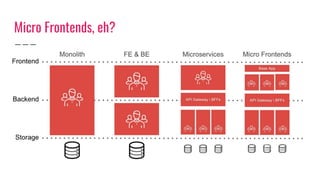
Micro Frontends, eh?
Micro-frontends are the technical
representation of a business subdomain,
they allow independent implementations with same or
different technology choices, finally
they avoid sharing logic with other subdomains and they
are own by a single team.
By @lucamezzalira
Micro Frontends, eh?
What people say about it?
In a nutshell
In short, micro frontends are all about slicing up big and
scary things into smaller, more manageable pieces, and then
being explicit about the dependencies between them. Our
technology choices, our codebases, our teams, and our release
processes should all be able to operate and evolve
independently of each other, without excessive coordination.
Source: https://www.martinfowler.com/articles/micro-frontends.html
Without context, is hard to say.
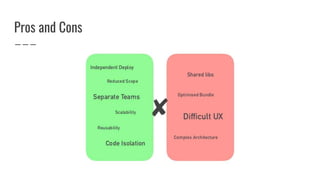
Pros and Cons
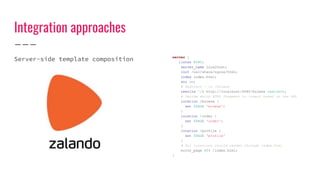
Integration approaches
Server-side template composition server {
listen 8080;
server_name localhost;
root /usr/share/nginx/html;
index index.html;
ssi on;
# Redirect / to /browse
rewrite ^/$ http://localhost:8080/browse redirect;
# Decide which HTML fragment to insert based on the URL
location /browse {
set $PAGE 'browse';
}
location /order {
set $PAGE 'order';
}
location /profile {
set $PAGE 'profile'
}
# All locations should render through index.html
error_page 404 /index.html;
}
Integration approaches
Run-time integration via Web
Components
<html>
<body>
<!-- These scripts don't render anything immediately →
<!-- Instead they each define a custom element type →
<script src="https://browse.example.com/bundle.js"></script>
<script src="https://order.example.com/bundle.js"></script>
<script src="https://profile.example.com/bundle.js"></script>
<div id="micro-frontend-root"></div>
<script type="text/javascript">
// These element types are defined by the above scripts
const webComponentsByRoute = {
'/': 'micro-frontend-browse-restaurants',
'/order-food': 'micro-frontend-order-food',
'/user-profile': 'micro-frontend-user-profile',
};
const webComponentType = webComponentsByRoute[window.location.pathname];
// Having determined the right web component custom element type,
// we now create an instance of it and attach it to the document
const root = document.getElementById('micro-frontend-root');
const webComponent = document.createElement(webComponentType);
root.appendChild(webComponent);
</script>
</body>
</html>
Integration approaches
Run-time integration via
JavaScript
<html>
<body>
<!-- These scripts don't render anything immediately →
<!-- Instead they attach entry-point functions to `window` →
<script src="https://browse.example.com/bundle.js"></script>
<script src="https://order.example.com/bundle.js"></script>
<script src="https://profile.example.com/bundle.js"></script>
<div id="micro-frontend-root"></div>
<script type="text/javascript">
// These global functions are attached to window by the above scripts
const mFrontendsByRoute = {
'/': window.renderBrowseRestaurants,
'/order-food': window.renderOrderFood,
'/user-profile': window.renderUserProfile,
};
const renderFunction = mFrontendsByRoute[window.location.pathname];
// Having determined the entry-point function, we now call it,
// giving it the ID of the element where it should render itself
renderFunction('micro-frontend-root');
</script>
</body>
</html>
Integration approaches
Build-time integration {
"name": "@feed-me/container",
"version": "1.0.0",
"description": "A food delivery web app",
"dependencies": {
"@feed-me/browse-restaurants": "^1.2.3",
"@feed-me/order-food": "^4.5.6",
"@feed-me/user-profile": "^7.8.9"
}
}
Integration approaches
Run-time integration via iframes <html>
<body>
<iframe id="micro-frontend-container"></iframe>
<script type="text/javascript">
const microFrontendsByRoute = {
'/': 'https://browse.example.com/index.html',
'/order-food': 'https://order.example.com/index.html',
'/user-profile': 'https://profile.example.com/index.html',
};
const if = document.getElementById('micro-frontend-container');
if.src = microFrontendsByRoute[window.location.pathname];
</script>
</body>
</html>
Libs and Frameworks
https://single-spa.js.org https://frint.js.org https://github.com/ara-framework https://github.com/zalando/tailor
Scenario 1 Big product and a big team!
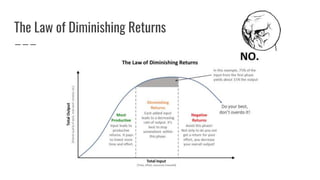
The Law of Diminishing Returns
Scenario 2 Working with legacy code.
SkipTheDishes That is how we did it.
Customer Restaurant Courier
Operation
Behind the scenes...
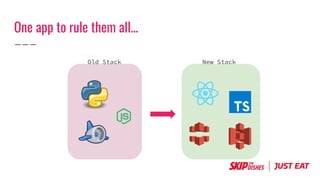
One app to rule them all...
Old Stack New Stack
But we have a problem...
Challenges...
1. Technology migration
2. Multiple domains
3. Multiple teams
4. No downtime allowed
Divide to conquer...
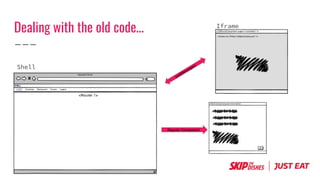
Dealing with the old code...
Shell
Iframe
Regular Component
Teams that like our approach...
[Project]
├── README.md
├── bin
├── lerna.json
├── node_modules
├── package.json
├── packages
│ ├── customer_feature
│ ├── base
│ ├── courier_feature
│ ├── restaurant_feature
│ ├── localization
│ ├── components
│ ├── theme
│ └── shell
├── tsconfig.json
└── yarn.lock
And you get for free:
1. Theme
2. Component Library
3. All configuration done
4. A opinionated structure
5. API handling
6. Authentication
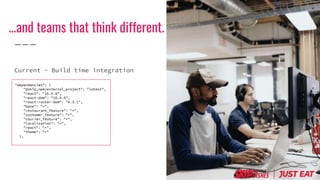
…and teams that think different.
"dependencies": {
"@skip_npm/external_project": "latest",
"react": "16.8.6",
"react-dom": "16.8.6",
"react-router-dom": "4.3.1",
"base": "*",
"restaurant_feature": "*",
"customer_feature": "*",
"courier_feature": "*",
"localization": "*",
"react": "*",
"theme": "*"
},
Current - Build time integration
index.html
<script
src="https://cdn.skip.com/external-project-3.1.0.js"
integrity="sha256-slogkvB1K3VOkzAI8QITxV3VzpOnkeNVsKvtkYLMjfk="
crossorigin="anonymous">
</script>
webpack.config.js
module.exports = {
//...
externals: {
external-project: 'ExternalProject'
}
};
routes.ts
import ExternalProject from 'external-project';
export const userLogout: IRoute = {
name: localizedStrings.externalProject,
path: "/externalProject",
component: ExternalProject,
};
…and teams that think different.
Next - Runtime integration
Using: https://webpack.js.org/configuration/externals/
Thank you...
Questions?

Micro frontends

  • 1.
    Micro frontends There isany valid reason to use it?
  • 2.
    Who am I? Myname is Kleyson Prado I'm from Brazil I code. SkipTheDishes pays me to code for them. Sorry no fancy title.
  • 3.
    Disclaimer (more likean apologize really…) - No live code here, sorry to disappoint you... - No credit for the pictures, of course they weren't mine... - Your ears bleeding with my accent and bad english... - Everything is my opinion, based on what I have researching about micro frontends - You shouldn't trust me. Really, at all.
  • 4.
    Micro Frontends, eh? Micro-frontendsare the technical representation of a business subdomain, they allow independent implementations with same or different technology choices, finally they avoid sharing logic with other subdomains and they are own by a single team. By @lucamezzalira
  • 5.
  • 7.
    What people sayabout it?
  • 9.
    In a nutshell Inshort, micro frontends are all about slicing up big and scary things into smaller, more manageable pieces, and then being explicit about the dependencies between them. Our technology choices, our codebases, our teams, and our release processes should all be able to operate and evolve independently of each other, without excessive coordination. Source: https://www.martinfowler.com/articles/micro-frontends.html
  • 14.
    Without context, ishard to say.
  • 15.
  • 16.
    Integration approaches Server-side templatecomposition server { listen 8080; server_name localhost; root /usr/share/nginx/html; index index.html; ssi on; # Redirect / to /browse rewrite ^/$ http://localhost:8080/browse redirect; # Decide which HTML fragment to insert based on the URL location /browse { set $PAGE 'browse'; } location /order { set $PAGE 'order'; } location /profile { set $PAGE 'profile' } # All locations should render through index.html error_page 404 /index.html; }
  • 17.
    Integration approaches Run-time integrationvia Web Components <html> <body> <!-- These scripts don't render anything immediately → <!-- Instead they each define a custom element type → <script src="https://browse.example.com/bundle.js"></script> <script src="https://order.example.com/bundle.js"></script> <script src="https://profile.example.com/bundle.js"></script> <div id="micro-frontend-root"></div> <script type="text/javascript"> // These element types are defined by the above scripts const webComponentsByRoute = { '/': 'micro-frontend-browse-restaurants', '/order-food': 'micro-frontend-order-food', '/user-profile': 'micro-frontend-user-profile', }; const webComponentType = webComponentsByRoute[window.location.pathname]; // Having determined the right web component custom element type, // we now create an instance of it and attach it to the document const root = document.getElementById('micro-frontend-root'); const webComponent = document.createElement(webComponentType); root.appendChild(webComponent); </script> </body> </html>
  • 18.
    Integration approaches Run-time integrationvia JavaScript <html> <body> <!-- These scripts don't render anything immediately → <!-- Instead they attach entry-point functions to `window` → <script src="https://browse.example.com/bundle.js"></script> <script src="https://order.example.com/bundle.js"></script> <script src="https://profile.example.com/bundle.js"></script> <div id="micro-frontend-root"></div> <script type="text/javascript"> // These global functions are attached to window by the above scripts const mFrontendsByRoute = { '/': window.renderBrowseRestaurants, '/order-food': window.renderOrderFood, '/user-profile': window.renderUserProfile, }; const renderFunction = mFrontendsByRoute[window.location.pathname]; // Having determined the entry-point function, we now call it, // giving it the ID of the element where it should render itself renderFunction('micro-frontend-root'); </script> </body> </html>
  • 19.
    Integration approaches Build-time integration{ "name": "@feed-me/container", "version": "1.0.0", "description": "A food delivery web app", "dependencies": { "@feed-me/browse-restaurants": "^1.2.3", "@feed-me/order-food": "^4.5.6", "@feed-me/user-profile": "^7.8.9" } }
  • 20.
    Integration approaches Run-time integrationvia iframes <html> <body> <iframe id="micro-frontend-container"></iframe> <script type="text/javascript"> const microFrontendsByRoute = { '/': 'https://browse.example.com/index.html', '/order-food': 'https://order.example.com/index.html', '/user-profile': 'https://profile.example.com/index.html', }; const if = document.getElementById('micro-frontend-container'); if.src = microFrontendsByRoute[window.location.pathname]; </script> </body> </html>
  • 21.
    Libs and Frameworks https://single-spa.js.orghttps://frint.js.org https://github.com/ara-framework https://github.com/zalando/tailor
  • 22.
    Scenario 1 Bigproduct and a big team!
  • 23.
    The Law ofDiminishing Returns
  • 24.
    Scenario 2 Workingwith legacy code.
  • 25.
    SkipTheDishes That ishow we did it.
  • 26.
  • 27.
  • 28.
    One app torule them all... Old Stack New Stack
  • 29.
    But we havea problem...
  • 30.
    Challenges... 1. Technology migration 2.Multiple domains 3. Multiple teams 4. No downtime allowed Divide to conquer...
  • 31.
    Dealing with theold code... Shell Iframe Regular Component
  • 32.
    Teams that likeour approach... [Project] ├── README.md ├── bin ├── lerna.json ├── node_modules ├── package.json ├── packages │ ├── customer_feature │ ├── base │ ├── courier_feature │ ├── restaurant_feature │ ├── localization │ ├── components │ ├── theme │ └── shell ├── tsconfig.json └── yarn.lock And you get for free: 1. Theme 2. Component Library 3. All configuration done 4. A opinionated structure 5. API handling 6. Authentication
  • 33.
    …and teams thatthink different. "dependencies": { "@skip_npm/external_project": "latest", "react": "16.8.6", "react-dom": "16.8.6", "react-router-dom": "4.3.1", "base": "*", "restaurant_feature": "*", "customer_feature": "*", "courier_feature": "*", "localization": "*", "react": "*", "theme": "*" }, Current - Build time integration
  • 34.
    index.html <script src="https://cdn.skip.com/external-project-3.1.0.js" integrity="sha256-slogkvB1K3VOkzAI8QITxV3VzpOnkeNVsKvtkYLMjfk=" crossorigin="anonymous"> </script> webpack.config.js module.exports = { //... externals:{ external-project: 'ExternalProject' } }; routes.ts import ExternalProject from 'external-project'; export const userLogout: IRoute = { name: localizedStrings.externalProject, path: "/externalProject", component: ExternalProject, }; …and teams that think different. Next - Runtime integration Using: https://webpack.js.org/configuration/externals/
  • 35.

Editor's Notes

  • #9 Martin Fowler - Agile Manifesto - Author of several books -