Mendix vs.
OutSystems
Application Access Controls
Low-Code Application Platforms (LCAPs) ?
Gartner Magic Quadrant for Enterprise Low-Code
Application Platforms Oct. 2023
Gartner defines low-code application platforms
(LCAPs) as application platforms that are used to
rapidly develop and run custom applications by
abstracting and minimizing the use of programming
lanquages.
Both Mendix and OutSystems have been leaders in
the Gartner Magic Quadrant for Enterprise Low-Code
Application Platforms for several years.
But how do these two platforms
stack up with regards to Application
Access Controls?
Application Access Controls
• Role Based Access Controls
• User Roles
• Module Roles
• Page Access
• Flow Access
• Entity Access
• Role Based Access Controls
• User Roles
• Page Access
Application Access Controls is a key capability for Enterprise Low-Code Platforms, i.e. ability to configure
rules to determine user access to applications, privileges within applications and access to data.
What platform tools do Mendix and OutSystems provide to ‘configure’ Application Access Controls?
Let’s have a quick look at the access control
capabilities in the Mendix and OutSystems IDEs…
Platform Tools
Create User Roles
In Mendix, User Roles
are created at
Application level and
are accessible by
default in all modules.
BTW… in Mendix
all modules live
in the same App!
Platform Tools
Configure Module Roles
The Mendix module role is a
specific role created within a
module to define a set of
access permissions. One or
more module roles can be
assigned to a user role.
This concept is not available
in OutSystems
Platform Tools
Configure Page Access
With Mendix you can configure
role access to all pages in one
place.
With OutSystems you have to
manually add references to roles
if these are defined in another
module. There is no central place
to configure page access – each
page needs to be opened
individually to configure page
access.
Platform Tools
Configure Entity Access
With Mendix you can configure
Entity access in one place. Entity
CRUD privileges are defined for
each module role, as well as
access rights for each field in an
entity. These Entity Access Rules
automatically determines what a
user can see or do in the UI
depending on their roles.
Platform tools to configure Entity
Access does not exist in
OutSystems – it is up to
developers to include access rules
as part of the CRUD actions and
apply conditional access/visibility
logic in the UI.
Platform Tools
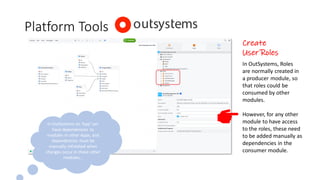
Create
User Roles
In OutSystems, Roles
are normally created in
a producer module, so
that roles could be
consumed by other
modules.
However, for any other
module to have access
to the roles, these need
to be added manually as
dependencies in the
consumer module.
In OutSystems an ‘App’ can
have dependencies to
modules in other Apps, and
dependencies must be
manually refreshed when
changes occur in these other
modules…
Platform Tools
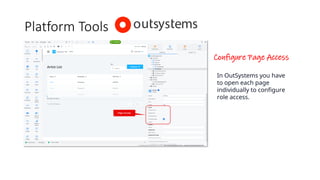
Configure Page Access
In OutSystems you have
to open each page
individually to configure
role access.
Platform Tools
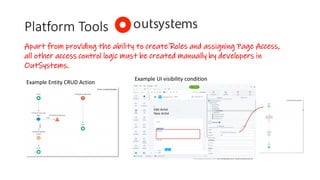
Apart from providing the ability to create Roles and assigning Page Access,
all other access control logic must be created manually by developers in
OutSystems.
Example Entity CRUD Action
Example UI visibility condition
Conclusion
• Mendix provides extensive, centralised
platform tools to configure Application
Access Controls for Pages, Flows and
Entities.
• Provides a standardised approach
across all Apps.
• Speeds up development and easy to
maintain.
• OutSystemsprovides rudimentary platform tools which are
limited to creating roles and assigning page access to roles.
• Additional access control logic needs to be created manually
by developers, e.g. CRUD actions and conditional access and
visibility of UI components.
• Longer development time.
• Maintenance overhead.
• Non-standard approach used by different developers.
• Increased risk of security breach.

Mendix vs OutSystems - Access Controls

  • 1.
  • 2.
    Low-Code Application Platforms(LCAPs) ? Gartner Magic Quadrant for Enterprise Low-Code Application Platforms Oct. 2023 Gartner defines low-code application platforms (LCAPs) as application platforms that are used to rapidly develop and run custom applications by abstracting and minimizing the use of programming lanquages. Both Mendix and OutSystems have been leaders in the Gartner Magic Quadrant for Enterprise Low-Code Application Platforms for several years. But how do these two platforms stack up with regards to Application Access Controls?
  • 3.
    Application Access Controls •Role Based Access Controls • User Roles • Module Roles • Page Access • Flow Access • Entity Access • Role Based Access Controls • User Roles • Page Access Application Access Controls is a key capability for Enterprise Low-Code Platforms, i.e. ability to configure rules to determine user access to applications, privileges within applications and access to data. What platform tools do Mendix and OutSystems provide to ‘configure’ Application Access Controls?
  • 4.
    Let’s have aquick look at the access control capabilities in the Mendix and OutSystems IDEs…
  • 5.
    Platform Tools Create UserRoles In Mendix, User Roles are created at Application level and are accessible by default in all modules. BTW… in Mendix all modules live in the same App!
  • 6.
    Platform Tools Configure ModuleRoles The Mendix module role is a specific role created within a module to define a set of access permissions. One or more module roles can be assigned to a user role. This concept is not available in OutSystems
  • 7.
    Platform Tools Configure PageAccess With Mendix you can configure role access to all pages in one place. With OutSystems you have to manually add references to roles if these are defined in another module. There is no central place to configure page access – each page needs to be opened individually to configure page access.
  • 8.
    Platform Tools Configure EntityAccess With Mendix you can configure Entity access in one place. Entity CRUD privileges are defined for each module role, as well as access rights for each field in an entity. These Entity Access Rules automatically determines what a user can see or do in the UI depending on their roles. Platform tools to configure Entity Access does not exist in OutSystems – it is up to developers to include access rules as part of the CRUD actions and apply conditional access/visibility logic in the UI.
  • 9.
    Platform Tools Create User Roles InOutSystems, Roles are normally created in a producer module, so that roles could be consumed by other modules. However, for any other module to have access to the roles, these need to be added manually as dependencies in the consumer module. In OutSystems an ‘App’ can have dependencies to modules in other Apps, and dependencies must be manually refreshed when changes occur in these other modules…
  • 10.
    Platform Tools Configure PageAccess In OutSystems you have to open each page individually to configure role access.
  • 11.
    Platform Tools Apart fromproviding the ability to create Roles and assigning Page Access, all other access control logic must be created manually by developers in OutSystems. Example Entity CRUD Action Example UI visibility condition
  • 12.
    Conclusion • Mendix providesextensive, centralised platform tools to configure Application Access Controls for Pages, Flows and Entities. • Provides a standardised approach across all Apps. • Speeds up development and easy to maintain. • OutSystemsprovides rudimentary platform tools which are limited to creating roles and assigning page access to roles. • Additional access control logic needs to be created manually by developers, e.g. CRUD actions and conditional access and visibility of UI components. • Longer development time. • Maintenance overhead. • Non-standard approach used by different developers. • Increased risk of security breach.