HELP MANUAL
BASIC FEATURES TO USE Our
COMPANY LAW SOFTWARE
As we said we provide the best and easy solution to our
client…
This help manual gives you the simple procedure. Through
which you can easily access our software functions & features.
By following procedure given below.
PROCEDURE STEPS…
Step 1
❖
Company creation :
MASTER > Company > New Company
❖
Create Master data of the Directors:
Master > Director
❖
Create master data of the subscribers:
MASTERS> SUBSCRIBER
❖
Create master of CA/CS:
Master> CA/CS MASTER
NOTE :In our software we gives you the facility to import
the master through MCA
Master data of company and director
IN OUR SOFTWARE FACILITY TO IMPORT DIRTECTORS DETAILS FROM
DIRECTORS MASTER IS PROVIDED.
PROCEDURE STEPS…
➢
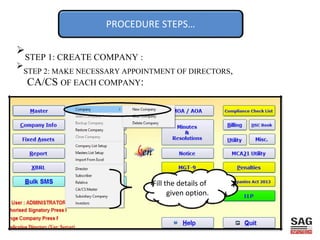
STEP 1: CREATE COMPANY :
➢
STEP 2: MAKE NECESSARY APPOINTMENT OF DIRECTORS,
CA/CS OF EACH COMPANY:
Fill the details of
given option.
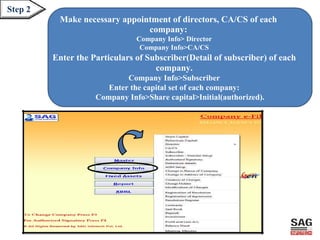
Step 2
Make necessary appointment of directors, CA/CS of each
company:
Company Info> Director
Company Info>CA/CS
Enter the Particulars of Subscriber(Detail of subscriber) of each
company.
Company Info>Subscriber
Enter the capital set of each company:
Company Info>Share capital>Initial(authorized).
Keep in mind
Important Note
•Master tab in the software is used for creating database from all companies
point of view.
•Company Info tab in the software is used for creating database for a
single company.
•For viewing the authorized signatories of the company in the e form press F4.
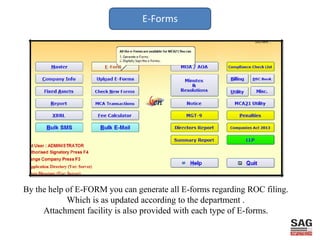
E-Forms
By the help of E-FORM you can generate all E-forms regarding ROC filing.
Which is as updated according to the department .
Attachment facility is also provided with each type of E-forms.
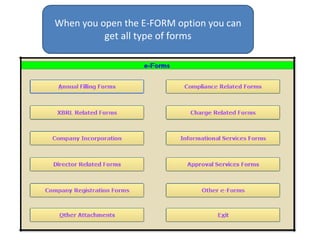
When you open the E-FORM option you can
get all type of forms
E-filing forms
FOR COMPANY INCORPORATION:
Such type of forms are :
Form INC 1: Application for the reservation of the name
Form INC 7: Application for the incorporation of company
Form INC 22 :Notice of situation or change of situation or registered office.
Form DIR 12: Particulars of appointment of director.
FOR THE ANNUAL FILING FORM:
ANNUAL FILING forms {form 20 B, 23AC, 23ACA, 21A, 66}
IMPRTANT NOTE:
For generating annual return firstly you will have to fill the form 20B.then after
only annual return can be generated.
For annual return generation.
➢
Report> annual returns
E-filing forms
FOR FILING FORM MGT: 14
STEP 1: CREATE RESOLUTION FOR WHICH MGT: 14 IS BEING FILED:
MASTER > RESOLUTION
STEP2: THEN REGISTER THE RESOLUTION:
COMPANY INFO > REGISTRATION OF RESOLUTION > NEW > REGISTER
STEP 3: THEN FILL UP THE E FORM:
E FORMS >INFORMATIONAL SERVICES FORMS> FORM MGT: 14.
FOR FILING FORM CHG: 1
STEP 1: CREATE THE PARTICULAR OF THE CHARGES AND CHARGE
HOLDER:
COMPANY INFO > CREATION OF CHARGES
COMPANY INFO >CHARGE HOLDER
STEP 2: GENERATION OF THE FORM CHG 1:
E-FORMS >CHARGE RELATED FORMS>FORM CHG: 1
MCA RELATED
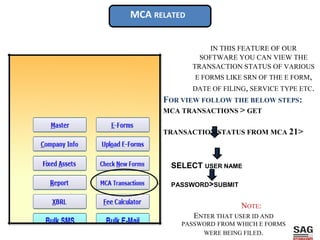
IN THIS FEATURE OF OUR
SOFTWARE YOU CAN VIEW THE
TRANSACTION STATUS OF VARIOUS
E FORMS LIKE SRN OF THE E FORM,
DATE OF FILING, SERVICE TYPE ETC.
FOR VIEW FOLLOW THE BELOW STEPS:
MCA TRANSACTIONS > GET
TRANSACTION STATUS FROM MCA 21>
SELECT USER NAME
PASSWORD>SUBMIT
NOTE:
ENTER THAT USER ID AND
PASSWORD FROM WHICH E FORMS
WERE BEING FILED.
Fee calculator:
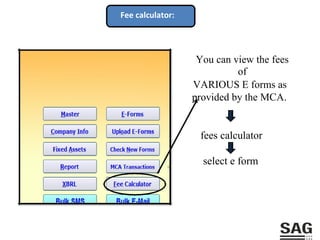
You can view the fees
of
VARIOUS E forms as
provided by the MCA.
fees calculator
select e form
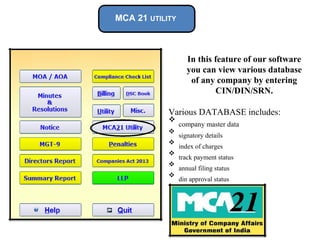
MCA 21 UTILITY
In this feature of our software
you can view various database
of any company by entering
CIN/DIN/SRN.
Various DATABASE includes:
❖
company master data

❖
signatory details

❖
index of charges

❖
track payment status

❖
annual filing status

❖
din approval status

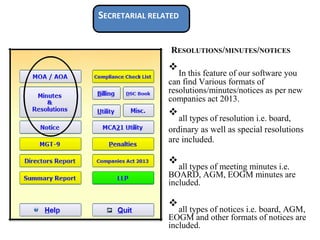
SECRETARIAL RELATED
RESOLUTIONS/MINUTES/NOTICES
❖
In this feature of our software you
can find Various formats of
resolutions/minutes/notices as per new
companies act 2013.

❖
all types of resolution i.e. board,

ordinary as well as special resolutions
are included.



❖
all types of meeting minutes i.e.
BOARD, AGM, EOGM minutes are
included.


❖
all types of notices i.e. board, AGM,
EOGM and other formats of notices are
included.

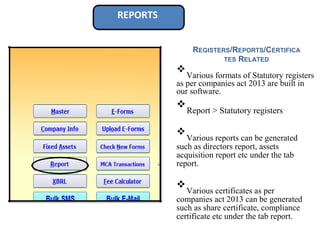
REPORTS
REGISTERS/REPORTS/CERTIFICA
TES RELATED
❖
Various formats of Statutory registers
as per companies act 2013 are built in
our software.

❖
Report > Statutory registers



❖
Various reports can be generated
such as directors report, assets
acquisition report etc under the tab
report.



❖
Various certificates as per
companies act 2013 can be generated
such as share certificate, compliance
certificate etc under the tab report.

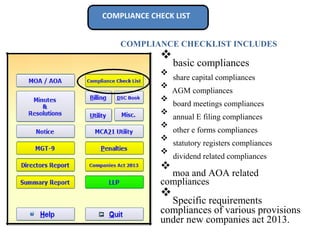
COMPLIANCE CHECK LIST
COMPLIANCE CHECKLIST INCLUDES
❖
basic compliances

❖
share capital compliances

❖
AGM compliances

❖
board meetings compliances

❖
annual E filing compliances

❖
other e forms compliances

❖
statutory registers compliances

❖
dividend related compliances

❖
moa and AOA related
compliances

❖
Specific requirements
compliances of various provisions
under new companies act 2013.

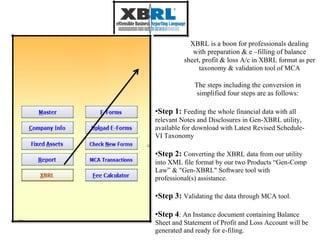
XBRL is a boon for professionals dealing
with preparation & e –filling of balance
sheet, profit & loss A/c in XBRL format as per
taxonomy & validation tool of MCA
The steps including the conversion in
simplified four steps are as follows:
•Step 1: Feeding the whole financial data with all
relevant Notes and Disclosures in Gen-XBRL utility,
available for download with Latest Revised Schedule-
VI Taxonomy
•Step 2: Converting the XBRL data from our utility
into XML file format by our two Products “Gen-Comp
Law” & "Gen-XBRL" Software tool with
professional(s) assistance.
•Step 3: Validating the data through MCA tool.
•Step 4: An Instance document containing Balance
Sheet and Statement of Profit and Loss Account will be
generated and ready for e-filing.
Thanks for using Our Product and
services!

MCA e-Filing Software

  • 1.
    HELP MANUAL BASIC FEATURESTO USE Our COMPANY LAW SOFTWARE
  • 2.
    As we saidwe provide the best and easy solution to our client… This help manual gives you the simple procedure. Through which you can easily access our software functions & features. By following procedure given below.
  • 3.
    PROCEDURE STEPS… Step 1 ❖ Companycreation : MASTER > Company > New Company ❖ Create Master data of the Directors: Master > Director ❖ Create master data of the subscribers: MASTERS> SUBSCRIBER ❖ Create master of CA/CS: Master> CA/CS MASTER NOTE :In our software we gives you the facility to import the master through MCA Master data of company and director IN OUR SOFTWARE FACILITY TO IMPORT DIRTECTORS DETAILS FROM DIRECTORS MASTER IS PROVIDED.
  • 4.
    PROCEDURE STEPS… ➢ STEP 1:CREATE COMPANY : ➢ STEP 2: MAKE NECESSARY APPOINTMENT OF DIRECTORS, CA/CS OF EACH COMPANY: Fill the details of given option.
  • 5.
    Step 2 Make necessaryappointment of directors, CA/CS of each company: Company Info> Director Company Info>CA/CS Enter the Particulars of Subscriber(Detail of subscriber) of each company. Company Info>Subscriber Enter the capital set of each company: Company Info>Share capital>Initial(authorized).
  • 6.
    Keep in mind ImportantNote •Master tab in the software is used for creating database from all companies point of view. •Company Info tab in the software is used for creating database for a single company. •For viewing the authorized signatories of the company in the e form press F4.
  • 7.
    E-Forms By the helpof E-FORM you can generate all E-forms regarding ROC filing. Which is as updated according to the department . Attachment facility is also provided with each type of E-forms.
  • 8.
    When you openthe E-FORM option you can get all type of forms
  • 9.
    E-filing forms FOR COMPANYINCORPORATION: Such type of forms are : Form INC 1: Application for the reservation of the name Form INC 7: Application for the incorporation of company Form INC 22 :Notice of situation or change of situation or registered office. Form DIR 12: Particulars of appointment of director. FOR THE ANNUAL FILING FORM: ANNUAL FILING forms {form 20 B, 23AC, 23ACA, 21A, 66} IMPRTANT NOTE: For generating annual return firstly you will have to fill the form 20B.then after only annual return can be generated. For annual return generation. ➢ Report> annual returns
  • 10.
    E-filing forms FOR FILINGFORM MGT: 14 STEP 1: CREATE RESOLUTION FOR WHICH MGT: 14 IS BEING FILED: MASTER > RESOLUTION STEP2: THEN REGISTER THE RESOLUTION: COMPANY INFO > REGISTRATION OF RESOLUTION > NEW > REGISTER STEP 3: THEN FILL UP THE E FORM: E FORMS >INFORMATIONAL SERVICES FORMS> FORM MGT: 14. FOR FILING FORM CHG: 1 STEP 1: CREATE THE PARTICULAR OF THE CHARGES AND CHARGE HOLDER: COMPANY INFO > CREATION OF CHARGES COMPANY INFO >CHARGE HOLDER STEP 2: GENERATION OF THE FORM CHG 1: E-FORMS >CHARGE RELATED FORMS>FORM CHG: 1
  • 11.
    MCA RELATED IN THISFEATURE OF OUR SOFTWARE YOU CAN VIEW THE TRANSACTION STATUS OF VARIOUS E FORMS LIKE SRN OF THE E FORM, DATE OF FILING, SERVICE TYPE ETC. FOR VIEW FOLLOW THE BELOW STEPS: MCA TRANSACTIONS > GET TRANSACTION STATUS FROM MCA 21> SELECT USER NAME PASSWORD>SUBMIT NOTE: ENTER THAT USER ID AND PASSWORD FROM WHICH E FORMS WERE BEING FILED.
  • 12.
    Fee calculator: You canview the fees of VARIOUS E forms as provided by the MCA. fees calculator select e form
  • 13.
    MCA 21 UTILITY Inthis feature of our software you can view various database of any company by entering CIN/DIN/SRN. Various DATABASE includes: ❖ company master data  ❖ signatory details  ❖ index of charges  ❖ track payment status  ❖ annual filing status  ❖ din approval status 
  • 14.
    SECRETARIAL RELATED RESOLUTIONS/MINUTES/NOTICES ❖ In thisfeature of our software you can find Various formats of resolutions/minutes/notices as per new companies act 2013.  ❖ all types of resolution i.e. board,  ordinary as well as special resolutions are included.    ❖ all types of meeting minutes i.e. BOARD, AGM, EOGM minutes are included.   ❖ all types of notices i.e. board, AGM, EOGM and other formats of notices are included. 
  • 15.
    REPORTS REGISTERS/REPORTS/CERTIFICA TES RELATED ❖ Various formatsof Statutory registers as per companies act 2013 are built in our software.  ❖ Report > Statutory registers    ❖ Various reports can be generated such as directors report, assets acquisition report etc under the tab report.    ❖ Various certificates as per companies act 2013 can be generated such as share certificate, compliance certificate etc under the tab report. 
  • 16.
    COMPLIANCE CHECK LIST COMPLIANCECHECKLIST INCLUDES ❖ basic compliances  ❖ share capital compliances  ❖ AGM compliances  ❖ board meetings compliances  ❖ annual E filing compliances  ❖ other e forms compliances  ❖ statutory registers compliances  ❖ dividend related compliances  ❖ moa and AOA related compliances  ❖ Specific requirements compliances of various provisions under new companies act 2013. 
  • 17.
    XBRL is aboon for professionals dealing with preparation & e –filling of balance sheet, profit & loss A/c in XBRL format as per taxonomy & validation tool of MCA The steps including the conversion in simplified four steps are as follows: •Step 1: Feeding the whole financial data with all relevant Notes and Disclosures in Gen-XBRL utility, available for download with Latest Revised Schedule- VI Taxonomy •Step 2: Converting the XBRL data from our utility into XML file format by our two Products “Gen-Comp Law” & "Gen-XBRL" Software tool with professional(s) assistance. •Step 3: Validating the data through MCA tool. •Step 4: An Instance document containing Balance Sheet and Statement of Profit and Loss Account will be generated and ready for e-filing.
  • 18.
    Thanks for usingOur Product and services!