UNPLUGGED MOBILE CONTROLS
USER GROUP
May 2014
Agenda
 Deep Dive
 UnpDialog
 UnpAlert
 UnpTabbedFooter
 Case Study
 Extracted Design Method (OneView Example)
 Q & A
Deep Dive - UnpDialog
 Problem: dialog(String); cannot be formatted
Deep Dive - UnpDialog
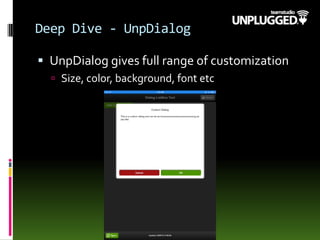
 UnpDialog gives full range of customization
 Size, color, background, font etc
Deep Dive - UnpDialog
 Usage:
1) Drag a UnpDialog control onto your XPage
2) Complete Title and Callback custom properties
3) Drag in a label or computed text for content
Deep Dive - UnpDialog
 Usage:
4) ‘Callback’ is an optional client side JS function
executed on ‘OK’
5) To trigger, call: unp.openDialog('dialogPopup');
Deep Dive - UnpDialog
 Callback is a CSJS function:
Deep Dive - UnpDialog
 Current Disadvantages:
1. Only 1 dialog per page as ID is hard coded
2. Cannot pass arguments into function call
(‘Callback’ property)
Deep Dive - UnpDialog
 OtherAdvantages:
1. Extendable and can include other controls
Deep Dive - UnpDialog
 Example: Selecting an item from a list (2 Options)
1) ComboBox/Dropdown:
Deep Dive - UnpDialog
 ComboBox/Dropdown:
Deep Dive - UnpDialog
 Do not use xp:ListBox for this:
 Blank as the HTML code generated in the same as for
a xp:comboBox
 But no ‘selected’ attribute can be set
Deep Dive - UnpDialog
 Displayed list of items use xp:repeat and ul/li:
Deep Dive - UnpDialog
 Scrollable area inside the dialog
Deep Dive - UnpDialog
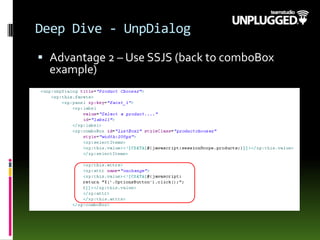
 Advantage 2 – Use SSJS (back to comboBox
example)
Deep Dive - UnpDialog
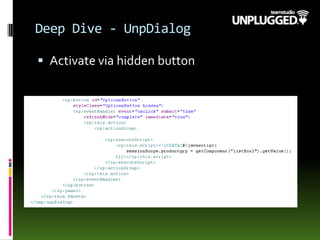
 Activate via hidden button
Deep Dive - UnpDialog
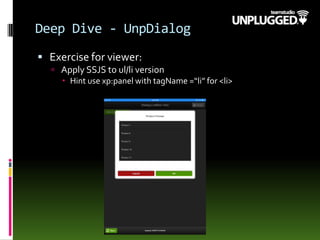
 Exercise for viewer:
 Apply SSJS to ul/li version
 Hint use xp:panel with tagName =“li” for <li>
Deep Dive - UnpAlert
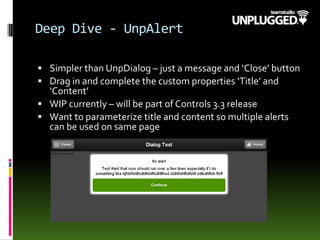
 Simpler than UnpDialog – just a message and ‘Close’ button
 Drag in and complete the custom properties ‘Title’ and
‘Content’
 WIP currently – will be part of Controls 3.3 release
 Want to parameterize title and content so multiple alerts
can be used on same page
Deep Dive – UnpTabbedFooter
 Aid with Navigation usually for large
forms/high number of fields but can be used
as alternative to the UnpNavigator control
 Allows the compartmentalization of form
‘areas’
Deep Dive – UnpTabbedFooter
 Usage:
 Drag the custom control onto your XPage and set the
synctype property to point to either 'none', 'currentDB' or
'alldbs' to allow syncing the current db only (default) or all
dbs on device. If set to 'none' then the sync button will not
appear.
 Create 'tabs' to include tappable areas in the footer for
navigation purposes.Within each 'tab' you can set the icon,
text, icon when tapped and the page to navigate to.
 A callback client side JS function is available to perform
post tap events
 PostSyncTarget will navigate the user to a specified XPage
after a sync has completed *
 Navigation via the tabbed footer is currently performed as
a full page load.
* Not for MobileWeb Browser Apps – only valid for Unplugged apps
Design Architecture – Abstracted
Design
 Creating a mobile design in one NSF that pulls data
from other NSFs.
Design Architecture – Abstracted
Design
 Set up data in a view in existing DBs
 View must be common
Design Architecture – Abstracted
Design
 In new ‘Design DB’:
 Use data sources to external DB’s.
Design Architecture – Abstracted
Design
 Use beforeRenderResponse to collate data
Design Architecture – Abstracted
Design
 Use scoped var to sort data
Design Architecture – Abstracted
Design
 Store results in scoped var
Design Architecture – Abstracted
Design
 Use xp:repeat and Controls CSS to mimic
UnpFlatView
Design Architecture – Abstracted
Design
 Result…
Design Architecture – Abstracted
Design
 For the form data, create the XPage content in
the original DB
 Use a ‘design’ XPage in the new design DB and
load the data via UNID using AJAX
Q & A
 @Unp_UG
 @MobileAppsRule
 @mattwhite
 www.Teamstudio.com/Unplugged
 https://github.com/unplugged/unplugged-
controls

May Unplugged Mobile Controls User Group

  • 1.
  • 2.
    Agenda  Deep Dive UnpDialog  UnpAlert  UnpTabbedFooter  Case Study  Extracted Design Method (OneView Example)  Q & A
  • 3.
    Deep Dive -UnpDialog  Problem: dialog(String); cannot be formatted
  • 4.
    Deep Dive -UnpDialog  UnpDialog gives full range of customization  Size, color, background, font etc
  • 5.
    Deep Dive -UnpDialog  Usage: 1) Drag a UnpDialog control onto your XPage 2) Complete Title and Callback custom properties 3) Drag in a label or computed text for content
  • 6.
    Deep Dive -UnpDialog  Usage: 4) ‘Callback’ is an optional client side JS function executed on ‘OK’ 5) To trigger, call: unp.openDialog('dialogPopup');
  • 7.
    Deep Dive -UnpDialog  Callback is a CSJS function:
  • 8.
    Deep Dive -UnpDialog  Current Disadvantages: 1. Only 1 dialog per page as ID is hard coded 2. Cannot pass arguments into function call (‘Callback’ property)
  • 9.
    Deep Dive -UnpDialog  OtherAdvantages: 1. Extendable and can include other controls
  • 10.
    Deep Dive -UnpDialog  Example: Selecting an item from a list (2 Options) 1) ComboBox/Dropdown:
  • 11.
    Deep Dive -UnpDialog  ComboBox/Dropdown:
  • 12.
    Deep Dive -UnpDialog  Do not use xp:ListBox for this:  Blank as the HTML code generated in the same as for a xp:comboBox  But no ‘selected’ attribute can be set
  • 13.
    Deep Dive -UnpDialog  Displayed list of items use xp:repeat and ul/li:
  • 14.
    Deep Dive -UnpDialog  Scrollable area inside the dialog
  • 15.
    Deep Dive -UnpDialog  Advantage 2 – Use SSJS (back to comboBox example)
  • 16.
    Deep Dive -UnpDialog  Activate via hidden button
  • 17.
    Deep Dive -UnpDialog  Exercise for viewer:  Apply SSJS to ul/li version  Hint use xp:panel with tagName =“li” for <li>
  • 18.
    Deep Dive -UnpAlert  Simpler than UnpDialog – just a message and ‘Close’ button  Drag in and complete the custom properties ‘Title’ and ‘Content’  WIP currently – will be part of Controls 3.3 release  Want to parameterize title and content so multiple alerts can be used on same page
  • 19.
    Deep Dive –UnpTabbedFooter  Aid with Navigation usually for large forms/high number of fields but can be used as alternative to the UnpNavigator control  Allows the compartmentalization of form ‘areas’
  • 20.
    Deep Dive –UnpTabbedFooter  Usage:  Drag the custom control onto your XPage and set the synctype property to point to either 'none', 'currentDB' or 'alldbs' to allow syncing the current db only (default) or all dbs on device. If set to 'none' then the sync button will not appear.  Create 'tabs' to include tappable areas in the footer for navigation purposes.Within each 'tab' you can set the icon, text, icon when tapped and the page to navigate to.  A callback client side JS function is available to perform post tap events  PostSyncTarget will navigate the user to a specified XPage after a sync has completed *  Navigation via the tabbed footer is currently performed as a full page load. * Not for MobileWeb Browser Apps – only valid for Unplugged apps
  • 21.
    Design Architecture –Abstracted Design  Creating a mobile design in one NSF that pulls data from other NSFs.
  • 22.
    Design Architecture –Abstracted Design  Set up data in a view in existing DBs  View must be common
  • 23.
    Design Architecture –Abstracted Design  In new ‘Design DB’:  Use data sources to external DB’s.
  • 24.
    Design Architecture –Abstracted Design  Use beforeRenderResponse to collate data
  • 25.
    Design Architecture –Abstracted Design  Use scoped var to sort data
  • 26.
    Design Architecture –Abstracted Design  Store results in scoped var
  • 27.
    Design Architecture –Abstracted Design  Use xp:repeat and Controls CSS to mimic UnpFlatView
  • 28.
    Design Architecture –Abstracted Design  Result…
  • 29.
    Design Architecture –Abstracted Design  For the form data, create the XPage content in the original DB  Use a ‘design’ XPage in the new design DB and load the data via UNID using AJAX
  • 30.
    Q & A @Unp_UG  @MobileAppsRule  @mattwhite  www.Teamstudio.com/Unplugged  https://github.com/unplugged/unplugged- controls