Mastering WordPress
Custom Post Types
By Mike Schinkel – @mikeschinkel
For WordCamp Atlanta Feb 2012
Slides Available Now

 On SpeakerDeck (PDF):

 On SlideShare(PPTX):

 The Code (either one):
416style
Who Am I?

 Conflicted: ½ Entrepreneur, ½ Web Developer

 Founder &Prez of NewClarity in Atlanta – We:
   Build Plugins for Distribution via WordPress.org
   Extend WordPress for Vertical Market CMS

Active Teacher
   350+ Answers on SE’s WordPress Answers
   Former Meetup Organizer & Presenter
   Former Developer Trainer
What do I know?

 Tends to develop deep expertise in narrow areas.
 2010-2012 – WordPress + PHP + MySQL + jQuery
 2007-2009 – Drupal + PHP + MySQL
 1995-2006 – ASP + VBScript + MS SQL Server
 1993-1994 – Visual Basic + Access Database
 1987-1993 – Clipper for DOS
 1985-1986 – dBase II & dBase III
 1983-1984 – Turbo Pascal
My Primary Toolset
    Mostly commercial because they are worth it.


 PhpStorm ($99) + Zend Debugger (free)
 Navicat for MySQL ($79)
 VirtualHostX ($40)
 Transmit for FTP ($34)/FileZilla (free)
 HTTPScoop ($15)
 Apache+PHP (on Mac OS X), MySQL (free)
What We’ll Cover Today
           Everything will be in PHP


1. Define a Custom Post Type in PHP
2. Custom Form ("MetaBox") + Custom Fields
3. Theme Template for Custom Post Type
4. Custom Columns in Admin Post List
5. Custom Taxonomies for any Post Type
Today (cont’d)

6. Configure Edit Screens for Posts and Pages
7. Parent Post Field in a Post Editor Metabox
8. Querying Custom Post Types
9. Hierarchical URLs for Custom Post Types
10. Custom Post Type Filters in Admin Post List
 Recognize and Bypass the Various Gotchas!
What Today’s Post Type?


Example Today:
“PressedComics”
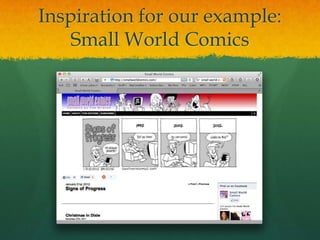
Inspiration for our example:
    Small World Comics
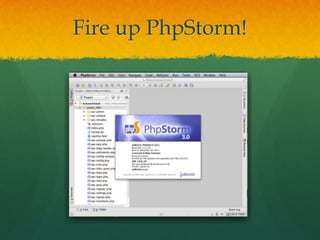
Fire up PhpStorm!
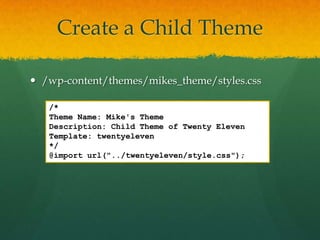
Create a Child Theme

 /wp-content/themes/mikes_theme/styles.css

   /*
   Theme Name: Mike's Theme
   Description: Child Theme of Twenty Eleven
   Template: twentyeleven
   */
   @import url("../twentyeleven/style.css");
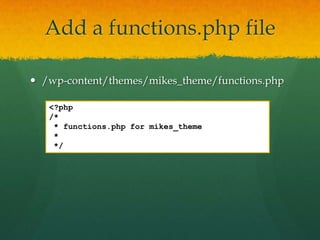
Add a functions.php file

 /wp-content/themes/mikes_theme/functions.php

   <?php
   /*
    * functions.php for mikes_theme
    *
    */
Part 1


     Add a
Custom Post Type
Called "Comics"
Register Post Type
<?php
/*
 * functions.php for mikes_theme
 *
 */

register_post_type( 'comic' );
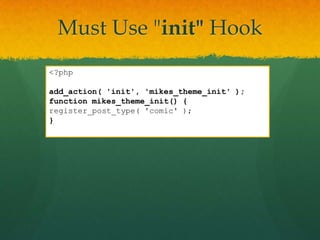
Must Use "init" Hook
<?php

add_action( 'init', 'mikes_theme_init' );
function mikes_theme_init() {
register_post_type( 'comic' );
}
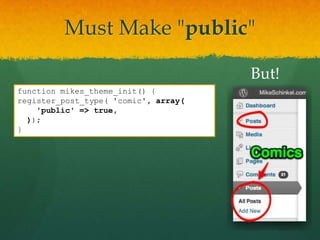
Must Make "public"

                                      But!
function mikes_theme_init() {
register_post_type( 'comic', array(
    'public' => true,
  ));
}
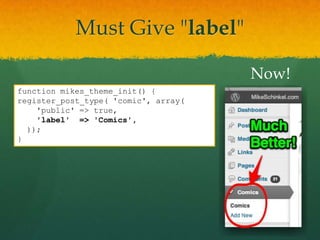
Must Give "label"

                                      Now!
function mikes_theme_init() {
register_post_type( 'comic', array(
    'public' => true,
    'label' => 'Comics',
  ));
}
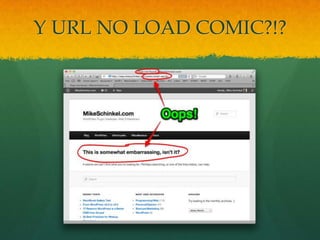
Y URL NO LOAD COMIC?!?
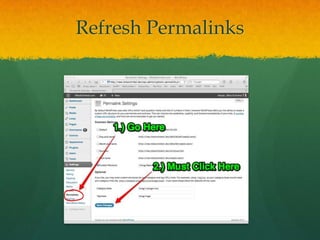
Refresh Permalinks
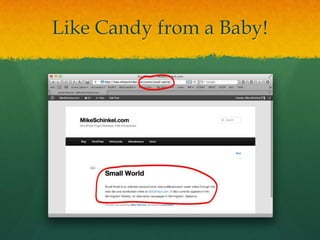
Like Candy from a Baby!
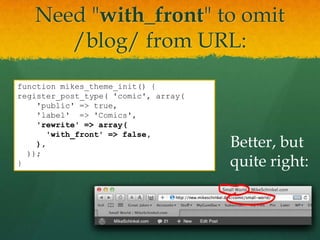
Need "with_front" to omit
      /blog/ from URL:
function mikes_theme_init() {
register_post_type( 'comic', array(
    'public' => true,
    'label' => 'Comics',
    'rewrite' => array(
      'with_front' => false,
    ),                                Better, but
  ));
}                                     quite right:
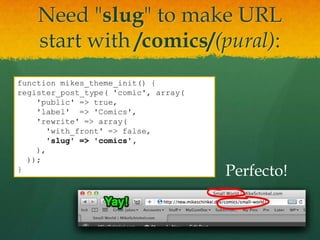
Need "slug" to make URL
    start with /comics/(pural):
function mikes_theme_init() {
register_post_type( 'comic', array(
    'public' => true,
    'label' => 'Comics',
    'rewrite' => array(
      'with_front' => false,
      'slug' => 'comics',
    ),
  ));
}                                     Perfecto!
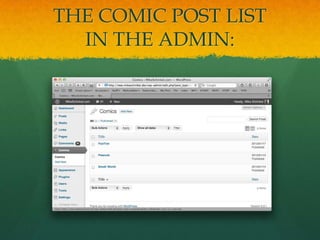
THE COMIC POST LIST
  IN THE ADMIN:
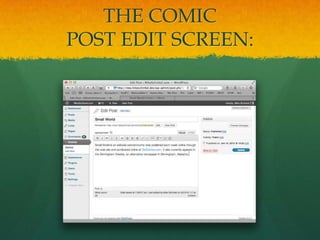
THE COMIC
POST EDIT SCREEN:
Part 2


    Add a
Custom Form
(a "Metabox")
     and
Custom Fields
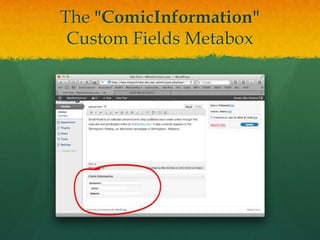
The "ComicInformation"
 Custom Fields Metabox
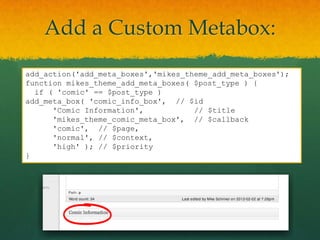
Add a Custom Metabox:
add_action('add_meta_boxes','mikes_theme_add_meta_boxes');
function mikes_theme_add_meta_boxes( $post_type ) {
  if ( 'comic' == $post_type )
add_meta_box( 'comic_info_box', // $id
      'Comic Information',           // $title
      'mikes_theme_comic_meta_box', // $callback
      'comic', // $page,
      'normal', // $context,
      'high' ); // $priority
}
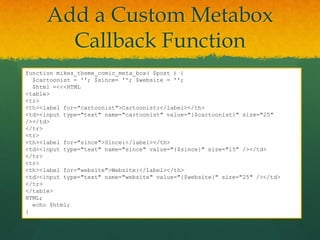
Add a Custom Metabox
        Callback Function
function mikes_theme_comic_meta_box( $post ) {
  $cartoonist = ''; $since= ''; $website = '';
  $html =<<<HTML
<table>
<tr>
<th><label for="cartoonist">Cartoonist:</label></th>
<td><input type="text" name="cartoonist" value="{$cartoonist}" size="25"
/></td>
</tr>
<tr>
<th><label for="since">Since:</label></th>
<td><input type="text" name="since" value="{$since}" size="15" /></td>
</tr>
<tr>
<th><label for="website">Website:</label></th>
<td><input type="text" name="website" value="{$website}" size="25" /></td>
</tr>
</table>
HTML;
  echo $html;
}
Update Custom Fields:

add_action( 'save_post', 'mikes_theme_save_post');
function mikes_theme_save_post( $post_id ) {
  if ( 'comic' == $post_type ) {
update_post_meta($post_id,'_cartoonist',$_POST['cartoonist']);
update_post_meta($post_id,'_since',$_POST['since']);
update_post_meta($post_id,'_website',$_POST['website']);
  }
}


     Note the leading underscores on the
     post meta 'key' names (2nd parameter)
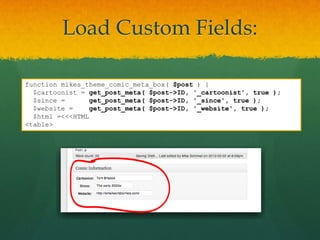
Load Custom Fields:

function mikes_theme_comic_meta_box( $post ) {
  $cartoonist = get_post_meta( $post->ID, '_cartoonist', true );
  $since =       get_post_meta( $post->ID, '_since', true );
  $website =     get_post_meta( $post->ID, '_website', true );
  $html =<<<HTML
<table>
Part 3


     Create a
Theme Template File
      for a
 Custom Post Type
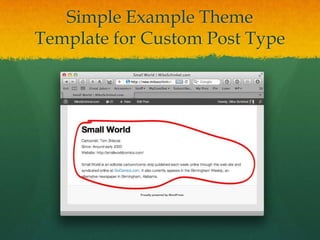
Simple Example Theme
Template for Custom Post Type
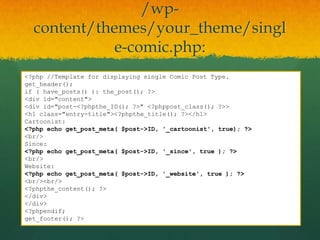
/wp-
  content/themes/your_theme/singl
            e-comic.php:
<?php //Template for displaying single Comic Post Type.
get_header();
if ( have_posts() ): the_post(); ?>
<div id="content">
<div id="post-<?phpthe_ID(); ?>" <?phppost_class(); ?>>
<h1 class="entry-title"><?phpthe_title(); ?></h1>
Cartoonist:
<?php echo get_post_meta( $post->ID, '_cartoonist', true); ?>
<br/>
Since:
<?php echo get_post_meta( $post->ID, '_since', true ); ?>
<br/>
Website:
<?php echo get_post_meta( $post->ID, '_website', true ); ?>
<br/><br/>
<?phpthe_content(); ?>
</div>
</div>
<?phpendif;
get_footer(); ?>
Part 4


Add Admin Columns
     for your
 Custom Post Type
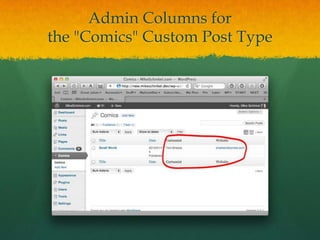
Admin Columns for
the "Comics" Custom Post Type
Use hook
  "manage_edit-{$post_type}_columns"


add_filter(
    'manage_edit-comic_columns',
    'mikes_theme_manage_edit_comic_columns'
);
function mikes_theme_manage_edit_comic_columns( $columns ) {
  $columns['cartoonist'] = 'Cartoonist';
  $columns['website'] = 'Website';
  return $columns;
}
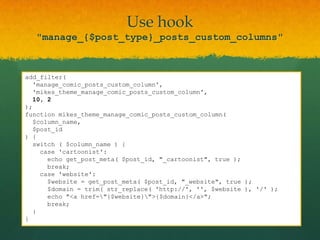
Use hook
   "manage_{$post_type}_posts_custom_columns"


add_filter(
  'manage_comic_posts_custom_column',
  'mikes_theme_manage_comic_posts_custom_column',
  10, 2
);
function mikes_theme_manage_comic_posts_custom_column(
  $column_name,
  $post_id
) {
  switch ( $column_name ) {
    case 'cartoonist':
      echo get_post_meta( $post_id, "_cartoonist", true );
      break;
    case 'website':
      $website = get_post_meta( $post_id, "_website", true );
      $domain = trim( str_replace( 'http://', '', $website ), '/' );
      echo "<a href="{$website}">{$domain}</a>";
      break;
  }
}
Better Admin Columns for
     the "Comics" Custom Post Type

function mikes_theme_manage_edit_comic_columns( $columns ) {
  $new_columns = array();
foreach( $columns as $key => $value ) {
    if ( 'date' == $key ) {
      $new_columns['cartoonist'] = 'Cartoonist';
      $new_columns['website'] = 'Website';
    }
    $new_columns[$key] = $value;
  }
  return $new_columns;
}
Part 5


    Adding a
Custom Taxonomy
  to a Post Type
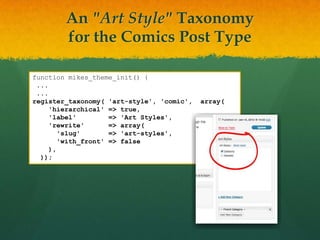
An "Art Style" Taxonomy
        for the Comics Post Type

function mikes_theme_init() {
 ...
 ...
register_taxonomy( 'art-style', 'comic',   array(
     'hierarchical' => true,
     'label'         => 'Art Styles',
     'rewrite'       => array(
        'slug'       => 'art-styles',
        'with_front' => false
     ),
  ));
Part 6


    Configure
 Post Edit Screens
(including Posts and Pages)
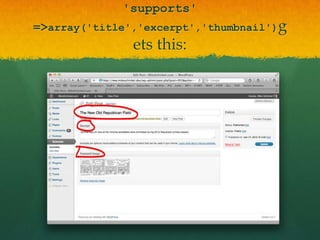
'supports'
=>array('title','excerpt','thumbnail')g
               ets this:
Configure an "Episodes" Post Type
   Specify what it "supports"

  function mikes_theme_init() {
   ...
   ...
  register_post_type( 'episode', array(
       'label' => 'Episodes',
       'public' => true,
       'rewrite' => array(
          'slug' =>'episodes',
          'with_front' => false
       ),
    'supports' => array(
          'title',
          'thumbnail',
          'excerpt'
       ),
    ));
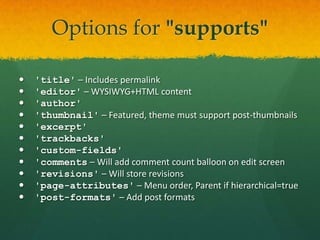
Options for "supports"

   'title' – Includes permalink
   'editor' – WYSIWYG+HTML content
   'author'
   'thumbnail' – Featured, theme must support post-thumbnails
   'excerpt'
   'trackbacks'
   'custom-fields'
   'comments – Will add comment count balloon on edit screen
   'revisions' – Will store revisions
   'page-attributes' – Menu order, Parent if hierarchical=true
   'post-formats' – Add post formats
Part 7


Parent Post Field in a
Post Editor Metabox
 (useful for non-same post types)
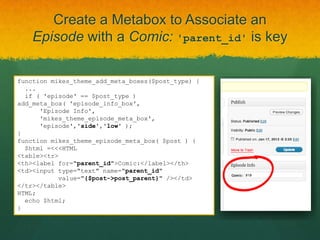
Create a Metabox to Associate an
    Episode with a Comic: 'parent_id' is key

function mikes_theme_add_meta_boxes($post_type) {
  ...
  if ( 'episode' == $post_type )
add_meta_box( 'episode_info_box',
      'Episode Info',
      'mikes_theme_episode_meta_box',
      'episode','side','low' );
}
function mikes_theme_episode_meta_box( $post ) {
  $html =<<<HTML
<table><tr>
<th><label for="parent_id">Comic:</label></th>
<td><input type="text" name="parent_id"
           value="{$post->post_parent}" /></td>
</tr></table>
HTML;
  echo $html;
}
Part 8


 Querying
Custom Post
    Types
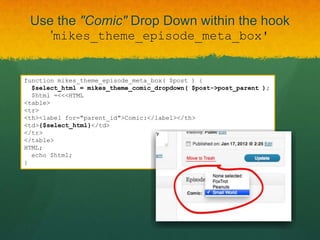
Use the "Comic" Drop Down within the hook
       'mikes_theme_episode_meta_box'


function mikes_theme_episode_meta_box( $post ) {
  $select_html = mikes_theme_comic_dropdown( $post->post_parent );
  $html =<<<HTML
<table>
<tr>
<th><label for="parent_id">Comic:</label></th>
<td>{$select_html}</td>
</tr>
</table>
HTML;
  echo $html;
}
Use WP_Query() to create a "Comic" Drop
    Down for "Episode" Parent Selection


function mikes_theme_comic_dropdown( $selected_id ) {
  $query = new WP_Query( 'post_type=comic&posts_per_page=-1' );
  $comics = array();
foreach( $query->posts as $comic ) {
    $title = get_the_title( $comic->ID );
    $selected = $comic->ID == intval( $selected_id ) ? ' selected' : '';
    $comics[ $comic->ID ] = <<<HTML
<option value="{$comic->ID}"{$selected}>{$title}</option>
HTML;
  }
  $comics = implode( '', $comics );
  $html =<<<HTML
<select name="parent_id">
<option value="0">None selected</option>
{$comics}
</select>
HTML;
  return $html;
}
Part 9


Hierarchical URLs for
 Custom Post Types
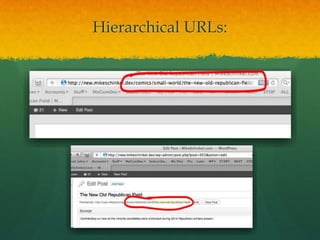
Hierarchical URLs:
Enable /comics/{$comic}/{$episode}/
   such as/comics/small-world/xmas-2012/


1. Call add_rewrite_rule()in 'init'hook.

2. Add 'query_var'arguments to 'comic' and
   'episode' post types named 'comic_qv' and
   'episode_qv', respectively.

3. Add 'post_type_link' hook.

4. Add 'request'hook.
Call add_rewrite_rule() in 'init' hook.
         And add 'query_var' arguments

add_rewrite_rule(
  '^comics/([^/]*)/([^/]*)/?',
  'index.php?post_type=episode&comic_qv=$matches[1]&episode_qv=$matches[2]',
  'top'
);
register_post_type( 'comic', array(
  ...
  'query_var' => 'comic_qv',
  ...
));
register_post_type( 'episode', array(
  ...
  'query_var' => 'episode_qv',
  ...
));
Add 'post_type_link'hook.


add_action( 'post_type_link', 'mikes_theme_post_type_link', 10, 4 );
function mikes_theme_post_type_link( $link, $post, $leavename, $sample ) {
  if ( 'episode' == $post->post_type ) {
    $parent = get_post( $post->post_parent );
    $comic_slug = isset( $parent->post_name )
      ? $parent->post_name
'     : '%comic%';
    $episode_slug = $sample
      ? '%postname%'
      : $post->post_name;
    $link = preg_replace( '#^(https?://[^/]+/).*$#',
      "$1comics/{$comic_slug}/{$episode_slug}/", $link );
  }
  return $link;
}
Add 'request'hook.

add_action( 'request', 'mikes_theme_request' );
function mikes_theme_request( $query_vars ) {
  global $wp;
  if ( ! is_admin() &&
isset( $query_vars['post_type'] ) &&
       'episode' == $query_vars['post_type'] ) {
    $comic = get_page_by_path( $query_vars['comic_qv'], OBJECT, 'comic' );
    $episode_query = new WP_Query( array(
      'name'              => $query_vars['episode_qv'],
      'post_type'         => 'episode',
      'fields'            => 'ids',
      'post_parent'       => $comic->ID,
      'posts_per_page'    => 1,
      'suppress_filters' => true,
    ));
    if ( 0 == count( $episode_query->posts ) ) {
      $query_vars = array( 'error' => '404' );
    }
  }
  return $query_vars;
}
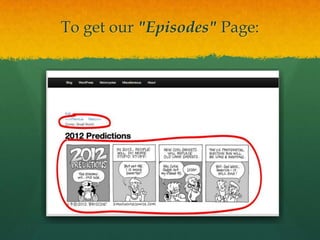
To get our "Episodes" Page:
/wp-
  content/themes/your_theme/singl
            e-episode.php:
<?php
get_header();
if ( have_posts() ): the_post(); ?>
<div id="content">
<div id="post-<?phpthe_ID(); ?>" <?phppost_class(); ?>>
<?phpedit_post_link( 'Edit', '<div class="edit-link">', '</div>' ); ?>
<?phpprevious_post_link( '%link', '&lt;&lt;&lt;Previous' ); ?>
&nbsp;&nbsp;&nbsp;
<?phpnext_post_link( '%link', 'Next&gt&gt&gt;' ); ?>
<h2 class="entry-parent">Comic: <?php echo get_the_title( $post->post_parent );
?></h2>
<h1 class="entry-title"><?phpthe_title(); ?></h1>
<?phpthe_content(); ?>
<?php if ( has_post_thumbnail( $post->ID ) )
       $image_html = wp_get_attachment_image_src(
get_post_thumbnail_id( $post->ID ), 'single-post-thumbnail' );
    ?>
<imgsrc="<?php echo $image_html[0]; ?>">
</div>
</div>
<?phpendif;
get_footer(); ?>
Part 10


Custom Post Type Filters
   in Admin Post List
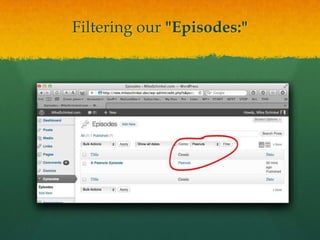
Filtering our "Episodes:"
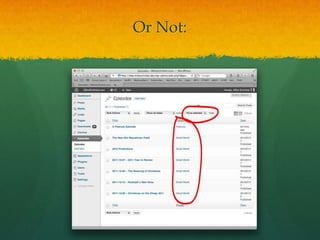
Or Not:
Enable /comics/{$comic}/{$episode}/
    such as/comics/small-world/xmas-2012/


1. Make mikes_theme_comic_dropdown() reusable.

2. Add 'restrict_manage_posts' hook.

3. Add 'pre_get_posts'hook.
Make mikes_theme_comic_dropdown()
             reusable
function mikes_theme_comic_dropdown( $selected_id, $name = 'parent_id' ) {
  $query = new WP_Query( 'post_type=comic&posts_per_page=-1' );
  $comics = array();
foreach( $query->posts as $comic ) {
    $title = get_the_title( $comic->ID );
    $selected = $comic->ID == intval( $selected_id ) ? ' selected' : '';
    $comics[ $comic->ID ] = <<<HTML
<option value="{$comic->ID}"{$selected}>{$title}</option>
HTML;
  }
  $comics = implode( '', $comics );
  $html =<<<HTML
<select name="{$name}">
<option value="0">None selected</option>
{$comics}
</select>
HTML;
  return $html;
}
Add 'restrict_manage_posts' hook.
         And add 'pre_get_posts'hook.

add_action( 'restrict_manage_posts', 'mikes_theme_restrict_manage_posts' );
function mikes_theme_restrict_manage_posts() {
  $comic_id = empty( $_GET['comic_id'] ) ? 0 : $_GET['comic_id'];
  echo 'Comic: ' . mikes_theme_comic_dropdown( $comic_id, 'comic_id' );
}

add_filter('pre_get_posts','mikes_theme_pre_get_posts');
function mikes_theme_pre_get_posts( $query ) {
  global $pagenow, $typenow, $wp_the_query;
  if ( 'edit.php' == $pagenow&& 'episode' == $typenow&&
       $query === $wp_the_query&& ! empty( $_GET['comic_id'] ) ) {
    $query->set( 'post_parent', intval( $_GET['comic_id'] ) );
  }
}
Takeaway


You can do practically anything
  you put your mind to with
WordPress' CPTs and a little PHP!
But Wait!


There's More…
Look for “Sunrise”

 A Platform Extension for WordPress
 Targeting needs of Professional Site Builders
 To be GPL and freely distributed
 Designed to be Modular
 Goal: To Have Community of Module Contributors
 Timeline:
     Pre-Alpha now
     Closed Beta – Q1 2012
     Open Beta – Q2 2012
     Release – Hmm…
Thank You

 To Contact Me:
  Twitter: @mikeschinkel
  http://about.me/mikeschinkel

Mastering Custom Post Types - WordCamp Atlanta 2012

  • 1.
    Mastering WordPress Custom PostTypes By Mike Schinkel – @mikeschinkel For WordCamp Atlanta Feb 2012
  • 2.
    Slides Available Now On SpeakerDeck (PDF):  On SlideShare(PPTX):  The Code (either one):
  • 3.
  • 4.
    Who Am I? Conflicted: ½ Entrepreneur, ½ Web Developer  Founder &Prez of NewClarity in Atlanta – We:  Build Plugins for Distribution via WordPress.org  Extend WordPress for Vertical Market CMS Active Teacher  350+ Answers on SE’s WordPress Answers  Former Meetup Organizer & Presenter  Former Developer Trainer
  • 5.
    What do Iknow?  Tends to develop deep expertise in narrow areas.  2010-2012 – WordPress + PHP + MySQL + jQuery  2007-2009 – Drupal + PHP + MySQL  1995-2006 – ASP + VBScript + MS SQL Server  1993-1994 – Visual Basic + Access Database  1987-1993 – Clipper for DOS  1985-1986 – dBase II & dBase III  1983-1984 – Turbo Pascal
  • 7.
    My Primary Toolset Mostly commercial because they are worth it.  PhpStorm ($99) + Zend Debugger (free)  Navicat for MySQL ($79)  VirtualHostX ($40)  Transmit for FTP ($34)/FileZilla (free)  HTTPScoop ($15)  Apache+PHP (on Mac OS X), MySQL (free)
  • 8.
    What We’ll CoverToday Everything will be in PHP 1. Define a Custom Post Type in PHP 2. Custom Form ("MetaBox") + Custom Fields 3. Theme Template for Custom Post Type 4. Custom Columns in Admin Post List 5. Custom Taxonomies for any Post Type
  • 9.
    Today (cont’d) 6. ConfigureEdit Screens for Posts and Pages 7. Parent Post Field in a Post Editor Metabox 8. Querying Custom Post Types 9. Hierarchical URLs for Custom Post Types 10. Custom Post Type Filters in Admin Post List  Recognize and Bypass the Various Gotchas!
  • 10.
    What Today’s PostType? Example Today: “PressedComics”
  • 11.
    Inspiration for ourexample: Small World Comics
  • 12.
  • 13.
    Create a ChildTheme  /wp-content/themes/mikes_theme/styles.css /* Theme Name: Mike's Theme Description: Child Theme of Twenty Eleven Template: twentyeleven */ @import url("../twentyeleven/style.css");
  • 14.
    Add a functions.phpfile  /wp-content/themes/mikes_theme/functions.php <?php /* * functions.php for mikes_theme * */
  • 15.
    Part 1 Add a Custom Post Type Called "Comics"
  • 16.
    Register Post Type <?php /* * functions.php for mikes_theme * */ register_post_type( 'comic' );
  • 17.
    Must Use "init"Hook <?php add_action( 'init', 'mikes_theme_init' ); function mikes_theme_init() { register_post_type( 'comic' ); }
  • 18.
    Must Make "public" But! function mikes_theme_init() { register_post_type( 'comic', array( 'public' => true, )); }
  • 19.
    Must Give "label" Now! function mikes_theme_init() { register_post_type( 'comic', array( 'public' => true, 'label' => 'Comics', )); }
  • 20.
    Y URL NOLOAD COMIC?!?
  • 21.
  • 22.
  • 23.
    Need "with_front" toomit /blog/ from URL: function mikes_theme_init() { register_post_type( 'comic', array( 'public' => true, 'label' => 'Comics', 'rewrite' => array( 'with_front' => false, ), Better, but )); } quite right:
  • 24.
    Need "slug" tomake URL start with /comics/(pural): function mikes_theme_init() { register_post_type( 'comic', array( 'public' => true, 'label' => 'Comics', 'rewrite' => array( 'with_front' => false, 'slug' => 'comics', ), )); } Perfecto!
  • 25.
    THE COMIC POSTLIST IN THE ADMIN:
  • 26.
  • 27.
    Part 2 Add a Custom Form (a "Metabox") and Custom Fields
  • 28.
  • 29.
    Add a CustomMetabox: add_action('add_meta_boxes','mikes_theme_add_meta_boxes'); function mikes_theme_add_meta_boxes( $post_type ) { if ( 'comic' == $post_type ) add_meta_box( 'comic_info_box', // $id 'Comic Information', // $title 'mikes_theme_comic_meta_box', // $callback 'comic', // $page, 'normal', // $context, 'high' ); // $priority }
  • 30.
    Add a CustomMetabox Callback Function function mikes_theme_comic_meta_box( $post ) { $cartoonist = ''; $since= ''; $website = ''; $html =<<<HTML <table> <tr> <th><label for="cartoonist">Cartoonist:</label></th> <td><input type="text" name="cartoonist" value="{$cartoonist}" size="25" /></td> </tr> <tr> <th><label for="since">Since:</label></th> <td><input type="text" name="since" value="{$since}" size="15" /></td> </tr> <tr> <th><label for="website">Website:</label></th> <td><input type="text" name="website" value="{$website}" size="25" /></td> </tr> </table> HTML; echo $html; }
  • 31.
    Update Custom Fields: add_action('save_post', 'mikes_theme_save_post'); function mikes_theme_save_post( $post_id ) { if ( 'comic' == $post_type ) { update_post_meta($post_id,'_cartoonist',$_POST['cartoonist']); update_post_meta($post_id,'_since',$_POST['since']); update_post_meta($post_id,'_website',$_POST['website']); } } Note the leading underscores on the post meta 'key' names (2nd parameter)
  • 32.
    Load Custom Fields: functionmikes_theme_comic_meta_box( $post ) { $cartoonist = get_post_meta( $post->ID, '_cartoonist', true ); $since = get_post_meta( $post->ID, '_since', true ); $website = get_post_meta( $post->ID, '_website', true ); $html =<<<HTML <table>
  • 33.
    Part 3 Create a Theme Template File for a Custom Post Type
  • 34.
    Simple Example Theme Templatefor Custom Post Type
  • 35.
    /wp- content/themes/your_theme/singl e-comic.php: <?php //Template for displaying single Comic Post Type. get_header(); if ( have_posts() ): the_post(); ?> <div id="content"> <div id="post-<?phpthe_ID(); ?>" <?phppost_class(); ?>> <h1 class="entry-title"><?phpthe_title(); ?></h1> Cartoonist: <?php echo get_post_meta( $post->ID, '_cartoonist', true); ?> <br/> Since: <?php echo get_post_meta( $post->ID, '_since', true ); ?> <br/> Website: <?php echo get_post_meta( $post->ID, '_website', true ); ?> <br/><br/> <?phpthe_content(); ?> </div> </div> <?phpendif; get_footer(); ?>
  • 36.
    Part 4 Add AdminColumns for your Custom Post Type
  • 37.
    Admin Columns for the"Comics" Custom Post Type
  • 38.
    Use hook "manage_edit-{$post_type}_columns" add_filter( 'manage_edit-comic_columns', 'mikes_theme_manage_edit_comic_columns' ); function mikes_theme_manage_edit_comic_columns( $columns ) { $columns['cartoonist'] = 'Cartoonist'; $columns['website'] = 'Website'; return $columns; }
  • 39.
    Use hook "manage_{$post_type}_posts_custom_columns" add_filter( 'manage_comic_posts_custom_column', 'mikes_theme_manage_comic_posts_custom_column', 10, 2 ); function mikes_theme_manage_comic_posts_custom_column( $column_name, $post_id ) { switch ( $column_name ) { case 'cartoonist': echo get_post_meta( $post_id, "_cartoonist", true ); break; case 'website': $website = get_post_meta( $post_id, "_website", true ); $domain = trim( str_replace( 'http://', '', $website ), '/' ); echo "<a href="{$website}">{$domain}</a>"; break; } }
  • 40.
    Better Admin Columnsfor the "Comics" Custom Post Type function mikes_theme_manage_edit_comic_columns( $columns ) { $new_columns = array(); foreach( $columns as $key => $value ) { if ( 'date' == $key ) { $new_columns['cartoonist'] = 'Cartoonist'; $new_columns['website'] = 'Website'; } $new_columns[$key] = $value; } return $new_columns; }
  • 41.
    Part 5 Adding a Custom Taxonomy to a Post Type
  • 42.
    An "Art Style"Taxonomy for the Comics Post Type function mikes_theme_init() { ... ... register_taxonomy( 'art-style', 'comic', array( 'hierarchical' => true, 'label' => 'Art Styles', 'rewrite' => array( 'slug' => 'art-styles', 'with_front' => false ), ));
  • 43.
    Part 6 Configure Post Edit Screens (including Posts and Pages)
  • 44.
  • 45.
    Configure an "Episodes"Post Type Specify what it "supports" function mikes_theme_init() { ... ... register_post_type( 'episode', array( 'label' => 'Episodes', 'public' => true, 'rewrite' => array( 'slug' =>'episodes', 'with_front' => false ), 'supports' => array( 'title', 'thumbnail', 'excerpt' ), ));
  • 46.
    Options for "supports"  'title' – Includes permalink  'editor' – WYSIWYG+HTML content  'author'  'thumbnail' – Featured, theme must support post-thumbnails  'excerpt'  'trackbacks'  'custom-fields'  'comments – Will add comment count balloon on edit screen  'revisions' – Will store revisions  'page-attributes' – Menu order, Parent if hierarchical=true  'post-formats' – Add post formats
  • 47.
    Part 7 Parent PostField in a Post Editor Metabox (useful for non-same post types)
  • 48.
    Create a Metaboxto Associate an Episode with a Comic: 'parent_id' is key function mikes_theme_add_meta_boxes($post_type) { ... if ( 'episode' == $post_type ) add_meta_box( 'episode_info_box', 'Episode Info', 'mikes_theme_episode_meta_box', 'episode','side','low' ); } function mikes_theme_episode_meta_box( $post ) { $html =<<<HTML <table><tr> <th><label for="parent_id">Comic:</label></th> <td><input type="text" name="parent_id" value="{$post->post_parent}" /></td> </tr></table> HTML; echo $html; }
  • 49.
  • 50.
    Use the "Comic"Drop Down within the hook 'mikes_theme_episode_meta_box' function mikes_theme_episode_meta_box( $post ) { $select_html = mikes_theme_comic_dropdown( $post->post_parent ); $html =<<<HTML <table> <tr> <th><label for="parent_id">Comic:</label></th> <td>{$select_html}</td> </tr> </table> HTML; echo $html; }
  • 51.
    Use WP_Query() tocreate a "Comic" Drop Down for "Episode" Parent Selection function mikes_theme_comic_dropdown( $selected_id ) { $query = new WP_Query( 'post_type=comic&posts_per_page=-1' ); $comics = array(); foreach( $query->posts as $comic ) { $title = get_the_title( $comic->ID ); $selected = $comic->ID == intval( $selected_id ) ? ' selected' : ''; $comics[ $comic->ID ] = <<<HTML <option value="{$comic->ID}"{$selected}>{$title}</option> HTML; } $comics = implode( '', $comics ); $html =<<<HTML <select name="parent_id"> <option value="0">None selected</option> {$comics} </select> HTML; return $html; }
  • 52.
    Part 9 Hierarchical URLsfor Custom Post Types
  • 53.
  • 54.
    Enable /comics/{$comic}/{$episode}/ such as/comics/small-world/xmas-2012/ 1. Call add_rewrite_rule()in 'init'hook. 2. Add 'query_var'arguments to 'comic' and 'episode' post types named 'comic_qv' and 'episode_qv', respectively. 3. Add 'post_type_link' hook. 4. Add 'request'hook.
  • 55.
    Call add_rewrite_rule() in'init' hook. And add 'query_var' arguments add_rewrite_rule( '^comics/([^/]*)/([^/]*)/?', 'index.php?post_type=episode&comic_qv=$matches[1]&episode_qv=$matches[2]', 'top' ); register_post_type( 'comic', array( ... 'query_var' => 'comic_qv', ... )); register_post_type( 'episode', array( ... 'query_var' => 'episode_qv', ... ));
  • 56.
    Add 'post_type_link'hook. add_action( 'post_type_link','mikes_theme_post_type_link', 10, 4 ); function mikes_theme_post_type_link( $link, $post, $leavename, $sample ) { if ( 'episode' == $post->post_type ) { $parent = get_post( $post->post_parent ); $comic_slug = isset( $parent->post_name ) ? $parent->post_name ' : '%comic%'; $episode_slug = $sample ? '%postname%' : $post->post_name; $link = preg_replace( '#^(https?://[^/]+/).*$#', "$1comics/{$comic_slug}/{$episode_slug}/", $link ); } return $link; }
  • 57.
    Add 'request'hook. add_action( 'request','mikes_theme_request' ); function mikes_theme_request( $query_vars ) { global $wp; if ( ! is_admin() && isset( $query_vars['post_type'] ) && 'episode' == $query_vars['post_type'] ) { $comic = get_page_by_path( $query_vars['comic_qv'], OBJECT, 'comic' ); $episode_query = new WP_Query( array( 'name' => $query_vars['episode_qv'], 'post_type' => 'episode', 'fields' => 'ids', 'post_parent' => $comic->ID, 'posts_per_page' => 1, 'suppress_filters' => true, )); if ( 0 == count( $episode_query->posts ) ) { $query_vars = array( 'error' => '404' ); } } return $query_vars; }
  • 58.
    To get our"Episodes" Page:
  • 59.
    /wp- content/themes/your_theme/singl e-episode.php: <?php get_header(); if ( have_posts() ): the_post(); ?> <div id="content"> <div id="post-<?phpthe_ID(); ?>" <?phppost_class(); ?>> <?phpedit_post_link( 'Edit', '<div class="edit-link">', '</div>' ); ?> <?phpprevious_post_link( '%link', '&lt;&lt;&lt;Previous' ); ?> &nbsp;&nbsp;&nbsp; <?phpnext_post_link( '%link', 'Next&gt&gt&gt;' ); ?> <h2 class="entry-parent">Comic: <?php echo get_the_title( $post->post_parent ); ?></h2> <h1 class="entry-title"><?phpthe_title(); ?></h1> <?phpthe_content(); ?> <?php if ( has_post_thumbnail( $post->ID ) ) $image_html = wp_get_attachment_image_src( get_post_thumbnail_id( $post->ID ), 'single-post-thumbnail' ); ?> <imgsrc="<?php echo $image_html[0]; ?>"> </div> </div> <?phpendif; get_footer(); ?>
  • 60.
    Part 10 Custom PostType Filters in Admin Post List
  • 61.
  • 62.
  • 63.
    Enable /comics/{$comic}/{$episode}/ such as/comics/small-world/xmas-2012/ 1. Make mikes_theme_comic_dropdown() reusable. 2. Add 'restrict_manage_posts' hook. 3. Add 'pre_get_posts'hook.
  • 64.
    Make mikes_theme_comic_dropdown() reusable function mikes_theme_comic_dropdown( $selected_id, $name = 'parent_id' ) { $query = new WP_Query( 'post_type=comic&posts_per_page=-1' ); $comics = array(); foreach( $query->posts as $comic ) { $title = get_the_title( $comic->ID ); $selected = $comic->ID == intval( $selected_id ) ? ' selected' : ''; $comics[ $comic->ID ] = <<<HTML <option value="{$comic->ID}"{$selected}>{$title}</option> HTML; } $comics = implode( '', $comics ); $html =<<<HTML <select name="{$name}"> <option value="0">None selected</option> {$comics} </select> HTML; return $html; }
  • 65.
    Add 'restrict_manage_posts' hook. And add 'pre_get_posts'hook. add_action( 'restrict_manage_posts', 'mikes_theme_restrict_manage_posts' ); function mikes_theme_restrict_manage_posts() { $comic_id = empty( $_GET['comic_id'] ) ? 0 : $_GET['comic_id']; echo 'Comic: ' . mikes_theme_comic_dropdown( $comic_id, 'comic_id' ); } add_filter('pre_get_posts','mikes_theme_pre_get_posts'); function mikes_theme_pre_get_posts( $query ) { global $pagenow, $typenow, $wp_the_query; if ( 'edit.php' == $pagenow&& 'episode' == $typenow&& $query === $wp_the_query&& ! empty( $_GET['comic_id'] ) ) { $query->set( 'post_parent', intval( $_GET['comic_id'] ) ); } }
  • 66.
    Takeaway You can dopractically anything you put your mind to with WordPress' CPTs and a little PHP!
  • 67.
  • 68.
    Look for “Sunrise” A Platform Extension for WordPress  Targeting needs of Professional Site Builders  To be GPL and freely distributed  Designed to be Modular  Goal: To Have Community of Module Contributors  Timeline:  Pre-Alpha now  Closed Beta – Q1 2012  Open Beta – Q2 2012  Release – Hmm…
  • 69.
    Thank You  ToContact Me:  Twitter: @mikeschinkel  http://about.me/mikeschinkel