Marketo Forms – Advanced Use Cases
1/24/2017 WWW.DEFINITIVE-RESULTS.COM |1-855-MKTGDOC (658-4362) 1
About Me
 15+ years marketing management, strategy, and operations experience
 Marketo Certified Expert
 Worked with companies of all sizes from $1M - $350B in revenue
 Lives in Nashville, Tennessee
 Enjoy movies, music, travel and camping with my husband
and our Basset Hound Fred.
1/24/2017 WWW.DEFINITIVE-RESULTS.COM |1-855-MKTGDOC (658-4362) 2
Agenda
 Forms 2.0 Use Case for Conditional Fields and Field Sets
o Conditional Field Visibility
o Field Sets that Include Conditional Visibility
 Do You Really Need that field?
o How to use a Flexible Field to store temporary data and then clear it out.
1/24/2017 WWW.DEFINITIVE-RESULTS.COM |1-855-MKTGDOC (658-4362) 3
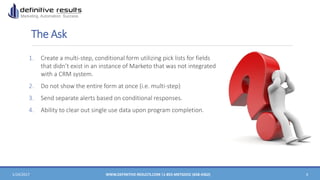
The Ask
1. Create a multi-step, conditional form utilizing pick lists for fields
that didn’t exist in an instance of Marketo that was not integrated
with a CRM system.
2. Do not show the entire form at once (i.e. multi-step)
3. Send separate alerts based on conditional responses.
4. Ability to clear out single use data upon program completion.
1/24/2017 WWW.DEFINITIVE-RESULTS.COM |1-855-MKTGDOC (658-4362) 4
Barriers to Success
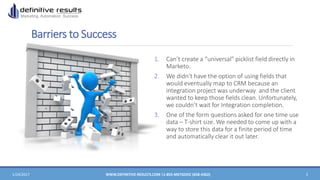
1. Can’t create a “universal” picklist field directly in
Marketo.
2. We didn’t have the option of using fields that
would eventually map to CRM because an
integration project was underway and the client
wanted to keep those fields clean. Unfortunately,
we couldn’t wait for Integration completion.
3. One of the form questions asked for one time use
data – T-shirt size. We needed to come up with a
way to store this data for a finite period of time
and automatically clear it out later.
1/24/2017 WWW.DEFINITIVE-RESULTS.COM |1-855-MKTGDOC (658-4362) 5
Our Big Bright Idea
1. Create four “flex” fields to capture the data, one of which would
be temporary for T-Shirt.
2. Make the first question universal and all other questions would
be conditionally visible based on that initial answer.
3. Create Smart Campaigns to Route Leads based on certain
conditions.
4. Create a Smart Campaign to clear out the temporary data.
1/24/2017 WWW.DEFINITIVE-RESULTS.COM |1-855-MKTGDOC (658-4362) 6
How We Did it – The Flex Fields and picklists
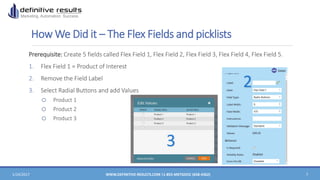
Prerequisite: Create 5 fields called Flex Field 1, Flex Field 2, Flex Field 3, Flex Field 4, Flex Field 5.
1. Flex Field 1 = Product of Interest
2. Remove the Field Label
3. Select Radial Buttons and add Values
o Product 1
o Product 2
o Product 3
1/24/2017 WWW.DEFINITIVE-RESULTS.COM |1-855-MKTGDOC (658-4362) 7
2
3
How We Did it – The Flex Fields and Picklists
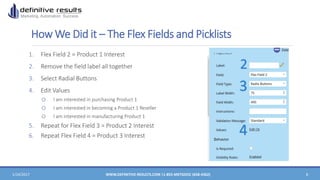
1. Flex Field 2 = Product 1 Interest
2. Remove the field label all together
3. Select Radial Buttons
4. Edit Values
o I am interested in purchasing Product 1
o I am interested in becoming a Product 1 Reseller
o I am interested in manufacturing Product 1
5. Repeat for Flex Field 3 = Product 2 Interest
6. Repeat Flex Field 4 = Product 3 Interest
1/24/2017 WWW.DEFINITIVE-RESULTS.COM |1-855-MKTGDOC (658-4362) 8
2
3
4
How We Did it – Field Containers
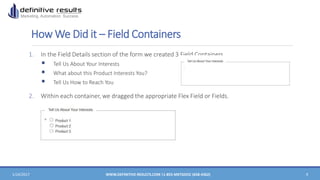
1. In the Field Details section of the form we created 3 Field Containers
 Tell Us About Your Interests
 What about this Product Interests You?
 Tell Us How to Reach You
2. Within each container, we dragged the appropriate Flex Field or Fields.
1/24/2017 WWW.DEFINITIVE-RESULTS.COM |1-855-MKTGDOC (658-4362) 9
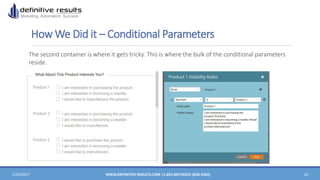
How We Did it – Conditional Parameters
The second container is where it gets tricky. This is where the bulk of the conditional parameters
reside.
1/24/2017 WWW.DEFINITIVE-RESULTS.COM |1-855-MKTGDOC (658-4362) 10
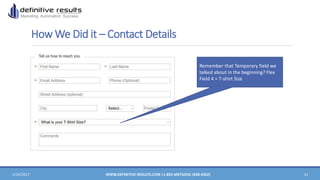
How We Did it – Contact Details
1/24/2017 WWW.DEFINITIVE-RESULTS.COM |1-855-MKTGDOC (658-4362) 11
Remember that Temporary field we
talked about in the beginning? Flex
Field 4 = T-shirt Size
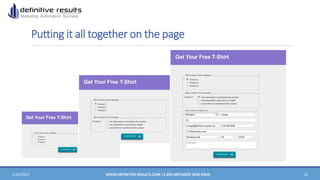
Putting it all together on the page
1/24/2017 WWW.DEFINITIVE-RESULTS.COM |1-855-MKTGDOC (658-4362) 12
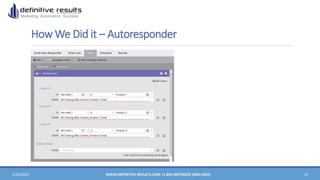
How We Did it – Autoresponder
1/24/2017 WWW.DEFINITIVE-RESULTS.COM |1-855-MKTGDOC (658-4362) 13
How We Did it – Sales Alerts
1/24/2017 WWW.DEFINITIVE-RESULTS.COM |1-855-MKTGDOC (658-4362) 14
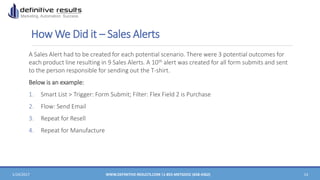
A Sales Alert had to be created for each potential scenario. There were 3 potential outcomes for
each product line resulting in 9 Sales Alerts. A 10th alert was created for all form submits and sent
to the person responsible for sending out the T-shirt.
Below is an example:
1. Smart List > Trigger: Form Submit; Filter: Flex Field 2 is Purchase
2. Flow: Send Email
3. Repeat for Resell
4. Repeat for Manufacture
Bonus Tip – Flex Fields and Temporary Data
1/24/2017 WWW.DEFINITIVE-RESULTS.COM |1-855-MKTGDOC (658-4362) 15
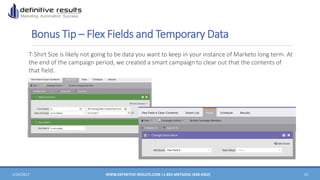
T-Shirt Size is likely not going to be data you want to keep in your instance of Marketo long term. At
the end of the campaign period, we created a smart campaign to clear out that the contents of
that field.
Questions?
Carly Schrager
CEO and Founder
Definitive Results, LLC
703-624-7285
Margaret Angell
Senior Marketing Automation Consultant
Definitive Results, LLC
615-426-0648

Marketo Forms - Advanced Use Cases

  • 1.
    Marketo Forms –Advanced Use Cases 1/24/2017 WWW.DEFINITIVE-RESULTS.COM |1-855-MKTGDOC (658-4362) 1
  • 2.
    About Me  15+years marketing management, strategy, and operations experience  Marketo Certified Expert  Worked with companies of all sizes from $1M - $350B in revenue  Lives in Nashville, Tennessee  Enjoy movies, music, travel and camping with my husband and our Basset Hound Fred. 1/24/2017 WWW.DEFINITIVE-RESULTS.COM |1-855-MKTGDOC (658-4362) 2
  • 3.
    Agenda  Forms 2.0Use Case for Conditional Fields and Field Sets o Conditional Field Visibility o Field Sets that Include Conditional Visibility  Do You Really Need that field? o How to use a Flexible Field to store temporary data and then clear it out. 1/24/2017 WWW.DEFINITIVE-RESULTS.COM |1-855-MKTGDOC (658-4362) 3
  • 4.
    The Ask 1. Createa multi-step, conditional form utilizing pick lists for fields that didn’t exist in an instance of Marketo that was not integrated with a CRM system. 2. Do not show the entire form at once (i.e. multi-step) 3. Send separate alerts based on conditional responses. 4. Ability to clear out single use data upon program completion. 1/24/2017 WWW.DEFINITIVE-RESULTS.COM |1-855-MKTGDOC (658-4362) 4
  • 5.
    Barriers to Success 1.Can’t create a “universal” picklist field directly in Marketo. 2. We didn’t have the option of using fields that would eventually map to CRM because an integration project was underway and the client wanted to keep those fields clean. Unfortunately, we couldn’t wait for Integration completion. 3. One of the form questions asked for one time use data – T-shirt size. We needed to come up with a way to store this data for a finite period of time and automatically clear it out later. 1/24/2017 WWW.DEFINITIVE-RESULTS.COM |1-855-MKTGDOC (658-4362) 5
  • 6.
    Our Big BrightIdea 1. Create four “flex” fields to capture the data, one of which would be temporary for T-Shirt. 2. Make the first question universal and all other questions would be conditionally visible based on that initial answer. 3. Create Smart Campaigns to Route Leads based on certain conditions. 4. Create a Smart Campaign to clear out the temporary data. 1/24/2017 WWW.DEFINITIVE-RESULTS.COM |1-855-MKTGDOC (658-4362) 6
  • 7.
    How We Didit – The Flex Fields and picklists Prerequisite: Create 5 fields called Flex Field 1, Flex Field 2, Flex Field 3, Flex Field 4, Flex Field 5. 1. Flex Field 1 = Product of Interest 2. Remove the Field Label 3. Select Radial Buttons and add Values o Product 1 o Product 2 o Product 3 1/24/2017 WWW.DEFINITIVE-RESULTS.COM |1-855-MKTGDOC (658-4362) 7 2 3
  • 8.
    How We Didit – The Flex Fields and Picklists 1. Flex Field 2 = Product 1 Interest 2. Remove the field label all together 3. Select Radial Buttons 4. Edit Values o I am interested in purchasing Product 1 o I am interested in becoming a Product 1 Reseller o I am interested in manufacturing Product 1 5. Repeat for Flex Field 3 = Product 2 Interest 6. Repeat Flex Field 4 = Product 3 Interest 1/24/2017 WWW.DEFINITIVE-RESULTS.COM |1-855-MKTGDOC (658-4362) 8 2 3 4
  • 9.
    How We Didit – Field Containers 1. In the Field Details section of the form we created 3 Field Containers  Tell Us About Your Interests  What about this Product Interests You?  Tell Us How to Reach You 2. Within each container, we dragged the appropriate Flex Field or Fields. 1/24/2017 WWW.DEFINITIVE-RESULTS.COM |1-855-MKTGDOC (658-4362) 9
  • 10.
    How We Didit – Conditional Parameters The second container is where it gets tricky. This is where the bulk of the conditional parameters reside. 1/24/2017 WWW.DEFINITIVE-RESULTS.COM |1-855-MKTGDOC (658-4362) 10
  • 11.
    How We Didit – Contact Details 1/24/2017 WWW.DEFINITIVE-RESULTS.COM |1-855-MKTGDOC (658-4362) 11 Remember that Temporary field we talked about in the beginning? Flex Field 4 = T-shirt Size
  • 12.
    Putting it alltogether on the page 1/24/2017 WWW.DEFINITIVE-RESULTS.COM |1-855-MKTGDOC (658-4362) 12
  • 13.
    How We Didit – Autoresponder 1/24/2017 WWW.DEFINITIVE-RESULTS.COM |1-855-MKTGDOC (658-4362) 13
  • 14.
    How We Didit – Sales Alerts 1/24/2017 WWW.DEFINITIVE-RESULTS.COM |1-855-MKTGDOC (658-4362) 14 A Sales Alert had to be created for each potential scenario. There were 3 potential outcomes for each product line resulting in 9 Sales Alerts. A 10th alert was created for all form submits and sent to the person responsible for sending out the T-shirt. Below is an example: 1. Smart List > Trigger: Form Submit; Filter: Flex Field 2 is Purchase 2. Flow: Send Email 3. Repeat for Resell 4. Repeat for Manufacture
  • 15.
    Bonus Tip –Flex Fields and Temporary Data 1/24/2017 WWW.DEFINITIVE-RESULTS.COM |1-855-MKTGDOC (658-4362) 15 T-Shirt Size is likely not going to be data you want to keep in your instance of Marketo long term. At the end of the campaign period, we created a smart campaign to clear out that the contents of that field.
  • 16.
    Questions? Carly Schrager CEO andFounder Definitive Results, LLC 703-624-7285 Margaret Angell Senior Marketing Automation Consultant Definitive Results, LLC 615-426-0648