© MariaDB Corporation Ab
MariaDB
Storage Engines
Serge Frezefond, Cloud Solution Architect
serge.frezefond@mariadb.com
@sfrezefond
http://serge.frezefond.com
* *23/02/2015 1
© MariaDB Corporation Ab
Agenda
• TokuDB
• Spider
• CONNECT
• Conclusion
23/02/2015 2
© MariaDB Corporation Ab
TokuDB - Better Performance
• TokuDB® uses Fractal Tree® technology:
– Internal nodes are similar to B-trees, but they also have
message buffers
– Large block size (4M) enables better compression performance
and range queries.
– Basement nodes support point queries
o Default size 128K
– Optimal I/O utilization:
o Reads: highly compressed data
o Writes: aggregation of multiple operations + high compression.
© MariaDB Corporation Ab
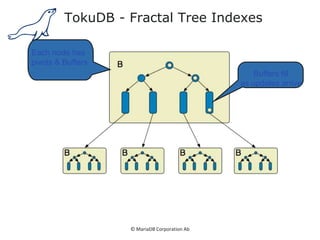
TokuDB - Fractal Tree Indexes
Each node has
pivots & Buffers
Buffers fill
as updates arrive
© MariaDB Corporation Ab
Fractal Tree Indexes
Each node
has pivots & Buffers
Buffers fill
as updates arrive
Flush a buffer
when it fills
A flush might take an I/O,
but it does lots of useful work
More changes per write ➔
fewer changes for same write load ➔
less SSD wear
© MariaDB Corporation Ab
Better Indexing Improves Performance
•
• High performance during INSERT/UPDATE/DELETE operations
© MariaDB Corporation Ab
Typical Strategies
• Partitioning
– Adds complexity
– Table scans, when needed, are slower
• Covering indexes
– Secondary keys require additional PK lookup
– Slows down write operations
• InnoDB compression
– Affects performance
• Read-only slaves
– Adds complexity
– Slave delays
• SSD
© MariaDB Corporation Ab
Using TokuDB
• Partitioning
– Better performance w/ bigger partitions
• CLUSTERING KEY
– Better secondary key insertion
– Less indexes overall
• TokuDB compression
– Always on
– Compression alternatives: quicklz, zlib, lzma
• Read-only slaves
– Upsert / Insert optimization
• SSD
– Compression == better utilization
© MariaDB Corporation Ab
Spider Storage Engine
• Developed by Kentoku Shiba
• Storage Engine „partitions“ tables
across multiple Database Server instances
• Based on Partitions with integrated Sharding
• Virtual view on tables distributed
across Instances
• Supports XA transactions
• Transactional Storage Engine
• Provides Scale-Out
in Combination with HA
9
Application
Customer
A-H
I-P
Q-Z
Spider
Customet
A-H
Shard 1
Customer
I-P
Shard 2
Customer
Q-Z
Shard 3
© MariaDB Corporation Ab
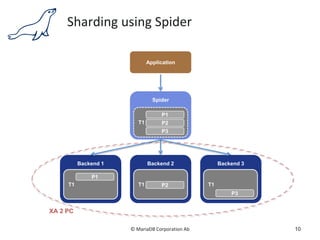
Sharding using Spider
10
Backend 2
Application
Spider
Backend 3
T1
P1
P2
P3
T1 P2 T1
P3
Backend 1
T1
P1
XA 2 PC
© MariaDB Corporation Ab
Sharding with Spider and HA
11
Backend 2
Application
Spider
Backend 3
T1
P1
P2
P3
T1 P2 T1
P3
Backend 1
T1
P1
XA 2 PC
P2
P3
P1
© MariaDB Corporation Ab
Spider Storage Engine
Installation
• Installation
• Spider will be shown as active Storage Engine
12
mysql -uroot -p < /usr/share/mysql/install_spider.sql
SELECT engine, support, transactions, xa FROM
information_schema.engines;
+--------------------+---------+--------------+------+
| engine | support | transactions | xa |
+--------------------+---------+--------------+------+
| SPIDER | YES | YES | YES |
| CSV | YES | NO | NO |
© MariaDB Corporation Ab
Spider Storage Engine
Installation
• Spider creates tables in Schema „mysql“
13
MariaDB [mysql]> show tables like 'spider%';
+---------------------------+
| Tables_in_mysql (spider%) |
+---------------------------+
| spider_link_failed_log |
| spider_link_mon_servers |
| spider_tables |
| spider_xa |
| spider_xa_failed_log |
| spider_xa_member |
+---------------------------+
6 rows in set (0.00 sec)
© MariaDB Corporation Ab
Spider Storage Engine
Installation
• 93 Spider System-Variables will be added
• 4 Spider Status-Values will be added
• More Spider Variables related to tables using CREATE
TABLE
• In MariaDB use COMMENT
• In MySQL use CONNECTION
14
MariaDB [mysql]> show global variables like 'spider%’;
MariaDB [mysql]> show global status like 'spider%’;
© MariaDB Corporation Ab
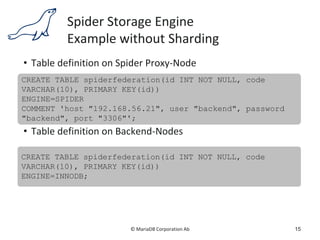
Spider Storage Engine
Example without Sharding
• Table definition on Spider Proxy-Node
• Table definition on Backend-Nodes
15
CREATE TABLE spiderfederation(id INT NOT NULL, code
VARCHAR(10), PRIMARY KEY(id))
ENGINE=SPIDER
COMMENT 'host "192.168.56.21", user "backend", password
"backend", port "3306"';
CREATE TABLE spiderfederation(id INT NOT NULL, code
VARCHAR(10), PRIMARY KEY(id))
ENGINE=INNODB;
© MariaDB Corporation Ab
Spider Storage Engine
Example using Sharding
• Table definition on Spider Proxy-Node
16
CREATE TABLE sharding(id INT NOT NULL, code VARCHAR(10),
PRIMARY KEY(id))
ENGINE=SPIDER COMMENT='user "backend", password
"backend", port "3306", table "sharding"'
PARTITION BY RANGE(id)
(
PARTITION p1 VALUES LESS THAN (100000)
COMMENT 'host "192.168.56.21"',
PARTITION p2 VALUES LESS THAN (200000)
COMMENT 'host "192.168.56.22"',
PARTITION p3 VALUES LESS THAN MAXVALUE
COMMENT 'host "192.168.56.23"'
);
© MariaDB Corporation Ab
Spider Storage Engine
Installation
• Spider UDFs will be added
• SPIDER_DIRECT_SQL
• Execute SQL on Backend-Server
• SPIDER_BG_DIRECT_SQL
• Execute SQL on Backend-Server
• SPIDER_COPY_TABLES
• SPIDER_FLUSH_TABLE_MON_CACHE
• Reset Spider Monitoring Information
17
© MariaDB Corporation Ab
CONNECT Storage Engine
23/02/2015 18
© MariaDB Corporation Ab
Goal of the CONNECT Storage Engine :
BI on various targets
Most of the data in companies is in various
external datasources (many in non relational
database format) :
– relational databases: Oracle, SQL Server…
– Dbase, Firebird, SQlite
– Microsoft Access & Excel
– Distributed mysql servers
– DOS,FIX,BIN,CSV, XML
– stored per column...
Not targeted for OLTP
2014/02/02 19
© MariaDB Corporation Ab
The CONNECT Storage Engine
2014/02/02 20
MySQL Server / MariaDB
MyISA
M
InnoDB Memory Connect
Federate
d
Merge CSV ...
ODBC MySQL XML CSV DIR TBL JSON ...
XML CSV ODBC
MySQ
L
DIR ...
© MariaDB Corporation Ab
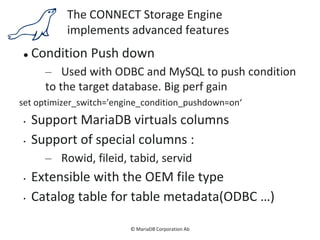
The CONNECT Storage Engine
implements advanced features
 Condition Push down
– Used with ODBC and MySQL to push condition
to the target database. Big perf gain
set optimizer_switch='engine_condition_pushdown=on‘
• Support MariaDB virtuals columns
• Support of special columns :
– Rowid, fileid, tabid, servid
• Extensible with the OEM file type
• Catalog table for table metadata(ODBC …)
© MariaDB Corporation Ab
CONECT
File table type
• DOS,FIX,BIN,FMT,CSV,INI,XML, JSON
• Support virtual tables (DIR)
• Large tables support (>2GB)
• Compression - gzlib format
• Memory file maping
• Add read optimized indexing to files
• Multiple CONNECT tables can be created on the
same underlying file
• Indexes can be shared between tables
© MariaDB Corporation Ab
CONNECT Storage Engine
ODBC table type
Allow to access to any ODBC datasource.
– Excel, Access, Firebird, SQLite
– SQL Server, Oracle, DB2
• Supports insert, update, delete and any other
commands
• Multi files ODBC: consolidated monthly excel
datasheet
• Access to ODBC and UnixODBC data sources
• WHERE conditions are push to the ODBC source
© MariaDB Corporation Ab
XML Table Type
<?xml version="1.0" encoding="ISO-8859-1"?>
<BIBLIO SUBJECT="XML">
<BOOK ISBN="9782212090819" LANG="fr" SUBJECT="applications">
<AUTHOR>
<FIRSTNAME>Jean-Christophe</FIRSTNAME>
<LASTNAME>Bernadac</LASTNAME>
</AUTHOR>
<TITLE>Construire une application XML</TITLE>
<PUBLISHER>
<NAME>Eyrolles</NAME> <PLACE>Paris</PLACE>
</PUBLISHER>
<DATEPUB>1999</DATEPUB>
</BOOK>
</BIBLIO>
© MariaDB Corporation Ab
XML Table Type
create table xsampall (
isbn char(15) field_format='@ISBN',
authorln char(20) field_format='AUTHOR/LASTNAME',
title char(32) field_format='TITLE',
translated char(32) field_format='TRANSLATOR/@PREFIX',
year int(4) field_format='DATEPUB')
engine=CONNECT table_type=XML file_name='Xsample.xml'
tabname='BIBLIO' option_list='rownode=BOOK,skipnull=1';
© MariaDB Corporation Ab
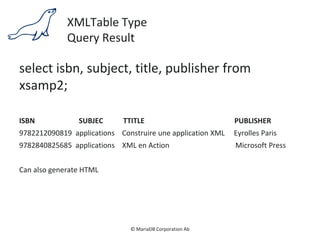
XMLTable Type
Query Result
select isbn, subject, title, publisher from
xsamp2;
ISBN SUBJEC TTITLE PUBLISHER
9782212090819 applications Construire une application XML Eyrolles Paris
9782840825685 applications XML en Action Microsoft Press
Can also generate HTML
© MariaDB Corporation Ab
JSON Table Type
[
{
"ISBN": "9782212090819",
"LANG": "fr",
"SUBJECT": "applications",
"AUTHOR": [
{
"FIRSTNAME": "Jean-Christophe",
"LASTNAME": "Bernadac"
},
… ],
"TITLE": "Construire une application XML",
"PUBLISHER": {
…
© MariaDB Corporation Ab
JSON Table Type
create table jsampall (
ISBN char(15),
Language char(2) field_format='LANG',
Subject char(32) field_format='SUBJECT',
Author char(128) field_format='AUTHOR:[" and "]',
Title char(32) field_format='TITLE',
Publisher char(20) field_format='PUBLISHER:NAME',
Location char(16) field_format='PUBLISHER:PLACE',
Year int(4) field_format='DATEPUB')
engine=CONNECT table_type=JSON File_name='biblio3.jsn';
© MariaDB Corporation Ab
JSON Table Type
Query Result
select title, author, publisher, location from jsampall;
The result is:
Title author publisher location
Construire application XML Jean Bernadac and François Knab Eyrolles Paris
XML en Action William J. Pardi Microsoft Press Paris
© MariaDB Corporation Ab
JSON Table Type
The Jpath Specification
Specification Array Type Description
[n] All Take the nth value of the array. Ignore it if n is 0.
[X] or [x] All Expand. Generate one row for each array value.
["string”] String Concatenate all values separated by the specified string.
[+] Numeric Make the sum of all the array values.
[*] Numeric Make the product of all array values.
[!] Numeric Make the average of all the array values.
[>] or [<] All Return the greatest or least value of the array.
[#] All Return the number of values in the array.
[] All Sum if numeric, else concatenation separated by “, “.
All Take the first value if an array.
© MariaDB Corporation Ab
Questions?
www.mariadb.com
www.facebook.com/mariadb.dbms
www.twitter.com/mariadb
------------------------------------
Serge Frezefond, Cloud Solution Architect
serge.frezefond@mariadb.com
@sfrezefond
http://serge.frezefond.com

MariaDB pres at LeMUG

  • 1.
    © MariaDB CorporationAb MariaDB Storage Engines Serge Frezefond, Cloud Solution Architect serge.frezefond@mariadb.com @sfrezefond http://serge.frezefond.com * *23/02/2015 1
  • 2.
    © MariaDB CorporationAb Agenda • TokuDB • Spider • CONNECT • Conclusion 23/02/2015 2
  • 3.
    © MariaDB CorporationAb TokuDB - Better Performance • TokuDB® uses Fractal Tree® technology: – Internal nodes are similar to B-trees, but they also have message buffers – Large block size (4M) enables better compression performance and range queries. – Basement nodes support point queries o Default size 128K – Optimal I/O utilization: o Reads: highly compressed data o Writes: aggregation of multiple operations + high compression.
  • 4.
    © MariaDB CorporationAb TokuDB - Fractal Tree Indexes Each node has pivots & Buffers Buffers fill as updates arrive
  • 5.
    © MariaDB CorporationAb Fractal Tree Indexes Each node has pivots & Buffers Buffers fill as updates arrive Flush a buffer when it fills A flush might take an I/O, but it does lots of useful work More changes per write ➔ fewer changes for same write load ➔ less SSD wear
  • 6.
    © MariaDB CorporationAb Better Indexing Improves Performance • • High performance during INSERT/UPDATE/DELETE operations
  • 7.
    © MariaDB CorporationAb Typical Strategies • Partitioning – Adds complexity – Table scans, when needed, are slower • Covering indexes – Secondary keys require additional PK lookup – Slows down write operations • InnoDB compression – Affects performance • Read-only slaves – Adds complexity – Slave delays • SSD
  • 8.
    © MariaDB CorporationAb Using TokuDB • Partitioning – Better performance w/ bigger partitions • CLUSTERING KEY – Better secondary key insertion – Less indexes overall • TokuDB compression – Always on – Compression alternatives: quicklz, zlib, lzma • Read-only slaves – Upsert / Insert optimization • SSD – Compression == better utilization
  • 9.
    © MariaDB CorporationAb Spider Storage Engine • Developed by Kentoku Shiba • Storage Engine „partitions“ tables across multiple Database Server instances • Based on Partitions with integrated Sharding • Virtual view on tables distributed across Instances • Supports XA transactions • Transactional Storage Engine • Provides Scale-Out in Combination with HA 9 Application Customer A-H I-P Q-Z Spider Customet A-H Shard 1 Customer I-P Shard 2 Customer Q-Z Shard 3
  • 10.
    © MariaDB CorporationAb Sharding using Spider 10 Backend 2 Application Spider Backend 3 T1 P1 P2 P3 T1 P2 T1 P3 Backend 1 T1 P1 XA 2 PC
  • 11.
    © MariaDB CorporationAb Sharding with Spider and HA 11 Backend 2 Application Spider Backend 3 T1 P1 P2 P3 T1 P2 T1 P3 Backend 1 T1 P1 XA 2 PC P2 P3 P1
  • 12.
    © MariaDB CorporationAb Spider Storage Engine Installation • Installation • Spider will be shown as active Storage Engine 12 mysql -uroot -p < /usr/share/mysql/install_spider.sql SELECT engine, support, transactions, xa FROM information_schema.engines; +--------------------+---------+--------------+------+ | engine | support | transactions | xa | +--------------------+---------+--------------+------+ | SPIDER | YES | YES | YES | | CSV | YES | NO | NO |
  • 13.
    © MariaDB CorporationAb Spider Storage Engine Installation • Spider creates tables in Schema „mysql“ 13 MariaDB [mysql]> show tables like 'spider%'; +---------------------------+ | Tables_in_mysql (spider%) | +---------------------------+ | spider_link_failed_log | | spider_link_mon_servers | | spider_tables | | spider_xa | | spider_xa_failed_log | | spider_xa_member | +---------------------------+ 6 rows in set (0.00 sec)
  • 14.
    © MariaDB CorporationAb Spider Storage Engine Installation • 93 Spider System-Variables will be added • 4 Spider Status-Values will be added • More Spider Variables related to tables using CREATE TABLE • In MariaDB use COMMENT • In MySQL use CONNECTION 14 MariaDB [mysql]> show global variables like 'spider%’; MariaDB [mysql]> show global status like 'spider%’;
  • 15.
    © MariaDB CorporationAb Spider Storage Engine Example without Sharding • Table definition on Spider Proxy-Node • Table definition on Backend-Nodes 15 CREATE TABLE spiderfederation(id INT NOT NULL, code VARCHAR(10), PRIMARY KEY(id)) ENGINE=SPIDER COMMENT 'host "192.168.56.21", user "backend", password "backend", port "3306"'; CREATE TABLE spiderfederation(id INT NOT NULL, code VARCHAR(10), PRIMARY KEY(id)) ENGINE=INNODB;
  • 16.
    © MariaDB CorporationAb Spider Storage Engine Example using Sharding • Table definition on Spider Proxy-Node 16 CREATE TABLE sharding(id INT NOT NULL, code VARCHAR(10), PRIMARY KEY(id)) ENGINE=SPIDER COMMENT='user "backend", password "backend", port "3306", table "sharding"' PARTITION BY RANGE(id) ( PARTITION p1 VALUES LESS THAN (100000) COMMENT 'host "192.168.56.21"', PARTITION p2 VALUES LESS THAN (200000) COMMENT 'host "192.168.56.22"', PARTITION p3 VALUES LESS THAN MAXVALUE COMMENT 'host "192.168.56.23"' );
  • 17.
    © MariaDB CorporationAb Spider Storage Engine Installation • Spider UDFs will be added • SPIDER_DIRECT_SQL • Execute SQL on Backend-Server • SPIDER_BG_DIRECT_SQL • Execute SQL on Backend-Server • SPIDER_COPY_TABLES • SPIDER_FLUSH_TABLE_MON_CACHE • Reset Spider Monitoring Information 17
  • 18.
    © MariaDB CorporationAb CONNECT Storage Engine 23/02/2015 18
  • 19.
    © MariaDB CorporationAb Goal of the CONNECT Storage Engine : BI on various targets Most of the data in companies is in various external datasources (many in non relational database format) : – relational databases: Oracle, SQL Server… – Dbase, Firebird, SQlite – Microsoft Access & Excel – Distributed mysql servers – DOS,FIX,BIN,CSV, XML – stored per column... Not targeted for OLTP 2014/02/02 19
  • 20.
    © MariaDB CorporationAb The CONNECT Storage Engine 2014/02/02 20 MySQL Server / MariaDB MyISA M InnoDB Memory Connect Federate d Merge CSV ... ODBC MySQL XML CSV DIR TBL JSON ... XML CSV ODBC MySQ L DIR ...
  • 21.
    © MariaDB CorporationAb The CONNECT Storage Engine implements advanced features  Condition Push down – Used with ODBC and MySQL to push condition to the target database. Big perf gain set optimizer_switch='engine_condition_pushdown=on‘ • Support MariaDB virtuals columns • Support of special columns : – Rowid, fileid, tabid, servid • Extensible with the OEM file type • Catalog table for table metadata(ODBC …)
  • 22.
    © MariaDB CorporationAb CONECT File table type • DOS,FIX,BIN,FMT,CSV,INI,XML, JSON • Support virtual tables (DIR) • Large tables support (>2GB) • Compression - gzlib format • Memory file maping • Add read optimized indexing to files • Multiple CONNECT tables can be created on the same underlying file • Indexes can be shared between tables
  • 23.
    © MariaDB CorporationAb CONNECT Storage Engine ODBC table type Allow to access to any ODBC datasource. – Excel, Access, Firebird, SQLite – SQL Server, Oracle, DB2 • Supports insert, update, delete and any other commands • Multi files ODBC: consolidated monthly excel datasheet • Access to ODBC and UnixODBC data sources • WHERE conditions are push to the ODBC source
  • 24.
    © MariaDB CorporationAb XML Table Type <?xml version="1.0" encoding="ISO-8859-1"?> <BIBLIO SUBJECT="XML"> <BOOK ISBN="9782212090819" LANG="fr" SUBJECT="applications"> <AUTHOR> <FIRSTNAME>Jean-Christophe</FIRSTNAME> <LASTNAME>Bernadac</LASTNAME> </AUTHOR> <TITLE>Construire une application XML</TITLE> <PUBLISHER> <NAME>Eyrolles</NAME> <PLACE>Paris</PLACE> </PUBLISHER> <DATEPUB>1999</DATEPUB> </BOOK> </BIBLIO>
  • 25.
    © MariaDB CorporationAb XML Table Type create table xsampall ( isbn char(15) field_format='@ISBN', authorln char(20) field_format='AUTHOR/LASTNAME', title char(32) field_format='TITLE', translated char(32) field_format='TRANSLATOR/@PREFIX', year int(4) field_format='DATEPUB') engine=CONNECT table_type=XML file_name='Xsample.xml' tabname='BIBLIO' option_list='rownode=BOOK,skipnull=1';
  • 26.
    © MariaDB CorporationAb XMLTable Type Query Result select isbn, subject, title, publisher from xsamp2; ISBN SUBJEC TTITLE PUBLISHER 9782212090819 applications Construire une application XML Eyrolles Paris 9782840825685 applications XML en Action Microsoft Press Can also generate HTML
  • 27.
    © MariaDB CorporationAb JSON Table Type [ { "ISBN": "9782212090819", "LANG": "fr", "SUBJECT": "applications", "AUTHOR": [ { "FIRSTNAME": "Jean-Christophe", "LASTNAME": "Bernadac" }, … ], "TITLE": "Construire une application XML", "PUBLISHER": { …
  • 28.
    © MariaDB CorporationAb JSON Table Type create table jsampall ( ISBN char(15), Language char(2) field_format='LANG', Subject char(32) field_format='SUBJECT', Author char(128) field_format='AUTHOR:[" and "]', Title char(32) field_format='TITLE', Publisher char(20) field_format='PUBLISHER:NAME', Location char(16) field_format='PUBLISHER:PLACE', Year int(4) field_format='DATEPUB') engine=CONNECT table_type=JSON File_name='biblio3.jsn';
  • 29.
    © MariaDB CorporationAb JSON Table Type Query Result select title, author, publisher, location from jsampall; The result is: Title author publisher location Construire application XML Jean Bernadac and François Knab Eyrolles Paris XML en Action William J. Pardi Microsoft Press Paris
  • 30.
    © MariaDB CorporationAb JSON Table Type The Jpath Specification Specification Array Type Description [n] All Take the nth value of the array. Ignore it if n is 0. [X] or [x] All Expand. Generate one row for each array value. ["string”] String Concatenate all values separated by the specified string. [+] Numeric Make the sum of all the array values. [*] Numeric Make the product of all array values. [!] Numeric Make the average of all the array values. [>] or [<] All Return the greatest or least value of the array. [#] All Return the number of values in the array. [] All Sum if numeric, else concatenation separated by “, “. All Take the first value if an array.
  • 31.
    © MariaDB CorporationAb Questions? www.mariadb.com www.facebook.com/mariadb.dbms www.twitter.com/mariadb ------------------------------------ Serge Frezefond, Cloud Solution Architect serge.frezefond@mariadb.com @sfrezefond http://serge.frezefond.com