Image Alt Tags For Magento 2
Image Alt Tags Extension for Magento 2 will help store owners automatically create SEO
wealthy alternate tags for product images and elevate search rankings.
Table of Content
1. Configuration
2. Frontend Demo of Google Address Lookup
1. Configuration
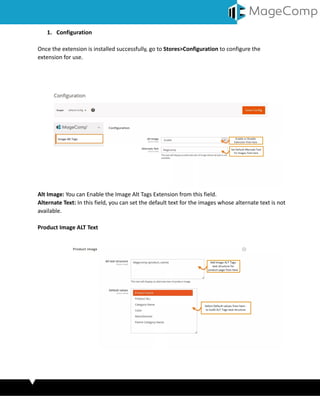
Once the extension is installed successfully, go to Stores>Configuration to configure the
extension for use.
Alt Image: You can Enable the Image Alt Tags Extension from this field.
Alternate Text: In this field, you can set the default text for the images whose alternate text is not
available.
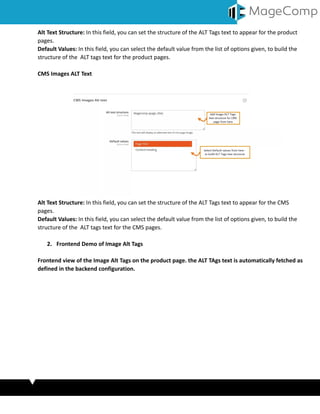
Product Image ALT Text
Alt Text Structure: In this field, you can set the structure of the ALT Tags text to appear for the product
pages.
Default Values: In this field, you can select the default value from the list of options given, to build the
structure of the ALT tags text for the product pages.
CMS Images ALT Text
Alt Text Structure: In this field, you can set the structure of the ALT Tags text to appear for the CMS
pages.
Default Values: In this field, you can select the default value from the list of options given, to build the
structure of the ALT tags text for the CMS pages.
2. Frontend Demo of Image Alt Tags
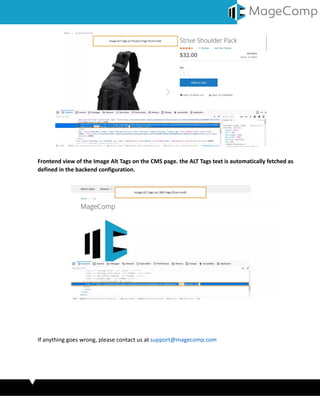
Frontend view of the Image Alt Tags on the product page. the ALT TAgs text is automatically fetched as
defined in the backend configuration.
Frontend view of the Image Alt Tags on the CMS page. the ALT Tags text is automatically fetched as
defined in the backend configuration.
If anything goes wrong, please contact us at support@magecomp.com

Magento 2 image alt tags.docx

  • 1.
    Image Alt TagsFor Magento 2 Image Alt Tags Extension for Magento 2 will help store owners automatically create SEO wealthy alternate tags for product images and elevate search rankings. Table of Content 1. Configuration 2. Frontend Demo of Google Address Lookup
  • 2.
    1. Configuration Once theextension is installed successfully, go to Stores>Configuration to configure the extension for use. Alt Image: You can Enable the Image Alt Tags Extension from this field. Alternate Text: In this field, you can set the default text for the images whose alternate text is not available. Product Image ALT Text
  • 3.
    Alt Text Structure:In this field, you can set the structure of the ALT Tags text to appear for the product pages. Default Values: In this field, you can select the default value from the list of options given, to build the structure of the ALT tags text for the product pages. CMS Images ALT Text Alt Text Structure: In this field, you can set the structure of the ALT Tags text to appear for the CMS pages. Default Values: In this field, you can select the default value from the list of options given, to build the structure of the ALT tags text for the CMS pages. 2. Frontend Demo of Image Alt Tags Frontend view of the Image Alt Tags on the product page. the ALT TAgs text is automatically fetched as defined in the backend configuration.
  • 4.
    Frontend view ofthe Image Alt Tags on the CMS page. the ALT Tags text is automatically fetched as defined in the backend configuration. If anything goes wrong, please contact us at support@magecomp.com