Machine Learning , Analytics &
Cyber Security the Next Level
Threat Analytics
Presented BY: Manjunath N V
yoda@security-exploits.com
LinkedIn: https://www.linkedin.com/in/manjunath-kumar-1a222a18
• Education
• B.E. in Computer Science (Bangalore University)
• Post Graduation in S.O.C (university of Edinburgh, Glasgow)
• Post Graduation in Digital Network Communication(London Metropolitan
university)
• Professional Experience
• 15+ Years of Consulting and Training experience in Programming, Networking,
testing & Security.
• Hold 20+ Active Professional Certifications in SECURITY
• Have Trained 3000+ People in Last 8 Years in IT Security
• WARNING – MAD about Security (can talk Hours on the Subject)
Who am I – Manjunath N V
• Theoretical Nature of
• Definitions
• Importance of these Technologies
• Where to Find More resources
• Hands On Materials
• Lab Setup
• Basic Demonstration
• Guidance to Projects
• Market Demand for Technologies
• Project IDEAS
Topics Covered
•JOBS
-Live online Openings
Motivation
• A working Docker IMAGE
• With Python Library installed
• Saved as LOCAL DOCKER IMAGE
• Seems Very simple but need to understand MANY Concepts such as
• Virtualisation
• Containers
• Devops
(WILL SHARE LOT OF self study LAB books for the MOTIVATED)
Final OUTPUT (DEMO)
• Machine Learning (ML)
Google’s definition - Machine learning is a type of artificial intelligence (AI)
that provides computers with the ability to learn without being explicitly
programmed. Machine learning focuses on the development of computer
programs that can teach themselves to grow and change when exposed to
new data.
Definitions
• Data Analytics
Data analysis is a process of inspecting, cleansing, transforming, and
modeling data with the goal of discovering useful information, suggesting
conclusions, and supporting decision-making.
Definitions (Contd.)
• Cyber Security
Cybersecurity is the body of technologies, processes and practices
designed to protect networks, computers, programs and data from attack,
damage or unauthorized access. In a computing context, security includes
both cybersecurityand physical security.
Definitions (Contd.)
• ML + Data Analytics + Cyber Security
Machine learning has been quickly adopted in cybersecurity for its
potential to automate the detection and prevention of attacks, particularly
for next-generation antivirus (NGAV) products. ML models in NGAV have
fundamental advantages compared to traditional AV, including the higher
likelihood of identifying novel, zero-day attacks and targeted malware, an
increased difficulty of evasion, and continued efficacy during prolonged
offline periods
Definitions (Finally.)
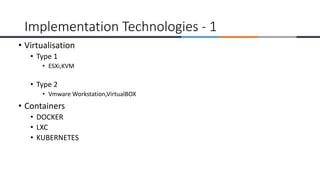
• Virtualisation
• Type 1
• ESXi,KVM
• Type 2
• Vmware Workstation,VirtualBOX
• Containers
• DOCKER
• LXC
• KUBERNETES
Implementation Technologies - 1
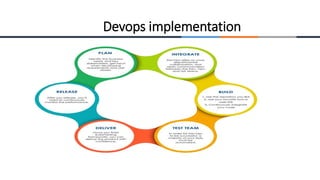
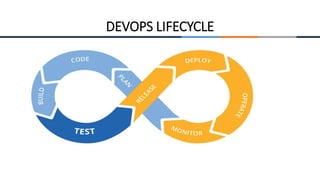
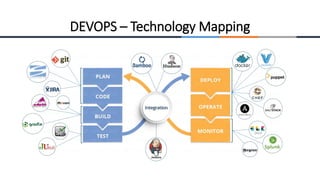
Devops implementation
DEVOPS LIFECYCLE
DEVOPS – Technology Mapping
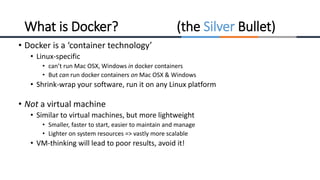
• Docker is a ‘container technology’
• Linux-specific
• can’t run Mac OSX, Windows in docker containers
• But can run docker containers on Mac OSX & Windows
• Shrink-wrap your software, run it on any Linux platform
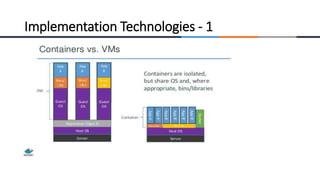
• Not a virtual machine
• Similar to virtual machines, but more lightweight
• Smaller, faster to start, easier to maintain and manage
• Lighter on system resources => vastly more scalable
• VM-thinking will lead to poor results, avoid it!
What is Docker? (the Silver Bullet)
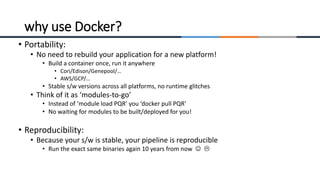
• Portability:
• No need to rebuild your application for a new platform!
• Build a container once, run it anywhere
• Cori/Edison/Genepool/…
• AWS/GCP/…
• Stable s/w versions across all platforms, no runtime glitches
• Think of it as ‘modules-to-go’
• Instead of ‘module load PQR’ you ‘docker pull PQR’
• No waiting for modules to be built/deployed for you!
• Reproducibility:
• Because your s/w is stable, your pipeline is reproducible
• Run the exact same binaries again 10 years from now  
why use Docker?
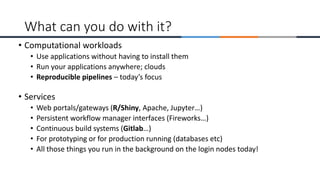
• Computational workloads
• Use applications without having to install them
• Run your applications anywhere; clouds
• Reproducible pipelines – today’s focus
• Services
• Web portals/gateways (R/Shiny, Apache, Jupyter…)
• Persistent workflow manager interfaces (Fireworks…)
• Continuous build systems (Gitlab…)
• For prototyping or for production running (databases etc)
• All those things you run in the background on the login nodes today!
What can you do with it?
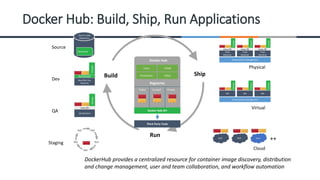
Docker Hub: Build, Ship, Run Applications
Build Ship
Run
Dev
QA
Source
Staging
Physical
Virtual
Cloud
Infrastructure Management
DockerFile
Source Code
Repository
TEST
TEST
TEST
TEST
TEST
GCE RAX Azure
Mac/Win Dev
Machine
Boot2Docker
Docker
Analytics
DB
Prod
Machine
Linux OS
Docker
Docker
++
Users Collab
Provenance Policy
Docker Hub
Registries
Public Curated Private
Docker Hub API
Third Party Tools
Prod
Machine
Linux OS
Docker
Docker
Prod
Machine
Linux OS
Docker
Docker
VM
Docker
Docker
VM
Docker
Docker
VM
Docker
Docker
QA Machine
Linux OS
Docker
Docker
DockerHub provides a centralized resource for container image discovery, distribution
and change management, user and team collaboration, and workflow automation
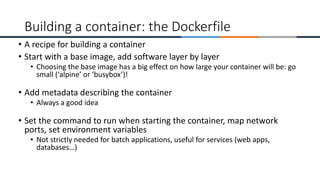
• A recipe for building a container
• Start with a base image, add software layer by layer
• Choosing the base image has a big effect on how large your container will be: go
small (‘alpine’ or ‘busybox’)!
• Add metadata describing the container
• Always a good idea
• Set the command to run when starting the container, map network
ports, set environment variables
• Not strictly needed for batch applications, useful for services (web apps,
databases…)
Building a container: the Dockerfile
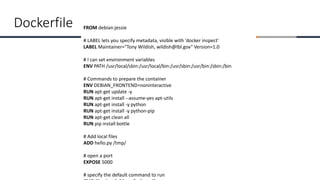
FROM debian:jessie
# LABEL lets you specify metadata, visible with 'docker inspect'
LABEL Maintainer="Tony Wildish, wildish@lbl.gov" Version=1.0
# I can set environment variables
ENV PATH /usr/local/sbin:/usr/local/bin:/usr/sbin:/usr/bin:/sbin:/bin
# Commands to prepare the container
ENV DEBIAN_FRONTEND=noninteractive
RUN apt-get update -y
RUN apt-get install --assume-yes apt-utils
RUN apt-get install -y python
RUN apt-get install -y python-pip
RUN apt-get clean all
RUN pip install bottle
# Add local files
ADD hello.py /tmp/
# open a port
EXPOSE 5000
# specify the default command to run
Dockerfile
- 21 -
FROM debian:jessie
# LABEL lets you specify metadata, visible with 'docker inspect'
LABEL Maintainer="Tony Wildish, wildish@lbl.gov" Version=1.0
# I can set environment variables
ENV PATH /usr/local/sbin:/usr/local/bin:/usr/sbin:/usr/bin:/sbin:/bin
# Commands to prepare the container
ENV DEBIAN_FRONTEND=noninteractive
RUN apt-get update -y
RUN apt-get upgrade -y
RUN apt-get install --assume-yes apt-utils
RUN apt-get install -y python
RUN apt-get install -y python-pip
RUN apt-get clean all
RUN pip install bottle
# Add local files
ADD hello.py /tmp/
# open a port
EXPOSE 5000
# specify the default command to run
CMD ["python", "/tmp/hello.py“]
Name+version
Contact info
Heavy lifting,
install base
tools before
our code
- 22 -
FROM debian:jessie
# LABEL lets you specify metadata, visible with 'docker inspect'
LABEL Maintainer="Tony Wildish, wildish@lbl.gov" Version=1.0
# I can set environment variables
ENV PATH /usr/local/sbin:/usr/local/bin:/usr/sbin:/usr/bin:/sbin:/bin
# Commands to prepare the container
ENV DEBIAN_FRONTEND=noninteractive
RUN apt-get update -y
RUN apt-get upgrade -y
RUN apt-get install --assume-yes apt-utils
RUN apt-get install -y python
RUN apt-get install -y python-pip
RUN apt-get clean all
RUN pip install bottle
# Add local files
ADD hello.py /tmp/
# open a port
EXPOSE 5000
# specify the default command to run
CMD ["python", "/tmp/hello.py“]
Name+version
Contact info
Heavy lifting,
install base
tools before
our code
‘heavy’ base image: 123 MB
Lots of RUN commands
means lots of layers,
not ideal for the cache
Blind update – to what???
Container != VM
Final image
size: 360 MB
Four Examples of What You Can Do with
Docker in Instructional Settings
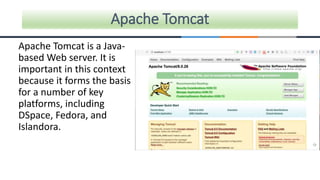
Apache Tomcat is a Java-
based Web server. It is
important in this context
because it forms the basis
for a number of key
platforms, including
DSpace, Fedora, and
Islandora.
Apache Tomcat
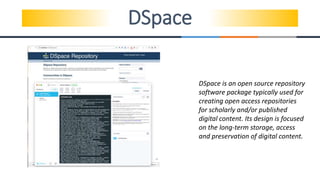
DSpace
DSpace is an open source repository
software package typically used for
creating open access repositories
for scholarly and/or published
digital content. Its design is focused
on the long-term storage, access
and preservation of digital content.
File Information Tool Set (FITS)
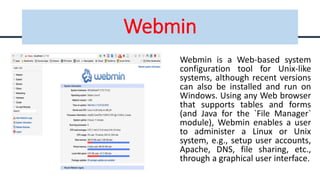
Webmin
Webmin is a Web-based system
configuration tool for Unix-like
systems, although recent versions
can also be installed and run on
Windows. Using any Web browser
that supports tables and forms
(and Java for the `File Manager`
module), Webmin enables a user
to administer a Linux or Unix
system, e.g., setup user accounts,
Apache, DNS, file sharing, etc.,
through a graphical user interface.
• What is machine learning?
• Learning system model
• Training and testing
• Performance
• Algorithms
• Machine learning structure
• Learning techniques
• Applications
An Overview of Machine Learning
• A branch of artificial intelligence, concerned with the design and development of
algorithms that allow computers to evolve behaviors based on empirical data.
• As intelligence requires knowledge, it is necessary for the computers to acquire
knowledge.
What is machine learning?
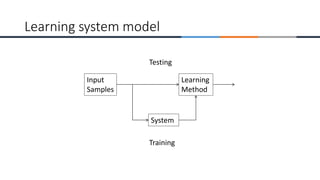
Learning system model
Input
Samples
Learning
Method
System
Training
Testing
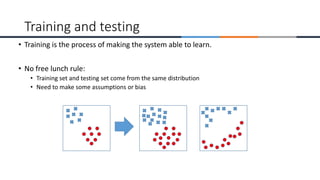
• Training is the process of making the system able to learn.
• No free lunch rule:
• Training set and testing set come from the same distribution
• Need to make some assumptions or bias
Training and testing
• There are several factors affecting the performance:
• Types of training provided
• The form and extent of any initial background knowledge
• The type of feedback provided
• The learning algorithms used
• Two important factors:
• Modeling
• Optimization
Performance
• The success of machine learning system also depends on the algorithms.
• The algorithms control the search to find and build the knowledge structures.
• The learning algorithms should extract useful information from training examples.
Algorithms
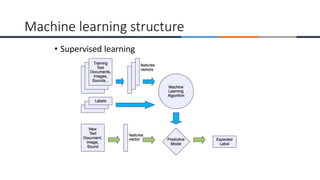
• Supervised learning
• Prediction
• Classification (discrete labels), Regression (real values)
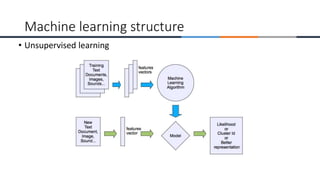
• Unsupervised learning
• Clustering
• Probability distribution estimation
• Finding association (in features)
• Dimension reduction
• Semi-supervised learning
• Reinforcement learning
• Decision making (robot, chess machine)
Algorithms
• Supervised learning
Machine learning structure
• Unsupervised learning
Machine learning structure
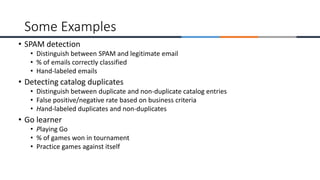
• SPAM detection
• Distinguish between SPAM and legitimate email
• % of emails correctly classified
• Hand-labeled emails
• Detecting catalog duplicates
• Distinguish between duplicate and non-duplicate catalog entries
• False positive/negative rate based on business criteria
• Hand-labeled duplicates and non-duplicates
• Go learner
• Playing Go
• % of games won in tournament
• Practice games against itself
Some Examples
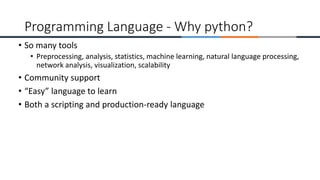
• So many tools
• Preprocessing, analysis, statistics, machine learning, natural language processing,
network analysis, visualization, scalability
• Community support
• “Easy” language to learn
• Both a scripting and production-ready language
Programming Language - Why python?
A very complete list can be found at PyPi the Python Package Index:
https://pypi.python.org/pypi
To install, use pip, which comes with Python:
pip install package
or download, unzip, and run the installer directly from the directory:
python setup.py install
If you have Python 2 and Python 3 installed, use pip3 (though not with
Anaconda) or make sure the right version is first in your PATH.
External libraries
• Data analysis and modeling
• Similar to R and Excel, Keep everything in Python
• Easy-to-use data structures
• DataFrame
• Data wrangling tools
• Merging, pivoting, etc
• Use for preprocessing
• File I/0, cleaning, manipulation, etc
• Combinable with other modules
• NumPy, SciPy, statsmodel, matplotlib
Pandas
• Machine learning module
• Open-source
• Built-in datasets
• Good resources for learning
• Very comprehensive of machine learning algorithms
• Preprocessing tools
• Methods for testing the accuracy of your model
Scikit-learn
• Natural Language ToolKit
• Access to over 50 corpora
• Corpus: body of text
• NLP tools
• Stemming, tokenizing, etc
• Resources for learning
• Lemmatizing, tokenization, tagging, parse trees
• Classification
• Chunking
• Sentence structure
nltk
https://www.crummy.com/software/BeautifulSoup/
Web analysis.
Need other packages to actually download pages like the library requests.
http://docs.python-requests.org/en/master/
BeautifulSoup navigates the Document Object Model:
http://www.w3schools.com/
Not a library, but a nice intro to web programming with Python.
https://wiki.python.org/moin/WebProgramming
Beautiful Soup
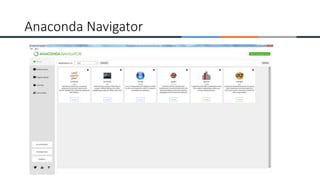
Anaconda Navigator
https://www.tutorialspoint.com/linux_admin/linux_admin_tutorial.pdf
Linux Basic tutorial
https://www.tutorialspoint.com/docker/docker_tutorial.pdf
Docker Basic tutorial
http://www.tutorialspoint.com/python3/python3_tutorial.pdf
Python 3 Basic tutorial
https://www.tutorialspoint.com/python_pandas/python_pandas_tutorial.pdf
Pandas Basic tutorial
Important Resources
https://www.tutorialspoint.com/scipy/scipy_tutorial.pdf
Scipy tutorial
https://www.tutorialspoint.com/big_data_analytics/big_data_analytics_tutorial.pdf
Data Analytics tutorial
https://www.tutorialspoint.com/web_analytics/web_analytics_tutorial.pdf
Web Analytics tutorial
https://archive.ics.uci.edu/ml/index.php
Machine Learning Data Sets
Important Resources
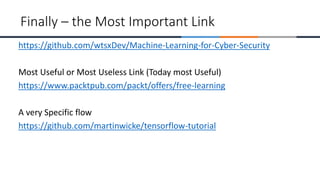
https://github.com/wtsxDev/Machine-Learning-for-Cyber-Security
Most Useful or Most Useless Link (Today most Useful)
https://www.packtpub.com/packt/offers/free-learning
A very Specific flow
https://github.com/martinwicke/tensorflow-tutorial
Finally – the Most Important Link
Questions
Is everyone Still Awake???????

Machine Learning , Analytics & Cyber Security the Next Level Threat Analytics.pptx

  • 1.
    Machine Learning ,Analytics & Cyber Security the Next Level Threat Analytics Presented BY: Manjunath N V yoda@security-exploits.com LinkedIn: https://www.linkedin.com/in/manjunath-kumar-1a222a18
  • 2.
    • Education • B.E.in Computer Science (Bangalore University) • Post Graduation in S.O.C (university of Edinburgh, Glasgow) • Post Graduation in Digital Network Communication(London Metropolitan university) • Professional Experience • 15+ Years of Consulting and Training experience in Programming, Networking, testing & Security. • Hold 20+ Active Professional Certifications in SECURITY • Have Trained 3000+ People in Last 8 Years in IT Security • WARNING – MAD about Security (can talk Hours on the Subject) Who am I – Manjunath N V
  • 3.
    • Theoretical Natureof • Definitions • Importance of these Technologies • Where to Find More resources • Hands On Materials • Lab Setup • Basic Demonstration • Guidance to Projects • Market Demand for Technologies • Project IDEAS Topics Covered
  • 4.
  • 5.
    • A workingDocker IMAGE • With Python Library installed • Saved as LOCAL DOCKER IMAGE • Seems Very simple but need to understand MANY Concepts such as • Virtualisation • Containers • Devops (WILL SHARE LOT OF self study LAB books for the MOTIVATED) Final OUTPUT (DEMO)
  • 6.
    • Machine Learning(ML) Google’s definition - Machine learning is a type of artificial intelligence (AI) that provides computers with the ability to learn without being explicitly programmed. Machine learning focuses on the development of computer programs that can teach themselves to grow and change when exposed to new data. Definitions
  • 7.
    • Data Analytics Dataanalysis is a process of inspecting, cleansing, transforming, and modeling data with the goal of discovering useful information, suggesting conclusions, and supporting decision-making. Definitions (Contd.)
  • 8.
    • Cyber Security Cybersecurityis the body of technologies, processes and practices designed to protect networks, computers, programs and data from attack, damage or unauthorized access. In a computing context, security includes both cybersecurityand physical security. Definitions (Contd.)
  • 9.
    • ML +Data Analytics + Cyber Security Machine learning has been quickly adopted in cybersecurity for its potential to automate the detection and prevention of attacks, particularly for next-generation antivirus (NGAV) products. ML models in NGAV have fundamental advantages compared to traditional AV, including the higher likelihood of identifying novel, zero-day attacks and targeted malware, an increased difficulty of evasion, and continued efficacy during prolonged offline periods Definitions (Finally.)
  • 10.
    • Virtualisation • Type1 • ESXi,KVM • Type 2 • Vmware Workstation,VirtualBOX • Containers • DOCKER • LXC • KUBERNETES Implementation Technologies - 1
  • 11.
  • 12.
  • 13.
  • 14.
  • 15.
    • Docker isa ‘container technology’ • Linux-specific • can’t run Mac OSX, Windows in docker containers • But can run docker containers on Mac OSX & Windows • Shrink-wrap your software, run it on any Linux platform • Not a virtual machine • Similar to virtual machines, but more lightweight • Smaller, faster to start, easier to maintain and manage • Lighter on system resources => vastly more scalable • VM-thinking will lead to poor results, avoid it! What is Docker? (the Silver Bullet)
  • 16.
    • Portability: • Noneed to rebuild your application for a new platform! • Build a container once, run it anywhere • Cori/Edison/Genepool/… • AWS/GCP/… • Stable s/w versions across all platforms, no runtime glitches • Think of it as ‘modules-to-go’ • Instead of ‘module load PQR’ you ‘docker pull PQR’ • No waiting for modules to be built/deployed for you! • Reproducibility: • Because your s/w is stable, your pipeline is reproducible • Run the exact same binaries again 10 years from now   why use Docker?
  • 17.
    • Computational workloads •Use applications without having to install them • Run your applications anywhere; clouds • Reproducible pipelines – today’s focus • Services • Web portals/gateways (R/Shiny, Apache, Jupyter…) • Persistent workflow manager interfaces (Fireworks…) • Continuous build systems (Gitlab…) • For prototyping or for production running (databases etc) • All those things you run in the background on the login nodes today! What can you do with it?
  • 18.
    Docker Hub: Build,Ship, Run Applications Build Ship Run Dev QA Source Staging Physical Virtual Cloud Infrastructure Management Infrastructure Management DockerFile Source Code Repository TEST TEST TEST TEST TEST GCE RAX Azure Mac/Win Dev Machine Boot2Docker Docker Analytics DB Prod Machine Linux OS Docker Docker ++ Users Collab Provenance Policy Docker Hub Registries Public Curated Private Docker Hub API Third Party Tools Prod Machine Linux OS Docker Docker Prod Machine Linux OS Docker Docker VM Docker Docker VM Docker Docker VM Docker Docker QA Machine Linux OS Docker Docker DockerHub provides a centralized resource for container image discovery, distribution and change management, user and team collaboration, and workflow automation
  • 19.
    • A recipefor building a container • Start with a base image, add software layer by layer • Choosing the base image has a big effect on how large your container will be: go small (‘alpine’ or ‘busybox’)! • Add metadata describing the container • Always a good idea • Set the command to run when starting the container, map network ports, set environment variables • Not strictly needed for batch applications, useful for services (web apps, databases…) Building a container: the Dockerfile
  • 20.
    FROM debian:jessie # LABELlets you specify metadata, visible with 'docker inspect' LABEL Maintainer="Tony Wildish, wildish@lbl.gov" Version=1.0 # I can set environment variables ENV PATH /usr/local/sbin:/usr/local/bin:/usr/sbin:/usr/bin:/sbin:/bin # Commands to prepare the container ENV DEBIAN_FRONTEND=noninteractive RUN apt-get update -y RUN apt-get install --assume-yes apt-utils RUN apt-get install -y python RUN apt-get install -y python-pip RUN apt-get clean all RUN pip install bottle # Add local files ADD hello.py /tmp/ # open a port EXPOSE 5000 # specify the default command to run Dockerfile
  • 21.
    - 21 - FROMdebian:jessie # LABEL lets you specify metadata, visible with 'docker inspect' LABEL Maintainer="Tony Wildish, wildish@lbl.gov" Version=1.0 # I can set environment variables ENV PATH /usr/local/sbin:/usr/local/bin:/usr/sbin:/usr/bin:/sbin:/bin # Commands to prepare the container ENV DEBIAN_FRONTEND=noninteractive RUN apt-get update -y RUN apt-get upgrade -y RUN apt-get install --assume-yes apt-utils RUN apt-get install -y python RUN apt-get install -y python-pip RUN apt-get clean all RUN pip install bottle # Add local files ADD hello.py /tmp/ # open a port EXPOSE 5000 # specify the default command to run CMD ["python", "/tmp/hello.py“] Name+version Contact info Heavy lifting, install base tools before our code
  • 22.
    - 22 - FROMdebian:jessie # LABEL lets you specify metadata, visible with 'docker inspect' LABEL Maintainer="Tony Wildish, wildish@lbl.gov" Version=1.0 # I can set environment variables ENV PATH /usr/local/sbin:/usr/local/bin:/usr/sbin:/usr/bin:/sbin:/bin # Commands to prepare the container ENV DEBIAN_FRONTEND=noninteractive RUN apt-get update -y RUN apt-get upgrade -y RUN apt-get install --assume-yes apt-utils RUN apt-get install -y python RUN apt-get install -y python-pip RUN apt-get clean all RUN pip install bottle # Add local files ADD hello.py /tmp/ # open a port EXPOSE 5000 # specify the default command to run CMD ["python", "/tmp/hello.py“] Name+version Contact info Heavy lifting, install base tools before our code ‘heavy’ base image: 123 MB Lots of RUN commands means lots of layers, not ideal for the cache Blind update – to what??? Container != VM Final image size: 360 MB
  • 23.
    Four Examples ofWhat You Can Do with Docker in Instructional Settings
  • 24.
    Apache Tomcat isa Java- based Web server. It is important in this context because it forms the basis for a number of key platforms, including DSpace, Fedora, and Islandora. Apache Tomcat
  • 25.
    DSpace DSpace is anopen source repository software package typically used for creating open access repositories for scholarly and/or published digital content. Its design is focused on the long-term storage, access and preservation of digital content.
  • 26.
  • 27.
    Webmin Webmin is aWeb-based system configuration tool for Unix-like systems, although recent versions can also be installed and run on Windows. Using any Web browser that supports tables and forms (and Java for the `File Manager` module), Webmin enables a user to administer a Linux or Unix system, e.g., setup user accounts, Apache, DNS, file sharing, etc., through a graphical user interface.
  • 28.
    • What ismachine learning? • Learning system model • Training and testing • Performance • Algorithms • Machine learning structure • Learning techniques • Applications An Overview of Machine Learning
  • 29.
    • A branchof artificial intelligence, concerned with the design and development of algorithms that allow computers to evolve behaviors based on empirical data. • As intelligence requires knowledge, it is necessary for the computers to acquire knowledge. What is machine learning?
  • 30.
  • 31.
    • Training isthe process of making the system able to learn. • No free lunch rule: • Training set and testing set come from the same distribution • Need to make some assumptions or bias Training and testing
  • 32.
    • There areseveral factors affecting the performance: • Types of training provided • The form and extent of any initial background knowledge • The type of feedback provided • The learning algorithms used • Two important factors: • Modeling • Optimization Performance
  • 33.
    • The successof machine learning system also depends on the algorithms. • The algorithms control the search to find and build the knowledge structures. • The learning algorithms should extract useful information from training examples. Algorithms
  • 34.
    • Supervised learning •Prediction • Classification (discrete labels), Regression (real values) • Unsupervised learning • Clustering • Probability distribution estimation • Finding association (in features) • Dimension reduction • Semi-supervised learning • Reinforcement learning • Decision making (robot, chess machine) Algorithms
  • 35.
  • 36.
  • 37.
    • SPAM detection •Distinguish between SPAM and legitimate email • % of emails correctly classified • Hand-labeled emails • Detecting catalog duplicates • Distinguish between duplicate and non-duplicate catalog entries • False positive/negative rate based on business criteria • Hand-labeled duplicates and non-duplicates • Go learner • Playing Go • % of games won in tournament • Practice games against itself Some Examples
  • 38.
    • So manytools • Preprocessing, analysis, statistics, machine learning, natural language processing, network analysis, visualization, scalability • Community support • “Easy” language to learn • Both a scripting and production-ready language Programming Language - Why python?
  • 39.
    A very completelist can be found at PyPi the Python Package Index: https://pypi.python.org/pypi To install, use pip, which comes with Python: pip install package or download, unzip, and run the installer directly from the directory: python setup.py install If you have Python 2 and Python 3 installed, use pip3 (though not with Anaconda) or make sure the right version is first in your PATH. External libraries
  • 40.
    • Data analysisand modeling • Similar to R and Excel, Keep everything in Python • Easy-to-use data structures • DataFrame • Data wrangling tools • Merging, pivoting, etc • Use for preprocessing • File I/0, cleaning, manipulation, etc • Combinable with other modules • NumPy, SciPy, statsmodel, matplotlib Pandas
  • 41.
    • Machine learningmodule • Open-source • Built-in datasets • Good resources for learning • Very comprehensive of machine learning algorithms • Preprocessing tools • Methods for testing the accuracy of your model Scikit-learn
  • 42.
    • Natural LanguageToolKit • Access to over 50 corpora • Corpus: body of text • NLP tools • Stemming, tokenizing, etc • Resources for learning • Lemmatizing, tokenization, tagging, parse trees • Classification • Chunking • Sentence structure nltk
  • 43.
    https://www.crummy.com/software/BeautifulSoup/ Web analysis. Need otherpackages to actually download pages like the library requests. http://docs.python-requests.org/en/master/ BeautifulSoup navigates the Document Object Model: http://www.w3schools.com/ Not a library, but a nice intro to web programming with Python. https://wiki.python.org/moin/WebProgramming Beautiful Soup
  • 44.
  • 45.
    https://www.tutorialspoint.com/linux_admin/linux_admin_tutorial.pdf Linux Basic tutorial https://www.tutorialspoint.com/docker/docker_tutorial.pdf DockerBasic tutorial http://www.tutorialspoint.com/python3/python3_tutorial.pdf Python 3 Basic tutorial https://www.tutorialspoint.com/python_pandas/python_pandas_tutorial.pdf Pandas Basic tutorial Important Resources
  • 46.
    https://www.tutorialspoint.com/scipy/scipy_tutorial.pdf Scipy tutorial https://www.tutorialspoint.com/big_data_analytics/big_data_analytics_tutorial.pdf Data Analyticstutorial https://www.tutorialspoint.com/web_analytics/web_analytics_tutorial.pdf Web Analytics tutorial https://archive.ics.uci.edu/ml/index.php Machine Learning Data Sets Important Resources
  • 47.
    https://github.com/wtsxDev/Machine-Learning-for-Cyber-Security Most Useful orMost Useless Link (Today most Useful) https://www.packtpub.com/packt/offers/free-learning A very Specific flow https://github.com/martinwicke/tensorflow-tutorial Finally – the Most Important Link
  • 48.