





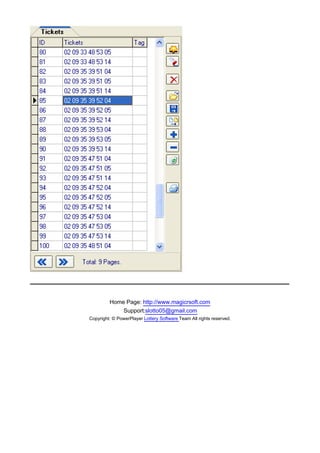

Top Previous Next
Quick Start


Follow the instructions below to start using Lotto PowerPlayer Pro right away. The steps should be
performed in the order listed. Please refer to the other chapters in this help file for more detailed
information.

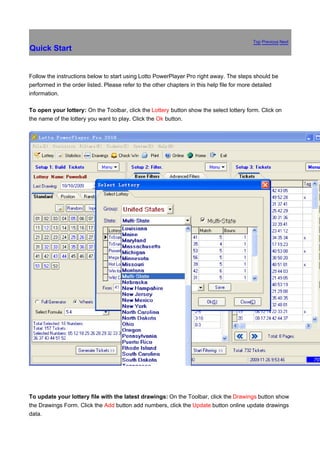
To open your lottery: On the Toolbar, click the Lottery button show the select lottery form. Click on
the name of the lottery you want to play. Click the Ok button.


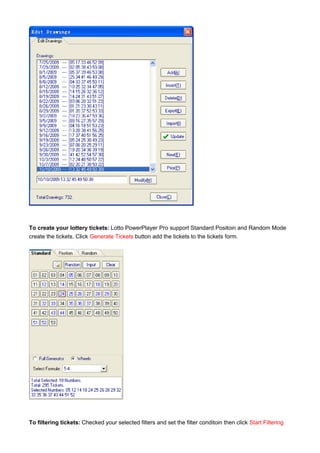
To update your lottery file with the latest drawings: On the Toolbar, click the Drawings button show
the Drawings Form. Click the Add button add numbers, click the Update button online update drawings
data.
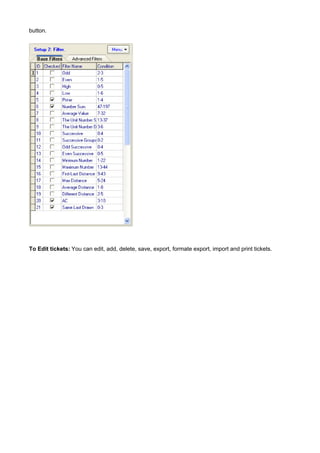
To create your lottery tickets: Lotto PowerPlayer Pro support Standard Positoin and Random Mode
create the tickets. Click Generate Tickets button add the tickets to the tickets form.


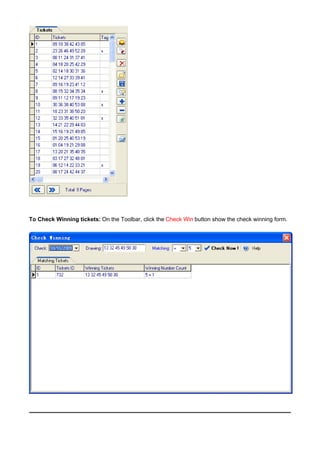
To filtering tickets: Checked your selected filters and set the filter conditoin then click Start Filtering
button.


To Edit tickets: You can edit, add, delete, save, export, formate export, import and print tickets.
To Check Winning tickets: On the Toolbar, click the Check Win button show the check winning form.
Home Page: http://www.magicrsoft.com
           Support:slotto05@gmail.com
Copyright: © PowerPlayer Lottery Software Team All rights reserved.
Top Previous Next
Welcome to Lotto PowerPlayer Pro


Lotto PowerPlayer Pro is a powerful mathematical lottery tool which helps you analyze previous
drawings using various filtering criteria ease of use, and power.

Lotto PowerPlayer Pro support more than 100 lotteries, works with all pick 1 through pick 15 with up
to 80 numbers. support 0, 1, 2, or 3 bonus numbers or with 1 power ball number. It does not support
daily pick 3 or pick 4 lotteries, if you want to play daily pick 3 or pick 4 lotteries you can use
PowerPlayer For Pick 3/4 (more information see PowerPlayer For Pick 3/4).

Lotto PowerPlayer Pro support more than 18 countries regions lotteries (United States, Canada,
Australia, United Kingdom, Germany, France, Greece, Ireland, South Africa, Singapore, New Zealand,
Hong Kong, Taiwan, Malaysia etc.). We update all the lotteries drawings everyday.


Lotto PowerPlayer Pro Main Features:

1. Support all pick 4 through 7 Wheels.

2. Free update more than 100 lotteries drawings.

3 Works with all pick 1 through pick 15 with up to 80 numbers.

4. Build full wheel very fast, build 1000000 lines only need 3 sec.

5. More than 40 kind of filters. (base filters can set filters condition automation).

6. Filtering support "Logical Condition ".

7. More than 50 statistical charts and statistical charts .

8. Automation set the base filters condition, save your times.

9. Online Check for Software Updates and Software Updates is FREE.
To learn how to start using Lotto PowerPlayer immediately, please read Quick Start guide.


                                  Home Page: http://www.magicrsoft.com
                                      Support:slotto05@gmail.com
                         Copyright: © PowerPlayer Lottery Software Team All rights reserved.
Top Previous Next
Installing Lotto PowerPlayer Pro


1. Be sure that your system meets all of the system requirements for running Lotto PowerPlayer Pro.

2. Be sure that all other open program are closed down.

3. If you have enough available space on your C or other drives, recommend that you install it in the
default location.


                                Home Page: http://www.magicrsoft.com
                                    Support:slotto05@gmail.com
                       Copyright: © PowerPlayer Lottery Software Team All rights reserved.
Top Previous Next
Starting Lotto PowerPlayer Pro


Double-click on the Lotto PowerPlayer Pro icon on your desktop or from the Start menu select
Programs|Lotto PowerPlayer Pro|Lotto PowerPlayer Pro.


                               Home Page: http://www.magicrsoft.com
                                   Support:slotto05@gmail.com
                      Copyright: © PowerPlayer Lottery Software Team All rights reserved.
Top聽 Previous聽 Next
System Requirement


Lotto PowerPlayer Pro requires the following minnimun requirements:

486 DX 166MHz or higher PC, running Windows 95/98/ME/NT/2000/XP/Vista/Windows 7.

200 MB RAM or higher.

100 Megabytes free hard disk space.

VGA display or higher (256 colors or more).

* If your operating system is Windows Vista or Windows 7, you should perform the following
steps.

1. Right click on the Lotto Pro icon on your desktop and select Properties.

2. Select the Compatibility tab.

3. Check the box next to "Run this program as an administrator."

4. Repeat the above steps for the Update Lotto Drawing Files icon on your desktop.


                                   Home Page: http://www.magicrsoftcom
                                      Support:slotto05@gmail.com
                        Copyright: © PowerPlayer Lottery Software Team All rights reserved.
Top Previous Next
Opening a Lottery

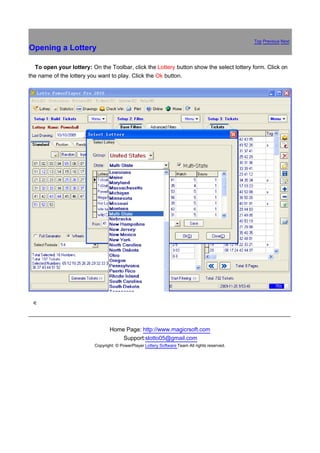
路  To open your lottery: On the Toolbar, click the Lottery button show the select lottery form. Click on
the name of the lottery you want to play. Click the Ok button.


銆


                                 Home Page: http://www.magicrsoft.com
                                     Support:slotto05@gmail.com
                          Copyright: © PowerPlayer Lottery Software Team All rights reserved.
Top Previous Next
Deleting a Drawing


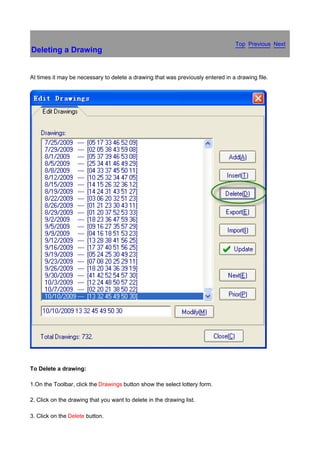
At times it may be necessary to delete a drawing that was previously entered in a drawing file.


To Delete a drawing:

1.On the Toolbar, click the Drawings button show the select lottery form.

2. Click on the drawing that you want to delete in the drawing list.

3. Click on the Delete button.
4. Click on the Yes button when you are asked to confirm the deletion.


                                Home Page: http://www.magicrsoft.com
                                    Support:slotto05@gmail.com
                       Copyright: © PowerPlayer Lottery Software Team All rights reserved.
Top Previous Next
Inserting a Drawings


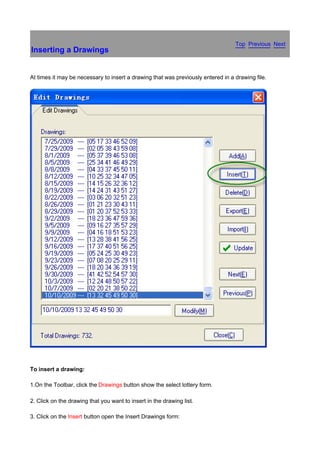
At times it may be necessary to insert a drawing that was previously entered in a drawing file.


To insert a drawing:

1.On the Toolbar, click the Drawings button show the select lottery form.

2. Click on the drawing that you want to insert in the drawing list.

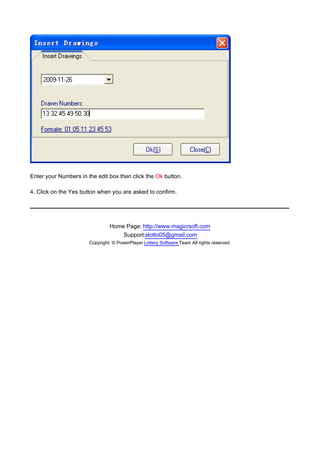
3. Click on the Insert button open the Insert Drawings form:
Enter your Numbers in the edit box then click the Ok button.

4. Click on the Yes button when you are asked to confirm.


                                Home Page: http://www.magicrsoft.com
                                    Support:slotto05@gmail.com
                       Copyright: © PowerPlayer Lottery Software Team All rights reserved.
Top Previous Next
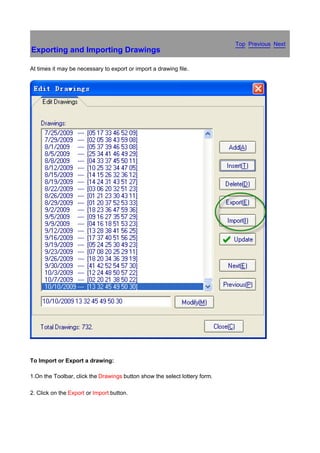
Exporting and Importing Drawings

At times it may be necessary to export or import a drawing file.


To Import or Export a drawing:

1.On the Toolbar, click the Drawings button show the select lottery form.

2. Click on the Export or Import button.
Home Page: http://www.magicrsoft.com
             Support:slotto05@gmail.com
Copyright: © PowerPlayer Lottery Software Team All rights reserved.
Top Previous Next
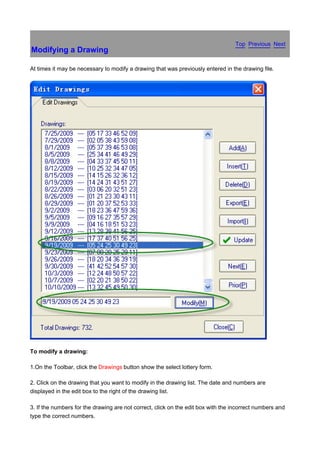
Modifying a Drawing

At times it may be necessary to modify a drawing that was previously entered in the drawing file.


To modify a drawing:

1.On the Toolbar, click the Drawings button show the select lottery form.

2. Click on the drawing that you want to modify in the drawing list. The date and numbers are
displayed in the edit box to the right of the drawing list.

3. If the numbers for the drawing are not correct, click on the edit box with the incorrect numbers and
type the correct numbers.
4. Click the Modify button to save your changes.


                                Home Page: http://www.magicrsoft.com
                                    Support:slotto05@gmail.com
                       Copyright: © PowerPlayer Lottery Software Team All rights reserved.
Top Previous Next
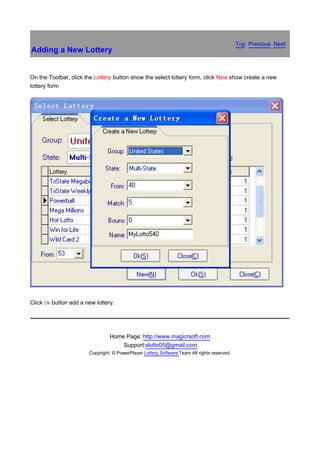
Adding a New Lottery


On the Toolbar, click the Lottery button show the select lottery form, click New show create a new
lottery form


Click Ok button add a new lottery.


                                Home Page: http://www.magicrsoft.com
                                    Support:slotto05@gmail.com
                       Copyright: © PowerPlayer Lottery Software Team All rights reserved.
Top Previous Next
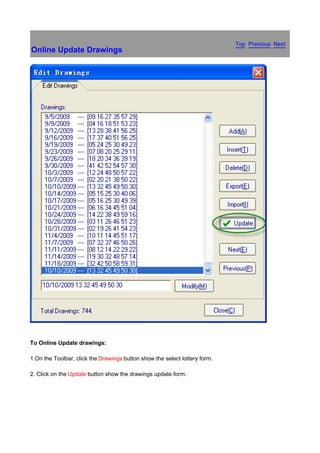
Online Update Drawings


To Online Update drawings:

1.On the Toolbar, click the Drawings button show the select lottery form.

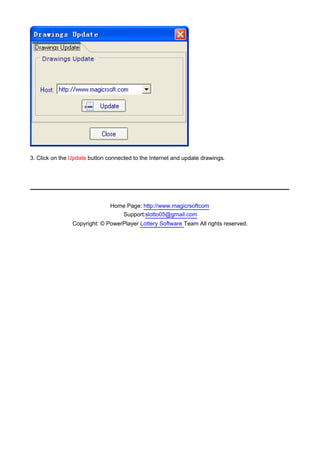
2. Click on the Update button show the drawings update form:
3. Click on the Update button connected to the Internet and update drawings.


                               Home Page: http://www.magicrsoftcom
                                  Support:slotto05@gmail.com
                Copyright: © PowerPlayer Lottery Software Team All rights reserved.
Top Previous Next
Overview

Lotto PowerPlayer Pro can generate lottery tickets with three different categories of numbers: full
generate number, smart (wheels) number, positon number and random numbers.

We recommend that if you are just learning to use Lotto PowerPlayer Pro that you create your tickets
using Smart numbers. The program does all the work for you, and all your tickets will contain numbers
that have the best statistical chance of hitting.

Once you are more experienced interpreting the charts and graphs in the Lotto PowerPlayer Pro, you
may want to play your own Favorite numbers, or a combination of Smart (wheels) and Favorite
numbers.

We don't recommend that you play tickets generated with Random numbers. The option is included
mainly so that you compare random results with results obtained from playing Smart (wheels) or
Favorite numbers.

When you generate tickets using any of the three categories of numbers you have two choices as to
how the tickets are generated; generate the tickets using the wheeling system of your choice, or
generate the number of tickets that you specify.

In most cases it is better to generate your tickets with one of the wheeling systems. When you play a
wheeling system, you are guaranteed a prize if a portion of the numbers you play match the actual
numbers picked. There is no such guarantee when create your tickets using the other method. Your
overall winnings are normally larger when you play a wheeling system because you will have several
tickets with winning matches.

You normally choose a wheeling system based on how much you can afford to spend and the prize
guarantee associated with the system. If you can only afford to play a small number of tickets, you can
apply filters to your lottery tickets to eliminate tickets with unlikely number combinations.


You also can edit your tickets, Lotto PowerPlayer Pro support add, delete, save, export to file, import
from file, print tickets to paper, add bouns and formate export.


                                Home Page: http://www.magicrsoft.com
                                    Support:slotto05@gmail.com
                       Copyright: © PowerPlayer Lottery Software Team All rights reserved.
Top Previous Next
Creating Full Generate Number Tickets


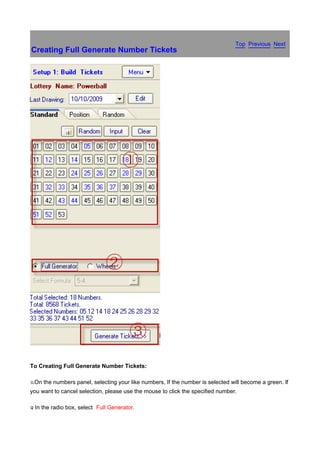
To Creating Full Generate Number Tickets:

x.On   the numbers panel, selecting your like numbers, If the number is selected will become a green. If
you want to cancel selection, please use the mouse to click the specified number.

y In
.      the radio box, select Full Generator.
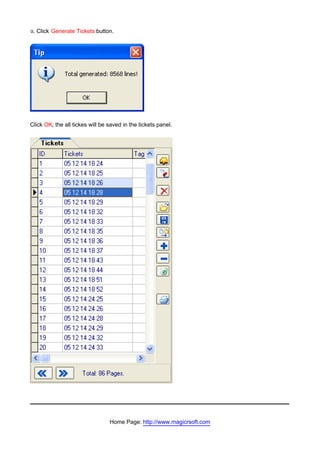
z.   Click Generate Tickets button.


Click OK, the all tickes will be saved in the tickets panel.


                                 Home Page: http://www.magicrsoft.com
Support:slotto05@gmail.com
Copyright: © PowerPlayer Lottery Software Team All rights reserved.
Top Previous
Creating Smart Number Tickets by Selecting a                                                      Next
Wheeling System


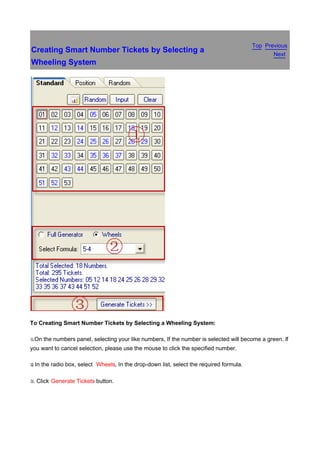
To Creating Smart Number Tickets by Selecting a Wheeling System:

x.On   the numbers panel, selecting your like numbers, If the number is selected will become a green. If
you want to cancel selection, please use the mouse to click the specified number.

y In
.      the radio box, select Wheels, In the drop-down list, select the required formula.

z.   Click Generate Tickets button.
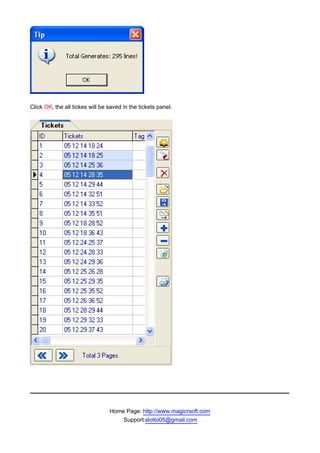
Click OK, the all tickes will be saved in the tickets panel.


                                 Home Page: http://www.magicrsoft.com
                                     Support:slotto05@gmail.com
Copyright: © PowerPlayer Lottery Software Team All rights reserved.
Top Previous Next
Creating a Positon Number Tickets


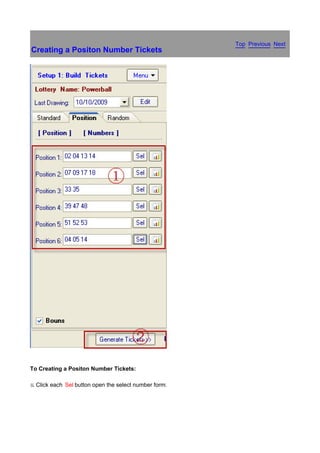
To Creating a Positon Number Tickets:

x.   Click each Sel button open the select number form:
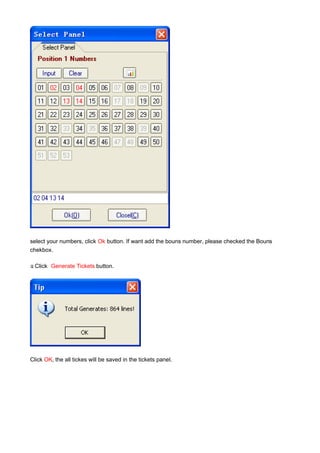
select your numbers, click Ok button. If want add the bouns number, please checked the Bouns
chekbox.

y Click
.         Generate Tickets button.


Click OK, the all tickes will be saved in the tickets panel.
Home Page: http://www.magicrsoft.com
             Support:slotto05@gmail.com
Copyright: © PowerPlayer Lottery Software Team All rights reserved.
Top Previous Next
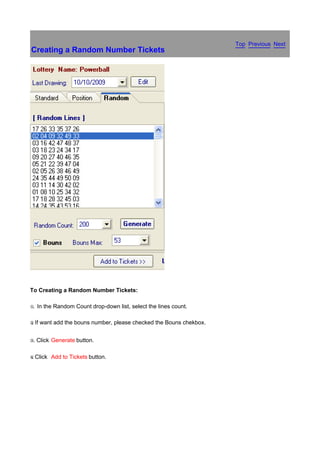
Creating a Random Number Tickets


To Creating a Random Number Tickets:

x.   In the Random Count drop-down list, select the lines count.

y If
.      want add the bouns number, please checked the Bouns chekbox.


z.   Click Generate button.

{ Click
.          Add to Tickets button.
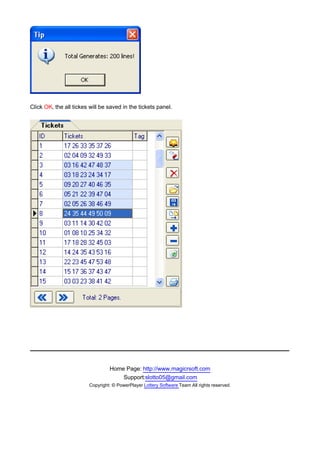
Click OK, the all tickes will be saved in the tickets panel.


                                  Home Page: http://www.magicrsoft.com
                                      Support:slotto05@gmail.com
                         Copyright: © PowerPlayer Lottery Software Team All rights reserved.
Top Previous Next
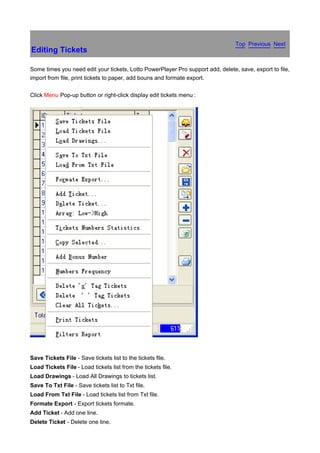
Editing Tickets

Some times you need edit your tickets, Lotto PowerPlayer Pro support add, delete, save, export to file,
import from file, print tickets to paper, add bouns and formate export.

Click Menu Pop-up button or right-click display edit tickets menu :


Save Tickets File - Save tickets list to the tickets file.
Load Tickets File - Load tickets list from the tickets file.
Load Drawings - Load All Drawings to tickets list.
Save To Txt File - Save tickets list to Txt file.
Load From Txt File - Load tickets list from Txt file.
Formate Export - Export tickets formate.
Add Ticket - Add one line.
Delete Ticket - Delete one line.
Array: Low->High - every tickets arrange Low-High.
Copy Selected - Copy selected tickets.
Add Bonus Number - Add bonus or power ball number.
Numbers Frequency - Statistic every number appear count in tickets list.
Delete 'x' Tag Tickets - Delete Tag = "X" in tickets list.
Delete ' ' Tag Tickets - Delete Tag = " " in tickets list.
Clear All Tickets - Clear the all tickets.
Filters Report - Show Latest filtering report.


                                 Home Page: http://www.magicrsoft.com
                                     Support:slotto05@gmail.com
                        Copyright: © PowerPlayer Lottery Software Team All rights reserved.
Top Previous Next
Printing Tickets on Paper

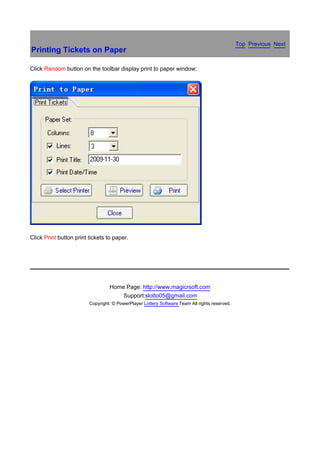
Click Random button on the toolbar display print to paper window:


Click Print button print tickets to paper.


                                  Home Page: http://www.magicrsoft.com
                                      Support:slotto05@gmail.com
                         Copyright: © PowerPlayer Lottery Software Team All rights reserved.
Top Previous Next
Random Select Numbers

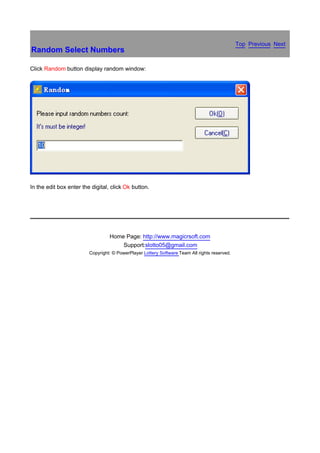
Click Random button display random window:


In the edit box enter the digital, click Ok button.


                                  Home Page: http://www.magicrsoft.com
                                      Support:slotto05@gmail.com
                         Copyright: © PowerPlayer Lottery Software Team All rights reserved.
Top Previous Next
Save and Load Your Own Favorite Number


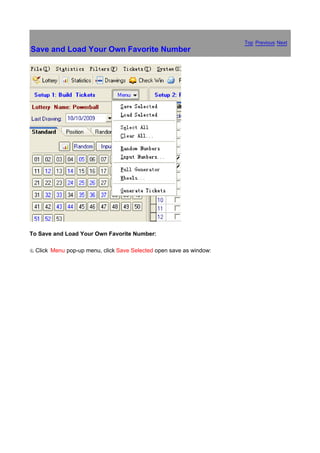
To Save and Load Your Own Favorite Number:

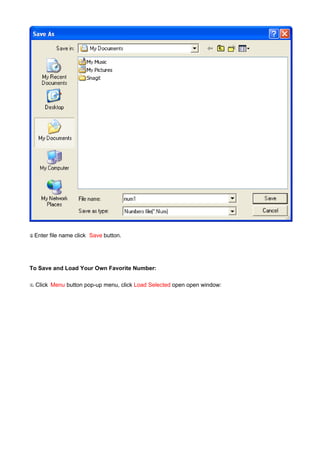
x.   Click Menu pop-up menu, click Save Selected open save as window:
y Enter
.         file name click Save button.


To Save and Load Your Own Favorite Number:

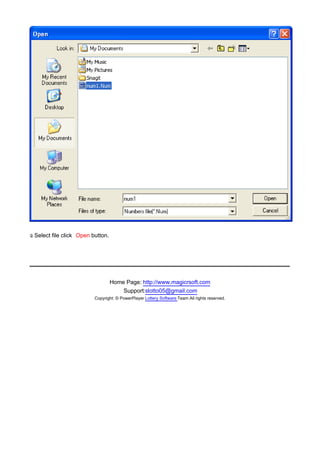
x.   Click Menu button pop-up menu, click Load Selected open open window:
y Select
.          file click Open button.


                                     Home Page: http://www.magicrsoft.com
                                         Support:slotto05@gmail.com
                            Copyright: © PowerPlayer Lottery Software Team All rights reserved.
Top Previous Next
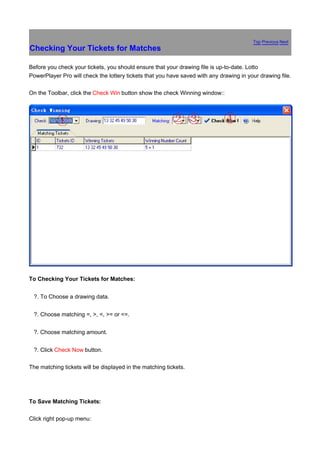
Checking Your Tickets for Matches

Before you check your tickets, you should ensure that your drawing file is up-to-date. Lotto
PowerPlayer Pro will check the lottery tickets that you have saved with any drawing in your drawing file.

On the Toolbar, click the Check Win button show the check Winning window::


To Checking Your Tickets for Matches:


鈶 ?.   To Choose a drawing data.


鈶 ?.   Choose matching =, >, <, >= or <=.


鈶 ?.   Choose matching amount.


鈶 ?.   Click Check Now button.

The matching tickets will be displayed in the matching tickets.


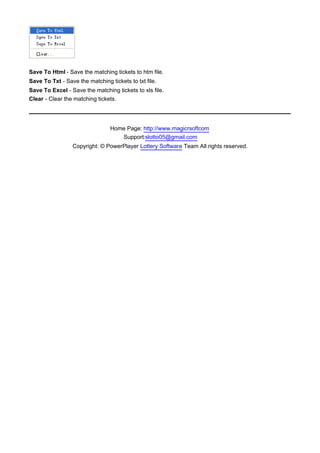
To Save Matching Tickets:

Click right pop-up menu:
Save To Html - Save the matching tickets to htm file.
Save To Txt - Save the matching tickets to txt file.
Save To Excel - Save the matching tickets to xls file.
Clear - Clear the matching tickets.


                                 Home Page: http://www.magicrsoftcom
                                    Support:slotto05@gmail.com
                 Copyright: © PowerPlayer Lottery Software Team All rights reserved.
Top Previous Next
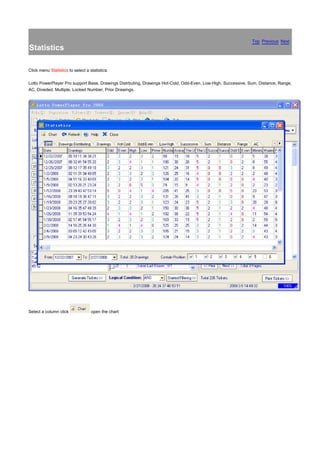
Statistics

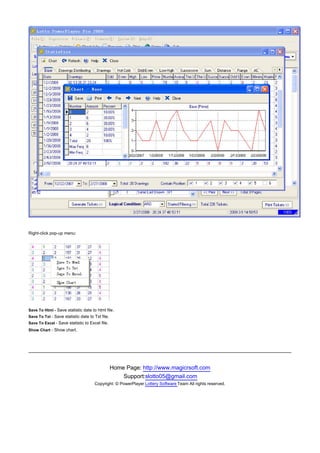
Click menu Statistics to select a statistics:

Lotto PowerPlayer Pro support Base, Drawings Distrbuting, Drawings Hot-Cold, Odd-Even, Low-High, Successive, Sum, Distance, Range,
AC, Diveded, Multiple, Locked Number, Prior Drawings.


Select a column click              open the chart:
Right-click pop-up menu:


Save To Html - Save statistic date to html file.
Save To Txt - Save statistic date to Txt file.
Save To Excel - Save statistic to Excel file.
Show Chart - Show chart.


                                                 Home Page: http://www.magicrsoft.com
                                                     Support:slotto05@gmail.com
                                     Copyright: © PowerPlayer Lottery Software Team All rights reserved.
Top Previous Next
How to Use The Filters

Sometimes, we need filters to remove some of the low probability of the tickets.
Lotto007 XP support more than 40+ filters to filtering tickets.

Questions:

1. Base Filters.
2. Advanced Filters.
3. What is the "Logical Condition" ?
4. How to set the base filters condition ?
5. How to set the advanced filters condition ?
6. How to use the filters assistant ?
7. What is "Filtering Contain Position" ?
8. What is "Generate Default Condition" ?
9. What is "Filtering Report" ?


1. Base Filters


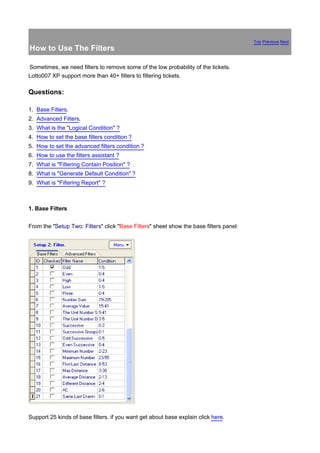
From the "Setup Two: Filters" click "Base Filters" sheet show the base filters panel:


Support 25 kinds of base filters. if you want get about base explain click here.
Base filters example

[Top]

2. Advanced Filters.


From the "Setup Two: Filters" click "Advanced Filters" sheet show the advanced filters panel:


Support 21 kinds of advanced filters, if you want get about advanced filters explain click here.

[Top]


3. What is the "Logical Condition"?


You can set you selected filters logical condition, if logical condition = "AMD" all filters conditions must
right, if logical condition = "OR" only need one filter condition right, of course you can inputlogical
condition yourself, for example: if we selected 5 filters, we can set the logical condition = "4-5". [Top]

4. How to set the base filters condition?


From column: "conditions " Click              show the base filter window:
Click "Assistant" button see the current filter statistic and chart, input your condition value, click "Ok"
button to save condition.

[Top]

5. How to set the advanced filters condition?


From column: "conditions " Click               show the advanced filter window:


Click "Assistant" button see current filter statistic and chart, input your condition value, click "Ok" button
save condition. [Top]


6. How to use the filters assistant ?
Click "Assistant" open the current filter chart:


We can use the chart set the filters conditions, for example: we can see Odd filter: value 1 appear 5
times, value 2 appear 5 times, value 3 appear 4 times, value 4 appear 2 times, value 5 appear 2 time,
in this way we can set the Odd conditions: 1-5. [Top]


7. What is "Filtering Contain Position"?
If we selected the position: 1,2,3,4,5, when filtering it's only filter the position: 1,2,3,4,5. [Top]


8. What is "Generate Default Condition"?


System automation statistic the history drawings (default statistic the last 20 drawings), automation enter filters conditions. "Generate
Default Condition" only support the base filter! [Top]


9. What is "Filtering Report"?


Click "Filtering Report" show Filters Report window:
[Top]


               Home Page: http://www.magicrsoft.com
                   Support:slotto05@gmail.com
        Copyright: © PowerPlayer Lottery Software Team All rights reserved.
Top Previous Next
Base Filters

Base Filters List:


1.   Odd
2.   Even
3.   Hight
4.   Low
5.   Prime
6. Number Sum
7. Average Value
8. Unit Number Sum
9. Unit Number Different Number Count
10. Successiv
11. Successiv Groups
12. Odd Successiv
13. Even Successiv
14. Minimum Number
15. Maximum Number
16. First-Last Distance
17. Max Distance
18. Average Distance
19. Different Distance
20. AC
21. Same Last Drawn
22. Sum Value Even Odd
23. Unit Number Group Count
24. Decade Group Count
25. Different Decade Count

1. Odd

How many Odd number in a line. Example of a winning line in a 6/45 lotto was 06 11 17 18 21 31 45, the
Odd numbers: 11 17 21 31 45, so Odd count=5. [Top]


2. Even

How many Even number in a line. Example of a winning line in a 6/45 lotto was 06 10 17 18 21 31 45, the
Even numbers: 06 10, so Even count=2. [Top]


3. High

How many High number in a line. Example of a winning line in a 6/45 lotto was 06 10 17 18 21 31 45, the
High numbers: 31 45 , so High count=2. [Top]


4. Low

How many Low number in a line. Example of a winning line in a 6/45 lotto was 06 10 17 18 21 31 45, the
Low numbers: 06 10 17 18 21, so Low count=4. [Top]


5. Prime

How many Prime number in a line. Example of a winning line in a 6/45 lotto was 02 11 17 20 21 31 42, the
Prime   numbers: 02 11 17 31 , so Prime count=4. [Top]

What is Prime? A prime number can be divided, without a remainder, only by itself and by 1. For example, 17 can be divided only by 17
and by 1. From 1-99 Prime Numbers:
2 3 5 7 11 13 17 19 23 29 31 37 41 43 47 53 59 61 67 71 73 79 83 89 97. [Top]


6. Number Sum
Sum of numbers in a line, for example, the line: 05, 11, 14, 15, 22, 39, sum is 5+11+14+15+22+39=106. [Top]


7. Average Value
The average value in a line, for example, the line: 05, 11, 14, 15, 22, 39 sum = 5+11+14+15+22+39=106 so average value is 106/6=17.
[Top]


8. Unit Number Sum
Sum of unit number in a line, for example, the line: 05, 11, 14, 15, 22, 39 the unit numbers is: 5, 1, 4 5, 2, 9, so unit number sum=26. [Top]


9. Unit Number Different Number
Different number count of the unit number in a line, for example, the line: 05, 12, 14, 15, 22, 39 the unit numbers is: 5, 2, 4 5, 2, 9, the
different number is 2, 4, 5, 9 so the different number count is 4. [Top]


10. Successive
For example: in the line: 03 13 25 26 27 43, the numbers: 25 26 27 is the successive numbers, so successive number count is 3. [Top]


11.Successive Groups
For example in the line: 03 13 25 26 32 33, the numbers: 25 26, 32 33 are all successive numbers, so successive number group is 2.
[Top]


12. Odd Successive
For example: in the line: 03 13 25 26 27 43, the numbers: 03 13 25, 27 43 are successive numbers, successive of odd count is 3. [Top]


13. Even Successive
For example: in the line: 04 12 22 25 33 43, the numbers:04 12 22 is be even numbers, successive of odd count is 3. [Top]


14. Minimum Number

The minimum number in a line. Example         of a winning line in a 6/45 lotto was 06 10 17 18 21 31 45 the minimum
number is 6. [Top]


15. Maximum Number

The maximum number in the line.     Example of a winning line in a 6/45 lotto was 06 10 17 18 21 31 45 the maximum
number is 45. [Top]


16. First-Last Distance
The first and the last number distance.in the line: 02, 05, 17, 19, 27, 31 the distance is 31-02=29. [Top]


17. Max Distance
The distance between every two numbers in a line. in the line: 02, 05, 17, 19, 27, 31 every distance is: 3 (05-02=3), 12 (17-05), 2 (19-17),
4 (31-27). so the max distance is 12 (maximum is 12). [Top]
18. Average Distance
The distance average in a line, in the line: 02, 05, 17, 19, 27, 31 the distance is: 3 (05-02=3), 12 (17-05), 2 (19-17), 4 (31-27). so the
distance average is 5 ((3+12+2+4)/4=5). [Top]


19.Different Distance
Amount the difference distance in a line, in the line: 02, 05, 17, 19, 27, 31 the distance is: 3 (05-02=3), 12 (17-05), 2 (19-17), 4 (31-27). so
the different distance is 4 (3, 12, 2, 4). [Top]


20. AC

The AC in the line. Example of a winning line in a 5/45 lotto was 11 14 49 55 58, the AC = 4. [Top]
What is AC?


21. Same Last Drawn

Same latest drawing numbers count in a line [Top]

22. Sum Value Even Odd
Example of a winning line in a 6/45 lotto was 10 17 18 21 31 45, the sum of this line is = 142, so it is
Even Sum. The player has to predict the outcome of a winning line the next draw will to be ODD or
EVEN. This filter will remove about 50% of all the combination. [Top]


23. Unit Number Group Count
How many groups of units are there in a winning line -. Our Example:10 17 18 21 31 45, so here we
have 3 groups of winning unit numbers, one group of unit =the green shaded area see below. Units 0
and 1 are next to each other so they are in one group, unit 5 is alone,so another group and finally units
7 and 8 are next to each other so they form one group- the third group, so all together we have 3
groups of winning units. [Top]


24. Decade Group Count
From 0 - 9 we call this a decade of 0
From 10-19 it is called a decade of 10
From 20-29 it is called a decade of 20
From 30-39 it is called a decade of 30
And so on, until the decade of 90 which is from 90-99, for a 6/45 game we have only 5 decades.
Let us take our winning line as: 02 16 37 39 41 42, we illustrate this line in table as below:
[Top]


As you can see, here we can count only 2 groups of decades. A group of decades = a shaded area.
Decades 0 and 10 are next to each other, so they form one group. Also decades 30 and 40 form one
group because they are next to each other.


25. Different Decade Count
Example:02 16 37 39 41 45 We have4 Different decade Count here in this winning line, but 2 Decade
Group count.


[Top]


                                Home Page: http://www.magicrsoft.com
                                    Support:slotto05@gmail.com
                         Copyright: © PowerPlayer Lottery Software Team All rights reserved.
Top Previous Next
Advanced Filters


Advanced Filter List:


1. Adv Number Count
2. Adv Number Sum
3. Successive Number Filter
4. Range Filter
5. Number Groups Filter
6. Must Contain the Numbers
7. Locked Numbers
8. Divided by 3
9. Divided by 4
10. Divided by 5
11. Divided by 6
12. Divided by 7
13. Divided by 8
14. Divided by 9
15. Divided by 10
16. Multiple Filter
17. Delete History Drawings
18. Hot-Cold Filter


1. Adv Number Count
Adv Number count contain the filters: Odd, Even, High, Low, Prime.


Click "Add=>" button add a filter.
Click "Replace>=" button replace the current filter.
Click "Delete<=" button delete the current filter.
Click "Delete All" button replace the current filter.
Click "Edit" button open text edit filter window.
Click "Assistant" open the filters statistic chart.
Click "Ok" Save the filter value.
Click "Save" save the filters value to file.
Click "Load" Load the filters value from file.
[Top]

2 . Adv Number Sum


Click                 button open adv number sum window:
Adv Number Sum contain the filters: Number Sum,High Sum, Low Sum, Odd Sum, Even Sum, Prime Sum, The Units
Number Sum.


Click "Add=>" button add a filter.
Click "Replace>=" button replace the current filter.
Click "Delete<=" button delete the current filter.
Click "Delete All" button replace the current filter.
Click "Edit" button open text edit filter window.
Click "Assistant" open the filters statistic chart.
Click "Ok" Save the filter value.
Click "Save" save the filters value to file.
Click "Load" Load the filters value from file.
[Top]


3.Successive Number Filter
Successive Number Filter contain the filters: Successive, Successive Groups, Odd Successive, Even Successive,
Successive 2, Successive 3, Successive 4, Successive 5.


Click "Add=>" button add a filter.
Click "Replace>=" button replace the current filter.
Click "Delete<=" button delete the current filter.
Click "Delete All" button replace the current filter.
Click "Edit" button open text edit filter window.
Click "Assistant" open the filters statistic chart.
Click "Ok" Save the filter value.
Click "Save" save the filters value to file.
Click "Load" Load the filters value from file.
[Top]


4. Range Filter
How many numbers in a range. Example: if the range we set: 01-10, Condition we set: 1-2, the line must contained
1-2 numbers in 01, 02, 03, 04, 05, 06, 07, 08, 09 10.


Click "Add=>" button add a filter.
Click "Replace>=" button replace the current filter.
Click "Delete<=" button delete the current filter.
Click "Delete All" button replace the current filter.
Click "Edit" button open text edit filter window.
Click "Assistant" open the filters statistic chart.
Click "Ok" Save the filter value.
Click "Save" save the filters value to file.
Click "Load" Load the filters value from file.
[Top]


5. Number Groups Filter
How many numbers in a combination. Example: if we selected the numbers: 01 11 23 35 36 37 38, the c ondition we
set 0-2, the line must contained 0-2 numbers in 01 11 23 35 36 37 38.


Click "Select Number" button Open select number panel.
Click "Add=>" button add a filter.
Click "Replace>=" button replace the current filter.
Click "Delete<=" button delete the current filter.
Click "Delete All" button replace the current filter.
Click "Edit" button open text edit filter window.
Click "Assistant" open the filters statistic chart.
Click "Ok" Save the filter value.
Click "Save" save the filters value to file.
Click "Load" Load the filters value from file.
[Top]


6. Must Contain Numbers
The specify number must in tickets.

Click "Select Number" button Open select number panel.
Click "Add=>" button add a filter.
Click "Replace>=" button replace the current filter.
Click "Delete<=" button delete the current filter.
Click "Delete All" button replace the current filter.
Click "Ok" Save the filter value.
Click "Save" save the filters value to file.
Click "Load" Load the filters value from file.
[Top]


7. Locked Nunber
If the line contained the locked number, determines how many numbers can be in a combination. Example: if we
selected the numbers: 11 23 35 36 37 38, set the condition: 0-2, if the line contained 01, the line must contained 0-2
numbers in 11 23 35 36 37 38.


Click "Select Number" button Open select number panel.
Click "Add=>" button add a filter.
Click "Replace>=" button replace the current filter.
Click "Delete<=" button delete the current filter.
Click "Delete All" button replace the current filter.
Click "Edit" button open text edit filter window.
Click "Assistant" open the filters statistic chart.
Click "Ok" Save the filter value.
Click "Save" save the filters value to file.
Click "Load" Load the filters value from file.
[Top]


8. Div 3, 4, 5, 6, 7, 8, 9, 10 Residue
How many numbers can be in a residue numbers combination. Example: if we selected the div 0 numbers. Condition
we set 0-2, the line must contained 0-2 numbers in div 0 numbers.


Click "Add=>" button add a filter.
Click "Replace>=" button replace the current filter.
Click "Delete<=" button delete the current filter.
Click "Delete All" button replace the current filter.
Click "Edit" button open text edit filter window.
Click "Assistant" open the filters statistic chart.
Click "Ok" Save the filter value.
Click "Save" save the filters value to file.
Click "Load" Load the filters value from file.
[Top]


16. Multiple Filter
How many numbers can be in a multiple numbers combination. Example: if we selected the multiple 7 numbers,
Condition we set 0-2, the line must contained 0-2 numbers in multiple 7 numbers.


Click "Add=>" button add a filter.
Click "Replace>=" button replace the current filter.
Click "Delete<=" button delete the current filter.
Click "Delete All" button replace the current filter.
Click "Edit" button open text edit filter window.
Click "Assistant" open the filters statistic chart.
Click "Ok" Save the filter value.
Click "Save" save the filters value to file.
Click "Load" Load the filters value from file.
[Top]


17. Delete History Drawings
Delete history drawings in tickets.


Click "Delete All" button replace the current filter.
Click "Edit" button open text edit filter window.
Click "Ok" Save the filter value.
Click "Save" save the filters value to file.
Click "Load" Load the filters value from file.
[Top]


18. Hot-Cold Filter
How many Hot or Cold number in a combination.


Click "Delete All" button replace the current filter.
Click "Edit" button open text edit filter window.
Click "Ok" Save the filter value.
Click "Save" save the filters value to file.
Click "Load" Load the filters value from file.
[Top]


                                       Home Page: http://www.magicrsoft.com
                                           Support:slotto05@gmail.com
                               Copyright: © PowerPlayer Lottery Software Team All rights reserved.
Top Previous Next
Base Filters Example

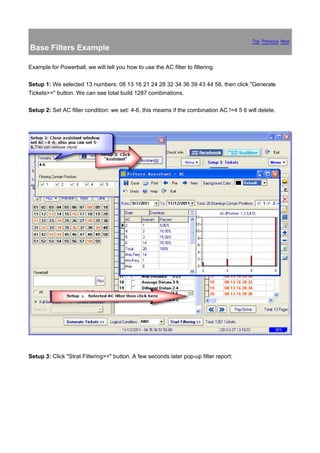
Example for Powerball, we will tell you how to use the AC filter to filtering.

Setup 1: We selected 13 numbers: 08 13 16 21 24 28 32 34 36 39 43 44 58, then click "Generate
Tickets>>" button. We can see total build 1287 combinations.

Setup 2: Set AC filter condition: we set: 4-6, this meams if the combination AC !=4 5 6 will delete.


Setup 3: Click "Strat Filtering>>" button. A few seconds later pop-up filter report:
We can see Total Faild 74 lines.


Setup 4: Click "Close" button pop-up delete faild window then click "Yes" will delete the faild lines.

[Top]


                                  Home Page: http://www.magicrsoft.com
                                      Support:slotto05@gmail.com
                           Copyright: © PowerPlayer Lottery Software Team All rights reserved.
Top Previous Next
Advanced Filters Example

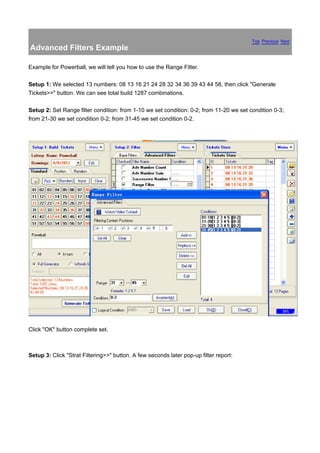
Example for Powerball, we will tell you how to use the Range Filter.

Setup 1: We selected 13 numbers: 08 13 16 21 24 28 32 34 36 39 43 44 58, then click "Generate
Tickets>>" button. We can see total build 1287 combinations.

Setup 2: Set Range filter condition: from 1-10 we set condition: 0-2; from 11-20 we set condition 0-3;
from 21-30 we set condition 0-2; from 31-45 we set condition 0-2.


Click "OK" button complete set.


Setup 3: Click "Strat Filtering>>" button. A few seconds later pop-up filter report:
We can see Total Faild 576 lines.


Setup 4: Click "Close" button pop-up delete faild window then click "Yes" will delete the faild lines.

[Top]


                                  Home Page: http://www.magicrsoft.com
                                      Support:slotto05@gmail.com
                           Copyright: © PowerPlayer Lottery Software Team All rights reserved.
Top Previous Next
What is AC ?

AC value is called " digital complicated value "

(It) is an important parameter of assessing (a) type (of) lottery ticket number value.

(Within) the lottery ticket, mean,( deduct of difference between?) any group all two positive number
value(s) that total amount (of the?) number of figure(s) in the number in R/S (Lotto),

among them R is counted for the bet number.

For example:

In lottery tickets of 7/35, it is 01, 05, 09, 13, 18, 26, 34 to elect the number,

straight difference between these 7 numbers

figures is: 4(=5-1=9-5=13-9); 5(=18-13); 8=(9-1=13-5=26-18=34-26); 12(=13-1); 17(=18-1);
25(=26-1=34-9); 33(=34-1); 13(=26-13=18-5); 9(=18-9); 21(=26-5=34-13); 29(=34-5); 17(=26-9);
16(=34-18).

The above has 13 (instances) of difference, namely:

4, 5, 8, 12, 17, 25, 33, 13, 9, 21, 29, 17, 16 in all, because of R =7, complicated value =13-(7-1) =7.

It is 0 that AC is worth the minimum, the maximum :

It is 15 hour in 7 basic numbers, (not a clue on what the ‘hour' issue might be)

6 basic numbers are 10 at (AC?), 5 basic numbers are 6 at (AC?).

The larger complicated value is, the more complicated the arithmetic series of the numbers. (Also), the
worse the regularity is, and the (greater the) randomness.

(If you consider) the number with too many arithmetic series, its complicated value is relatively low,
(and the randomness becomes correspondingly greater). The risk of obtaining the winning number
inside a bond can also be lower when that occurs.

The number all formed by arithmetic series, complicated value can be 0.

Date....Drawings..AC.Value

1/02/2006 6 4 9 = 3
1/03/2006 9 4 3 = 3
1/04/2006 8 5 3 = 3
1/05/2006 6 8 7 = 2
1/06/2006 6 0 7 = 3
1/07/2006 8 3 7 = 3


                               Home Page: http://www.magicrsoft.com
                                   Support:slotto05@gmail.com
                      Copyright: © PowerPlayer Lottery Software Team All rights reserved.
Video Tutorial                                                                               Top Previous Next


Online Video Url:


http://www.magicrsoft.com/lotterysoftware-video-tutorial.html


                                Home Page: http://www.magicrsoft.com
                                    Support:slotto05@gmail.com
                       Copyright: © PowerPlayer Lottery Software Team All rights reserved.
Top Previous Next
Wheeling Types

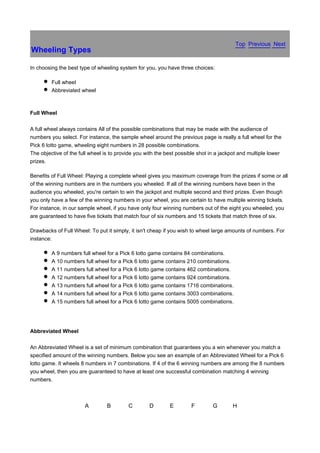
In choosing the best type of wheeling system for you, you have three choices:

         Full wheel
         Abbreviated wheel


Full Wheel

A full wheel always contains All of the possible combinations that may be made with the audience of
numbers you select. For instance, the sample wheel around the previous page is really a full wheel for the
Pick 6 lotto game, wheeling eight numbers in 28 possible combinations.
The objective of the full wheel is to provide you with the best possible shot in a jackpot and multiple lower
prizes.

Benefits of Full Wheel: Playing a complete wheel gives you maximum coverage from the prizes if some or all
of the winning numbers are in the numbers you wheeled. If all of the winning numbers have been in the
audience you wheeled, you're certain to win the jackpot and multiple second and third prizes. Even though
you only have a few of the winning numbers in your wheel, you are certain to have multiple winning tickets.
For instance, in our sample wheel, if you have only four winning numbers out of the eight you wheeled, you
are guaranteed to have five tickets that match four of six numbers and 15 tickets that match three of six.

Drawbacks of Full Wheel: To put it simply, it isn't cheap if you wish to wheel large amounts of numbers. For
instance:

         A 9 numbers full wheel for a Pick 6 lotto game contains 84 combinations.
         A 10 numbers full wheel for a Pick 6 lotto game contains 210 combinations.
         A 11 numbers full wheel for a Pick 6 lotto game contains 462 combinations.
         A 12 numbers full wheel for a Pick 6 lotto game contains 924 combinations.
         A 13 numbers full wheel for a Pick 6 lotto game contains 1716 combinations.
         A 14 numbers full wheel for a Pick 6 lotto game contains 3003 combinations.
         A 15 numbers full wheel for a Pick 6 lotto game contains 5005 combinations.


Abbreviated Wheel

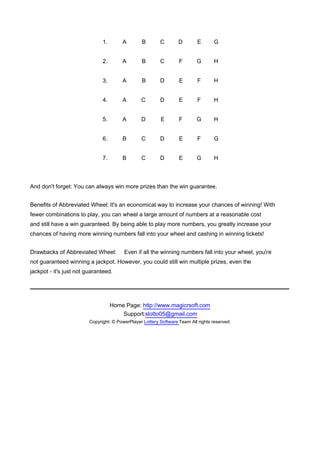
An Abbreviated Wheel is a set of minimum combination that guarantees you a win whenever you match a
specified amount of the winning numbers. Below you see an example of an Abbreviated Wheel for a Pick 6
lotto game. It wheels 8 numbers in 7 combinations. If 4 of the 6 winning numbers are among the 8 numbers
you wheel, then you are guaranteed to have at least one successful combination matching 4 winning
numbers.


                       A         B        C        D        E        F         G       H
1.       A        B        C        D        E       G


                               2.       A        B        C        F       G        H


                               3.       A        B        D        E        F       H


                               4.       A        C        D        E        F       H


                               5.       A        D        E        F       G        H


                               6.       B        C        D        E        F       G


                               7.       B        C        D        E       G        H


And don't forget: You can always win more prizes than the win guarantee.


Benefits of Abbreviated Wheel: It's an economical way to increase your chances of winning! With
fewer combinations to play, you can wheel a large amount of numbers at a reasonable cost
and still have a win guaranteed. By being able to play more numbers, you greatly increase your
chances of having more winning numbers fall into your wheel and cashing in winning tickets!


Drawbacks of Abbreviated Wheel:          Even if all the winning numbers fall into your wheel, you're
not guaranteed winning a jackpot. However, you could still win multiple prizes, even the
jackpot - it's just not guaranteed.


                                    Home Page: http://www.magicrsoft.com
                                        Support:slotto05@gmail.com
                         Copyright: © PowerPlayer Lottery Software Team All rights reserved.
Top Previous Next
How to Use Ours Wheeling Systems


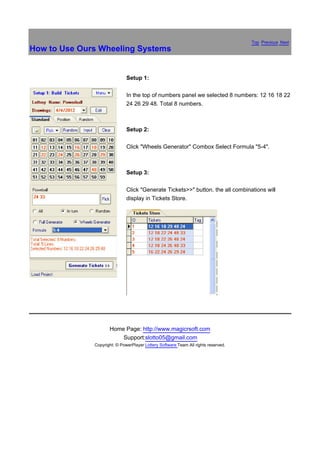
                              Setup 1:

                              In the top of numbers panel we selected 8 numbers: 12 16 18 22
                              24 26 29 48. Total 8 numbers.


                              Setup 2:

                              Click "Wheels Generator" Combox Select Formula "5-4".


                              Setup 3:

                              Click "Generate Tickets>>" button. the all combinations will
                              display in Tickets Store.


                     Home Page: http://www.magicrsoft.com
                         Support:slotto05@gmail.com
              Copyright: © PowerPlayer Lottery Software Team All rights reserved.
Top Previous Next
How Wheeling System works

It's incredibly simple to put a Wheeling System to work for you! Let's walk though an example.
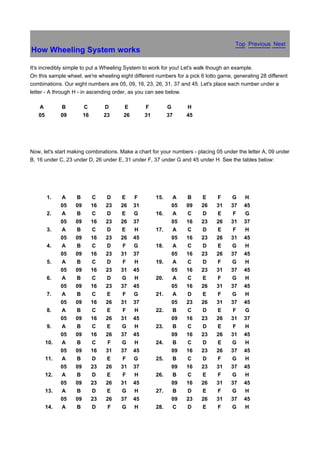
On this sample wheel, we're wheeling eight different numbers for a pick 6 lotto game, generating 28 different
combinations. Our eight numbers are 05, 09, 16, 23, 26, 31, 37 and 45. Let's place each number under a
letter - A through H - in ascending order, as you can see below.

   A          B         C         D    E         F          G     H
   05         09        16        23   26        31         37    45


Now, let's start making combinations. Make a chart for your numbers - placing 05 under the letter A, 09 under
B, 16 under C, 23 under D, 26 under E, 31 under F, 37 under G and 45 under H. See the tables below:


        1.    A    B         C    D    E    F         15.    A    B     E     F      G    H
              05   09        16   23   26   31               05   09    26    31     37   45
        2.    A    B         C    D    E    G         16.    A    C     D     E       F   G
              05   09        16   23   26   37               05   16    23    26     31   37
        3.    A    B         C    D    E    H         17.    A    C     D     E       F   H
              05   09        16   23   26   45               05   16    23    26     31   45
        4.    A    B         C    D     F   G         18.    A    C     D     E      G    H
              05   09        16   23   31   37               05   16    23    26     37   45
        5.    A    B         C    D     F   H         19.    A    C     D     F      G    H
              05   09        16   23   31   45               05   16    23    31     37   45
        6.    A    B         C    D    G    H         20.    A    C     E     F      G    H
              05   09        16   23   37   45               05   16    26    31     37   45
        7.    A    B         C    E     F   G         21.    A    D     E     F      G    H
              05   09        16   26   31   37               05   23    26    31     37   45
        8.    A    B         C    E     F   H         22.    B    C     D     E       F   G
              05   09        16   26   31   45               09   16    23    26     31   37
        9.    A    B         C    E    G    H         23.    B    C     D     E       F   H
              05   09        16   26   37   45               09   16    23    26     31   45
        10.   A    B         C     F   G    H         24.    B    C     D     E      G    H
              05   09        16   31   37   45               09   16    23    26     37   45
        11.   A    B         D    E     F   G         25.    B    C     D     F      G    H
              05   09        23   26   31   37               09   16    23    31     37   45
        12.   A    B         D    E     F   H         26.    B    C     E     F      G    H
              05   09        23   26   31   45               09   16    26    31     37   45
        13.   A    B         D    E    G    H         27.    B    D     E     F      G    H
              05   09        23   26   37   45               09   23    26    31     37   45
        14.   A    B         D     F   G    H         28.    C    D     E     F      G    H
05     09    23    31      37   45                16      23     26     31        37   45


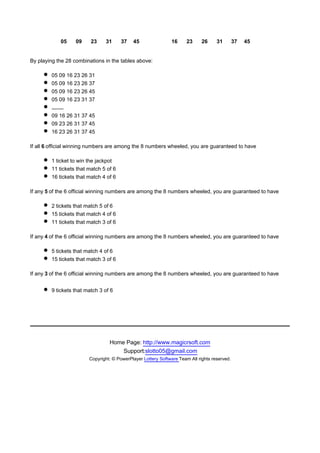
By playing the 28 combinations in the tables above:

        05 09 16 23 26 31
        05 09 16 23 26 37
        05 09 16 23 26 45
        05 09 16 23 31 37
        ........
        09 16 26 31 37 45
        09 23 26 31 37 45
        16 23 26 31 37 45

If all 6 official winning numbers are among the 8 numbers wheeled, you are guaranteed to have

        1 ticket to win the jackpot
        11 tickets that match 5 of 6
        16 tickets that match 4 of 6

If any 5 of the 6 official winning numbers are among the 8 numbers wheeled, you are guaranteed to have

        2 tickets that match 5 of 6
        15 tickets that match 4 of 6
        11 tickets that match 3 of 6

If any 4 of the 6 official winning numbers are among the 8 numbers wheeled, you are guaranteed to have

        5 tickets that match 4 of 6
        15 tickets that match 3 of 6

If any 3 of the 6 official winning numbers are among the 8 numbers wheeled, you are guaranteed to have


        9 tickets that match 3 of 6


                                 Home Page: http://www.magicrsoft.com
                                     Support:slotto05@gmail.com
                        Copyright: © PowerPlayer Lottery Software Team All rights reserved.
Top Previous Next
Why Use Wheeling Systems

Successful lottery players realize that a Wheeling System is a way of organizing your lotto-type game play to
enhance your odds of winning multiple-tier prizes. Wheeling Systems put the force of mathematics in your
corner. It is a method of arranging a number of number selections into multiple combinations (game) that
provide either full or partial coverage of all possible mixtures of those selections.

Consider how this increases your chances! If some or all the winning numbers can be found inside your
number of number selections, you are GUARANTEED to have one or more winning tickets.

You will find compelling reasons why ALL SERIOUS LOTTERY PLAYERS and LOTTO POOLS are having
fun with Wheeling Systems:

         They are easy to use!
         They systematically increase your chances of winning.
         You get maximum coverage of the numbers you wish to play
         You're guaranteed to win a prize or prizes if you select the correct group of numbers for your wheel.


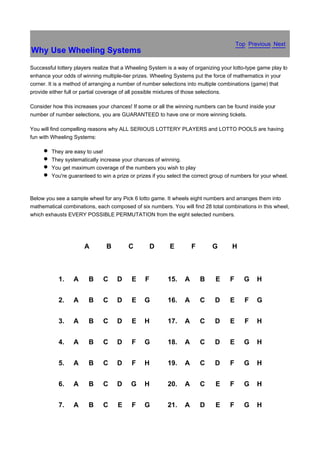
Below you see a sample wheel for any Pick 6 lotto game. It wheels eight numbers and arranges them into
mathematical combinations, each composed of six numbers. You will find 28 total combinations in this wheel,
which exhausts EVERY POSSIBLE PERMUTATION from the eight selected numbers.


                       A        B        C          D      E         F       G        H


            1.    A     B      C     D     E    F         15.    A       B     E     F     G    H


            2.    A     B      C     D     E    G         16.    A       C    D      E      F   G


            3.    A     B      C     D     E    H         17.    A       C    D      E      F   H


            4.    A     B      C     D     F    G         18.    A       C    D      E     G    H


            5.    A     B      C     D     F    H         19.    A       C    D      F     G    H


            6.    A     B      C     D    G     H         20.    A       C     E     F     G    H


            7.    A     B      C     E     F    G         21.    A       D     E     F     G    H
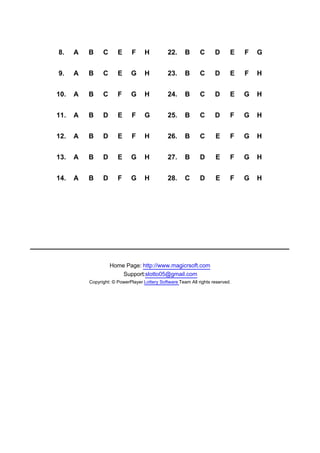
8.    A   B     C      E      F     H          22.     B      C      D      E   F   G


9.    A   B     C      E     G      H          23.     B      C      D      E   F   H


10.   A   B     C      F     G      H          24.     B      C      D      E   G   H


11.   A   B     D      E      F     G          25.     B      C      D      F   G   H


12.   A   B     D      E      F     H          26.     B      C      E      F   G   H


13.   A   B     D      E     G      H          27.     B      D      E      F   G   H


14.   A   B     D      F     G      H          28.     C      D      E      F   G   H


                    Home Page: http://www.magicrsoft.com
                        Support:slotto05@gmail.com
          Copyright: © PowerPlayer Lottery Software Team All rights reserved.
Top Previous Next
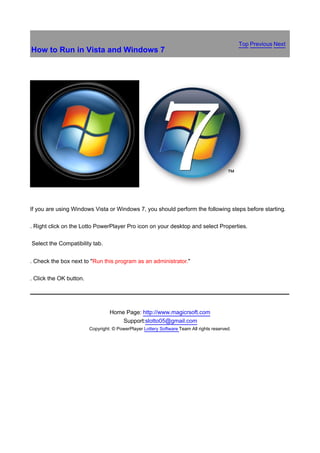
How to Run in Vista and Windows 7


If you are using Windows Vista or Windows 7, you should perform the following steps before starting.

. Right click on the Lotto PowerPlayer Pro icon on your desktop and select Properties.

Select the Compatibility tab.


. Check the box next to "Run this program as an administrator."

. Click the OK button.


                                  Home Page: http://www.magicrsoft.com
                                      Support:slotto05@gmail.com
                         Copyright: © PowerPlayer Lottery Software Team All rights reserved.
Top Previous Next
How to Purchase


銆


Purchase Lotto PowerPlayer Pro online via secure third party online payment gateway - Click Here

Purchase PowerPlayer For Pick 3/4 online via secure third party online payment gateway - Click Here


Purchase PowerPlayer For Prediction online via secure third party online payment gateway - Click Here

Purchase Lotto PowerPlayer Pro, PowerPlayer For Pick 3/4 and PowerPlayer For Prediction Power
Pack (discount 20% on three programs). online payment gateway - Click Here

FAQ about registration of PowerPlayer


1. Is my online order form secure?
Yes, it is 100% secure.

2. Do I have to pay for the upgrades?
No! All upgrades are free to registered PowerPlayer users.

3. Is tech support free?
Yes, it's free for all.

4. What happens after I send in the order?
You will receive an email confirming your order shortly after
sending the online order form. Then, within 24 hours, you will
receive a second email with your registration name, code.
If you do not get your code or if you've lost it, please email us
at slotto05@gmail.com. Please include your name, address,
email address, and order confirmation number (if you have it).
We will be happy to help you.

5. I have entered the registration code, however the software
  reminds it's unregistered, why?
Perhaps you have entered a wrong registration code or name.
Please check your name and registration code carefully and make
sure they are exactly the same as you received from the author or
an authorized reseller If you have any question about registration,
please contact us.


                                        Home Page: http://www.magicrsoft.com
                                            Support:slotto05@gmail.com
                                Copyright: © PowerPlayer Lottery Software Team All rights reserved.
Top Previous Next
How to Register

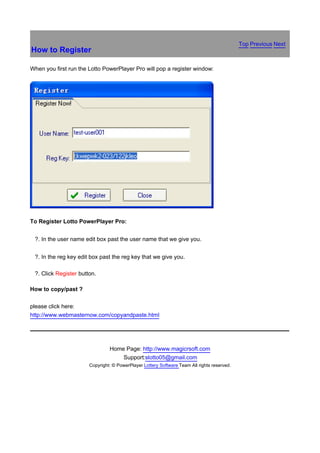
When you first run the Lotto PowerPlayer Pro will pop a register window:


To Register Lotto PowerPlayer Pro:


鈶 ?.   In the user name edit box past the user name that we give you.


鈶 ?.   In the reg key edit box past the reg key that we give you.

鈶 ?.   Click Register button.

How to copy/past ?

please click here:
http://www.webmasternow.com/copyandpaste.html


                                   Home Page: http://www.magicrsoft.com
                                       Support:slotto05@gmail.com
                          Copyright: © PowerPlayer Lottery Software Team All rights reserved.
Top Previous Next
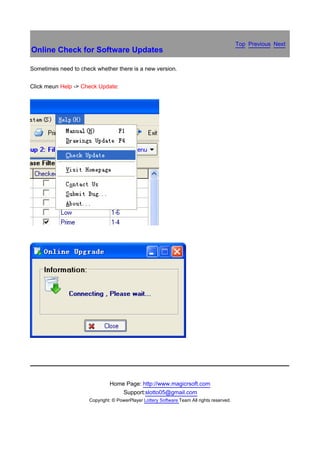
Online Check for Software Updates

Sometimes need to check whether there is a new version.


Click meun Help -> Check Update:


                               Home Page: http://www.magicrsoft.com
                                   Support:slotto05@gmail.com
                      Copyright: © PowerPlayer Lottery Software Team All rights reserved.
Top Previous Next
Technical Support

Before contacting our support department, you should make sure that you have the latest version of
Lotto PowerPlayer Pro.

You should also check the Frequently Asked Questions (FAQ) located at
http://www.magicrsoft.com/faq.html

If you cannot find satisfactory answer there, feel free contact us .


                                 Home Page: http://www.magicrsoft.com
                                     Support:slotto05@gmail.com
                        Copyright: © PowerPlayer Lottery Software Team All rights reserved.

Lottopowerplayerpro lottery software manual

  • 1.
    Top Previous Next QuickStart Follow the instructions below to start using Lotto PowerPlayer Pro right away. The steps should be performed in the order listed. Please refer to the other chapters in this help file for more detailed information. To open your lottery: On the Toolbar, click the Lottery button show the select lottery form. Click on the name of the lottery you want to play. Click the Ok button. To update your lottery file with the latest drawings: On the Toolbar, click the Drawings button show the Drawings Form. Click the Add button add numbers, click the Update button online update drawings data.
  • 2.
    To create yourlottery tickets: Lotto PowerPlayer Pro support Standard Positoin and Random Mode create the tickets. Click Generate Tickets button add the tickets to the tickets form. To filtering tickets: Checked your selected filters and set the filter conditoin then click Start Filtering
  • 3.
    button. To Edit tickets:You can edit, add, delete, save, export, formate export, import and print tickets.
  • 4.
    To Check Winningtickets: On the Toolbar, click the Check Win button show the check winning form.
  • 5.
    Home Page: http://www.magicrsoft.com Support:slotto05@gmail.com Copyright: © PowerPlayer Lottery Software Team All rights reserved.
  • 6.
    Top Previous Next Welcometo Lotto PowerPlayer Pro Lotto PowerPlayer Pro is a powerful mathematical lottery tool which helps you analyze previous drawings using various filtering criteria ease of use, and power. Lotto PowerPlayer Pro support more than 100 lotteries, works with all pick 1 through pick 15 with up to 80 numbers. support 0, 1, 2, or 3 bonus numbers or with 1 power ball number. It does not support daily pick 3 or pick 4 lotteries, if you want to play daily pick 3 or pick 4 lotteries you can use PowerPlayer For Pick 3/4 (more information see PowerPlayer For Pick 3/4). Lotto PowerPlayer Pro support more than 18 countries regions lotteries (United States, Canada, Australia, United Kingdom, Germany, France, Greece, Ireland, South Africa, Singapore, New Zealand, Hong Kong, Taiwan, Malaysia etc.). We update all the lotteries drawings everyday. Lotto PowerPlayer Pro Main Features: 1. Support all pick 4 through 7 Wheels. 2. Free update more than 100 lotteries drawings. 3 Works with all pick 1 through pick 15 with up to 80 numbers. 4. Build full wheel very fast, build 1000000 lines only need 3 sec. 5. More than 40 kind of filters. (base filters can set filters condition automation). 6. Filtering support "Logical Condition ". 7. More than 50 statistical charts and statistical charts . 8. Automation set the base filters condition, save your times. 9. Online Check for Software Updates and Software Updates is FREE. To learn how to start using Lotto PowerPlayer immediately, please read Quick Start guide. Home Page: http://www.magicrsoft.com Support:slotto05@gmail.com Copyright: © PowerPlayer Lottery Software Team All rights reserved.
  • 7.
    Top Previous Next InstallingLotto PowerPlayer Pro 1. Be sure that your system meets all of the system requirements for running Lotto PowerPlayer Pro. 2. Be sure that all other open program are closed down. 3. If you have enough available space on your C or other drives, recommend that you install it in the default location.   Home Page: http://www.magicrsoft.com Support:slotto05@gmail.com Copyright: © PowerPlayer Lottery Software Team All rights reserved.
  • 8.
    Top Previous Next StartingLotto PowerPlayer Pro Double-click on the Lotto PowerPlayer Pro icon on your desktop or from the Start menu select Programs|Lotto PowerPlayer Pro|Lotto PowerPlayer Pro.   Home Page: http://www.magicrsoft.com Support:slotto05@gmail.com Copyright: © PowerPlayer Lottery Software Team All rights reserved.
  • 9.
    Top聽 Previous聽 Next SystemRequirement Lotto PowerPlayer Pro requires the following minnimun requirements: 486 DX 166MHz or higher PC, running Windows 95/98/ME/NT/2000/XP/Vista/Windows 7. 200 MB RAM or higher. 100 Megabytes free hard disk space. VGA display or higher (256 colors or more). * If your operating system is Windows Vista or Windows 7, you should perform the following steps. 1. Right click on the Lotto Pro icon on your desktop and select Properties. 2. Select the Compatibility tab. 3. Check the box next to "Run this program as an administrator." 4. Repeat the above steps for the Update Lotto Drawing Files icon on your desktop. Home Page: http://www.magicrsoftcom Support:slotto05@gmail.com Copyright: © PowerPlayer Lottery Software Team All rights reserved.
  • 10.
    Top Previous Next Openinga Lottery 路 To open your lottery: On the Toolbar, click the Lottery button show the select lottery form. Click on the name of the lottery you want to play. Click the Ok button. 銆 Home Page: http://www.magicrsoft.com Support:slotto05@gmail.com Copyright: © PowerPlayer Lottery Software Team All rights reserved.
  • 11.
    Top Previous Next Deletinga Drawing At times it may be necessary to delete a drawing that was previously entered in a drawing file. To Delete a drawing: 1.On the Toolbar, click the Drawings button show the select lottery form. 2. Click on the drawing that you want to delete in the drawing list. 3. Click on the Delete button.
  • 12.
    4. Click onthe Yes button when you are asked to confirm the deletion. Home Page: http://www.magicrsoft.com Support:slotto05@gmail.com Copyright: © PowerPlayer Lottery Software Team All rights reserved.
  • 13.
    Top Previous Next Insertinga Drawings At times it may be necessary to insert a drawing that was previously entered in a drawing file.   To insert a drawing: 1.On the Toolbar, click the Drawings button show the select lottery form. 2. Click on the drawing that you want to insert in the drawing list. 3. Click on the Insert button open the Insert Drawings form:
  • 14.
    Enter your Numbersin the edit box then click the Ok button. 4. Click on the Yes button when you are asked to confirm. Home Page: http://www.magicrsoft.com Support:slotto05@gmail.com Copyright: © PowerPlayer Lottery Software Team All rights reserved.
  • 15.
    Top Previous Next Exportingand Importing Drawings At times it may be necessary to export or import a drawing file.   To Import or Export a drawing: 1.On the Toolbar, click the Drawings button show the select lottery form. 2. Click on the Export or Import button.
  • 16.
    Home Page: http://www.magicrsoft.com Support:slotto05@gmail.com Copyright: © PowerPlayer Lottery Software Team All rights reserved.
  • 17.
    Top Previous Next Modifyinga Drawing At times it may be necessary to modify a drawing that was previously entered in the drawing file. To modify a drawing: 1.On the Toolbar, click the Drawings button show the select lottery form. 2. Click on the drawing that you want to modify in the drawing list. The date and numbers are displayed in the edit box to the right of the drawing list. 3. If the numbers for the drawing are not correct, click on the edit box with the incorrect numbers and type the correct numbers.
  • 18.
    4. Click theModify button to save your changes. Home Page: http://www.magicrsoft.com Support:slotto05@gmail.com Copyright: © PowerPlayer Lottery Software Team All rights reserved.
  • 19.
    Top Previous Next Addinga New Lottery On the Toolbar, click the Lottery button show the select lottery form, click New show create a new lottery form   Click Ok button add a new lottery. Home Page: http://www.magicrsoft.com Support:slotto05@gmail.com Copyright: © PowerPlayer Lottery Software Team All rights reserved.
  • 20.
    Top Previous Next OnlineUpdate Drawings To Online Update drawings: 1.On the Toolbar, click the Drawings button show the select lottery form. 2. Click on the Update button show the drawings update form:
  • 21.
    3. Click onthe Update button connected to the Internet and update drawings.   Home Page: http://www.magicrsoftcom Support:slotto05@gmail.com Copyright: © PowerPlayer Lottery Software Team All rights reserved.
  • 22.
    Top Previous Next Overview LottoPowerPlayer Pro can generate lottery tickets with three different categories of numbers: full generate number, smart (wheels) number, positon number and random numbers. We recommend that if you are just learning to use Lotto PowerPlayer Pro that you create your tickets using Smart numbers. The program does all the work for you, and all your tickets will contain numbers that have the best statistical chance of hitting. Once you are more experienced interpreting the charts and graphs in the Lotto PowerPlayer Pro, you may want to play your own Favorite numbers, or a combination of Smart (wheels) and Favorite numbers. We don't recommend that you play tickets generated with Random numbers. The option is included mainly so that you compare random results with results obtained from playing Smart (wheels) or Favorite numbers. When you generate tickets using any of the three categories of numbers you have two choices as to how the tickets are generated; generate the tickets using the wheeling system of your choice, or generate the number of tickets that you specify. In most cases it is better to generate your tickets with one of the wheeling systems. When you play a wheeling system, you are guaranteed a prize if a portion of the numbers you play match the actual numbers picked. There is no such guarantee when create your tickets using the other method. Your overall winnings are normally larger when you play a wheeling system because you will have several tickets with winning matches. You normally choose a wheeling system based on how much you can afford to spend and the prize guarantee associated with the system. If you can only afford to play a small number of tickets, you can apply filters to your lottery tickets to eliminate tickets with unlikely number combinations. You also can edit your tickets, Lotto PowerPlayer Pro support add, delete, save, export to file, import from file, print tickets to paper, add bouns and formate export. Home Page: http://www.magicrsoft.com Support:slotto05@gmail.com Copyright: © PowerPlayer Lottery Software Team All rights reserved.
  • 23.
    Top Previous Next CreatingFull Generate Number Tickets To Creating Full Generate Number Tickets: x.On the numbers panel, selecting your like numbers, If the number is selected will become a green. If you want to cancel selection, please use the mouse to click the specified number. y In . the radio box, select Full Generator.
  • 24.
    z. Click Generate Tickets button. Click OK, the all tickes will be saved in the tickets panel. Home Page: http://www.magicrsoft.com
  • 25.
    Support:slotto05@gmail.com Copyright: © PowerPlayerLottery Software Team All rights reserved.
  • 26.
    Top Previous Creating SmartNumber Tickets by Selecting a Next Wheeling System To Creating Smart Number Tickets by Selecting a Wheeling System: x.On the numbers panel, selecting your like numbers, If the number is selected will become a green. If you want to cancel selection, please use the mouse to click the specified number. y In . the radio box, select Wheels, In the drop-down list, select the required formula. z. Click Generate Tickets button.
  • 27.
    Click OK, theall tickes will be saved in the tickets panel. Home Page: http://www.magicrsoft.com Support:slotto05@gmail.com
  • 28.
    Copyright: © PowerPlayerLottery Software Team All rights reserved.
  • 29.
    Top Previous Next Creatinga Positon Number Tickets To Creating a Positon Number Tickets: x. Click each Sel button open the select number form:
  • 30.
    select your numbers,click Ok button. If want add the bouns number, please checked the Bouns chekbox. y Click . Generate Tickets button. Click OK, the all tickes will be saved in the tickets panel.
  • 31.
    Home Page: http://www.magicrsoft.com Support:slotto05@gmail.com Copyright: © PowerPlayer Lottery Software Team All rights reserved.
  • 32.
    Top Previous Next Creatinga Random Number Tickets To Creating a Random Number Tickets: x. In the Random Count drop-down list, select the lines count. y If . want add the bouns number, please checked the Bouns chekbox. z. Click Generate button. { Click . Add to Tickets button.
  • 33.
    Click OK, theall tickes will be saved in the tickets panel.   Home Page: http://www.magicrsoft.com Support:slotto05@gmail.com Copyright: © PowerPlayer Lottery Software Team All rights reserved.
  • 34.
    Top Previous Next EditingTickets Some times you need edit your tickets, Lotto PowerPlayer Pro support add, delete, save, export to file, import from file, print tickets to paper, add bouns and formate export. Click Menu Pop-up button or right-click display edit tickets menu : Save Tickets File - Save tickets list to the tickets file. Load Tickets File - Load tickets list from the tickets file. Load Drawings - Load All Drawings to tickets list. Save To Txt File - Save tickets list to Txt file. Load From Txt File - Load tickets list from Txt file. Formate Export - Export tickets formate. Add Ticket - Add one line. Delete Ticket - Delete one line.
  • 35.
    Array: Low->High -every tickets arrange Low-High. Copy Selected - Copy selected tickets. Add Bonus Number - Add bonus or power ball number. Numbers Frequency - Statistic every number appear count in tickets list. Delete 'x' Tag Tickets - Delete Tag = "X" in tickets list. Delete ' ' Tag Tickets - Delete Tag = " " in tickets list. Clear All Tickets - Clear the all tickets. Filters Report - Show Latest filtering report.   Home Page: http://www.magicrsoft.com Support:slotto05@gmail.com Copyright: © PowerPlayer Lottery Software Team All rights reserved.
  • 36.
    Top Previous Next PrintingTickets on Paper Click Random button on the toolbar display print to paper window: Click Print button print tickets to paper.   Home Page: http://www.magicrsoft.com Support:slotto05@gmail.com Copyright: © PowerPlayer Lottery Software Team All rights reserved.
  • 37.
    Top Previous Next RandomSelect Numbers Click Random button display random window: In the edit box enter the digital, click Ok button.   Home Page: http://www.magicrsoft.com Support:slotto05@gmail.com Copyright: © PowerPlayer Lottery Software Team All rights reserved.
  • 38.
    Top Previous Next Saveand Load Your Own Favorite Number To Save and Load Your Own Favorite Number: x. Click Menu pop-up menu, click Save Selected open save as window:
  • 39.
    y Enter . file name click Save button. To Save and Load Your Own Favorite Number: x. Click Menu button pop-up menu, click Load Selected open open window:
  • 40.
    y Select . file click Open button.   Home Page: http://www.magicrsoft.com Support:slotto05@gmail.com Copyright: © PowerPlayer Lottery Software Team All rights reserved.
  • 41.
    Top Previous Next CheckingYour Tickets for Matches Before you check your tickets, you should ensure that your drawing file is up-to-date. Lotto PowerPlayer Pro will check the lottery tickets that you have saved with any drawing in your drawing file. On the Toolbar, click the Check Win button show the check Winning window:: To Checking Your Tickets for Matches: 鈶 ?. To Choose a drawing data. 鈶 ?. Choose matching =, >, <, >= or <=. 鈶 ?. Choose matching amount. 鈶 ?. Click Check Now button. The matching tickets will be displayed in the matching tickets. To Save Matching Tickets: Click right pop-up menu:
  • 42.
    Save To Html- Save the matching tickets to htm file. Save To Txt - Save the matching tickets to txt file. Save To Excel - Save the matching tickets to xls file. Clear - Clear the matching tickets. Home Page: http://www.magicrsoftcom Support:slotto05@gmail.com Copyright: © PowerPlayer Lottery Software Team All rights reserved.
  • 43.
    Top Previous Next Statistics Clickmenu Statistics to select a statistics: Lotto PowerPlayer Pro support Base, Drawings Distrbuting, Drawings Hot-Cold, Odd-Even, Low-High, Successive, Sum, Distance, Range, AC, Diveded, Multiple, Locked Number, Prior Drawings. Select a column click open the chart:
  • 44.
    Right-click pop-up menu: SaveTo Html - Save statistic date to html file. Save To Txt - Save statistic date to Txt file. Save To Excel - Save statistic to Excel file. Show Chart - Show chart.   Home Page: http://www.magicrsoft.com Support:slotto05@gmail.com Copyright: © PowerPlayer Lottery Software Team All rights reserved.
  • 45.
    Top Previous Next Howto Use The Filters Sometimes, we need filters to remove some of the low probability of the tickets. Lotto007 XP support more than 40+ filters to filtering tickets. Questions: 1. Base Filters. 2. Advanced Filters. 3. What is the "Logical Condition" ? 4. How to set the base filters condition ? 5. How to set the advanced filters condition ? 6. How to use the filters assistant ? 7. What is "Filtering Contain Position" ? 8. What is "Generate Default Condition" ? 9. What is "Filtering Report" ? 1. Base Filters From the "Setup Two: Filters" click "Base Filters" sheet show the base filters panel: Support 25 kinds of base filters. if you want get about base explain click here.
  • 46.
    Base filters example [Top] 2.Advanced Filters. From the "Setup Two: Filters" click "Advanced Filters" sheet show the advanced filters panel: Support 21 kinds of advanced filters, if you want get about advanced filters explain click here. [Top] 3. What is the "Logical Condition"? You can set you selected filters logical condition, if logical condition = "AMD" all filters conditions must right, if logical condition = "OR" only need one filter condition right, of course you can inputlogical condition yourself, for example: if we selected 5 filters, we can set the logical condition = "4-5". [Top] 4. How to set the base filters condition? From column: "conditions " Click show the base filter window:
  • 47.
    Click "Assistant" buttonsee the current filter statistic and chart, input your condition value, click "Ok" button to save condition. [Top] 5. How to set the advanced filters condition? From column: "conditions " Click show the advanced filter window: Click "Assistant" button see current filter statistic and chart, input your condition value, click "Ok" button save condition. [Top] 6. How to use the filters assistant ?
  • 48.
    Click "Assistant" openthe current filter chart: We can use the chart set the filters conditions, for example: we can see Odd filter: value 1 appear 5 times, value 2 appear 5 times, value 3 appear 4 times, value 4 appear 2 times, value 5 appear 2 time, in this way we can set the Odd conditions: 1-5. [Top] 7. What is "Filtering Contain Position"?
  • 49.
    If we selectedthe position: 1,2,3,4,5, when filtering it's only filter the position: 1,2,3,4,5. [Top] 8. What is "Generate Default Condition"? System automation statistic the history drawings (default statistic the last 20 drawings), automation enter filters conditions. "Generate Default Condition" only support the base filter! [Top] 9. What is "Filtering Report"? Click "Filtering Report" show Filters Report window:
  • 50.
    [Top] Home Page: http://www.magicrsoft.com Support:slotto05@gmail.com Copyright: © PowerPlayer Lottery Software Team All rights reserved.
  • 51.
    Top Previous Next BaseFilters Base Filters List: 1. Odd 2. Even 3. Hight 4. Low 5. Prime 6. Number Sum 7. Average Value 8. Unit Number Sum 9. Unit Number Different Number Count 10. Successiv 11. Successiv Groups 12. Odd Successiv 13. Even Successiv 14. Minimum Number 15. Maximum Number 16. First-Last Distance 17. Max Distance 18. Average Distance 19. Different Distance 20. AC 21. Same Last Drawn 22. Sum Value Even Odd 23. Unit Number Group Count 24. Decade Group Count 25. Different Decade Count 1. Odd How many Odd number in a line. Example of a winning line in a 6/45 lotto was 06 11 17 18 21 31 45, the Odd numbers: 11 17 21 31 45, so Odd count=5. [Top] 2. Even How many Even number in a line. Example of a winning line in a 6/45 lotto was 06 10 17 18 21 31 45, the Even numbers: 06 10, so Even count=2. [Top] 3. High How many High number in a line. Example of a winning line in a 6/45 lotto was 06 10 17 18 21 31 45, the High numbers: 31 45 , so High count=2. [Top] 4. Low How many Low number in a line. Example of a winning line in a 6/45 lotto was 06 10 17 18 21 31 45, the Low numbers: 06 10 17 18 21, so Low count=4. [Top] 5. Prime How many Prime number in a line. Example of a winning line in a 6/45 lotto was 02 11 17 20 21 31 42, the
  • 52.
    Prime numbers: 02 11 17 31 , so Prime count=4. [Top] What is Prime? A prime number can be divided, without a remainder, only by itself and by 1. For example, 17 can be divided only by 17 and by 1. From 1-99 Prime Numbers: 2 3 5 7 11 13 17 19 23 29 31 37 41 43 47 53 59 61 67 71 73 79 83 89 97. [Top] 6. Number Sum Sum of numbers in a line, for example, the line: 05, 11, 14, 15, 22, 39, sum is 5+11+14+15+22+39=106. [Top] 7. Average Value The average value in a line, for example, the line: 05, 11, 14, 15, 22, 39 sum = 5+11+14+15+22+39=106 so average value is 106/6=17. [Top] 8. Unit Number Sum Sum of unit number in a line, for example, the line: 05, 11, 14, 15, 22, 39 the unit numbers is: 5, 1, 4 5, 2, 9, so unit number sum=26. [Top] 9. Unit Number Different Number Different number count of the unit number in a line, for example, the line: 05, 12, 14, 15, 22, 39 the unit numbers is: 5, 2, 4 5, 2, 9, the different number is 2, 4, 5, 9 so the different number count is 4. [Top] 10. Successive For example: in the line: 03 13 25 26 27 43, the numbers: 25 26 27 is the successive numbers, so successive number count is 3. [Top] 11.Successive Groups For example in the line: 03 13 25 26 32 33, the numbers: 25 26, 32 33 are all successive numbers, so successive number group is 2. [Top] 12. Odd Successive For example: in the line: 03 13 25 26 27 43, the numbers: 03 13 25, 27 43 are successive numbers, successive of odd count is 3. [Top] 13. Even Successive For example: in the line: 04 12 22 25 33 43, the numbers:04 12 22 is be even numbers, successive of odd count is 3. [Top] 14. Minimum Number The minimum number in a line. Example of a winning line in a 6/45 lotto was 06 10 17 18 21 31 45 the minimum number is 6. [Top] 15. Maximum Number The maximum number in the line. Example of a winning line in a 6/45 lotto was 06 10 17 18 21 31 45 the maximum number is 45. [Top] 16. First-Last Distance The first and the last number distance.in the line: 02, 05, 17, 19, 27, 31 the distance is 31-02=29. [Top] 17. Max Distance The distance between every two numbers in a line. in the line: 02, 05, 17, 19, 27, 31 every distance is: 3 (05-02=3), 12 (17-05), 2 (19-17), 4 (31-27). so the max distance is 12 (maximum is 12). [Top]
  • 53.
    18. Average Distance Thedistance average in a line, in the line: 02, 05, 17, 19, 27, 31 the distance is: 3 (05-02=3), 12 (17-05), 2 (19-17), 4 (31-27). so the distance average is 5 ((3+12+2+4)/4=5). [Top] 19.Different Distance Amount the difference distance in a line, in the line: 02, 05, 17, 19, 27, 31 the distance is: 3 (05-02=3), 12 (17-05), 2 (19-17), 4 (31-27). so the different distance is 4 (3, 12, 2, 4). [Top] 20. AC The AC in the line. Example of a winning line in a 5/45 lotto was 11 14 49 55 58, the AC = 4. [Top] What is AC? 21. Same Last Drawn Same latest drawing numbers count in a line [Top] 22. Sum Value Even Odd Example of a winning line in a 6/45 lotto was 10 17 18 21 31 45, the sum of this line is = 142, so it is Even Sum. The player has to predict the outcome of a winning line the next draw will to be ODD or EVEN. This filter will remove about 50% of all the combination. [Top] 23. Unit Number Group Count How many groups of units are there in a winning line -. Our Example:10 17 18 21 31 45, so here we have 3 groups of winning unit numbers, one group of unit =the green shaded area see below. Units 0 and 1 are next to each other so they are in one group, unit 5 is alone,so another group and finally units 7 and 8 are next to each other so they form one group- the third group, so all together we have 3 groups of winning units. [Top] 24. Decade Group Count From 0 - 9 we call this a decade of 0 From 10-19 it is called a decade of 10 From 20-29 it is called a decade of 20 From 30-39 it is called a decade of 30 And so on, until the decade of 90 which is from 90-99, for a 6/45 game we have only 5 decades. Let us take our winning line as: 02 16 37 39 41 42, we illustrate this line in table as below:
  • 54.
    [Top] As you cansee, here we can count only 2 groups of decades. A group of decades = a shaded area. Decades 0 and 10 are next to each other, so they form one group. Also decades 30 and 40 form one group because they are next to each other. 25. Different Decade Count Example:02 16 37 39 41 45 We have4 Different decade Count here in this winning line, but 2 Decade Group count. [Top] Home Page: http://www.magicrsoft.com Support:slotto05@gmail.com Copyright: © PowerPlayer Lottery Software Team All rights reserved.
  • 55.
    Top Previous Next AdvancedFilters Advanced Filter List: 1. Adv Number Count 2. Adv Number Sum 3. Successive Number Filter 4. Range Filter 5. Number Groups Filter 6. Must Contain the Numbers 7. Locked Numbers 8. Divided by 3 9. Divided by 4 10. Divided by 5 11. Divided by 6 12. Divided by 7 13. Divided by 8 14. Divided by 9 15. Divided by 10 16. Multiple Filter 17. Delete History Drawings 18. Hot-Cold Filter 1. Adv Number Count
  • 56.
    Adv Number countcontain the filters: Odd, Even, High, Low, Prime. Click "Add=>" button add a filter. Click "Replace>=" button replace the current filter. Click "Delete<=" button delete the current filter. Click "Delete All" button replace the current filter. Click "Edit" button open text edit filter window. Click "Assistant" open the filters statistic chart. Click "Ok" Save the filter value. Click "Save" save the filters value to file. Click "Load" Load the filters value from file. [Top] 2 . Adv Number Sum Click button open adv number sum window:
  • 57.
    Adv Number Sumcontain the filters: Number Sum,High Sum, Low Sum, Odd Sum, Even Sum, Prime Sum, The Units Number Sum. Click "Add=>" button add a filter. Click "Replace>=" button replace the current filter. Click "Delete<=" button delete the current filter. Click "Delete All" button replace the current filter. Click "Edit" button open text edit filter window. Click "Assistant" open the filters statistic chart. Click "Ok" Save the filter value. Click "Save" save the filters value to file. Click "Load" Load the filters value from file. [Top] 3.Successive Number Filter
  • 58.
    Successive Number Filtercontain the filters: Successive, Successive Groups, Odd Successive, Even Successive, Successive 2, Successive 3, Successive 4, Successive 5. Click "Add=>" button add a filter. Click "Replace>=" button replace the current filter. Click "Delete<=" button delete the current filter. Click "Delete All" button replace the current filter. Click "Edit" button open text edit filter window. Click "Assistant" open the filters statistic chart. Click "Ok" Save the filter value. Click "Save" save the filters value to file. Click "Load" Load the filters value from file. [Top] 4. Range Filter
  • 59.
    How many numbersin a range. Example: if the range we set: 01-10, Condition we set: 1-2, the line must contained 1-2 numbers in 01, 02, 03, 04, 05, 06, 07, 08, 09 10. Click "Add=>" button add a filter. Click "Replace>=" button replace the current filter. Click "Delete<=" button delete the current filter. Click "Delete All" button replace the current filter. Click "Edit" button open text edit filter window. Click "Assistant" open the filters statistic chart. Click "Ok" Save the filter value. Click "Save" save the filters value to file. Click "Load" Load the filters value from file. [Top] 5. Number Groups Filter
  • 60.
    How many numbersin a combination. Example: if we selected the numbers: 01 11 23 35 36 37 38, the c ondition we set 0-2, the line must contained 0-2 numbers in 01 11 23 35 36 37 38. Click "Select Number" button Open select number panel. Click "Add=>" button add a filter. Click "Replace>=" button replace the current filter. Click "Delete<=" button delete the current filter. Click "Delete All" button replace the current filter. Click "Edit" button open text edit filter window. Click "Assistant" open the filters statistic chart. Click "Ok" Save the filter value. Click "Save" save the filters value to file. Click "Load" Load the filters value from file. [Top] 6. Must Contain Numbers
  • 61.
    The specify numbermust in tickets. Click "Select Number" button Open select number panel. Click "Add=>" button add a filter. Click "Replace>=" button replace the current filter. Click "Delete<=" button delete the current filter. Click "Delete All" button replace the current filter. Click "Ok" Save the filter value. Click "Save" save the filters value to file. Click "Load" Load the filters value from file. [Top] 7. Locked Nunber
  • 62.
    If the linecontained the locked number, determines how many numbers can be in a combination. Example: if we selected the numbers: 11 23 35 36 37 38, set the condition: 0-2, if the line contained 01, the line must contained 0-2 numbers in 11 23 35 36 37 38. Click "Select Number" button Open select number panel. Click "Add=>" button add a filter. Click "Replace>=" button replace the current filter. Click "Delete<=" button delete the current filter. Click "Delete All" button replace the current filter. Click "Edit" button open text edit filter window. Click "Assistant" open the filters statistic chart. Click "Ok" Save the filter value. Click "Save" save the filters value to file. Click "Load" Load the filters value from file. [Top] 8. Div 3, 4, 5, 6, 7, 8, 9, 10 Residue
  • 63.
    How many numberscan be in a residue numbers combination. Example: if we selected the div 0 numbers. Condition we set 0-2, the line must contained 0-2 numbers in div 0 numbers. Click "Add=>" button add a filter. Click "Replace>=" button replace the current filter. Click "Delete<=" button delete the current filter. Click "Delete All" button replace the current filter. Click "Edit" button open text edit filter window. Click "Assistant" open the filters statistic chart. Click "Ok" Save the filter value. Click "Save" save the filters value to file. Click "Load" Load the filters value from file. [Top] 16. Multiple Filter
  • 64.
    How many numberscan be in a multiple numbers combination. Example: if we selected the multiple 7 numbers, Condition we set 0-2, the line must contained 0-2 numbers in multiple 7 numbers. Click "Add=>" button add a filter. Click "Replace>=" button replace the current filter. Click "Delete<=" button delete the current filter. Click "Delete All" button replace the current filter. Click "Edit" button open text edit filter window. Click "Assistant" open the filters statistic chart. Click "Ok" Save the filter value. Click "Save" save the filters value to file. Click "Load" Load the filters value from file. [Top] 17. Delete History Drawings
  • 65.
    Delete history drawingsin tickets. Click "Delete All" button replace the current filter. Click "Edit" button open text edit filter window. Click "Ok" Save the filter value. Click "Save" save the filters value to file. Click "Load" Load the filters value from file. [Top] 18. Hot-Cold Filter
  • 66.
    How many Hotor Cold number in a combination. Click "Delete All" button replace the current filter. Click "Edit" button open text edit filter window. Click "Ok" Save the filter value. Click "Save" save the filters value to file. Click "Load" Load the filters value from file. [Top] Home Page: http://www.magicrsoft.com Support:slotto05@gmail.com Copyright: © PowerPlayer Lottery Software Team All rights reserved.
  • 67.
    Top Previous Next BaseFilters Example Example for Powerball, we will tell you how to use the AC filter to filtering. Setup 1: We selected 13 numbers: 08 13 16 21 24 28 32 34 36 39 43 44 58, then click "Generate Tickets>>" button. We can see total build 1287 combinations. Setup 2: Set AC filter condition: we set: 4-6, this meams if the combination AC !=4 5 6 will delete. Setup 3: Click "Strat Filtering>>" button. A few seconds later pop-up filter report:
  • 68.
    We can seeTotal Faild 74 lines. Setup 4: Click "Close" button pop-up delete faild window then click "Yes" will delete the faild lines. [Top] Home Page: http://www.magicrsoft.com Support:slotto05@gmail.com Copyright: © PowerPlayer Lottery Software Team All rights reserved.
  • 69.
    Top Previous Next AdvancedFilters Example Example for Powerball, we will tell you how to use the Range Filter. Setup 1: We selected 13 numbers: 08 13 16 21 24 28 32 34 36 39 43 44 58, then click "Generate Tickets>>" button. We can see total build 1287 combinations. Setup 2: Set Range filter condition: from 1-10 we set condition: 0-2; from 11-20 we set condition 0-3; from 21-30 we set condition 0-2; from 31-45 we set condition 0-2. Click "OK" button complete set. Setup 3: Click "Strat Filtering>>" button. A few seconds later pop-up filter report:
  • 70.
    We can seeTotal Faild 576 lines. Setup 4: Click "Close" button pop-up delete faild window then click "Yes" will delete the faild lines. [Top] Home Page: http://www.magicrsoft.com Support:slotto05@gmail.com Copyright: © PowerPlayer Lottery Software Team All rights reserved.
  • 71.
    Top Previous Next Whatis AC ? AC value is called " digital complicated value " (It) is an important parameter of assessing (a) type (of) lottery ticket number value. (Within) the lottery ticket, mean,( deduct of difference between?) any group all two positive number value(s) that total amount (of the?) number of figure(s) in the number in R/S (Lotto), among them R is counted for the bet number. For example: In lottery tickets of 7/35, it is 01, 05, 09, 13, 18, 26, 34 to elect the number, straight difference between these 7 numbers figures is: 4(=5-1=9-5=13-9); 5(=18-13); 8=(9-1=13-5=26-18=34-26); 12(=13-1); 17(=18-1); 25(=26-1=34-9); 33(=34-1); 13(=26-13=18-5); 9(=18-9); 21(=26-5=34-13); 29(=34-5); 17(=26-9); 16(=34-18). The above has 13 (instances) of difference, namely: 4, 5, 8, 12, 17, 25, 33, 13, 9, 21, 29, 17, 16 in all, because of R =7, complicated value =13-(7-1) =7. It is 0 that AC is worth the minimum, the maximum : It is 15 hour in 7 basic numbers, (not a clue on what the ‘hour' issue might be) 6 basic numbers are 10 at (AC?), 5 basic numbers are 6 at (AC?). The larger complicated value is, the more complicated the arithmetic series of the numbers. (Also), the worse the regularity is, and the (greater the) randomness. (If you consider) the number with too many arithmetic series, its complicated value is relatively low, (and the randomness becomes correspondingly greater). The risk of obtaining the winning number inside a bond can also be lower when that occurs. The number all formed by arithmetic series, complicated value can be 0. Date....Drawings..AC.Value 1/02/2006 6 4 9 = 3 1/03/2006 9 4 3 = 3 1/04/2006 8 5 3 = 3 1/05/2006 6 8 7 = 2 1/06/2006 6 0 7 = 3
  • 72.
    1/07/2006 8 37 = 3 Home Page: http://www.magicrsoft.com Support:slotto05@gmail.com Copyright: © PowerPlayer Lottery Software Team All rights reserved.
  • 73.
    Video Tutorial Top Previous Next Online Video Url: http://www.magicrsoft.com/lotterysoftware-video-tutorial.html Home Page: http://www.magicrsoft.com Support:slotto05@gmail.com Copyright: © PowerPlayer Lottery Software Team All rights reserved.
  • 74.
    Top Previous Next WheelingTypes In choosing the best type of wheeling system for you, you have three choices: Full wheel Abbreviated wheel Full Wheel A full wheel always contains All of the possible combinations that may be made with the audience of numbers you select. For instance, the sample wheel around the previous page is really a full wheel for the Pick 6 lotto game, wheeling eight numbers in 28 possible combinations. The objective of the full wheel is to provide you with the best possible shot in a jackpot and multiple lower prizes. Benefits of Full Wheel: Playing a complete wheel gives you maximum coverage from the prizes if some or all of the winning numbers are in the numbers you wheeled. If all of the winning numbers have been in the audience you wheeled, you're certain to win the jackpot and multiple second and third prizes. Even though you only have a few of the winning numbers in your wheel, you are certain to have multiple winning tickets. For instance, in our sample wheel, if you have only four winning numbers out of the eight you wheeled, you are guaranteed to have five tickets that match four of six numbers and 15 tickets that match three of six. Drawbacks of Full Wheel: To put it simply, it isn't cheap if you wish to wheel large amounts of numbers. For instance: A 9 numbers full wheel for a Pick 6 lotto game contains 84 combinations. A 10 numbers full wheel for a Pick 6 lotto game contains 210 combinations. A 11 numbers full wheel for a Pick 6 lotto game contains 462 combinations. A 12 numbers full wheel for a Pick 6 lotto game contains 924 combinations. A 13 numbers full wheel for a Pick 6 lotto game contains 1716 combinations. A 14 numbers full wheel for a Pick 6 lotto game contains 3003 combinations. A 15 numbers full wheel for a Pick 6 lotto game contains 5005 combinations. Abbreviated Wheel An Abbreviated Wheel is a set of minimum combination that guarantees you a win whenever you match a specified amount of the winning numbers. Below you see an example of an Abbreviated Wheel for a Pick 6 lotto game. It wheels 8 numbers in 7 combinations. If 4 of the 6 winning numbers are among the 8 numbers you wheel, then you are guaranteed to have at least one successful combination matching 4 winning numbers. A B C D E F G H
  • 75.
    1. A B C D E G 2. A B C F G H 3. A B D E F H 4. A C D E F H 5. A D E F G H 6. B C D E F G 7. B C D E G H And don't forget: You can always win more prizes than the win guarantee. Benefits of Abbreviated Wheel: It's an economical way to increase your chances of winning! With fewer combinations to play, you can wheel a large amount of numbers at a reasonable cost and still have a win guaranteed. By being able to play more numbers, you greatly increase your chances of having more winning numbers fall into your wheel and cashing in winning tickets! Drawbacks of Abbreviated Wheel: Even if all the winning numbers fall into your wheel, you're not guaranteed winning a jackpot. However, you could still win multiple prizes, even the jackpot - it's just not guaranteed. Home Page: http://www.magicrsoft.com Support:slotto05@gmail.com Copyright: © PowerPlayer Lottery Software Team All rights reserved.
  • 76.
    Top Previous Next Howto Use Ours Wheeling Systems Setup 1: In the top of numbers panel we selected 8 numbers: 12 16 18 22 24 26 29 48. Total 8 numbers. Setup 2: Click "Wheels Generator" Combox Select Formula "5-4". Setup 3: Click "Generate Tickets>>" button. the all combinations will display in Tickets Store. Home Page: http://www.magicrsoft.com Support:slotto05@gmail.com Copyright: © PowerPlayer Lottery Software Team All rights reserved.
  • 77.
    Top Previous Next HowWheeling System works It's incredibly simple to put a Wheeling System to work for you! Let's walk though an example. On this sample wheel, we're wheeling eight different numbers for a pick 6 lotto game, generating 28 different combinations. Our eight numbers are 05, 09, 16, 23, 26, 31, 37 and 45. Let's place each number under a letter - A through H - in ascending order, as you can see below. A B C D E F G H 05 09 16 23 26 31 37 45 Now, let's start making combinations. Make a chart for your numbers - placing 05 under the letter A, 09 under B, 16 under C, 23 under D, 26 under E, 31 under F, 37 under G and 45 under H. See the tables below: 1. A B C D E F 15. A B E F G H 05 09 16 23 26 31 05 09 26 31 37 45 2. A B C D E G 16. A C D E F G 05 09 16 23 26 37 05 16 23 26 31 37 3. A B C D E H 17. A C D E F H 05 09 16 23 26 45 05 16 23 26 31 45 4. A B C D F G 18. A C D E G H 05 09 16 23 31 37 05 16 23 26 37 45 5. A B C D F H 19. A C D F G H 05 09 16 23 31 45 05 16 23 31 37 45 6. A B C D G H 20. A C E F G H 05 09 16 23 37 45 05 16 26 31 37 45 7. A B C E F G 21. A D E F G H 05 09 16 26 31 37 05 23 26 31 37 45 8. A B C E F H 22. B C D E F G 05 09 16 26 31 45 09 16 23 26 31 37 9. A B C E G H 23. B C D E F H 05 09 16 26 37 45 09 16 23 26 31 45 10. A B C F G H 24. B C D E G H 05 09 16 31 37 45 09 16 23 26 37 45 11. A B D E F G 25. B C D F G H 05 09 23 26 31 37 09 16 23 31 37 45 12. A B D E F H 26. B C E F G H 05 09 23 26 31 45 09 16 26 31 37 45 13. A B D E G H 27. B D E F G H 05 09 23 26 37 45 09 23 26 31 37 45 14. A B D F G H 28. C D E F G H
  • 78.
    05 09 23 31 37 45 16 23 26 31 37 45 By playing the 28 combinations in the tables above: 05 09 16 23 26 31 05 09 16 23 26 37 05 09 16 23 26 45 05 09 16 23 31 37 ........ 09 16 26 31 37 45 09 23 26 31 37 45 16 23 26 31 37 45 If all 6 official winning numbers are among the 8 numbers wheeled, you are guaranteed to have 1 ticket to win the jackpot 11 tickets that match 5 of 6 16 tickets that match 4 of 6 If any 5 of the 6 official winning numbers are among the 8 numbers wheeled, you are guaranteed to have 2 tickets that match 5 of 6 15 tickets that match 4 of 6 11 tickets that match 3 of 6 If any 4 of the 6 official winning numbers are among the 8 numbers wheeled, you are guaranteed to have 5 tickets that match 4 of 6 15 tickets that match 3 of 6 If any 3 of the 6 official winning numbers are among the 8 numbers wheeled, you are guaranteed to have 9 tickets that match 3 of 6 Home Page: http://www.magicrsoft.com Support:slotto05@gmail.com Copyright: © PowerPlayer Lottery Software Team All rights reserved.
  • 79.
    Top Previous Next WhyUse Wheeling Systems Successful lottery players realize that a Wheeling System is a way of organizing your lotto-type game play to enhance your odds of winning multiple-tier prizes. Wheeling Systems put the force of mathematics in your corner. It is a method of arranging a number of number selections into multiple combinations (game) that provide either full or partial coverage of all possible mixtures of those selections. Consider how this increases your chances! If some or all the winning numbers can be found inside your number of number selections, you are GUARANTEED to have one or more winning tickets. You will find compelling reasons why ALL SERIOUS LOTTERY PLAYERS and LOTTO POOLS are having fun with Wheeling Systems: They are easy to use! They systematically increase your chances of winning. You get maximum coverage of the numbers you wish to play You're guaranteed to win a prize or prizes if you select the correct group of numbers for your wheel. Below you see a sample wheel for any Pick 6 lotto game. It wheels eight numbers and arranges them into mathematical combinations, each composed of six numbers. You will find 28 total combinations in this wheel, which exhausts EVERY POSSIBLE PERMUTATION from the eight selected numbers. A B C D E F G H 1. A B C D E F 15. A B E F G H 2. A B C D E G 16. A C D E F G 3. A B C D E H 17. A C D E F H 4. A B C D F G 18. A C D E G H 5. A B C D F H 19. A C D F G H 6. A B C D G H 20. A C E F G H 7. A B C E F G 21. A D E F G H
  • 80.
    8. A B C E F H 22. B C D E F G 9. A B C E G H 23. B C D E F H 10. A B C F G H 24. B C D E G H 11. A B D E F G 25. B C D F G H 12. A B D E F H 26. B C E F G H 13. A B D E G H 27. B D E F G H 14. A B D F G H 28. C D E F G H Home Page: http://www.magicrsoft.com Support:slotto05@gmail.com Copyright: © PowerPlayer Lottery Software Team All rights reserved.
  • 81.
    Top Previous Next Howto Run in Vista and Windows 7 If you are using Windows Vista or Windows 7, you should perform the following steps before starting. . Right click on the Lotto PowerPlayer Pro icon on your desktop and select Properties. Select the Compatibility tab. . Check the box next to "Run this program as an administrator." . Click the OK button. Home Page: http://www.magicrsoft.com Support:slotto05@gmail.com Copyright: © PowerPlayer Lottery Software Team All rights reserved.
  • 82.
    Top Previous Next Howto Purchase 銆 Purchase Lotto PowerPlayer Pro online via secure third party online payment gateway - Click Here Purchase PowerPlayer For Pick 3/4 online via secure third party online payment gateway - Click Here Purchase PowerPlayer For Prediction online via secure third party online payment gateway - Click Here Purchase Lotto PowerPlayer Pro, PowerPlayer For Pick 3/4 and PowerPlayer For Prediction Power Pack (discount 20% on three programs). online payment gateway - Click Here FAQ about registration of PowerPlayer 1. Is my online order form secure? Yes, it is 100% secure. 2. Do I have to pay for the upgrades? No! All upgrades are free to registered PowerPlayer users. 3. Is tech support free? Yes, it's free for all. 4. What happens after I send in the order? You will receive an email confirming your order shortly after sending the online order form. Then, within 24 hours, you will receive a second email with your registration name, code. If you do not get your code or if you've lost it, please email us at slotto05@gmail.com. Please include your name, address, email address, and order confirmation number (if you have it). We will be happy to help you. 5. I have entered the registration code, however the software reminds it's unregistered, why? Perhaps you have entered a wrong registration code or name. Please check your name and registration code carefully and make sure they are exactly the same as you received from the author or an authorized reseller If you have any question about registration, please contact us. Home Page: http://www.magicrsoft.com Support:slotto05@gmail.com Copyright: © PowerPlayer Lottery Software Team All rights reserved.
  • 83.
    Top Previous Next Howto Register When you first run the Lotto PowerPlayer Pro will pop a register window: To Register Lotto PowerPlayer Pro: 鈶 ?. In the user name edit box past the user name that we give you. 鈶 ?. In the reg key edit box past the reg key that we give you. 鈶 ?. Click Register button. How to copy/past ? please click here: http://www.webmasternow.com/copyandpaste.html Home Page: http://www.magicrsoft.com Support:slotto05@gmail.com Copyright: © PowerPlayer Lottery Software Team All rights reserved.
  • 84.
    Top Previous Next OnlineCheck for Software Updates Sometimes need to check whether there is a new version. Click meun Help -> Check Update: Home Page: http://www.magicrsoft.com Support:slotto05@gmail.com Copyright: © PowerPlayer Lottery Software Team All rights reserved.
  • 85.
    Top Previous Next TechnicalSupport Before contacting our support department, you should make sure that you have the latest version of Lotto PowerPlayer Pro. You should also check the Frequently Asked Questions (FAQ) located at http://www.magicrsoft.com/faq.html If you cannot find satisfactory answer there, feel free contact us . Home Page: http://www.magicrsoft.com Support:slotto05@gmail.com Copyright: © PowerPlayer Lottery Software Team All rights reserved.