Participant
Overview and
                 Sneak Peak (2)    Functionality
 Vocab (3)
                                       (15)


                   Adding
                                  Managing Your
Resources (2)     Corporate
                                   Website (20)
                 Sponsors (5)


                                  Receive Launch
Next Steps (3)   Questions (10)
                                      email
Please hold your questions
until the end of today’s
presentation.
Look for this icon for tips
along the way!
We are jumping from a much smaller platform, to a much bigger platform
with new features. We encourage you to take a leap of faith into a known
platform that has had a lot of success thus far. We encourage you to keep a
positive mindset and give your permission to learn and explore!
   New Mobile App – 750+ users and counting in 2 months

   New Facebook App – First event fundraising app that
    functions entirely in Facebook

   Significant Online Growth – up +16%!

   Unprecedented Reporting Features

   Automatic Tax Receipts

   Participant Portal Functionality
Classic Site          New Site (Artez)
Walk Page (Website)   Event Home Page
Donor                 Donor, Sponsor, Constituent
Walker                Participant, Registrant, Solicitor,
                      Constituent
Super Teams           Locations
Walksite Manager      E2 and Sponsor Portal
MyNAMI                Participant Portal


                        Artez works with a variety of
                        organizations so the system is
                        used by other clients. We’ve
                        customized the platform as
                        much as possible but you will
                        see some workarounds and
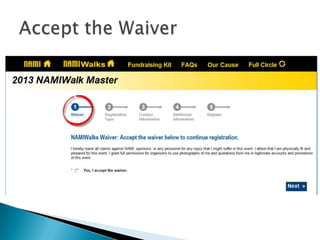
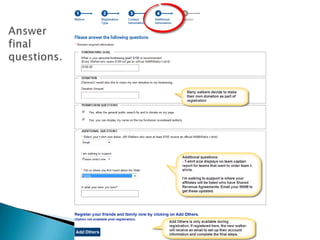
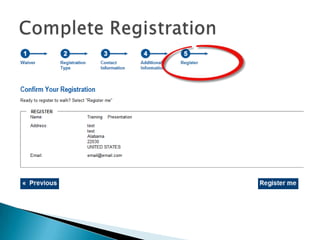
Registration
Click Register to Walk
to get started
   Everyone must create new login

   Participants should use their portal.

   Almost everything can be changed except:
    ◦ Usernames and Vanity URL’s

   Add Shared Revenue Partners – Email NWM
Become a
                                        detective!
                                        Figuring out the
   Flyer                               answers to
    ◦   Online Registration             questions will
    ◦   Participant Portal              help you better
                                        understand the
    ◦   Team Captain Website Resource
                                        website.
    ◦   Mobile App!
                                        Be the first to
   Videos                              register!
    ◦ Online Registration
    ◦ Participant Portal
    ◦ …and more for you!

   The Exchange! www.namiwalks.org/exchange

   Refresher Calls
Nothing pre-
                                                   populates
                                                   Resize images in
                                                   Paint

   Update Content – Use Content Form
    www.namiwalks.org/content
    ◦ Update www.namiwalks.org info
    ◦ Update any content on your page including walk info,
      videos, beyond the walk links, EXCEPT your picture

   Update Picture
    ◦ Email to namiwalkspictures@gmail.com
    ◦ Correct size (467 pixels wide) and format (JPEG)
    ◦ Correct title (Your Location ex. Austin)

   Updating Event Date and Time
    ◦ Update in E2 – Events Tab
    ◦ Displays in Emails
    ◦ BUT also need to submit Content Form
Sponsor
          E2
 Portal
E2 System – manage 95% of your website

                               Navigate by using tabs
                               at top.

                               IMPORTANT: While
                               tempting, please do
                               NOT contact Artez
                               support. System is
                               used by other clients.
                               We have to pay each
                               time we contact them
                               and they are not
                               familiar with our
                               program. Please go
                               through the channels
                               we have set up for you.
E2: Events Tab
                 Update Event Date and Time: info
                 displayed in automatic emails. Don’t
                 forget to submit a content form so
                 it will show everywhere else.

                 Leave Registration Dates as is.

                 Use Fundraising Summary to see
                 how your Walk is doing without
                 running a report.

                 Verified Funds = online donations
                 and funds you’ve entered into the
                 system

                 Unverified/Pledged Funds =
                 donations a walker has entered in
                 the Participant Portal that you
                 haven’t received yet.
Works like a
                                           database

                                           Use top left
                                           headers to orient
   Manage Walkers, Teams, Donors
                                           Almost anything
                                           can be solved in
   3 Things Only You Can Do               relationships but
    ◦ Cancel Registration                  talk up the
                                           Participant Portal
    ◦ Change Team Status                   too!
      Remove from Team, Switch Teams, Promote Team
       Captains
    ◦ Create Super Teams

   2 Things No One Can Do
    ◦ Change usernames
    ◦ Change Vanity URL’s
   Voiding Donations:
    ◦ Only void OFFLINE donations
    ◦ Online donations that need to be refunded still
      need to go through Walk Help
      www.namiwalks.org/help


   Change Solicitor from Donation
    ◦ Walker  Walker
    ◦ Walker  Team
    ◦ Walker/Team  General Donation
      (used for Sponsorship)
Upgrade Excel to
                                            latest version
                                            Brush up on your
                                            Excel skills

   3 Steps                                 Use the Revenue
    ◦ Click on Report you need              Report often!
    ◦ Adjust settings and generate report
    ◦ Export if necessary

   Custom Reports
    ◦ Revenue Report
    ◦ Sponsor Report
    ◦ Team Captain Report

   Survey questions only available in Snapshot
    report
Add Logos into   Add Financials
Sponsor Portal      into E2
Logo dimensions:
100-300 pix

No Logo? No
problem
Skip the field

Edit information
at anytime
Add Logos into   Add Financials
Sponsor Portal      into E2
Once you get your
                                    1st sponsor, work
                                    with your NWM to
                                    go through
                                    training on adding
                                    them to the
                                    website

                                     Process takes no
                                     mare than 5
Search for fake                         Remove
                                     minutes
  participant                        Donation from
                       Attach
                                    fake Participant
 “Add Corporate    Sponsorship in
                                    in Relationships
Sponsor” in Data   Data Entry Tab
                                      Tab (Remove
    Entry Tab                           Solicitor)
   Walk Manager Website Guide

   The Exchange: www.namiwalks.org/exchange


   Walk Manager Resource Center: www.namiwalks.org/wmrc
    Resources, Flyers, Videos

   Walk Help: www.namiwalks.org/help
    Specific donation or very specific walker question

   National Walk Manager
    Sponsorship Training, Additional Training, Adding
    Affiliates and more!
Attend
                                                    Refresher Calls
                                    Sponsorship
                                                    (Optional)
                                    Training with
                     Announce New   NWM
                     Website

             Learn


                                                Be the first to
This week:
Receive                                         register and then
launch                                          look up your
email                                           record in E2.

                                                Learn the new
                                                website by trying
                                                things one at a
Reach out to your
National Walk Manager
Remember, the new website is very exciting and we are taking a leap into a
new system that offers lots of new features. This means there is a lot to learn.
We encourage you to dive into the resources we have to offer and try things
one step at a time.


Most importantly, remember that your participants will take on whatever
mindset you have with the new platform. We encourage you to be positive,
upbeat, and excited to learn – your participants will be right there with you!
Local Walk Manager Website Training

Local Walk Manager Website Training

  • 2.
    Participant Overview and Sneak Peak (2) Functionality Vocab (3) (15) Adding Managing Your Resources (2) Corporate Website (20) Sponsors (5) Receive Launch Next Steps (3) Questions (10) email
  • 3.
    Please hold yourquestions until the end of today’s presentation.
  • 4.
    Look for thisicon for tips along the way!
  • 5.
    We are jumpingfrom a much smaller platform, to a much bigger platform with new features. We encourage you to take a leap of faith into a known platform that has had a lot of success thus far. We encourage you to keep a positive mindset and give your permission to learn and explore!
  • 6.
    New Mobile App – 750+ users and counting in 2 months  New Facebook App – First event fundraising app that functions entirely in Facebook  Significant Online Growth – up +16%!  Unprecedented Reporting Features  Automatic Tax Receipts  Participant Portal Functionality
  • 7.
    Classic Site New Site (Artez) Walk Page (Website) Event Home Page Donor Donor, Sponsor, Constituent Walker Participant, Registrant, Solicitor, Constituent Super Teams Locations Walksite Manager E2 and Sponsor Portal MyNAMI Participant Portal Artez works with a variety of organizations so the system is used by other clients. We’ve customized the platform as much as possible but you will see some workarounds and
  • 9.
    Registration Click Register toWalk to get started
  • 20.
    Everyone must create new login  Participants should use their portal.  Almost everything can be changed except: ◦ Usernames and Vanity URL’s  Add Shared Revenue Partners – Email NWM
  • 21.
    Become a detective! Figuring out the  Flyer answers to ◦ Online Registration questions will ◦ Participant Portal help you better understand the ◦ Team Captain Website Resource website. ◦ Mobile App! Be the first to  Videos register! ◦ Online Registration ◦ Participant Portal ◦ …and more for you!  The Exchange! www.namiwalks.org/exchange  Refresher Calls
  • 23.
    Nothing pre- populates Resize images in Paint  Update Content – Use Content Form www.namiwalks.org/content ◦ Update www.namiwalks.org info ◦ Update any content on your page including walk info, videos, beyond the walk links, EXCEPT your picture  Update Picture ◦ Email to namiwalkspictures@gmail.com ◦ Correct size (467 pixels wide) and format (JPEG) ◦ Correct title (Your Location ex. Austin)  Updating Event Date and Time ◦ Update in E2 – Events Tab ◦ Displays in Emails ◦ BUT also need to submit Content Form
  • 24.
    Sponsor E2 Portal
  • 25.
    E2 System –manage 95% of your website Navigate by using tabs at top. IMPORTANT: While tempting, please do NOT contact Artez support. System is used by other clients. We have to pay each time we contact them and they are not familiar with our program. Please go through the channels we have set up for you.
  • 26.
    E2: Events Tab Update Event Date and Time: info displayed in automatic emails. Don’t forget to submit a content form so it will show everywhere else. Leave Registration Dates as is. Use Fundraising Summary to see how your Walk is doing without running a report. Verified Funds = online donations and funds you’ve entered into the system Unverified/Pledged Funds = donations a walker has entered in the Participant Portal that you haven’t received yet.
  • 27.
    Works like a database Use top left headers to orient  Manage Walkers, Teams, Donors Almost anything can be solved in  3 Things Only You Can Do relationships but ◦ Cancel Registration talk up the Participant Portal ◦ Change Team Status too!  Remove from Team, Switch Teams, Promote Team Captains ◦ Create Super Teams  2 Things No One Can Do ◦ Change usernames ◦ Change Vanity URL’s
  • 28.
    Voiding Donations: ◦ Only void OFFLINE donations ◦ Online donations that need to be refunded still need to go through Walk Help www.namiwalks.org/help  Change Solicitor from Donation ◦ Walker  Walker ◦ Walker  Team ◦ Walker/Team  General Donation  (used for Sponsorship)
  • 29.
    Upgrade Excel to latest version Brush up on your Excel skills  3 Steps Use the Revenue ◦ Click on Report you need Report often! ◦ Adjust settings and generate report ◦ Export if necessary  Custom Reports ◦ Revenue Report ◦ Sponsor Report ◦ Team Captain Report  Survey questions only available in Snapshot report
  • 31.
    Add Logos into Add Financials Sponsor Portal into E2
  • 32.
    Logo dimensions: 100-300 pix NoLogo? No problem Skip the field Edit information at anytime
  • 33.
    Add Logos into Add Financials Sponsor Portal into E2
  • 34.
    Once you getyour 1st sponsor, work with your NWM to go through training on adding them to the website Process takes no mare than 5 Search for fake Remove minutes participant Donation from Attach fake Participant “Add Corporate Sponsorship in in Relationships Sponsor” in Data Data Entry Tab Tab (Remove Entry Tab Solicitor)
  • 35.
    Walk Manager Website Guide  The Exchange: www.namiwalks.org/exchange  Walk Manager Resource Center: www.namiwalks.org/wmrc Resources, Flyers, Videos  Walk Help: www.namiwalks.org/help Specific donation or very specific walker question  National Walk Manager Sponsorship Training, Additional Training, Adding Affiliates and more!
  • 36.
    Attend Refresher Calls Sponsorship (Optional) Training with Announce New NWM Website Learn Be the first to This week: Receive register and then launch look up your email record in E2. Learn the new website by trying things one at a
  • 37.
    Reach out toyour National Walk Manager
  • 38.
    Remember, the newwebsite is very exciting and we are taking a leap into a new system that offers lots of new features. This means there is a lot to learn. We encourage you to dive into the resources we have to offer and try things one step at a time. Most importantly, remember that your participants will take on whatever mindset you have with the new platform. We encourage you to be positive, upbeat, and excited to learn – your participants will be right there with you!