Live migrating a container:
pros, cons and gotchas
Pavel Emelyanov
Principal engineer @ Virtuozzo
AgendaAgenda
• Why you might want to live migrate a container
• Why (and how) to avoid live migration
• Why is container live migration so complex
2
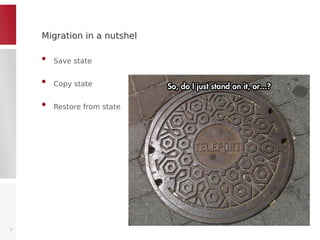
Migration in a nutshelMigration in a nutshel
• Save state
• Copy state
• Restore from state
3
Why you might want to live migrate a containerWhy you might want to live migrate a container
• Spectacular
• Load balancing
• Updating kernel
– Can avoid live migration, just C/R
• Updaring or replacing hardware
4
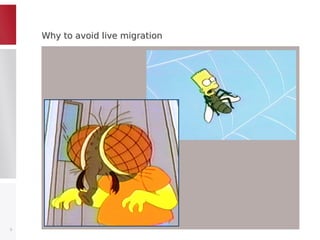
Why to avoid live migrationWhy to avoid live migration
5
How to avoid live migrationHow to avoid live migration
• Balance network traffic
• Microservices
• Crash-driven updates
• Planned downtime
6
Making live migration liveMaking live migration live
• State saving, transfering and restoring happens with tasks frozen
• (Big) memory transfer should not be done at that time
• Memory pre-copy
• Memory post-copy
7
Pre-copyPre-copy
• Track memory changes,
copy memory while tasks are running, goto again
• Pros:
– Safe: once migrated, source node can disappear
• Cons:
– Unpredictable: iterations may take long
– Non-guaranteed: “dirty” memory next round may remain big
8
Post-copyPost-copy
• Migrate all but memory, turn on “network swap” on destination
• Pros:
– Predictable: time to migrate can be well estimated
• Cons:
– Unsafe: src node death means death of container on destination
9
Live migration at lengthLive migration at length
• Memory pre-copy (iteratively, optional)
• Freeze + Save state
• Copy state
• Restore from state + Unfreeze and resume
• Memory post-copy (optional)
10
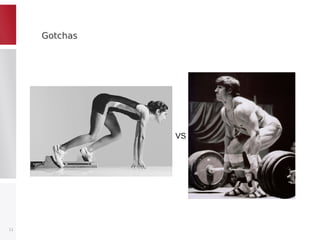
GotchasGotchas
11
VS
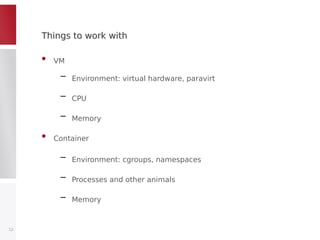
Things to work withThings to work with
• VM
– Environment: virtual hardware, paravirt
– CPU
– Memory
• Container
– Environment: cgroups, namespaces
– Processes and other animals
– Memory
12
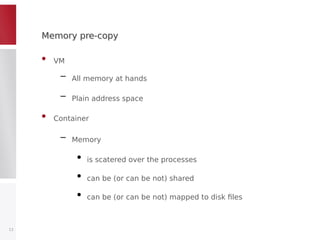
Memory pre-copyMemory pre-copy
• VM
– All memory at hands
– Plain address space
• Container
– Memory
●
is scatered over the processes
●
can be (or can be not) shared
●
can be (or can be not) mapped to disk files
13
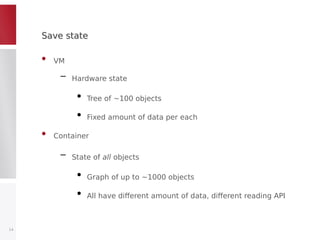
Save stateSave state
• VM
– Hardware state
●
Tree of ~100 objects
●
Fixed amount of data per each
• Container
– State of all objects
●
Graph of up to ~1000 objects
●
All have different amount of data, different reading API
14
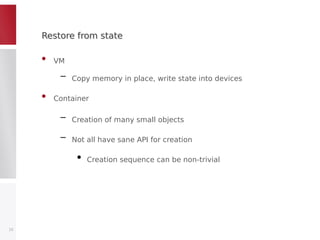
Restore from stateRestore from state
• VM
– Copy memory in place, write state into devices
• Container
– Creation of many small objects
– Not all have sane API for creation
●
Creation sequence can be non-trivial
15
Memory post-copyMemory post-copy
• UserfaultFD from Andrea Archangeli
• VM
– Merged into 4.2
• Container
– Non-cooperative work of uffd monitor and client,
need further patching
16
And we also need this, this and this!And we also need this, this and this!
• Check for CPUs compatibility
• Check and load necessary kernel modules (iptables, filesystems)
• Non-shared filesystem should be copied
• Roll-back on source node if something fails in between
– Keep tasks frozen after dump, kill after restore
17
ImplementationImplementation
• CRIU
– Save & restore state
– Memory pre/post copy
• P.Haul
– Checks
– Orchestrate all C/R steps
– Deal with filesystem
18
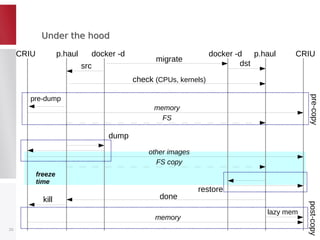
P.Haul goalsP.Haul goals
• Provide engine for containers live miration using CRIU
• Perform necessary pre-checks (e.g. CPU compatibility)
• Organize memory pre-copy and/or post-copy
• Take care of file-system migration (if needed)
19
Under the hoodUnder the hood
20
CRIU CRIUp.haul p.hauldocker -d docker -d
migrate
src dst
check (CPUs, kernels)
pre-dump
memory
dump
other images
restore
memory
lazy mem
FS
FS copy
done
pre-copypost-copy
kill
freeze
time
More infoMore info
• http://criu.org
• http://criu.org/P.Haul
• criu@openvz.org
• +CriuOrg / @__criu__
• https://github.com/xemul/(criu|p.haul)
21
Thank you!
Pavel Emelyanov
@__criu__
xemul@openvz.org

Live migrating a container: pros, cons and gotchas

  • 1.
    Live migrating acontainer: pros, cons and gotchas Pavel Emelyanov Principal engineer @ Virtuozzo
  • 2.
    AgendaAgenda • Why youmight want to live migrate a container • Why (and how) to avoid live migration • Why is container live migration so complex 2
  • 3.
    Migration in anutshelMigration in a nutshel • Save state • Copy state • Restore from state 3
  • 4.
    Why you mightwant to live migrate a containerWhy you might want to live migrate a container • Spectacular • Load balancing • Updating kernel – Can avoid live migration, just C/R • Updaring or replacing hardware 4
  • 5.
    Why to avoidlive migrationWhy to avoid live migration 5
  • 6.
    How to avoidlive migrationHow to avoid live migration • Balance network traffic • Microservices • Crash-driven updates • Planned downtime 6
  • 7.
    Making live migrationliveMaking live migration live • State saving, transfering and restoring happens with tasks frozen • (Big) memory transfer should not be done at that time • Memory pre-copy • Memory post-copy 7
  • 8.
    Pre-copyPre-copy • Track memorychanges, copy memory while tasks are running, goto again • Pros: – Safe: once migrated, source node can disappear • Cons: – Unpredictable: iterations may take long – Non-guaranteed: “dirty” memory next round may remain big 8
  • 9.
    Post-copyPost-copy • Migrate allbut memory, turn on “network swap” on destination • Pros: – Predictable: time to migrate can be well estimated • Cons: – Unsafe: src node death means death of container on destination 9
  • 10.
    Live migration atlengthLive migration at length • Memory pre-copy (iteratively, optional) • Freeze + Save state • Copy state • Restore from state + Unfreeze and resume • Memory post-copy (optional) 10
  • 11.
  • 12.
    Things to workwithThings to work with • VM – Environment: virtual hardware, paravirt – CPU – Memory • Container – Environment: cgroups, namespaces – Processes and other animals – Memory 12
  • 13.
    Memory pre-copyMemory pre-copy •VM – All memory at hands – Plain address space • Container – Memory ● is scatered over the processes ● can be (or can be not) shared ● can be (or can be not) mapped to disk files 13
  • 14.
    Save stateSave state •VM – Hardware state ● Tree of ~100 objects ● Fixed amount of data per each • Container – State of all objects ● Graph of up to ~1000 objects ● All have different amount of data, different reading API 14
  • 15.
    Restore from stateRestorefrom state • VM – Copy memory in place, write state into devices • Container – Creation of many small objects – Not all have sane API for creation ● Creation sequence can be non-trivial 15
  • 16.
    Memory post-copyMemory post-copy •UserfaultFD from Andrea Archangeli • VM – Merged into 4.2 • Container – Non-cooperative work of uffd monitor and client, need further patching 16
  • 17.
    And we alsoneed this, this and this!And we also need this, this and this! • Check for CPUs compatibility • Check and load necessary kernel modules (iptables, filesystems) • Non-shared filesystem should be copied • Roll-back on source node if something fails in between – Keep tasks frozen after dump, kill after restore 17
  • 18.
    ImplementationImplementation • CRIU – Save& restore state – Memory pre/post copy • P.Haul – Checks – Orchestrate all C/R steps – Deal with filesystem 18
  • 19.
    P.Haul goalsP.Haul goals •Provide engine for containers live miration using CRIU • Perform necessary pre-checks (e.g. CPU compatibility) • Organize memory pre-copy and/or post-copy • Take care of file-system migration (if needed) 19
  • 20.
    Under the hoodUnderthe hood 20 CRIU CRIUp.haul p.hauldocker -d docker -d migrate src dst check (CPUs, kernels) pre-dump memory dump other images restore memory lazy mem FS FS copy done pre-copypost-copy kill freeze time
  • 21.
    More infoMore info •http://criu.org • http://criu.org/P.Haul • criu@openvz.org • +CriuOrg / @__criu__ • https://github.com/xemul/(criu|p.haul) 21
  • 22.