Linux Firewall (Netfilter)
ROMAL Yorish
Ahmad Elham
Helmand Waziri
Alayar
Zia Rahman
Abolfazel
Outline
• Firewall
• Netfilter
o Tables
o Chains
o Targets
• Netfilter tools
• Iptable
• UFW
Firewall
• Firewall is a system to monitor and control the incoming and
outgoing network traffic based on predetermined security rules.
Advantage of using a Linux firewall:
Flexibility : you can create highly specific rules for packets filtering .
Open source : cost-effective and community-driven .
Scalability : use it for SOHO and small business .
Compatibility : Works seamlessly with other Linux Services like VPN ,IDS/IPS .
Netfilter
• Netfilter is a framework in Linux that manage how packets
are filtered , redirected or modified.
• Involve five tables:
1. Filter
2. Raw
3. Security
4. Mangle
5. Nat
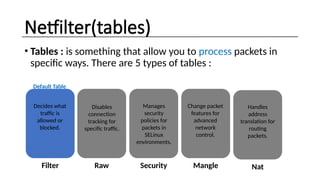
Netfilter(tables)
• Tables : is something that allow you to process packets in
specific ways. There are 5 types of tables :
ROLE ROLE ROLE ROLE
ROLE
Filter Raw Security Mangle Nat
Decides what
traffic is
allowed or
blocked.
Disables
connection
tracking for
specific traffic.
Manages
security
policies for
packets in
SELinux
environments.
Change packet
features for
advanced
network
control.
Handles
address
translation for
routing
packets.
Default Table
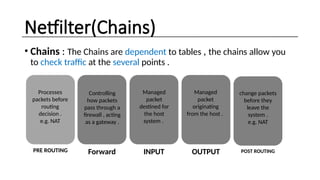
Netfilter(Chains)
• Chains : The Chains are dependent to tables , the chains allow you
to check traffic at the several points .
ROLE ROLE ROLE ROLE
ROLE
PRE ROUTING Forward INPUT OUTPUT POST ROUTING
Processes
packets before
routing
decision .
e.g. NAT
Controlling
how packets
pass through a
firewall , acting
as a gateway .
Managed
packet
destined for
the host
system .
Managed
packet
originating
from the host .
change packets
before they
leave the
system .
e.g. NAT
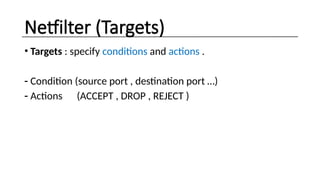
Netfilter (Targets)
• Targets : specify conditions and actions .
- Condition (source port , destination port …)
- Actions (ACCEPT , DROP , REJECT )
Netfilter Tools
• To make configuration easier , Netfilter support command
line tools such as :
Arptables (don’t used now)
Ebtales (don’t used now)
Iptables
Ip6tables
Nft
Iptable
• Iptable : is a command-line tool used in Linux to configure the
system’s firewall rules .
• Structure : Iptable [options] –[ACD] [Chain] [match condition ] –j [target/action ]
-[Options ] : for listing , for saving ….
-[ACD] : -A (append) , -C(check the rule in exists in the chain ) , -D(Delete a rule from chain )
-[chain] : input, output, forward …
-[match condition] : -p(protocol) , -s (source address) , -d (destination address), --dport
(destination port )
- j[target] : Accept , Drop , Reject …
- EXAMPALE : [ Iptable –A INPUT -p tcp –-dport 22 –j ACCEPT ]
• Itable :equivalent of ‘Iptable’ for IPV6 network .
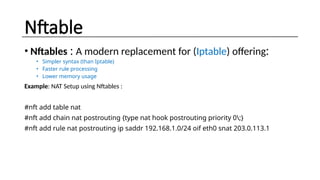
Nftable
• Nftables : A modern replacement for (Iptable) offering:
• Simpler syntax (than Iptable)
• Faster rule processing
• Lower memory usage
Example: NAT Setup using Nftables :
#nft add table nat
#nft add chain nat postrouting {type nat hook postrouting priority 0;}
#nft add rule nat postrouting ip saddr 192.168.1.0/24 oif eth0 snat 203.0.113.1
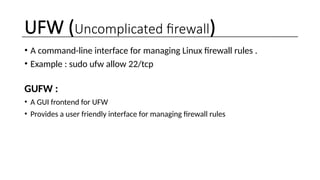
UFW (Uncomplicated firewall)
• A command-line interface for managing Linux firewall rules .
• Example : sudo ufw allow 22/tcp
GUFW :
• A GUI frontend for UFW
• Provides a user friendly interface for managing firewall rules

Linux Firewall (Netfilter )and tools .pptx

  • 1.
    Linux Firewall (Netfilter) ROMALYorish Ahmad Elham Helmand Waziri Alayar Zia Rahman Abolfazel
  • 2.
    Outline • Firewall • Netfilter oTables o Chains o Targets • Netfilter tools • Iptable • UFW
  • 3.
    Firewall • Firewall isa system to monitor and control the incoming and outgoing network traffic based on predetermined security rules. Advantage of using a Linux firewall: Flexibility : you can create highly specific rules for packets filtering . Open source : cost-effective and community-driven . Scalability : use it for SOHO and small business . Compatibility : Works seamlessly with other Linux Services like VPN ,IDS/IPS .
  • 4.
    Netfilter • Netfilter isa framework in Linux that manage how packets are filtered , redirected or modified. • Involve five tables: 1. Filter 2. Raw 3. Security 4. Mangle 5. Nat
  • 5.
    Netfilter(tables) • Tables :is something that allow you to process packets in specific ways. There are 5 types of tables : ROLE ROLE ROLE ROLE ROLE Filter Raw Security Mangle Nat Decides what traffic is allowed or blocked. Disables connection tracking for specific traffic. Manages security policies for packets in SELinux environments. Change packet features for advanced network control. Handles address translation for routing packets. Default Table
  • 6.
    Netfilter(Chains) • Chains :The Chains are dependent to tables , the chains allow you to check traffic at the several points . ROLE ROLE ROLE ROLE ROLE PRE ROUTING Forward INPUT OUTPUT POST ROUTING Processes packets before routing decision . e.g. NAT Controlling how packets pass through a firewall , acting as a gateway . Managed packet destined for the host system . Managed packet originating from the host . change packets before they leave the system . e.g. NAT
  • 7.
    Netfilter (Targets) • Targets: specify conditions and actions . - Condition (source port , destination port …) - Actions (ACCEPT , DROP , REJECT )
  • 8.
    Netfilter Tools • Tomake configuration easier , Netfilter support command line tools such as : Arptables (don’t used now) Ebtales (don’t used now) Iptables Ip6tables Nft
  • 9.
    Iptable • Iptable :is a command-line tool used in Linux to configure the system’s firewall rules . • Structure : Iptable [options] –[ACD] [Chain] [match condition ] –j [target/action ] -[Options ] : for listing , for saving …. -[ACD] : -A (append) , -C(check the rule in exists in the chain ) , -D(Delete a rule from chain ) -[chain] : input, output, forward … -[match condition] : -p(protocol) , -s (source address) , -d (destination address), --dport (destination port ) - j[target] : Accept , Drop , Reject … - EXAMPALE : [ Iptable –A INPUT -p tcp –-dport 22 –j ACCEPT ] • Itable :equivalent of ‘Iptable’ for IPV6 network .
  • 10.
    Nftable • Nftables :A modern replacement for (Iptable) offering: • Simpler syntax (than Iptable) • Faster rule processing • Lower memory usage Example: NAT Setup using Nftables : #nft add table nat #nft add chain nat postrouting {type nat hook postrouting priority 0;} #nft add rule nat postrouting ip saddr 192.168.1.0/24 oif eth0 snat 203.0.113.1
  • 11.
    UFW (Uncomplicated firewall) •A command-line interface for managing Linux firewall rules . • Example : sudo ufw allow 22/tcp GUFW : • A GUI frontend for UFW • Provides a user friendly interface for managing firewall rules