LibreOffice MCQ for All Exams
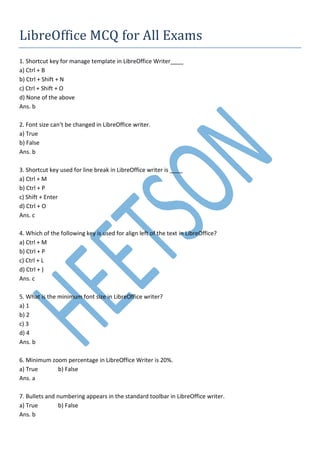
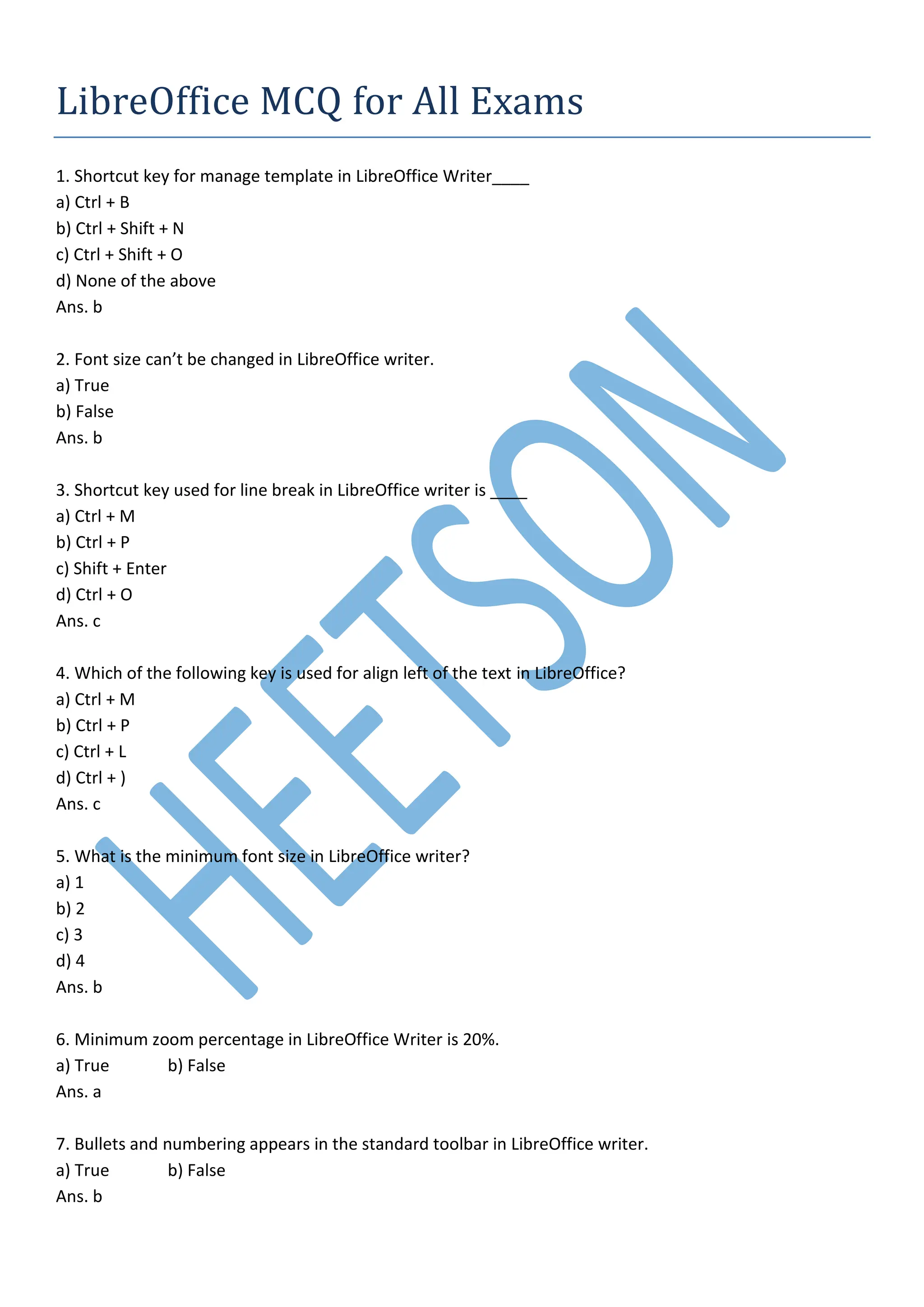
1. Shortcut key for manage template in LibreOffice Writer____
a) Ctrl + B
b) Ctrl + Shift + N
c) Ctrl + Shift + O
d) None of the above
Ans. b
2. Font size can’t be changed in LibreOffice writer.
a) True
b) False
Ans. b
3. Shortcut key used for line break in LibreOffice writer is ____
a) Ctrl + M
b) Ctrl + P
c) Shift + Enter
d) Ctrl + O
Ans. c
4. Which of the following key is used for align left of the text in LibreOffice?
a) Ctrl + M
b) Ctrl + P
c) Ctrl + L
d) Ctrl + )
Ans. c
5. What is the minimum font size in LibreOffice writer?
a) 1
b) 2
c) 3
d) 4
Ans. b
6. Minimum zoom percentage in LibreOffice Writer is 20%.
a) True b) False
Ans. a
7. Bullets and numbering appears in the standard toolbar in LibreOffice writer.
a) True b) False
Ans. b
8. Eleven menu are found in LibreOffice writer.
a) True
b) false
Ans. a
9. LibreOffice writer template does not include style formatting.
a) False
b) True
Ans. a
10. What is the default file extension of LibreOffice Writer?
a) .doc
b) .docx
c) .odt
d) None of the above
Ans. c
11. What is the maximum font size in LibreOffice Writer?
a) 999.9
b) 80
c) 100
d) 200
Ans. a
12. Shortcut key for insert table in LibreOffice writer.
a) Ctrl + F7
b) Ctrl + F12
c) Ctrl + F8
d) Ctrl + F9
Ans. b
13. Print Preview shortcut key is ______ in LibreOffice writer.
a) Ctrl + Shift + O
b) Ctrl + shift + P
c) Ctrl + Shift + S
d) Ctrl + Shift + U
Ans. a
14. Shortcut key for increase the font size in libreOffice Writer is …….
a) Ctrl + ]
b) Ctrl + [
c) Ctrl + [
d) Ctrl + ]
Ans. a
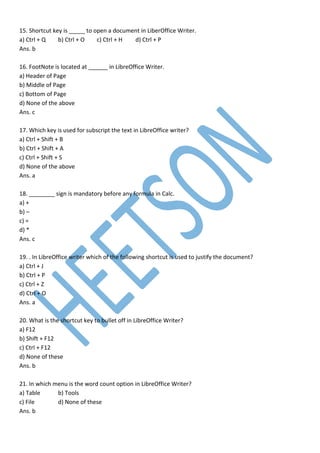
15. Shortcut key is _____ to open a document in LiberOffice Writer.
a) Ctrl + Q b) Ctrl + O c) Ctrl + H d) Ctrl + P
Ans. b
16. FootNote is located at ______ in LibreOffice Writer.
a) Header of Page
b) Middle of Page
c) Bottom of Page
d) None of the above
Ans. c
17. Which key is used for subscript the text in LibreOffice writer?
a) Ctrl + Shift + B
b) Ctrl + Shift + A
c) Ctrl + Shift + S
d) None of the above
Ans. a
18. ________ sign is mandatory before any formula in Calc.
a) +
b) –
c) =
d) *
Ans. c
19. . In LibreOffice writer which of the following shortcut is used to justify the document?
a) Ctrl + J
b) Ctrl + P
c) Ctrl + Z
d) Ctrl + O
Ans. a
20. What is the shortcut key to bullet off in LibreOffice Writer?
a) F12
b) Shift + F12
c) Ctrl + F12
d) None of these
Ans. b
21. In which menu is the word count option in LibreOffice Writer?
a) Table b) Tools
c) File d) None of these
Ans. b
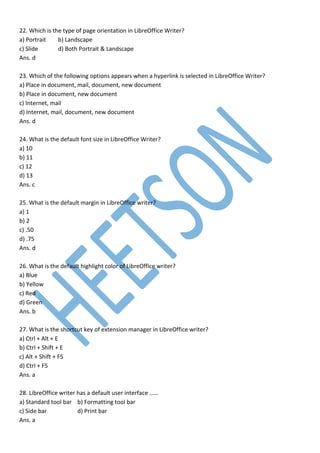
22. Which is the type of page orientation in LibreOffice Writer?
a) Portrait b) Landscape
c) Slide d) Both Portrait & Landscape
Ans. d
23. Which of the following options appears when a hyperlink is selected in LibreOffice Writer?
a) Place in document, mail, document, new document
b) Place in document, new document
c) Internet, mail
d) Internet, mail, document, new document
Ans. d
24. What is the default font size in LibreOffice Writer?
a) 10
b) 11
c) 12
d) 13
Ans. c
25. What is the default margin in LibreOffice writer?
a) 1
b) 2
c) .50
d) .75
Ans. d
26. What is the default highlight color of LibreOffice writer?
a) Blue
b) Yellow
c) Red
d) Green
Ans. b
27. What is the shortcut key of extension manager in LibreOffice writer?
a) Ctrl + Alt + E
b) Ctrl + Shift + E
c) Alt + Shift + F5
d) Ctrl + F5
Ans. a
28. LibreOffice writer has a default user interface ……
a) Standard tool bar b) Formatting tool bar
c) Side bar d) Print bar
Ans. a
29. Shortcut key Ctrl + 1 is used for heading 1 style in selected text.
a) True
b) False
Ans. a
30. Which of the following options will be used to change the printer related settings in LibreOffice Writer?
a) Printer
b) Print Preview
c) Printer Setup
d) Print setup
Ans. c
31. What is the shortcut key to apply heading in LibreOffice Writer?
a) Ctrl + 1
b) Ctrl + 2
c) Ctrl + 3
d) All of the above
Ans. d
32. Where is the option to comment in LibreOffice write?
a) Tools
b) Style
c) Insert
d) Format
Ans. c
33. How many user interfaces are available in LibreOffice Writer?
a) 2
b) 3
c) 4
d) 5
Ans. d
34. What is the shortcut key to bold a text in LibreOffice Writer?
a) Ctrl + D
b) Ctrl + B
c) Ctrl + s
d) Ctrl + N
Ans. b
35. What is the shortcut key to centralize text in LibreOffice writer?
a) Ctrl + J b) Ctrl +K
c) Ctrl + E d) Ctrl + L
Ans. c
36. It does not appear in LibreOffice Writer status bar?
a) Total characters b) Number of words
c) Computer Name d) Current page number
Ans. c
37. What is the default view of LibreOffice writer?
a) Normal view b) Slide view c) Web view d) None of these
Ans. a
38. In which menu of the LibreOffice writer is the Emphasis option available?
a) Style
b) Tool menu
c) Edit menu
d) Insert menu
Ans. a
39. Bold, Italic, underline option is found in which menu in LibreOffice Writer?
a) Edit
b) Format
c) Tool
d) File
Ans. b
40. What is the default alignment of text in LibreOffice Writer?
a) Right align
b) Left align
c) Both A and B
d) None of these
Ans. b
41. In LibreOffice writer, what is the line under the text called?
a) Underline
b) Below line
c) Bottom line
d) Top line
Ans. a
42. In which menu is the option of endnote and footnote found in LibreOffice writer?
a) Edit menu
b) View menu
c) Format menu
d) Insert menu
Ans. c
43. Shortcut key to break the page?
a) Ctrl + Return
b) Ctrl + Enter
c) Ctrl + A
d) Both A and B
Ans. d
44. In which menu of LibreOffice writer is there is an option for ‘automatic spell check’?
a) View
b) Tool
c) Edit
d) File
Ans. b
45. LibreOffice is an application software.
a) True
b) False
Ans. a
46. Which of the following shortcut keys is used to increase the width of the selected column of a table in
LibreOffice writer?
a) Alt + Ctrl + Right Arrow
b) Alt + Ctrl + Left arrow
c) Alt + Right arrow
d) Ctrl + Right arrow
Ans. c
47. Which shortcut key is used for new style in LibreOffice writer?
a) Shift + F11
b) Shift + F5
c) Ctrl + F
d) Ctrl + F5
Ans. a
48. In LibreOffice writer, search is case sensitive.
a) True
b) False
Ans. b
49. In LibreOffice, shortcut keys are used for duplicate shapes?
a) Ctrl + F3 b) Ctrl + F2
c) Shift + F2 d) Shift + F3
Ans. d
50. In LibreOffice writer, mail merge option is in which menu?
a) Insert b) Format c) Tools d) Form
Ans. c
51. What is the shortcut key of superscript in LibreOffice Writer?
a) Ctrl + Shift + P
b) Ctrl + Shift + B
c) Ctrl + shift + S
d) None of these
Ans. a
52. What is the shortcut key for Autotext used in LibreOffice Writer?
a) Ctrl + F3
b) Ctrl + F2
c) Ctrl + F4
d) None of these
Ans. b
53. What is the shortcut key for save as in LibreOffice writer?
a) Ctrl + Shift + S
b) Ctrl + S
c) F12
d) None of these
Ans. a
54. By default Line spacing in LibreOffice Writer is?
a) 1
b) 1.5
c) 2
d) 2.5
Ans. a
55. What is the shortcut key for double underline in LibreOffice Writer?
a) Ctrl + Shift + D
b) Ctrl + D
c) Ctrl + D
d) Ctrl + Shift + U
Ans. b
56. What is the shortcut key for inserting a table in LibreOffice Writer?
a) Ctrl + F12 b) Ctrl + F2
c) Ctrl + F1 d) None of these
Ans. a
57. In LibreOffice, the shortcut key of going at the last of the cell is ____.
a) Alt + Tab b) Tab c) Alt d) Shift + Tab
Ans. d
58. In LibreOffice writer, scroll bar option is in which menu?
a) File
b) Insert
c) Tools
d) View
Ans. d
59. Thesaurus option is in which menu of LibreOffice?
a) Format
b) Tools
c) View
d) None of these
Ans. b
60. Which shortcut key is used for full screen in LibreOffice?
a) Ctrl + Shift + J
b) Ctrl + shift + K
c) Shift + J
d) None of the above
Ans. a
61. Which shortcut key is used in LibreOffice to hide or unhide the ruler?
a) Ctrl + Shift + R
b) Ctrl + Shift + P
c) Ctrl + shift + B
d) None of these
Ans. a
62. What is the shortcut key for clear format in LibreOffice Writer?
a) Ctrl + C
b) Ctrl + M
c) Ctrl + Shift + M
d) None of these
Ans. b
63. What is the shortcut key to close the current window in LibreOffice Writer?
a) Ctrl + Q b) Ctrl + W
c) Ctrl + T d) None of these
Ans. b
64. Which was the most widely used word processing software in late 1970?
a) MS Word
b) LibreOffice Writer
c) Word Star
d) None of the above
Ans. c
65. What is the word processing in LibreOffice?
a) Draw
b) Impress
c) Calc
d) Writer
Ans. d
66. What is the file extension for template in LibreOffice Writer?
a) .odp
b) .odt
c) .ott
d) .doc
Ans. c
67. Which of the following keyboard shortcut is used to exit writer?
a) Ctrl + F4
b) Ctrl + F2
c) Ctrl + F1
d) Alt + F4
Ans. d
68. What is the shortcut key to create a new document in LibreOffice Writer?
a) Ctrl + N
b) Ctrl + Shift + N
c) Shift + N
d) None of these
Ans. a
69. The status bar can be enabled/disabled in LibreOffice Writer.
a) True
b) False
Ans. a
70. The table of LibreOffice writer document cannot be converted into text.
a) True
b) False
Ans. b
71. We cannot add video to LibreOffice Writer document.
a) True
b) False
Ans. b
72. You can save a document created in LibreOffice writer directly on Google drive.
a) True
b) False
Ans. a
73. In LibreOffice writer, a table can be broken by means of split table option, can we break the row and
column in two parts in LibreOffice writer?
a) Yes
b) No
Ans. a
74. In LibreOffice writer, you can use header and footer on every page.
a) True
b) False
Ans. a
75. LibreOffice writer has 11 total menus.
a) True
b) False
Ans. a
76. LibreOffice writer can have different footer in even and odd pages.
a) True
b) False
Ans. a
77. In LibreOffice writer, a manual font can be written 100, because the final font size is 96 by the font size.
a) True b) False
Ans. a
78. In the LibreOffice writer, if the italic option is used by the Ctrl + I shortcut key on the selected text, can
the italic option be removed from this shortcut key?
a) Yes b) No
Ans. a
79. When in LibreOffice writer, the file of LibreOffice Calc is inserted, the data appears as an embedded
object.
a) True b) False
Ans. a
80. The default language of Libreoffice writer is English.
a) True
b) False
Ans. a
81. What is the maximum number of views you can add to a slide?
a) 3
b) 2
c) 5
d) 10
Ans. d
82. What is the file extension of LibreOffice Impress?
a) .ott
b) .odt
c) .ods
d) .odp
Ans. d
83. It is used to determine the timing on a slide in a presentation?
a) rehearsal
b) slide timer
c) slide timing tool
d) Slide tool
Ans. a
84. How many types of LibreOffice Impress charts can be inserted?
a) 12
b) 14
c) 11
d) 10
Ans. d
85. Which of the following is slide transition?
a) Over head
b) Letter
c) A special effect used to show a slideshow
d) A type of slide
Ans. c
86. What type of program is LibreOffice Impress?
a) WordProcessing b) Presentation
c) Spreadsheet d) None of these
Ans. b
87. By what name do you know the first slide in the presentation?
a) Home slide b) Main slide
c) title slide d) None
Ans. c
88. What is the maximum zoom in LibreOffice Impress?
a) 5%
b) 100%
c) 500%
d) 3000%
Ans. d
89. Where does the zoom option appear in LibreOffice Impress?
a) Title bar
b) Menu bar
c) Status bar
d) Task bar
Ans. c
90. What is the shortcut key to print a presentation slide?
a) Ctrl + P
b) Ctrl + Shift + P
c) Ctrl + O
d) None
Ans. a
91. What is the shortcut key for print preview in Presentation?
a) Ctrl + shift + F12
b) Ctrl + Shift + P
c) Ctrl +P
d) None
Ans. a
92. What is the default title name in LibreOffice Impress?
a) Untitle
b) Untitled1
c) Document1
d) Doc1
Ans. b
93. Where is the option of slide transition present?
a) Slide b) View
c) A and B d) insert
Ans. c
94. How many menus are there in LibreOffice Impress?
a) 10 b) 20 c) 30 d) 15
Ans. a
95. What is the minimum zoom size of LibreOffice Impress?
a) 10%
b) 5%
c) 20%
d) 15%
Ans. b
96. The shortcut key to exit presentation is?
a) Esc
b) Del
c) Alt
d) None
Ans. a
97. Shortcut key is to be taken out of Presentation?
a) Ctrl + A
b) Esc
c) Left arrow
d) None
Ans. b
98. Using which option do all the slides appear simultaneously?
a) Handouts
b) Print preview
c) Slide sorter
d) None of these
Ans. c
99. This shortcut key is used to add new slides in LibreOffice impress.
a) Ctrl + M
b) Ctrl + N
c) Ctrl + T
d) Ctrl + S
Ans. a
100. What is the Power Point known in the LibreOffice?
a) Writer b) Draw
c) Calc d) Impress
Ans. d
101. Which option will be used to repeat the slide show continuously?
a) Repeat b) Loop
c) Again d) None
Ans. b
102. Which of the following will you use to organize or shorten a slide?
a) Slide sorter view
b) Slide pen
c) Both of the above
d) None of these
Ans. c
103. Which option will be used to remove slide transition?
a) Split transition
b) None transition
c) Wipe transition
d) Push
Ans. b
104. ______ is a slide used as a starting point for other slides?
a) Template
b) File
c) First slide
d) Master slide
Ans. d
105. Which of the following software are made presentations in LibreOffice?
a) LibreOffice writer
b) LibreOffice Calc
c) LibreOffice Impress
d) None of these
Ans. c
106. Which of the following alignment is not in LibreOffice Impress?
a) Right
b) Left
c) Center
d) Justify
Ans. d
107. What is the default page orientation in LibreOffice Impress?
a) Horizontal b) Vertical
c) Landscaped d) Portrait
Ans. c
108. What is the shortcut key to start/perform a slide show?
a) F3 b) F4 c) Shift + F4 d) F5
Ans. d
109. How many types of charts are there in LibreOffice Impress?
a) 9
b) 10
c) 11
d) 12
Ans. b
110. Which view of LibreOffice Impress contains only text?
a) outline view
b) slide sorter view
c) Notes view
d) Normal view
Ans. a
111. How does the screen appear when you open LibreOffice Impress?
a) Landscape
b) Portrait
c) Both
d) None of these
Ans. a
112. In which menu is the insert slide option available?
a) View
b) Edit
c) Insert
d) Slide
Ans. d
113. How can we go directly to the menu while the slide is running?
a) by mouse click
b) by right click on the slide
c) By clicking on the ribbon
d) None of these
Ans. b
114. Which of the following is not an option of edit menu of LibreOffice Impress?
a) Cut b) copy
c) duplicate d) page setup
Ans. d
115. What will be the shortcut key to move to the next slide?
a) Ctrl + Page down b) Ctrl + Page up
c) Ctrl + Home d) None
Ans. a
116. To create a text box in a slide ______?
a) Insert > Table > Textbox
b) Insert > Textbox
c) Slide > Textbox
d) None
Ans. b
117. Which of the following sound files can be added to LibreOffice Impress?
a) .wav
b) .dat
c) .drv
d) .log
Ans. a
118. LibreOffice Impress presentation has a default template?
a) Title and contact
b) Content only
c) Image only
d) Title only
Ans. a
119. In which menu is the macros command used in LibreOffice impress?
a) Insert Menu
b) Slide menu
c) Tools menu
d) View menu
Ans. c
120. What is the shortcut key for a duplicate slide?
a) Ctrl + Shift + D
b) Ctrl + D
c) Ctrl + S
d) None
Ans. b
121. In which menu is the option of Master slide found in LibreOffice Impress?
a) Slide show b) Slide
c) Format d) View
Ans. b
122. LibreOffice Impress has an optimum zoom _____ percentage?
a) 75 b) 95 c) 100 d) 200
Ans. a
123. Any presentation in LibreOffice Impress can be exported in the following Format?
a) PDF
b) BMP
c) GIF
d) All
Ans. d
124. Which file format is not added to LibreOffice Impress?
a) JPEG
b) HTML
c) GIF
d) WAV
Ans. b
125. Which shortcut key is used for the text box in LibreOffice Impress?
a) F2
b) F3
c) F4
d) F5
Ans. a
126. The cell selected in LibreOffice Calc defined.
a) A deep wide boarder
b) A dotted border
c) A blinking boarder
d) By Italic text
Ans. a
127. What is the shortcut key to move from one cell to another in LibreOffice Calc?
a) Tabs
b) Ctrl + Q
c) Ctrl + M
d) None
Ans. a
128. Which of the following is used to convert row into a column?
a) row to column b) Transpose
c) Convert d) Reverse
Ans. b
129. How to edit cell in LibreOffice Calc spreadsheet, or what shortcut key will be used to edit the cell?
a) F1 b) F2 c) F12 d) None
Ans. b
130. What is the shortcut key to close LibreOffice Spreadsheet?
a) Ctrl + Shift + E
b) Ctrl + H
c) Ctrl + T
d) Ctrl + Q
Ans. d
131. Which of the following charts is not in the chart menu?
a) Pie chart
b) Bar chart
c) Line chart
d) Square chart
Ans. d
132. Which of the following charts is used to display a data series?
a) column
b) Bubble
c) Pie
d) None
Ans. c
133. In LibreOffice Calc, is the extension name of the template file?
a) .ods
b) .xlsx
c) .xlt
d) .ots
Ans. d
134. In LibreOffice, give the value of ‘=average(1,2,4,9)’
a) 1
b) 3
c) 4
d) 5
Ans. c
135. Which of the following can represent a column in LibreOffice Calc?
a) 1,2,3,4 b) A, B, C, D
c) A1, B1, C1 d) 1A, 1B, 2C
Ans. b
136. The maximum width of a column can be
a) 100 b) 200 c) 300 d) 400
Ans. a
137. Where is the goal seek option in LibreOffice Calc?
a) Windows
b) Tools
c) Data
d) Format
Ans. c
138. Which command is used to uppercase text written in lower case?
a) Cycle case
b) =proper(text)
c) =upper(text)
d) None
Ans. c
139. By what other name is the formula bar known in libreOffice Calc?
a) function bar
b) Name box
c) Input line
d) None of these
Ans. c
140. Which menu will be required to comment in LibreOffice Calc?
a) Insert
b) View
c) Format
d) Data
Ans. a
141. If the cell address changes after copying the formula, then the address is known as……..
a) Absolute address
b) Relative address
c) Mixed address
d) Dynamic address
Ans. b
142. In which menu is the option of Donnet found in LibreOffice Writer or Calc?
a) Edit b) View
c) Help d) None
Ans. c
143. What is the number of by default rows and columns in LibreOffice Calc?
a) 1048576, 16384 b) 1048576, 1024
c) 65536, 256 d) None
Ans. b
144. What is the address of the last cell in LibreOffice Calc?
a) AMJ1024 b) AMJ1048576 c) XFD1048576 d) XFD1024
Ans. b
145. What is the last row and column name in LibreOffice Calc?
a) 1048576, AMJ
b) 1048776, AMH
c) 1048556, AME
d) 1047576, AMJ
Ans. a
146. What is the shortcut key to save as in LibreOffice Spreadsheet?
a) Shift + Alt + S
b) Ctrl + S
c) Ctrl + Shift + s
d) None
Ans. c
147. Shortcut key to insert cell in LibreOffice Calc
a) Ctrl + Shift + +
b) Ctrl + +
c) Alt + +
d) Ctrl + -
Ans. b
148. Shortcut key ‘Ctrl + -‘ used for
a) Delete row
b) Delete column
c) Delete sheet
d) Delete cell
Ans. d
149. Currently you are on a G7 cell in LibreOffice Calc spreadsheet, which of the following will you be in
after pressing the Home key of the keyboard?
a) A1
b) A7
c) F7
d) G1
Ans. a
150. What is the default size of a font in LibreOffice Calc?
a) 10 b) 12 c) 14 d) 18
Ans. a
151. Which function in LibreOffice Calc only show Date?
a) Now() b) Today()
c) Weekdays() d) None of the above
Ans. b
152. What is the shortcut key for inserting date in LibreOffice Calc?
a) Ctrl + ;
b) Ctrl + :
c) Shift + ;
d) None
Ans. a
153. How many types of ‘cell references’ are there in LibreOffice Calc?
a) 1
b) 2
c) 3
d) 4
Ans. b
154. Which bar is at the top of LibreOffice Calc?
a) Status bar
b) Menu bar
c) Title bar
d) Format bar
Ans. c
155. What is the shortcut key to select cells in LibreOffice Calc?
a) Ctrl + 1
b) Ctrl + shift + 1
c) Ctrl + A
d) Shift + d
Ans. c
156. How many seats are there by default in the workbook of LibreOffice Calc?
a) 1 b) 2 c) 3 d) 4
Ans. a
157. What is the default width of the column in the libreOffice column?
a) .18 inch b) .89 inch c) 1.28 inch d) 1.05 inch
Ans. b
158. What is the shortcut key to cut in LibreOffice Calc?
a) Shift + X b) Ctrl + X c) Ctrl + alt + X d) Ctrl + O
Ans. b
159. How many worksheets are there in LibreOffice Calc?
a) 32000
b) 48000
c) 60000
d) No limit
Ans. a
160. Which of the following zoom in LibreOffice Calc?
a) 20% to 400%
b) 20% to 600%
c) 10% to 500%
d) 5% to 3000%
Ans. a
161. What is the alignment of numbers in LibreOffice Calc?
a) Right
b) Left
c) Center
d) All
Ans. a
162. From which menu is the text color changed in LibreOffice Calc?
a) Edit
b) Formatting
c) Style
d) View
Ans. b
163. What is the default font name of LibreOffice Calc?
a) Times new roman
b) Liberation Sans
c) Liberation Serif
d) Calibri
Ans. b
164. What is the LibreOffice Calc file extension name?
a) .odt b) .ods
c) .odb d) .odm
Ans. b
165. Shortcut key used to open the function wizard in LibreOffice Calc is ………..
a) Alt + F1
b) Ctrl + F6
c) F2
d) Ctrl + F2
Ans. d
166. The combination of the column letter and row number for cell in an Calc spreadsheet is called ………
a) Cell across
b) Cell reference
c) Cell identity
d) Cell Identification number
Ans. b
167. What is the maximum number of characters in one cell in calc spreadsheet?
a) 6000
b) 32767
c) 255
d) 1021
Ans. b
168. What is the maximum number of cell per spreadsheets in calc?
a) 6000
b) 1000
c) 1073741824
d) 1048576
Ans. c
169. Which shortcut key is used to insert comment in LibreOffice Calc?
a) Ctrl + Alt + C
b) Ctrl + Shift + J
c) Ctrl + Alt + S
d) None of these
Ans. a
170. The LibreOffice Calc is similar to Microsoft Excel, with almost the same abilities.
a) True
b) False
Ans. a
171. Page down key is used to moves the viewable rows down one screen.
a) True
b) False
Ans. a
172. In LibreOffice Package, spreadsheet is called ___________
a) Excel b) Row
c) Column d) Calc
Ans. d
173. ______ is used to highlight cells containing numeric values.
a) Ctrl + F7
b) Ctrl + F6
c) Ctrl + F8
d) Ctrl + F5
Ans. c
174. How many axes does chart in Calc have?
a) 2
b) 3
c) 4
d) 5
Ans. a
175. How many columns are there in LibreOffice Calc
a) 1048576
b) 16384
c) 1024
d) None
Ans. c
176. In which menu is the Merge Cells command found in LibreOffice Calc?
a) Edit
b) Style
c) Sheet
d) Format
Ans. d
177. In which menu is the LibreOffice Digital signature option available?
a) Windows
b) View
c) File
d) Tools
Ans. d
178. What is the use of signature in LibreOffice?
a) integrity b) Authentication
c) Non-Repudiation d) All of these
Ans. d
179. What is the use of Ctrl + G shortcut key in LibreOffice?
a) Go to page b) Go to heading
c) Go to line d) Go to text
Ans. a
180. By using which submenu libreOffice accept the donation?
a) donate to libreOffice
b) transfer to LibreOffice
c) Give to LibreOffice
d) Help to LibreOffice
Ans. a
181. How many languages does LibreOffice support?
a) 100
b) 115
c) 120
d) 125
Ans. b
182. How many languages are dedicated in LibreOffice?
a) 70
b) 75
c) 80
d) 40
Ans. d
183. What is the shortcut key to exit LibreOffice?
a) Ctrl + Q
b) Ctrl + W
c) Ctrl + T
d) None
Ans. a
184. What is the shortcut key to jumb to last edited slide in LibreOffice?
a) Ctrl + E
b) Ctrl + J
c) Ctrl + Shift + F5
d) Ctrl + Shift + T
Ans. c
185. What is the shortcut key for clear formatting in LibreOffice Writer?
a) Ctrl + B b) Ctrl + Q
c) Ctrl + M d) Ctrl + T
Ans. c
186. What is the line given above a text?
a) Below line b) Over line c) Up line d) Upper line
Ans. b
187. What is the extension of Base Data in LibreOffice?
a) .odb
b) .ods
c) .odf
d) None
Ans. a
188. ______ is the correct option to insert header in LibreOffice?
a) Format > Header
b) Edit > Header
c) Insert > Header
d) View > Header
Ans. c
189. Which menu has the option to add pages in LibreOffice Writer?
a) File
b) Edit
c) Format
d) Insert
Ans. d
190. Which shortcut key is used to break the line in LibreOffice Writer?
a) Alt + Enter
b) Ctrl + Enter
c) Shift + Enter
d) None
Ans. c
191. Which shortcut key is used in LibreOffice Writer to go to the beginning of the line?
a) Home
b) Alt + Home
c) Ctrl + Home
d) Shift + Home
Ans. a
192. Where is the file name displayed in LibreOffice?
a) in the title bar b) in the task bar
c) in the status bar d) in the scroll bar
Ans. a
193. Ruler has shortcut key in LibreOffice?
a) Ctrl + R b) Ctrl + Shift + R
c) Alt + shift + c d) Window + L + R
Ans. b
194. What is the new style shortcut key in LibreOffice sector?
a) Shift + F12
b) Ctrl + Shift + F11
c) Shift + F11
d) Ctrl + F12
Ans. c
195. What is the shortcut key of a hyperlink in LibreOffice?
a) Ctrl + L
b) Ctrl + K
c) Ctrl + c
d) Ctrl + J
Ans. b
196. What is the shortcut key to print in LibreOffice?
a) Ctrl + P
b) Shift + P
c) Alt + P
d) None
Ans. a
197. There is no effect of transition in LibreOffice?
a) Dissolve
b) Fade
c) Diagonal
d) Fly in
Ans. d
198. What is the graphics software in LibreOffice?
a) Calc
b) Impress
c) Writer
d) Draw
Ans. d
199. Which of these platforms can LibreOffice work on?
a) Windows b) Linux
c) Mac d) All of the above
Ans. d
200. Which of the following extensions are not related to the libra office?
a) .odt b) .ods c) .odp d) .rtf
Ans. d
201. What is LibreOffice word processing called?
a) Writer
b) Calc
c) Text
d) Word
Ans. a
202. Which shortcut key is use to show formatting marks in LibreOffice?
a) Ctrl + F5
b) Ctrl + F10
c) Ctrl + F2
d) All of these
Ans. b
203. What is the shortcut key to paste in LibreOffice?
a) Ctrl + P
b) Ctrl + C
c) Ctrl + V
d) None
Ans. c
204. Which menu has word count option in LibreOffice?
a) Tools
b) Insert
c) Format
d) Edit
Ans. a
205. Which shortcut key is used to get help in LibreOffice?
a) F2
b) F1
c) Shift + F1
d) None
Ans. b
206. Where is the option of Edit in LibreOffice?
a) Status Bar b) Title Bar
c) Standard Bar d) None of the above
Ans. c
207. LibreOffice uses a very strong encryption mechanism that makes it almost impossible to retrieve the
contents of a document if a password is lost or forgotten.
a) True
b) False
Ans. a
208. After writing a text once in LibreOffice, after writing the same text again, the rest of the text is written
automatically after writing the first word?
a) True
b) False
Ans. a
209. In LibreOffice Can you write date only in DD/MM/YY?
a) True
b) False
Ans. b
210. LibreOffice is not an application software
a) True
b) False
Ans. b
211. LibreOffice contains many software
a) True
b) False
Ans. a
212. LibreOffice is an application software
a) True
b) False
Ans. a
213. There is not find and replace option in LibreOffice
a) True
b) False
Ans. b
214. LibreOffice is developed by Microsoft
a) True b) False
Ans. b
215. LibreOffice falls under the category of computer software
a) True b) False
Ans. a
216. LibreOffice is connected to a server. In case of any type of problem in the main server, the LibreOffice
automatically backup the file from the Main server.
a) True b) False
Ans. b
217. There is not publisher software in LibreOffice
a) True b) False
Ans. a
218. Undo and Redo commands are there is LibreOffice
a) True
b) False
Ans. a
219. Bing is a LibreOffice product
a) True
b) False
Ans. b
220. LibreOffice ‘menu bar’ can be opened with shortcut key
a) True
b) False
Ans. a
221. LibreOffice is a free open source software
a) True
b) False
Ans. a
222. Which menu is used for wizard in LibreOffice Calc?
a) File
b) Insert
c) Edit
d) None
Ans. a
223. Clicking on the column name in LibreOffice can be selected the entire column.
a) True
b) False
Ans. a
224. Columns in LibreOffice Calc can have different widths.
a) True b) False
Ans. a
225. In LibreOffice Calc, entire sheet can be selected at once?
a) True
b) False
Ans. a
226. Ctrl + Shift + Arrow Up shortcut key is used to select the column from the current cell to the first cell?
a) True
b) False
Ans. a
227. LibreOffice Calc does not allow to open more than one document.
a) True
b) False
Ans. b
228. By default grid line is printed in LibreOffice Calc
a) True
b) False
Ans. b
229. The cells of a single column of libreoffice calc spreadsheet can have different widths.
a) True
b) False
Ans. b
230. LibreOffice Impress is a part of Linux operating system
a) True
b) False
Ans. b
231. There is no option of mail merge in LibreOffice Impress.
a) True
b) False
Ans. a
232. In LibreOffice Impress, delete key is used to delete a slide.
a) True
b) False
Ans. a
233. When you add a new slide, it inserts according to its previous slide layout.
a) True
b) False
Ans. a
234. In LibreOffice Impress, Two presentations are open and the first presentation is in the works, then the
second file is also saved after saving.
a) True b) False
Ans. b
235. In LibreOffice Impress, the shortcut key to find is Ctrl + F.
a) True
b) False
Ans. a
236. LibreOffice Impress acts like an Excel Program.
a) True
b) False
Ans. b
1. When creating a table in LibreOffice writer, how many rows and columns are there by default?
a) 1
b) 2
c) 3
d) 4
2. Which strip is present below the title bar in LibreOffice Writer?
a) Tool bar
b) Status bar
c) Menu bar
d) Task bar
3. Which key is used to go to beginning of the line in LibreOffice writer?
a) Ctrl + Home
b) Home
c) Alt + Home
d) Shift + Home
4. Which of the following is not a component of the LibreOffice suite?
a) Writer
b) Impress
c) Calc
d) Internet Explorer
5. What is the default font used in LibreOffice Writer?
a) Liberation Serif
b) Liberation impact
c) Times new roman
d) None of these
6. Which shortcut key is used for Heading 2 in LibreOffice Writer?
a) Ctrl + 1
b) Ctrl + 2
c) Ctrl + 3
d) None of these
7. What is the default location of save in LibreOffice Writer?
a) Desktop
b) Documents
c) Download
d) All of the above
8. What is the maximum zoom percentage in LibreOffice Writer?
a) 100
b) 500
c) 600
d) 1000
9. What is the name of the bar which appears at the bottom of LibreOffice and Microsoft Word?
a) Status bar
b) Taskbar
c) Menubar
d) Title bar
10. What is the default file name in LibreOffice Write?
a) New file
b) Odt file
c) Untitled 1
d) None of the above
Click here for Answers
Computer Best MCQ Book in Just Rs.29/- [7000+ Question in English]
https://bharatskills.in/best-computer-mcq-book-for-competitive-exams/
Computer Best MCQ Book in Just Rs.25/- (2100+ Question in Hindi)
https://bharatskills.in/computer-mcq-book-in-hindi-pdf/
HEETSON
Telegram https://t.me/Heetson_Official
WhatsApp Channel

LibreOffice Most Important MCQ Question (Writer, Calc, Impress)

  • 1.
    LibreOffice MCQ forAll Exams 1. Shortcut key for manage template in LibreOffice Writer____ a) Ctrl + B b) Ctrl + Shift + N c) Ctrl + Shift + O d) None of the above Ans. b 2. Font size can’t be changed in LibreOffice writer. a) True b) False Ans. b 3. Shortcut key used for line break in LibreOffice writer is ____ a) Ctrl + M b) Ctrl + P c) Shift + Enter d) Ctrl + O Ans. c 4. Which of the following key is used for align left of the text in LibreOffice? a) Ctrl + M b) Ctrl + P c) Ctrl + L d) Ctrl + ) Ans. c 5. What is the minimum font size in LibreOffice writer? a) 1 b) 2 c) 3 d) 4 Ans. b 6. Minimum zoom percentage in LibreOffice Writer is 20%. a) True b) False Ans. a 7. Bullets and numbering appears in the standard toolbar in LibreOffice writer. a) True b) False Ans. b
  • 2.
    8. Eleven menuare found in LibreOffice writer. a) True b) false Ans. a 9. LibreOffice writer template does not include style formatting. a) False b) True Ans. a 10. What is the default file extension of LibreOffice Writer? a) .doc b) .docx c) .odt d) None of the above Ans. c 11. What is the maximum font size in LibreOffice Writer? a) 999.9 b) 80 c) 100 d) 200 Ans. a 12. Shortcut key for insert table in LibreOffice writer. a) Ctrl + F7 b) Ctrl + F12 c) Ctrl + F8 d) Ctrl + F9 Ans. b 13. Print Preview shortcut key is ______ in LibreOffice writer. a) Ctrl + Shift + O b) Ctrl + shift + P c) Ctrl + Shift + S d) Ctrl + Shift + U Ans. a 14. Shortcut key for increase the font size in libreOffice Writer is ……. a) Ctrl + ] b) Ctrl + [ c) Ctrl + [ d) Ctrl + ] Ans. a
  • 3.
    15. Shortcut keyis _____ to open a document in LiberOffice Writer. a) Ctrl + Q b) Ctrl + O c) Ctrl + H d) Ctrl + P Ans. b 16. FootNote is located at ______ in LibreOffice Writer. a) Header of Page b) Middle of Page c) Bottom of Page d) None of the above Ans. c 17. Which key is used for subscript the text in LibreOffice writer? a) Ctrl + Shift + B b) Ctrl + Shift + A c) Ctrl + Shift + S d) None of the above Ans. a 18. ________ sign is mandatory before any formula in Calc. a) + b) – c) = d) * Ans. c 19. . In LibreOffice writer which of the following shortcut is used to justify the document? a) Ctrl + J b) Ctrl + P c) Ctrl + Z d) Ctrl + O Ans. a 20. What is the shortcut key to bullet off in LibreOffice Writer? a) F12 b) Shift + F12 c) Ctrl + F12 d) None of these Ans. b 21. In which menu is the word count option in LibreOffice Writer? a) Table b) Tools c) File d) None of these Ans. b
  • 4.
    22. Which isthe type of page orientation in LibreOffice Writer? a) Portrait b) Landscape c) Slide d) Both Portrait & Landscape Ans. d 23. Which of the following options appears when a hyperlink is selected in LibreOffice Writer? a) Place in document, mail, document, new document b) Place in document, new document c) Internet, mail d) Internet, mail, document, new document Ans. d 24. What is the default font size in LibreOffice Writer? a) 10 b) 11 c) 12 d) 13 Ans. c 25. What is the default margin in LibreOffice writer? a) 1 b) 2 c) .50 d) .75 Ans. d 26. What is the default highlight color of LibreOffice writer? a) Blue b) Yellow c) Red d) Green Ans. b 27. What is the shortcut key of extension manager in LibreOffice writer? a) Ctrl + Alt + E b) Ctrl + Shift + E c) Alt + Shift + F5 d) Ctrl + F5 Ans. a 28. LibreOffice writer has a default user interface …… a) Standard tool bar b) Formatting tool bar c) Side bar d) Print bar Ans. a
  • 5.
    29. Shortcut keyCtrl + 1 is used for heading 1 style in selected text. a) True b) False Ans. a 30. Which of the following options will be used to change the printer related settings in LibreOffice Writer? a) Printer b) Print Preview c) Printer Setup d) Print setup Ans. c 31. What is the shortcut key to apply heading in LibreOffice Writer? a) Ctrl + 1 b) Ctrl + 2 c) Ctrl + 3 d) All of the above Ans. d 32. Where is the option to comment in LibreOffice write? a) Tools b) Style c) Insert d) Format Ans. c 33. How many user interfaces are available in LibreOffice Writer? a) 2 b) 3 c) 4 d) 5 Ans. d 34. What is the shortcut key to bold a text in LibreOffice Writer? a) Ctrl + D b) Ctrl + B c) Ctrl + s d) Ctrl + N Ans. b 35. What is the shortcut key to centralize text in LibreOffice writer? a) Ctrl + J b) Ctrl +K c) Ctrl + E d) Ctrl + L Ans. c
  • 6.
    36. It doesnot appear in LibreOffice Writer status bar? a) Total characters b) Number of words c) Computer Name d) Current page number Ans. c 37. What is the default view of LibreOffice writer? a) Normal view b) Slide view c) Web view d) None of these Ans. a 38. In which menu of the LibreOffice writer is the Emphasis option available? a) Style b) Tool menu c) Edit menu d) Insert menu Ans. a 39. Bold, Italic, underline option is found in which menu in LibreOffice Writer? a) Edit b) Format c) Tool d) File Ans. b 40. What is the default alignment of text in LibreOffice Writer? a) Right align b) Left align c) Both A and B d) None of these Ans. b 41. In LibreOffice writer, what is the line under the text called? a) Underline b) Below line c) Bottom line d) Top line Ans. a 42. In which menu is the option of endnote and footnote found in LibreOffice writer? a) Edit menu b) View menu c) Format menu d) Insert menu Ans. c
  • 7.
    43. Shortcut keyto break the page? a) Ctrl + Return b) Ctrl + Enter c) Ctrl + A d) Both A and B Ans. d 44. In which menu of LibreOffice writer is there is an option for ‘automatic spell check’? a) View b) Tool c) Edit d) File Ans. b 45. LibreOffice is an application software. a) True b) False Ans. a 46. Which of the following shortcut keys is used to increase the width of the selected column of a table in LibreOffice writer? a) Alt + Ctrl + Right Arrow b) Alt + Ctrl + Left arrow c) Alt + Right arrow d) Ctrl + Right arrow Ans. c 47. Which shortcut key is used for new style in LibreOffice writer? a) Shift + F11 b) Shift + F5 c) Ctrl + F d) Ctrl + F5 Ans. a 48. In LibreOffice writer, search is case sensitive. a) True b) False Ans. b 49. In LibreOffice, shortcut keys are used for duplicate shapes? a) Ctrl + F3 b) Ctrl + F2 c) Shift + F2 d) Shift + F3 Ans. d
  • 8.
    50. In LibreOfficewriter, mail merge option is in which menu? a) Insert b) Format c) Tools d) Form Ans. c 51. What is the shortcut key of superscript in LibreOffice Writer? a) Ctrl + Shift + P b) Ctrl + Shift + B c) Ctrl + shift + S d) None of these Ans. a 52. What is the shortcut key for Autotext used in LibreOffice Writer? a) Ctrl + F3 b) Ctrl + F2 c) Ctrl + F4 d) None of these Ans. b 53. What is the shortcut key for save as in LibreOffice writer? a) Ctrl + Shift + S b) Ctrl + S c) F12 d) None of these Ans. a 54. By default Line spacing in LibreOffice Writer is? a) 1 b) 1.5 c) 2 d) 2.5 Ans. a 55. What is the shortcut key for double underline in LibreOffice Writer? a) Ctrl + Shift + D b) Ctrl + D c) Ctrl + D d) Ctrl + Shift + U Ans. b 56. What is the shortcut key for inserting a table in LibreOffice Writer? a) Ctrl + F12 b) Ctrl + F2 c) Ctrl + F1 d) None of these Ans. a
  • 9.
    57. In LibreOffice,the shortcut key of going at the last of the cell is ____. a) Alt + Tab b) Tab c) Alt d) Shift + Tab Ans. d 58. In LibreOffice writer, scroll bar option is in which menu? a) File b) Insert c) Tools d) View Ans. d 59. Thesaurus option is in which menu of LibreOffice? a) Format b) Tools c) View d) None of these Ans. b 60. Which shortcut key is used for full screen in LibreOffice? a) Ctrl + Shift + J b) Ctrl + shift + K c) Shift + J d) None of the above Ans. a 61. Which shortcut key is used in LibreOffice to hide or unhide the ruler? a) Ctrl + Shift + R b) Ctrl + Shift + P c) Ctrl + shift + B d) None of these Ans. a 62. What is the shortcut key for clear format in LibreOffice Writer? a) Ctrl + C b) Ctrl + M c) Ctrl + Shift + M d) None of these Ans. b 63. What is the shortcut key to close the current window in LibreOffice Writer? a) Ctrl + Q b) Ctrl + W c) Ctrl + T d) None of these Ans. b
  • 10.
    64. Which wasthe most widely used word processing software in late 1970? a) MS Word b) LibreOffice Writer c) Word Star d) None of the above Ans. c 65. What is the word processing in LibreOffice? a) Draw b) Impress c) Calc d) Writer Ans. d 66. What is the file extension for template in LibreOffice Writer? a) .odp b) .odt c) .ott d) .doc Ans. c 67. Which of the following keyboard shortcut is used to exit writer? a) Ctrl + F4 b) Ctrl + F2 c) Ctrl + F1 d) Alt + F4 Ans. d 68. What is the shortcut key to create a new document in LibreOffice Writer? a) Ctrl + N b) Ctrl + Shift + N c) Shift + N d) None of these Ans. a 69. The status bar can be enabled/disabled in LibreOffice Writer. a) True b) False Ans. a 70. The table of LibreOffice writer document cannot be converted into text. a) True b) False Ans. b
  • 11.
    71. We cannotadd video to LibreOffice Writer document. a) True b) False Ans. b 72. You can save a document created in LibreOffice writer directly on Google drive. a) True b) False Ans. a 73. In LibreOffice writer, a table can be broken by means of split table option, can we break the row and column in two parts in LibreOffice writer? a) Yes b) No Ans. a 74. In LibreOffice writer, you can use header and footer on every page. a) True b) False Ans. a 75. LibreOffice writer has 11 total menus. a) True b) False Ans. a 76. LibreOffice writer can have different footer in even and odd pages. a) True b) False Ans. a 77. In LibreOffice writer, a manual font can be written 100, because the final font size is 96 by the font size. a) True b) False Ans. a 78. In the LibreOffice writer, if the italic option is used by the Ctrl + I shortcut key on the selected text, can the italic option be removed from this shortcut key? a) Yes b) No Ans. a 79. When in LibreOffice writer, the file of LibreOffice Calc is inserted, the data appears as an embedded object. a) True b) False Ans. a
  • 12.
    80. The defaultlanguage of Libreoffice writer is English. a) True b) False Ans. a 81. What is the maximum number of views you can add to a slide? a) 3 b) 2 c) 5 d) 10 Ans. d 82. What is the file extension of LibreOffice Impress? a) .ott b) .odt c) .ods d) .odp Ans. d 83. It is used to determine the timing on a slide in a presentation? a) rehearsal b) slide timer c) slide timing tool d) Slide tool Ans. a 84. How many types of LibreOffice Impress charts can be inserted? a) 12 b) 14 c) 11 d) 10 Ans. d 85. Which of the following is slide transition? a) Over head b) Letter c) A special effect used to show a slideshow d) A type of slide Ans. c 86. What type of program is LibreOffice Impress? a) WordProcessing b) Presentation c) Spreadsheet d) None of these Ans. b
  • 13.
    87. By whatname do you know the first slide in the presentation? a) Home slide b) Main slide c) title slide d) None Ans. c 88. What is the maximum zoom in LibreOffice Impress? a) 5% b) 100% c) 500% d) 3000% Ans. d 89. Where does the zoom option appear in LibreOffice Impress? a) Title bar b) Menu bar c) Status bar d) Task bar Ans. c 90. What is the shortcut key to print a presentation slide? a) Ctrl + P b) Ctrl + Shift + P c) Ctrl + O d) None Ans. a 91. What is the shortcut key for print preview in Presentation? a) Ctrl + shift + F12 b) Ctrl + Shift + P c) Ctrl +P d) None Ans. a 92. What is the default title name in LibreOffice Impress? a) Untitle b) Untitled1 c) Document1 d) Doc1 Ans. b 93. Where is the option of slide transition present? a) Slide b) View c) A and B d) insert Ans. c
  • 14.
    94. How manymenus are there in LibreOffice Impress? a) 10 b) 20 c) 30 d) 15 Ans. a 95. What is the minimum zoom size of LibreOffice Impress? a) 10% b) 5% c) 20% d) 15% Ans. b 96. The shortcut key to exit presentation is? a) Esc b) Del c) Alt d) None Ans. a 97. Shortcut key is to be taken out of Presentation? a) Ctrl + A b) Esc c) Left arrow d) None Ans. b 98. Using which option do all the slides appear simultaneously? a) Handouts b) Print preview c) Slide sorter d) None of these Ans. c 99. This shortcut key is used to add new slides in LibreOffice impress. a) Ctrl + M b) Ctrl + N c) Ctrl + T d) Ctrl + S Ans. a 100. What is the Power Point known in the LibreOffice? a) Writer b) Draw c) Calc d) Impress Ans. d
  • 15.
    101. Which optionwill be used to repeat the slide show continuously? a) Repeat b) Loop c) Again d) None Ans. b 102. Which of the following will you use to organize or shorten a slide? a) Slide sorter view b) Slide pen c) Both of the above d) None of these Ans. c 103. Which option will be used to remove slide transition? a) Split transition b) None transition c) Wipe transition d) Push Ans. b 104. ______ is a slide used as a starting point for other slides? a) Template b) File c) First slide d) Master slide Ans. d 105. Which of the following software are made presentations in LibreOffice? a) LibreOffice writer b) LibreOffice Calc c) LibreOffice Impress d) None of these Ans. c 106. Which of the following alignment is not in LibreOffice Impress? a) Right b) Left c) Center d) Justify Ans. d 107. What is the default page orientation in LibreOffice Impress? a) Horizontal b) Vertical c) Landscaped d) Portrait Ans. c
  • 16.
    108. What isthe shortcut key to start/perform a slide show? a) F3 b) F4 c) Shift + F4 d) F5 Ans. d 109. How many types of charts are there in LibreOffice Impress? a) 9 b) 10 c) 11 d) 12 Ans. b 110. Which view of LibreOffice Impress contains only text? a) outline view b) slide sorter view c) Notes view d) Normal view Ans. a 111. How does the screen appear when you open LibreOffice Impress? a) Landscape b) Portrait c) Both d) None of these Ans. a 112. In which menu is the insert slide option available? a) View b) Edit c) Insert d) Slide Ans. d 113. How can we go directly to the menu while the slide is running? a) by mouse click b) by right click on the slide c) By clicking on the ribbon d) None of these Ans. b 114. Which of the following is not an option of edit menu of LibreOffice Impress? a) Cut b) copy c) duplicate d) page setup Ans. d
  • 17.
    115. What willbe the shortcut key to move to the next slide? a) Ctrl + Page down b) Ctrl + Page up c) Ctrl + Home d) None Ans. a 116. To create a text box in a slide ______? a) Insert > Table > Textbox b) Insert > Textbox c) Slide > Textbox d) None Ans. b 117. Which of the following sound files can be added to LibreOffice Impress? a) .wav b) .dat c) .drv d) .log Ans. a 118. LibreOffice Impress presentation has a default template? a) Title and contact b) Content only c) Image only d) Title only Ans. a 119. In which menu is the macros command used in LibreOffice impress? a) Insert Menu b) Slide menu c) Tools menu d) View menu Ans. c 120. What is the shortcut key for a duplicate slide? a) Ctrl + Shift + D b) Ctrl + D c) Ctrl + S d) None Ans. b 121. In which menu is the option of Master slide found in LibreOffice Impress? a) Slide show b) Slide c) Format d) View Ans. b
  • 18.
    122. LibreOffice Impresshas an optimum zoom _____ percentage? a) 75 b) 95 c) 100 d) 200 Ans. a 123. Any presentation in LibreOffice Impress can be exported in the following Format? a) PDF b) BMP c) GIF d) All Ans. d 124. Which file format is not added to LibreOffice Impress? a) JPEG b) HTML c) GIF d) WAV Ans. b 125. Which shortcut key is used for the text box in LibreOffice Impress? a) F2 b) F3 c) F4 d) F5 Ans. a 126. The cell selected in LibreOffice Calc defined. a) A deep wide boarder b) A dotted border c) A blinking boarder d) By Italic text Ans. a 127. What is the shortcut key to move from one cell to another in LibreOffice Calc? a) Tabs b) Ctrl + Q c) Ctrl + M d) None Ans. a 128. Which of the following is used to convert row into a column? a) row to column b) Transpose c) Convert d) Reverse Ans. b
  • 19.
    129. How toedit cell in LibreOffice Calc spreadsheet, or what shortcut key will be used to edit the cell? a) F1 b) F2 c) F12 d) None Ans. b 130. What is the shortcut key to close LibreOffice Spreadsheet? a) Ctrl + Shift + E b) Ctrl + H c) Ctrl + T d) Ctrl + Q Ans. d 131. Which of the following charts is not in the chart menu? a) Pie chart b) Bar chart c) Line chart d) Square chart Ans. d 132. Which of the following charts is used to display a data series? a) column b) Bubble c) Pie d) None Ans. c 133. In LibreOffice Calc, is the extension name of the template file? a) .ods b) .xlsx c) .xlt d) .ots Ans. d 134. In LibreOffice, give the value of ‘=average(1,2,4,9)’ a) 1 b) 3 c) 4 d) 5 Ans. c 135. Which of the following can represent a column in LibreOffice Calc? a) 1,2,3,4 b) A, B, C, D c) A1, B1, C1 d) 1A, 1B, 2C Ans. b
  • 20.
    136. The maximumwidth of a column can be a) 100 b) 200 c) 300 d) 400 Ans. a 137. Where is the goal seek option in LibreOffice Calc? a) Windows b) Tools c) Data d) Format Ans. c 138. Which command is used to uppercase text written in lower case? a) Cycle case b) =proper(text) c) =upper(text) d) None Ans. c 139. By what other name is the formula bar known in libreOffice Calc? a) function bar b) Name box c) Input line d) None of these Ans. c 140. Which menu will be required to comment in LibreOffice Calc? a) Insert b) View c) Format d) Data Ans. a 141. If the cell address changes after copying the formula, then the address is known as…….. a) Absolute address b) Relative address c) Mixed address d) Dynamic address Ans. b 142. In which menu is the option of Donnet found in LibreOffice Writer or Calc? a) Edit b) View c) Help d) None Ans. c
  • 21.
    143. What isthe number of by default rows and columns in LibreOffice Calc? a) 1048576, 16384 b) 1048576, 1024 c) 65536, 256 d) None Ans. b 144. What is the address of the last cell in LibreOffice Calc? a) AMJ1024 b) AMJ1048576 c) XFD1048576 d) XFD1024 Ans. b 145. What is the last row and column name in LibreOffice Calc? a) 1048576, AMJ b) 1048776, AMH c) 1048556, AME d) 1047576, AMJ Ans. a 146. What is the shortcut key to save as in LibreOffice Spreadsheet? a) Shift + Alt + S b) Ctrl + S c) Ctrl + Shift + s d) None Ans. c 147. Shortcut key to insert cell in LibreOffice Calc a) Ctrl + Shift + + b) Ctrl + + c) Alt + + d) Ctrl + - Ans. b 148. Shortcut key ‘Ctrl + -‘ used for a) Delete row b) Delete column c) Delete sheet d) Delete cell Ans. d 149. Currently you are on a G7 cell in LibreOffice Calc spreadsheet, which of the following will you be in after pressing the Home key of the keyboard? a) A1 b) A7 c) F7 d) G1 Ans. a
  • 22.
    150. What isthe default size of a font in LibreOffice Calc? a) 10 b) 12 c) 14 d) 18 Ans. a 151. Which function in LibreOffice Calc only show Date? a) Now() b) Today() c) Weekdays() d) None of the above Ans. b 152. What is the shortcut key for inserting date in LibreOffice Calc? a) Ctrl + ; b) Ctrl + : c) Shift + ; d) None Ans. a 153. How many types of ‘cell references’ are there in LibreOffice Calc? a) 1 b) 2 c) 3 d) 4 Ans. b 154. Which bar is at the top of LibreOffice Calc? a) Status bar b) Menu bar c) Title bar d) Format bar Ans. c 155. What is the shortcut key to select cells in LibreOffice Calc? a) Ctrl + 1 b) Ctrl + shift + 1 c) Ctrl + A d) Shift + d Ans. c 156. How many seats are there by default in the workbook of LibreOffice Calc? a) 1 b) 2 c) 3 d) 4 Ans. a 157. What is the default width of the column in the libreOffice column? a) .18 inch b) .89 inch c) 1.28 inch d) 1.05 inch Ans. b
  • 23.
    158. What isthe shortcut key to cut in LibreOffice Calc? a) Shift + X b) Ctrl + X c) Ctrl + alt + X d) Ctrl + O Ans. b 159. How many worksheets are there in LibreOffice Calc? a) 32000 b) 48000 c) 60000 d) No limit Ans. a 160. Which of the following zoom in LibreOffice Calc? a) 20% to 400% b) 20% to 600% c) 10% to 500% d) 5% to 3000% Ans. a 161. What is the alignment of numbers in LibreOffice Calc? a) Right b) Left c) Center d) All Ans. a 162. From which menu is the text color changed in LibreOffice Calc? a) Edit b) Formatting c) Style d) View Ans. b 163. What is the default font name of LibreOffice Calc? a) Times new roman b) Liberation Sans c) Liberation Serif d) Calibri Ans. b 164. What is the LibreOffice Calc file extension name? a) .odt b) .ods c) .odb d) .odm Ans. b
  • 24.
    165. Shortcut keyused to open the function wizard in LibreOffice Calc is ……….. a) Alt + F1 b) Ctrl + F6 c) F2 d) Ctrl + F2 Ans. d 166. The combination of the column letter and row number for cell in an Calc spreadsheet is called ……… a) Cell across b) Cell reference c) Cell identity d) Cell Identification number Ans. b 167. What is the maximum number of characters in one cell in calc spreadsheet? a) 6000 b) 32767 c) 255 d) 1021 Ans. b 168. What is the maximum number of cell per spreadsheets in calc? a) 6000 b) 1000 c) 1073741824 d) 1048576 Ans. c 169. Which shortcut key is used to insert comment in LibreOffice Calc? a) Ctrl + Alt + C b) Ctrl + Shift + J c) Ctrl + Alt + S d) None of these Ans. a 170. The LibreOffice Calc is similar to Microsoft Excel, with almost the same abilities. a) True b) False Ans. a 171. Page down key is used to moves the viewable rows down one screen. a) True b) False Ans. a
  • 25.
    172. In LibreOfficePackage, spreadsheet is called ___________ a) Excel b) Row c) Column d) Calc Ans. d 173. ______ is used to highlight cells containing numeric values. a) Ctrl + F7 b) Ctrl + F6 c) Ctrl + F8 d) Ctrl + F5 Ans. c 174. How many axes does chart in Calc have? a) 2 b) 3 c) 4 d) 5 Ans. a 175. How many columns are there in LibreOffice Calc a) 1048576 b) 16384 c) 1024 d) None Ans. c 176. In which menu is the Merge Cells command found in LibreOffice Calc? a) Edit b) Style c) Sheet d) Format Ans. d 177. In which menu is the LibreOffice Digital signature option available? a) Windows b) View c) File d) Tools Ans. d 178. What is the use of signature in LibreOffice? a) integrity b) Authentication c) Non-Repudiation d) All of these Ans. d
  • 26.
    179. What isthe use of Ctrl + G shortcut key in LibreOffice? a) Go to page b) Go to heading c) Go to line d) Go to text Ans. a 180. By using which submenu libreOffice accept the donation? a) donate to libreOffice b) transfer to LibreOffice c) Give to LibreOffice d) Help to LibreOffice Ans. a 181. How many languages does LibreOffice support? a) 100 b) 115 c) 120 d) 125 Ans. b 182. How many languages are dedicated in LibreOffice? a) 70 b) 75 c) 80 d) 40 Ans. d 183. What is the shortcut key to exit LibreOffice? a) Ctrl + Q b) Ctrl + W c) Ctrl + T d) None Ans. a 184. What is the shortcut key to jumb to last edited slide in LibreOffice? a) Ctrl + E b) Ctrl + J c) Ctrl + Shift + F5 d) Ctrl + Shift + T Ans. c 185. What is the shortcut key for clear formatting in LibreOffice Writer? a) Ctrl + B b) Ctrl + Q c) Ctrl + M d) Ctrl + T Ans. c
  • 27.
    186. What isthe line given above a text? a) Below line b) Over line c) Up line d) Upper line Ans. b 187. What is the extension of Base Data in LibreOffice? a) .odb b) .ods c) .odf d) None Ans. a 188. ______ is the correct option to insert header in LibreOffice? a) Format > Header b) Edit > Header c) Insert > Header d) View > Header Ans. c 189. Which menu has the option to add pages in LibreOffice Writer? a) File b) Edit c) Format d) Insert Ans. d 190. Which shortcut key is used to break the line in LibreOffice Writer? a) Alt + Enter b) Ctrl + Enter c) Shift + Enter d) None Ans. c 191. Which shortcut key is used in LibreOffice Writer to go to the beginning of the line? a) Home b) Alt + Home c) Ctrl + Home d) Shift + Home Ans. a 192. Where is the file name displayed in LibreOffice? a) in the title bar b) in the task bar c) in the status bar d) in the scroll bar Ans. a
  • 28.
    193. Ruler hasshortcut key in LibreOffice? a) Ctrl + R b) Ctrl + Shift + R c) Alt + shift + c d) Window + L + R Ans. b 194. What is the new style shortcut key in LibreOffice sector? a) Shift + F12 b) Ctrl + Shift + F11 c) Shift + F11 d) Ctrl + F12 Ans. c 195. What is the shortcut key of a hyperlink in LibreOffice? a) Ctrl + L b) Ctrl + K c) Ctrl + c d) Ctrl + J Ans. b 196. What is the shortcut key to print in LibreOffice? a) Ctrl + P b) Shift + P c) Alt + P d) None Ans. a 197. There is no effect of transition in LibreOffice? a) Dissolve b) Fade c) Diagonal d) Fly in Ans. d 198. What is the graphics software in LibreOffice? a) Calc b) Impress c) Writer d) Draw Ans. d 199. Which of these platforms can LibreOffice work on? a) Windows b) Linux c) Mac d) All of the above Ans. d
  • 29.
    200. Which ofthe following extensions are not related to the libra office? a) .odt b) .ods c) .odp d) .rtf Ans. d 201. What is LibreOffice word processing called? a) Writer b) Calc c) Text d) Word Ans. a 202. Which shortcut key is use to show formatting marks in LibreOffice? a) Ctrl + F5 b) Ctrl + F10 c) Ctrl + F2 d) All of these Ans. b 203. What is the shortcut key to paste in LibreOffice? a) Ctrl + P b) Ctrl + C c) Ctrl + V d) None Ans. c 204. Which menu has word count option in LibreOffice? a) Tools b) Insert c) Format d) Edit Ans. a 205. Which shortcut key is used to get help in LibreOffice? a) F2 b) F1 c) Shift + F1 d) None Ans. b 206. Where is the option of Edit in LibreOffice? a) Status Bar b) Title Bar c) Standard Bar d) None of the above Ans. c
  • 30.
    207. LibreOffice usesa very strong encryption mechanism that makes it almost impossible to retrieve the contents of a document if a password is lost or forgotten. a) True b) False Ans. a 208. After writing a text once in LibreOffice, after writing the same text again, the rest of the text is written automatically after writing the first word? a) True b) False Ans. a 209. In LibreOffice Can you write date only in DD/MM/YY? a) True b) False Ans. b 210. LibreOffice is not an application software a) True b) False Ans. b 211. LibreOffice contains many software a) True b) False Ans. a 212. LibreOffice is an application software a) True b) False Ans. a 213. There is not find and replace option in LibreOffice a) True b) False Ans. b 214. LibreOffice is developed by Microsoft a) True b) False Ans. b 215. LibreOffice falls under the category of computer software a) True b) False Ans. a
  • 31.
    216. LibreOffice isconnected to a server. In case of any type of problem in the main server, the LibreOffice automatically backup the file from the Main server. a) True b) False Ans. b 217. There is not publisher software in LibreOffice a) True b) False Ans. a 218. Undo and Redo commands are there is LibreOffice a) True b) False Ans. a 219. Bing is a LibreOffice product a) True b) False Ans. b 220. LibreOffice ‘menu bar’ can be opened with shortcut key a) True b) False Ans. a 221. LibreOffice is a free open source software a) True b) False Ans. a 222. Which menu is used for wizard in LibreOffice Calc? a) File b) Insert c) Edit d) None Ans. a 223. Clicking on the column name in LibreOffice can be selected the entire column. a) True b) False Ans. a 224. Columns in LibreOffice Calc can have different widths. a) True b) False Ans. a
  • 32.
    225. In LibreOfficeCalc, entire sheet can be selected at once? a) True b) False Ans. a 226. Ctrl + Shift + Arrow Up shortcut key is used to select the column from the current cell to the first cell? a) True b) False Ans. a 227. LibreOffice Calc does not allow to open more than one document. a) True b) False Ans. b 228. By default grid line is printed in LibreOffice Calc a) True b) False Ans. b 229. The cells of a single column of libreoffice calc spreadsheet can have different widths. a) True b) False Ans. b 230. LibreOffice Impress is a part of Linux operating system a) True b) False Ans. b 231. There is no option of mail merge in LibreOffice Impress. a) True b) False Ans. a 232. In LibreOffice Impress, delete key is used to delete a slide. a) True b) False Ans. a 233. When you add a new slide, it inserts according to its previous slide layout. a) True b) False Ans. a
  • 33.
    234. In LibreOfficeImpress, Two presentations are open and the first presentation is in the works, then the second file is also saved after saving. a) True b) False Ans. b 235. In LibreOffice Impress, the shortcut key to find is Ctrl + F. a) True b) False Ans. a 236. LibreOffice Impress acts like an Excel Program. a) True b) False Ans. b 1. When creating a table in LibreOffice writer, how many rows and columns are there by default? a) 1 b) 2 c) 3 d) 4 2. Which strip is present below the title bar in LibreOffice Writer? a) Tool bar b) Status bar c) Menu bar d) Task bar 3. Which key is used to go to beginning of the line in LibreOffice writer? a) Ctrl + Home b) Home c) Alt + Home d) Shift + Home 4. Which of the following is not a component of the LibreOffice suite? a) Writer b) Impress c) Calc d) Internet Explorer 5. What is the default font used in LibreOffice Writer? a) Liberation Serif b) Liberation impact c) Times new roman d) None of these
  • 34.
    6. Which shortcutkey is used for Heading 2 in LibreOffice Writer? a) Ctrl + 1 b) Ctrl + 2 c) Ctrl + 3 d) None of these 7. What is the default location of save in LibreOffice Writer? a) Desktop b) Documents c) Download d) All of the above 8. What is the maximum zoom percentage in LibreOffice Writer? a) 100 b) 500 c) 600 d) 1000 9. What is the name of the bar which appears at the bottom of LibreOffice and Microsoft Word? a) Status bar b) Taskbar c) Menubar d) Title bar 10. What is the default file name in LibreOffice Write? a) New file b) Odt file c) Untitled 1 d) None of the above Click here for Answers Computer Best MCQ Book in Just Rs.29/- [7000+ Question in English] https://bharatskills.in/best-computer-mcq-book-for-competitive-exams/ Computer Best MCQ Book in Just Rs.25/- (2100+ Question in Hindi) https://bharatskills.in/computer-mcq-book-in-hindi-pdf/ HEETSON Telegram https://t.me/Heetson_Official WhatsApp Channel